set Lexus IS350 2019 Owner's Manual / 2019 IS300,IS350 OWNER'S MANUAL (OM53E71U)
[x] Cancel search | Manufacturer: LEXUS, Model Year: 2019, Model line: IS350, Model: Lexus IS350 2019Pages: 660, PDF Size: 10.15 MB
Page 4 of 660

TABLE OF CONTENTS4
IS350 AWD/IS350/IS300 AWD/IS300_U
5-1. Basic OperationsLexus Display Audio system............................................312
Steering wheel audio switches ....................................... 318
Mobile Assistant ..........................319
USB/AUX ports ..........................321
5-2. Setup Setup menu .................................. 324
General settings......................... 325
Voice settings.............................. 328
Display settings ........................... 329
5-3. Using the audio system Selecting the audio source .......................................... 330
Optimal use of the audio system............................................331
Audio settings ............................. 332
Audio menu screen operation .................................... 335
5-4. Using the radio Radio operation.......................... 338
5-5. Playing an audio CD and MP3/WMA/AAC discs
CD player operation ................ 344 5-6. Using an external device
Listening to an iPod ....................351
Using USB memory device .......................................... 355
Using the AUX port ................. 359
5-7. Connecting Bluetooth
®
Steps for using Bluetooth®
devices ........................................ 360
Registering a Bluetooth
®
device .......................................... 362
Selecting a Bluetooth
®
device .......................................... 363
Connecting a Bluetooth
®
audio player .............................. 364
Connecting a Bluetooth
®
phone ........................................... 365
Displaying a Bluetooth
®
device details ............................ 366
Detailed Bluetooth
®
settings ........................................ 367
5-8. Bluetooth
® Audio
Listening to Bluetooth
®
Audio ........................................... 370
5Lexus Display Audio
system
Page 5 of 660
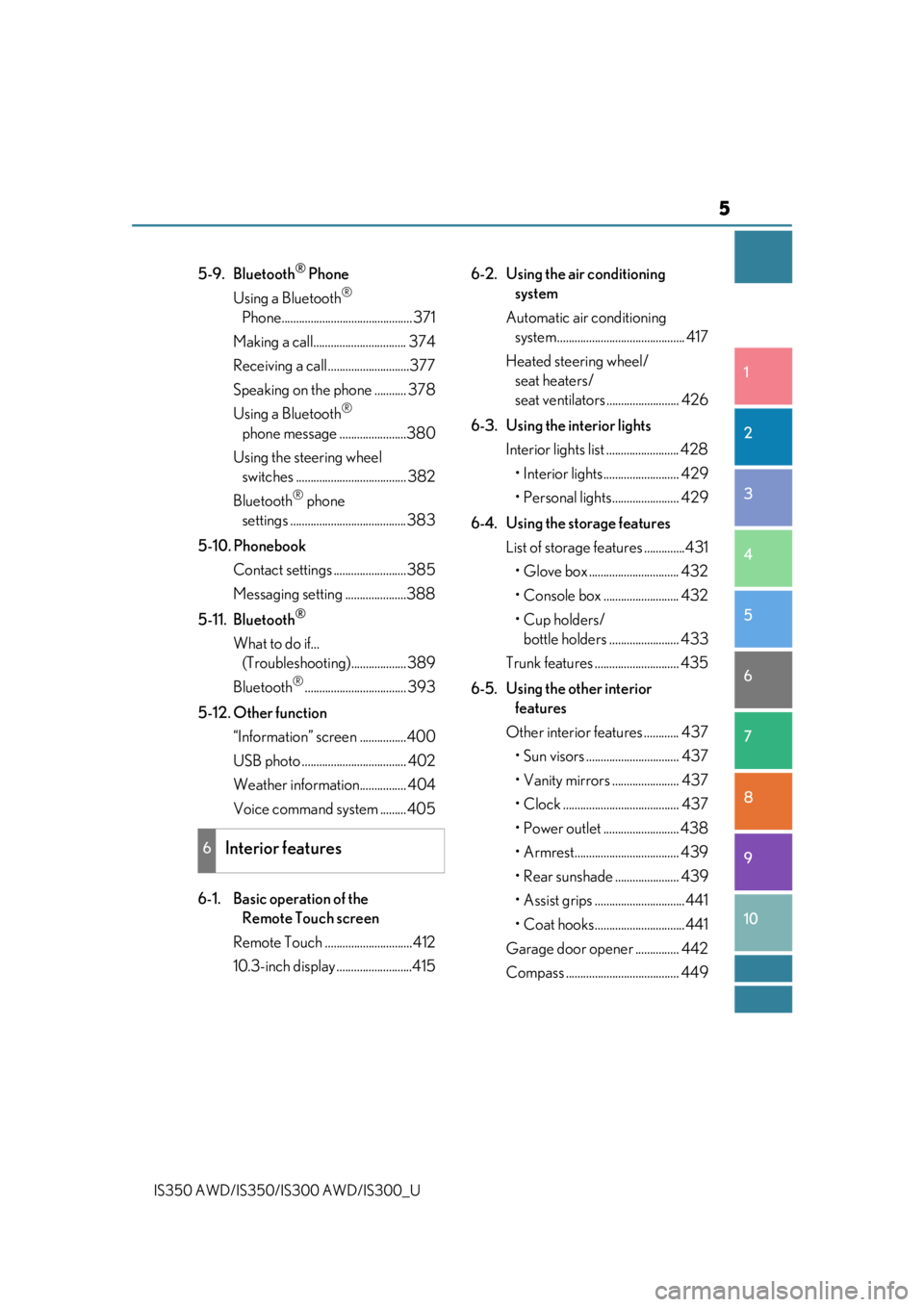
5
1
9 8
7 5 4
3
2
10
IS350 AWD/IS350/IS300 AWD/IS300_U
6
5-9. Bluetooth® Phone
Using a Bluetooth
®
Phone............................................. 371
Making a call................................ 374
Receiving a call ............................377
Speaking on the phone ........... 378
Using a Bluetooth
®
phone message .......................380
Using the steering wheel switches ...................................... 382
Bluetooth
® phone
settings ........................................ 383
5-10. Phonebook Contact settings .........................385
Messaging setting .....................388
5-11. Bluetooth
®
What to do if... (Troubleshooti ng)................... 389
Bluetooth
®................................... 393
5-12. Other function “Information” screen ................400
USB photo .................................... 402
Weather information................ 404
Voice command system ......... 405
6-1. Basic operation of the Remote Touch screen
Remote Touch ..............................412
10.3-inch display ..........................415 6-2. Using the air conditioning
system
Automatic air conditioning system............................................ 417
Heated steering wheel/ seat heaters/
seat ventilators ......................... 426
6-3. Using the interior lights Interior lights list ......................... 428• Interior lights.......................... 429
• Personal lights....................... 429
6-4. Using the storage features List of storage features ..............431• Glove box ............................... 432
• Console box .......................... 432
•Cup holders/bottle holders ........................ 433
Trunk features ............................. 435
6-5. Using the other interior features
Other interior features ............ 437 • Sun visors ................................ 437
• Vanity mirrors ....................... 437
• Clock ........................................ 437
• Power outlet .......................... 438
• Armrest.................................... 439
• Rear sunshade ...................... 439
• Assist grips ...............................441
• Coat hooks...............................441
Garage door opener ............... 442
Compass ....................................... 449
6Interior features
Page 18 of 660
18Pictorial index
IS350 AWD/IS350/IS300 AWD/IS300_U
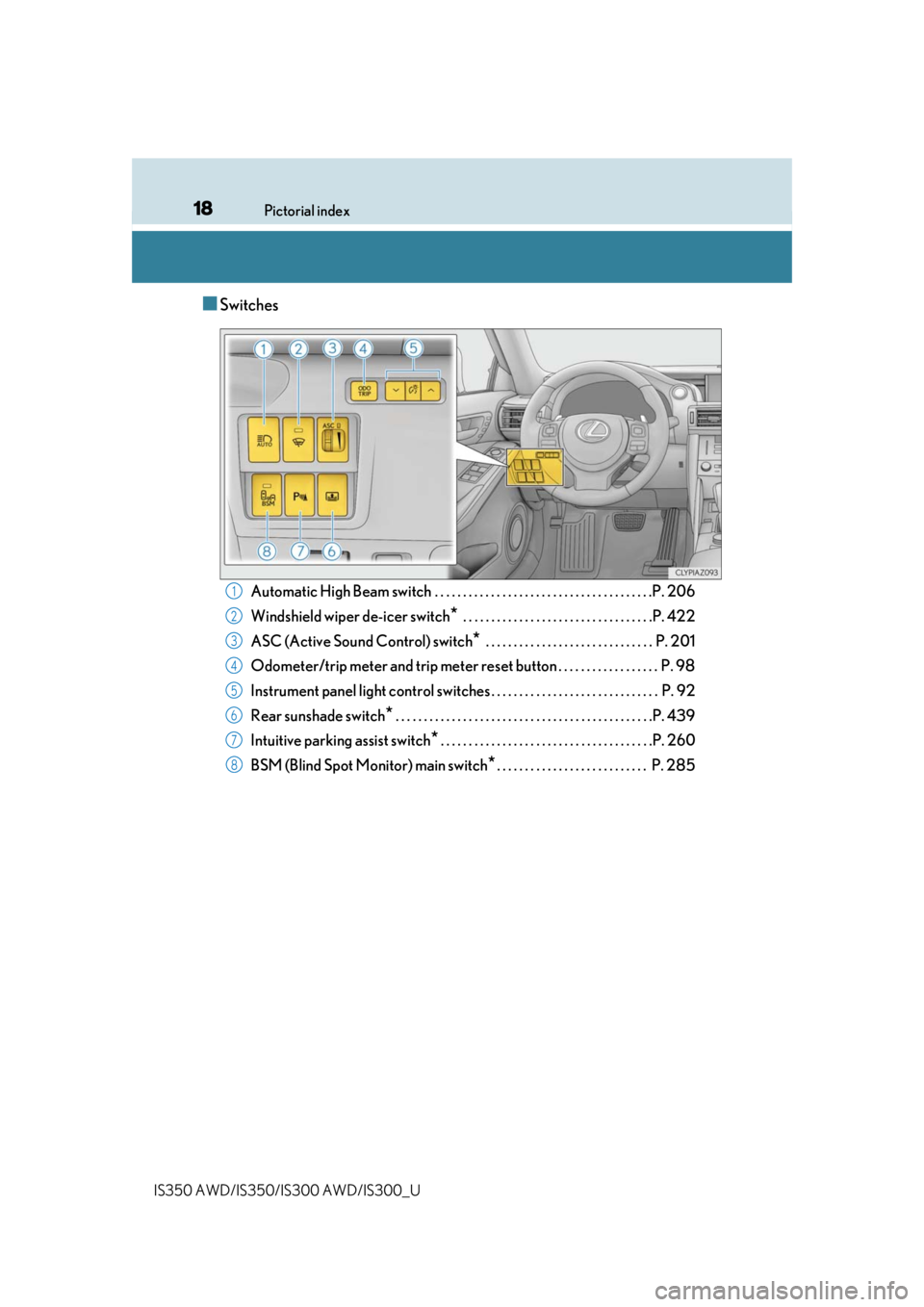
■Switches
Automatic High Beam switch . . . . . . . . . . . . . . . . . . . . . . . . . . . . . . . . . . . . . . .P. 206
Windshield wiper de-icer switch
* . . . . . . . . . . . . . . . . . . . . . . . . . . . . . . . . . .P. 422
ASC (Active Sound Control) switch
* . . . . . . . . . . . . . . . . . . . . . . . . . . . . . . P. 201
Odometer/trip meter and trip meter reset button . . . . . . . . . . . . . . . . . . P. 98
Instrument panel light control swit ches . . . . . . . . . . . . . . . . . . . . . . . . . . . . . . P. 92
Rear sunshade switch
* . . . . . . . . . . . . . . . . . . . . . . . . . . . . . . . . . . . . . . . . . . . . . .P. 439
Intuitive parking assist switch
*. . . . . . . . . . . . . . . . . . . . . . . . . . . . . . . . . . . . . .P. 260
BSM (Blind Spot Monitor) main switch
*. . . . . . . . . . . . . . . . . . . . . . . . . . . P. 285
1
2
3
4
5
6
7
8
Page 19 of 660
19Pictorial index
IS350 AWD/IS350/IS300 AWD/IS300_U
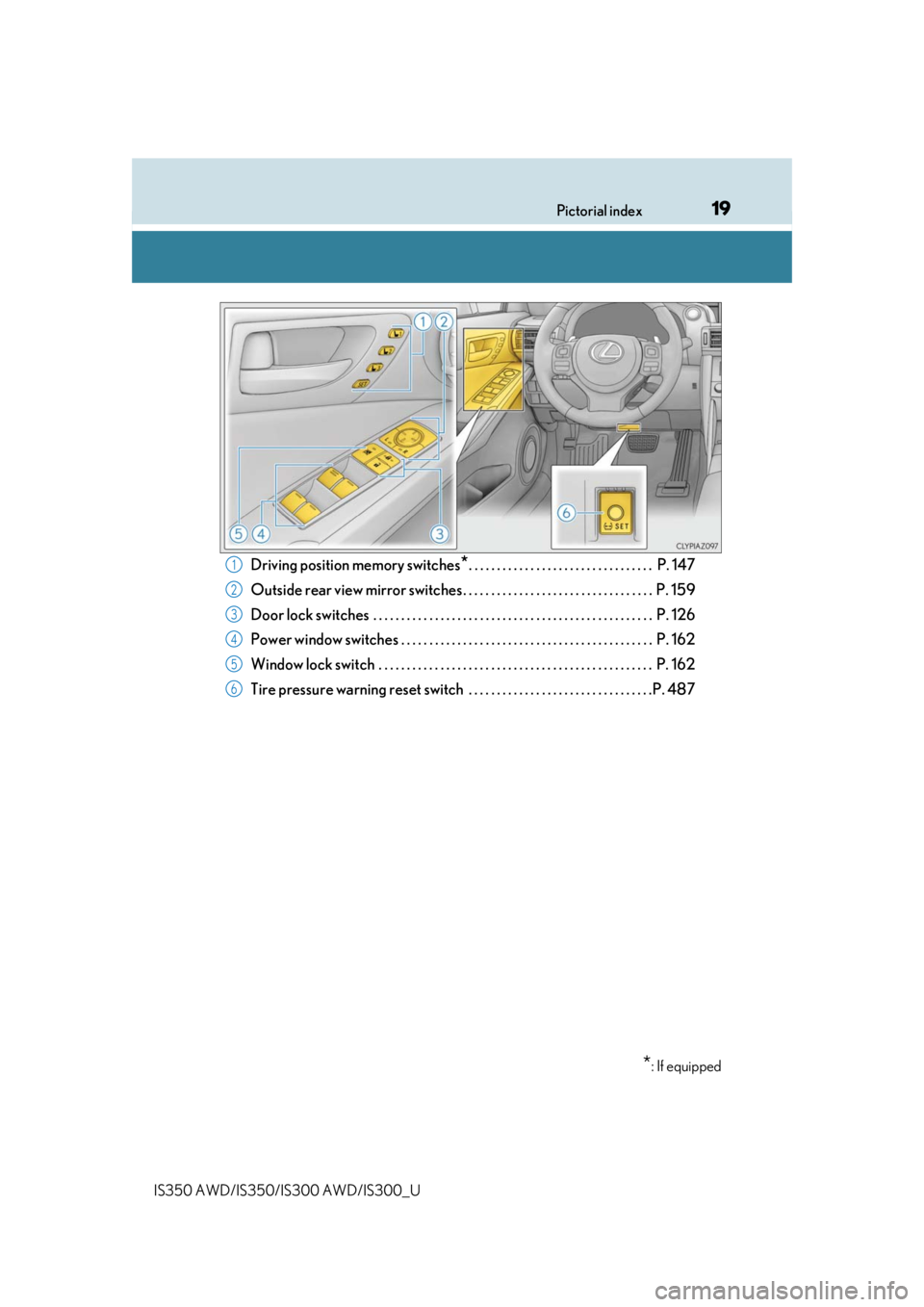
Driving position memory switches*. . . . . . . . . . . . . . . . . . . . . . . . . . . . . . . . . P. 147
Outside rear view mirror switches . . . . . . . . . . . . . . . . . . . . . . . . . . . . . . . . . . P. 159
Door lock switches . . . . . . . . . . . . . . . . . . . . . . . . . . . . . . . . . . . . . . . . . . . . . . . . . . P. 126
Power window switches . . . . . . . . . . . . . . . . . . . . . . . . . . . . . . . . . . . . . . . . . . . . . P. 162
Window lock switch . . . . . . . . . . . . . . . . . . . . . . . . . . . . . . . . . . . . . . . . . . . . . . . . . P. 162
Tire pressure warning reset switch . . . . . . . . . . . . . . . . . . . . . . . . . . . . . . . . .P. 4871
2
3
4
5
6
*: If equipped
Page 42 of 660

421-1. For safe use
IS350 AWD/IS350/IS300 AWD/IS300_U
■If the SRS airbags deploy (inflate)
●Slight abrasions, burns, bruising etc., may be sustained from SRS airbags, due to the
extremely high speed deployment (inflation) by hot gases.
●A loud noise and white powder will be emitted.
●Parts of the airbag module (steering wheel hub, airbag cover and inflator) as well as the
seats, parts of the front and rear pillars, an d roof side rails may be hot for several min-
utes. The airbag itself may also be hot.
●The windshield may crack.
●All of the doors will be unlocked. ( P. 129)
●Fuel supply to the engi ne will be stopped. (P. 524)
●For Lexus Enform Safety Connect subscribers, if any of the following situations occur,
the system is designed to send an emerge ncy call to the response center, notifying
them of the vehicle’s location (without needing to push the “SOS” button) and an agent
will attempt to speak with the occupants to ascertain the level of emergency and assis-
tance required. If the occupants are unable to communicate, the agent automatically
treats the call as an emergency and helps to dispatch the necessary emergency ser-
vices. ( P. 68)
• An SRS airbag is deployed.
• A seat belt pretensioner is activated.
• The vehicle is involved in a severe rear-end collision.
■SRS airbag deployment cond itions (SRS front airbags)
●The SRS front airbags will deploy in the event of an impact that exceeds the set thresh-
old level (the level of force corresponding to an approximately 12 - 18 mph [20 - 30
km/h] frontal collision with a fixed wa ll that does not move or deform).
However, this threshold velocity will be cons iderably higher in the following situations:
• If the vehicle strikes an object, such as a parked vehicle or sign pole, which can move
or deform on impact
• If the vehicle is involved in an underride collision, such as a collision in which the
front of the vehicle “underrides”, or goes under, the bed of a truck
●Depending on the type of collision, it is possi ble that only the seat belt pretensioners will
activate.
●The SRS front airbags for the fr ont passenger will not activate if there is no passenger
sitting in the front passenger seat. However, the SRS front airbags for the front passen-
ger may deploy if luggage is put in the seat, even if the seat is unoccupied. ( P. 46)
■SRS airbag deployment conditions (S RS side and curtain shield airbags)
●The SRS side and curtain shield airbags w ill deploy in the event of an impact that
exceeds the set threshold level (the level of force corresponding to the impact force
produced by an approximately 3300 lb. [15 00 kg] vehicle colliding with the vehicle
cabin from a direction perpendicular to the vehicle orientation at an approximate
speed of 12 - 18 mph [20 - 30 km/h]).
●Both SRS curtain shield airbags will de ploy in the event of vehicle rollover.
●Both SRS curtain shield airbags will deploy in the event of a severe frontal collision.
Page 72 of 660

721-2. Lexus Enform
IS350 AWD/IS350/IS300 AWD/IS300_U
■Enhanced Roadside Assistance
Enhanced Roadside Assistance adds GPS data to the already included war-
ranty-based Lexus roadside service.
Subscribers can press the “SOS” button to reach a Safety Connect response-
center agent, who can help with a wide range of needs, such as: towing, flat
tire, fuel delivery, etc. For a descript ion of the Roadside Assistance services
and their limitations, please see the Safety Connect Terms and Conditions,
which are available at Lexus.com.
Important! Read this informatio n before using Safety Connect.
■Exposure to radio frequency signals
The Safety Connect system installed in your vehicle is a low-power radio\
transmitter and receiver. It receives and also sends out radio frequency (RF)
signals.
In August 1996, the Federal Commu nications Commission (FCC) adopted
RF exposure guidelines with safety levels for mobile wireless phones. Those
guidelines are consistent with the safe ty standards previously set by the fol-
lowing U.S. and internat ional standards bodies.
●ANSI (American National Stan dards Institute) C95.1 [1992]
●NCRP (National Council on Radiation Protection and Measurement)
Report 86 [1986]
●ICNIRP (International Commission on Non-Ionizing Radiation Protection)
[1996]
Those standards were based on comprehensive and periodic evaluations of
the relevant scientific literature. Over 120 scientists, engineers, and physi-
cians from universities, and governme nt health agencies and industries
reviewed the available body of rese arch to develop the ANSI Standard
(C95.1).
The design of Safety Connect complies wi th the FCC guidelines in addition to
those standards.
Safety information for Safety Connect
Page 78 of 660
781-3. Theft deterrent system
IS350 AWD/IS350/IS300 AWD/IS300_U
The alarm uses light and sound to give an alert when an intrusion is detected.
The alarm is triggered in the following situations when the alarm is set:
●A locked door is unlocked or opened in any way other than using the entry
function, wireless remote control or mech anical key. (The doors will lock again
automatically.)
●The trunk is opened in any way other th an using the entry function or wireless
remote control.
●The hood is opened.
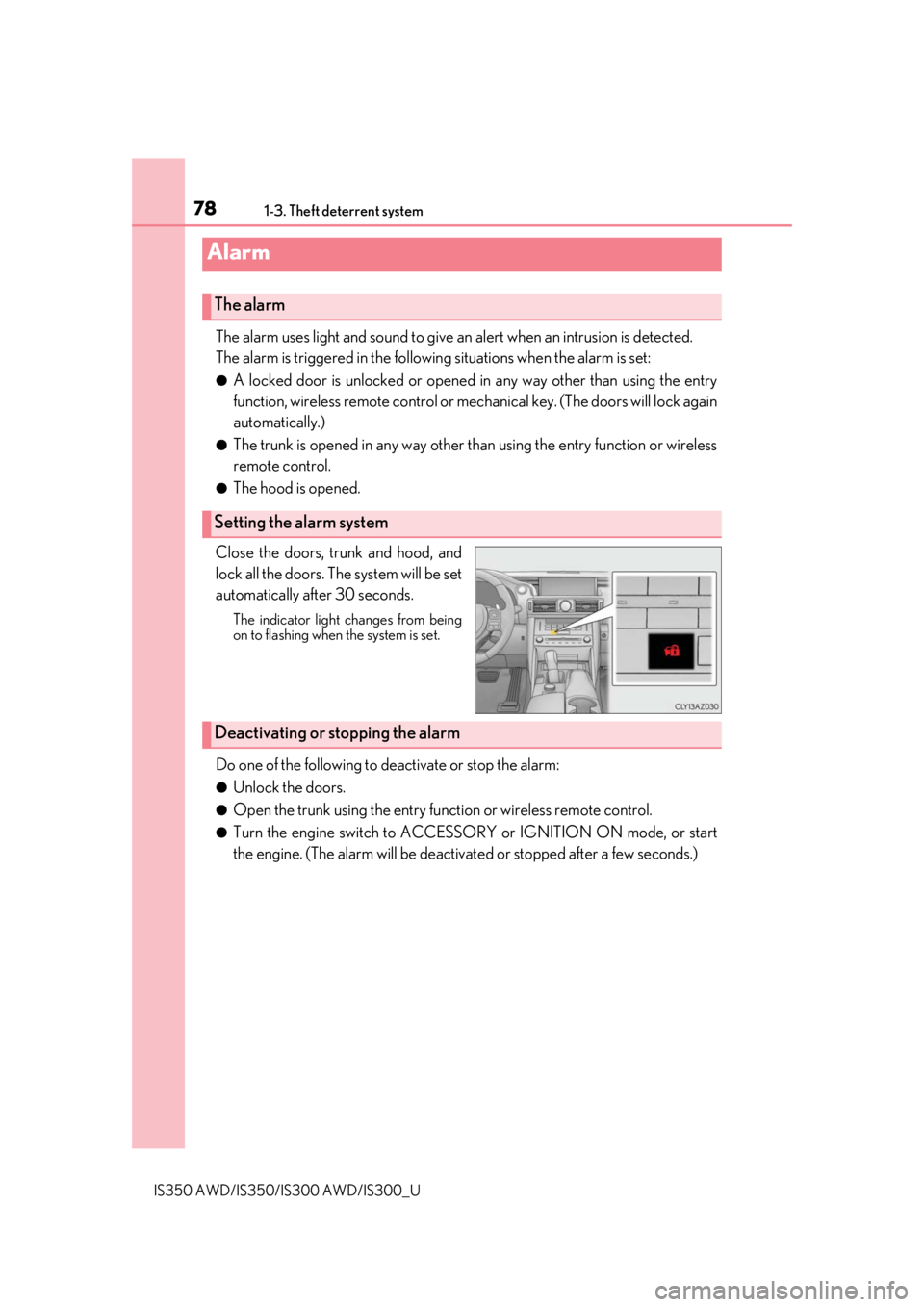
Close the doors, trunk and hood, and
lock all the doors. The system will be set
automatically after 30 seconds.
The indicator light changes from being
on to flashing when the system is set.
Do one of the following to de activate or stop the alarm:
●Unlock the doors.
●Open the trunk using the entry func tion or wireless remote control.
●Turn the engine switch to ACCESSOR Y or IGNITION ON mode, or start
the engine. (The alarm will be deactivat ed or stopped after a few seconds.)
Alarm
The alarm
Setting the alarm system
Deactivating or stopping the alarm
Page 79 of 660
791-3. Theft deterrent system
1
For safety and security
IS350 AWD/IS350/IS300 AWD/IS300_U
■System maintenance
The vehicle has a maintenance-free type alarm system.
■Items to check before locking the vehicle
To prevent unexpected triggering of the alarm and vehicle theft, make sure of the follow-
ing:
●Nobody is in the vehicle.
●The windows and moon roof are closed before the alarm is set.
●No valuables or other personal items are left in the vehicle.
■Triggering of the alarm
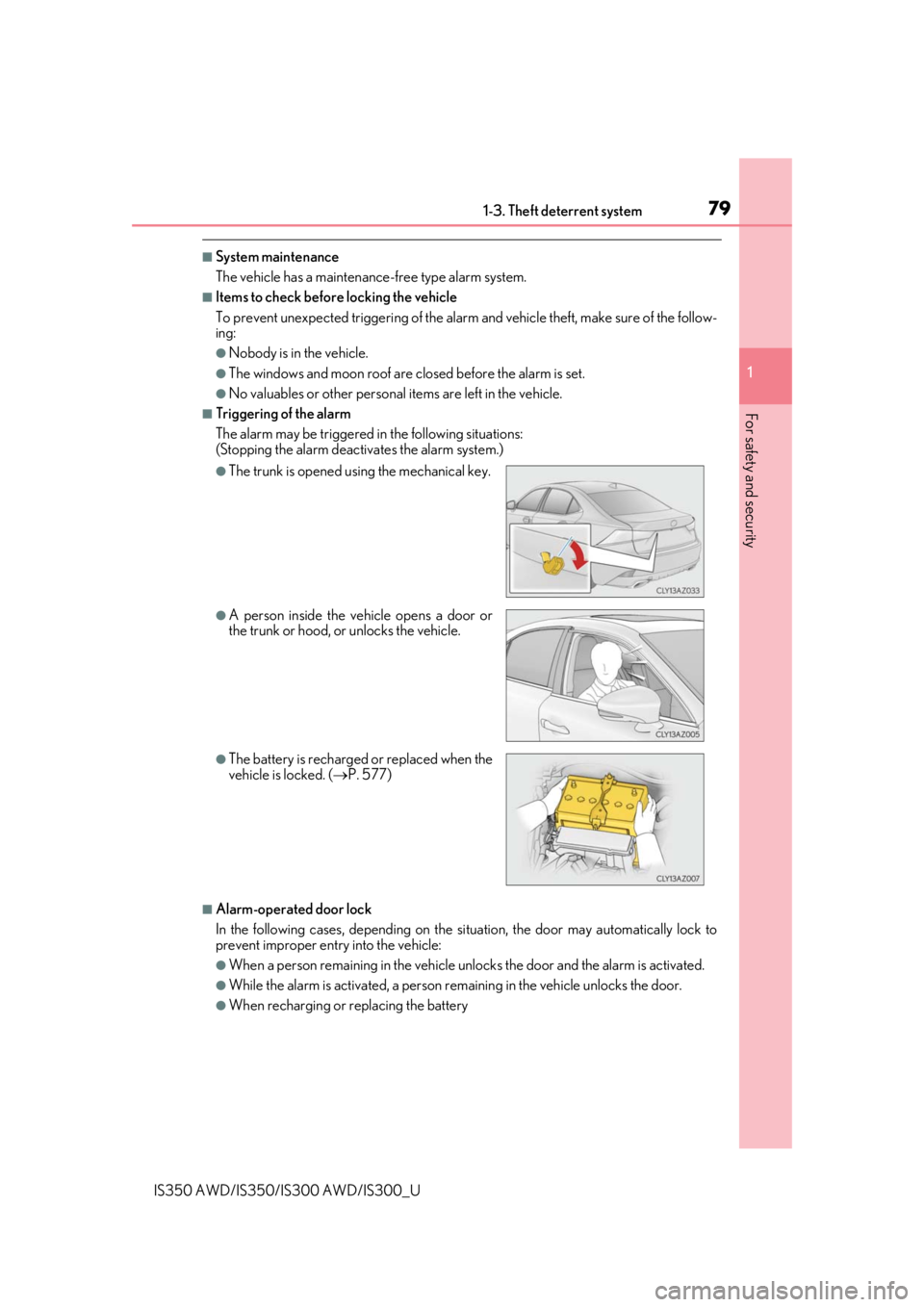
The alarm may be triggered in the following situations:
(Stopping the alarm deactivates the alarm system.)
■Alarm-operated door lock
In the following cases, depending on the si tuation, the door may automatically lock to
prevent improper entry into the vehicle:
●When a person remaining in the vehicle un locks the door and the alarm is activated.
●While the alarm is activated, a person remaining in the vehicle unlocks the door.
●When recharging or replacing the battery
●The trunk is opened using the mechanical key.
●A person inside the vehicle opens a door or
the trunk or hood, or unlocks the vehicle.
●The battery is recharged or replaced when the
vehicle is locked. (P. 577)
Page 86 of 660
862. Instrument cluster
IS350 AWD/IS350/IS300 AWD/IS300_U
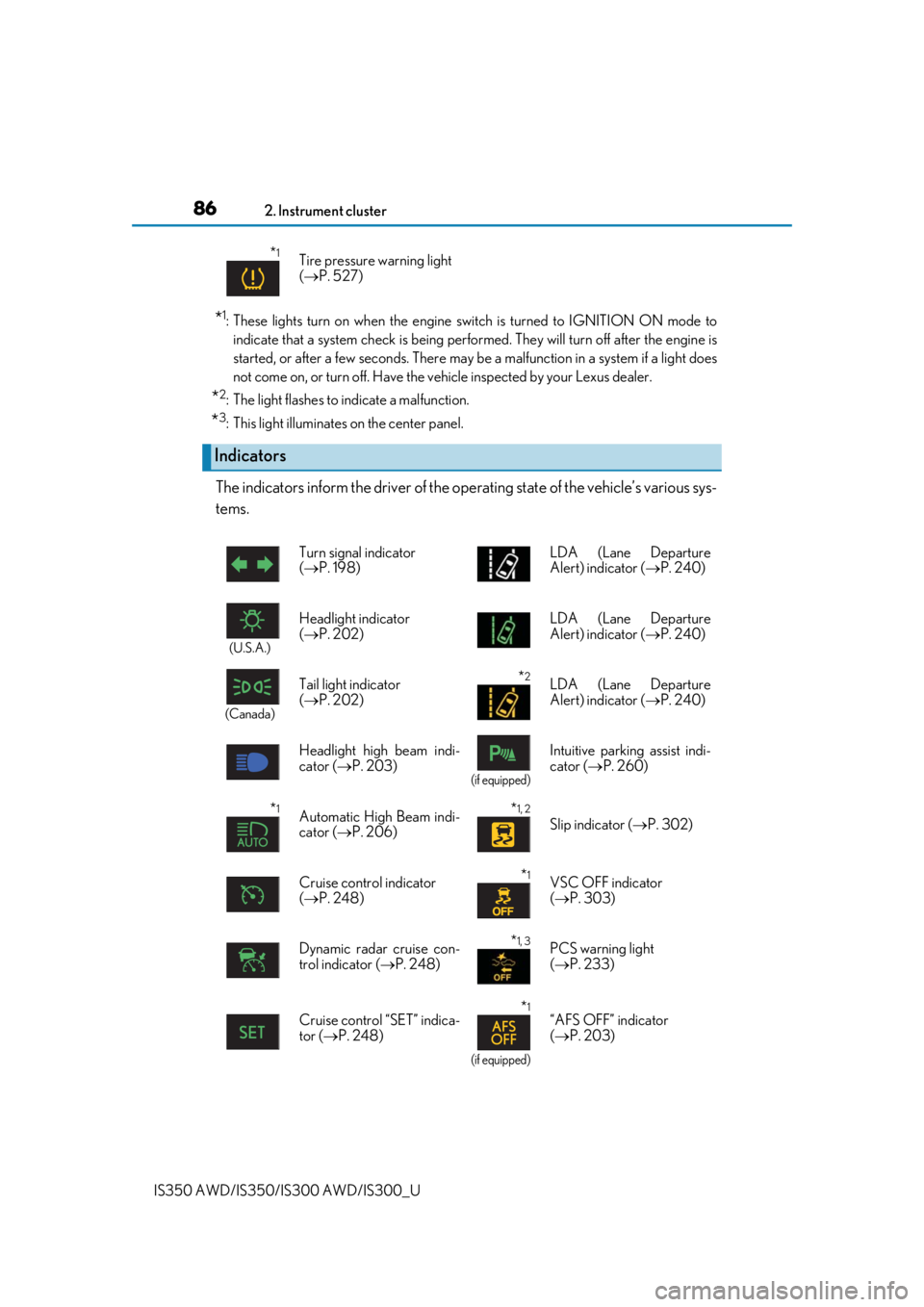
*1: These lights turn on when the engine switch is turned to IGNITION ON mode to indicate that a system check is being performed. They will turn off after the engine is
started, or after a few seconds. There may be a malfunction in a system if a light does
not come on, or turn off. Have the ve hicle inspected by your Lexus dealer.
*2: The light flashes to indicate a malfunction.
*3: This light illuminates on the center panel.
The indicators inform the driver of the op erating state of the vehicle’s various sys-
tems.
*1Tire pressure warning light
( P. 527)
Indicators
Turn signal indicator
( P. 198) LDA (Lane Departure
Alert) indicator (
P. 240)
(U.S.A.)
Headlight indicator
( P. 202) LDA (Lane Departure
Alert) indicator (
P. 240)
(Canada)
Tail light indicator
( P. 202) *2LDA (Lane Departure
Alert) indicator ( P. 240)
Headlight high beam indi-
cator ( P. 203)
(if equipped)
Intuitive parkin g assist indi-
cator ( P. 260)
*1Automatic High Beam indi-
cator ( P. 206)*1, 2
Slip indicator ( P. 302)
Cruise control indicator
( P. 248)
*1VSC OFF indicator
( P. 303)
Dynamic radar cruise con-
trol indicator ( P. 248)
*1, 3PCS warning light
( P. 233)
Cruise control “SET” indica-
tor ( P. 248)
*1
(if equipped)
“AFS OFF” indicator
( P. 203)
Page 88 of 660

882. Instrument cluster
IS350 AWD/IS350/IS300 AWD/IS300_U
*4: In order to confirm operation, the BSM ou tside rear view mirror indicators illuminate
in the following situations:
• When the engine switch is turned to IGNITION ON mode while the BSM main switch is set to ON.
• When the BSM main switch is set to ON while the engine switch is in IGNITION
ON mode.
If the system is functioning correctly, the BSM outside rear view mirror indicators will
turn off after a few seconds.
If the BSM outside rear view mirror indicators do not illuminate or do not turn off,
there may be a malfunction in the system.
If this occurs, have the vehicle inspected by your Lexus dealer.
*5: This light illuminates on the outside rear view mirrors.
*6: This light illuminates on the center panel.
*7: When the outside temperature is approximately 37 F (3 C) or lower, the indicator
will flash for approximately 10 seconds, then stay on.
*8:Except F SPORT models
*9:F SPORT models
WARNING
■If a safety system warnin g light does not come on
Should a safety system light such as the ABS and SRS warning light not come on when
you start the engine, this could mean that these systems are not available to help pro-
tect you in an accident, which could result in death or serious injury. Have the vehicle
inspected by your Lexus dealer immediately if this occurs.