air conditioning Lexus IS350 2020 / LEXUS 2020 IS300,IS350 (OM53F29U) User Guide
[x] Cancel search | Manufacturer: LEXUS, Model Year: 2020, Model line: IS350, Model: Lexus IS350 2020Pages: 660, PDF Size: 10.84 MB
Page 411 of 660

411
Interior features6
IS350 AWD/IS350/IS300 AWD/IS300_U
6-1. Basic operation of the Remote Touch screen
Remote Touch .............................. 412
10.3-inch display ......................... 415
6-2. Using the air conditioning system
Automatic air conditioning system ........................................... 417
Heated steering wheel/ seat heaters/
seat ventilators .........................426
6-3. Using the interior lights Interior lights list..........................428• Interior lights ..........................429
• Personal lights .......................429 6-4. Using the storage features
List of storage features ............. 431
• Glove box ............................... 432
• Console box........................... 432
•Cup holders/ bottle holders......................... 433
Trunk features ............................. 435
6-5. Using the other interior features
Other interior features ............ 437 • Sun visors ................................ 437
• Vanity mirrors ....................... 437
• Clock ........................................ 437
• Power outlet...........................438
• Armrest .................................... 439
• Rear sunshade ...................... 439
• Assist grips................................441
• Coat hooks ...............................441
Garage door opener ............... 442
Compass ....................................... 449
Page 414 of 660

4146-1. Basic operation of the Remote Touch screen
IS350 AWD/IS350/IS300 AWD/IS300_U
Press the “MENU” button on the
Remote Touch to display the “Menu”
screen.
The display may differ depending on
the type of the system.
When the split-screen display is
selected, the “Menu” screen will be dis-
played on the main display. ( P. 415)
*: Refer to the “NAVIGATION SYSTEM OWNER’S MANUAL”.
“Menu” screen
SwitchFunction
Select to display the “Destination” screen.*
Select to display the radio control screen.*
Select to display the media control screen.*
Select to display the hands-free operation screen.*
Select to display the “LEXUS App Suite” screen.*
Select to display the “Information” screen.*
Select to display the air conditioning control screen. ( P. 417)
Select to display the “Setup” screen.*
“Display”Select to adjust the contrast and brightness of the screens, turn the
screen off, etc.
*
Page 416 of 660

4166-1. Basic operation of the Remote Touch screen
IS350 AWD/IS350/IS300 AWD/IS300_U
■ Selecting the operation screen
When selecting the main display, move the Remote Touch knob to the left.
When selecting the side display, move the Remote Touch knob to the right.
■Main display
For details about the functions and operation of the main display, refer to the
respective section and “NAVIGATION SYSTEM OWNER’S MANUAL”.
■Side display
Basic screens
To change the screen displayed on the side display, use the screen buttons on
the right side of the display.
Navigation system
*
Audio*
Phone*
Vehicle information ( P. 115)
Air conditioning system
( P. 420)
Interruption screens
Each of the following screens is displayed automatically in accordance with
conditions. • Intuitive parking assist (if equipped) ( P. 261)
•Phone
*
• Destination Assist*
•Driving mode ( P. 297)
*: Refer to the “NAVIGATION SYSTEM OWNER’S MANUAL”.
Split-screen display operation
1
2
3
4
5
Page 417 of 660

417
IS350 AWD/IS350/IS300 AWD/IS300_U
6
Interior features
6-2. Using the air conditioning system
■Adjusting the temperature setting
To adjust the temperature setting,
touch and slide your finger up or
down on the sensor.
The temperature setting can also be
adjusted by touching on the sensor.
When the temperature setting is
changed, a buzzer sounds.
If is not pressed, the system
will blow ambient temperature air or
heated air.
Automatic air conditioning system
Air outlets and fan speed are automatically adjusted according to the tem-
perature setting.
Vehicles with a Lexus Display Audio sy stem: Press the “MENU” button on the
Lexus Display Audio controller, then sele ct “Climate” to display the air condi-
tioning operation screen.
For details on the Lexus Display Audio controller, refer to “Lexus Display
Audio controller” on P. 314.
Vehicles with a navigation system: Press the “MENU” button on the Remote
Touch, then select to display the ai r conditioning control screen. The air
conditioning system can be displayed and operated on the side display.
( P. 416)
Air conditioning controls
Page 418 of 660

4186-2. Using the air conditioning system
IS350 AWD/IS350/IS300 AWD/IS300_U
■Fan speed setting
Press to increase the fan speed.
Press to decrease the fan speed.
■Change the airflow mode
To change the airflow, press .
The air outlets used are switched each time the button is pressed. Air flows to the upper body.
Air flows to the upper body and feet.
Air flows to the feet.
Air flows to the feet and the windshield defogger operates
■Other functions
●Switching between outside air and recirculated air modes ( P. 421)
●Defogging the windshield ( P. 422)
●Defogging the rear window and outside rear view mirrors ( P. 422)
With a Lexus Display AudioWith a navigation system
1
2
3
4
Page 419 of 660
4196-2. Using the air conditioning system
6
Interior features
IS350 AWD/IS350/IS300 AWD/IS300_U
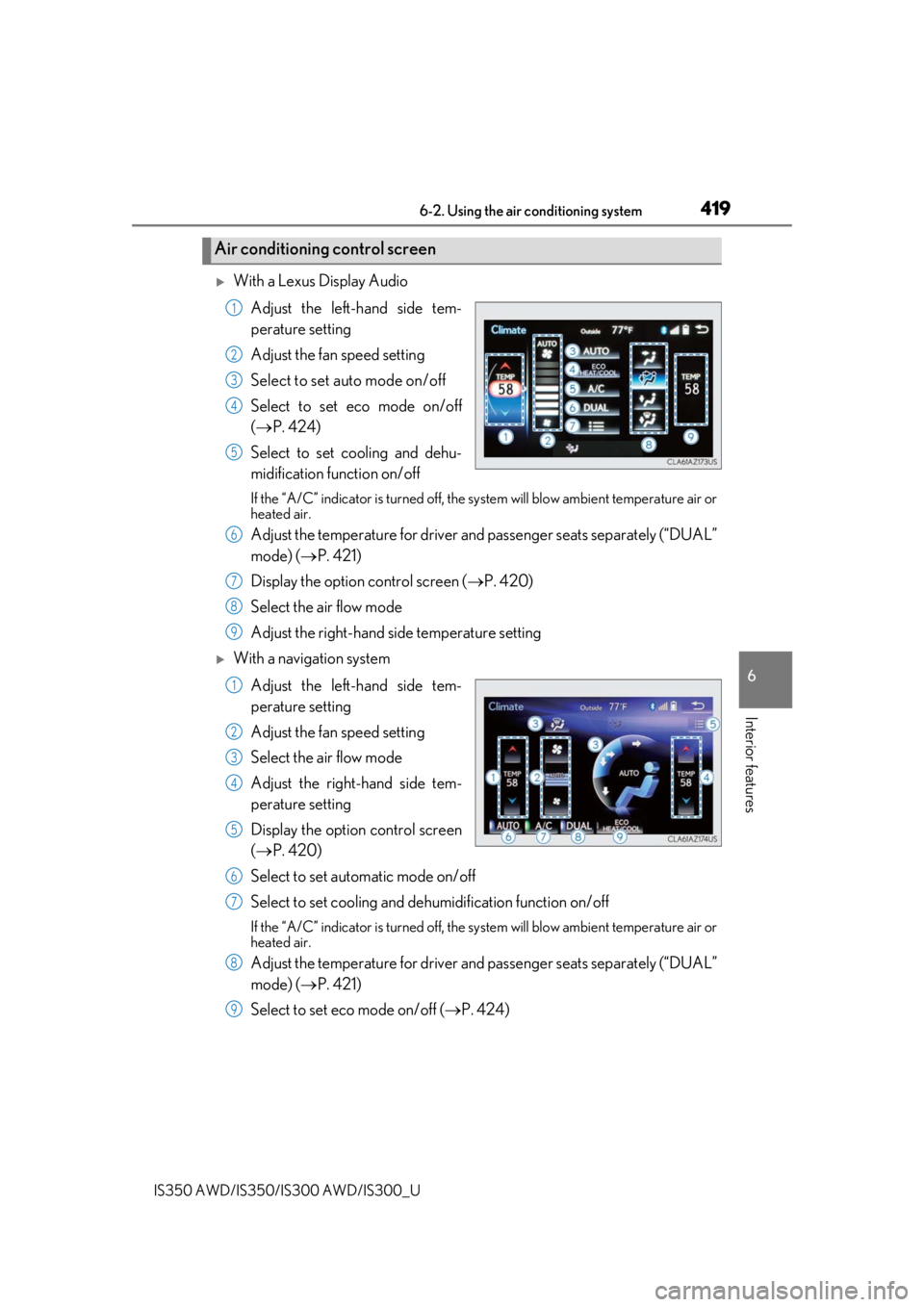
With a Lexus Display AudioAdjust the left-hand side tem-
perature setting
Adjust the fan speed setting
Select to set auto mode on/off
Select to set eco mode on/off
( P. 424)
Select to set cooling and dehu-
midification function on/off
If the “A/C” indicator is tu rned off, the system will blow ambient temperature air or
heated air.
Adjust the temperature for driver an d passenger seats separately (“DUAL”
mode) ( P. 421)
Display the option control screen ( P. 420)
Select the air flow mode
Adjust the right-hand side temperature setting
With a navigation system
Adjust the left-hand side tem-
perature setting
Adjust the fan speed setting
Select the air flow mode
Adjust the right-hand side tem-
perature setting
Display the option control screen
( P. 420)
Select to set automatic mode on/off
Select to set cooling and dehumidification function on/off
If the “A/C” indicator is tu rned off, the system will blow ambient temperature air or
heated air.
Adjust the temperature for driver an d passenger seats separately (“DUAL”
mode) ( P. 421)
Select to set eco mode on/off ( P. 424)
Air conditioning control screen
1
2
3
4
5
6
7
8
9
1
2
3
4
5
6
7
8
9
Page 420 of 660
4206-2. Using the air conditioning system
IS350 AWD/IS350/IS300 AWD/IS300_U
■Option control screen
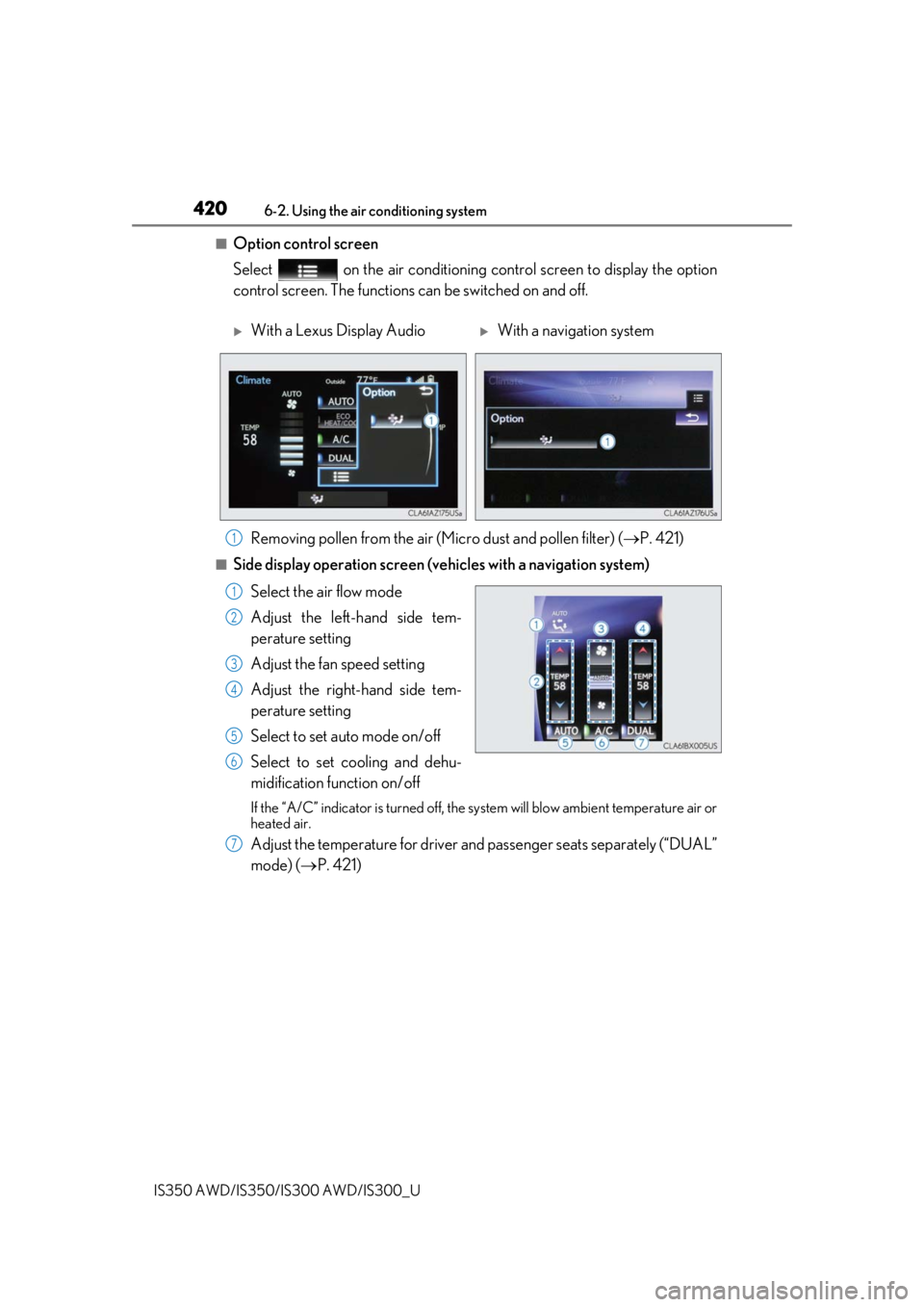
Select on the air conditioning control screen to display the option
control screen. The functions can be switched on and off.
■Side display operation screen (v ehicles with a navigation system)
Select the air flow mode
Adjust the left-hand side tem-
perature setting
Adjust the fan speed setting
Adjust the right-hand side tem-
perature setting
Select to set auto mode on/off
Select to set cooling and dehu-
midification function on/off
If the “A/C” indicator is tu rned off, the system will blow ambient temperature air or
heated air.
Adjust the temperature for driver an d passenger seats separately (“DUAL”
mode) ( P. 421)
With a Lexus Display Audio With a navigation system
Removing pollen from the air (Mic ro dust and pollen filter) (P. 421)
1
1
2
3
4
5
6
7
Page 421 of 660

4216-2. Using the air conditioning system
6
Interior features
IS350 AWD/IS350/IS300 AWD/IS300_U
Press , or select “AUTO” on the air conditioning control screen.
Adjust the temperature setting.
To stop the operation, press .
■Automatic mode indicator
If the fan speed setting or air flow modes are operated, the automatic mode
indicator goes off. However, automatic mode for functions other than that
operated is maintained.
■Adjusting the temperature for driv er and passenger seats separately
(“DUAL” mode)
To turn on the “DUAL” mode, perfor m any of the following procedures:
●Press or select “DUAL” on the air conditioning control screen.
●Select “DUAL” on the side display operation screen.(vehicles with a navi-
gation system)
●Adjust the passenger’s side temperature setting.
The indicator comes on when the “DUAL” mode is on.
While in “DUAL” mode, the temperature of the rear air outlets is set at the right-
hand side temperature setting.
■Switching between outside air and recirculated air modes
Press to change to recirculated air mode.
Press to change to outside air mode.
The indicator above the selected button comes on.
■Micro dust and pollen filter
Pollen is removed from the air and the air flows to the upper part of the body.
Select on the option control screen.
When the micro dust and pollen filter is on, is displayed on the air condition-
ing control screen.
In order to prevent the windshield from fo gging up when the outside air is cold, the
dehumidification function may operate.
The pollens are filtered out even if the micro dust and pollen filter is turned off.
Using automatic mode
Other functions
1
2
3
Page 422 of 660
4226-2. Using the air conditioning system
IS350 AWD/IS350/IS300 AWD/IS300_U
■Defogging the windshield
Defoggers are used to defog the wi ndshield and front side windows.
Press .
Set the outside/recirculated air mode button to outside air mode if the recirculated
air mode is used. (It may switch automatically.)
To defog the windshield and the side wind ows early, turn the air flow and tempera-
ture up.
To return to the previous mode, press
again when the windshield is
defogged.
■Defogging the rear window and outside rear view mirrors
Defoggers are used to defog the rear window, and to remove raindrops, dew
and frost from the outside rear view mirrors.
Press .
The defoggers will automatically turn off after a period of time.
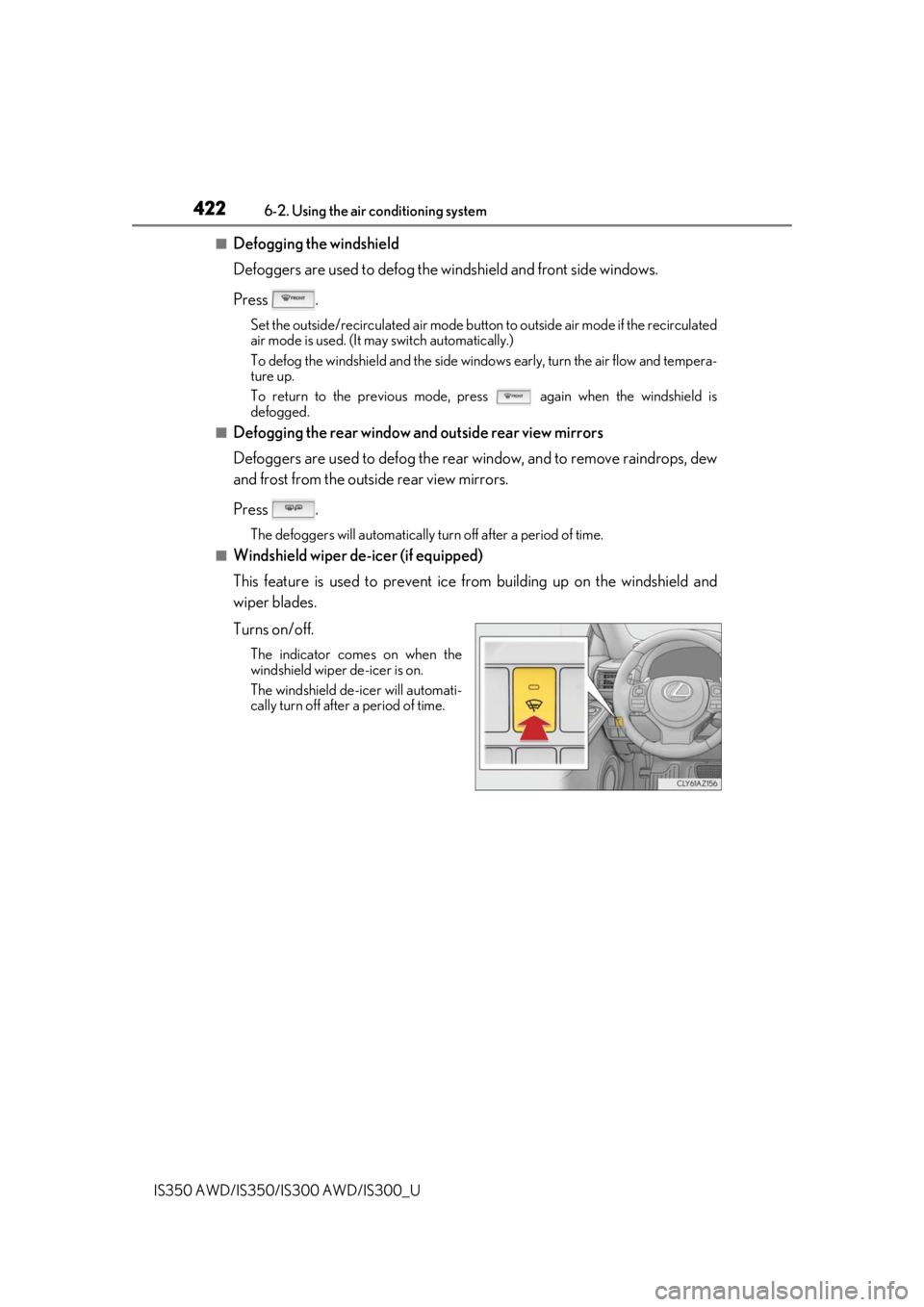
■Windshield wiper de-icer (if equipped)
This feature is used to prevent ice fr om building up on the windshield and
wiper blades.
Turns on/off.
The indicator comes on when the
windshield wiper de-icer is on.
The windshield de-icer will automati-
cally turn off after a period of time.
Page 423 of 660
4236-2. Using the air conditioning system
6
Interior features
IS350 AWD/IS350/IS300 AWD/IS300_U
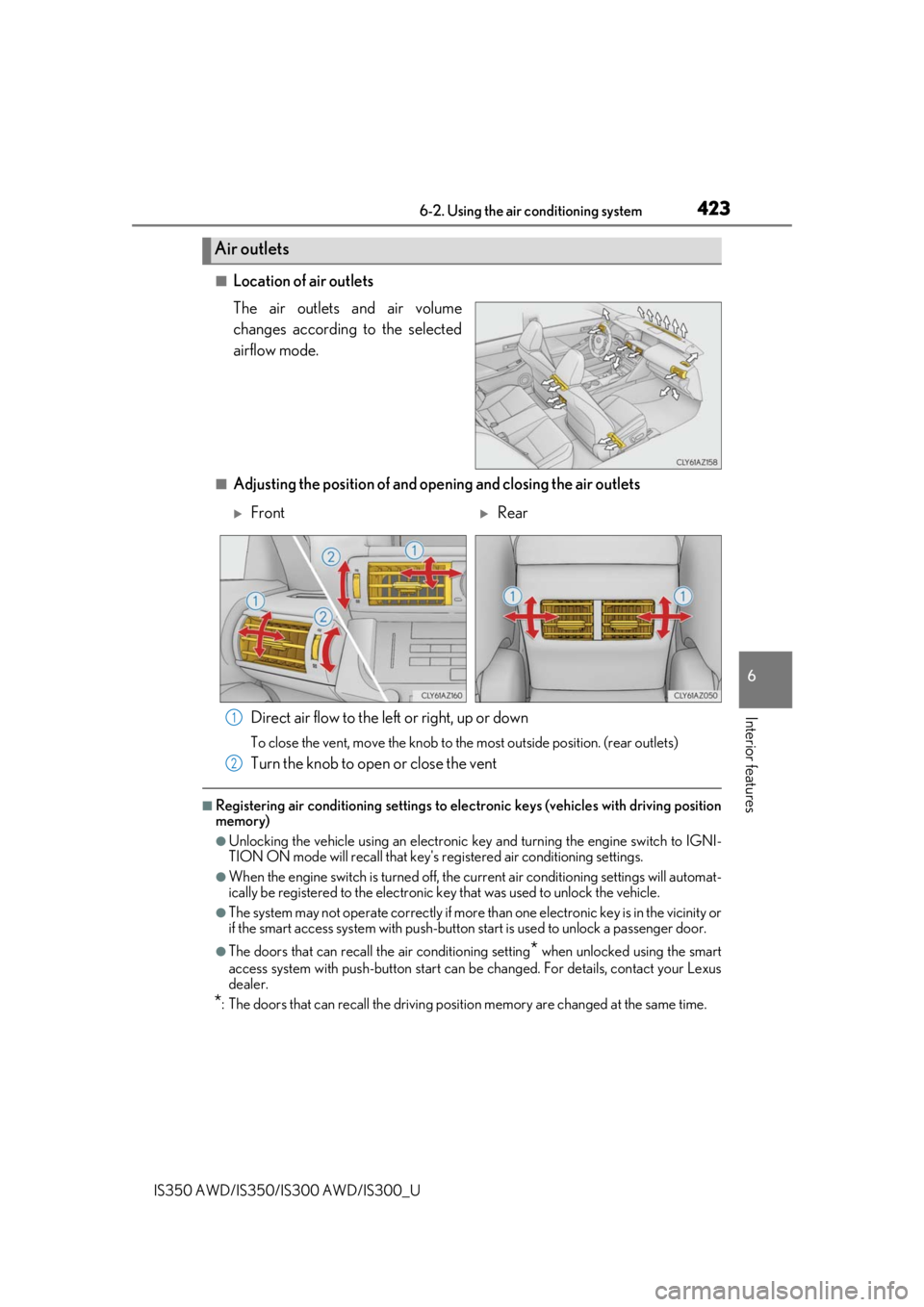
■Location of air outlets
The air outlets and air volume
changes according to the selected
airflow mode.
■Adjusting the position of and opening and closing the air outletsDirect air flow to the left or right, up or down
To close the vent, move the knob to the most outside position. (rear outlets)
Turn the knob to open or close the vent
■Registering air conditioning settings to elec tronic keys (vehicles with driving position
memory)
●Unlocking the vehicle using an electronic ke y and turning the engine switch to IGNI-
TION ON mode will recall that key's re gistered air conditioning settings.
●When the engine switch is turned off, the current air conditioning settings will automat-
ically be registered to the electronic key that was used to unlock the vehicle.
●The system may not operate correctly if more th an one electronic key is in the vicinity or
if the smart access system with push-button start is used to unlock a passenger door.
●The doors that can recall the air conditioning setting* when unlocked using the smart
access system with push-button start can be changed. For details, contact your Lexus
dealer.
*: The doors that can recall the driving positi on memory are changed at the same time.
Air outlets
FrontRear
1
2