battery LEXUS IS350 2022 User Guide
[x] Cancel search | Manufacturer: LEXUS, Model Year: 2022, Model line: IS350, Model: LEXUS IS350 2022Pages: 440, PDF Size: 22.72 MB
Page 101 of 440

993-2. Opening, closing and locking the doors and trunk
3
Before driving
gas station, radio station, large display,
airport or other faci lity that generates
strong radio waves or electrical noise
●When carrying a portable radio, cellular
phone, cordless phon e or other wireless
communication device
●When the electronic key is in contact
with, or is covered by the following metal-
lic objects
• Cards to which aluminum foil is attached
• Cigarette boxes that have aluminum foil
inside
• Metallic wallets or bags
•Coins
• Hand warmers made of metal
• Media such as CDs and DVDs
●When other wireless keys (that emit radio
waves) are being used nearby
●When carrying the electronic key
together with the following devices that
emit radio waves
• Another vehicle’s electronic key or a wireless key that emits radio waves
• Personal computers or personal digital assistants (PDAs)
• Digital audio players
• Portable game systems
●If window tint with a metallic content or
metallic objects are attached to the rear
window
■Note for the entry function
●Even when the electronic key is within the
effective range (detection areas), the sys-
tem may not operate properly in the fol-
lowing cases:
• The electronic key is too close to the win-
dow or outside door handle, near the
ground, or in a high place when the doors
are locked or unlocked.
• The electronic key is near the ground or
in a high place, or too close to the rear
bumper center when the trunk is opened.
• The electronic key is on the instrument panel, rear package tray or floor, or in the
door pockets or glove box when the
engine is started or engine switch modes
are changed.
●Do not leave the electronic key on top of
the instrument panel or near the door
pockets when exiting the vehicle.
Depending on the ra dio wave reception conditions, it may be detected by the
antenna outside the cabin and the doors
will become lockable from the outside,
possibly trapping the electronic key
inside the vehicle.
●As long as the electronic key is within the
effective range, the doors may be locked
or unlocked by anyone. However, only
the doors detecting the electronic key
can be used to unlock the vehicle.
●Even if the electronic
key is not inside the
vehicle, it may be possible to start the
engine if the electronic key is near the
window.
●The doors may unlock or lock if a large
amount of water splashes on the door
handle, such as in the rain or in a car
wash, when the electronic key is within
the effective range. (The doors will auto-
matically be locked after approximately
30 seconds if the doors are not opened
and closed.)
●If the wireless remote control is used to
lock the doors when the electronic key is
near the vehicle, there is a possibility that
the door may not be unlocked by the
entry function. (Use the wireless remote
control to unlock the doors.)
●Touching the door lock or unlock sensor
while wearing gloves may prevent lock or
unlock operation.
●When the lock operation is performed
using the lock sensor, recognition signals
will be shown up to two consecutive
times. After this, no recognition signals
will be given.
●If the door handle becomes wet while the
electronic key is within the effective
range, the door may lock and unlock
repeatedly. In this ca se, follow the follow-
ing correction procedures to wash the
vehicle:
• Place the electronic key in a location 6 ft. (2 m) or more away from the vehicle.
(Take care to ensure that the key is not
stolen.)
• Set the electronic key to battery-saving mode to disable the smart access system
with push-button start. ( P.98)
●If the electronic key is inside the vehicle
and a door handle becomes wet during a
Page 118 of 440
1163-5. Opening, closing the windows and moon roof
■The power windows can be operated
when
The engine switch is in IGNITION ON
mode.
■When the battery is disconnected
The window lock switch is disabled. If nec-
essary, press the window lock switch after
reconnecting the battery.
*: If equipped
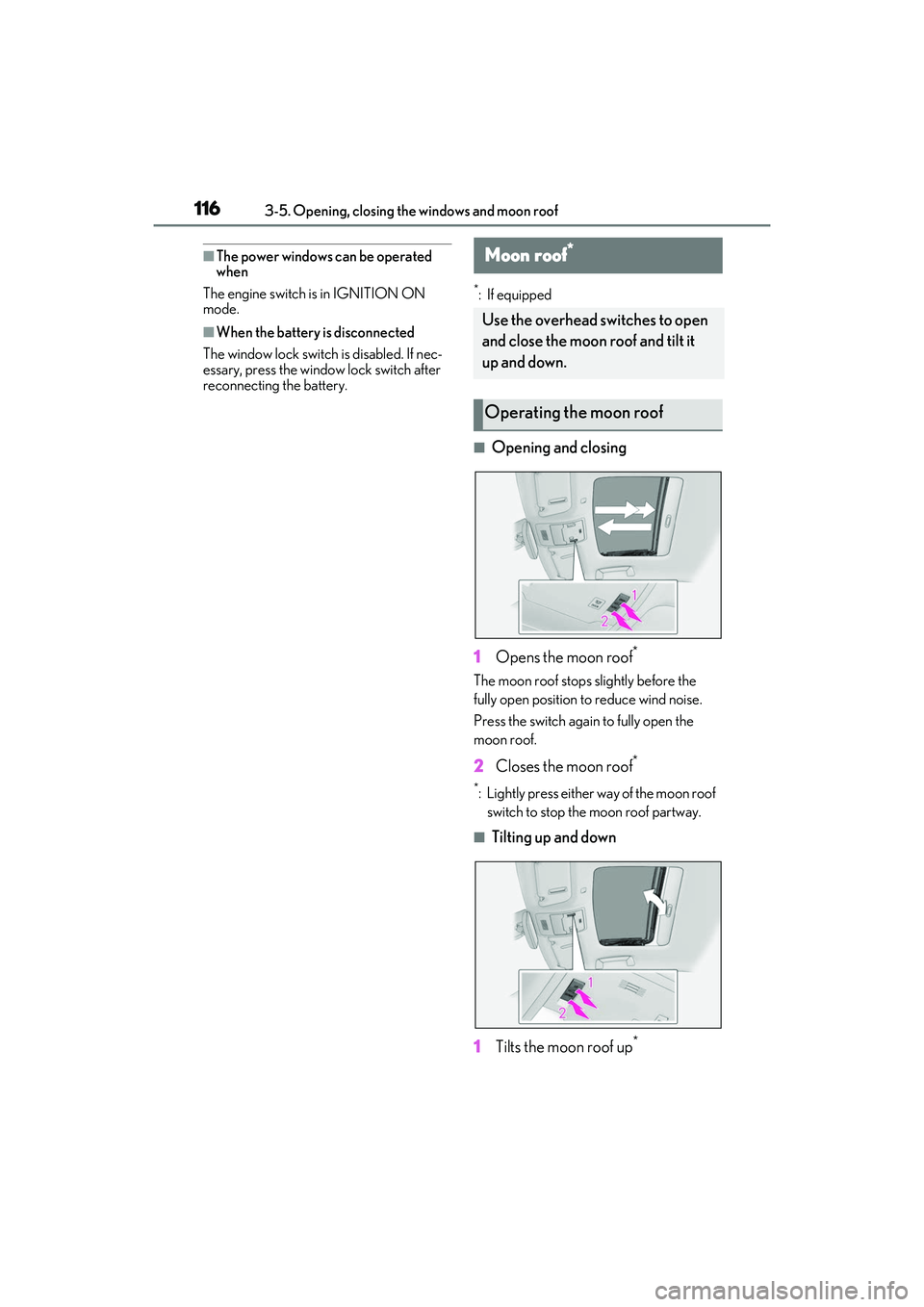
■Opening and closing
1 Opens the moon roof
*
The moon roof stops slightly before the
fully open position to reduce wind noise.
Press the switch again to fully open the
moon roof.
2 Closes the moon roof*
*: Lightly press either way of the moon roof
switch to stop the moon roof partway.
■Tilting up and down
1 Tilts the moon roof up
*
Moon roof*
Use the overhead switches to open
and close the moon roof and tilt it
up and down.
Operating the moon roof
Page 132 of 440

1304-2. Driving procedures
4-2.Driving procedures
1Check that the parking brake is set.
2 Check that the shift lever is in P.
3 Firmly depress the brake pedal.
and a message will be displayed on
the multi-information display.
If it is not displayed, the engine cannot be
started.
4 Press the engine switch shortly and
firmly.
When operating the engine switch, one
short, firm press is enough. It is not neces-
sary to press and hold the switch.
The engine will crank until it starts or for up
to 30 seconds, whichever is less.
Continue depressing the brake pedal until
the engine is completely started.
The engine can be started from any engine
switch mode.
■If the engine does not start
●Check that the shift lever is securely set in
P. The engine may not start if the shift lever is displaced out of P.
●The engine immobilizer system may not
have been deactivated. (
P.60)
Contact your Lexus dealer.
■Electronic key battery depletion
P.86
■Conditions affecting operation
P.98
■Notes for the entry function
P.99
■Steering lock function
●After turning the engine switch off and
opening and closing th e doors, the steer-
ing wheel will be lock ed due to the steer-
ing lock function. Operating the engine
switch again automatically cancels the
steering lock.
●When the steering lock cannot be
released, “Push Engine Switch while
Turning Steering Whee l in Either Direc-
tion” will be displayed on the multi-infor-
mation display.
Check that the shift lever is in P. Press the
engine switch while turning the steering
wheel left and right.
●To prevent the steering lock motor from
overheating, operation of the motor may
be suspended if the en gine is turned on
and off repeatedly in a short period of
time. In this case, re frain from operating
the engine switch. After about 10 sec-
onds, the steering lock motor will resume
functioning.
■When “Access System with Elec. Key
Malfunction See Owner's Manual” is
displayed on the multi-information dis-
play
The system may be malfunctioning. Have
the vehicle inspected by your Lexus dealer
Engine (ignition) switch
Performing the following opera-
tions when carryin g the electronic
key on your person starts the
engine or changes engine switch
modes.
Starting the engine
Page 133 of 440

1314-2. Driving procedures
4
Driving
immediately.
■If the electronic key battery is depleted
P.308
■Operation of the engine switch
●If the switch is not pressed shortly and
firmly, the engine switch mode may not
change or the engine may not start.
●If attempting to restart the engine imme-
diately after turning the engine switch off,
the engine may not start in some cases.
After turning the engine switch off, please
wait a few seconds before restarting the
engine.
■If the smart access system with
push-button start has been deactivated
by a customized setting
P.351
1 Stop the vehicle.
2 Set the parking brake ( P.139),
and shift the shift lever to P.
3 Press the engine switch.
4 Release the brake pedal and check
that the display on the meters is off.
■Automatic engine shut off feature
●The vehicle is equipped with a feature
that automatically shuts off the engine
when the shift lever is in P with the engine
running for an extended period.
●The engine will automatically shut off
after approximately 1 hour if it has been
left running while the shift lever is in P.
●The timer for the automatic engine shut
off feature will reset if the brake pedal is
depressed or if the shift lever is in a posi-
tion other than P.
●After the vehicle is parked, if the door is
locked with the door lock switch ( P.92)
from the inside or the mechanical key
from the outside, the automatic engine
shut off feature will be disabled. The timer
for the automatic engine shut off feature
will be re-enabled if the driver’s door is
opened.
WARNING
■When starting the engine
Always start the engi ne while sitting in
the driver’s seat. Do not depress the
accelerator pedal wh ile starting the
engine under any circumstances.
Doing so may cause an accident result-
ing in death or serious injury.
■Caution while driving
If engine failure occurs while the vehicle
is moving, do not lock or open the doors
until the vehicle reaches a safe and com-
plete stop. Activation of the steering lock
in this circumstance may lead to an acci-
dent, resulting in death or serious injury.
NOTICE
■When starting the engine
●Do not race a cold engine.
●If the engine becomes difficult to start
or stalls frequently, have your vehicle
checked by your Lexus dealer immedi-
ately.
■Symptoms indicating a malfunction
with the engine switch
If the engine switch seems to be operat-
ing somewhat differently than usual, such
as the switch sticking slightly, there may
be a malfunction. Contact your Lexus
dealer immediately.
Stopping the engine
Page 135 of 440

1334-2. Driving procedures
4
Driving
more than an hour with the shift lever in P,
the engine switch will automatically turn off.
However, this function cannot entirely pre-
vent battery discharge. Do not leave the
vehicle with the engine switch in ACCES-
SORY or IGNITION ON mode for long
periods of time when the engine is not run-
ning.
If the engine is stopped with the shift
lever in a position other than P, the
engine switch will not be turned off but
instead be turned to ACCESSORY
mode. Perform the following proce-
dure to turn the switch off:
1Check that the parking brake is set.
2 Shift the shift lever to P.
3 Check that “Turn Power Off” is dis-
played on the multi-information dis-
play and then press the engine
switch once.
4 Check that “Turn Power Off” on the
multi-information display is off.
NOTICE
■To prevent battery discharge
●Do not leave the engine switch in
ACCESSORY or IGNITION ON
mode for long period s of time without
the engine running.
●If “ACCESSORY” or “IGNITION
ON” is displayed on the meters while
the engine is not running, the engine
switch is not off. Exit the vehicle after
turning the engine switch off.
When stopping the engine with
the shift lever in a position other
than P
NOTICE
■To prevent battery discharge
Do not stop the engine when the shift
lever is in a position other than P. If the
engine is stopped in another shift lever
position, the engine switch will not be
turned off but instead be turned to
ACCESSORY mode. If the vehicle is left
in ACCESSORY mode, battery dis-
charge may occur.
Page 148 of 440

1464-3. Operating the lights and wipers
Doing so interferes with the sensor detect-
ing the level of ambient light and may cause
the automatic headlight system to malfunc-
tion.
■Automatic light off system
When the light switch is in , or : The headlights and tail lights turn off
30 seconds after the engine switch is
turned to ACCESSORY mode or turned
off and a door is opened and all of the doors
and trunk are closed. (The lights turn off
immediately if on the key is pressed
twice after all the doors are closed.)
To turn the lights on again, turn the engine
switch to IGNITION ON mode, or turn the
light switch off once and then back to
or .
If any of the doors or trunk lid is left open,
the lights automatically turn off after 20
minutes.
■Light reminder buzzer
A buzzer sounds when the engine switch is
turned off or turned to ACCESSORY
mode and the driver’s door is opened while
the lights are turned on.
■Automatic headlight leveling system (if
equipped)
The level of the headlights is automatically
adjusted according to the number of pas-
sengers and the loading condition of the
vehicle to ensure that the headlights do not
interfere with other road users.
■Customization
Some functions can be customized.
( P.388)
1 With the headlights on, push the
lever away from you to turn on the
high beams.
Pull the lever toward you to the center
position to turn the high beams off.
2Pull the lever toward you and
release it to flash the high beams
once.
You can flash the high beams with the
headlights on or off.
NOTICE
■To prevent battery discharge
Do not leave the lights on longer than
necessary when the engine is not run-
ning.
Turning on the high beam head-
lights
Page 171 of 440
1694-5. Using the driving support systems
4
Driving
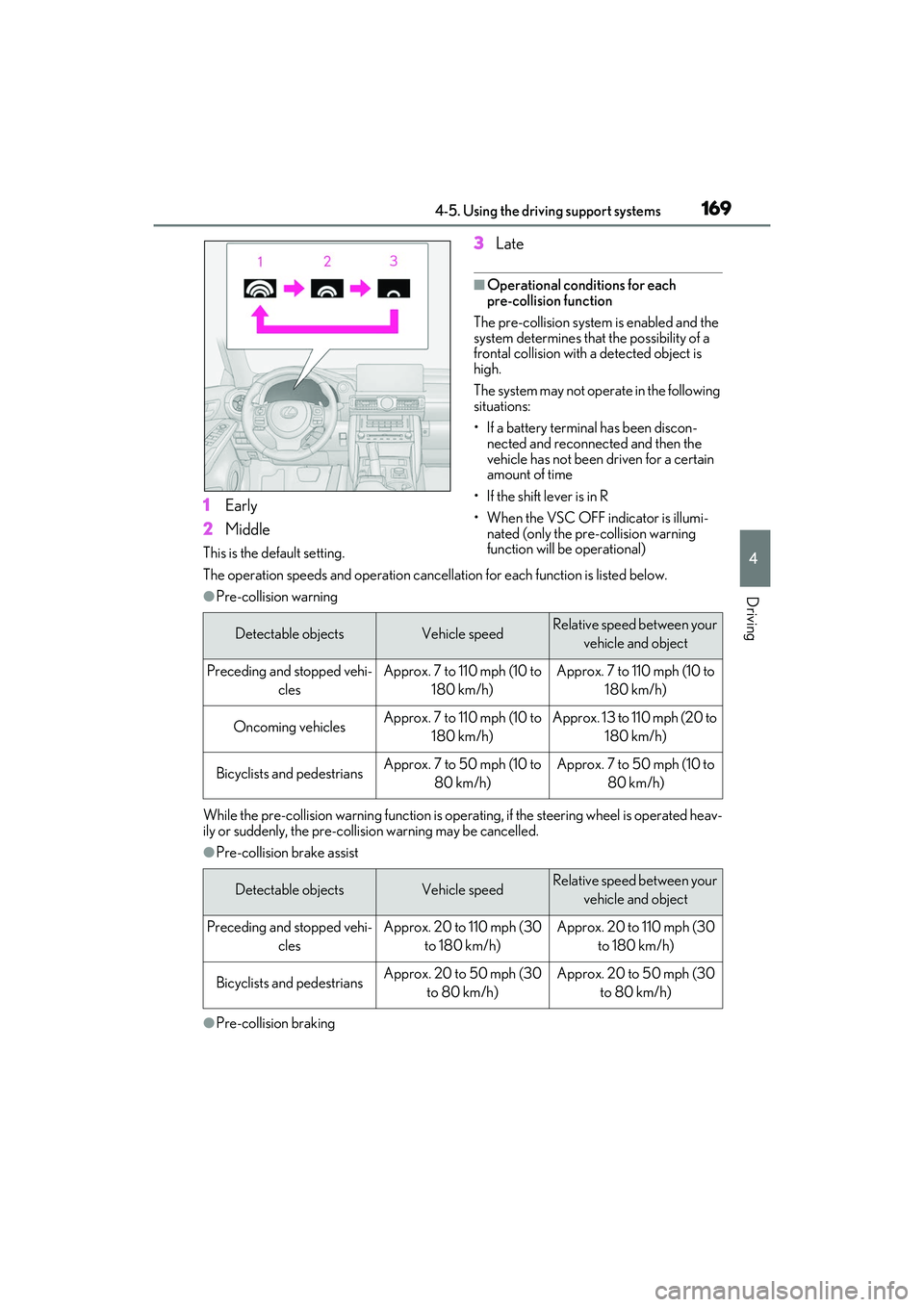
1Early
2 Middle
This is the default setting.
3Late
■Operational conditions for each
pre-collision function
The pre-collision system is enabled and the
system determines that the possibility of a
frontal collision with a detected object is
high.
The system may not operate in the following
situations:
• If a battery terminal has been discon- nected and reconnected and then the
vehicle has not been driven for a certain
amount of time
• If the shift lever is in R
• When the VSC OFF indicator is illumi- nated (only the pre-collision warning
function will be operational)
The operation speeds and operation cancella tion for each function is listed below.
●Pre-collision warning
While the pre-collision warning function is operat ing, if the steering wheel is operated heav-
ily or suddenly, the pre-collis ion warning may be cancelled.
●Pre-collision brake assist
●Pre-collision braking
Detectable objectsVehicle speedRelative speed between your
vehicle and object
Preceding and stopped vehi- clesApprox. 7 to 110 mph (10 to 180 km/h)Approx. 7 to 110 mph (10 to 180 km/h)
Oncoming vehiclesApprox. 7 to 110 mph (10 to 180 km/h)Approx. 13 to 110 mph (20 to 180 km/h)
Bicyclists and pedestriansApprox. 7 to 50 mph (10 to 80 km/h)Approx. 7 to 50 mph (10 to 80 km/h)
Detectable objectsVehicle speedRelative speed between your vehicle and object
Preceding and stopped vehi- clesApprox. 20 to 110 mph (30 to 180 km/h)Approx. 20 to 110 mph (30 to 180 km/h)
Bicyclists and pedestriansApprox. 20 to 50 mph (30 to 80 km/h)Approx. 20 to 50 mph (30 to 80 km/h)
Page 207 of 440

2054-5. Using the driving support systems
4
Driving
■The system can be operated when
●The engine switch is in IGNITION ON
mode.
●Intuitive parking assist function is on.
●The vehicle speed is less than about 6
mph (10 km/h).
●A shift lever other than P.
■Setting the buzzer volume
The buzzer volume can be adjusted on the
multi-information display. ( P.202)
■If “Parking Assist Unavailable Clean
Parking Assist Sensor” is displayed on
the multi-information display
A sensor may be covered with ice, snow,
dirt, etc. Remove the ice, snow, dirt, etc.,
from the sensor to return the system to nor-
mal.
Also, due to ice forming on a sensor at low
temperatures, a warning message may be
displayed or the sensor may not be able to detect an object. Once the ice melts, the
system will return to normal.
■If “Parking Assist Unavailable” is dis-
played on the multi-information display
●Water may be continuo
usly flowing over
the sensor surface, such as in a heavy
rain. When the system determines that it
is normal, the system will return to nor-
mal.
●Initialization may no t have been per-
formed after a battery terminal was dis-
connected and reconnect ed. Initialize the
system. ( P.205)
If this message contin ues to be displayed
even after initialization, have the vehicle
inspected by your Lexus dealer.
■If a battery terminal has been discon-
nected and reconnected
The system needs to be initialized. To initial-
ize the system, drive the vehicle straight
ahead for 5 seconds or more at a speed of
approximately 22 mph (35 km/h) or more.
■Sensor detection information
●The sensor's detection areas are limited
to the areas around the vehicle front and
rear bumpers.
●The following situations may occur
during use.
• Depending on the sh ape of the object
and other factors, the detection distance
may shorten, or detection may be impos-
sible.
• There will be a short delay between
object detection and di splay. Even at low
speeds, there is a possibility that the
object will come wi thin the sensor’s
detection areas befo re the display is
shown and the warning beep sounds.
• It might be difficult to hear the buzzer due
to the volume of the audio system or air
flow noise of the air conditioning system.
• It may be difficult to hear the buzzer if buzzers for other systems are sounding.
■Objects which the system may not be
properly detected
The shape of the object may prevent the
sensor from detecting it. Pay particular
attention to the following objects:
●Wires, fences, ropes, etc.
WARNING
■When to disable the function
In the following situations, disable the
function as it may operate even though
there is no possibility of a collision.
●Failing to observe the warnings above.
●A non-genuine Toyota suspension
(lowered suspension, etc.) is installed.
■Notes when washing the vehicle
Do not apply intensive bursts of water or
steam to the sensor area.
Doing so may result in the sensor mal-
functioning.
●When using a high pressure washer to
wash the vehicle, do not spray the sen-
sors directly, as doing so may cause a
sensor to malfunction.
●When using steam to clean the vehicle,
do not direct steam too close to the
sensors as doing so may cause a sen-
sor to malfunction.
Page 222 of 440
2204-5. Using the driving support systems
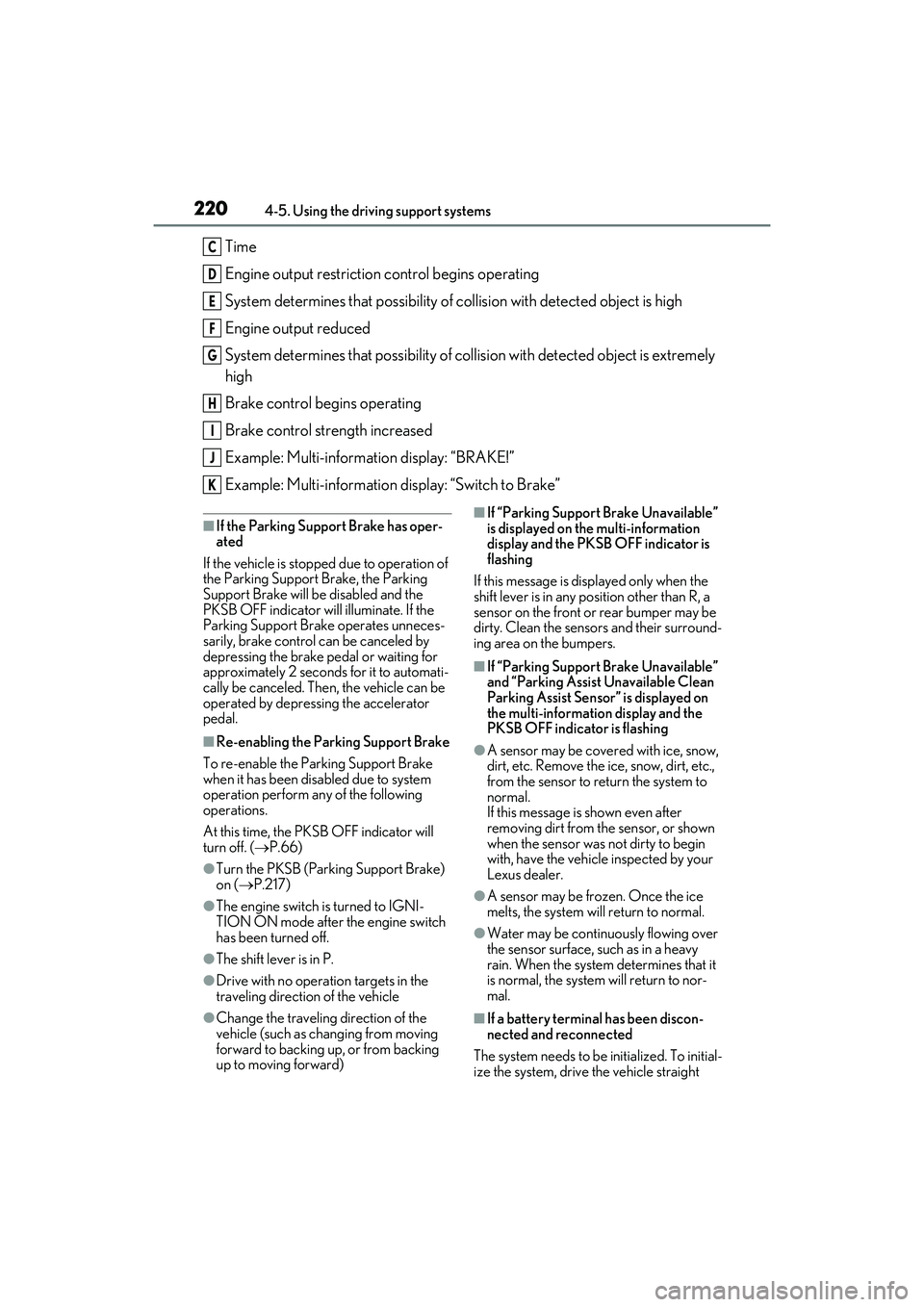
Time
Engine output restriction control begins operating
System determines that possibility of collision with detected object is high
Engine output reduced
System determines that possibility of col lision with detected object is extremely
high
Brake control begins operating
Brake control strength increased
Example: Multi-information display: “BRAKE!”
Example: Multi-information display: “Switch to Brake”
■If the Parking Support Brake has oper-
ated
If the vehicle is stoppe d due to operation of
the Parking Support Brake, the Parking
Support Brake will be disabled and the
PKSB OFF indicator will illuminate. If the
Parking Support Brake operates unneces-
sarily, brake control can be canceled by
depressing the brake pedal or waiting for
approximately 2 seconds for it to automati-
cally be canceled. Then, the vehicle can be
operated by depressing the accelerator
pedal.
■Re-enabling the Park ing Support Brake
To re-enable the Parking Support Brake
when it has been disabled due to system
operation perform an y of the following
operations.
At this time, the PKSB OFF indicator will
turn off. ( P.66)
●Turn the PKSB (Parking Support Brake)
on (P.217)
●The engine switch is turned to IGNI-
TION ON mode after the engine switch
has been turned off.
●The shift lever is in P.
●Drive with no operation targets in the
traveling direction of the vehicle
●Change the traveling direction of the
vehicle (such as chan ging from moving
forward to backing up, or from backing
up to moving forward)
■If “Parking Support Brake Unavailable”
is displayed on th e multi-information
display and the PKSB OFF indicator is
flashing
If this message is displayed only when the
shift lever is in any po sition other than R, a
sensor on the front or rear bumper may be
dirty. Clean the sensors and their surround-
ing area on the bumpers.
■If “Parking Support Brake Unavailable”
and “Parking Assist Unavailable Clean
Parking Assist Sensor” is displayed on
the multi-information display and the
PKSB OFF indicator is flashing
●A sensor may be cove red with ice, snow,
dirt, etc. Remove the ice, snow, dirt, etc.,
from the sensor to return the system to
normal.
If this message is shown even after
removing dirt from the sensor, or shown
when the sensor was not dirty to begin
with, have the vehicle inspected by your
Lexus dealer.
●A sensor may be frozen. Once the ice
melts, the system wi ll return to normal.
●Water may be continuo usly flowing over
the sensor surface, such as in a heavy
rain. When the system determines that it
is normal, the system will return to nor-
mal.
■If a battery terminal has been discon-
nected and reconnected
The system needs to be initialized. To initial-
ize the system, drive the vehicle straight
C
D
E
F
G
H
I
J
K
Page 236 of 440
2344-6. Driving tips
4-6.Driving tips
Use fluids that are appropriate to
the prevailing outside temperatures.
•Engine oil
• Engine coolant
•Washer fluid
Have a service technician inspect
the condition of the battery.
Have the vehicle fitted with four
snow tires or purchase a set of tire
chains for the rear tires.
*
Ensure that all tires are the specified size
and brand, and that chains match the size
of the tires.
*: Tire chains cannot be mounted on vehi-
cles with front and rear tires of differing
sizes.
Perform the following according to the
driving conditions:
Do not try to forcibly open a window
Winter driving tips
Carry out the necessary prepara-
tions and inspections before driving
the vehicle in winter. Always drive
the vehicle in a manner appropriate
to the prevailing weather condi-
tions.
Preparation for winter
WARNING
■Driving with snow tires
Observe the following precautions to
reduce the risk of accidents.
Failure to do so may result in a loss of
vehicle control and cause death or seri-
ous injury.
●Use tires of the specified size.
●Maintain the recommended level of air
pressure.
●Do not drive in excess of 75 mph (120
km/h), regardless of the type of snow
tires being used.
●Use snow tires on all, not just some
wheels.
■Driving with tire chains (vehicles with
front and rear tires of the same size)
Observe the following precautions to
reduce the risk of accidents.
Failure to do so may result in the vehicle
being unable to be driven safely, and may
cause death or serious injury.
●Do not drive in excess of the speed
limit specified for the tire chains being
used, or 30 mph (50 km/h), which-
ever is lower.
●Avoid driving on bumpy road surfaces
or over potholes.
●Avoid sudden acceleration, abrupt
steering, sudden braking and shifting
operations that cause sudden engine
braking.
●Slow down sufficiently before entering
a curve to ensure that vehicle control is
maintained.
●Do not use LTA (Lane Tracing Assist)
system.
NOTICE
■Repairing or replacing snow tires
Request repairs or replacement of snow
tires from Lexus dealers or legitimate tire
retailers.
This is because the removal and attach-
ment of snow tires affects the operation
of the tire pressure warning valves and
transmitters.
Before driving the vehicle