reset LEXUS IS350 2022 User Guide
[x] Cancel search | Manufacturer: LEXUS, Model Year: 2022, Model line: IS350, Model: LEXUS IS350 2022Pages: 440, PDF Size: 22.72 MB
Page 133 of 440

1314-2. Driving procedures
4
Driving
immediately.
■If the electronic key battery is depleted
P.308
■Operation of the engine switch
●If the switch is not pressed shortly and
firmly, the engine switch mode may not
change or the engine may not start.
●If attempting to restart the engine imme-
diately after turning the engine switch off,
the engine may not start in some cases.
After turning the engine switch off, please
wait a few seconds before restarting the
engine.
■If the smart access system with
push-button start has been deactivated
by a customized setting
P.351
1 Stop the vehicle.
2 Set the parking brake ( P.139),
and shift the shift lever to P.
3 Press the engine switch.
4 Release the brake pedal and check
that the display on the meters is off.
■Automatic engine shut off feature
●The vehicle is equipped with a feature
that automatically shuts off the engine
when the shift lever is in P with the engine
running for an extended period.
●The engine will automatically shut off
after approximately 1 hour if it has been
left running while the shift lever is in P.
●The timer for the automatic engine shut
off feature will reset if the brake pedal is
depressed or if the shift lever is in a posi-
tion other than P.
●After the vehicle is parked, if the door is
locked with the door lock switch ( P.92)
from the inside or the mechanical key
from the outside, the automatic engine
shut off feature will be disabled. The timer
for the automatic engine shut off feature
will be re-enabled if the driver’s door is
opened.
WARNING
■When starting the engine
Always start the engi ne while sitting in
the driver’s seat. Do not depress the
accelerator pedal wh ile starting the
engine under any circumstances.
Doing so may cause an accident result-
ing in death or serious injury.
■Caution while driving
If engine failure occurs while the vehicle
is moving, do not lock or open the doors
until the vehicle reaches a safe and com-
plete stop. Activation of the steering lock
in this circumstance may lead to an acci-
dent, resulting in death or serious injury.
NOTICE
■When starting the engine
●Do not race a cold engine.
●If the engine becomes difficult to start
or stalls frequently, have your vehicle
checked by your Lexus dealer immedi-
ately.
■Symptoms indicating a malfunction
with the engine switch
If the engine switch seems to be operat-
ing somewhat differently than usual, such
as the switch sticking slightly, there may
be a malfunction. Contact your Lexus
dealer immediately.
Stopping the engine
Page 280 of 440

2786-2. Maintenance
6-2.Maintenance
■Repair and replacement
It is recommended that genuine Lexus parts
be used for repairs to ensure performance
of each system. If non-Lexus parts are used
in replacement or if a repair shop other than
a Lexus dealer performs repairs, confirm
the warranty coverage.
■Allow inspection and repairs to be per-
formed by a Lexus dealer
●Lexus technicians are well-trained spe-
cialists and are kept up to date with the
latest service information. They are well
informed about the operation of all sys-
tems on your vehicle.
●Keep a copy of the repair order. It proves
that the maintenance that has been per-
formed is under warra nty coverage. If any
problem should arise while your vehicle is
under warranty, your Lexus dealer will
promptly take care of it.
General maintenance should be per-
formed on a daily basis. This can be
done by yourself or by a Lexus dealer.
Scheduled maintenance should be
performed at specified intervals
according to the maintenance sched-
ule.
For details about ma intenance items and
schedules, refer to the “Warranty and Ser-
vice Guide”, “Owner’s Manual Supple-
ment” or “Scheduled Maintenance”.
■Resetting the message indicating main-
tenance is required
After the required maintenance is per-
formed according to the maintenance
schedule, please reset the message.
To reset the message, follow the procedure
described below:
1 Press or of the meter control
switch to select .
2 Press or of the meter control
switch, select the “Vehicle Settings”
Maintenance requirements
To ensure safe and economical driv-
ing, day-to-day care and regular
maintenance are essential. It is the
owner’s responsibility to perform
regular checks. Lexus recommends
the following maintenance:
WARNING
■If your vehicle is not properly main-
tained
Improper maintenance could result in
serious damage to the vehicle and possi-
ble death or serious injury.
■Handling of the battery
●Engine exhaust, some of its constitu-
ents, and a wide variety of automobile
components contain or emit chemicals
known to the State of California to
cause cancer and birth defects and
other reproductive harm. Work in a
well ventilated area.
●Oils, fuels and fluids contained in vehi-
cles as well as waste produced by
component wear contain or emit
chemicals known to the State of Cali-
fornia to cause cancer and birth
defects or other re productive harm.
Avoid exposure and wash any affected
area immediately.
●Battery posts, terminals and related
accessories contai n lead and lead
compounds which are known to cause
brain damage. Wash your hands after
handling. ( P.294)
General maintenance
Scheduled maintenance
Page 281 of 440

2796-2. Maintenance
6
Maintenance and care
then “Scheduled Maintenance”. (To
confirm setting, press .)
3 Select the “Yes” and press .
4 A message will be displayed on the
multi-information display when the
reset procedure has been completed.
You can perform some maintenance
procedures by yourself.
Please be aware that do-it-yourself
maintenance may affect warranty cov-
erage.
The use of Lexus repair manuals is recom-
mended.
For details about warra nty coverage, refer
to the separate “Owner’s Guide”, “War-
ranty and Service Guide”, “Owner’s Man-
ual Supplement” or “Warranty Booklet”.
Do-it-yourself maintenance
General maintenance
Listed below are the general main-
tenance items that should be per-
formed at the intervals specified in
the “Warranty and Service Guide”
or “Owner’s Manual Supplement”.
It is recommended that any prob-
lem you notice should be brought to
the attention of your Lexus dealer
or qualified service shop for advice.
WARNING
■If the engine is running
Turn the engine off and ensure that there
is adequate ventilation before perform-
ing maintenance checks.
Engine compartment
ItemsCheck points
BatteryCheck the connec-
tions. ( P.294)
Brake fluid
Is the brake fluid at the
correct level?
( P.294)
Engine/inter-
cooler coolant
Is the engine/inter-
cooler coolant at the
correct level?
( P.292)
Engine oil
Is the engine oil at the
correct level?
( P.289)
Exhaust system
There should not be
any fumes or strange
sounds.
Page 293 of 440

2916-3. Do-it-yourself maintenance
6
Maintenance and care
IS300
IS500
1 Remove the oil filler cap by turning
it counterclockwise.
2 Add engine oil slowly, checking the
dipstick.
3 Install the oil filler cap by turning it
clockwise.
■Checking the oil type and prepar-
ing the item needed
Make sure to check the oil type and
prepare the items needed before add-
ing oil.
Engine oil selection
P.367
Oil quantity (Low Full)
1.6 qt. (1.5 L, 1.3 Imp. qt.)
Item
Clean funnel
■Engine oil consumption
A certain amount of engine oil will be con-
sumed while driving. In the following situa-
tions, oil consumption may increase, and
engine oil may need to be refilled in
between oil maintenance intervals.
●When the engine is new, for example
directly after purchasing the vehicle or
after replacing the engine
●If low quality oil or oil of an inappropriate
viscosity is used
●When driving at high engine speeds or
with a heavy load, or when driving while
accelerating or dece lerating frequently
●When leaving the engine idling for a long
time, or when driving frequently through
heavy traffic
■After changing the engine oil (IS350
AWD/IS350/IS300 AWD/IS300)
The engine oil maintenance data should be
reset. Perform the following procedures:
1 Press or of the meter control
switch to select on the multi-infor-
mation display.
2 Press or of the meter control
switch, select the “Vehicle Settings”
then “Oil Maintenance”. (To confirm
setting, press .)
3 Select the “Yes” and press .
4 A message will be displayed on the
multi-information display when the
reset procedure has been completed.
WARNING
■Used engine oil
●Used engine oil contains potentially
harmful contaminants which may
cause skin disorders such as inflamma-
tion and skin cancer, so care should be
taken to avoid prolonged and
repeated contact. To remove used
engine oil from your skin, wash thor-
oughly with soap and water.
Page 303 of 440
3016-3. Do-it-yourself maintenance
6
Maintenance and care
pressure is set as the benchmark pres-
sure.
■How to initialize the tire pressure
warning system
1 Park the vehicle in a safe place, turn
the engine switch off and wait 20
minutes or more.
Initialization cannot be performed while
the vehicle is moving.
2 Adjust the tire inflation pressure to
the specified cold tire inflation pres-
sure level.
Make sure to adjust th e tire pressure to the
specified cold tire infl ation pressure level.
The tire pressure warning system will oper-
ate based on this pressure level.
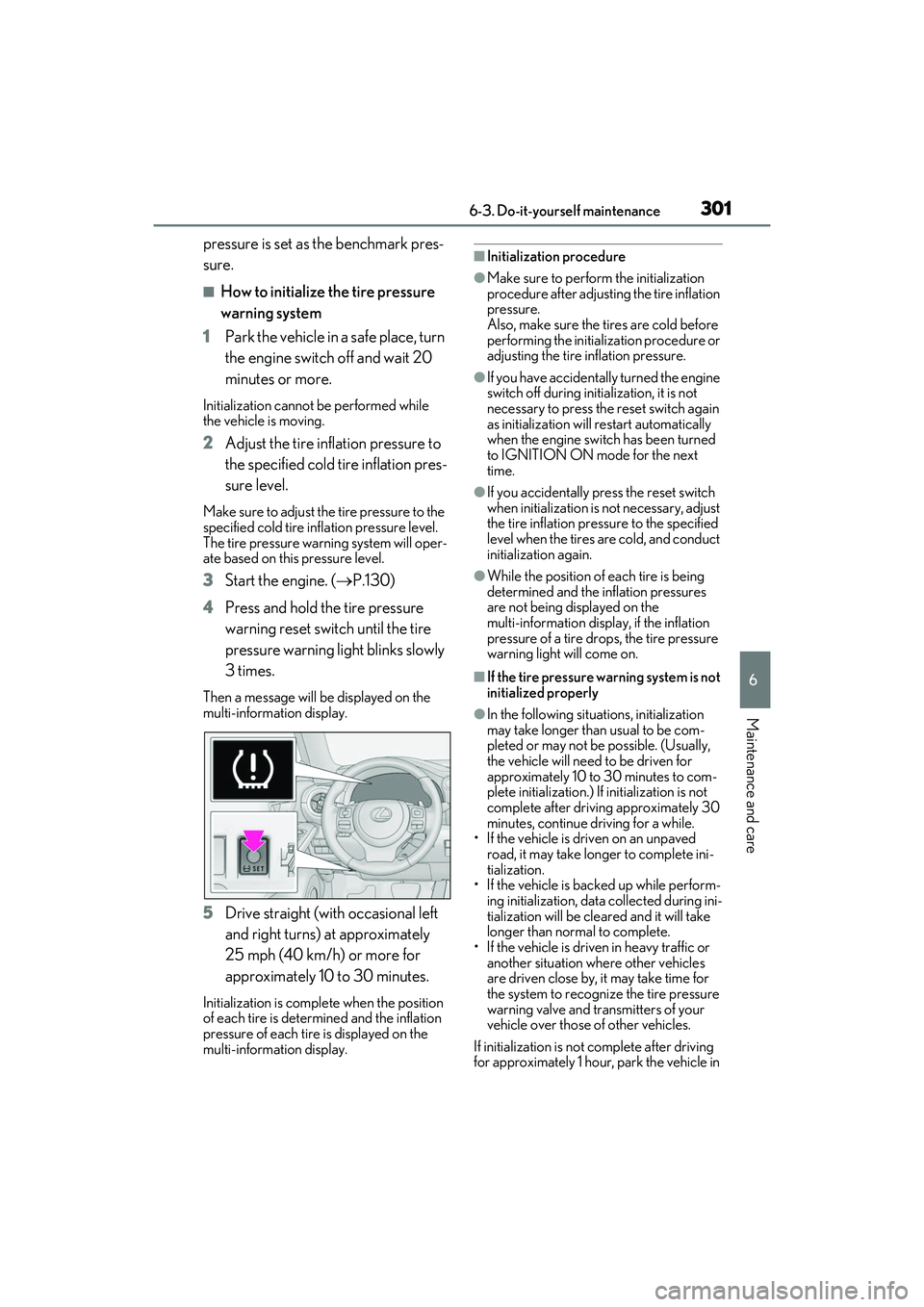
3 Start the engine. ( P.130)
4 Press and hold the tire pressure
warning reset switch until the tire
pressure warning light blinks slowly
3 times.
Then a message will be displayed on the
multi-information display.
5 Drive straight (with occasional left
and right turns) at approximately
25 mph (40 km/h) or more for
approximately 10 to 30 minutes.
Initialization is complete when the position
of each tire is determined and the inflation
pressure of each tire is displayed on the
multi-information display.
■Initialization procedure
●Make sure to perform the initialization
procedure after adjusting the tire inflation
pressure.
Also, make sure the tires are cold before
performing the initia lization procedure or
adjusting the tire inflation pressure.
●If you have accidentally turned the engine
switch off during initialization, it is not
necessary to press the reset switch again
as initialization will restart automatically
when the engine switch has been turned
to IGNITION ON mode for the next
time.
●If you accidentally press the reset switch
when initialization is not necessary, adjust
the tire inflation pressure to the specified
level when the tires are cold, and conduct
initialization again.
●While the position of each tire is being
determined and the inflation pressures
are not being displayed on the
multi-information display, if the inflation
pressure of a tire drops, the tire pressure
warning light will come on.
■If the tire pressure warning system is not
initialized properly
●In the following situations, initialization
may take longer than usual to be com-
pleted or may not be possible. (Usually,
the vehicle will need to be driven for
approximately 10 to 30 minutes to com-
plete initialization.) If initialization is not
complete after drivin g approximately 30
minutes, continue driving for a while.
• If the vehicle is driven on an unpaved road, it may take longer to complete ini-
tialization.
• If the vehicle is backed up while perform- ing initialization, data collected during ini-
tialization will be cleared and it will take
longer than normal to complete.
• If the vehicle is driven in heavy traffic or another situation where other vehicles
are driven close by, it may take time for
the system to recognize the tire pressure
warning valve and transmitters of your
vehicle over those of other vehicles.
If initialization is not complete after driving
for approximately 1 hour, park the vehicle in
Page 304 of 440
3026-3. Do-it-yourself maintenance
a safe place for approximately 20 minutes
and then drive the vehicle again.
●In the following situations, initialization
will not be started or was not completed
properly and the system will not operate
properly. Perform the initialization proce-
dure again.
• If, when attempting to start initialization,
the tire pressure warning light does not
blink 3 times.
• If, when the vehicle has been driven for
about 20 minutes after performing ini-
tialization, the tire pressure warning light
blinks for approximately 1 minute and
then illuminates.
●If initialization cannot be completed after
performing the above procedure, con-
tact your Lexus dealer.
Every tire pressure warning valve and
transmitter has a unique ID code.
When replacing a tire pressure warn-
ing valve and transmitter, it is necessary
to register the ID codes.
1 Park the vehicle in a safe place, turn
the engine switch off, wait 20 min-
utes or more, and then start the
engine.
Registering cannot be performed while the
vehicle is moving.
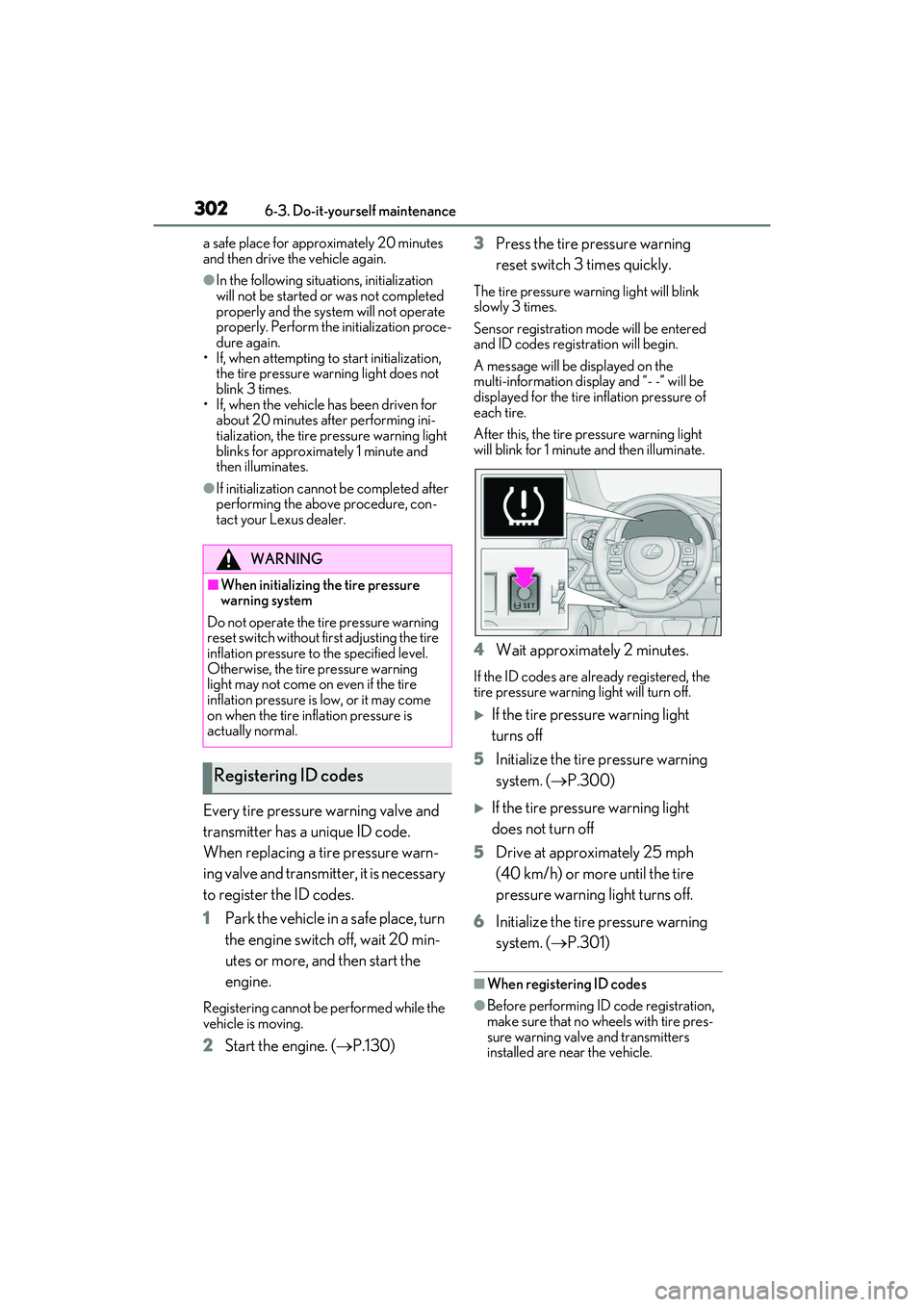
2Start the engine. ( P.130) 3
Press the tire pressure warning
reset switch 3 times quickly.
The tire pressure warning light will blink
slowly 3 times.
Sensor registration mode will be entered
and ID codes registration will begin.
A message will be displayed on the
multi-information display and “- -” will be
displayed for the tire inflation pressure of
each tire.
After this, the tire pr essure warning light
will blink for 1 minute and then illuminate.
4 Wait approximately 2 minutes.
If the ID codes are already registered, the
tire pressure warning light will turn off.
If the tire pressure warning light
turns off
5 Initialize the tire pressure warning
system. ( P.300)
If the tire pressure warning light
does not turn off
5 Drive at approximately 25 mph
(40 km/h) or more until the tire
pressure warning light turns off.
6 Initialize the tire pressure warning
system. ( P.301)
■When registering ID codes
●Before performing ID code registration,
make sure that no wheels with tire pres-
sure warning valve and transmitters
installed are near the vehicle.
WARNING
■When initializing the tire pressure
warning system
Do not operate the ti re pressure warning
reset switch without first adjusting the tire
inflation pressure to the specified level.
Otherwise, the tire pressure warning
light may not come on even if the tire
inflation pressure is low, or it may come
on when the tire inflation pressure is
actually normal.
Registering ID codes
Page 341 of 440

3397-2. Steps to take in an emergency
7
When trouble arises
■If “Engine Stopped Steering Power
Low” is displayed
This message is displa yed if the engine is
stopped while driving.
When steering wheel operations are
heavier than usual, gr ip the steering wheel
firmly and operate it using more force than
usual.
■If “Auto Power Off to Conserve Battery”
is displayed
Power was turned off due to the automatic
power off function. Next time when starting
the engine, increase the engine speed
slightly and maintain that level for approxi-
mately 5 minutes to recharge the battery.
■If “Headlight System Malfunction Visit
Your Dealer” is displayed
The following systems may be malfunction-
ing. Have the vehicle inspected by your
Lexus dealer immediately.
●The LED headlight system
●The automatic headlig ht leveling system
(if equipped)
●Automatic High Beam
■If “Radar Cruise Control Unavailable
See Owner's Manual” is displayed
The dynamic radar cruise control with
full-speed range system is suspended tem-
porarily or until the problem shown in the
message is resolved. (causes and coping
methods: P.163)
■If “Radar Cruise Control Unavailable” is
displayed
The dynamic radar cruise control with
full-speed range system cannot be used
temporarily. Use the system when it
becomes available again.
■If a message that indicates the malfunc-
tion of front camera is displayed
The following systems may be suspended
until the problem shown in the message is
resolved. ( P.163, 329)
●PCS (Pre-Collision system)
●LTA (Lane Tracing Assist)
●Automatic High Beam
●RSA (Road Sign Assi st) (if equipped)
●Dynamic radar cruise control with
full-speed range
■If a message that indicates the malfunc-
tion of radar sensor is displayed
The following systems may be suspended
until the problem show n in the message is
resolved. ( P.163, 329)
●PCS (Pre-Collision system)
●LTA (Lane Tracing Assist)
●Dynamic radar cruise control with
full-speed range
■If “Maintenance Required Soon” is dis-
played
Indicates that all maintenance according to
the driven distance on the maintenance
schedule
* should be performed soon.
Comes on approximately 4500 miles
(7200 km) after the message has been
reset. If necessary, perform maintenance.
Please reset the message after the mainte-
nance is performed. (P.278)
*: Refer to the separate “Scheduled Main-
tenance” or “Owner’s Manual Supple-
ment” for the main tenance interval
applicable to your vehicle.
■If “Maintenance Required Visit Your
Dealer” is displayed
Indicates that all mainte nance is required to
correspond to the driven distance on the
maintenance schedule
*.
Comes on approximately 5000 miles
(8000 km) after the message has been
reset. (The indicator will not work properly
unless the message has been reset.) Per-
form the necessary maintenance. Please
reset the message after the maintenance is
performed. ( P.278)
*: Refer to the separate “Scheduled Main-
tenance” or “Owner’s Manual Supple-
ment” for the main tenance interval
applicable to your vehicle.
■If “Oil Maintenance Required Soon” is
displayed
Indicates that the engine oil should be
scheduled to be changed.
Page 342 of 440

3407-2. Steps to take in an emergency
Check the engine oil and change it if neces-
sary. After changing the engine oil, make
sure to reset the message. (P.291)
■If “Oil Maintenance Required” is dis-
played
Indicates that the en gine oil should be
changed.
Check and change the engine oil, and oil fil-
ter by your Lexus deal er. After changing the
engine oil, make sure to reset the message.
( P.291)
■If a message that in dicates the need for
visiting your Lexus dealer is displayed
The system or part shown on the
multi-information display is malfunctioning.
Have the vehicle inspected by your Lexus
dealer immediately.
■If a message that in dicates the need for
referring to Owner’s Manual is dis-
played
●If any of the following messages are
shown on the multi-information display,
follow the instructions.
• “Engine Coolant Temp High” ( P.357)
• “High Transmission Fluid Temp” ( P.134)
●If any of the following messages are
shown on the multi-information display, it
may indicate a malf unction. Have the
vehicle inspected by your Lexus dealer
immediately.
• “Access System with Elec. Key Malfunc-
tion”
●If any of the following messages are
shown on the multi-info rmation display, it
may indicate a malfunction. Immediately
stop the vehicle and contact your Lexus
dealer.
• “Braking Power Low”
• “Charging System Malfunction”
• “Oil Pressure Low”
NOTICE
■If “High Power Consumption Power
to Climate Temporarily Limited” is
displayed frequently
There is a possible malfunction relating
to the charging system or the battery
may be deteriorating. Have the vehicle
inspected by your Lexus dealer.
Page 391 of 440

3898-2. Customization
8
Vehicle specifications
Definition of symbols: O = Available, — = Not available
■Gauges, meters and multi-information display ( P.64, 69, 75)
Function*1Default settingCustomized setting
LanguageEnglishFrenchOO—Spanish
Units*2miles (MPG US)
miles (MPG Impe-
rial)
OO—km (L/100 km)
km (km/L)
Eco Driving Indicator LightOnOff—O—
Switch settings*3Drive information 1Desired status
screen
*4—O—
Drive information 1
Current fuel con- sumption
Customizable items: P.78
—O—Average fuel econ-omy (after reset)
Drive information 2
Distance (driving range)
—O—Average vehicle
speed (after reset)
Drive information 3*3
Average fuel con- sumption (after refuel)
—O—
Elapsed time (after start)
Pop-up displayOnOff—O—
ColorColor 1Color 2OO—
Rev indicator*55000 rpm
2000 - 6800
rpm
*6
2000 - 6100 rpm*7
2000 - 7300 rpm
*8
—O—
Off
ABC
Page 424 of 440

422Alphabetical Index
Parking Support Brake function (static objects) ......................................................... 222 Function ...........................................................222
PCS (Pre-Collision System) Function ........................................................... 165
PCS OFF switch ......................................... 168
Warning light ............................................... 334
Personal lights............................................... 253
PKSA (Parking Support Alert) ................201
PKSB (Parking Support Brake)...............216 Warning message..................................... 220
Power easy access system ....................... 104
Power outlets ..................................................261
Power steering (Elect ric power steering
system).......................................................... 229 Warning light ............................................... 332
Power window switch lights .................... 253
Power windows Door lock linked window operation... 115
Jam protection function..............................114
Operation..........................................................114
Window lock switch ................................... 115
Pre-Collision System (PCS) Function ........................................................... 165
PCS OFF switch ......................................... 168
Warning light ............................................... 334
R
Radar cruise control (dynamic radar cruise control with full-speed range)...............187
Radiator ........................................................... 293
RCTA Function ............................................................210
Warning message.........................................211
RCTA (Rear Cross Traffic Alert) ...........201
RCTA function ................................................ 211
Rear Cross Traffic Alert (RCTA) ...........210
Rear seats ........................................................ 103 Head restraints .............................................107
Rear side marker lights Light switch .....................................................145
Rear sunshades ............................................ 262 Rear turn signal lights
Replacing light bulbs....................... 314, 316
Turn signal lever .......................................... 138
Wattage ..........................................................375
Rear view mirror Inside rear view mirror ............................... 110
Outside rear view mirrors........................ 112
Rear window defogger ............................. 245
Refueling Capacity ......................................................... 367
Fuel types ....................................................... 367
If the fuel filler do or cannot be opened
........................................................................... 351
Opening the fuel tank cap ......................157
Remote Touch .............................................. 238
Replacing Electronic key battery ............................. 308
Fuses.................................................................. 310
Light bulbs ...................................................... 313
Tires ....................................................................341
Resetting the message indicating mainte- nance is required ...................................... 278
Rev indicator .....................................................72
Rev peak..............................................................73
Road Sign Assist .............. ............................. 184
RSA (Road Sign Assist) ............................. 184
S
Seat belt reminder light............................. 332
Seat belts............................................................ 24 Automatic Locking Retractor................. 26
Child restraint system installation ......... 42
Cleaning and maintaining the seat belt.......................................................................... 274
Emergency Locking Retractor .............. 26
How to wear your seat belt ..................... 25
How your child should wear the seat belt
............................................................................. 25
Pregnant women, proper seat belt use ............................................................................. 24
Reminder light and buzzer ................... 332
Seat belt extender......................................... 25