warning lights LEXUS IS350 2022 User Guide
[x] Cancel search | Manufacturer: LEXUS, Model Year: 2022, Model line: IS350, Model: LEXUS IS350 2022Pages: 440, PDF Size: 22.72 MB
Page 67 of 440
652-1. Instrument cluster
2
Vehicle status information and indicators
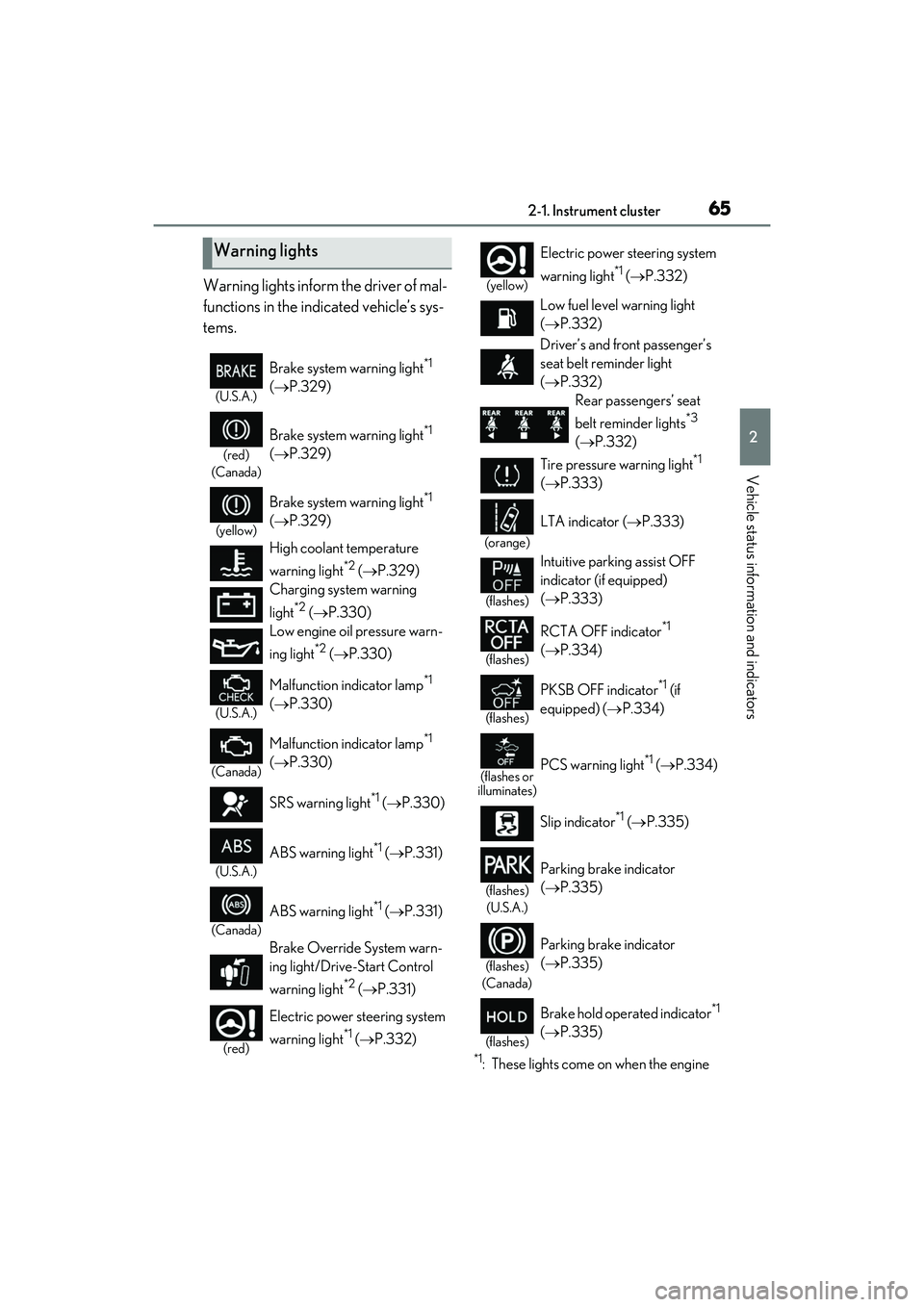
Warning lights inform the driver of mal-
functions in the indicated vehicle’s sys-
tems.
*1: These lights come on when the engine
Warning lights
(U.S.A.)
Brake system warning light*1
( P.329)
(red)
(Canada)
Brake system warning light*1
( P.329)
(yellow)
Brake system warning light*1
( P.329)
High coolant temperature
warning light
*2 ( P.329)
Charging system warning
light
*2 ( P.330)
Low engine oil pressure warn-
ing light
*2 ( P.330)
(U.S.A.)
Malfunction indicator lamp*1
( P.330)
(Canada)
Malfunction indicator lamp*1
( P.330)
SRS warning light
*1 ( P.330)
(U.S.A.)
ABS warning light*1 (P.331)
(Canada)
ABS warning light*1 (P.331)
Brake Override System warn-
ing light/Drive-Start Control
warning light
*2 ( P.331)
(red)
Electric power steering system
warning light
*1 ( P.332)
(yellow)
Electric power st eering system
warning light
*1 ( P.332)
Low fuel level warning light
( P.332)
Driver’s and front passenger’s
seat belt re minder light
( P.332)
Rear passengers’ seat
belt reminder lights
*3
( P.332)
Tire pressure warning light
*1
( P.333)
(orange)
LTA indicator ( P.333)
(flashes)
Intuitive parking assist OFF
indicator (if equipped)
( P.333)
(flashes)
RCTA OFF indicator*1
( P.334)
(flashes)
PKSB OFF indicator*1 (if
equipped) ( P.334)
(flashes or
illuminates)PCS warning light*1 ( P.334)
Slip indicator
*1 ( P.335)
(flashes)
(U.S.A.)
Parking brake indicator
( P.335)
(flashes)
(Canada)
Parking brake indicator
( P.335)
(flashes)
Brake hold operated indicator*1
( P.335)
Page 68 of 440

662-1. Instrument cluster
switch is turned to IGNITION ON
mode to indicate that a system check is
being performed. They will turn off after
the engine is started, or after a few sec-
onds. There may be a malfunction in a
system if the lights do not come on, or
turn off. Have the vehicle inspected by
your Lexus dealer.
*2: This light illuminates on the multi-infor- mation display.
*3: This light illuminates on the center panel.
The indicators inform the driver of the
operating state of the vehicle’s various
systems.
WARNING
■If a safety system warning light does
not come on
Should a safety system light such as the
ABS and SRS warning light not come on
when you start the engine, this could
mean that these systems are not available
to help protect you in an accident, which
could result in death or serious injury.
Have the vehicle inspected by your
Lexus dealer immediately if this occurs.
Indicators
Turn signal indicator ( P.138)
(U.S.A.)
Headlight indicator (P.145)
(Canada)
Tail light indicator ( P.145)
Headlight high beam indicator
( P.146)
Automatic High Beam indicator
( P.147)
PCS warning light*1, 2 ( P.168)
Cruise control indicator
( P.194)
Dynamic radar cruise control
indicator ( P.187)
Cruise control “SET” indicator
( P.187)
(white)
LTA indicator ( P.180)
(green)
LTA indicator ( P.165, 180)
(orange)
(flashes)LTA indicator ( P.180)
BSM outside rear view mirror
indicators
*3, 4 ( P.197, 210)
BSM OFF indicator
*1, 2
( P.197)
Intuitive parking assist OFF
indicator
*2(if equipped)
( P.204)
RCTA OFF indicator
*1, 2
( P.210)
PKSB OFF indicator
*1, 2 (if
equipped) ( P.217)
(flashes)
Slip indicator*1 ( P.230)
VSC OFF indicator
*1, 2
( P.230)
Smart access system with
push-button start indicator
*5
( P.130)
(U.S.A.)
Parking brake indicator
( P.139)
Page 77 of 440

752-1. Instrument cluster
2
Vehicle status information and indicators
■Pop-up display
Distance until the next engine oil
change will displayed when a warning
message indicating that oil mainte-
nance should be performed soon or is
required is displayed.
The brightness of the instrument panel
lights can be adjusted.
Darker
Brighter
■Brightness of the meters (day mode and
night mode)
The brightness of the meters changes
between day mode and night mode.
●Day mode: When the tail lights are off or
when the tail lights are on but the sur-
rounding area is bright
●Night mode: When the tail lights are on
and the surrounding area is dark
■Display (except F SPORT models)
By selecting menu icons on the
multi-information display, a variety of
driving-related information can be dis-
played. The multi-information display
can also be used to change display set-
tings and other vehicle settings.
Warning or advice pop-up displays are
also displayed in certain situations.
■Display (F SPORT models)
Main meter in center position
The multi-information display presents
the driver with a variety of driv-
ing-related information.
Warning or advice pop-up displays are
also displayed in certain situations.
Changing the instrument panel
light brightness
A
B
Multi-information display
The multi-information display pres-
ents the driver with a variety of
vehicle data.
Display and menu icons
Page 112 of 440
1103-4. Adjusting the steering wheel and mirrors
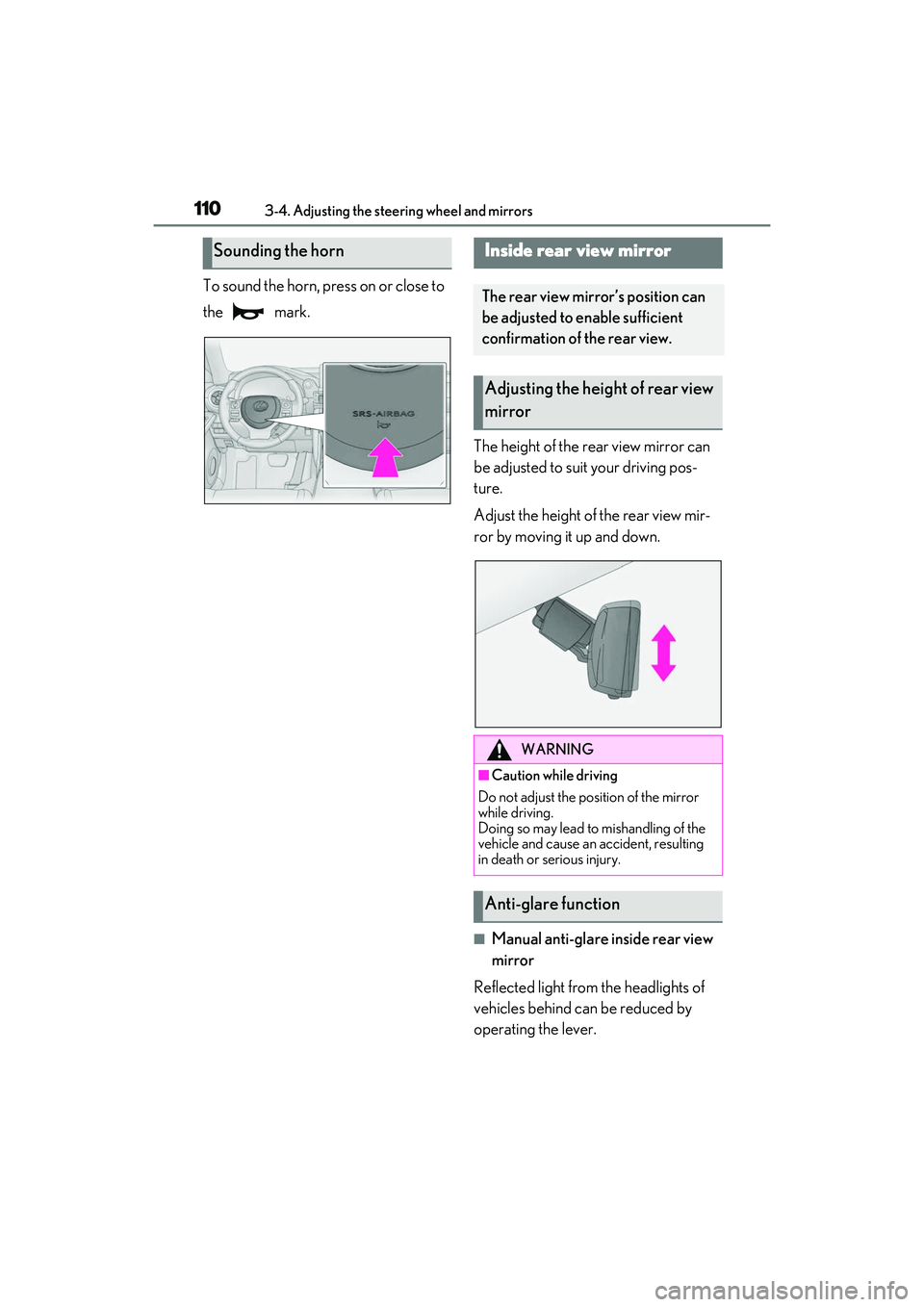
To sound the horn, press on or close to
the mark.The height of the rear view mirror can
be adjusted to suit your driving pos-
ture.
Adjust the height of the rear view mir-
ror by moving it up and down.
■Manual anti-glare inside rear view
mirror
Reflected light from the headlights of
vehicles behind can be reduced by
operating the lever.
Sounding the hornInside rear view mirror
The rear view mirror’s position can
be adjusted to enable sufficient
confirmation of the rear view.
Adjusting the height of rear view
mirror
WARNING
■Caution while driving
Do not adjust the position of the mirror
while driving.
Doing so may lead to mishandling of the
vehicle and cause an accident, resulting
in death or serious injury.
Anti-glare function
Page 149 of 440

1474-3. Operating the lights and wipers
4
Driving
1Press the Automatic High Beam
switch.
2 Turn the headlight switch to the
or position.
When the headlight swit ch lever is in the original position, the Automatic High
Beam system will be enabled and the
Automatic High Beam indicator will illumi-
nate.
■Conditions to turn the high beams on/off
automatically
●When all of the follo
wing conditions are
met, the high beams will be turned on
automatically (after approximately 1 sec-
ond):
• The vehicle speed is approximately 21 mph (34 km/h) or more.
• The area ahead of the vehicle is dark.
• There are no vehicles ahead with head- lights or tail lights turned on.
• There are few streetlights on the road ahead.
●If any of the following conditions is met,
the high beams will turn off automatically:
• The vehicle speed is below approxi-
mately 17 mph (27 km/h).
• The area ahead of the vehicle is not dark.
• Vehicles ahead have their headlights or tail lights turned on.
• There are many streetlights on the road ahead.
■Camera sensor dete ction information
●The high beams may not be automatically
turned off in the following situations:
• When a vehicle suddenly appears from around a curve
• When the vehicle is cut in front of by another vehicle
• When vehicles ahead cannot be detected due to repeated curves, road
dividers or roadside trees
• When vehicles ahead appear in a far- away lane on a wide road
• When the lights of vehicles ahead are not
on
AHB (Automatic High
Beam)
The Automatic High Beam uses a
camera sensor located behind the
upper portion of the windshield to
assess the brightness of the lights of
vehicles ahead, streetlights, etc.,
and automatically turns the high
beams on or off as necessary.
WARNING
■Limitations of the Automatic High
Beam
Do not overly rely on the Automatic High
Beam. Always drive sa fely, taking care to
observe your surroundings and turning
the high beams on or off manually if nec-
essary.
■To prevent incorrect operation of the
Automatic High Beam system
Do not overload the vehicle.
Activating the Automatic High
Beam
Page 158 of 440

1564-3. Operating the lights and wipers
●If the wiper is turned to AUTO mode
while the engine switch is in IGNITION
ON mode, the wipers will operate once
to show that AUTO mode is activated.
●If the temperature of the raindrop sensor
is 185°F (85°C) or higher, or -22°F
(-30°C) or lower, automatic operation
may not occur. In this case, operate the
wipers in any mode other than AUTO
mode.
■When the windshield wipers are in tem-
porary operation (vehicles with
rain-sensing windshield wipers)
AUTO mode cannot be activated even if is
pressed.
■If no windshield washer fluid sprays
Check that the washer nozzles are not
blocked if there is wash er fluid in the wind-
shield washer fluid reservoir.
WARNING
■Caution regarding the use of wind-
shield wipers in AUTO mode
The windshield wipers may operate
unexpectedly if the sensor is touched or
the windshield is subject to vibration in
AUTO mode. Take care that your fingers
or anything else do not become caught
in the windshield wipers.
■Caution regarding the use of washer
fluid
When it is cold, do not use the washer
fluid until the windshield becomes warm.
The fluid may freeze on the windshield
and cause low visibility. This may lead to
an accident, resulting in death or serious
injury.
NOTICE
■When there is no washer fluid spray
from the nozzle
Damage to the washer fluid pump may
be caused if the lever is pulled toward
you and held continually.
■When a nozzle becomes blocked
In this case, contact your Lexus dealer.
Do not try to clear it with a pin or other
object. The nozzle will be damaged.
Page 164 of 440
1624-5. Using the driving support systems
WARNING
●If the part of the windshield in front of
the front camera is fogged up or cov-
ered with condensation or ice, use the
windshield defogger to remove the
fog, condensation or ice. ( P.245)
●If water droplets cannot be properly
removed from the area of the wind-
shield in front of the front camera by
the windshield wipers, replace the
wiper insert or wiper blade.
●Do not attach window tint to the wind-
shield.
●Replace the windshield if it is damaged
or cracked.
After replacing the windshield, the
front camera must be recalibrated.
Contact your Lexus dealer for details.
●Do not allow liquids to contact the
front camera.
●Do not allow bright lights to shine into
the front camera.
●Do not dirty or damage the front cam-
era.
When cleaning the inside of the wind-
shield, do not allow glass cleaner to
contact the lens of the front camera.
Also, do not touch the lens.
If the lens is dirty or damaged, contact
your Lexus dealer.
●Do not subject the front camera to a
strong impact.
●Do not change the installation position
or direction of the front camera or
remove it.
●Do not disassemble the front camera.
●Do not modify any components of the
vehicle around the front camera
(inside rear view mirror, etc.) or ceiling.
●Do not attach any accessories to the
hood, front grille or front bumper that
may obstruct the front camera. Con-
tact your Lexus dealer for details.
●If a surfboard or other long object is to
be mounted on the roof, make sure
that it will not obstruct the front cam-
era.
●Do not modify the headlights or other
lights.
Page 165 of 440

1634-5. Using the driving support systems
4
Driving
■If a warning message is displayed on the multi-information display
A system may be temporarily unavailable or there may be a malfunction in the system.
●In the following situations, perform the actions specified in the table. When the normal
operating conditions are detected, the message will disappear and the system will
become operational.
If the message does not disappear, contact your Lexus dealer.
●In the following situations, if the situation ha s changed (or the vehicle has been driven for
some time) and the normal operating conditio ns are detected, the message will disappear
and the system will become operational.
If the message does not disappear, contact your Lexus dealer.
• When the temperature around the radar sensor is outside of the operational range, such as when the vehicle is in the sun or in an extremely cold environment
• When the front camera cannot detect objects in front of the vehicle, such as when driving
in the dark, snow, or fog, or when brig ht lights are shining into the front camera
• Depending on the conditions in the vicinity of the vehicle, the radar may judge the sur-
rounding environment can not be properly re cognized. In that case, “Pre-Collision Sys-
SituationActions
When the area around a camera is covered
with dirt, moisture (fogged up, covered with
condensation, ice, etc. ), or other foreign
matterUsing the wiper and A/C function, remove
the dirt and other attached matter.
( P.245)
When the temperature around the front
camera is outside of the operational range,
such as when the vehicle is in the sun or in an
extremely cold environment
If the front camera is hot, such as after the
vehicle had been parked in the sun, use the
air conditioning system to decrease the tem-
perature around the front camera.
If a sunshade was used when the vehicle
was parked, depending on its type, the sun-
light reflected from the surface of the sun-
shade may cause the temperature of the
front camera to become excessively high.
If the front camera is cold, such after the
vehicle is parked in an extremely cold envi-
ronment, use the air conditioning system to
increase the temperature around the front
camera.
The area in front of the front camera is
obstructed, such as when the hood is open
or a sticker is attached to the part of the
windshield in front of the front camera.
Close the hood, remove the sticker, etc. to
clear the obstruction.
When “Pre-Collision Sy stem Radar In Self
Calibration Unavailable See Owner’s Man-
ual” is displayed.Check whether there is attached materials
on the radar sensor and radar sensor cover,
and if there is, remove it.
Page 172 of 440
1704-5. Using the driving support systems
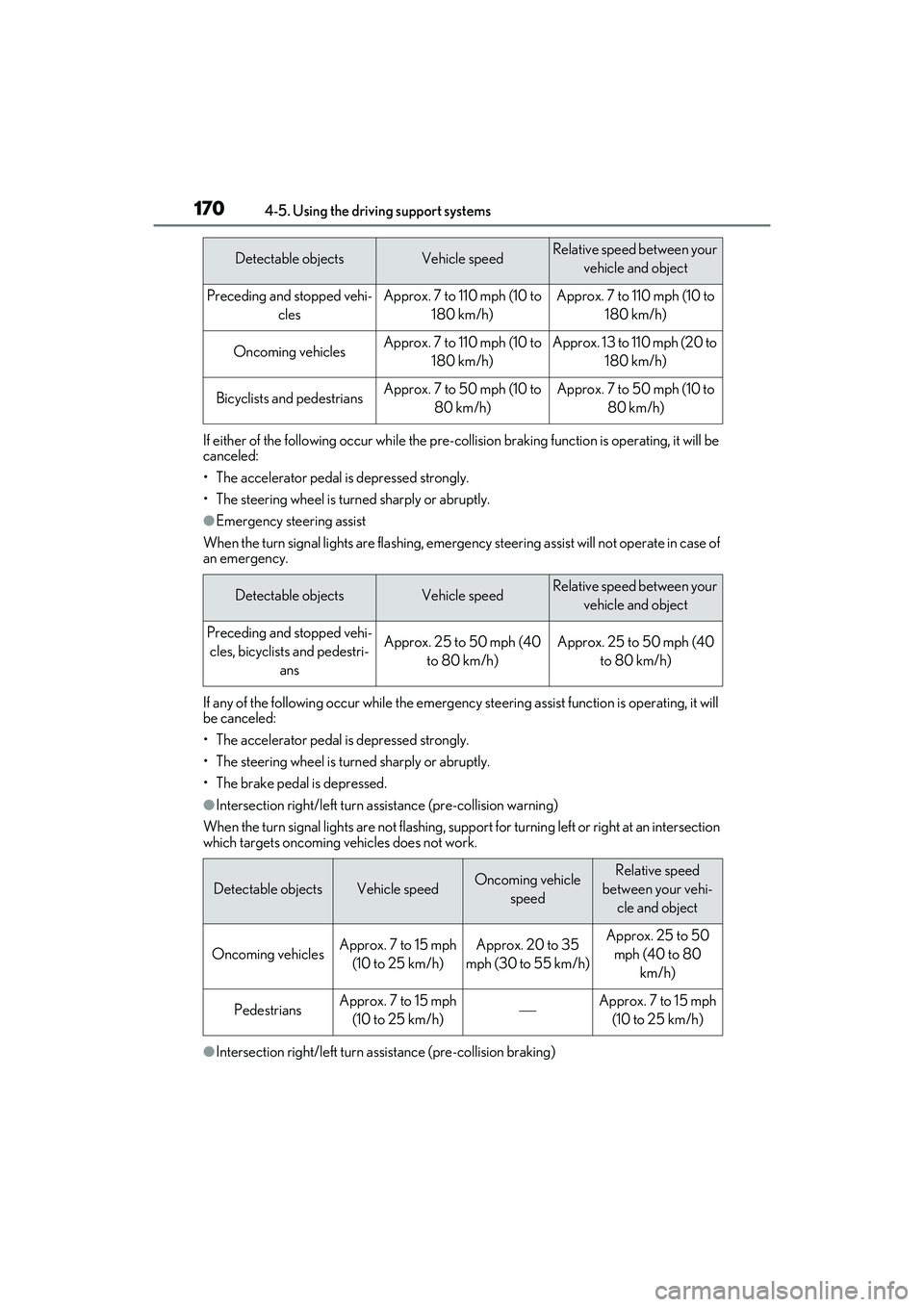
If either of the following occur while the pre-collision braking function is operating, it will be
canceled:
• The accelerator pedal is depressed strongly.
• The steering wheel is turned sharply or abruptly.
●Emergency steering assist
When the turn signal lights are flashing, emergency steering assist will not operate in case of
an emergency.
If any of the following occur while the emergency st eering assist function is operating, it will
be canceled:
• The accelerator pedal is depressed strongly.
• The steering wheel is turned sharply or abruptly.
• The brake pedal is depressed.
●Intersection right/left turn a ssistance (pre-collision warning)
When the turn signal lights are not flashing, support for turning left or right at an intersection
which targets oncoming vehicles does not work.
●Intersection right/left turn a ssistance (pre-collision braking)
Detectable objectsVehicle speedRelative speed between your
vehicle and object
Preceding and stopped vehi- clesApprox. 7 to 110 mph (10 to 180 km/h)Approx. 7 to 110 mph (10 to 180 km/h)
Oncoming vehiclesApprox. 7 to 110 mph (10 to 180 km/h)Approx. 13 to 110 mph (20 to 180 km/h)
Bicyclists and pedestriansApprox. 7 to 50 mph (10 to 80 km/h)Approx. 7 to 50 mph (10 to 80 km/h)
Detectable objectsVehicle speedRelative speed between your vehicle and object
Preceding and stopped vehi-cles, bicyclists and pedestri- ansApprox. 25 to 50 mph (40 to 80 km/h)Approx. 25 to 50 mph (40 to 80 km/h)
Detectable objectsVehicle speedOncoming vehicle speedRelative speed
between your vehi- cle and object
Oncoming vehiclesApprox. 7 to 15 mph (10 to 25 km/h)Approx. 20 to 35
mph (30 to 55 km/h)Approx. 25 to 50 mph (40 to 80 km/h)
PedestriansApprox. 7 to 15 mph (10 to 25 km/h)Approx. 7 to 15 mph (10 to 25 km/h)
Page 178 of 440

1764-5. Using the driving support systems
WARNING
■Before using LTA system
●Do not rely solely upon the LTA sys-
tem. The LTA system does not auto-
matically drive the vehicle or reduce
the amount of attention that must be
paid to the area in front of the vehicle.
The driver must always assume full
responsibility for driving safely by pay-
ing careful attention to the surround-
ing conditions and operating the
steering wheel to correct the path of
the vehicle. Also, the driver must take
adequate breaks when fatigued, such
as from driving for a long period of
time.
●Failure to perform appropriate driving
operations and pay careful attention
may lead to an accident, resulting in
death or serious injury.
■Situations unsuitable for LTA system
In the following situations, use the LTA
switch to turn the system off. Failure to do
so may lead to an accident, resulting in
death or serious injury.
●Vehicle is driven on a road surface
which is slippery due to rainy weather,
fallen snow, freezing, etc.
●Vehicle is driven on a snow-covered
road.
●White (yellow) lines are difficult to see
due to rain, snow, fog, dust, etc.
●Vehicle is driven in a temporary lane or
restricted lane due to construction
work.
●Vehicle is driven in a construction
zone.
●A spare tire, tire chains, etc. are
equipped.
●When the tires have been excessively
worn, or when the tire inflation pres-
sure is low.
●During emergency towing.
■Preventing LTA system malfunctions
and operations performed by mistake
●Do not modify the headlights or place
stickers, etc. on the surface of the
lights.
●Do not modify the suspension etc. If
the suspension etc. needs to be
replaced, contact your Lexus dealer.
●Do not install or place anything on the
hood or grille. Also, do not install a
grille guard (bull bars, kangaroo bar,
etc.).
●If your windshield needs repairs, con-
tact your Lexus dealer.
■Conditions in which functions may
not operate properly
In the following situations, the functions
may not operate properly and the vehicle
may depart from its la ne. Drive safely by
always paying careful attention to your
surroundings and operate the steering
wheel to correct the path of the vehicle
without relying solely on the functions.
●When the follow-up cruising display is
displayed (
P.180) and the preced-
ing vehicle changes lanes. (Your vehi-
cle may follow the preceding vehicle
and also change lanes.)
●When the follow-up cruising display is
displayed (
P.180) and the preced-
ing vehicle is swaying. (Your vehicle
may sway accordingly and depart from
the lane.)
●When the follow-up cruising display is
displayed (
P.180) and the preced-
ing vehicle departs from its lane. (Your
vehicle may follow the preceding vehi-
cle and depart from the lane.)