lock LEXUS IS350 2022 Owner's Manual
[x] Cancel search | Manufacturer: LEXUS, Model Year: 2022, Model line: IS350, Model: LEXUS IS350 2022Pages: 440, PDF Size: 22.72 MB
Page 73 of 440
712-1. Instrument cluster
2
Vehicle status information and indicators
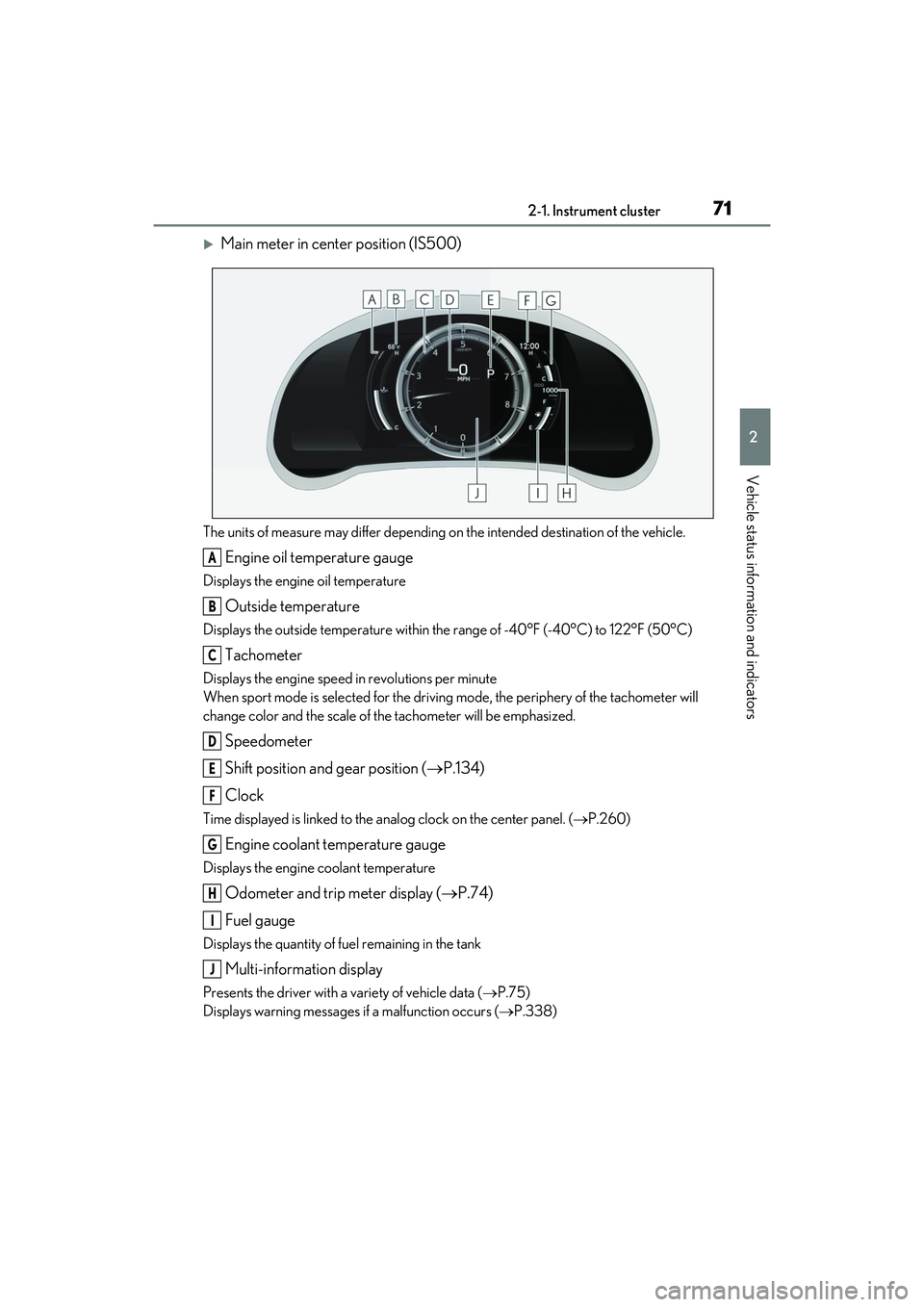
Main meter in center position (IS500)
The units of measure may differ depending on the intended destination of the vehicle.
Engine oil temperature gauge
Displays the engine oil temperature
Outside temperature
Displays the outside temperature within the range of -40°F (-40°C) to 122°F (50°C)
Tachometer
Displays the engine speed in revolutions per minute
When sport mode is selected for the driving mode, the periphery of the tachometer will
change color and the scale of the tachometer will be emphasized.
Speedometer
Shift position and gear position ( P.134)
Clock
Time displayed is linked to the anal og clock on the center panel. (P.260)
Engine coolant temperature gauge
Displays the engine coolant temperature
Odometer and trip meter display ( P.74)
Fuel gauge
Displays the quantity of fuel remaining in the tank
Multi-information display
Presents the driver with a variety of vehicle data ( P.75)
Displays warning messages if a malfunction occurs (P.338)
A
B
C
D
E
F
G
H
I
J
Page 74 of 440

722-1. Instrument cluster
Main meter moved to the right
The units of measure may differ depending on the intended destination of the vehicle.
Outside temperature
Displays the outside temperature within the range of -40°F (-40°C) to 122°F (50°C)
Clock
Time displayed is linked to the analog clock on the center panel. (P.260)
Tachometer
Displays the engine speed in revolutions per minute
When sport mode is selected for the driving mode, the periphery of the tachometer will
change color and the scale of the tachometer will be emphasized.
Speedometer
Shift position and gear position ( P.134)
Odometer and trip meter display ( P.74)
Multi-information display
Presents the driver with a variety of vehicle data ( P.75)
Displays warning messages if a malfunction occurs (P.338)
Engine coolant temperature gauge
Displays the engine coolant temperature
Fuel gauge
Displays the quantity of fuel remaining in the tank
■Rev indicator (F SPORT models)
When the engine speed reaches a set
speed, a ring-shaped indicator will be
displayed on the tachometer.
A
B
C
D
E
F
G
H
I
Page 83 of 440

812-1. Instrument cluster
2
Vehicle status information and indicators
■Meter display settings that can be
changed
Language
Select to change th e language displayed.
Units
Select to change the units of measure dis-
played.
Speedometer display (except F
SPORT models)
Select to set the disp lay of the speedome-
ter to digital/analog/both digital and ana-
log.
Drive information 1/Drive informa-
tion 2/Drive information 3
Select to select up to 2 items ( P.78) that
will be displayed on ea ch Drive information
screen (Drive information 1 screen, Drive
information 2 screen and Drive informa-
tion 3 screen) respectively.
Clock
Select to switch be tween 12-hour display
and 24-hour display.
Pop-up display
Select to enable/disab le pop-up displays
for each relevant system.
Accent color
Select to change the accent color on the
screen, such as the cursor color.
Rev indicator (F SPORT models)
• Select to enable/disable the rev indica-
tor.
• Select to set the engine speed at which the rev indicator (amber) will begin to be
displayed.
Rev peak (F SPORT models)
Select to enable/disable the rev peak.
Eco Driving Indicator Light
Select to enable/dis able the Eco Driving
Indicator Light.
Default setting
Select to reset the meter display settings to
the default setting.
■Vehicle functions and settings that
can be changed
P.388
■Suspension of the settings display
●Some settings cannot be changed while
driving. When changing settings, park
the vehicle in a safe place.
●If a warning message is displayed, opera-
tion of the settings display will be sus-
pended.
Settings display
WARNING
■Cautions during setting up the dis-
play
As the engine needs to be running
during setting up the display, en sure that
the vehicle is parked in a place with ade-
quate ventilation. In a closed area such as
a garage, exhaust gases including harm-
ful carbon monoxide (CO) may collect
and enter the vehicle. This may lead to
death or a serious health hazard.
NOTICE
■During setting up the display
To prevent battery discharge, ensure that
the engine is running while setting up the
display features.
Page 87 of 440
85
3
3
Before driving
Before driving
.3-1. Key informationKeys ................................................... 86
3-2. Opening, closing and locking the doors and trunk
Doors................................................. 90
Trunk.................................................. 94
Smart access system with push-button start ....................... 97
3-3. Adjusting the seats Front seats ..................................... 102
Rear seats ...................................... 103
Driving position memory ........ 104
Head restraints............................ 107
3-4. Adjusting the steering wheel and mirrors
Steering wheel............................. 109
Inside rear view mirror.............. 110
Outside rear view mirrors ....... 112
3-5. Opening, closing the windows and moon roof
Power windows............................ 114
Moon roof ...................................... 116
Page 88 of 440

863-1. Key information
3-1.Key information
The following keys are provided with
the vehicle.Electronic keys
• Operating the smart access system with push-button start ( P.97)
• Operating the wireless remote control function ( P.88)
Mechanical keys
Key number plate
Card key (electronic key) (if
equipped)
Operating the smart access system with
push-button start ( P.97)
■Card key (if equipped)
●The card key is not waterproof.
●The mechanical key that is stored inside
the card key should be used only if a
problem arises, such as when the card key does not operate properly.
●If it is difficult to
take out the mechanical
key, push down the lock release button
using a pen tip etc. If it is still difficult to
pull it out, use a coin etc.
●To store the mechanical key in the card
key, insert it while pressing the lock
release button.
●If the battery cover is not installed and the
battery falls out or if the battery was
removed because the key got wet, rein-
stall the battery with the positive terminal
facing the Lexus emblem.
■When riding in an aircraft
When bringing an electronic key onto an
aircraft, make sure you do not press any
buttons on the electronic key while inside
the aircraft cabin. If you are carrying an
electronic key in your bag etc., ensure that
the buttons are not likely to be pressed acci-
dentally. Pressing a button may cause the
electronic key to emit radio waves that
could interfere with the operation of the air-
craft.
■Electronic key battery depletion
●The standard battery life is 1 to 2 years.
(The card key battery life is about a year
and a half.)
●If the battery becomes low, an alarm will
sound in the cabin an d a message will be
shown on the multi-information display
when the engine is stopped.
Keys
The keys
A
B
C
D
Page 90 of 440

883-1. Key information
Locks the doors (P.90)
Unlocks the doors ( P.90)
Opens the windows and moon
roof
* ( P.90)
Opens the trunk ( P.95)
Sounds the alarm
*: This setting must be customized at your
Lexus dealer.
■Theft deterrent panic mode
When is pressed for longer than
about one second, an alarm will sound intermittently and the vehicle lights will flash
to deter any person from trying to break
into or damage your vehicle.
To stop the alarm, pr
ess any button on the
electronic key.
To take out the mechanical key, push
the release button and take the key out.
The mechanical key can only be inserted in
one direction, as the key only has grooves
on one side. If the key cannot be inserted in
a lock cylinder, turn it over and re-attempt
to insert it.
After using the mechanical key, store it in
the electronic key. Carry the mechanical
key together with the electronic key. If the
electronic key battery is depleted or the
entry function does not operate properly,
you will need the mechanical key.
( P.351)
NOTICE
●When installing the battery, make sure
to check the direction of the battery.
Installing the battery in the wrong
direction may cause the battery to
deplete rapidly.
●The surface of the card key may be
damaged, or its coating may peel off in
the following situations:
• The card key is carried together with hard objects, such as coins and keys.
• The card key is scraped with a sharp object, such as the tip of a mechanical
pencil.
• The surface of the card key is wiped with thinner or benzene.
Wireless remote control
A
B
C
D
E
Using the mechanical key
Page 91 of 440

893-1. Key information
3
Before driving
■When required to leave the vehicle’s
key with a parking attendant
Set the luggage security system (P.96) on
and lock the glove box ( P.256) as cir-
cumstances demand.
Remove the mechanical key for your own
use and provide the attendant with the elec-
tronic key only.
■If you lose your mechanical keys
P.350
■If a wrong key is used
The key cylinder rotates freely to isolate
inside mechanism.
Page 92 of 440

903-2. Opening, closing and locking the doors and trunk
3-2.Opening, closing and locking the doors and trunk
■Smart access system with
push-button start
Carry the electronic key to enable this
function.
1 Grip the driver’s door handle to
unlock the door. Grip the passen-
ger’s front door handle to unlock all
the doors.
*
Make sure to touch the sensor on the back
of the handle.
The doors cannot be unlocked for 3 sec-
onds after the doors are locked.
*: The door unlock settings can be
changed.
2 Touch the lock sensor (indentation
on the upper part of the front door
handle) to lock all the doors.
Check that the door is securely locked.
■Wireless remote control
1 Locks all the doors
Check that the door is securely locked.
2Unlocks all the doors
Pressing the button unlocks the driver’s
door. Pressing the button again within 5
seconds unlocks the other door.
Press and hold to open the windows and
moon roof.
*
*
: This setting must be customized at your Lexus dealer.
■Switching the door unlock function
It is possible to set which doors the entry
function unlocks using the wireless remote
control.
1 Turn the engine switch off.
2 When the indicator light on the key sur-
face is not on, press and hold ,
or for approximately 5
seconds while pre ssing and holding
.
The setting changes each time an operation
is performed, as shown below. (When
changing the setting continuously, release
the buttons, wait for at least 5 seconds, and
repeat step 2 .)
Doors
Unlocking and locking the doors
from the outside
Page 93 of 440

913-2. Opening, closing and locking the doors and trunk
3
Before driving
To prevent unintended triggering of the
alarm, unlock the doors using the wireless
remote control and open and close a door
once after the settings have been changed.
(If a door is not opened within 60 seconds
after is pressed, the doors will be
locked again and the alarm will automati-
cally be set.)
In a case that the alarm is triggered, imme-
diately stop the alarm. ( P.61)
■Impact detection door lock release sys-
tem
In the event that the vehicle is subject to a
strong impact, all the doors are unlocked.
Depending on the force of the impact or the
type of accident, however, the system may
not operate.
■Operation signals
A buzzer sounds and the emergency flash-
ers flash to indicate that the doors have
been locked/unlocke d. (Locked: once;
Unlocked: twice)
A buzzer sounds to indicate that the win-
dows and moon roof are operating.
■Security feature
If a door is not opened within approximately
60 seconds after the vehicle is unlocked, the security feature automatically locks the
vehicle again.
■Welcome light illumination control
The front position, tail and license plate
lights automatically turn on at night when
the doors are unlocked using the entry
function or wireless remote control if the
light switch is in the “AUTO” position.
■When the doors cannot be locked by the
lock sensor on the upper part of the
door handle
If the door will not lock even when the top-
side sensor area is touched, try touching
both the topside and underside sensor
areas at the same time.
■Door lock buzzer
If an attempt to lock the doors is made when
a door is not fully closed, a buzzer sounds
continuously for 5 seconds. Fully close the
door to stop the buzz er, and lock the vehi-
cle once more.
■Setting the alarm
Locking the doors will set the alarm system.
( P.61)
■Using the mechanical key
The doors can also be locked and unlocked
with the mechanical key. ( P.351)
■Conditions affecting the operation of
the smart access system with push-but-
ton start or wireless remote control
P.98
■If the smart access system with
push-button start or the wireless remote
control does not operate properly
Use the mechanical key to lock and unlock
the doors. (P.351)
Replace the key battery with a new one if it
is depleted. ( P.308)
Multi-information
display/BeepUnlocking function
Exterior: Beeps 3 times
Interior: Pings once
Holding the driver’s
door handle unlocks
only the driver’s
door.
Holding the front
passenger’s door
handle unlocks all
the doors.
Exterior: Beeps twice
Interior: Pings once
Holding either front
door handle unlocks
all the doors.
Page 94 of 440

923-2. Opening, closing and locking the doors and trunk
■Rear seat reminder function
In order to remind you not to forget lug-
gage, etc. in the rear seat, when the engine
switch is turned off after any of the following
conditions are met, a buzzer will sound and
a message will be displayed on the
multi-information display for approximately
6 seconds.
●The engine is started within 10 minutes
after opening and closing a rear door.
●A rear door has been opened and closed
after the engine was started.
However, if a rear door is opened and then
closed within approxim ately 2 seconds, the
rear seat reminder function may not oper-
ate.
The rear seat reminder function determines
that luggage, etc. has been placed in a rear
seat based on opening and closing of a rear
door. Therefore, depend ing on the situation,
the rear seat reminder function may not
operate and you may still forget luggage,
etc. in the rear seat, or it may operate
unnecessarily.
The rear seat reminder function can be
enabled/disabled.
■Customization
Some functions can be customized.
( P.388)
■Door lock switches
1 Locks all the doors
2 Unlocks all the doors
■Inside lock buttons
1 Locks the door
2 Unlocks the door
The front doors can be opened by pull-
ing the inside handle even if the lock
buttons are in the lock position.
■Locking the doors from the outside with-
out a key
1 Move the inside lock button to the lock
position.
2 Close the door.
The door cannot be lo cked if the engine
WARNING
■To prevent an accident
Observe the following precautions while
driving the vehicle.
Failure to do so may result in a door
opening and an occupant being thrown
out of the vehicle, resulting in death or
serious injury.
●Ensure that all doors are properly
closed and locked.
●Do not pull the inside handle of the
doors while driving.
Be especially careful with the front doors,
as the doors may be opened even if the
inside lock buttons are in locked position.
●Set the rear door ch ild-protector locks
when children are seated in the rear
seats.
Unlocking and locking the doors
from the inside