sport mode LEXUS IS350 2022 Owner's Manual
[x] Cancel search | Manufacturer: LEXUS, Model Year: 2022, Model line: IS350, Model: LEXUS IS350 2022Pages: 440, PDF Size: 22.72 MB
Page 170 of 440

1684-5. Using the driving support systems
■Enabling/disabling the pre-colli-
sion system
The pre-collision system can be
enabled/disabled on ( P.75) of
the multi-information display.
The system is automa tically enabled each
time the engine switch is turned to IGNI-
TION ON mode.
If the system is disabled, the PCS warn-
ing light will turn on and a message will
be displayed on the multi-information
display.
■Changing the pre-collision warn-
ing timing
The pre-collision warning timing can
be changed on ( P.75) of the
multi-information display.
The warning timing setting is retained
when the engine switch is turned off. How-
ever, if the pre-collision system is disabled
and re-enabled, the operation timing will
return to the default setting (middle).
If the pre-collision warning timing is
changed, emergency steering assist
timing will also be changed accord-
ingly.
If late is selected, emergency steering
assist would not operate in case of an
emergency.
WARNING
●When the vehicle is raised on a lift with
the engine running and the tires are
allowed to rotate freely
●When inspecting the vehicle using a
drum tester such as a chassis dyna-
mometer or speedometer tester, or
when using an on vehicle wheel bal-
ancer
●When a strong impact is applied to the
front bumper or front grille, due to an
accident or other reasons
●If the vehicle cannot be driven in a sta-
ble manner, such as when the vehicle
has been in an accident or is malfunc-
tioning
●When the vehicle is driven in a sporty
manner or off-road
●When the tires are not properly
inflated
●When the tires are very worn
●When tires of a size other than speci-
fied are installed
●When tire chains are installed
●When a compact spare tire or an
emergency tire puncture repair kit is
used
●If equipment (snow plow, etc.) that may
obstruct the radar sensor or front cam-
era is temporarily installed to the vehi-
cle
Changing settings of the pre-col-
lision system
Page 205 of 440

2034-5. Using the driving support systems
4
Driving
*:If equipped
■Types of sensors
Except F SPORT modelsFront corner sensors
Front center sensors
Rear corner sensors
Rear center sensors
F SPORT modelsFront corner sensors
Front center sensors
Rear corner sensors
Rear center sensors
■Display
When the sensors detect an object,
such as a wall, a graphic is shown on
the multi-information display and Cen-
ter Display depending on the position
and distance to the object.
Multi-information display
Front corner sensor detection
Front center sensor detection
Rear corner sensor detection
Rear center sensor detection
Center Display (vehicles with a
Lexus parking assist monitor)
A graphic is shown when the Lexus park-
Intuitive parking assist*
The distance from your vehicle to
objects, such as a wall, when paral-
lel parking or maneuvering into a
garage is measured by the sensors
and communicated via the
multi-information display, Center
Display and a buzzer. Always check
the surrounding area when using
this system.
System components
A
B
C
D
A
B
C
D
A
B
C
D
Page 219 of 440

2174-5. Using the driving support systems
4
Driving
The Parking Support Brake can be
enabled/disabled on the multi-informa-
tion display. All of the Parking Support
Brake functions (static objects and
rear-crossing vehicles) are
enabled/disabled simultaneously.
Use the meter control switches to
enable/disable the parking support
brake. (P.76)
1 Press or to select . 2
Press or to select “
PKSB” and then press .
When the Parking Support Brake is dis-
abled, the PKSB OFF indicator ( P.66)
illuminates on the multi-information dis-
play.
When the Parking Support Brake is turned
on or off, operation of the Parking Support
Brake continues in the same condition the
next time the engine is started.
If the engine output restriction control or
brake control operates, a buzzer will sound
and a message will be displayed on the
Center Display and multi-information dis-
play, to alert the driver.
Depending on the situat ion, engine output
restriction control will operate to either
limit acceleration or restrict output as
much as possible.
Engine output restriction control is
operating (acceleration restriction)
Acceleration greater than a certain
amount is restricted by the system.
Center Display (Panoramic view monitor)
(If equipped): No warning displayed
Multi-information display: “Object
Detected Acceleration Reduced”
PKSB OFF indicator: Not illuminated
Buzzer: Does not sound
Engine output restriction control is
operating (output restricted as
much as possible)
The system has determined that stron-
ger-than-normal brake operation is neces-
sary.
WARNING
●When the vehicle is driven in a sporty
manner or off-road
●When the tires are not properly
inflated
●When the tires are very worn
●When a tire chains, compact spare tire
or an emergency tire puncture repair
kit is used
NOTICE
■If “Parking Support Brake Unavail-
able” is displayed on the multi-infor-
mation display and the PKSB OFF
indicator is flashing
If this message is displayed immediately
after the engine switch is changed to
IGNITION ON mode, operate the vehi-
cle carefully, paying attention to your
surroundings. It ma y be necessary to
drive the vehicle for a certain amount of
time before the system returns to normal.
(If the system is not return to normal after
driving for a while, clean the sensors and
their surrounding area on the bumpers.)
Enabling/Disabling the Parking
Support Brake
Displays and buzzers for engine
output restriction control and
brake control
Page 229 of 440
2274-5. Using the driving support systems
4
Driving
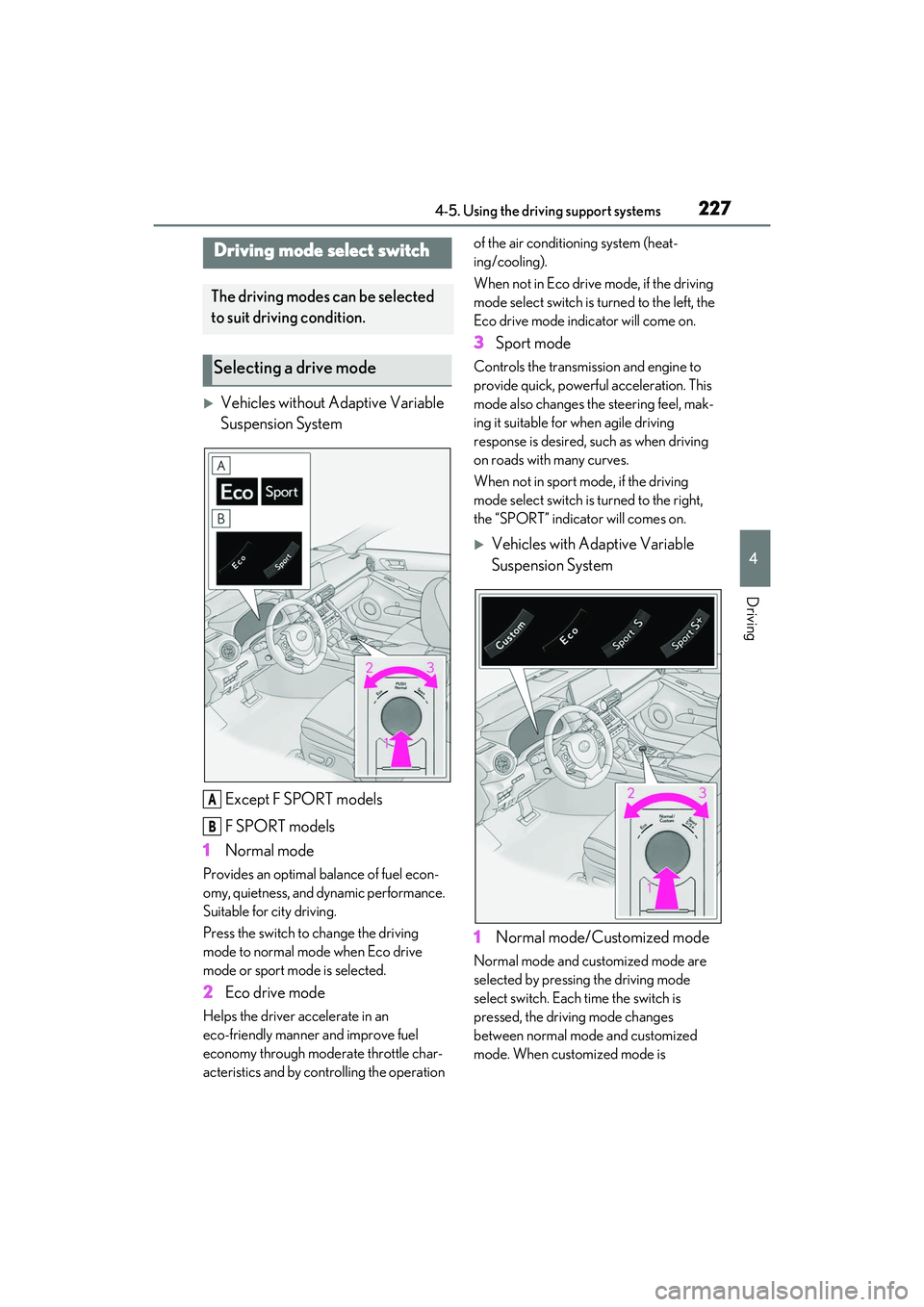
Vehicles without Adaptive Variable
Suspension SystemExcept F SPORT models
F SPORT models
1 Normal mode
Provides an optimal balance of fuel econ-
omy, quietness, and dynamic performance.
Suitable for city driving.
Press the switch to change the driving
mode to normal mode when Eco drive
mode or sport mode is selected.
2 Eco drive mode
Helps the driver accelerate in an
eco-friendly manner and improve fuel
economy through modera te throttle char-
acteristics and by controlling the operation of the air conditioning system (heat-
ing/cooling).
When not in Eco drive mode, if the driving
mode select switch is turned to the left, the
Eco drive mode indicator will come on.
3
Sport mode
Controls the transmission and engine to
provide quick, powerful acceleration. This
mode also changes the steering feel, mak-
ing it suitable for when agile driving
response is desired, such as when driving
on roads with many curves.
When not in sport mode, if the driving
mode select switch is turned to the right,
the “SPORT” indicator will comes on.
Vehicles with Adaptive Variable
Suspension System
1 Normal mode/Customized mode
Normal mode and customized mode are
selected by pressing the driving mode
select switch. Each time the switch is
pressed, the driving mode changes
between normal mode and customized
mode. When customized mode is
Driving mode select switch
The driving modes can be selected
to suit driving condition.
Selecting a drive mode
A
B
Page 230 of 440
2284-5. Using the driving support systems
selected, the “Customize” indicator will be
illuminated.
When Eco drive mode or sport mode is
selected, pressing the switch changes the
driving mode to normal mode.
•Normal mode
Provides an optimal balance of fuel econ-
omy, quietness, and dynamic performance.
Suitable for city driving.
• Customized mode
Allows you to drive with the following func-
tions set to your preferred settings. Cus-
tomized mode settings can only be
changed on the drive mode customization
display of the Center Display. ( P.240)
2Eco drive mode
Helps the driver accelerate in an
eco-friendly manner and improve fuel
economy through modera te throttle char-
acteristics and by controlling the operation
of the air conditioning system (heat-
ing/cooling).
When not in Eco drive mode, if the driving
mode select switch is turned to the left, the
Eco drive mode indicator will come on.
3 Sport mode
•SPORT S mode
Controls the transmission and engine to
provide quick, powerful acceleration. This
mode is suitable for when agile driving response is desired,
such as when driving
on roads with many curves.
When not in SPORT S mode, if the driving
mode select switch is turned to the right,
the “SPORT S” indicator will come on.
• SPORT S+ mode
Helps to ensure stee ring performance and
driving stability by simultaneously con-
trolling the steering and suspension in
addition to the transmission and engine.
Suitable for sportier driving.
When in SPORT S mode, if the driving
mode select switch is turned to the right,
the “SPORT S+” indicator will come on.
■Operation of the air conditioning sys-
tem in Eco drive mode
Eco drive mode controls the heating/cool-
ing operations and fan speed of the air con-
ditioning system to enhance fuel efficiency.
To improve air condit ioning performance,
adjust the fan speed or turn off Eco drive
mode.
■Automatic deactivation of sport mode
and customized mode
If the engine switch is turned off after driv-
ing in sport mode or customized mode, the
drive mode will be changed to normal
mode.
■Driving mode pop-up display (10.3-inch
display only)
When the driving mode is changed, the
selected driving mode will be temporarily
displayed on the side display. ( P.241)
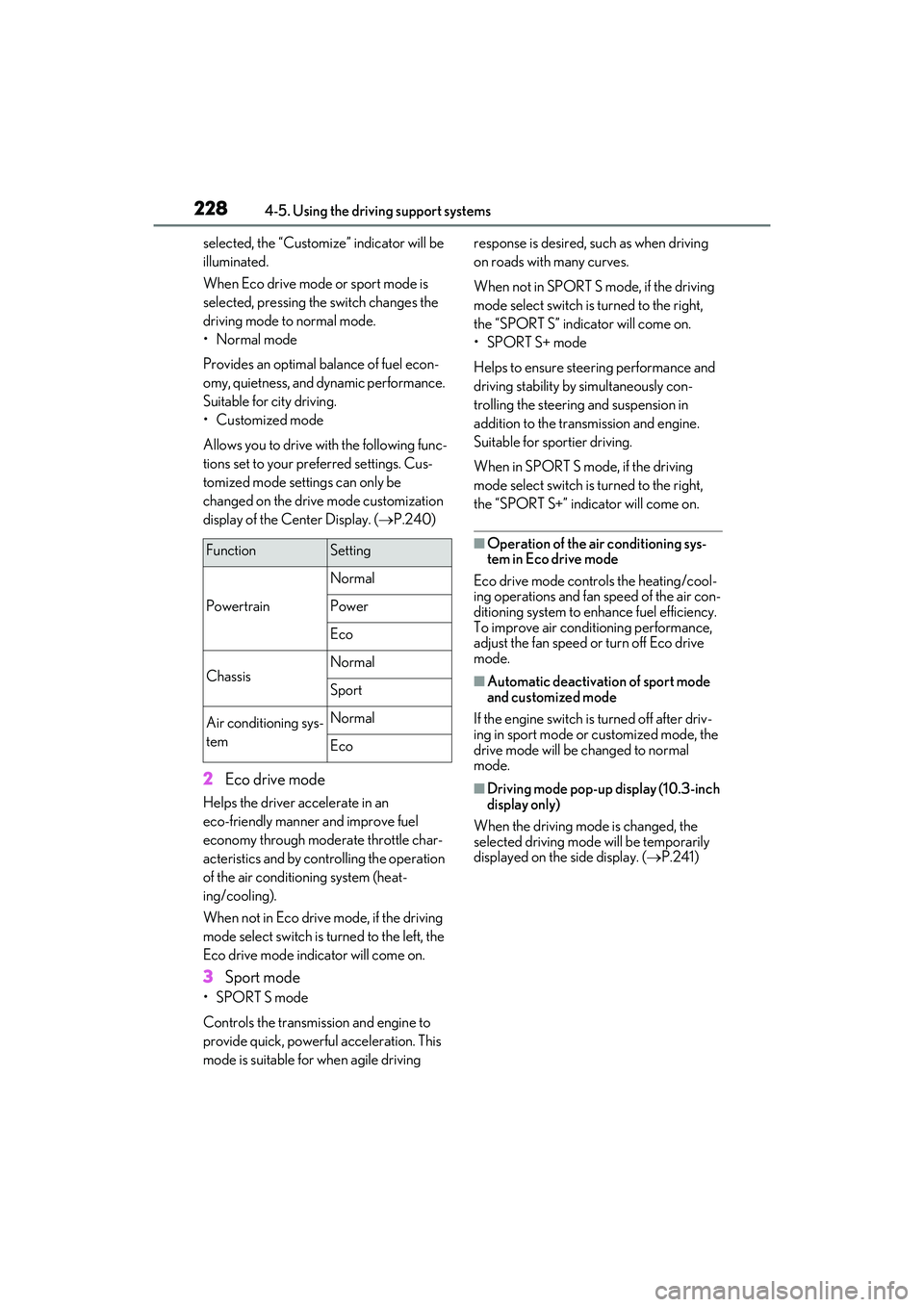
FunctionSetting
Powertrain
Normal
Power
Eco
ChassisNormal
Sport
Air conditioning sys-
temNormal
Eco
Page 231 of 440

2294-5. Using the driving support systems
4
Driving
■ABS (Anti-lock Brake System)
Helps to prevent wheel lock when the
brakes are applied suddenly, or if the
brakes are applied while driving on a
slippery road surface
■Brake assist
Generates an increased level of brak-
ing force after the brake pedal is
depressed when the system detects a
panic stop situation
■VSC (Vehicle Stability Control)
Helps the driver to control skidding
when swerving sudden ly or turning on
slippery road surfaces.
■Enhanced VSC (Enhanced Vehi-
cle Stability Control)
Provides cooperative control of the
ABS, TRAC, VSC and EPS.
Helps to maintain directional stability
when swerving on slippery road sur-
faces by controlling steering perfor-
mance.
■TRAC (Traction Control)
Helps to maintain drive power and pre-
vent the drive wheels from spinning
when starting the vehicle or accelerat-
ing on slippery roads
■Active Cornering Assist (ACA)
Helps to prevent the vehicle from drift-
ing to the outer side by performing
inner wheel brake control when
attempting to accele rate while turning
■Hill-start assist control
Helps to reduce the backward move-
ment of the vehicle when starting on an
uphill
■EPS (Electric Power Steering)
Employs an electric motor to reduce
the amount of effort needed to turn the
steering wheel.
■Adaptive Variable Suspension sys-
tem (if equipped)
Controls the damping force of the
shock absorber of each wheel accord-
ing to the road and driving conditions,
helping achieve a comfortable ride,
excellent driveability and a high level of
stability.
If SPORT S+ mode is selected using
the driving mode select switch, the
damping force will become more suit-
able for sporty driving. ( P.227)
■VDIM (Vehicle Dynamics Inte-
grated Management)
Provides integrated control of the
ABS, brake assist, TRAC, VSC,
hill-start assist control and EPS systems
Helps to maintain vehicle stability when
swerving on slippery road surfaces by
Driving assist systems
To keep driving safety and perfor-
mance, the following systems oper-
ate automatically in response to
various driving situations. Be aware,
however, that these systems are
supplementary and should not be
relied upon too heavily when oper-
ating the vehicle.
Summary of the driving assist
systems
Page 325 of 440
3237-2. Steps to take in an emergency
7
When trouble arises
7-2.Steps to take in an emergency
If your vehicle needs to be
towed
If towing is necessary, we recom-
mend having your vehicle towed by
your Lexus dealer or commercial
towing service, using a wheel-lift
type truck or flatbed truck.
Use a safety chain system for all
towing, and abide by all state/pro-
vincial and local laws.
If towing your vehicle with a
wheel-lift type truck from the front,
the vehicle’s rear wheels and axles
must be in good conditions.
( P.324)
If they are damaged, use a towing
dolly or flatbed truck.
WARNING
Observe the following precautions.
Failure to do so may result in death or
serious injury.
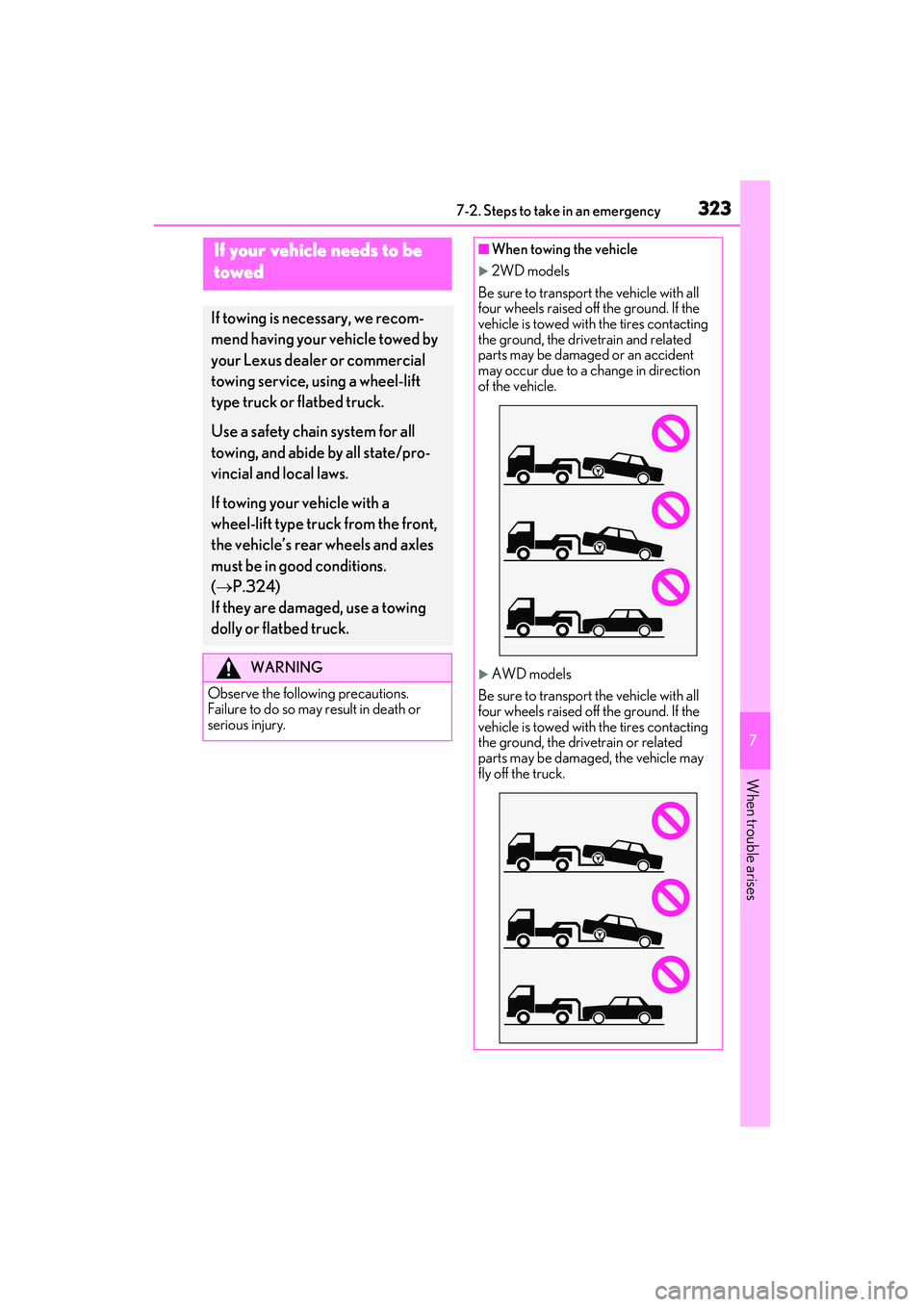
■When towing the vehicle
2WD models
Be sure to transport the vehicle with all
four wheels raised off the ground. If the
vehicle is towed with the tires contacting
the ground, the drivetrain and related
parts may be damaged or an accident
may occur due to a change in direction
of the vehicle.
AWD models
Be sure to transport the vehicle with all
four wheels raised off the ground. If the
vehicle is towed with the tires contacting
the ground, the drivetrain or related
parts may be damaged, the vehicle may
fly off the truck.
Page 392 of 440

3908-2. Customization
*1: For details about each function: P.81
*2: The default setting varies according to country.
*3:Except F SPORT models
*4: Some status screens cannot be registered (i ndicated on the multi-information display)
*5: F SPORT models
*6: IS350 AWD/IS350/IS300 AWD
*7:IS300
*8:IS500
■Door lock (P.90, 94, 351)
Rev peak*5OnOff—O—
Rear seat reminder functionOnOff—O—
FunctionDefault settingCustomized setting
Unlocking using a mechani-
cal key
Driver’s door
unlocked in one step, all doors
unlocked in two steps
All doors unlocked in one step——O
Automatic door lock
Shifting the shift
lever to position other than P
Off
O—OVehicle speed is
approximately 12
mph (20 km/h) or
higher
Automatic door unlockShifting the shift lever to POff
O—ODriver’s door is opened
Locking/unlocking of the
trunk when all doors are
locked/unlocked
OnOff——O
Function*1Default settingCustomized settingABC
ABC
Page 398 of 440
3968-2. Customization
■PKSB (Parking Support Brake)* ( P.216)
*:If equipped
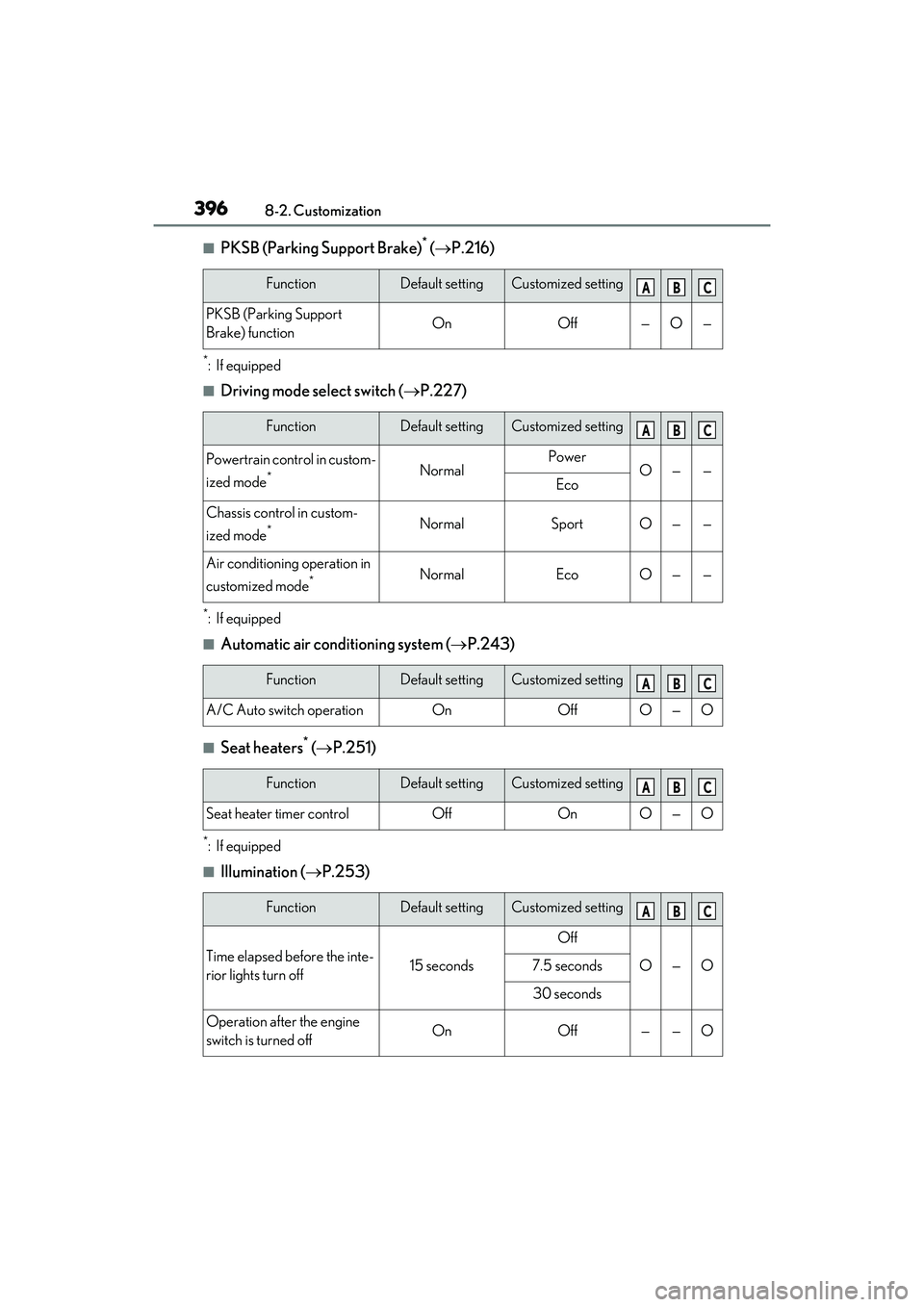
■Driving mode select switch ( P.227)
*:If equipped
■Automatic air conditioning system ( P.243)
■Seat heaters* ( P.251)
*:If equipped
■Illumination ( P.253)
FunctionDefault settingCustomized setting
PKSB (Parking Support
Brake) functionOnOff—O—
FunctionDefault settingCustomized setting
Powertrain control in custom-
ized mode
*NormalPowerO——Eco
Chassis control in custom-
ized mode
*NormalSportO——
Air conditioning operation in
customized mode
*NormalEcoO——
FunctionDefault settingCustomized setting
A/C Auto switch operationOnOffO—O
FunctionDefault settingCustomized setting
Seat heater timer controlOffOnO—O
FunctionDefault settingCustomized setting
Time elapsed before the inte-
rior lights turn off15 seconds
Off
O—O7.5 seconds
30 seconds
Operation after the engine
switch is turned offOnOff——O
ABC
ABC
ABC
ABC
ABC
Page 423 of 440
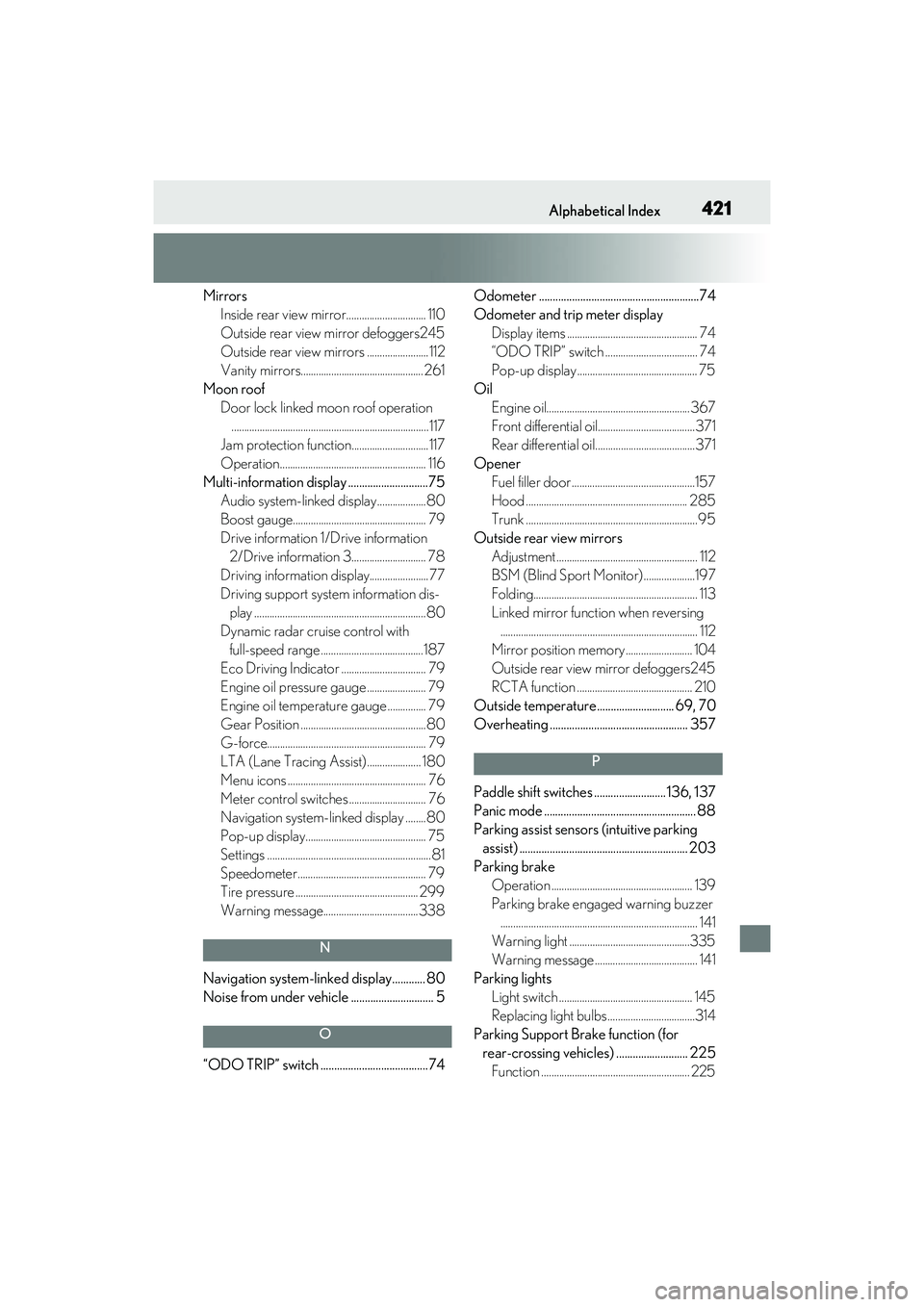
421Alphabetical Index
MirrorsInside rear view mirror............................... 110
Outside rear view mirror defoggers245
Outside rear view mirrors ........................112
Vanity mirrors................................................261
Moon roof Door lock linked moon roof operation.............................................................................117
Jam protection function..............................117
Operation......................................................... 116
Multi-information display .............................75 Audio system-linked display...................80
Boost gauge.................................................... 79
Drive information 1/Drive information 2/Drive information 3............................. 78
Driving information display....................... 77
Driving support syst em information dis-
play ...................................................................80
Dynamic radar cruise control with full-speed range ........................................187
Eco Driving Indicator ................................. 79
Engine oil pressure gauge ....................... 79
Engine oil temperature gauge ............... 79
Gear Position .................................................80
G-force.............................................................. 79
LTA (Lane Tracing Assist)..................... 180
Menu icons ...................................................... 76
Meter control switches .............................. 76
Navigation system-linked display ........80
Pop-up display............................................... 75
Settings ................................................................81
Speedometer.................................................. 79
Tire pressure ................................................ 299
Warning message.....................................338
N
Navigation system-linked display............ 80
Noise from under vehicle .............................. 5
O
“ODO TRIP” switch .......................................74 Odometer ..........................................................74
Odometer and trip meter display
Display items ................................................... 74
“ODO TRIP” switch .................................... 74
Pop-up display ............................................... 75
Oil Engine oil........................................................ 367
Front differential oil......................................371
Rear differential oil.......................................371
Opener Fuel filler door ................................................157
Hood ............................................................... 285
Trunk ...................................................................95
Outside rear view mirrors Adjustment ....................................................... 112
BSM (Blind Sport Monitor)....................197
Folding................................................................ 113
Linked mirror function when reversing............................................................................. 112
Mirror position memory .......................... 104
Outside rear view mirror defoggers245
RCTA function ............................................. 210
Outside temperature............................ 69, 70
Overheating .................................................. 357
P
Paddle shift switches .......................... 136, 137
Panic mode ....................................................... 88
Parking assist sensors (intuitive parking assist) ............................................................. 203
Parking brake Operation ....................................................... 139
Parking brake engaged warning buzzer............................................................................. 141
Warning light ...............................................335
Warning message ........................................ 141
Parking lights Light switch .................................................... 145
Replacing light bulbs ..................................314
Parking Support Brake function (for rear-crossing vehicles) .......................... 225 Function .......................................................... 225