air condition LEXUS IS350C 2013 Owners Manual
[x] Cancel search | Manufacturer: LEXUS, Model Year: 2013, Model line: IS350C, Model: LEXUS IS350C 2013Pages: 624, PDF Size: 6.58 MB
Page 1 of 624

TABLE OF CONTENTS
1
1Before drivingAdjusting and operating features such as door locks, mir-
rors, and steering column.
2When drivingDriving, stopping and safe-driving information.
3Interior featuresAir conditioning and audio systems, as well as other interior
features for a comfortable driving experience.
4Maintenance
and careCleaning and protecting your vehicle, performing do-it-your-
self maintenance, and maintenance information.
5When trouble
arisesWhat to do if the vehicle needs to be towed, gets a flat tire,
or is involved in an accident.
6Vehicle
specificationsDetailed vehicle information.
7For ownersReporting safety defects for US owners, and seat belt, SRS
airbag and headlight aim inst ructions for Canadian owners
IndexAlphabetical listing of informat ion contained in this manual.
Page 2 of 624
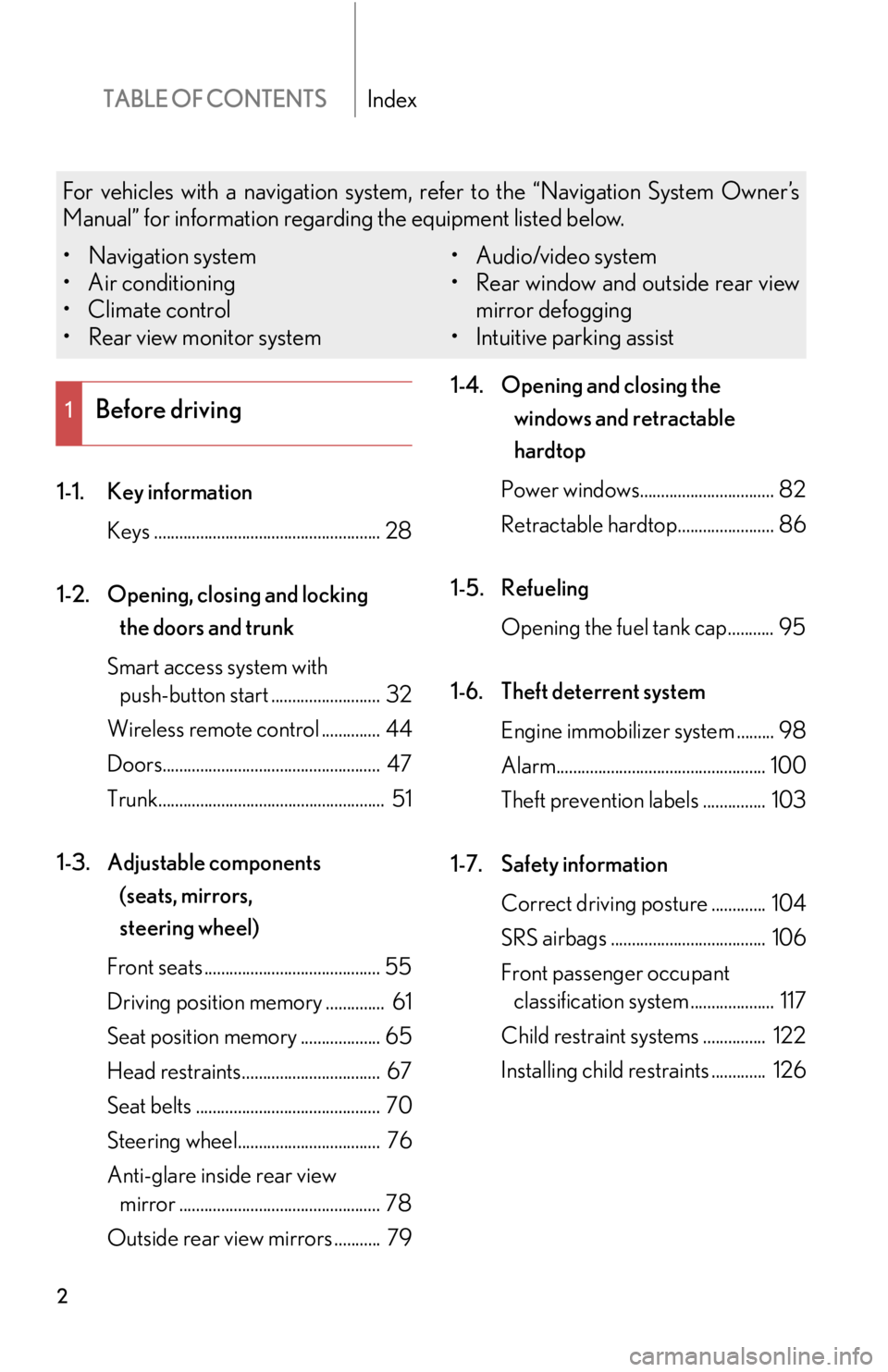
TABLE OF CONTENTSIndex
2
1-1. Key informationKeys ...................................................... 28
1-2. Opening, closing and locking the doors and trunk
Smart access system with push-button start .......................... 32
Wireless remote control .............. 44
Doors.................................................... 47
Trunk...................................................... 51
1-3. Adjustable components (seats, mirrors,
steering wheel)
Front seats .......................................... 55
Driving position memory .............. 61
Seat position memory ................... 65
Head restraints................................. 67
Seat belts ............................................ 70
Steering wheel.................................. 76
Anti-glare inside rear view mirror ................................................ 78
Outside rear view mirrors ........... 79 1-4. Opening and closing the
windows and retractable
hardtop
Power windows................................ 82
Retractable hardtop....................... 86
1-5. Refueling Opening the fuel tank cap........... 95
1-6. Theft deterrent system Engine immobilizer system ......... 98
Alarm.................................................. 100
Theft prevention labels ............... 103
1-7. Safety information Correct driving posture ............. 104
SRS airbags ..................................... 106
Front passenger occupant classification system .................... 117
Child restraint sy stems ............... 122
Installing child restraints ............. 126
1Before driving
For vehicles with a navigation system, refer to the “Navigation System Owner’s
Manual” for information regarding the equipment listed below.
• Navigation system
• Air conditioning
• Climate control
• Rear view monitor system • Audio/video system
• Rear window and outside rear view
mirror defogging
• Intuitive parking assist
Page 4 of 624

TABLE OF CONTENTSIndex
4
3-1. Using the air conditioning system and defogger
Automatic air conditioning system ............................................ 242
Rear window and outside rear view
mirror defoggers ........................ 251
Windshield wiper de-icer ......... 252
3-2. Using the audio system Audio system type ....................... 253
Using the radio .............................. 256
Using the CD player ................... 264
Playing back MP3 and WMA discs ................................... 271
Operating an iPod ....................... 279
Operating a USB memory....... 287
Optimal use of the audio system ............................................ 296
Using the AUX port................... 298
Using the steering wheel audio switches ........................... 300 3-3. Using the Bluetooth
®
audio system
Bluetooth
® audio system ........ 303
Using the Bluetooth
® audio
system ........................................... 306
Operating a Bluetooth
®
enabled portable player ............ 311
Setting up a Bluetooth
®
enabled portable player .......... 315
Bluetooth
® audio system
setup ................................................ 321
3-4. Using the hands-free phone system (for mobile phones)
Hands-free system for mobile phones ............................ 322
Using the hands-free system (for mobile phones) .................. 326
Making a phone call.................... 334
Setting a mobile phone ............. 338
Security and system setup ........ 343
Using the phone book................ 347
3-5. Using the interior lights Interior lights list........................... 353
• Interior light ................................. 354
• Personal lights ............................ 354
3Interior features
Page 5 of 624

1
2
3
4
5
6
7
5
3-6. Using the storage featuresList of storage fe atures.............. 355
• Glove box .................................... 356
• Console box ................................ 357
• Cup holders................................ 358
• Auxiliary box ................................ 361
3-7. Other interior features Sun visors......................................... 362
Vanity mirror .................................. 363
Clock ................................................. 364
Satellite switch es .......................... 365
Ashtrays .......................................... 368
Cigarette lighter ........................... 369
Power outlet ................................... 370
Seat heaters and ventilators ..... 371
Floor mat.......................................... 373
Trunk features................................ 374
Garage door opener.................. 377
Compass......................................... 383
Safety Connect ............................. 387 4-1. Maintenance and care
Cleaning and protecting the vehicle exterior................... 396
Cleaning and protecting the vehicle interior ..................... 401
4-2. Maintenance Maintenance requirements ..... 404
General maintena nce ................ 406
Emission inspection and maintenance (I/M)
programs ...................................... 409
4-3. Do-it-yourself maintenance Do-it-yourself service precautions ................................... 410
Hood .................................................. 413
Positioning a floor jack................ 414
Engine compartment................... 416
Tires .................................................... 431
Tire inflation pressure.................. 441
Wheels ............................................. 445
Air conditioning filter.................. 447
Electronic key battery ................ 449
Checking and replacing fuses ................................................. 451
Headlight aim ................................ 466
Light bulbs ....................................... 468
4Maintenance and care
Page 15 of 624
15
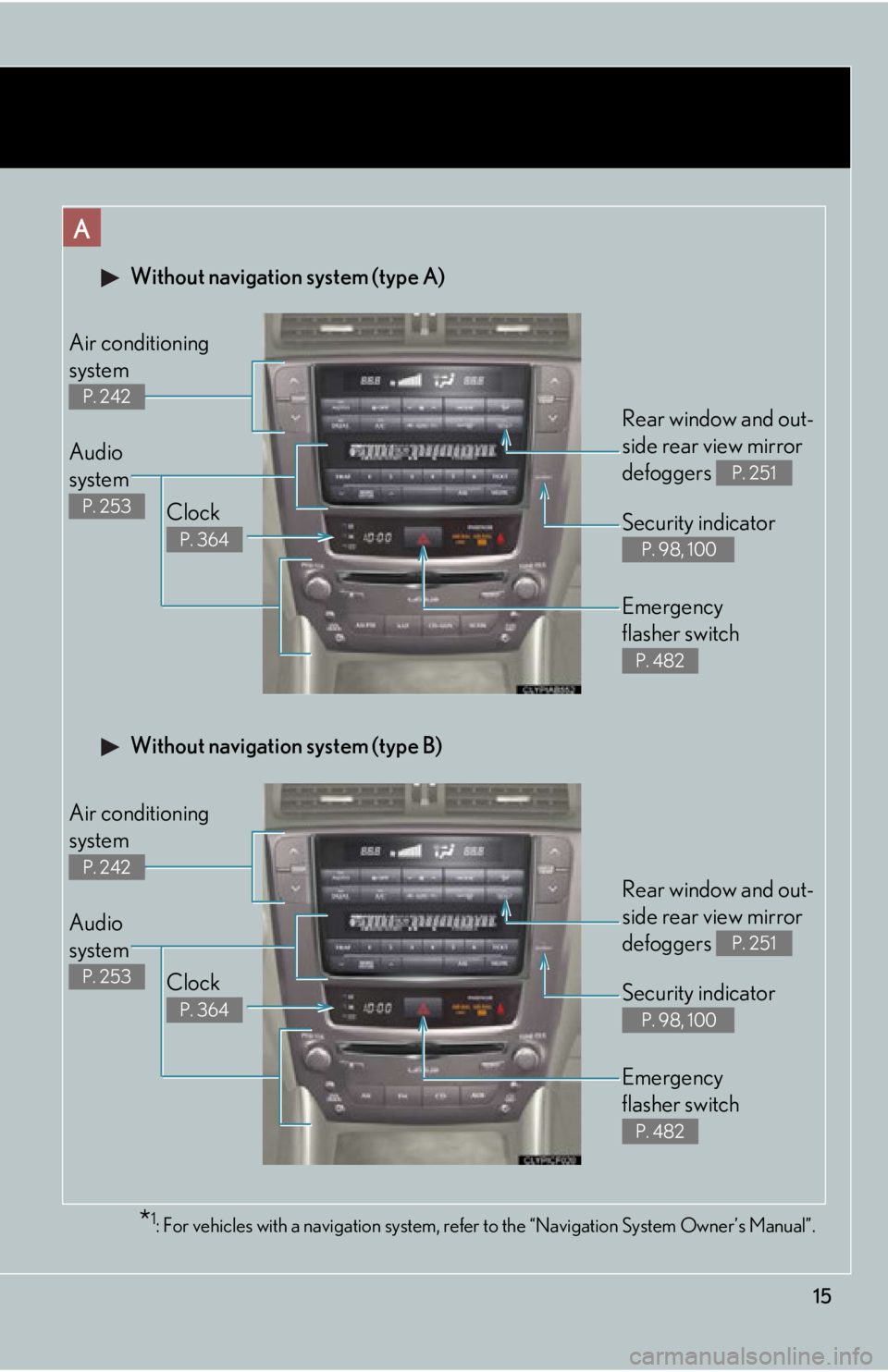
Without navigation system (type A)
Clock
P. 364
Audio
system
P. 253
Air conditioning
system
P. 242
Rear window and out-
side rear view mirror
defoggers
P. 251
Security indicator
P. 98, 100
Emergency
flasher switch
P. 482
*1: For vehicles with a navigation system, refer to the “Navigation System Owner’s Manual”.
A
Clock
P. 364
Audio
system
P. 253
Air conditioning
system
P. 242
Rear window and out-
side rear view mirror
defoggers
P. 251
Security indicator
P. 98, 100
Emergency
flasher switch
P. 482
Without navigation system (type B)
Page 16 of 624
16
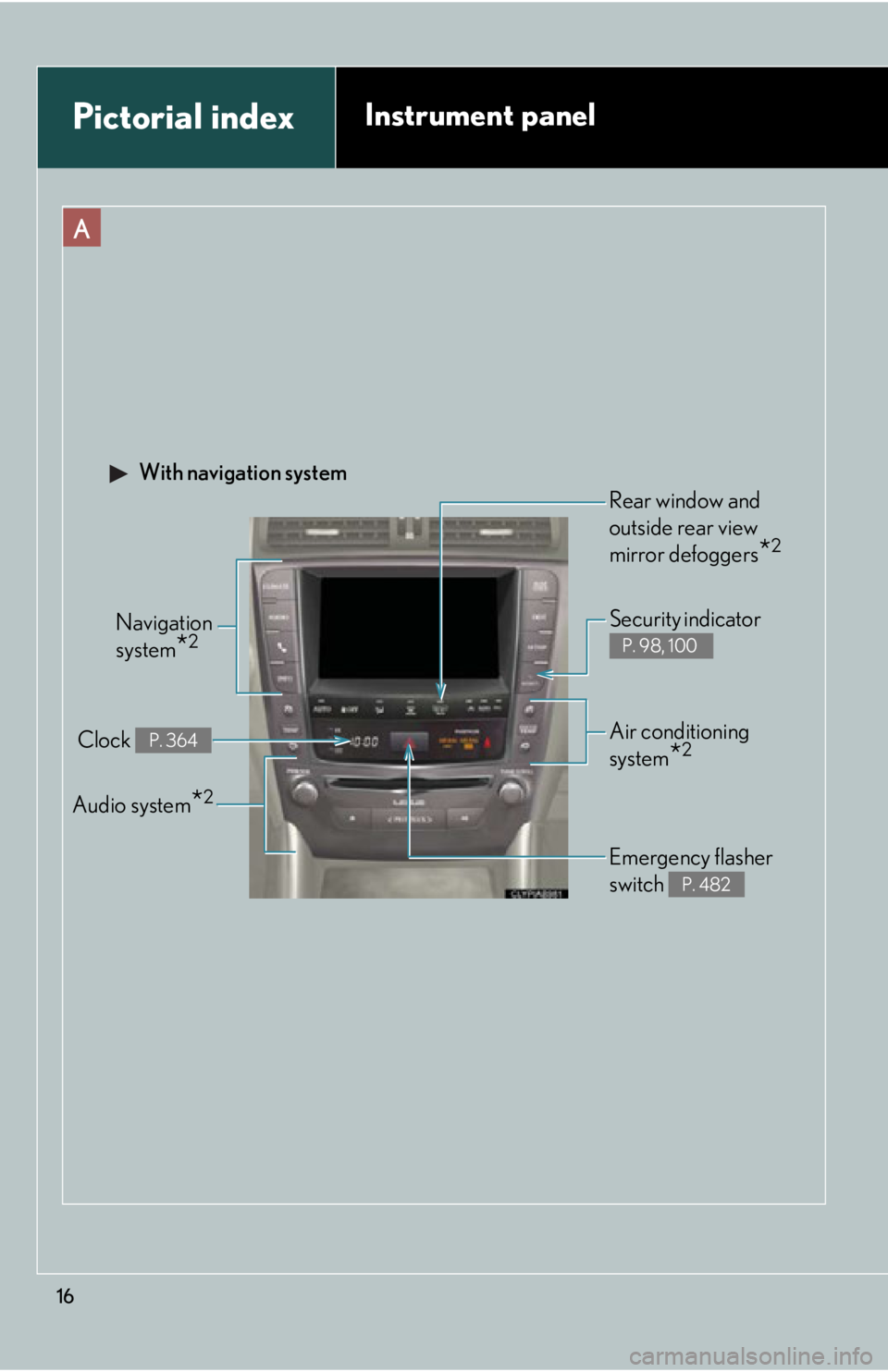
Pictorial indexInstrument panel
A
Navigation
system
*2
Clock P. 364
Audio system*2
Security indicator
P. 98, 100
Emergency flasher
switch
P. 482
Air conditioning
system
*2
With navigation system
Rear window and
outside rear view
mirror defoggers
*2
Page 22 of 624

22
Event data recorder
This vehicle is equipped with an event data recorder (EDR). The main purpose of an
EDR is to record, in certain crash or near crash-like situations, such as an air bag
deployment or hitting a road obstacle, data that will assist in understanding how a
vehicle’s systems performed. The EDR is desi gned to record data related to vehicle
dynamics and safety systems for a short peri od of time, typically 30 seconds or less.
The EDR in this vehicle is designed to record such data as:
• How various systems in your vehicle were operating;
• Whether or not the driver and passenge r safety belts were buckled/fastened;
• How far (if at all) the driver was depressing the accelerator and/or brake pedal;
and,
• How fast the vehicle was traveling.
These data can help provide a better understanding of the circumstances in which
crashes and injuries occur.
NOTE: EDR data are recorded by your vehicle only if a non-trivial crash situation
occurs; no data are recorded by the EDR under normal driving conditions and no
personal data (e.g., name, gender, age, and crash location) are recorded. However,
other parties, such as law enforcement, could combine the EDR data with the type
of personally identifying data routinel y acquired during a crash investigation.
To read data recorded by an EDR, special equipment is required, and access to the
vehicle or the EDR is needed. In addition to the vehicle manufacturer, other parties,
such as law enforcement, that have the special equipment, can read the information
if they have access to the vehicle or the EDR.
Page 36 of 624

36
1-2. Opening, closing and locking the doors and trunk
■Operation signals
A buzzer sounds and the emergency flashers flash to indicate that the doors have
been locked/unlocked. (Locked: Once; Unlocked: Twice)
■Conditions affecting operation
The smart access system with push-button start uses weak radio waves. In the fol-
lowing situations, the communication betw een the electronic key and the vehicle
may be affected, preventing the smart access system with push-button start from
operating properly:
(Ways of coping: P. 5 2 8 )
●When the electronic key battery is depleted
●Near a TV tower, electric power plant, gas station, radio station, large display,
airport or other facility that generates strong radio waves or electrical noise
●When carrying a portable radio, cellular phone, cordless phone or other wire-
less communication devices
●When the electronic key is in contact wi th, or is covered by the following metal-
lic objects
• Cards to which aluminum foil is attached
• Cigarette boxes that have aluminum foil inside
• Metallic wallets or bags
•Coins
• Hand warmers made of metal
• Media such as CDs and DVDs
●When multiple electronic keys are in the vicinity
●When another wireless key (that emits radio waves) is being used nearby
●When carrying or using the electronic key together with the following devices
that emit radio waves
• Another vehicle's electronic key or a wireless key that emits radio waves
• Personal computer or personal digital assistant (PDA)
• Digital audio player
• Portable game system
●If window tint with a metallic content or metallic objects are attached to the rear
window
●Immediately after the retractable hardtop is opened or closed
Page 108 of 624

108
1-7. Safety information
■SRS warning light
This warning light system monitors the airbag sensor assembly, front airbag sensors,
side airbag sensor assemblies , driver's seat position sensor, driver's seat belt buckle
switch, front passenger occupant classifi cation system (ECU and sensors), “AIR
BAG ON” indicator light, “AIR BAG OFF” indicator light, front passenger’s seat
belt buckle switch, seat belt pretensioner assemblies, airbags, interconnecting wir-
ing and power sources. ( P. 4 9 2 )
■If the SRS airbags deploy (inflate)
●Bruising and slight abrasion s may result from contact with a deploying (inflating)
SRS airbag.
●A loud noise and white powder will be emitted.
●Parts of the airbag module (steering wheel , airbag cover and inflator) as well as
the front seats may be hot for several minu tes. The airbag itself may also be hot.
●The windshield may crack.
●For Safety Connect subscribers, if the SRS airbags deploy or in the event of a
severe rear-end collision, the system is designed to send an emergency call to
the response center, notifying them of the vehicle’s location (without needing to
push the “SOS” button) and an agent will attempt to speak with the occupants
to ascertain the level of emergency and assistance required. If the occupants
are unable to communicate, the agent automatically treats the call as an emer-
gency and helps to dispatch the necessary emergency services. ( P. 3 8 7 )
■SRS airbag deployment conditions (SRS front airbags)
●The SRS front airbags will deploy in the event of an impact that exceeds the
set threshold level (the level of force corresponding to an approximately 12 -
18 mph [20 - 30 km/h] frontal collision wi th a fixed wall that does not move or
deform).
However, this threshold velocity will be considerably higher if the vehicle strikes
an object, such as a parked vehicle or sign pole, which can move or deform on
impact, or if the vehicle is involved in an underride collision (e.g. a collision in
which the front of the vehicle “underrides”, or goes under, the bed of a truck, etc.).
Page 109 of 624

109
1-7. Safety information
1
Before driving
●Depending on the type of collision, it is possible that only the seat belt preten-
sioners will activate.
●The SRS front airbags for the front passenger will not activate if there is no pas-
senger sitting in the front passenger seat. However, the SRS front airbags for the
front passenger may deploy if luggage is put in the seat, even if the seat is unoc-
cupied. ( P. 1 1 7 )
■SRS airbag deployment conditions (SRS side airbags)
The SRS side airbags will deploy in the event of an impact that exceeds the set
threshold level (the level of force corresponding to the impact force produced by
an approximately 3300 lb. [1500 kg] vehicle colliding with the vehicle cabin from
a direction perpendicular to the vehicle orientation at an approximate speed of 12 -
18 mph [20 - 30 km/h]).
■Conditions under which the SRS airbags may deploy (inflate), other than a colli-
sion
The SRS front airbags may also deploy if a serious impact occurs to the underside of
your vehicle. Some examples are shown in the illustration.
●Hitting a curb, edge of pavement or hard
surface
●Falling into or jumping over a deep hole
●Landing hard or vehicle falling