lights LEXUS IS350C 2013 Owners Manual
[x] Cancel search | Manufacturer: LEXUS, Model Year: 2013, Model line: IS350C, Model: LEXUS IS350C 2013Pages: 624, PDF Size: 6.58 MB
Page 3 of 624

1
2
3
4
5
6
7
3
2-1. Driving proceduresDriving the vehicle ........................ 138
Engine (ignition) switch .............. 147
Automatic transmission................ 151
Turn signal lever ............................ 158
Parking brake ................................. 159
Horn.................................................... 160
2-2. Instrument cluster Gauges and meters ....................... 161
Indicators and warning lights................................................. 167
Multi-information display............. 171
2-3. Operating the lights and windshield wipers
Headlight switch ............................ 176
Fog light switch .............................. 180
Windshield wipers and washer............................................. 182
Headlight cleaner switch ........... 189 2-4. Using other driving systems
Cruise control ................................ 190
Dynamic radar cruise control............................................. 194
Intuitive parking assist ............... 208
Driving assist systems.................. 214
Hill-start assist control ............... 220
PCS (Pre-Collision System) ........... 222
2-5. Driving information Cargo and luggage ..................... 229
Vehicle load limits ........................ 232
Winter driving tips ....................... 233
Trailer towing ................................. 237
Dinghy towing ............................... 238
2When driving
Page 4 of 624

TABLE OF CONTENTSIndex
4
3-1. Using the air conditioning system and defogger
Automatic air conditioning system ............................................ 242
Rear window and outside rear view
mirror defoggers ........................ 251
Windshield wiper de-icer ......... 252
3-2. Using the audio system Audio system type ....................... 253
Using the radio .............................. 256
Using the CD player ................... 264
Playing back MP3 and WMA discs ................................... 271
Operating an iPod ....................... 279
Operating a USB memory....... 287
Optimal use of the audio system ............................................ 296
Using the AUX port................... 298
Using the steering wheel audio switches ........................... 300 3-3. Using the Bluetooth
®
audio system
Bluetooth
® audio system ........ 303
Using the Bluetooth
® audio
system ........................................... 306
Operating a Bluetooth
®
enabled portable player ............ 311
Setting up a Bluetooth
®
enabled portable player .......... 315
Bluetooth
® audio system
setup ................................................ 321
3-4. Using the hands-free phone system (for mobile phones)
Hands-free system for mobile phones ............................ 322
Using the hands-free system (for mobile phones) .................. 326
Making a phone call.................... 334
Setting a mobile phone ............. 338
Security and system setup ........ 343
Using the phone book................ 347
3-5. Using the interior lights Interior lights list........................... 353
• Interior light ................................. 354
• Personal lights ............................ 354
3Interior features
Page 8 of 624
8
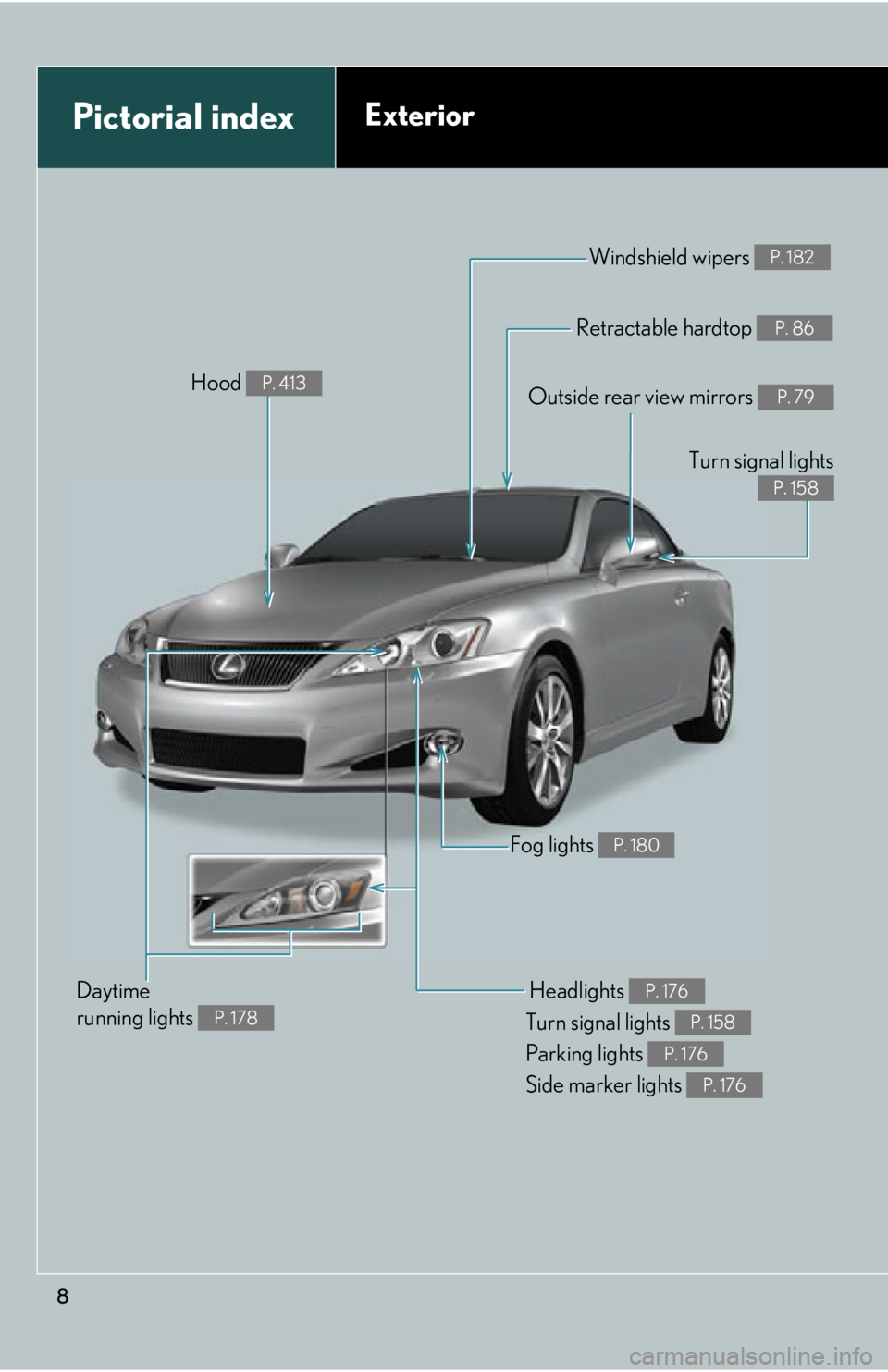
Pictorial indexExterior
Fog lights P. 180
Headlights
Turn signal lights
Parking lights
Side marker lights P. 176
P. 158
P. 176
P. 176
Windshield wipers P. 182
Retractable hardtop P. 86
Outside rear view mirrors P. 79
Turn signal lights
P. 158
Daytime
running lights
P. 178
Hood P. 413
Page 9 of 624
9
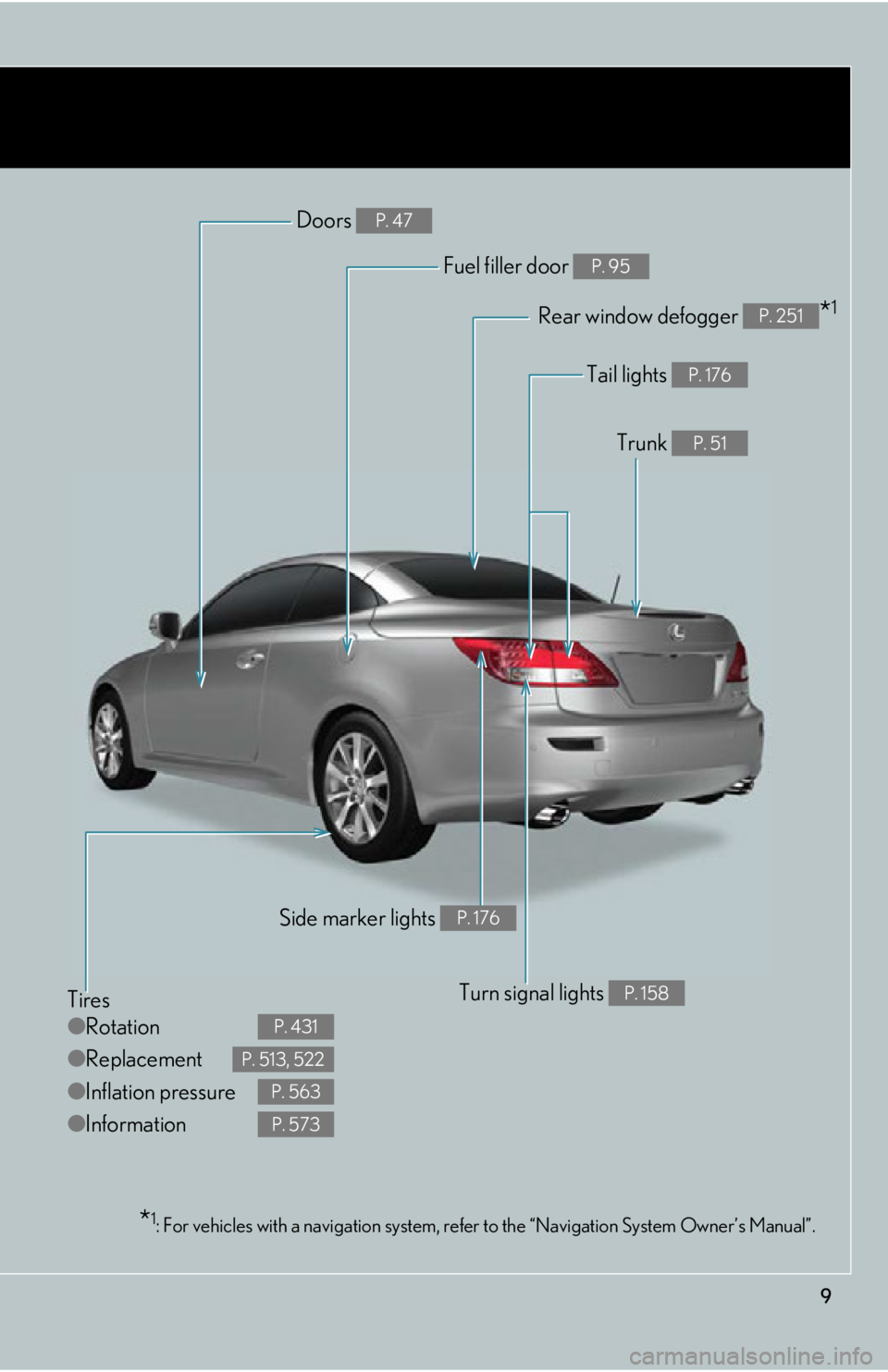
Tires
●Rotation
● Replacement
● Inflation pressure
● Information
P. 431
P. 513, 522
P. 563
P. 573
Tail lights P. 176
Trunk P. 51
Rear window defogger *1P. 251
Doors P. 47
Fuel filler door P. 95
Turn signal lights P. 158
Side marker lights P. 176
*1: For vehicles with a navigation system, refe r to the “Navigation System Owner’s Manual”.
Page 11 of 624
11
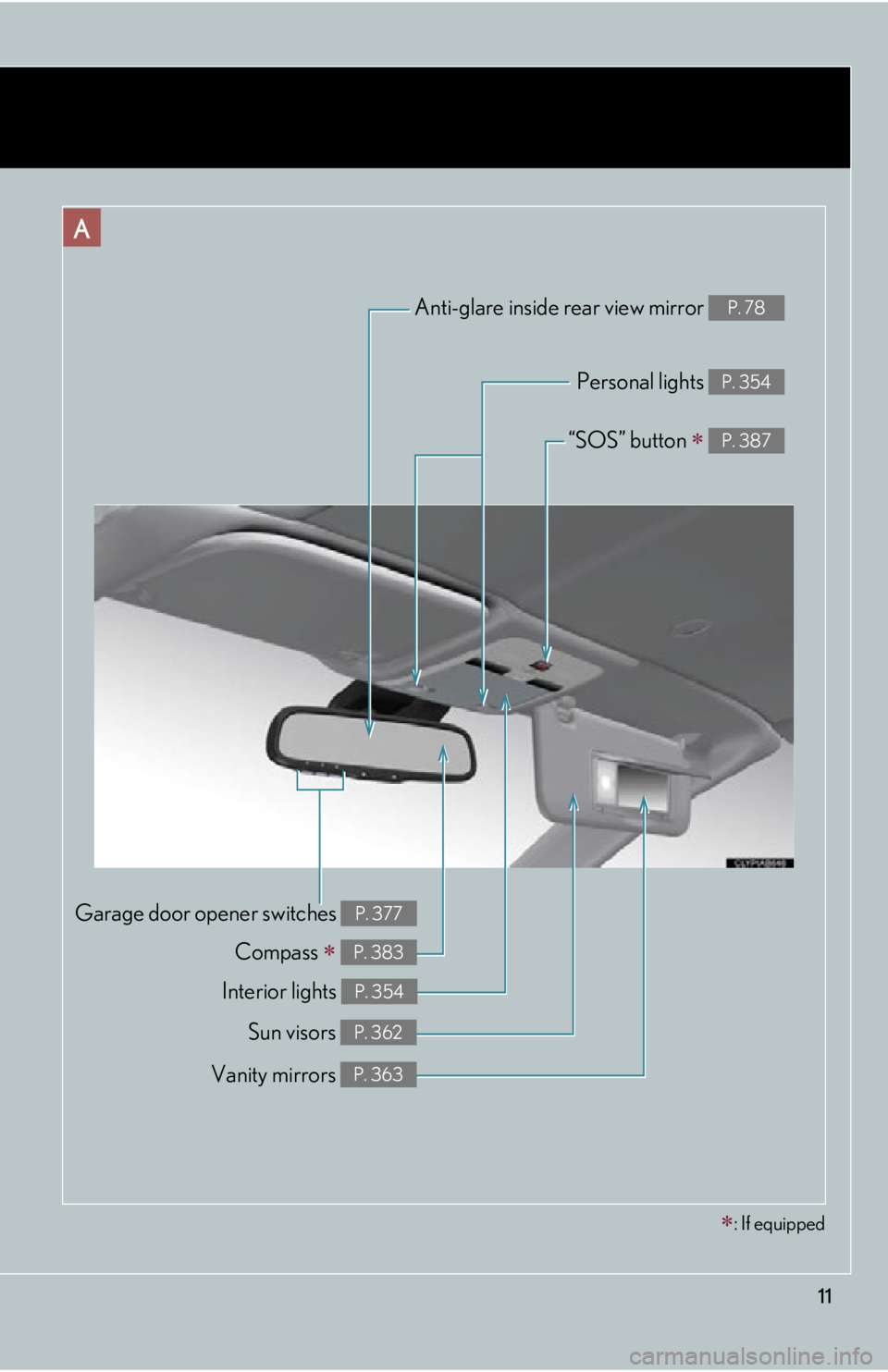
Compass P. 383
Garage door opener switches P. 377
Anti-glare inside rear view mirror P. 78
Personal lights P. 354
Interior lights P. 354
Vanity mirrors P. 363
Sun visors P. 362
A
“SOS” button P. 387
: If equipped
Page 45 of 624
45
1-2. Opening, closing and locking the doors and trunk
1
Before driving
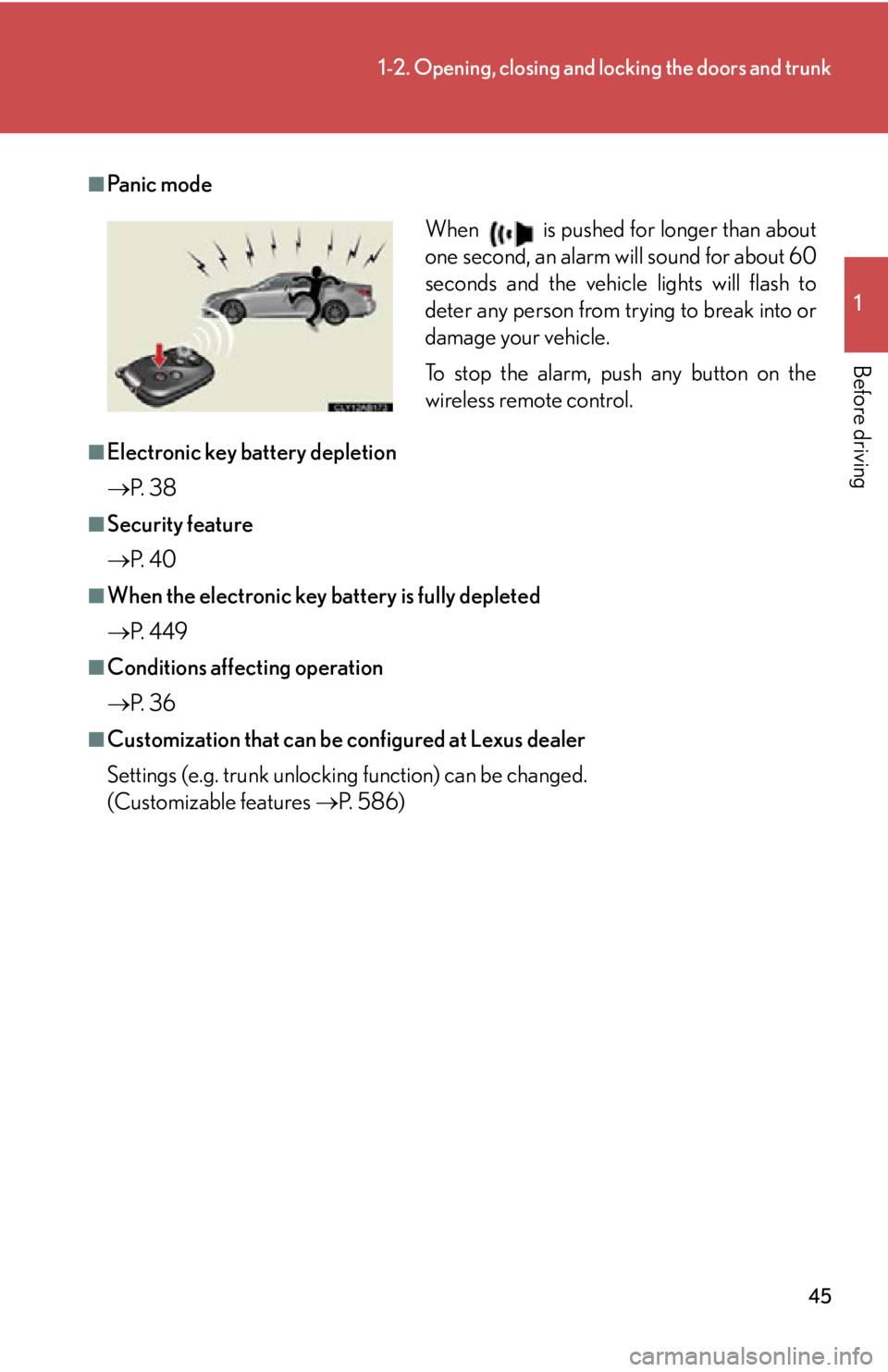
■Pa n i c m o d e
■Electronic key battery depletion
P. 3 8
■Security feature
P. 4 0
■When the electronic key battery is fully depleted
P. 4 4 9
■Conditions affecting operation
P. 3 6
■Customization that can be configured at Lexus dealer
Settings (e.g. trunk unlocking function) can be changed.
(Customizable features P. 5 8 6 )
When is pushed for longer than about
one second, an alarm will sound for about 60
seconds and the vehicle lights will flash to
deter any person from trying to break into or
damage your vehicle.
To stop the alarm, push any button on the
wireless remote control.
Page 78 of 624

78
1-3. Adjustable components (seats, mirrors, steering wheel)
Anti-glare inside rear view mirror
■To prevent sensor error
CAUTION
■Caution while driving
Do not adjust the position of the mirror while driving.
Doing so may lead to mishandling of the vehicle and an accident, resulting in death
or serious injury.
In automatic mode, sensors are used to detect the headlights of vehicles
behind and automatically reduce the reflected light.
Turns automatic mode on/off
The indicator comes on when
automatic mode is turned on.
The anti-glare mirror default
mode is automatic. The anti-
glare mirror is automatically set
to automatic whenever the
“ENGINE START STOP” switch
is turned to IGNITION ON
mode.
To ensure that the sensors operate properly,
do not touch or cover them.
Page 100 of 624
100
1-6. Theft deterrent system
Alarm
The system sounds the alarm and flashes the lights when forcible entry is
detected.
■ Triggering of the alarm
The alarm is triggered in the following situations when the alarm is
set.
●A locked door or trunk is unlocked or opened in any way other
than using the entry function, wi reless remote door lock function
or mechanical key.
● The hood is opened.
■ Setting the alarm system
If the retractable hardtop is
open, close it.
Close the doors, trunk and
hood, and lock both side doors.
The system will be set automati-
cally after 30 seconds.
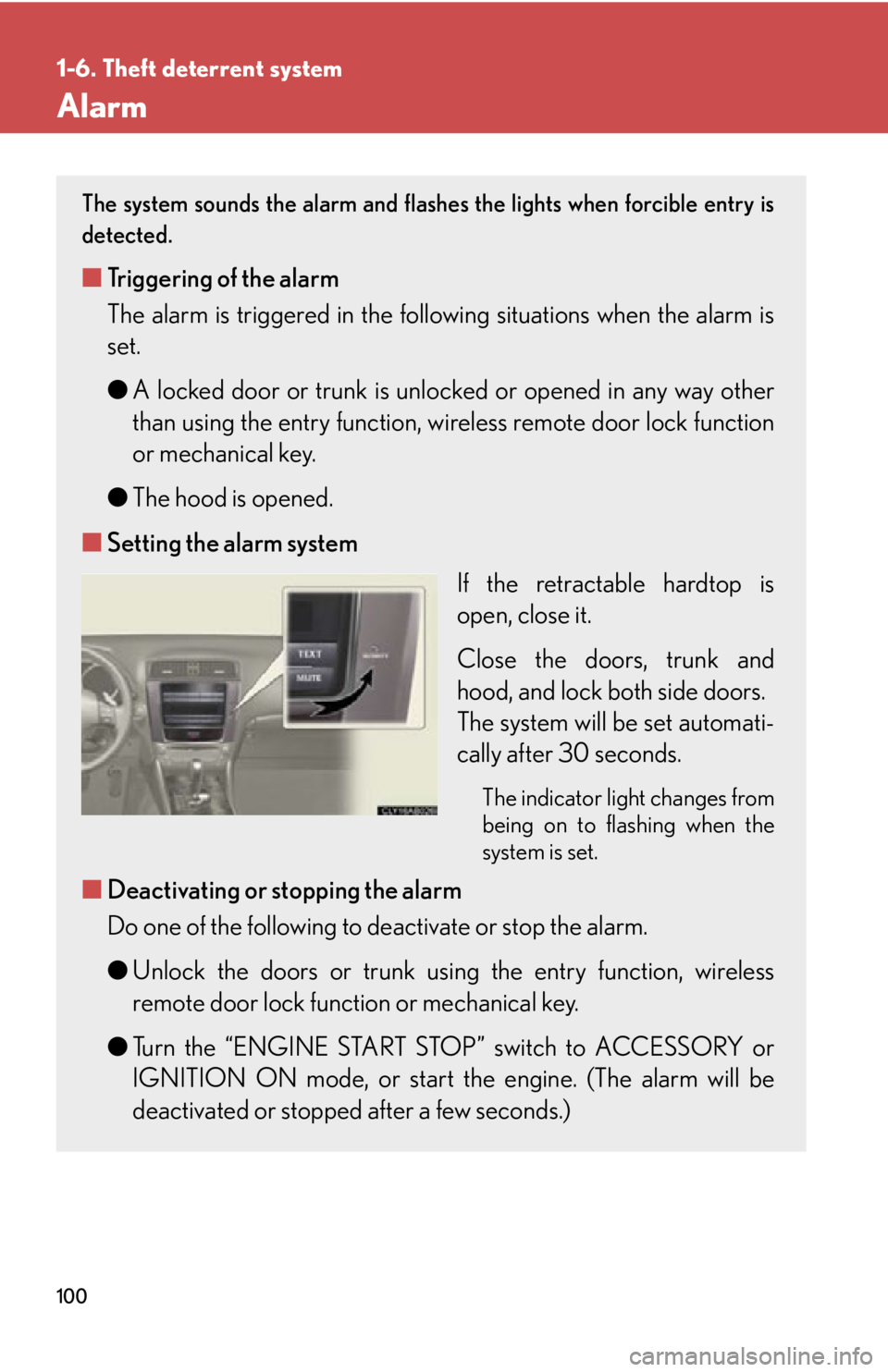
The indicator light changes from
being on to flashing when the
system is set.
■Deactivating or stopping the alarm
Do one of the following to deactivate or stop the alarm.
●Unlock the doors or trunk using the entry function, wireless
remote door lock function or mechanical key.
● Turn the “ENGINE START STOP” switch to ACCESSORY or
IGNITION ON mode, or start the engine. (The alarm will be
deactivated or stopped after a few seconds.)
Page 107 of 624
107
1-7. Safety information
1
Before driving
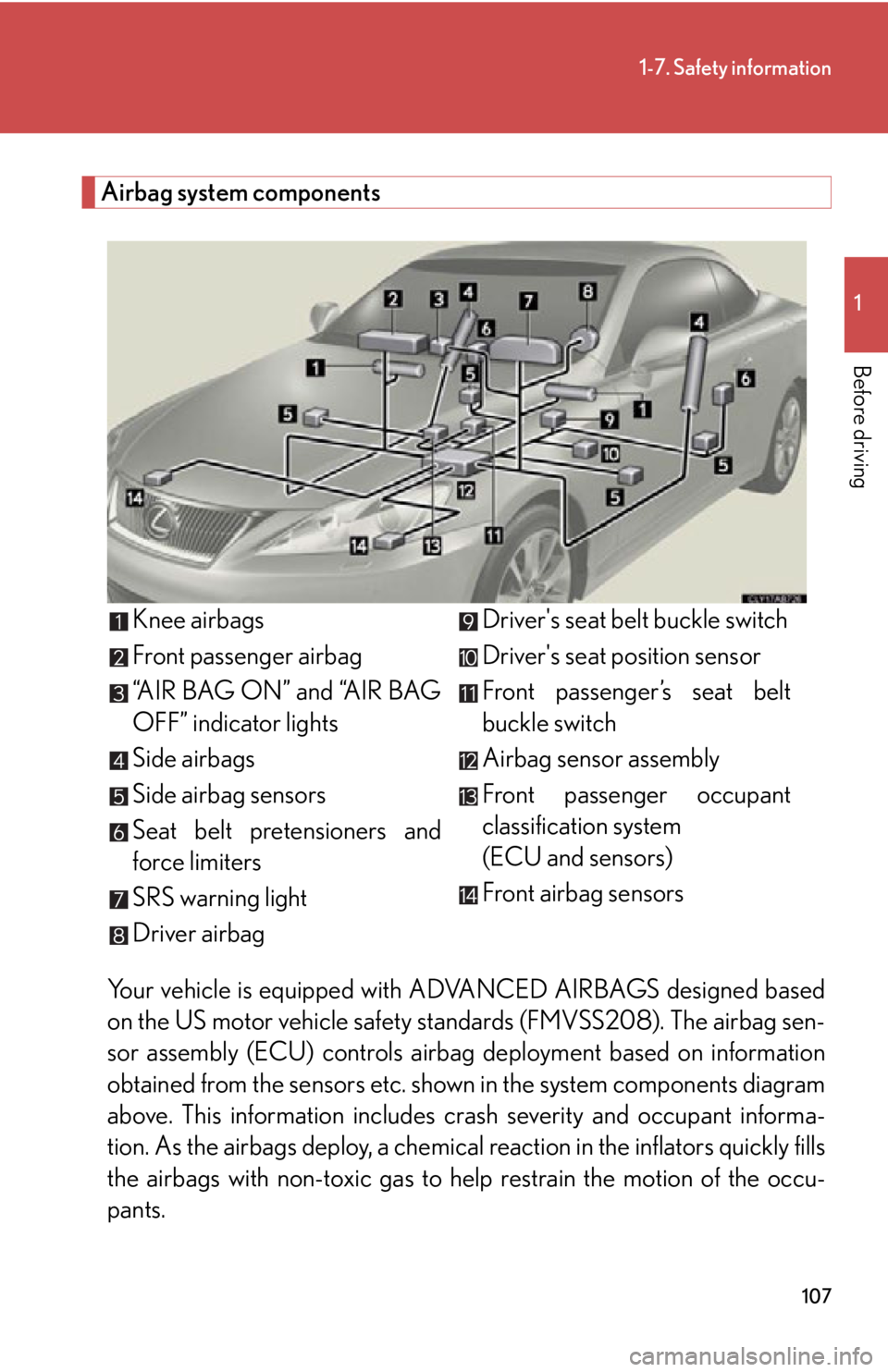
Airbag system componentsYour vehicle is equipped with AD VANCED AIRBAGS designed based
on the US motor vehicle safety st andards (FMVSS208). The airbag sen-
sor assembly (ECU) controls airbag deployment based on information
obtained from the sensors etc. show n in the system components diagram
above. This information includes crash severity and occupant informa-
tion. As the airbags deploy, a chemica l reaction in the inflators quickly fills
the airbags with non-toxic gas to he lp restrain the motion of the occu-
pants. Knee airbags
Front passenger airbag
“AIR BAG ON” and “AIR BAG
OFF” indicator lights
Side airbags
Side airbag sensors
Seat belt pretensioners and
force limiters
SRS warning light
Driver airbag
Driver's seat belt buckle switch
Driver's seat position sensor
Front passenger’s seat belt
buckle switch
Airbag sensor assembly
Front passenger occupant
classification system
(ECU and sensors)
Front airbag sensors
Page 118 of 624

118
1-7. Safety information
Condition and operation in the front passenger occupant classification system
■Adult*1
■Child *3 or child restraint system*4
Indicator/
warning light “AIR BAG ON” and “AIR BAG OFF”
indicator lights “A I R B A G
ON”
SRS warning light Off
Front passenger’s seat belt reminder light Flashing
*2
DevicesFront passenger airbag
Activated
Side airbag on the front
passenger seat
Front passenger knee airbag
Front passenger’s seat belt pretensioner
Indicator/
warning light “AIR BAG ON” and “AIR BAG OFF”
indicator lights “A I R B A G
OFF”
*5
SRS warning light Off
Front passenger’s seat belt reminder light Flashing
*2
DevicesFront passenger airbag Deactivated
Side airbag on the front passenger seat Activated
Front passenger knee airbag Deactivated
Front passenger’s seat belt pretensioner Activated