brake light lexus LC500 2019 / LEXUS 2019 LC 500,LC 500H (OM11471U) User Guide
[x] Cancel search | Manufacturer: LEXUS, Model Year: 2019, Model line: LC500, Model: Lexus LC500 2019Pages: 432, PDF Size: 13.82 MB
Page 151 of 432
1514-2. Driving procedures
4
Driving
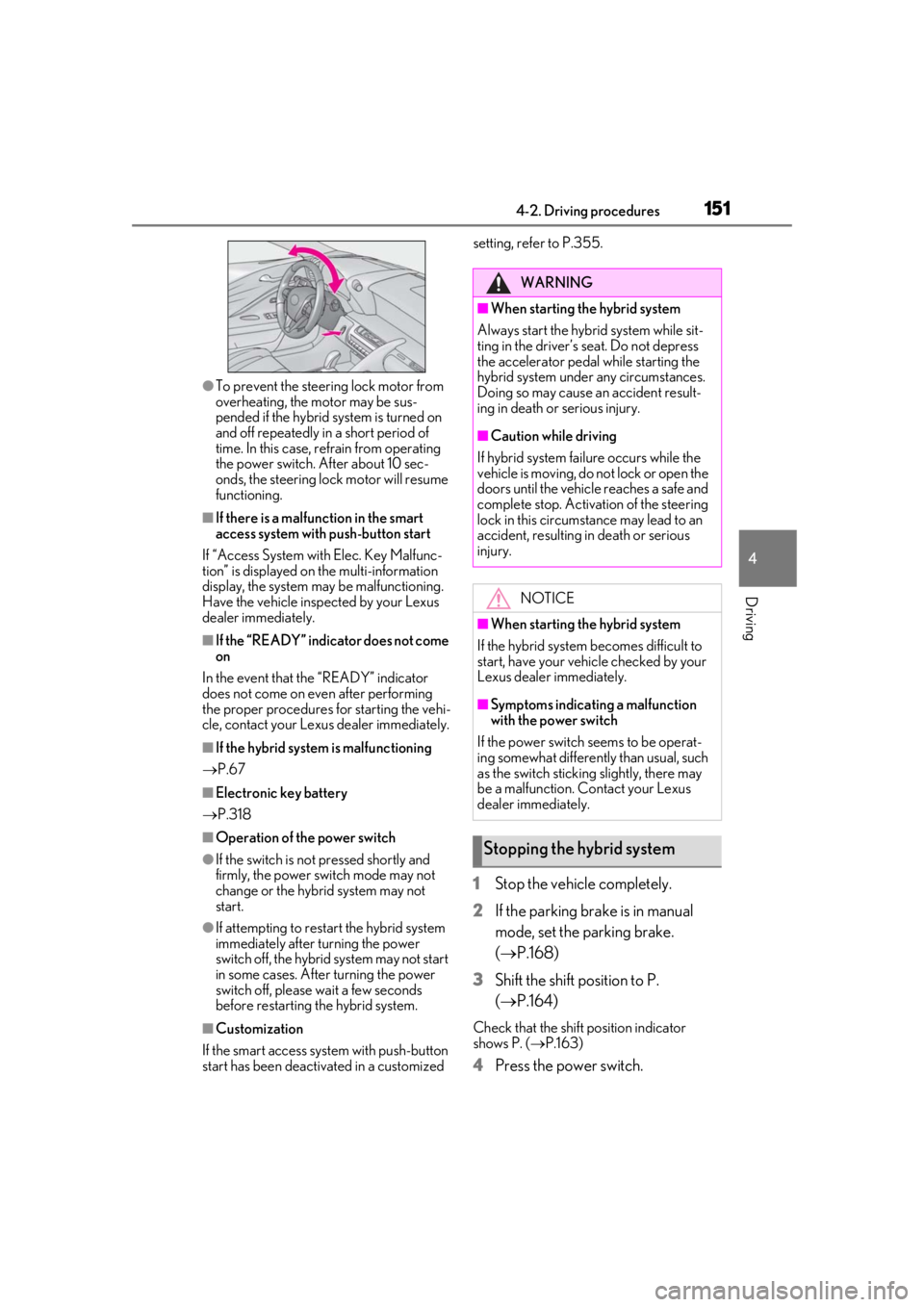
●To prevent the steering lock motor from
overheating, the motor may be sus-
pended if the hybrid system is turned on
and off repeatedly in a short period of
time. In this case, refrain from operating
the power switch. After about 10 sec-
onds, the steering lock motor will resume
functioning.
■If there is a malfun ction in the smart
access system with push-button start
If “Access System with Elec. Key Malfunc-
tion” is displayed on the multi-information
display, the system may be malfunctioning.
Have the vehicle inspected by your Lexus
dealer immediately.
■If the “READY” indicator does not come
on
In the event that the “READY” indicator
does not come on even after performing
the proper procedures for starting the vehi-
cle, contact your Lexus dealer immediately.
■If the hybrid system is malfunctioning
P.67
■Electronic key battery
P.318
■Operation of the power switch
●If the switch is not pressed shortly and
firmly, the power switch mode may not
change or the hybrid system may not
start.
●If attempting to restart the hybrid system
immediately after turning the power
switch off, the hybrid system may not start
in some cases. After turning the power
switch off, please wait a few seconds
before restarting the hybrid system.
■Customization
If the smart access sy stem with push-button
start has been deactivated in a customized setting, refe
r to P.355.
1Stop the vehicle completely.
2 If the parking brake is in manual
mode, set the parking brake.
(P.168)
3 Shift the shift position to P.
(P.164)
Check that the shift position indicator
shows P. ( P.163)
4 Press the power switch.
WARNING
■When starting the hybrid system
Always start the hybrid system while sit-
ting in the driver’s seat. Do not depress
the accelerator pedal while starting the
hybrid system under any circumstances.
Doing so may cause an accident result-
ing in death or serious injury.
■Caution while driving
If hybrid system failure occurs while the
vehicle is moving, do not lock or open the
doors until the vehicle reaches a safe and
complete stop. Activation of the steering
lock in this circumstance may lead to an
accident, resulting in death or serious
injury.
NOTICE
■When starting the hybrid system
If the hybrid system becomes difficult to
start, have your vehicle checked by your
Lexus dealer immediately.
■Symptoms indicating a malfunction
with the power switch
If the power switch seems to be operat-
ing somewhat differently than usual, such
as the switch sticking slightly, there may
be a malfunction. Contact your Lexus
dealer immediately.
Stopping the hybrid system
Page 157 of 432
1574-2. Driving procedures
4
Driving
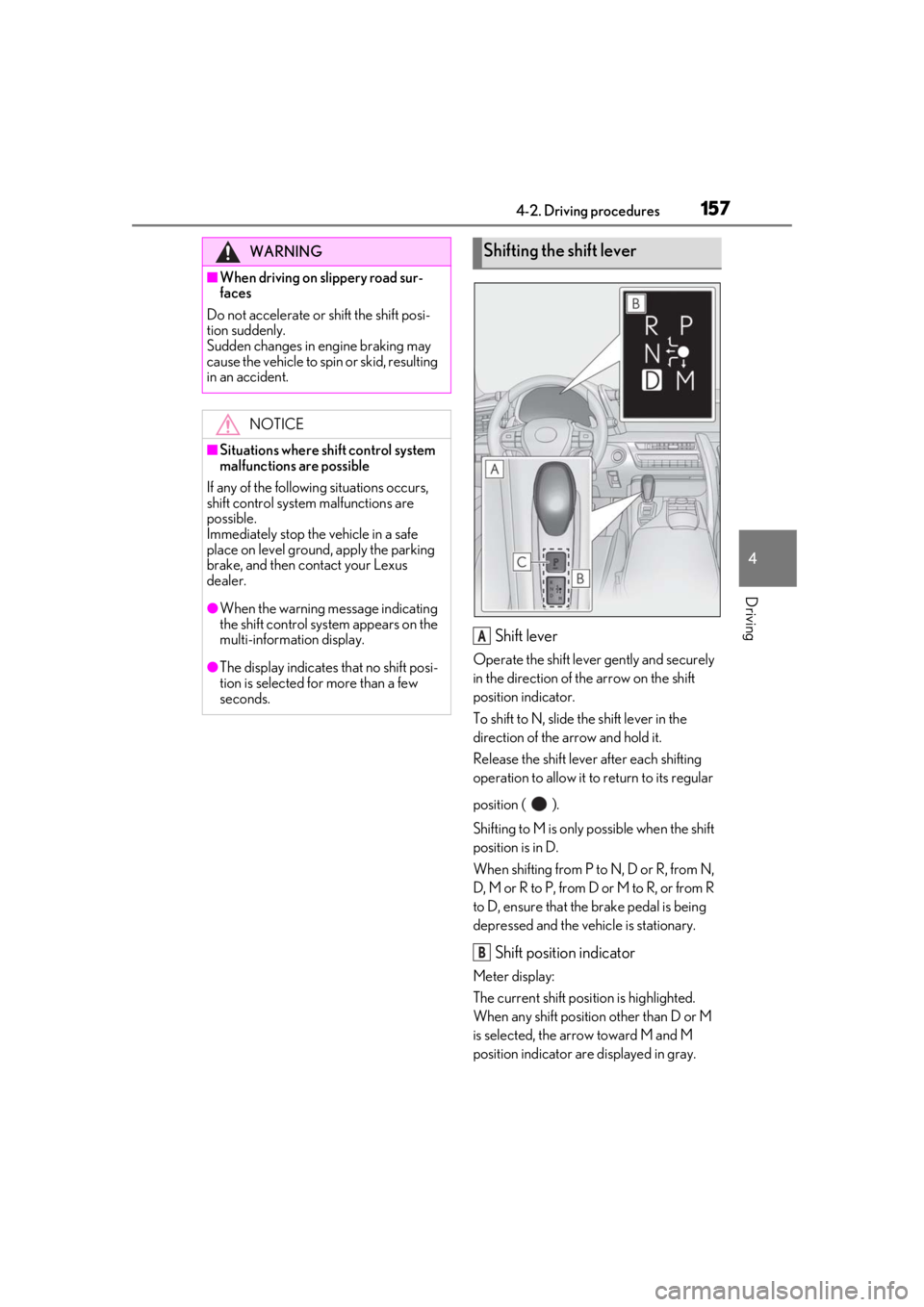
Shift lever
Operate the shift lever gently and securely
in the direction of the arrow on the shift
position indicator.
To shift to N, slide the shift lever in the
direction of the arrow and hold it.
Release the shift lever after each shifting
operation to allow it to return to its regular
position ( ).
Shifting to M is only possible when the shift
position is in D.
When shifting from P to N, D or R, from N,
D, M or R to P, from D or M to R, or from R
to D, ensure that the brake pedal is being
depressed and the vehicle is stationary.
Shift position indicator
Meter display:
The current shift position is highlighted.
When any shift position other than D or M
is selected, the arrow toward M and M
position indicator are displayed in gray.
WARNING
■When driving on slippery road sur-
faces
Do not accelerate or shift the shift posi-
tion suddenly.
Sudden changes in engine braking may
cause the vehicle to spin or skid, resulting
in an accident.
NOTICE
■Situations where sh ift control system
malfunctions are possible
If any of the following situations occurs,
shift control system malfunctions are
possible.
Immediately stop the vehicle in a safe
place on level ground, apply the parking
brake, and then contact your Lexus
dealer.
●When the warning message indicating
the shift control syst em appears on the
multi-information display.
●The display indicates that no shift posi-
tion is selected for more than a few
seconds.
Shifting the shift lever
A
B
Page 162 of 432

1624-2. Driving procedures
cator changes from a flashing to a solid
light, and then operate the shift lever
again.
●The shift position can only be changed to
M directly from D.
In addition, if an atte mpt is made to change
the shift position by moving the shift lever or
by pressing the P position switch in any of
the following situations, the buzzer will
sound and the shifting operation will be dis-
abled or the shift position will automatically
change to N. When this happens, select an
appropriate shift position.
●Situations where the shifting operation
will be disabled:
• When an attempt is made to change the shift position from P to another position
by moving the shift lever without depress-
ing the brake pedal.
• When an attempt is made to change the shift position from P or N to M by moving
the shift lever.
• When the P position switch is pressed
while the vehicle is running.
*1
●Situations where the shift position will
automatically change to N:
• When an attempt is made to select the R
position by moving the shift lever when
the vehicle is moving forward.
*2
• When an attempt is made to select the D position by moving the shift lever when
the vehicle is moving in reverse.
*3
• When the shift position is changed from R to M
●If N is selected while driving at a certain
speed, even if the shift lever is not held in
the N position, the shift position changes
to N. In this situation, the buzzer sounds
and a confirmation message is displayed
on the multi-information display to inform
the driver that the shift position has
changed to N.
*1: Shift position may be changed to P when
driving at extremely low speeds.
*2: Shift position may be changed to R when driving at low speeds.
*3: Shift position may be changed to D when driving at low speeds.
■Reverse warning buzzer
When shifting into R, a buzzer will sound to
inform the driver that the shift position is in
R.
■To protect the hybrid transmission
If the transmission flui d temperature is high,
“Transmission Fluid Temp High See
Owner’s Manual” will be displayed on the
multi-information display and the vehicle
will go into transmission protection mode
automatically. Have the vehicle inspected
by your Lexus dealer.
■When driving with dynamic radar cruise
control with full-speed range activated
●When dynamic radar cruise control with
full-speed range is operating, the system
does not respond to paddle shift switch
operations.
●Even when the drivin g mode is switched
to sport mode with the intent of enabling
engine braking, dynamic radar cruise
control with full-speed range is not can-
celed and engine braking is not activated.
■Restraining sudden start (Drive-Start
Control)
P.137
■AI-SHIFT
The AI-SHIFT automatica lly selects the suit-
able gear according to driver performance
and driving conditions.
The AI-SHIFT automatically operates when
the shift position is in D. (Shifting the shift
position to the M position cancels the func-
tion.)
■If a message about a shift operation is
shown
To prevent the shift position from being
selected incorrectly or the vehicle from
moving unexpectedly, the shift position may
be changed automatically or operating the
shift lever may be required. In this case,
change the shift position following the mes-
sages on the multi-information display.
■After recharging/reconnecting the 12-
volt battery
P.299
Page 163 of 432
1634-2. Driving procedures
4
Driving
■Customization
Settings (e.g. revers e warning buzzer) can
be changed.
(Customizable features: P.391)
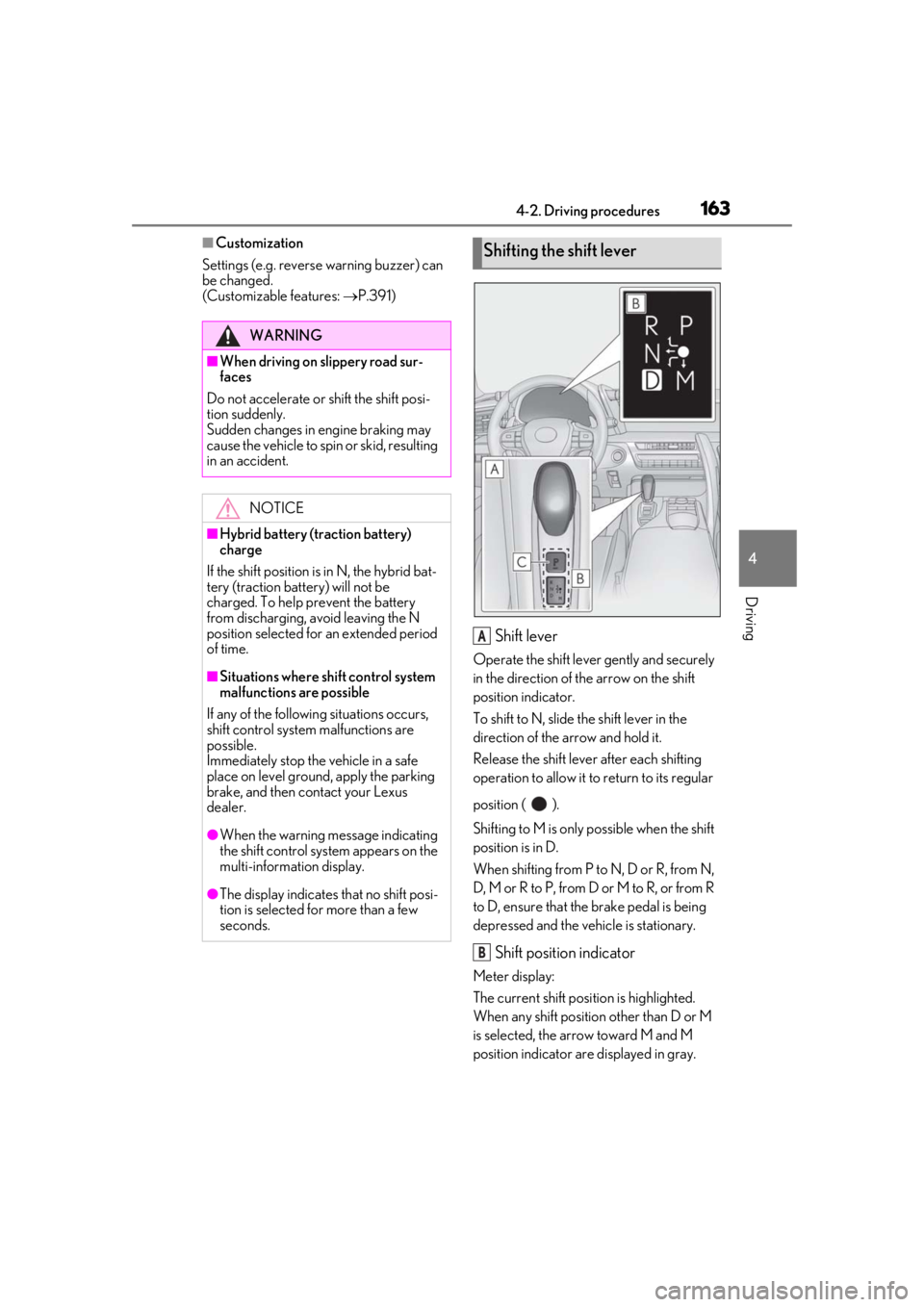
Shift lever
Operate the shift lever gently and securely
in the direction of the arrow on the shift
position indicator.
To shift to N, slide the shift lever in the
direction of the arrow and hold it.
Release the shift lever after each shifting
operation to allow it to return to its regular
position ( ).
Shifting to M is only possible when the shift
position is in D.
When shifting from P to N, D or R, from N,
D, M or R to P, from D or M to R, or from R
to D, ensure that the brake pedal is being
depressed and the vehicle is stationary.
Shift position indicator
Meter display:
The current shift position is highlighted.
When any shift position other than D or M
is selected, the arrow toward M and M
position indicator are displayed in gray.
WARNING
■When driving on slippery road sur-
faces
Do not accelerate or shift the shift posi-
tion suddenly.
Sudden changes in engine braking may
cause the vehicle to spin or skid, resulting
in an accident.
NOTICE
■Hybrid battery (traction battery)
charge
If the shift position is in N, the hybrid bat-
tery (traction battery) will not be
charged. To help prevent the battery
from discharging, avoid leaving the N
position selected for an extended period
of time.
■Situations where sh ift control system
malfunctions are possible
If any of the following situations occurs,
shift control system malfunctions are
possible.
Immediately stop the vehicle in a safe
place on level ground, apply the parking
brake, and then contact your Lexus
dealer.
●When the warning message indicating
the shift control syst em appears on the
multi-information display.
●The display indicates that no shift posi-
tion is selected for more than a few
seconds.
Shifting the shift lever
A
B
Page 168 of 432
1684-2. Driving procedures
■Customization
P.391
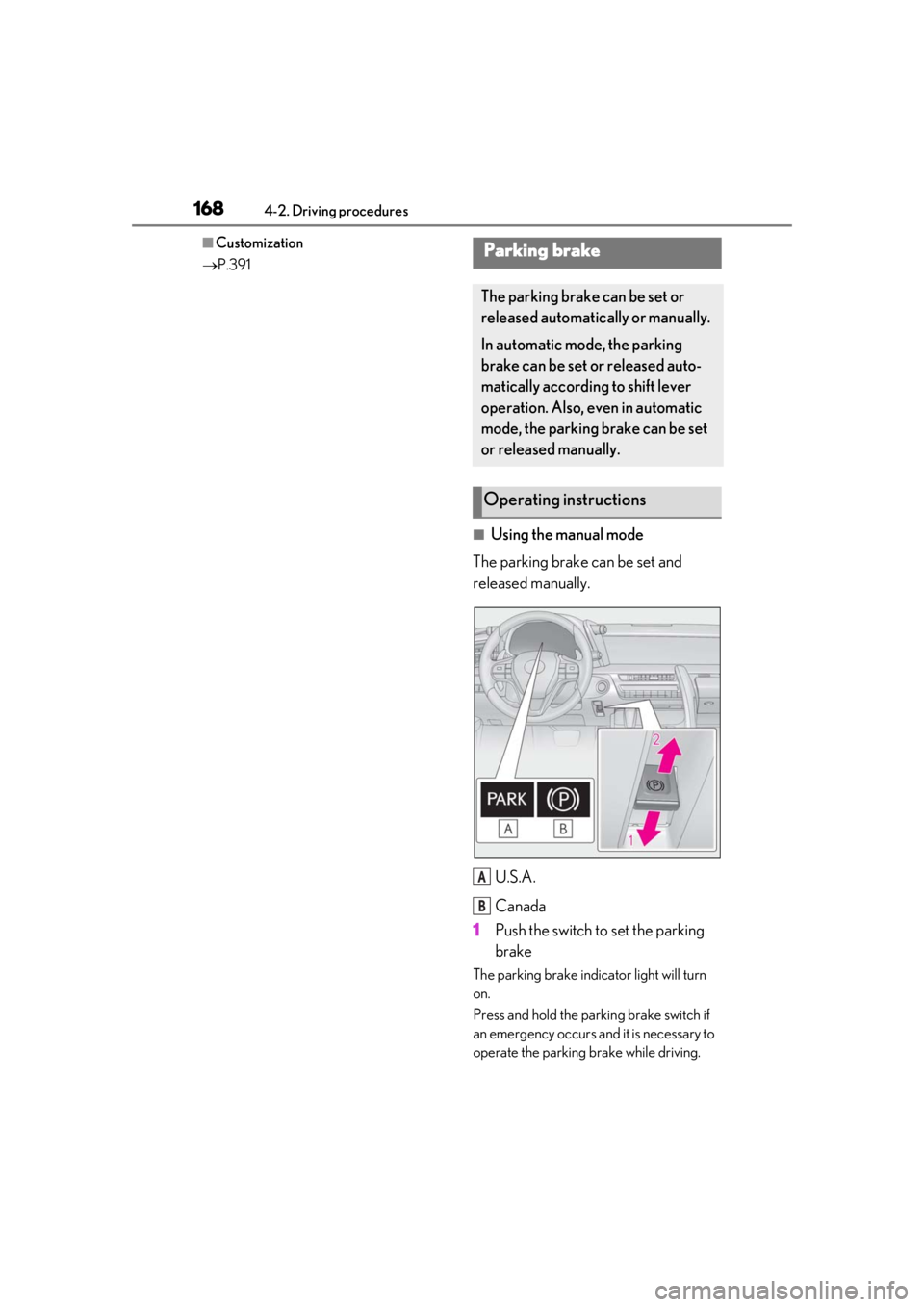
■Using the manual mode
The parking brake can be set and
released manually.
U.S.A.
Canada
1 Push the switch to set the parking
brake
The parking brake indi cator light will turn
on.
Press and hold the parking brake switch if
an emergency occurs and it is necessary to
operate the parking brake while driving.
Parking brake
The parking brake can be set or
released automatically or manually.
In automatic mode, the parking
brake can be set or released auto-
matically according to shift lever
operation. Also, even in automatic
mode, the parking brake can be set
or released manually.
Operating instructions
A
B
Page 169 of 432
1694-2. Driving procedures
4
Driving
2Pull the switch to release the park-
ing brake
• Operate the parking brake switch while
depressing the brake pedal.
• Using the parking brake automatic release function, the parking brake can
be released by depressing the accelera-
tor pedal. When using this function,
slowly depress the accelerator pedal.
Make sure that the pa rking brake indicator
light turn off.
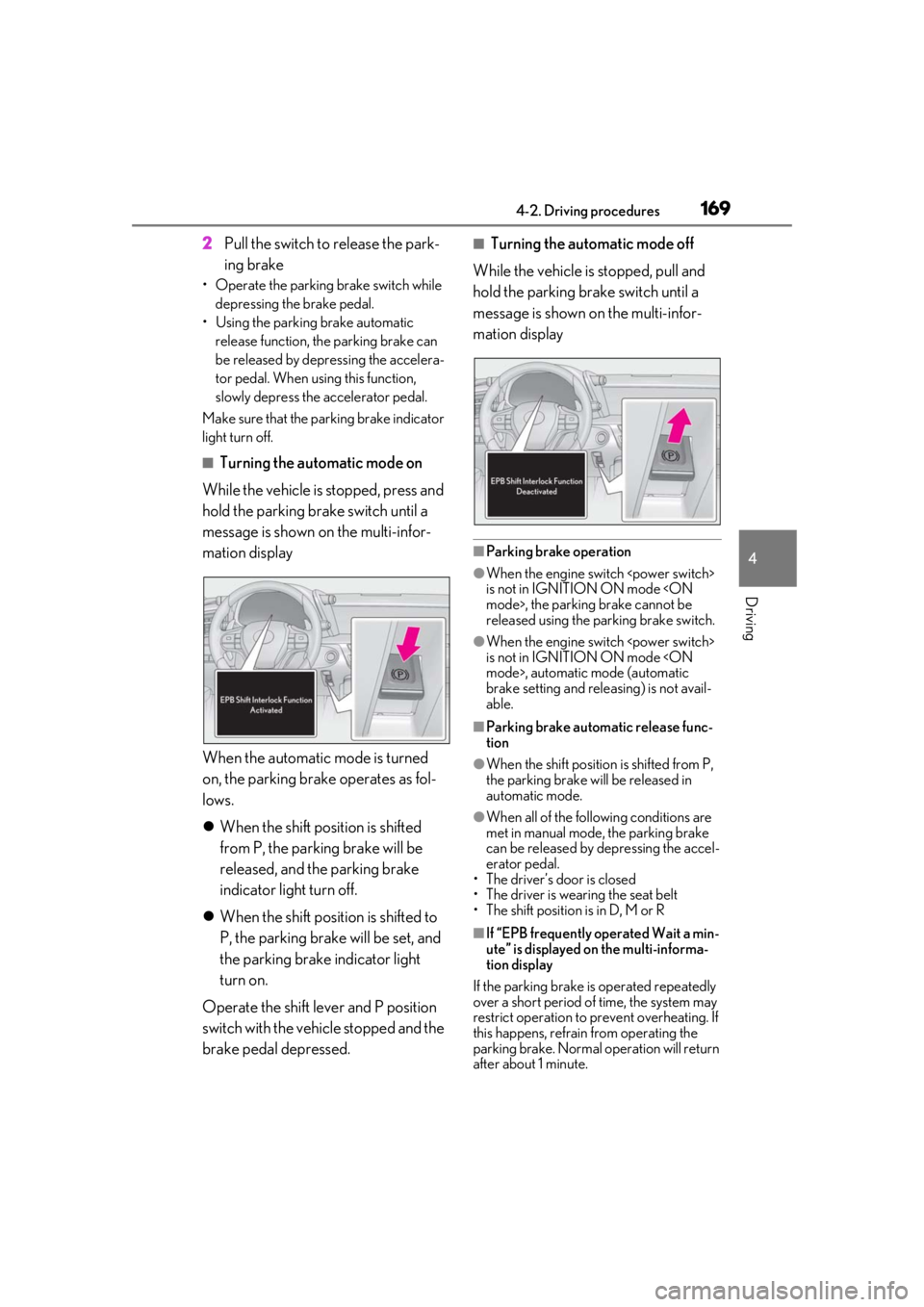
■Turning the automatic mode on
While the vehicle is stopped, press and
hold the parking brake switch until a
message is shown on the multi-infor-
mation display
When the automatic mode is turned
on, the parking brake operates as fol-
lows.
When the shift position is shifted
from P, the parking brake will be
released, and the parking brake
indicator light turn off.
When the shift position is shifted to
P, the parking brake will be set, and
the parking brake indicator light
turn on.
Operate the shift lever and P position
switch with the vehicle stopped and the
brake pedal depressed.
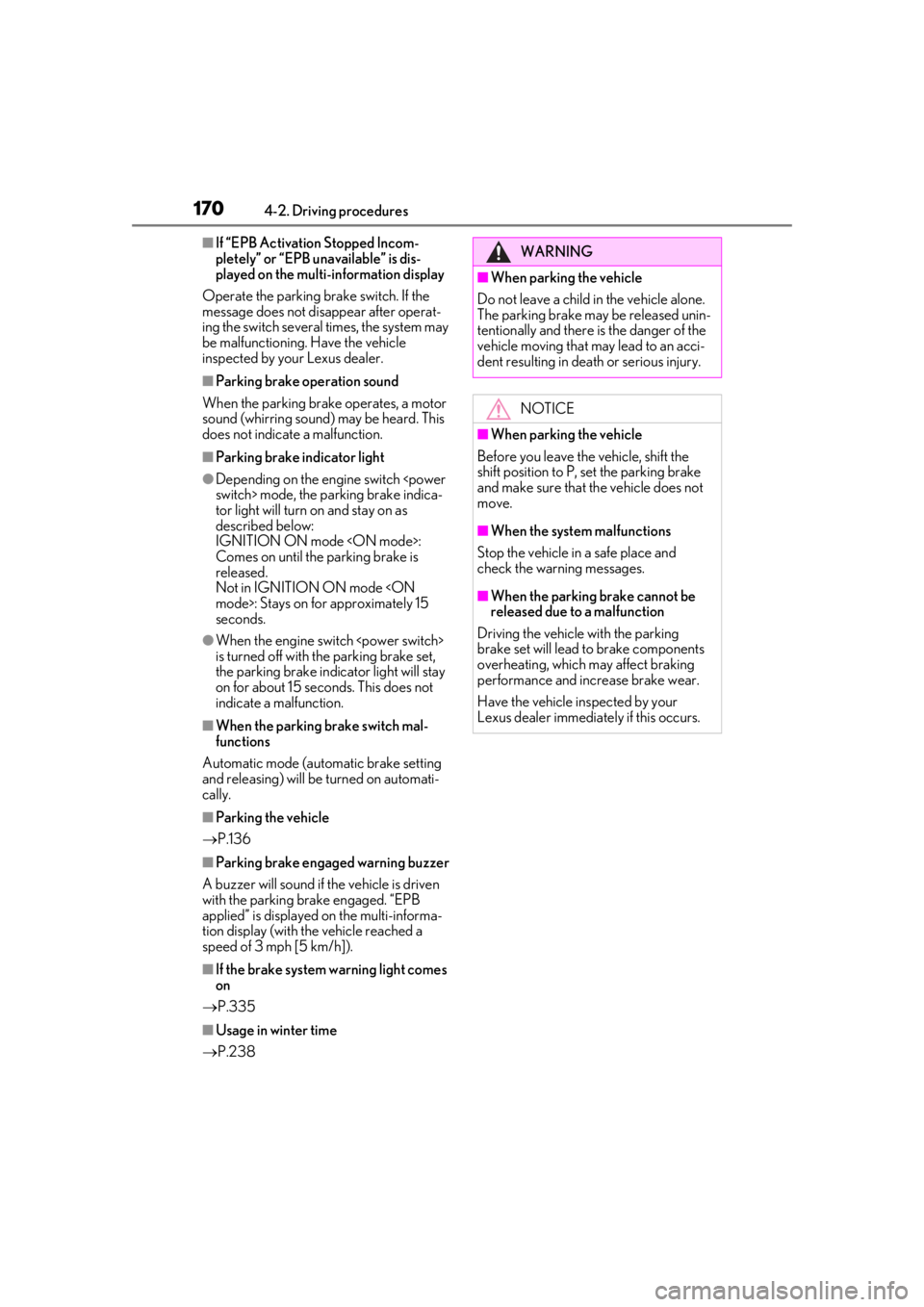
■Turning the automatic mode off
While the vehicle is stopped, pull and
hold the parking brake switch until a
message is shown on the multi-infor-
mation display
■Parking brake operation
●When the engine switch
is not in IGNITION ON mode
released using the parking brake switch.
●When the engine switch
is not in IGNITION ON mode
brake setting and releasing) is not avail-
able.
■Parking brake automatic release func-
tion
●When the shift position is shifted from P,
the parking brake will be released in
automatic mode.
●When all of the follo wing conditions are
met in manual mode, the parking brake
can be released by depressing the accel-
erator pedal.
• The driver’s door is closed
• The driver is wearing the seat belt
• The shift position is in D, M or R
■If “EPB frequently operated Wait a min-
ute” is displayed on the multi-informa-
tion display
If the parking brake is operated repeatedly
over a short period of time, the system may
restrict operation to prevent overheating. If
this happens, refrain from operating the
parking brake. Normal operation will return
after about 1 minute.
Page 170 of 432
1704-2. Driving procedures
■If “EPB Activation Stopped Incom-
pletely” or “EPB unavailable” is dis-
played on the multi-information display
Operate the parking brake switch. If the
message does not disappear after operat-
ing the switch several times, the system may
be malfunctioning. Have the vehicle
inspected by your Lexus dealer.
■Parking brake operation sound
When the parking brake operates, a motor
sound (whirring sound) may be heard. This
does not indicate a malfunction.
■Parking brake indicator light
●Depending on the engine switch
tor light will turn on and stay on as
described below:
IGNITION ON mode
Comes on until the parking brake is
released.
Not in IGNITION ON mode
seconds.
●When the engine switch
is turned off with the parking brake set,
the parking brake indi cator light will stay
on for about 15 seconds. This does not
indicate a malfunction.
■When the parking brake switch mal-
functions
Automatic mode (automatic brake setting
and releasing) will be turned on automati-
cally.
■Parking the vehicle
P.136
■Parking brake engaged warning buzzer
A buzzer will sound if the vehicle is driven
with the parking brake engaged. “EPB
applied” is displayed on the multi-informa-
tion display (with the vehicle reached a
speed of 3 mph [5 km/h]).
■If the brake system warning light comes
on
P.335
■Usage in winter time
P.238
WARNING
■When parking the vehicle
Do not leave a child in the vehicle alone.
The parking brake may be released unin-
tentionally and there is the danger of the
vehicle moving that may lead to an acci-
dent resulting in death or serious injury.
NOTICE
■When parking the vehicle
Before you leave the vehicle, shift the
shift position to P, set the parking brake
and make sure that the vehicle does not
move.
■When the system malfunctions
Stop the vehicle in a safe place and
check the warning messages.
■When the parking brake cannot be
released due to a malfunction
Driving the vehicle with the parking
brake set will lead to brake components
overheating, which may affect braking
performance and increase brake wear.
Have the vehicle inspected by your
Lexus dealer immediately if this occurs.
Page 171 of 432
1714-2. Driving procedures
4
Driving
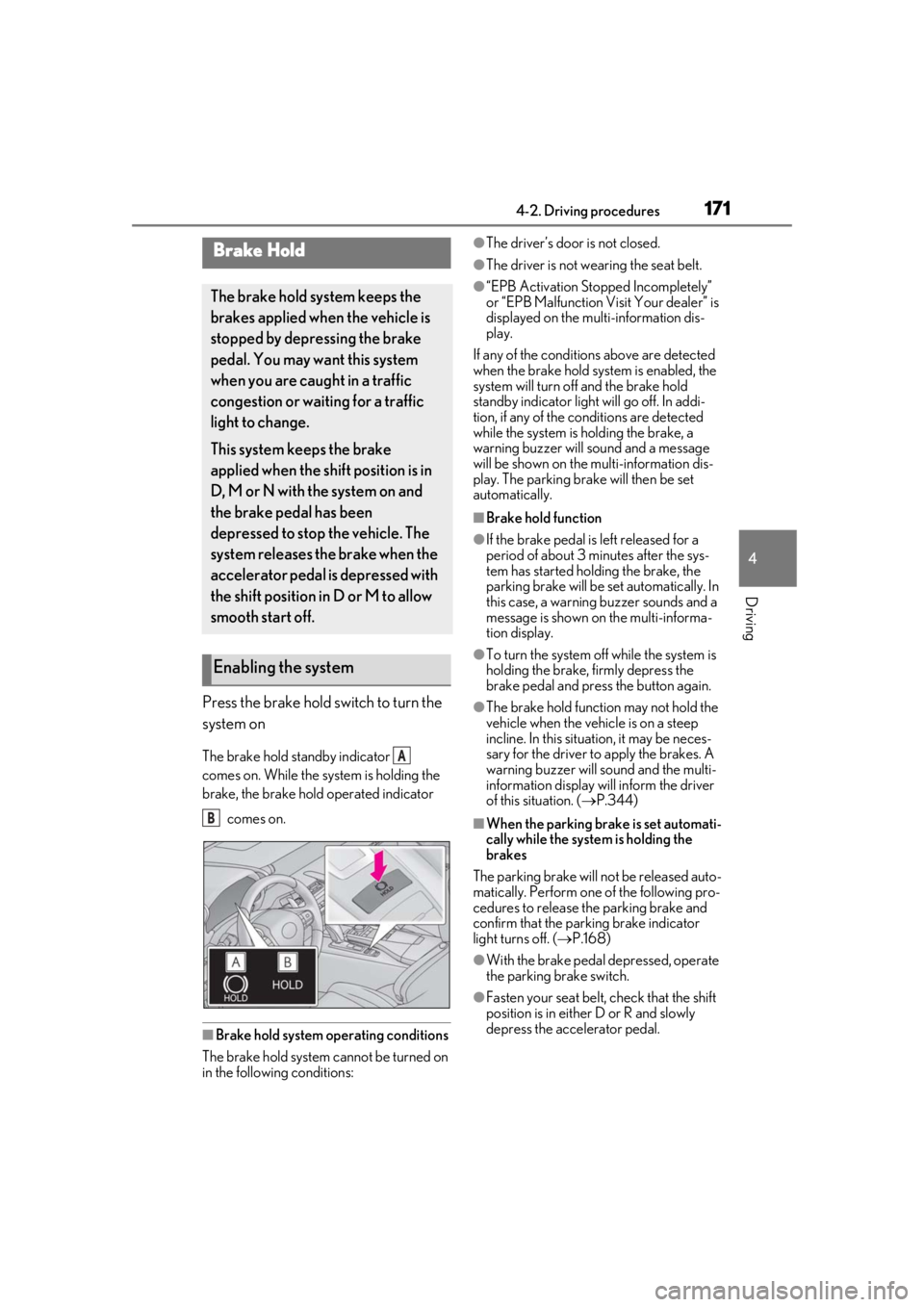
Press the brake hold switch to turn the
system on
The brake hold standby indicator
comes on. While the system is holding the
brake, the brake hold operated indicator comes on.
■Brake hold system operating conditions
The brake hold system cannot be turned on
in the following conditions:
●The driver’s door is not closed.
●The driver is not wearing the seat belt.
●“EPB Activation Stopped Incompletely”
or “EPB Malfunction Visit Your dealer” is
displayed on the multi-information dis-
play.
If any of the conditions above are detected
when the brake hold system is enabled, the
system will turn off and the brake hold
standby indicator light will go off. In addi-
tion, if any of the conditions are detected
while the system is holding the brake, a
warning buzzer will sound and a message
will be shown on the multi-information dis-
play. The parking brake will then be set
automatically.
■Brake hold function
●If the brake pedal is left released for a
period of about 3 mi nutes after the sys-
tem has started holding the brake, the
parking brake will be set automatically. In
this case, a warning buzzer sounds and a
message is shown on the multi-informa-
tion display.
●To turn the system off while the system is
holding the brake, firmly depress the
brake pedal and press the button again.
●The brake hold function may not hold the
vehicle when the vehicle is on a steep
incline. In this situation, it may be neces-
sary for the driver to apply the brakes. A
warning buzzer will sound and the multi-
information display will inform the driver
of this situation. ( P.344)
■When the parking brake is set automati-
cally while the system is holding the
brakes
The parking brake will not be released auto-
matically. Perform one of the following pro-
cedures to release the parking brake and
confirm that the parking brake indicator
light turns off. ( P.168)
●With the brake pedal depressed, operate
the parking brake switch.
●Fasten your seat belt, check that the shift
position is in either D or R and slowly
depress the accelerator pedal.
Brake Hold
The brake hold system keeps the
brakes applied when the vehicle is
stopped by depressing the brake
pedal. You may wa nt this system
when you are caught in a traffic
congestion or waiting for a traffic
light to change.
This system keeps the brake
applied when the shift position is in
D, M or N with the system on and
the brake pedal has been
depressed to stop the vehicle. The
system releases the brake when the
accelerator pedal is depressed with
the shift position in D or M to allow
smooth start off.
Enabling the system
A
B
Page 173 of 432
1734-3. Operating the lights and wipers
4
Driving
4-3.Operating the lights and wipers
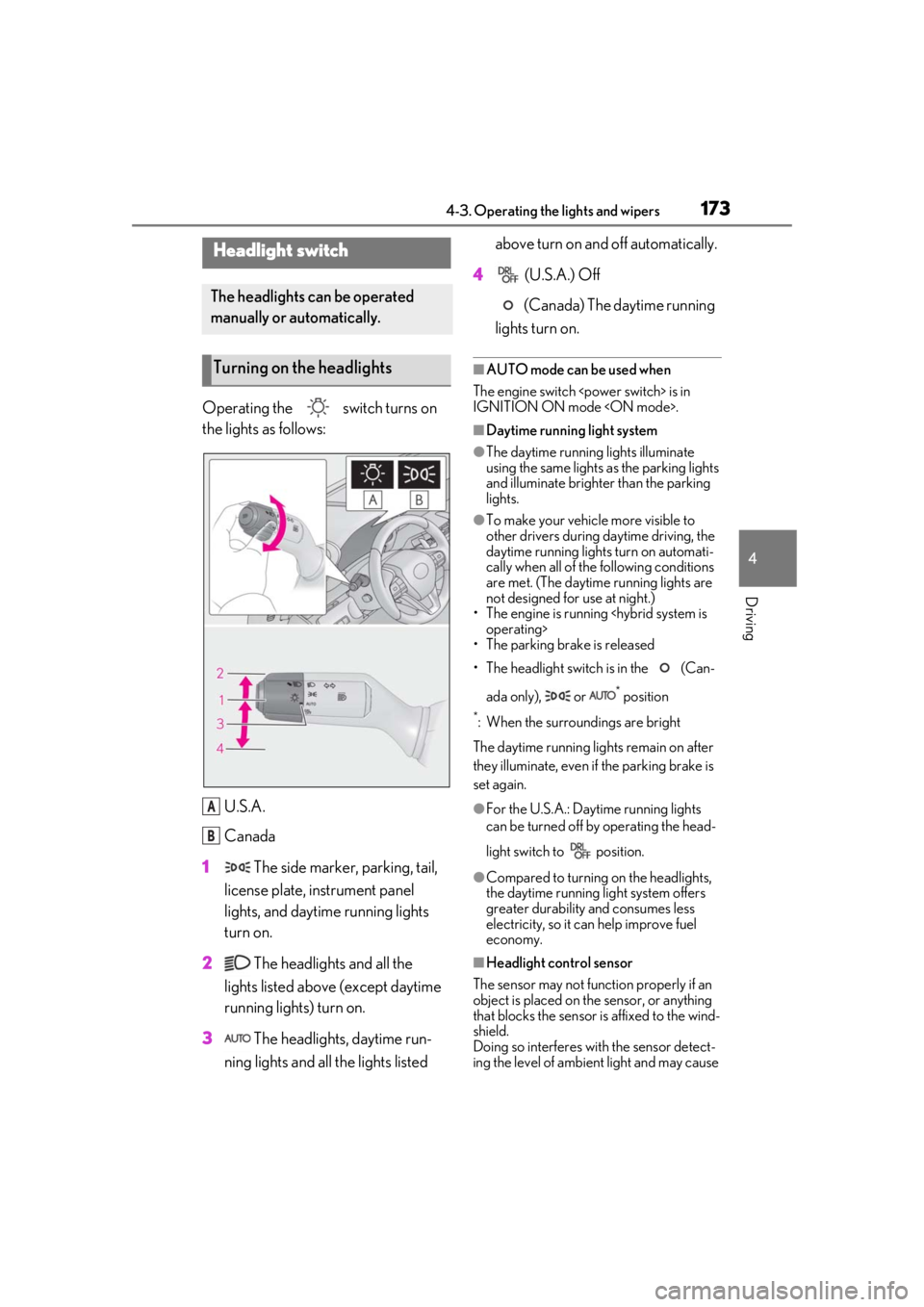
Operating the switch turns on
the lights as follows:U.S.A.
Canada
1 The side marker, parking, tail,
license plate, instrument panel
lights, and daytime running lights
turn on.
2 The headlights and all the
lights listed above (except daytime
running lights) turn on.
3 The headlights, daytime run-
ning lights and all the lights listed above turn on and off automatically.
4 (U.S.A.) Off
(Canada) The daytime running
lights turn on.
■AUTO mode can be used when
The engine switch
IGNITION ON mode
■Daytime running light system
●The daytime running lights illuminate
using the same lights as the parking lights
and illuminate brighter than the parking
lights.
●To make your vehicle more visible to
other drivers during daytime driving, the
daytime running lights turn on automati-
cally when all of the following conditions
are met. (The daytime running lights are
not designed for use at night.)
• The engine is running
• The parking brake is released
• The headlight switch is in the (Can-
ada only), or
* position
*: When the surroundings are bright
The daytime running lights remain on after
they illuminate, even if the parking brake is
set again.
●For the U.S.A.: Daytime running lights
can be turned off by operating the head-
light switch to position.
●Compared to turning on the headlights,
the daytime running light system offers
greater durability and consumes less
electricity, so it can help improve fuel
economy.
■Headlight control sensor
The sensor may not function properly if an
object is placed on the sensor, or anything
that blocks the sensor is affixed to the wind-
shield.
Doing so interferes with the sensor detect-
ing the level of ambien t light and may cause
Headlight switch
The headlights can be operated
manually or automatically.
Turning on the headlights
A
B
Page 195 of 432

1954-5. Using the driving support systems
4
Driving
• The vehicle is wobbling.
• The vehicle is being driven at extremely high speeds.
• When driving on a hill
• If the radar sensor or camera sensor is misaligned
●In some situations such as the following,
sufficient braking force may not be
obtained, preventing the system from
performing properly:
• If the braking functions cannot operate to
their full extent, such as when the brake
parts are extremely cold, extremely hot,
or wet
• If the vehicle is not properly maintained (brakes or tires are excessively worn,
improper tire inflation pressure, etc.)
• When the vehicle is being driven on a gravel road or other slippery surface
●Some pedestrians such as the following
may not be detected by the radar sensor
and camera sensor, preventing the sys-
tem from operating properly:
• Pedestrians shorter than approximately 3.2 ft. (1 m) or tall er than approximately
6.5 ft. (2 m)
• Pedestrians wearing oversized clothing (a rain coat, long skirt, etc.), making their
silhouette obscure
• Pedestrians who are carrying large bag- gage, holding an umbrella, etc., hiding
part of their body
• Pedestrians who are bending forward or squatting
• Pedestrians who are pushing a stroller, wheelchair, bicycle or other vehicle
• Groups of pedestrians which are close
together
• Pedestrians who are wearing white and look extremely bright
• Pedestrians in the dark, such as at night or while in a tunnel
• Pedestrians whose clothing appears to
be nearly the same co lor or brightness as
their surroundings
• Pedestrians near walls , fences, guardrails,
or large objects
• Pedestrians who are on a metal object (manhole cover, steel plate, etc.) on the
road
• Pedestrians who are walking fast
• Pedestrians who are changing speed abruptly • Pedestrians running out from behind a
vehicle or a large object
• Pedestrians who are extremely close to
the side of the vehicle (outside rear view
mirror, etc.)
■If the PCS warning light flashes or illumi-
nates and a warning message is dis-
played on the multi-information display
The pre-collision system may be temporar-
ily unavailable or there may be a malfunc-
tion in the system.
●In the following situations, the warning
light will turn off, the message will disap-
pear and the system will become opera-
tional when normal operating conditions
return:
• When the radar sensor or camera sensor
or the area around either sensor is hot,
such as in the sun
• When the radar sensor or camera sensor
or the area around either sensor is cold,
such as in an extremely cold environment
• When a front sensor is dirty or covered
with snow, etc.
• When the part of the windshield in front of the camera sensor is fogged up or cov-
ered with condensation or ice (Defog-
ging the windshield: P.249)
• If the camera sensor is obstructed, such
as when the hood is open or a sticker is
attached to the windshield near the cam-
era sensor
●If the PCS warning light continues to flash
or remains illuminated or the warning
message does not disappear even
though the vehicle has returned to nor-
mal, the system may be malfunctioning.
Have the vehicle inspected by your Lexus
dealer immediately.
■If VSC is disabled
●If VSC is disabled ( P.233), the pre-col-
lision brake assist and pre-collision brak-
ing functions are also disabled.
●The PCS warning light will turn on and
“VSC Turned Off Pre-Collision Brake
System Unavailable” will be displayed on
the multi-information display.