key battery lexus LC500 2019 / LEXUS 2019 LC 500,LC 500H (OM11471U) User Guide
[x] Cancel search | Manufacturer: LEXUS, Model Year: 2019, Model line: LC500, Model: Lexus LC500 2019Pages: 432, PDF Size: 13.82 MB
Page 116 of 432

1163-2. Opening, closing and locking the doors and trunk
• The electronic key is near the ground or in a high place, or too close to the rear
bumper center when the trunk is opened.
• The electronic key is on the instrument panel, rear package tray or floor, or in the
door pockets or glove box when the
engine
engine switch
changed.
●Do not leave the electronic key on top of
the instrument panel or near the door
pockets when exiting the vehicle.
Depending on the radio wave reception
conditions, it may be detected by the
antenna outside the cabin and the doors
will become lockable from the outside,
possibly trapping the electronic key
inside the vehicle.
●As long as the electron ic key is within the
effective range, the doors may be locked
or unlocked by anyone. However, only
the doors detecting the electronic key
can be used to unlock the vehicle.
●Even if the electronic key is not inside the
vehicle, it may be possible to start the
engine
key is near the window.
●The doors may unlock or lock if a large
amount of water spla shes on the door
handle, such as in the rain or in a car
wash, when the electronic key is within
the effective range. (The doors will auto-
matically be locked after approximately
60 seconds if the d oors are not opened
and closed.)
●If the wireless remote control is used to
lock the doors when the electronic key is
near the vehicle, there is a possibility that
the door may not be unlocked by the
entry function. (Use the wireless remote
control to unlock the doors.)
●When the lock operation is performed
using the lock sensor, recognition signals
will be shown up to two consecutive
times. After this, no recognition signals
will be given.
●If the door handle becomes wet while the
electronic key is within the effective
range, the door may lock and unlock
repeatedly. In this case, follow the follow-
ing correction procedures to wash the vehicle:
• Place the electronic key in a location 6 ft. (2 m) or more away from the vehicle.
(Take care to ensure that the key is not
stolen.)
• Set the electronic key to battery-saving
mode to disable the smart access system
with push-button start. ( P.115)
●If the electronic key is inside the vehicle
and a door handle becomes wet during a
car wash, a message may be shown on
the multi-information display and a
buzzer will sound outside the vehicle. To
turn off the alarm, lock both side doors.
●If an outside door handle is not retracted
during a car wash, a door may be opened
or an outside door handle may be dam-
aged. Make sure that the outside door
handles are retracted before using the
car wash.
●A sudden handle operation or a handle
operation immediately after entering the
effective range may prevent the doors
from being unlocked. Touch the door
unlock sensor and check that the doors
are unlocked before pulling the door
handle again.
●Unlocking the vehicle may take more
time if another electronic key is within the
effective range.
■When the vehicle is not driven for
extended periods
●To prevent theft of the vehicle, do not
leave the electronic key within 6 ft. (2 m)
of the vehicle.
●The smart access system with push-but-
ton start can be deactivated in advance.
■To operate the system properly
●Make sure to carry the electronic key
when operating the system. Do not get
the electronic key too close to the vehicle
when operating the system from the out-
side of the vehicle.
Depending on the position and holding
condition of the elec tronic key, the key
may not be detected correctly and the
system may not operate properly. (The
alarm may go off accidentally, or the door
lock prevention function may not oper-
ate.)
Page 146 of 432
1464-2. Driving procedures
4-2.Driving procedures
1Press the parking brake switch to
check that the parking brake is set.
(P.168)
Parking brake indicator will come on.
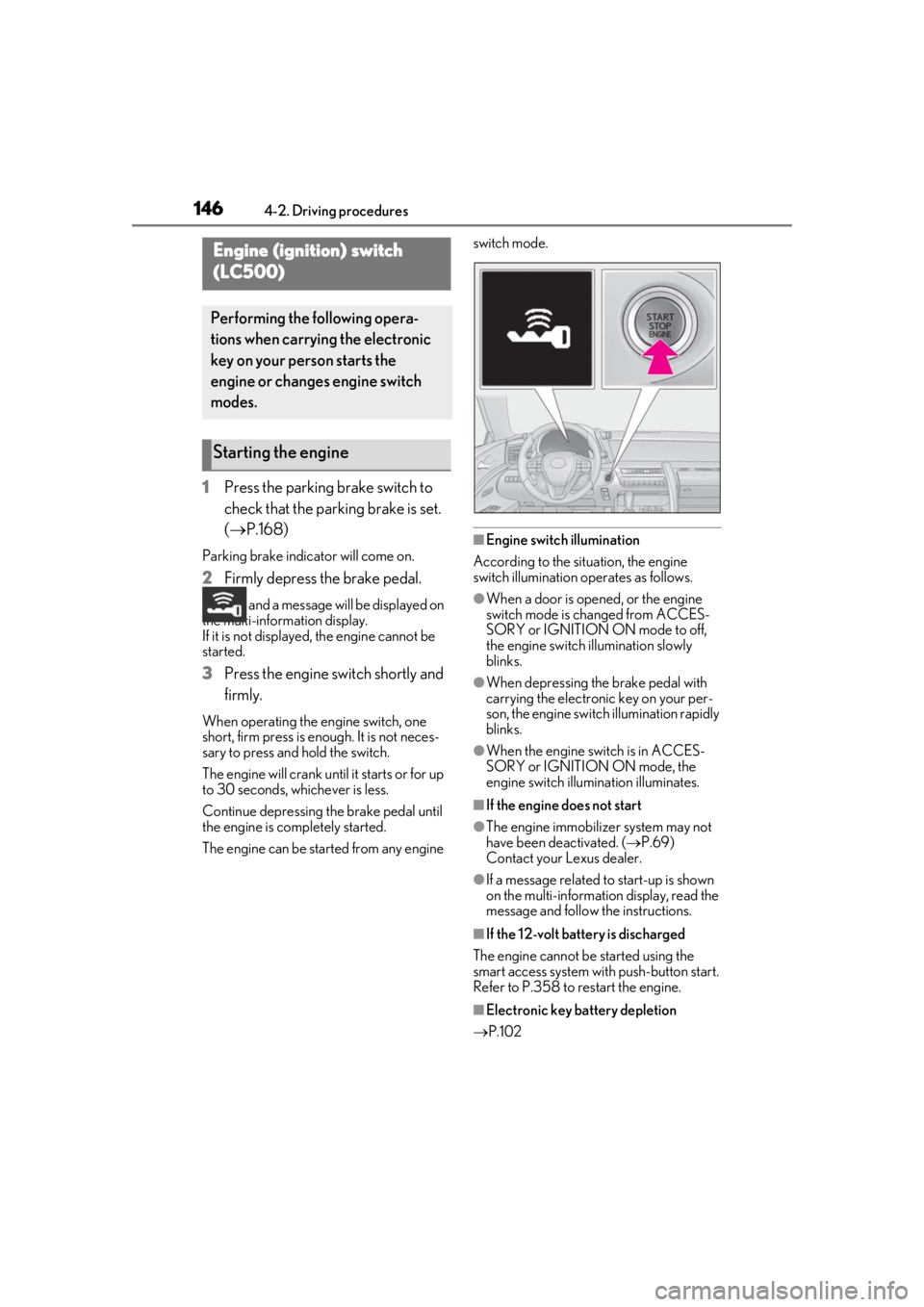
2 Firmly depress the brake pedal.
and a message will be displayed on
the multi-information display.
If it is not displayed, the engine cannot be
started.
3 Press the engine switch shortly and
firmly.
When operating the engine switch, one
short, firm press is enough. It is not neces-
sary to press and hold the switch.
The engine will crank until it starts or for up
to 30 seconds, whichever is less.
Continue depressing the brake pedal until
the engine is completely started.
The engine can be started from any engine switch mode.
■Engine switch illumination
According to the situation, the engine
switch illumination operates as follows.
●When a door is opened, or the engine
switch mode is changed from ACCES-
SORY or IGNITION ON mode to off,
the engine switch illumination slowly
blinks.
●When depressing the brake pedal with
carrying the electronic key on your per-
son, the engine switch illumination rapidly
blinks.
●When the engine sw itch is in ACCES-
SORY or IGNITION ON mode, the
engine switch illumination illuminates.
■If the engine does not start
●The engine immobilizer system may not
have been deactivated. ( P.69)
Contact your Lexus dealer.
●If a message related to start-up is shown
on the multi-information display, read the
message and follow the instructions.
■If the 12-volt batte ry is discharged
The engine cannot be started using the
smart access system with push-button start.
Refer to P.358 to restart the engine.
■Electronic key battery depletion
P.102
Engine (ignition) switch
(LC500)
Performing the following opera-
tions when carryin g the electronic
key on your person starts the
engine or changes engine switch
modes.
Starting the engine
Page 147 of 432
1474-2. Driving procedures
4
Driving
■Conditions affecting operation
P.115
■Notes for the entry function
P.115
■Steering lock function
●After turning the engine switch off and
opening and closing the doors, the steer-
ing wheel will be lock ed due to the steer-
ing lock function. Operating the engine
switch again automatically cancels the
steering lock.
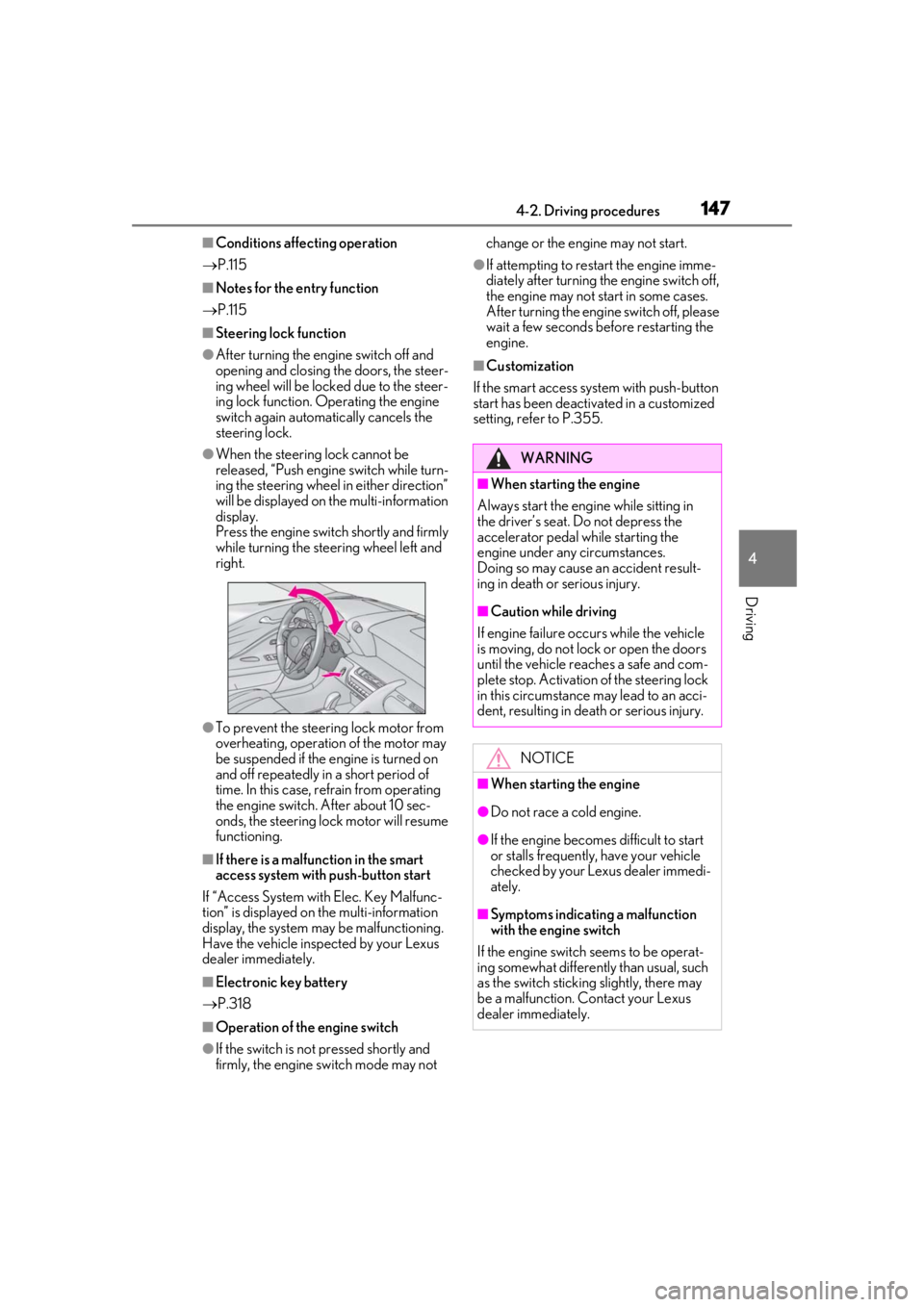
●When the steering lock cannot be
released, “Push engine switch while turn-
ing the steering wheel in either direction”
will be displayed on the multi-information
display.
Press the engine switch shortly and firmly
while turning the steering wheel left and
right.
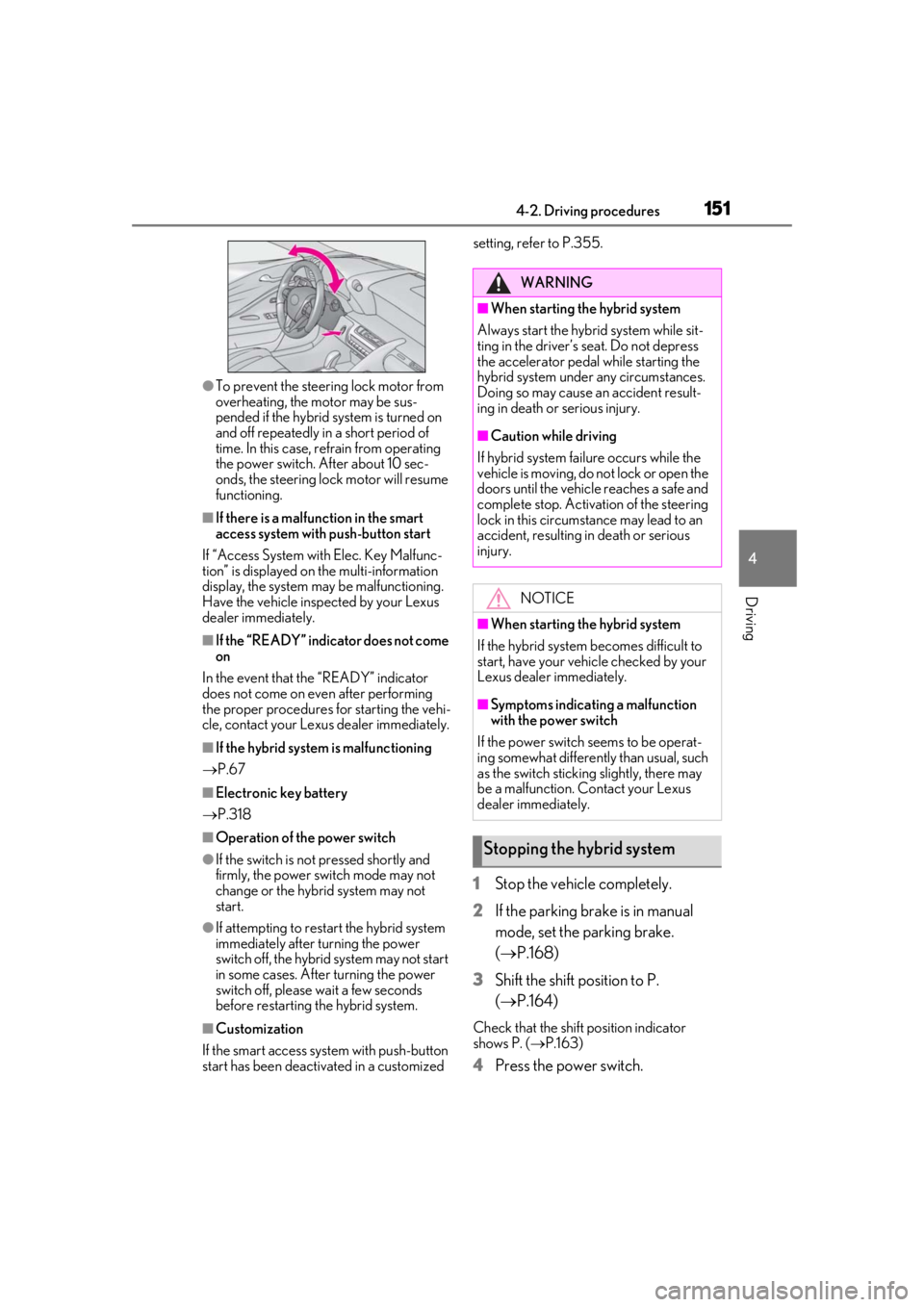
●To prevent the steering lock motor from
overheating, operation of the motor may
be suspended if the engine is turned on
and off repeatedly in a short period of
time. In this case, refrain from operating
the engine switch. After about 10 sec-
onds, the steering lock motor will resume
functioning.
■If there is a malfun ction in the smart
access system with push-button start
If “Access System with Elec. Key Malfunc-
tion” is displayed on the multi-information
display, the system may be malfunctioning.
Have the vehicle inspected by your Lexus
dealer immediately.
■Electronic key battery
P.318
■Operation of the engine switch
●If the switch is not pressed shortly and
firmly, the engine switch mode may not change or the engine may not start.
●If attempting to restart the engine imme-
diately after turning th
e engine switch off,
the engine may not start in some cases.
After turning the engine switch off, please
wait a few seconds be fore restarting the
engine.
■Customization
If the smart access system with push-button
start has been deactivated in a customized
setting, refe r to P.355.
WARNING
■When starting the engine
Always start the engine while sitting in
the driver’s seat. Do not depress the
accelerator pedal while starting the
engine under any circumstances.
Doing so may cause an accident result-
ing in death or serious injury.
■Caution while driving
If engine failure occurs while the vehicle
is moving, do not lock or open the doors
until the vehicle reaches a safe and com-
plete stop. Activation of the steering lock
in this circumstance may lead to an acci-
dent, resulting in death or serious injury.
NOTICE
■When starting the engine
●Do not race a cold engine.
●If the engine becomes difficult to start
or stalls frequently, have your vehicle
checked by your Lexus dealer immedi-
ately.
■Symptoms indicating a malfunction
with the engine switch
If the engine switch seems to be operat-
ing somewhat differently than usual, such
as the switch sticking slightly, there may
be a malfunction. Contact your Lexus
dealer immediately.
Page 149 of 432
1494-2. Driving procedures
4
Driving
meter.
■Auto power off function
If the vehicle is left in ACCESSORY mode
for more than 20 minutes or IGNITION
ON mode (the engine is not running) for
more than an hour with the shift position in
P, the engine switch will automatically turn
off. However, this fu nction cannot entirely
prevent the 12-volt battery discharge. Do
not leave the vehicle with the engine switch
in ACCESSORY or IGNITION ON mode
for long periods of time when the engine is
not running.
■When the shift control system malfunc-
tions
When attempting to turn the engine switch
off while there is a malfunction in the shift
control system, the engine switch mode
may change to ACCESSORY mode. In this
case, ACCESSORY mode may be turned
off by applying the parking brake and press-
ing the engine switch again. If there is a mal-
function in the system, have the vehicle
inspected by your Lexus dealer immedi-
ately.1 Press the parking brake switch to
check that the parking brake is set.
(P.168)
Parking brake indicator will come on.
2 Firmly depress the brake pedal.
and a message will be displayed on
the multi-information display.
If it is not displayed, the hybrid system can-
not be started.
When the shift position is N, the hybrid sys-
tem cannot start. Shift the shift position to P
when starting the hybrid system. ( P.164)
3 Press the power switch shortly and
firmly.
When operating the power switch, one
short, firm press is enough. It is not neces-
sary to press and hold the switch.
If the “READY” indicator turns on, the
hybrid system will operate normally.
Continue depressing the brake pedal until
the “READY” indicat or is illuminated.
The hybrid system can be started from any
NOTICE
■To prevent 12-volt battery discharge
●Do not leave the engine switch in
ACCESSORY or IGNITION ON
mode for long period s of time without
the engine running.
●If “ACCESSORY” or “IGNITION
ON” is displayed on the meter, the
engine switch is not off.
Exit the vehicle after turning the
engine switch off.
Power (ignition) switch
(LC500h)
Performing the following opera-
tions when carrying the electronic
key on your person starts the hybrid
system or changes power switch
modes.
Starting the hybrid system
Page 150 of 432
1504-2. Driving procedures
power switch mode.
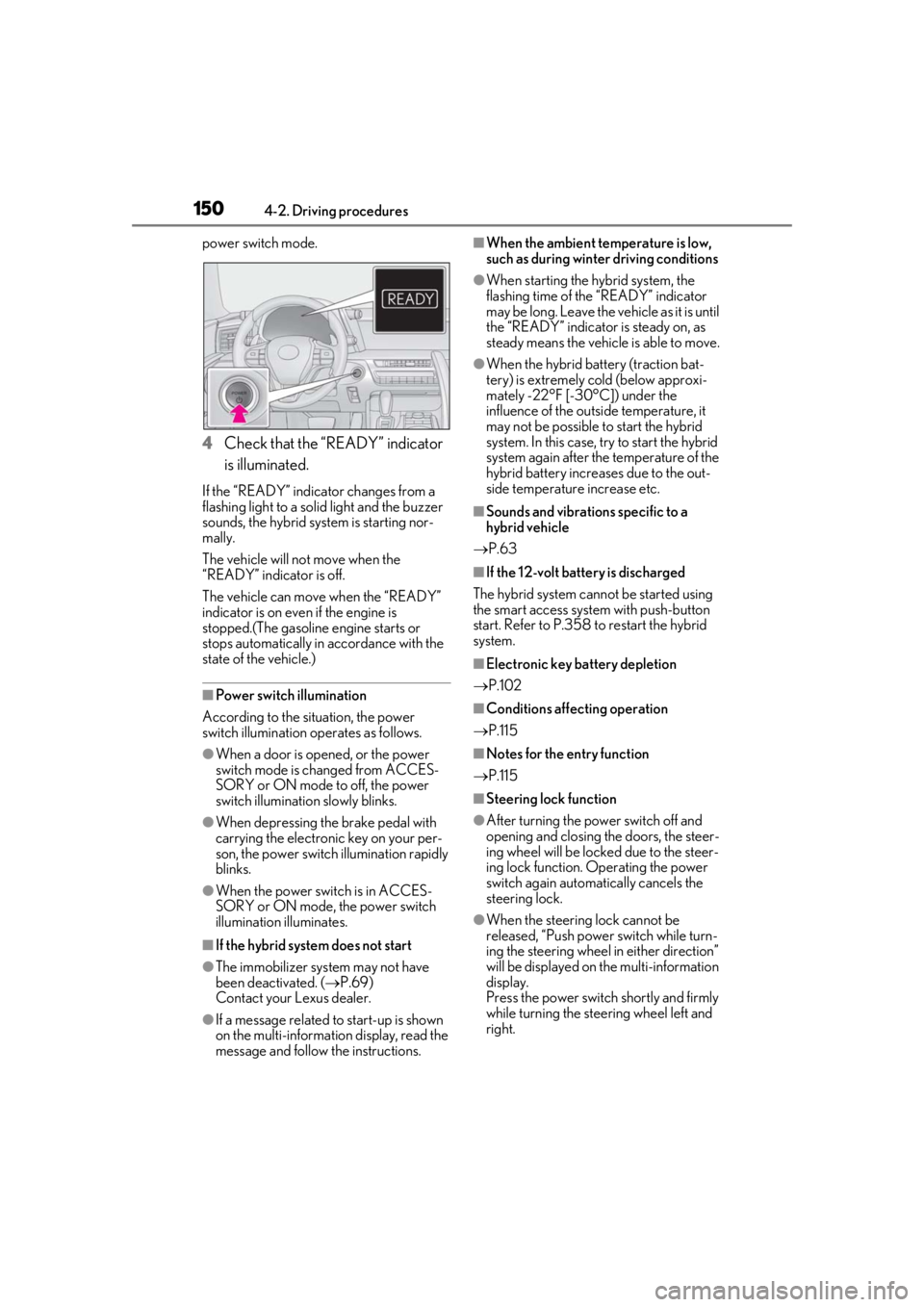
4Check that the “READY” indicator
is illuminated.
If the “READY” indicator changes from a
flashing light to a solid light and the buzzer
sounds, the hybrid system is starting nor-
mally.
The vehicle will not move when the
“READY” indicator is off.
The vehicle can move when the “READY”
indicator is on even if the engine is
stopped.(The gasoline engine starts or
stops automatically in accordance with the
state of the vehicle.)
■Power switch illumination
According to the situation, the power
switch illumination operates as follows.
●When a door is opened, or the power
switch mode is changed from ACCES-
SORY or ON mode to off, the power
switch illumination slowly blinks.
●When depressing the brake pedal with
carrying the electron ic key on your per-
son, the power switch illumination rapidly
blinks.
●When the power swit ch is in ACCES-
SORY or ON mode, the power switch
illumination illuminates.
■If the hybrid system does not start
●The immobilizer system may not have
been deactivated. ( P.69)
Contact your Lexus dealer.
●If a message related to start-up is shown
on the multi-information display, read the
message and follow the instructions.
■When the ambient temperature is low,
such as during winter driving conditions
●When starting the hybrid system, the
flashing time of the “READY” indicator
may be long. Leave the ve hicle as it is until
the “READY” indicator is steady on, as
steady means the vehicle is able to move.
●When the hybrid battery (traction bat-
tery) is extremely cold (below approxi-
mately -22°F [-30°C]) under the
influence of the outside temperature, it
may not be possible to start the hybrid
system. In this case, try to start the hybrid
system again after the temperature of the
hybrid battery increases due to the out-
side temperature increase etc.
■Sounds and vibrations specific to a
hybrid vehicle
P.63
■If the 12-volt batte ry is discharged
The hybrid system cannot be started using
the smart access syst em with push-button
start. Refer to P.358 to restart the hybrid
system.
■Electronic key battery depletion
P.102
■Conditions affecting operation
P.115
■Notes for the entry function
P.115
■Steering lock function
●After turning the power switch off and
opening and closing the doors, the steer-
ing wheel will be lock ed due to the steer-
ing lock function. Operating the power
switch again automatically cancels the
steering lock.
●When the steering lock cannot be
released, “Push power switch while turn-
ing the steering wheel in either direction”
will be displayed on the multi-information
display.
Press the power switch shortly and firmly
while turning the steering wheel left and
right.
Page 151 of 432
1514-2. Driving procedures
4
Driving
●To prevent the steering lock motor from
overheating, the motor may be sus-
pended if the hybrid system is turned on
and off repeatedly in a short period of
time. In this case, refrain from operating
the power switch. After about 10 sec-
onds, the steering lock motor will resume
functioning.
■If there is a malfun ction in the smart
access system with push-button start
If “Access System with Elec. Key Malfunc-
tion” is displayed on the multi-information
display, the system may be malfunctioning.
Have the vehicle inspected by your Lexus
dealer immediately.
■If the “READY” indicator does not come
on
In the event that the “READY” indicator
does not come on even after performing
the proper procedures for starting the vehi-
cle, contact your Lexus dealer immediately.
■If the hybrid system is malfunctioning
P.67
■Electronic key battery
P.318
■Operation of the power switch
●If the switch is not pressed shortly and
firmly, the power switch mode may not
change or the hybrid system may not
start.
●If attempting to restart the hybrid system
immediately after turning the power
switch off, the hybrid system may not start
in some cases. After turning the power
switch off, please wait a few seconds
before restarting the hybrid system.
■Customization
If the smart access sy stem with push-button
start has been deactivated in a customized setting, refe
r to P.355.
1Stop the vehicle completely.
2 If the parking brake is in manual
mode, set the parking brake.
(P.168)
3 Shift the shift position to P.
(P.164)
Check that the shift position indicator
shows P. ( P.163)
4 Press the power switch.
WARNING
■When starting the hybrid system
Always start the hybrid system while sit-
ting in the driver’s seat. Do not depress
the accelerator pedal while starting the
hybrid system under any circumstances.
Doing so may cause an accident result-
ing in death or serious injury.
■Caution while driving
If hybrid system failure occurs while the
vehicle is moving, do not lock or open the
doors until the vehicle reaches a safe and
complete stop. Activation of the steering
lock in this circumstance may lead to an
accident, resulting in death or serious
injury.
NOTICE
■When starting the hybrid system
If the hybrid system becomes difficult to
start, have your vehicle checked by your
Lexus dealer immediately.
■Symptoms indicating a malfunction
with the power switch
If the power switch seems to be operat-
ing somewhat differently than usual, such
as the switch sticking slightly, there may
be a malfunction. Contact your Lexus
dealer immediately.
Stopping the hybrid system
Page 273 of 432
273
6
6
Maintenance and care
Maintenance and care
6-1. Maintenance and careCleaning and protecting the vehi-cle exterior ................................ 274
Cleaning and protecting the vehi- cle interior ................................. 277
6-2. Maintenance Maintenance requirements .. 283
General maintenance ............. 284
Emission inspection and mainte- nance (I/M) programs ......... 287
6-3. Do-it-yourself maintenance Do-it-yourself service precautions........................................................ 288
Hood............................................... 290
Positioning a floor jack............ 290
Engine compartment............... 292
12-volt battery............................. 299
Tires ................................................. 301
Replacing the tire ...................... 309
Tire inflation pressure ............... 313
Wheels............................................ 315
Air conditioning filter................316
Electronic key battery .............. 318
Checking and replacing fuses ......................................................... 319
Headlight aim.............................. 323
Light bulbs .................................... 324
Page 275 of 432
2756-1. Maintenance and care
6
Maintenance and care
the door may lock and unlock repeatedly. In
that case, follow the following correction
procedures to wash the vehicle:
●Place the key in a position 6 ft. (2 m) or
more separate from the vehicle while the
vehicle is being washed. (Take care to
ensure that the key is not stolen.)
●Set the electronic key to battery-saving
mode to disable the smart access system
with push-button start. ( P.115)
■Aluminum wheels
●Remove any dirt immediately by using a
neutral detergent.
●Wash detergent off with water immedi-
ately after use.
●To protect the paint from damage, make
sure to observe the following precau-
tions.
• Do not use acidic, a lkaline or abrasive
detergent
• Do not use hard brushes
• Do not use detergent on the wheels when they are hot, such as after driving or park-
ing in hot weather
■Brake caliper coating
●When using detergent, use neutral deter-
gent. Do not use hard brushes or abra-
sive cleaners, as they will damage the
coating.
●Do not use detergent on the brake cali-
pers when they are hot.
●Wash detergent off immediately after
use.
■Bumpers
Do not scrub with abrasive cleaners.
■Front side windows water-repellent
coating
●The following precautions can extend the
effectiveness of the water-repellent coat-
ing.
• Remove any dirt, etc. from the front side windows regularly.
• Do not allow dirt and dust to accumulate
on the windows for a long period.
Clean the windows with a soft, damp
cloth as soon as possible.
• Do not use wax or glass cleaners that contain abrasives when cleaning the win- dows.
• Do not use any metallic objects to remove condensation build up.
●When the water-repellent performance
has become insufficient, the coating can
be repaired. Contact your Lexus dealer.
WARNING
■When washing the vehicle
Do not apply water to the inside of the
engine compartment. Doing so may
cause the electrical components etc. to
catch fire.
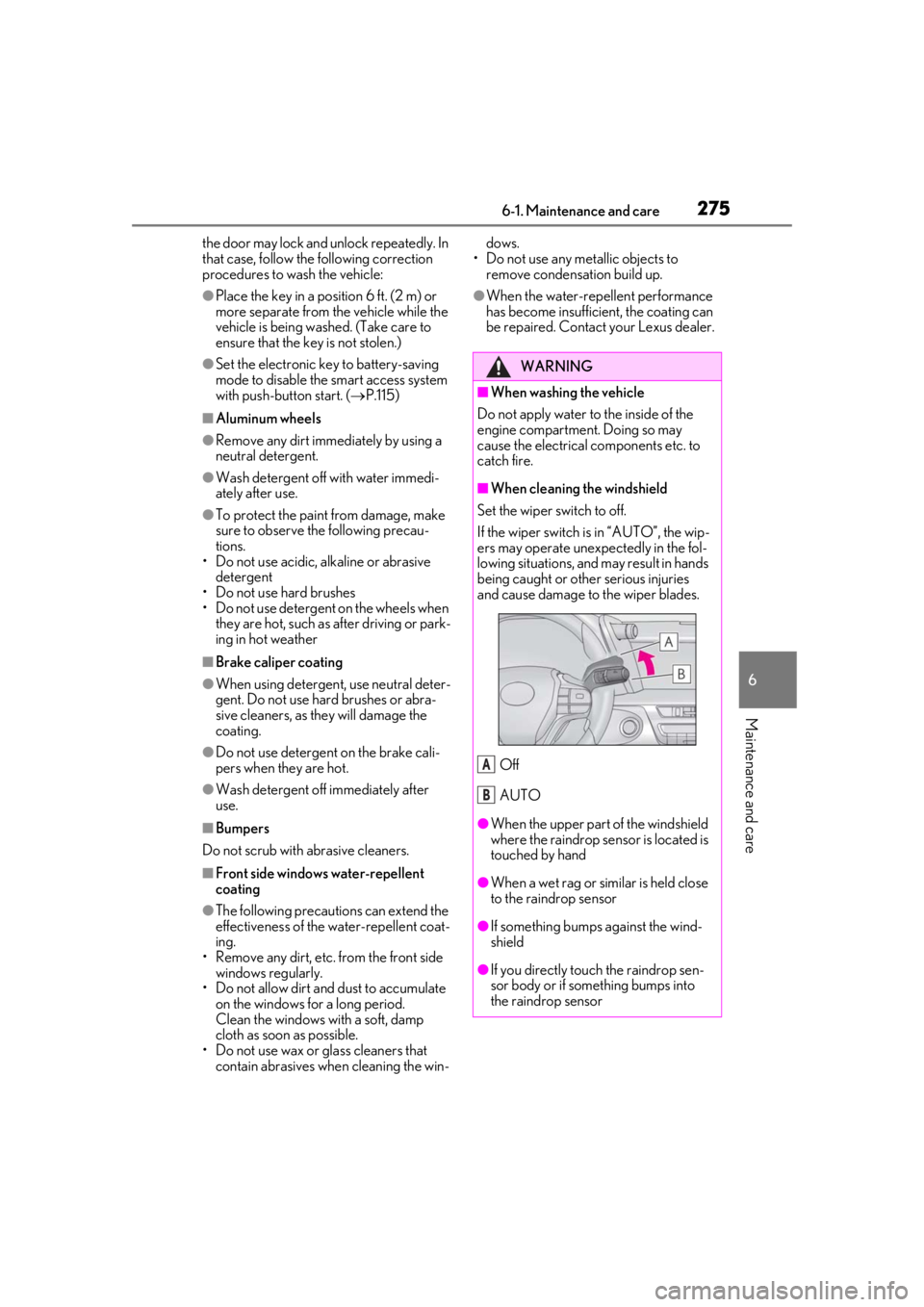
■When cleaning the windshield
Set the wiper switch to off.
If the wiper switch is in “AUTO”, the wip-
ers may operate unexpectedly in the fol-
lowing situations, and may result in hands
being caught or other serious injuries
and cause damage to the wiper blades.
Off
AUTO
●When the upper part of the windshield
where the raindrop sensor is located is
touched by hand
●When a wet rag or similar is held close
to the raindrop sensor
●If something bumps against the wind-
shield
●If you directly touch the raindrop sen-
sor body or if something bumps into
the raindrop sensor
A
B
Page 299 of 432
2996-3. Do-it-yourself maintenance
6
Maintenance and care
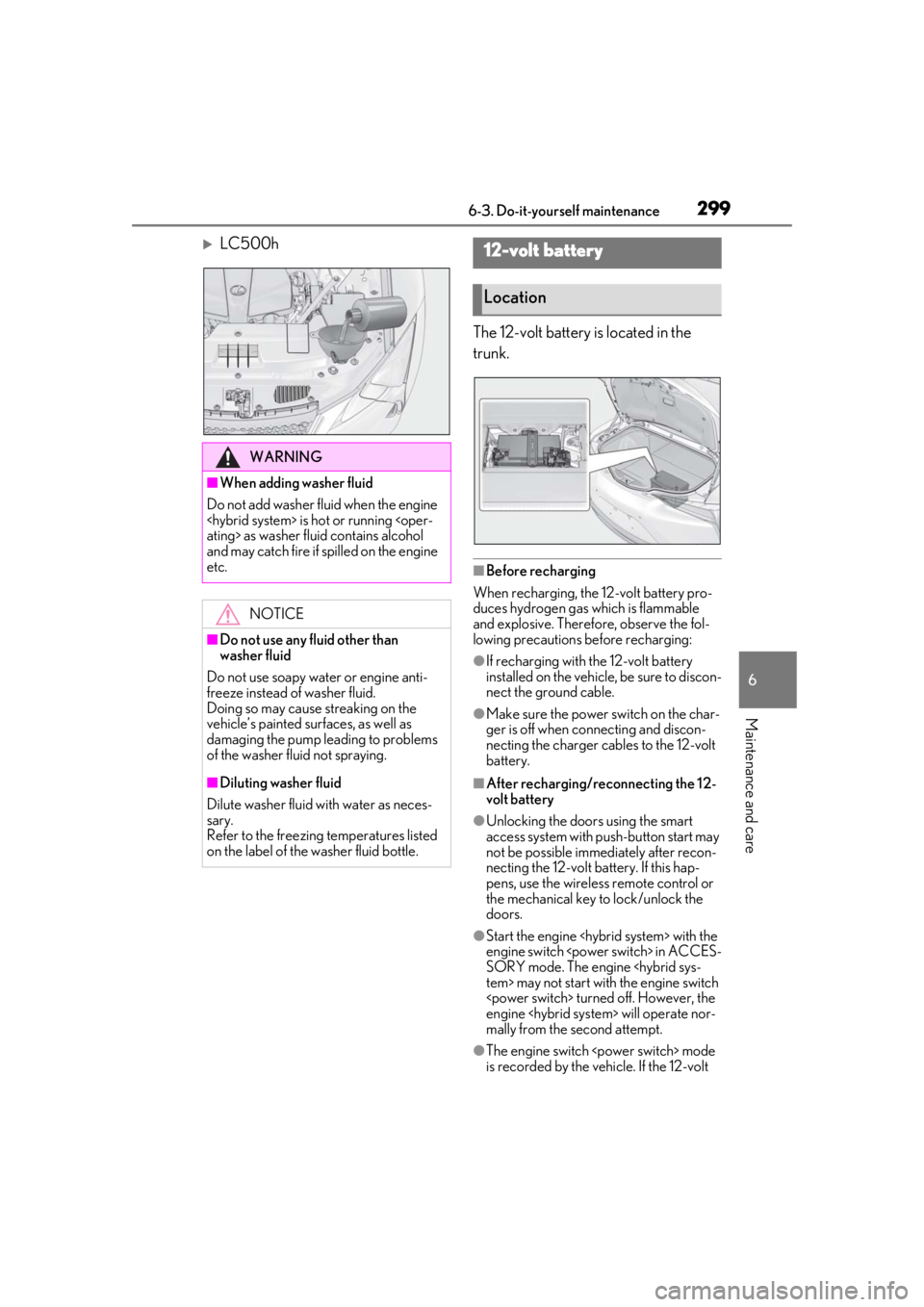
LC500hThe 12-volt battery is located in the
trunk.
■Before recharging
When recharging, the 12-volt battery pro-
duces hydrogen gas which is flammable
and explosive. Therefore, observe the fol-
lowing precautions before recharging:
●If recharging with the 12-volt battery
installed on the vehicle, be sure to discon-
nect the ground cable.
●Make sure the power switch on the char-
ger is off when connecting and discon-
necting the charger cables to the 12-volt
battery.
■After recharging/reconnecting the 12-
volt battery
●Unlocking the doors using the smart
access system with pu sh-button start may
not be possible immediately after recon-
necting the 12-volt battery. If this hap-
pens, use the wireless remote control or
the mechanical key to lock/unlock the
doors.
●Start the engine
engine switch
SORY mode. The engine
engine
mally from the second attempt.
●The engine switch
is recorded by the vehicle. If the 12-volt
WARNING
■When adding washer fluid
Do not add washer fluid when the engine
and may catch fire if spilled on the engine
etc.
NOTICE
■Do not use any fluid other than
washer fluid
Do not use soapy water or engine anti-
freeze instead of washer fluid.
Doing so may cause streaking on the
vehicle’s painted surfaces, as well as
damaging the pump leading to problems
of the washer fluid not spraying.
■Diluting washer fluid
Dilute washer fluid with water as neces-
sary.
Refer to the freezing temperatures listed
on the label of the washer fluid bottle.
12-volt battery
Location
Page 318 of 432
3186-3. Do-it-yourself maintenance
■If the electronic key battery is depleted
The following symptoms may occur:
●The smart access syst em with push-but-
ton start and wireless remote control will
not function properly.
●The operational rang e will be reduced.
■When the card key battery needs to be
replaced (if equipped)
The battery for th e card key is available only
at Lexus dealers. Your Lexus dealer can
replace the battery for you.
Prepare the following before replacing
the battery:
Flathead screwdriver
Small flathead screwdriver
Lithium battery CR2032
■Use a CR2032 lithium battery
●Batteries can be purchased at your Lexus
dealer, local electrical appliance shops or
camera stores.
●Replace only with the same or equivalent
type recommended by the manufacturer.
●Dispose of used batteries according to
the local laws.
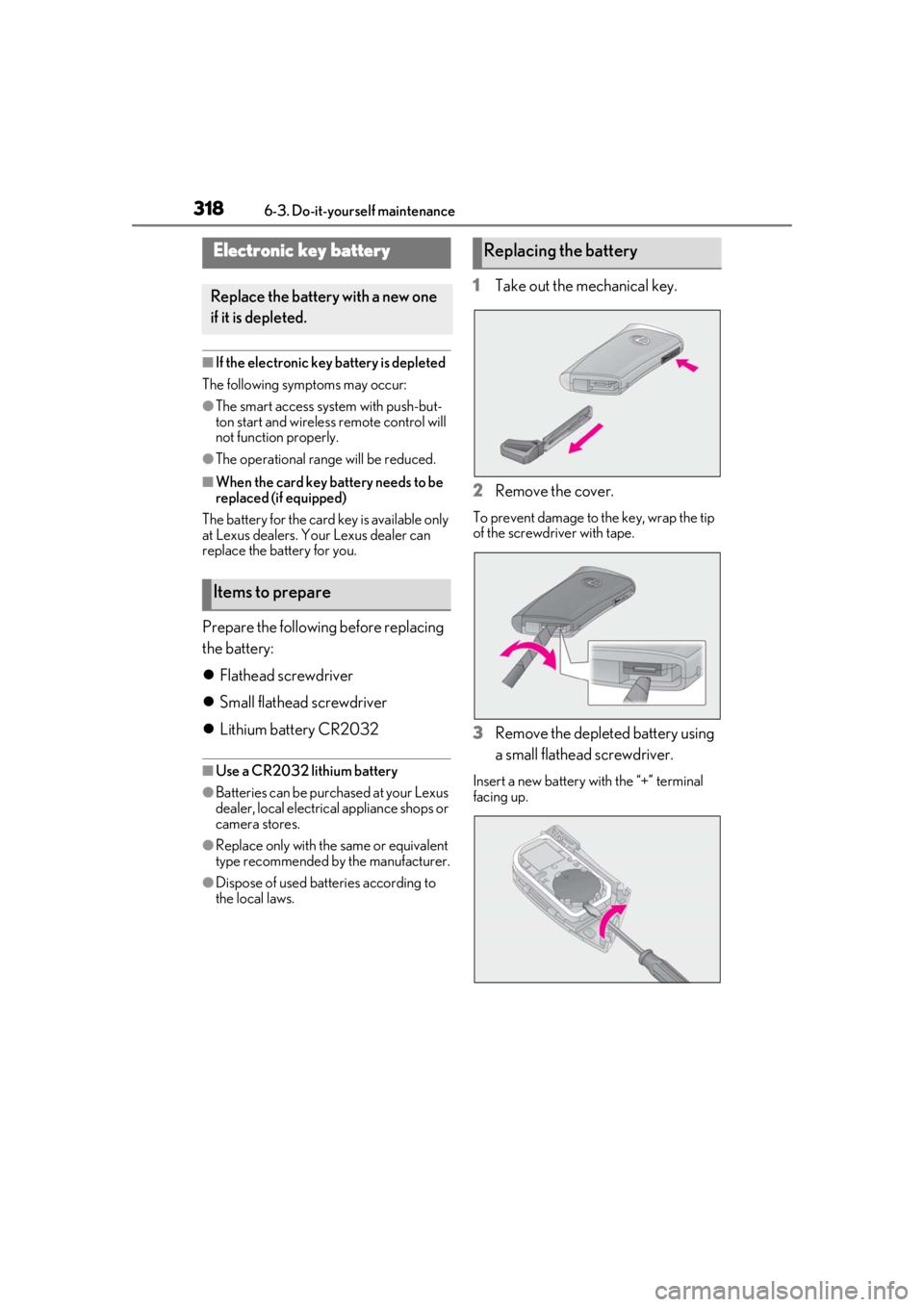
1 Take out the mechanical key.
2 Remove the cover.
To prevent damage to the key, wrap the tip
of the screwdri ver with tape.
3Remove the depleted battery using
a small flathead screwdriver.
Insert a new battery with the “+” terminal
facing up.
Electronic key battery
Replace the battery with a new one
if it is depleted.
Items to prepare
Replacing the battery