window lexus LC500 2019 / LEXUS 2019 LC 500,LC 500H (OM11471U) User Guide
[x] Cancel search | Manufacturer: LEXUS, Model Year: 2019, Model line: LC500, Model: Lexus LC500 2019Pages: 432, PDF Size: 13.82 MB
Page 71 of 432
711-5. Theft deterrent system
1
For safety and security
■Items to check before locking the
vehicle
To prevent unexpected triggering of
the alarm and vehicle theft, make sure
of the following:
Nobody is in the vehicle.
The windows are closed before the
alarm is set.
No valuables or other personal
items are left in the vehicle.
■Setting
Close the doors, trunk and hood, and
lock both side doors. The system will
be set automatically after 30 seconds.
The indicator light changes from being on
to flashing when the system is set.
■Canceling or stopping
Do one of the following to deactivate
or stop the alarms:
Unlock the doors or open the trunk.
Turn the engine switch
TION ON mode
start the engine
(The alarm will be deactivated or
stopped after a few seconds.)
■System maintenance
The vehicle has a maintenance-free type
alarm system.
■Triggering of the alarm
The alarm may be triggered in the following
situations:
(Stopping the alarm deactivates the alarm
system.)
●A person inside the vehicle opens a door,
the trunk or hood, or unlocks the vehicle
using a door lock switch.
●The 12-volt battery is recharged or
replaced when the vehicle is locked.
( P.361)
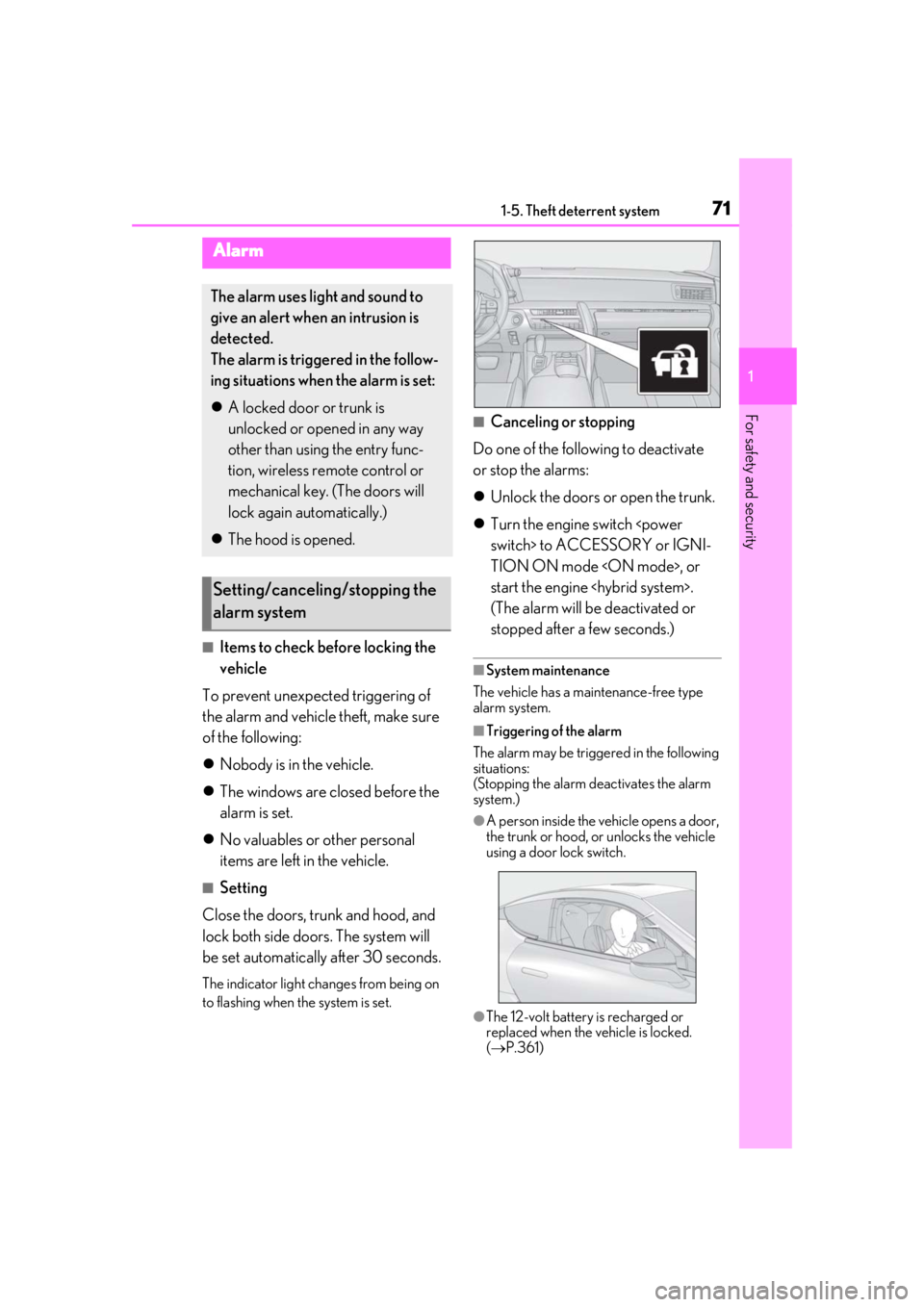
Alarm
The alarm uses light and sound to
give an alert when an intrusion is
detected.
The alarm is triggered in the follow-
ing situations when the alarm is set:
A locked door or trunk is
unlocked or opened in any way
other than using the entry func-
tion, wireless remote control or
mechanical key. (The doors will
lock again automatically.)
The hood is opened.
Setting/canceling/stopping the
alarm system
Page 90 of 432
902-1. Instrument cluster
roundings are dark, a suggestion mes-
sage will be displayed.
■Suggestion to turn off the head-
lights
If the headlights are left on for a certain
amount of time after the engine switch
suggestion message will be displayed
asking if you wish to turn the headlights
off.
When the headlight switch is in the
“AUTO” position: To turn the headlights
off, select “Yes”.
If a front door is op ened after the engine
switch
suggestion message will not be displayed.
■Suggestion to unlock the power
windows
If it is attempt to close the passenger’s
side window using the power window
switch on the driver’s door, a sugges-
tion message will be displayed.
■Customization
The suggestion function can be turned
on/off. (Customizable features: P.391)
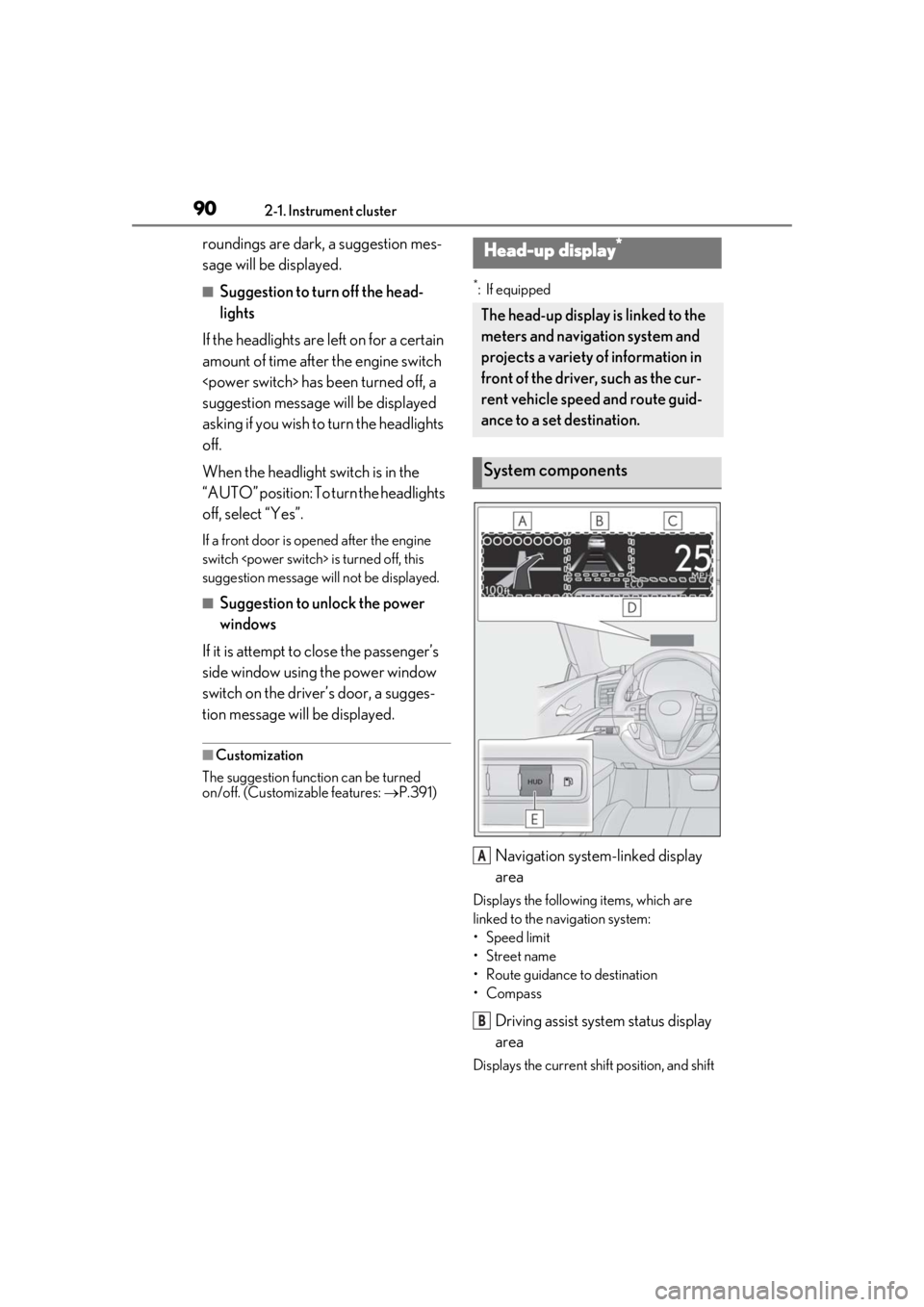
*: If equipped
Navigation system-linked display
area
Displays the following items, which are
linked to the navigation system:
•Speed limit
• Street name
• Route guidance to destination
•Compass
Driving assist system status display
area
Displays the current sh ift position, and shift
Head-up display*
The head-up display is linked to the
meters and navigation system and
projects a variety of information in
front of the driver, such as the cur-
rent vehicle speed and route guid-
ance to a set destination.
System components
A
B
Page 101 of 432
101
3
3
Before driving
Before driving
3-1. Key informationKeys ................................................. 102
3-2. Opening, closing and locking the doors and trunk
Doors............................................... 106
Trunk................................................. 110
Smart access system with push- button start .................................. 113
3-3. Adjusting the seats Front seats ..................................... 120
Driving position memory ........ 122
Head restraints............................ 125
3-4. Adjusting the steering wheel and mirrors
Steering wheel............................. 127
Inside rear view mirror............. 128
Outside rear view mirrors ...... 129
3-5. Opening and closing the win- dows
Power windows........................... 132
Page 104 of 432
1043-1. Key information
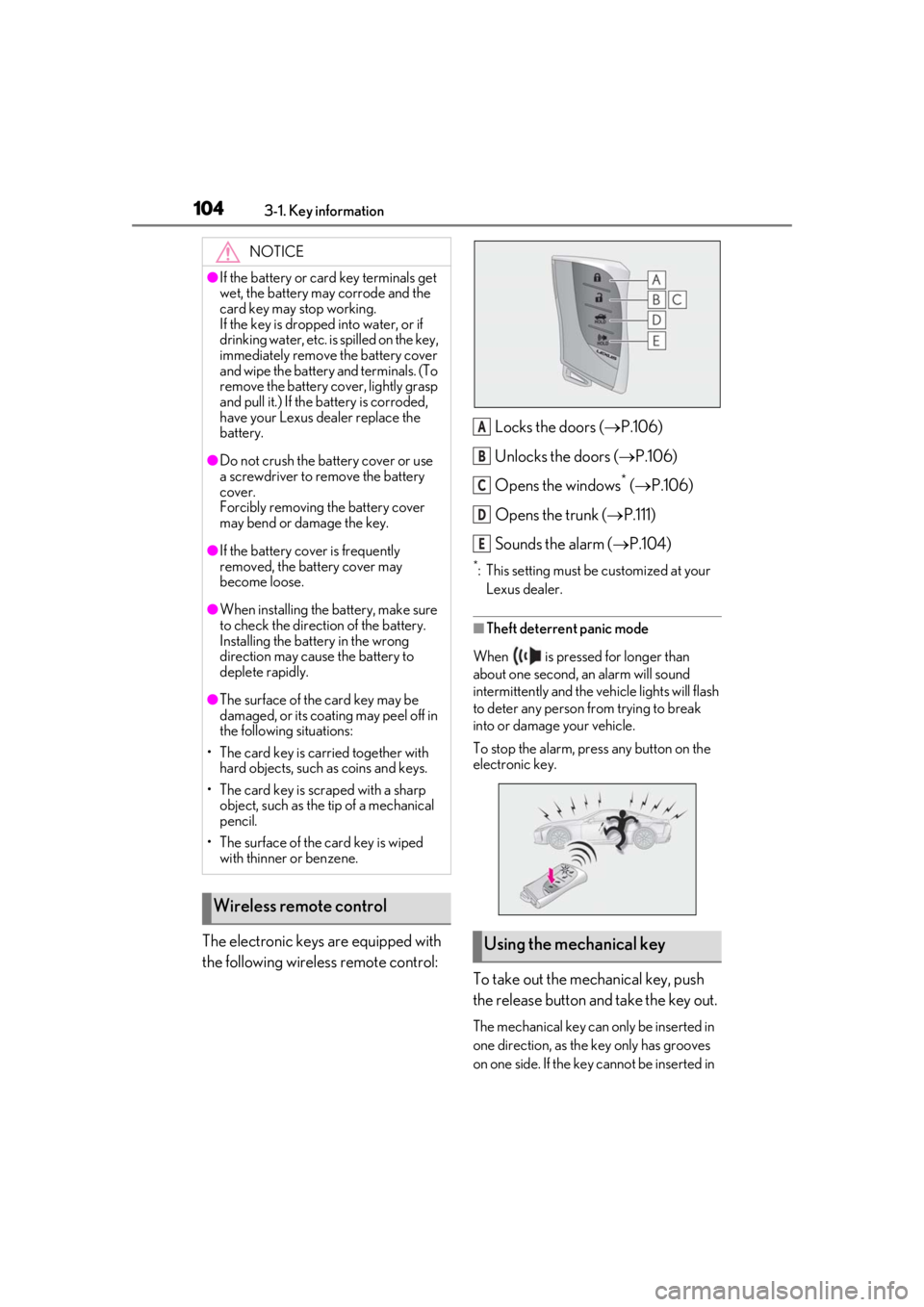
The electronic keys are equipped with
the following wireless remote control:Locks the doors (
P.106)
Unlocks the doors ( P.106)
Opens the windows
* ( P.106)
Opens the trunk ( P.111)
Sounds the alarm ( P.104)
*: This setting must be customized at your
Lexus dealer.
■Theft deterrent panic mode
When is pressed for longer than
about one second, an alarm will sound
intermittently and the vehicle lights will flash
to deter any person from trying to break
into or damage your vehicle.
To stop the alarm, press any button on the
electronic key.
To take out the mechanical key, push
the release button and take the key out.
The mechanical key can only be inserted in
one direction, as the key only has grooves
on one side. If the key cannot be inserted in
NOTICE
●If the battery or card key terminals get
wet, the battery may corrode and the
card key may stop working.
If the key is dropped into water, or if
drinking water, etc. is spilled on the key,
immediately remove the battery cover
and wipe the battery and terminals. (To
remove the battery co ver, lightly grasp
and pull it.) If the battery is corroded,
have your Lexus dealer replace the
battery.
●Do not crush the battery cover or use
a screwdriver to remove the battery
cover.
Forcibly removing the battery cover
may bend or damage the key.
●If the battery cover is frequently
removed, the battery cover may
become loose.
●When installing the ba ttery, make sure
to check the direction of the battery.
Installing the battery in the wrong
direction may cause the battery to
deplete rapidly.
●The surface of the card key may be
damaged, or its coating may peel off in
the following situations:
• The card key is carried together with hard objects, such as coins and keys.
• The card key is scraped with a sharp object, such as the tip of a mechanical
pencil.
• The surface of the card key is wiped with thinner or benzene.
Wireless remote control
Using the mechanical key
A
B
C
D
E
Page 106 of 432
1063-2. Opening, closing and locking the doors and trunk
3-2.Opening, closing and locking the doors and trunk
■Smart access system with push-
button start
Carry the electronic key to enable this
function.
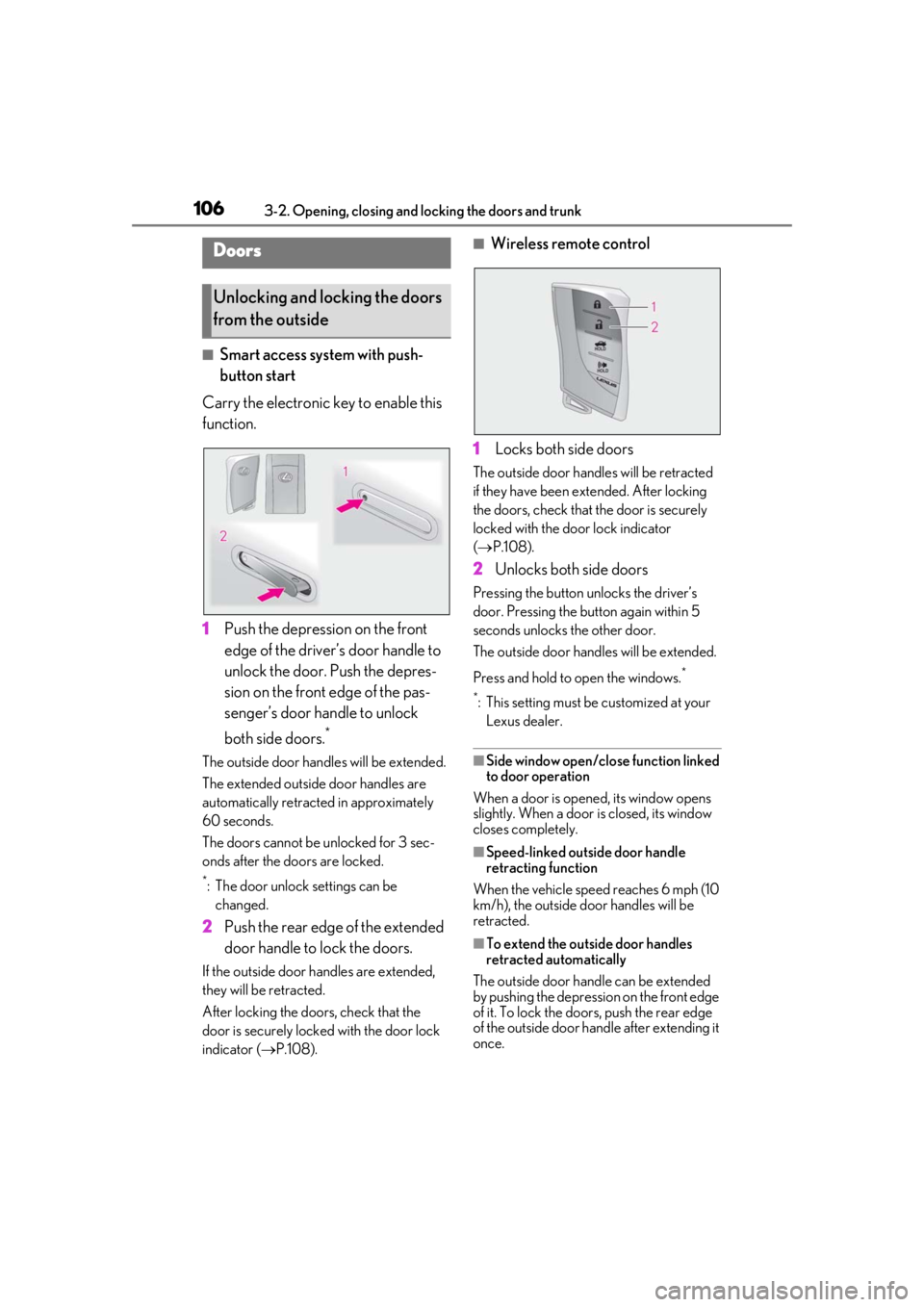
1 Push the depression on the front
edge of the driver’s door handle to
unlock the door. Push the depres-
sion on the front edge of the pas-
senger’s door handle to unlock
both side doors.
*
The outside door hand les will be extended.
The extended outside door handles are
automatically retracted in approximately
60 seconds.
The doors cannot be unlocked for 3 sec-
onds after the doors are locked.
*: The door unlock settings can be changed.
2 Push the rear edge of the extended
door handle to lock the doors.
If the outside door handles are extended,
they will be retracted.
After locking the doors, check that the
door is securely locked with the door lock
indicator ( P.108).
■Wireless remote control
1 Locks both side doors
The outside door handles will be retracted
if they have been ex tended. After locking
the doors, check that the door is securely
locked with the door lock indicator
( P.108).
2 Unlocks both side doors
Pressing the button unlocks the driver’s
door. Pressing the button again within 5
seconds unlocks the other door.
The outside door handles will be extended.
Press and hold to open the windows.
*
*
: This setting must be customized at your Lexus dealer.
■Side window open/close function linked
to door operation
When a door is opened, its window opens
slightly. When a door is closed, its window
closes completely.
■Speed-linked outside door handle
retracting function
When the vehicle speed reaches 6 mph (10
km/h), the outside door handles will be
retracted.
■To extend the outside door handles
retracted automatically
The outside door hand le can be extended
by pushing the depression on the front edge
of it. To lock the door s, push the rear edge
of the outside door handle after extending it
once.
Doors
Unlocking and locking the doors
from the outside
Page 108 of 432
1083-2. Opening, closing and locking the doors and trunk
Lock or unlock the doors using the
mechanical key. (P.355)
■Customization
Settings (e.g. unloc king function using a
key) can be changed.
(Customizable features: P.391)
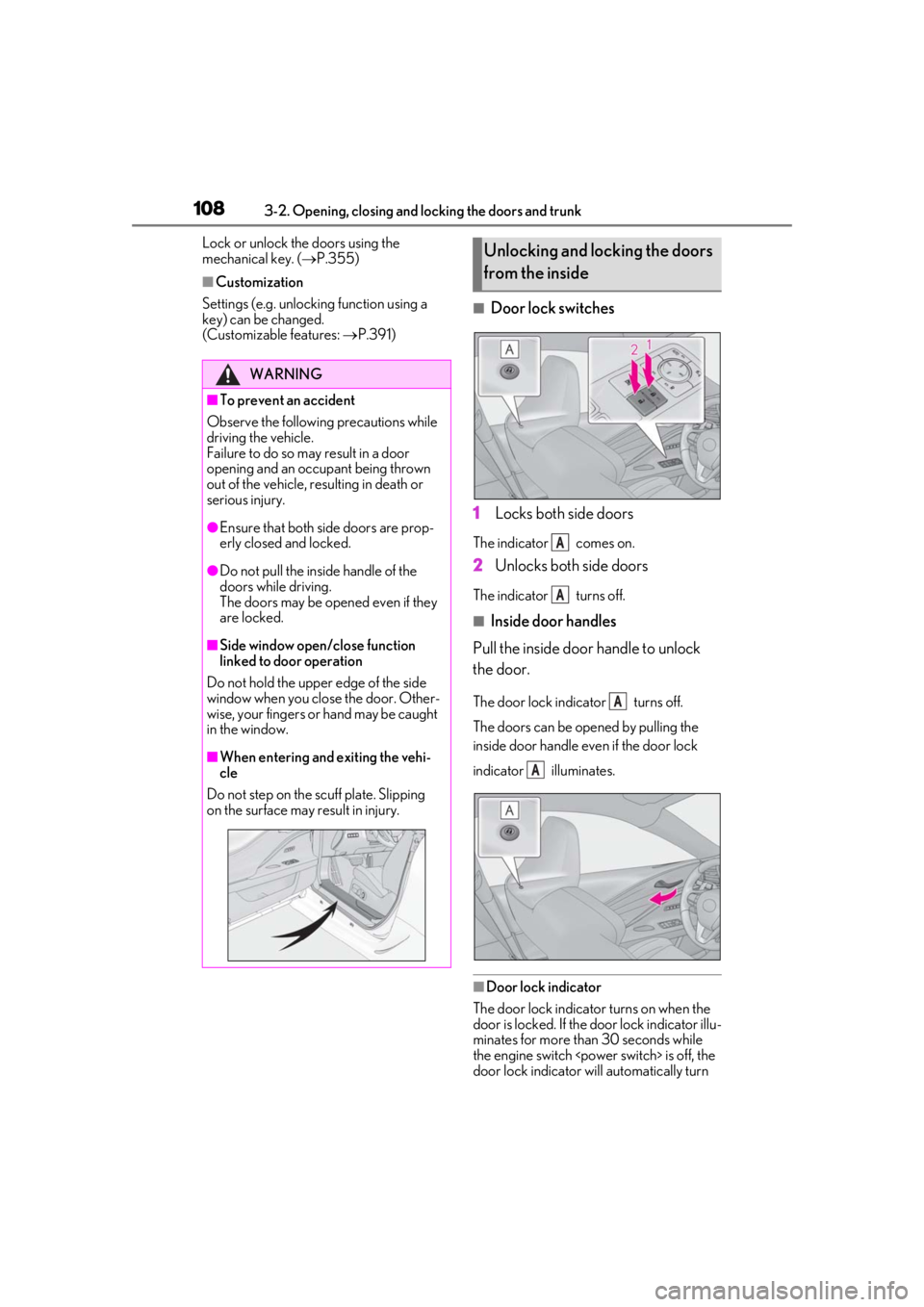
■Door lock switches
1 Locks both side doors
The indicator comes on.
2Unlocks both side doors
The indicator turns off.
■Inside door handles
Pull the inside door handle to unlock
the door.
The door lock indicator turns off.
The doors can be op ened by pulling the
inside door handle even if the door lock
indicator illuminates.
■Door lock indicator
The door lock indicator turns on when the
door is locked. If the door lock indicator illu-
minates for more than 30 seconds while
the engine switch
door lock indicator will automatically turn
WARNING
■To prevent an accident
Observe the following precautions while
driving the vehicle.
Failure to do so may result in a door
opening and an occupant being thrown
out of the vehicle, re sulting in death or
serious injury.
●Ensure that both side doors are prop-
erly closed and locked.
●Do not pull the inside handle of the
doors while driving.
The doors may be opened even if they
are locked.
■Side window open/close function
linked to door operation
Do not hold the upper edge of the side
window when you close the door. Other-
wise, your fingers or hand may be caught
in the window.
■When entering and exiting the vehi-
cle
Do not step on the scuff plate. Slipping
on the surface may result in injury.
Unlocking and locking the doors
from the inside
A
A
A
A
Page 115 of 432
1153-2. Opening, closing and locking the doors and trunk
3
Before driving
■Battery-saving function
The battery-saving fu nction will be acti-
vated in order to prevent the electronic key
battery and the 12-volt battery from being
discharged while the vehicle is not in opera-
tion for a long time.
●In the following situations, the smart
access system with pu sh-button start may
take some time to unlock the doors.
• The electronic key has been left within
approximately 6 ft. (2 m) of the outside of
the vehicle for 10 minutes or longer.
• The smart access system with push-but-
ton start has not been used for 5 days or
longer.
●If the smart access system with push-but-
ton start has not been used for 14 days or
longer, the doors cannot be unlocked at
the passenger door. In this case, push the
depression on the front edge the driver’s
door handle, or use the wireless remote
control or mechanical key, to unlock the
doors.
■Turning an electronic key to battery-
saving mode
When battery-saving mode is set, battery
depletion is minimized by stopping the elec-
tronic key from re ceiving radio waves.
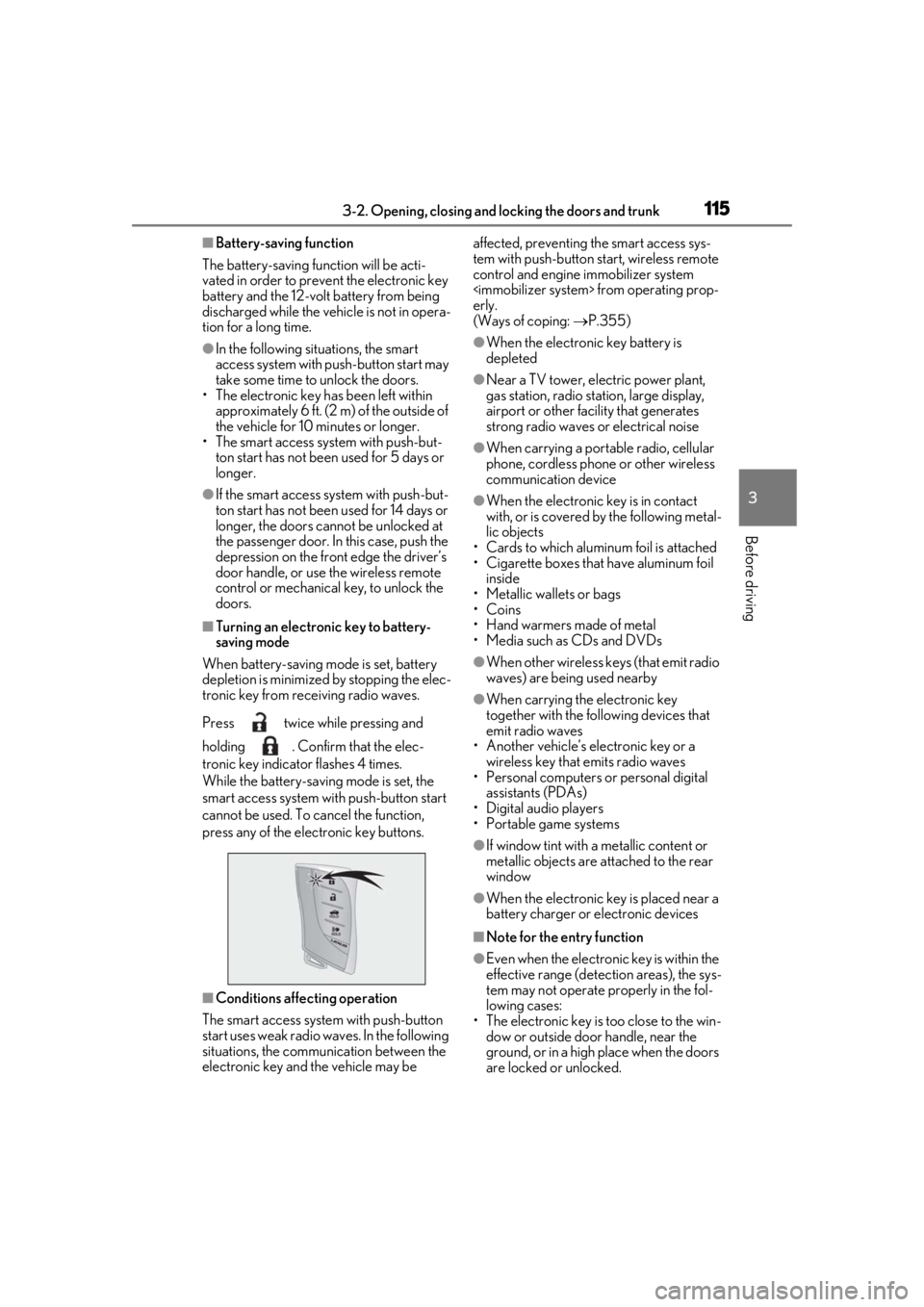
Press twice while pressing and
holding . Confirm that the elec-
tronic key indicator flashes 4 times.
While the battery-saving mode is set, the
smart access system with push-button start
cannot be used. To cancel the function,
press any of the electronic key buttons.
■Conditions affe cting operation
The smart access system with push-button
start uses weak radio waves. In the following
situations, the communication between the
electronic key and the vehicle may be affected, preventing
the smart access sys-
tem with push-button start, wireless remote
control and engine immobilizer system
erly.
(Ways of coping: P.355)
●When the electronic key battery is
depleted
●Near a TV tower, electric power plant,
gas station, radio stat ion, large display,
airport or other fac ility that generates
strong radio waves or electrical noise
●When carrying a portable radio, cellular
phone, cordless phone or other wireless
communication device
●When the electronic key is in contact
with, or is covered by the following metal-
lic objects
• Cards to which aluminum foil is attached
• Cigarette boxes that have aluminum foil inside
• Metallic wallets or bags
•Coins
• Hand warmers made of metal
• Media such as CDs and DVDs
●When other wireless keys (that emit radio
waves) are being used nearby
●When carrying the electronic key
together with the following devices that
emit radio waves
• Another vehicle’s electronic key or a wireless key that emits radio waves
• Personal computers or personal digital
assistants (PDAs)
• Digital audio players
• Portable game systems
●If window tint with a metallic content or
metallic objects are attached to the rear
window
●When the electronic key is placed near a
battery charger or electronic devices
■Note for the entry function
●Even when the electronic key is within the
effective range (detection areas), the sys-
tem may not operate properly in the fol-
lowing cases:
• The electronic key is too close to the win-
dow or outside door handle, near the
ground, or in a high place when the doors
are locked or unlocked.
Page 116 of 432

1163-2. Opening, closing and locking the doors and trunk
• The electronic key is near the ground or in a high place, or too close to the rear
bumper center when the trunk is opened.
• The electronic key is on the instrument panel, rear package tray or floor, or in the
door pockets or glove box when the
engine
engine switch
changed.
●Do not leave the electronic key on top of
the instrument panel or near the door
pockets when exiting the vehicle.
Depending on the radio wave reception
conditions, it may be detected by the
antenna outside the cabin and the doors
will become lockable from the outside,
possibly trapping the electronic key
inside the vehicle.
●As long as the electron ic key is within the
effective range, the doors may be locked
or unlocked by anyone. However, only
the doors detecting the electronic key
can be used to unlock the vehicle.
●Even if the electronic key is not inside the
vehicle, it may be possible to start the
engine
key is near the window.
●The doors may unlock or lock if a large
amount of water spla shes on the door
handle, such as in the rain or in a car
wash, when the electronic key is within
the effective range. (The doors will auto-
matically be locked after approximately
60 seconds if the d oors are not opened
and closed.)
●If the wireless remote control is used to
lock the doors when the electronic key is
near the vehicle, there is a possibility that
the door may not be unlocked by the
entry function. (Use the wireless remote
control to unlock the doors.)
●When the lock operation is performed
using the lock sensor, recognition signals
will be shown up to two consecutive
times. After this, no recognition signals
will be given.
●If the door handle becomes wet while the
electronic key is within the effective
range, the door may lock and unlock
repeatedly. In this case, follow the follow-
ing correction procedures to wash the vehicle:
• Place the electronic key in a location 6 ft. (2 m) or more away from the vehicle.
(Take care to ensure that the key is not
stolen.)
• Set the electronic key to battery-saving
mode to disable the smart access system
with push-button start. ( P.115)
●If the electronic key is inside the vehicle
and a door handle becomes wet during a
car wash, a message may be shown on
the multi-information display and a
buzzer will sound outside the vehicle. To
turn off the alarm, lock both side doors.
●If an outside door handle is not retracted
during a car wash, a door may be opened
or an outside door handle may be dam-
aged. Make sure that the outside door
handles are retracted before using the
car wash.
●A sudden handle operation or a handle
operation immediately after entering the
effective range may prevent the doors
from being unlocked. Touch the door
unlock sensor and check that the doors
are unlocked before pulling the door
handle again.
●Unlocking the vehicle may take more
time if another electronic key is within the
effective range.
■When the vehicle is not driven for
extended periods
●To prevent theft of the vehicle, do not
leave the electronic key within 6 ft. (2 m)
of the vehicle.
●The smart access system with push-but-
ton start can be deactivated in advance.
■To operate the system properly
●Make sure to carry the electronic key
when operating the system. Do not get
the electronic key too close to the vehicle
when operating the system from the out-
side of the vehicle.
Depending on the position and holding
condition of the elec tronic key, the key
may not be detected correctly and the
system may not operate properly. (The
alarm may go off accidentally, or the door
lock prevention function may not oper-
ate.)
Page 129 of 432
1293-4. Adjusting the steering wheel and mirrors
3
Before driving
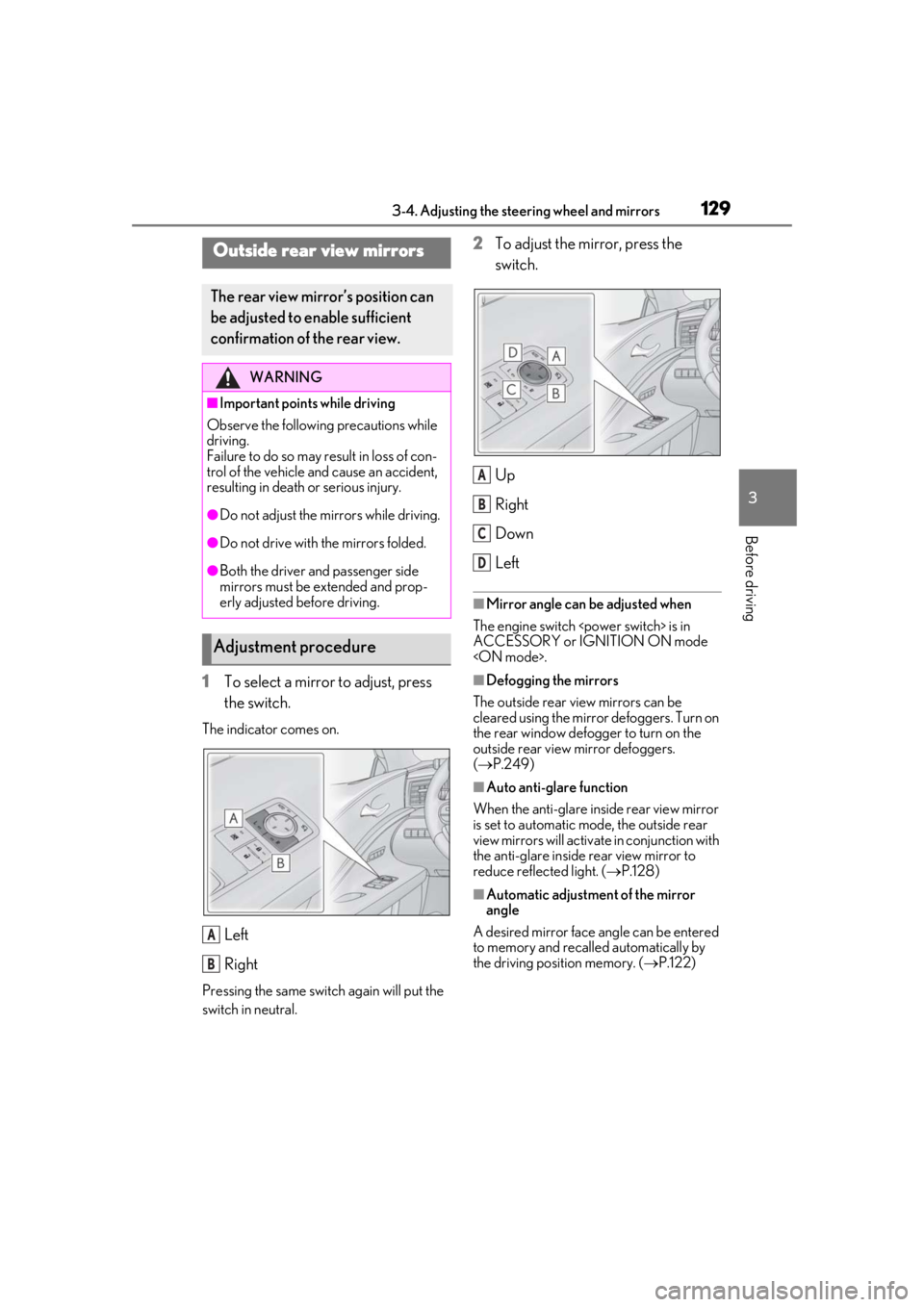
1To select a mirror to adjust, press
the switch.
The indicator comes on.
Left
Right
Pressing the same switch again will put the
switch in neutral.
2To adjust the mirror, press the
switch.
Up
Right
Down
Left
■Mirror angle can be adjusted when
The engine switch
ACCESSORY or IGNITION ON mode
■Defogging the mirrors
The outside rear view mirrors can be
cleared using the mirror defoggers. Turn on
the rear window defogger to turn on the
outside rear view mirror defoggers.
( P.249)
■Auto anti-glare function
When the anti-glare inside rear view mirror
is set to automatic mode, the outside rear
view mirrors will activate in conjunction with
the anti-glare inside rear view mirror to
reduce reflec ted light. (P.128)
■Automatic adjustment of the mirror
angle
A desired mirror face angle can be entered
to memory and recalled automatically by
the driving position memory. ( P.122)
Outside rear view mirrors
The rear view mirror’s position can
be adjusted to enable sufficient
confirmation of the rear view.
WARNING
■Important points while driving
Observe the following precautions while
driving.
Failure to do so may result in loss of con-
trol of the vehicle and cause an accident,
resulting in death or serious injury.
●Do not adjust the mirrors while driving.
●Do not drive with the mirrors folded.
●Both the driver and passenger side
mirrors must be extended and prop-
erly adjusted before driving.
Adjustment procedure
A
B
A
B
C
D
Page 132 of 432
1323-5. Opening and closing the windows
3-5.Opening and closing the windows
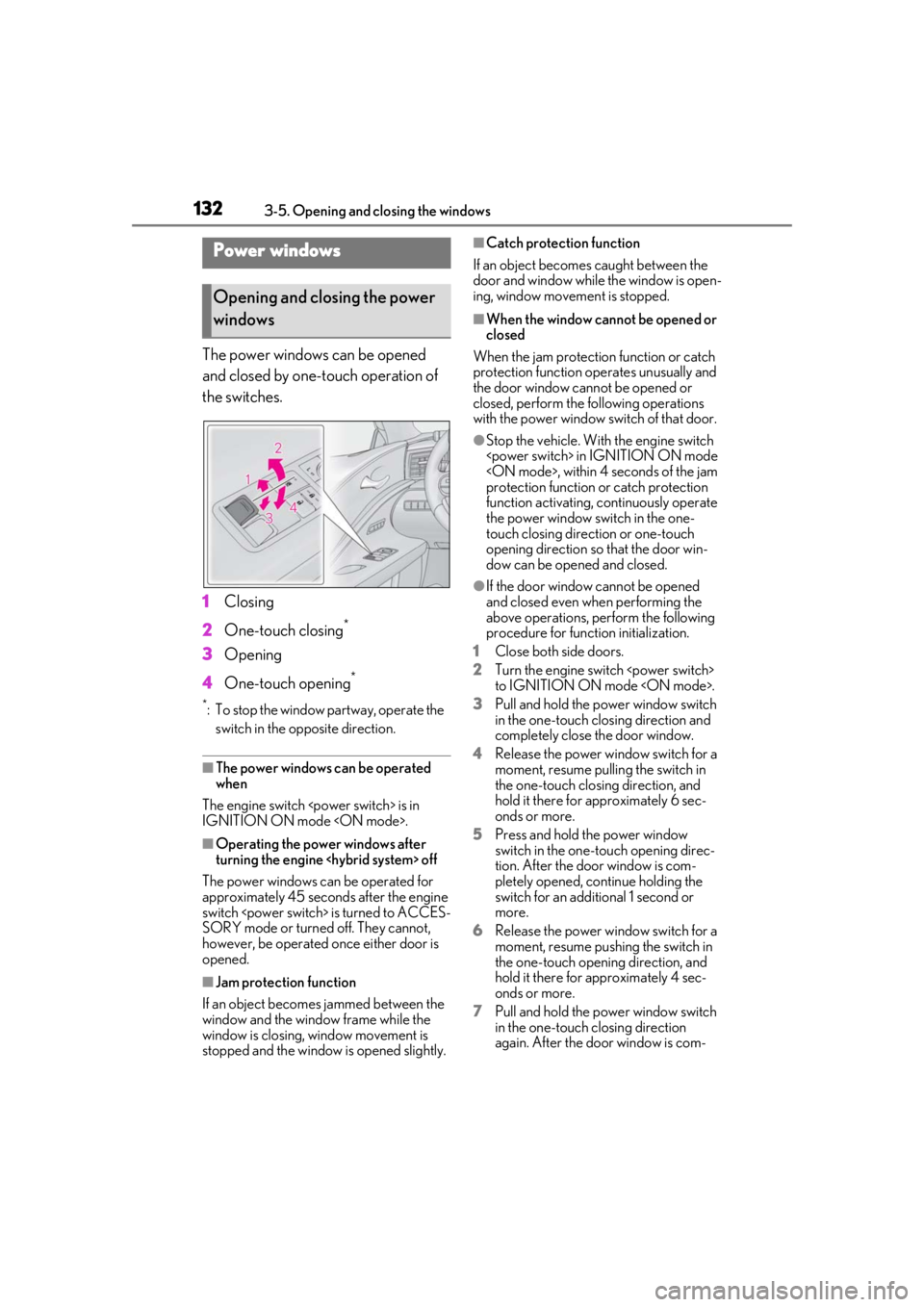
The power windows can be opened
and closed by one-touch operation of
the switches.
1Closing
2 One-touch closing
*
3Opening
4 One-touch opening
*
*: To stop the window partway, operate the
switch in the op posite direction.
■The power windows can be operated
when
The engine switch
IGNITION ON mode
■Operating the power windows after
turning the engine
The power windows can be operated for
approximately 45 seconds after the engine
switch
SORY mode or turned off. They cannot,
however, be operated once either door is
opened.
■Jam protection function
If an object becomes jammed between the
window and the window frame while the
window is closing, window movement is
stopped and the window is opened slightly.
■Catch protection function
If an object becomes caught between the
door and window while the window is open-
ing, window movement is stopped.
■When the window cannot be opened or
closed
When the jam protection function or catch
protection function operates unusually and
the door window cannot be opened or
closed, perform the following operations
with the power window switch of that door.
●Stop the vehicle. With the engine switch
protection function or catch protection
function activating, continuously operate
the power window switch in the one-
touch closing direction or one-touch
opening direction so that the door win-
dow can be opened and closed.
●If the door window cannot be opened
and closed even when performing the
above operations, perform the following
procedure for function initialization.
1 Close both side doors.
2 Turn the engine switch
to IGNITION ON mode
3 Pull and hold the power window switch
in the one-touch closing direction and
completely close the door window.
4 Release the power window switch for a
moment, resume pulling the switch in
the one-touch closing direction, and
hold it there for approximately 6 sec-
onds or more.
5 Press and hold the power window
switch in the one-touch opening direc-
tion. After the door window is com-
pletely opened, continue holding the
switch for an additional 1 second or
more.
6 Release the power window switch for a
moment, resume pushing the switch in
the one-touch opening direction, and
hold it there for approximately 4 sec-
onds or more.
7 Pull and hold the power window switch
in the one-touch closing direction
again. After the door window is com-
Power windows
Opening and closing the power
windows