brake lexus LC500 2019 / LEXUS 2019 LC 500,LC 500H QUICK GUIDE (OM11489U) User Guide
[x] Cancel search | Manufacturer: LEXUS, Model Year: 2019, Model line: LC500, Model: Lexus LC500 2019Pages: 114, PDF Size: 2.38 MB
Page 29 of 114
29
LC500_LC500h_QG_OM11489U_(U)
*1: To improve fuel efficiency and reduce noise, set the shift position in D for normal driving.You can choose gear range suitable for your driving situation by operating the paddle
shift switches.
*2: Any gear range can be fixed when driving in M mode.
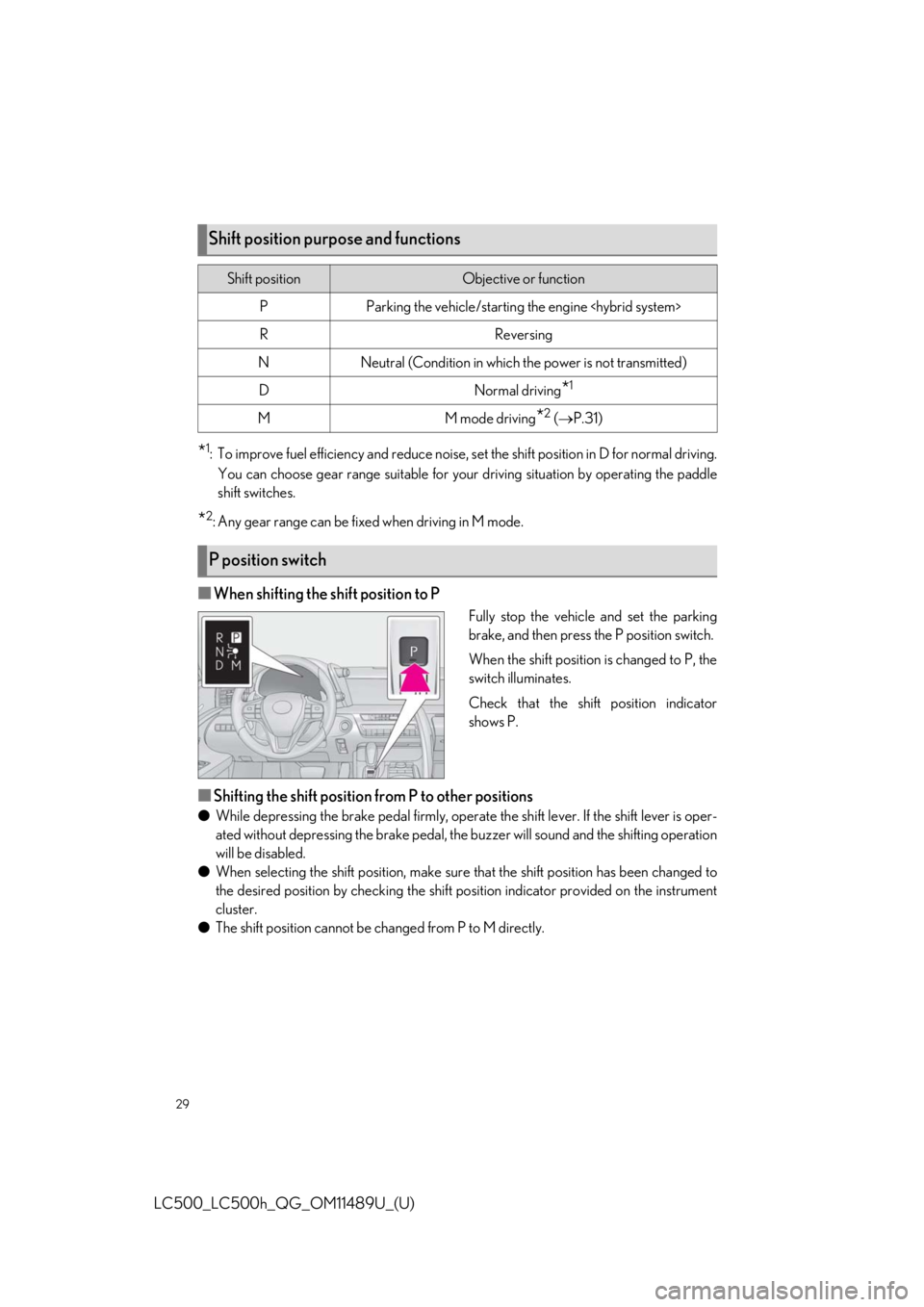
■When shifting the shift position to P
Fully stop the vehicle and set the parking
brake, and then press the P position switch.
When the shift position is changed to P, the
switch illuminates.
Check that the shift position indicator
shows P.
■Shifting the shift position from P to other positions
● While depressing the brake pedal firmly, operate the shift lever. If the shift lever is oper-
ated without depressing the brake pedal, the buzzer will sound and the shifting operation
will be disabled.
● When selecting the shift position, make sure that the shift position has been changed to
the desired position by checking the shift po sition indicator provided on the instrument
cluster.
● The shift position cannot be changed from P to M directly.
Shift position purpose and functions
Shift positionObjective or function
PParking the vehicle/starting the engine
RReversing
NNeutral (Condition in which the power is not transmitted)
DNormal driving*1
MM mode driving*2 ( P.31)
P position switch
Page 33 of 114
33
LC500_LC500h_QG_OM11489U_(U)
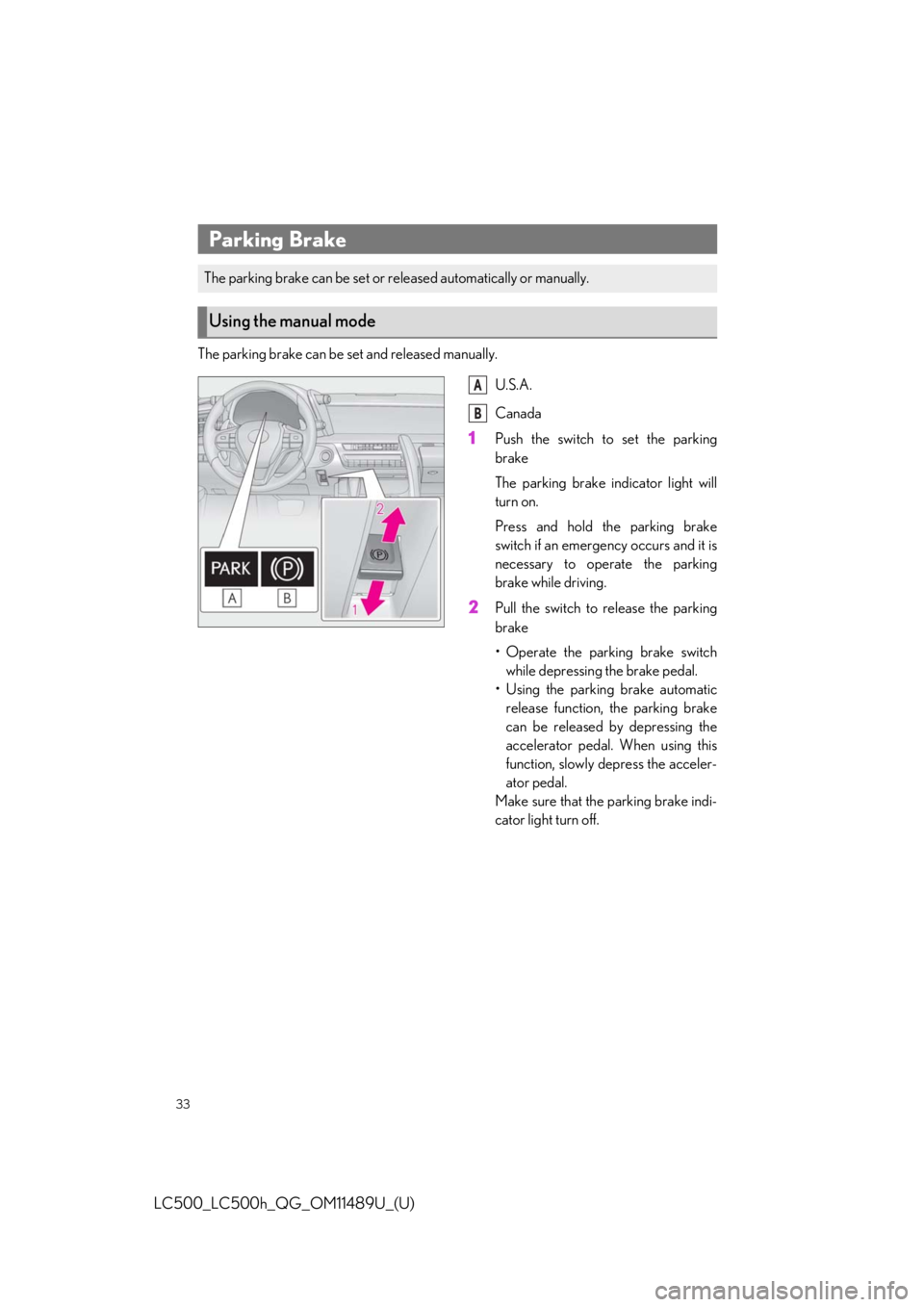
The parking brake can be set and released manually.
U.S.A.
Canada
1Push the switch to set the parking
brake
The parking brake indicator light will
turn on.
Press and hold the parking brake
switch if an emergency occurs and it is
necessary to operate the parking
brake while driving.
2Pull the switch to release the parking
brake
• Operate the parking brake switchwhile depressing the brake pedal.
• Using the parking brake automatic release function, the parking brake
can be released by depressing the
accelerator pedal. When using this
function, slowly depress the acceler-
ator pedal.
Make sure that the parking brake indi-
cator light turn off.
Parking Brake
The parking brake can be set or re leased automatically or manually.
Using the manual mode
A
B
Page 34 of 114
34
LC500_LC500h_QG_OM11489U_(U)
In automatic mode, the parking brake can be set or released automatically according to shift
lever operation. Also, even in automatic mo de, the parking brake can be set or released
manually.
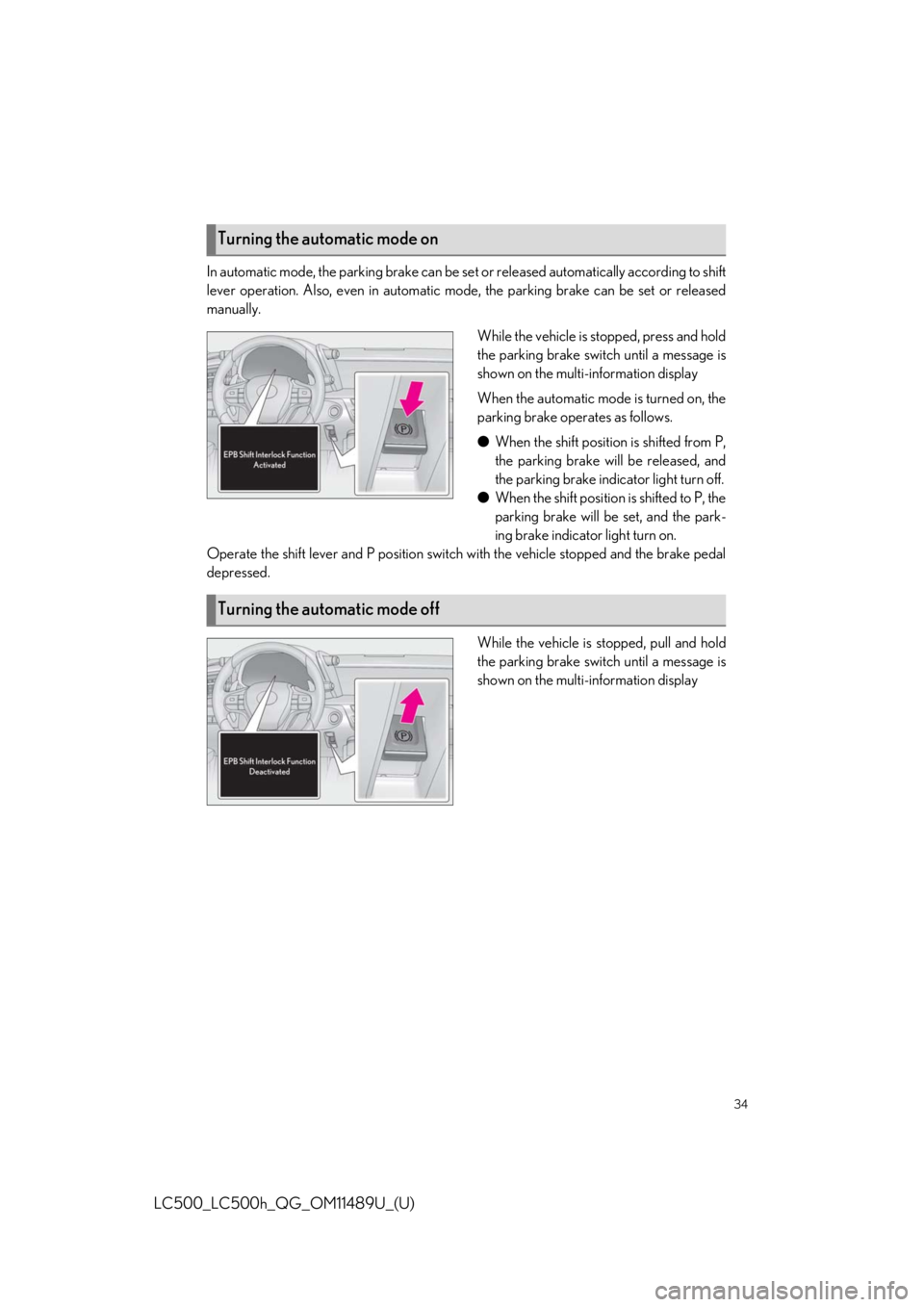
While the vehicle is stopped, press and hold
the parking brake switch until a message is
shown on the multi-information display
When the automatic mode is turned on, the
parking brake operates as follows.
●When the shift position is shifted from P,
the parking brake will be released, and
the parking brake indicator light turn off.
● When the shift position is shifted to P, the
parking brake will be set, and the park-
ing brake indicator light turn on.
Operate the shift lever and P position switch with the vehicle stopped and the brake pedal
depressed.
While the vehicle is stopped, pull and hold
the parking brake switch until a message is
shown on the multi-information display
Turning the automatic mode on
Turning the automatic mode off
Page 35 of 114
35
LC500_LC500h_QG_OM11489U_(U)
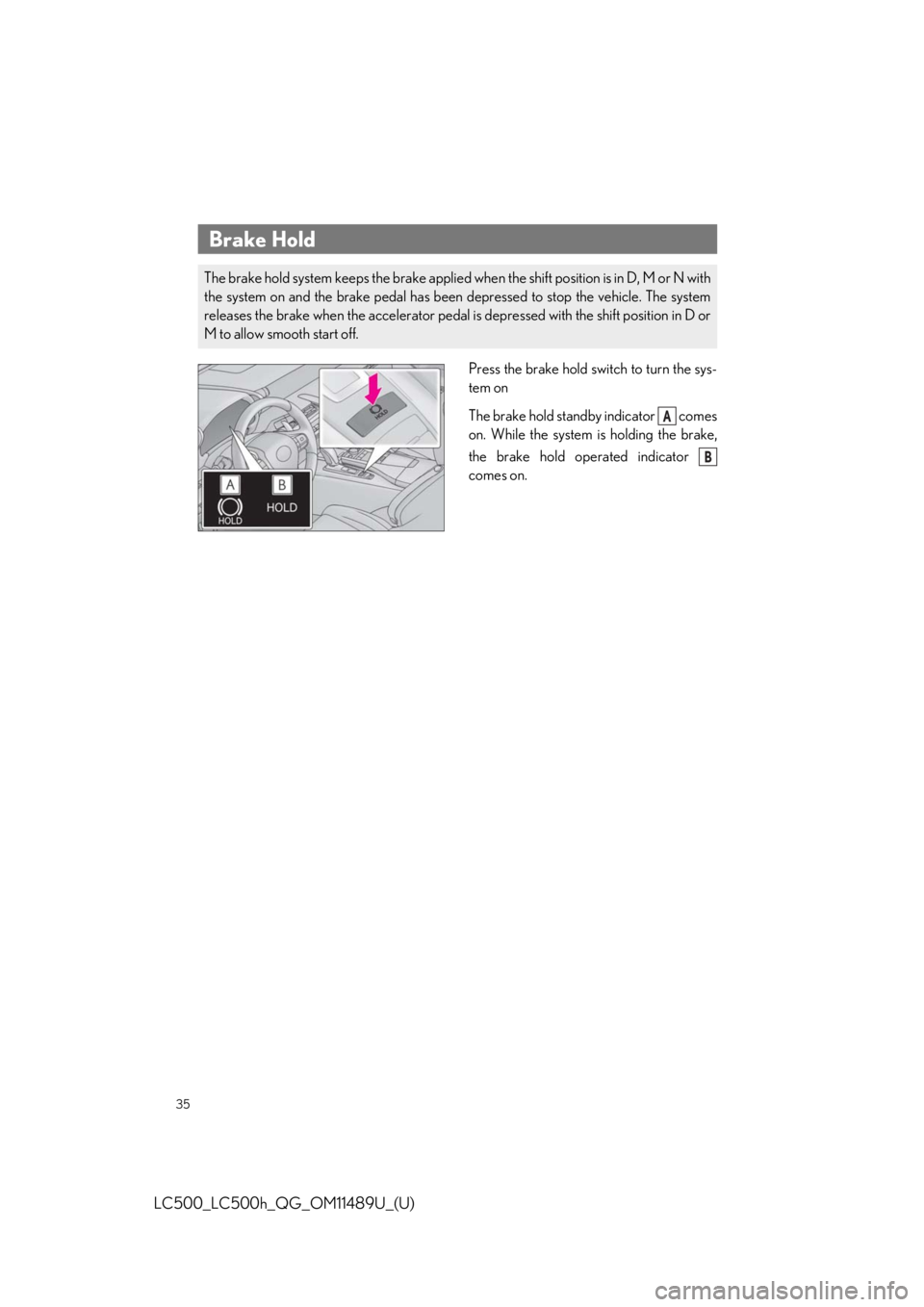
Press the brake hold switch to turn the sys-
tem on
The brake hold standby indicator comes
on. While the system is holding the brake,
the brake hold operated indicator
comes on.
Brake Hold
The brake hold system keeps the brake applied when the shift position is in D, M or N with
the system on and the brake pedal has been depressed to stop the vehicle. The system
releases the brake when the accelerator pedal is depressed with the shift position in D or
M to allow smooth start off.
A
B
Page 45 of 114
45
LC500_LC500h_QG_OM11489U_(U)
■PCS (Pre-Collision System)
The pre-collision system uses a radar sensor and camera sensor to detect vehicles and
pedestrians in front of your vehicle. When th e system determines that the possibility of a
frontal collision with a vehicle or pedestrian is high, a warning operates to urge the driver to
take evasive action and the potential brake pressure is increased to help the driver avoid the
collision. If the system determines that the po ssibility of a frontal collision with a vehicle or
pedestrian is extremely high, the brakes are au tomatically applied to help avoid the collision
or help reduce the impact of the collision.
■LKA (Lane-Keeping Assist)
P.46
■Automatic High Beam
P.42
■Dynamic radar cruise contro l with full-speed range
P.47
Lexus Safety System +
The Lexus Safety System + consists of the fo llowing drive assist systems and contributes to
a safe and comfortable driving experience:
Drive assist systems of Lexus Safety System +
Page 50 of 114
50
LC500_LC500h_QG_OM11489U_(U)
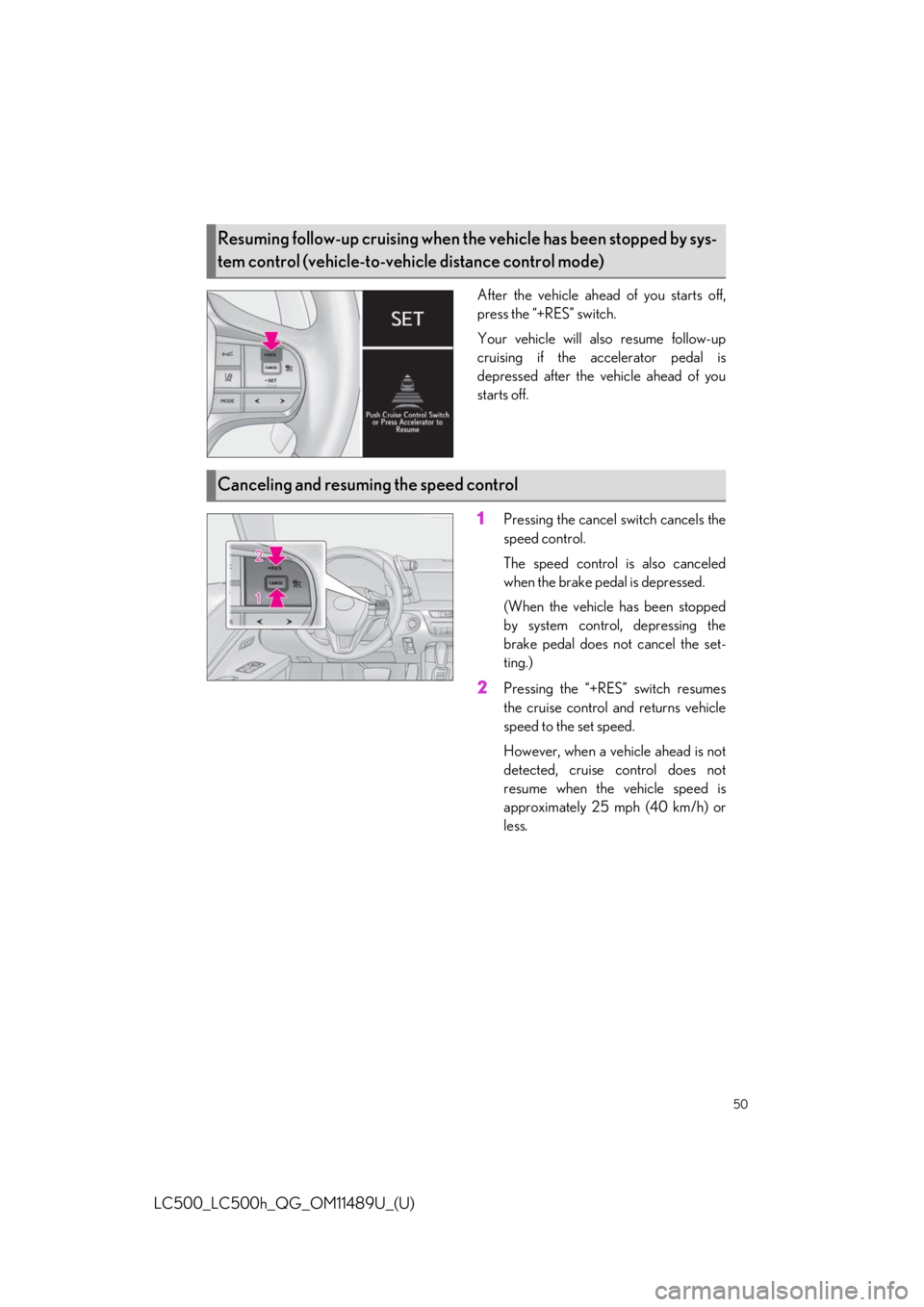
After the vehicle ahead of you starts off,
press the “+RES” switch.
Your vehicle will also resume follow-up
cruising if the accelerator pedal is
depressed after the vehicle ahead of you
starts off.
1Pressing the cancel switch cancels the
speed control.
The speed control is also canceled
when the brake pedal is depressed.
(When the vehicle has been stopped
by system control, depressing the
brake pedal does not cancel the set-
ting.)
2Pressing the “+RES” switch resumes
the cruise control and returns vehicle
speed to the set speed.
However, when a vehicle ahead is not
detected, cruise control does not
resume when the vehicle speed is
approximately 25 mph (40 km/h) or
less.
Resuming follow-up cruising when the vehicle has been stopped by sys-
tem control (vehicle-to-vehicle distance control mode)
Canceling and resuming the speed control
Page 105 of 114
What to do if...
105
LC500_LC500h_QG_OM11489U_(U)
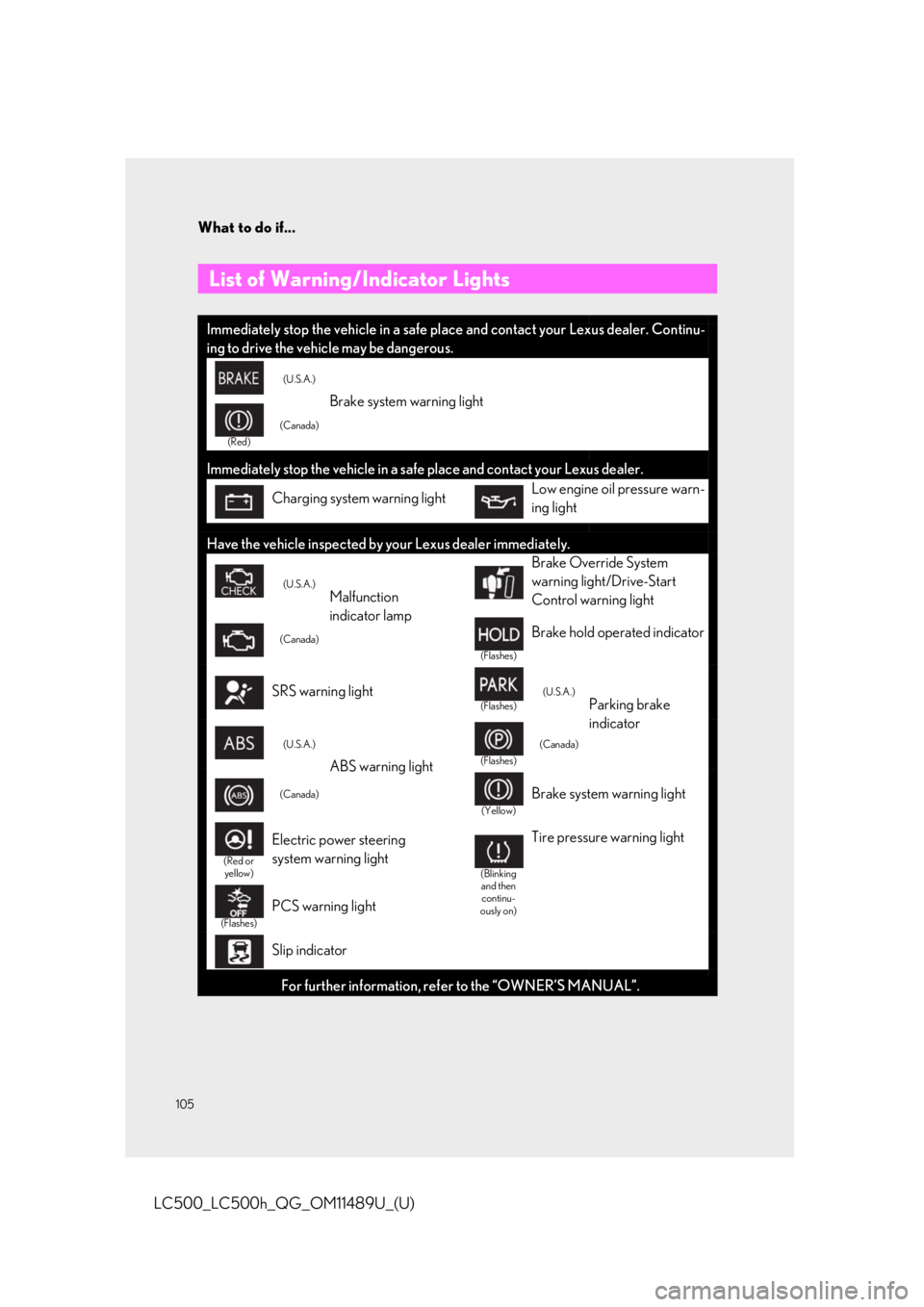
List of Warning/Indicator Lights
Immediately stop the vehicle in a safe pl ace and contact your Lexus dealer. Continu-
ing to drive the vehicle may be dangerous.
(U.S.A.)
Brake system warning light
(Red)
(Canada)
Immediately stop the vehicle in a safe place and contact your Lexus dealer.
Charging system warning lightLow engine oil pressure warn-
ing light
Have the vehicle inspected by your Lexus dealer immediately.
(U.S.A.)Malfunction
indicator lamp
Brake Override System
warning light/Drive-Start
Control warning light
(Canada)
(Flashes)
Brake hold operated indicator
SRS warning light(Flashes)(U.S.A.)Parking brake
indicator
(U.S.A.)
ABS warning light(Flashes)
(Canada)
(Canada)
(Yellow)
Brake system warning light
(Red or
yellow)
Electric power steering
system warning light
(Blinking and then continu-
ously on)
Tire pressure warning light
(Flashes)
PCS warning light
Slip indicator
For further information, refe r to the “OWNER’S MANUAL”.
Page 107 of 114
What to do if...
107
LC500_LC500h_QG_OM11489U_(U)
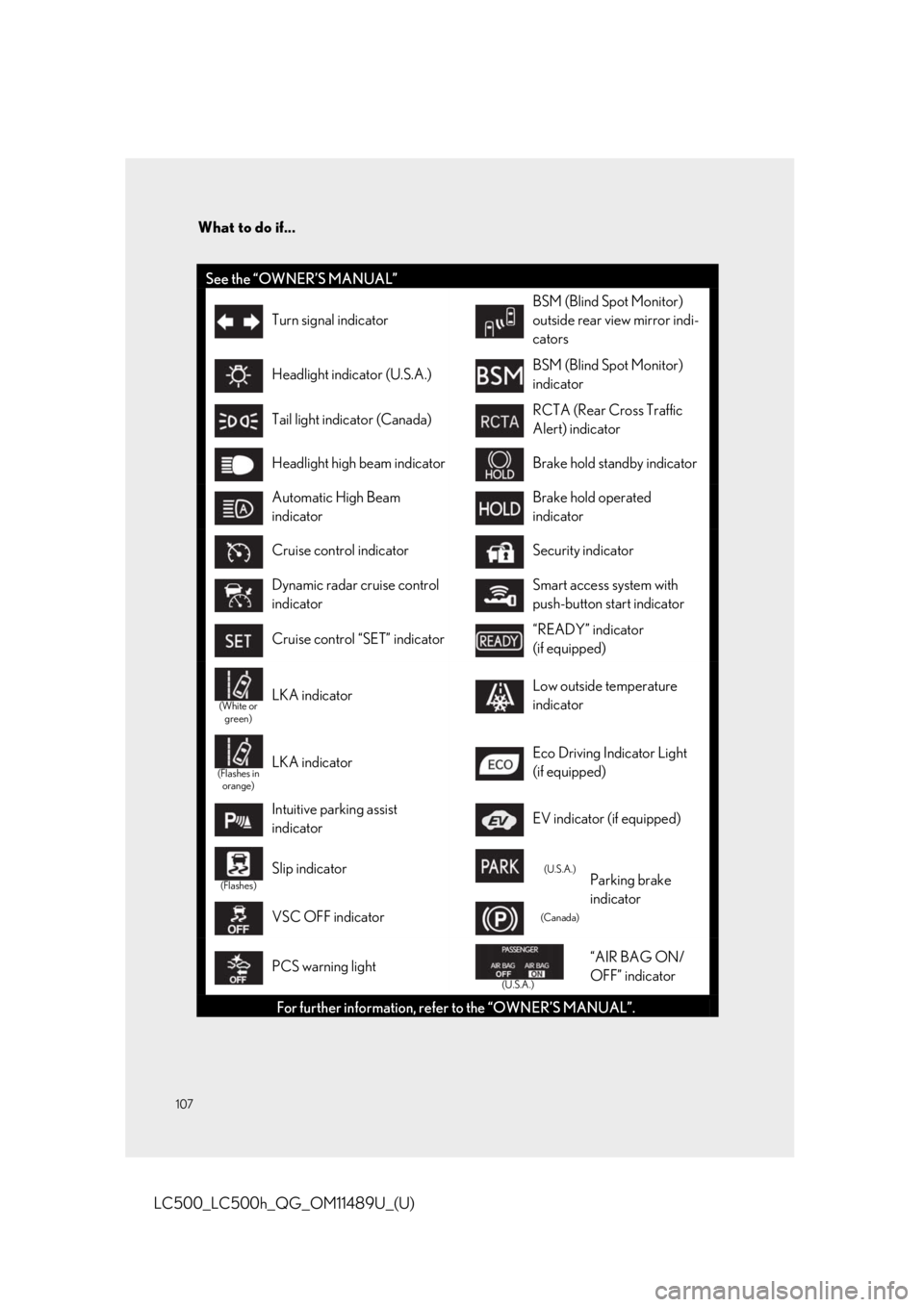
See the “OWNER’S MANUAL”
Turn signal indicator
BSM (Blind Spot Monitor)
outside rear view mirror indi-
cators
Headlight indicator (U.S.A.)BSM (Blind Spot Monitor)
indicator
Tail light indicator (Canada)RCTA (Rear Cross Traffic
Alert) indicator
Headlight high beam indicatorBrake hold standby indicator
Automatic High Beam
indicatorBrake hold operated
indicator
Cruise control indicatorSecurity indicator
Dynamic radar cruise control
indicatorSmart access system with
push-button start indicator
Cruise control “SET” indicator“READY” indicator
(if equipped)
(White or green)LKA indicatorLow outside temperature
indicator
(Flashes in orange)LKA indicatorEco Driving Indicator Light
(if equipped)
Intuitive parking assist
indicatorEV indicator (if equipped)
(Flashes)
Slip indicator(U.S.A.)Parking brake
indicator
VSC OFF indicator(Canada)
PCS warning light
(U.S.A.)
“AIR BAG ON/
OFF” indicator
For further information, refe r to the “OWNER’S MANUAL”.
Page 110 of 114
110
What to do if...
LC500_LC500h_QG_OM11489U_(U)
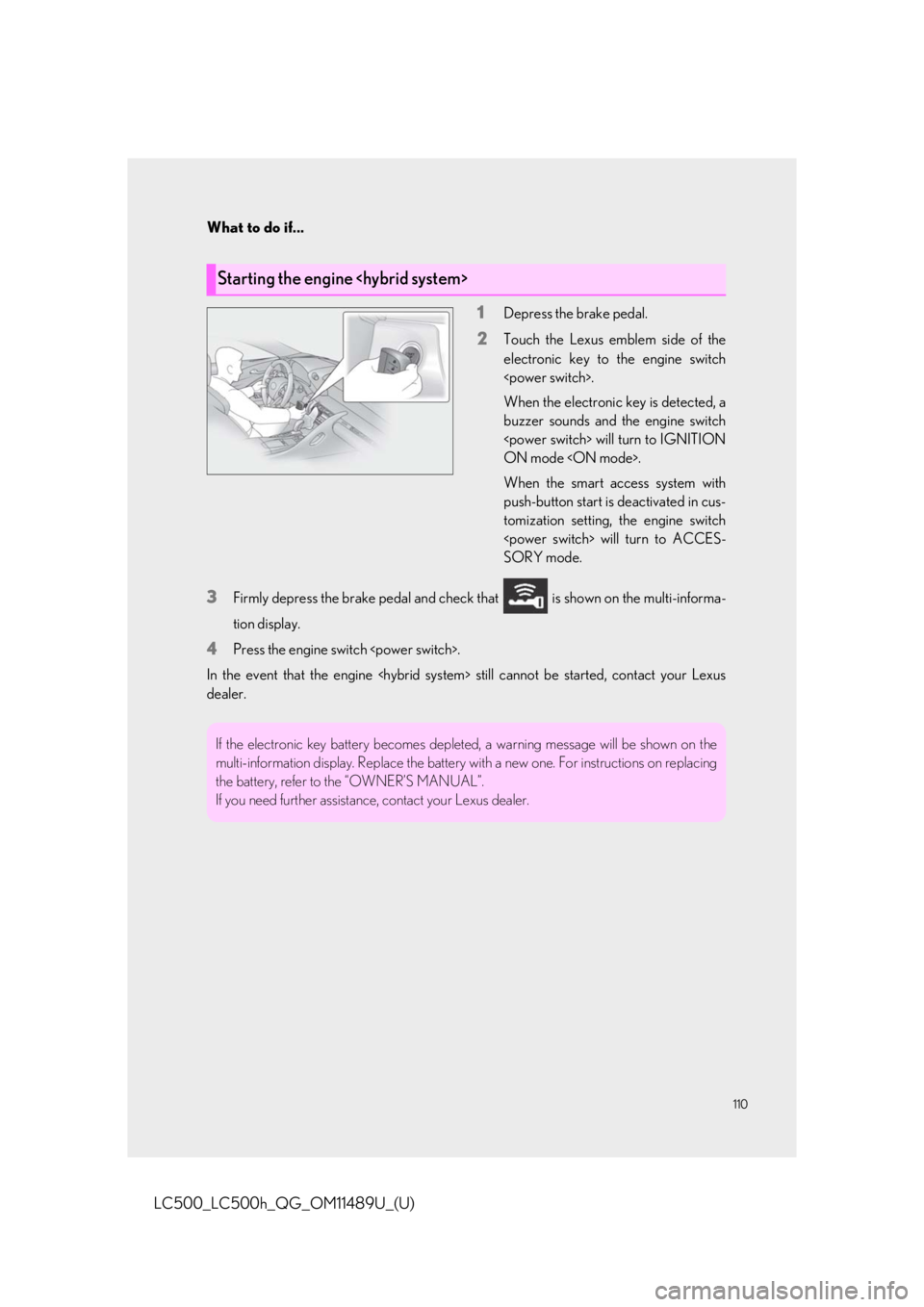
1Depress the brake pedal.
2Touch the Lexus emblem side of the
electronic key to the engine switch
When the electronic key is detected, a
buzzer sounds and the engine switch
ON mode
When the smart access system with
push-button start is deactivated in cus-
tomization setting, the engine switch
SORY mode.
3Firmly depress the brake pedal and check that is shown on the multi-informa-
tion display.
4Press the engine swit ch
In the event that the engine
dealer.
Starting the engine
If the electronic key battery becomes depleted, a warning message will be shown on the
multi-information display. Replace the battery wi th a new one. For instructions on replacing
the battery, refer to the “OWNER’S MANUAL”.
If you need further assistance , contact your Lexus dealer.
Page 111 of 114
What to do if...
111
LC500_LC500h_QG_OM11489U_(U)
Make sure that the correct operating procedures have been followed.Make sure that the brake pedal is firmly
depressed when attempting to start the
engine
If the engine
Brake pedal
If the engine
information or contact your Lexus dealer.