ESP Lexus LC500 2021 / LEXUS 2021 LC500,LC500H (OM11559U) Owner's Guide
[x] Cancel search | Manufacturer: LEXUS, Model Year: 2021, Model line: LC500, Model: Lexus LC500 2021Pages: 448, PDF Size: 14.11 MB
Page 142 of 448
1424-1. Before driving
4-1.Before driving
■Starting the engine
P.152, 156
■Driving
1 With the brake pedal depressed,
shift the shift position to D.
(P.164, 171)
Check that the shift position indicator
shows D.
2 If the parking brake is in manual
mode, release the parking brake.
(P.176)
3 Gradually release the brake pedal
and gently depress the accelerator
pedal to accelerate the vehicle.
■Stopping
1 With the shift position in D, depress
the brake pedal.
2 If necessary, set the parking brake.
If the vehicle is to be stopped for an
extended period of time, shift the shift posi-
tion to P. ( P.164, 171)
■Parking the vehicle
1 Stop the vehicle completely.
2 If the parking brake is in manual
mode, set the parking brake.
(P.176)
3 Shift the shift position to P. ( P.165,
171)
Check that the shift position indicator shows P.
4
Press the engine switch
5 Slowly release the brake pedal.
6 Lock the door, making sure that you
have the electronic key on your
person.
If parking on a hill, block the wheels as
needed.
■Starting off on a steep uphill
1 Firmly depress the brake pedal and
shift the shift position to D.
The hill-start assist control will be activated.
( P.243)
2 Set the parking brake. ( P.176)
3 Release the brake pedal and gently
depress the accelerator pedal to
accelerate the vehicle.
4 Release the parking brake.
(P.176)
■For fuel-efficient driving (LC500h)
Keep in mind that hybr id vehicles are similar
to conventional vehicles, and it is necessary
to refrain from activi ties such as sudden
acceleration. ( P.249)
■Driving in the rain
●Drive carefully when it is raining, because
visibility will be reduced, the windows
may become fogged-up, and the road
will be slippery.
●Drive carefully when it starts to rain,
because the road surface will be espe-
cially slippery.
●Refrain from high speeds when driving on
an expressway in the rain, because there
may be a layer of wa ter between the tires
and the road surface, preventing the
steering and brakes from operating prop-
erly.
Driving the vehicle
The following procedures should be
observed to ensure safe driving:
Driving procedure
Page 144 of 448
1444-1. Before driving
WARNING
■When driving the vehicle
●Do not drive if you are unfamiliar with
the location of the brake and accelera-
tor pedals to avoid depressing the
wrong pedal.
• Accidentally depressing the accelera- tor pedal instead of the brake pedal
will result in sudden acceleration that
may lead to an accident.
• When backing up, you may twist your body around, leading to a difficulty in
operating the pedals. Make sure to
operate the pedals properly.
• Make sure to keep a correct driving posture even when moving the vehicle
only slightly. This allows you to depress
the brake and accelerator pedals
properly.
• Depress the brake pedal using your right foot. Depressing the brake pedal
using your left foot may delay
response in an emergency, resulting in
an accident.
●LC500h: The driver should pay extra
attention to pedestrians when the vehi-
cle is powered only by the electric
motor (traction motor). As there is no
engine noise, the pedestrians may mis-
judge the vehicle’s movement. Even
though the vehicle is equipped with the
vehicle proximity notification system,
drive with care as pedestrians in the
vicinity may still not notice the vehicle if
the surrounding area is noisy.
●Do not drive the vehicle over or stop
the vehicle near flammable materials.
The exhaust system and exhaust gases
can be extremely hot. These hot parts
may cause a fire if there is any flamma-
ble material nearby.
●During normal driving, do not turn off
the engine
the engine
driving will not cause loss of steering
or braking control, however, power
assist to the steering will be lost. This
will make it more difficult to steer
smoothly, so you should pull over and
stop the vehicle as soon as it is safe to
do so.
In the event of an emergency, such as if
it becomes impossible to stop the vehi-
cle in the normal way: P.338
●Use engine braking (downshift) to
maintain a safe speed when driving
down a steep hill.
Using the brakes continuously may
cause the brakes to overheat and lose
effectiveness. ( P.162, 169)
●Do not adjust the positions of the
steering wheel, the seat, or the inside
or outside rear view mirrors while driv-
ing.
Doing so may result in a loss of vehicle
control.
●Always check that all passengers’
arms, heads or other parts of their
body are not outside the vehicle.
●Do not drive in excess of the speed
limit. Even if the legal speed limit per-
mits it, do not drive over 85 mph (140
km/h) unless your vehicle has high-
speed capability tires. Driving over 85
mph (140 km/h) may re sult in tire fail-
ure, loss of control and possible injury.
Be sure to consult a tire dealer to
determine whether the tires on your
vehicle are high-speed capability tires
or not before driving at such speeds.
■When driving on slippery road sur-
faces
●Sudden braking, acceleration and
steering may cause tire slippage and
reduce your ability to control the vehi-
cle.
Page 170 of 448
1704-2. Driving procedures
■Reverse warning buzzer
When shifting into R, a buzzer will sound to
inform the driver that the shift position is in
R.
■To protect the hybrid transmission
If the transmission fluid temperature is high,
“Transmission Fluid Temp High See
Owner’s Manual” will be displayed on the
multi-information display and the vehicle
will go into transmission protection mode
automatically. Have the vehicle inspected
by your Lexus dealer.
■When driving with dynamic radar cruise
control with full-speed range activated
●When dynamic radar cruise control with
full-speed range is operating, the system
does not respond to paddle shift switch
operations.
●Even when the drivin g mode is switched
to sport mode with the intent of enabling
engine braking, dynamic radar cruise
control with full-speed range is not can-
celed and engine braking is not activated.
■Restraining sudden start (Drive-Start
Control)
P.143
■AI-SHIFT
The AI-SHIFT automatica lly selects the suit-
able gear according to driver performance
and driving conditions.
The AI-SHIFT automatically operates when
the shift position is in D. (Shifting the shift
position to the M position cancels the func-
tion.)
■If a message about a shift operation is
shown
To prevent the shift position from being
selected incorrectly or the vehicle from
moving unexpectedly, the shift position may
be changed automatically or operating the
shift lever may be required. In this case,
change the shift positi on following the mes-
sages on the multi-information display.
■After recharging/reconnecting the 12-
volt battery
P.311
■Customization
Settings (e.g. revers e warning buzzer) can
be changed.
(Customizable features: P.405)
WARNING
■When driving on slippery road sur-
faces
Do not accelerate or shift the shift posi-
tion suddenly.
Sudden changes in engine braking may
cause the vehicle to sp in or skid, resulting
in an accident.
NOTICE
■Hybrid battery (t raction battery)
charge
If the shift position is in N, the hybrid bat-
tery (traction battery) will not be
charged. To help prevent the battery
from discharging, avoid leaving the N
position selected for an extended period
of time.
■Situations where sh ift control system
malfunctions are possible
If any of the following situations occurs,
shift control system malfunctions are
possible.
Immediately stop the vehicle in a safe
place on level ground, apply the parking
brake, and then contact your Lexus
dealer.
●When the warning message indicating
the shift control system appears on the
multi-information display.
●The display indicates that no shift posi-
tion is selected for more than a few
seconds.
Page 194 of 448
1944-5. Using the driving support systems
4-5.Using the driving support systems
■PCS (Pre-Collision System)
P.200
■LKA (Lane-Keeping Assist)
P.207
■Automatic High Beam
P.184
■Dynamic radar cruise control with
full-speed range
P.214
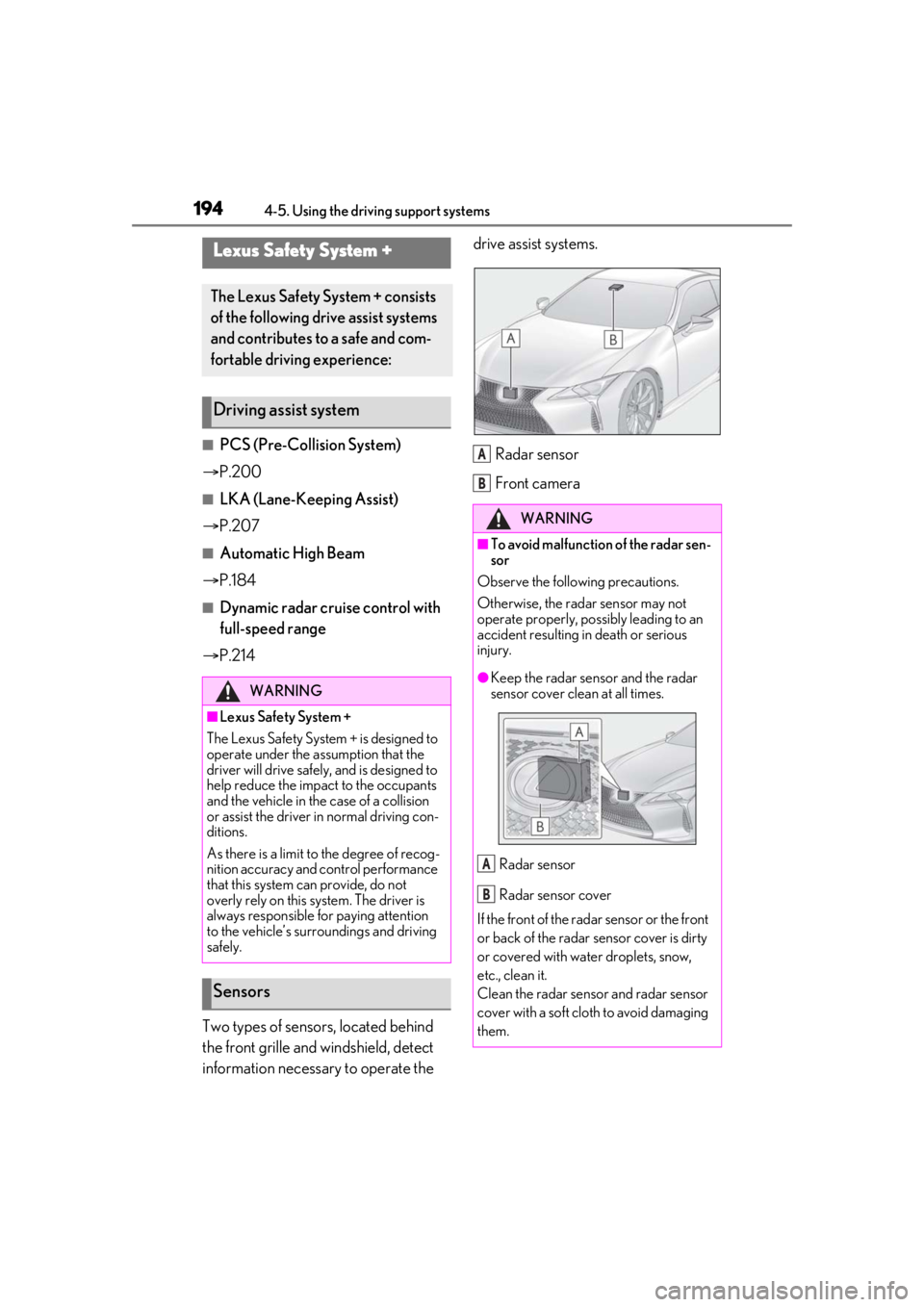
Two types of sensors, located behind
the front grille and windshield, detect
information necessary to operate the drive assist systems.
Radar sensor
Front camera
Lexus Safety System +
The Lexus Safety Sy stem + consists
of the following drive assist systems
and contributes to a safe and com-
fortable driving experience:
Driving assist system
WARNING
■Lexus Safety System +
The Lexus Safety System + is designed to
operate under the assumption that the
driver will drive safely, and is designed to
help reduce the impact to the occupants
and the vehicle in the case of a collision
or assist the driver in normal driving con-
ditions.
As there is a limit to the degree of recog-
nition accuracy and control performance
that this system can provide, do not
overly rely on this system. The driver is
always responsible for paying attention
to the vehicle’s surro undings and driving
safely.
Sensors
WARNING
■To avoid malfunction of the radar sen-
sor
Observe the following precautions.
Otherwise, the radar sensor may not
operate properly, possibly leading to an
accident resulting in death or serious
injury.
●Keep the radar sensor and the radar
sensor cover clean at all times.
Radar sensor
Radar sensor cover
If the front of the rada r sensor or the front
or back of the radar sensor cover is dirty
or covered with water droplets, snow,
etc., clean it.
Clean the radar sensor and radar sensor
cover with a soft cloth to avoid damaging
them.
A
B
A
B
Page 201 of 448
2014-5. Using the driving support systems
4
Driving
and rear wheels and effort necessary
to turn the steering wheel to help
enhance steering responsiveness.
WARNING
■Limitations of the pre-collision system
●The driver is solely responsible for safe
driving. Always drive safely, taking
care to observe your surroundings.
Do not use the pre-collision system
instead of normal braking operations
under any circumstances. This system
will not prevent collisions or lessen col-
lision damage or injury in every situa-
tion. Do not overly rely on this system.
Failure to do so may lead to an acci-
dent, resulting in death or serious
injury.
●Although this system is designed to
help avoid a collision or help reduce
the impact of the collision, its effective-
ness may change according to various
conditions, therefore the system may
not always be able to achieve the same
level of performance.
Read the following conditions care-
fully. Do not overly rely on this system
and always drive carefully.
• Conditions under which the system may operate even if there is no possi-
bility of a collision: P.203
• Conditions under which the system may not operate properly: P.205
●Do not attempt to test the operation of
the pre-collision system yourself.
Depending on the objects used for
testing (dummies, cardboard objects
imitating detectable objects, etc.), the
system may not operate properly, pos-
sibly leading to an accident.
■Pre-collision braking
●When the pre-collision braking func-
tion is operating, a large amount of
braking force will be applied.
●If the vehicle is stopped by the opera-
tion of the pre-collision braking func-
tion, the pre-collision braking function
operation will be canceled after
approximately 2 seconds.
Depress the brake pedal as necessary.
●The pre-collision braking function may
not operate if certain operations are
performed by the driver. If the acceler-
ator pedal is being depressed strongly
or the steering wheel is being turned,
the system may determine that the
driver is taking evasive action and pos-
sibly prevent the pre-collision braking
function from operating.
●In some situations, while the pre-colli-
sion braking function is operating,
operation of the function may be can-
celed if the accelerator pedal is
depressed strongly or the steering
wheel is turned and the system deter-
mines that the driver is taking evasive
action.
●If the brake pedal is being depressed,
the system may determine that the
driver is taking evasive action and pos-
sibly delay the operat ion timing of the
pre-collision braking function.
■When to disable the pre-collision sys-
tem
In the following situations, disable the
system, as it may not operate properly,
possibly leading to an accident resulting
in death or serious injury:
●When the vehicle is being towed
●When your vehicle is towing another
vehicle
●When transporting the vehicle via
truck, boat, train or similar means of
transportation
●When the vehicle is raised on a lift with
the engine running
and the tires are allowed to rotate
freely
Page 209 of 448
2094-5. Using the driving support systems
4
Driving
Press the LKA switch to turn the LKA
system on.
The LKA indicator illuminates and a mes-
sage is displayed on the multi-information
display.
Press the LKA switch again to turn the
LKA system off.
When the LKA system is turned on or off,
operation of the LKA system continues in
the same condition the next time the
engine
WARNING
■Before using LKA system
Do not rely solely upon the LKA system.
The LKA system does not automatically
drive the vehicle or reduce the amount of
attention that must be paid to the area in
front of the vehicle. The driver must
always assume full responsibility for driv-
ing safely by paying careful attention to
the surrounding conditions and operat-
ing the steering wheel to correct the path
of the vehicle. Also, the driver must take
adequate breaks when fatigued, such as
from driving for a long period of time.
Failure to perform appropriate driving
operations and pay careful attention may
lead to an accident, resulting in death or
serious injury.
■To avoid operating LKA system by
mistake
When not using the LKA system, use the
LKA switch to turn the system off.
■Situations unsuitable for LKA system
Do not use the LKA system in the follow-
ing situations.
The system may not operate properly
and lead to an accident, resulting in
death or serious injury.
●A spare tire, tire chains, etc. are
equipped.
●When the tires have been excessively
worn, or when the tire inflation pres-
sure is low.
●Tires which differ by structure, manu-
facturer, brand or tread pattern are
used.
●Objects or patterns that could be mis-
taken for white (yellow) lines are pres-
ent on the side of th e road (guardrails,
curbs, reflective poles, etc.).
●Vehicle is driven on a snow-covered
road.
●White (yellow) lines are difficult to see
due to rain, snow, fog, dust, etc.
●Asphalt repair marks, white (yellow)
line marks, etc. are present due to road
repair.
●Vehicle is driven in a temporary lane or
restricted lane due to construction
work.
●Vehicle is driven on a road surface
which is slippery due to rainy weather,
fallen snow, freezing, etc.
●Vehicle is driven in traffic lanes other
than on highways and freeways.
●Vehicle is driven in a construction
zone.
■Preventing LKA system malfunctions
and operations performed by mistake
●Do not modify the headlights or place
stickers, etc. on the surface of the
lights.
●Do not modify the suspension etc. If
the suspension etc. needs to be
replaced, contact your Lexus dealer.
●Do not install or place anything on the
hood or grille. Also, do not install a
grille guard (bull bars, kangaroo bar,
etc.).
●If your windshield needs repairs, con-
tact your Lexus dealer.
Turning LKA system on
Page 215 of 448
2154-5. Using the driving support systems
4
Driving
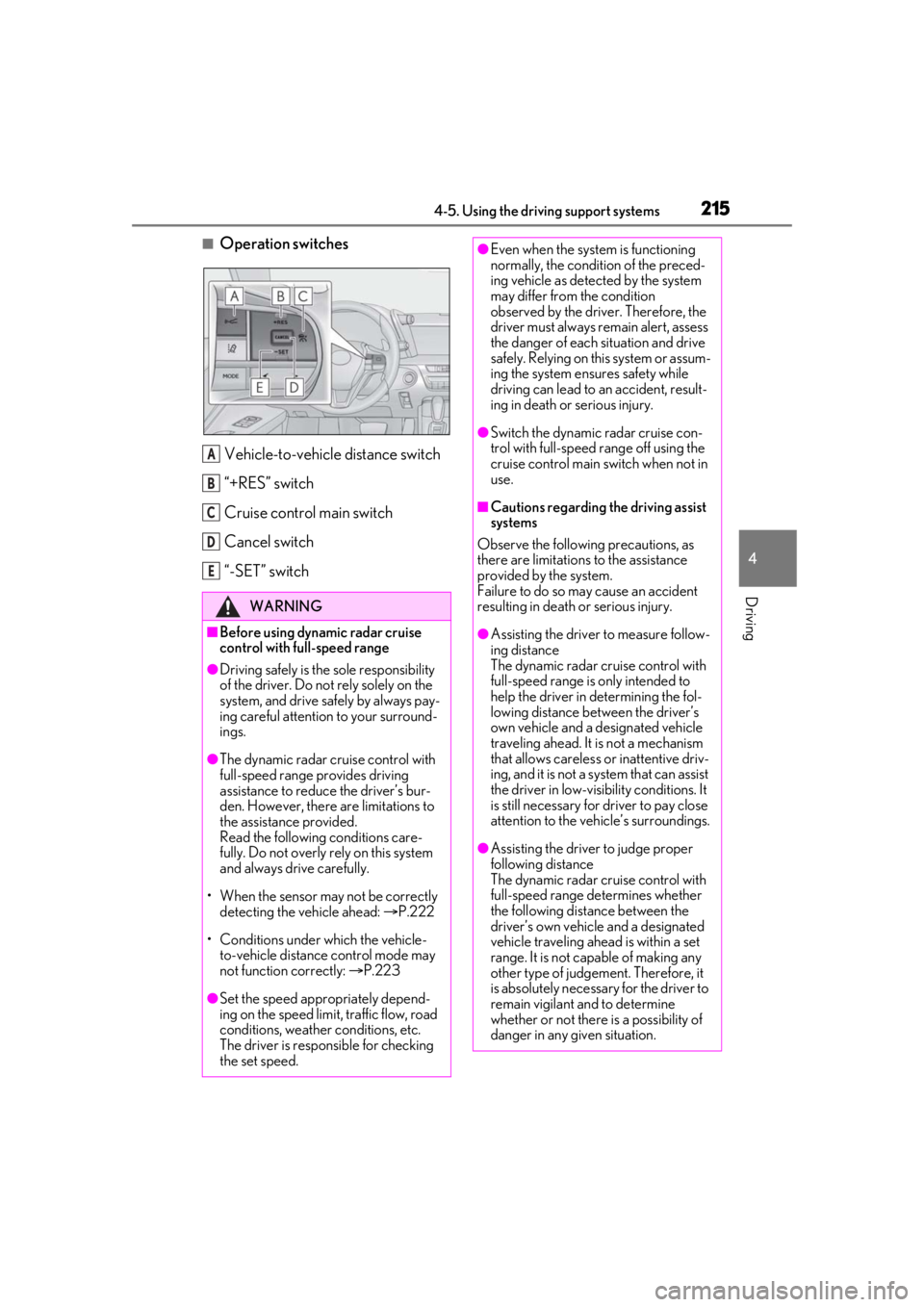
■Operation switchesVehicle-to-vehicle distance switch
“+RES” switch
Cruise control main switch
Cancel switch
“-SET” switch
WARNING
■Before using dynamic radar cruise
control with full-speed range
●Driving safely is the sole responsibility
of the driver. Do not rely solely on the
system, and drive safely by always pay-
ing careful attention to your surround-
ings.
●The dynamic radar cruise control with
full-speed range pr ovides driving
assistance to reduce the driver’s bur-
den. However, there are limitations to
the assistance provided.
Read the following conditions care-
fully. Do not overly rely on this system
and always drive carefully.
• When the sensor ma y not be correctly
detecting the vehicle ahead: P.222
• Conditions under which the vehicle- to-vehicle distance control mode may
not function correctly: P.223
●Set the speed appropriately depend-
ing on the speed limit, traffic flow, road
conditions, weather conditions, etc.
The driver is responsible for checking
the set speed.
A
B
C
D
E
●Even when the system is functioning
normally, the condition of the preced-
ing vehicle as detected by the system
may differ from the condition
observed by the driver. Therefore, the
driver must always remain alert, assess
the danger of each situation and drive
safely. Relying on this system or assum-
ing the system ensures safety while
driving can lead to an accident, result-
ing in death or serious injury.
●Switch the dynamic radar cruise con-
trol with full-speed range off using the
cruise control main switch when not in
use.
■Cautions regarding the driving assist
systems
Observe the following precautions, as
there are limitations to the assistance
provided by the system.
Failure to do so may cause an accident
resulting in death or serious injury.
●Assisting the driver to measure follow-
ing distance
The dynamic radar cruise control with
full-speed range is only intended to
help the driver in determining the fol-
lowing distance between the driver’s
own vehicle and a designated vehicle
traveling ahead. It is not a mechanism
that allows careless or inattentive driv-
ing, and it is not a system that can assist
the driver in low-visibility conditions. It
is still necessary for driver to pay close
attention to the vehicle’s surroundings.
●Assisting the driver to judge proper
following distance
The dynamic radar cruise control with
full-speed range determines whether
the following distance between the
driver’s own vehicle and a designated
vehicle traveling ahead is within a set
range. It is not capable of making any
other type of judgement. Therefore, it
is absolutely necessary for the driver to
remain vigilant and to determine
whether or not there is a possibility of
danger in any given situation.
Page 217 of 448
2174-5. Using the driving support systems
4
Driving
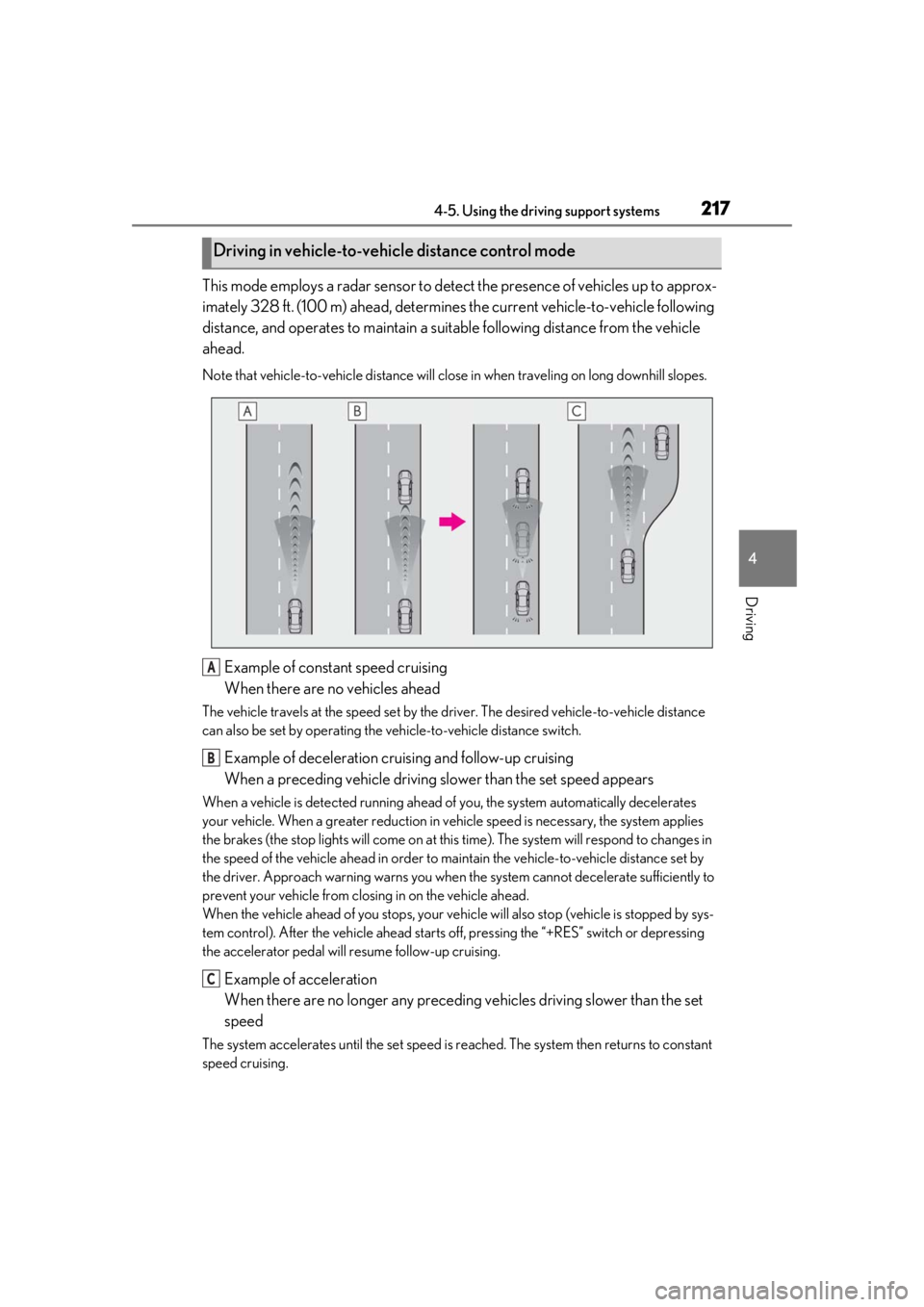
This mode employs a radar sensor to detect the presence of vehicles up to approx-
imately 328 ft. (100 m) ahead, determines the current vehicle-to-vehicle following
distance, and operates to maintain a suit able following distance from the vehicle
ahead.
Note that vehicle-to-vehicle di stance will close in when traveling on long downhill slopes.
Example of constant speed cruising
When there are no vehicles ahead
The vehicle travels at the speed set by the driver. The desired vehicle-to-vehicle distance
can also be set by operating the vehicle-to-vehicle distance switch.
Example of deceleration cruising and follow-up cruising
When a preceding vehicle driving slower than the set speed appears
When a vehicle is detected running ahead of you, the system automatically decelerates
your vehicle. When a greater reduction in vehicle speed is necessary, the system applies
the brakes (the stop lights will come on at this time). The system will respond to changes in
the speed of the vehicle ahead in order to maintain the vehicle-to-vehicle distance set by
the driver. Approach warning warns you when th e system cannot decelerate sufficiently to
prevent your vehicle from closing in on the vehicle ahead.
When the vehicle ahead of you stops, your vehi cle will also stop (vehicle is stopped by sys-
tem control). After the vehicle ahead starts off, pressing the “+RES” switch or depressing
the accelerator pedal will resume follow-up cruising.
Example of acceleration
When there are no longer any preceding vehicles driving slower than the set
speed
The system accelerates until the set speed is re ached. The system then returns to constant
speed cruising.
Driving in vehicle-to-vehicle distance control mode
A
B
C
Page 224 of 448
2244-5. Using the driving support systems
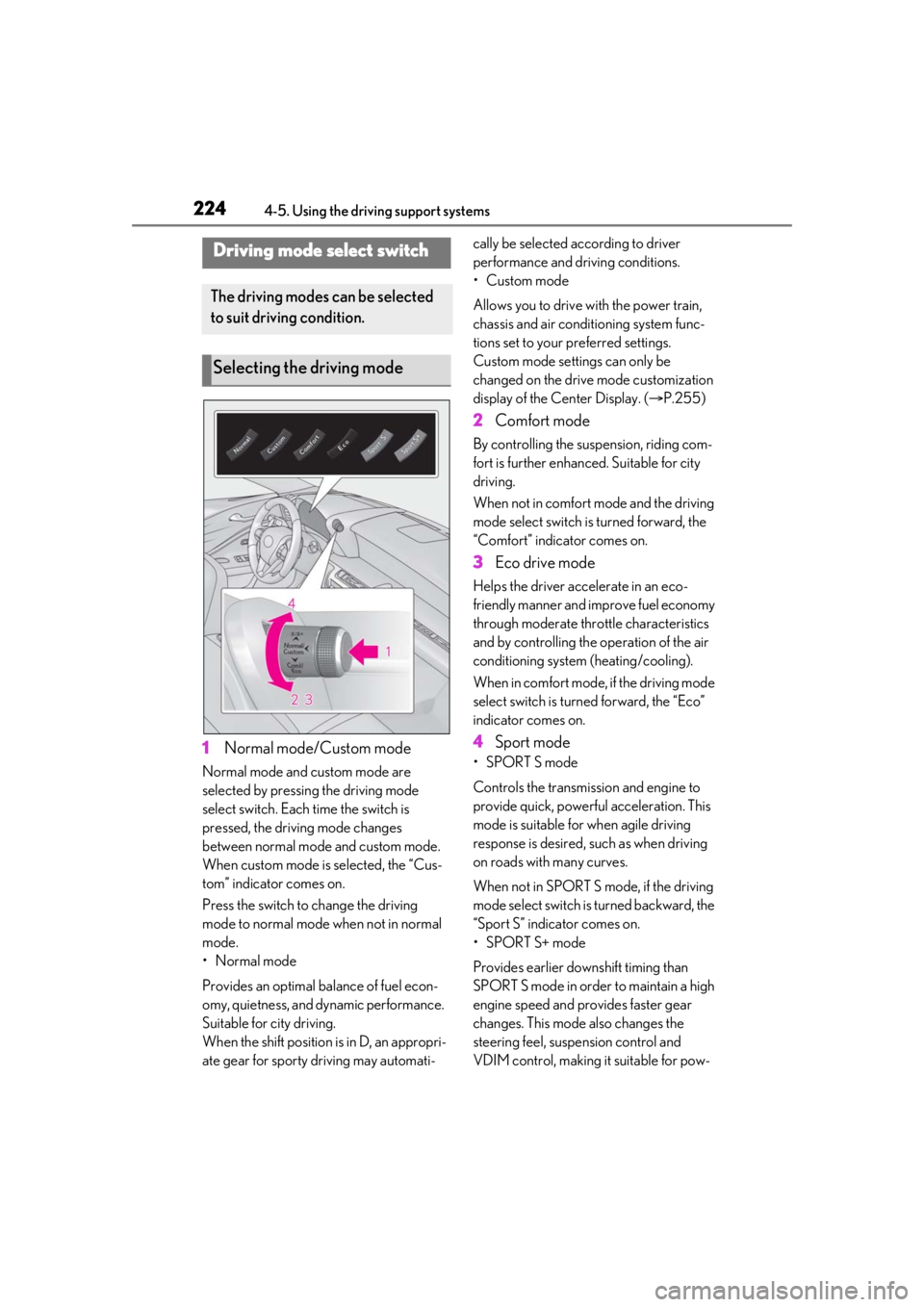
1Normal mode/Custom mode
Normal mode and custom mode are
selected by pressing the driving mode
select switch. Each time the switch is
pressed, the driving mode changes
between normal mode and custom mode.
When custom mode is selected, the “Cus-
tom” indicator comes on.
Press the switch to change the driving
mode to normal mode when not in normal
mode.
•Normal mode
Provides an optimal ba lance of fuel econ-
omy, quietness, and dynamic performance.
Suitable for city driving.
When the shift position is in D, an appropri-
ate gear for sporty driving may automati- cally be selected according to driver
performance and driving conditions.
• Custom mode
Allows you to drive with the power train,
chassis and air conditioning system func-
tions set to your preferred settings.
Custom mode settings can only be
changed on the drive mode customization
display of the Center Display. (
P.255)
2 Comfort mode
By controlling the suspension, riding com-
fort is further enhanced. Suitable for city
driving.
When not in comfort mode and the driving
mode select switch is turned forward, the
“Comfort” indicator comes on.
3Eco drive mode
Helps the driver acce lerate in an eco-
friendly manner and improve fuel economy
through moderate thro ttle characteristics
and by controlling the operation of the air
conditioning system (heating/cooling).
When in comfort mode, if the driving mode
select switch is turned forward, the “Eco”
indicator comes on.
4 Sport mode
•SPORT S mode
Controls the transmission and engine to
provide quick, powerful acceleration. This
mode is suitable for when agile driving
response is desired, such as when driving
on roads with many curves.
When not in SPORT S mode, if the driving
mode select switch is turned backward, the
“Sport S” indicator comes on.
•SPORT S+ mode
Provides earlier downshift timing than
SPORT S mode in order to maintain a high
engine speed and provides faster gear
changes. This mode also changes the
steering feel, susp ension control and
VDIM control, making it suitable for pow-
Driving mode select switch
The driving modes can be selected
to suit driving condition.
Selecting the driving mode
Page 227 of 448
2274-5. Using the driving support systems
4
Driving
• When the engine switch
TION ON mode
■If “Clean Parking Assist Sensor” is dis-
played on the multi-information display
A sensor may be dirty or covered with snow
or ice. In such cases, if it is removed from
the sensor, the system should return to nor-
mal.
Also, due to the sensor being frozen at low
temperatures, a malfunction display may
appear or an obstacle may not be detected.
If the sensor thaws out, the system should
return to normal.
■If “Parking Assist Malfunction” or “Park-
ing Assist Malfunction Visit Your
Dealer” is displayed on the multi-infor-
mation display
There is a malfunction and the device may
not be working properly.
Have the vehicle inspected by your Lexus
dealer.
■Sensor detectio n information
●The sensor’s detection areas are limited
to the areas around the vehicle’s front and
rear bumpers.
●Certain vehicle conditions and the sur-
rounding environment may affect the
ability of the sensor to correctly detect
obstacles. Particular instances where this
may occur are listed below.
• There is dirt, snow or ice on the sensor. (Wiping the sensors will resolve this
problem.)
• The sensor is frozen. (Thawing the area will resolve this problem.)
In especially cold weather, if a sensor is
frozen the screen may show an abnormal
display, or obstacles may not be
detected.
• The sensor is covered in any way.
• The vehicle is leaning considerably to one side.
• On an extremely bumpy road, on an incline, on gravel, or on grass.
• The vicinity of the vehicle is noisy due to
vehicle horns, motorcycle engines, air
brakes of large vehicles, or other loud
noises producing ultrasonic waves.
• There is another vehicle equipped with parking assist sensor in the vicinity.
• The sensor is coated with a sheet of spray or heavy rain.
• The vehicle is equipped with a fender pole or wireless antenna.
• Towing eyelets are installed.
• The bumper or sensor receives a strong
impact.
• The vehicle is approaching a tall or
curved curb.
• In harsh sunlight or intense cold weather.
• The area directly under the bumpers is not detected.
• If obstacles draw too close to the sensor.
• A non-genuine Lexus suspension (low-
ered suspension etc.) is installed.
• People may not be detected if they are wearing certain types of clothing.
In addition to the examples above, there are
instances in which, be cause of their shape,
signs and other objects may be judged by
the sensor to be closer than they are.
●The shape of the obstacle may prevent
the sensor from detecting it. Pay particu-
lar attention to the following obstacles:
• Wires, fences, ropes, etc.
• Cotton, snow and other materials that
absorb sound waves
• Sharply-angled objects
• Low obstacles
• Tall obstacles with upper sections pro- jecting outwards in the direction of your
vehicle
●The following situations may occur
during use.
• Depending on the shape of the obstacle and other factors, the detection distance
may shorten, or detection may be impos-
sible.
• Obstacles may not be detected if they
are too close to the sensor.
• There will be a short delay between obstacle detection and display. Even at
slow speeds, there is a possibility that the
obstacle will come within the sensor’s
detection areas befo re the display is
shown and the warning beep sounds.
• Thin posts or object s lower than the sen-
sor may not be detected when
approached, even if they have been
detected once.
• It might be difficult to hear beeps due to