remote control LEXUS LC500 2022 User Guide
[x] Cancel search | Manufacturer: LEXUS, Model Year: 2022, Model line: LC500, Model: LEXUS LC500 2022Pages: 112, PDF Size: 6.09 MB
Page 80 of 112
79
LC500_LC500h_QG_OM11618U_(U)
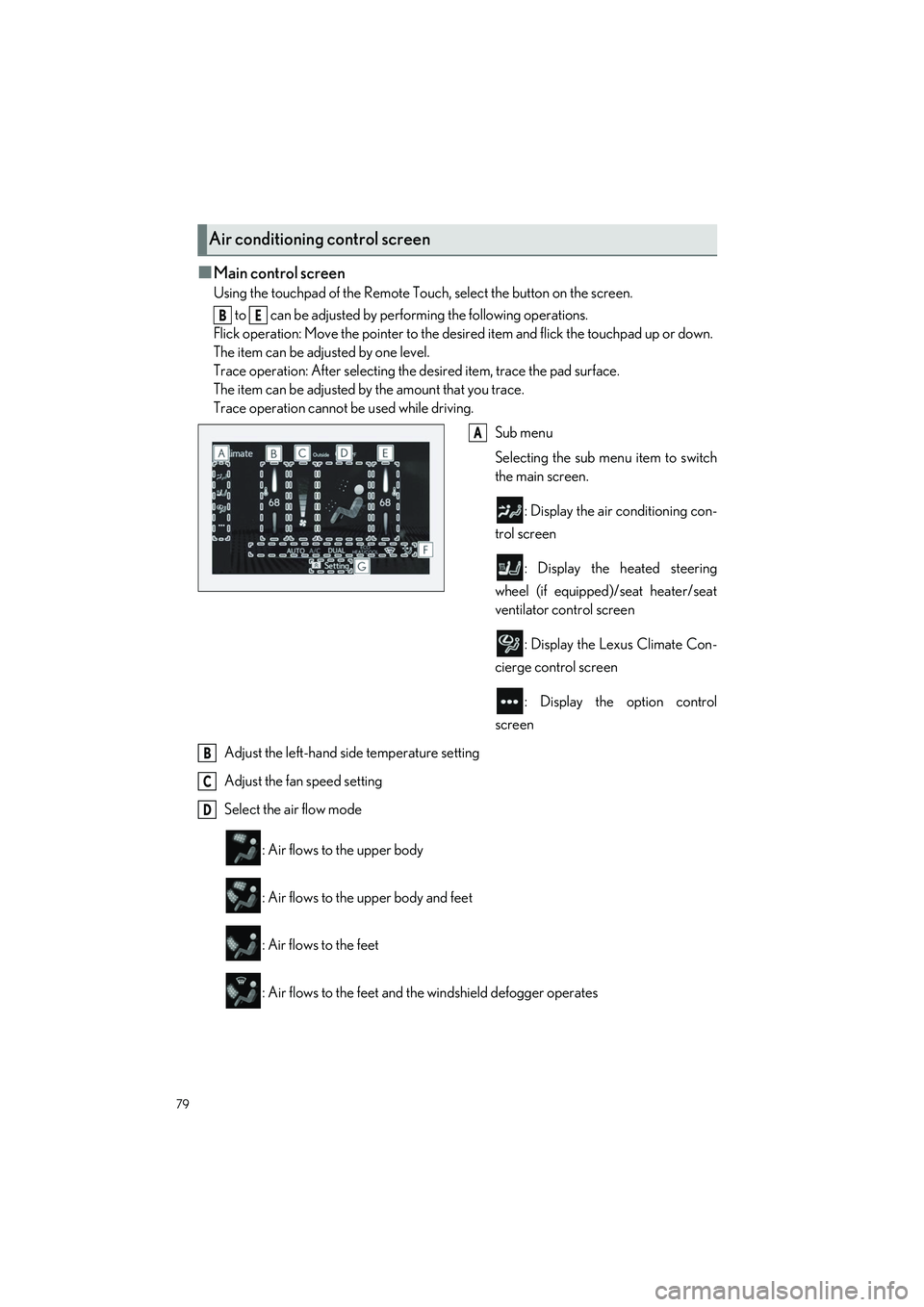
■Main control screen
Using the touchpad of the Remote Touch, select the button on the screen. to can be adjusted by perf orming the following operations.
Flick operation: Move the pointer to the desi red item and flick the touchpad up or down.
The item can be adjusted by one level.
Trace operation: After selecting the desired item, trace the pad surface.
The item can be adjusted by the amount that you trace.
Trace operation cannot be used while driving.
Sub menu
Selecting the sub menu item to switch
the main screen.
: Display the air conditioning con-
trol screen
: Display the heated steering
wheel (if equipped)/seat heater/seat
ventilator control screen
: Display the Lexus Climate Con-
cierge control screen
: Display the option control
screen
Adjust the left-hand side temperature setting
Adjust the fan speed setting
Select the air flow mode
: Air flows to the upper body
: Air flows to the upper body and feet
: Air flows to the feet
: Air flows to the feet and the windshield defogger operates
Air conditioning control screen
BE
A
B
C
D
Page 81 of 112
80
LC500_LC500h_QG_OM11618U_(U)
Adjust the right-hand side temperature setting
Function on/off indicators
When the function is on, the indicator illuminates on the control screen.
Sub function menu
When the sub function button on the Remote Touch is pressed, the following functions
can be switched on and off.
: Set Lexus Climate Concierge ( P.77)
“AUTO”: Set automatic mode on/off ( P.81)
“Off”: Turn the fan off
“A/C”: Set cooling and dehumidification function
“DUAL”: Adjust the temperature for driver and passenger seats separately (“DUAL”
mode)
: Set eco air conditioning mode
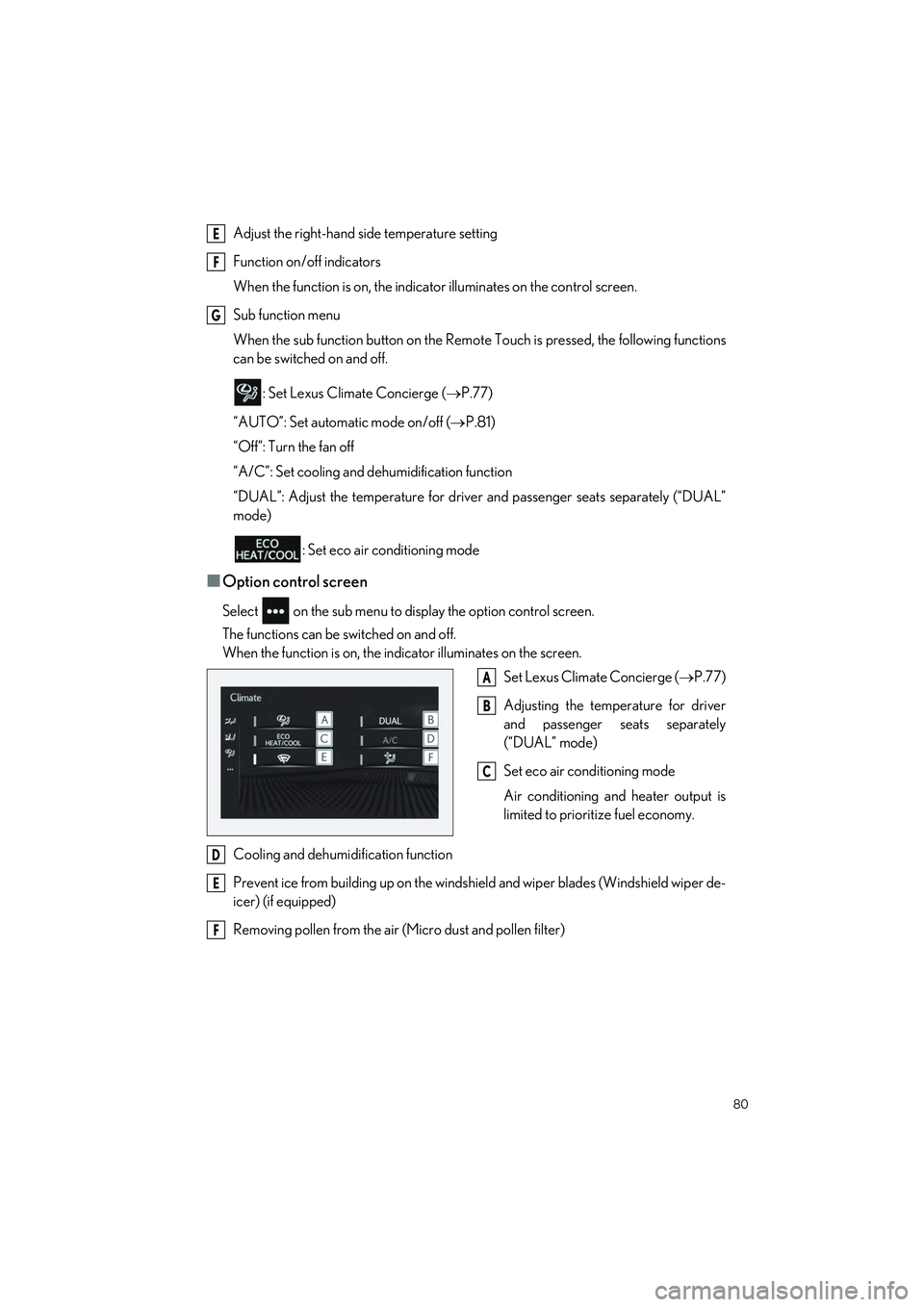
■Option control screen
Select on the sub menu to display the option control screen.
The functions can be switched on and off.
When the function is on, the in dicator illuminates on the screen.
Set Lexus Climate Concierge ( P.77)
Adjusting the temp erature for driver
and passenger seats separately
(“DUAL” mode)
Set eco air conditioning mode
Air conditioning and heater output is
limited to prioritize fuel economy.
Cooling and dehumidification function
Prevent ice from building up on the windshield and wiper blades (Windshield wiper de-
icer) (if equipped)
Removing pollen from the air (Micro dust and pollen filter)
E
F
G
A
B
C
D
E
F
Page 91 of 112
90
LC500_LC500h_QG_OM11618U_(U)
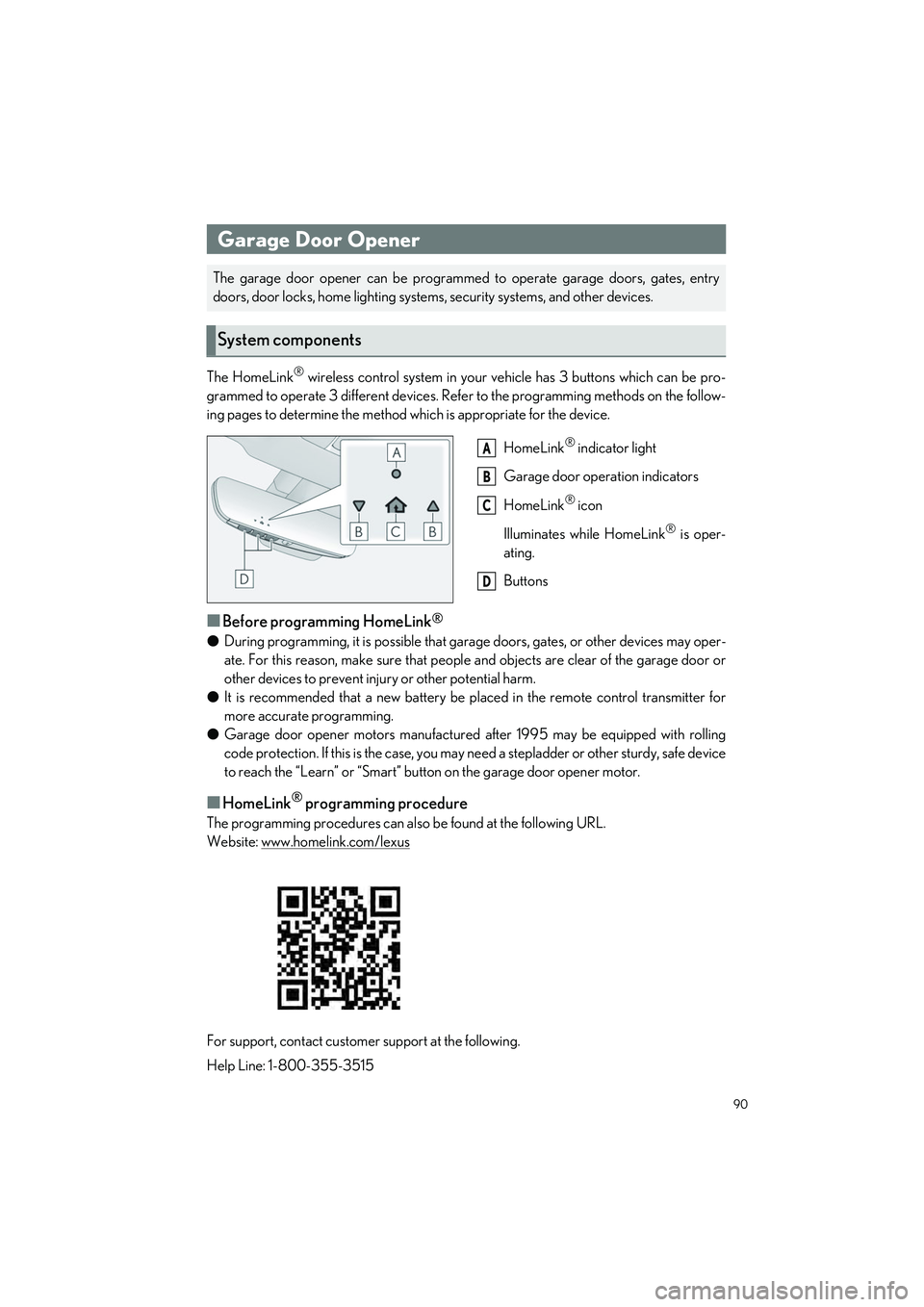
The HomeLink® wireless control system in your vehicle has 3 buttons which can be pro-
grammed to operate 3 different devices. Refe r to the programming methods on the follow-
ing pages to determine the method which is appropriate for the device.
HomeLink
® indicator light
Garage door operation indicators
HomeLink
® icon
Illuminates while HomeLink
® is oper-
ating.
Buttons
■Before programming HomeLink®
● During programming, it is possible that garage doors, gates, or other devices may oper-
ate. For this reason, make sure that people and objects are clear of the garage door or
other devices to prevent inju ry or other potential harm.
● It is recommended that a new battery be placed in the remote control transmitter for
more accurate programming.
● Garage door opener motors manufactured after 1995 may be equipped with rolling
code protection. If this is the case, you may need a stepladder or other sturdy, safe device
to reach the “Learn” or “Smart” button on the garage door opener motor.
■HomeLink® programming procedure
The programming procedures can also be found at the following URL.
Website: www.homelink.com/lexus
For support, contact customer support at the following.
Help Line: 1-800-355-3515
Garage Door Opener
The garage door opener can be programmed to operate garage doors, gates, entry
doors, door locks, home lighting system s, security systems, and other devices.
System components
A
B
C
D
Page 92 of 112
91
LC500_LC500h_QG_OM11618U_(U)
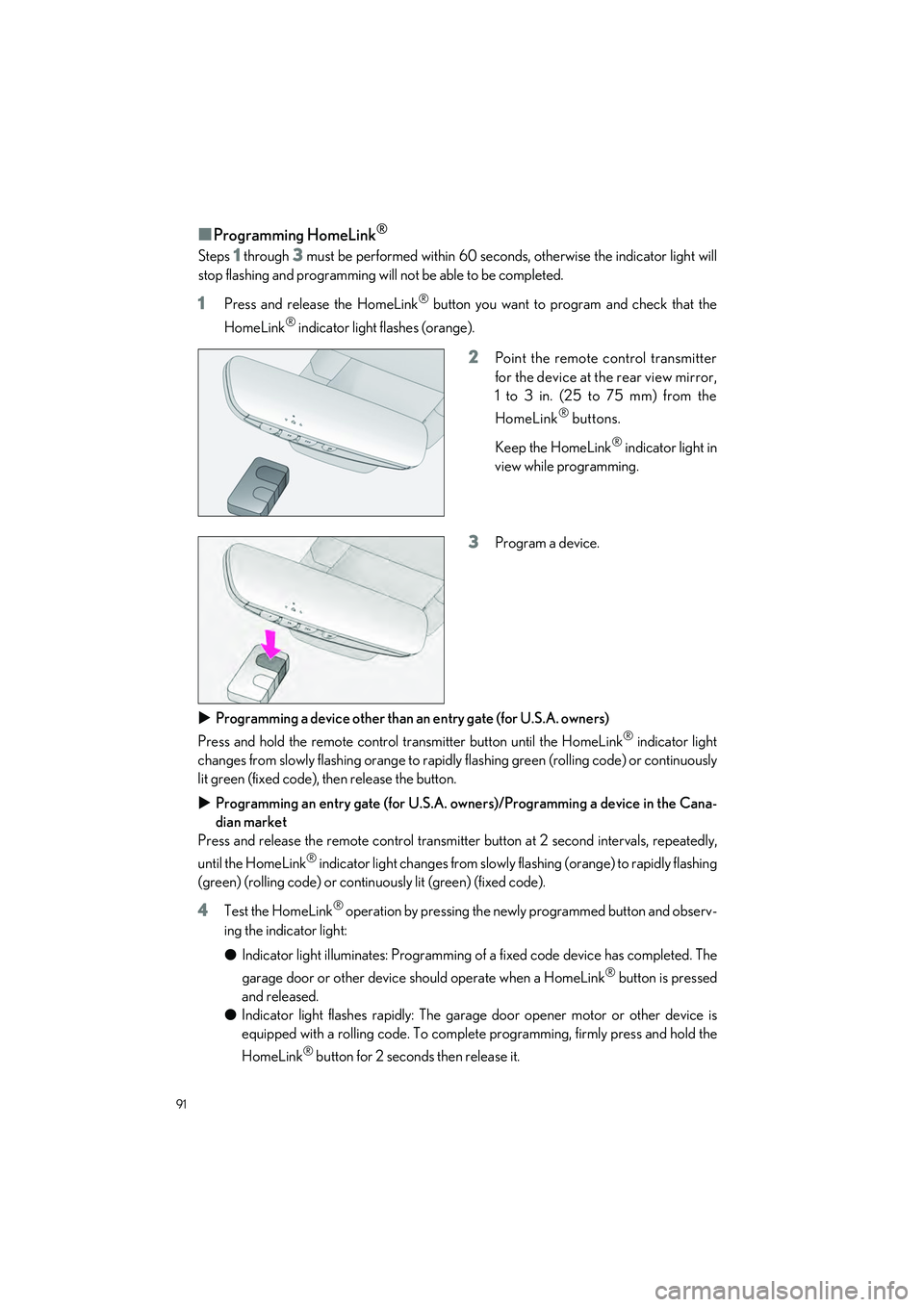
■Programming HomeLink®
Steps 1 through 3 must be performed within 60 seconds, otherwise the indicator light will
stop flashing and programming will not be able to be completed.
1Press and release the HomeLink® button you want to program and check that the
HomeLink
® indicator light flashes (orange).
2Point the remote control transmitter
for the device at the rear view mirror,
1 to 3 in. (25 to 75 mm) from the
HomeLink
® buttons.
Keep the HomeLink
® indicator light in
view while programming.
3Program a device.
Programming a device other than an entry gate (for U.S.A. owners)
Press and hold the remote control transmitter button until the HomeLink
® indicator light
changes from slowly flashing orange to rapidl y flashing green (rolling code) or continuously
lit green (fixed code), then release the button.
Programming an entry gate (for U.S.A. owners)/Programming a device in the Cana-
dian market
Press and release the remote control transmitter button at 2 second intervals, repeatedly,
until the HomeLink
® indicator light changes from slowly flashing (orange) to rapidly flashing
(green) (rolling code) or continuo usly lit (green) (fixed code).
4Test the HomeLink® operation by pressing the newly programmed button and observ-
ing the indicator light:
● Indicator light illuminates: Programming of a fixed code device has completed. The
garage door or other device should operate when a HomeLink
® button is pressed
and released.
● Indicator light flashes rapidly: The garage door opener motor or other device is
equipped with a rolling code. To complete programming, firmly press and hold the
HomeLink
® button for 2 seconds then release it.
Page 100 of 112
99
LC500_LC500h_QG_OM11618U_(U)
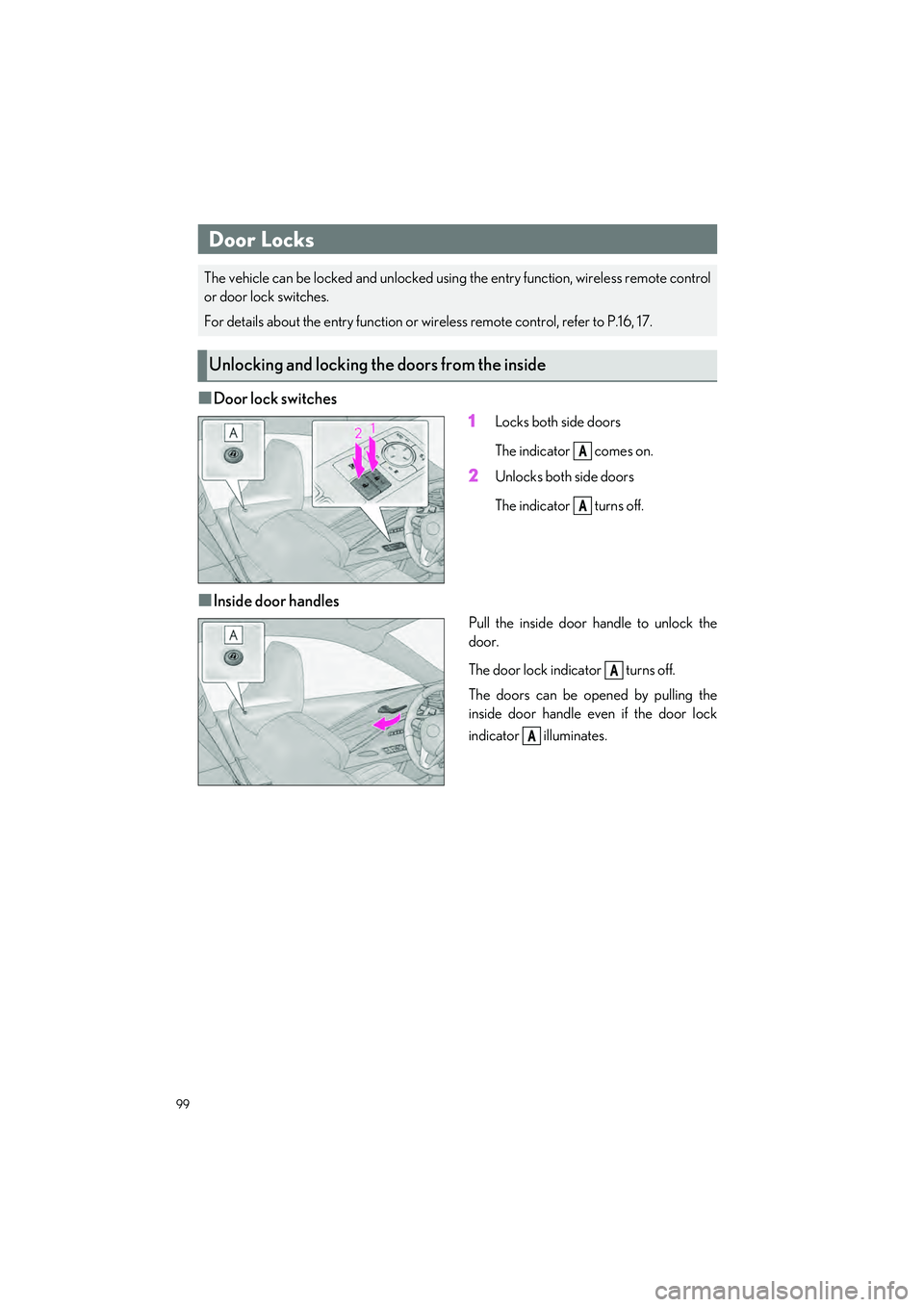
■Door lock switches1
Locks both side doors
The indicator comes on.
2Unlocks both side doors
The indicator turns off.
■Inside door handles
Pull the inside door handle to unlock the
door.
The door lock indicator turns off.
The doors can be opened by pulling the
inside door handle even if the door lock
indicator illuminates.
Door Locks
The vehicle can be locked and unlocked usin g the entry function, wireless remote control
or door lock switches.
For details about the entry function or wireless remote control, refer to P.16, 17.
Unlocking and locking th e doors from the inside
A
A
A
A