defog lexus LC500C 2021 Owner's Manual / LEXUS 2021 LC500 CONVERTIBLE OWNER'S MANUAL (OM11498U)
[x] Cancel search | Manufacturer: LEXUS, Model Year: 2021, Model line: LC500C, Model: Lexus LC500C 2021Pages: 410, PDF Size: 8.71 MB
Page 12 of 410

12Pictorial index
Pictorial index
■Exterior
Doors .......................................................................................................................... .. P.96
Locking/unlocking .............................................................................................................. P.96
Opening/closing the side window/rear quarter window..................................P.122
Locking/unlocking by using th e mechanical key ................................................. P.331
Warning messages ............................................................................................................. P. 99
Trunk .......................................................................................................................... .P.100
Opening from inside the cabin ......................................................................................P.101
Opening from outside .......................................................................................................P.10 1
Opening by using the mechanical key .................................................................... P.332
Warning messages ............................................................................................................. P. 99
Outside rear view mirrors..................................................................................... P.119
Adjusting the mirror angle ............................................................................................... P.119
Folding the mirrors ............................................................................................................ P.120
Driving position memory .................................................................................................. P.112
Defogging the mirrors .................................................................................................... P.233
Windshield wipers .................................................................................................. P.167A
B
C
D
Page 16 of 410
16Pictorial index
Applying/releasing ............................................................................................................P.157
Precautions against winter season ............................................................................ P.224
Warning buzzer/message.................................................................................. P.317, 324
Turn signal lever ...................................................................................................... P.156
Headlight switch....................................................................................................... P.161
Headlights/parking lights/tail lights/license plate lights/
daytime running lights ........................................................................................................ P .161
Automatic High Beam ......................................................................................................P.164
Windshield wiper and washer switch ................................................................ P.167
Usage.......................................................................................................................... .............P.167
Adding washer fluid ......................................................................................................... P.2 78
Warning messages .......................................................................................................... P.324
Emergency flasher switch ...................................................................................P.306
Hood lock release lever ....................................................................................... P.272
Tilt and telescopic steering cont rol switch....................................................... P.117
Adjustment ..................................................................................................................... ........ P.117
Driving position memory .................................................................................................. P.112
Air conditioning system ...................................................................................... P.232
Usage.......................................................................................................................... ........... P.232
Rear window defogger................................................................................................... P.233
Audio system
*
Trunk opener main switch ....................................................................................P.103
*: Refer to “NAVIGATION SYSTEM OWNER’S MANUAL”.
F
G
H
I
J
K
L
M
Page 121 of 410
1193-4. Adjusting the steering wheel and mirrors
3
Before driving
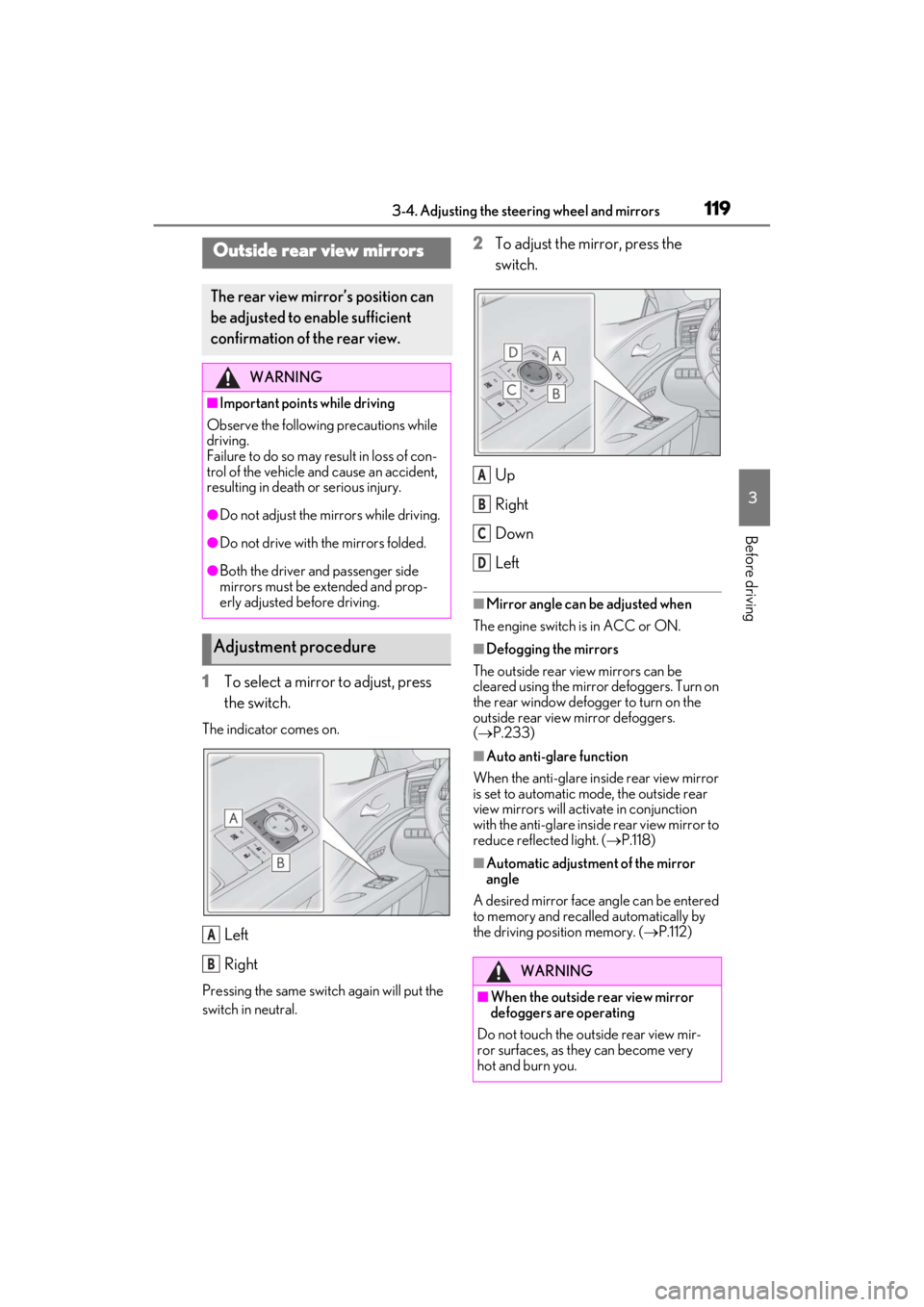
1To select a mirror to adjust, press
the switch.
The indicator comes on.
Left
Right
Pressing the same switch again will put the
switch in neutral.
2To adjust the mirror, press the
switch.
Up
Right
Down
Left
■Mirror angle can be adjusted when
The engine switch is in ACC or ON.
■Defogging the mirrors
The outside rear view mirrors can be
cleared using the mirror defoggers. Turn on
the rear window defogger to turn on the
outside rear view mirror defoggers.
( P.233)
■Auto anti-glare function
When the anti-glare inside rear view mirror
is set to automatic mode, the outside rear
view mirrors will activate in conjunction
with the anti-glare insi de rear view mirror to
reduce reflec ted light. (P.118)
■Automatic adjustment of the mirror
angle
A desired mirror face angle can be entered
to memory and recalled automatically by
the driving position memory. ( P.112)
Outside rear view mirrors
The rear view mirror’s position can
be adjusted to enable sufficient
confirmation of the rear view.
WARNING
■Important points while driving
Observe the following precautions while
driving.
Failure to do so may result in loss of con-
trol of the vehicle and cause an accident,
resulting in death or serious injury.
●Do not adjust the mirrors while driving.
●Do not drive with the mirrors folded.
●Both the driver and passenger side
mirrors must be extended and prop-
erly adjusted before driving.
Adjustment procedure
A
BWARNING
■When the outside rear view mirror
defoggers are operating
Do not touch the outside rear view mir-
ror surfaces, as they can become very
hot and burn you.
A
B
C
D
Page 176 of 410
1744-5. Using the driving support systems
WARNING
●Do not attach accessories, stickers
(including transparent stickers) or
other items to the radar sensor, radar
sensor cover or surrounding area.
●Do not subject the radar sensor or its
surrounding area to a strong impact.
If the radar sensor, front grille, or front
bumper has been subjected to a
strong impact, have the vehicle
inspected by your Lexus dealer.
●Do not disassemble the radar sensor.
●Do not modify or paint the radar sen-
sor or radar sensor cover.
●In the following cases, the radar sensor
must be recalibrated. Contact your
Lexus dealer for details.
• When the radar sensor or front grille are removed and installed, or replaced
• When the front bumper is replaced
■To avoid malfunction of the front
camera
Observe the following precautions.
Otherwise, the front camera may not
operate properly, possibly leading to an
accident resulting in death or serious
injury.
●Keep the windshield clean at all times.
• If the windshield is dirty or covered with an oily film, water droplets, snow,
etc., clean the windshield.
• If a glass coating agent is applied to the windshield, it will still be necessary to
use the windshield wipers to remove
water droplets, etc. from the area of
the windshield in front of the front
camera.
• If the inner side of the windshield where the front camera is installed is
dirty, contact your Lexus dealer.
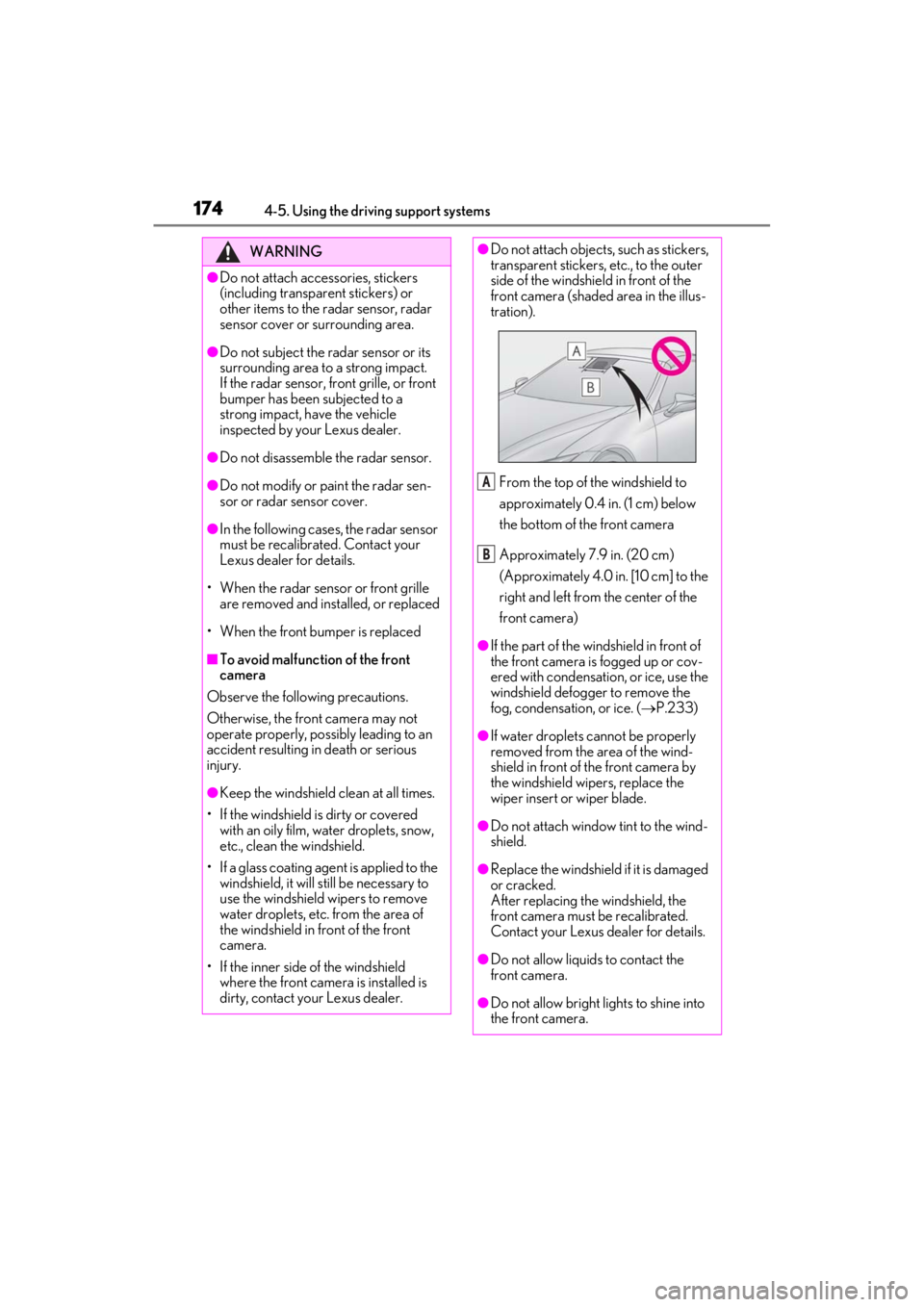
●Do not attach objects, such as stickers,
transparent stickers, etc., to the outer
side of the windshield in front of the
front camera (shaded area in the illus-
tration).
From the top of the windshield to
approximately 0.4 in. (1 cm) below
the bottom of the front camera
Approximately 7.9 in. (20 cm)
(Approximately 4.0 in. [10 cm] to the
right and left from the center of the
front camera)
●If the part of the windshield in front of
the front camera is fogged up or cov-
ered with condensation, or ice, use the
windshield defogger to remove the
fog, condensation, or ice. ( P.233)
●If water droplets cannot be properly
removed from the area of the wind-
shield in front of the front camera by
the windshield wipers, replace the
wiper insert or wiper blade.
●Do not attach window tint to the wind-
shield.
●Replace the windshield if it is damaged
or cracked.
After replacing the windshield, the
front camera must be recalibrated.
Contact your Lexus dealer for details.
●Do not allow liquids to contact the
front camera.
●Do not allow bright lights to shine into
the front camera.
A
B
Page 179 of 410
1774-5. Using the driving support systems
4
Driving
■If a warning message is displayed on the multi-information display
A system may be temporarily unavailable or there may be a malfunction in the system.
●In the following situations, perform the actions specified in the table. When the normal
operating conditions are detected, the message will disappear and the system will
become operational.
If the message does not disappear, contact your Lexus dealer.
SituationActions
When the area around a sensor is covered
with dirt, moisture (f ogged up, covered with
condensation, ice, etc. ), or other foreign
matterTo clean the part of the windshield in front of
the front camera, use the windshield wipers
or the windshield defogger of the air condi-
tioning system ( P.233).
Page 234 of 410
2325-3. Using the air conditioning system
5-3.Using the air conditioning system
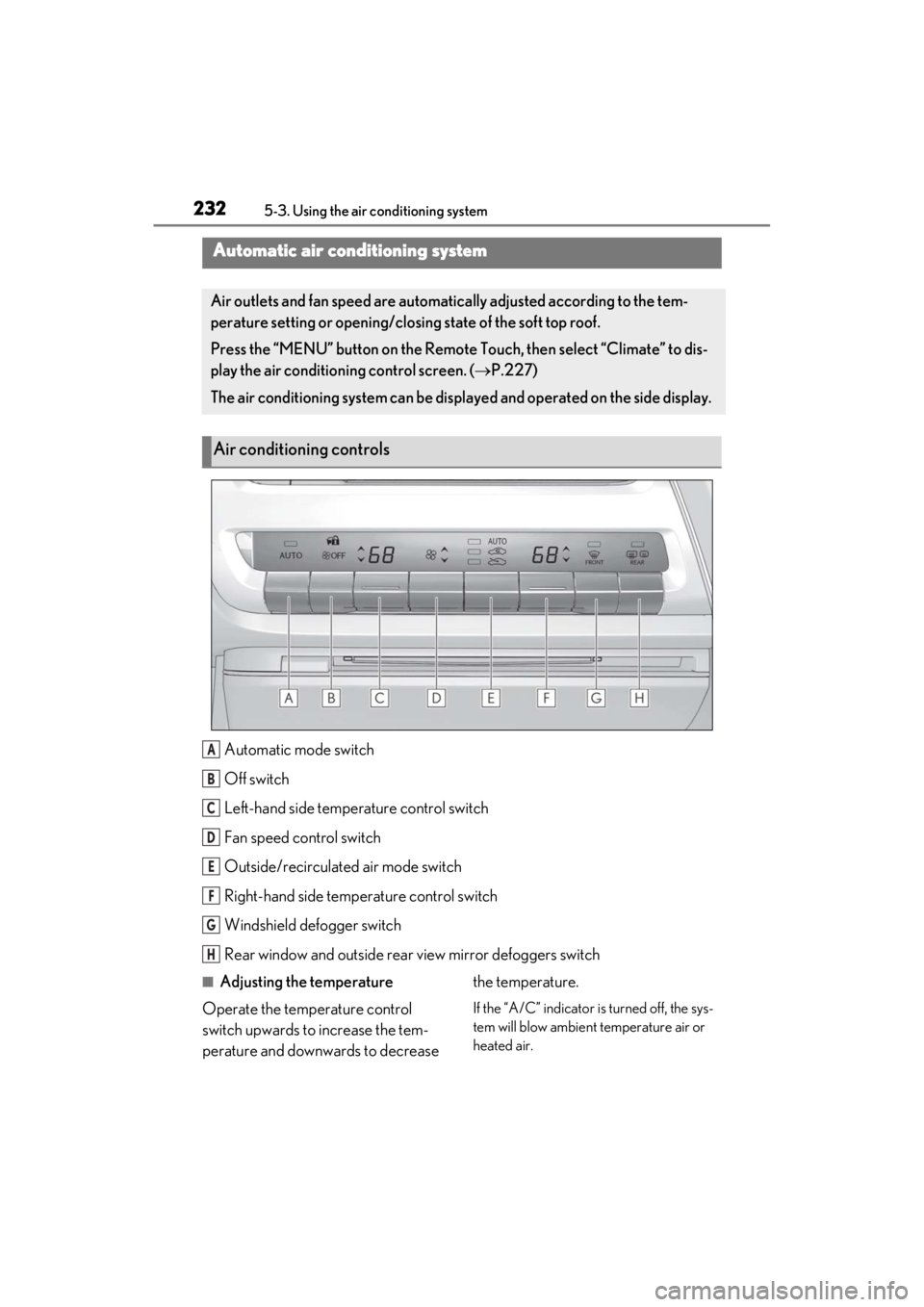
Automatic mode switch
Off switch
Left-hand side temperature control switch
Fan speed control switch
Outside/recirculated air mode switch
Right-hand side temp erature control switch
Windshield defogger switch
Rear window and outside rear view mirror defoggers switch
■Adjusting the temperature
Operate the temperature control
switch upwards to increase the tem-
perature and downwards to decrease the temperature.
If the “A/C” indicator is turned off, the sys-
tem will blow ambient temperature air or
heated air.
Automatic air conditioning system
Air outlets and fan speed are automati
cally adjusted according to the tem-
perature setting or opening/closing state of the soft top roof.
Press the “MENU” button on the Remote Touch, then select “Climate” to dis-
play the air conditioning control screen. ( P.227)
The air conditioning system can be displa yed and operated on the side display.
Air conditioning controls
A
B
C
D
E
F
G
H
Page 235 of 410
2335-3. Using the air conditioning system
5
Interior features
■Setting the fan speed
Operate the fan speed control switch
upwards to increase the fan speed and
downwards to decrease the fan speed.
Press the off switch to turn the fan off.
■Changing the air flow mode
P.235
■Switching between outside air and
recirculated air modes
Operate the outside/recirculated air
mode switch upwards or downwards.
The mode changes as follows each
time the switch is operated.
automatic mode (outside air
mode) (recirculated air
mode) automatic mode
When the system is switched to automatic
mode, the air conditioning system oper-
ates automatically.
■Defogging the windshield
Defoggers are used to defog the wind-
shield and front side windows.
Press the windshield defogger switch.
Set the outside/reci rculated air mode
switch to outside air mode if the recircu-
lated air mode is used. (It may switch auto-
matically.)
To defog the windshield and the side win-
dows early, turn the air flow and tempera-
ture up.
To return to the previous mode, press the
windshield defogger switch again when the
windshield is defogged.
■Defogging the rear window and
outside rear view mirrors
Defoggers are used to defog the rear window, and to remove raindrops, dew
and frost from the outside rear view
mirrors.
Press the rear wi
ndow and outside
rear view mirror defoggers switch.
The defoggers will automatically turn off
after 15 to 60 minutes. The operation time
changes according to the ambient tem-
perature and vehicle speed.
■Windshield wiper de-icer (if
equipped)
P.237
■When the outside temperature exceeds
75°F (24°C) and the air conditioning
system is on
●In order to reduce the air conditioning
power consumption, the air conditioning
system may switch to recirculated air
mode automatically. This may also
reduce fuel consumption.
●Recirculated air mode is selected as a
default mode when the engine switch is
turned to ON.
●It is possible to switch to outside air mode
at any time by pressing the outside/recir-
culated air mode switch.
■Fogging up of the windows
The windows will easily fog up when the
humidity in the vehicle is high. Turning
“A/C” on will dehumidify the air from the
outlets and defog the windshield effectively.
●If you turn “A/C” off, the windows may
fog up more easily.
●The windows may fog up if the recircu-
lated air mode is used.
■When driving on dusty roads
Close all windows. If dust thrown up by the
vehicle is still drawn into the vehicle after
closing the windows, it is recommended
that the air intake mode be set to outside air
mode and the fan speed to any setting
except off.
Page 237 of 410
2355-3. Using the air conditioning system
5
Interior features
●The meaning of each symbol on the label
are as follows:
■Customization
Settings (e.g. A/C Auto switch operation)
can be changed.
(Customizable features P.367)
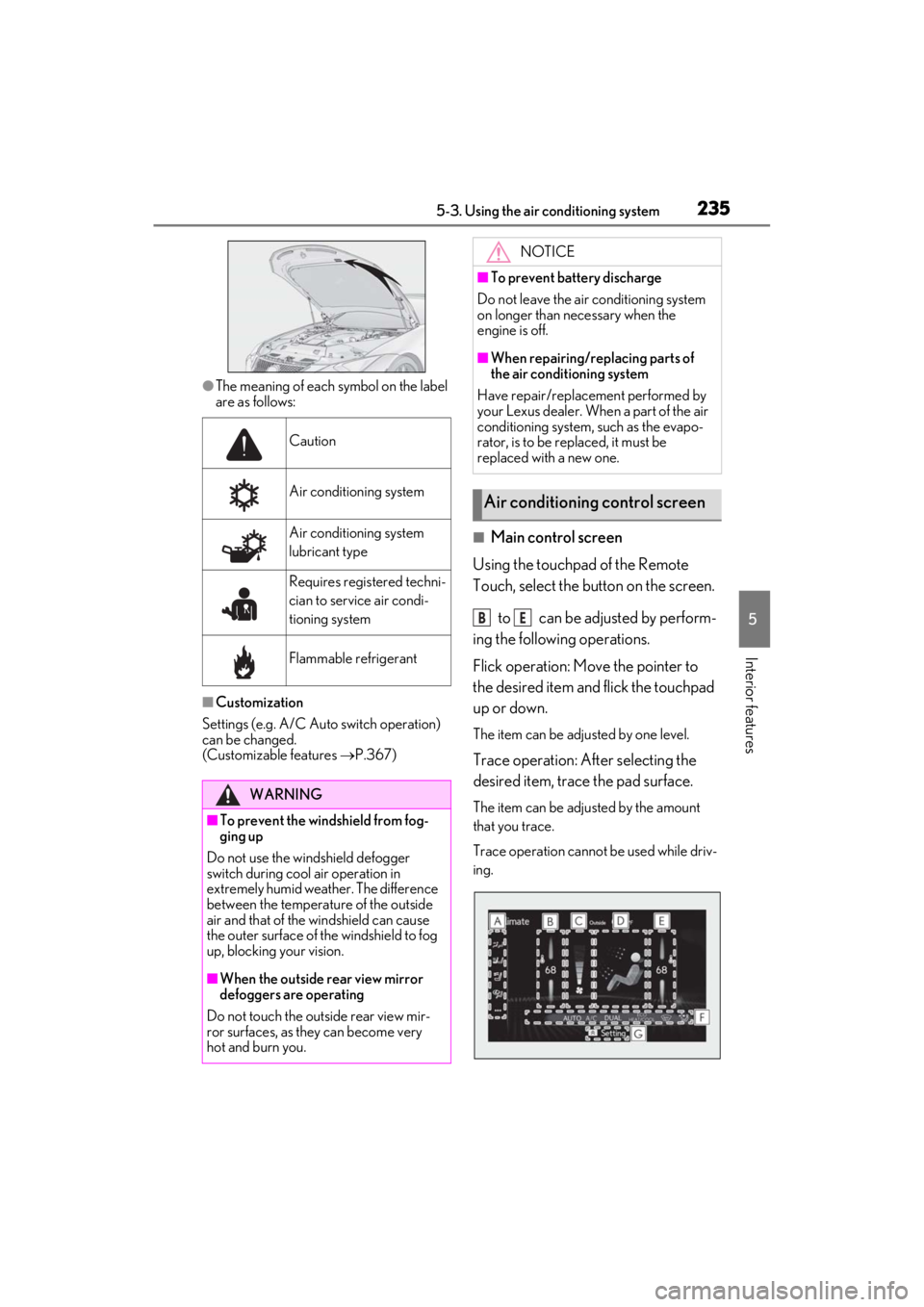
■Main control screen
Using the touchpad of the Remote
Touch, select the button on the screen.
to can be adjusted by perform-
ing the following operations.
Flick operation: Move the pointer to
the desired item and flick the touchpad
up or down.
The item can be adjusted by one level.
Trace operation: After selecting the
desired item, trace the pad surface.
The item can be adjusted by the amount
that you trace.
Trace operation cannot be used while driv-
ing.
Caution
Air conditioning system
Air conditioning system
lubricant type
Requires registered techni-
cian to service air condi-
tioning system
Flammable refrigerant
WARNING
■To prevent the windshield from fog-
ging up
Do not use the windshield defogger
switch during cool air operation in
extremely humid weather. The difference
between the temperature of the outside
air and that of the windshield can cause
the outer surface of the windshield to fog
up, blocking your vision.
■When the outside rear view mirror
defoggers are operating
Do not touch the outside rear view mir-
ror surfaces, as they can become very
hot and burn you.
NOTICE
■To prevent battery discharge
Do not leave the air conditioning system
on longer than necessary when the
engine is off.
■When repairing/replacing parts of
the air conditioning system
Have repair/replace ment performed by
your Lexus dealer. When a part of the air
conditioning system, such as the evapo-
rator, is to be replaced, it must be
replaced with a new one.
Air conditioning control screen
BE
Page 238 of 410
2365-3. Using the air conditioning system
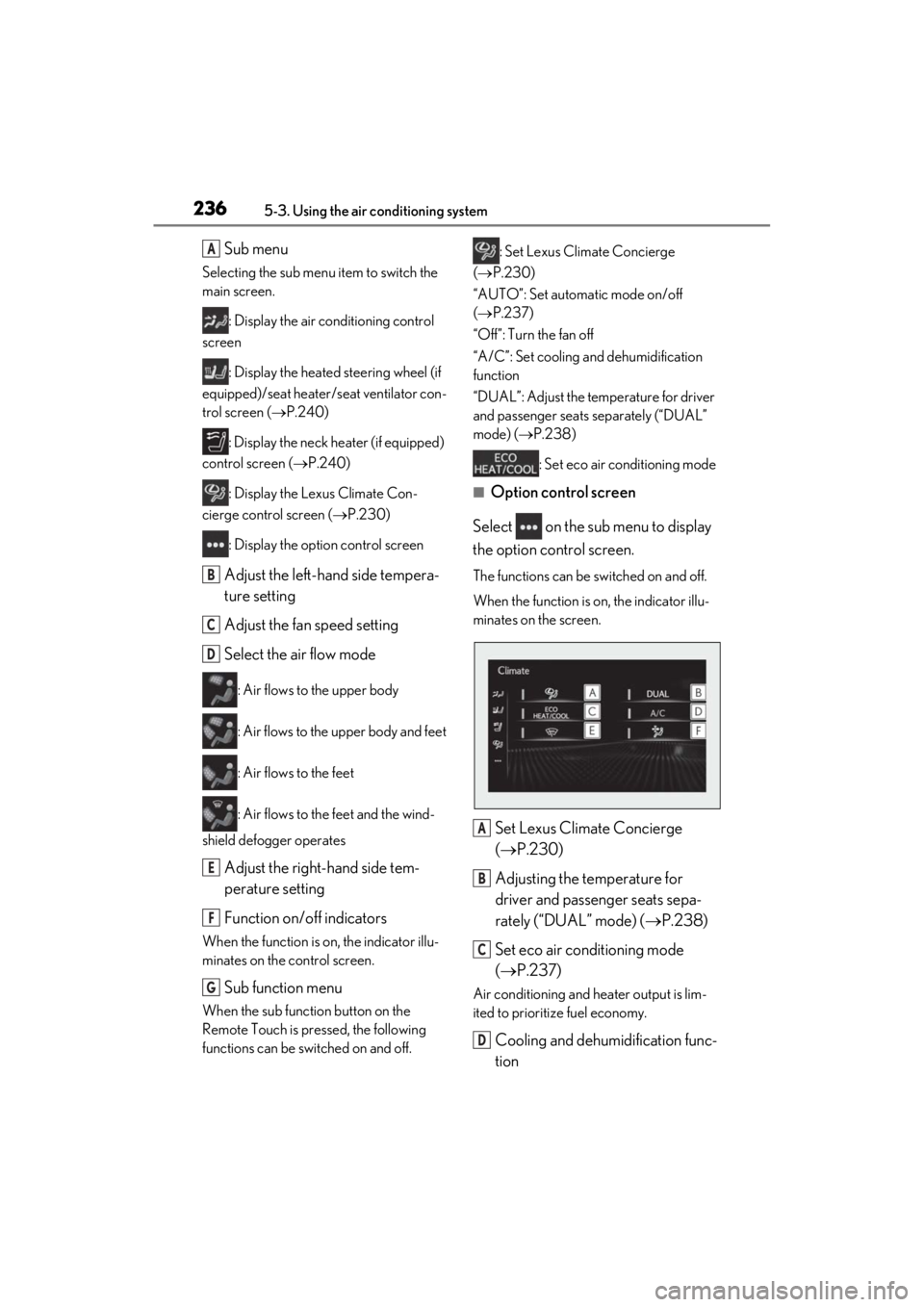
Sub menu
Selecting the sub menu item to switch the
main screen.
: Display the air conditioning control
screen
: Display the heated steering wheel (if
equipped)/seat heater/seat ventilator con-
trol screen ( P.240)
: Display the neck heater (if equipped)
control screen ( P.240)
: Display the Lexus Climate Con-
cierge control screen ( P.230)
: Display the option control screen
Adjust the left-hand side tempera-
ture setting
Adjust the fan speed setting
Select the air flow mode
: Air flows to the upper body
: Air flows to the upper body and feet
: Air flows to the feet
: Air flows to the feet and the wind-
shield defogger operates
Adjust the right-hand side tem-
perature setting
Function on/off indicators
When the function is on, the indicator illu-
minates on the control screen.
Sub function menu
When the sub function button on the
Remote Touch is pressed, the following
functions can be switched on and off. : Set Lexus Climate Concierge
( P.230)
“AUTO”: Set automatic mode on/off
( P.237)
“Off”: Turn the fan off
“A/C”: Set cooling and dehumidification
function
“DUAL”: Adjust the temperature for driver
and passenger seats separately (“DUAL”
mode) ( P.238)
: Set eco air conditioning mode
■Option control screen
Select on the sub menu to display
the option control screen.
The functions can be switched on and off.
When the function is on, the indicator illu-
minates on the screen.
Set Lexus Climate Concierge
( P.230)
Adjusting the temperature for
driver and passenger seats sepa-
rately (“DUAL” mode) ( P.238)
Set eco air conditioning mode
( P.237)
Air conditioning and heater output is lim-
ited to prioritize fuel economy.
Cooling and dehumidification func-
tion
A
B
C
D
E
F
G
A
B
C
D
Page 241 of 410
2395-3. Using the air conditioning system
5
Interior features
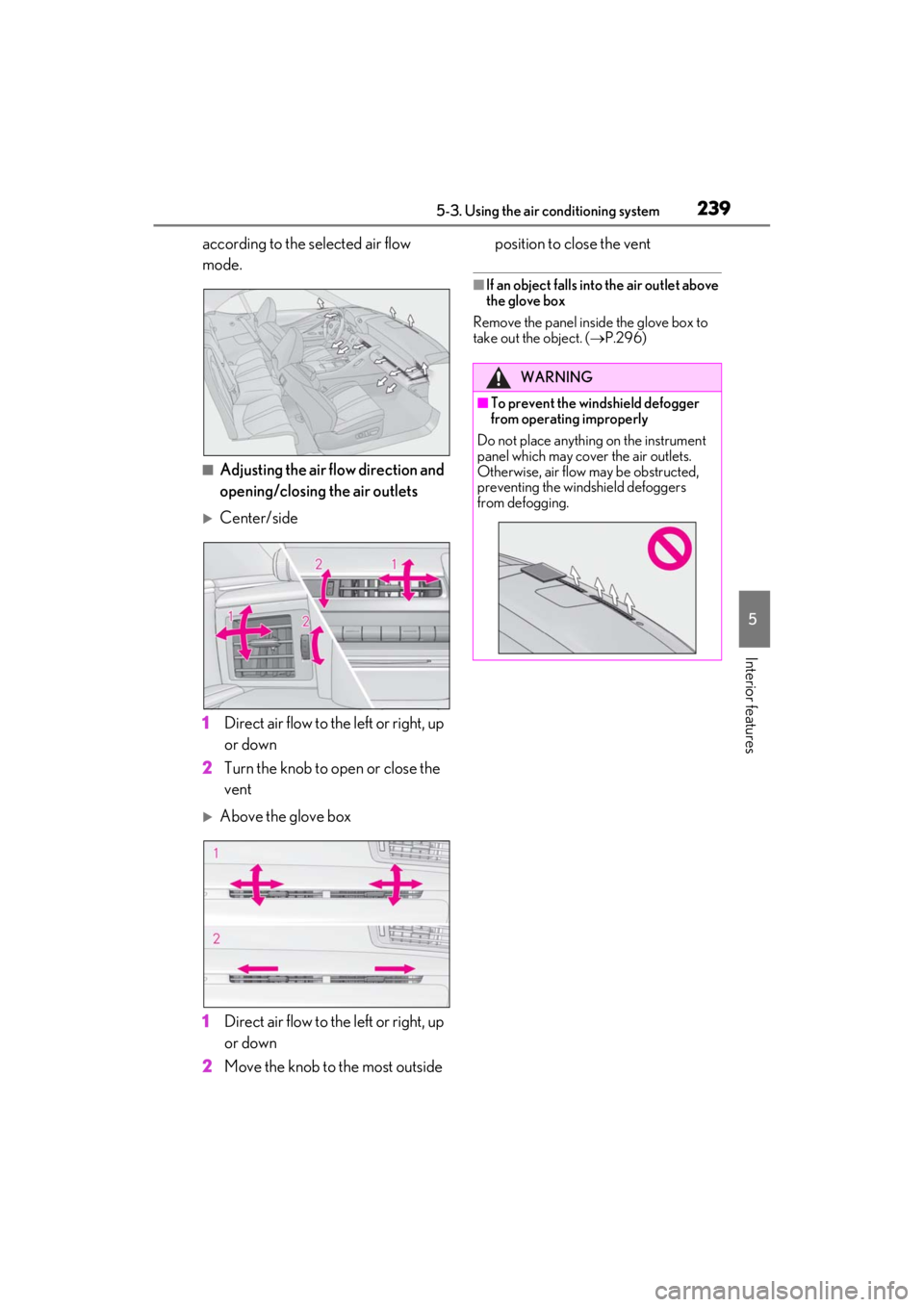
according to the selected air flow
mode.
■Adjusting the air flow direction and
opening/closing the air outlets
Center/side
1
Direct air flow to the left or right, up
or down
2
Turn the knob to open or close the
vent
Above the glove box
1
Direct air flow to the left or right, up
or down
2
Move the knob to the most outside position to close the vent
■If an object falls into the air outlet above
the glove box
Remove the panel inside the glove box to
take out the object. ( P.296)
WARNING
■To prevent the windshield defogger
from operating improperly
Do not place anything on the instrument
panel which may cover the air outlets.
Otherwise, air flow may be obstructed,
preventing the windshield defoggers
from defogging.