key battery lexus LC500C 2021 Owner's Manual / LEXUS 2021 LC500 CONVERTIBLE OWNER'S MANUAL (OM11498U)
[x] Cancel search | Manufacturer: LEXUS, Model Year: 2021, Model line: LC500C, Model: Lexus LC500C 2021Pages: 410, PDF Size: 8.71 MB
Page 1 of 410

LC500_OM_OM11498U_(U)
1
2
3
4
5
6
7
8
9
Pictorial indexSearch by illustration
For safety
and securityMake sure to read through them
(Main topics: Child seat, theft deterrent system)
Vehicle status
information and
indicatorsReading driving-related information
(Main topics: Meters, multi-information display)
Before drivingOpening and closing the doors and windows,
adjustment before driving
(Main topics: Keys, doors, seats)
DrivingOperations and advice which are necessary for driving
(Main topics: Starting engine, refueling)
Interior featuresUsage of the interior features
(Main topics: Air conditioner, storage features)
Maintenance
and careCaring for your vehicle and maintenance procedures
(Main topics: Interior and exterior, light bulbs)
When trouble
arisesWhat to do in case of malfunction and emergency
(Main topics: Battery discharge, flat tire)
Vehicle
specificationsVehicle specifications, customizable features
(Main topics: Fuel, oil, tire inflation pressure)
For ownersReporting safety defects for U.S. owners, and seat belt,
SRS airbag and headlight aim instructions for Canadian
owners
IndexSearch by symptom
Search alphabetically
Page 4 of 410
4TABLE OF CONTENTS
Electronic key battery ................297
Checking and replacing fuses 299
Headlight aim................................. 302
Light bulbs ....................................... 303
7-1. Essential information Emergency flashers..................... 306
If your vehicle has to be stopped in an emergency ............................. 306
If the vehicle is trapped in rising water............................................... 307
7-2. Steps to take in an emergency If your vehicle needs to be towed........................................................... 309
If you think something is wrong 312
Fuel pump shut off system ......... 313
If a warning light turns on or a warn- ing buzzer sounds ...................... 314
If a warning message is displayed ........................................................... 323
If you have a flat tire..................... 327
If the engine wi ll not start .......... 328
If you lose your keys .................... 329
If the fuel filler door cannot be opened........................................... 330
If the electronic key does not oper- ate properly ................................. 330
If the battery is discharged ....... 332
If the soft top roof cannot be closed ........................................................... 338
If your vehicle overheats ........... 345
If the vehicle becomes stuck ... 3478-1. Specifications
Maintenance data (fuel, oil level, etc.) ................................................. 350
Fuel information............................ 357
Tire information ............................ 359
8-2. Customization Customizable features .............. 367
8-3. Items to initialize Items to initialize ........................... 378
9-1. For owners Reporting safety defects for U.S. owners ........................................... 380
Seat belt instructions for Canadian owners (in French) ................... 380
SRS airbag instructions for Cana- dian owners (in French) ......... 382
Headlight aim instructions for Canadian owners (in French).......................................................... 388
What to do if... (Troubleshooting) .......................................................... 392
Alphabetical index ..................... 394
7When trouble arises
8Vehicle specifications
9For owners
Index
Page 68 of 410

661-4. Theft deterrent system
●A person inside the vehicle opens a door,
the trunk or hood, or unlocks the vehicle
using a door lock switch.
●The battery is rech arged or replaced
when the vehicle is locked. ( P.336)
■Alarm-operated door lock
In the following cases, depending on the sit-
uation, the door may automatically lock to
prevent improper entry into the vehicle:
●When a person remaining in the vehicle
unlocks the door and the alarm is acti-
vated.
●While the alarm is activated, a person
remaining in the vehicle unlocks the door.
●When recharging or replacing the bat-
tery
■Customization
The alarm can be set to activate/deactivate
when the mechanical key is used to unlock.
(Customizable features: P.367)
NOTICE
■To ensure the system operates cor-
rectly
Do not modify or remove the system. If
modified or removed, the proper opera-
tion of the system cannot be guaranteed.
Page 94 of 410
923-1. Key information
3-1.Key information
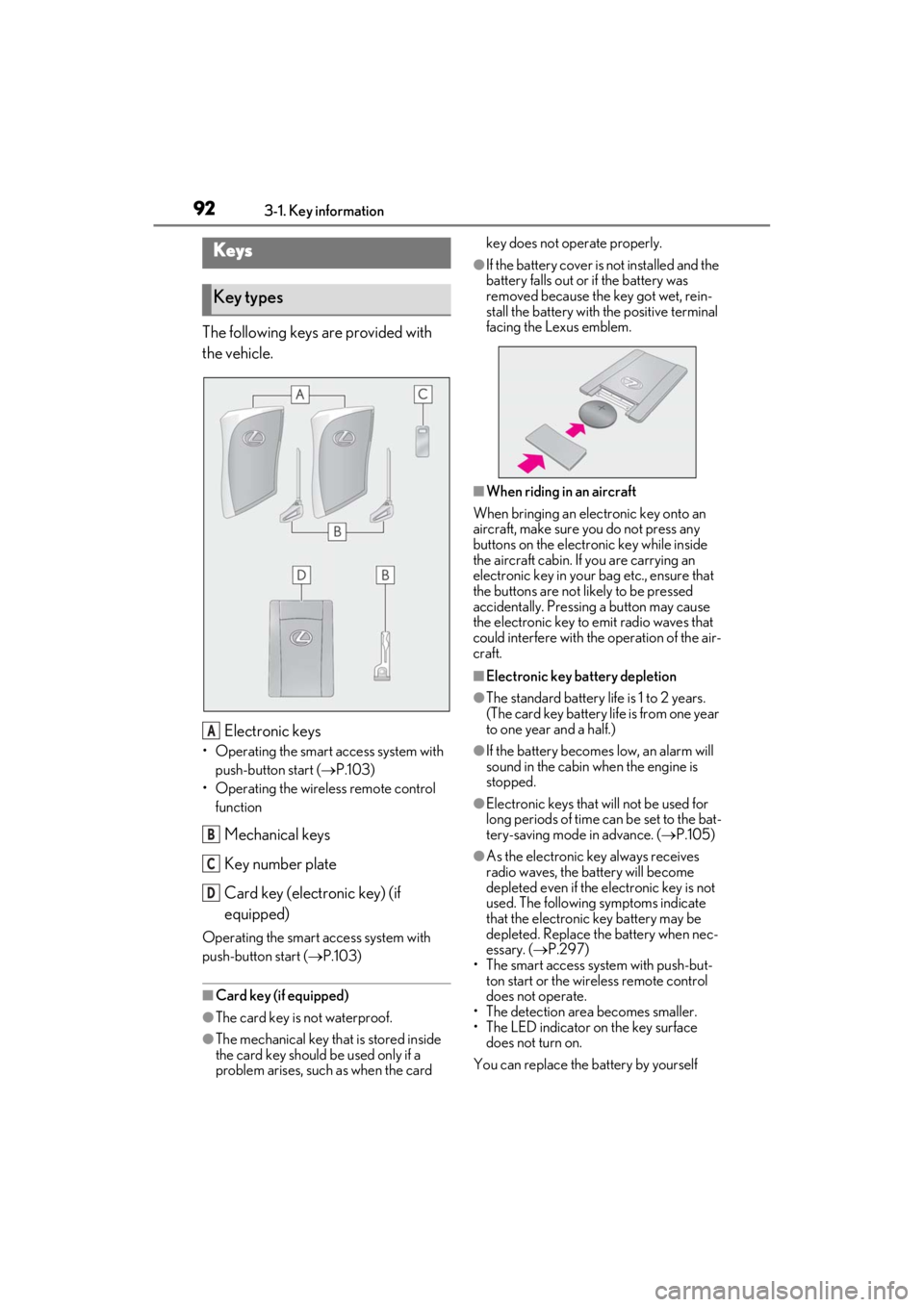
The following keys are provided with
the vehicle.
Electronic keys
• Operating the smart access system with push-button start ( P.103)
• Operating the wireless remote control function
Mechanical keys
Key number plate
Card key (electronic key) (if
equipped)
Operating the smart access system with
push-button start ( P.103)
■Card key (if equipped)
●The card key is not waterproof.
●The mechanical key that is stored inside
the card key should be used only if a
problem arises, such as when the card key does not operate properly.
●If the battery cover is not installed and the
battery falls out or if the battery was
removed because the key got wet, rein-
stall the battery with the positive terminal
facing the Lexus emblem.
■When riding in an aircraft
When bringing an electronic key onto an
aircraft, make sure you do not press any
buttons on the electronic key while inside
the aircraft cabin. If you are carrying an
electronic key in your bag etc., ensure that
the buttons are not likely to be pressed
accidentally. Pressing a button may cause
the electronic key to emit radio waves that
could interfere with the operation of the air-
craft.
■Electronic key battery depletion
●The standard battery life is 1 to 2 years.
(The card key battery life is from one year
to one year and a half.)
●If the battery becomes low, an alarm will
sound in the cabin when the engine is
stopped.
●Electronic keys that will not be used for
long periods of time can be set to the bat-
tery-saving mode in advance. ( P.105)
●As the electronic key always receives
radio waves, the battery will become
depleted even if the electronic key is not
used. The following symptoms indicate
that the electronic key battery may be
depleted. Replace the battery when nec-
essary. ( P.297)
• The smart access system with push-but- ton start or the wireless remote control
does not operate.
• The detection area becomes smaller.
• The LED indicator on the key surface does not turn on.
You can replace the battery by yourself
Keys
Key types
A
B
C
D
Page 95 of 410
933-1. Key information
3
Before driving
( P.297). However, as there is a danger
that the electronic key may be damaged, it
is recommended that replacement be car-
ried out by your Lexus dealer.
●To avoid serious deterioration, do not
leave the electronic key within 3 ft. (1 m)
of the following electr ical appliances that
produce a magnetic field:
• TVs
• Personal computers
• Cellular phones, cordless phones and battery chargers
• Recharging cellular phones or cordless phones
• Table lamps
• Induction cookers
■Replacing the battery
P.297
■Confirmation of the registered key
number
The number of keys already registered to
the vehicle can be confirmed. Ask your
Lexus dealer for details.
■If “A New Key has been Registered
Contact Your Dealer for Details” is
shown on the multi-information display
This message will be displayed each time
the driver’s door is opened when the doors
are unlocked from the outside for approxi-
mately 10 days after a new electronic key
has been registered.
If this message is disp layed but you have not
had a new electronic key registered, ask
your Lexus dealer to check if an unknown
electronic key (other than those in your
possession) has been registered.
NOTICE
■To prevent key damage
●Do not drop the keys, subject them to
strong shocks or bend them.
●Do not expose the keys to high tem-
peratures for long periods of time.
●Do not get the keys wet or wash them
in an ultrasonic washer etc.
●Do not attach metallic or magnetic
materials to the keys or place the keys
close to such materials.
●Do not disassemble the keys.
●Do not attach a sticker or anything else
to the surface of the electronic key.
●Do not place the keys near objects that
produce magnetic fields, such as TVs,
audio systems and induction cookers.
●Do not place the keys near medical
electrical equipment such as low-fre-
quency therapy equipment or micro-
wave therapy equipment, and do not
receive medical attent ion with the keys
on your person.
■Carrying the electronic key on your
person
Carry the electronic key 3.9 in. (10 cm)
or more away from electric appliances
that are turned on. Radio waves emitted
from electric applianc es within 3.9 in. (10
cm) of the electronic key may interfere
with the key, causing the key to not func-
tion properly.
■In case of a smart access system with
push-button start malfunction or
other key-related problems
P.330
■When an electronic key is lost
P.329
■Handling the card key (if equipped)
●If the battery or card key terminals get
wet, the battery may corrode and the
card key may stop working.
If the key is dropped into water, or if
drinking water, etc. is spilled on the
key, immediately remove the battery
cover and wipe the battery and termi-
nals. (To remove the battery cover,
lightly grasp and pull it.) If the battery is
corroded, have your Lexus dealer
replace the battery.
Page 96 of 410
943-1. Key information
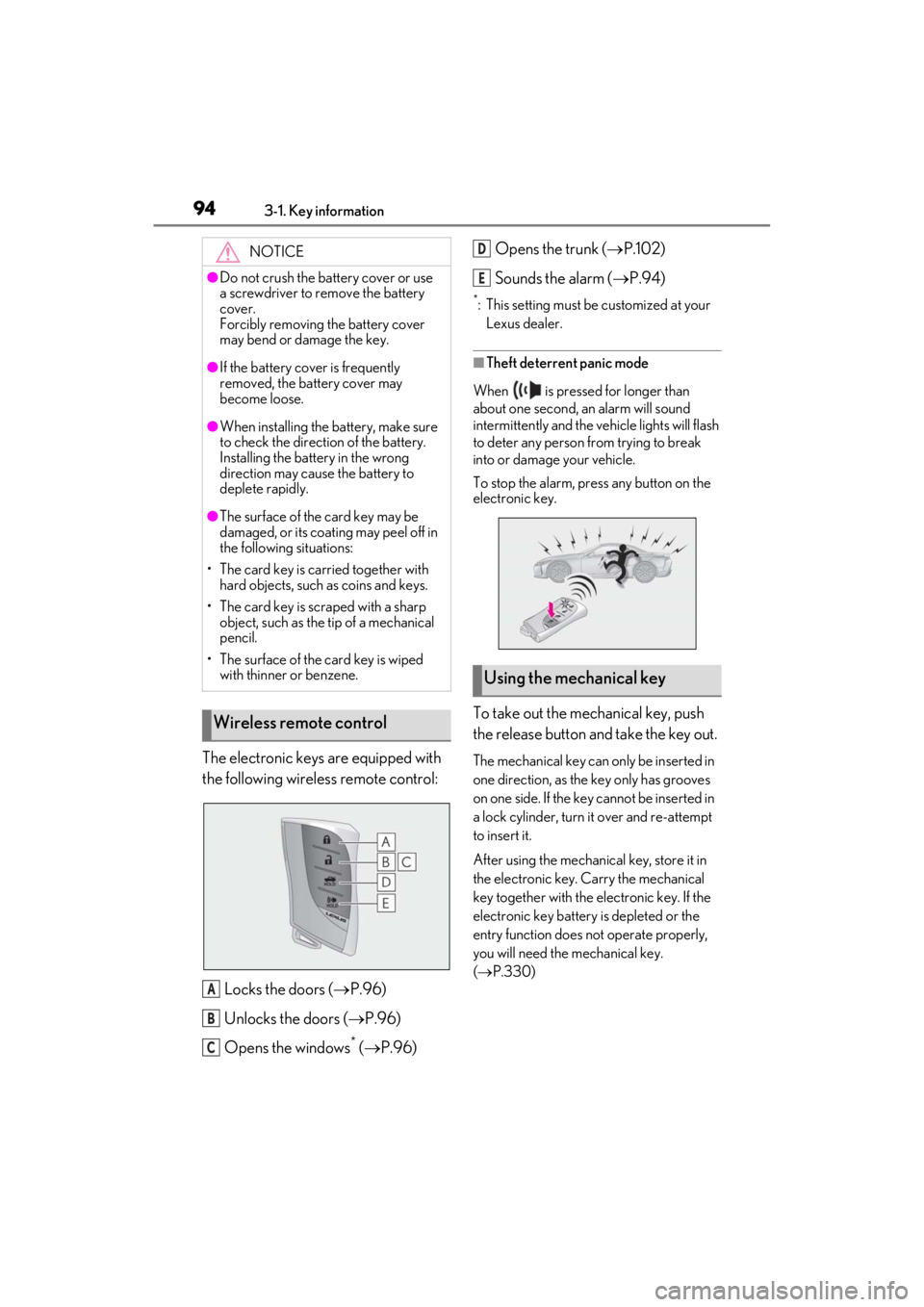
The electronic keys are equipped with
the following wireless remote control:Locks the doors ( P.96)
Unlocks the doors ( P.96)
Opens the windows
* ( P.96) Opens the trunk (
P.102)
Sounds the alarm ( P.94)
*: This setting must be customized at your
Lexus dealer.
■Theft deterrent panic mode
When is pressed for longer than
about one second, an alarm will sound
intermittently and the vehicle lights will flash
to deter any person from trying to break
into or damage your vehicle.
To stop the alarm, press any button on the
electronic key.
To take out the mechanical key, push
the release button and take the key out.
The mechanical key can only be inserted in
one direction, as the key only has grooves
on one side. If the key cannot be inserted in
a lock cylinder, turn it over and re-attempt
to insert it.
After using the mechanical key, store it in
the electronic key. Carry the mechanical
key together with the electronic key. If the
electronic key battery is depleted or the
entry function does not operate properly,
you will need the mechanical key.
( P.330)
NOTICE
●Do not crush the battery cover or use
a screwdriver to remove the battery
cover.
Forcibly removing the battery cover
may bend or damage the key.
●If the battery cover is frequently
removed, the battery cover may
become loose.
●When installing the ba
ttery, make sure
to check the direction of the battery.
Installing the battery in the wrong
direction may cause the battery to
deplete rapidly.
●The surface of the card key may be
damaged, or its coating may peel off in
the following situations:
• The card key is carried together with hard objects, such as coins and keys.
• The card key is scraped with a sharp object, such as the tip of a mechanical
pencil.
• The surface of the card key is wiped with thinner or benzene.
Wireless remote control
A
B
C
Using the mechanical key
D
E
Page 99 of 410
973-2. Opening, closing and locking the doors and trunk
3
Before driving
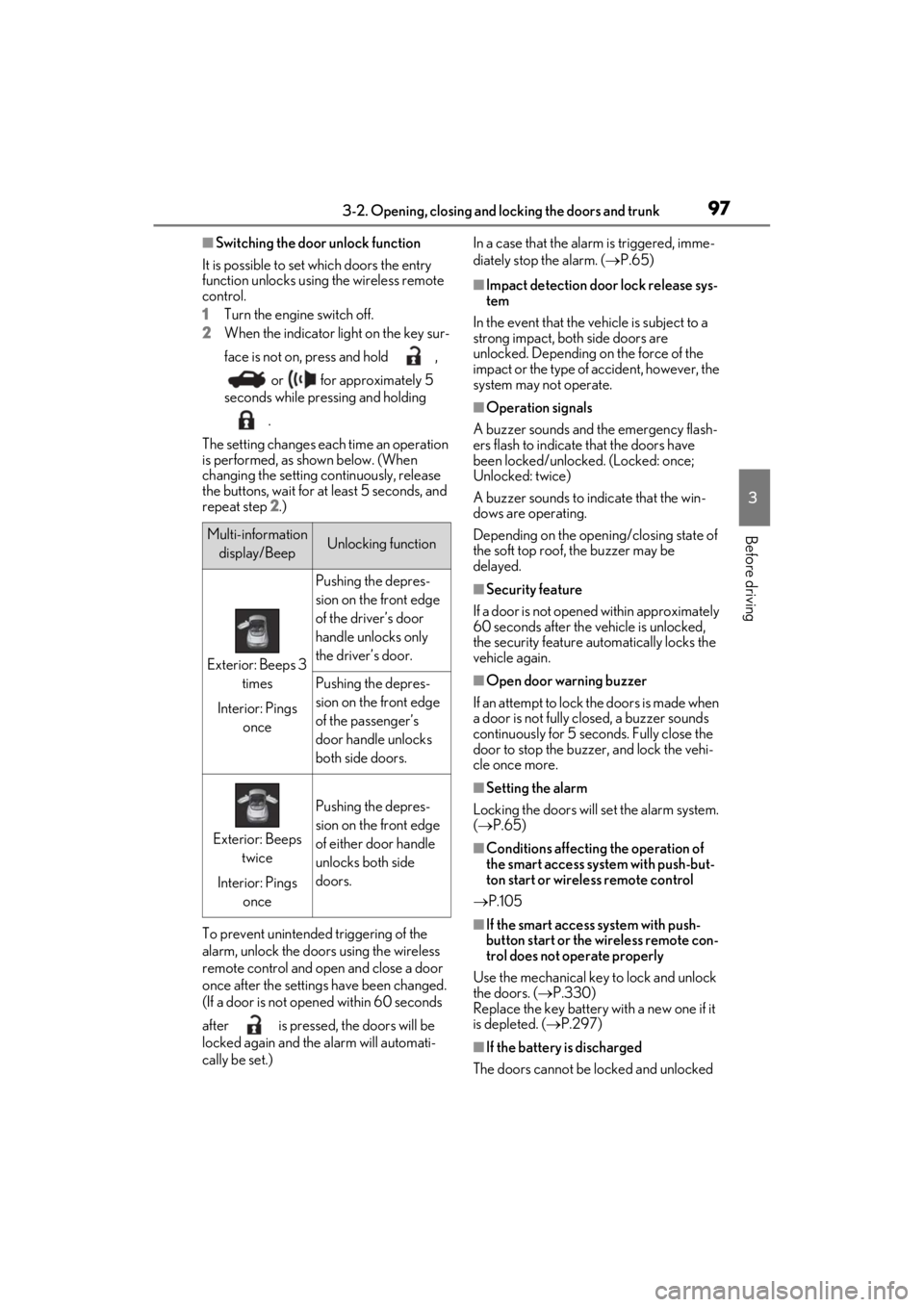
■Switching the door unlock function
It is possible to set which doors the entry
function unlocks using the wireless remote
control.
1 Turn the engine switch off.
2 When the indicator light on the key sur-
face is not on, press and hold ,
or for approximately 5
seconds while pressing and holding
.
The setting changes each time an operation
is performed, as shown below. (When
changing the setting continuously, release
the buttons, wait for at least 5 seconds, and
repeat step 2 .)
To prevent unintended triggering of the
alarm, unlock the doors using the wireless
remote control and open and close a door
once after the settings have been changed.
(If a door is not opened within 60 seconds
after is pressed, the doors will be
locked again and the alarm will automati-
cally be set.) In a case that the alarm is triggered, imme-
diately stop the alarm. (
P.65)
■Impact detection door lock release sys-
tem
In the event that the vehicle is subject to a
strong impact, both side doors are
unlocked. Depending on the force of the
impact or the type of accident, however, the
system may not operate.
■Operation signals
A buzzer sounds and the emergency flash-
ers flash to indicate that the doors have
been locked/unlocked. (Locked: once;
Unlocked: twice)
A buzzer sounds to in dicate that the win-
dows are operating.
Depending on the open ing/closing state of
the soft top roof, the buzzer may be
delayed.
■Security feature
If a door is not opened within approximately
60 seconds after the vehicle is unlocked,
the security feature automatically locks the
vehicle again.
■Open door warning buzzer
If an attempt to lock the doors is made when
a door is not fully closed, a buzzer sounds
continuously for 5 seconds. Fully close the
door to stop the buzzer, and lock the vehi-
cle once more.
■Setting the alarm
Locking the doors will set the alarm system.
( P.65)
■Conditions affecting the operation of
the smart access system with push-but-
ton start or wireless remote control
P.105
■If the smart access system with push-
button start or the wireless remote con-
trol does not operate properly
Use the mechanical key to lock and unlock
the doors. ( P.330)
Replace the key battery with a new one if it
is depleted. ( P.297)
■If the battery is discharged
The doors cannot be locked and unlocked
Multi-information display/BeepUnlocking function
Exterior: Beeps 3 times
Interior: Pings once
Pushing the depres-
sion on the front edge
of the driver’s door
handle unlocks only
the driver’s door.
Pushing the depres-
sion on the front edge
of the passenger’s
door handle unlocks
both side doors.
Exterior: Beeps twice
Interior: Pings once
Pushing the depres-
sion on the front edge
of either door handle
unlocks both side
doors.
Page 104 of 410
1023-2. Opening, closing and locking the doors and trunk
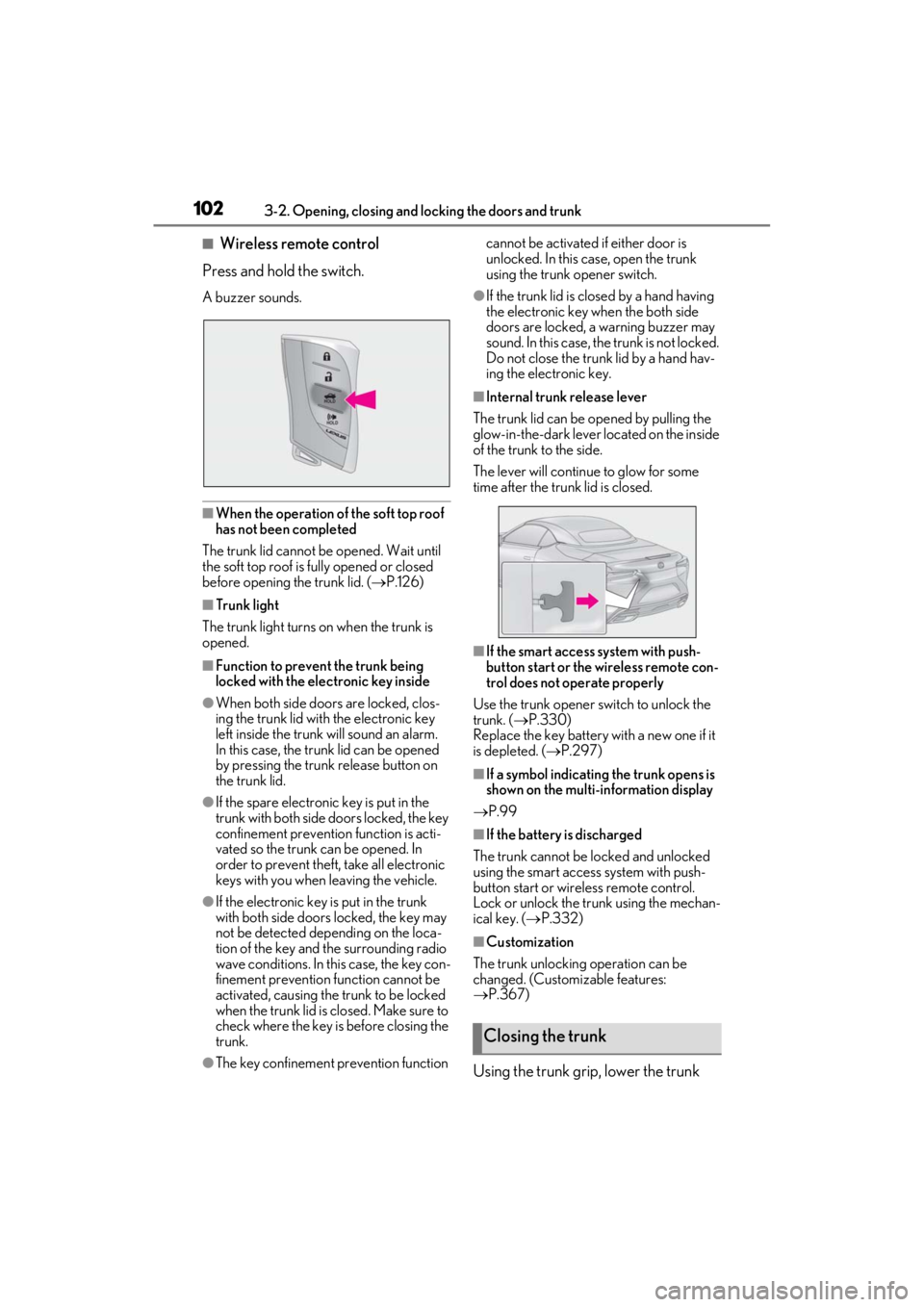
■Wireless remote control
Press and hold the switch.
A buzzer sounds.
■When the operation of the soft top roof
has not been completed
The trunk lid cannot be opened. Wait until
the soft top roof is fully opened or closed
before opening the trunk lid. ( P.126)
■Trunk light
The trunk light turns on when the trunk is
opened.
■Function to prevent the trunk being
locked with the electronic key inside
●When both side doors are locked, clos-
ing the trunk lid with the electronic key
left inside the trunk will sound an alarm.
In this case, the trunk lid can be opened
by pressing the trunk release button on
the trunk lid.
●If the spare electronic key is put in the
trunk with both side doors locked, the key
confinement prevention function is acti-
vated so the trunk can be opened. In
order to prevent theft, take all electronic
keys with you when leaving the vehicle.
●If the electronic key is put in the trunk
with both side doors locked, the key may
not be detected depending on the loca-
tion of the key and the surrounding radio
wave conditions. In th is case, the key con-
finement prevention function cannot be
activated, causing the trunk to be locked
when the trunk lid is closed. Make sure to
check where the key is before closing the
trunk.
●The key confinement prevention function cannot be activated if either door is
unlocked. In this case, open the trunk
using the trunk opener switch.
●If the trunk lid is closed by a hand having
the electronic key when the both side
doors are locked, a warning buzzer may
sound. In this case, the trunk is not locked.
Do not close the trunk lid by a hand hav-
ing the electronic key.
■Internal trunk release lever
The trunk lid can be opened by pulling the
glow-in-the-dark lever located on the inside
of the trunk to the side.
The lever will continue to glow for some
time after the trunk lid is closed.
■If the smart access system with push-
button start or the wireless remote con-
trol does not operate properly
Use the trunk opener switch to unlock the
trunk. ( P.330)
Replace the key battery with a new one if it
is depleted. ( P.297)
■If a symbol indicating the trunk opens is
shown on the multi-information display
P.99
■If the battery is discharged
The trunk cannot be locked and unlocked
using the smart access system with push-
button start or wireless remote control.
Lock or unlock the trunk using the mechan-
ical key. ( P.332)
■Customization
The trunk unlocking operation can be
changed. (Customizable features:
P.367)
Using the trunk grip, lower the trunk
Closing the trunk
Page 106 of 410
1043-2. Opening, closing and locking the doors and trunk
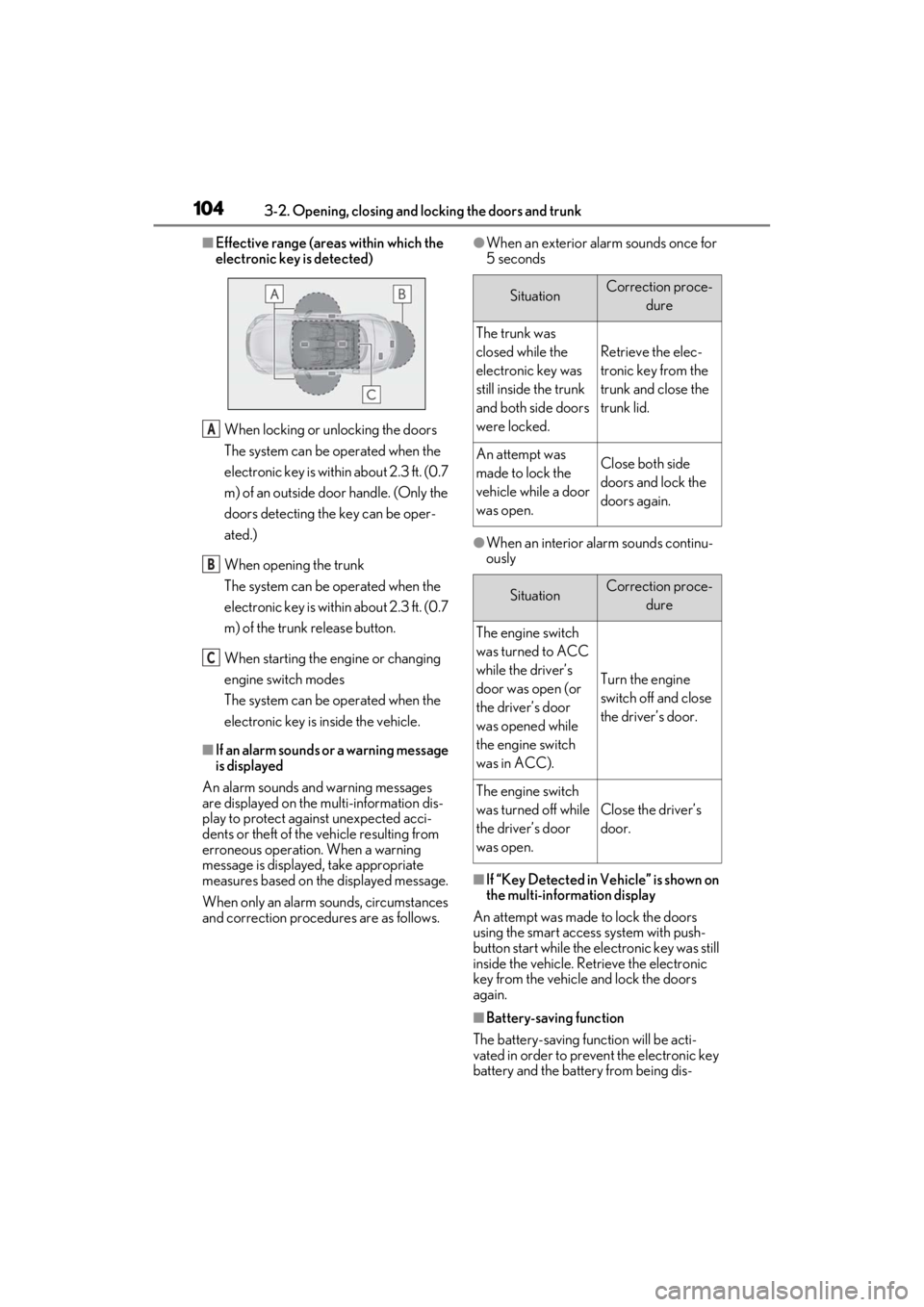
■Effective range (areas within which the
electronic key is detected)
When locking or unlocking the doors
The system can be operated when the
electronic key is within about 2.3 ft. (0.7
m) of an outside door handle. (Only the
doors detecting the key can be oper-
ated.)
When opening the trunk
The system can be operated when the
electronic key is within about 2.3 ft. (0.7
m) of the trunk release button.
When starting the engine or changing
engine switch modes
The system can be operated when the
electronic key is inside the vehicle.
■If an alarm sounds or a warning message
is displayed
An alarm sounds and warning messages
are displayed on the multi-information dis-
play to protect against unexpected acci-
dents or theft of the vehicle resulting from
erroneous operation. When a warning
message is displayed, take appropriate
measures based on the displayed message.
When only an alarm sounds, circumstances
and correction procedures are as follows.
●When an exterior alarm sounds once for
5 seconds
●When an interior alarm sounds continu-
ously
■If “Key Detected in Vehicle” is shown on
the multi-information display
An attempt was made to lock the doors
using the smart access system with push-
button start while the electronic key was still
inside the vehicle. Retrieve the electronic
key from the vehicle and lock the doors
again.
■Battery-saving function
The battery-saving function will be acti-
vated in order to prevent the electronic key
battery and the battery from being dis-
A
B
C
SituationCorrection proce- dure
The trunk was
closed while the
electronic key was
still inside the trunk
and both side doors
were locked.
Retrieve the elec-
tronic key from the
trunk and close the
trunk lid.
An attempt was
made to lock the
vehicle while a door
was open.Close both side
doors and lock the
doors again.
SituationCorrection proce-dure
The engine switch
was turned to ACC
while the driver’s
door was open (or
the driver’s door
was opened while
the engine switch
was in ACC).
Turn the engine
switch off and close
the driver’s door.
The engine switch
was turned off while
the driver’s door
was open.
Close the driver’s
door.
Page 107 of 410
1053-2. Opening, closing and locking the doors and trunk
3
Before driving
charged while the vehicle is not in operation
for a long time.
●In the following situations, the smart
access system with pu sh-button start may
take some time to unlock the doors.
• The electronic key has been left within approximately 6 ft. (2 m) of the outside of
the vehicle for 10 minutes or longer.
• The smart access system with push-but- ton start has not been used for 5 days or
longer.
●If the smart access system with push-but-
ton start has not been used for 14 days or
longer, the doors cannot be unlocked at
the passenger door. In this case, push the
depression on the front edge the driver’s
door handle, or use the wireless remote
control or mechanical key, to unlock the
doors.
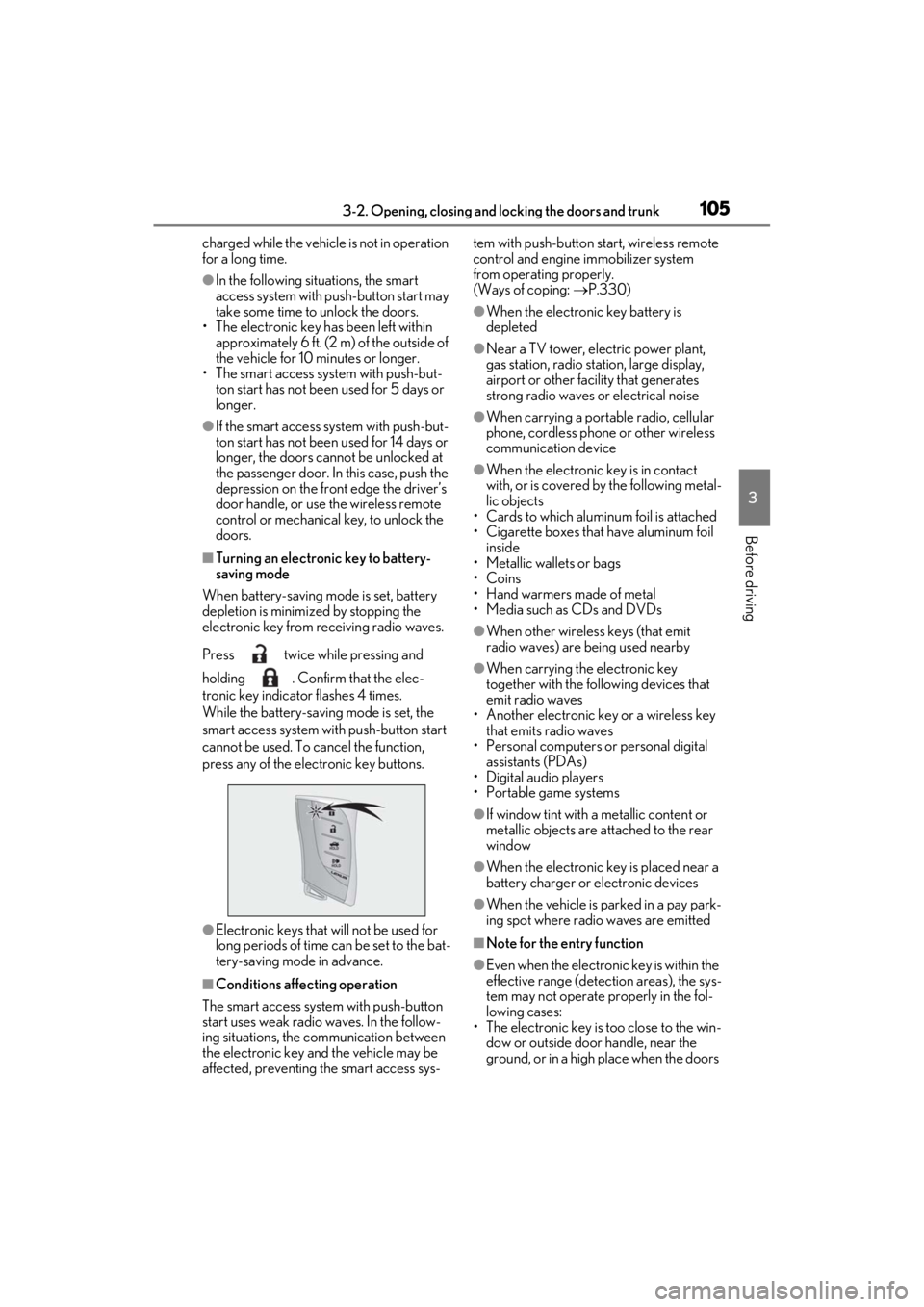
■Turning an electronic key to battery-
saving mode
When battery-saving mode is set, battery
depletion is minimized by stopping the
electronic key from receiving radio waves.
Press twice while pressing and
holding . Confirm that the elec-
tronic key indicator flashes 4 times.
While the battery-saving mode is set, the
smart access system with push-button start
cannot be used. To cancel the function,
press any of the electronic key buttons.
●Electronic keys that will not be used for
long periods of time can be set to the bat-
tery-saving mode in advance.
■Conditions affe cting operation
The smart access system with push-button
start uses weak radio waves. In the follow-
ing situations, the communication between
the electronic key and the vehicle may be
affected, preventing the smart access sys- tem with push-button start, wireless remote
control and engine immobilizer system
from operating properly.
(Ways of coping:
P.330)
●When the electronic key battery is
depleted
●Near a TV tower, electric power plant,
gas station, radio stat ion, large display,
airport or other fac ility that generates
strong radio waves or electrical noise
●When carrying a portable radio, cellular
phone, cordless phone or other wireless
communication device
●When the electronic key is in contact
with, or is covered by the following metal-
lic objects
• Cards to which aluminum foil is attached
• Cigarette boxes that have aluminum foil
inside
• Metallic wallets or bags
•Coins
• Hand warmers made of metal
• Media such as CDs and DVDs
●When other wireless keys (that emit
radio waves) are being used nearby
●When carrying the electronic key
together with the following devices that
emit radio waves
• Another electronic key or a wireless key that emits radio waves
• Personal computers or personal digital assistants (PDAs)
• Digital audio players
• Portable game systems
●If window tint with a metallic content or
metallic objects are attached to the rear
window
●When the electronic key is placed near a
battery charger or electronic devices
●When the vehicle is parked in a pay park-
ing spot where radio waves are emitted
■Note for the entry function
●Even when the electronic key is within the
effective range (detection areas), the sys-
tem may not operate properly in the fol-
lowing cases:
• The electronic key is too close to the win- dow or outside door handle, near the
ground, or in a high place when the doors