phone lexus LC500C 2021 Owner's Manual / LEXUS 2021 LC500 CONVERTIBLE OWNER'S MANUAL (OM11498U)
[x] Cancel search | Manufacturer: LEXUS, Model Year: 2021, Model line: LC500C, Model: Lexus LC500C 2021Pages: 410, PDF Size: 8.71 MB
Page 9 of 410
9
Your vehicle has components that may
contain perchlorate. These compo-
nents may include airbag, seat belt pre-
tensioners, Pop Up Hood system,
active roll bar and wireless remote
control batteries.
WARNING
■General precautions while driving
Driving under the influence: Never drive
your vehicle when under the influence of
alcohol or drugs that have impaired your
ability to operate your vehicle. Alcohol
and certain drugs delay reaction time,
impair judgment and reduce coordina-
tion, which could lead to an accident that
could result in death or serious injury.
Defensive driving: Always drive defen-
sively. Anticipate mistakes that other
drivers or pedestrians might make and
be ready to avoid accidents.
Driver distraction: Always give your full
attention to driving. Anything that dis-
tracts the driver, such as adjusting con-
trols, talking on a cellular phone or
reading can result in a collision with
resulting death or serious injury to you,
your occupants or others.
■General precaution regarding chil-
dren’s safety
Never leave children unattended in the
vehicle, and never allow children to have
or use the key.
Children may be able to start the vehicle
or shift the vehicle into neutral. There is
also a danger that children may injure
themselves by playing with the windows
or other features of the vehicle. In addi-
tion, heat build-up or extremely cold
temperatures inside the vehicle can be
fatal to children.
Page 18 of 410
18Pictorial index
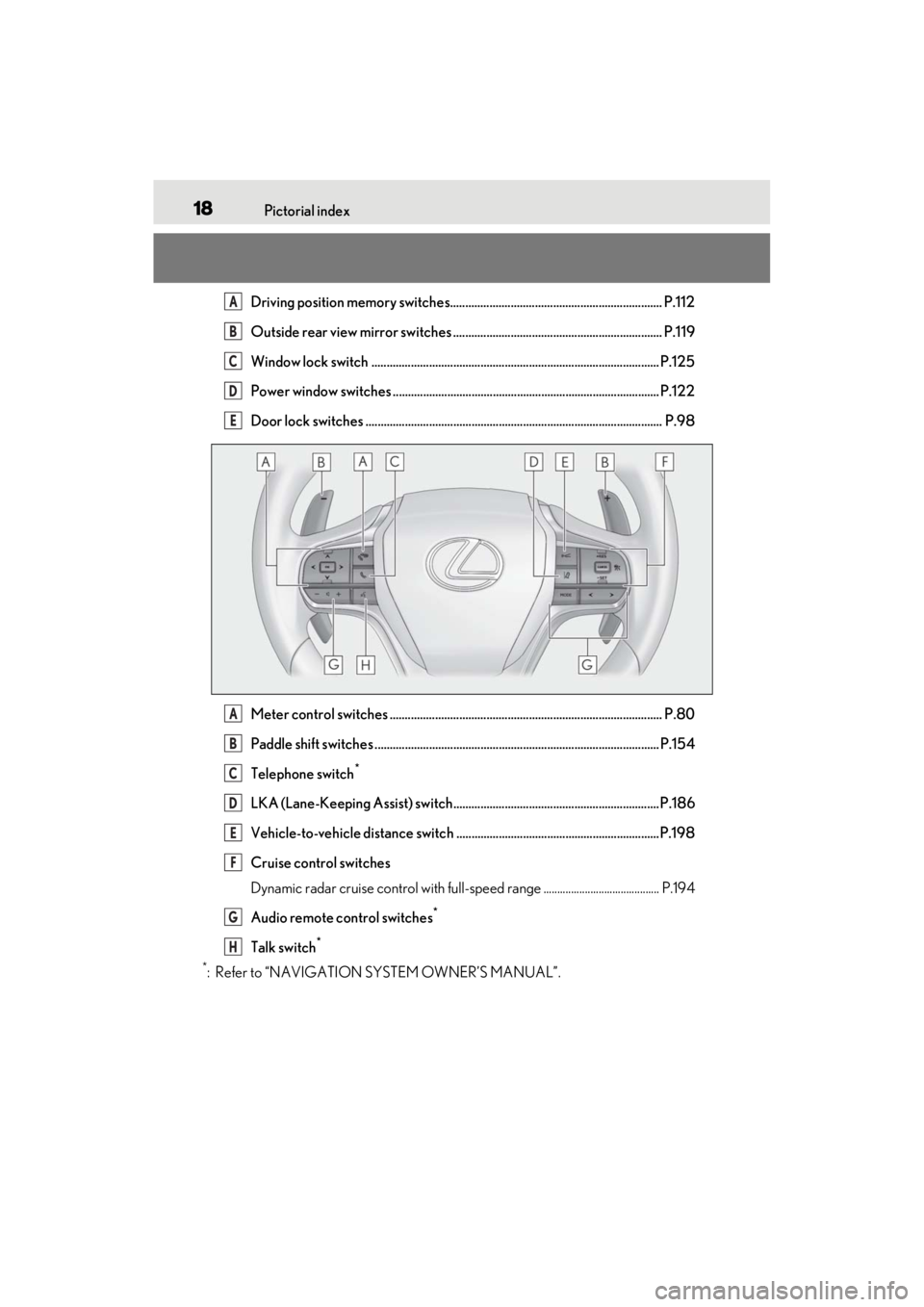
Driving position memory switches...................................................................... P.112
Outside rear view mirror switches ..................................................................... P.119
Window lock switch ............................................................................................... P.125
Power window switches ........................................................................................ P.122
Door lock switches .................................................................................................. P.98
Meter control switches .......................................................................................... P.80
Paddle shift switches .............................................................................................. P.154
Telephone switch
*
LKA (Lane-Keeping Assist) switch.................................................................... P.186
Vehicle-to-vehicle distance switch ...................................................................P.198
Cruise control switches
Dynamic radar cruise control with full-speed range .......................................... P.194
Audio remote control switches
*
Talk switch*
*
: Refer to “NAVIGATION SYSTEM OWNER’S MANUAL”.
A
B
C
D
E
A
B
C
D
E
F
G
H
Page 58 of 410
561-3. Lexus Enform
1-3.Lexus Enform
*:If equipped
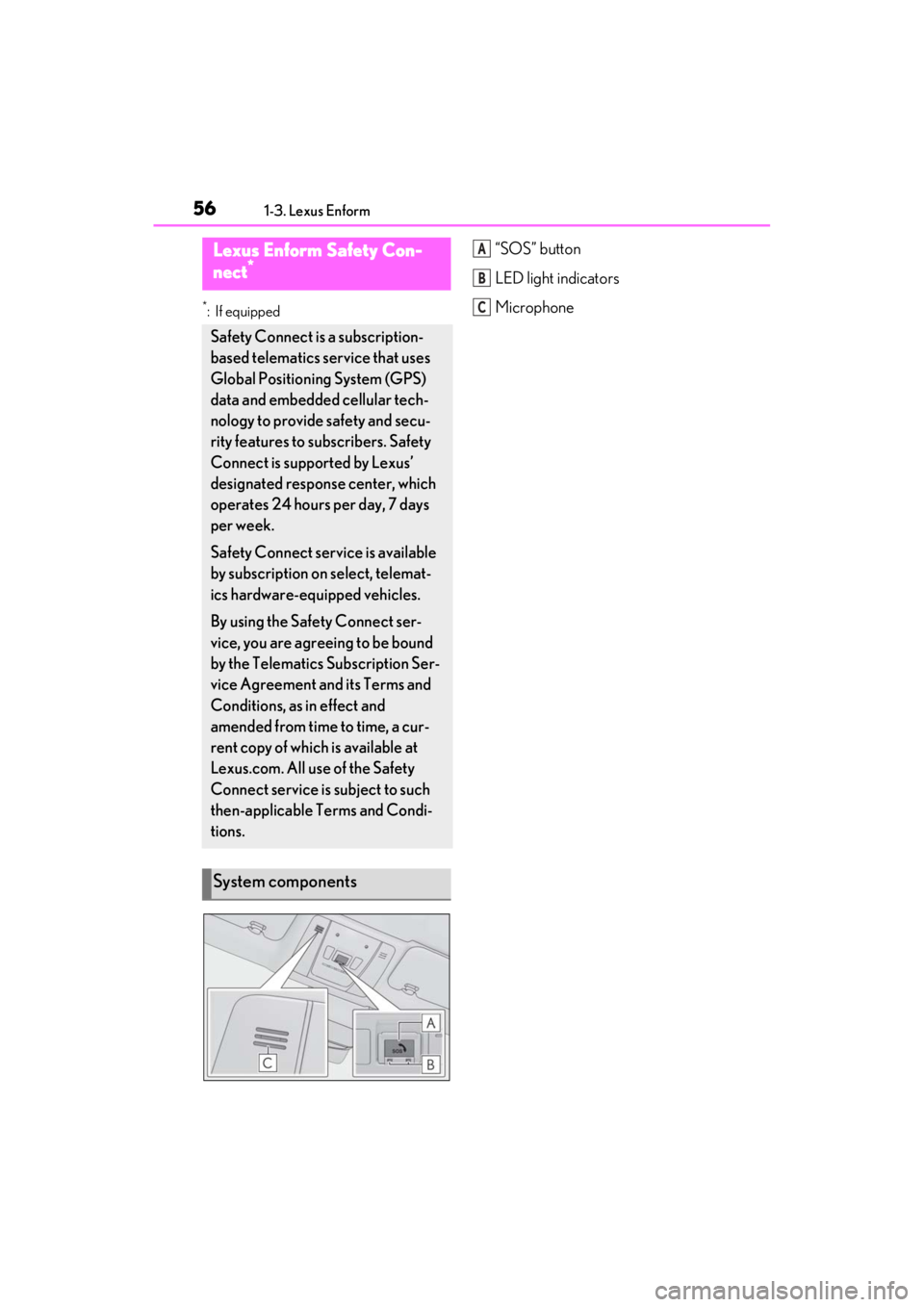
“SOS” button
LED light indicators
MicrophoneLexus Enform Safety Con-
nect*
Safety Connect is a subscription-
based telematics service that uses
Global Positioning System (GPS)
data and embedded cellular tech-
nology to provide safety and secu-
rity features to subscribers. Safety
Connect is supported by Lexus’
designated response center, which
operates 24 hours per day, 7 days
per week.
Safety Connect service is available
by subscription on select, telemat-
ics hardware-equipped vehicles.
By using the Safety Connect ser-
vice, you are agreeing to be bound
by the Telematics Subscription Ser-
vice Agreement and its Terms and
Conditions, as in effect and
amended from time to time, a cur-
rent copy of which is available at
Lexus.com. All use of the Safety
Connect service is subject to such
then-applicable Terms and Condi-
tions.
System components
A
B
C
Page 60 of 410
581-3. Lexus Enform
Subscribers have the following Safety
Connect services available:
Automatic Collision Notification
*
Helps drivers receive necessary response
from emergency service providers.
(
P.59)
*: U.S. Patent No. 7,508,298 B2
Stolen Vehicle Location
Helps drivers in the event of vehicle theft.
(
P.59)
Emergency Assistance Button
(“SOS”)
Connects drivers to response-center sup-
port. (
P.60)
Enhanced Roadside Assistance
Provides drivers various on-road assis-
tance. (
P.60)
After you have signed the Telematics
Subscription Service Agreement and
are enrolled, you can begin receiving
services.
A variety of subscription terms is avail-
able for purchase. Contact your Lexus
dealer, call the following or push the
“SOS” button in your vehicle for fur-
ther subscription details.
• The United States
1-800-25-LEXUS (1-800-255-3987)
• Canada
1-800-26-LEXUS (1-800-265-3987)
•Puerto Rico
1-877-539-8777
■Safety Connect Services Information
●Phone calls using the vehicle’s Blue-
tooth® technology will not be possible
during Safety Connect.
●Safety Connect is available beginning
ServicesSubscription
Page 62 of 410

601-3. Lexus Enform
vehicle. After filing a police report, call
the Safety Connect response center at
1-800-25-LEXUS (1-800-255-
3987) in the United States, 1-877-
539-8777 in Puerto Rico or 1-800-
265-3987 in Canada, and follow the
prompts for Safety Connect to initiate
this service.
In addition to assisting law enforce-
ment with recovery of a stolen vehicle,
Safety-Connect-equipped vehicle
location data may, under certain cir-
cumstances, be shared with third par-
ties to locate your vehicle. Further
information is available at Lexus.com.
■Emergency Assistance Button
(“SOS”)
In the event of an emergency on the
road, push the “SOS” button to reach
the Safety Connect response center.
The answering agent will determine
your vehicle’s location, assess the
emergency, and dispatch the neces-
sary assistance required.
If you accidentally press the “SOS” button,
tell the response-center agent that you are
not experiencing an emergency.
■Enhanced Roadside Assistance
Enhanced Roadside Assistance adds
GPS data to the already included war-
ranty-based Lexus roadside service.
Subscribers can press the “SOS” but-
ton to reach a Safety Connect
response-center agent, who can help
with a wide range of needs, such as:
towing, flat tire, fuel delivery, etc. For a
description of the Roadside Assistance
services and their limitations, please see the Safety Connect Terms and
Conditions, which are available at
Lexus.com.
Important! Read this information about
exposure to radio frequency signals
before using Safety Connect;
The Safety Connect system installed in
your vehicle is a low-power radio
transmitter and receiver. It receives
and also sends out radio frequency
(RF) signals.
In August 1996, the Federal Commu-
nications Commission (FCC) adopted
RF exposure guidelines with safety lev-
els for mobile wireless phones. Those
guidelines are consistent with the
safety standards previously set by the
following U.S. and international stan-
dards bodies.
ANSI (American National Stan-
dards Institute) C95.1 [1992]
NCRP (National Council on Radia-
tion Protection and Measurement)
Report 86 [1986]
ICNIRP (International Commission
on Non-Ionizing Radiation Protec-
tion) [1996]
Those standards were based on com-
prehensive and periodic evaluations of
the relevant scientific literature. Over
120 scientists, engineers, and physi-
cians from universities, and govern-
ment health agencies and industries
reviewed the available body of
Safety information for Safety
Connect
Page 63 of 410
611-3. Lexus Enform
1
For safety and security
research to develop the ANSI Stan-
dard (C95.1).
The design of Safety Connect com-
plies with the FCC guidelines in addi-
tion to those standards.
*: If equipped
After you sign the Telematics Sub-
scription Service Agreement, down-
load the Lexus App from your cellular
phone’s app store, and register within
the app (or enroll and complete regis-
tration at the dealer), you can begin
using these services. (P.56)
A variety of subscription terms are
available. Contact your Lexus dealer,
or call 1-800-25-LEXUS (1-800-
255-3987) for further subscription
details.
■Availability of service
Lexus Enform Remote is available in the
contiguous United States, Washington
D.C. and Alaska.
Lexus Enform Remote is not available in
some countries or areas.
■Lexus Enform Remote Information
●Lexus Enform Remote should only be
used by authorized users.
●Laws in some communities may require
that the vehicle be within view of the user
Lexus Enform Remote*
Lexus Enform Remote is a cellular
phone application that lets you view
and remotely control certain
aspects of your vehicle.
For details about the functions and
services of this application, refer to
http://www.lexus.com/enform/
.
Function of the Lexus Enform
Remote is achieved by using DCM
(Data Communication Module).
Subscription
Page 85 of 410
832-1. Instrument cluster
2
Vehicle status information and indicators
Select to display warning messages
and measures to be taken if a malfunc-
tion is detected. ( P.323)
Select to change the meter display set-
tings.
■Language
Select to change the language on the
display.
■Units
Select to change the unit of measure
for fuel consumption.
■Eco Driving Indicator Light
Select to activate/deactivate the Eco
Driving Indicator Light.
■Drive information 1/Drive informa-
tion 2
Select to select up to 2 items that will
be displayed on the “Drive Info 1”
screen and “Drive Info 2” screen
respectively. ( P.80)
■Pop-up display
Select to set the following pop-up dis-
plays, which may appear in some situa-
tions, on/off.
• Route guidance display of the navi- gation system-linked system
• Making call display of the hands- free phone system
• Audio system operation display
• Voice recognition display
• Instrument panel brightness adjust- ment display
■Ring position memory
Select to change the meter ring posi-
tion when the engine is started.
The position before the engine is
stopped or the center position can be
selected.
■Accent color
Select to change the accent color on
the screen, such as the cursor color.
■Rev indicator
Select to set the rev indicator on/off.
When set to on, proceed to select the
engine speed at which the rev indica-
tor will be displayed.
■Rev peak
Select to set the rev peak on/off.
■Clock
Select to switch between 12-hour dis-
play and 24-hour display.
■Initialization
Select to reset the meter display set-
tings.
■Suspension of the settings display
In the following situations, operation of the
settings display will be temporarily sus-
pended.
●When a warning message appears on the
multi-information display
●When the vehicle begins to move
■Customization
The settings can be changed on of the
multi-information display.
●Settings of the driving assist systems
( P.367)
●Vehicle settings ( P.86, 265, 286,
287, 367)
Warning message display
Settings display
Page 95 of 410
933-1. Key information
3
Before driving
( P.297). However, as there is a danger
that the electronic key may be damaged, it
is recommended that replacement be car-
ried out by your Lexus dealer.
●To avoid serious deterioration, do not
leave the electronic key within 3 ft. (1 m)
of the following electr ical appliances that
produce a magnetic field:
• TVs
• Personal computers
• Cellular phones, cordless phones and battery chargers
• Recharging cellular phones or cordless phones
• Table lamps
• Induction cookers
■Replacing the battery
P.297
■Confirmation of the registered key
number
The number of keys already registered to
the vehicle can be confirmed. Ask your
Lexus dealer for details.
■If “A New Key has been Registered
Contact Your Dealer for Details” is
shown on the multi-information display
This message will be displayed each time
the driver’s door is opened when the doors
are unlocked from the outside for approxi-
mately 10 days after a new electronic key
has been registered.
If this message is disp layed but you have not
had a new electronic key registered, ask
your Lexus dealer to check if an unknown
electronic key (other than those in your
possession) has been registered.
NOTICE
■To prevent key damage
●Do not drop the keys, subject them to
strong shocks or bend them.
●Do not expose the keys to high tem-
peratures for long periods of time.
●Do not get the keys wet or wash them
in an ultrasonic washer etc.
●Do not attach metallic or magnetic
materials to the keys or place the keys
close to such materials.
●Do not disassemble the keys.
●Do not attach a sticker or anything else
to the surface of the electronic key.
●Do not place the keys near objects that
produce magnetic fields, such as TVs,
audio systems and induction cookers.
●Do not place the keys near medical
electrical equipment such as low-fre-
quency therapy equipment or micro-
wave therapy equipment, and do not
receive medical attent ion with the keys
on your person.
■Carrying the electronic key on your
person
Carry the electronic key 3.9 in. (10 cm)
or more away from electric appliances
that are turned on. Radio waves emitted
from electric applianc es within 3.9 in. (10
cm) of the electronic key may interfere
with the key, causing the key to not func-
tion properly.
■In case of a smart access system with
push-button start malfunction or
other key-related problems
P.330
■When an electronic key is lost
P.329
■Handling the card key (if equipped)
●If the battery or card key terminals get
wet, the battery may corrode and the
card key may stop working.
If the key is dropped into water, or if
drinking water, etc. is spilled on the
key, immediately remove the battery
cover and wipe the battery and termi-
nals. (To remove the battery cover,
lightly grasp and pull it.) If the battery is
corroded, have your Lexus dealer
replace the battery.
Page 107 of 410
1053-2. Opening, closing and locking the doors and trunk
3
Before driving
charged while the vehicle is not in operation
for a long time.
●In the following situations, the smart
access system with pu sh-button start may
take some time to unlock the doors.
• The electronic key has been left within approximately 6 ft. (2 m) of the outside of
the vehicle for 10 minutes or longer.
• The smart access system with push-but- ton start has not been used for 5 days or
longer.
●If the smart access system with push-but-
ton start has not been used for 14 days or
longer, the doors cannot be unlocked at
the passenger door. In this case, push the
depression on the front edge the driver’s
door handle, or use the wireless remote
control or mechanical key, to unlock the
doors.
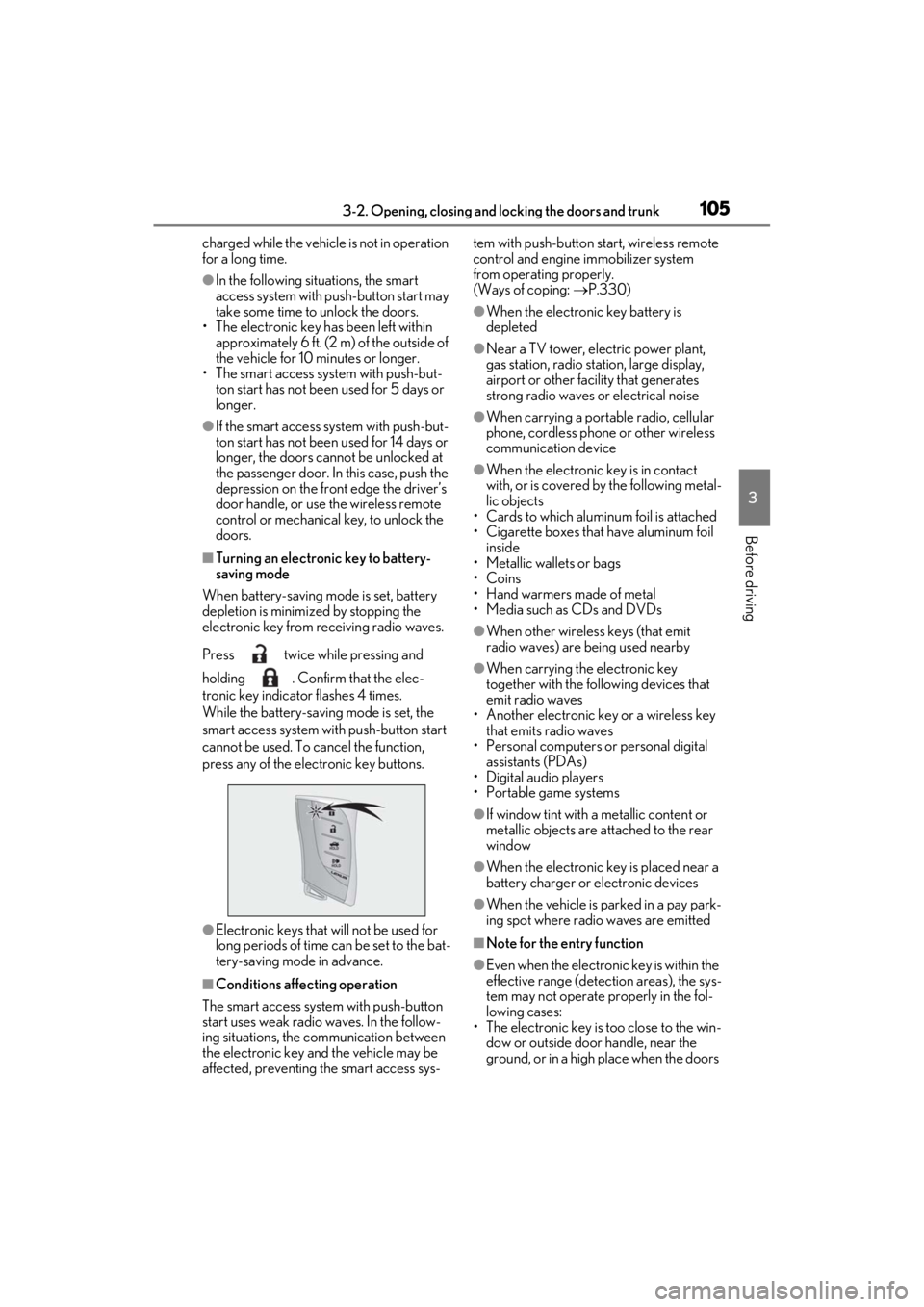
■Turning an electronic key to battery-
saving mode
When battery-saving mode is set, battery
depletion is minimized by stopping the
electronic key from receiving radio waves.
Press twice while pressing and
holding . Confirm that the elec-
tronic key indicator flashes 4 times.
While the battery-saving mode is set, the
smart access system with push-button start
cannot be used. To cancel the function,
press any of the electronic key buttons.
●Electronic keys that will not be used for
long periods of time can be set to the bat-
tery-saving mode in advance.
■Conditions affe cting operation
The smart access system with push-button
start uses weak radio waves. In the follow-
ing situations, the communication between
the electronic key and the vehicle may be
affected, preventing the smart access sys- tem with push-button start, wireless remote
control and engine immobilizer system
from operating properly.
(Ways of coping:
P.330)
●When the electronic key battery is
depleted
●Near a TV tower, electric power plant,
gas station, radio stat ion, large display,
airport or other fac ility that generates
strong radio waves or electrical noise
●When carrying a portable radio, cellular
phone, cordless phone or other wireless
communication device
●When the electronic key is in contact
with, or is covered by the following metal-
lic objects
• Cards to which aluminum foil is attached
• Cigarette boxes that have aluminum foil
inside
• Metallic wallets or bags
•Coins
• Hand warmers made of metal
• Media such as CDs and DVDs
●When other wireless keys (that emit
radio waves) are being used nearby
●When carrying the electronic key
together with the following devices that
emit radio waves
• Another electronic key or a wireless key that emits radio waves
• Personal computers or personal digital assistants (PDAs)
• Digital audio players
• Portable game systems
●If window tint with a metallic content or
metallic objects are attached to the rear
window
●When the electronic key is placed near a
battery charger or electronic devices
●When the vehicle is parked in a pay park-
ing spot where radio waves are emitted
■Note for the entry function
●Even when the electronic key is within the
effective range (detection areas), the sys-
tem may not operate properly in the fol-
lowing cases:
• The electronic key is too close to the win- dow or outside door handle, near the
ground, or in a high place when the doors
Page 286 of 410
2846-3. Do-it-yourself maintenance
• If the ID code on the tire pressure warn-ing valves and transmitters is not regis-
tered in the tire pressure warning
computer.
●Performance may be affected in the fol-
lowing situations.
• Near a TV tower, electric power plant, gas station, radio stat ion, large display,
airport or other faci lity that generates
strong radio waves or electrical noise
• When carrying a portable radio, cellular
phone, cordless phone or other wireless
communication device If tire position information is not correctly
displayed due to the radio wave conditions,
the display may be corrected by driving and
changing the radio
wave conditions.●When the vehicle is parked, the time
taken for the warning to start or go off
could be extended.
●When tire inflation pr essure declines rap-
idly for example when a tire has burst, the
warning may not function.
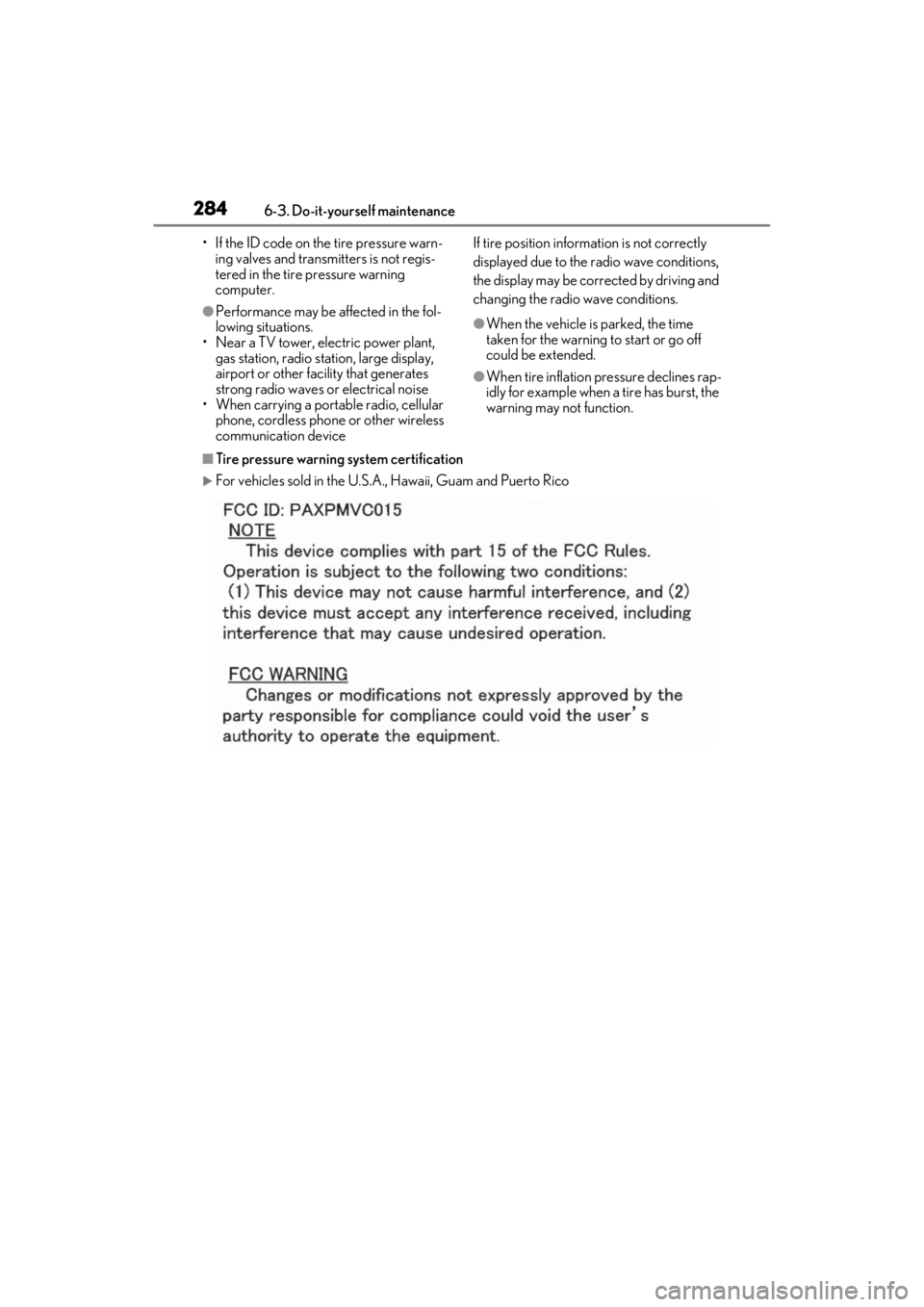
■Tire pressure warning system certification
For vehicles sold in the U.S.A. , Hawaii, Guam and Puerto Rico