power steering lexus LC500C 2021 Owner's Manual / LEXUS 2021 LC500 CONVERTIBLE OWNER'S MANUAL (OM11498U)
[x] Cancel search | Manufacturer: LEXUS, Model Year: 2021, Model line: LC500C, Model: Lexus LC500C 2021Pages: 410, PDF Size: 8.71 MB
Page 2 of 410
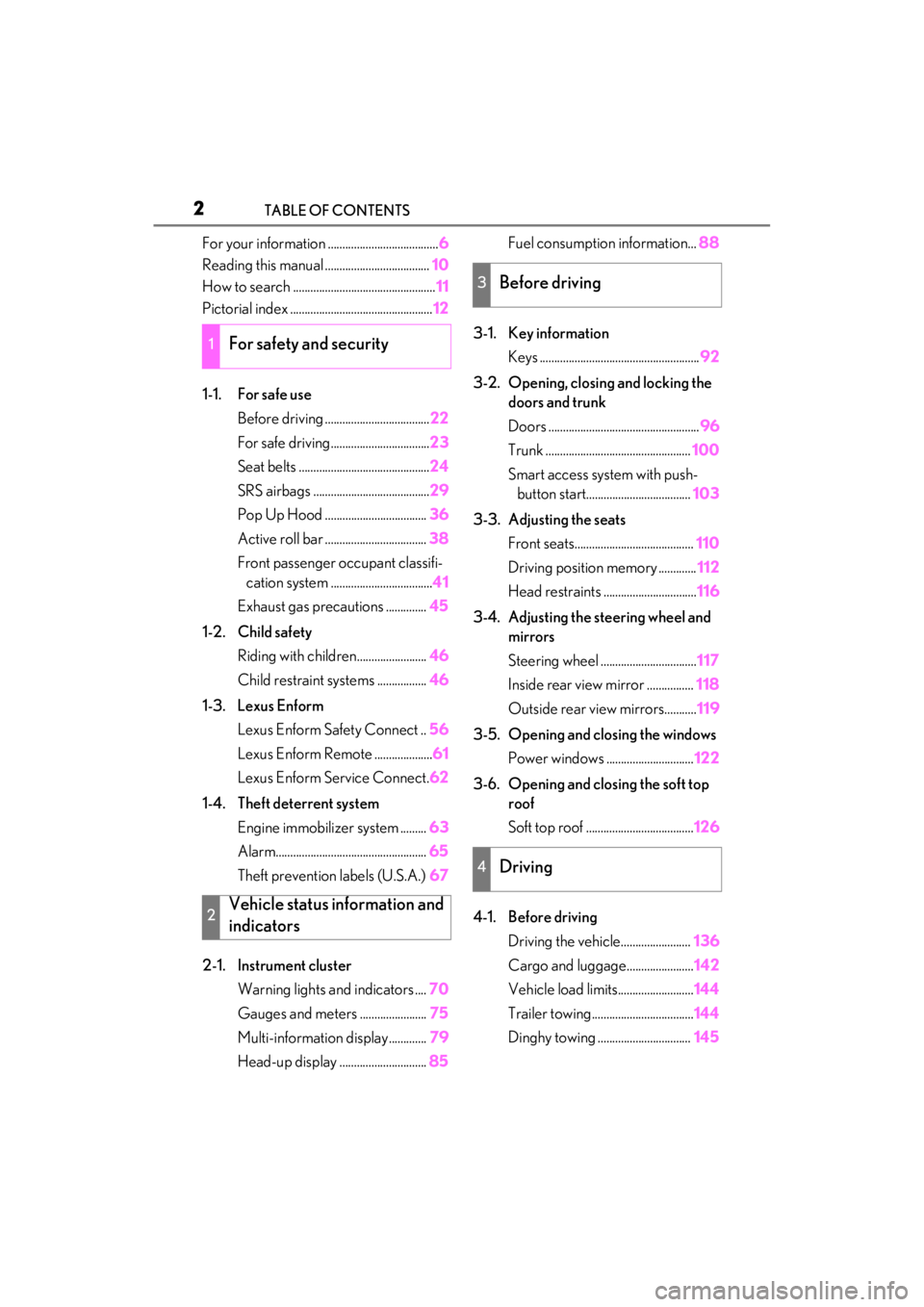
2TABLE OF CONTENTS
For your information ......................................6
Reading this manual .................................... 10
How to search ................................................. 11
Pictorial index ................................................. 12
1-1. For safe use Before driving .................................... 22
For safe driving.................................. 23
Seat belts ............................................. 24
SRS airbags ........................................ 29
Pop Up Hood ................................... 36
Active roll bar ................................... 38
Front passenger occupant classifi- cation system ................................... 41
Exhaust gas precautions .............. 45
1-2. Child safety Riding with children........................ 46
Child restraint systems ................. 46
1-3. Lexus Enform Lexus Enform Safety Connect .. 56
Lexus Enform Remote .................... 61
Lexus Enform Service Connect. 62
1-4. Theft deterrent system Engine immobilizer system ......... 63
Alarm.................................................... 65
Theft prevention labels (U.S.A.) 67
2-1. Instrument cluster Warning lights and indicators .... 70
Gauges and meters ....................... 75
Multi-information display............. 79
Head-up display .............................. 85Fuel consumption information...
88
3-1. Key information Keys ....................................................... 92
3-2. Opening, closing and locking the doors and trunk
Doors .................................................... 96
Trunk .................................................. 100
Smart access system with push- button start.................................... 103
3-3. Adjusting the seats Front seats......................................... 110
Driving position memory ............. 112
Head restraints ................................ 116
3-4. Adjusting the steering wheel and mirrors
Steering wheel ................................. 117
Inside rear view mirror ................ 118
Outside rear view mirrors........... 119
3-5. Opening and closing the windows Power windows .............................. 122
3-6. Opening and closing the soft top roof
Soft top roof ..................................... 126
4-1. Before driving Driving the vehicle........................ 136
Cargo and luggage....................... 142
Vehicle load limits.......................... 144
Trailer towing................................... 144
Dinghy towing ................................ 145
1For safety and security
2Vehicle status information and
indicators
3Before driving
4Driving
Page 73 of 410
712-1. Instrument cluster
2
Vehicle status information and indicators
*1: These lights turn on when the engine switch is turned to ON to indicate that a
system check is being performed. They
will turn off after the engine is started, or
after a few seconds. There may be a
malfunction in a system if a light does
not come on, or turn off. Have the vehi-
cle inspected by your Lexus dealer.
*2: This light illuminates on the multi-infor- mation display.
*3: The light flashes to indicate a malfunc-tion.
*4: This light illuminates on the center panel.
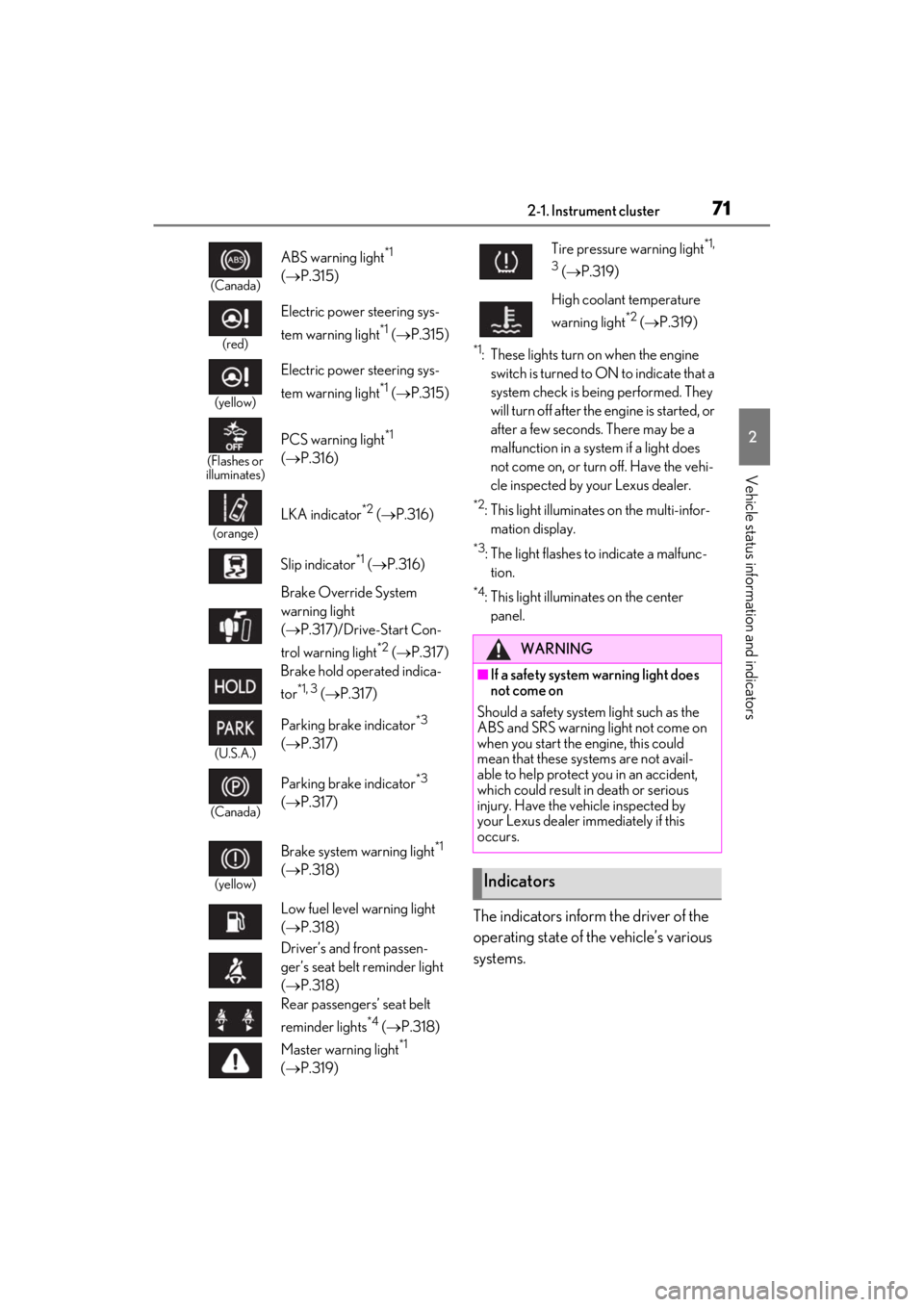
The indicators inform the driver of the
operating state of the vehicle’s various
systems.
(Canada)
ABS warning light*1
( P.315)
(red)
Electric power steering sys-
tem warning light
*1 ( P.315)
(yellow)
Electric power steering sys-
tem warning light
*1 ( P.315)
(Flashes or
illuminates)
PCS warning light*1
( P.316)
(orange)
LKA indicator*2 ( P.316)
Slip indicator
*1 ( P.316)
Brake Override System
warning light
( P.317)/Drive-Start Con-
trol warning light
*2 ( P.317)
Brake hold operated indica-
tor
*1, 3 ( P.317)
(U.S.A.)
Parking brake indicator*3
( P.317)
(Canada)
Parking brake indicator*3
( P.317)
(yellow)
Brake system warning light*1
( P.318)
Low fuel level warning light
( P.318)
Driver’s and front passen-
ger’s seat belt reminder light
( P.318)
Rear passengers’ seat belt
reminder lights
*4 ( P.318)
Master warning light
*1
( P.319)
Tire pressure warning light*1,
3
( P.319)
High coolant temperature
warning light
*2 ( P.319)
WARNING
■If a safety system warning light does
not come on
Should a safety system light such as the
ABS and SRS warning light not come on
when you start the engine, this could
mean that these systems are not avail-
able to help protect you in an accident,
which could result in death or serious
injury. Have the vehicle inspected by
your Lexus dealer immediately if this
occurs.
Indicators
Page 93 of 410

91
3
3
Before driving
Before driving
3-1. Key informationKeys ................................................... 92
3-2. Opening, closing and locking the doors and trunk
Doors................................................. 96
Trunk................................................ 100
Smart access system with push- button start ................................. 103
3-3. Adjusting the seats Front seats ...................................... 110
Driving position memory ......... 112
Head restraints............................. 116
3-4. Adjusting the steering wheel and mirrors
Steering wheel.............................. 117
Inside rear view mirror.............. 118
Outside rear view mirrors ....... 119
3-5. Opening and closing the win- dows
Power windows........................... 122
3-6. Opening and closing the soft top roof
Soft top roof.................................. 126
Page 112 of 410
1103-3. Adjusting the seats
3-3.Adjusting the seats
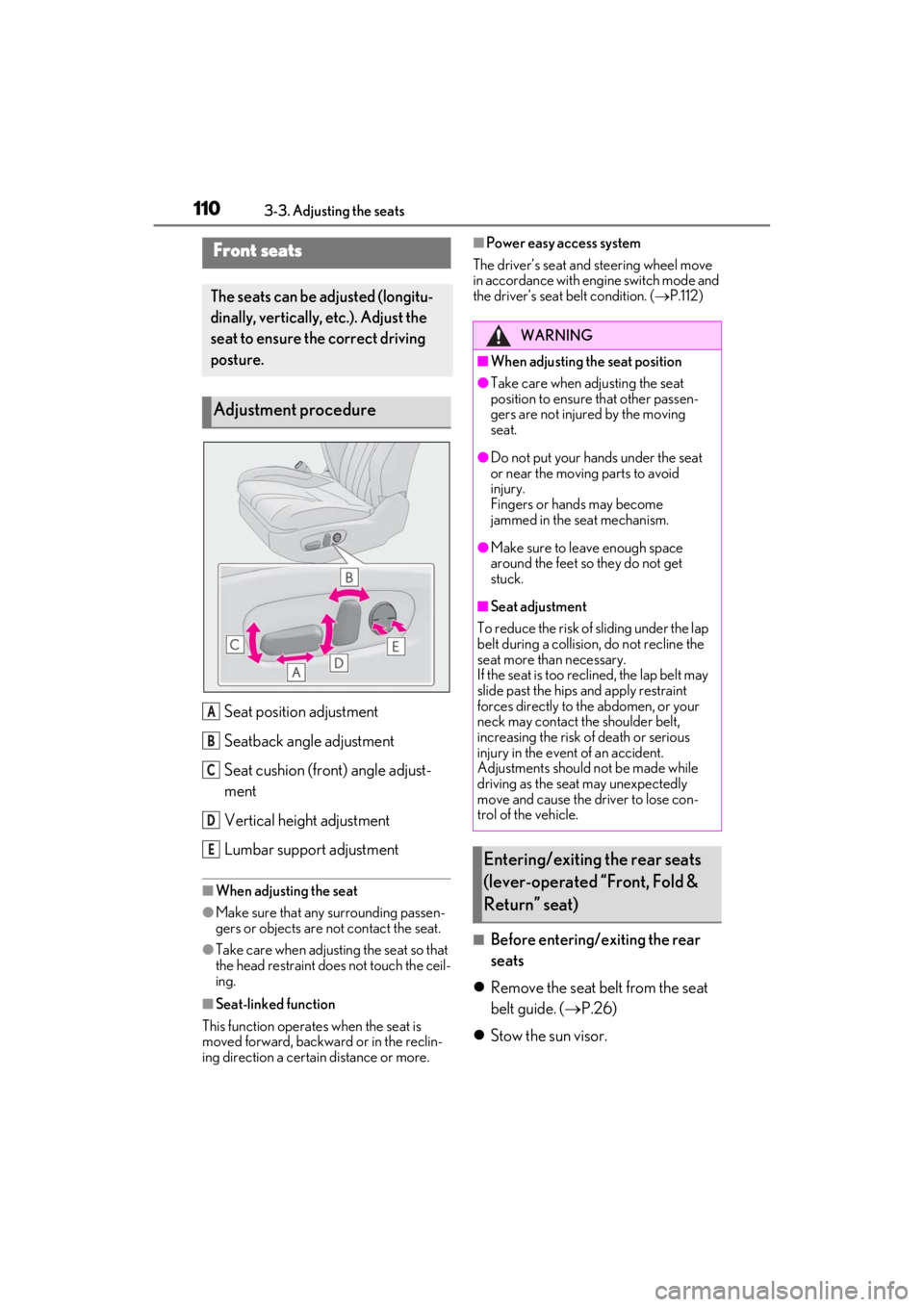
Seat position adjustment
Seatback angle adjustment
Seat cushion (front) angle adjust-
ment
Vertical height adjustment
Lumbar support adjustment
■When adjusting the seat
●Make sure that any surrounding passen-
gers or objects are not contact the seat.
●Take care when adjusting the seat so that
the head restraint does not touch the ceil-
ing.
■Seat-linked function
This function operates when the seat is
moved forward, backward or in the reclin-
ing direction a certain distance or more.
■Power easy access system
The driver’s seat and steering wheel move
in accordance with engine switch mode and
the driver’s seat belt condition. ( P.112)
■Before entering/exiting the rear
seats
Remove the seat belt from the seat
belt guide. ( P.26)
Stow the sun visor.
Front seats
The seats can be adjusted (longitu-
dinally, vertically, etc.). Adjust the
seat to ensure the correct driving
posture.
Adjustment procedure
A
B
C
D
E
WARNING
■When adjusting the seat position
●Take care when adjusting the seat
position to ensure that other passen-
gers are not injured by the moving
seat.
●Do not put your hands under the seat
or near the moving parts to avoid
injury.
Fingers or hands may become
jammed in the seat mechanism.
●Make sure to leave enough space
around the feet so they do not get
stuck.
■Seat adjustment
To reduce the risk of sliding under the lap
belt during a collision, do not recline the
seat more than necessary.
If the seat is too rec lined, the lap belt may
slide past the hips and apply restraint
forces directly to the abdomen, or your
neck may contact the shoulder belt,
increasing the risk of death or serious
injury in the event of an accident.
Adjustments should not be made while
driving as the seat may unexpectedly
move and cause the driver to lose con-
trol of the vehicle.
Entering/exiting the rear seats
(lever-operated “Front, Fold &
Return” seat)
Page 114 of 410
1123-3. Adjusting the seats
The seat and steering wheel are auto-
matically adjusted to allow the driver to
enter and exit the vehicle easily.
When all of the following have been
performed, the seat and steering wheel
are automatically adjusted to a position
that allows the driver to enter and exit
the vehicle easily.
The shift position has been shifted to
P.
The engine switch has been turned
off.
The driver’s seat belt has been
unfastened.
WARNING
■Jam protection function
Do not use a hand, foot, or any other part
of your body to intentionally activate the
jam protection function.
Driving position memory
This feature automatically adjusts
the positions of the driver’s seat,
steering wheel, outside rear view
mirrors and head-up display (if
equipped) to make entering and
exiting the vehicle easier or to suit
your preferences.
Up to 3 different driving positions
can be recorded.
Each electronic key (including a
card key) can be registered to
recall your preferred driving posi-
tion.
Power easy access system
Page 115 of 410
1133-3. Adjusting the seats
3
Before driving
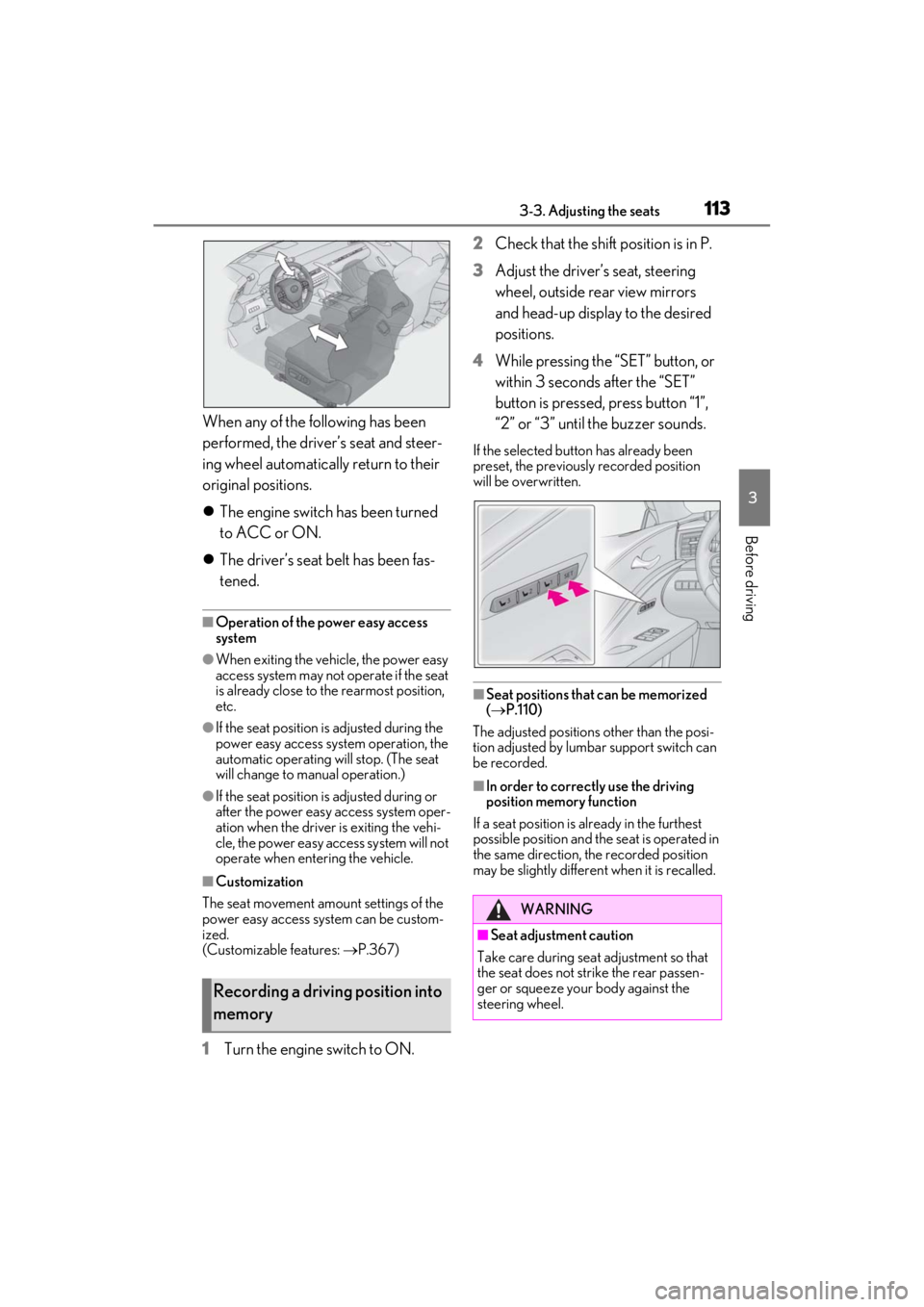
When any of the following has been
performed, the driver’s seat and steer-
ing wheel automatically return to their
original positions.
The engine switch has been turned
to ACC or ON.
The driver’s seat belt has been fas-
tened.
■Operation of the power easy access
system
●When exiting the vehicle, the power easy
access system may not operate if the seat
is already close to the rearmost position,
etc.
●If the seat position is adjusted during the
power easy access sy stem operation, the
automatic operating will stop. (The seat
will change to manual operation.)
●If the seat position is adjusted during or
after the power easy access system oper-
ation when the driver is exiting the vehi-
cle, the power easy access system will not
operate when entering the vehicle.
■Customization
The seat movement amou nt settings of the
power easy access sy stem can be custom-
ized.
(Customizable features: P.367)
1Turn the engine switch to ON. 2
Check that the shift position is in P.
3
Adjust the driver’s seat, steering
wheel, outside rear view mirrors
and head-up display to the desired
positions.
4
While pressing the “SET” button, or
within 3 seconds after the “SET”
button is pressed, press button “1”,
“2” or “3” until the buzzer sounds.
If the selected button has already been
preset, the previously recorded position
will be overwritten.
■Seat positions that can be memorized
( P.110)
The adjusted positions other than the posi-
tion adjusted by lumbar support switch can
be recorded.
■In order to correctly use the driving
position memory function
If a seat position is already in the furthest
possible position and the seat is operated in
the same direction, the recorded position
may be slightly differen t when it is recalled.
Recording a driving position into
memory
WARNING
■Seat adjustment caution
Take care during seat adjustment so that
the seat does not strike the rear passen-
ger or squeeze your body against the
steering wheel.
Page 119 of 410
1173-4. Adjusting the steering wheel and mirrors
3
Before driving
3-4.Adjusting the steering wheel and mirrors
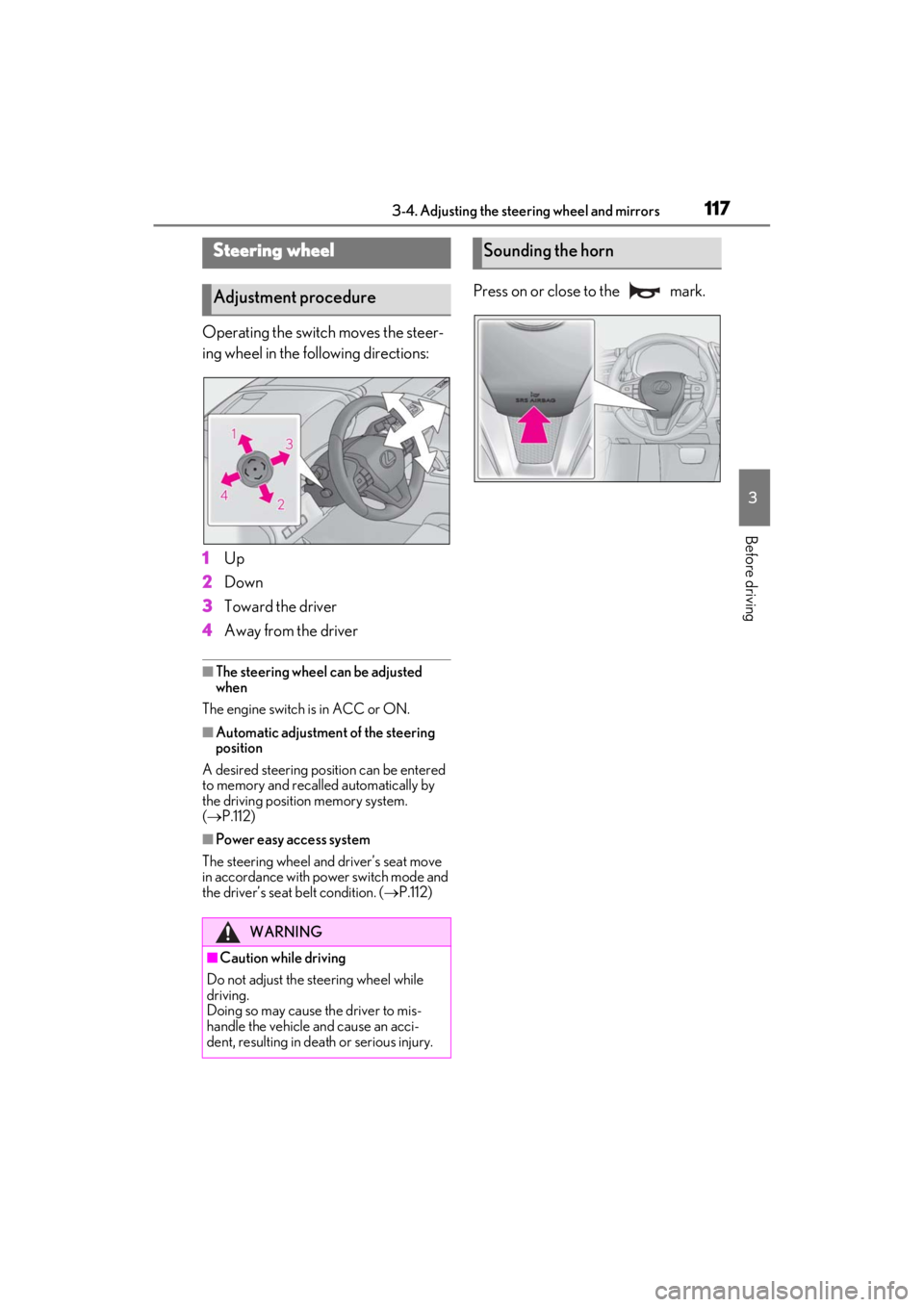
Operating the switch moves the steer-
ing wheel in the following directions:
1
Up
2
Down
3
Toward the driver
4
Away from the driver
■The steering wheel can be adjusted
when
The engine switch is in ACC or ON.
■Automatic adjustment of the steering
position
A desired steering position can be entered
to memory and recalled automatically by
the driving position memory system.
( P.112)
■Power easy access system
The steering wheel and driver’s seat move
in accordance with power switch mode and
the driver’s seat belt condition. ( P.112)
Press on or close to the mark.
Steering wheel
Adjustment procedure
WARNING
■Caution while driving
Do not adjust the steering wheel while
driving.
Doing so may cause the driver to mis-
handle the vehicle and cause an acci-
dent, resulting in death or serious injury.
Sounding the horn
Page 140 of 410
1384-1. Before driving
WARNING
■When driving the vehicle
●Do not drive if you are unfamiliar with
the location of the brake and accelera-
tor pedals to avoid depressing the
wrong pedal.
• Accidentally depressing the accelera- tor pedal instead of the brake pedal
will result in sudden acceleration that
may lead to an accident.
• When backing up, you may twist your body around, leading to a difficulty in
operating the pedals. Make sure to
operate the pedals properly.
• Make sure to keep a correct driving posture even when moving the vehicle
only slightly. This allows you to depress
the brake and accelerator pedals
properly.
• Depress the brake pedal using your right foot. Depressing the brake pedal
using your left foot may delay
response in an emergency, resulting in
an accident.
●Do not drive the vehicle over or stop
the vehicle near flammable materials.
The exhaust system and exhaust gases
can be extremely hot. These hot parts
may cause a fire if there is any flamma-
ble material nearby.
●During normal driving, do not turn off
the engine. Turning the engine off
while driving will not cause loss of
steering or braking control, however,
power assist to the steering will be lost.
This will make it more difficult to steer
smoothly, so you should pull over and
stop the vehicle as soon as it is safe to
do so.
In the event of an emergency, such as
if it becomes impo ssible to stop the
vehicle in the normal way: P.306
●Use engine braking (downshift) to
maintain a safe speed when driving
down a steep hill.
Using the brakes continuously may
cause the brakes to overheat and lose
effectiveness. ( P.150)
●Do not adjust the positions of the
steering wheel, the seat, or the inside
or outside rear view mirrors while driv-
ing.
Doing so may result in a loss of vehicle
control.
●Always check that all passengers’
arms, heads or other parts of their
body are not outside the vehicle.
●Do not drive in excess of the speed
limit. Even if the legal speed limit per-
mits it, do not drive over 85 mph (140
km/h) unless your vehicle has high-
speed capability tires. Driving over 85
mph (140 km/h) may result in tire fail-
ure, loss of control and possible injury.
Be sure to consult a tire dealer to
determine whether the tires on your
vehicle are high-speed capability tires
or not before driving at such speeds.
■When driving on slippery road sur-
faces
●Sudden braking, acceleration and
steering may cause tire slippage and
reduce your ability to control the vehi-
cle.
●Sudden acceleration, engine braking
due to shifting, or changes in engine
speed could cause the vehicle to skid,
resulting in an accident.
●After driving through a puddle, lightly
depress the brake pedal to make sure
that the brakes are functioning prop-
erly. Wet brake pads may prevent the
brakes from functioning properly. If
the brakes on only one side are wet
and not functioning properly, steering
control may be affected.
■When shifting the shift position
●Do not let the vehicle roll backward
while a forward driving position is
selected, or roll forw ard while the shift
position is in R.
Doing so may cause the engine to stall
or lead to poor brake and steering
performance, resulting in an accident
or damage to the vehicle.
Page 142 of 410
1404-1. Before driving
WARNING
●Do not leave cigarette lighters in the
vehicle. If a cigarette lighter is in a
place such as the glove box or on the
floor, it may be lit accidentally when
luggage is loaded or the seat is
adjusted, causing a fire.
●Do not attach adhesive discs to the
windshield or windows. Do not place
containers such as air fresheners on
the instrument panel or dashboard.
Adhesive discs or containers may act
as lenses, causing a fire in the vehicle.
●Do not leave a door or window open if
the curved glass is coated with a met-
allized film such as a silver-colored
one. Reflected sunlight may cause the
glass to act as a lens, causing a fire.
●Always apply the parking brake, shift
the shift position to P, stop the engine
and lock the vehicle.
Do not leave the vehicle unattended
while the engine is running.
If the vehicle is parked with the shift
position in P but the parking brake is
not set, the vehicle may start to move,
possibly leading to an accident.
●Do not touch the exhaust pipes while
the engine is running or immediately
after turning the engine off.
Doing so may cause burns.
■When taking a nap in the vehicle
Always turn the engine off. Otherwise, if
you accidentally move the shift lever or
depress the accelerator pedal, this could
cause an accident or fire due to engine
overheating. Additionally, if the vehicle is
parked in a poorly ventilated area,
exhaust gases may collect and enter the
vehicle, leading to death or a serious
health hazard.
■When braking
●When the brakes are wet, drive more
cautiously.
Braking distance in creases when the
brakes are wet, and this may cause
one side of the vehicle to brake differ-
ently than the other side. Also, the
parking brake may not securely hold
the vehicle.
●If the electronically controlled brake
system does not operate, do not follow
other vehicles closely and avoid hills or
sharp turns that require braking.
In this case, braking is still possible, but
the brake pedal should be depressed
more firmly than usual. Also, the brak-
ing distance will increase. Have your
brakes fixed immediately.
●The brake system consists of 2 or
more individual hydraulic systems; if
one of the systems fails, the other(s)
will still operate. In this case, the brake
pedal should be depressed more
firmly than usual and the braking dis-
tance will increase. Have your brakes
fixed immediately.
NOTICE
■When driving the vehicle
●Do not depress the accelerator and
brake pedals at th e same time while
driving, as this may restrain the engine
output.
●Do not use the accelerator pedal or
depress the accelerator and brake
pedals at the same time to hold the
vehicle on a hill.
■Avoiding damage to vehicle parts
●Do not turn the steering wheel fully in
either direction and hold it there for an
extended period of time.
Doing so may damage the power
steering motor.
Page 150 of 410
1484-2. Driving procedures
The engine will stop, and the meter display
will be extinguished (the shift position indi-
cator will be extinguished a few seconds
after the meter display).
5Check that “ACCESSORY” or
“IGNITION ON” is not shown on
the meter.
■Automatic engine shut off feature
●The vehicle is equipped with a feature
that automatically shuts off the engine
when the shift position is in P with the
engine running for an extended period.
●The engine will automatically shut off
after approximately 1 hour if it has been
left running while the shift position is in P.
●The timer for the automatic engine shut
off feature will reset if the brake pedal is
depressed or if the shift position is in a
position other than P.
●After the vehicle is parked, if the door is
locked with the door lock switch
( P.98) from the inside or the mechani-
cal key ( P.330) from the outside, the
automatic engine shut off feature will be
disabled. The timer for the automatic
engine shut off feature will be re-enabled
if the driver’s door is opened.
■Automatic P position selection function
P.153
WARNING
■Stopping the engine in an emergency
●If you want to stop the engine in an
emergency while driving the vehicle,
press and hold the engine switch for
more than 2 seconds, or press it briefly
3 times or more in succession.
( P.306)
However, do not touch the engine
switch while driving except in an emer-
gency. Turning the engine off while
driving will not cause loss of steering
or braking control, however, power
assist to the steering will be lost. This
will make it more difficult to steer
smoothly, so you should pull over and
stop the vehicle as soon as it is safe to
do so.
●If the engine switch is operated while
the vehicle is running, a warning mes-
sage will be shown on the multi-infor-
mation display and a buzzer sounds.
●When restarting the engine after an
emergency shutdown, press the
engine switch.
■When parking
Exhaust gases include harmful carbon
monoxide (CO), which is colorless and
odorless. Observe the following precau-
tions.
Failure to do so may cause exhaust gases
to enter the vehicle and may lead to an
accident caused by light-headedness, or
may lead to death or a serious health
hazard.
●If the vehicle is in a poorly ventilated
area or a closed area, such as a
garage, stop the engine.
●Do not leave the vehicle with the
engine running for a long time. If such
a situation cannot be avoided, park the
vehicle in an open space and ensure
that exhaust fumes do not enter the
vehicle interior.