roof lexus LC500C 2021 Owner's Manual / LEXUS 2021 LC500 CONVERTIBLE OWNER'S MANUAL (OM11498U)
[x] Cancel search | Manufacturer: LEXUS, Model Year: 2021, Model line: LC500C, Model: Lexus LC500C 2021Pages: 410, PDF Size: 8.71 MB
Page 2 of 410
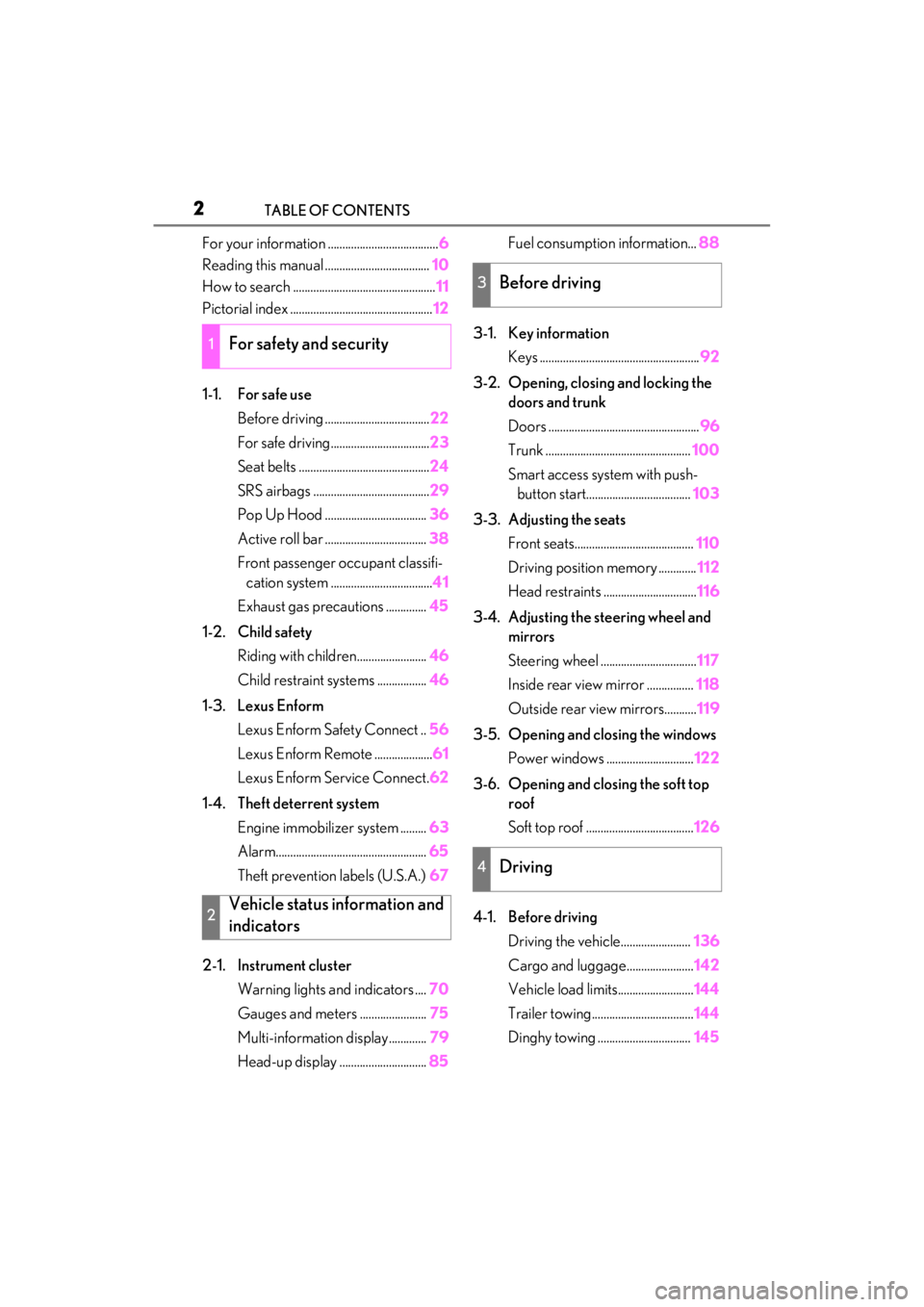
2TABLE OF CONTENTS
For your information ......................................6
Reading this manual .................................... 10
How to search ................................................. 11
Pictorial index ................................................. 12
1-1. For safe use Before driving .................................... 22
For safe driving.................................. 23
Seat belts ............................................. 24
SRS airbags ........................................ 29
Pop Up Hood ................................... 36
Active roll bar ................................... 38
Front passenger occupant classifi- cation system ................................... 41
Exhaust gas precautions .............. 45
1-2. Child safety Riding with children........................ 46
Child restraint systems ................. 46
1-3. Lexus Enform Lexus Enform Safety Connect .. 56
Lexus Enform Remote .................... 61
Lexus Enform Service Connect. 62
1-4. Theft deterrent system Engine immobilizer system ......... 63
Alarm.................................................... 65
Theft prevention labels (U.S.A.) 67
2-1. Instrument cluster Warning lights and indicators .... 70
Gauges and meters ....................... 75
Multi-information display............. 79
Head-up display .............................. 85Fuel consumption information...
88
3-1. Key information Keys ....................................................... 92
3-2. Opening, closing and locking the doors and trunk
Doors .................................................... 96
Trunk .................................................. 100
Smart access system with push- button start.................................... 103
3-3. Adjusting the seats Front seats......................................... 110
Driving position memory ............. 112
Head restraints ................................ 116
3-4. Adjusting the steering wheel and mirrors
Steering wheel ................................. 117
Inside rear view mirror ................ 118
Outside rear view mirrors........... 119
3-5. Opening and closing the windows Power windows .............................. 122
3-6. Opening and closing the soft top roof
Soft top roof ..................................... 126
4-1. Before driving Driving the vehicle........................ 136
Cargo and luggage....................... 142
Vehicle load limits.......................... 144
Trailer towing................................... 144
Dinghy towing ................................ 145
1For safety and security
2Vehicle status information and
indicators
3Before driving
4Driving
Page 4 of 410

4TABLE OF CONTENTS
Electronic key battery ................297
Checking and replacing fuses 299
Headlight aim................................. 302
Light bulbs ....................................... 303
7-1. Essential information Emergency flashers..................... 306
If your vehicle has to be stopped in an emergency ............................. 306
If the vehicle is trapped in rising water............................................... 307
7-2. Steps to take in an emergency If your vehicle needs to be towed........................................................... 309
If you think something is wrong 312
Fuel pump shut off system ......... 313
If a warning light turns on or a warn- ing buzzer sounds ...................... 314
If a warning message is displayed ........................................................... 323
If you have a flat tire..................... 327
If the engine wi ll not start .......... 328
If you lose your keys .................... 329
If the fuel filler door cannot be opened........................................... 330
If the electronic key does not oper- ate properly ................................. 330
If the battery is discharged ....... 332
If the soft top roof cannot be closed ........................................................... 338
If your vehicle overheats ........... 345
If the vehicle becomes stuck ... 3478-1. Specifications
Maintenance data (fuel, oil level, etc.) ................................................. 350
Fuel information............................ 357
Tire information ............................ 359
8-2. Customization Customizable features .............. 367
8-3. Items to initialize Items to initialize ........................... 378
9-1. For owners Reporting safety defects for U.S. owners ........................................... 380
Seat belt instructions for Canadian owners (in French) ................... 380
SRS airbag instructions for Cana- dian owners (in French) ......... 382
Headlight aim instructions for Canadian owners (in French).......................................................... 388
What to do if... (Troubleshooting) .......................................................... 392
Alphabetical index ..................... 394
7When trouble arises
8Vehicle specifications
9For owners
Index
Page 13 of 410
13Pictorial index
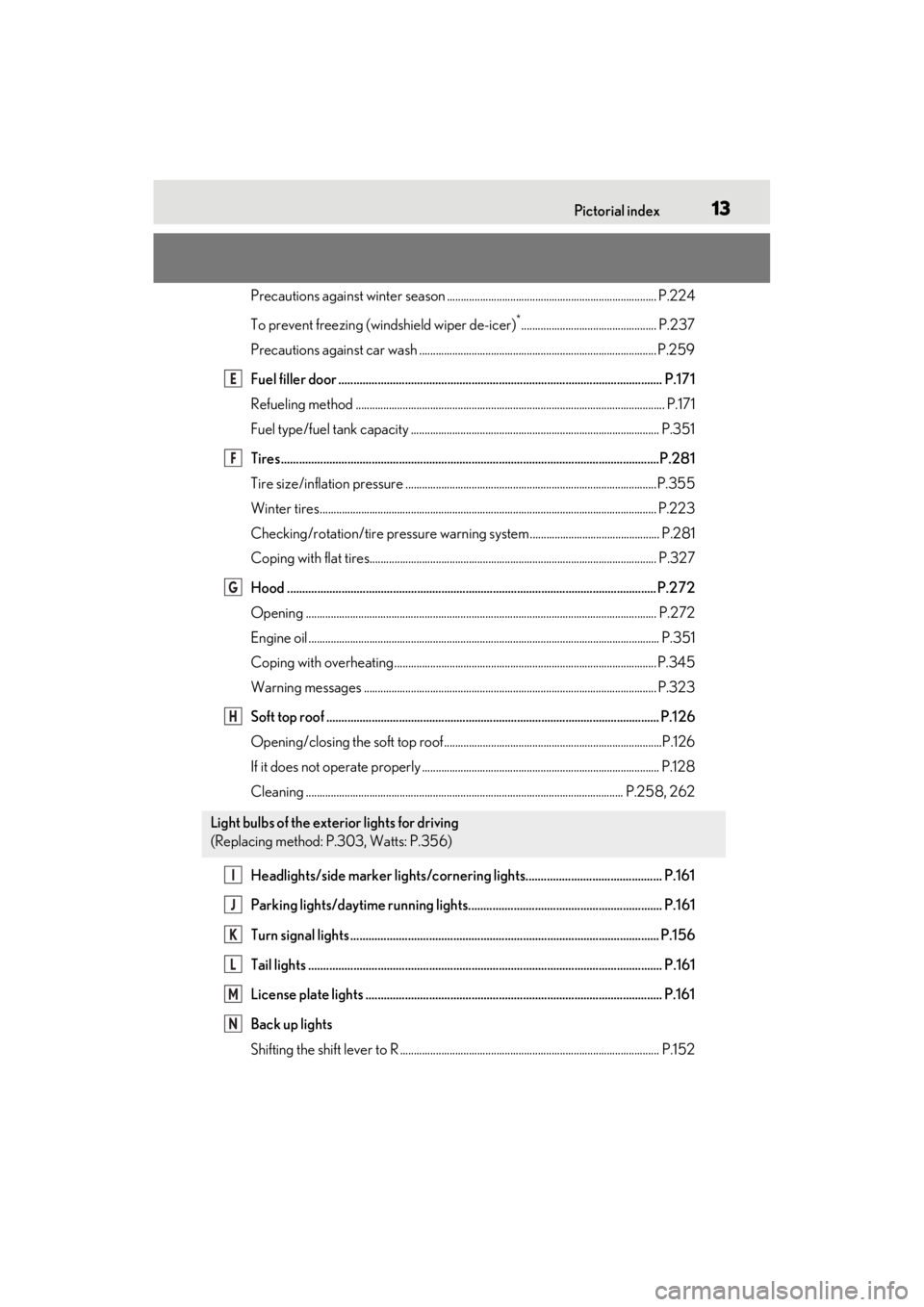
Precautions against winter season ............................................................................ P.224
To prevent freezing (windshield wiper de-icer)
*................................................. P.237
Precautions against car wash ............................. ......................................................... P.259
Fuel filler door ........................................................................................................... P.17 1
Refueling method ............................................................................................................... .P.171
Fuel type/fuel tank capacity ...... .................................................................................... P.351
Tires.......................................................................................................................... ...P.281
Tire size/inflation pressure ............................ ...............................................................P.355
Winter tires.......................................................................................................................... P.223
Checking/rotation/tire pressure warning system............................................... P.281
Coping with flat tires........................................................................................................ P .327
Hood .......................................................................................................................... P.272
Opening ........................................................................................................................ ....... P.272
Engine oil ..................................................................................................................... .......... P.351
Coping with overheating ............................................................................................... P.345
Warning messages .......................................................................................................... P.323
Soft top roof .............................................................................................................. P.12 6
Opening/closing the soft top roof...............................................................................P.126
If it does not operate properly ...................... ................................................................ P.128
Cleaning ................................................................................................................... P.25 8, 262
Headlights/side marker lights/cornering lights............................................. P.161
Parking lights/daytime running lights................................................................ P.161
Turn signal lights ...................................................................................................... P.156
Tail lights .................................................................................................................... .P.161
License plate lights .................................................................................................. P.161
Back up lights
Shifting the shift lever to R .............................................................................................. P.15 2
Light bulbs of the exterior lights for driving
(Replacing method: P.303, Watts: P.356)
E
F
G
H
I
J
K
L
M
N
Page 19 of 410
19Pictorial index
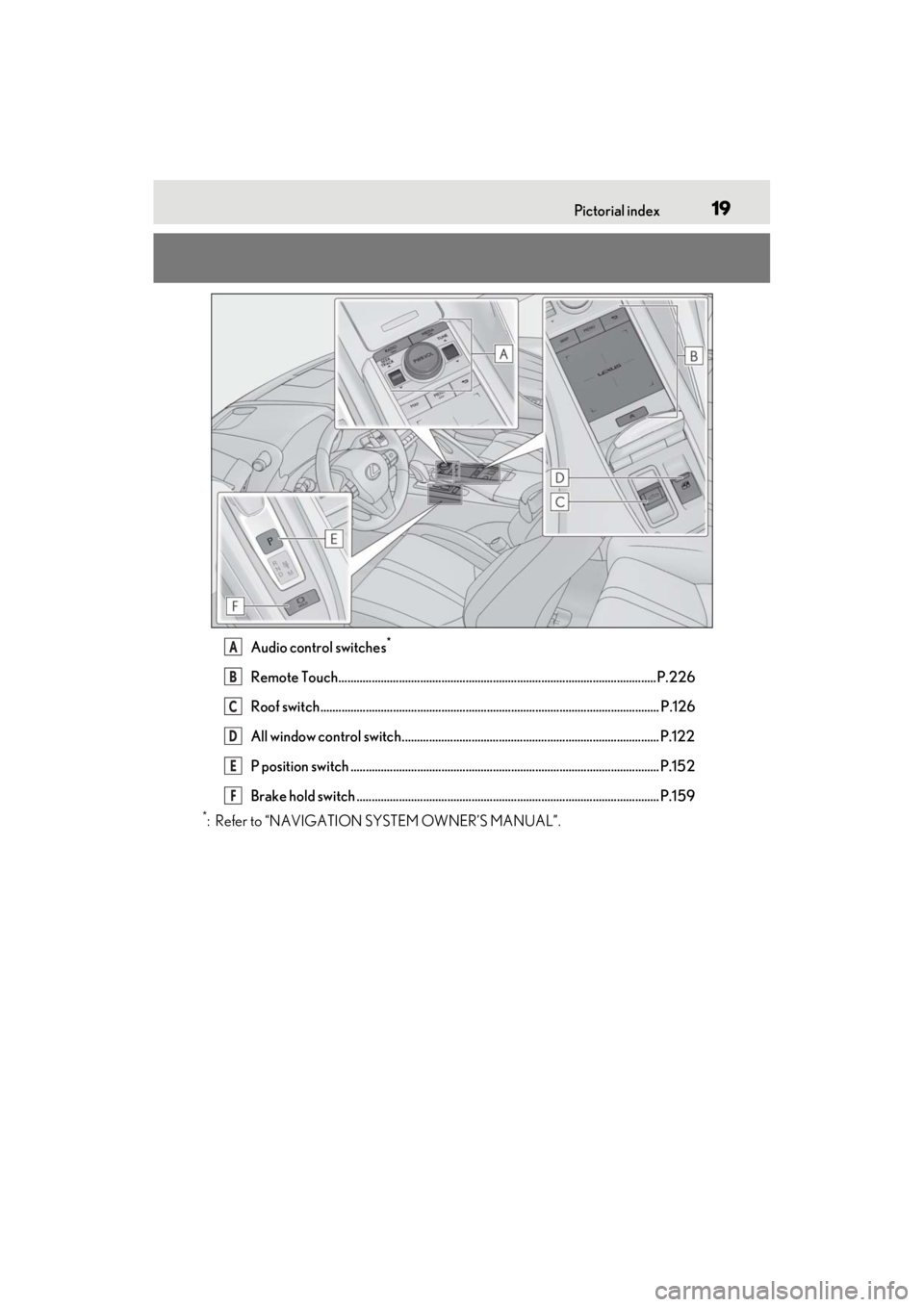
Audio control switches*
Remote Touch.........................................................................................................P.226
Roof switch................................................................................................................ P.126
All window control switch..................................................................................... P.122
P position switch ...................................................................................................... P.152
Brake hold switch .................................................................................................... P.159
*: Refer to “NAVIGATION SYSTEM OWNER’S MANUAL”.
A
B
C
D
E
F
Page 37 of 410
351-1. For safe use
1
For safety and security
WARNING
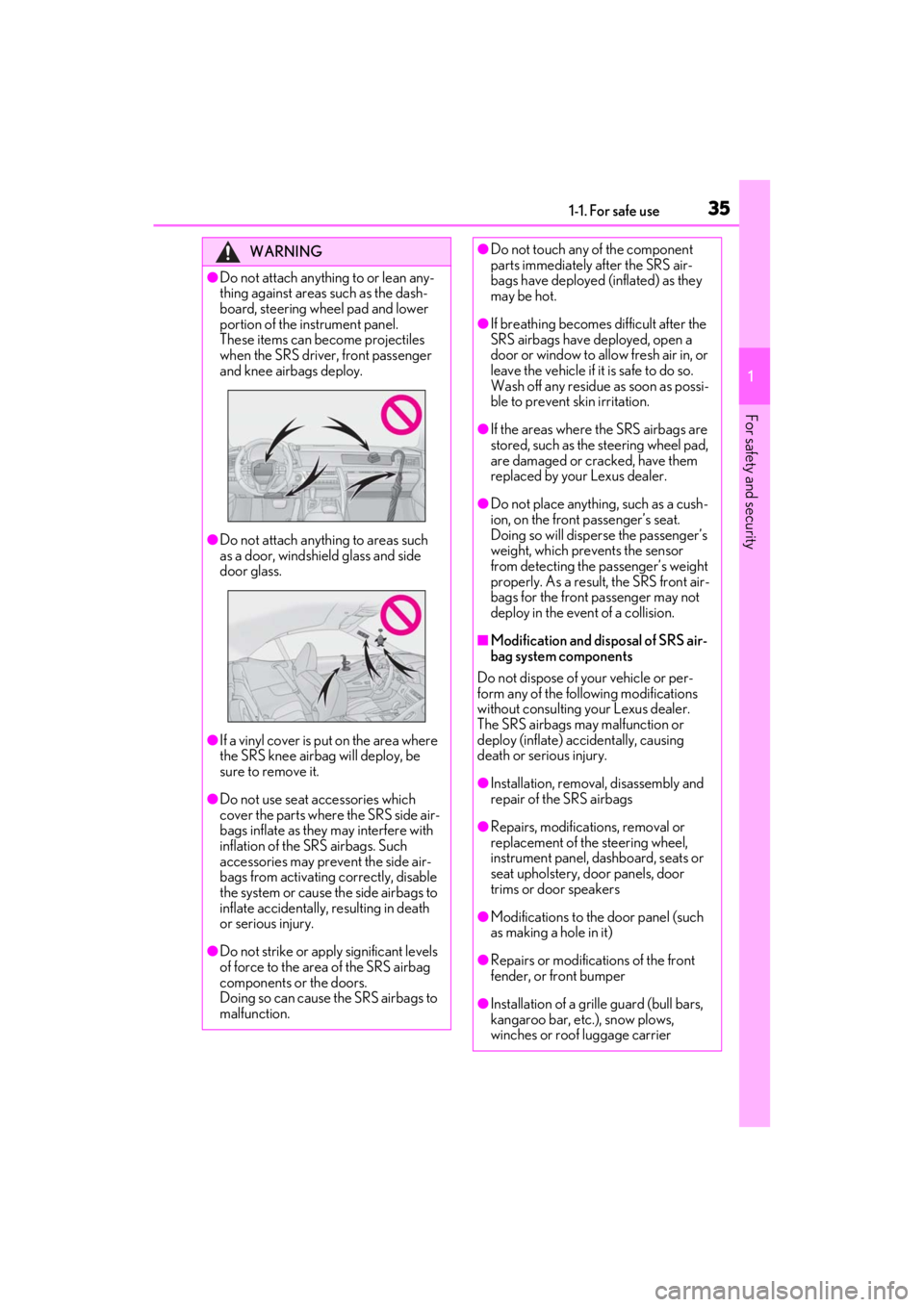
●Do not attach anything to or lean any-
thing against areas such as the dash-
board, steering wheel pad and lower
portion of the instrument panel.
These items can become projectiles
when the SRS driver, front passenger
and knee airbags deploy.
●Do not attach anything to areas such
as a door, windshield glass and side
door glass.
●If a vinyl cover is put on the area where
the SRS knee airbag will deploy, be
sure to remove it.
●Do not use seat accessories which
cover the parts where the SRS side air-
bags inflate as they may interfere with
inflation of the SRS airbags. Such
accessories may prevent the side air-
bags from activating correctly, disable
the system or cause the side airbags to
inflate accidentally, resulting in death
or serious injury.
●Do not strike or apply significant levels
of force to the area of the SRS airbag
components or the doors.
Doing so can cause the SRS airbags to
malfunction.
●Do not touch any of the component
parts immediately after the SRS air-
bags have deployed (inflated) as they
may be hot.
●If breathing becomes difficult after the
SRS airbags have deployed, open a
door or window to allow fresh air in, or
leave the vehicle if it is safe to do so.
Wash off any residue as soon as possi-
ble to prevent skin irritation.
●If the areas where the SRS airbags are
stored, such as the steering wheel pad,
are damaged or cracked, have them
replaced by your Lexus dealer.
●Do not place anything, such as a cush-
ion, on the front passenger’s seat.
Doing so will disperse the passenger’s
weight, which prevents the sensor
from detecting the passenger’s weight
properly. As a result, the SRS front air-
bags for the front passenger may not
deploy in the event of a collision.
■Modification and disposal of SRS air-
bag system components
Do not dispose of your vehicle or per-
form any of the following modifications
without consulting your Lexus dealer.
The SRS airbags may malfunction or
deploy (inflate) accidentally, causing
death or serious injury.
●Installation, removal, disassembly and
repair of the SRS airbags
●Repairs, modifications, removal or
replacement of the steering wheel,
instrument panel, dashboard, seats or
seat upholstery, door panels, door
trims or door speakers
●Modifications to the door panel (such
as making a hole in it)
●Repairs or modifications of the front
fender, or front bumper
●Installation of a grille guard (bull bars,
kangaroo bar, etc.), snow plows,
winches or roof luggage carrier
Page 41 of 410

391-1. For safe use
1
For safety and security
Before operating
After operating
■Active roll bar precautions
●Before scrapping your vehicle, make
sure to contact your Lexus dealer.
●If the active roll bar operates when the
soft top roof is opened, the soft top roof
cannot be closed.
●The active roll bar cannot be reused once
it has operated. Have it replaced by your
Lexus dealer.
■Active roll bar operational conditions
●The active roll bar operate regardless of
the opening/closing state of the soft top
roof.
●The active roll bar will operates in the
event of an impact that exceeds the set
threshold level (the level of force corre-
sponding to an approximately 12 - 18
mph [20 - 30 km/h] frontal collision with
a fixed wall that does not move or
deform, or the impact force produced by
an approximately 3300 lb. [1500 kg]
vehicle colliding with the vehicle cabin
from a direction perpendicular to the
vehicle orientation at an approximate speed of 12 - 18 mph [20 - 30 km/h]).
However, this threshol d velocity will be
considerably higher in the following situa-
tions:
• If the vehicle strikes an object, such as a parked vehicle or sign pole, which can
move or deform on impact
• If the vehicle is involved in an underride
collision, such as a collision in which the
front of the vehicle underrides, or goes
under, the bed of a truck
●The active roll bar operates when the
vehicle rolls over.
●The active roll bar may also operate if a
serious impact occurs to the underside of
the vehicle, such as in the following situa-
tion.
•Hitting a curb, edge of pavement or hard
surface
• Falling into or jumping over a deep hole
• Landing hard or falling
• The vehicle is leaning considerably to one side.
• The vehicle is subjected to certain types
of severe impacts when the vehicle has
slided sideways and collided with a curb,
etc.
■Conditions under whic h the active roll
bar may not operate
The active roll bar does not generally oper-
ate if the vehicle is involved in a rear colli-
sion, or if it is involved in a low-speed frontal
or side collision. But, whenever a collision of
any type causes sufficient forward deceler-
ation of the vehicle, op eration of the active
roll bar may occur.
●Collision from the rear
●Collision from the side to the vehicle
body other than the passenger compart-
ment
●Collision from the side at an angle
■When the active roll bar operates
The soft top roof cannot be opened or
closed while the active roll bar is operating.
■Warning message
If “Active Roll Bar System Malfunction Visit
Your Dealer” is displayed on the multi-
information display, have the vehicle
A
B
Page 93 of 410

91
3
3
Before driving
Before driving
3-1. Key informationKeys ................................................... 92
3-2. Opening, closing and locking the doors and trunk
Doors................................................. 96
Trunk................................................ 100
Smart access system with push- button start ................................. 103
3-3. Adjusting the seats Front seats ...................................... 110
Driving position memory ......... 112
Head restraints............................. 116
3-4. Adjusting the steering wheel and mirrors
Steering wheel.............................. 117
Inside rear view mirror.............. 118
Outside rear view mirrors ....... 119
3-5. Opening and closing the win- dows
Power windows........................... 122
3-6. Opening and closing the soft top roof
Soft top roof.................................. 126
Page 94 of 410
923-1. Key information
3-1.Key information
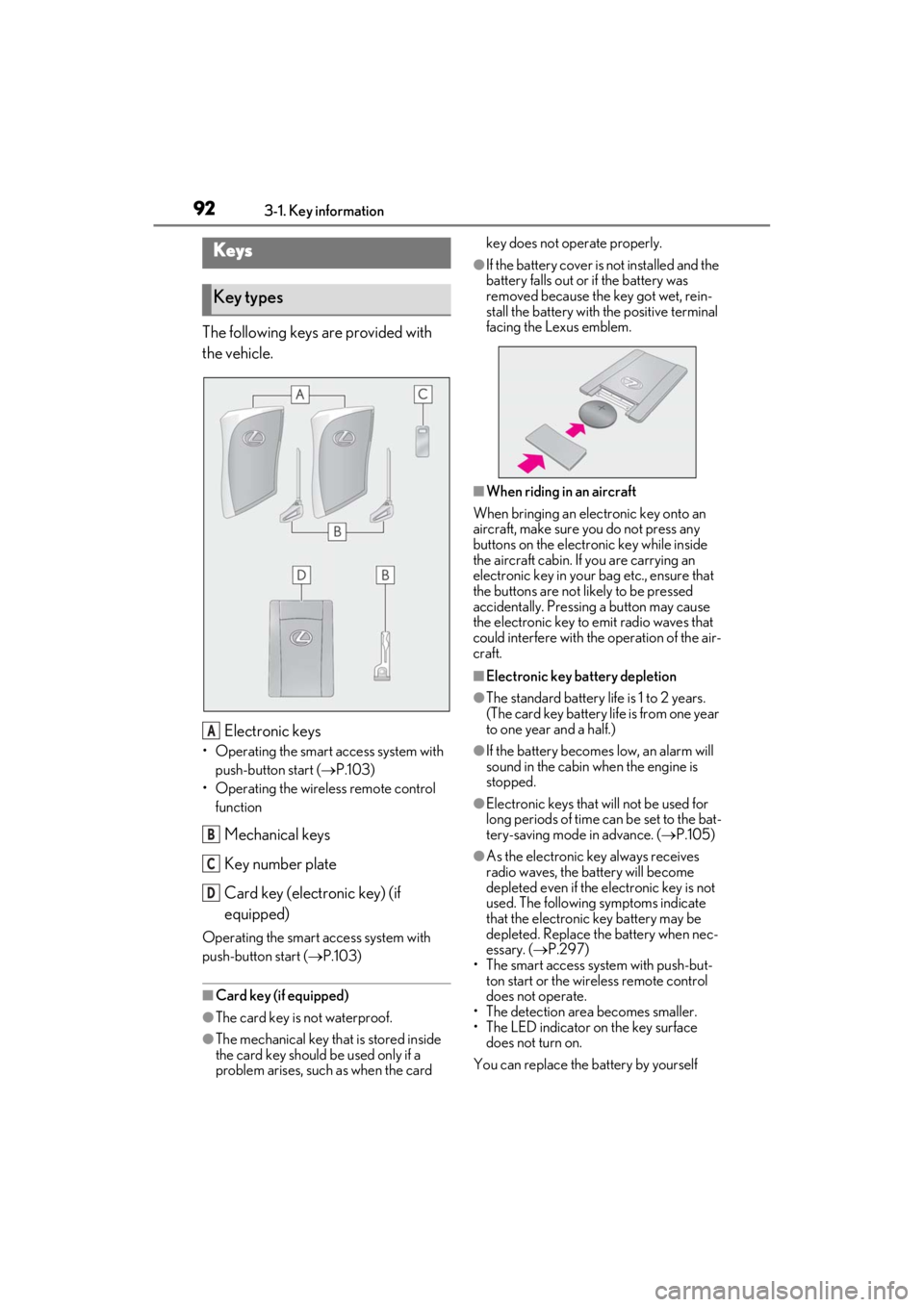
The following keys are provided with
the vehicle.
Electronic keys
• Operating the smart access system with push-button start ( P.103)
• Operating the wireless remote control function
Mechanical keys
Key number plate
Card key (electronic key) (if
equipped)
Operating the smart access system with
push-button start ( P.103)
■Card key (if equipped)
●The card key is not waterproof.
●The mechanical key that is stored inside
the card key should be used only if a
problem arises, such as when the card key does not operate properly.
●If the battery cover is not installed and the
battery falls out or if the battery was
removed because the key got wet, rein-
stall the battery with the positive terminal
facing the Lexus emblem.
■When riding in an aircraft
When bringing an electronic key onto an
aircraft, make sure you do not press any
buttons on the electronic key while inside
the aircraft cabin. If you are carrying an
electronic key in your bag etc., ensure that
the buttons are not likely to be pressed
accidentally. Pressing a button may cause
the electronic key to emit radio waves that
could interfere with the operation of the air-
craft.
■Electronic key battery depletion
●The standard battery life is 1 to 2 years.
(The card key battery life is from one year
to one year and a half.)
●If the battery becomes low, an alarm will
sound in the cabin when the engine is
stopped.
●Electronic keys that will not be used for
long periods of time can be set to the bat-
tery-saving mode in advance. ( P.105)
●As the electronic key always receives
radio waves, the battery will become
depleted even if the electronic key is not
used. The following symptoms indicate
that the electronic key battery may be
depleted. Replace the battery when nec-
essary. ( P.297)
• The smart access system with push-but- ton start or the wireless remote control
does not operate.
• The detection area becomes smaller.
• The LED indicator on the key surface does not turn on.
You can replace the battery by yourself
Keys
Key types
A
B
C
D
Page 99 of 410
973-2. Opening, closing and locking the doors and trunk
3
Before driving
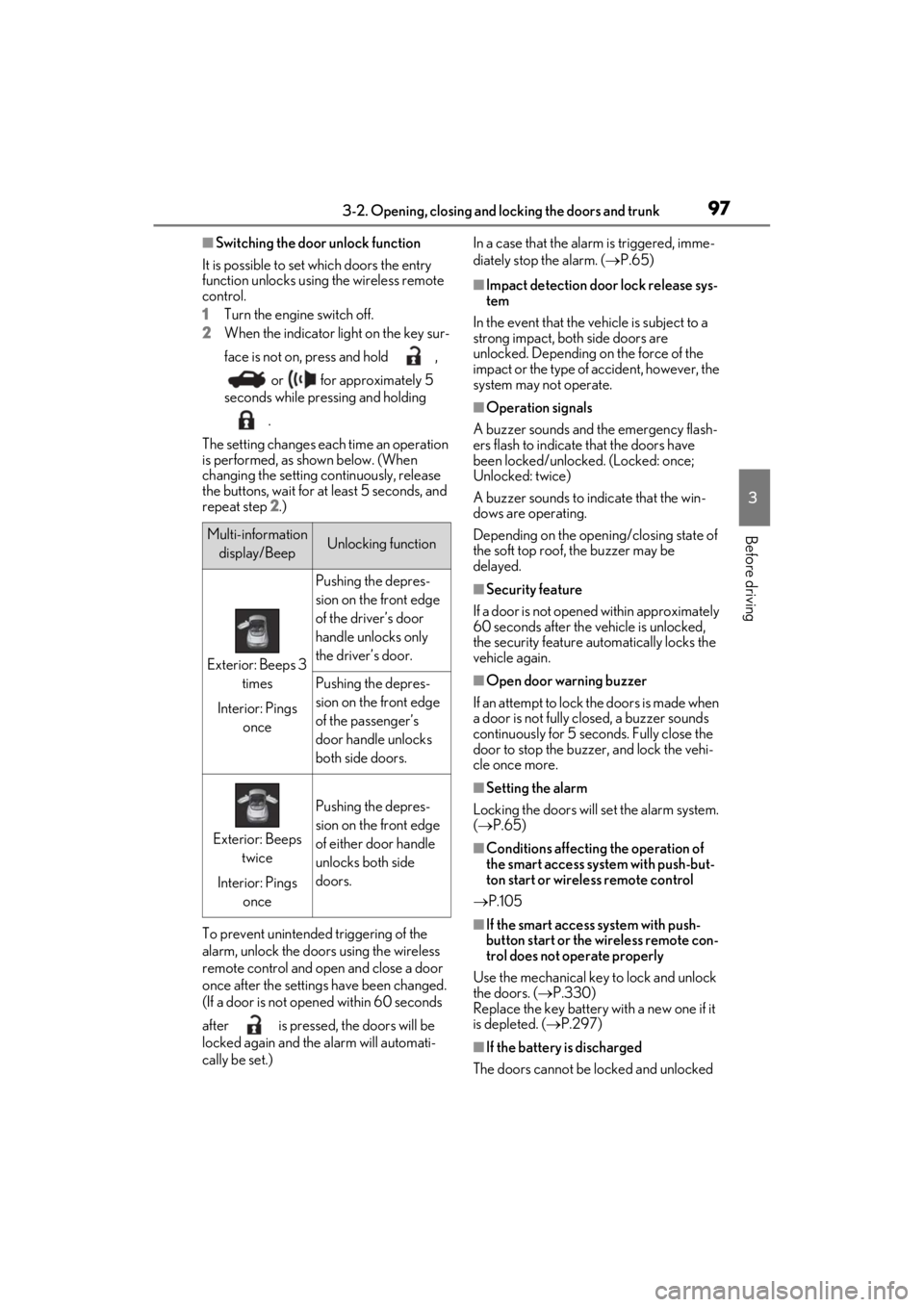
■Switching the door unlock function
It is possible to set which doors the entry
function unlocks using the wireless remote
control.
1 Turn the engine switch off.
2 When the indicator light on the key sur-
face is not on, press and hold ,
or for approximately 5
seconds while pressing and holding
.
The setting changes each time an operation
is performed, as shown below. (When
changing the setting continuously, release
the buttons, wait for at least 5 seconds, and
repeat step 2 .)
To prevent unintended triggering of the
alarm, unlock the doors using the wireless
remote control and open and close a door
once after the settings have been changed.
(If a door is not opened within 60 seconds
after is pressed, the doors will be
locked again and the alarm will automati-
cally be set.) In a case that the alarm is triggered, imme-
diately stop the alarm. (
P.65)
■Impact detection door lock release sys-
tem
In the event that the vehicle is subject to a
strong impact, both side doors are
unlocked. Depending on the force of the
impact or the type of accident, however, the
system may not operate.
■Operation signals
A buzzer sounds and the emergency flash-
ers flash to indicate that the doors have
been locked/unlocked. (Locked: once;
Unlocked: twice)
A buzzer sounds to in dicate that the win-
dows are operating.
Depending on the open ing/closing state of
the soft top roof, the buzzer may be
delayed.
■Security feature
If a door is not opened within approximately
60 seconds after the vehicle is unlocked,
the security feature automatically locks the
vehicle again.
■Open door warning buzzer
If an attempt to lock the doors is made when
a door is not fully closed, a buzzer sounds
continuously for 5 seconds. Fully close the
door to stop the buzzer, and lock the vehi-
cle once more.
■Setting the alarm
Locking the doors will set the alarm system.
( P.65)
■Conditions affecting the operation of
the smart access system with push-but-
ton start or wireless remote control
P.105
■If the smart access system with push-
button start or the wireless remote con-
trol does not operate properly
Use the mechanical key to lock and unlock
the doors. ( P.330)
Replace the key battery with a new one if it
is depleted. ( P.297)
■If the battery is discharged
The doors cannot be locked and unlocked
Multi-information display/BeepUnlocking function
Exterior: Beeps 3 times
Interior: Pings once
Pushing the depres-
sion on the front edge
of the driver’s door
handle unlocks only
the driver’s door.
Pushing the depres-
sion on the front edge
of the passenger’s
door handle unlocks
both side doors.
Exterior: Beeps twice
Interior: Pings once
Pushing the depres-
sion on the front edge
of either door handle
unlocks both side
doors.
Page 104 of 410
1023-2. Opening, closing and locking the doors and trunk
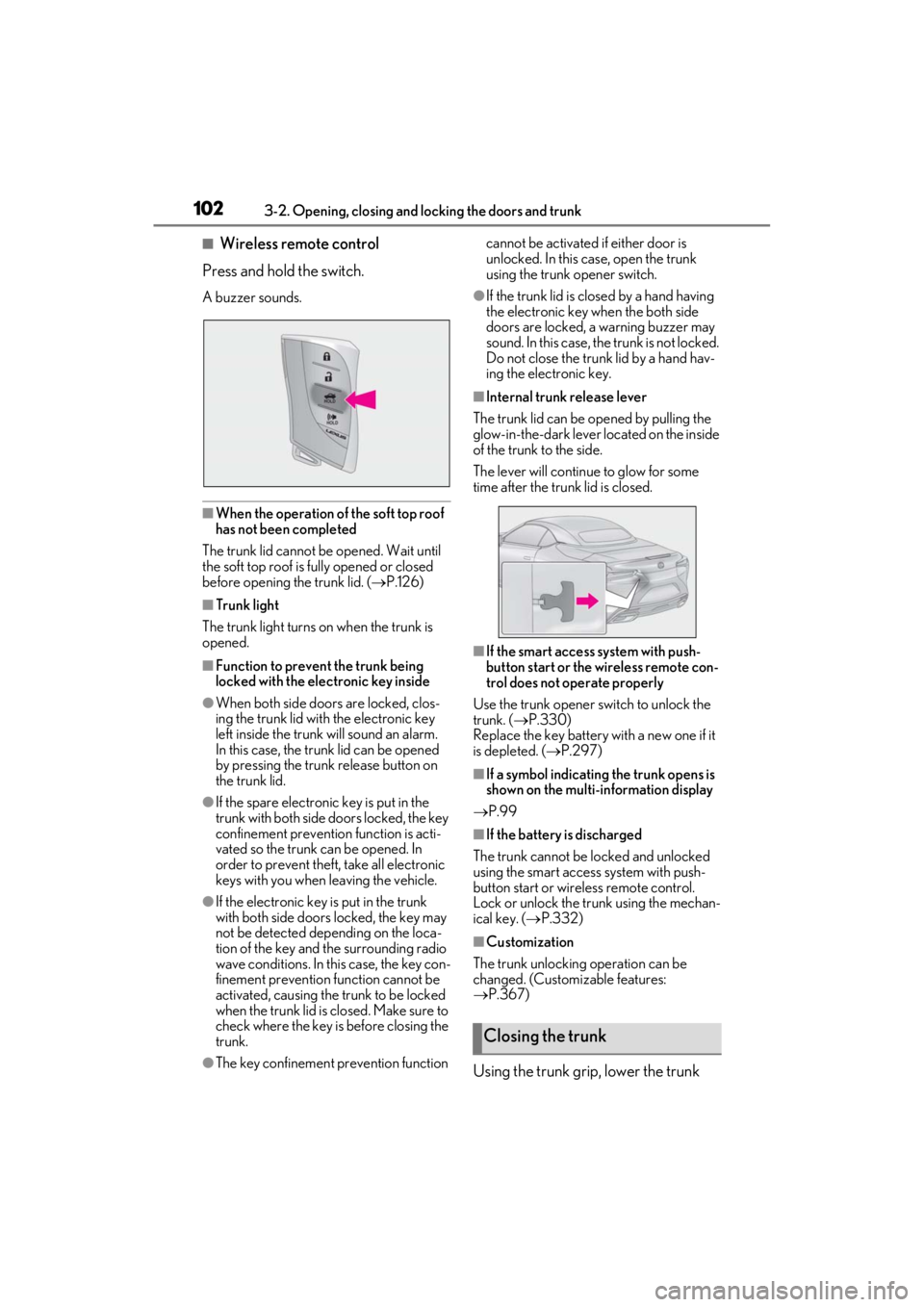
■Wireless remote control
Press and hold the switch.
A buzzer sounds.
■When the operation of the soft top roof
has not been completed
The trunk lid cannot be opened. Wait until
the soft top roof is fully opened or closed
before opening the trunk lid. ( P.126)
■Trunk light
The trunk light turns on when the trunk is
opened.
■Function to prevent the trunk being
locked with the electronic key inside
●When both side doors are locked, clos-
ing the trunk lid with the electronic key
left inside the trunk will sound an alarm.
In this case, the trunk lid can be opened
by pressing the trunk release button on
the trunk lid.
●If the spare electronic key is put in the
trunk with both side doors locked, the key
confinement prevention function is acti-
vated so the trunk can be opened. In
order to prevent theft, take all electronic
keys with you when leaving the vehicle.
●If the electronic key is put in the trunk
with both side doors locked, the key may
not be detected depending on the loca-
tion of the key and the surrounding radio
wave conditions. In th is case, the key con-
finement prevention function cannot be
activated, causing the trunk to be locked
when the trunk lid is closed. Make sure to
check where the key is before closing the
trunk.
●The key confinement prevention function cannot be activated if either door is
unlocked. In this case, open the trunk
using the trunk opener switch.
●If the trunk lid is closed by a hand having
the electronic key when the both side
doors are locked, a warning buzzer may
sound. In this case, the trunk is not locked.
Do not close the trunk lid by a hand hav-
ing the electronic key.
■Internal trunk release lever
The trunk lid can be opened by pulling the
glow-in-the-dark lever located on the inside
of the trunk to the side.
The lever will continue to glow for some
time after the trunk lid is closed.
■If the smart access system with push-
button start or the wireless remote con-
trol does not operate properly
Use the trunk opener switch to unlock the
trunk. ( P.330)
Replace the key battery with a new one if it
is depleted. ( P.297)
■If a symbol indicating the trunk opens is
shown on the multi-information display
P.99
■If the battery is discharged
The trunk cannot be locked and unlocked
using the smart access system with push-
button start or wireless remote control.
Lock or unlock the trunk using the mechan-
ical key. ( P.332)
■Customization
The trunk unlocking operation can be
changed. (Customizable features:
P.367)
Using the trunk grip, lower the trunk
Closing the trunk