light lexus LC500C 2021 Owner's Manual / LEXUS 2021 LC500 CONVERTIBLE OWNER'S MANUAL QUICK GUIDE (OM11518U)
[x] Cancel search | Manufacturer: LEXUS, Model Year: 2021, Model line: LC500C, Model: Lexus LC500C 2021Pages: 106, PDF Size: 2.13 MB
Page 2 of 106
2
LC500_QG_OM11518U_(U)
Front Seats.................................................................................................................................. 18
Fuel Consumption Information ........................................................................................... 59
Garage Door Opener ........................................................................................................... 87
Hands-free System For Cellular Phone
*
Registering/connecting Bluetooth® device ..................................................................... 63
Contacts transfer .............................................................................................................. ............ 64
Registering the contacts in the favorites list.. ..................................................................... 65
Calling by favorites list ...................................................................................................... .......... 65
Calling the message sender ..................................................................................................... 65
Receiving a call ............................................................................................................... ............... 66
Steering switches .............................................................................................................. ............ 66
Headlights..................................................................................................................... ............. 36
Head-up Display ......................................................................................................................34
Intuitive Parking Assist ....................................................................................................... ... 47
Keys ........................................................................................................................... ................... 14
Lexus Climate Concierge .................................................................................................... 74
Lexus Enform Remote ...........................................................................................................9 3
Lexus Enform Safety Connect ............................................................................................. 91
Lexus Enform Service Connect .......................................................................................... 94
Lexus Safety System +.......................................................................................................... ..40
LKA (Lane-Keeping Assist)................................................................................................... 41
Multi-information Display.....................................................................................................3 2
Navigation System
*
Registering home ............................................................................................................... ............. 61
Destination search - Search by address ................................................................................ 61
Destination search - Search points of intere st by name ............................................... 62
Destination search - Search points of intere st by category ........................................ 62
Destination search - Search points of interest by phone number ............................ 62
Voice Command System ........................................................................................................... 79
*: These features may be operated by Voice Command (See P.79)
Page 5 of 106
5
LC500_QG_OM11518U_(U)
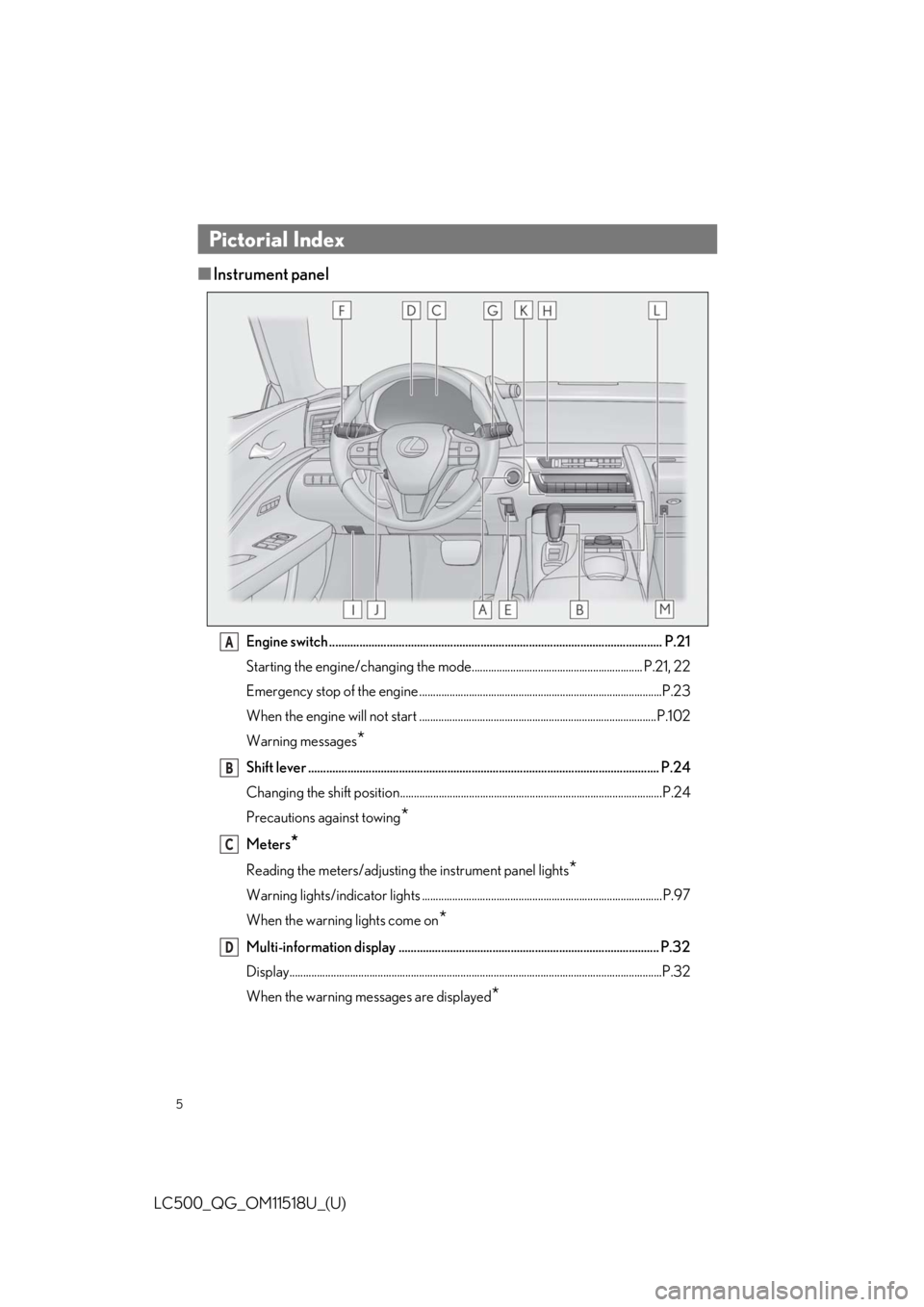
■Instrument panel
Engine switch .............................................................................................................. P.21
Starting the engine/changing the mode.............................................................. P.21, 22
Emergency stop of the engine ........................................................................................P.23
When the engine will not start ......................................................................................P.102
Warning messages
*
Shift lever .................................................................................................................... P.24
Changing the shift position...............................................................................................P.24
Precautions against towing
*
Meters*
Reading the meters/adjusting the instrument panel lights*
Warning lights/indicator lights .......................................................................................P.97
When the warning lights come on
*
Multi-information display ...................................................................................... P.32
Display.......................................................................................................................................P.32
When the warning messages are displayed
*
Pictorial Index
A
B
C
D
Page 6 of 106

6
LC500_QG_OM11518U_(U)
Parking brake switch ............................................................................................... P.29
Applying/releasing..............................................................................................................P.29
Precautions against winter season
*
Warning buzzer/message*
Turn signal lever ........................................................................................................ P.28
Headlight switch ....................................................................................................... P.36
Headlights/parking lights/tail lights/license plate lights/ daytime
running lights ..........................................................................................................................P.36
Automatic High Beam ....................................................................................................... P.37
Windshield wiper and washer switch ................................................................. P.39
Usage ........................................................................................................................................P.39
Adding washer fluid
*
Warning messages*
Emergency flasher switch*
Hood lock release lever*
Tilt and telescopic steering control switch*
Adjustment*
Driving position memory ................................................................................................... P.19
Air conditioning system .......................................................................................... P.75
Usage .......................................................................................................................... .............. P.76
Rear window defogger ...................................................................................................... P.75
Audio system.............................................................................................................. P.67
Trunk opener main switch
*
*
: Refer to the “OWNER’S MANUAL”.
E
F
G
H
I
J
K
L
M
Page 7 of 106
7
LC500_QG_OM11518U_(U)
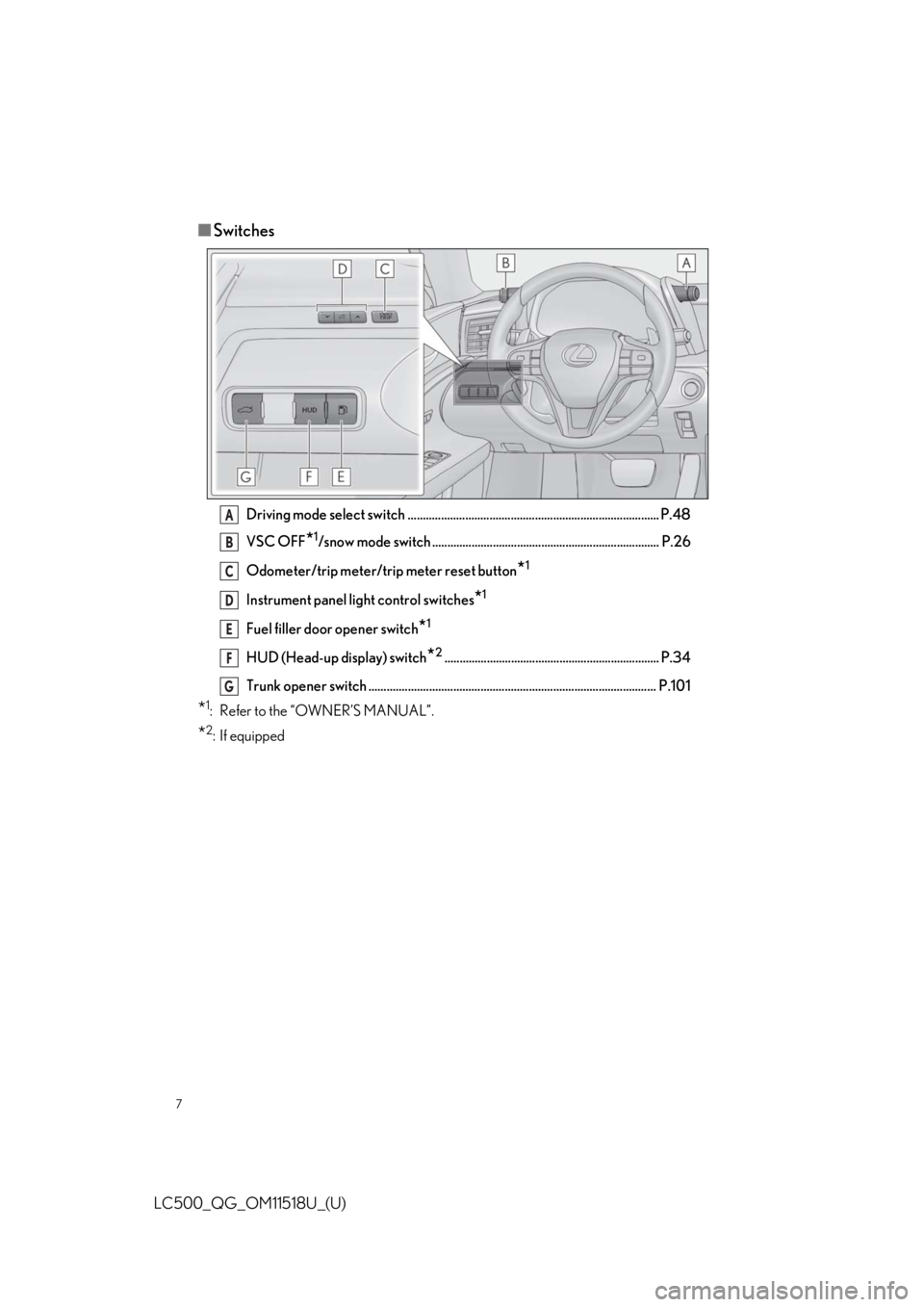
■Switches
Driving mode select switch ................................................................................... P.48
VSC OFF
*1/snow mode switch ........................................................................... P.26
Odometer/trip meter/trip meter reset button
*1
Instrument panel light control switches*1
Fuel filler door opener switch*1
HUD (Head-up display) switch*2....................................................................... P.34
Trunk opener switch ............................................................................................... P.101
*1: Refer to the “OWNER’S MANUAL”.
*2: If equipped
A
B
C
D
E
F
G
Page 12 of 106
12
LC500_QG_OM11518U_(U)
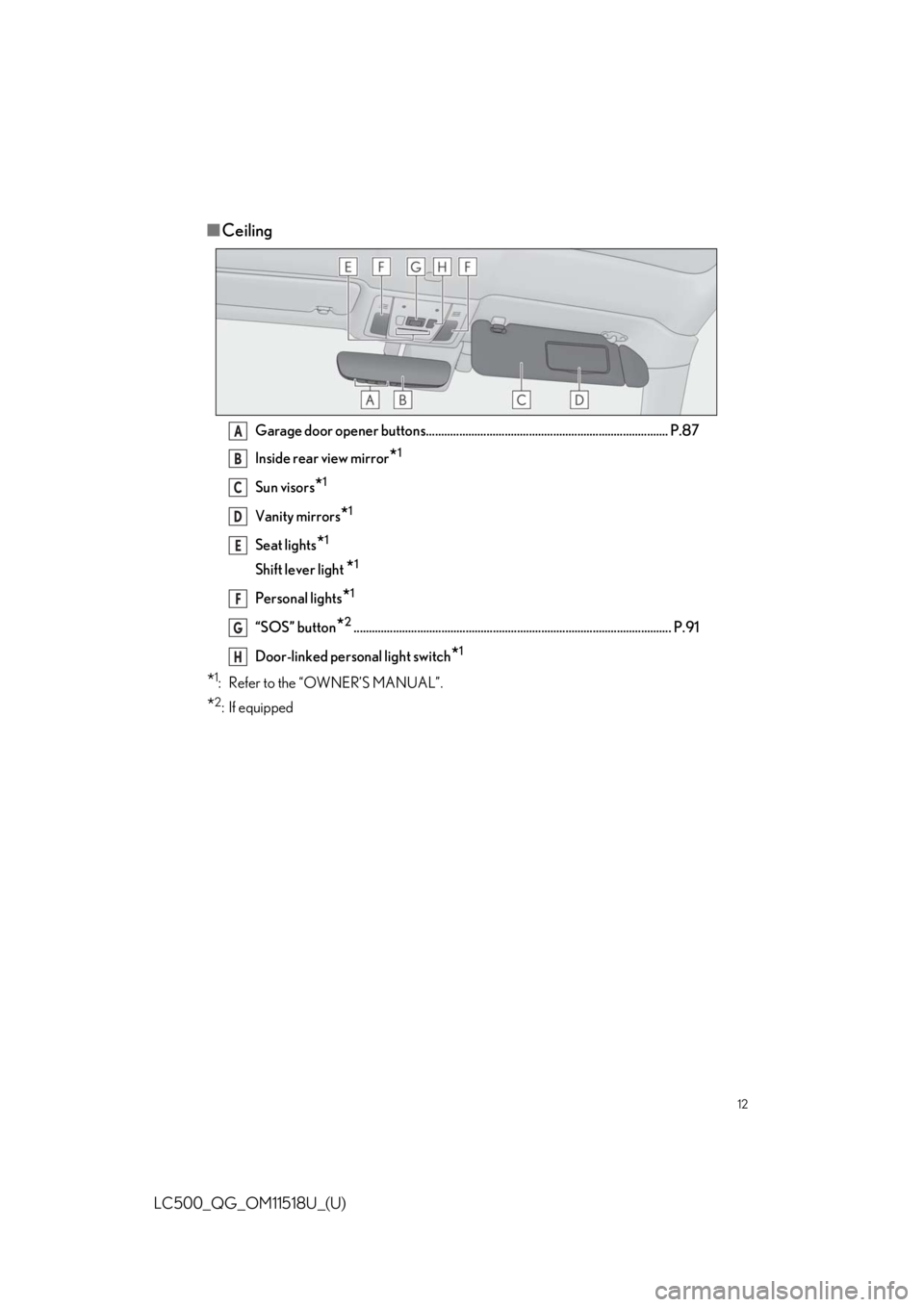
■Ceiling
Garage door opener buttons................................................................................ P.87
Inside rear view mirror
*1
Sun visors*1
Vanity mirrors*1
Seat lights*1
Shift lever light *1
Personal lights*1
“SOS” button*2......................................................................................................... P.91
Door-linked personal light switch
*1
*1: Refer to the “OWNER’S MANUAL”.
*2: If equipped
A
B
C
D
E
F
G
H
Page 24 of 106

24
LC500_QG_OM11518U_(U)
Shift lever
Operate the shift lever gently and
securely in the direction of the arrow
on the shift position indicator.
To shift to N, slide the shift lever in the
direction of the arrow and hold it.
Release the shift lever after each shift-
ing operation to allow it to return to its
regular position ( ).
Shifting to M is only possible when the
shift position is in D.
When shifting from P to N, D or R,
from N, D, M or R to P, from D or M to
R, or from R to D, ensure that the brake
pedal is being depressed and the vehi-
cle is stationary.
Shift position indicator
Meter display:
The current shift position is highlighted.
When any shift position other than D or M is selected, the arrow toward M and M posi-
tion indicator are displayed in gray.
Shift lever display:
The current shift position is illuminated.
When selecting the shift position, make sure that the shift position has been changed to
the desired position by checking the shift po sition indicator provided on the instrument
cluster.
P position switch
P.25
Automatic Transmission
Shifting the shift lever
A
B
C
Page 29 of 106

29
LC500_QG_OM11518U_(U)
The parking brake can be set and released manually.
U.S.A.
Canada
1Push the switch to set the parking
brake
The parking brake indicator light will
turn on.
Press and hold the parking brake
switch if an emergency occurs and it is
necessary to operate the parking
brake while driving.
2Pull the switch to release the parking
brake
• Operate the parking brake switchwhile depressing the brake pedal.
• Using the parking brake automatic release function, the parking brake
can be released by depressing the
accelerator pedal. When using this
function, slowly depress the acceler-
ator pedal.
Make sure that the parking brake indi-
cator light turn off.
Parking Brake
The parking brake can be set or re leased automatically or manually.
Using the manual mode
A
B
Page 30 of 106

30
LC500_QG_OM11518U_(U)
In automatic mode, the parking brake can be set or released automatically according to shift
lever operation. Also, even in automatic mo de, the parking brake can be set or released
manually.
While the vehicle is stopped, press and hold
the parking brake switch until a message is
shown on the multi-information display
When the automatic mode is turned on, the
parking brake operates as follows.
●When the shift position is shifted from P,
the parking brake will be released, and
the parking brake indi cator light will turn
off.
● When the shift position is shifted to P, the
parking brake will be set, and the park-
ing brake indicator light will turn on.
Operate the shift lever and P position switch with the vehicle stopped and the brake pedal
depressed.
While the vehicle is stopped, pull and hold
the parking brake switch until a message is
shown on the multi-information display
Turning the automatic mode on
Turning the automatic mode off
Page 36 of 106

36
LC500_QG_OM11518U_(U)
U.S.A.
Canada
1 The side marker, parking, tail,
license plate, instrument panel lights,
and daytime running lights turn on.
2 The headlights an d all the lights
listed above (except daytime running
lights) turn on.
3 The headlights, daytime running
lights and all the lig hts listed above turn
on and off automatically.
4 Off*
*
: U.S.A. only
1With the headlights on, push the lever
away from you to turn on the high
beams.
Pull the lever toward you to the center
position to turn the high beams off.
2Pull the lever toward you and release it
to flash the high beams once.
You can flash the high beams with the
headlights on or off.
Headlights
A
B
Turning on the high beam headlights
Page 37 of 106

37
LC500_QG_OM11518U_(U)
1Press the Automatic High Beam
switch.
2Turn the headlight switch to the
or position.
The Automatic High Beam indicator
will come on when the system is oper-
ating.
Automatic High Beam
The Automatic High Beam uses an in-vehicle front camera to a ssess the brightness of
streetlights, the lights of vehicle ahead, etc., and automatically turns the high beam on or
off as necessary.
Activating the Automatic High Beam system