towing lexus LC500h 2019 / LEXUS 2019 LC 500,LC 500H (OM11471U) User Guide
[x] Cancel search | Manufacturer: LEXUS, Model Year: 2019, Model line: LC500h, Model: Lexus LC500h 2019Pages: 432, PDF Size: 13.82 MB
Page 190 of 432
1904-5. Using the driving support systems
and rear wheels and effort necessary
to turn the steering wheel to help
enhance steering responsiveness.
WARNING
■Limitations of the pre-collision system
●The driver is solely responsible for safe
driving. Always drive safely, taking
care to observe your surroundings.
Do not use the pre-collision system
instead of normal braking operations
under any circumstances. This system
will not prevent collisions or lessen col-
lision damage or injury in every situa-
tion. Do not overly rely on this system.
Failure to do so may lead to an acci-
dent, resulting in death or serious
injury.
●Although this system is designed to
help avoid a collision or help reduce
the impact of the collision, its effective-
ness may change according to various
conditions, therefore the system may
not always be able to achieve the same
level of performance.
Read the following conditions care-
fully. Do not overly rely on this system
and always drive carefully.
• Conditions under which the system may operate even if there is no possi-
bility of a collision: P.192
• Conditions under which the system may not operate properly: P.194
●Do not attempt to test the operation of
the pre-collision system yourself, as the
system may not operate properly, pos-
sibly leading to an accident.
■Pre-collision braking
●When the pre-collision braking func-
tion is operating, a large amount of
braking force will be applied.
●If the vehicle is stopped by the opera-
tion of the pre-collision braking func-
tion, the pre-collision braking function
operation will be canceled after
approximately 2 seconds.
Depress the brake pedal as necessary.
●The pre-collision braking function may
not operate if certain operations are
performed by the driver. If the acceler-
ator pedal is being depressed strongly
or the steering wheel is being turned,
the system may determine that the
driver is taking evasive action and pos-
sibly prevent the pre-collision braking
function from operating.
●In some situations, while the pre-colli-
sion braking function is operating,
operation of the function may be can-
celed if the accelerator pedal is
depressed strongly or the steering
wheel is turned and the system deter-
mines that the driver is taking evasive
action.
●If the brake pedal is being depressed,
the system may determine that the
driver is taking evasive action and pos-
sibly delay the operat ion timing of the
pre-collision braking function.
■When to disable the pre-collision sys-
tem
In the following situations, disable the
system, as it may not operate properly,
possibly leading to an accident resulting
in death or serious injury:
●When the vehicle is being towed
●When your vehicle is towing another
vehicle
●When transporting the vehicle via
truck, boat, train or similar means of
transportation
●When the vehicle is raised on a lift with
the engine running
and the tires are allowed to rotate
freely
Page 205 of 432
2054-5. Using the driving support systems
4
Driving
WARNING
●Assisting the driver to operate the
vehicle
The dynamic radar cruise control with
full-speed range has limited capability
to prevent or avoid a collision with a
vehicle traveling ahead. Therefore, if
there is ever any danger, the driver
must take immediate and direct con-
trol of the vehicle and act appropri-
ately in order to ensure the safety of all
involved.
■Situations unsuitable for dynamic
radar cruise control with full-speed
range
Do not use dynamic radar cruise control
with full-speed range in any of the follow-
ing situations.
Doing so may result in inappropriate
speed control and could cause an acci-
dent resulting in death or serious injury.
●Roads where there are pedestrians,
cyclists, etc.
●In heavy traffic
●On roads with sharp bends
●On winding roads
●On slippery roads, such as those cov-
ered with rain, ice or snow
●On steep downhills , or where there
are sudden changes between sharp up
and down gradients
Vehicle speed may exceed the set
speed when driving down a steep hill.
●At entrances to freeways and highways
●When weather conditions are bad
enough that they may prevent the sen-
sors from detectin g correctly (fog,
snow, sandstorm, heavy rain, etc.)
●When there is rain, snow, etc. on the
front surface of the radar sensor or
camera sensor
●In traffic conditions that require fre-
quent repeated acceleration and
deceleration
●During emergency towing
●When an approach warning buzzer is
heard often
Page 216 of 432

2164-5. Using the driving support systems
• When the engine switch
TION ON mode
■If “Clean Parking Assist Sensor” is dis-
played on the multi-information display
A sensor may be dirty or covered with snow
or ice. In such cases, if it is removed from
the sensor, the system should return to nor-
mal.
Also, due to the sensor being frozen at low
temperatures, a malfunction display may
appear or an obstacle may not be detected.
If the sensor thaws out, the system should
return to normal.
■If “Parking Assist Malfunction” or “Park-
ing Assist Malfunction Visit Your
Dealer” is displayed on the multi-infor-
mation display
There is a malfunction and the device may
not be working properly.
Have the vehicle inspected by your Lexus
dealer.
■Sensor detectio n information
●The sensor’s detection areas are limited
to the areas around the vehicle’s front and
rear bumpers.
●Certain vehicle conditions and the sur-
rounding environment may affect the
ability of the sensor to correctly detect
obstacles. Particular instances where this
may occur are listed below.
• There is dirt, snow or ice on the sensor. (Wiping the sensors will resolve this
problem.)
• The sensor is frozen. (Thawing the area will resolve this problem.)
In especially cold weather, if a sensor is
frozen the screen may show an abnormal
display, or obstacles may not be
detected.
• The sensor is covered in any way.
• The vehicle is leaning considerably to one side.
• On an extremely bumpy road, on an incline, on gravel, or on grass.
• The vicinity of the vehicle is noisy due to
vehicle horns, motorcycle engines, air
brakes of large vehicles, or other loud
noises producing ultrasonic waves.
• There is another vehicle equipped with parking assist sensor in the vicinity.
• The sensor is coated with a sheet of spray or heavy rain.
• The vehicle is equipped with a fender pole or wireless antenna.
• Towing eyelets are installed.
• The bumper or sensor receives a strong
impact.
• The vehicle is approaching a tall or
curved curb.
• In harsh sunlight or intense cold weather.
• The area directly under the bumpers is not detected.
• If obstacles draw too close to the sensor.
• A non-genuine Lexus suspension (low-
ered suspension etc.) is installed.
• People may not be detected if they are wearing certain types of clothing.
In addition to the examples above, there are
instances in which, be cause of their shape,
signs and other objects may be judged by
the sensor to be closer than they are.
●The shape of the obstacle may prevent
the sensor from detecting it. Pay particu-
lar attention to the following obstacles:
• Wires, fences, ropes, etc.
• Cotton, snow and other materials that
absorb sound waves
• Sharply-angled objects
• Low obstacles
• Tall obstacles with upper sections pro- jecting outwards in the direction of your
vehicle
●The following situations may occur
during use.
• Depending on the shape of the obstacle and other factors, the detection distance
may shorten, or detection may be impos-
sible.
• Obstacles may not be detected if they
are too close to the sensor.
• There will be a short delay between obstacle detection and display. Even at
slow speeds, there is a possibility that the
obstacle will come within the sensor’s
detection areas befo re the display is
shown and the warning beep sounds.
• Thin posts or object s lower than the sen-
sor may not be detected when
approached, even if they have been
detected once.
• It might be difficult to hear beeps due to
Page 225 of 432
2254-5. Using the driving support systems
4
Driving
lane*
●Vehicles traveling 2 lanes away from your
vehicle*
●Vehicles which are being overtaken rap-
idly by your vehicle.*
*
: Depending on the conditions, detection of a vehicle and/or object may occur.
■Conditions under which the BSM func-
tion may not function correctly
●The BSM function may not detect vehi-
cles correctly in the following situations:
• When the sensor is misaligned due to a
strong impact to the sensor or its sur-
rounding area
• When mud, snow, ice, a sticker, etc. is
covering the sensor or surrounding area
on the rear bumper
• When driving on a road surface that is
wet with standing water during bad
weather, such as heavy rain, snow, or fog
• When multiple vehicles are approaching
with only a small gap between each vehi-
cle
• When the distance between your vehicle
and a following vehicle is short
• When there is a significant difference in speed between your vehicle and the vehi-
cle that enters the detection area
• When the difference in speed between your vehicle and another vehicle is
changing
• When a vehicle enters a detection area traveling at about the same speed as your
vehicle
• As your vehicle starts from a stop, a vehi- cle remains in the detection area
• When driving up an d down consecutive
steep inclines, such as hills, dips in the
road, etc.
• When driving on roads with sharp bends, consecutive curves, or uneven surfaces
• When vehicle lanes are wide, or when
driving on the edge of a lane, and the
vehicle in an adjacent lane is far away
from your vehicle
• When an accessory (such as a bicycle
carrier) or towing eyel et is installed to the
rear of the vehicle
• When there is a significant difference in
height between your vehicle and the
vehicle that enters the detection area • Immediately after the BSM function is
turned on
●Instances of the BSM function unneces-
sarily detecting a vehicle and/or object
may increase in the following situations:
• When the sensor is misaligned due to a strong impact to the sensor or its sur-
rounding area
• When the distance between your vehicle and a guardrail, wall, etc. that enters the
detection area is short
• When driving up and down consecutive steep inclines, such as hills, dips in the
road, etc.
• When vehicle lanes are narrow, or when driving on the edge of a lane, and a vehi-
cle traveling in a lane other than the adja-
cent lanes enters the detection area
• When driving on roads with sharp bends, consecutive curves, or uneven surfaces
• When the tires are slipping or spinning
• When the distance between your vehicle and a following vehicle is short
• When an accessory (such as a bicycle carrier) or towing eyelet is installed to the
rear of the vehicle
WARNING
■Cautions regarding the use of the
function
The driver is solely responsible for safe
driving. Always drive safely, taking care
to observe your surroundings.
The BSM function is a supplementary
function which alerts the driver that a
vehicle is in a blind spot of the outside
rear view mirrors or is approaching rap-
idly from behind into a blind spot. Do not
overly rely on the BSM function. As the
function cannot judge if it is safe to
change lanes, over re liance could lead to
an accident resulting in death or serious
injury.
As the system may not function correctly
under certain conditio ns, the driver’s own
visual confirmation of safety is necessary.
Page 228 of 432
2284-5. Using the driving support systems
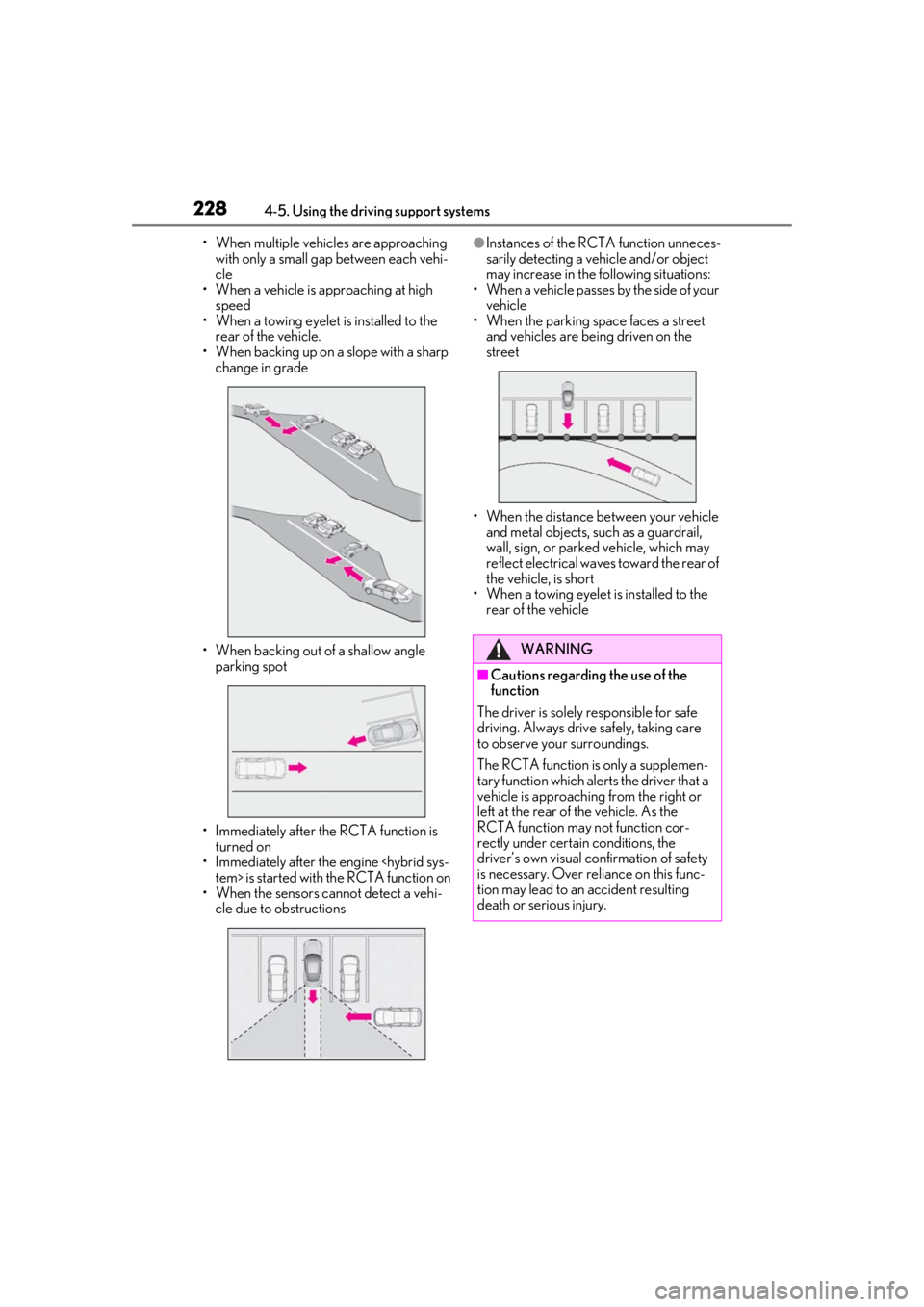
• When multiple vehicles are approaching with only a small gap between each vehi-
cle
• When a vehicle is approaching at high speed
• When a towing eyelet is installed to the
rear of the vehicle.
• When backing up on a slope with a sharp change in grade
• When backing out of a shallow angle parking spot
• Immediately after the RCTA function is turned on
• Immediately after the engine
• When the sensors cannot detect a vehi- cle due to obstructions●Instances of the RCTA function unneces-
sarily detecting a vehicle and/or object
may increase in the following situations:
• When a vehicle passes by the side of your vehicle
• When the parking space faces a street
and vehicles are being driven on the
street
• When the distance between your vehicle and metal objects, such as a guardrail,
wall, sign, or parked vehicle, which may
reflect electrical waves toward the rear of
the vehicle, is short
• When a towing eyelet is installed to the
rear of the vehicle
WARNING
■Cautions regarding the use of the
function
The driver is solely responsible for safe
driving. Always drive safely, taking care
to observe your surroundings.
The RCTA function is only a supplemen-
tary function which alerts the driver that a
vehicle is approaching from the right or
left at the rear of the vehicle. As the
RCTA function may not function cor-
rectly under certai n conditions, the
driver’s own visual confirmation of safety
is necessary. Over re liance on this func-
tion may lead to an accident resulting
death or serious injury.
Page 262 of 432
2625-5. Using the storage features
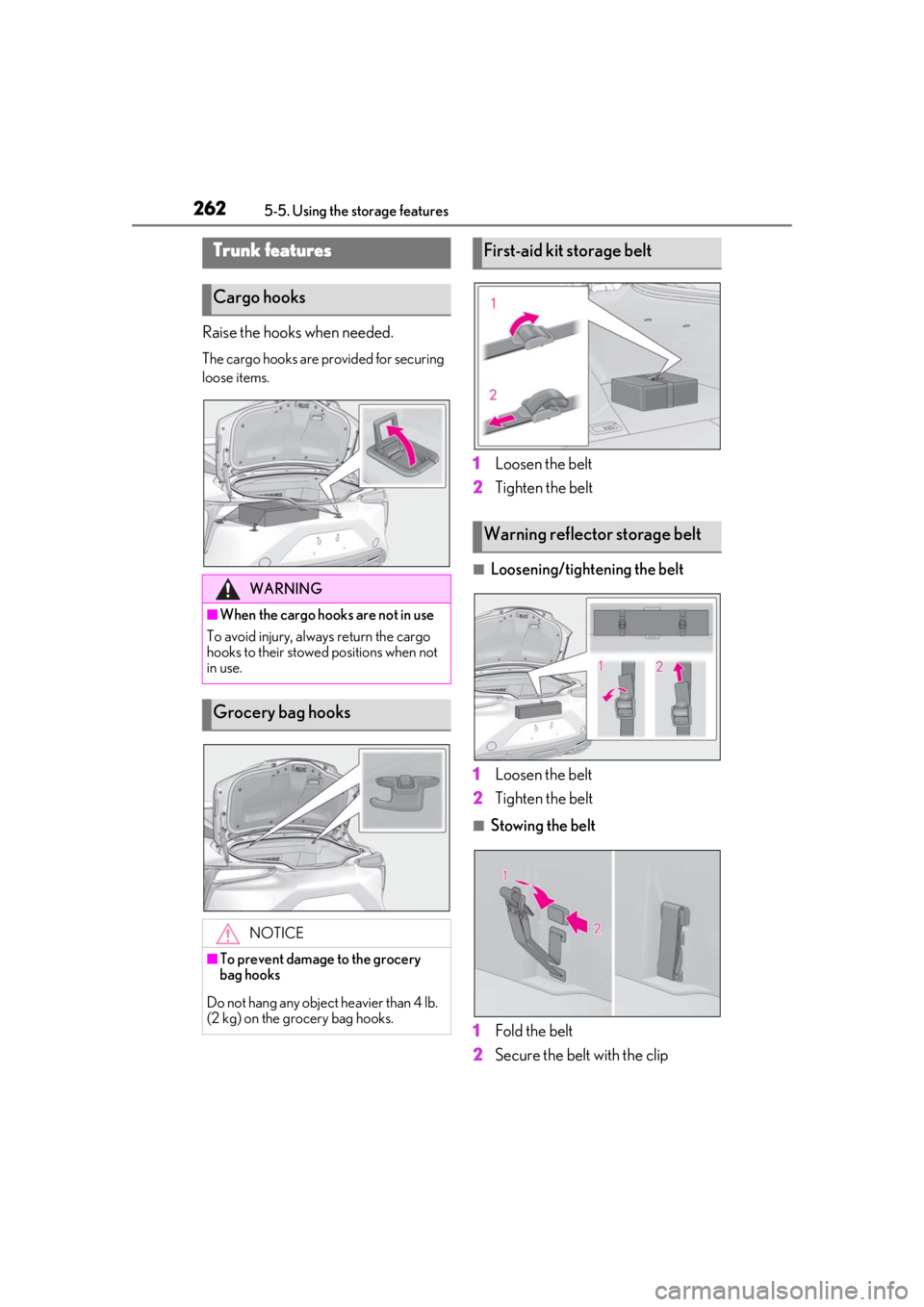
Raise the hooks when needed.
The cargo hooks are provided for securing
loose items.
1Loosen the belt
2 Tighten the belt
■Loosening/tightening the belt
1 Loosen the belt
2 Tighten the belt
■Stowing the belt
1 Fold the belt
2 Secure the belt with the clip
Trunk features
Cargo hooks
WARNING
■When the cargo hooks are not in use
To avoid injury, always return the cargo
hooks to their stowed positions when not
in use.
Grocery bag hooks
NOTICE
■To prevent damage to the grocery
bag hooks
Do not hang any object heavier than 4 lb.
(2 kg) on the grocery bag hooks.
First-aid kit storage belt
Warning reflector storage belt
Page 310 of 432
3106-3. Do-it-yourself maintenance
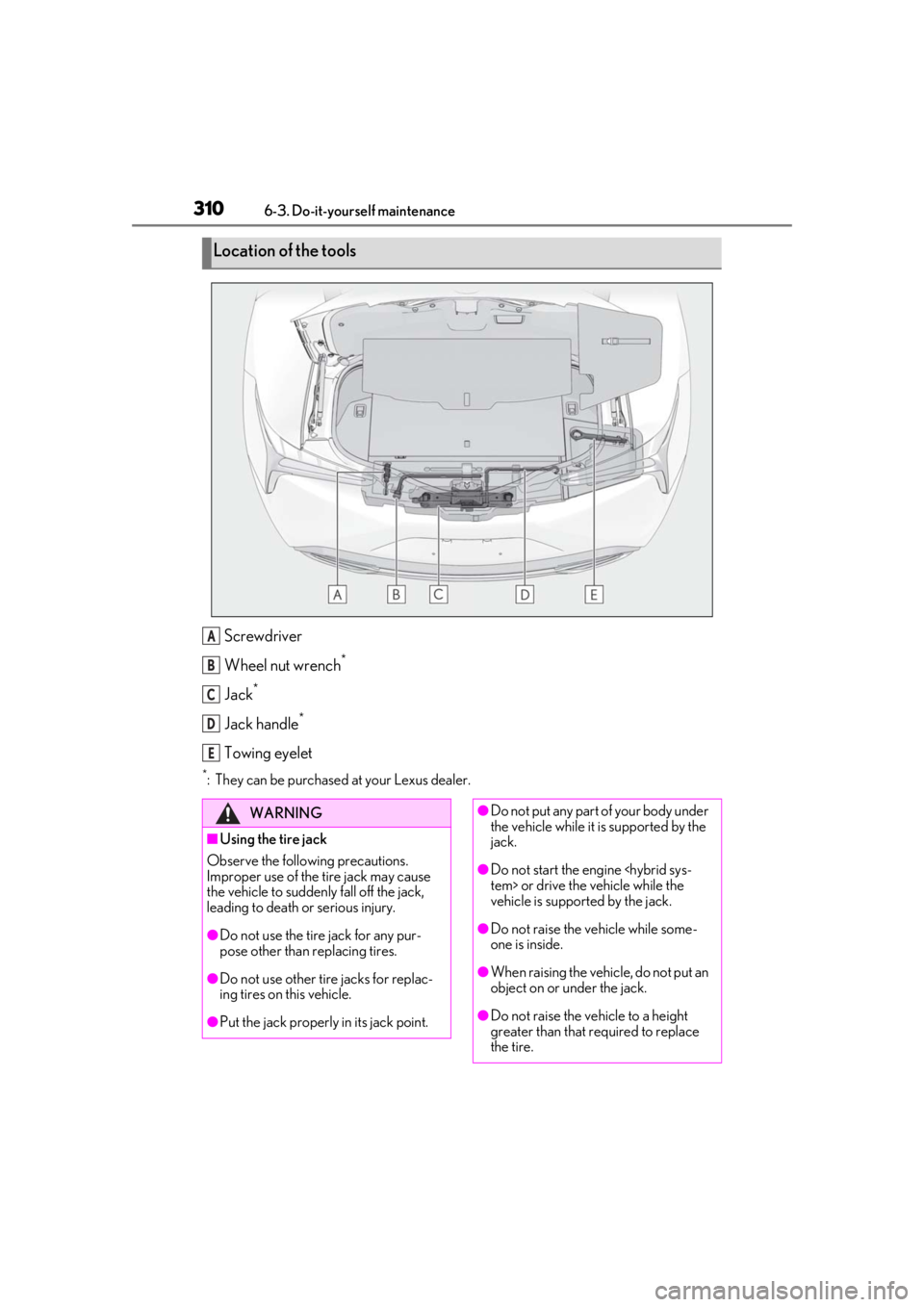
Screwdriver
Wheel nut wrench
*
Jack*
Jack handle*
Towing eyelet
*: They can be purchased at your Lexus dealer.
Location of the tools
A
B
C
D
E
WARNING
■Using the tire jack
Observe the following precautions.
Improper use of the tire jack may cause
the vehicle to suddenly fall off the jack,
leading to death or serious injury.
●Do not use the tire jack for any pur-
pose other than replacing tires.
●Do not use other tire jacks for replac-
ing tires on this vehicle.
●Put the jack properly in its jack point.
●Do not put any part of your body under
the vehicle while it is supported by the
jack.
●Do not start the engine
vehicle is supported by the jack.
●Do not raise the vehicle while some-
one is inside.
●When raising the vehicle, do not put an
object on or under the jack.
●Do not raise the vehicle to a height
greater than that required to replace
the tire.
Page 329 of 432
3297-2. Steps to take in an emergency
7
When trouble arises
7-2.Steps to take in an emergency
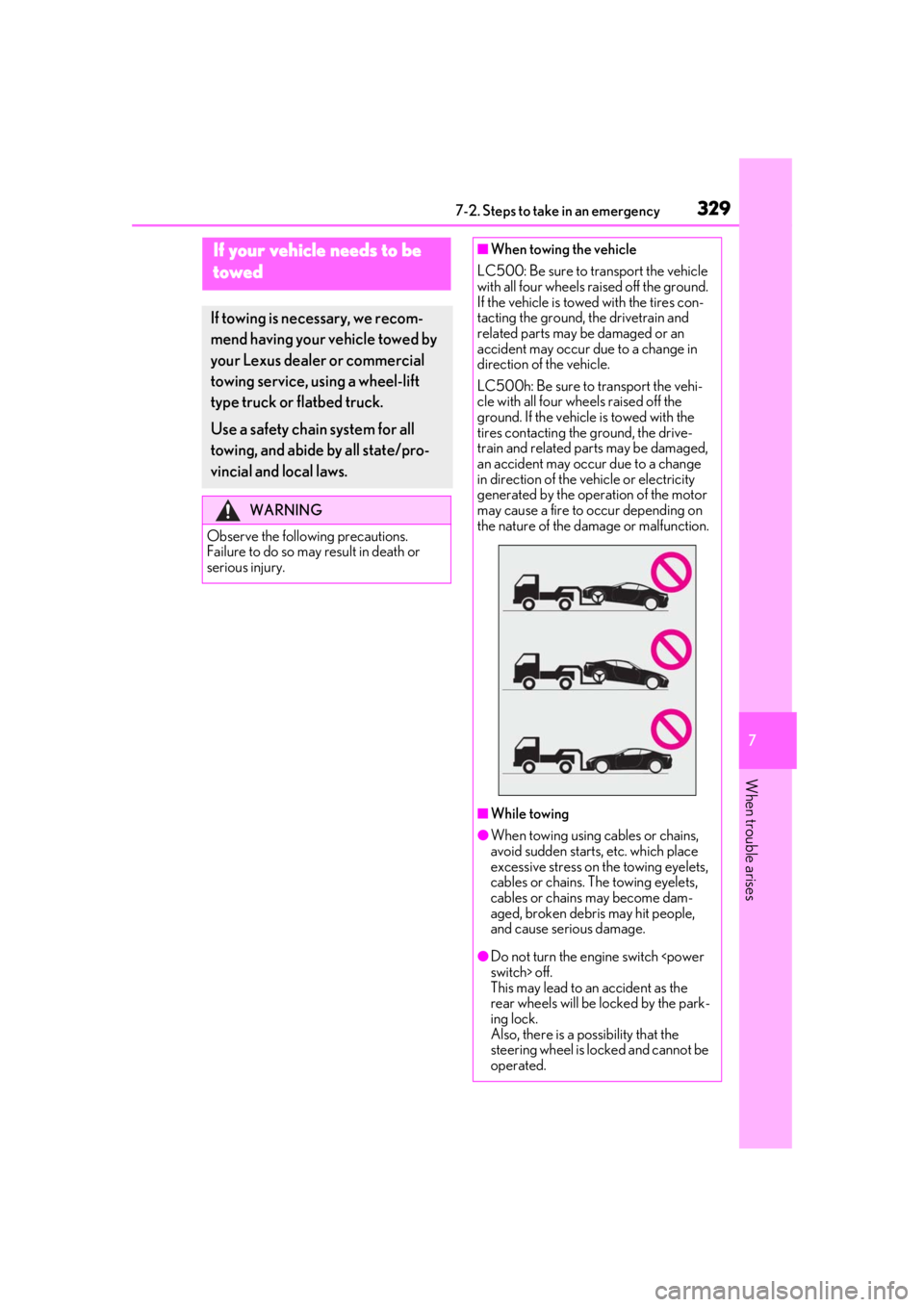
If your vehicle needs to be
towed
If towing is necessary, we recom-
mend having your vehicle towed by
your Lexus dealer or commercial
towing service, using a wheel-lift
type truck or flatbed truck.
Use a safety chain system for all
towing, and abide by all state/pro-
vincial and local laws.
WARNING
Observe the following precautions.
Failure to do so may result in death or
serious injury.
■When towing the vehicle
LC500: Be sure to transport the vehicle
with all four wheels raised off the ground.
If the vehicle is towed with the tires con-
tacting the ground, the drivetrain and
related parts may be damaged or an
accident may occur due to a change in
direction of the vehicle.
LC500h: Be sure to transport the vehi-
cle with all four wheels raised off the
ground. If the vehicle is towed with the
tires contacting the ground, the drive-
train and related parts may be damaged,
an accident may occur due to a change
in direction of the vehicle or electricity
generated by the operation of the motor
may cause a fire to occur depending on
the nature of the damage or malfunction.
■While towing
●When towing using cables or chains,
avoid sudden starts, etc. which place
excessive stress on the towing eyelets,
cables or chains. The towing eyelets,
cables or chains may become dam-
aged, broken debris may hit people,
and cause serious damage.
●Do not turn the engine switch
This may lead to an accident as the
rear wheels will be locked by the park-
ing lock.
Also, there is a possibility that the
steering wheel is locked and cannot be
operated.
Page 330 of 432
3307-2. Steps to take in an emergency
In the following situations, it is not pos-
sible to be towed by another vehicle
using cables or chains, as the rear
wheels may be locked due to the park-
ing lock. Contact your Lexus dealer or
commercial towing service.
There is a malfunction in the shift control system. (
P.149, 153, 347)
There is a malfunction in the engine
immobilizer system
There is a malfunction in the smart
access system with push-button
start. ( P.355)
The 12-volt battery is discharged.
( P.357)
The following may indicate a problem
with your transmission. Contact your
Lexus dealer or commercial towing
service before towing.
LC500: The engine is running but
the vehicle does not move.
LC500h: The hybrid system warn-
ing message is shown on the multi-
information display and the vehicle
does not move.
The vehicle makes an abnormal
sound.
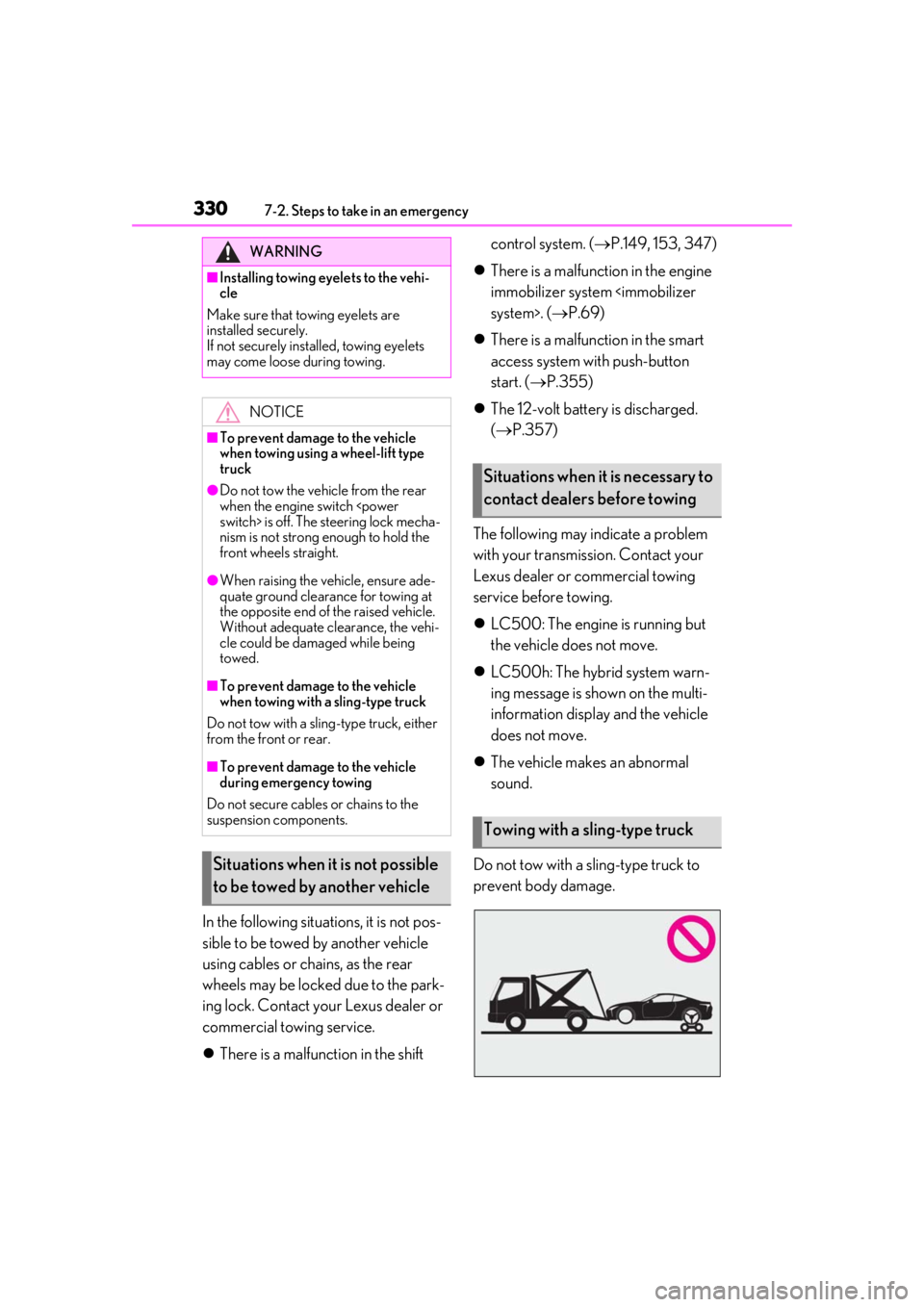
Do not tow with a sling-type truck to
prevent body damage.
WARNING
■Installing towing eyelets to the vehi-
cle
Make sure that towing eyelets are
installed securely.
If not securely installed, towing eyelets
may come loose during towing.
NOTICE
■To prevent damage to the vehicle
when towing using a wheel-lift type
truck
●Do not tow the vehicle from the rear
when the engine switch
nism is not strong enough to hold the
front wheels straight.
●When raising the vehicle, ensure ade-
quate ground clearance for towing at
the opposite end of the raised vehicle.
Without adequate clearance, the vehi-
cle could be damaged while being
towed.
■To prevent damage to the vehicle
when towing with a sling-type truck
Do not tow with a sling-type truck, either
from the front or rear.
■To prevent damage to the vehicle
during emergency towing
Do not secure cables or chains to the
suspension components.
Situations when it is not possible
to be towed by another vehicle
Situations when it is necessary to
contact dealers before towing
Towing with a sling-type truck
Page 331 of 432
3317-2. Steps to take in an emergency
7
When trouble arises
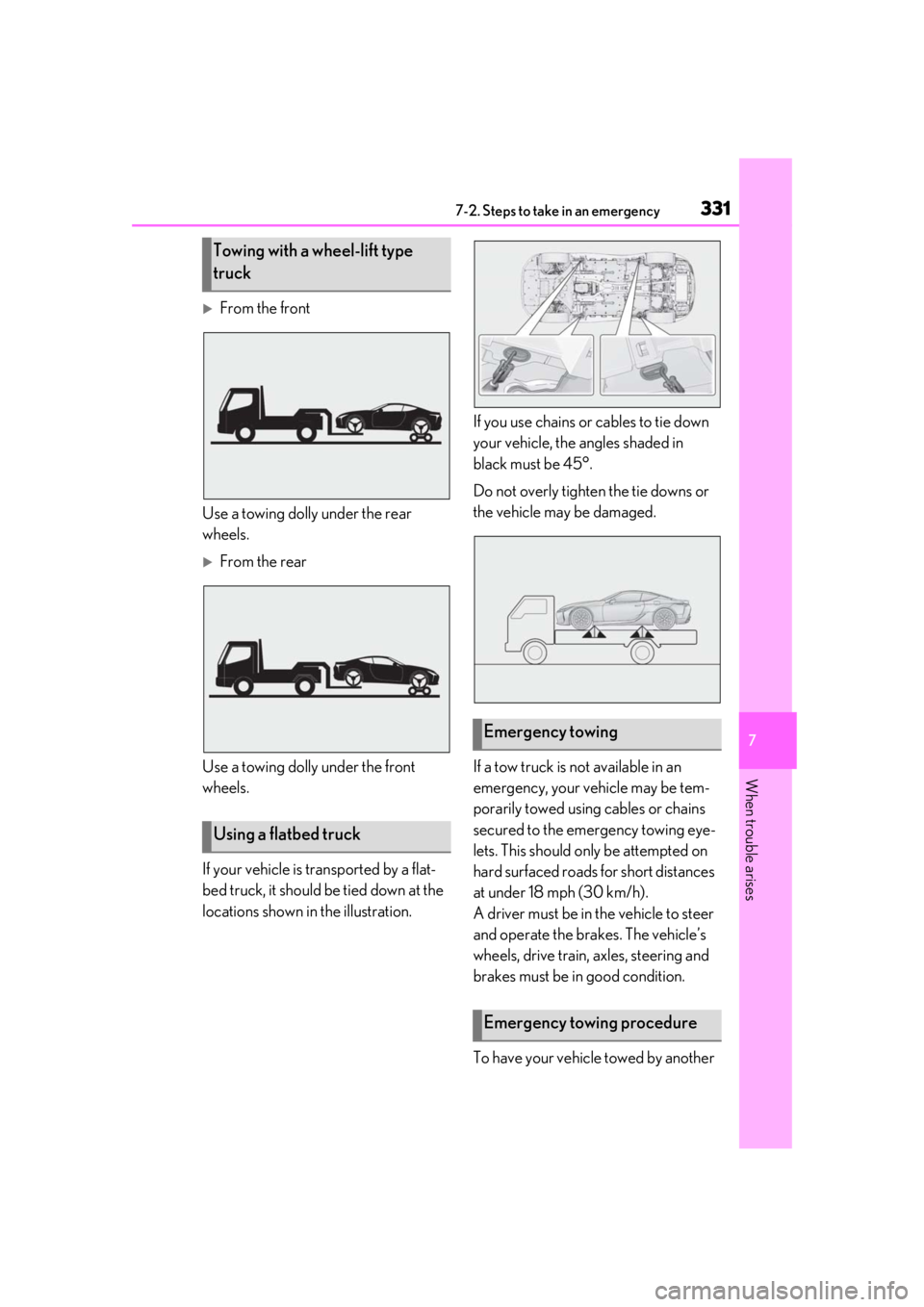
From the front
Use a towing dolly under the rear
wheels.
From the rear
Use a towing dolly under the front
wheels.
If your vehicle is transported by a flat-
bed truck, it should be tied down at the
locations shown in the illustration. If you use chains or cables to tie down
your vehicle, the angles shaded in
black must be 45°.
Do not overly tighten the tie downs or
the vehicle may be damaged.
If a tow truck is not available in an
emergency, your vehicle may be tem-
porarily towed using cables or chains
secured to the emergency towing eye-
lets. This should only be attempted on
hard surfaced roads for short distances
at under 18 mph (30 km/h).
A driver must be in the vehicle to steer
and operate the brakes. The vehicle’s
wheels, drive train, axles, steering and
brakes must be in good condition.
To have your vehicle towed by another
Towing with a wheel-lift type
truck
Using a flatbed truck
Emergency towing
Emergency towing procedure