interior lights lexus LC500h 2020 Owner's Manual / LEXUS 2020 LC500,LC500H OWNER'S MANUAL (OM11537U)
[x] Cancel search | Manufacturer: LEXUS, Model Year: 2020, Model line: LC500h, Model: Lexus LC500h 2020Pages: 436, PDF Size: 13.86 MB
Page 3 of 436
3TABLE OF CONTENTS
1
2
3
4
5
6
7
8
9
4-1. Before drivingDriving the vehicle ........................ 138
Cargo and luggage ...................... 144
Vehicle load limits ......................... 146
Trailer towing .................................. 147
Dinghy towing ................................ 147
4-2. Driving procedures Engine (ignition) switch (LC500)............................................................ 148
Power (ignition) switch (LC500h) ............................................................. 151
EV drive mode (LC500h)........ 155
Automatic transmission (LC500) ............................................................ 157
Hybrid transmission (LC500h) ............................................................ 163
Turn signal lever............................. 169
Parking brake ................................. 170
Brake Hold....................................... 173
4-3. Operating the lights and wipers Headlight switch ............................ 175
Automatic High Beam ................ 178
Windshield wipers and washer 180
4-4. Refueling Opening the fuel tank cap......... 184
4-5. Using the driving support systems Lexus Safety System + ................ 187
PCS (Pre-Collision System)..... 192
LKA (Lane-Keeping Assist) ..... 199
Dynamic radar crui se control with
full-speed range......................... 206
Driving mode select switch....... 216
Intuitive parking assist ................. 217BSM (Blind Spot Monitor) ........223
Active rear wing ............................
232
Driving assist systems ................ 235
4-6. Driving tips Hybrid vehicle driving tips (LC500h).................................... 240
Winter driving tips ........................ 242
5-1. Remote Touch Remote Touch............................... 246
5-2. Lexus Climate Concierge Lexus Climate Concierge........ 250
5-3. Using the air conditioning system Automatic air conditioning system........................................................... 252
Heated steering wheel/seat heat- ers/seat ventilators................... 259
5-4. Using the interior lights Interior lights list ............................ 262
5-5. Using the storage features List of storage features .............. 264
Trunk features ............................... 266
5-6. Using the other interior features Other interior features .............. 268
Garage door opener ................. 270
6-1. Maintenance and care Cleaning and protecting the vehi-cle exterior................................... 278
Cleaning and protecting the vehi- cle interior ..................................... 281
4Driving
5Interior features
6Maintenance and care
Page 245 of 436
245
5
5
Interior features
Interior features
5-1. Remote TouchRemote Touch ............................ 246
5-2. Lexus Climate Concierge Lexus Climate Concierge ..... 250
5-3. Using the air conditioning system Automatic air conditioning system........................................................ 252
Heated steering wheel/seat heat- ers/seat ventilators ................ 259
5-4. Using the interior lights Interior lights list......................... 262
5-5. Using the storage features List of storage features............ 264
Trunk features............................. 266
5-6. Using the other interior features Other interior features ........... 268
Garage door opener............... 270
Page 262 of 436
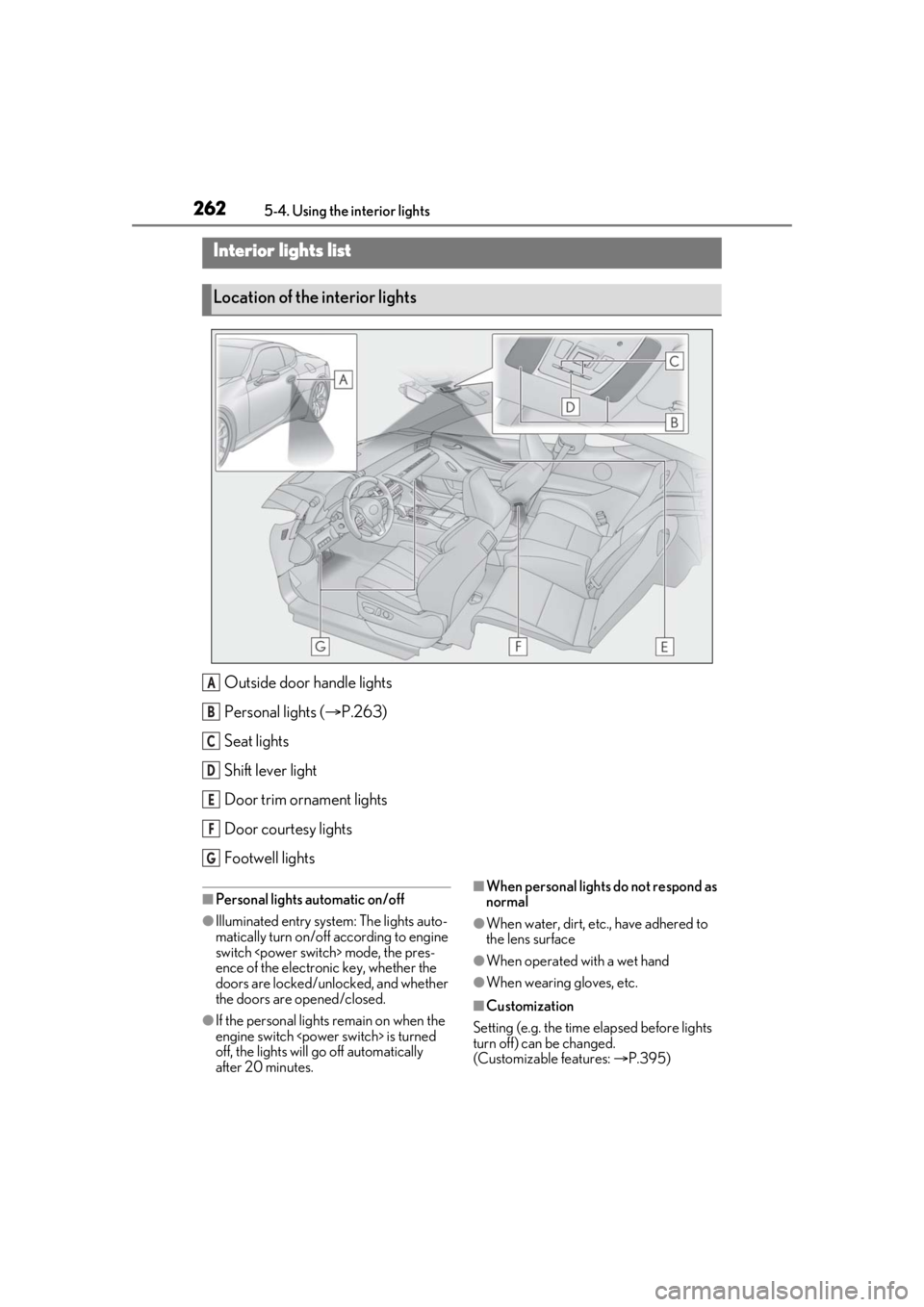
2625-4. Using the interior lights
5-4.Using the interior lights
Outside door handle lights
Personal lights ( P.263)
Seat lights
Shift lever light
Door trim ornament lights
Door courtesy lights
Footwell lights
■Personal lights automatic on/off
●Illuminated entry system: The lights auto-
matically turn on/off according to engine
switch
ence of the electronic key, whether the
doors are locked/unlocked, and whether
the doors are opened/closed.
●If the personal lights remain on when the
engine switch
off, the lights will go off automatically
after 20 minutes.
■When personal lights do not respond as
normal
●When water, dirt, etc., have adhered to
the lens surface
●When operated with a wet hand
●When wearing gloves, etc.
■Customization
Setting (e.g. the time elapsed before lights
turn off) can be changed.
(Customizable features: P.395)
Interior lights list
Location of the interior lights
A
B
C
D
E
F
G
Page 263 of 436
2635-4. Using the interior lights
5
Interior features
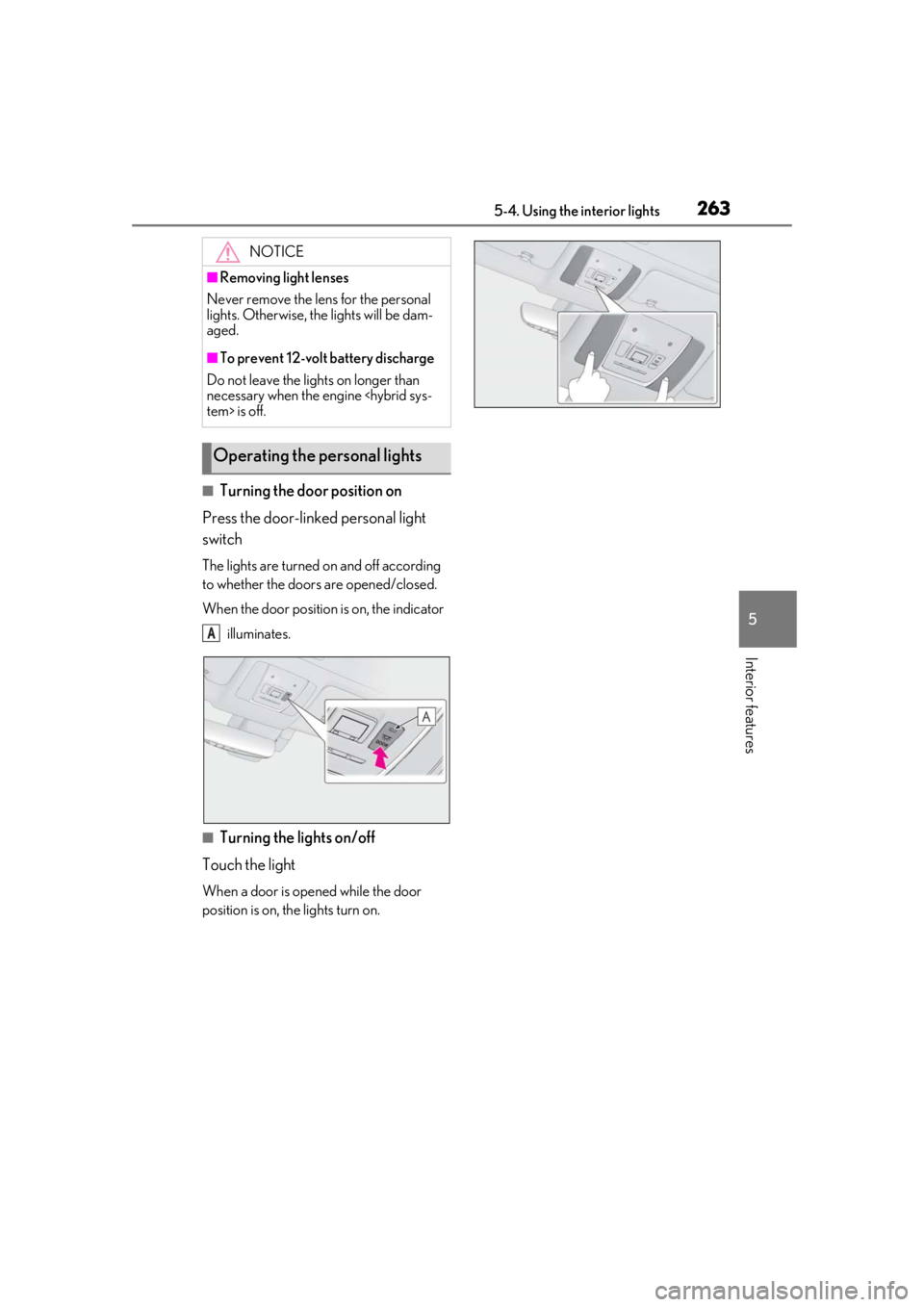
■Turning the door position on
Press the door-linked personal light
switch
The lights are turned on and off according
to whether the doors are opened/closed.
When the door position is on, the indicator
illuminates.
■Turning the lights on/off
Touch the light
When a door is opened while the door
position is on, the lights turn on.
NOTICE
■Removing light lenses
Never remove the lens for the personal
lights. Otherwise, th e lights will be dam-
aged.
■To prevent 12-volt battery discharge
Do not leave the lights on longer than
necessary when the engine
Operating the personal lights
A
Page 265 of 436
2655-5. Using the storage features
5
Interior features
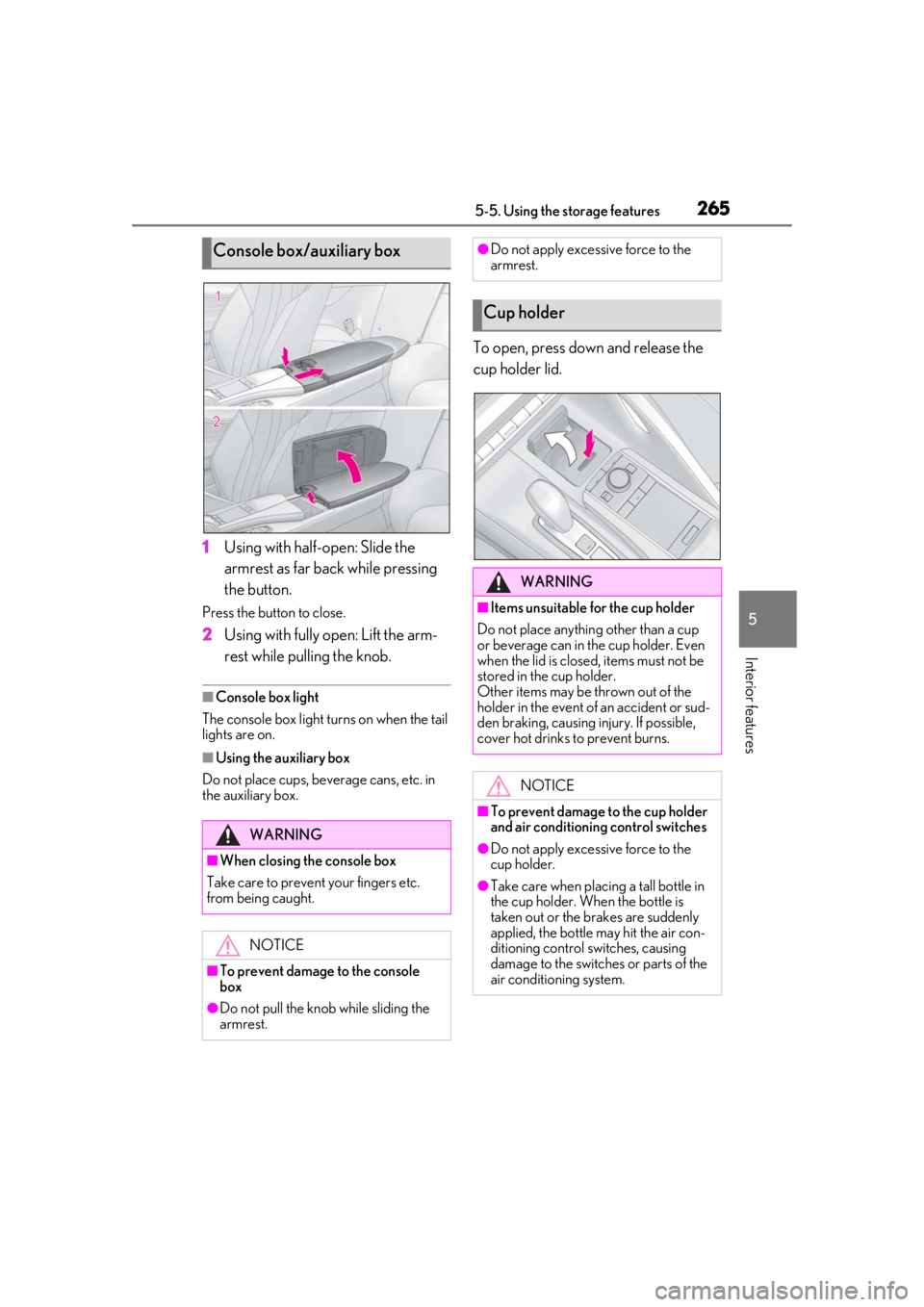
1Using with half-open: Slide the
armrest as far back while pressing
the button.
Press the button to close.
2Using with fully open: Lift the arm-
rest while pulling the knob.
■Console box light
The console box light turns on when the tail
lights are on.
■Using the auxiliary box
Do not place cups, beverage cans, etc. in
the auxiliary box.
To open, press down and release the
cup holder lid.
Console box/auxiliary box
WARNING
■When closing the console box
Take care to prevent your fingers etc.
from being caught.
NOTICE
■To prevent damage to the console
box
●Do not pull the knob while sliding the
armrest.
●Do not apply excessive force to the
armrest.
Cup holder
WARNING
■Items unsuitable for the cup holder
Do not place anything other than a cup
or beverage can in the cup holder. Even
when the lid is closed, items must not be
stored in the cup holder.
Other items may be thrown out of the
holder in the event of an accident or sud-
den braking, causing injury. If possible,
cover hot drinks to prevent burns.
NOTICE
■To prevent damage to the cup holder
and air conditioning control switches
●Do not apply excessive force to the
cup holder.
●Take care when placing a tall bottle in
the cup holder. When the bottle is
taken out or the brakes are suddenly
applied, the bottle may hit the air con-
ditioning control switches, causing
damage to the switches or parts of the
air conditioning system.
Page 268 of 436
2685-6. Using the other interior features
5-6.Using the other interior features
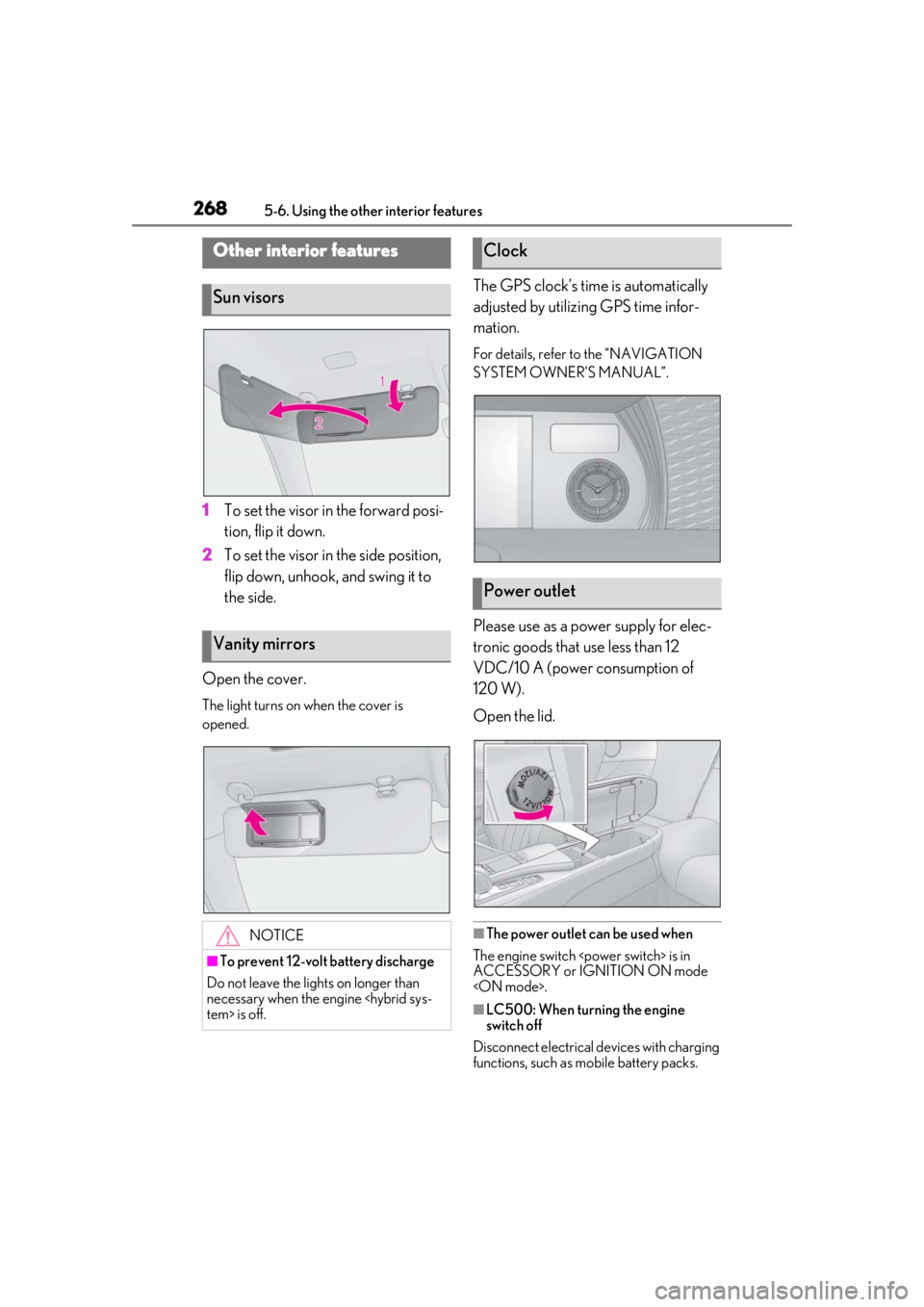
1To set the visor in the forward posi-
tion, flip it down.
2 To set the visor in the side position,
flip down, unhook, and swing it to
the side.
Open the cover.
The light turns on when the cover is
opened.
The GPS clock’s time is automatically
adjusted by utilizing GPS time infor-
mation.
For details, refer to the “NAVIGATION
SYSTEM OWNER’S MANUAL”.
Please use as a power supply for elec-
tronic goods that use less than 12
VDC/10 A (power consumption of
120 W).
Open the lid.
■The power outlet can be used when
The engine switch
ACCESSORY or IGNITION ON mode
■LC500: When turning the engine
switch off
Disconnect electrical devices with charging
functions, such as mobile battery packs.
Other interior features
Sun visors
Vanity mirrors
NOTICE
■To prevent 12-volt battery discharge
Do not leave the lights on longer than
necessary when the engine
Clock
Power outlet
Page 289 of 436
2896-2. Maintenance
6
Maintenance and care
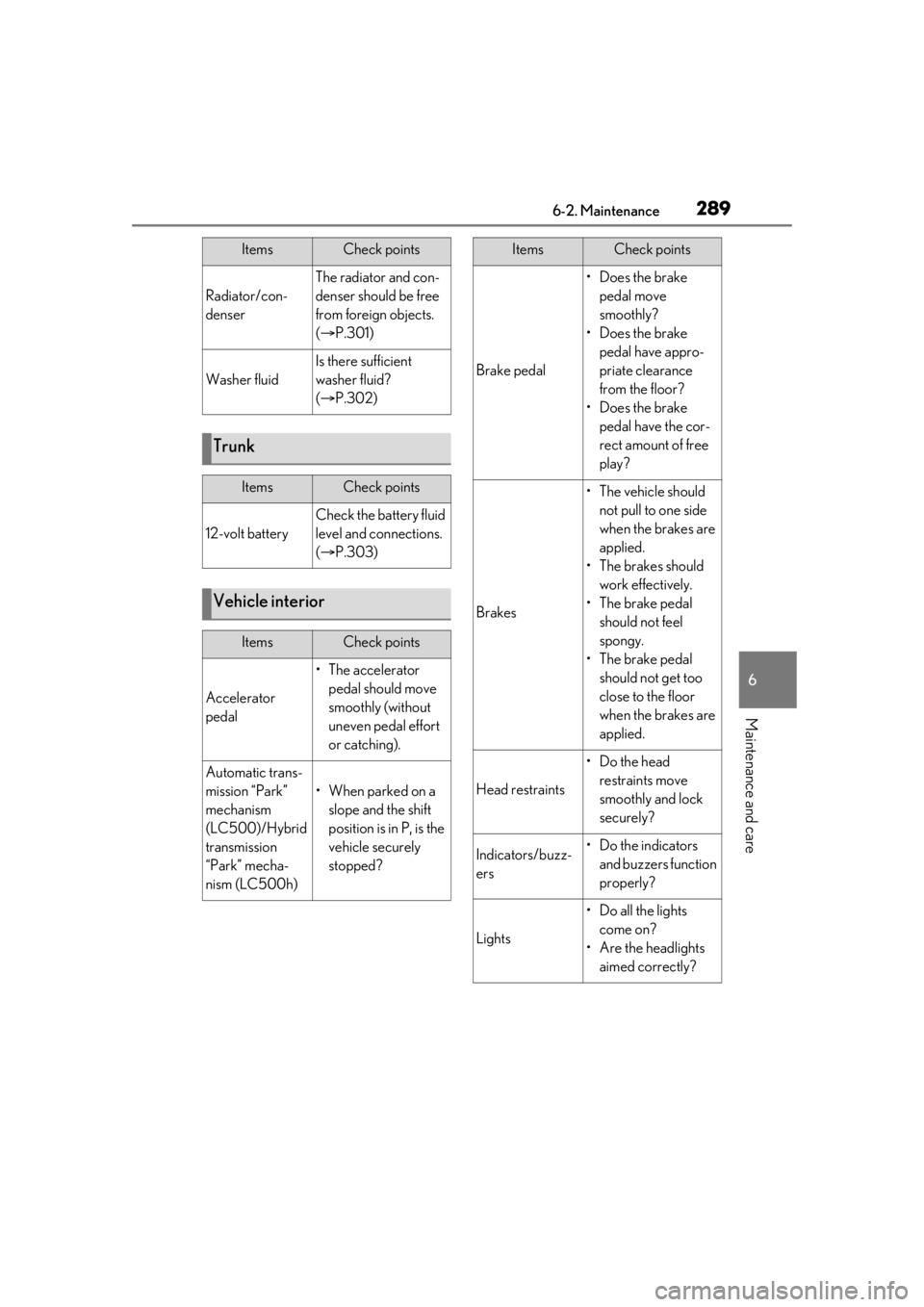
Radiator/con-
denser
The radiator and con-
denser should be free
from foreign objects.
( P.301)
Washer fluid
Is there sufficient
washer fluid?
( P.302)
Trunk
ItemsCheck points
12-volt battery
Check the battery fluid
level and connections.
( P.303)
Vehicle interior
ItemsCheck points
Accelerator
pedal
• The accelerator
pedal should move
smoothly (without
uneven pedal effort
or catching).
Automatic trans-
mission “Park”
mechanism
(LC500)/Hybrid
transmission
“Park” mecha-
nism (LC500h)
•When parked on a slope and the shift
position is in P, is the
vehicle securely
stopped?
ItemsCheck points
Brake pedal
•Does the brake pedal move
smoothly?
•Does the brake pedal have appro-
priate clearance
from the floor?
•Does the brake pedal have the cor-
rect amount of free
play?
Brakes
•The vehicle should not pull to one side
when the brakes are
applied.
• The brakes should work effectively.
• The brake pedal should not feel
spongy.
• The brake pedal should not get too
close to the floor
when the brakes are
applied.
Head restraints
•Do the head restraints move
smoothly and lock
securely?
Indicators/buzz-
ers•Do the indicators and buzzers function
properly?
Lights
• Do all the lights come on?
• Are the headlights aimed correctly?
ItemsCheck points
Page 355 of 436
3557-2. Steps to take in an emergency
7
When trouble arises
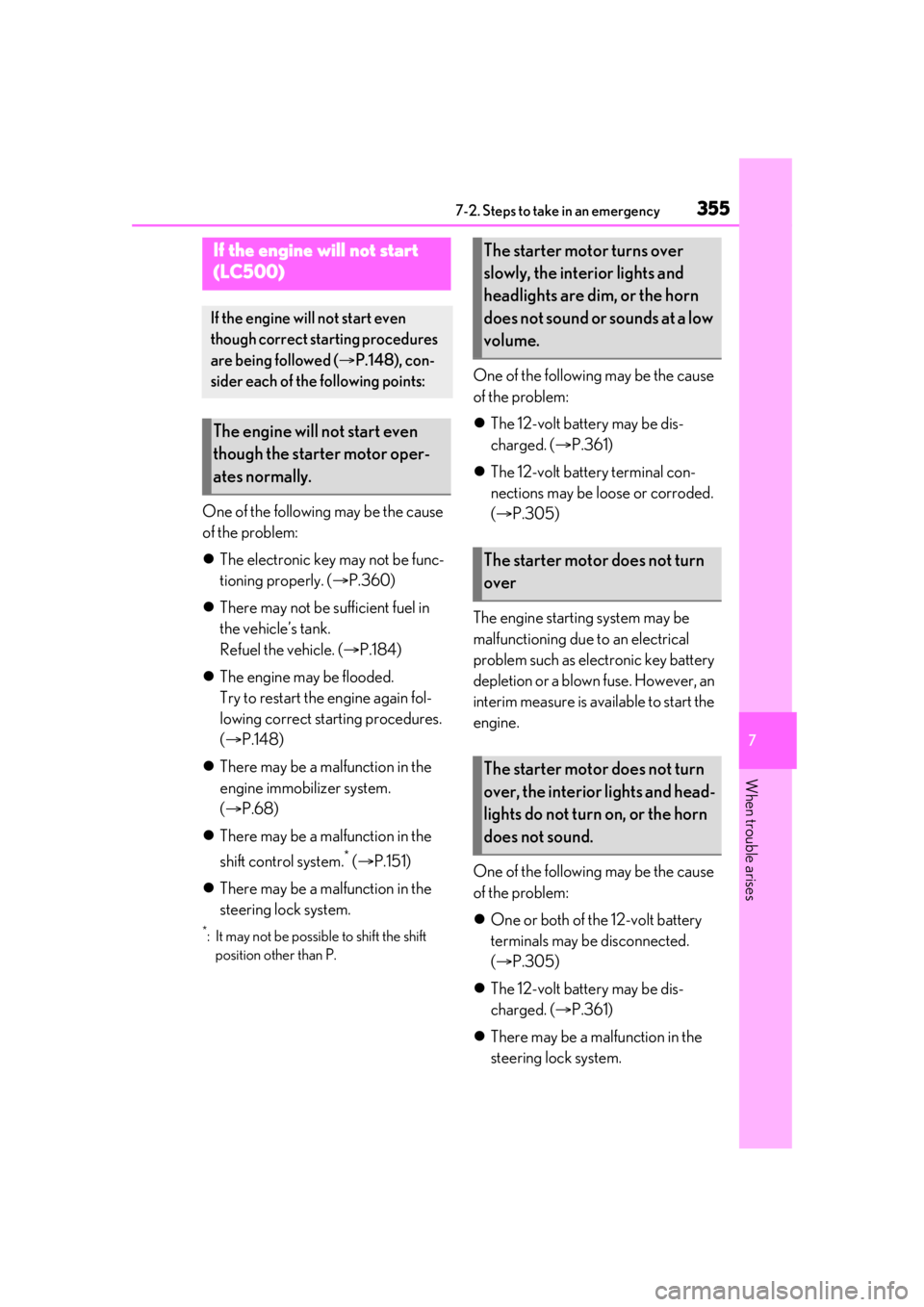
One of the following may be the cause
of the problem:
The electronic key may not be func-
tioning properly. ( P.360)
There may not be sufficient fuel in
the vehicle’s tank.
Refuel the vehicle. ( P.184)
The engine may be flooded.
Try to restart the engine again fol-
lowing correct starting procedures.
( P.148)
There may be a malfunction in the
engine immobilizer system.
( P.68)
There may be a malfunction in the
shift control system.
* ( P.151)
There may be a malfunction in the
steering lock system.
*: It may not be possible to shift the shift
position other than P.
One of the following may be the cause
of the problem:
The 12-volt battery may be dis-
charged. ( P.361)
The 12-volt battery terminal con-
nections may be lo ose or corroded.
( P.305)
The engine starting system may be
malfunctioning due to an electrical
problem such as electronic key battery
depletion or a blown fuse. However, an
interim measure is available to start the
engine.
One of the following may be the cause
of the problem:
One or both of the 12-volt battery
terminals may be disconnected.
( P.305)
The 12-volt battery may be dis-
charged. ( P.361)
There may be a malfunction in the
steering lock system.
If the engine will not start
(LC500)
If the engine will not start even
though correct starting procedures
are being followed ( P.148), con-
sider each of the following points:
The engine will not start even
though the starter motor oper-
ates normally.
The starter motor turns over
slowly, the interior lights and
headlights are dim, or the horn
does not sound or sounds at a low
volume.
The starter motor does not turn
over
The starter motor does not turn
over, the interior lights and head-
lights do not turn on, or the horn
does not sound.
Page 357 of 436
3577-2. Steps to take in an emergency
7
When trouble arises
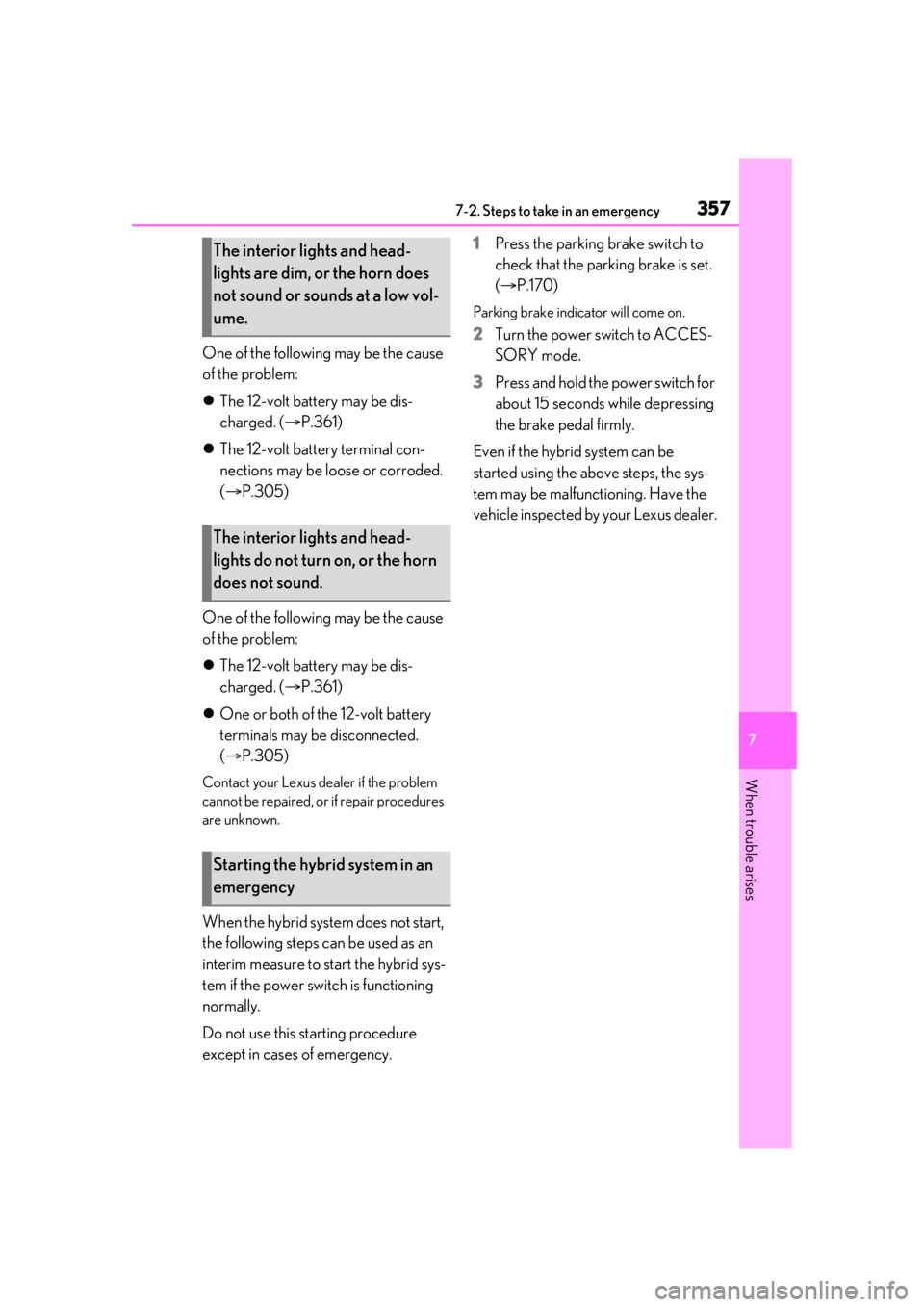
One of the following may be the cause
of the problem:
The 12-volt battery may be dis-
charged. ( P.361)
The 12-volt battery terminal con-
nections may be loose or corroded.
( P.305)
One of the following may be the cause
of the problem:
The 12-volt battery may be dis-
charged. ( P.361)
One or both of the 12-volt battery
terminals may be disconnected.
( P.305)
Contact your Lexus dealer if the problem
cannot be repaired, or if repair procedures
are unknown.
When the hybrid system does not start,
the following steps can be used as an
interim measure to start the hybrid sys-
tem if the power switch is functioning
normally.
Do not use this starting procedure
except in cases of emergency. 1
Press the parking brake switch to
check that the parking brake is set.
(P.170)
Parking brake indicator will come on.
2 Turn the power switch to ACCES-
SORY mode.
3 Press and hold the power switch for
about 15 seconds while depressing
the brake pedal firmly.
Even if the hybrid system can be
started using the above steps, the sys-
tem may be malfunctioning. Have the
vehicle inspected by your Lexus dealer.
The interior lights and head-
lights are dim, or the horn does
not sound or sounds at a low vol-
ume.
The interior lights and head-
lights do not turn on, or the horn
does not sound.
Starting the hybrid system in an
emergency
Page 403 of 436
4038-2. Customization
8
Vehicle specifications
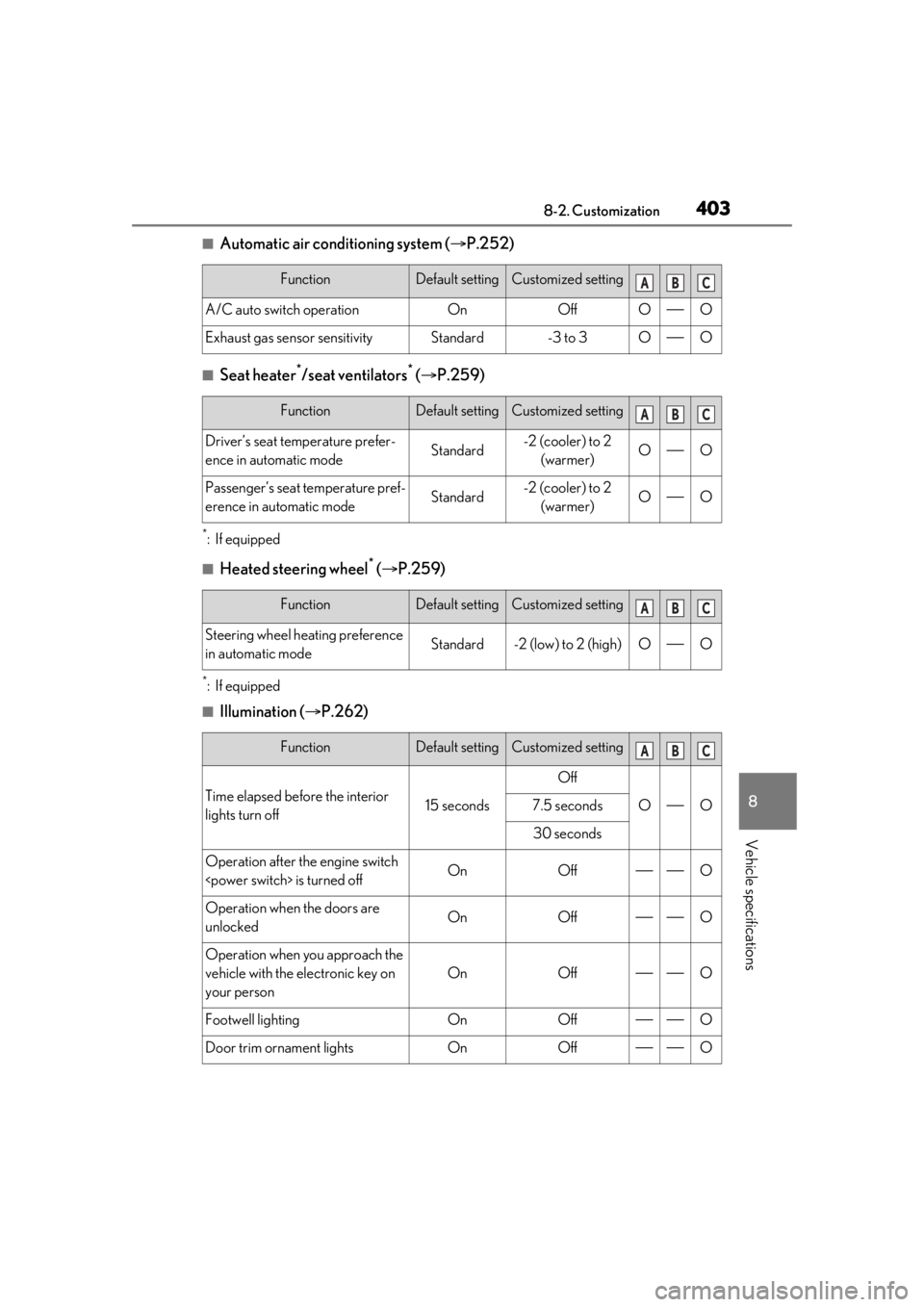
■Automatic air conditioning system (P.252)
■Seat heater*/seat ventilators* ( P.259)
*:If equipped
■Heated steering wheel* ( P.259)
*:If equipped
■Illumination ( P.262)
FunctionDefault settingCustomized setting
A/C auto switch operationOnOffOO
Exhaust gas sensor sensitivityStandard-3 to 3OO
FunctionDefault settingCustomized setting
Driver’s seat temperature prefer-
ence in automatic modeStandard-2 (cooler) to 2
(warmer)OO
Passenger’s seat temperature pref-
erence in automatic modeStandard-2 (cooler) to 2 (warmer)OO
FunctionDefault settingCustomized setting
Steering wheel heating preference
in automatic modeStandard-2 (low) to 2 (high)OO
FunctionDefault settingCustomized setting
Time elapsed before the interior
lights turn off15 seconds
Off
OO7.5 seconds
30 seconds
Operation after the engine switch
Operation when the doors are
unlockedOnOffO
Operation when you approach the
vehicle with the electronic key on
your person
OnOffO
Footwell lightingOnOffO
Door trim ornament lightsOnOffO
ABC
ABC
ABC
ABC