audio lexus LC500h 2021 Owner's Manual / LEXUS 2021 LC500,LC500H OWNER'S MANUAL (OM11559U)
[x] Cancel search | Manufacturer: LEXUS, Model Year: 2021, Model line: LC500h, Model: Lexus LC500h 2021Pages: 448, PDF Size: 14.11 MB
Page 15 of 448
15Pictorial index
Applying/releasing ............................................................................................................P.176
Precautions against winter season ................... .......................................................... P.251
Warning buzzer/message................................................................................ P.350, 357
Turn signal lever ...................................................................................................... P.175
Headlight switch....................................................................................................... P.181
Headlights/parking lights/tail lights/daytime running lights .............................P.181
Windshield wiper and washer switch ................................................................ P.187
Usage.......................................................................................................................... ............ P.187
Adding washer fluid .......................................................................................................... P. 310
Warning messages .......................................................................................................... P.357
Emergency flasher switch .................................................................................. P.338
Hood lock release lever ...................................................................................... P.302
Tilt and telescopic steering contro l switch................................ .................... ..P.133
Adjustment ..................................................................................................................... ...... P.133
Driving position memory ................................................................................................. P.127
Air conditioning system .......................................................................................P.260
Usage.......................................................................................................................... ........... P.260
Rear window defogger.....................................................................................................P.261
Audio system
*
Trunk opener main switch ..................................................................................... P.117
*: Refer to “NAVIGATION SYSTEM OWNER’S MANUAL”.
F
G
H
I
J
K
L
M
Page 17 of 448
17Pictorial index
Driving position memory switches..................................................................... P.127
Outside rear view mirror switches ....................................................................P.135
Window lock switch ............................................................................................... P.139
Power window switches ........................................................................................P.138
Door lock switches .................................................................................................. P.112
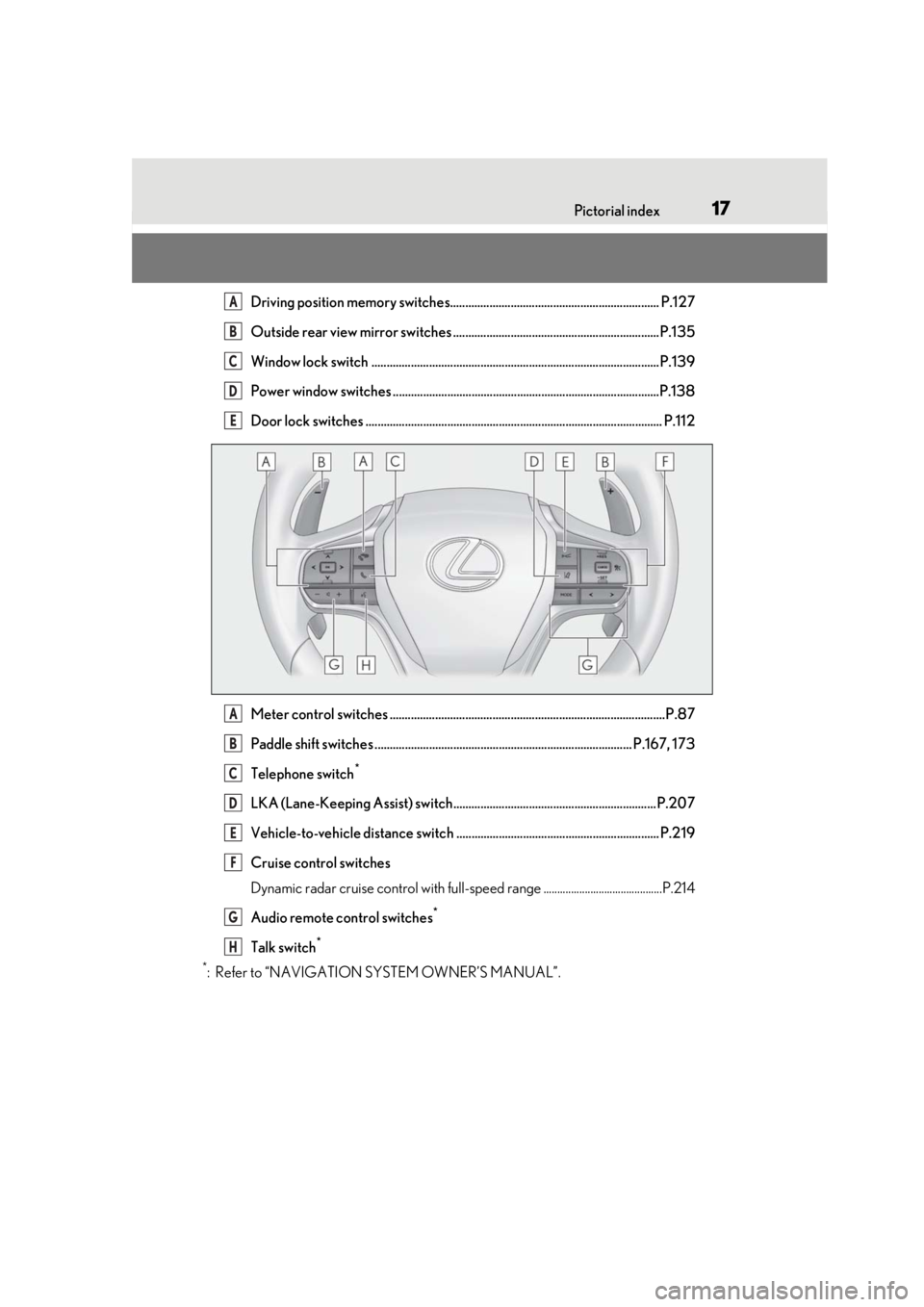
Meter control switches ...........................................................................................P.87
Paddle shift switches ..................................................................................... P.167, 173
Telephone switch
*
LKA (Lane-Keeping Assist) switch...................................................................P.207
Vehicle-to-vehicle distance switch ................................................................... P.219
Cruise control switches
Dynamic radar cruise control with full-speed range ...........................................P.214
Audio remote control switches
*
Talk switch*
*
: Refer to “NAVIGATION SYSTEM OWNER’S MANUAL”.
A
B
C
D
E
A
B
C
D
E
F
G
H
Page 18 of 448
18Pictorial index
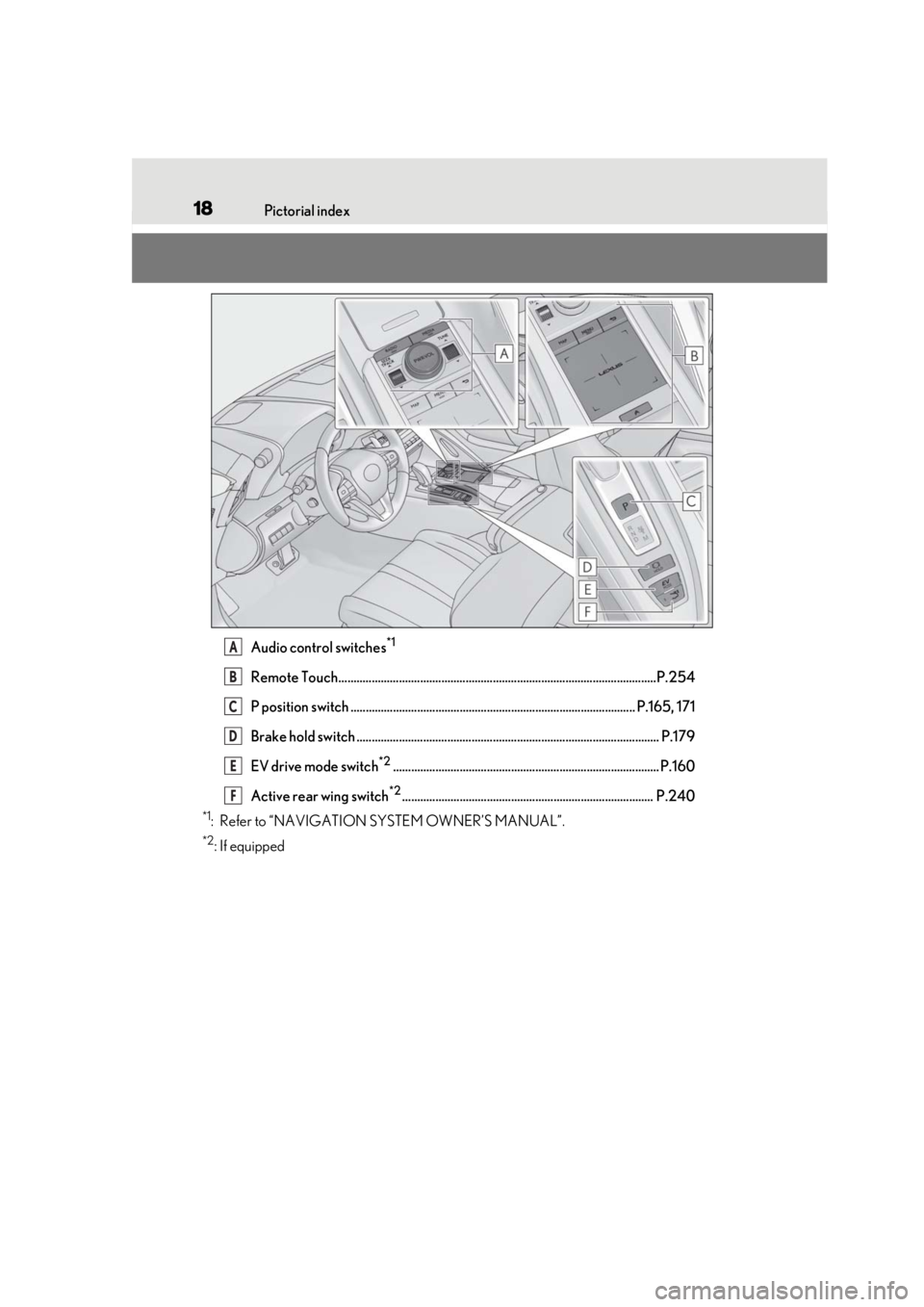
Audio control switches*1
Remote Touch.........................................................................................................P.254
P position switch .............................................................................................. P.165, 171
Brake hold switch .................................................................................................... P.179
EV drive mode switch
*2........................................................................................ P.160
Active rear wing switch
*2................................................................................... P.240
*1: Refer to “NAVIGATION SYSTEM OWNER’S MANUAL”.
*2: If equipped
A
B
C
D
E
F
Page 86 of 448
862-1. Instrument cluster
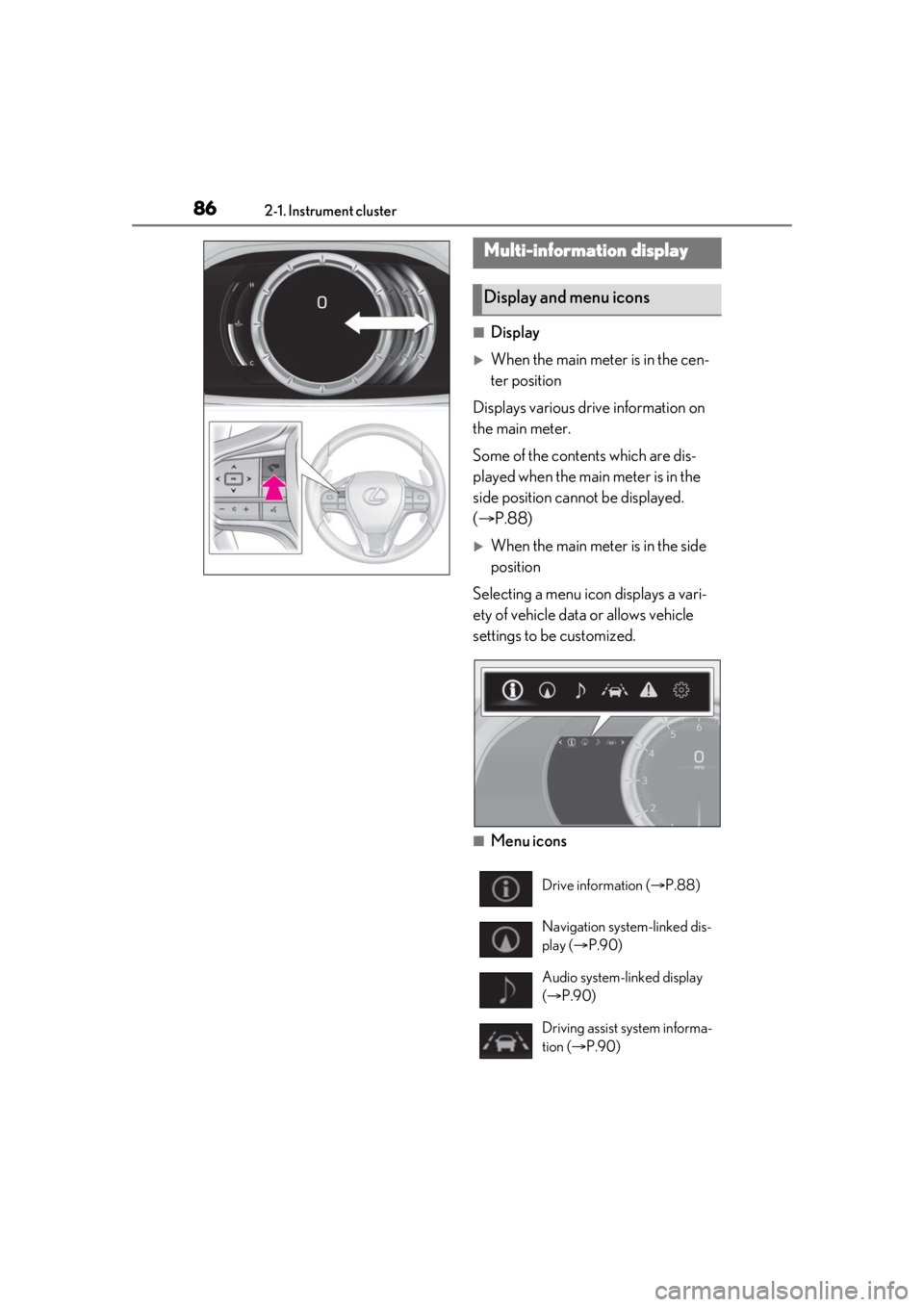
■Display
When the main meter is in the cen-
ter position
Displays various drive information on
the main meter.
Some of the contents which are dis-
played when the main meter is in the
side position cannot be displayed.
( P.88)
When the main meter is in the side
position
Selecting a menu icon displays a vari-
ety of vehicle data or allows vehicle
settings to be customized.
■Menu icons
Multi-information display
Display and menu icons
Drive information ( P.88)
Navigation system-linked dis-
play ( P.90)
Audio system-linked display
( P.90)
Driving assist system informa-
tion ( P.90)
Page 90 of 448
902-1. Instrument cluster
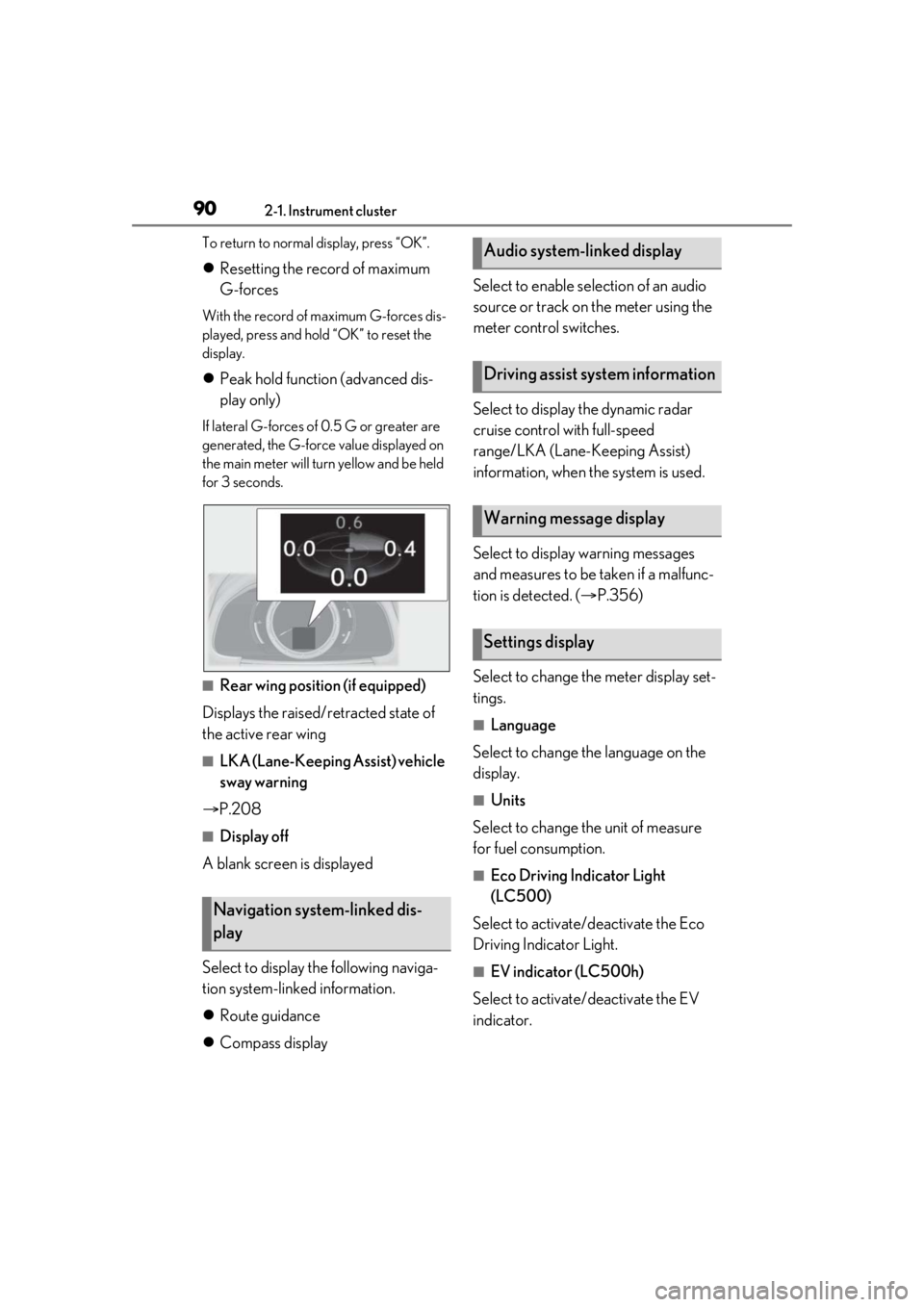
To return to normal display, press “OK”.
Resetting the record of maximum
G-forces
With the record of maximum G-forces dis-
played, press and hold “OK” to reset the
display.
Peak hold function (advanced dis-
play only)
If lateral G-forces of 0.5 G or greater are
generated, the G-force value displayed on
the main meter will turn yellow and be held
for 3 seconds.
■Rear wing position (if equipped)
Displays the raised/retracted state of
the active rear wing
■LKA (Lane-Keeping Assist) vehicle
sway warning
P.208
■Display off
A blank screen is displayed
Select to display the following naviga-
tion system-linked information.
Route guidance
Compass display Select to enable se
lection of an audio
source or track on the meter using the
meter control switches.
Select to display the dynamic radar
cruise control with full-speed
range/LKA (Lane-Keeping Assist)
information, when the system is used.
Select to display warning messages
and measures to be taken if a malfunc-
tion is detected. ( P.356)
Select to change the meter display set-
tings.
■Language
Select to change the language on the
display.
■Units
Select to change the unit of measure
for fuel consumption.
■Eco Driving Indicator Light
(LC500)
Select to activate/deactivate the Eco
Driving Indicator Light.
■EV indicator (LC500h)
Select to activate/deactivate the EV
indicator.
Navigation system-linked dis-
play
Audio system-linked display
Driving assist system information
Warning message display
Settings display
Page 91 of 448
912-1. Instrument cluster
2
Vehicle status information and indicators
■Drive information 1/Drive infor-
mation 2
Select to select up to 2 items that will
be displayed on the “Drive Info 1”
screen and “Drive Info 2” screen
respectively. ( P.88)
■Pop-up display
Select to set the following pop-up dis-
plays, which may appear in some situa-
tions, on/off.
• Route guidance display of the navi- gation system-linked system
• Making call display of the hands- free phone system
• Audio system operation display
• Voice recognition display
• Instrument panel brightness adjust- ment display
■Ring position memory
Select to change the meter ring posi-
tion when the engine
started.
The position before the engine
tion can be selected.
■Accent color
Select to change the accent color on
the screen, such as the cursor color.
■Rev indicator
Select to set the rev indicator on/off.
When set to on, proceed to select the
engine speed at which the rev indicator
will be displayed.
■Rev peak
Select to set the rev peak on/off.
■Clock
Select to switch between 12-hour dis-
play and 24-hour display.
■Initialization
Select to reset the meter display set-
tings.
■Suspension of the settings display
In the following situations, operation of the
settings display will be temporarily sus-
pended.
●When a warning message appears on the
multi-information display
●When the vehicle begins to move
■Customization
The settings can be changed on of the
multi-information display.
●Settings of the driving assist systems
( P.405)
●Vehicle settings ( P.94, 295, 318, 320,
405)
WARNING
■Cautions during setting up the dis-
play
As the engine
be running
the display, ensure that the vehicle is
parked in a place with adequate ventila-
tion. In a closed area such as a garage,
exhaust gases including harmful carbon
monoxide (CO) may collect and enter
the vehicle. This may lead to death or a
serious health hazard.
NOTICE
■While setting up the display
To prevent 12-volt battery discharge,
ensure that the engine is running
display features.
Page 93 of 448
932-1. Instrument cluster
2
Vehicle status information and indicators
*:If equipped
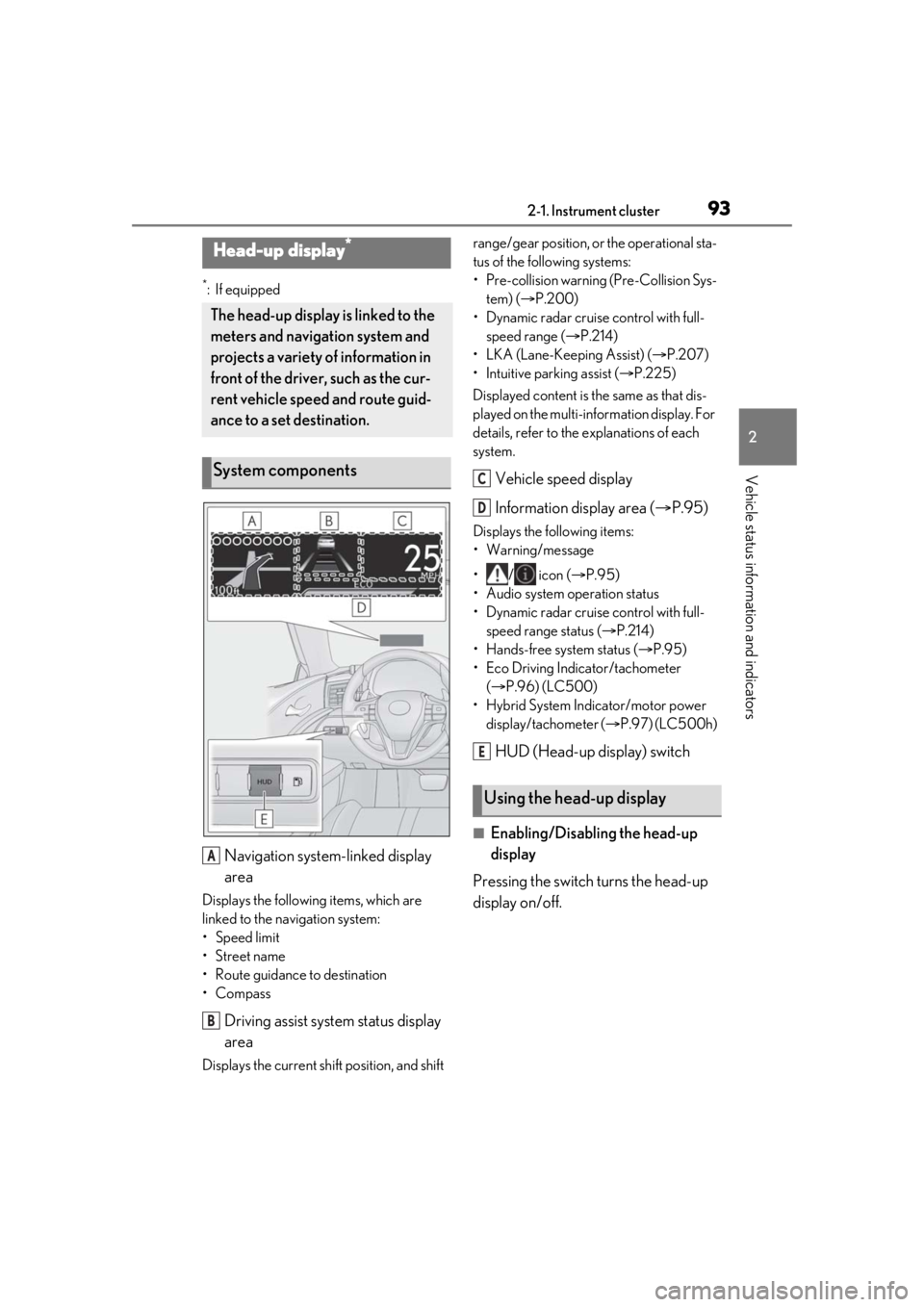
Navigation system-linked display
area
Displays the following items, which are
linked to the navigation system:
• Speed limit
•Street name
• Route guidance to destination
•Compass
Driving assist system status display
area
Displays the current shift position, and shift range/gear position, or the operational sta-
tus of the following systems:
• Pre-collision warning (Pre-Collision Sys-
tem) ( P.200)
• Dynamic radar cruise control with full- speed range ( P.214)
• LKA (Lane-Keeping Assist) ( P.207)
• Intuitive parking assist ( P.225)
Displayed content is th e same as that dis-
played on the multi-information display. For
details, refer to the ex planations of each
system.
Vehicle speed display
Information display area ( P.95)
Displays the following items:
• Warning/message
•/ icon ( P.95)
• Audio system operation status
• Dynamic radar cruise control with full- speed range status ( P.214)
• Hands-free system status ( P.95)
• Eco Driving Indicator/tachometer ( P.96) (LC500)
• Hybrid System Indicator/motor power display/tachometer ( P.97) (LC500h)
HUD (Head-up display) switch
■Enabling/Disabling the head-up
display
Pressing the switch turns the head-up
display on/off.
Head-up display*
The head-up display is linked to the
meters and navigati on system and
projects a variety of information in
front of the driver, such as the cur-
rent vehicle speed and route guid-
ance to a set destination.
System components
A
B
Using the head-up display
C
D
E
Page 94 of 448
942-1. Instrument cluster
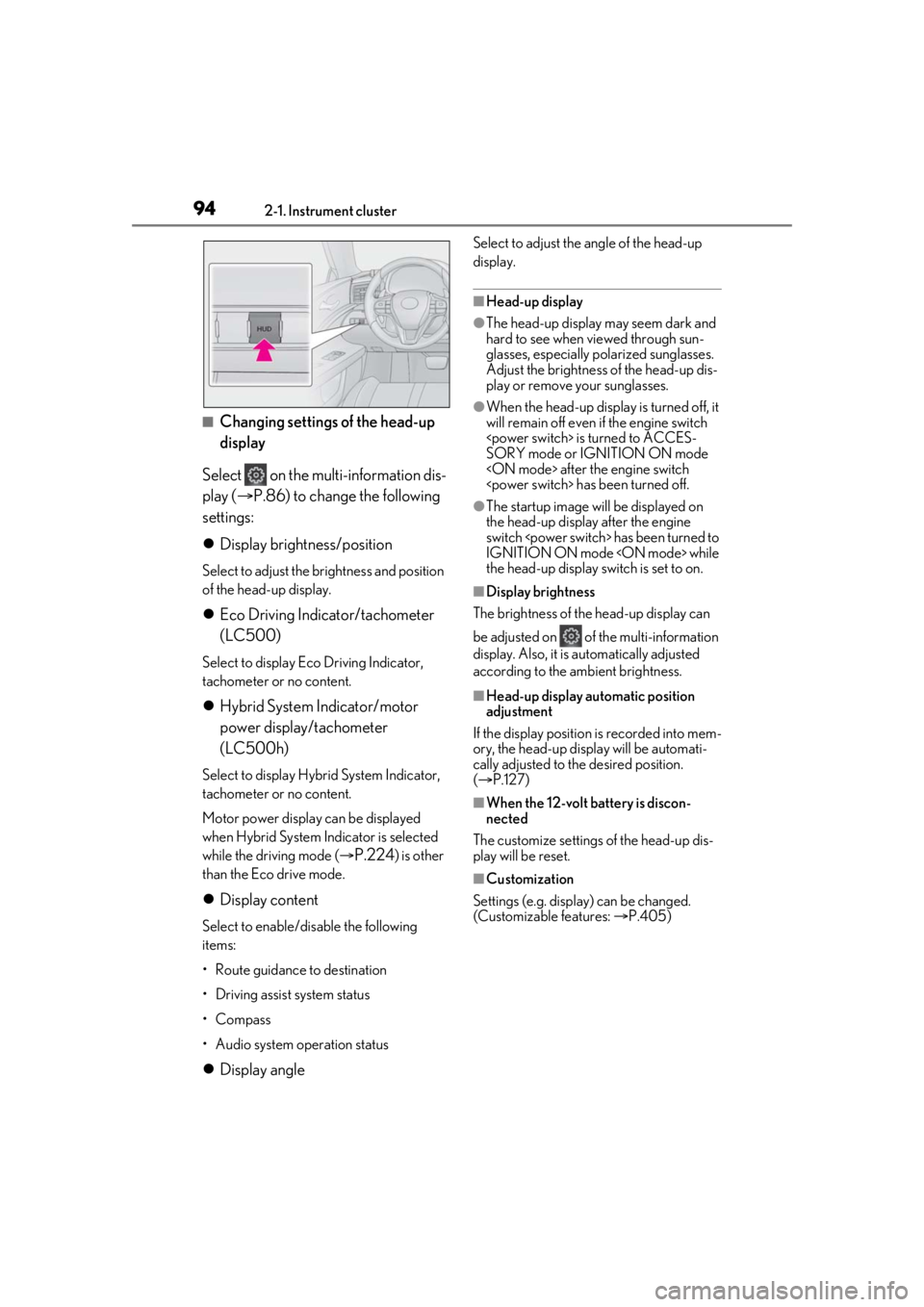
■Changing settings of the head-up
display
Select on the multi-information dis-
play ( P.86) to change the following
settings:
Display brightness/position
Select to adjust the brightness and position
of the head-up display.
Eco Driving Indicator/tachometer
(LC500)
Select to display Eco Driving Indicator,
tachometer or no content.
Hybrid System Indicator/motor
power display/tachometer
(LC500h)
Select to display Hybrid System Indicator,
tachometer or no content.
Motor power display can be displayed
when Hybrid System Indicator is selected
while the driving mode (
P.224) is other
than the Eco drive mode.
Display content
Select to enable/dis able the following
items:
• Route guidance to destination
• Driving assist system status
•Compass
• Audio system operation status
Display angle
Select to adjust the angle of the head-up
display.
■Head-up display
●The head-up display may seem dark and
hard to see when viewed through sun-
glasses, especially polarized sunglasses.
Adjust the brightness of the head-up dis-
play or remove your sunglasses.
●When the head-up display is turned off, it
will remain off even if the engine switch
SORY mode or IGNITION ON mode
●The startup image will be displayed on
the head-up display after the engine
switch
IGNITION ON mode
the head-up display switch is set to on.
■Display brightness
The brightness of the head-up display can
be adjusted on of the multi-information
display. Also, it is automatically adjusted
according to the ambient brightness.
■Head-up display automatic position
adjustment
If the display position is recorded into mem-
ory, the head-up display will be automati-
cally adjusted to th e desired position.
( P.127)
■When the 12-volt battery is discon-
nected
The customize settings of the head-up dis-
play will be reset.
■Customization
Settings (e.g. display) can be changed.
(Customizable features: P.405)
Page 96 of 448
962-1. Instrument cluster
■Audio system operation status
Displayed when the audio system is
operated.
■Eco Driving Indica tor/tachometer
(LC500)
Displays either of Eco Driving Indica-
tor or the tachometer.
■Hybrid System Indicator/motor
power display/tachometer
(LC500h)
Displays either of Hybrid System Indi-
cator or the tachometer.
Motor power display can be displayed
when Hybrid System Indicator is
selected while the driving mode
( P.224) is other than the Eco drive
mode.
Displays the following items which are
linked to the navigation system:
■Speed limit
Displays the speed limit on the current
road.
■Street name
When the navigation system is per-
forming route guidance, the name of
the next street will be displayed on the
top of the display area.
■Route guidance to destination
Displayed when the navigation system
is performing route guidance. When
approaching an inte rsection, an arrow
will be displayed to indicate the sug- gested direction of travel.
■Compass
Displays the direction of travel.
■Street name display
Only street names which are included in the
map data will be displayed.
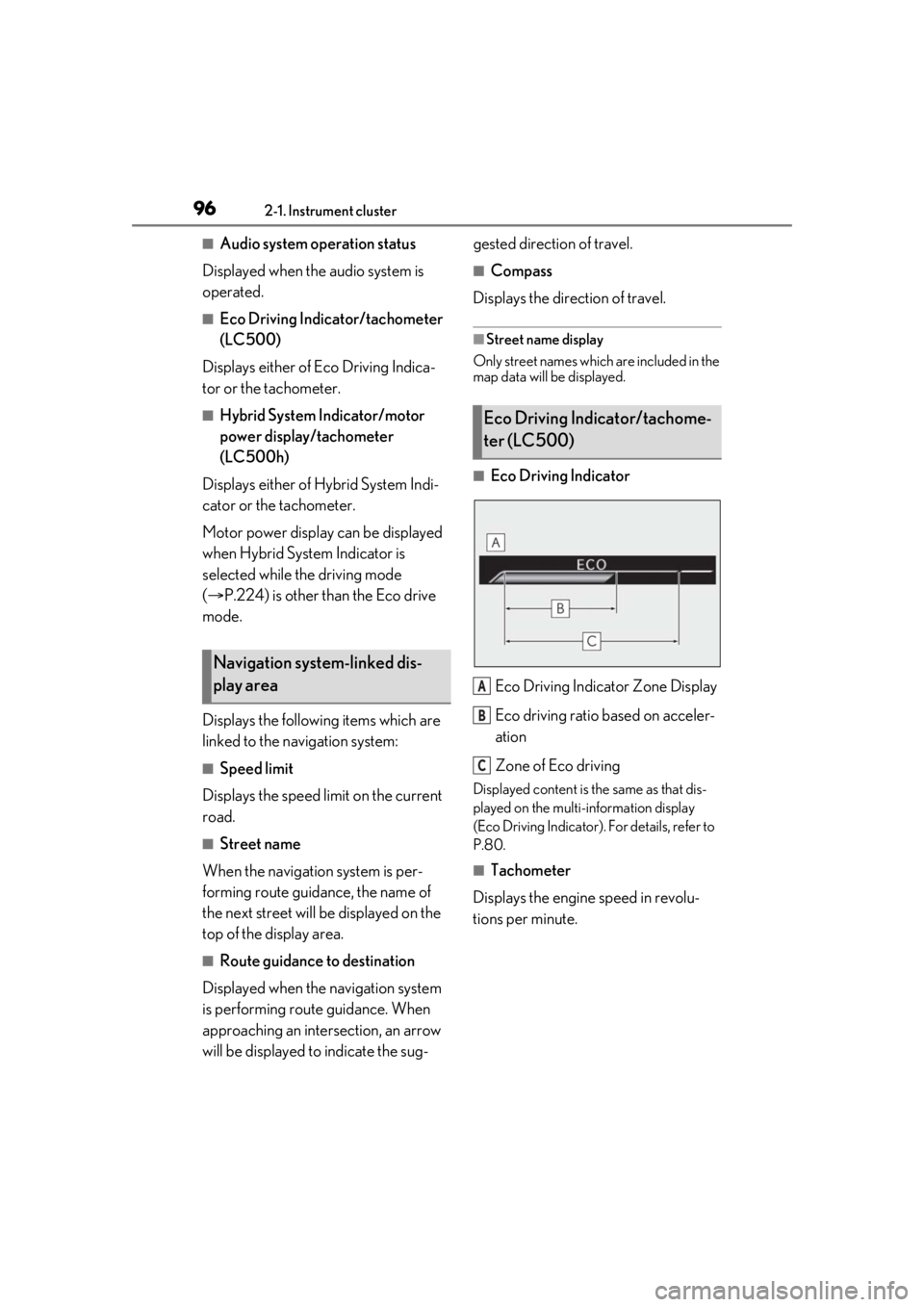
■Eco Driving Indicator
Eco Driving Indicator Zone Display
Eco driving ratio based on acceler-
ation
Zone of Eco driving
Displayed content is th e same as that dis-
played on the multi-information display
(Eco Driving Indicator). For details, refer to
P.80.
■Tachometer
Displays the engine speed in revolu-
tions per minute.
Navigation system-linked dis-
play area
Eco Driving Indicator/tachome-
ter (LC500)
A
B
C
Page 107 of 448
1073-1. Key information
3
Before driving
long periods of time can be set to the bat-
tery-saving mode in advance. (P.119)
●As the electronic ke y always receives
radio waves, the battery will become
depleted even if the electronic key is not
used. The following symptoms indicate
that the electronic key battery may be
depleted. Replace the battery when nec-
essary. ( P.330)
• The smart access system with push-but- ton start or the wireless remote control
does not operate.
• The detection area becomes smaller.
•The LED indicator on the key surface does not turn on.
You can replace the battery by yourself
( P.330). However, as there is a danger
that the electronic key may be damaged, it
is recommended that replacement be car-
ried out by your Lexus dealer.
●To avoid serious deterioration, do not
leave the electronic ke y within 3 ft. (1 m)
of the following electr ical appliances that
produce a magnetic field:
•TVs
• Personal computers
• Cellular phones, cordless phones and battery chargers
• Recharging cellular phones or cordless
phones
• Table lamps
• Induction cookers
■Replacing the battery
P.330
■Confirmation of the registered key
number
The number of keys already registered to
the vehicle can be confirmed. Ask your
Lexus dealer for details.
■If “A New Key has been Registered
Contact Your Dealer for Details” is
shown on the multi-information display
This message will be displayed each time
the driver’s door is opened when the doors
are unlocked from the outside for approxi-
mately 10 days after a new electronic key
has been registered.
If this message is disp layed but you have not
had a new electronic key registered, ask your Lexus dealer to check if an unknown
electronic key (other than those in your
possession) has be
en registered.
NOTICE
■To prevent key damage
●Do not drop the keys, subject them to
strong shocks or bend them.
●Do not expose the keys to high tem-
peratures for long periods of time.
●Do not get the keys wet or wash them
in an ultrasonic washer etc.
●Do not attach metallic or magnetic
materials to the keys or place the keys
close to such materials.
●Do not disassemble the keys.
●Do not attach a sticker or anything else
to the surface of the electronic key.
●Do not place the keys near objects that
produce magnetic fields, such as TVs,
audio systems and induction cookers.
●Do not place the keys near medical
electrical equipment such as low-fre-
quency therapy equipment or micro-
wave therapy equipment, and do not
receive medical attent ion with the keys
on your person.
■Carrying the electronic key on your
person
Carry the electronic key 3.9 in. (10 cm)
or more away from electric appliances
that are turned on. Radio waves emitted
from electric applianc es within 3.9 in. (10
cm) of the electronic key may interfere
with the key, causing the key to not func-
tion properly.
■In case of a smart access system with
push-button start malfunction or
other key-rela ted problems
P.367
■When an electronic key is lost
P.366