battery lexus LFA 2012 Technical Information / LEXUS 2012 LFA (OM77006U) User Guide
[x] Cancel search | Manufacturer: LEXUS, Model Year: 2012, Model line: LFA, Model: Lexus LFA 2012Pages: 420, PDF Size: 5.02 MB
Page 161 of 420
159
2-3. Operating the lights and windshield wipers
2
When driving
■Daytime running light system (Canada only)
To make your vehicle more visible to other drivers, the headlights and tail lights turn
on automatically whenever the engine is started and the parking brake is released.
■Automatic light off system
●When the headlights come on: The headlights and tail lights turn off 30 seconds
after a door is opened and closed if the ignition switch is turned to the “ACC” or
“LOCK” position. (The light turns off immediately if on the key is pressed
after both side doors are locked.)
●When only the tail lights come on: The tail lights turn off automatically if the igni-
tion switch is turned to the “ACC” or “LOCK” position and the driver’s door is
opened.
To turn the lights on again, turn the ignition switch to the “ON” position, or turn the
light switch to once and then back to or
.
NOTICE
■To prevent battery discharge
Do not leave the lights on longer than necessary when the engine is not running.
Page 175 of 420

173
2-4. Using other driving systems
2
When driving
NOTICE
■To prevent system damage
●Do not apply pressure to the active rear wing when pushing or pulling the vehicle.
●Do not lean on the active rear wing.
●Do not attach any accessories or other foreign objects to the active rear wing.
●Do not modify or disassemble the active rear wing.
●Do not subject the active rear wing to severe impacts.
■To prevent battery discharge
Do not operate the active rear wing repe atedly while the engine is turned off.
Page 195 of 420
193
3-1. Using the air conditioning system and defogger
3
Interior features
■Outside temperature display
●The temperature display shows temperatures within the range of -40°F (-40°C)
and 122°F (50°C).
●In the following situations, the correct outside temperature may not be dis-
played, or the display may take longer than normal to change:
• When the vehicle is stopped, or moving at low speeds (less than 15 mph [25
km/h])
• When the outside temperature has chan ged suddenly (at the entrance/exit of
a garage, tunnel, etc.)
●When “--” or “E” is displayed, the system may be malfunctioning. Take your vehi-
cle to your Lexus dealer.
CAUTION
■To prevent the windshield from fogging up
Do not use
during cool air operation in extremely humid weather. The differ-
ence between the temperature of the outs ide air and that of the windshield can
cause the outer surface of the windshield to fog up, blocking your vision.
NOTICE
■To prevent battery discharge
Do not leave the air conditioning system on longer than necessary when the engine
is stopped.
Page 202 of 420
200
3-1. Using the air conditioning system and defogger
CAUTION
■To prevent the windshield from fogging up
Do not use
during cool air operation in extremely humid weather. The differ-
ence between the temperature of the outside air and that of the windshield can
cause the outer surface of the windshield to fog up, blocking your vision.
NOTICE
■To prevent battery discharge
Do not leave the air conditioning system on longer than necessary when the engine
is stopped.
Page 208 of 420
206
3-2. Using the audio system
Ejecting discs■ Ejecting a disc
Select the disc to be ejected.
Push the “ ” button and remove the disc.
■ Ejecting all discs
Push and hold the “ ” button until you hear a beep, then remove the
discs.
■Using cellular phones
Interference may be heard through the audi o/video system’s speakers if a cellular
phone is being used inside or close to the vehicle while the audio/video system is
operating.
NOTICE
■To prevent battery discharge
Do not leave the audio/video system on longer than necessary with the engine off.
■To avoid damaging the audio/video system
Take care not to spill drinks or othe r fluids over the audio/video system.
STEP1
STEP2
Page 209 of 420
207
3
Interior features
3-3.Using the interior lights
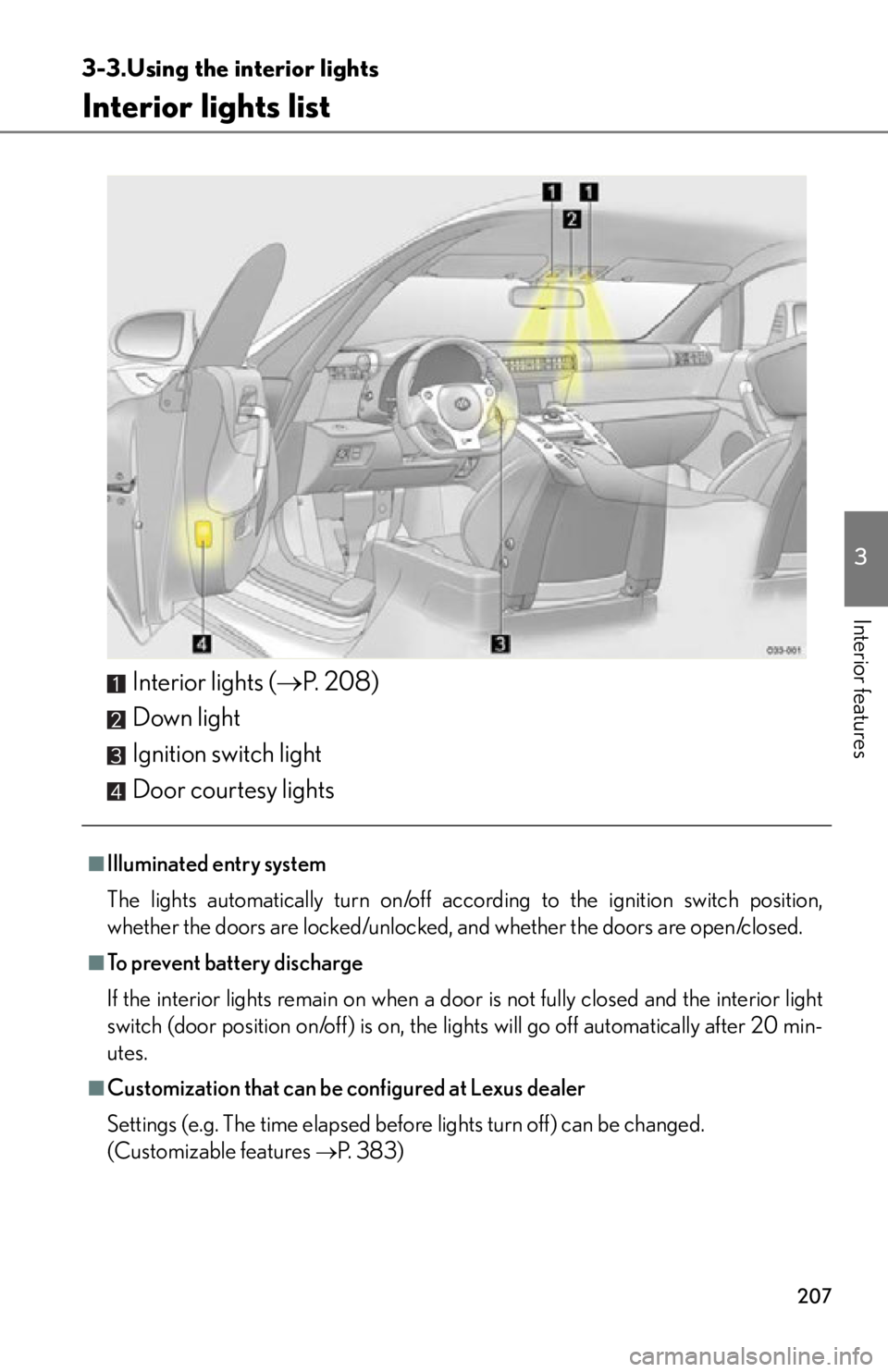
Interior lights list
Interior lights (P. 2 0 8 )
Down light
Ignition switch light
Door courtesy lights
■Illuminated entry system
The lights automatically turn on/off acco rding to the ignition switch position,
whether the doors are locked/unlocked, and whether the doors are open/closed.
■To prevent battery discharge
If the interior lights remain on when a door is not fully closed and the interior light
switch (door position on/off) is on, the lights will go off automatically after 20 min-
utes.
■Customization that can be configured at Lexus dealer
Settings (e.g. The time elapsed before lights turn off) can be changed.
(Customizable features
P. 383)
Page 216 of 420
214
3-5. Other interior features
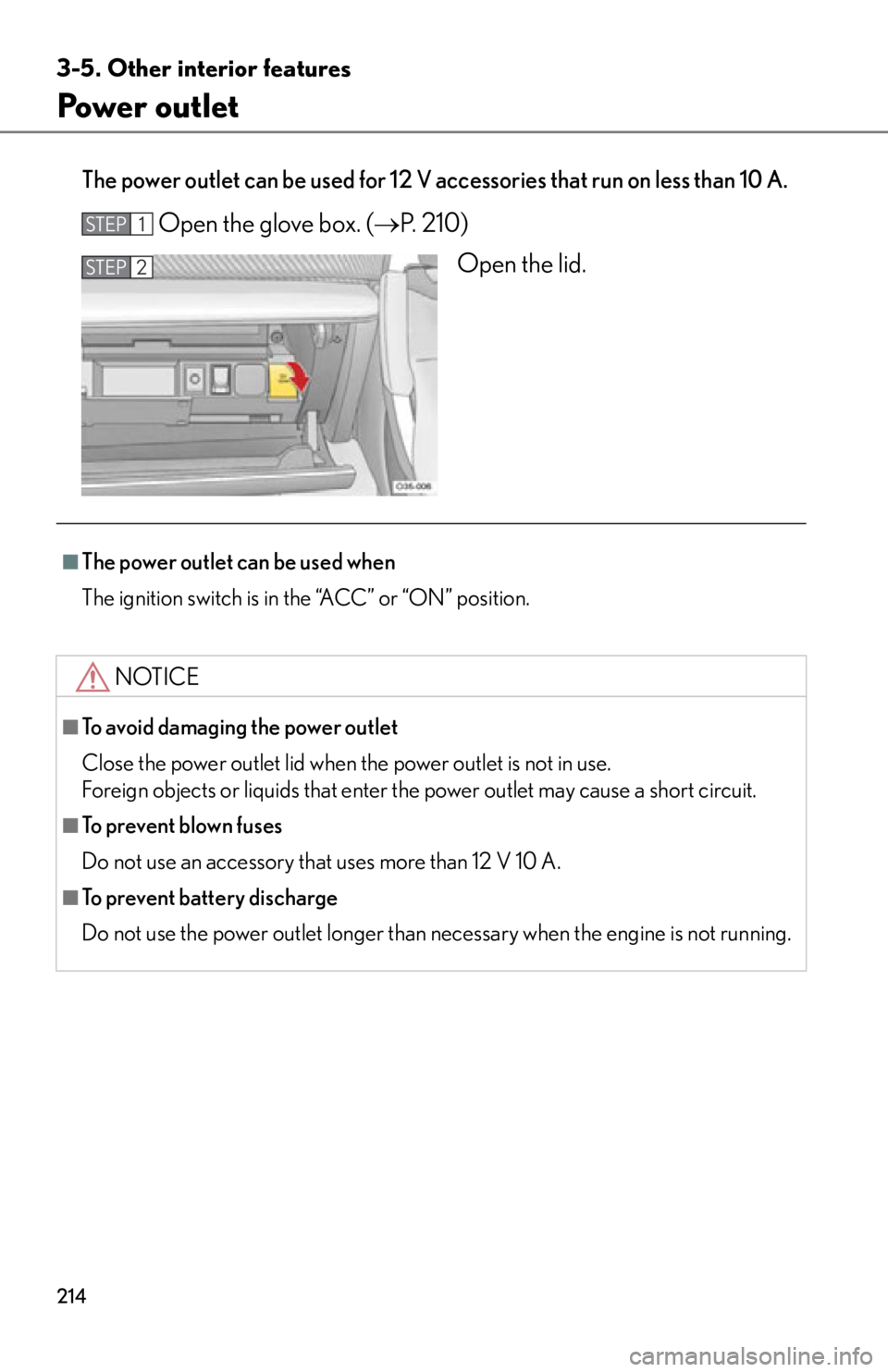
Power outlet
The power outlet can be used for 12 V accessories that run on less than 10 A.
Open the glove box. (P. 210)
Open the lid.STEP1
STEP2
■The power outlet can be used when
The ignition switch is in the “ACC” or “ON” position.
NOTICE
■To avoid damaging the power outlet
Close the power outlet lid when the power outlet is not in use.
Foreign objects or liquids that enter th e power outlet may cause a short circuit.
■To prevent blown fuses
Do not use an accessory that uses more than 12 V 10 A.
■To prevent battery discharge
Do not use the power outlet longer than necessary when the engine is not running.
Page 229 of 420

Maintenance and care4
227
4-1. Maintenance and careCleaning and protecting the vehicle exterior............ 228
Cleaning and protecting the vehicle interior .............. 235
4-2. Maintenance Maintenance requirements ........................ 240
General maintenance .......... 242
Emission inspection and maintenance (I/M)
programs................................ 246 4-3. Do-it-yourself
maintenance
Do-it-yourself service precautions ............................ 247
Hood .......................................... 250
Positioning a floor jack ......... 253
Engine compartment ........... 256
Adding washer fluid .............. 264
Battery ...................................... 265
Tires............................................ 270
Tire inflation pressure............ 277
Wheels ....................................... 281
Air conditioning filter ........... 283
Wireless remote control battery .................................... 285
Checking and replacing fuses ........................................ 287
Light bulbs ................................ 299
Page 243 of 420
241
4-2. Maintenance
4
Maintenance and care
CAUTION
■If your vehicle is not properly maintained
Improper maintenance could result in serious damage to the vehicle and possible
serious injury or death.
■Handling of the battery
●Engine exhaust, some of its constituents, and a wide variety of automobile com-
ponents contain or emit chemicals known to the State of California to cause can-
cer and birth defects and other reproductive harm. Work in a well ventilated area.
●Oils, fuels and fluids contained in vehicles as well as waste produced by compo-
nent wear contain or emit chemicals known to the State of California to cause
cancer and birth defects or other reproductive harm. Avoid exposure and wash
any affected area immediately.
●Battery posts, terminals and related accessories contain lead and lead com-
pounds which are known to cause brai n damage. Wash your hands after han-
dling. ( P. 2 6 5 )
Page 244 of 420
242
4-2. Maintenance
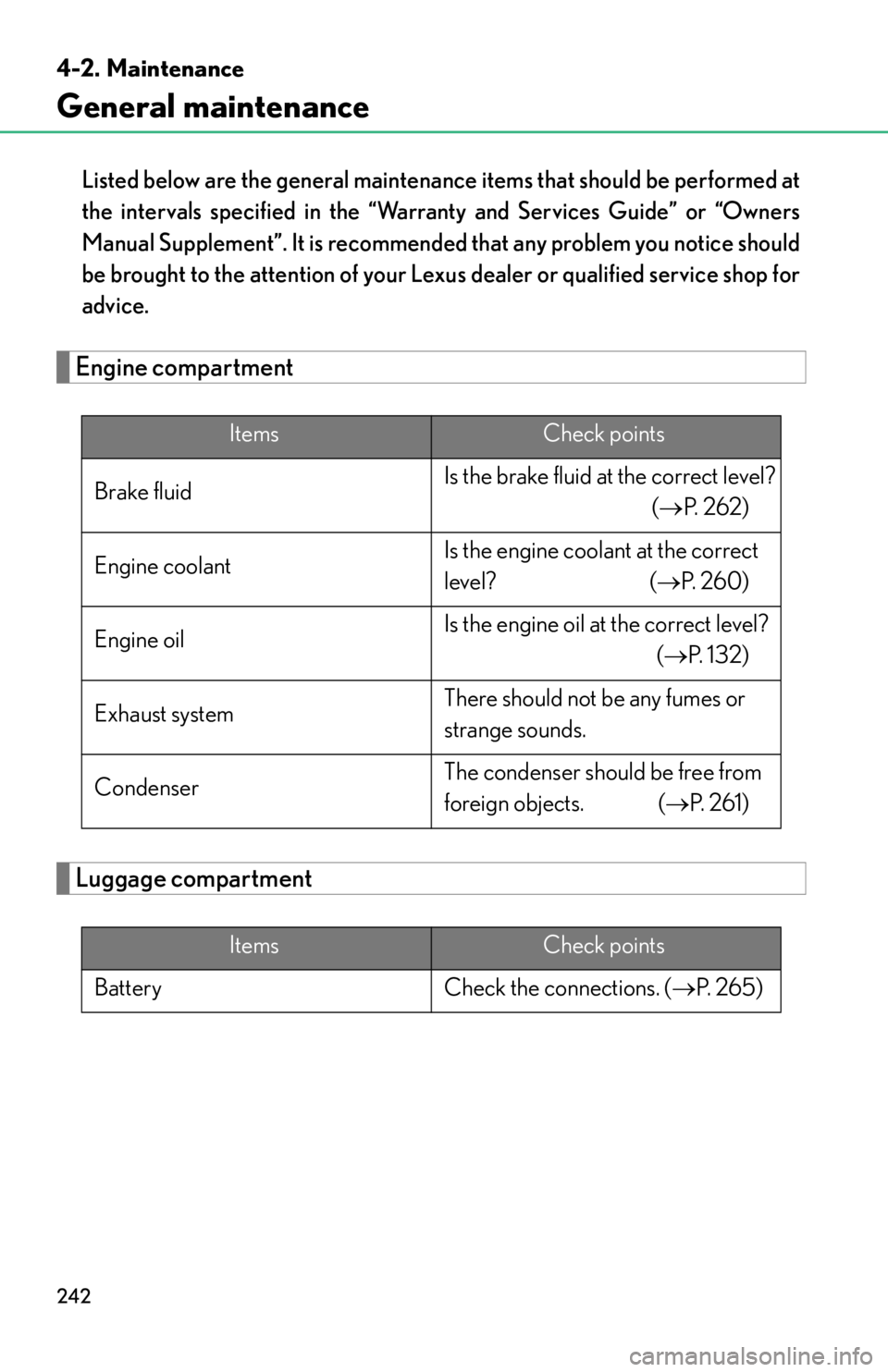
General maintenance
Listed below are the general maintenance items that should be performed at
the intervals specified in the “Warranty and Services Guide” or “Owners
Manual Supplement”. It is recommended that any problem you notice should
be brought to the attention of your Lexu s dealer or qualified service shop for
advice.
Engine compartment
Luggage compartment
ItemsCheck points
Brake fluid Is the brake fluid at the correct level?
(P. 2 6 2 )
Engine coolant Is the engine coolant at the correct
level? (
P. 2 6 0 )
Engine oil Is the engine oil at the correct level?
(P. 1 3 2 )
Exhaust system There should not be any fumes or
strange sounds.
Condenser The condenser should be free from
foreign objects. (
P. 2 6 1 )
ItemsCheck points
Battery Check the connections. ( P. 2 6 5 )