remote control lexus LFA 2012 Technical Information / LEXUS 2012 LFA (OM77006U) User Guide
[x] Cancel search | Manufacturer: LEXUS, Model Year: 2012, Model line: LFA, Model: Lexus LFA 2012Pages: 420, PDF Size: 5.02 MB
Page 49 of 420

47
1-4. Opening and closing the windows
1
Before driving
■When the power window does not close normally
If the jam protection function is operating abnormally and a window cannot be
closed, perform the following operations using the power window switch on the rel-
evant door.
●After stopping the vehicle, the window can be closed with the door closed by
holding the power window switch in the one-touch closing position while the
ignition switch is turned to the “ON” position.
●If the window still cannot be closed even by carrying out the operation
explained above, initialize the function by performing the following procedure.
Hold the power window switch in the one-touch closing position. Con-
tinue holding the switch for a further 6 seconds after the window has
closed.
Hold the power window switch in the one-touch opening position. Con-
tinue holding the switch for a further 2 seconds after the window has
opened completely.
Hold the power window switch in the one-touch closing position once
again. Continue holding the switch for a further 2 seconds after the win-
dow has closed.
If you release the switch while the window is moving, start again from the beginning.
If the window continues to close but then re-open slightly even after performing the
above procedure correctly, have the vehicle inspected by your Lexus dealer.
■Customization that can be conf igured at your Lexus dealer
Settings of the linked key and wireless remote control operation can be changed.
(Customizable features P. 383)
STEP1
STEP2
STEP3
Page 57 of 420
55
1
1-6. Theft deterrent system
Before driving
Alarm
The system sounds the alarm and flashes the lights when forcible entry is
detected.
■ Triggering of the alarm
The alarm is triggered in the following situations when the alarm is set:
●A locked door is unlocked or op ened in any way other than using
the wireless remote control or key.
● The hood or rear hatch is opened.
● The tilt sensor detects a change of vehicle inclination.
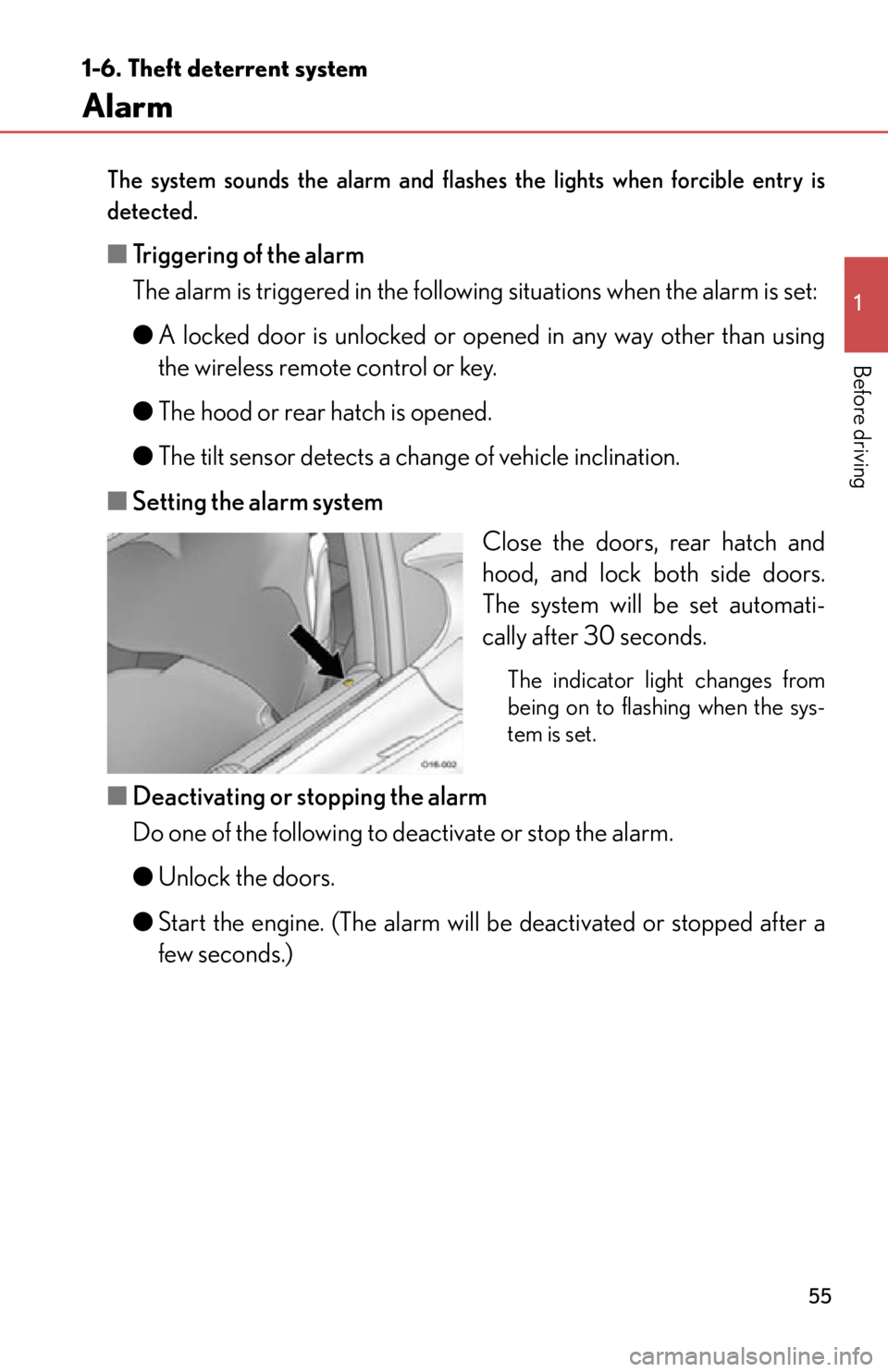
■ Setting the alarm system
Close the doors, rear hatch and
hood, and lock both side doors.
The system will be set automati-
cally after 30 seconds.
The indicator light changes from
being on to flashing when the sys-
tem is set.
■Deactivating or stopping the alarm
Do one of the following to deactivate or stop the alarm.
●Unlock the doors.
● Start the engine. (The alarm will be deactivated or stopped after a
few seconds.)
Page 60 of 420

58
1-6. Theft deterrent system
■The alarm cannot be set when
In the following situations, the alarm cannot be set. Be careful if the vehicle will not
be used for an extended period of time.
●When a battery terminal is disconnected
●When the “D/C CUT” fuse is removed
■Canceling and automatic re-enabling of the tilt sensor
●The alarm will still be set even when the tilt sensor is canceled.
●After the tilt sensor is canceled, turning the ignition switch to the “ON” position
or unlocking the doors using the wireless remote control or key will re-enable
the tilt sensor.
●When the alarm system is set again, the intrusion sensor and tilt sensor will be
set.
■Tilt sensor detection considerations
The sensor may trigger the alarm in the fo llowing situations. Cancel the tilt sensor
as necessary.
●The vehicle is transported by a ferry, a flatbed track, train, etc.
●The vehicle is parked in a parking garage.
●Any of the tires loses air pressure.
●The vehicle is jacked up.
●An earthquake occurs or the road caves in.
NOTICE
■To ensure the system operates correctly
Do not modify or remove the system. If mo dified or removed, the proper operation
of the system cannot be guaranteed.
Page 189 of 420
187
3-1. Using the air conditioning system and defogger
3
Interior features
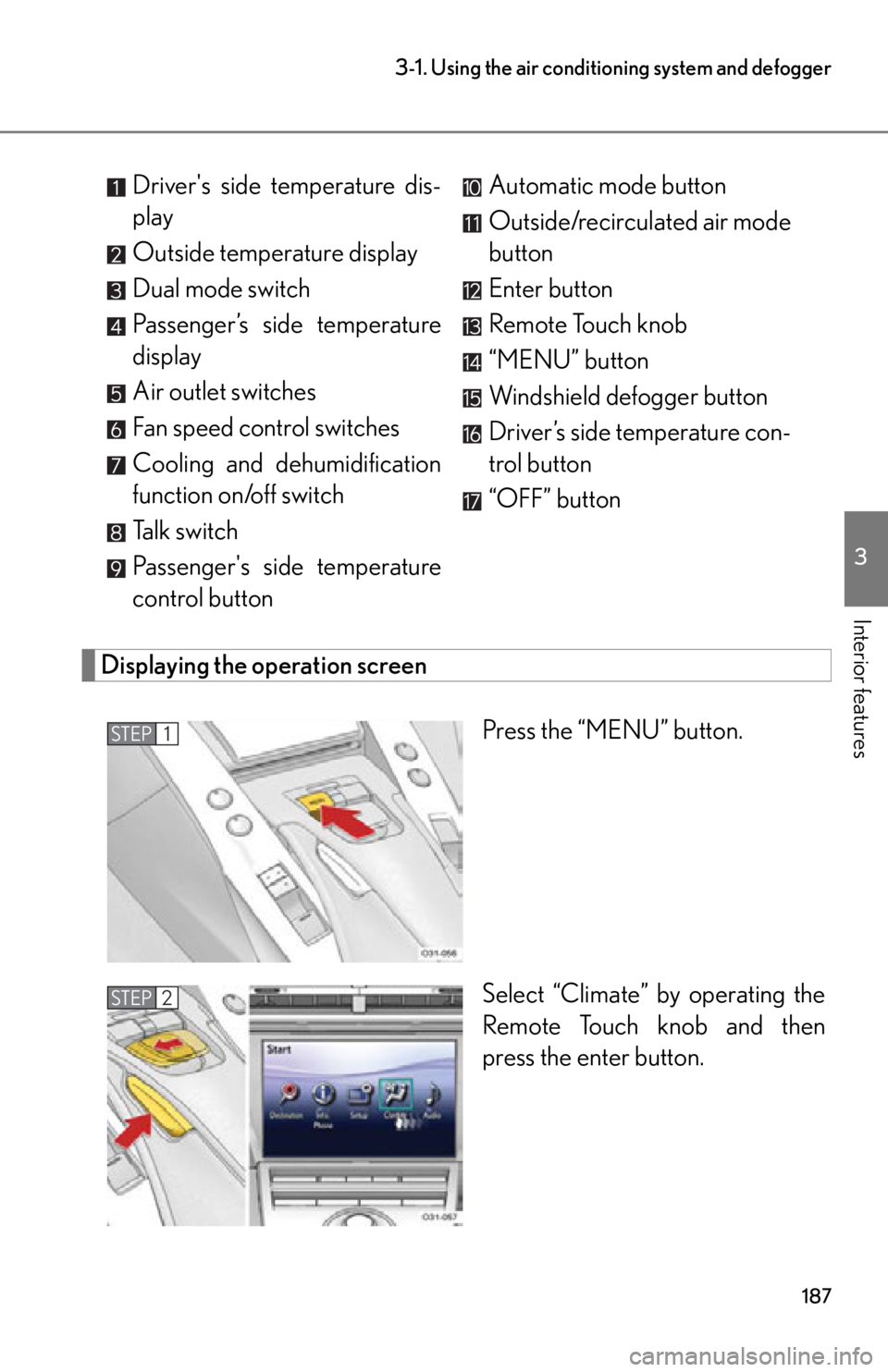
Displaying the operation screen
Press the “MENU” button.
Select “Climate” by operating the
Remote Touch knob and then
press the enter button.
Driver's side temperature dis-
play
Outside temperature display
Dual mode switch
Passenger’s side temperature
display
Air outlet switches
Fan speed control switches
Cooling and dehumidification
function on/off switch
Talk switch
Passenger's side temperature
control button
Automatic mode button
Outside/recirculated air mode
button
Enter button
Remote Touch knob
“MENU” button
Windshield defogger button
Driver’s side temperature con-
trol button
“OFF” button
STEP1
STEP2
Page 229 of 420

Maintenance and care4
227
4-1. Maintenance and careCleaning and protecting the vehicle exterior............ 228
Cleaning and protecting the vehicle interior .............. 235
4-2. Maintenance Maintenance requirements ........................ 240
General maintenance .......... 242
Emission inspection and maintenance (I/M)
programs................................ 246 4-3. Do-it-yourself
maintenance
Do-it-yourself service precautions ............................ 247
Hood .......................................... 250
Positioning a floor jack ......... 253
Engine compartment ........... 256
Adding washer fluid .............. 264
Battery ...................................... 265
Tires............................................ 270
Tire inflation pressure............ 277
Wheels ....................................... 281
Air conditioning filter ........... 283
Wireless remote control battery .................................... 285
Checking and replacing fuses ........................................ 287
Light bulbs ................................ 299
Page 287 of 420
285
4-3. Do-it-yourself maintenance
4
Maintenance and care
Wireless remote control battery
Replace the battery with a new one if it is depleted.
As the cover opening may be damaged easily, it is recommended that the bat-
tery be replaced by your Lexus dealer.
■You will need the following items:
●Flathead screwdriver (tip width: approximately 0.32 in. [8.0 mm],
tip thickness: approximately 0.04 in. [1.0 mm])
● Lithium battery (CR2016)
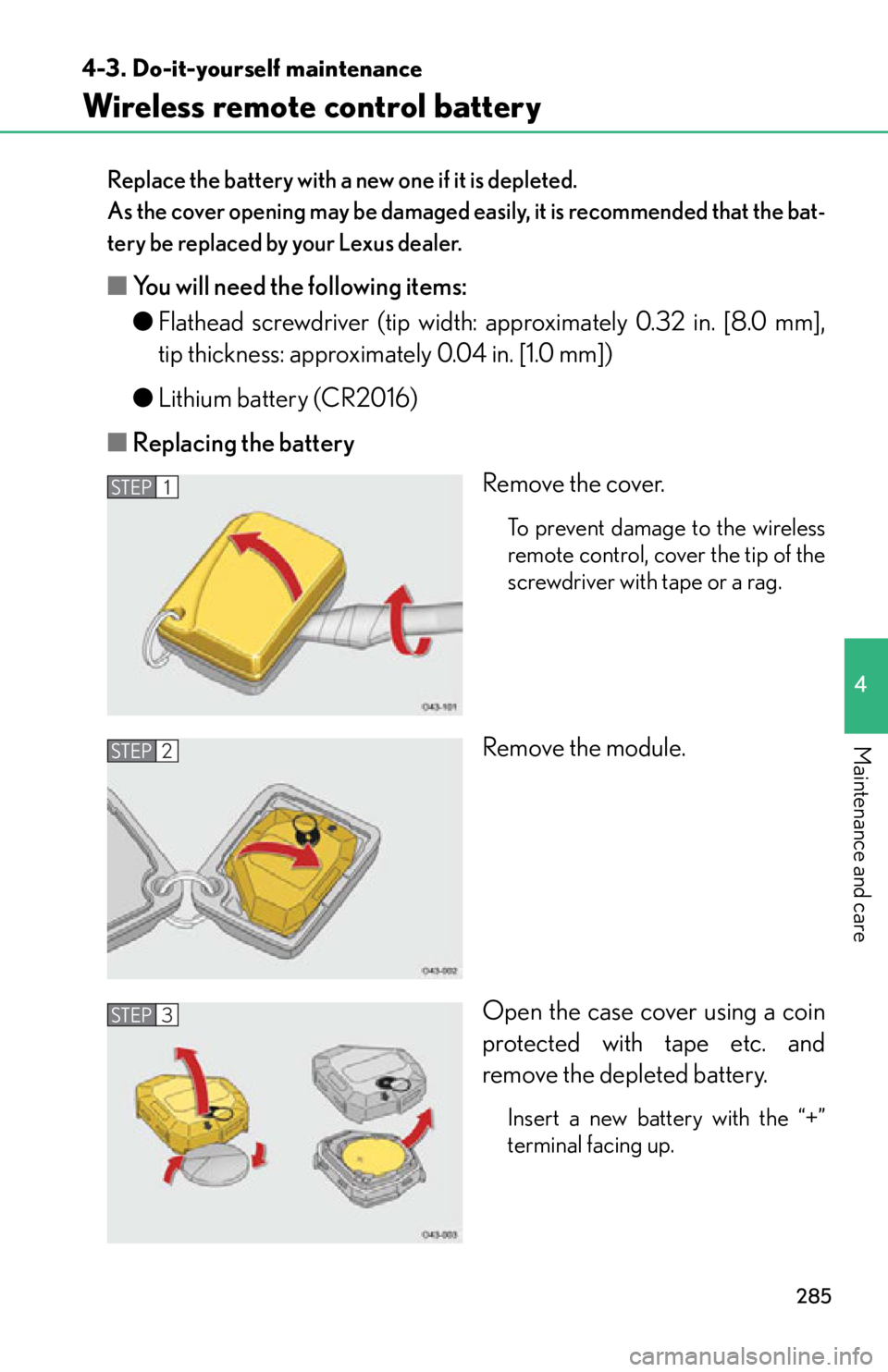
■ Replacing the battery
Remove the cover.
To prevent damage to the wireless
remote control, cover the tip of the
screwdriver with tape or a rag.
Remove the module.
Open the case cover using a coin
protected with tape etc. and
remove the depleted battery.
Insert a new battery with the “+”
terminal facing up.
STEP1
STEP2
STEP3
Page 288 of 420
286
4-3. Do-it-yourself maintenance
■Use a CR2016 lithium battery
●Batteries can be purchased at your Lexus dealer, local electrical appliance
shops or camera stores.
●Replace only with the same or equivalent type recommended by the manufac-
turer.
●Dispose of used batteries according to the local laws.
■If wireless remote control battery is depleted
The following symptoms may occur:
●The wireless remote control will not function properly.
●The operational range is reduced.
CAUTION
■Removed battery and other parts
Keep away from children. These parts are small and if swallowed by a child, they can
cause choking. Failure to do so coul d result in death or serious injury.
NOTICE
■For normal operation after replacing the battery
Observe the following precautions to prevent accidents.
●Always work with dry hands.
Moisture may cause the battery to rust.
●Do not touch or move any other comp onents inside the remote control.
●Do not bend either of the battery terminals.
Page 297 of 420
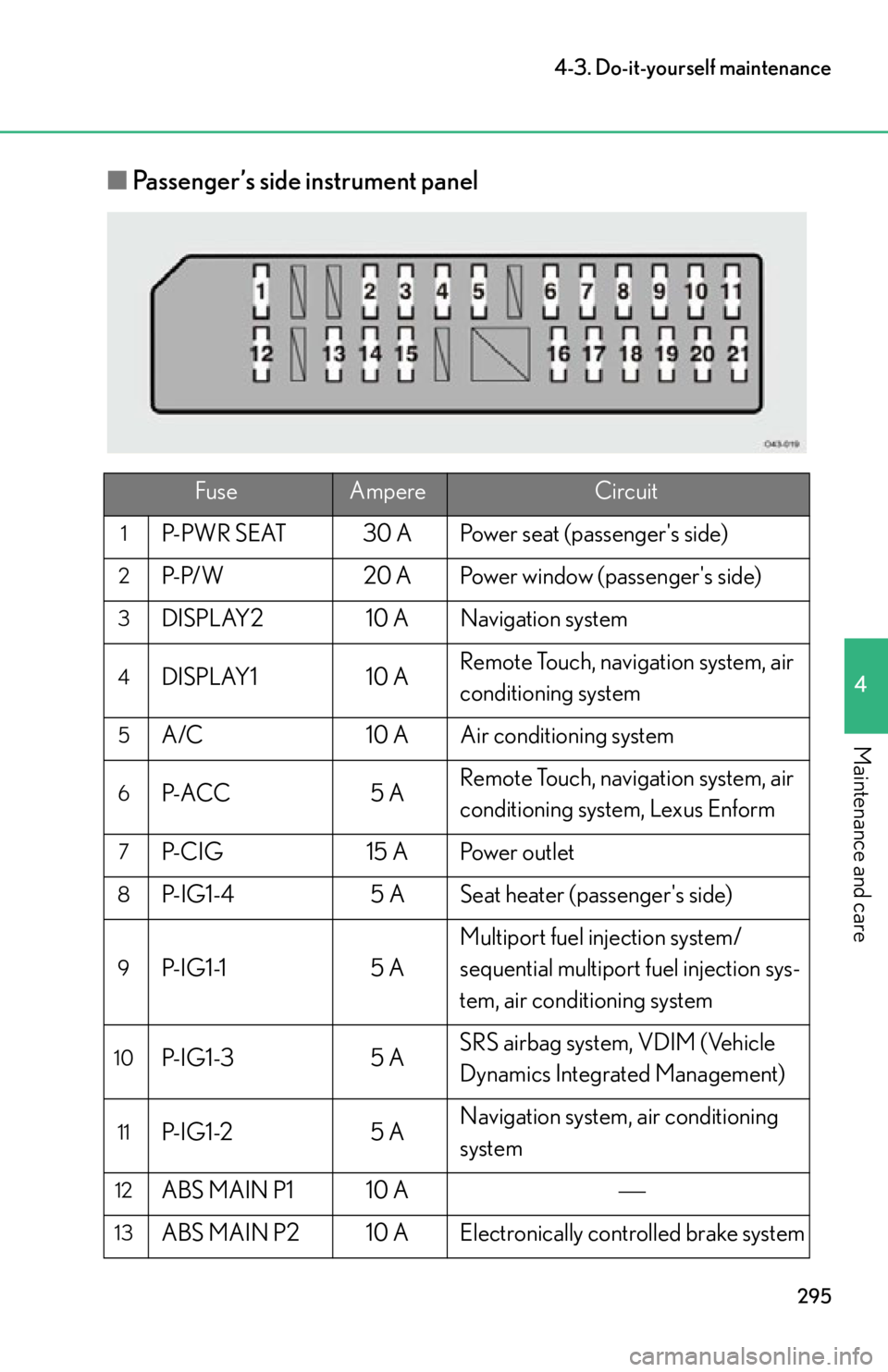
295
4-3. Do-it-yourself maintenance
4
Maintenance and care
■Passenger’s side instrument panel
FuseAmpereCircuit
1P-PWR SEAT 30 A Power seat (passenger's side)
2P-P/W 20 A Power window (passenger's side)
3DISPLAY2 10 A Navigation system
4DISPLAY1 10 A Remote Touch, navigation system, air
conditioning system
5A/C
10 A Air conditioning system
6P- ACC 5 ARemote Touch, navigation system, air
conditioning system, Lexus Enform
7P-CIG
15 A Power outlet
8P-IG1-4 5 A Seat heater (passenger's side)
9P- I G 1 -15 AMultiport fuel injection system/
sequential multiport fuel injection sys-
tem, air conditioning system
10P- I G 1 -3
5 ASRS airbag system, VDIM (Vehicle
Dynamics Integrated Management)
11P- I G 1 -2
5 ANavigation system, air conditioning
system
12ABS MAIN P1 10 A
13ABS MAIN P2 10 A Electronically controlled brake system
Page 298 of 420

296
4-3. Do-it-yourself maintenance
14PMG5 A Electric power control system
15RAD NO.1 10 A Audio system
16MAYDAY 5 A Lexus Enform
17P-S/HTR 15 A Seat heater (passenger's side)
18MIR HTR 15 A Outside rear view mirror defoggers
19P- M PX- B 5 A Multiport fuel injection system/
sequential multiport fuel injection sys-
tem, wireless remote door lock func-
tion, power seat (passenger’s side)
20GAUGE 10 A Gauges and meters
21ECU-IG2 5 AMultiport fuel injection system/
sequential multiport fuel injection sys-
tem, ASG (Automated Sequential
Gearbox), electric power control sys-
tem, passenger occupant classifica-
tion system, CAN gateway ECU,
Lexus Enform
FuseAmpereCircuit
Page 303 of 420

When trouble arises5
301
5-1. Essential informationEmergency flashers.............. 302
If your vehicle needs to be towed................................ 303
If you think something is wrong ..................................... 308
Fuel pump shut off system .................................... 309
Event data recorder ............... 310 5-2. Steps to take in an
emergency
If a warning light turns on or a warning buzzer
sounds... .................................. 312
If a warning message is displayed................................ 322
If you have a flat tire............... 332
If the engine will not start .... 343
If you lose your keys/ wireless remote
control transmitter ............. 344
If the parking brake cannot be released ............. 345
If the vehicle battery is discharged ............................ 348
If your vehicle overheats ...... 351
If the vehicle becomes stuck........................................ 354
If your vehicle has to be stopped in an
emergency ............................ 355