reset lexus LFA 2012 Technical Information / LEXUS 2012 LFA (OM77006U) User Guide
[x] Cancel search | Manufacturer: LEXUS, Model Year: 2012, Model line: LFA, Model: Lexus LFA 2012Pages: 420, PDF Size: 5.02 MB
Page 158 of 420
156
2-2. Instrument cluster
■Meter operation restrictions while vehicle is in motion
While the vehicle is in motion, some menu items cannot be changed using the con-
trol pad. Restricted items are displayed in gray or without an arrow. These items can
be operated once the vehicle is stopped.
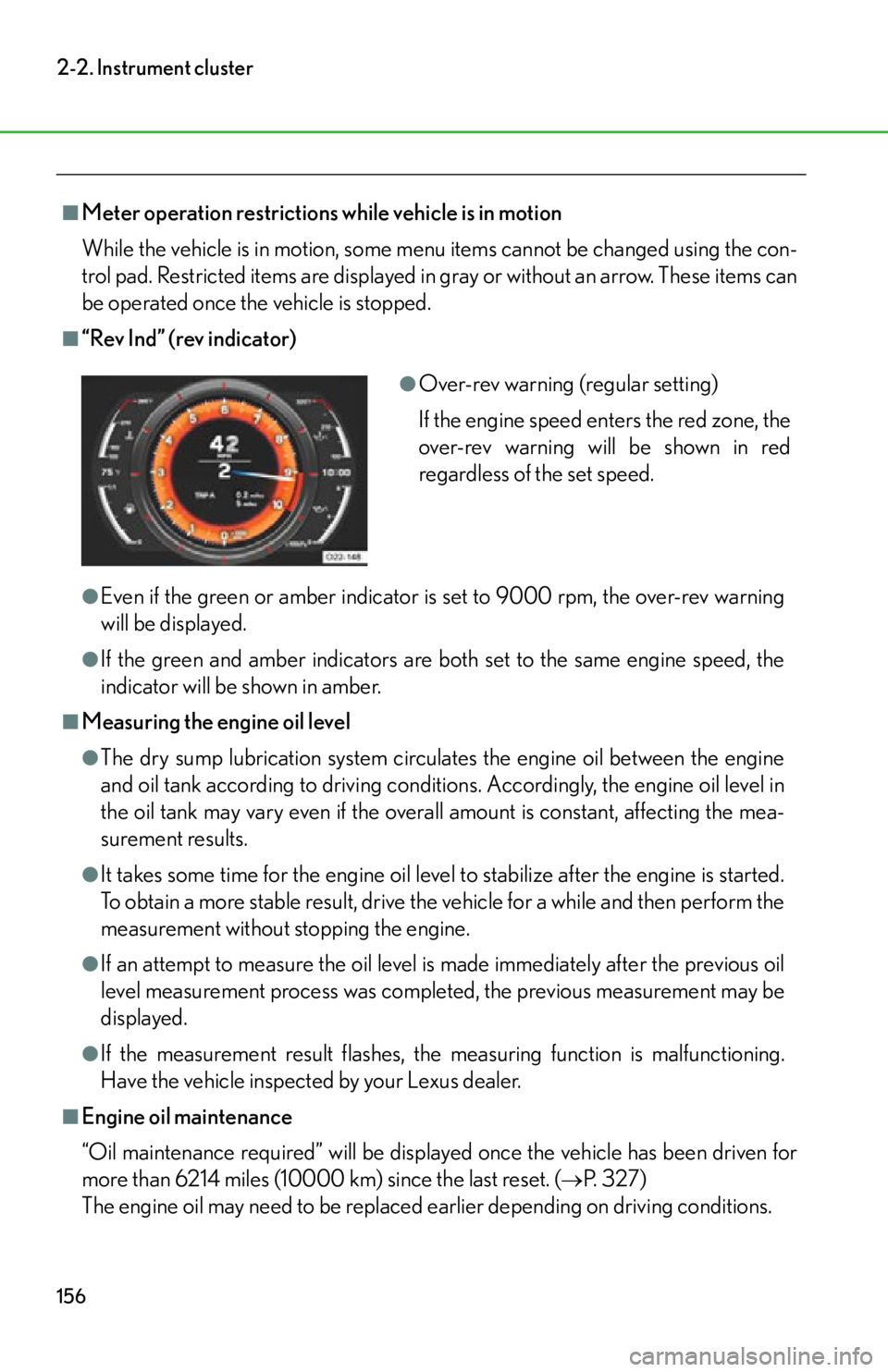
■“Rev Ind” (rev indicator)
●Even if the green or amber indicator is set to 9000 rpm, the over-rev warning
will be displayed.
●If the green and amber indicators are both set to the same engine speed, the
indicator will be shown in amber.
■Measuring the engine oil level
●The dry sump lubrication system circulates the engine oil between the engine
and oil tank according to driving conditions. Accordingly, the engine oil level in
the oil tank may vary even if the overall amount is constant, affecting the mea-
surement results.
●It takes some time for the engine oil level to stabilize after the engine is started.
To obtain a more stable result, drive the vehicle for a while and then perform the
measurement without stopping the engine.
●If an attempt to measure the oil level is made immediately after the previous oil
level measurement process was completed, the previous measurement may be
displayed.
●If the measurement result flashes, the measuring function is malfunctioning.
Have the vehicle inspected by your Lexus dealer.
■Engine oil maintenance
“Oil maintenance required” will be displayed once the vehicle has been driven for
more than 6214 miles (10000 km) since the last reset. (
P. 3 2 7 )
The engine oil may need to be replaced earlier depending on driving conditions.
●Over-rev warning (regular setting)
If the engine speed enters the red zone, the
over-rev warning will be shown in red
regardless of the set speed.
Page 159 of 420

157
2-2. Instrument cluster
2
When driving
■Using the “Lap Timer”
●When the “Lap Timer” function is turned “OFF” or the engine is stopped while a
lap is being timed, the lap timer will stop and the lap time up to that point will be
recorded.
●If the lap time being recorded ends with the same time as the fastest lap, the
newer time will be saved as the fastest lap time.
●If the lap time exceeds “9:59:59.99”, the display will return to “0:00:00.00” but
the total time will be recorded.
●If a warning message is displayed when a lap time is being measured, the lap
time will still continue to be recorded.
Operating the control pad while the warning message is shown returns the dis-
play to the stopwatch but the warning message will continue to appear until the
warning is resolved.
●In the normal display, the current measurement time and the latest lap time will
be displayed.
■Changing the temperature measurement unit
When the “Temp” measurement unit is ch anged, the air conditioning system tem-
perature setting, air outlet s and fan speed characteristic s may be changed. This is
normal and does not indicate a malfunction.
■If the battery is disconnected or discharges
“Lap Timer” data and “Clock” settings will be reset.
Page 204 of 420
202
3-2.Using the audio system
Audio/video system some basics
The audio/video system can be used when the ignition switch is in the “ACC”
or “ON” position.
For operating instructions, refer to the “Navigation System Owner’s Manual”
under the heading “AUDIO/VIDEO SYSTEM”.
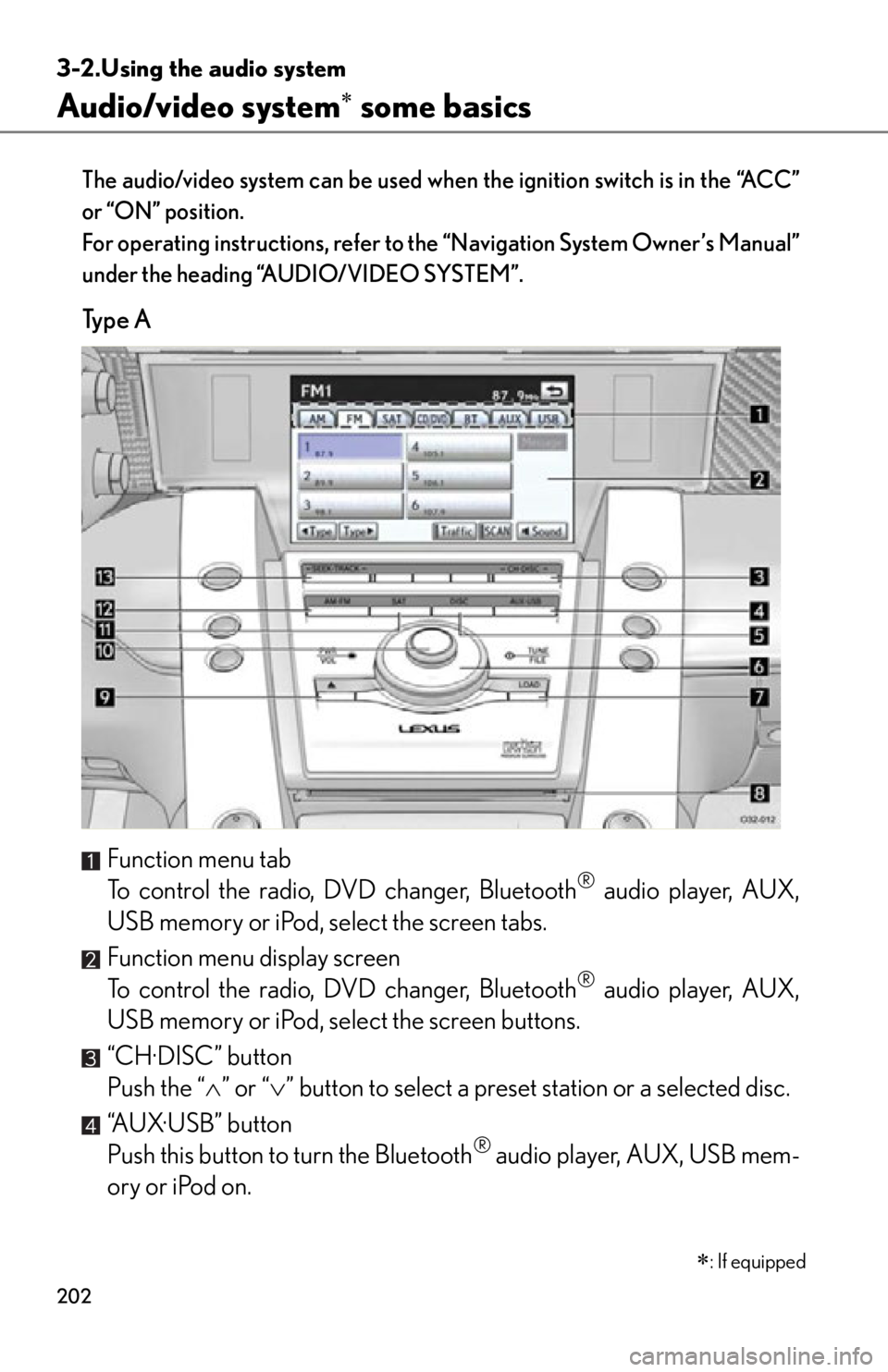
Ty p e A
Function menu tab
To control the radio, DVD changer, Bluetooth
® audio player, AUX,
USB memory or iPod, select the screen tabs.
Function menu display screen
To control the radio, DVD changer, Bluetooth
® audio player, AUX,
USB memory or iPod, select the screen buttons.
“CH·DISC” button
Push the “ ” or “ ” button to select a preset station or a selected disc.
“AUX·USB” button
Push this button to turn the Bluetooth
® audio player, AUX, USB mem-
ory or iPod on.
: If equipped
Page 206 of 420
204
3-2. Using the audio system
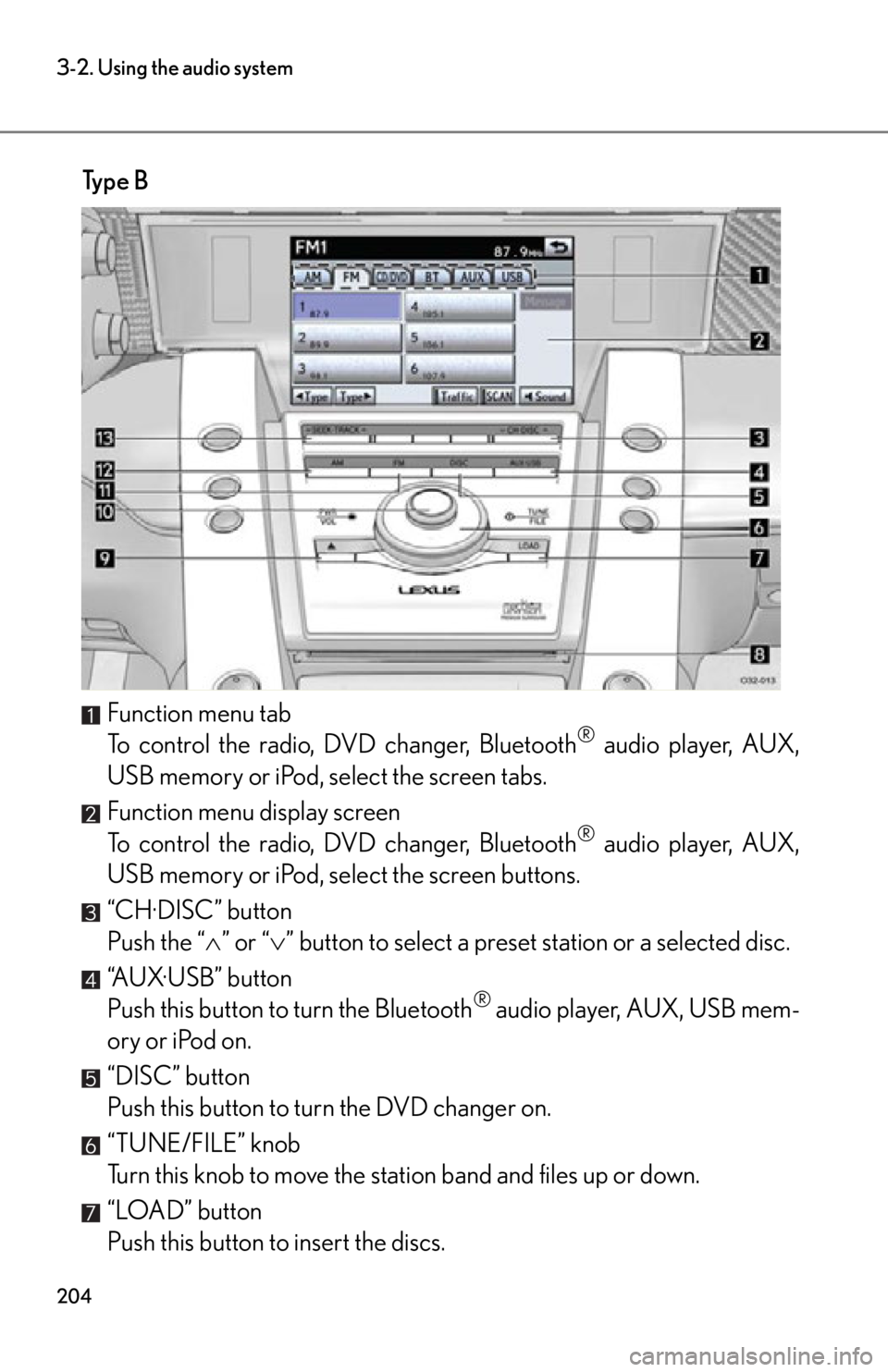
Ty p e BFunction menu tab
To control the radio, DVD changer, Bluetooth
® audio player, AUX,
USB memory or iPod, select the screen tabs.
Function menu display screen
To control the radio, DVD changer, Bluetooth
® audio player, AUX,
USB memory or iPod, select the screen buttons.
“CH·DISC” button
Push the “ ” or “ ” button to select a preset station or a selected disc.
“AUX·USB” button
Push this button to turn the Bluetooth
® audio player, AUX, USB mem-
ory or iPod on.
“DISC” button
Push this button to turn the DVD changer on.
“TUNE/FILE” knob
Turn this knob to move the station band and files up or down.
“LOAD” button
Push this button to insert the discs.
Page 260 of 420

258
4-3. Do-it-yourself maintenance
Add oil based on the oil level shown on the meter.
Do not add more than 0.5 qt. (0.5 L, 0.4 Imp. qt.) at a time regardless of
the oil level reading.
To check the oil level again, install the oil filler cap by turning it
clockwise.
Check the oil level using the “Oil Level” display and repeat the
above procedure if more oil is required.
Even if the measurement result shows that the oil is below the maximum
level, be careful not to add more oil than necessary.
Install the oil filler cap by turning it clockwise.
■Engine oil consumption
●The amount of engine oil consumed depe nds on the oil viscosity, the quality of
the oil and the way the vehicle is driven.
●More oil is consumed under driving conditions such as high speeds and fre-
quent acceleration and deceleration.
●A new engine consumes more oil.
●When judging the amount of oil consumpt ion, keep in mind that the oil may
have become diluted, making it difficult to judge the true level accurately.
●Oil consumption: Max. 1.1 qt./600 miles (0.9 Imp. qt./600 miles, 1.0 L/1000
km)
●If your vehicle consumes more than 1.1 qt. (1.0 L, 0.9 Imp. qt.) every 600 miles
(1000 km), contact your Lexus dealer.
■After the engine oil has been changed
The “Oil Maintenance” display on the mete r needs resetting. Have the display reset
at your Lexus dealer. ( P. 1 3 2 )
STEP4
STEP5
STEP6
STEP7
Page 269 of 420
267
4-3. Do-it-yourself maintenance
4
Maintenance and care
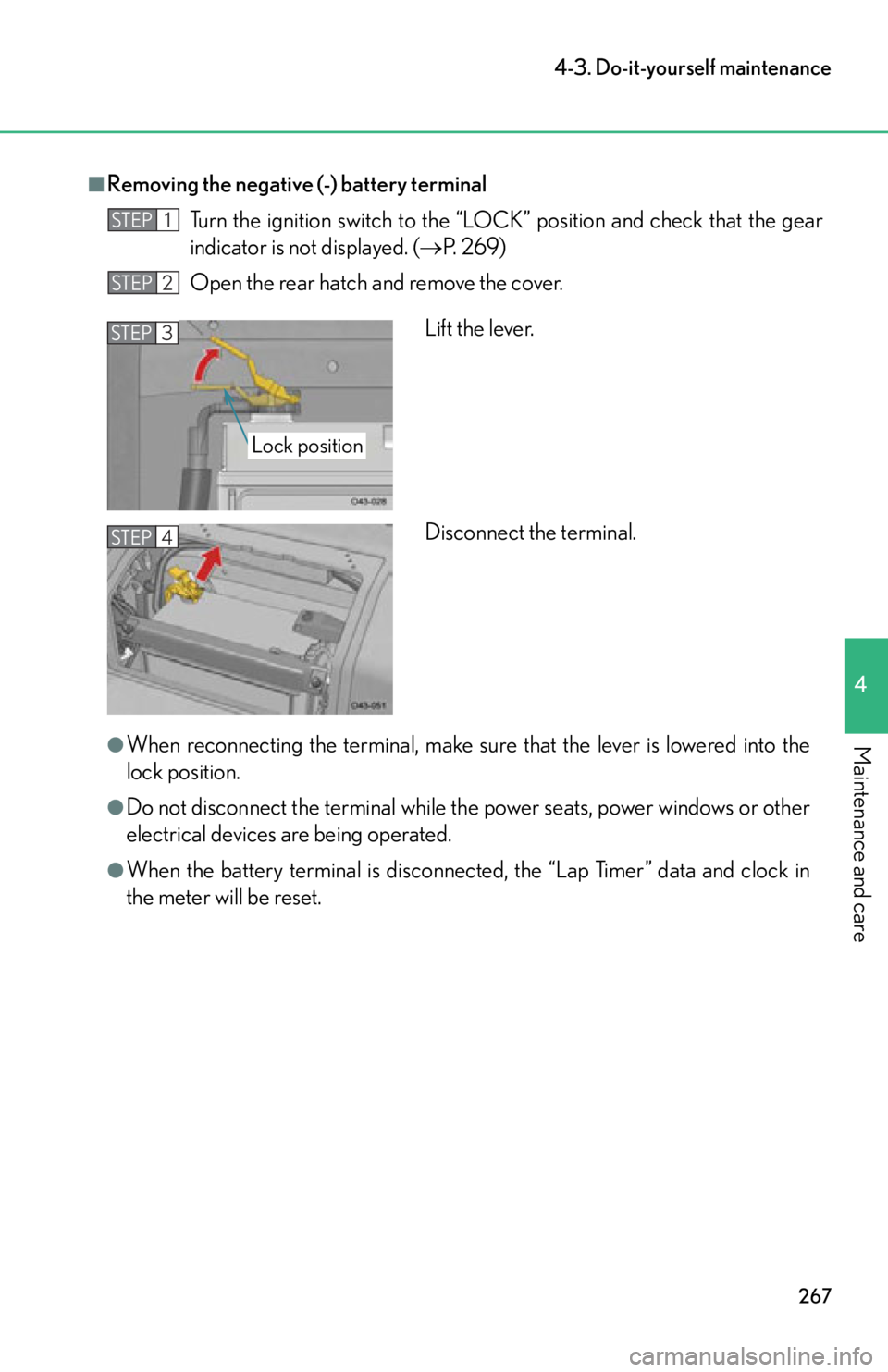
■Removing the negative (-) battery terminalTurn the ignition switch to the “LOC K” position and check that the gear
indicator is not displayed. ( P. 2 6 9 )
Open the rear hatch and remove the cover.
●When reconnecting the terminal, make sure that the lever is lowered into the
lock position.
●Do not disconnect the term inal while the power seats, power windows or other
electrical devices are being operated.
●When the battery terminal is disconnect ed, the “Lap Timer” data and clock in
the meter will be reset.
STEP1
STEP2
Lift the lever.
Disconnect the terminal.STEP3
Lock position
STEP4
Page 273 of 420
271
4-3. Do-it-yourself maintenance
4
Maintenance and care
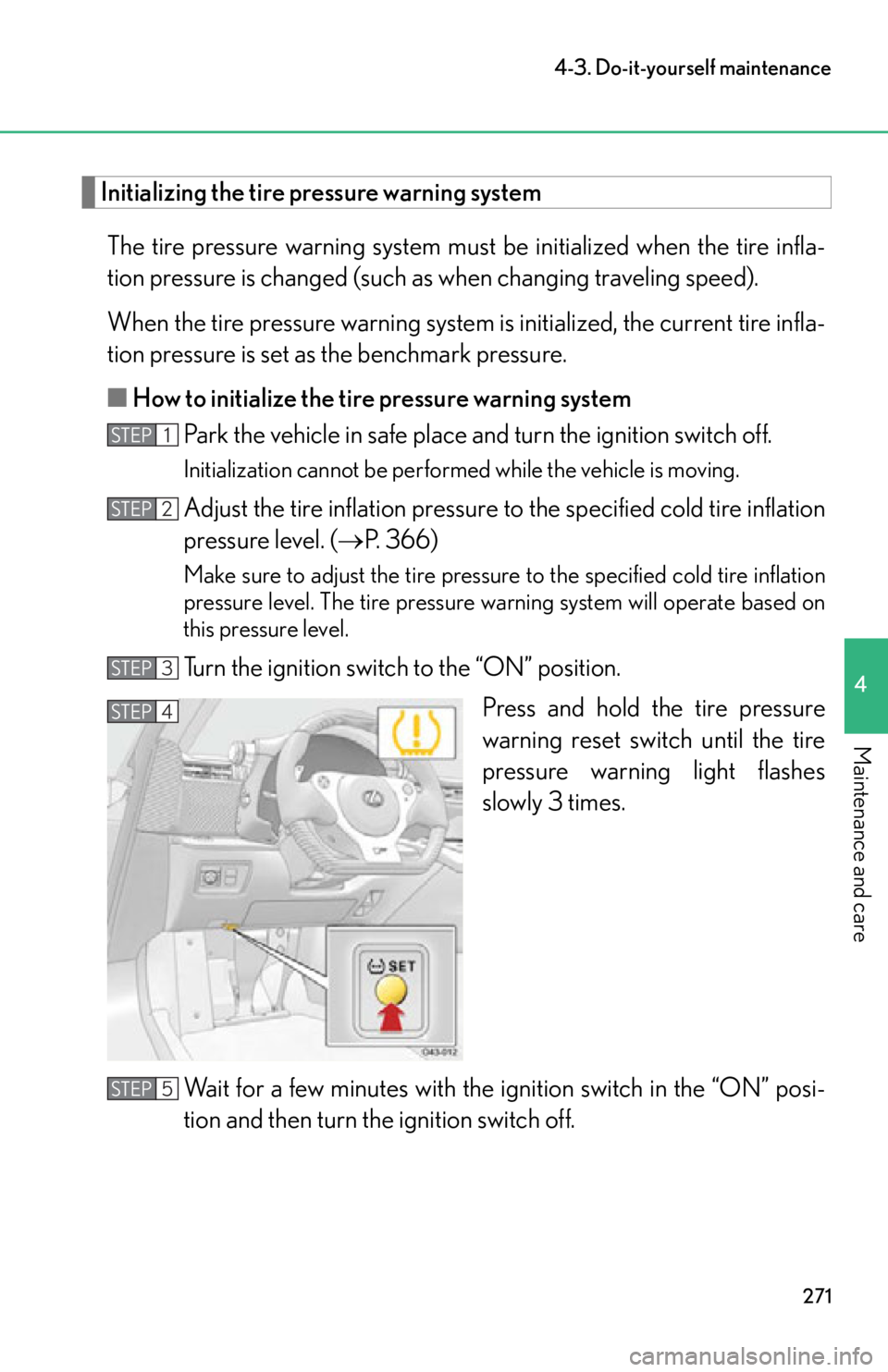
Initializing the tire pressure warning systemThe tire pressure warning system must be initialized when the tire infla-
tion pressure is changed (such as when changing traveling speed).
When the tire pressure warning system is initialized, the current tire infla-
tion pressure is set as the benchmark pressure.
■ How to initialize the tire pressure warning system
Park the vehicle in safe place and turn the ignition switch off.
Initialization cannot be performed while the vehicle is moving.
Adjust the tire inflation pressure to the specified cold tire inflation
pressure level. ( P. 366)
Make sure to adjust the tire pressure to the specified cold tire inflation
pressure level. The tire pressure warning system will operate based on
this pressure level.
Turn the ignition switch to the “ON” position.
Press and hold the tire pressure
warning reset switch until the tire
pressure warning light flashes
slowly 3 times.
Wait for a few minutes with th e ignition switch in the “ON” posi-
tion and then turn the ignition switch off.
STEP1
STEP2
STEP3
STEP4
STEP5
Page 276 of 420

274
4-3. Do-it-yourself maintenance
■If you press the tire pressure warning reset switch accidentally
If initialization is performed, adjust the tire inflation pressure to the specified level
and initialize the tire pressure warning system again.
■When the initialization of the tire pressure warning system has failed
Initialization can be completed in a few minutes. However, in the following cases,
the settings have not been recorded and the system will not operate properly. If
repeated attempts to record tire inflation pressure settings are unsuccessful, have
the vehicle inspected by your Lexus dealer.
●When operating the tire pressure warning reset switch, the tire pressure warning
light does not flash 3 times.
●After carrying out the initialization procedure, the tire pressure warning light
flashes for 1 minute then stays on after driving for 20 minutes.
■Tire pressure warning system certification
MODEL/FCC IDs:
Tr a n s m i t t e r : PA X P M V 1 0 7 J
Receiver: HYQ13BDK
For vehicles sold in the U.S.A.
NOTE:
This device complies with part 15 of the FCC Rules. Operation is subject to the fol-
lowing two conditions: (1) This device may not cause harmful interference, and (2)
this device must accept any interference received, including interference that may
cause undesired operation.
FCC WARNING:
Changes or modifications not expressly approved by the party responsible for
compliance could void the user's authority to operate the equipment.
For vehicles sold in Canada
NOTE:
Operation is subject to the following two conditions: (1) this device may not cause
interference, and (2) this device must accept any interference, including interfer-
ence that may cause undesired operation of the device.
Page 319 of 420

5
When trouble arises
317
5-2. Steps to take in an emergency
■If the malfunction indicator lamp comes on while driving
First check the following:
●Is the fuel tank empty?
If it is, fill the fuel tank immediately.
●Is the fuel tank cap loose?
If it is, tighten it securely.
The light will go off after taking several driving trips.
If the light does not go off even after several trips, contact your Lexus dealer as soon
as possible.
■Electric power steering system warning light
When the battery is low or when the voltage drops temporarily, the electric power
steering system warnin g light may come on.
■Passenger detection sensor and passenger seat belt reminder
●If luggage is placed on the passenger seat, the passenger detection sensor may
cause the warning light to flash even if a passenger is not sitting in the seat.
●If a cushion is placed on the seat, the sensor may not detect a passenger, and the
warning light may not operate properly.
■When the tire pressure warning light comes on
Check the tire inflation pressure and adjust to the appropriate level. Pushing the tire
pressure warning reset switch will not turn off the tire pressure warning light. After
the tire inflation pressure is adjusted, it may take a few minutes for the tire pressure
warning light to go off.
■The tire pressure warning light may come on due to natural causes
The tire pressure warning light may come on due to natural causes such as natural
air leaks or tire inflation pressure changes caused by temperature. In this case,
adjusting the tire inflation pressure will turn off the warning light (after a few min-
utes).
Page 331 of 420
5
When trouble arises
329
5-2. Steps to take in an emergency
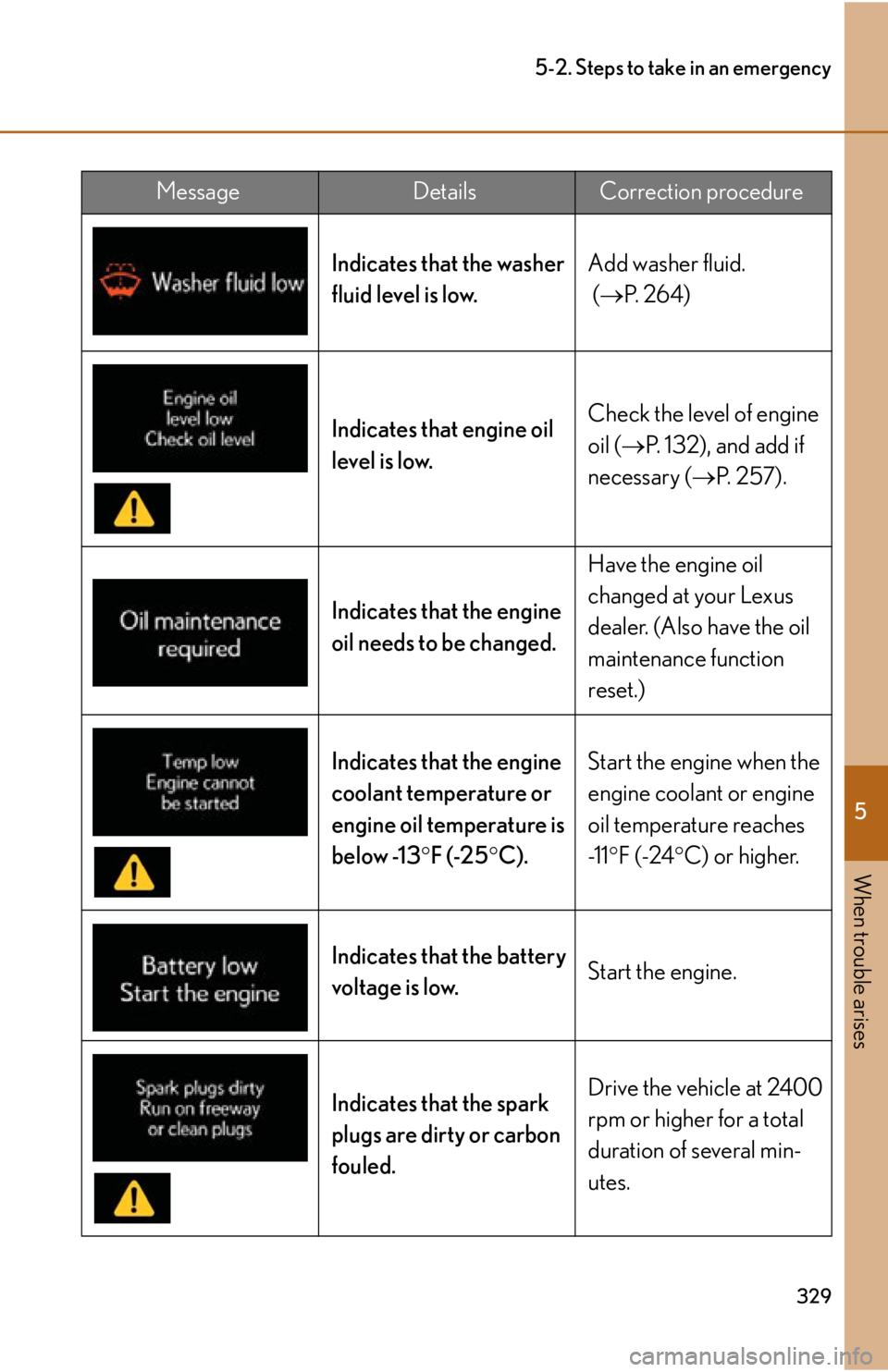
Indicates that the washer
fluid level is low.Add washer fluid.
(
P. 2 6 4 )
Indicates that engine oil
level is low. Check the level of engine
oil (
P. 132), and add if
necessary ( P. 2 5 7 ) .
Indicates that the engine
oil needs to be changed. Have the engine oil
changed at your Lexus
dealer. (Also have the oil
maintenance function
reset.)
Indicates that the engine
coolant temperature or
engine oil temperature is
below -13 F (-25 C). Start the engine when the
engine coolant or engine
oil temperature reaches
-1 1
F (-24 C) or higher.
Indicates that the battery
voltage is low. Start the engine.
Indicates that the spark
plugs are dirty or carbon
fouled. Drive the vehicle at 2400
rpm or higher for a total
duration of several min-
utes.
MessageDetailsCorrection procedure