cooling lexus LFA 2012 Technical Information / LEXUS 2012 LFA OWNERS MANUAL (OM77006U)
[x] Cancel search | Manufacturer: LEXUS, Model Year: 2012, Model line: LFA, Model: Lexus LFA 2012Pages: 420, PDF Size: 5.02 MB
Page 189 of 420
187
3-1. Using the air conditioning system and defogger
3
Interior features
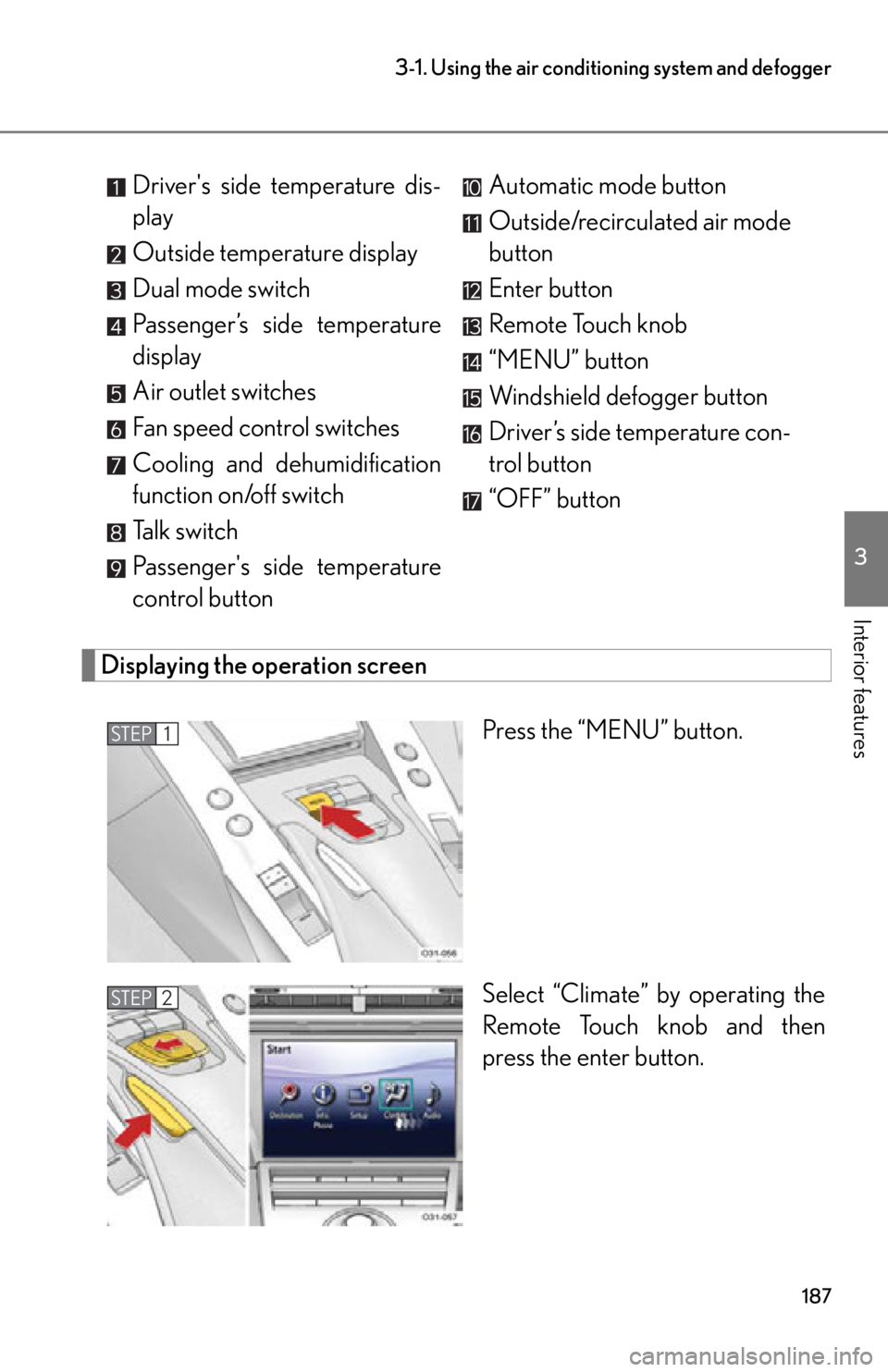
Displaying the operation screen
Press the “MENU” button.
Select “Climate” by operating the
Remote Touch knob and then
press the enter button.
Driver's side temperature dis-
play
Outside temperature display
Dual mode switch
Passenger’s side temperature
display
Air outlet switches
Fan speed control switches
Cooling and dehumidification
function on/off switch
Talk switch
Passenger's side temperature
control button
Automatic mode button
Outside/recirculated air mode
button
Enter button
Remote Touch knob
“MENU” button
Windshield defogger button
Driver’s side temperature con-
trol button
“OFF” button
STEP1
STEP2
Page 190 of 420
188
3-1. Using the air conditioning system and defogger
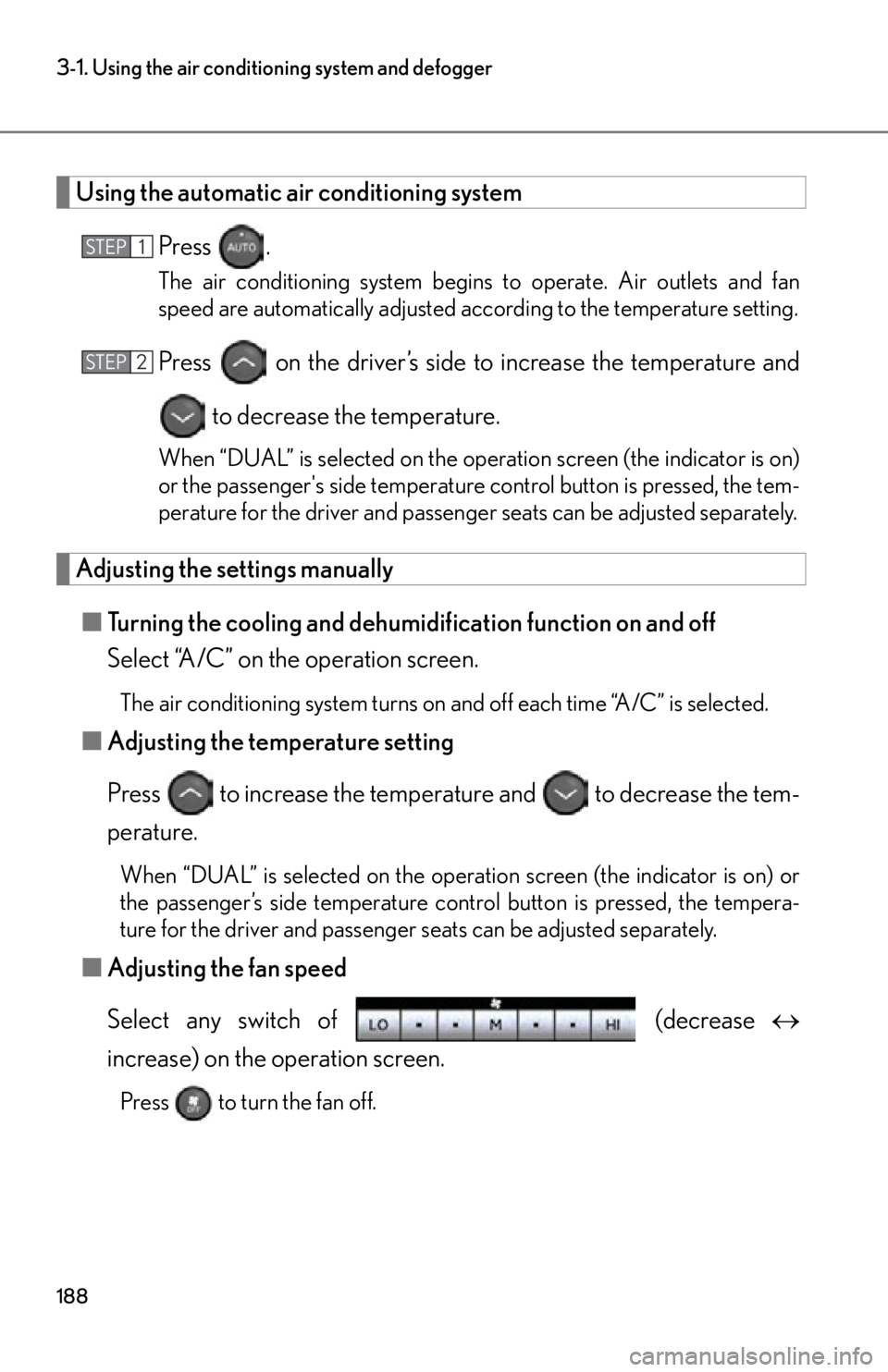
Using the automatic air conditioning system
Press .
The air conditioning system begins to operate. Air outlets and fan
speed are automatically adjusted according to the temperature setting.
Press on the driver’s side to increase the temperature and
to decrease the temperature.
When “DUAL” is selected on the oper ation screen (the indicator is on)
or the passenger's side temperature control button is pressed, the tem-
perature for the driver and passenge r seats can be adjusted separately.
Adjusting the settings manually
■ Turning the cooling and dehumidification function on and off
Select “A/C” on the operation screen.
The air conditioning system turns on and off each time “A/C” is selected.
■Adjusting the temperature setting
Press to increase the temperat ure and to decrease the tem-
perature.
When “DUAL” is selected on the oper ation screen (the indicator is on) or
the passenger’s side temperature cont rol button is pressed, the tempera-
ture for the driver and passenger seats can be adjusted separately.
■ Adjusting the fan speed
Select any switch of (decrease
increase) on the operation screen.
Press to turn the fan off.
STEP1
STEP2
Page 196 of 420
194
3-1. Using the air conditioning system and defogger
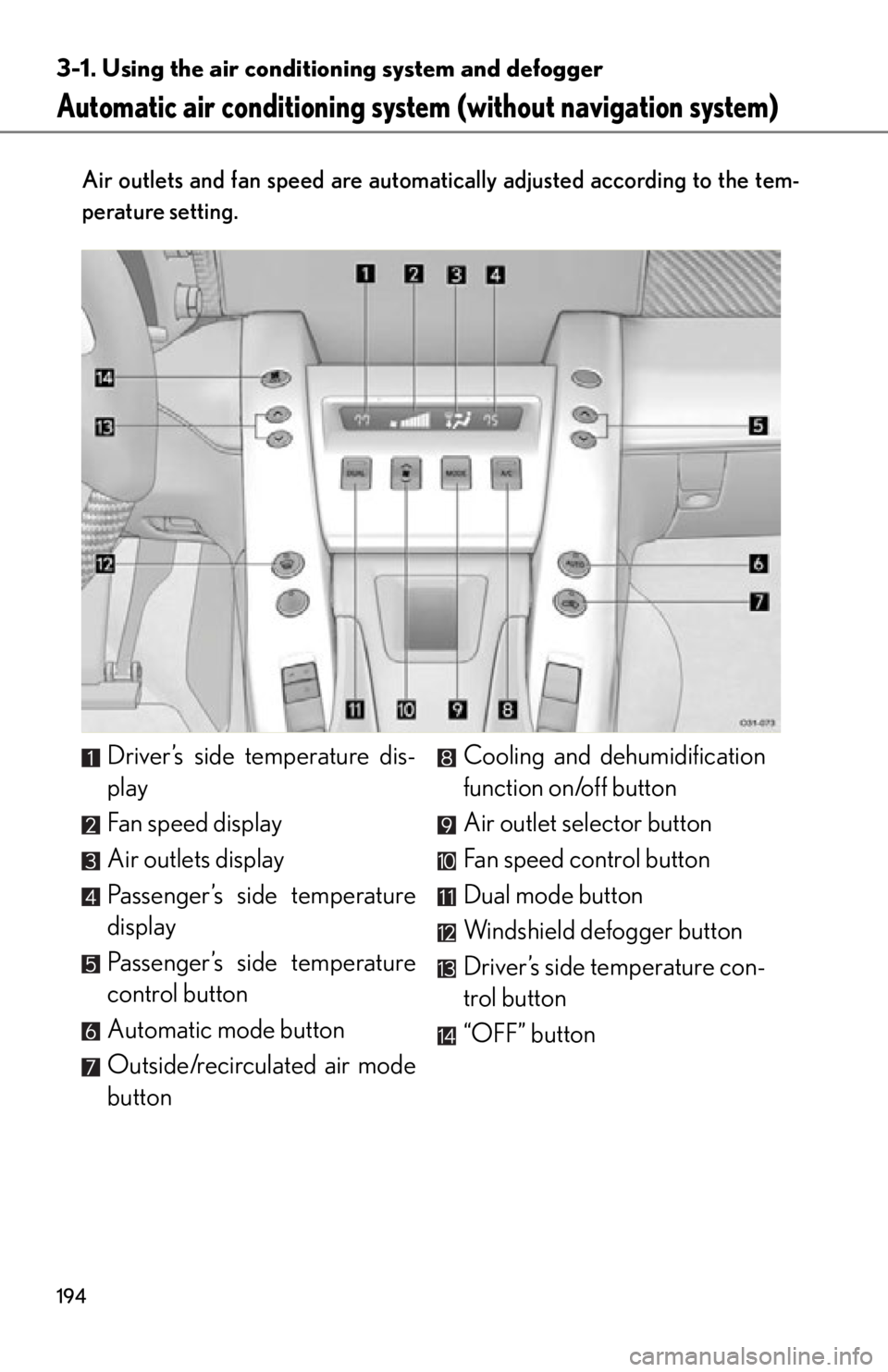
Automatic air conditioning system (without navigation system)
Air outlets and fan speed are automati cally adjusted according to the tem-
perature setting.
Driver’s side temperature dis-
play
Fan speed display
Air outlets display
Passenger’s side temperature
display
Passenger’s side temperature
control button
Automatic mode button
Outside/recirculated air mode
button Cooling and de
humidification
function on/off button
Air outlet selector button
Fan speed control button
Dual mode button
Windshield defogger button
Driver’s side temperature con-
trol button
“OFF” button
Page 197 of 420
195
3-1. Using the air conditioning system and defogger
3
Interior features
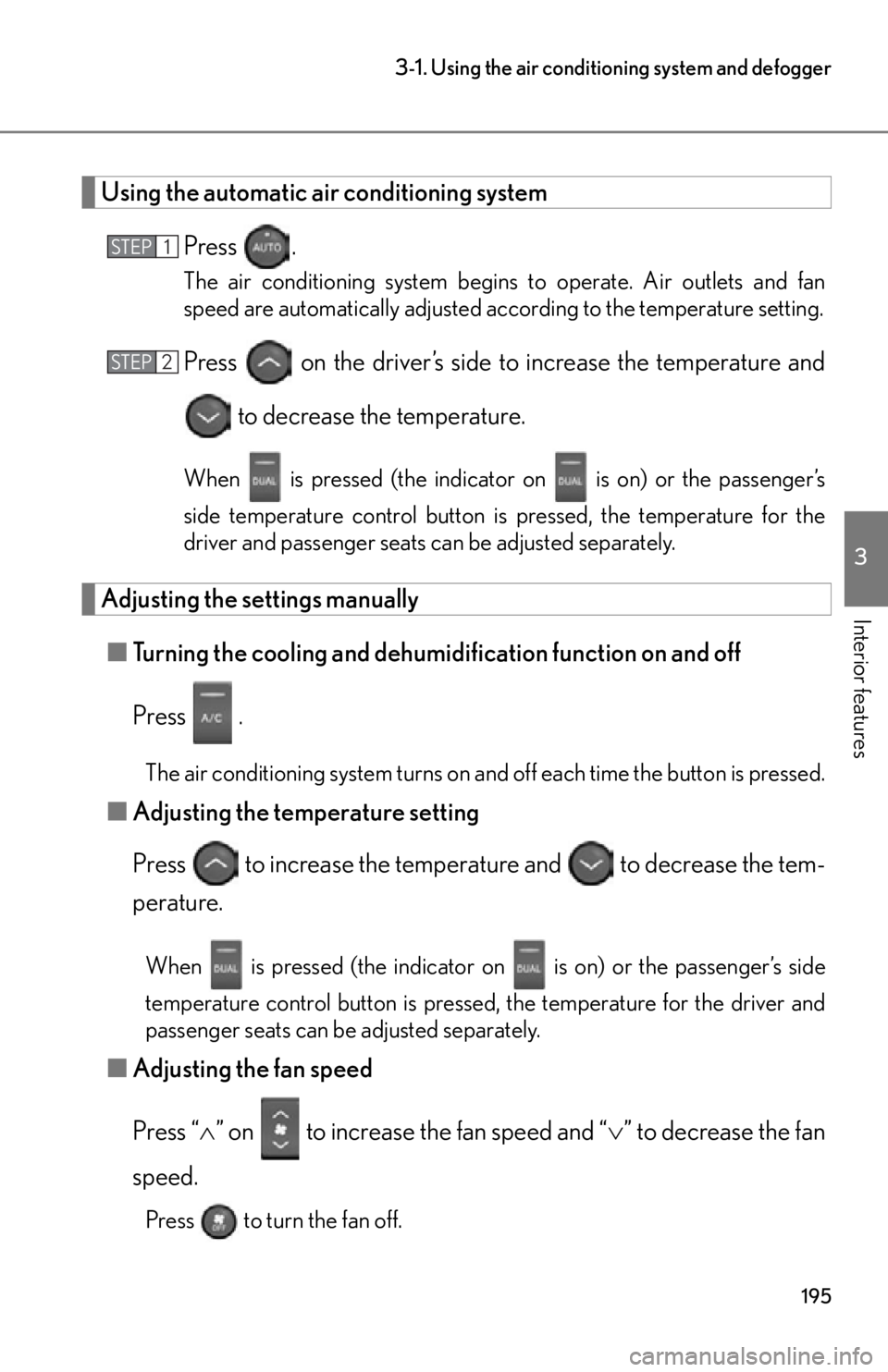
Using the automatic air conditioning system
Press .
The air conditioning system begins to operate. Air outlets and fan
speed are automatically adjusted according to the temperature setting.
Press on the driver’s side to increase the temperature and
to decrease the temperature.
When is pressed (the indicator on is on) or the passenger’s
side temperature control button is pressed, the temperature for the
driver and passenger seats can be adjusted separately.
Adjusting the settings manually
■ Turning the cooling and dehumidification function on and off
Press
.
The air conditioning system turns on and off each time the button is pressed.
■ Adjusting the temperature setting
Press to increase the temperat ure and to decrease the tem-
perature.
When is pressed (the indicator on is on) or the passenger’s side
temperature control button is pressed, the temperature for the driver and
passenger seats can be adjusted separately.
■ Adjusting the fan speed
Press “ ” on to increase the fan speed and “ ” to decrease the fan
speed.
Press to turn the fan off.
STEP1
STEP2
Page 236 of 420
234
4-1. Maintenance and care
NOTICE
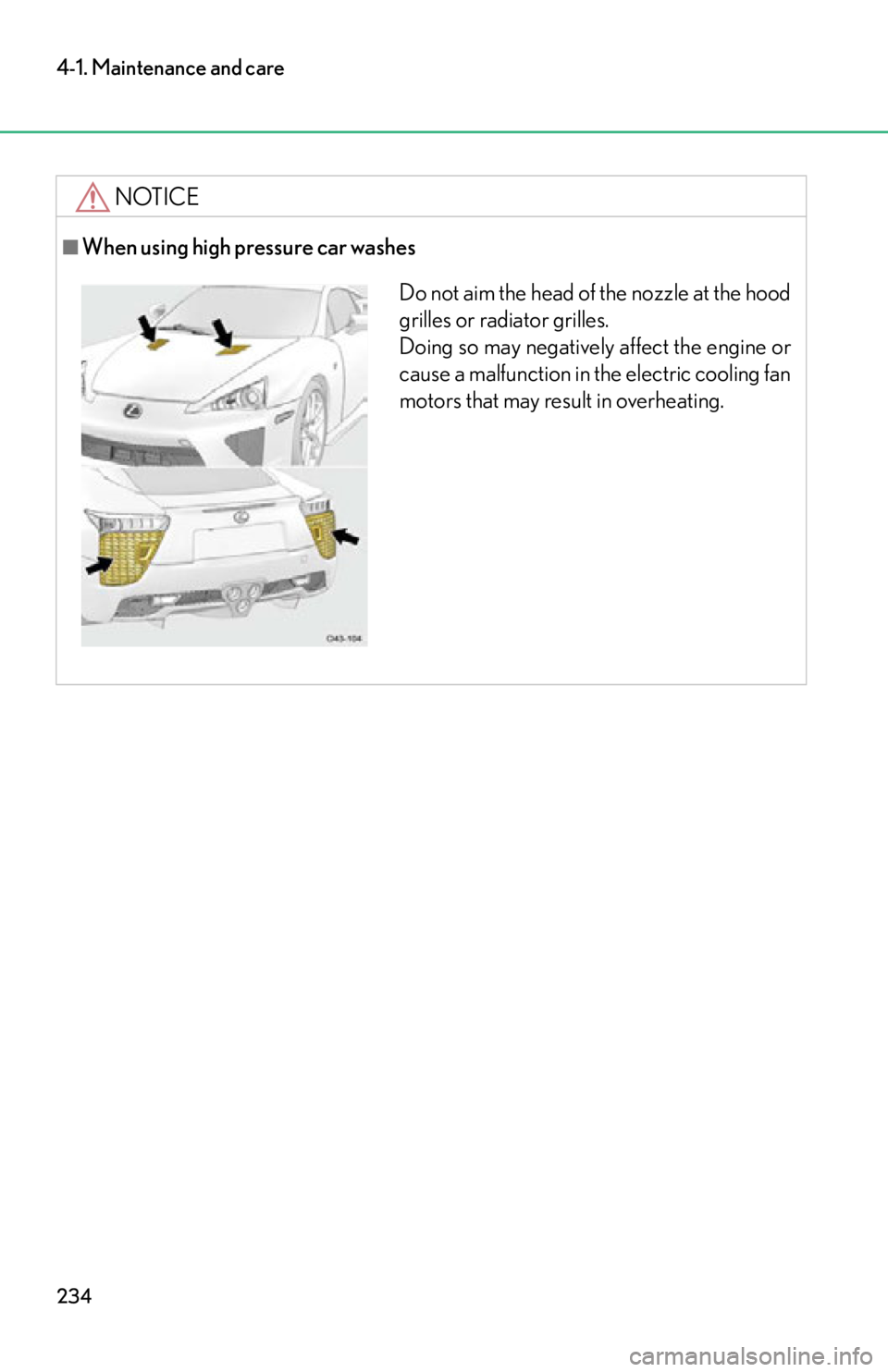
■When using high pressure car washes
Do not aim the head of the nozzle at the hood
grilles or radiator grilles.
Doing so may negatively affect the engine or
cause a malfunction in the electric cooling fan
motors that may result in overheating.
Page 251 of 420
249
4-3. Do-it-yourself maintenance
4
Maintenance and care
CAUTION
The engine compartment contains many mechanisms and fluids that may move sud-
denly, become hot, or become electrically energized. To avoid death or serious injury,
observe the following precautions:
■When working on the engine compartment
●Keep hands, clothing, and tools away from the moving fan and engine drive belt.
●Be careful not to touch the engine, exhaust manifold, etc. right after driving as
they may be hot. Oil and other fluids may also be hot.
●Do not leave anything that may burn easily, such as paper or rags, in the engine
compartment.
●Do not smoke, cause sparks or expose an open flame to fuel. Fuel fumes are flam-
mable.
■When working near the electric cooling fan
Be sure the ignition switch is in the “LOCK” position.
With the ignition on, the electric cooling fan may automatically start to run if the air
conditioning is on. ( P. 2 6 1 )
■Safety glasses
Wear safety glasses to prevent flying or falling material, fluid spray, etc. from getting
in the eyes.
NOTICE
■If you remove the air cleaner filters
Driving with the air cleaner filters remo ved may cause excessive engine wear due
to dirt in the air. Also a backfire could cause a fire in the engine compartment.
Page 258 of 420
256
4-3. Do-it-yourself maintenance
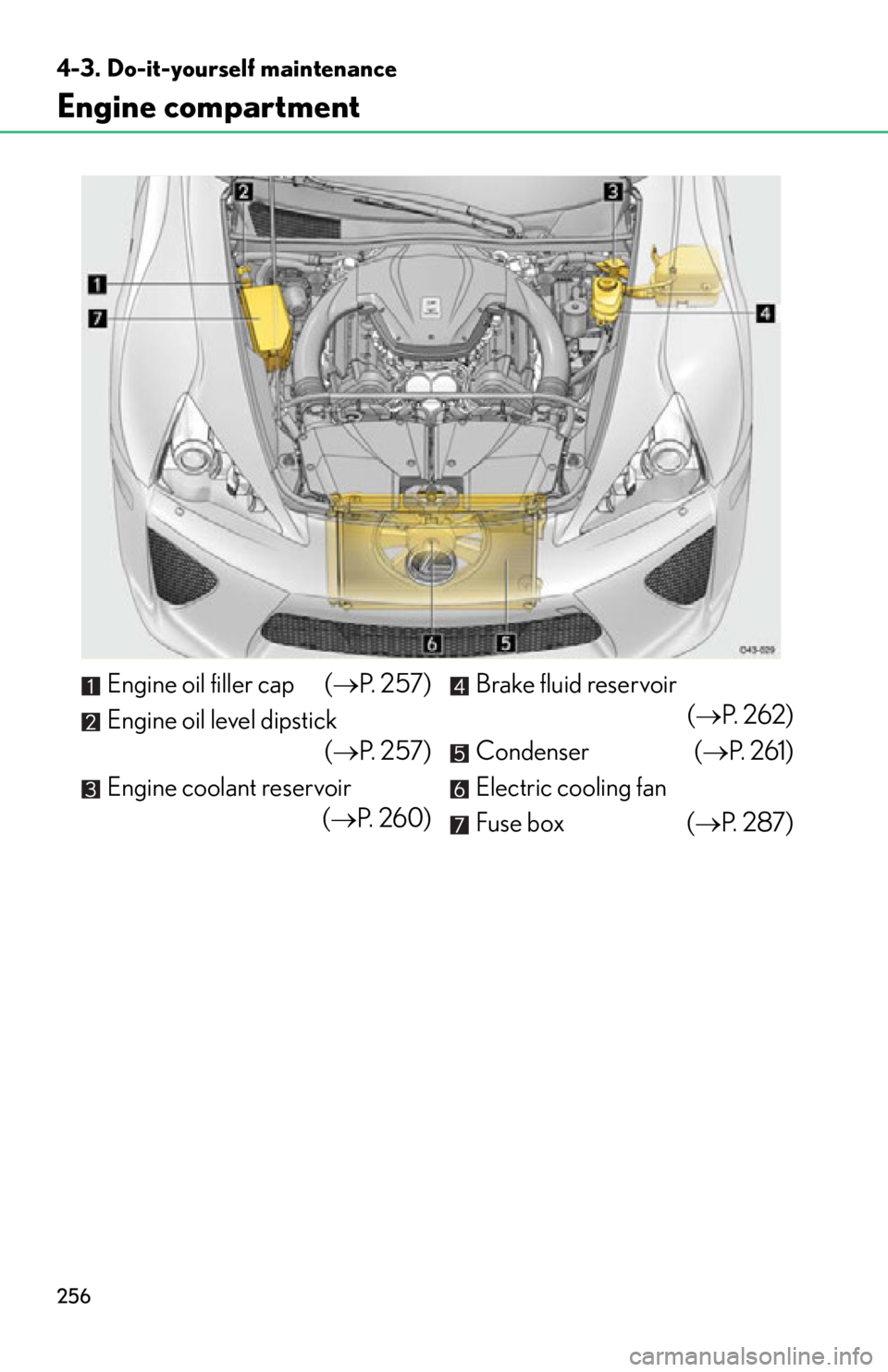
Engine compartment
Engine oil filler cap (P. 2 5 7 )
Engine oil level dipstick ( P. 2 5 7 )
Engine coolant reservoir (P. 260) Brake fluid reservoir
(P. 2 6 2 )
Condenser ( P. 2 6 1 )
Electric cooling fan
Fuse box ( P. 2 8 7 )
Page 262 of 420
260
4-3. Do-it-yourself maintenance
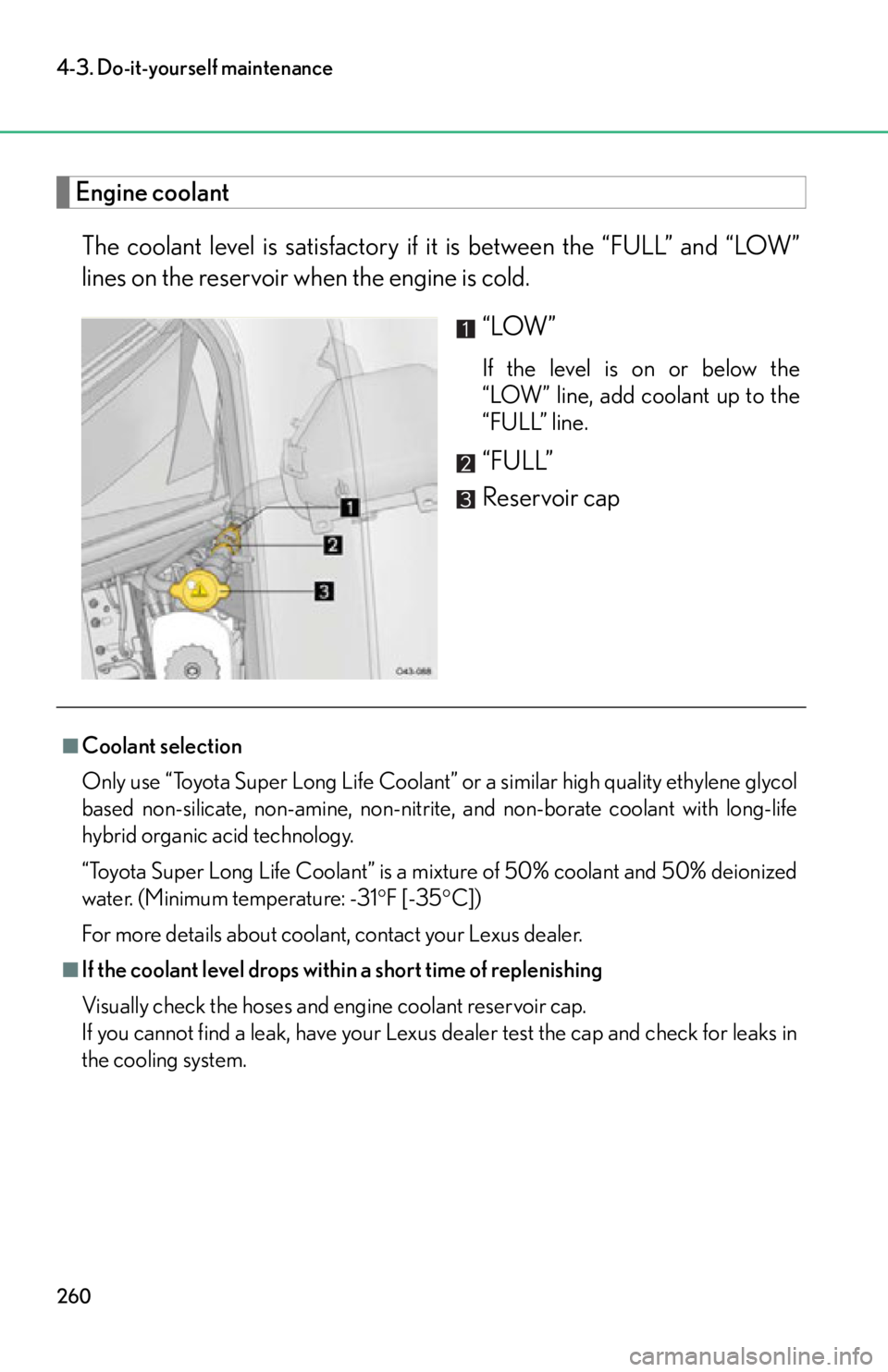
Engine coolantThe coolant level is satisfactory if it is between the “FULL” and “LOW”
lines on the reservoir when the engine is cold.
“LOW”
If the level is on or below the
“LOW” line, add coolant up to the
“FULL” line.
“FULL”
Reservoir cap
■Coolant selection
Only use “Toyota Super Long Life Coolant” or a similar high quality ethylene glycol
based non-silicate, non-amine, non-nitrite, and non-borate coolant with long-life
hybrid organic acid technology.
“Toyota Super Long Life Coolant” is a mixture of 50% coolant and 50% deionized
water. (Minimum temperature: -31 F [-35C])
For more details about coolant, contact your Lexus dealer.
■If the coolant level drops within a short time of replenishing
Visually check the hoses and engine coolant reservoir cap.
If you cannot find a leak, have your Lexus dealer test the cap and check for leaks in
the cooling system.
Page 263 of 420
261
4-3. Do-it-yourself maintenance
4
Maintenance and care
CondenserCheck the condenser and clear any foreign objects.
If it is extremely dirty or you are not sure of its condition, have your vehicle
checked by your Lexus dealer.
CAUTION
■When the engine is hot
Do not remove the engine coolant reservoir cap.
The cooling system may be under pressure and may spray hot coolant if the cap is
removed, causing burns or other injuries.
NOTICE
■When adding engine coolant
Coolant is neither plain water nor straight antifreeze. The correct mixture of water
and antifreeze must be used to provide proper lubrication, corrosion protection
and cooling. Be sure to read the antifreeze or coolant label.
■If you spill coolant
Be sure to wash it off with water to prevent it from damaging parts or paint.
CAUTION
■When the engine is hot
Do not touch the condenser, as it may be hot and cause burns.
Page 293 of 420

291
4-3. Do-it-yourself maintenance
4
Maintenance and care
8CDS FAN 40 A Electric cooling fan
9WIP40 A Windshield wiper
10ABS MTR1 50 A Electronically controlled brake system
11ACC CUT 7.5 A Starter system
12H-LP RH 15 A Headlight low/high beam (right-side)
13H-LP LH 15 A Headlight low/high beam (left-side)
14E/G IG 5 AMultiport fuel injection system/
sequential multiport fuel injection sys-
tem, ASG (Automated Sequential
Gearbox)
15IGN
10 AMultiport fuel injection system/
sequential multiport fuel injection sys-
tem, SRS airbag system, electronically
controlled brake system, electric
power control system
16EFI NO.2 10 A
Multiport fuel injection system/
sequential multiport fuel injection sys-
tem
17EFI NO.1
10 AMultiport fuel injection system/
sequential multiport fuel injection sys-
tem
18P/I
50 A INJ, A/PMP HTR, EFI, A/F HTR
19ST 30 A Starter system
20MAIN 30 A H-LP RH, H-LP LH
21ABS MTR2 50 A Electronically controlled brake system
22F/ P M P3 0 AMultiport fuel injection system/
sequential multiport fuel injection sys-
tem
FuseAmpereCircuit