brake LEXUS LS430 2006 User Guide
[x] Cancel search | Manufacturer: LEXUS, Model Year: 2006, Model line: LS430, Model: LEXUS LS430 2006Pages: 419, PDF Size: 11.19 MB
Page 108 of 419
92
2-1. Driving procedures
CAUTION
■When braking the vehicle
●When the brakes are wet, drive more cautiously.
Braking distance increases when the brakes are wet, and may cause one side of
th
e vehicle to brake differently than the other side. Also the parking brake may
not securely hold the vehicle.
●If the power brake assist function does not operate, do not follow other vehicles
closely and avoid downhill or sharp turns that require making.
Braking is still possible, but it will re quir
e more force on the pedal than usual.
Braking distance may also increase.
●Do not pump the brake pedal if the engine stalls. Each push on the pedal uses up
your reserved brake fluid pressure.
●Even if the power assist is completely lost, the brakes will still work. But you will
have to push the pedal hard, much hard er than normal. And your braking dis-
tance will increase.
●Do not drive your vehicle with only a single brake system. Have your brakes fixed
immediately.
NOTICE
■While driving the vehicle
Do not use the accelerator pedal or depres s acceler
ator and brake pedals together
to hold the vehicle on a hill.
■When parking the vehicle
Always put the selector lever in P. The vehicle may begin to move, or the vehicle
ma
y accelerate suddenly if the accelerat or pedal is accidentally depressed.
Page 109 of 419
93
2-1. Driving procedures
2
When driving
NOTICE
■Avoiding damage to vehicle parts
●Do not turn the steering wheel fully in either direction and hold it there for a long
time. Doing so may damage the power steering pump.
●When driving over bumps in the road, drive as slowly as possible to avoid damag-
ing the wheels, underside of the vehicle, etc.
■If you hear a squealing or scraping no ise (brake pad wear limit indicators)
Have your Lexus dealer check and replace the brake pads as soon as possible.
Exp
ensive rotor damage can result if the pads are not replaced when needed.
■If a malfunction is detected while driving
A flat or damaged tire may c
ause the following situations. Hold the steering wheel
firmly and gradually press the brak e pedal to slow down the vehicle.
• It may be difficult to control your vehicle.
• The vehicle will make abnormal sounds.
• The vehicle will behave abnormally.
Replace a flat tire with a new one. ( P.
3 4 7 )
Page 110 of 419
94
2-1. Driving procedures
Starting the engine
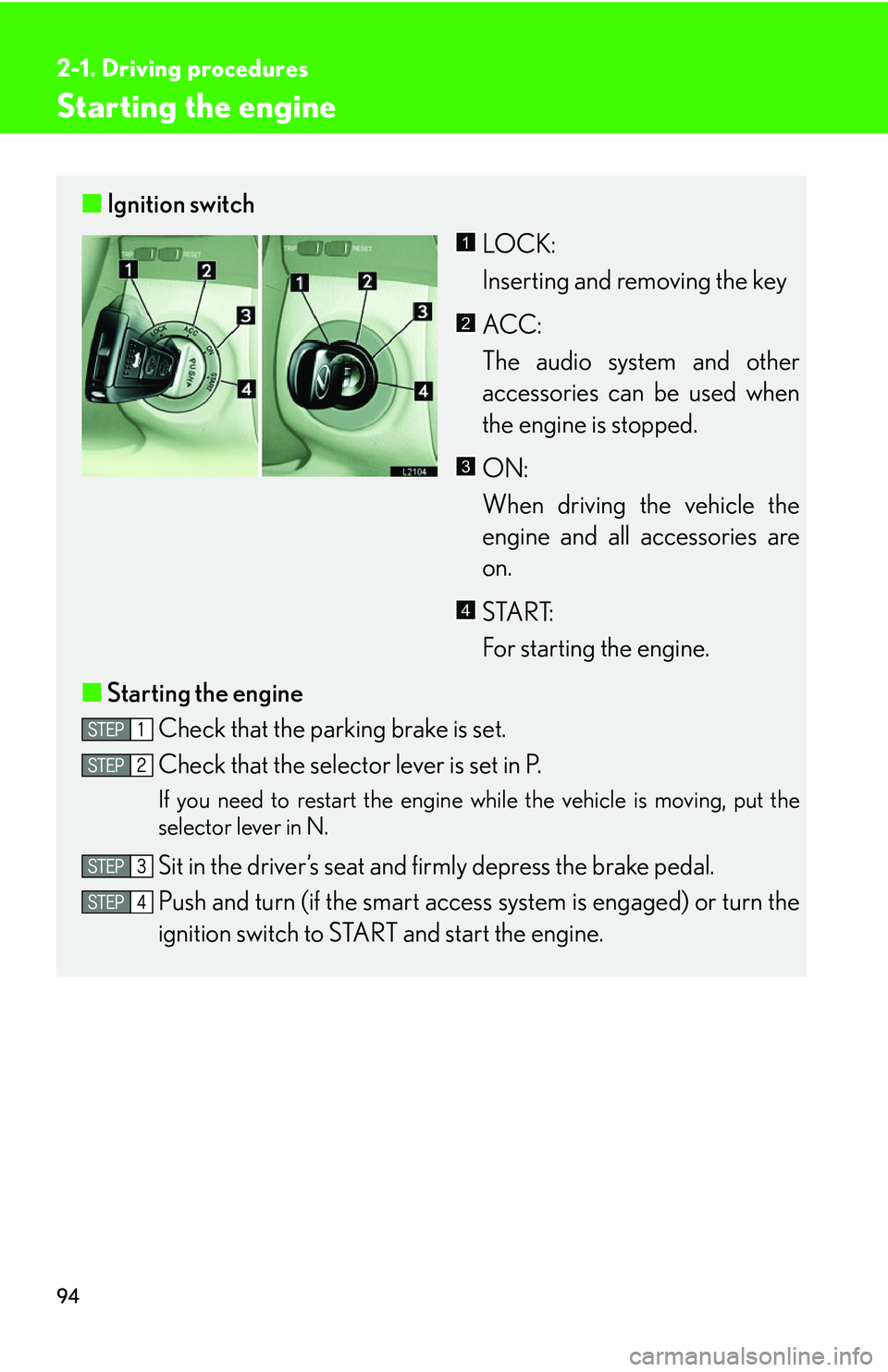
■Ignition switch
LOCK:
Inserting and removing the key
ACC:
The audio system and other
acces
sories can be used when
the engine is stopped.
ON:
When driving the vehicle the
engine an
d all accessories are
on.
START:
For starting the engine.
■ Star
ting the engine
Check that the parking brake is set.
Check that the selector lever is set in P.
If you need to restart the engine while the vehicle is moving, put the
selector lever in N.
Sit in the driver’s seat and firmly depress the brake pedal.
Push and turn (if the smart access s
ystem is engaged) or turn the
ignition switch to STAR T and star
t the engine.
1
2
3
4
Page 114 of 419
98
2-1. Driving procedures
Automatic transmission
Select a gear position appropriate for the driving conditions.
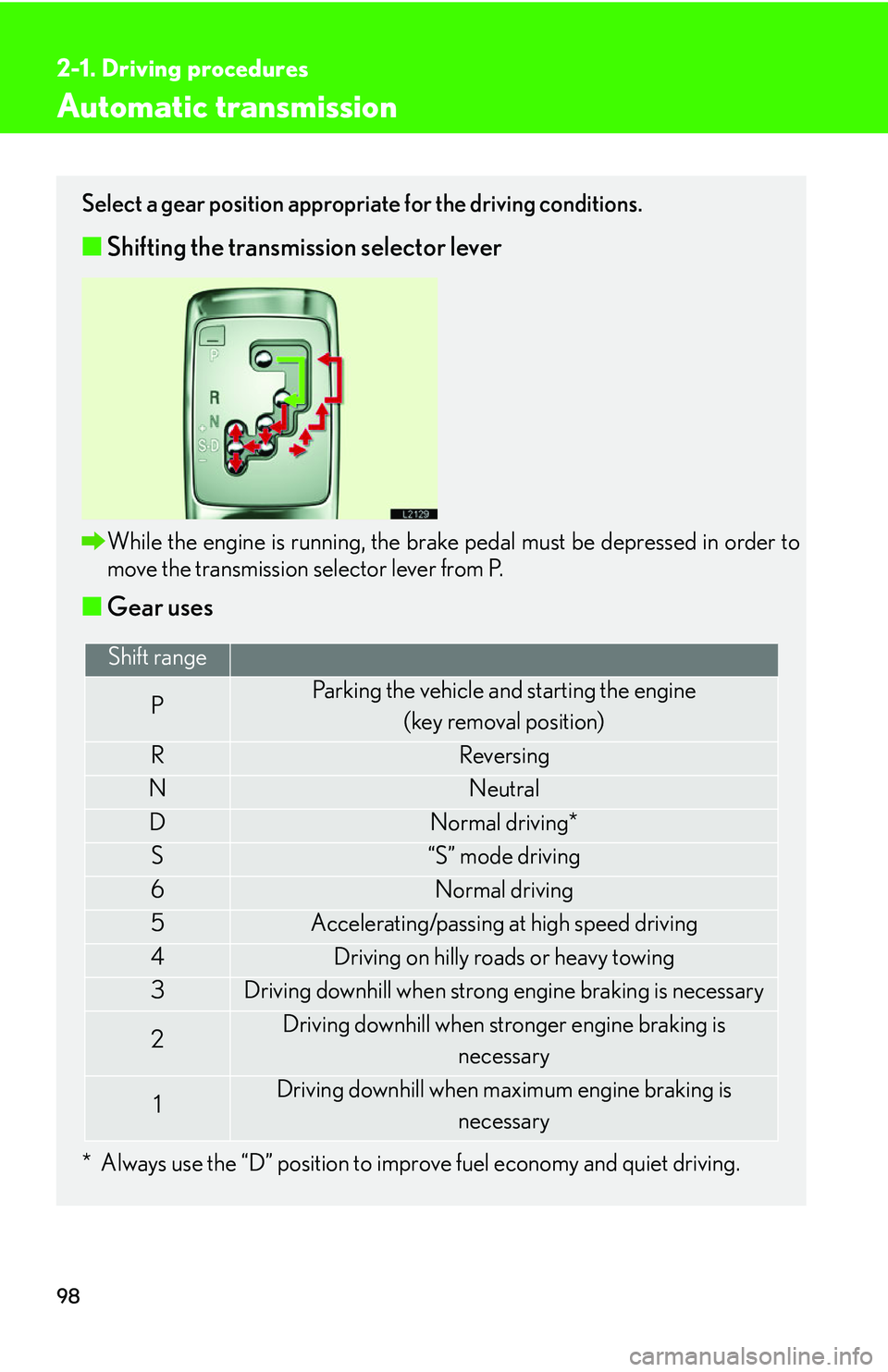
■Shifting the transmission selector lever
While the engine is running, the brake pedal must be depressed in order to
move the transmission selector lever from P.
■Gear uses
* Always use the “D” position to improve fuel economy and quiet driving.
Shift range
PParking the vehicle and starting the engine
(key removal position)
RReversing
NNeutral
DNormal driving*
S“S” mode driving
6Normal driving
5Accelerating/passing at high speed driving
4Driving on hilly roads or heavy towing
3Driving downhill when strong engine braking is necessary
2Driving downhill when stronger engine braking is necessary
1Driving downhill when maximum engine braking is
necessary
Page 118 of 419
102
2-1. Driving procedures
Parking brake
NOTICE
■Before driving
Fully release the parking brake.
Driving the vehicle with the parking brake set will lead to brake components over -
heating, which may affect braking performance and increase brake wear.
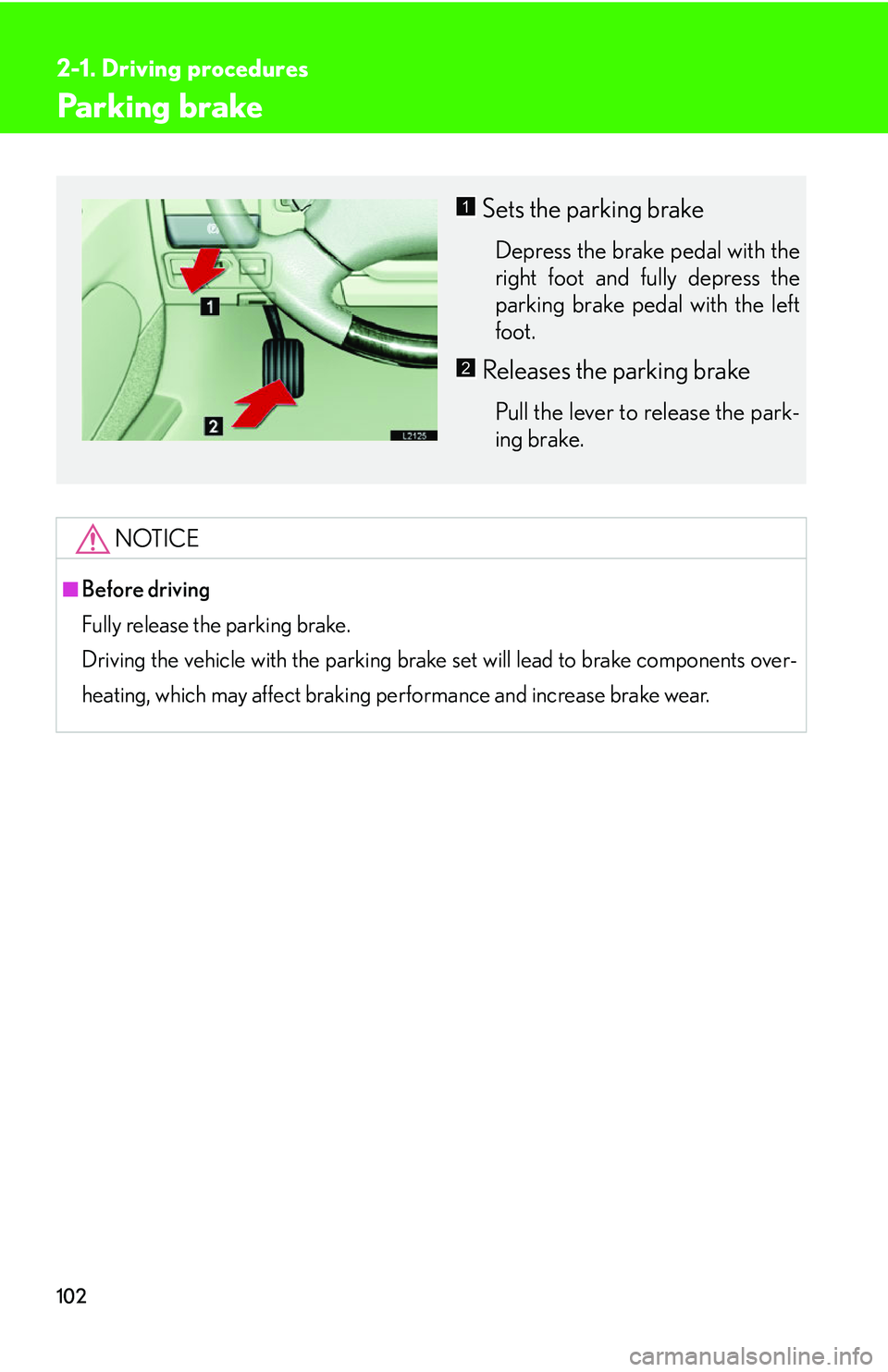
Sets the parking brake
Depress the brake pedal with the
right foot and fully depress the
parking brake pedal with the left
foot.
Releases the parking brake
Pull the lever to release the park -
ing brake.
1
2
Page 127 of 419

111
2-3. Operating the headlight and windshield wipers
2
When driving
Daytime running light system
The headlights turn on automatically (at a reduced intensity) whenever the
engine is started and the parking brake is released to make your vehicle
more visible to other drivers. Dayt ime running lights are not designed for
use at night.
■Headlight control sensor
■Automatic light off system
The headlights turn off automatically if the engine is stopped and the driver’s door is
opened wh
ile the headlights are turned on.
To turn the headlights on again, turn the key to ON, or turn the light switch off once
and then
back to or position.
■Automatic headlight leveling system
The level of the headlights is
automatically adjusted according to the number of
passengers and the loading condition of the vehicle to ensure that the headlights do
not interfere other road users.
■Customization
The time it takes for the headlights to automatically turn on or off can be changed.
( P.384 )
The sensor may not function properly if an
object is placed on the sensor, or anything
that blocks the sensor is affixed to the wind-
shield.
Doing so interferes with the sensor detect-
ing the level of ambient light and may cause
the automatic headlight system malfunc-
tion.
Page 146 of 419
130
2-4. Using other driving systems
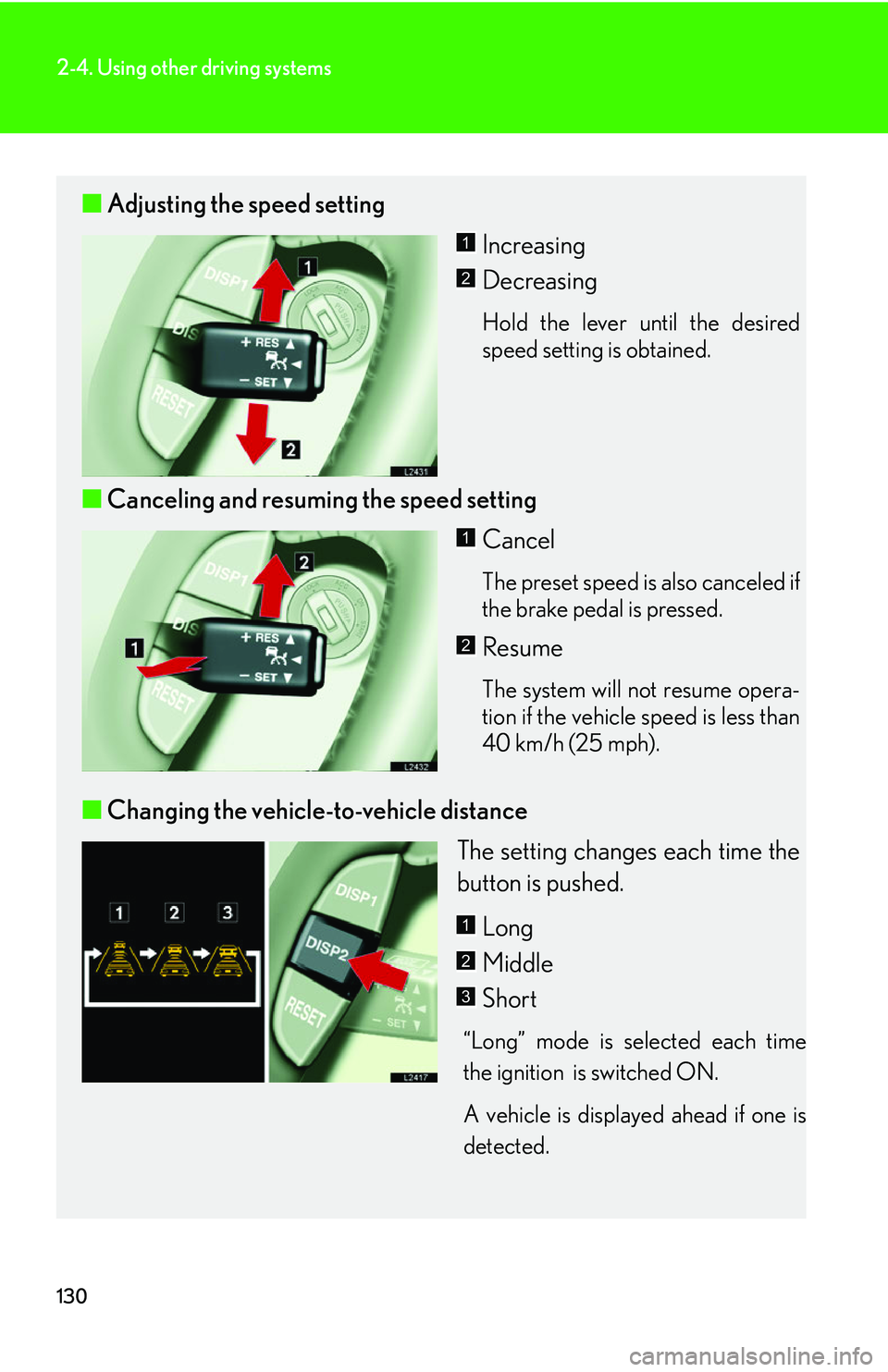
■Adjusting the speed setting
Increasing
Decreasing
Hold the lever until the desired
speed setting is obtained.
■Canceling and resuming the speed setting
Cancel
The preset speed is also canceled if
the brake pedal is pressed.
Resume
The system will not resume opera-
tion if the vehicle speed is less than
40 km/h (25 mph).
■ Changing the vehicle-to-vehicle distance
The setting changes each time the
button is pushed.
Long
Middle
Short
“Long” mode is selected each time
the ignition is switched ON.
A vehicle is displayed ahead if one is
detected
.
1
2
1
2
1
2
3
Page 147 of 419
131
2-4. Using other driving systems
2
When driving
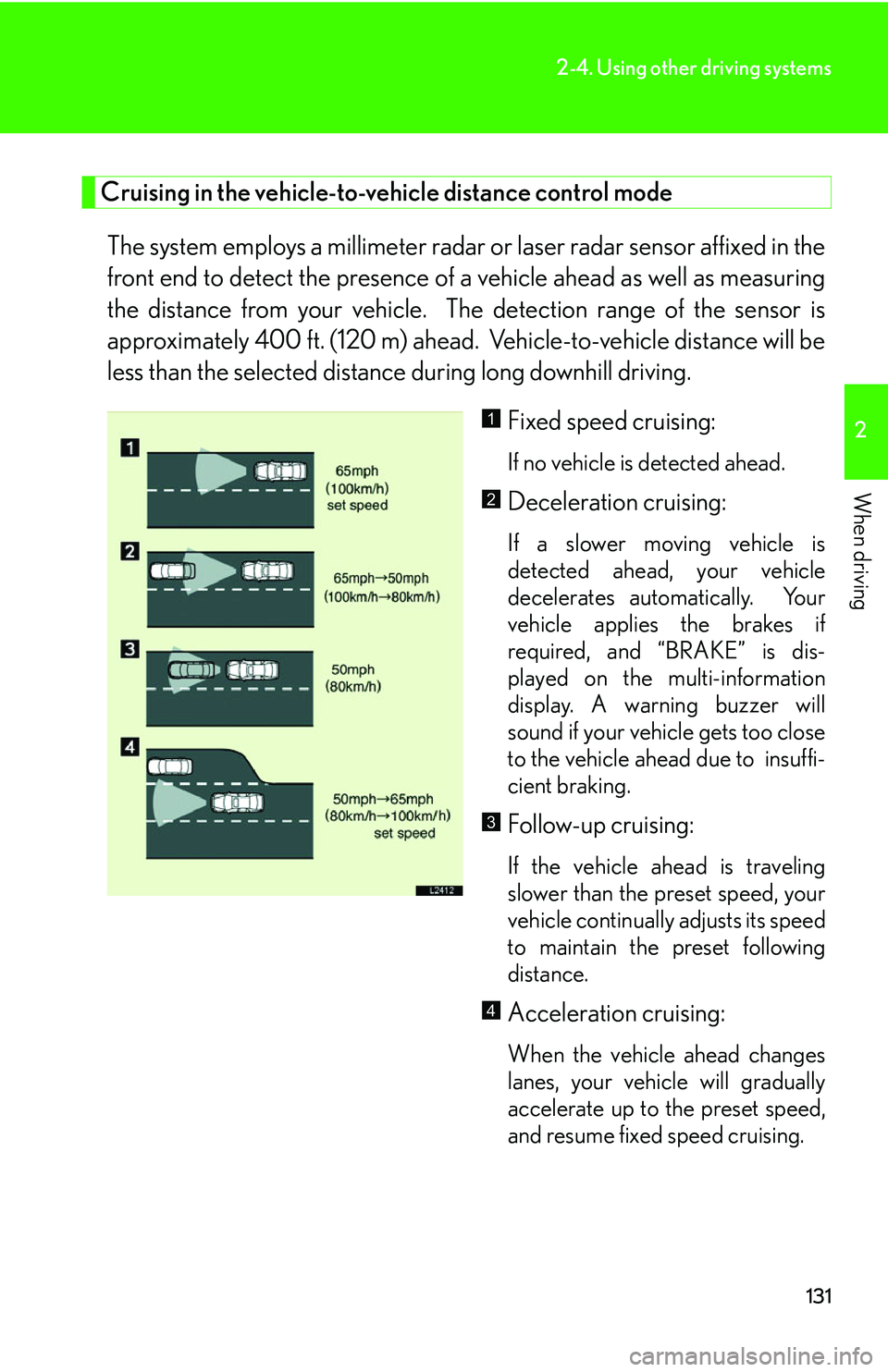
Cruising in the vehicle-to-vehicle distance control mode
The system employs a millimeter radar or laser radar sensor affixed in the
front end to detect the pr esence of a vehicle ahead as well as measuring
the distance from your vehicle. The detection range of the sensor is
approximately 400 ft. (120 m) ahead. Vehicle-to-vehicle distance will be
less than the selected distance during long downhill driving.
Fixed speed cruising:
If no vehicle is detected ahead.
Deceleration cruising:
If a slower moving vehicle is
detected ahead, your vehicle
decelerates automatically. Your
vehicle applies the brakes if
required, and “BRAKE” is dis -
played on the multi-information
displa
y. A warning buzzer will
sound if your vehicle gets too close
to the vehicle ahead due to insuffi -
cient braking.
Follow-up cruising:
If the vehicle ahead is traveling
slower than the preset speed, your
vehicle continually adjusts its speed
to maintain the preset following
distance.
Acceleration cruising:
When the vehicle ahead changes
lanes, your vehicle will gradually
accelerate up to the preset speed,
and resume fixed speed cruising.
1
2
3
4
Page 148 of 419
132
2-4. Using other driving systems
■Setting vehicle speed
Settings can be made when the vehicle
is traveling above 28 mph (45 km/h).
■Unsuitable conditions
You cannot set the speed in the following conditions:
• When the selector lever is in a position other than D, 4, 5, or 6.
• When driving in adverse weather conditions.
■Automatic cruise control cancellation
In the following cases, the preset speed is can ce
lled. If the system is restored, cruise
control enters the ready mode.
• The slip indicator light blinks and a warning tone sounds.
• The anti-lock braking system activates.
• Foreign matter adheres to the sensor.
• The driving pattern selector sw it
ch is set to “SNOW” mode.
• The wipers are operated at high speed (radar), or either high or low speeds (l
aser). This includes high and low speed operation with the wiper lever in the
AUTO position.
• The vehicle’s speed falls below 25 mph (40 km/h). In this case, you must apply th
e brakes manually to slow the vehicle.
If the preset speed automatically cancels out for other than the above reasons, the
sy
stem may have malfunctioned. Do not operate the dynamic radar/laser cruise
control. You may continue driving, howe ver have your vehicle checked by your
Lexus dealer at the earliest opportunity.
Page 152 of 419
136
2-4. Using other driving systems
CAUTION
■Conditions which hinder the laser cruise control’s vehicle detection capability
A delay in detection of a vehicle may occur in the following situations. You must
ap
ply the brakes manually to avoid accidents.
• The vehicle ahead has higher ground clearance, meaning the reflectors are in a higher position
.
• The rear section of the vehicle ahead is extremely dirty.
• Surrounding vehicles are fl in
ging up water or snow.
• Your front view is obscured by excessive exhaust smoke.
• Protective film is attached to the reflectors of the vehicle ahead, or they are d
amaged.
• Reflectors are not installed on the vehicle ahead.
• Heavy luggage in your trunk or on your r
ear seats causes the nose of your vehi-
cle to rise.
• A vehicle cuts in at short range.
• A motorcycle is traveling along the side of the same lane
■To ensure the radar/laser cruise control system functions correctly
●Keep the radar sensor and grille cover/la ser sensor glass clean. When cleaning,
use a soft cloth and be careful not to damage the sensor or grille cover.
●Avoid strong impacts around the sensor, as incorrect sensor alignment will result
in system malfunction. A special device is required to adjust the sensor alignment.
See your Lexus dealer for adjustment.
●Do not disassemble the sensor.
●Do not affix stickers (including transparent stickers), or attach accessories
around the sensor or grille cover/sensor glass.
●Do not modify or paint the grille cover. When replacing the cover, be sure to use
a genuine Lexus cover. *
* Vehicles equipped with the radar cruise control only.