steering LEXUS LS430 2006 Owner's Manual
[x] Cancel search | Manufacturer: LEXUS, Model Year: 2006, Model line: LS430, Model: LEXUS LS430 2006Pages: 419, PDF Size: 11.19 MB
Page 111 of 419
95
2-1. Driving procedures
2
When driving
■If the engine does not start
Check whether the other keys will start the engine.
If they work, your key may be broken. Have the key checked at your Lexus dealer.
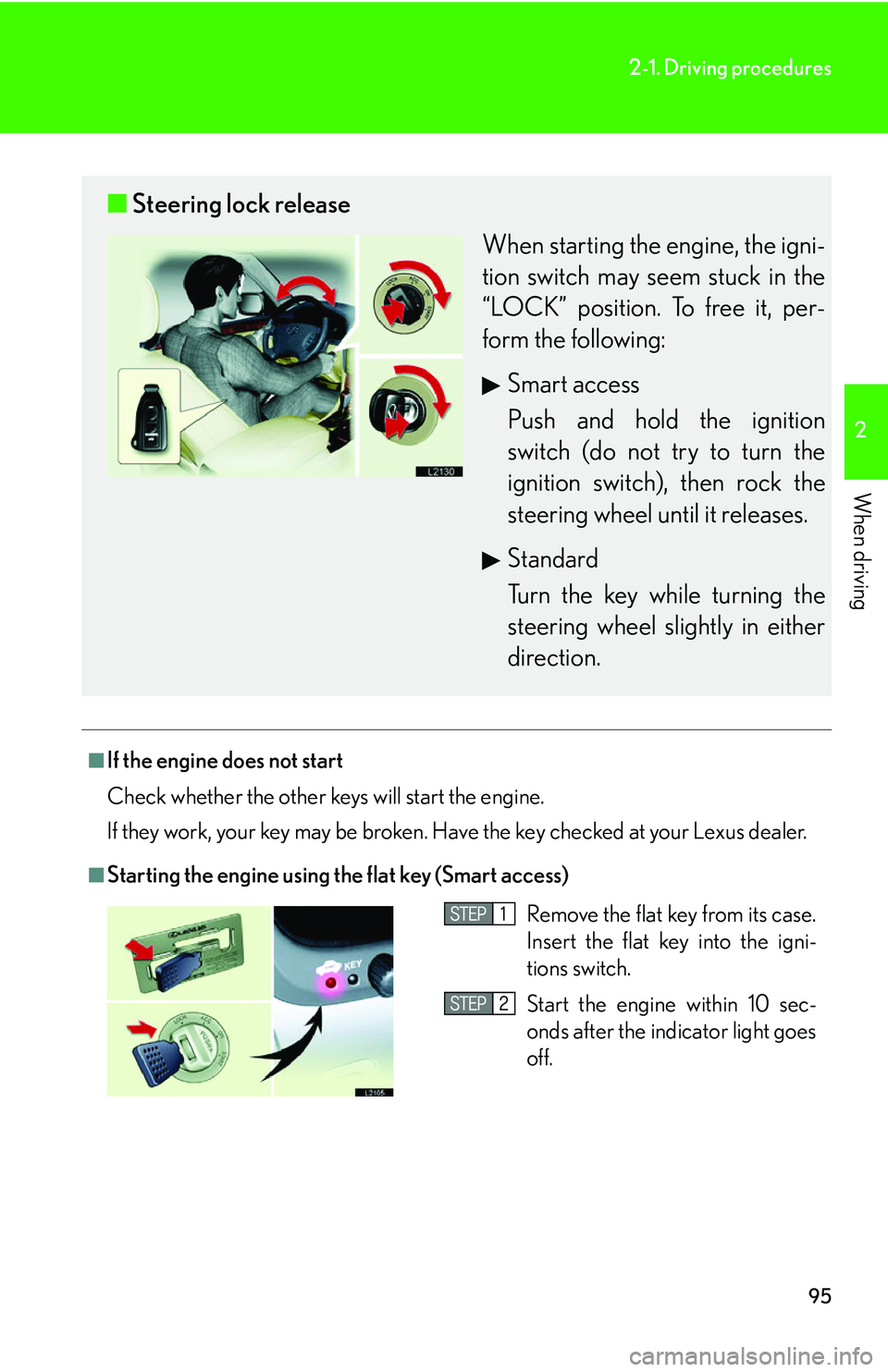
■Starting the engine using the flat key (Smart access)
■ Steering lock release
When starting the engine, the igni -
tion switch may seem stuck in the
“L
OCK” position. To free it, per -
form the following:
Smart access
Push and hold the ignition
s
witch (do not try to turn the
ignition switch), then rock the
steering wheel until it releases.
Standard
Turn the key while turning the
steering wheel slightly in either
dir
ection.
Remove the flat key from its case.
Insert the flat key into the igni-
tions switch.
Start the engine within 10 sec-
onds after the indicator light goes
off.
Page 156 of 419

140
2-4. Using other driving systems
Driver assist systems
When VSC or TRAC is operating
If the vehicle is in danger of slip-
ping or the rear wheels spin, the
slip indicator ligh t flash to indicate
that the s
ystems have been
engaged.
A buzzer (intermittent) sounds
when VSC is operating.
To help enhance improve vehicle safety, the following systems operate auto-
matically in certain driving conditions.
■ ABS (Anti-lock Braking System)
Help ensure steering performance in th e event of sudden braking or driving
on slippery road surfaces.
■ BA (Brake Assist)
Generates an increased level of braking force after the brake pedal is
pushed, when the system detects a panic stop situation.
■VSC (Vehicle Stability Control)
Helps the driver to control skidding wh en swerving suddenly or turning on
slippery road surfaces.
■ TRAC (Traction Control)
Helps maintain drive power and prevents spinning the rear wheels when
starting the vehicle or accelerating on slippery roads.
■Pre-collision system (if equipped)
( P. 1 4 3 )
Page 157 of 419

141
2-4. Using other driving systems
2
When driving
To disable VSC and TRAC
If the vehicle gets stuck in fresh snow or mud, VSC and TRAC may
reduce power from the engine to the wheels. You may need to turn VSC
and TRAC off to enable you to rock the vehicle in order to free the vehi-
cle.
Push the button to turn off VSC
and TRAC.
The TRAC OFF indicator light
turns on.
Push the button again to turn the
sy
stem back on.
1
■Operating sounds and vibrations caus ed by the ABS, VSC & TRAC systems
●A sound may be heard from the engine compartment when the engine is
started or just after the vehicle begins to move. This sound does not indicate that
a malfunction has occurred in any of these systems.
●Any of the following conditions may occur when the ABS, VSC and TRAC sys -
tems are operating. None of these indicates that a malfunction has occurred.
• A sound may be heard.
• Vibrations may be felt through the vehicle body and steering.
• A motor sound may be heard after the vehicle comes to a stop.
• The brake pedal may pulsate slightly while the ABS is activated.
• The brake pedal may move forward slightly after the ABS is activated.
■Failure warning for VSC or TRAC system
If an error in the VSC or TRAC systems is
detected, the master warning light and
TRAC OFF indicator light comes on, a warning tone sounds. (P.334 )
Page 163 of 419
147
2-5. Driving information
2
When driving
As shown in the above example, if the number of occupants increases,
the cargo and luggage load equaling the combined weight of the occu-
pants who got on later, by an amount. In other w
ords, if an increase in the
number of occupants causes an excess of the total load capacity (com -
bined weight of occupants plus car go and luggage load), y
ou must
reduce the cargo and luggage on your vehicle. ( P.148 )
CAUTION
■Storage precautions
●Do not place anything on the packag e tray behind the rear seatback.
Such items may be thrown about and possib ly injur
e people in the vehicle during
sudden braking or in an accident.
●Do not drive with objects on top of the instrument panel.
They may interfere with the driver’s field of view or move during sharp accelera -
tion or turning, thus impairing the driver ’
s control of the vehicle. In an accident
they may injure the vehicle occupants.
●Secure all items in the occupant compartment, as they may shift and injure some -
one during an accident or sudden braking.
■Weight of the load
●Improper loading may cause deterioratio n of steering or braking control result-
ing in an accident which may cause death or serious injury.
●Do not exceed the maximum axle weight ra ting or the total vehicle weight rating.
●Even if the total load of occupant's weight and the cargo load is less than the total
load capacity, do not apply the load unevenly.
Page 164 of 419
148
2-5. Driving information
Vehicle load limits
■Total load capacity and seating capacity
These are also described on the tire and loading information label. ( P. 2 8 3 )
CAUTION
■Overload
Do not apply excess load.
It may cause not only damage to the tires, but also
deterioration of steering ability
and braking ability, resu lting in an accident.
Vehicle load limits include total load ca pacity, seating capacity, towing capac-
ity and cargo capacity.
■ Total load capacity: 900 lb. (410 kg)
Total load capacity means the comb ined w
eight of occupants, cargo
and luggage.
■ Seating capacity: T
otal 5 (Front 2, Rear 3)
Seating capacity means the maxi mum number of occupants whose
estimated a
verage weight is 150 lb. (68 kg) per person.
Even if the number of occupants ar e within the seating capacity, do not
exceed the total load capacity.
■ Towing capacity: 2000 lb. (907 kg)
Towing capacity means the maximum gross trailer weight (trailer
w
eight plus its cargo weight) that your vehicle is able to tow.
■ Car
go capacity
Cargo capacity ma y incr
ease or decrease depending on the weight
and the number of occupants. ( P.145 )
Page 172 of 419
156
2-5. Driving information
Trailer towing tips
Your vehicle will handle differently when towing a trailer. The three main
causes of vehicle-trailer accidents are driver error, excessive speed and
improper trailer loading. Keep these in mind when towing.
• Before starting out, check the tra iler
’s lights and the vehicle-trailer
connections. Recheck after driving a short distance.
• Practice turning, stopping and reversi ng with the tr
ailer attached in an
area away from traffic until you be come accustomed to the feel of the
vehicle.
• Reversing with a trailer attached is dif
ficult and requires practice. Grip
the bottom of the steering wheel and move your hand to the left to
move the trailer to the left. Move yo ur hand to the right to move the
trailer to the right. (This is gene rally opposite to reversing without a
trailer attached.) Avoid sharp or prolonged turning. Have someone
guide you when reversing to redu ce the risk of an accident.
NOTICE
■When installing a trailer hitch
●Use only the position recommended by your Lexus dealer. Do not install the
trailer hitch on the bumper; this may cause body damage.
●Do not use axle-mounted hitches as they can cause damage to the axle housing,
wheel bearings, wheels or tires.
■Brakes
Lexus recommends trailers with brakes that conform to any applicable federal and
sta
te/provincial requlations.
■Do not directly splice trailer lights
Direct splicing may damage your vehicle’s electrical system and cause a malfunc -
tion.
Page 173 of 419
157
2-5. Driving information
2
When driving
• As stopping distance is increased when towing a trailer, vehicle-to-
vehicle distance should be increas ed. For each 10 mph (16 km/h) of
speed, allow at least one vehicle and trailer length.
• Avoid sudden braking as you may sk id, r
esulting in jackknifing and loss
of control. This is especially true on wet or slippery surfaces.
• Avoid jerky starts or sudden acceleration.
• Avoid jerky steering and sharp turn s, and slo
w down before making a
turn.
• Note that when making a turn, the tr ailer wheels will be closer than the
v
ehicle wheels to the inside of th e turn. Compensate by making a
larger than normal turning radius.
• Crosswinds and rough roads will ad v
ersely affect handling of your
vehicle and trailer, causing sway. Peri odically check the rear to prepare
for being passed by large trucks or buses, which may cause your vehi-
cle and trailer to sway. If s
waying occurs, firmly grip the steering wheel,
reduce speed immediately but gradually, and steer straight ahead.
Never increase speed. If you make no extreme correction with the
steering or brakes, your vehi cle and trailer will stabilize.
• Take care when passing other vehicl es. P
assing requires considerable
distance. After passing a vehicle, do not forget the length of your
trailer, and be sure you have plenty of room before changing lanes.
• In order to maintain efficient engine br
aking and electrical charging
performance, do not use overdrive. Transmission shift range position
must be in “4”, in the “S” mode.
• Due to the added load of the traile r
, your vehicle’s engine may overheat
on hot days (at temperatures over 85°F [30°C]) when driving up a
long or steep grade. If the engine coolant temperature gauge indicates
overheating, immediately turn off the air conditioning (if in use), pull
your vehicle off the road and stop in a safe spot. See “If your vehicle
overheats” ( P.359 ).
Page 177 of 419
3Interior features
161
3-1. Using the air conditioning
system and defogger ........... 162
Automatic air conditioning
control .......................................... 162
Rear window defogger............. 170
Rear air conditioning
controls ........................................ 172
3-2. Using the audio system .......... 174 Audio system ................................. 174
Operating the radio................... 176
Operating the cassette
player ............................................ 182
Using the CD changer ............ 185
Optimal use of the audio
system ............................................ 191
Using the rear controller ......... 193
Using the steering switches.... 195
3-3. Turning on interior lights ...... 198 Interior lights list ......................... 198
3-4. Storage ...................................... 201 Storage features......................... 201 3-5. Other interior features ....... 208
Sun visors ..................................... 208
Vanity mirror and light ............ 209
Clock ............................................... 210
Ashtray............................................. 211
Cigarette lighter ......................... 213
Power outlets................................ 214
Outside temperature display .......................................... 216
Seat heaters .................................. 218
Climate control seat
switches ..................................... 220
Refreshing rear seat
switches ...................................... 222
Coat hooks................................... 223
Floor mats ..................................... 224
Sunshades ................................... 225
Trunk features.............................. 227
Garage door opener ............... 232
Compass (vehicles without
navigation system) ................ 238
Page 190 of 419
174
3-2. Using the audio system
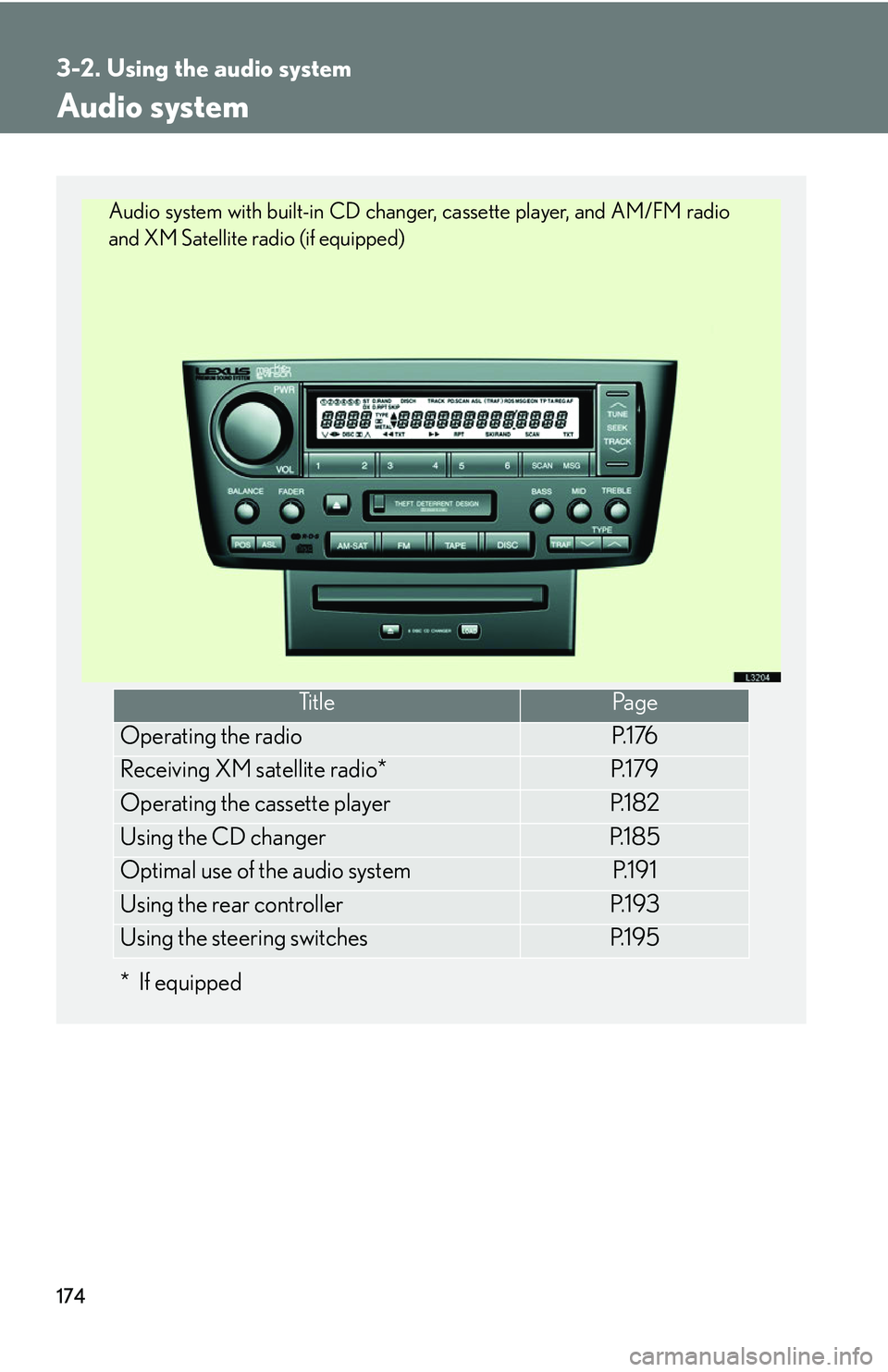
Audio system
*If equipped
Ti t l ePa g e
Operating the radioP. 1 76
Receiving XM satellite radio*P. 1 7 9
Operating the cassette playerP. 1 8 2
Using the CD changerP. 1 8 5
Optimal use of the audio systemP. 1 9 1
Using the rear controllerP. 1 9 3
Using the steering switchesP. 1 9 5
Audio system with built-in CD changer, cassette player, and AM/FM radio
and XM Satellite radio (if equipped)
Page 211 of 419
195
3-2. Using the audio system
3
Interior features
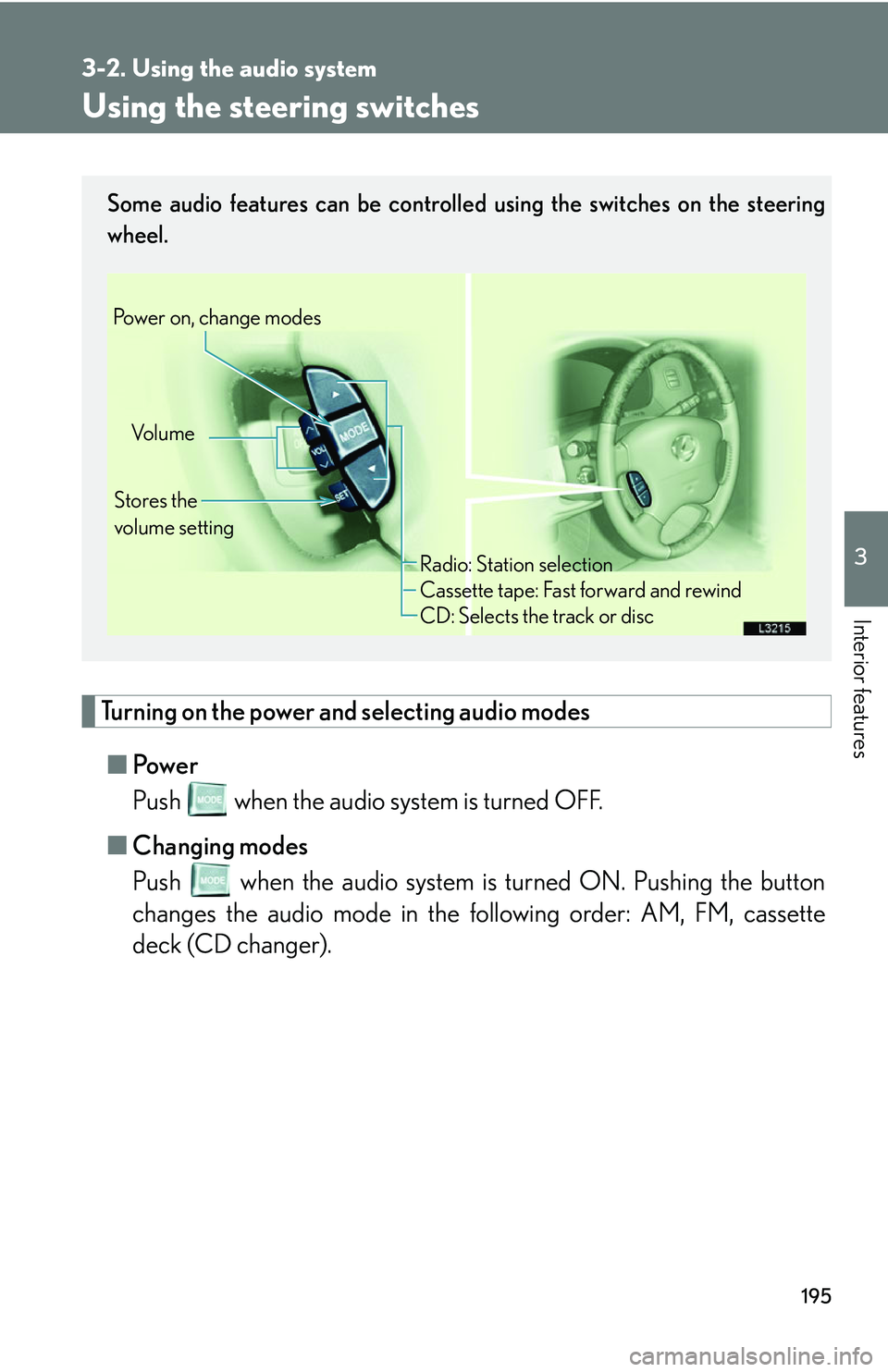
Using the steering switches
Turning on the power and selecting audio modes
■Pow e r
Push when the audio system is turned OFF.
■ Cha
nging modes
Push when the audio system is turned ON. Pushing the button
changes the audio mode in the following order: AM, FM, cassette
deck (CD changer).
Some audio features can be controlled using the switches on the steering
wheel.
Vo l u m e
Stores the
volume setting
Power on, change modes
Radio: Station selection
Cassette tape: Fast forward and rewind
CD: Selects the track or disc