buttons LEXUS LS430 2006 Owners Manual
[x] Cancel search | Manufacturer: LEXUS, Model Year: 2006, Model line: LS430, Model: LEXUS LS430 2006Pages: 419, PDF Size: 11.19 MB
Page 8 of 419
C
A
B
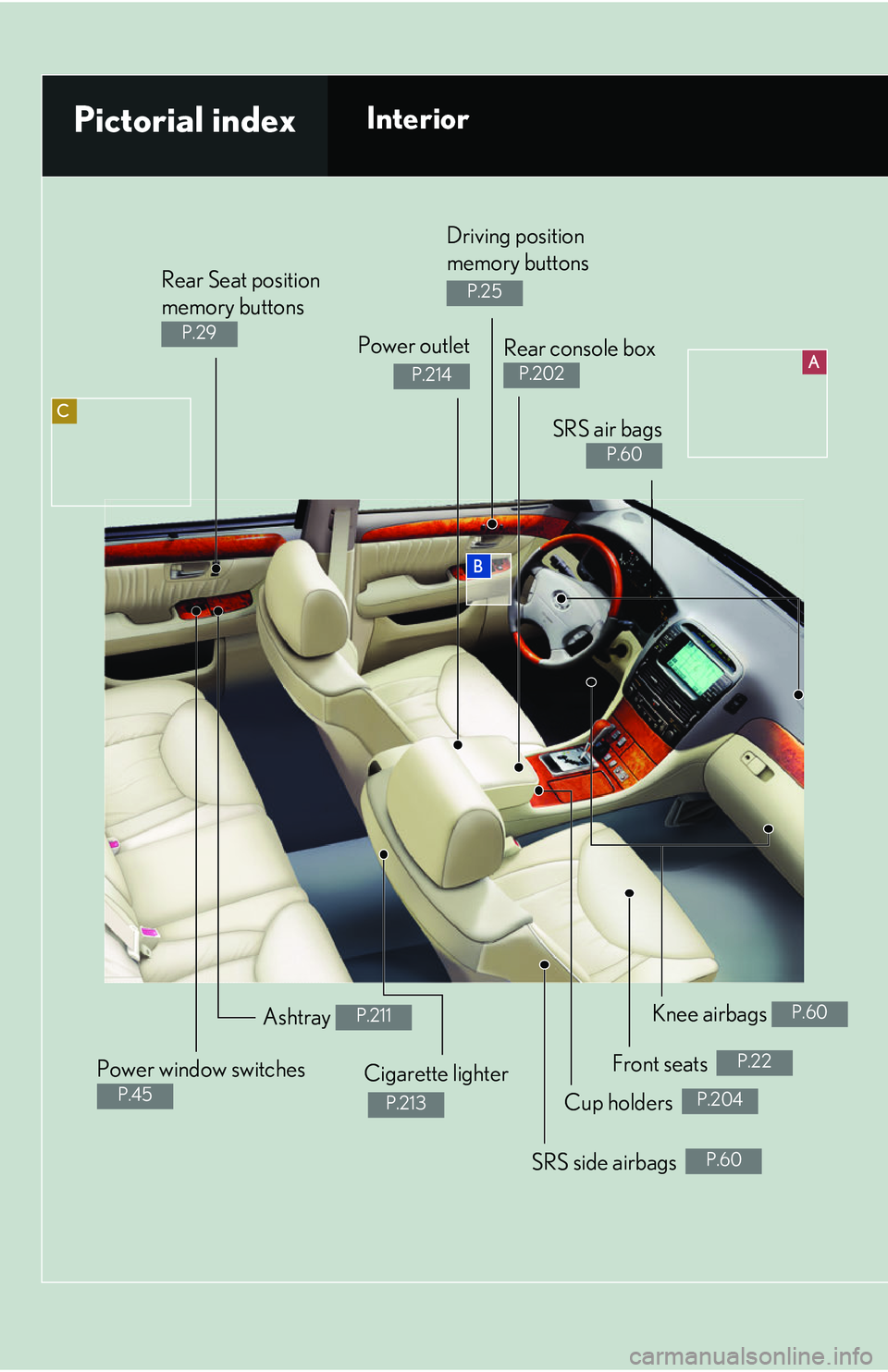
Rear Seat position
memory buttons
P.29 Power outlet
P.214
Power window switches
P.45
Ashtray P.211
Cigarette lighter
P.213
Knee airbags P.60
Pictorial indexInterior
Rear console box
P.202
Driving position
memory buttons
P.25
SRS air bags
P.60
Front seats P.22
Cup holders P.204
SRS side airbags P.60
Page 9 of 419
A
BC
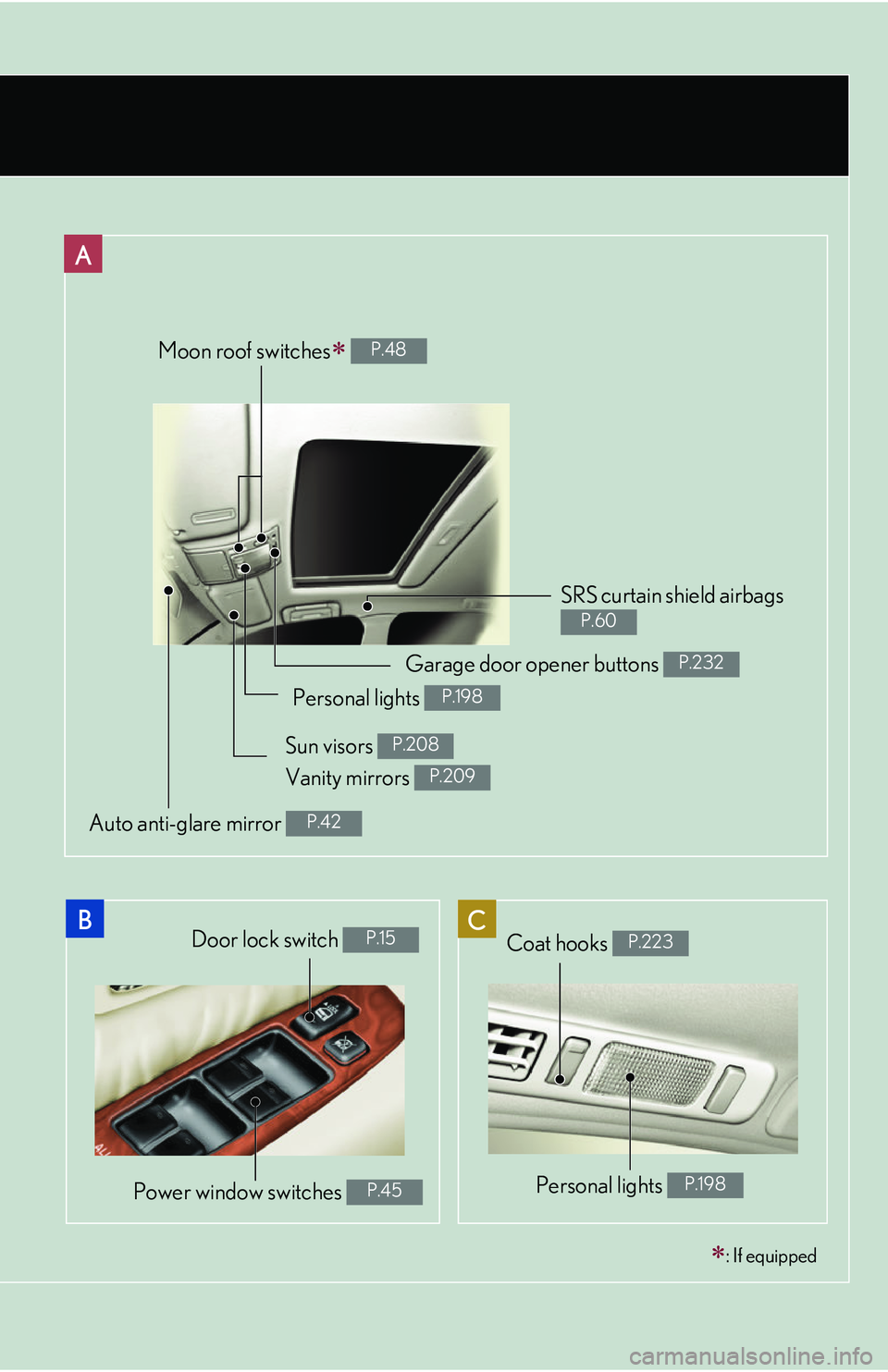
Moon roof switches P.48
SRS curtain shield airbags
P.60
Door lock switch P.15
Power window switches P.45
: If equipped
Garage door opener buttons P.232
Personal lights P.198
Sun visors P.208
Auto anti-glare mirror P.42
Coat hooks P.223
Personal lights P.198
Vanity mirrors P.209
Page 25 of 419
9
1-2. Opening, closing and locking the doors and trunk
1
Before driving
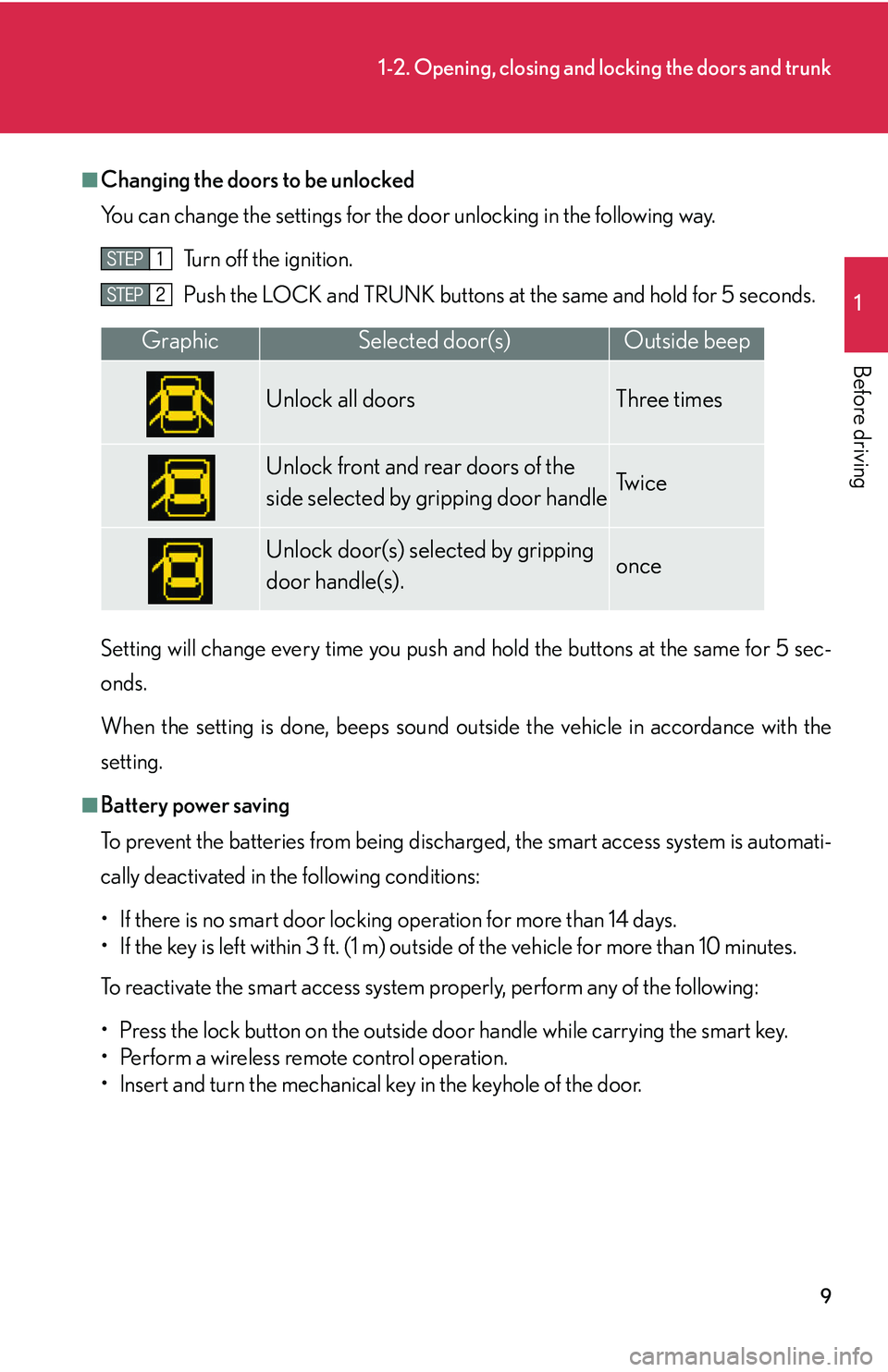
■Changing the doors to be unlocked
You can change the settings for the door unl
ocking in the following way.
Turn off the ignition.
Push the LOCK and TRUNK buttons at
the same and hold for 5 seconds.
Setting will change every time you push an d hold the bu
ttons at the same for 5 sec-
onds.
When the setting is done, beeps sound outside the vehicle in accordance with the
setting.
■Battery power saving
To prevent the batteries from being discharged, the smart access system is automati -
cally deactivated in the following conditions:
• If there is no smart door locking operation for more than 14 days.
• If the key is left within 3 ft. (1 m) outside of the vehicle for more than 10 minutes.
To reactivate the smart access system properly, perform any of the following:
• Press the lock button on the outside do o
r handle while carrying the smart key.
• Perform a wireless remote control operation.
• lnsert and turn the mechanical key in the keyhole of the door.
GraphicSelected door(s)Outside beep
Unlock all doors Three times
Unlock front and rear doors of the
side selected by gripping door handleTw i c e
Unlock door(s) selected by gripping
door handle(s).once
Page 32 of 419
16
1-2. Opening, closing and locking the doors and trunk
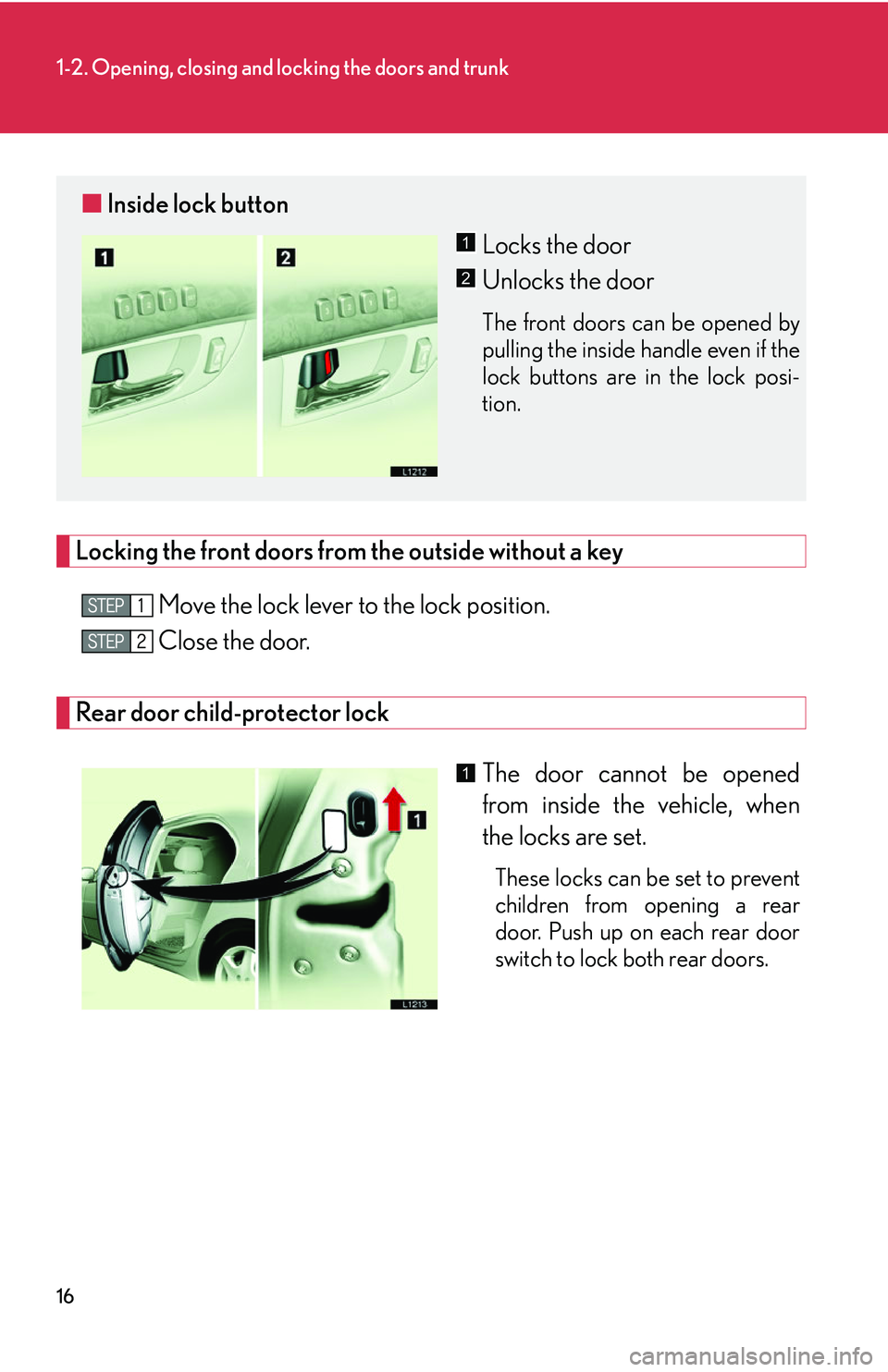
Locking the front doors from the outside without a key
Move the lock lever to the lock position.
Close the door.
Rear door child-protector lock
The door cannot be opened
from inside the vehicle, when
the locks ar
e set.
These locks can be set to prevent
children from opening a rear
door. Push up on each rear door
switch to lock both rear doors.
■Inside lock button
Locks the door
Unlocks the door
The front doors can be opened by
pulling the inside handle even if the
lock buttons are in the lock posi -
tion.
1
2
1
Page 42 of 419
26
1-3. Adjustable components
Selecting a memory setting using a smart access key or wireless remote
control key
Memorized driving positions ( P.25) can be recalled when you unlock
the driver’s door.
■ R
egistering the key
Set the driving positions into the memor
y system using the “1”, “2”
or “3” buttons ( P.25 ).
Close the driver’s door, turn the ig nition switch to the in OFF posi-
tion and remove the key.
Push the “1”, “2” or “3” button and the “LOCK” or “UNLOCK”
button at the same time about one second until you hear a beep.
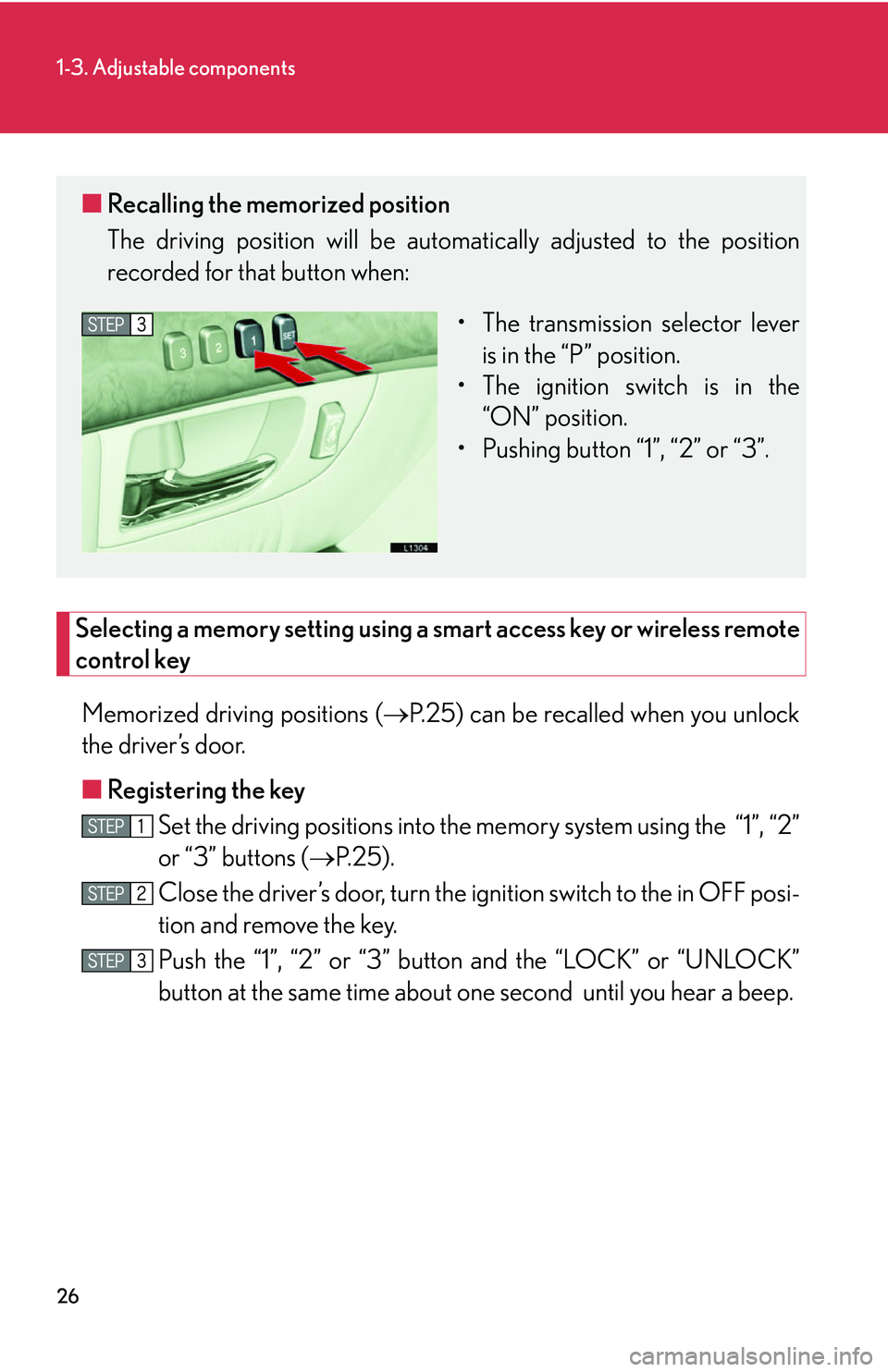
■ Recalling the memorized position
The driving position will be automati cally adjusted to the position
recorded for that button when:
• The transmission selector lever is in the “P
” position.
• The ignition switch is in the “
ON” position.
• Pushing button “1”, “2” or “3”.
Page 192 of 419
176
3-2. Using the audio system
Operating the radio
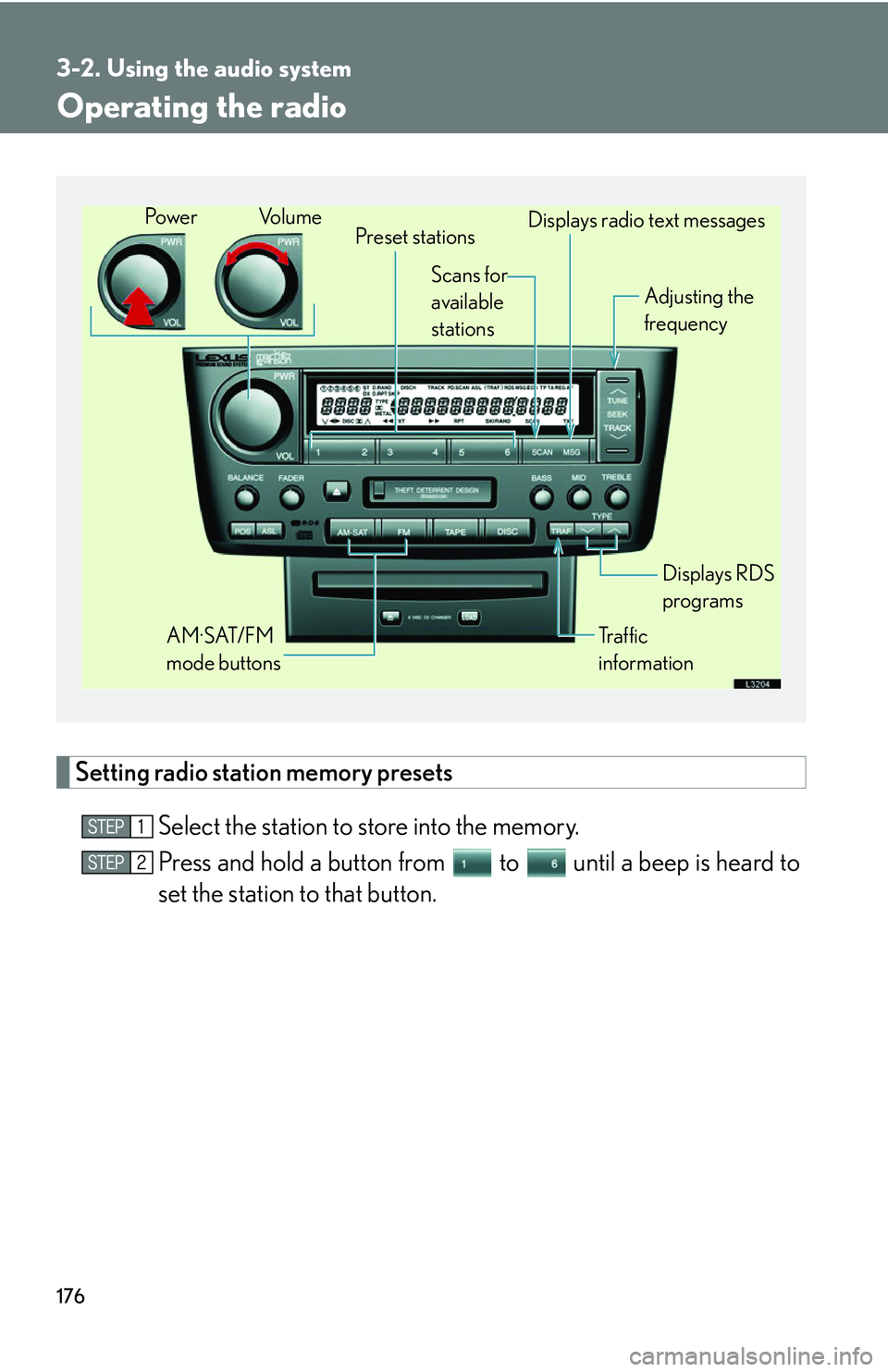
Setting radio station memory presets
Select the station to store into the memory.
Press and hold a button from to until a beep is heard to
set the station to that button.
Preset stations
Tr a f f i c
information Adjusting the
frequency
AM·SAT/FM
mode buttons Displays RDS
programs
Po w e r Vo l u m e
Scans for
available
stations Displays radio text messages
Page 234 of 419
218
3-5. Other interior features
Seat heaters
■Operating conditions
The ignition switch must be in the ON position.
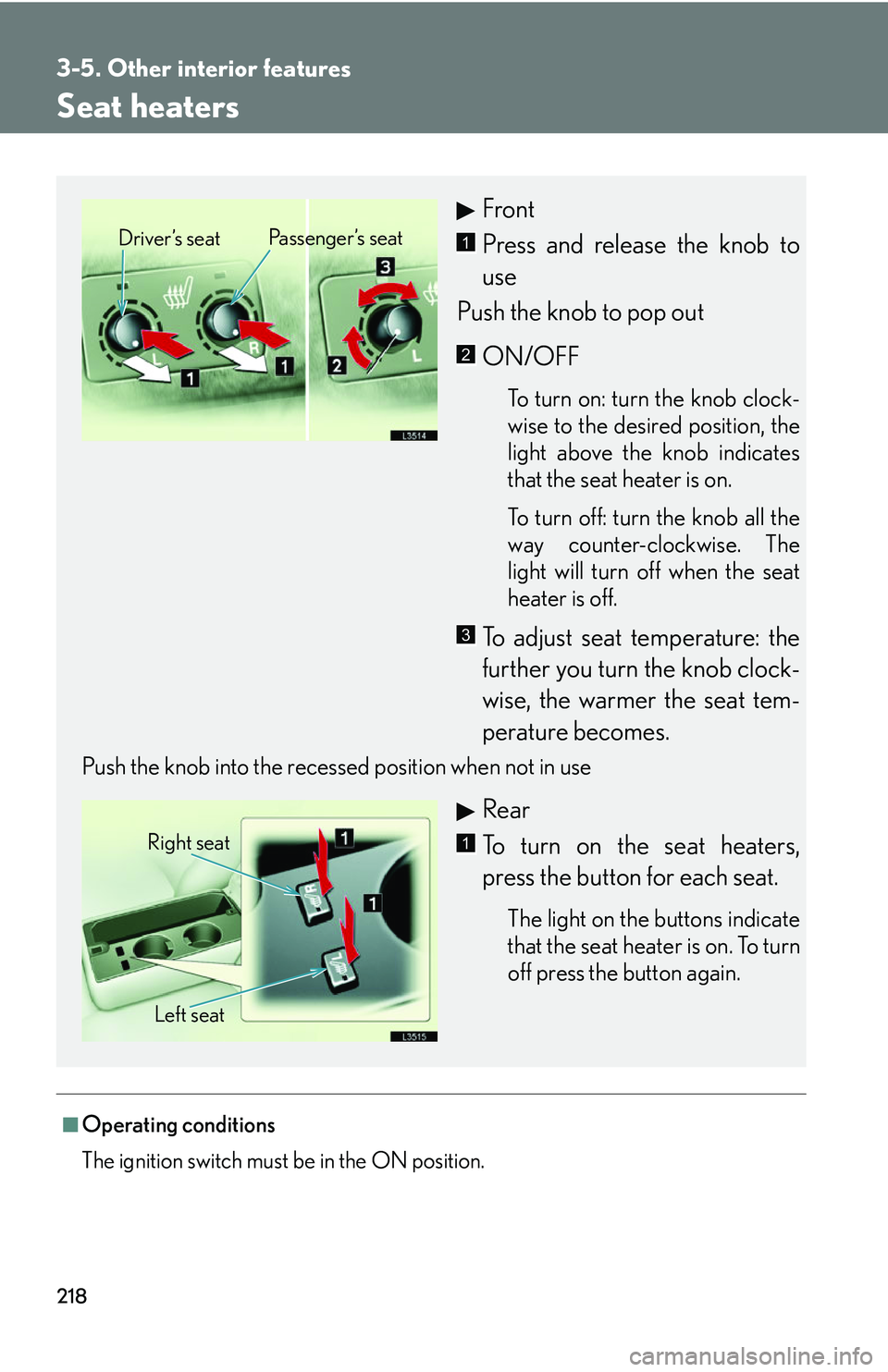
Front
Press and release the knob to
use
Push the knob to pop out
ON/OFF
To turn on: turn the knob clock -
wise to the desired position, the
light abo
ve the knob indicates
that the seat heater is on.
To turn off: turn the knob all the
w
ay counter-clockwise. The
light will turn off when the seat
heater is off.
To adjust seat temperature: the
further you turn the knob clock -
wise, the warmer the seat tem -
perature becomes.
Push the knob into the recessed position when not in use
Rear
To turn on the seat heaters,
press the button for each seat.
The light on the buttons indicate
that the seat heater is on. To turn
off press the button again.
Driver’s seat Passenger’s seat1
2
3
Right seat
Left seat1
Page 248 of 419
232
3-5. Other interior features
Garage door opener
The garage door opener (HomeLink Universal Transceiver) is manufactured
under license from HomeLink.
Programming the HomeLink (for U.S.A. owners)
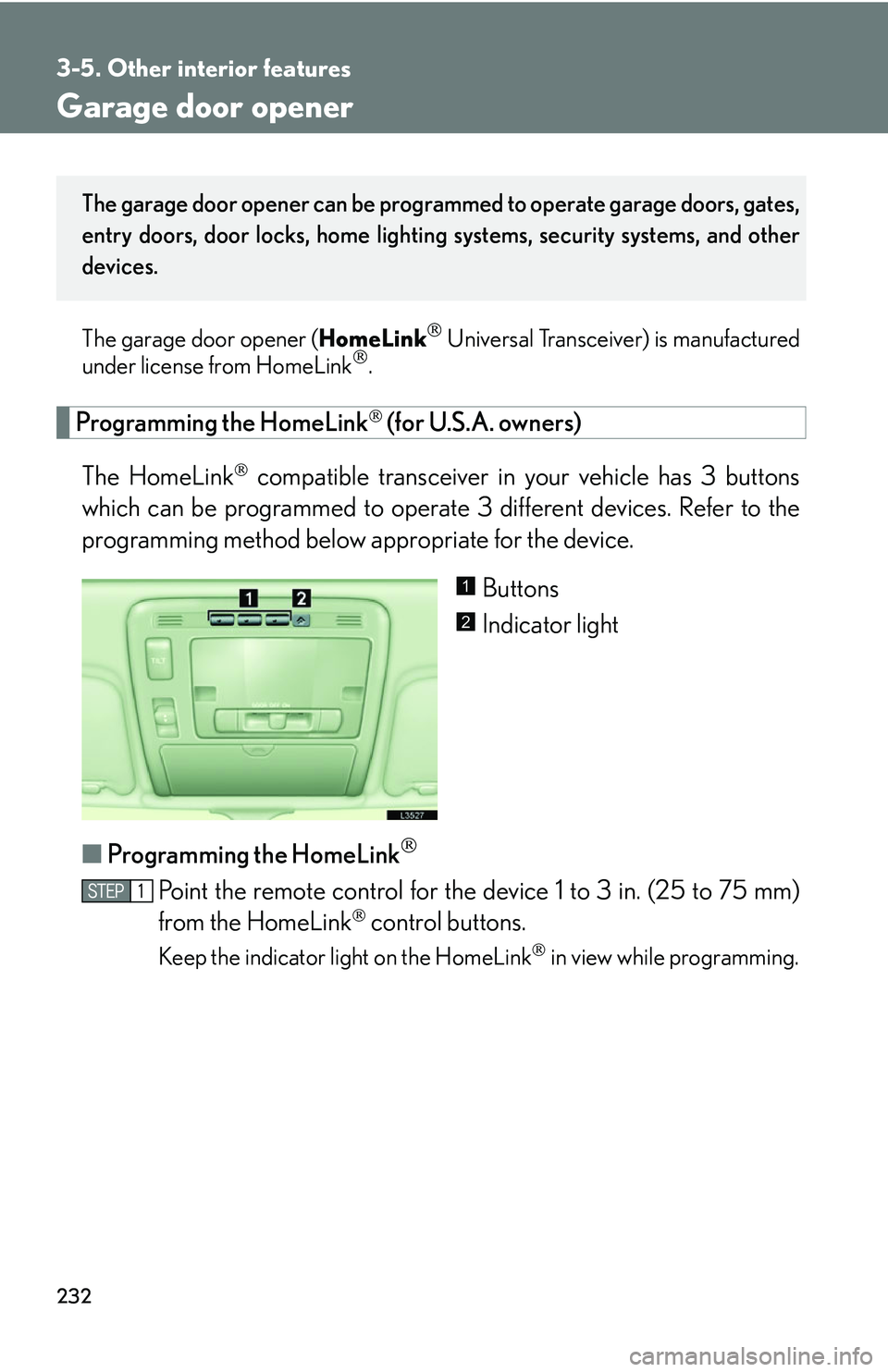
The HomeLink
compatible transceiver in your vehicle has 3 buttons
which can be programmed to operate 3 different devices. Refer to the
programming method below appropriate for the device.
Buttons
Indicator light
■ P
rogramming the HomeLink
Point the remote control for the device 1 to 3 in. (25 to 75 mm)
from the HomeLink
control buttons.
Keep the indicator light on the HomeLink in view while programming.
The garage door opener can be programmed to operate garage doors, gates,
entry doors, door locks, home lighting systems, security systems, and other
devices.
1
2
Page 249 of 419
233
3-5. Other interior features
3
Interior features
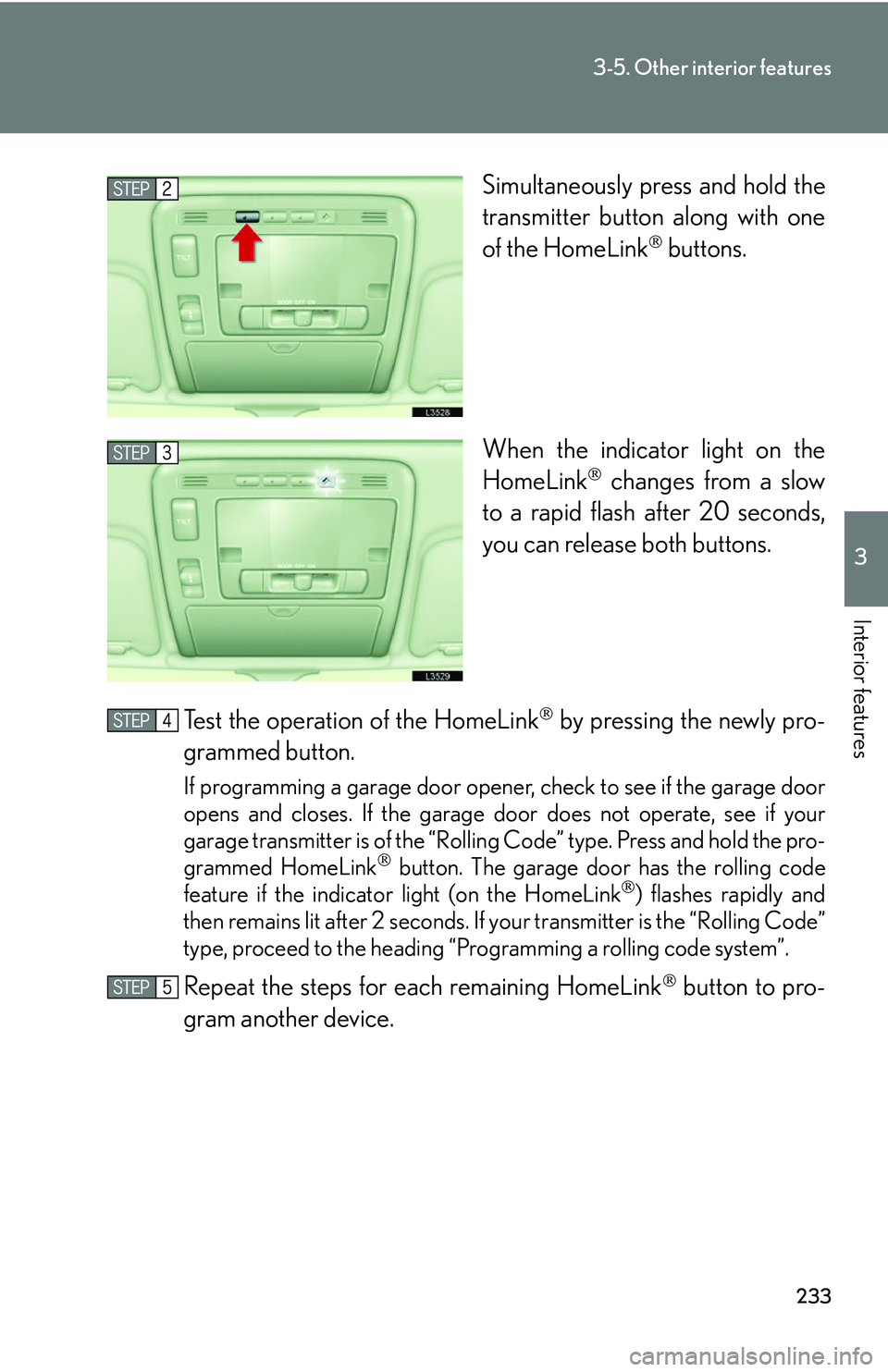
Simultaneously press and hold the
transmitter button along with one
of the HomeLink
buttons.
When the indicator light on the
Ho
meLink changes from a slow
to a rapid flash after 20 seconds,
you can release both buttons.
Test the operation of the HomeLink
by pressing the newly pro -
grammed button.
If programming a garage door opener, check to see if the garage door
opens and closes. If the garage door does not operate, see if your
garage transmitter is of the “Rolling Code” type. Press and hold the pro-
grammed HomeLink
button. The garage door has the rolling code
feature if the indicator light (on the HomeLink) flashes rapidly and
then remains lit after 2 seconds. If your transmitter is the “Rolling Code”
type, proceed to the heading “Pro gramming a rolling code system”.
Repeat the steps for each remaining HomeLink button to pro-
gram another device.
Page 251 of 419
235
3-5. Other interior features
3
Interior features
■Programming an entrance gate (for U.S.A. owners)/Programming
all devices in the Canadian market
Point the remote control for the device 1 to 3 in. (25 to 75 mm)
from the HomeLink
control buttons.
Keep the indicator light on the HomeLink in view while programming.
Press and hold the selected HomeLink button.
Repeatedly press and release (c y
cle) the device remote control
button every two seconds until step is complete.
When the indicator light on the HomeLink
compatible trans -
ceiver start to flashing rapidly, release the buttons.
Press the newly programmed HomeLink
button to see if it oper -
ates the device.
Repeat the steps for each remaining HomeLink
button to pro -
gram another device.
■ P
rogramming other devices
To program other devices such as home security s
ystems, home door
locks or lighting, contact your auth orized Lexus dealer for assistance.
■ R
eprogramming a button
The individual HomeLink
buttons cannot be erased but can be repro -
grammed. To reprogram a button, follo
w the “Basic programming”
instructions.
4