ECO mode LEXUS LS460L 2016 User Guide
[x] Cancel search | Manufacturer: LEXUS, Model Year: 2016, Model line: LS460L, Model: LEXUS LS460L 2016Pages: 708, PDF Size: 36.57 MB
Page 154 of 708
1543-2. Opening, closing and locking the doors
LS460/LS460L_GE (OM50G06E)
■Operation signals
Doors:
The emergency flashers flash to indicate that the doors have been locked/unlocked.
(Locked: Once; Unlocked: Twice)
Windows and moon roof:
A buzzer sounds to indicate that th e windows and moon roof are operating.
Some models, the buzzer also sounds from the doors and the trunk.
■Security feature
If a door is not opened within approximately 30 seconds after the vehicle is
unlocked, the security feature automatically locks the vehicle again.
■Welcome light illumination control
The front position, tail and license plate lights automatically turn on at night when the
doors are unlocked using the entry function or wireless remote control if the head-
light switch is in the “AUTO” position.
Page 164 of 708
1643-2. Opening, closing and locking the doors
LS460/LS460L_GE (OM50G06E)
■Note for the entry function
●Even when the electronic key is within the effective range (detection areas), the
system may not operate properly in the following cases:
• The electronic key is too close to the window or outside door handle, near the
ground, or in a high place when the doors are locked or unlocked.
• The electronic key is near the ground or in a high place, or too close to the rear
bumper center when the trunk is opened.
• The electronic key is on the instrument panel, rear package tray or floor, or in the
door pockets or glove box when the engine is started or engine switch modes
are changed.
●Do not leave the electronic key on top of the instrument panel or near the door
pockets when exiting the vehicle. Depending on the radio wave reception condi-
tions, it may be detected by the antenna outside the cabin and the door will
become lockable from the outside, possibly trapping the electronic key inside the
vehicle.
●As long as the electronic key is within the effective range, the doors may be locked
or unlocked by anyone. However, only th e doors detecting the electronic key can
be used to unlock the vehicle.
●Even if the electronic key is not inside the vehicle, it may be possible to start the
engine if the electronic key is near the window.
●The doors may unlock if a large amount of water splashes on the door handle, such
as in the rain or in a car wash when the electronic key is within the effective range.
(The door will automatically be locked after approximately 30 seconds if the doors
are not opened and closed.)
●Gripping the door handle when wearing a glove may not unlock the door.
●If the wireless remote control is used to lock the doors when the electronic key is
near the vehicle, there is a possibility that the door may not be unlocked by the
entry function. (Use the wireless remote control to unlock the doors.)
●A sudden approach to the effective range or door handle may prevent the doors
from being unlocked. In this case, return the door handle to the original position
and check that the doors unlock before pulling the door handle again.
Page 177 of 708
1773-2. Opening, closing and locking the doors
3
Operation of each component
LS460/LS460L_GE (OM50G06E)
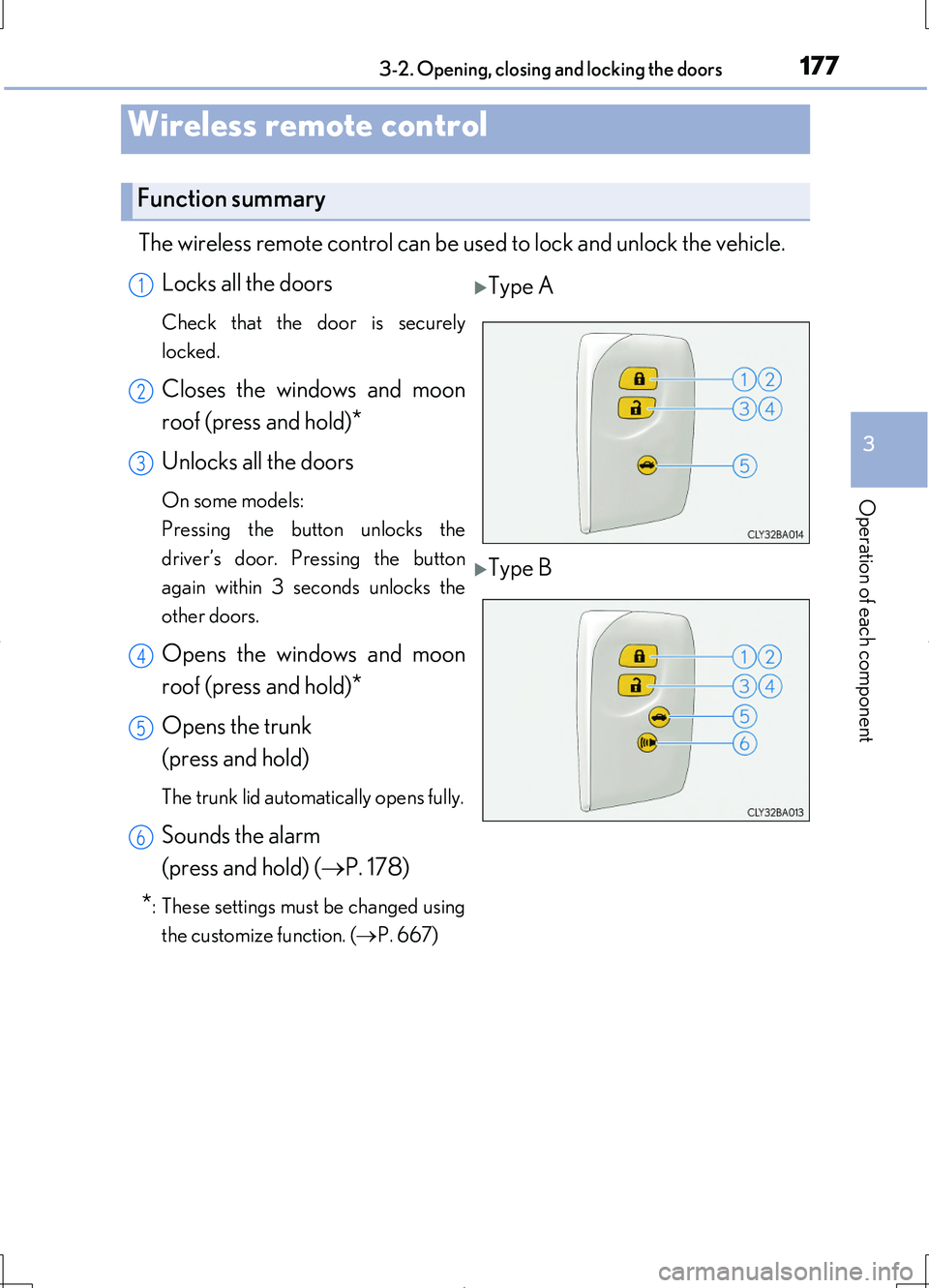
The wireless remote control can be used to lock and unlock the vehicle.
Locks all the doors
Check that the door is securely
locked.
Closes the windows and moon
roof (press and hold)*
Unlocks all the doors
On some models:
Pressing the button unlocks the
driver’s door. Pressing the button
again within 3 seconds unlocks the
other doors.
Opens the windows and moon
roof (press and hold)*
Opens the trunk
(press and hold)
The trunk lid automatically opens fully.
Sounds the alarm
(press and hold) ( P. 178)
*: These settings must be changed using
the customize function. ( P. 667)
Wireless remote control
Function summary
Type A
Type B
1
2
3
4
5
6
Page 178 of 708
1783-2. Opening, closing and locking the doors
LS460/LS460L_GE (OM50G06E)
■Operation signals
Doors:
The emergency flashers flash to indicate that the doors have been locked/unlocked.
(Locked: Once; Unlocked: Twice)
Windows and moon roof:
A buzzer sounds to indicate that th e windows and moon roof are operating.
Some models, the buzzer sounds from the doors and the trunk.
■Welcome light illumination control
P. 154
■Door lock buzzer
If an attempt to lock the doors is made when a door is not fully closed, a buzzer
sounds continuously for 5 seconds. Fully close the door to stop the buzzer, and lock
the vehicle once more.
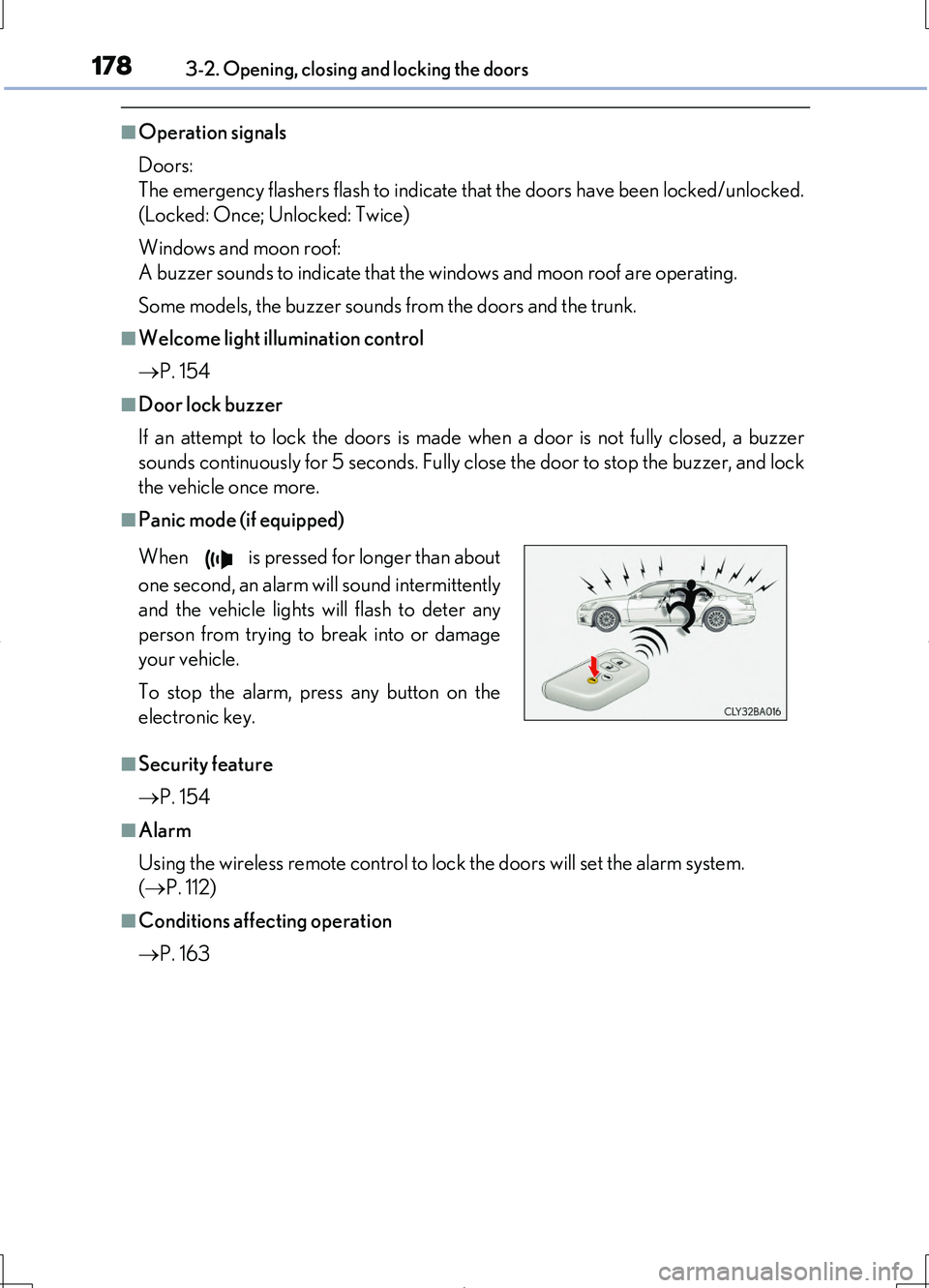
■Panic mode (if equipped)
■Security feature
P. 154
■Alarm
Using the wireless remote control to lock the doors will set the alarm system.
( P. 112)
■Conditions affecting operation
P. 163
When is pressed for longer than about
one second, an alarm will sound intermittently
and the vehicle lights will flash to deter any
person from trying to break into or damage
your vehicle.
To stop the alarm, press any button on the
electronic key.
Page 189 of 708
1893-2. Opening, closing and locking the doors
3
Operation of each component
LS460/LS460L_GE (OM50G06E)
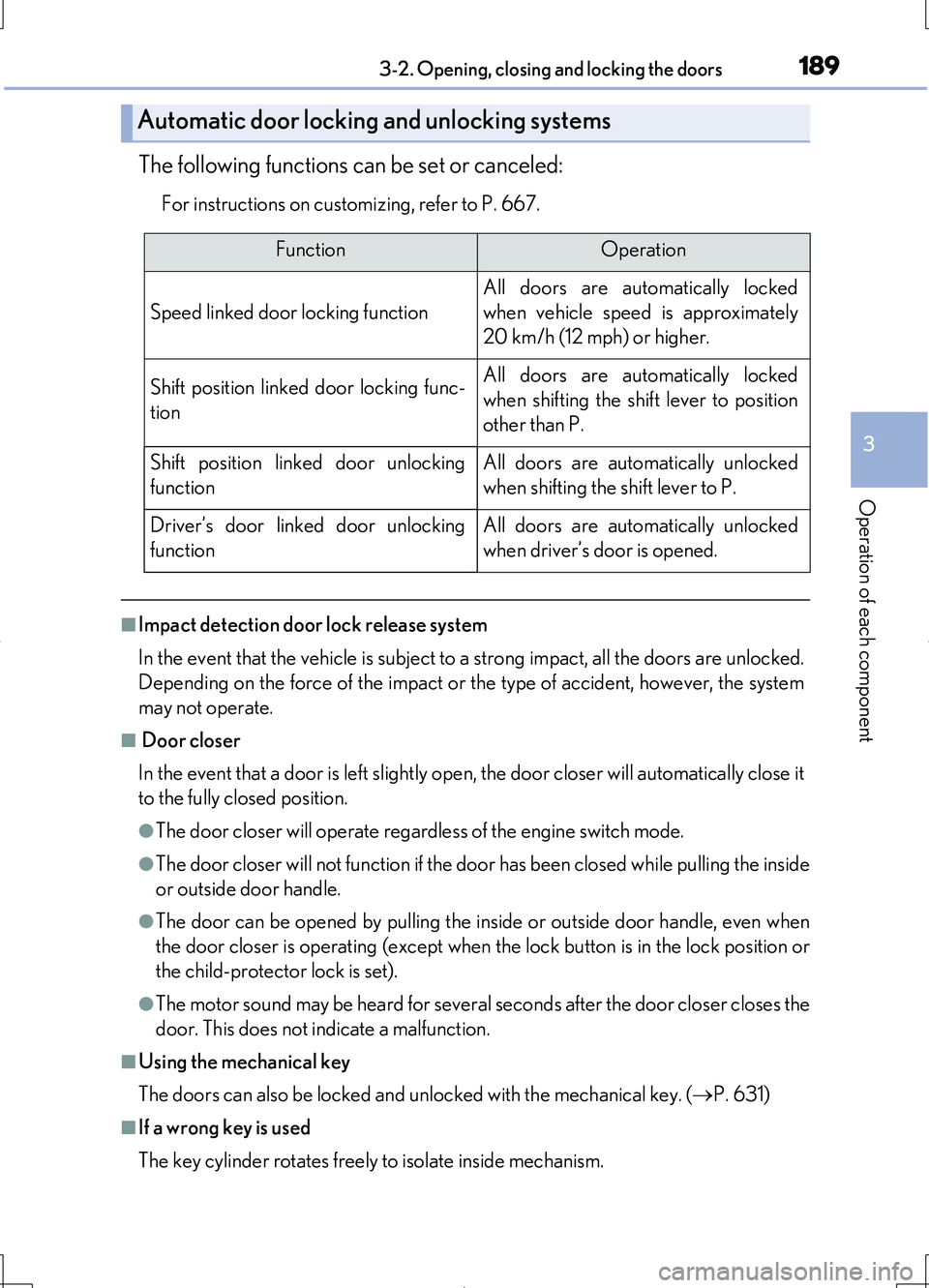
The following functions can be set or canceled:
For instructions on customizing, refer to P. 667.
■Impact detection door lock release system
In the event that the vehicle is subject to a strong impact, all the doors are unlocked.
Depending on the force of the impact or the type of accident, however, the system
may not operate.
■ Door closer
In the event that a door is left slightly open, the door closer will automatically close it
to the fully closed position.
●The door closer will operate regardless of the engine switch mode.
●The door closer will not function if the door has been closed while pulling the inside
or outside door handle.
●The door can be opened by pulling the in side or outside door handle, even when
the door closer is operating (except when the lock button is in the lock position or
the child-protector lock is set).
●The motor sound may be heard for several s econds after the door closer closes the
door. This does not indicate a malfunction.
■Using the mechanical key
The doors can also be locked and unlocked with the mechanical key. ( P. 631)
■If a wrong key is used
The key cylinder rotates freely to isolate inside mechanism.
Automatic door locking and unlocking systems
FunctionOperation
Speed linked door locking function
All doors are automatically locked
when vehicle speed is approximately
20 km/h (12 mph) or higher.
Shift position linked door locking func-
tion
All doors are automatically locked
when shifting the shift lever to position
other than P.
Shift position linked door unlocking
function
All doors are automatically unlocked
when shifting the shift lever to P.
Driver’s door linked door unlocking
function
All doors are automatically unlocked
when driver’s door is opened.
Page 196 of 708
1963-2. Opening, closing and locking the doors
LS460/LS460L_GE (OM50G06E)
CAUTION
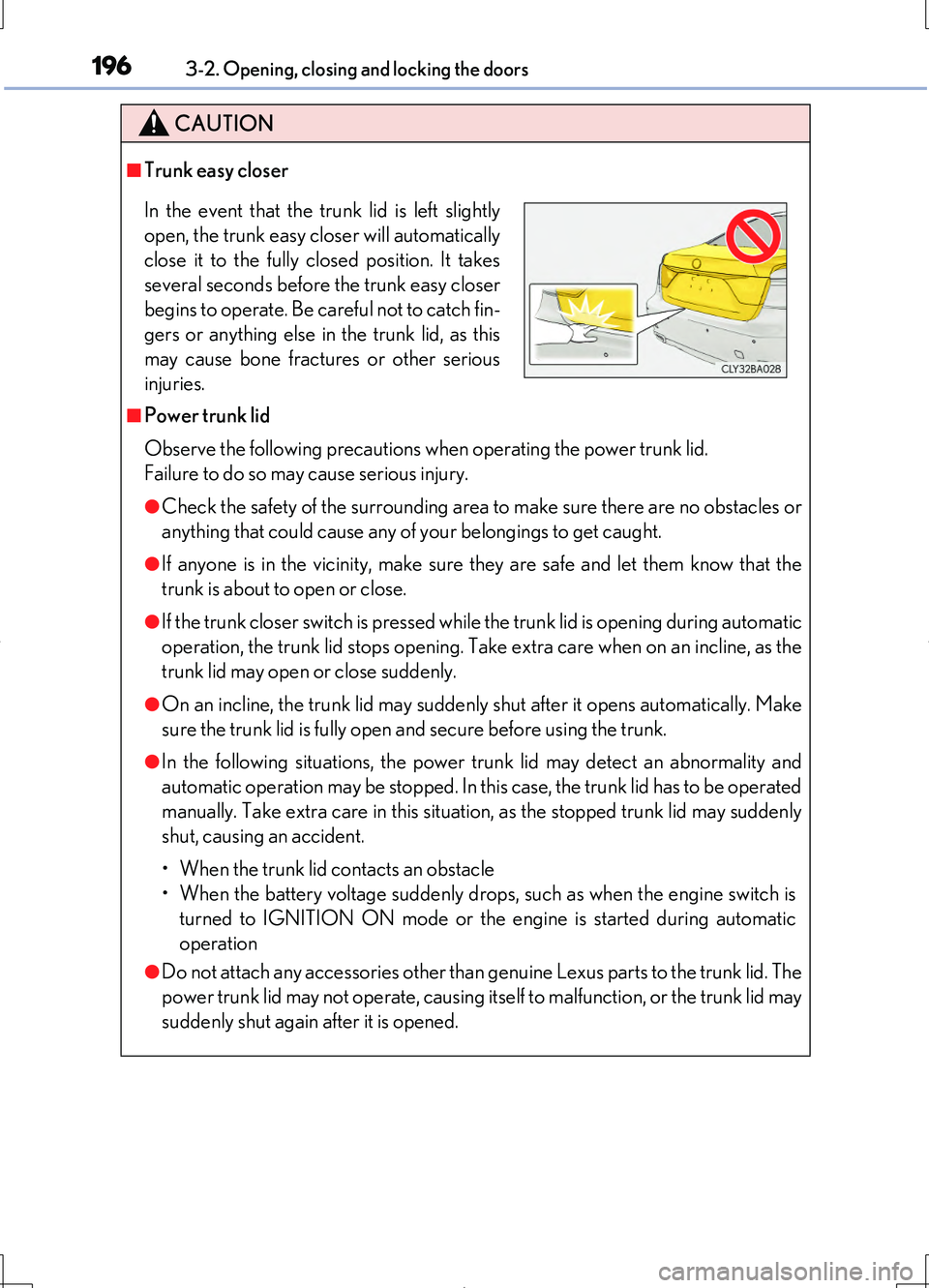
■Trunk easy closer
■Power trunk lid
Observe the following precautions when operating the power trunk lid.
Failure to do so may cause serious injury.
●Check the safety of the surrounding area to make sure there are no obstacles or
anything that could cause any of your belongings to get caught.
●If anyone is in the vicinity, make sure they are safe and let them know that the
trunk is about to open or close.
●If the trunk closer switch is pressed while the trunk lid is opening during automatic
operation, the trunk lid stops opening. Take extra care when on an incline, as the
trunk lid may open or close suddenly.
●On an incline, the trunk lid may suddenly shut after it opens automatically. Make
sure the trunk lid is fully open and secure before using the trunk.
●In the following situations, the power trunk lid may detect an abnormality and
automatic operation may be stopped. In this case, the trunk lid has to be operated
manually. Take extra care in this situation, as the stopped trunk lid may suddenly
shut, causing an accident.
• When the trunk lid contacts an obstacle
• When the battery voltage suddenly drops, such as when the engine switch is
turned to IGNITION ON mode or the engine is started during automatic
operation
●Do not attach any accessories other than genuine Lexus parts to the trunk lid. The
power trunk lid may not operate, causing itself to malfunction, or the trunk lid may
suddenly shut again after it is opened.
In the event that the trunk lid is left slightly
open, the trunk easy closer will automatically
close it to the fully closed position. It takes
several seconds before the trunk easy closer
begins to operate. Be careful not to catch fin-
gers or anything else in the trunk lid, as this
may cause bone fractures or other serious
injuries.
Page 214 of 708
2143-3. Adjusting the seats
LS460/LS460L_GE (OM50G06E)
■Seat return function linked to the door opening operation
●Operating conditions
The engine switch is in IGNITION ON mode.
●Canceling operation partway through
During the seat return operation, performing either of the following actions cancels
the operation:
• Pressing the “SET”, “M” or “C” button ( P. 223)
• Pressing any of the seat adjustment switches
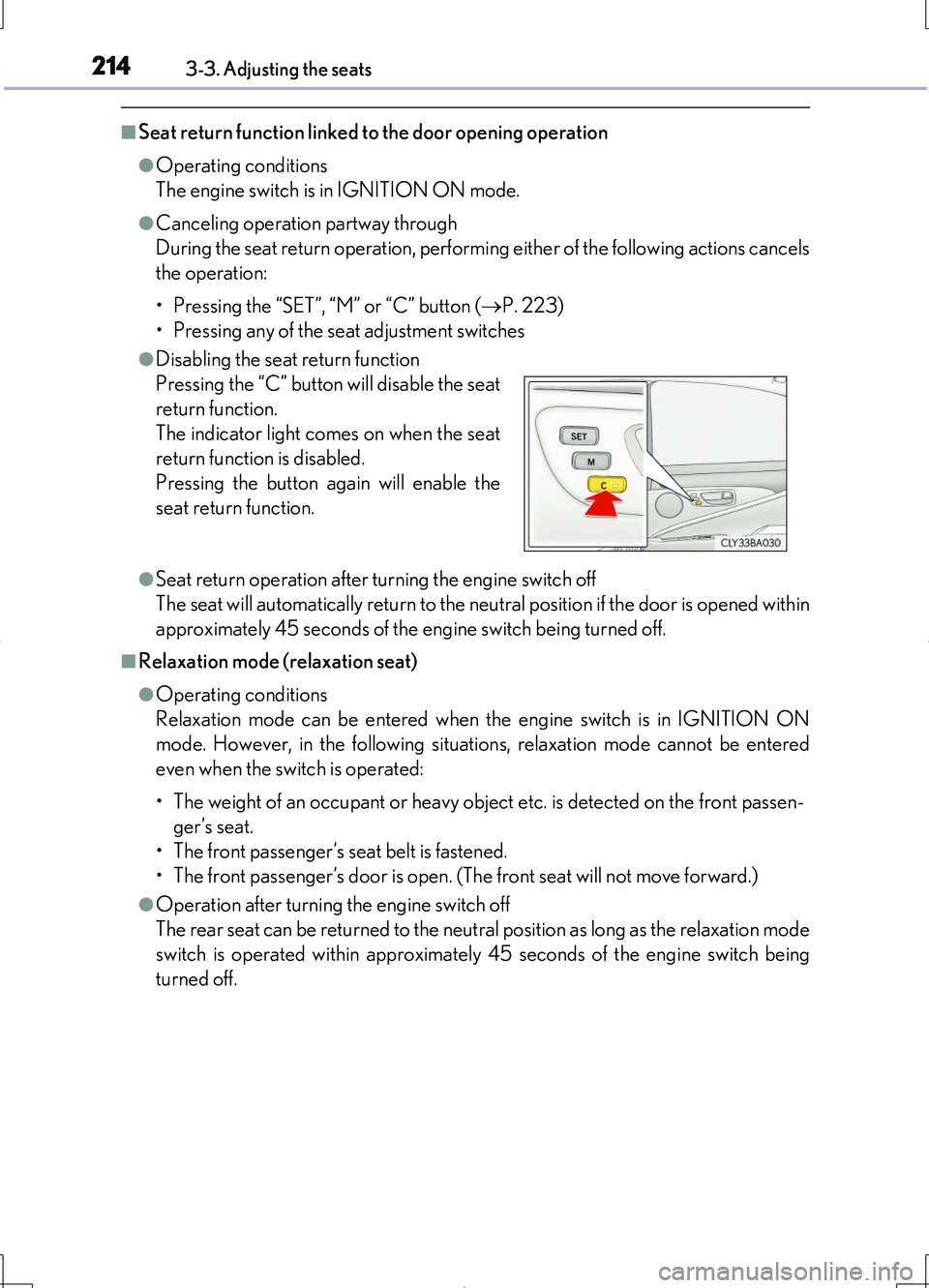
●Disabling the seat return function
●Seat return operation after turning the engine switch off
The seat will automatically return to the neutral position if the door is opened within
approximately 45 seconds of the engine switch being turned off.
■Relaxation mode (relaxation seat)
●Operating conditions
Relaxation mode can be entered when the engine switch is in IGNITION ON
mode. However, in the following situations, relaxation mode cannot be entered
even when the switch is operated:
• The weight of an occupant or heavy obje ct etc. is detected on the front passen-
ger’s seat.
• The front passenger’s seat belt is fastened.
• The front passenger’s door is open. (T he front seat will not move forward.)
●Operation after turning the engine switch off
The rear seat can be returned to the neutral position as long as the relaxation mode
switch is operated within approximately 45 seconds of the engine switch being
turned off.
Pressing the “C” button will disable the seat
return function.
The indicator light comes on when the seat
return function is disabled.
Pressing the button again will enable the
seat return function.
Page 218 of 708
2183-3. Adjusting the seats
LS460/LS460L_GE (OM50G06E)
Your preferred driving position (the position of the driver’s seat, steering
wheel, outside rear view mirrors and he ight of seat belt shoulder anchor)
can be recorded and recalled by pressing a switch.
Three different driving positions can be recorded into memory.
■Recording procedure
Check that the shift lever is in P.
Turn the engine switch to IGNITION ON mode.
Adjust the driver’s seat, steering wheel, outside rear view mirrors and
seat belt shoulder anchor height to the desired positions.
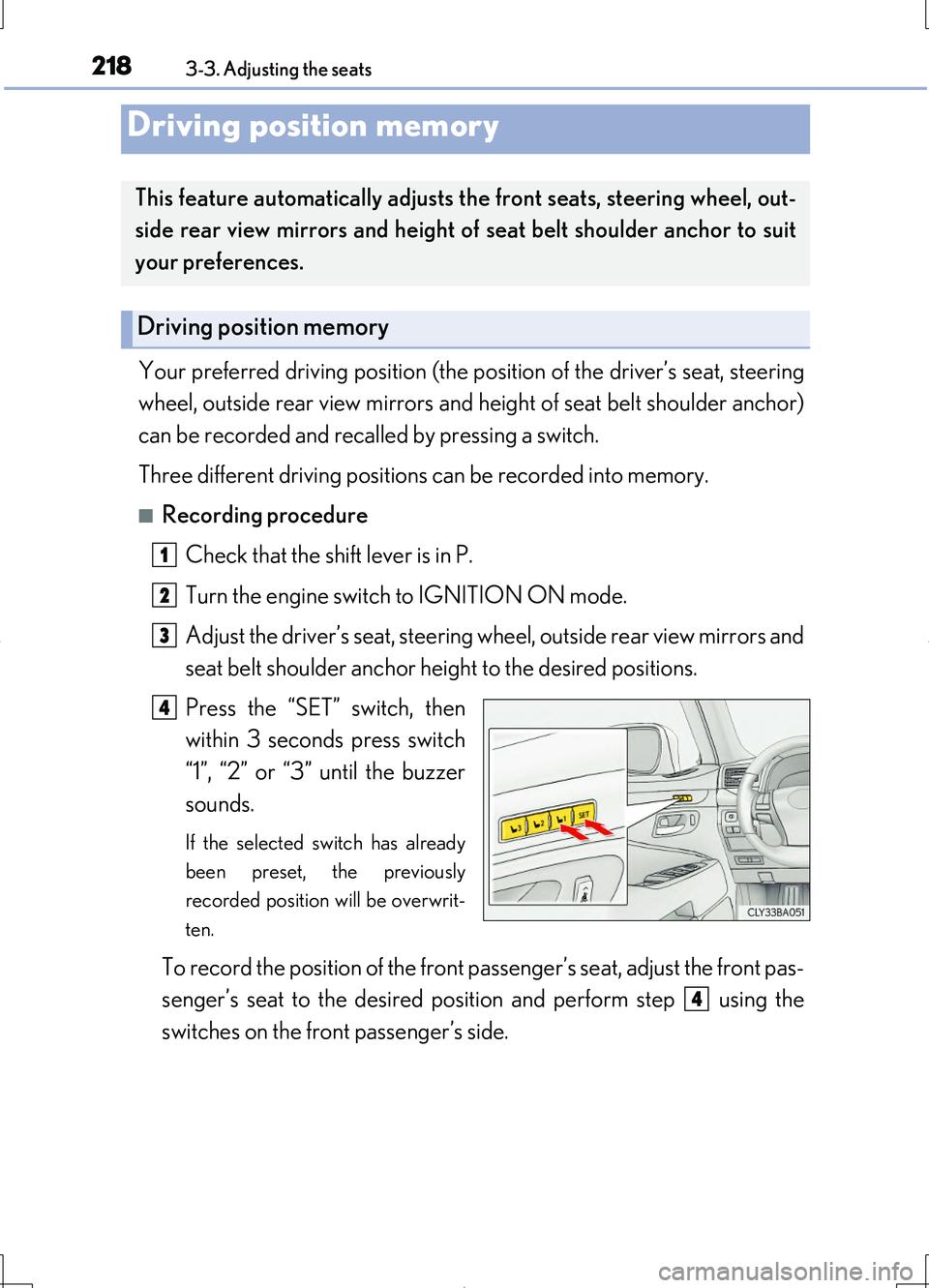
Press the “SET” switch, then
within 3 seconds press switch
“1”, “2” or “3” until the buzzer
sounds.
If the selected switch has already
been preset, the previously
recorded position will be overwrit-
ten.
To record the position of the front passenger’s seat, adjust the front pas-
senger’s seat to the desired posi tion and perform step using the
switches on the front passenger’s side.
Driving position memory
This feature automatically adjusts the front seats, steering wheel, out-
side rear view mirrors and height of seat belt shoulder anchor to suit
your preferences.
Driving position memory
1
2
3
4
4
Page 221 of 708
2213-3. Adjusting the seats
3
Operation of each component
LS460/LS460L_GE (OM50G06E)
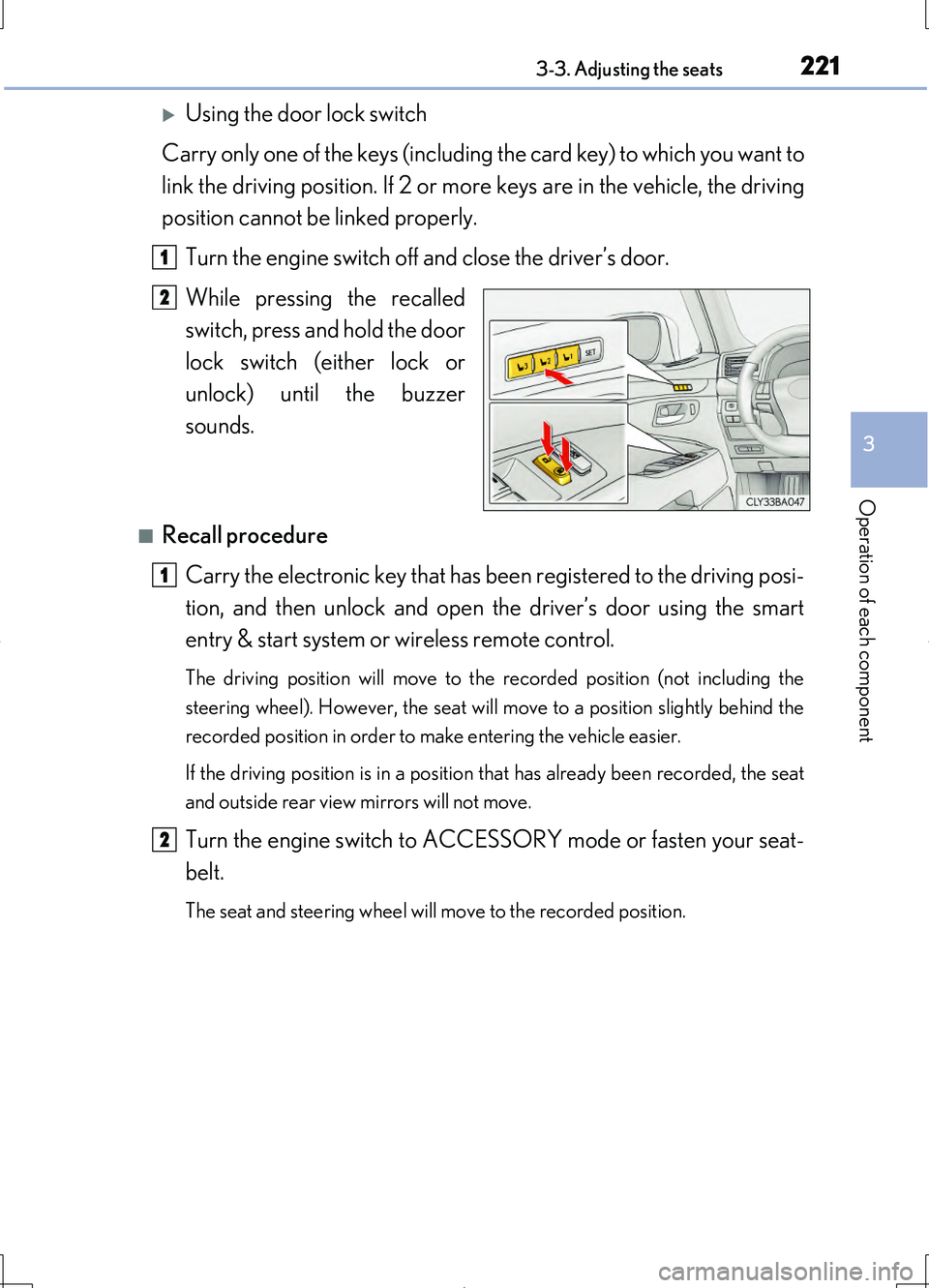
Using the door lock switch
Carry only one of the keys (including the card key) to which you want to
link the driving position. If 2 or more keys are in the vehicle, the driving
position cannot be linked properly.
Turn the engine switch off and close the driver’s door.
While pressing the recalled
switch, press and hold the door
lock switch (either lock or
unlock) until the buzzer
sounds.
■Recall procedure
Carry the electronic key that has be en registered to the driving posi-
tion, and then unlock and open the driver’s door using the smart
entry & start system or wireless remote control.
The driving position will move to the recorded position (not including the
steering wheel). However, the seat will move to a position slightly behind the
recorded position in order to make entering the vehicle easier.
If the driving position is in a position that has already been recorded, the seat
and outside rear view mirrors will not move.
Turn the engine switch to ACCESSO RY mode or fasten your seat-
belt.
The seat and steering wheel will move to the recorded position.
1
2
1
2
Page 223 of 708
2233-3. Adjusting the seats
3
Operation of each component
LS460/LS460L_GE (OM50G06E)
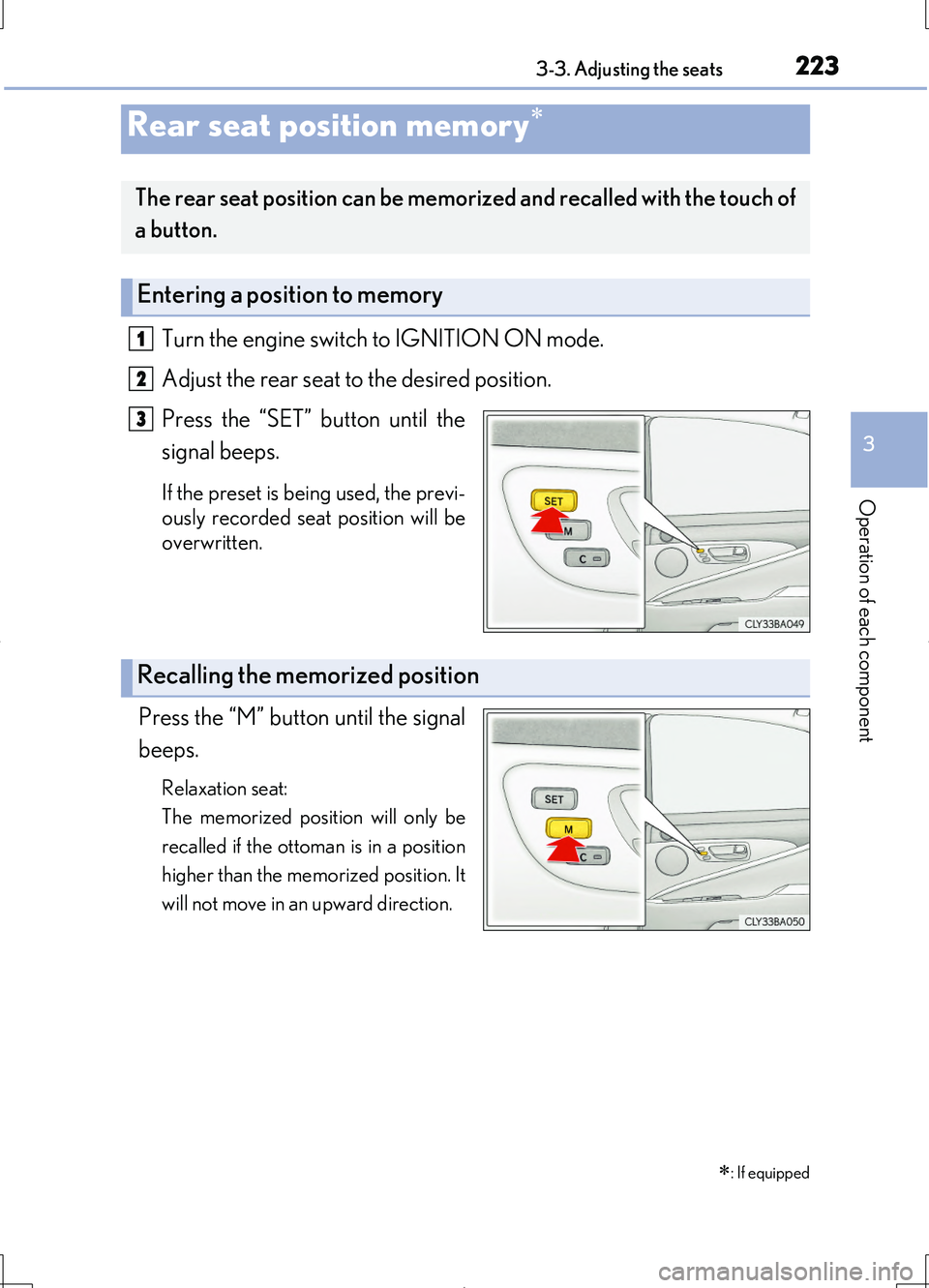
Turn the engine switch to IGNITION ON mode.
Adjust the rear seat to the desired position.
Press the “SET” button until the
signal beeps.
If the preset is being used, the previ-
ously recorded seat position will be
overwritten.
Press the “M” button until the signal
beeps.
Relaxation seat:
The memorized position will only be
recalled if the ottoman is in a position
higher than the memorized position. It
will not move in an upward direction.
Rear seat position memory
The rear seat position can be memorized and recalled with the touch of
a button.
Entering a position to memory
1
2
3
Recalling the memorized position
: If equipped