instrument cluster LEXUS LS460L 2016 Owner's Manual
[x] Cancel search | Manufacturer: LEXUS, Model Year: 2016, Model line: LS460L, Model: LEXUS LS460L 2016Pages: 708, PDF Size: 36.57 MB
Page 136 of 708
1362. Instrument cluster
LS460/LS460L_GE (OM50G06E)
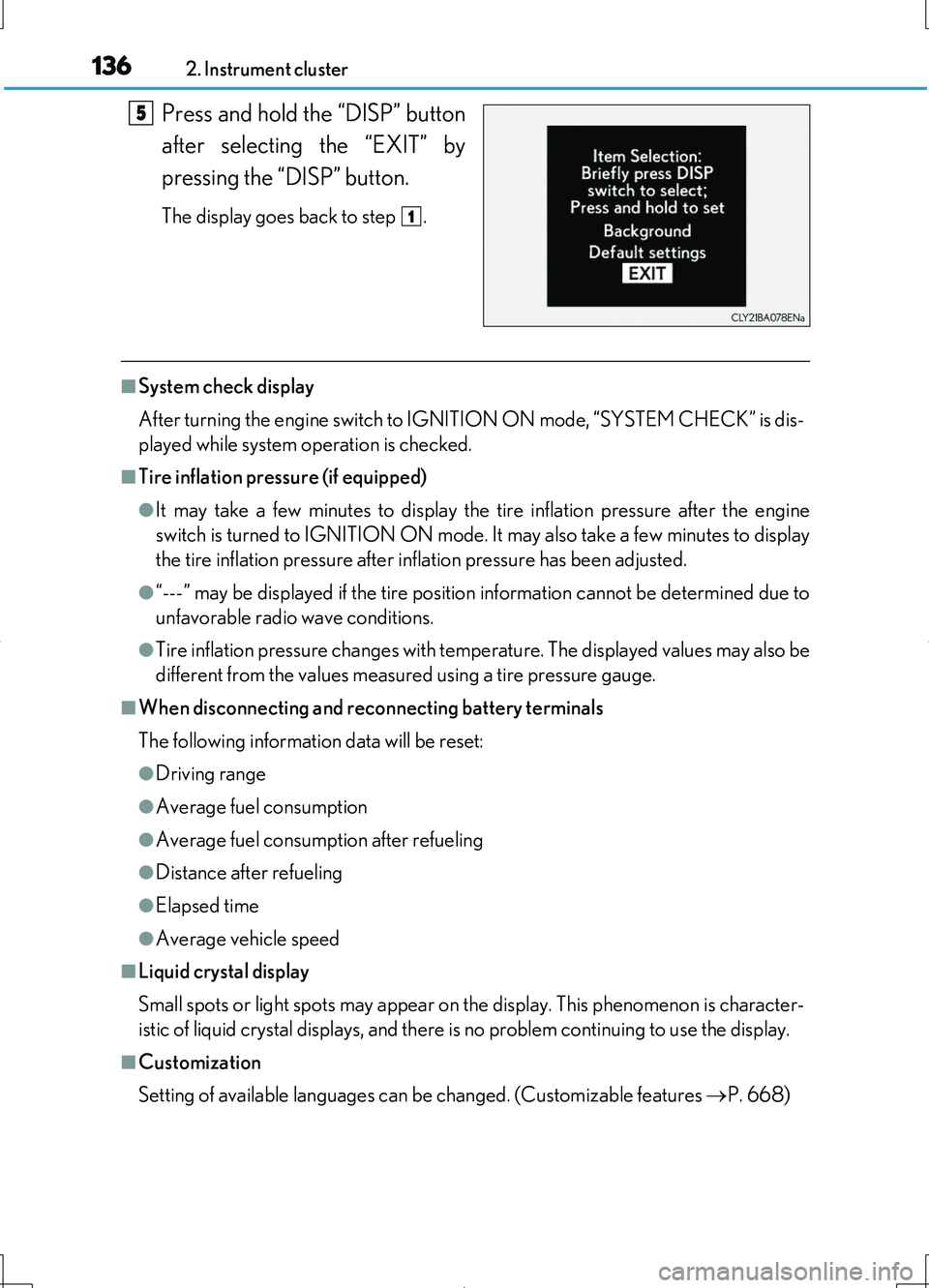
Press and hold the “DISP” button
after selecting the “EXIT” by
pressing the “DISP” button.
The display goes back to step .
■System check display
After turning the engine switch to IGNITION ON mode, “SYSTEM CHECK” is dis-
played while system operation is checked.
■Tire inflation pressure (if equipped)
●It may take a few minutes to display the tire inflation pressure after the engine
switch is turned to IGNITION ON mode. It may also take a few minutes to display
the tire inflation pressure after inflation pressure has been adjusted.
●“---” may be displayed if the tire position information cannot be determined due to
unfavorable radio wave conditions.
●Tire inflation pressure changes with temperature. The displayed values may also be
different from the values measured using a tire pressure gauge.
■When disconnecting and reconnecting battery terminals
The following information data will be reset:
●Driving range
●Average fuel consumption
●Average fuel consumption after refueling
●Distance after refueling
●Elapsed time
●Average vehicle speed
■Liquid crystal display
Small spots or light spots may appear on the display. This phenomenon is character-
istic of liquid crystal displays, and there is no problem continuing to use the display.
■Customization
Setting of available languages can be changed. (Customizable features P. 668)
5
1
Page 137 of 708
1372. Instrument cluster
2
Instrument cluster
LS460/LS460L_GE (OM50G06E)
CAUTION
■The information display at low temperatures
Allow the interior of the vehicle to warm up before using the liquid crystal informa-
tion display. At extremely low temperatures, the information display monitor may
respond slowly, and display changes may be delayed.
For example, there is a lag between the driver’s shifting and the new gear number
appearing on the display. This lag could cause the driver to downshift again, caus-
ing rapid and excessive engine braking and possibly an accident resulting in death
or injury.
■Cautions during setting up the display
As the engine needs to be running during setting up the display, ensure that the
vehicle is parked in a place with adequate ventilation. In a closed area such as a
garage, exhaust gases including harmful carbon monoxide (CO) may collect and
enter the vehicle. This may lead to death or a serious health hazard.
NOTICE
■During setting up the display
To prevent battery discharge, ensure that the engine is running while setting up the
display features.
Page 138 of 708
1382. Instrument cluster
LS460/LS460L_GE (OM50G06E)
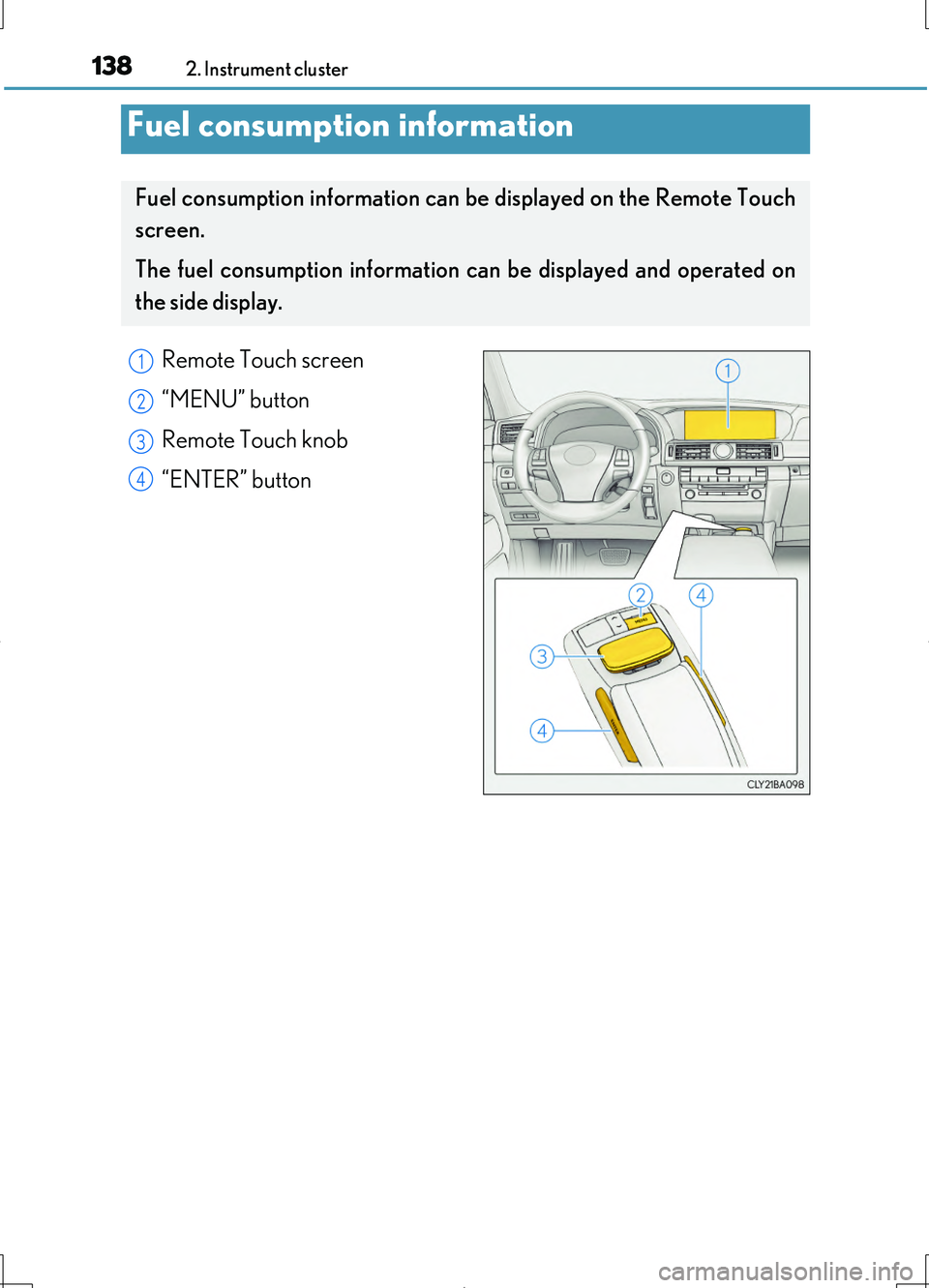
Remote Touch screen
“MENU” button
Remote Touch knob
“ENTER” button
Fuel consumption information
Fuel consumption information can be displayed on the Remote Touch
screen.
The fuel consumption information can be displayed and operated on
the side display.
1
2
3
4
Page 139 of 708
1392. Instrument cluster
2
Instrument cluster
LS460/LS460L_GE (OM50G06E)
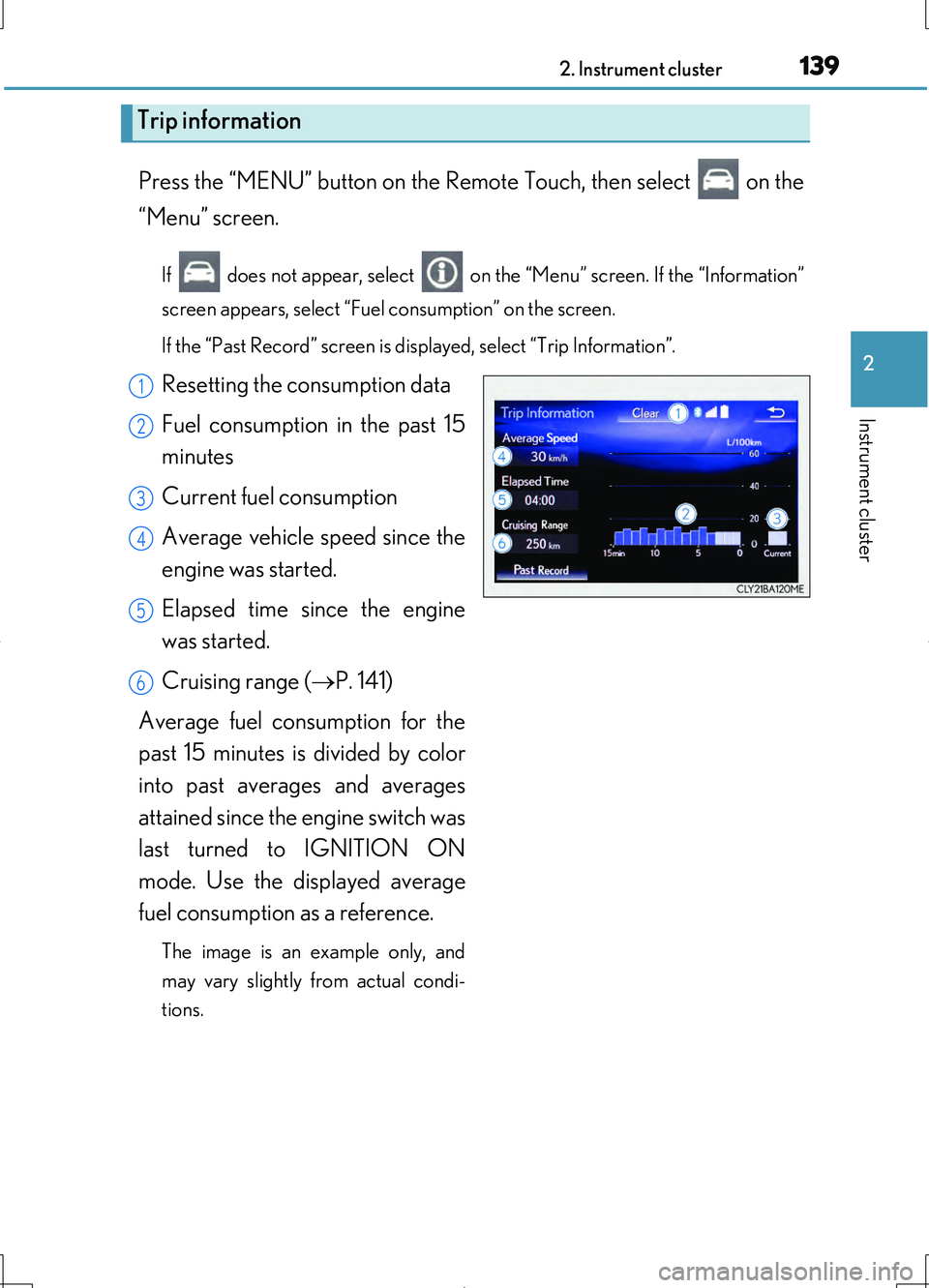
Press the “MENU” button on the Remote Touch, then select on the
“Menu” screen.
If does not appear, select on the “Menu” screen. If the “Information”
screen appears, select “Fuel consumption” on the screen.
If the “Past Record” screen is displayed, select “Trip Information”.
Resetting the consumption data
Fuel consumption in the past 15
minutes
Current fuel consumption
Average vehicle speed since the
engine was started.
Elapsed time since the engine
was started.
Cruising range ( P. 141)
Average fuel consumption for the
past 15 minutes is divided by color
into past averages and averages
attained since the engine switch was
last turned to IGNITION ON
mode. Use the displayed average
fuel consumption as a reference.
The image is an example only, and
may vary slightly from actual condi-
tions.
Trip information
1
2
3
4
5
6
Page 140 of 708
1402. Instrument cluster
LS460/LS460L_GE (OM50G06E)
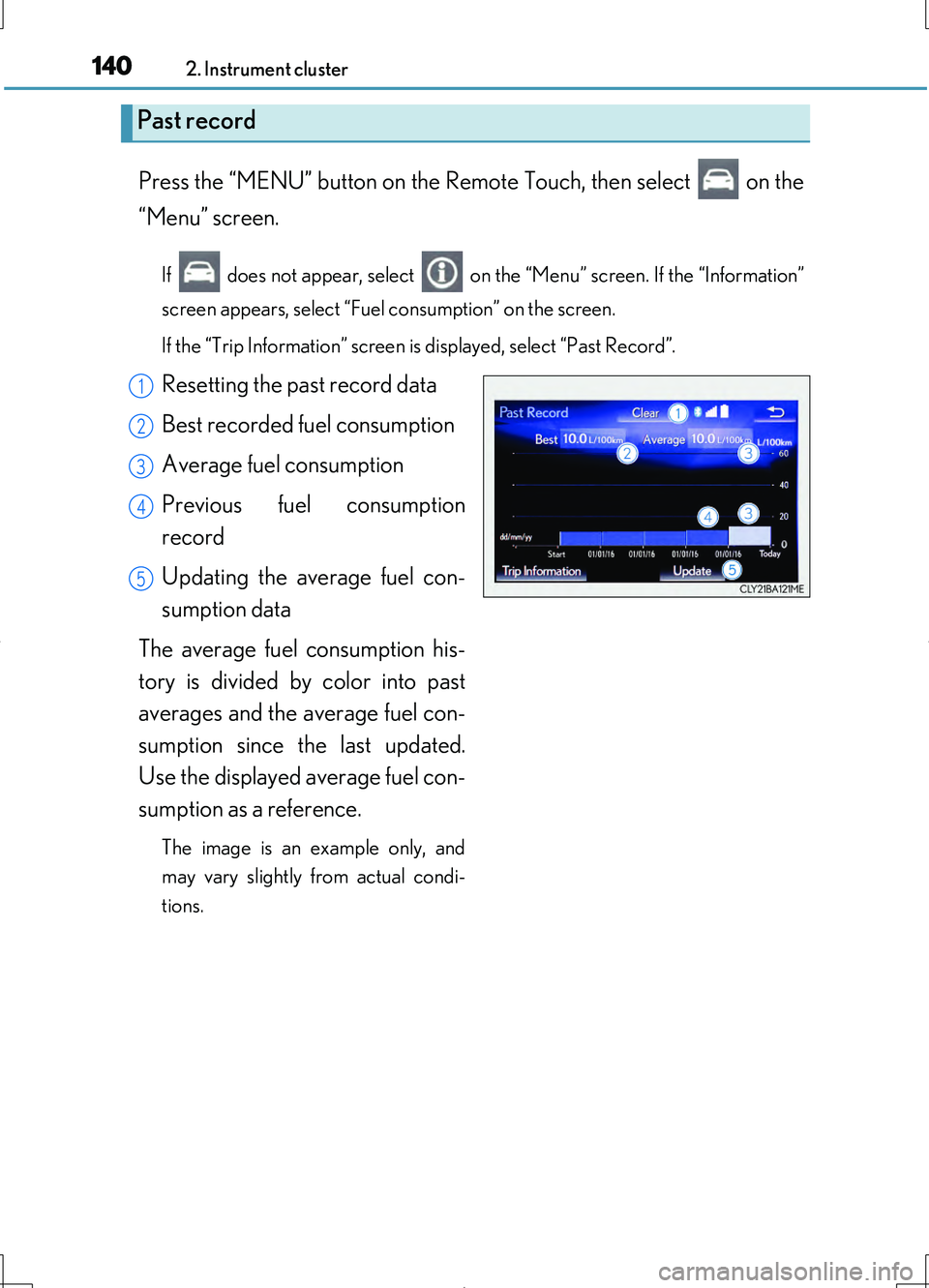
Press the “MENU” button on the Remote Touch, then select on the
“Menu” screen.
If does not appear, select on the “Menu” screen. If the “Information”
screen appears, select “Fuel consumption” on the screen.
If the “Trip Information” screen is displayed, select “Past Record”.
Resetting the past record data
Best recorded fuel consumption
Average fuel consumption
Previous fuel consumption
record
Updating the average fuel con-
sumption data
The average fuel consumption his-
tory is divided by color into past
averages and the average fuel con-
sumption since the last updated.
Use the displayed average fuel con-
sumption as a reference.
The image is an example only, and
may vary slightly from actual condi-
tions.
Past record
1
2
3
4
5
Page 141 of 708
1412. Instrument cluster
2
Instrument cluster
LS460/LS460L_GE (OM50G06E)
■Updating the past record data
Update the average fuel consumption by selecting “Update” to measure the current
fuel consumption again.
■Resetting the data
The fuel consumption data can be deleted by selecting “Clear”.
■Cruising range
Displays the estimated maximum distance that can be driven with the quantity of fuel
remaining.
This distance is computed based on your average fuel consumption.
As a result, the actual distance that can be driven may differ from that displayed.
Page 142 of 708
1422. Instrument cluster
LS460/LS460L_GE (OM50G06E)
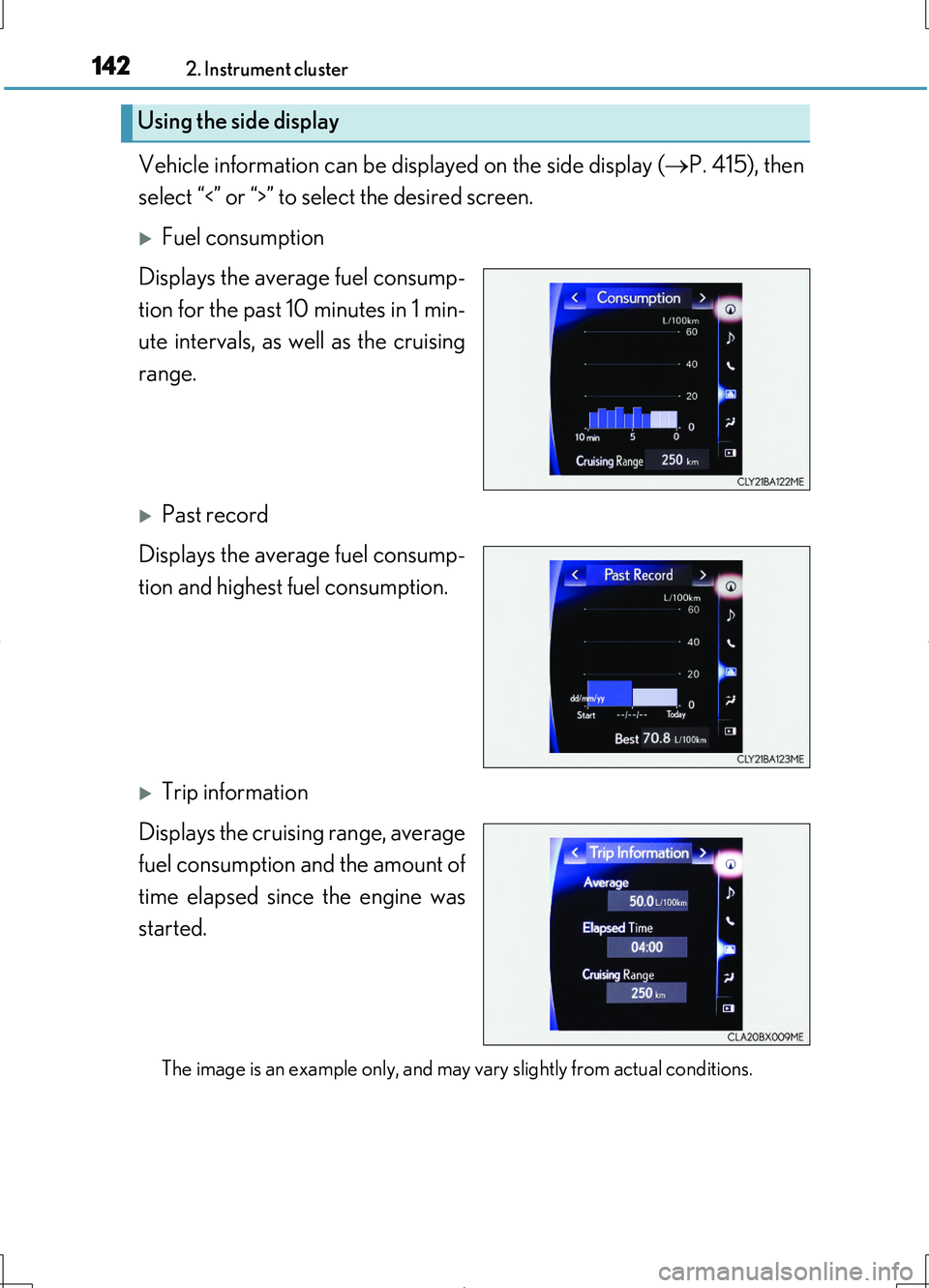
Vehicle information can be displayed on the side display (P. 415), then
select “<” or “>” to select the desired screen.
Fuel consumption
Displays the average fuel consump-
tion for the past 10 minutes in 1 min-
ute intervals, as well as the cruising
range.
Past record
Displays the average fuel consump-
tion and highest fuel consumption.
Trip information
Displays the cruising range, average
fuel consumption and the amount of
time elapsed since the engine was
started.
The image is an example only, and may vary slightly from actual conditions.
Using the side display
Page 243 of 708
2433-5. Opening, closing the windows and moon roof
3
Operation of each component
LS460/LS460L_GE (OM50G06E)
■Moon roof open warning buzzer
The buzzer sounds and a message is shown on the multi-information display in the
instrument cluster when the engine switch is turned off and the driver’s door is
opened with the moon roof open.
■Customization
Settings (e.g. linked door lock operation) can be changed.
(Customizable features P. 667)
CAUTION
Observe the following precautions.
Failure to do so may cause death or serious injury.
■Opening the moon roof
●Do not allow any passengers to put their hands or heads outside the vehicle while
it is moving.
●Do not sit on top of the moon roof.
■Closing the moon roof
●The driver is responsible for moon roof opening and closing operations.
In order to prevent accidental operation, especially by a child, do not let a child
operate the moon roof. It is possible for children and other passengers to have
body parts caught in the moon roof.
●Check to make sure that all passengers do not have any part of their body in a
position where it could be caught when the moon roof is being operated.
●When using the smart entry & start system, wireless remote control or mechani-
cal key and operating the moon roof, operate the moon roof after checking to
make sure that there is no possibility of any passenger having any of their body
parts caught in the moon roof. Also, do not let a child operate moon roof by the
smart entry & start system, wireless remote control or mechanical key. It is possi-
ble for children and other passengers to get caught in the moon roof.
●When exiting the vehicle, turn the engine switch off, carry the key and exit the
vehicle along with the child. There may be accidental operation, due to mischief,
etc., that may possibly lead to an accident.
■Jam protection function
●Never use any part of your body to intentionally activate the jam protection func-
tion.
●The jam protection function may not work if something gets caught just before
the moon roof fully closes.