fuel LEXUS LS500 2018 User Guide
[x] Cancel search | Manufacturer: LEXUS, Model Year: 2018, Model line: LS500, Model: LEXUS LS500 2018Pages: 514, PDF Size: 10.62 MB
Page 73 of 514
732-1. Instrument cluster
LS500_OM_OM50F54U_(U) 2
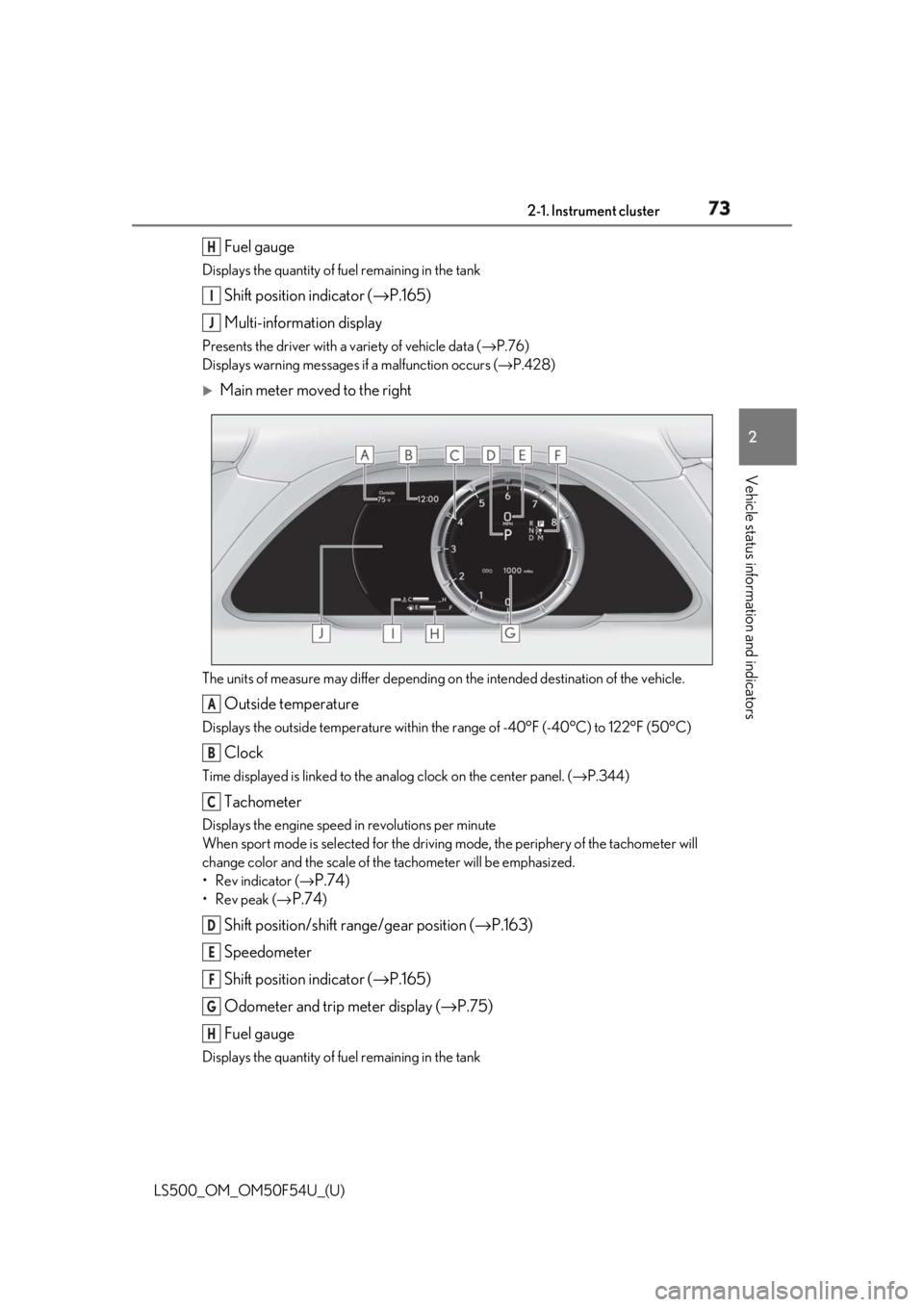
Vehicle status information and indicators Fuel gaugeDisplays the quantity of fuel remaining in the tank
Shift position indicator ( → P.165)
Multi-information displayPresents the driver with a variety of vehicle data ( → P.76)
Displays warning messages if a malfunction occurs ( → P.428)
Main meter moved to the right
The units of measure may differ depending on the intended destination of the vehicle.
Outside temperatureDisplays the outside temperature within the range of -40°F (-40°C) to 122°F (50°C)
ClockTime displayed is linked to the analog clock on the center panel. ( → P.344)
TachometerDisplays the engine speed in revolutions per minute
When sport mode is se lected for the driving mode, the periphery of the tachometer will
change color and the scale of the tachometer will be emphasized.
• Rev indicator ( →
P.74 )
•Rev peak ( →
P.74 )
Shift position/shift range/gear position ( → P.163)
Speedometer
Shift position indicator ( → P.165)
Odometer and trip meter display ( → P.75)
Fuel gaugeDisplays the quantity of fuel remaining in the tank H
I
J
A
B
C
D
E
F
G
H
Page 78 of 514
78 2-1. Instrument cluster
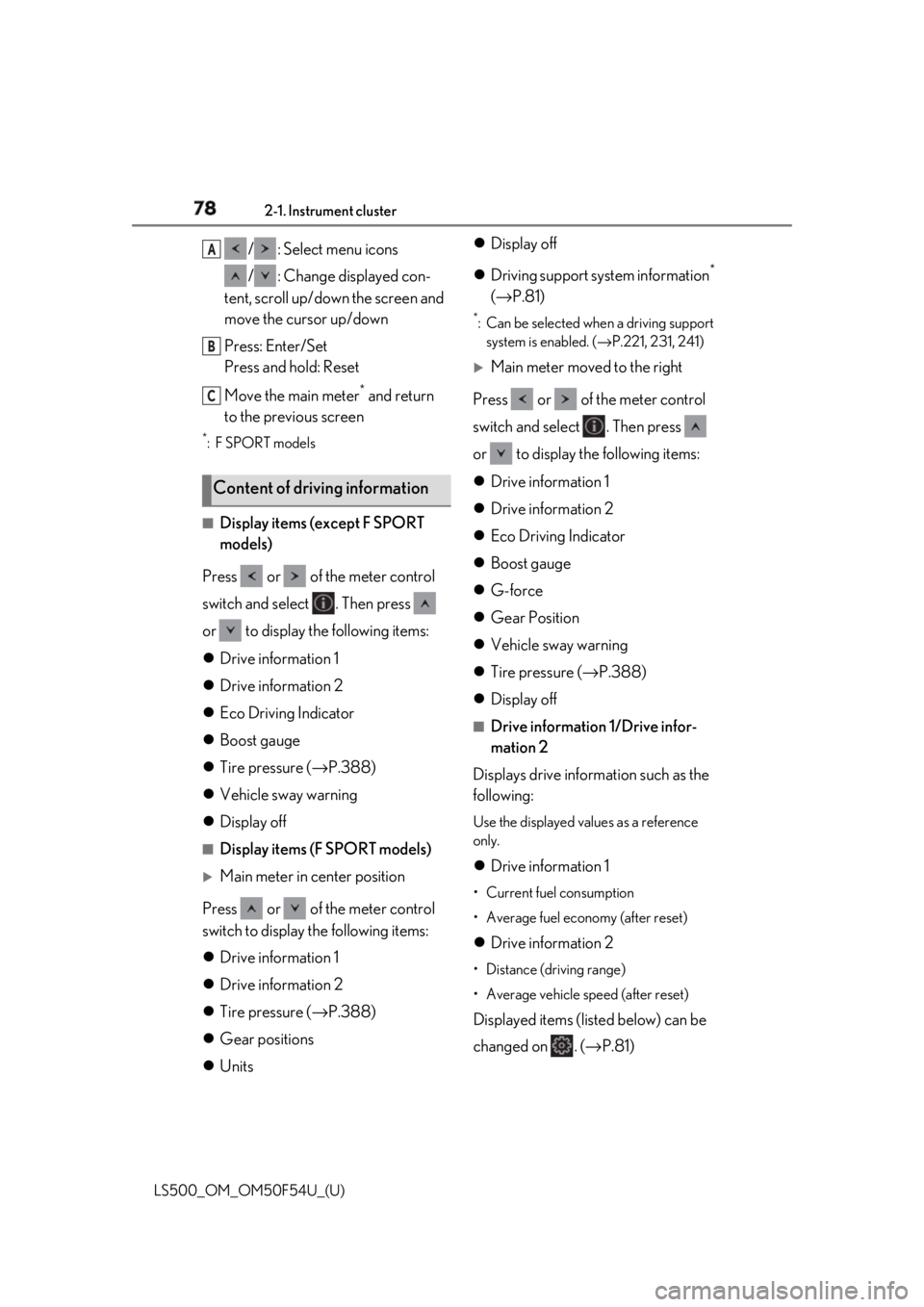
LS500_OM_OM50F54U_(U) / : Select menu icons
/ : Change displayed con-
tent, scroll up/down the screen and
move the cursor up/down
Press: Enter/Set
Press and hold: Reset
Move the main meter *
and return
to the previous screen *
:F SPORT models
■
Display items (except F SPORT
models)
Press or of the meter control
switch and select . Then press
or to display the following items:
Drive information 1
Drive information 2
Eco Driving Indicator
Boost gauge
Tire pressure ( → P.388)
Vehicle sway warning
Display off ■
Display items (F SPORT models)
Main meter in center position
Press or of the meter control
switch to display the following items:
Drive information 1
Drive information 2
Tire pressure ( → P.388)
Gear positions
Units Display off
Driving support system information *
( → P.81) *
: Can be selected when a driving support
system is enabled. ( → P.221, 231, 241)
Main meter moved to the right
Press or of the meter control
switch and select . Then press
or to display the following items:
Drive information 1
Drive information 2
Eco Driving Indicator
Boost gauge
G-force
Gear Position
Vehicle sway warning
Tire pressure ( → P.388)
Display off ■
Drive information 1/Drive infor-
mation 2
Displays drive information such as the
following: Use the displayed values as a reference
only.
Drive information 1 • Current fuel consumption
• Average fuel economy (after reset)
Drive information 2 • Distance (driving range)
• Average vehicle speed (after reset)
Displayed items (listed below) can be
changed on . ( → P.81)Content of driving information A
B
C
Page 79 of 514
792-1. Instrument cluster
LS500_OM_OM50F54U_(U) 2
Vehicle status information and indicators Current fuel consumption Bar type: Displays instantaneous current
fuel consumption
Average fuel economy After reset: Displays average fuel con-
sumption since the display was reset *1
After start: Displays average fuel con-
sumption since engine start
After refuel: Displays average fuel con-
sumption since refuel
Average vehicle speed After reset: Displays average vehicle
speed since the display was reset *1
After start: Displays average vehicle speed
since engine start
Elapsed time After reset: Displays elapsed time since the
display was reset *1
After start: Displays elapsed time since
engine start
Distance Driving range: Displays driving range with
remaining fuel *2, 3
After start: Displays the distance driven
since engine start
Other Blank: No item *1
: To reset, display the desired item and
press and hold of the meter control
switch. *2
: This distance is computed based on
your average fuel consumption. As a
result, the actual distance that can be
driven may differ from that displayed. *3
: When only a small amount of fuel is
added to the tank, the display may not be updated.
When refueling, turn the engine switch
off. If the vehicle is refueled without
turning the engine switch off, the display
may not be updated. ■
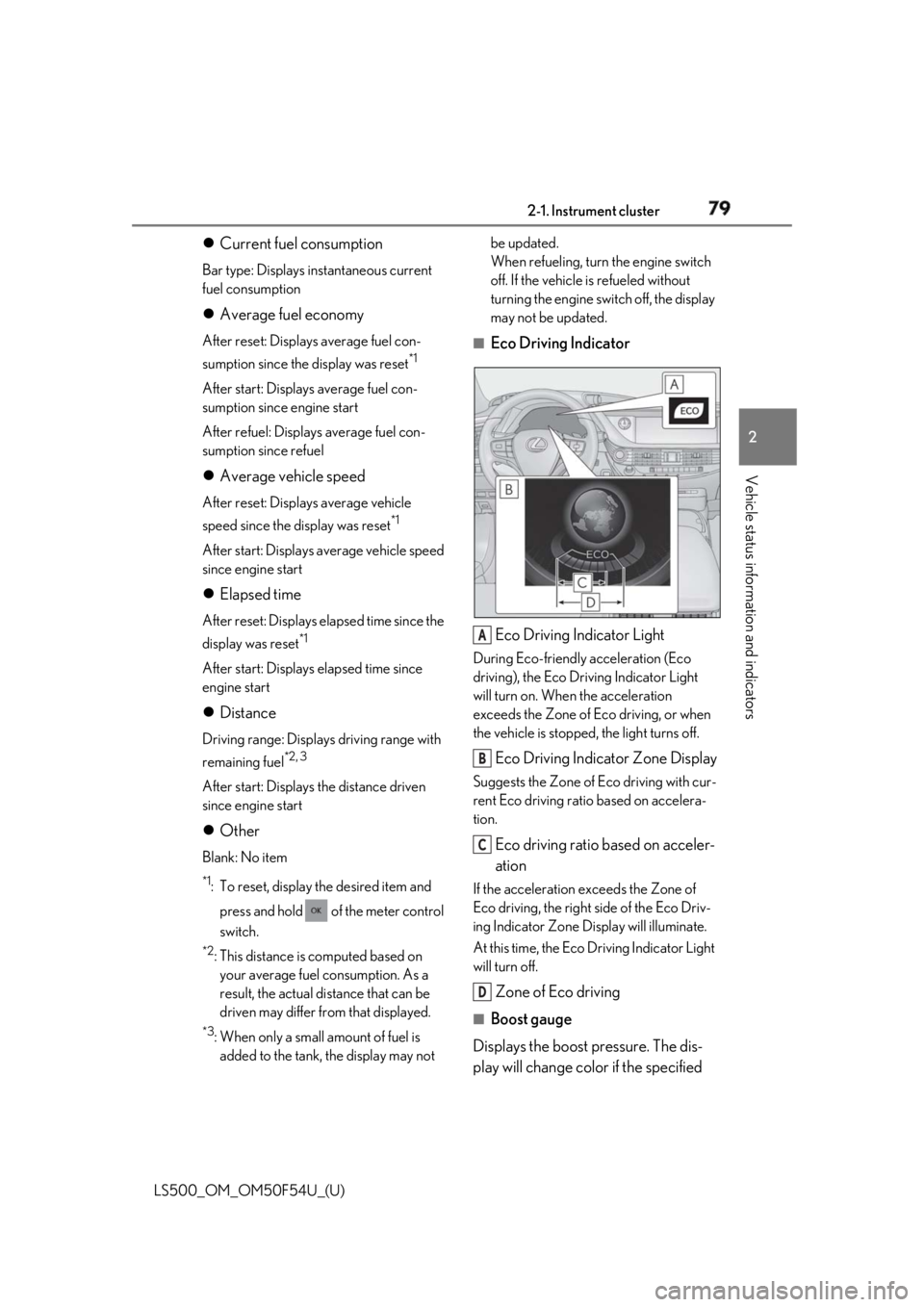
Eco Driving Indicator
Eco Driving Indicator Light During Eco-friendly acceleration (Eco
driving), the Eco Driving Indicator Light
will turn on. When the acceleration
exceeds the Zone of Eco driving, or when
the vehicle is stopped, the light turns off.
Eco Driving Indicator Zone Display Suggests the Zone of Eco driving with cur-
rent Eco driving ratio based on accelera-
tion.
Eco driving ratio based on acceler-
ation If the acceleration exceeds the Zone of
Eco driving, the right side of the Eco Driv-
ing Indicator Zone Display will illuminate.
At this time, the Eco Driving Indicator Light
will turn off.
Zone of Eco driving ■
Boost gauge
Displays the boost pressure. The dis-
play will change color if the specified A
B
C
D
Page 87 of 514
872-1. Instrument cluster
LS500_OM_OM50F54U_(U) 2
Vehicle status information and indicators ■
Tachometer
Displays the engine speed in revolu-
tions per minute. ■
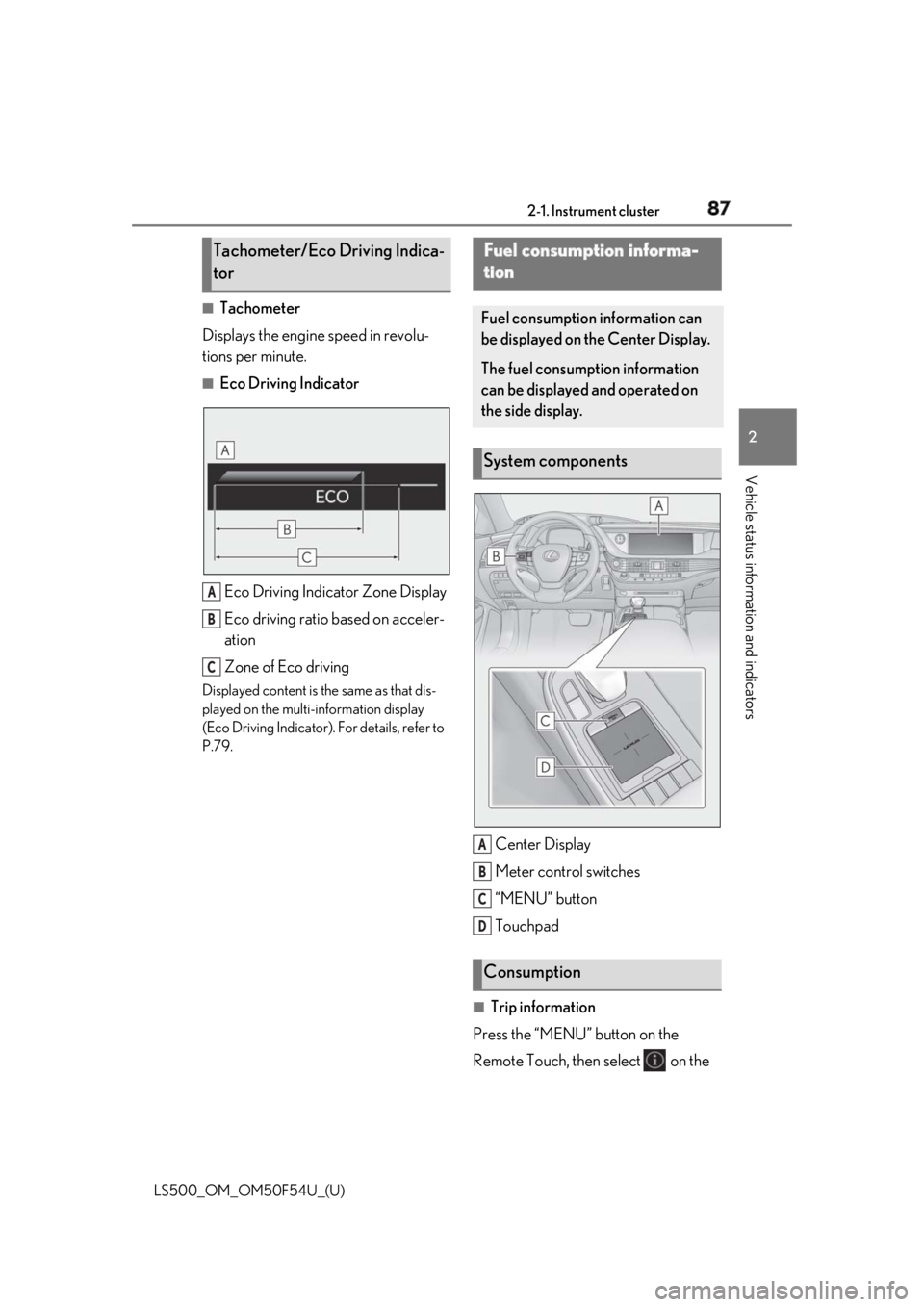
Eco Driving Indicator
Eco Driving Indicator Zone Display
Eco driving ratio based on acceler-
ation
Zone of Eco drivingDisplayed content is the same as that dis-
played on the multi-information display
(Eco Driving Indicator). For details, refer to
P.79.
Center Display
Meter control switches
“MENU” button
Touchpad
■
Trip information
Press the “MENU” button on the
Remote Touch, then select on the Tachometer/Eco Driving Indica-
tor
A
B
C Fuel consumption informa-
tion Fuel consumption information can
be displayed on the Center Display.
The fuel consumption information
can be displayed and operated on
the side display.
System components
Consumption A
B
C
D
Page 88 of 514
88 2-1. Instrument cluster
LS500_OM_OM50F54U_(U) menu screen.
If a screen other than “Trip Information”
is displayed, select “Trip Information”.
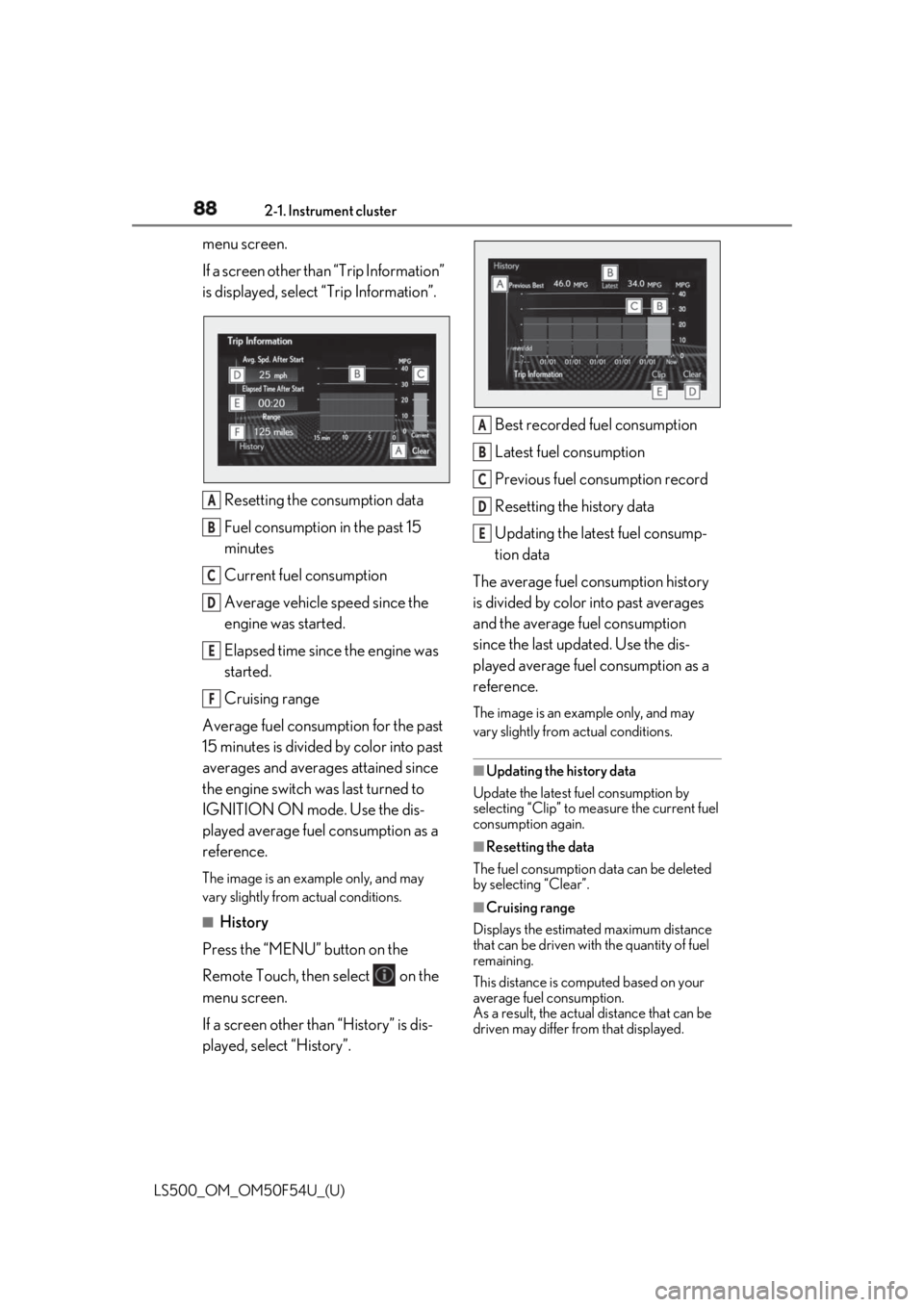
Resetting the consumption data
Fuel consumption in the past 15
minutes
Current fuel consumption
Average vehicle speed since the
engine was started.
Elapsed time since the engine was
started.
Cruising range
Average fuel consumption for the past
15 minutes is divided by color into past
averages and averages attained since
the engine switch was last turned to
IGNITION ON mode. Use the dis-
played average fuel consumption as a
reference. The image is an example only, and may
vary slightly from actual conditions.
■
History
Press the “MENU” button on the
Remote Touch, then select on the
menu screen.
If a screen other than “History” is dis-
played, select “History”. Best recorded fuel consumption
Latest fuel consumption
Previous fuel consumption record
Resetting the history data
Updating the latest fuel consump-
tion data
The average fuel consumption history
is divided by color into past averages
and the average fuel consumption
since the last updated. Use the dis-
played average fuel consumption as a
reference. The image is an example only, and may
vary slightly from actual conditions.
■
Updating the history data
Update the latest fuel consumption by
selecting “Clip” to meas ure the current fuel
consumption again.
■
Resetting the data
The fuel consumption data can be deleted
by selecting “Clear”.
■
Cruising range
Displays the estimated maximum distance
that can be driven with the quantity of fuel
remaining.
This distance is computed based on your
average fuel consumption.
As a result, the actual distance that can be
driven may differ from that displayed.A
B
C
D
E
F A
B
C
D
E
Page 89 of 514
892-1. Instrument cluster
LS500_OM_OM50F54U_(U) 2
Vehicle status information and indicators Display the vehicle information on the
side display ( → P.307), and then select
or to display the desired
screen.
The image is an example only, and may
vary slightly from actual conditions.
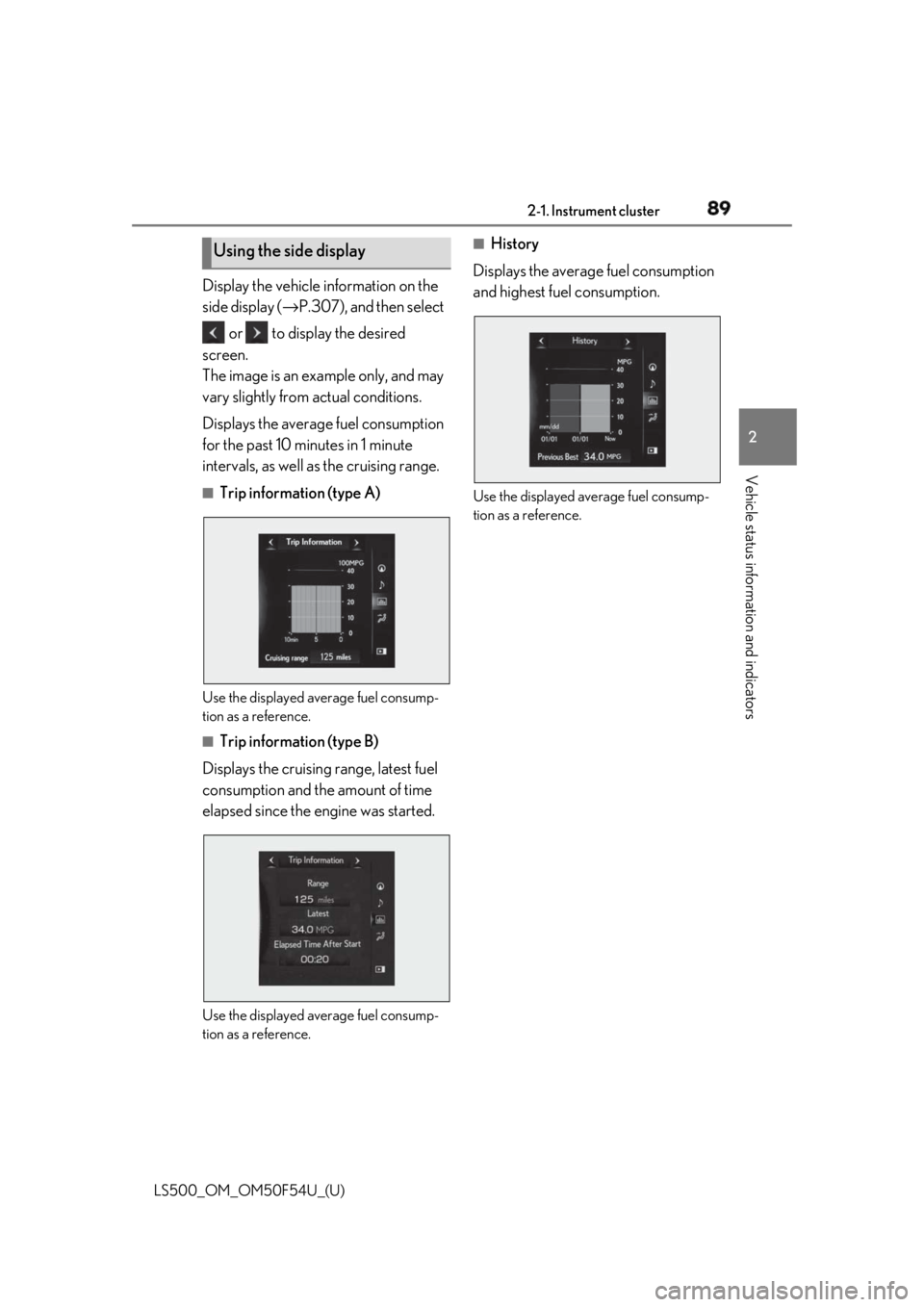
Displays the average fuel consumption
for the past 10 minutes in 1 minute
intervals, as well as the cruising range. ■
Trip information (type A)
Use the displayed average fuel consump-
tion as a reference. ■
Trip information (type B)
Displays the cruising range, latest fuel
consumption and the amount of time
elapsed since the engine was started.
Use the displayed average fuel consump-
tion as a reference. ■
History
Displays the average fuel consumption
and highest fuel consumption.
Use the displayed average fuel consump-
tion as a reference.Using the side display
Page 149 of 514
149
LS500_OM_OM50F54U_(U) 4 4
Driving Driving .
4-1. Before driving
Driving the vehicle ..................... 150
Cargo and luggage ................... 156
Vehicle load limits ...................... 158
Trailer towing ............................... 159
Dinghy towing ............................. 159
4-2. Driving procedures
Engine (ignition) switch ........... 160
Automatic transmission........... 163
Turn signal lever.......................... 169
Parking brake .............................. 170
Brake Hold.................................... 173
4-3. Operating the lights and wipers
Headlight switch ......................... 175
AHB (Automatic High Beam)
......................................................... 178
Windshield wipers and washer
......................................................... 180
4-4. Refueling
Opening the fuel tank cap...... 185
4-5. Using the driving support sys-
tems
Lexus Safety System+A........... 187
Lexus Safety System+ .............. 194
PCS (Pre-Collision System) (vehi-
cles with Lexus Safety Sys-
tem+A) ....................................... 200
PCS (Pre-Collision System) (vehi-
cles with Lexus Safety System+)
......................................................... 210 FCTA (Front Cross Traffic Alert)
........................................................ 218
LTA (Lane Tracing Assist) ...... 221
LKA (Lane-Keeping Assist)
........................................................ 231
RSA (Road Sign Assist).......... 238
Dynamic radar cruise control with
full-speed range........................ 241
BSM (Blind Spot Monitor) ..... 251
PKSA (Parking Support Alert)
....................................................... 256
Intuitive parking assist ............. 257
RCTA (Rear cross traffic alert)
function....................................... 264
RCD (Rear Camera Detection)
function....................................... 268
PKSB (Parking Support Brake)
......................................................... 271
Parking Support Brake function
(static objects) ......................... 277
Parking Support Brake function
(rear-crossing vehicles) ...... 282
Parking Support Brake function
(rear pedestrians) .................. 286
Driving mode select switch .. 289
Electronically modulated air sus-
pension ........................................ 291
Driving assist systems.............. 294
4-6. Driving tips
Winter driving tips .................... 299
Page 151 of 514
1514-1. Before driving
LS500_OM_OM50F54U_(U) 4
Driving ■
Restraining the engi ne output (Brake
Override System)●
When the accelerator and brake pedals
are depressed at the same time, the
engine output may be restrained.●
A warning message is displayed on the
multi-information display while the sys-
tem is operating.■
Restraining sudden start (Drive-Start
Control)●
When the following unusual operation is
performed, the engine output may be
restrained.
• When the shift position is shifted from R
to D, D to R, N to R, P to D *
, or P to R *
(D
includes M) with the accelerator pedal
depressed, a warning message appears
on the multi-information display. If a
warning message is shown on the
multi-information disp lay, read the mes-
sage and follow the instruction.
• When the accelerator pedal is depressed
too much while the vehicle is in reverse. *
: Depending on the situation, the shift
position may not be changed.●
While Drive-Start Control is being acti-
vated, your vehicle may have trouble
escaping from the mud or fresh snow. In
such case, deactivate TRAC ( → P.295)
to cancel Drive-Start Control so that the
vehicle may become able to escape from
the mud or fresh snow.■
Breaking in your new Lexus
To extend the life of the vehicle, observing
the following precautions is recommended: ●
For the first 186 miles (300 km):
Avoid sudden stops.
●
For the first 621 miles (1000 km):
• Do not drive at extremely high speeds.
• Avoid sudden acceleration.
• Do not drive continuously in low gears.
• Do not drive at a constant speed for
extended periods.
■
Drum-in-disc type parking brake system
Your vehicle has a drum-in-disc type park-
ing brake system. This type of brake system
needs bedding-down of the brake shoes
periodically or whenev er the parking brake shoes and/or drum are replaced. Have your
Lexus dealer perform the bedding down
operation. ■
Brake pads and discs (F SPORT models)
The brake pads and discs are designed for
use under high load conditions. Therefore,
brake noise may be generated depending
on the vehicle speed, braking force and
vehicle environment (temperature, humid-
ity, etc.). ■
Operating your vehicle in a foreign
country
Comply with the relevant vehicle registra-
tion laws and confirm the availability of the
correct fuel. ( → P.449)■
Idling time before engine stop
To prevent damage to the turbocharger,
allow the engine to idle immediately after
high-speed driving or hill climbing.
Driving condition Idling time
Normal city driving Not neces-
sary
High-speed driving (Con-
stant speed of approx. 62
mph [100km/h]) Not neces-
sary
Steep hill driving or continu-
ous driving at 62 mph (100
km/h) or more (race track
driving etc.) Approxi-
mately 1
minute
WARNING
Observe the following precautions.
Failure to do so may result in death or
serious injury.
■
When starting the vehicle
Always keep your foot on the brake
pedal while stopped with the engine run-
ning. This prevents the vehicle from
creeping.
Page 163 of 514
1634-2. Driving procedures
LS500_OM_OM50F54U_(U) 4
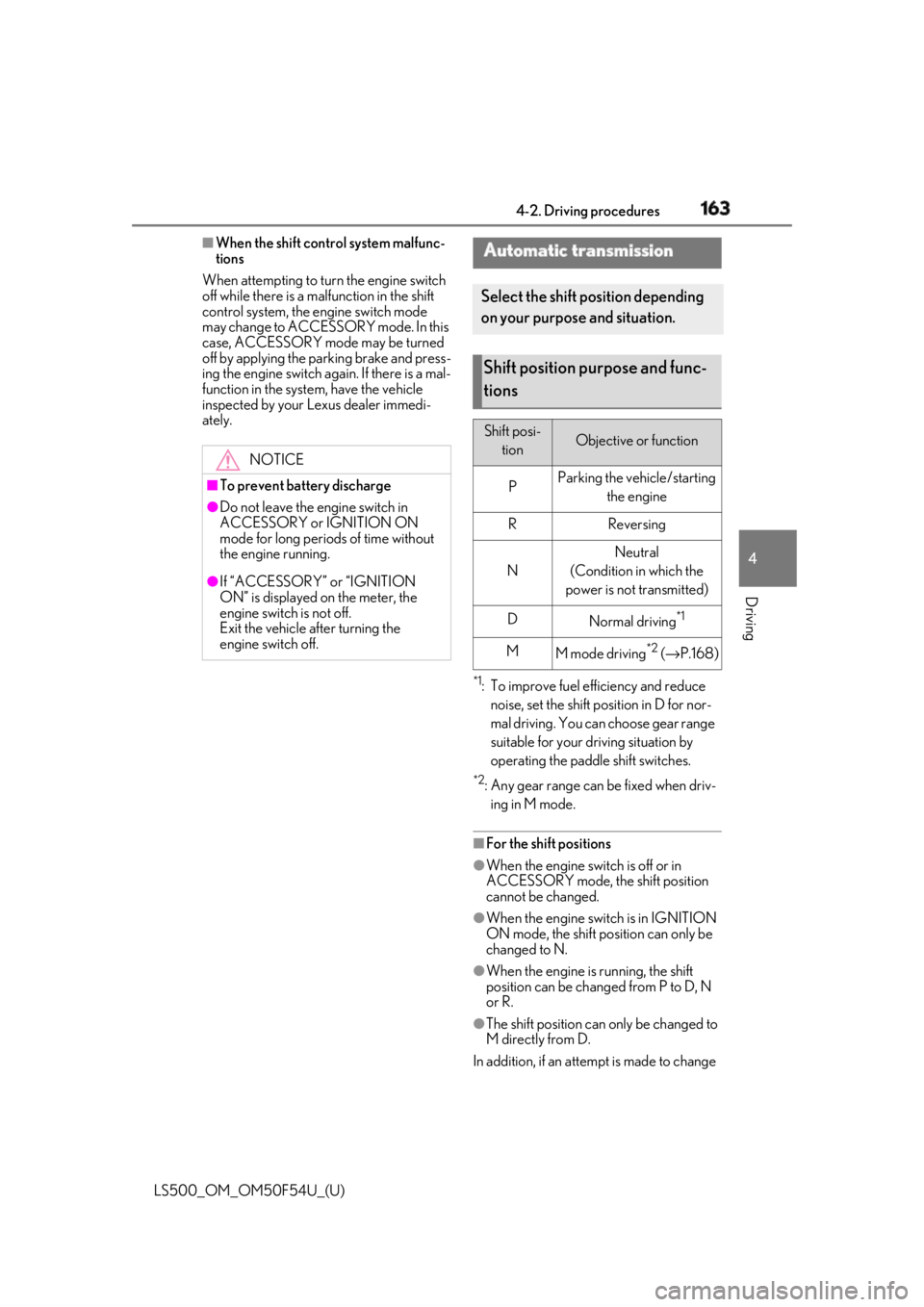
Driving ■
When the shift control system malfunc-
tions
When attempting to turn the engine switch
off while there is a malfunction in the shift
control system, the engine switch mode
may change to ACCESSORY mode. In this
case, ACCESSORY mode may be turned
off by applying the parking brake and press-
ing the engine switch again. If there is a mal-
function in the system, have the vehicle
inspected by your Lexus dealer immedi-
ately.
*1
: To improve fuel efficiency and reduce
noise, set the shift position in D for nor-
mal driving. You can choose gear range
suitable for your driving situation by
operating the paddle shift switches. *2
: Any gear range can be fixed when driv-
ing in M mode.
■
For the shift positions ●
When the engine switch is off or in
ACCESSORY mode, the shift position
cannot be changed.
●
When the engine swit ch is in IGNITION
ON mode, the shift position can only be
changed to N.
●
When the engine is running, the shift
position can be changed from P to D, N
or R.
●
The shift position can only be changed to
M directly from D.
In addition, if an attempt is made to change NOTICE■
To prevent battery discharge●
Do not leave the engine switch in
ACCESSORY or IGNITION ON
mode for long period s of time without
the engine running.●
If “ACCESSORY” or “IGNITION
ON” is displayed on the meter, the
engine switch is not off.
Exit the vehicle after turning the
engine switch off. Automatic transmission Select the shift position depending
on your purpose and situation.
Shift position purpose and func-
tions Shift posi-
tion Objective or function
P Parking the vehicle/starting
the engine
R Reversing
N Neutral
(Condition in which the
power is not transmitted)
D
Normal driving *1
M
M mode driving *2
( → P.168)
Page 175 of 514
1754-3. Operating the lights and wipers
LS500_OM_OM50F54U_(U) 4
Driving 4-3.Operating the lights and wipers
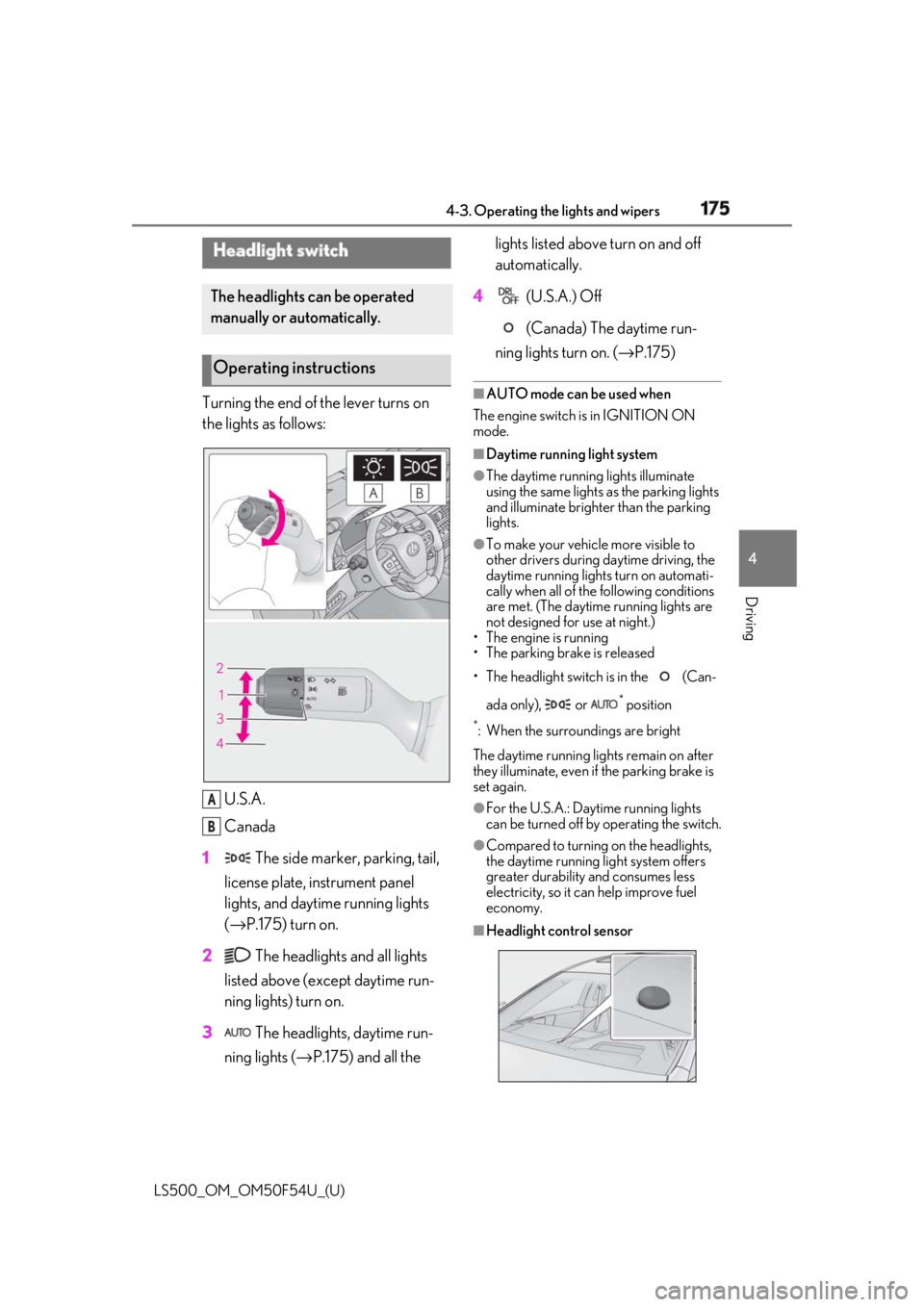
Turning the end of the lever turns on
the lights as follows:
U.S.A.
Canada
1 The side marker, parking, tail,
license plate, instrument panel
lights, and daytime running lights
( → P.175) turn on.
2 The headlights and all lights
listed above (except daytime run-
ning lights) turn on.
3 The headlights, daytime run-
ning lights ( → P.175) and all the lights listed above turn on and off
automatically.
4 (U.S.A.) Off
(Canada) The daytime run-
ning lights turn on. ( → P.175)■
AUTO mode can be used when
The engine switch is in IGNITION ON
mode. ■
Daytime running light system ●
The daytime running lights illuminate
using the same lights as the parking lights
and illuminate brighter than the parking
lights. ●
To make your vehicle more visible to
other drivers during daytime driving, the
daytime running lights turn on automati-
cally when all of the following conditions
are met. (The daytime running lights are
not designed for use at night.)
• The engine is running
• The parking brake is released
• The headlight switch is in the (Can-
ada only), or *
position*
: When the surroundings are bright
The daytime running lights remain on after
they illuminate, even if the parking brake is
set again. ●
For the U.S.A.: Daytime running lights
can be turned off by operating the switch. ●
Compared to turning on the headlights,
the daytime running light system offers
greater durability and consumes less
electricity, so it can help improve fuel
economy.
■
Headlight control sensorHeadlight switch The headlights can be operated
manually or automatically.
Operating instructions
A
B