headlights LEXUS LS500 2018 User Guide
[x] Cancel search | Manufacturer: LEXUS, Model Year: 2018, Model line: LS500, Model: LEXUS LS500 2018Pages: 514, PDF Size: 10.62 MB
Page 193 of 514
1934-5. Using the driving support systems
LS500_OM_OM50F54U_(U) 4
Driving WARNING●
If water droplets cannot be properly
removed from the area of the wind-
shield in front of the camera sensor by
the windshield wipers, replace the
wiper insert or wiper blade.
If the wiper inserts or wiper blades need
to be replaced, contact your Lexus
dealer. ●
Do not attach window tinting to the
windshield.●
Replace the windshield if it is damaged
or cracked.
If the windshield needs to be replaced,
contact your Lexus dealer.●
Do not get the camera sensor wet.●
Do not allow bright lights to shine into
the camera sensor.●
Do not dirty or damage the camera
sensor.
When cleaning the inside of the wind-
shield, do not allow glass cleaner to
contact the lens. Also, do not touch the
lens.
If the lens is dirty or damaged, contact
your Lexus dealer.
●
Do not subject the camera sensor to a
strong impact.
●
Do not change the installation position
or direction of the camera sensor or
remove it.
●
Do not disassemble the camera sen-
sor.
●
Do not modify any components of the
vehicle around the camera sensor
(inside rear view mirror, etc.) or ceiling.
●
Do not attach any accessories that
may obstruct the camera sensor to the
hood, front grille or front bumper.
Contact your Lexus dealer. ●
If a surfboard or other long object is to
be mounted on the roof, make sure
that it will not obstruct the camera sen-
sor. ●
Do not modify the headlights or other
lights.
Page 199 of 514
1994-5. Using the driving support systems
LS500_OM_OM50F54U_(U) 4
Driving WARNING●
If the part of the windshield in front of
the camera sensor is fogged up or
covered with condensation or ice, use
the windshield defogger to remove the
fog, condensation or ice. ( → P.314)●
If water droplets cannot be properly
removed from the area of the wind-
shield in front of the camera sensor by
the windshield wipers, replace the
wiper insert or wiper blade.
If the wiper inserts or wiper blades need
to be replaced, contact your Lexus
dealer. ●
Do not attach window tinting to the
windshield.●
Replace the windshield if it is damaged
or cracked.
If the windshield needs to be replaced,
contact your Lexus dealer.●
Do not get the camera sensor wet.●
Do not allow bright lights to shine into
the camera sensor.●
Do not dirty or damage the camera
sensor.
When cleaning the inside of the wind-
shield, do not allow glass cleaner to
contact the lens. Also, do not touch the
lens.
If the lens is dirty or damaged, contact
your Lexus dealer.
●
Do not subject the camera sensor to a
strong impact.
●
Do not change the installation position
or direction of the camera sensor or
remove it.
●
Do not disassemble the camera sen-
sor.
●
Do not modify any components of the
vehicle around the camera sensor
(inside rear view mirror, etc.) or ceiling. ●
Do not attach any accessories that
may obstruct the camera sensor to the
hood, front grille or front bumper.
Contact your Lexus dealer. ●
If a surfboard or other long object is to
be mounted on the roof, make sure
that it will not obstruct the camera sen-
sor. ●
Do not modify the headlights or other
lights.
Page 208 of 514
208 4-5. Using the driving support systems
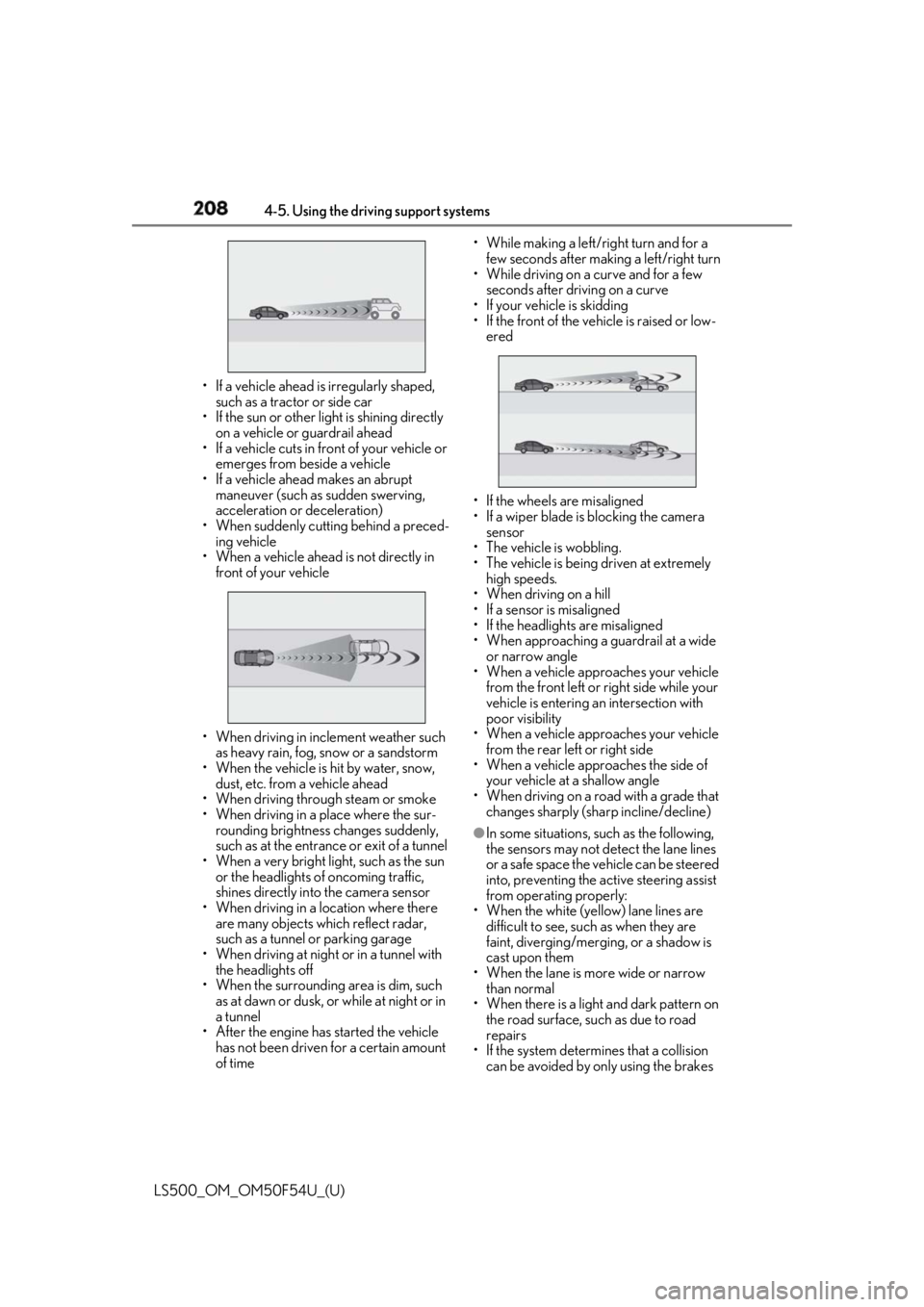
LS500_OM_OM50F54U_(U) • If a vehicle ahead is irregularly shaped,
such as a tractor or side car
• If the sun or other light is shining directly
on a vehicle or guardrail ahead
• If a vehicle cuts in front of your vehicle or
emerges from beside a vehicle
• If a vehicle ahead makes an abrupt
maneuver (such as sudden swerving,
acceleration or deceleration)
• When suddenly cutting behind a preced-
ing vehicle
• When a vehicle ahead is not directly in
front of your vehicle
• When driving in incl ement weather such
as heavy rain, fog, snow or a sandstorm
• When the vehicle is hit by water, snow,
dust, etc. from a vehicle ahead
• When driving through steam or smoke
• When driving in a place where the sur-
rounding brightness changes suddenly,
such as at the entrance or exit of a tunnel
• When a very bright light, such as the sun
or the headlights of oncoming traffic,
shines directly in to the camera sensor
• When driving in a lo cation where there
are many objects which reflect radar,
such as a tunnel or parking garage
• When driving at night or in a tunnel with
the headlights off
• When the surrounding area is dim, such
as at dawn or dusk, or while at night or in
a tunnel
• After the engine has started the vehicle
has not been driven for a certain amount
of time • While making a left/r ight turn and for a
few seconds after making a left/right turn
• While driving on a curve and for a few
seconds after driving on a curve
• If your vehicle is skidding
• If the front of the vehicle is raised or low-
ered
• If the wheels are misaligned
• If a wiper blade is blocking the camera
sensor
• The vehicle is wobbling.
• The vehicle is being driven at extremely
high speeds.
• When driving on a hill
• If a sensor is misaligned
• If the headlights are misaligned
• When approaching a guardrail at a wide
or narrow angle
• When a vehicle approaches your vehicle
from the front left or right side while your
vehicle is entering an intersection with
poor visibility
• When a vehicle approaches your vehicle
from the rear left or right side
• When a vehicle approaches the side of
your vehicle at a shallow angle
• When driving on a road with a grade that
changes sharply (sha rp incline/decline)●
In some situations, such as the following,
the sensors may not detect the lane lines
or a safe space the vehicle can be steered
into, preventing the active steering assist
from operating properly:
• When the white (yellow) lane lines are
difficult to see, such as when they are
faint, diverging/merging, or a shadow is
cast upon them
• When the lane is more wide or narrow
than normal
• When there is a light and dark pattern on
the road surface, such as due to road
repairs
• If the system determines that a collision
can be avoided by only using the brakes
Page 209 of 514
2094-5. Using the driving support systems
LS500_OM_OM50F54U_(U) 4
Driving • When a pedestrian is detected near the
centerline of the vehicle●
In some situations such as the following,
sufficient braking force or steering force
may not be obtained, preventing the sys-
tem from performing properly:
• If the braking functions cannot operate to
their full extent, such as when the brake
parts are extremely cold, extremely hot,
or wet
• If the vehicle is not properly maintained
(brakes or tires are excessively worn,
improper tire inflation pressure, etc.)
• When the vehicle is being driven on a
gravel road or other slippery surface
• If there are deep ruts in the road
• When driving on a slope
• When driving on a horizontally slanted
road●
Some pedestrians and bicyclists, such as
the following, may not be detected by the
sensors, preventing the system from
operating properly:
• Pedestrians and bicyclists shorter than
approximately 3.2 ft. (1 m) or taller than
approximately 6.5 ft. (2 m)
• Bicyclists riding on unusual bicycles
(bicycles for small children, tricycles,
folding bicycles, BMX bicycles, tandem
bicycles, etc.)
• Pedestrians and bicyclists who are wear-
ing white and look extremely bright
• Pedestrians and bicyclists which are not
illuminated by the headli ghts at night, in a
tunnel, etc.
• Pedestrians whose clothing appears to
be nearly the same co lor or brightness as
their surroundings
• Pedestrians and bicy clists near walls,
fences, guardrails, or large objects
• Pedestrians and bicyclists which are on a
metal object (manhole cover, steel plate,
etc.) on the road
• Pedestrians and bicyclists which are mov-
ing fast
• Pedestrians and bicy clists which change
speed or direction abruptly
• Pedestrians and bicyclists which suddenly
emerge from behind a vehicle or large
object
• Pedestrians and bicyclists which are
extremely close to the side of the vehicle
(outside rear view mirror, etc.) • Pedestrians and bicyclists wearing over-
sized clothing, such as a rain coat, long
skirt, etc., making their silhouette obscure
• Pedestrians and bicyclists who are carry-
ing large baggage, ho lding an umbrella,
etc., hiding part of their body
• Pedestrians and bicyclists behind an
object that hides part of their body
• Pedestrians and bicyclists who are bend-
ing forward or squatting
• Pedestrians who are pushing a stroller,
wheelchair, bicycle or other vehicle
• Groups of pedestrians/bicyclists which
are close together ●
Some guardrails, such as the following,
may not be detected by the sensors, pre-
venting the system from operating prop-
erly:
• Guardrails which are less than approxi-
mately 1.9 ft. (60 cm) tall
• Short guardrails
• Irregularly-shaped gu ardrails (wire cable
guardrails, guardrails made of thin poles,
etc.)
• Guardrails which are not illuminated by
the headlights at nigh t, in a tunnel, etc.
• Guardrails which appear to be nearly the
same color or brightness as their sur-
roundings
• Guardrails which appear to be nearly the
same shape as their surroundings (walls,
etc.)
• Guardrails which are over a metal object
(manhole cover, steel plate, etc.)
• Guardrails which are hidden behind thick
grass
• Guardrails which are extremely close to
the side of the vehicle (outside rear view
mirror, etc.)
• Curved guardrails or guardrails at the
entrance of a curve
●
In some situations su ch as the following,
the system may detect a pedestrian and
display a warning on the head-up display,
even though no pedestrian exists:
• If the front of the vehicle is raised or low-
ered, such as when the road surface is
uneven or undulating (due to ruts, etc.)
• When driving on a slope
• When driving on a horizontally slanted
road
• If the driver’s posture (driver seat posi-
tion) is extreme, such as excessively
Page 216 of 514
216 4-5. Using the driving support systems
LS500_OM_OM50F54U_(U) road or a wall that may be mistaken for a
vehicle or pedestrian
• When driving near an object that reflects
radio waves, such as a large truck or
guardrail
• When driving near a TV tower, broad-
casting station, electric power plant, or
other location where strong radio waves
or electrical noise may be present■
Situations in which the system may not
operate properly●
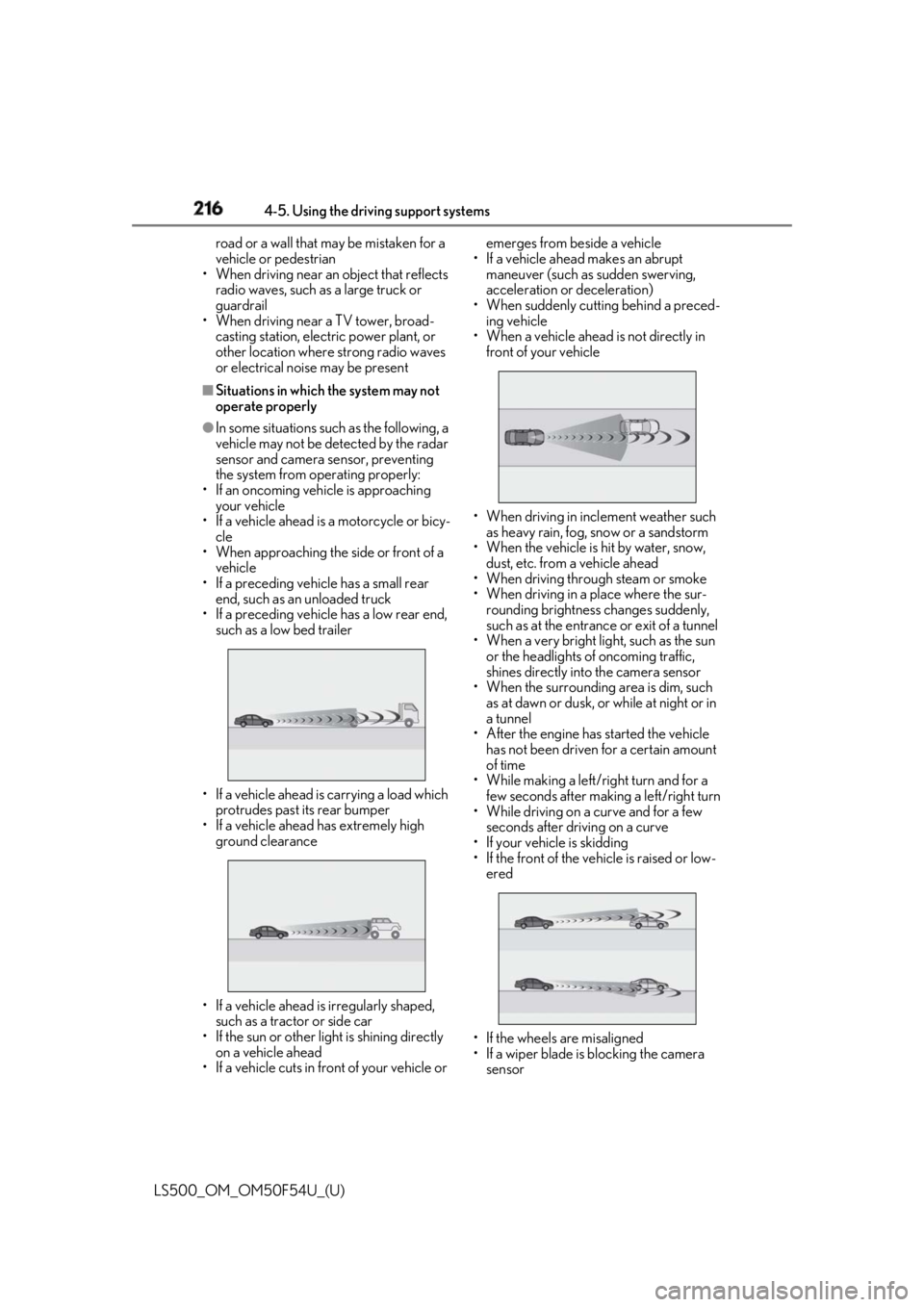
In some situations such as the following, a
vehicle may not be detected by the radar
sensor and camera sensor, preventing
the system from operating properly:
• If an oncoming vehicle is approaching
your vehicle
• If a vehicle ahead is a motorcycle or bicy-
cle
• When approaching the side or front of a
vehicle
• If a preceding vehicle has a small rear
end, such as an unloaded truck
• If a preceding vehicle has a low rear end,
such as a low bed trailer
• If a vehicle ahead is carrying a load which
protrudes past its rear bumper
• If a vehicle ahead has extremely high
ground clearance
• If a vehicle ahead is irregularly shaped,
such as a tractor or side car
• If the sun or other light is shining directly
on a vehicle ahead
• If a vehicle cuts in front of your vehicle or emerges from beside a vehicle
• If a vehicle ahead makes an abrupt
maneuver (such as sudden swerving,
acceleration or deceleration)
• When suddenly cutting behind a preced-
ing vehicle
• When a vehicle ahead is not directly in
front of your vehicle
• When driving in incl ement weather such
as heavy rain, fog, snow or a sandstorm
• When the vehicle is hit by water, snow,
dust, etc. from a vehicle ahead
• When driving through steam or smoke
• When driving in a place where the sur-
rounding brightness changes suddenly,
such as at the entrance or exit of a tunnel
• When a very bright light, such as the sun
or the headlights of oncoming traffic,
shines directly into the camera sensor
• When the surrounding area is dim, such
as at dawn or dusk, or while at night or in
a tunnel
• After the engine has started the vehicle
has not been driven for a certain amount
of time
• While making a left/r ight turn and for a
few seconds after making a left/right turn
• While driving on a curve and for a few
seconds after driving on a curve
• If your vehicle is skidding
• If the front of the vehicle is raised or low-
ered
• If the wheels are misaligned
• If a wiper blade is blocking the camera
sensor
Page 224 of 514
224 4-5. Using the driving support systems
LS500_OM_OM50F54U_(U) WARNING●
When the follow-up cruising display is
displayed ( → P.225) and the preced-
ing vehicle is being driven extremely
close to the left/right lane line. (Your
vehicle may follow the preceding vehi-
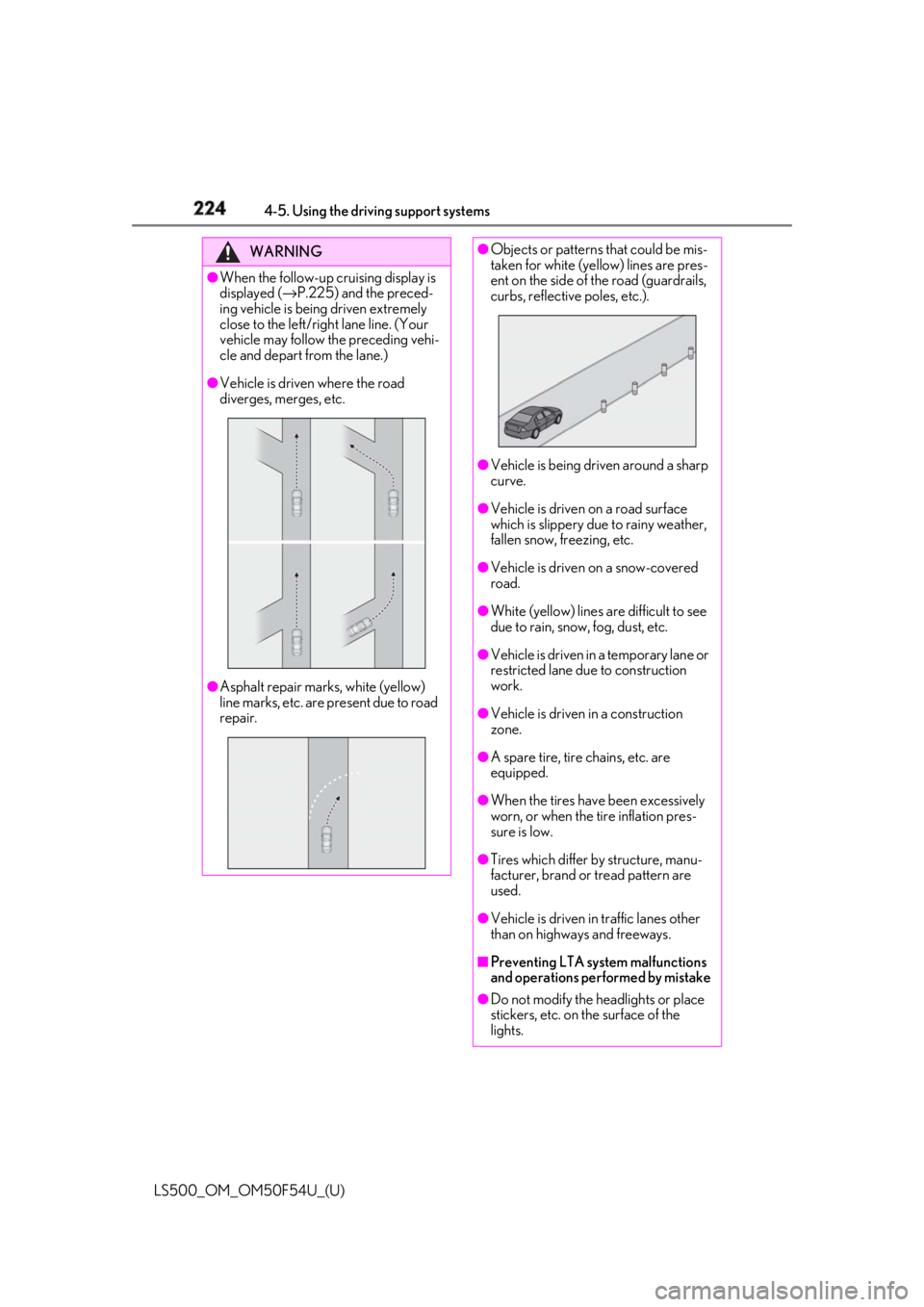
cle and depart from the lane.)●
Vehicle is driven where the road
diverges, merges, etc.
●
Asphalt repair marks, white (yellow)
line marks, etc. are present due to road
repair. ●
Objects or patterns that could be mis-
taken for white (yellow) lines are pres-
ent on the side of the road (guardrails,
curbs, reflective poles, etc.).
●
Vehicle is being driven around a sharp
curve. ●
Vehicle is driven on a road surface
which is slippery due to rainy weather,
fallen snow, freezing, etc. ●
Vehicle is driven on a snow-covered
road. ●
White (yellow) lines are difficult to see
due to rain, snow, fog, dust, etc. ●
Vehicle is driven in a temporary lane or
restricted lane due to construction
work. ●
Vehicle is driven in a construction
zone.
●
A spare tire, tire chains, etc. are
equipped.
●
When the tires have been excessively
worn, or when the tire inflation pres-
sure is low.
●
Tires which differ by structure, manu-
facturer, brand or tread pattern are
used.
●
Vehicle is driven in traffic lanes other
than on highways and freeways.
■
Preventing LTA system malfunctions
and operations performed by mistake
●
Do not modify the headlights or place
stickers, etc. on the surface of the
lights.
Page 229 of 514
2294-5. Using the driving support systems
LS500_OM_OM50F54U_(U) 4
Driving ●
The traffic lines are yellow (which may be
more difficult to recognize than lines that
are white).●
The white (yellow) lines cross over a curb,
etc.●
The vehicle is driven on a bright surface,
such as concrete.●
If the edge of the road is not clear or
straight.●
The vehicle is driven on a surface that is
bright due to reflected light, etc.●
The vehicle is driven in an area where the
brightness changes suddenly, such as at
the entrances and exits of tunnels, etc.●
Light from the headlights of an oncoming
vehicle, the sun, etc. enters the camera.●
The vehicle is driven on a slope.●
The vehicle is driven on a road which tilts
left or right, or a winding road.●
The vehicle is driven on an unpaved or
rough road.●
The vehicle is driven around a sharp
curve.●
The traffic lane is ex cessively narrow or
wide.●
The vehicle is extremely tilted due to car-
rying heavy luggage or having improper
tire pressure.●
The distance to the preceding vehicle is
extremely short.●
The preceding vehicle changes lanes.
(Your vehicle may follow the preceding
vehicle and also change lanes.)●
The preceding vehicle is swaying. (Your
vehicle may sway accordingly and depart
from the lane.)
●
The vehicle is moving up and down a
large amount due to road conditions
during driving (poor roads or road
seams).
●
When driving in a tunnel or at night with
the headlights off or when a headlight is
dim due to its lens being dirty or it being
misaligned.
●
The vehicle is struck by a crosswind.
●
The vehicle has just changed lanes through operation of the steering wheel
by the driver or crossed an intersection. ●
Snow tires, etc. are equipped. ●
The vehicle is being driven at extremely
high speeds. ■
Warning message
If the following warning message is dis-
played on the multi-in formation display and
the LTA indicator illuminates in orange, fol-
low the appropriate troubleshooting proce-
dure.
Warning message Details/Actions
“LTA Malfunction
Visit Your Dealer” The system may not be
operating properly.
→ Have the vehicle
inspected at your
Lexus dealer.
“Front Camera
Unavailable
Remove Debris
On Windshield” Dirt, rain, condensa-
tion, ice, snow, etc., are
present on the wind-
shield in front of the
camera sensor.
→ Turn the LTA system
off, remove any dirt,
rain, condensation, ice,
snow, etc., from the
windshield, and then
turn the LTA system
back on.
Page 233 of 514
2334-5. Using the driving support systems
LS500_OM_OM50F54U_(U) 4
Driving
Press the LKA switch to turn the LKA
system on.WARNING■
Before using LKA system
Do not rely solely upon the LKA system.
The LKA system does not automatically
drive the vehicle or reduce the amount of
attention that must be paid to the area in
front of the vehicle. The driver must
always assume full responsibility for driv-
ing safely by paying careful attention to
the surrounding conditions and operat-
ing the steering wheel to correct the path
of the vehicle. Also, the driver must take
adequate breaks when fatigued, such as
from driving for a long period of time.
Failure to perform appropriate driving
operations and pay careful attention may
lead to an accident, resulting in death or
serious injury. ■
To avoid operating LKA system by
mistake
When not using the LKA system, use the
LKA switch to turn the system off. ■
Situations unsuitab le for LKA system
Do not use the LKA system in the follow-
ing situations.
The system may not operate properly
and lead to an accident, resulting in
death or serious injury.
●
A spare tire, tire chains, etc. are
equipped.
●
When the tires have been excessively
worn, or when the tire inflation pres-
sure is low.
●
Tires which differ by structure, manu-
facturer, brand or tread pattern are
used.
●
Objects or patterns that could be mis-
taken for white (yellow) lines are pres-
ent on the side of th e road (guardrails,
curbs, reflective poles, etc.).
●
Vehicle is driven on a snow-covered
road.
●
White (yellow) lines are difficult to see
due to rain, snow, fog, dust, etc. ●
Asphalt repair marks, white (yellow)
line marks, etc. are present due to road
repair. ●
Vehicle is driven in a temporary lane or
restricted lane due to construction
work. ●
Vehicle is driven on a road surface
which is slippery due to rainy weather,
fallen snow, freezing, etc. ●
Vehicle is driven in traffic lanes other
than on highways and freeways. ●
Vehicle is driven in a construction
zone. ■
Preventing LKA system malfunctions
and operations performed by mistake ●
Do not modify the headlights or place
stickers, etc. on the surface of the
lights. ●
Do not modify the suspension etc. If
the suspension etc. needs to be
replaced, contact your Lexus dealer. ●
Do not install or place anything on the
hood or grille. Also, do not install a
grille guard (bull bars, kangaroo bar,
etc.). ●
If your windshield needs repairs, con-
tact your Lexus dealer.
Turning LKA system on
Page 236 of 514

236 4-5. Using the driving support systems
LS500_OM_OM50F54U_(U) function is automatically restored.
( → P.235)■
Steering assist function/lane centering
function
Depending on the vehicle speed, lane
departure situation, ro ad conditions, etc.,
the driver may not feel the function is oper-
ating or the function may not operate at all.■
Lane departure alert function
The warning buzzer may be difficult to hear
due to external noise, audio playback, etc.
Also, it may be difficult to feel steering
wheel vibrations due to the road conditions,
etc. ■
Hands off steering wheel alert
When the system determines that the driver
has removed the hands from the steering
wheel while the steering assist function or
lane centering function is operating, a warn-
ing message is displaye d on the multi-infor-
mation display. If the driver continues to
keep the hands off of the steering wheel, a
warning message is displayed and the func-
tion is temporarily canceled. This alert also
operates in the same way when the driver
continuously operates the steering wheel
only a small amount. However, depending
on the road conditions , etc., the function
may not cancel. ■
White (yellow) lines ar e only on one side
of road
The LKA system will not operate for the
side on which white (yellow) lines could not
be recognized. ■
Conditions in whic h functions may not
operate properly
In the following situations, the camera sen-
sor may not detect white (yellow) lines and
various functions may not operate normally.
●
There are shadows on the road that run
parallel with, or cover, the white (yellow)
lines.
●
The vehicle is driven in an area without
white (yellow) lines, such as in front of a
tollgate or checkpoint, or at an intersec-
tion, etc.
●
The white (yellow) lines are cracked,
“Botts’ dots”, “Raised pavement marker” or stones are present. ●
The white (yellow) lines cannot be seen
or are difficult to see due to sand, etc. ●
The vehicle is driven on a road surface
that is wet due to rain, puddles, etc. ●
The traffic lines are yellow (which may be
more difficult to reco gnize than lines that
are white). ●
The white (yellow) lines cross over a curb,
etc. ●
The vehicle is driven on a bright surface,
such as concrete. ●
The vehicle is driven on a surface that is
bright due to reflected light, etc. ●
The vehicle is driven in an area where the
brightness changes sudd enly, such as at
the entrances and exits of tunnels, etc. ●
Light from the headlights of an oncoming
vehicle, the sun, etc. enters the camera. ●
The vehicle is driven where the road
diverges, merges, etc. ●
The vehicle is driven on a slope. ●
The vehicle is driven on a road which tilts
left or right, or a winding road. ●
The vehicle is driven on an unpaved or
rough road. ●
The vehicle is driven around a sharp
curve. ●
The traffic lane is excessively narrow or
wide. ●
The vehicle is extremely tilted due to car-
rying heavy luggage or having improper
tire pressure. ●
The distance to the preceding vehicle is
extremely short.
●
The vehicle is moving up and down a
large amount due to road conditions
during driving (poor roads or road
seams).
●
The headlight lenses are dirty and emit a
faint amount of light at night, or the beam
axis has deviated.
●
The vehicle is struck by a crosswind.
●
The vehicle has just changed lanes or
crossed an intersection.
●
Snow tires, etc. are equipped.
Page 270 of 514

270 4-5. Using the driving support systems
LS500_OM_OM50F54U_(U) • Pedestrians who are bending forward or
squatting
• Pedestrians who are lying down
• Pedestrians who are running
• Pedestrians who suddenly enter the
detection area
• Pedestrians riding a bicycle, skateboard,
or other light vehicle
• Pedestrians wearing oversized clothing
such as a rain coat, long skirt, etc., making
their silhouette obscure
• Pedestrians whose body is partially hid-
den by an object, such as a cart or
umbrella
• Pedestrians which are obscured by dark-
ness, such as at night●
In some situations, such as the following,
pedestrians may not be detected by the
rear camera detection function, prevent-
ing the function from operating properly:
• When backing up in inclement weather
(rain, snow, fog, etc.)
• When the rear camera is obscured (dirt,
snow, ice, etc. are attached) or scratched
• When a very bright light, such as the sun,
or the headlights of another vehicle,
shines directly into the rear camera
• When backing up in a place where the
surrounding brightness changes sud-
denly, such as at the entrance or exit of a
garage or underground parking lot
• When backing up in a dim environment
such as during dusk or in an underground
parking lot●
Even though there are no pedestrians in
the detection area, some objects, such as
the following, may be detected, possibly
causing the rear camera detection func-
tion to operate.
• Three dimensional objects, such as a
pole, traffic cone, fence, or parked vehi-
cle
• Moving objects, such as a car or motor-
cycle
• Objects moving toward your vehicle
when backing up, such as flags or pud-
dles (or airborne matter, such as smoke,
steam, rain, or snow)
• Cobblestone or gravel roads, tram rails,
road repairs, white lines, pedestrian
crossings or fallen leaves on the road
• Metal covers (gratings), such as those
used for drainage ditches • Objects reflected in a puddle or on a wet
road surface
• The roadside or bumps on the road
•Shadows on the road ●
In some situations, such as the following,
the rear camera detection function may
operate even though there are no pedes-
trians in the detection area.
• When backing up toward the roadside or
a bump on the road
• If the vehicle is signif icantly tilted, such as
when carrying a heavy load
• When backing up toward an
incline/decline
• If the suspension has been modified or
tires of a size othe r than specified are
installed
• If the rear of the vehicle is raised or low-
ered due to the carried load
• If an electronic component, such as a
backlit license plate or rear fog light, is
installed near the rear camera
• If a bumper protector, such as an addi-
tional trim strip, is installed to the rear
bumper
• If the orientation of the rear camera has
been changed due to a collision or other
impact, or removal and installation
• If a towing eyelet is in stalled to the rear of
the vehicle
• When water is flowing over the rear cam-
era lens
• When the rear camera is obscured (dirt,
snow, ice, etc. are at tached) or scratched
• If there is a flashing light in the detection
area, such as the emergency flashers of
another vehicle ●
Situations in which the rear camera
detection function may be difficult to
notice
• If buzzer may be difficult to hear if the
surrounding area is noisy, the volume of
the audio system volume is high, the air
conditioning system is being used, etc.
• If the temperature in the cabin is
extremely high or low, the audio system
screen may not operate correctly.