sport mode LEXUS LS500 2018 User Guide
[x] Cancel search | Manufacturer: LEXUS, Model Year: 2018, Model line: LS500, Model: LEXUS LS500 2018Pages: 514, PDF Size: 10.62 MB
Page 77 of 514
772-1. Instrument cluster
LS500_OM_OM50F54U_(U) 2
Vehicle status information and indicators
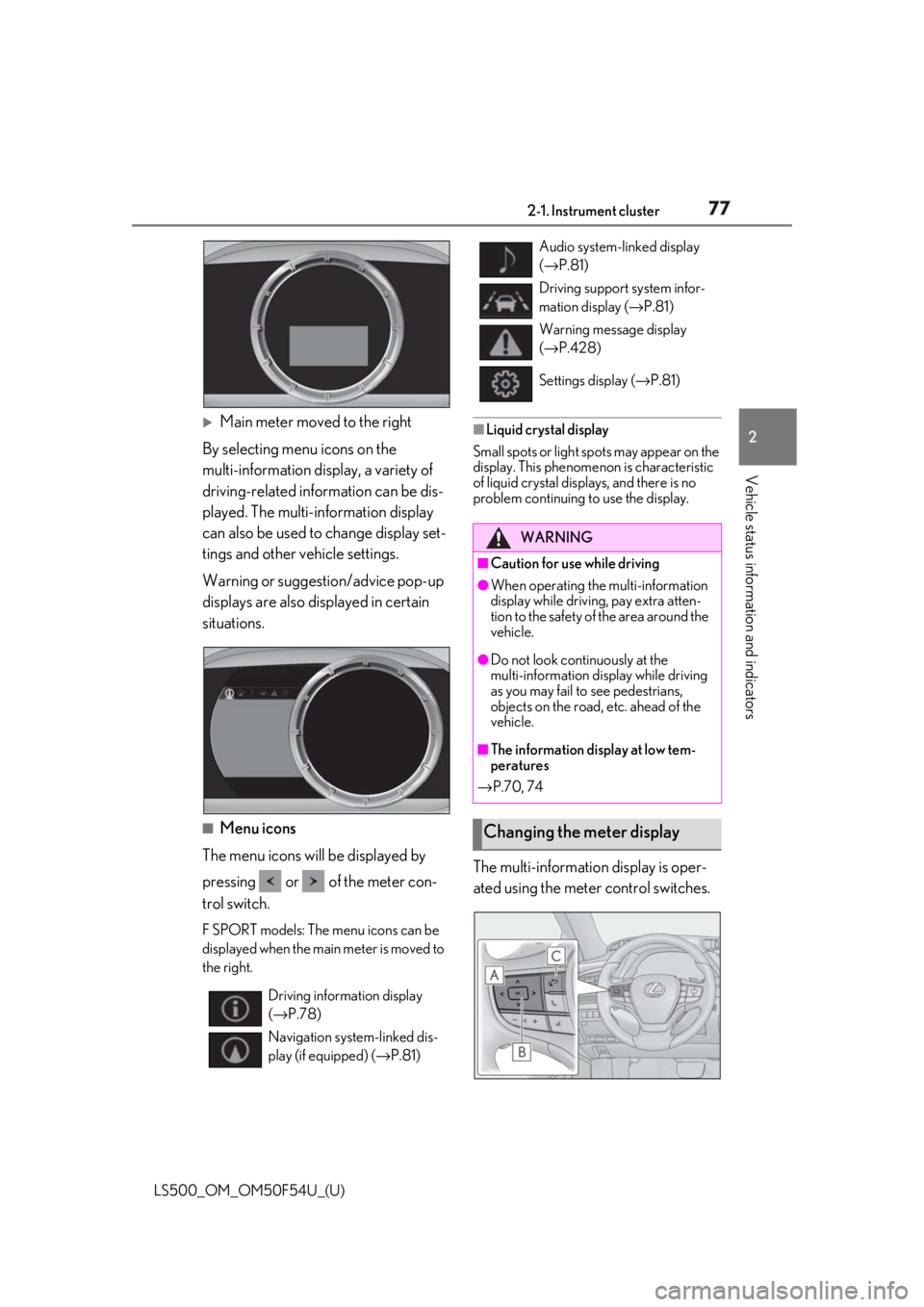
Main meter moved to the right
By selecting menu icons on the
multi-information display, a variety of
driving-related information can be dis-
played. The multi-information display
can also be used to change display set-
tings and other vehicle settings.
Warning or suggestion/advice pop-up
displays are also displayed in certain
situations.
■
Menu icons
The menu icons will be displayed by
pressing or of the meter con-
trol switch. F SPORT models: The menu icons can be
displayed when the main meter is moved to
the right. ■
Liquid crystal display
Small spots or light sp ots may appear on the
display. This phenomen on is characteristic
of liquid crystal disp lays, and there is no
problem continuing to use the display.
The multi-information display is oper-
ated using the meter control switches.
Driving information display
( → P.78)
Navigation syst em-linked dis-
play (if equipped) ( → P.81) Audio system-linked display
( → P.81)
Driving support system infor-
mation display ( → P.81)
Warning message display
( → P.428)
Settings display ( → P.81)
WARNING■
Caution for use while driving ●
When operating the multi-information
display while drivin g, pay extra atten-
tion to the safety of the area around the
vehicle. ●
Do not look continuously at the
multi-information display while driving
as you may fail to see pedestrians,
objects on the road, etc. ahead of the
vehicle. ■
The information display at low tem-
peratures
→ P.70, 74
Changing the meter display
Page 78 of 514
78 2-1. Instrument cluster
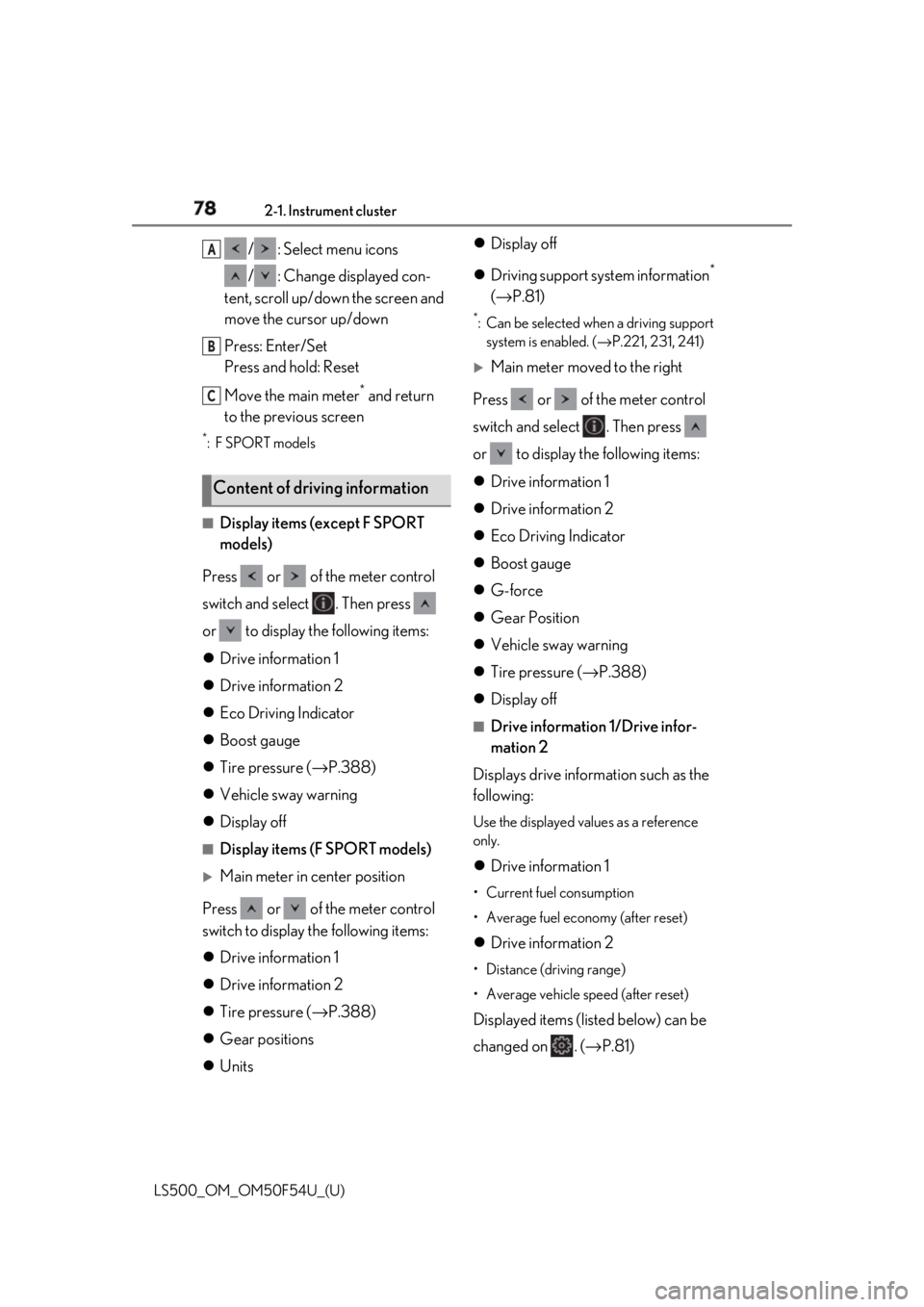
LS500_OM_OM50F54U_(U) / : Select menu icons
/ : Change displayed con-
tent, scroll up/down the screen and
move the cursor up/down
Press: Enter/Set
Press and hold: Reset
Move the main meter *
and return
to the previous screen *
:F SPORT models
■
Display items (except F SPORT
models)
Press or of the meter control
switch and select . Then press
or to display the following items:
Drive information 1
Drive information 2
Eco Driving Indicator
Boost gauge
Tire pressure ( → P.388)
Vehicle sway warning
Display off ■
Display items (F SPORT models)
Main meter in center position
Press or of the meter control
switch to display the following items:
Drive information 1
Drive information 2
Tire pressure ( → P.388)
Gear positions
Units Display off
Driving support system information *
( → P.81) *
: Can be selected when a driving support
system is enabled. ( → P.221, 231, 241)
Main meter moved to the right
Press or of the meter control
switch and select . Then press
or to display the following items:
Drive information 1
Drive information 2
Eco Driving Indicator
Boost gauge
G-force
Gear Position
Vehicle sway warning
Tire pressure ( → P.388)
Display off ■
Drive information 1/Drive infor-
mation 2
Displays drive information such as the
following: Use the displayed values as a reference
only.
Drive information 1 • Current fuel consumption
• Average fuel economy (after reset)
Drive information 2 • Distance (driving range)
• Average vehicle speed (after reset)
Displayed items (listed below) can be
changed on . ( → P.81)Content of driving information A
B
C
Page 80 of 514
80 2-1. Instrument cluster
LS500_OM_OM50F54U_(U) pressure is exceeded. This display is intended for use as a guide-
line. Depending on factors such as the road
surface condition, temperature and vehicle
speed, the display may not show the actual
condition of the vehicle. ■
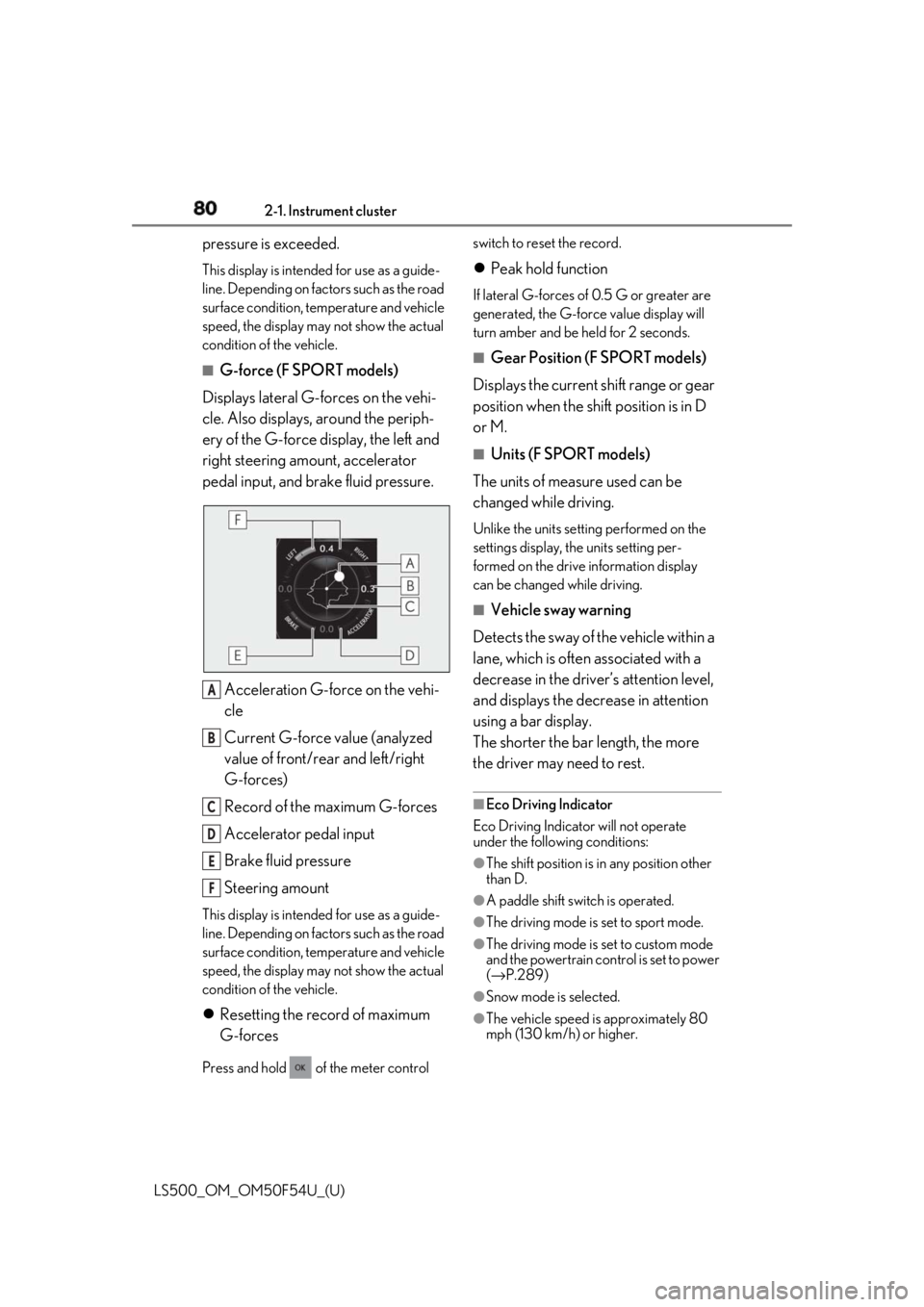
G-force (F SPORT models)
Displays lateral G-forces on the vehi-
cle. Also displays, around the periph-
ery of the G-force display, the left and
right steering amount, accelerator
pedal input, and brake fluid pressure.
Acceleration G-force on the vehi-
cle
Current G-force value (analyzed
value of front/rear and left/right
G-forces)
Record of the maximum G-forces
Accelerator pedal input
Brake fluid pressure
Steering amountThis display is intended for use as a guide-
line. Depending on factors such as the road
surface condition, temperature and vehicle
speed, the display may not show the actual
condition of the vehicle.
Resetting the record of maximum
G-forces
Press and hold of the meter control switch to reset the record.
Peak hold function If lateral G-forces of 0.5 G or greater are
generated, the G-forc e value display will
turn amber and be held for 2 seconds. ■
Gear Position (F SPORT models)
Displays the current shift range or gear
position when the shift position is in D
or M. ■
Units (F SPORT models)
The units of measure used can be
changed while driving. Unlike the units sett ing performed on the
settings display, th e units setting per-
formed on the drive information display
can be changed while driving.■
Vehicle sway warning
Detects the sway of the vehicle within a
lane, which is often associated with a
decrease in the driver’s attention level,
and displays the decrease in attention
using a bar display.
The shorter the bar length, the more
the driver may need to rest. ■
Eco Driving Indicator
Eco Driving Indicator will not operate
under the following conditions: ●
The shift position is in any position other
than D.
●
A paddle shift swit ch is operated.
●
The driving mode is set to sport mode.
●
The driving mode is set to custom mode
and the powertrain control is set to power
( → P.289)
●
Snow mode is selected.
●
The vehicle speed is approximately 80
mph (130 km/h) or higher.A
B
C
D
E
F
Page 81 of 514
812-1. Instrument cluster
LS500_OM_OM50F54U_(U) 2
Vehicle status information and indicators ■
Vehicle sway warning
This display is enabled when the operating
conditions of the vehi cle sway warning of
the LTA ( → P.227) or LKA ( → P.235) are
met.
Select to display the following naviga-
tion system-linked information.
Route guidance to destination
Compass display (heading-up dis-
play) ■
Route guidance to destination display
When the route guidance to destination
display is enabled on the head-up display, it
will not be displayed on the multi-informa-
tion display. ( → P.85)
Select to enable selection of an audio
source or track on the meter using the
meter control switches.
Select to display the operational status
of the following systems:
LTA (Lane Tracing Assist) (if
equipped) ( → P.221)
LKA (Lane-Keeping Assist) (if
equipped) ( → P.231)
Dynamic radar cruise control with
full-speed range ( → P.241)
RSA (Road Sign Assist) (if
equipped) ( → P.238) ■
Meter display settings that can be
changed
Language Select to change the language displayed.
Units Select to change the units of measure dis-
played.
Speedometer display (except F
SPORT models) Select to set the display of the speedome-
ter to digital/analog/both digital and ana-
log.
Drive information 1/Drive informa-
tion 2 Select to select up to 2 items ( → P.78) that
will be displayed on each Drive information
screen (Drive information 1 screen and
Drive information 2 sc reen) respectively.
Clock Select to switch between 12-hour display
and 24-hour display.
Pop-up display Select to enable/disable pop-up displays
for each relevant system.
Accent color Select to change the accent color on the
screen, such as the cursor color.
Rev indicator (F SPORT models) • Select to enable/disable the rev indica-
tor.
• Select to set the engine speed at which
the rev indicator (amber) will begin to be
displayed.
Rev peak (F SPORT models)
Select to enable/disable the rev peak.Navigation system-linked dis-
play (if equipped)
Audio system-linked display
Driving support system informa-
tion display Settings display
Page 151 of 514
1514-1. Before driving
LS500_OM_OM50F54U_(U) 4
Driving ■
Restraining the engi ne output (Brake
Override System)●
When the accelerator and brake pedals
are depressed at the same time, the
engine output may be restrained.●
A warning message is displayed on the
multi-information display while the sys-
tem is operating.■
Restraining sudden start (Drive-Start
Control)●
When the following unusual operation is
performed, the engine output may be
restrained.
• When the shift position is shifted from R
to D, D to R, N to R, P to D *
, or P to R *
(D
includes M) with the accelerator pedal
depressed, a warning message appears
on the multi-information display. If a
warning message is shown on the
multi-information disp lay, read the mes-
sage and follow the instruction.
• When the accelerator pedal is depressed
too much while the vehicle is in reverse. *
: Depending on the situation, the shift
position may not be changed.●
While Drive-Start Control is being acti-
vated, your vehicle may have trouble
escaping from the mud or fresh snow. In
such case, deactivate TRAC ( → P.295)
to cancel Drive-Start Control so that the
vehicle may become able to escape from
the mud or fresh snow.■
Breaking in your new Lexus
To extend the life of the vehicle, observing
the following precautions is recommended: ●
For the first 186 miles (300 km):
Avoid sudden stops.
●
For the first 621 miles (1000 km):
• Do not drive at extremely high speeds.
• Avoid sudden acceleration.
• Do not drive continuously in low gears.
• Do not drive at a constant speed for
extended periods.
■
Drum-in-disc type parking brake system
Your vehicle has a drum-in-disc type park-
ing brake system. This type of brake system
needs bedding-down of the brake shoes
periodically or whenev er the parking brake shoes and/or drum are replaced. Have your
Lexus dealer perform the bedding down
operation. ■
Brake pads and discs (F SPORT models)
The brake pads and discs are designed for
use under high load conditions. Therefore,
brake noise may be generated depending
on the vehicle speed, braking force and
vehicle environment (temperature, humid-
ity, etc.). ■
Operating your vehicle in a foreign
country
Comply with the relevant vehicle registra-
tion laws and confirm the availability of the
correct fuel. ( → P.449)■
Idling time before engine stop
To prevent damage to the turbocharger,
allow the engine to idle immediately after
high-speed driving or hill climbing.
Driving condition Idling time
Normal city driving Not neces-
sary
High-speed driving (Con-
stant speed of approx. 62
mph [100km/h]) Not neces-
sary
Steep hill driving or continu-
ous driving at 62 mph (100
km/h) or more (race track
driving etc.) Approxi-
mately 1
minute
WARNING
Observe the following precautions.
Failure to do so may result in death or
serious injury.
■
When starting the vehicle
Always keep your foot on the brake
pedal while stopped with the engine run-
ning. This prevents the vehicle from
creeping.
Page 153 of 514
1534-1. Before driving
LS500_OM_OM50F54U_(U) 4
Driving WARNING●
After driving through a puddle, lightly
depress the brake pedal to make sure
that the brakes are functioning prop-
erly. Wet brake pads may prevent the
brakes from functioning properly. If the
brakes on only one side are wet and
not functioning properly, steering con-
trol may be affected.■
When shifting the shift position●
Do not let the vehicle roll backward
while a forward driving position is
selected, or roll forward while the shift
position is in R.
Doing so may cause the engine to stall
or lead to poor brake and steering
performance, resulting in an accident
or damage to the vehicle.●
Do not shift the shift position to P while
the vehicle is moving.
Doing so can damage the transmission
and may result in a loss of vehicle con-
trol.●
Do not shift the shift position to R while
the vehicle is moving forward.
Doing so can damage the transmission
and may result in a loss of vehicle con-
trol.
●
Do not shift the shift position to a driv-
ing position while the vehicle is moving
backward.
Doing so can damage the transmission
and may result in a loss of vehicle con-
trol.
●
Changing the shift position to N while
the vehicle is moving will disengage
the engine from the transmission.
Engine braking is not available when N
is selected. ●
Be careful not to change the shift posi-
tion with the accelerator pedal
depressed. Changing the shift posi-
tion to any positions other than P or N
may lead to unexpected rapid acceler-
ation of the vehicle that may cause an
accident and result in death or serious
injury.
After changing the shift position, make
sure to confirm the current shift posi-
tion displayed on the shift position indi-
cator inside the meter. ■
Brake pad wear
If any of the following situations occurs,
have the brake pads visually checked and
replaced by your Lexus dealer as soon as
possible. ●
If the thickness of the brake pads
exceeds the brake pad wear limit when
visually checking all four brake pads
(for the brake pad wear limit, refer to
P.453) ●
If a warning message is displayed on
the multi-information display (only the
right-side pads can be detected)
Rotor damage may result if the pads are
not replaced when needed.
F SPORT models: Moderate levels of the
brake pad and disc wear allow enhanced
braking power. As a result, the discs may
wear more quickly than conventional
brake discs. Therefore, when replacing
the brake pads, Lexus recommends that
you also have the thickness of the discs
measured.
It is dangerous to drive the vehicle when
the wear limits of the brake pads and/or
those of the brake discs are exceeded.
■
When the vehicle is stopped
●
Do not race the engine.
If the vehicle is in any gear other than P
or N, the vehicle may accelerate sud-
denly and unexpectedly, causing an
accident.
Page 164 of 514

164 4-2. Driving procedures
LS500_OM_OM50F54U_(U) the shift position by moving the shift lever or
by pressing the P position switch in any of
the following situations, the buzzer will
sound and the shifting operation will be dis-
abled or the shift position will automatically
change to N. When this happens, select an
appropriate shift position. ●
Situations where the shifting operation
will be disabled:
• When an attempt is made to change the
shift position from P to another position
by moving the shift lever without depress-
ing the brake pedal.
• When an attempt is made to change the
shift position from P or N to M by moving
the shift lever.
• When the P position switch is pressed
while the vehicle is running. *1
●
Situations where the shift position will
automatically change to N:
• When an attempt is made to select the R
position by moving the shift lever when
the vehicle is moving forward. *2
• When an attempt is made to select the D
position by moving the shift lever when
the vehicle is moving in reverse. *3
• When the shift position is changed from
R to M●
If N is selected while driving at a certain
speed, even if the shift lever is not held in
the N position, the shift position changes
to N. In this situation, the buzzer sounds
and a confirmation message is displayed
on the multi-information display to inform
the driver that the shift position has
changed to N. *1
: Shift position may be changed to P
when driving at extremely low speeds. *2
: Shift position may be changed to R
when driving at low speeds. *3
: Shift position may be changed to D
when driving at low speeds.
■
Reverse warning buzzer
When shifting into R, a buzzer will sound to
inform the driver that the shift position is in
R.
■
To protect the automatic transmission
If the automatic transmission fluid tempera- ture is high, “Transmission Fluid Temp High
See Owner’s Manual” will be displayed on
the multi-information display and the vehi-
cle will go into transmission protection
mode automatically. Have the vehicle
inspected by your Lexus dealer. ■
When driving with dynamic radar cruise
control with full-speed range activated
Even when performing the following
actions with the intent of enabling engine
braking, engine braking will not be acti-
vated because dynamic radar cruise con-
trol with full-speed range will not be
canceled. ●
While driving in the D position, down-
shifting to 9, 8, 7, 6, 5 or 4. ●
When switching the driving mode to
sport mode while driving in the D position
( → P.289)■
Restraining sudden start (Drive-Start
Control)
→ P.151 ■
AI-SHIFT
The AI-SHIFT automatica lly selects the suit-
able gear according to driver performance
and driving conditions.
The AI-SHIFT automatically operates when
the shift position is in D. (Shifting the shift
position to the M position cancels the func-
tion.) ■
If a message about a shift operation is
shown
To prevent the shift position from being
selected incorrectly or the vehicle from
moving unexpectedly, the shift position may
be changed automatically or operating the
shift lever may be requ ired. In this case,
change the shift position following the mes-
sages on the multi-information display.
■
After recharging/reconnecting the bat-
tery
→ P.384
■
Customization
Some functions can be customized.
( → P.468)
Page 167 of 514
1674-2. Driving procedures
LS500_OM_OM50F54U_(U) 4
Driving charged. Check the battery in this situation.
( → P.438)
■
Driving mode
→ P.289 ■
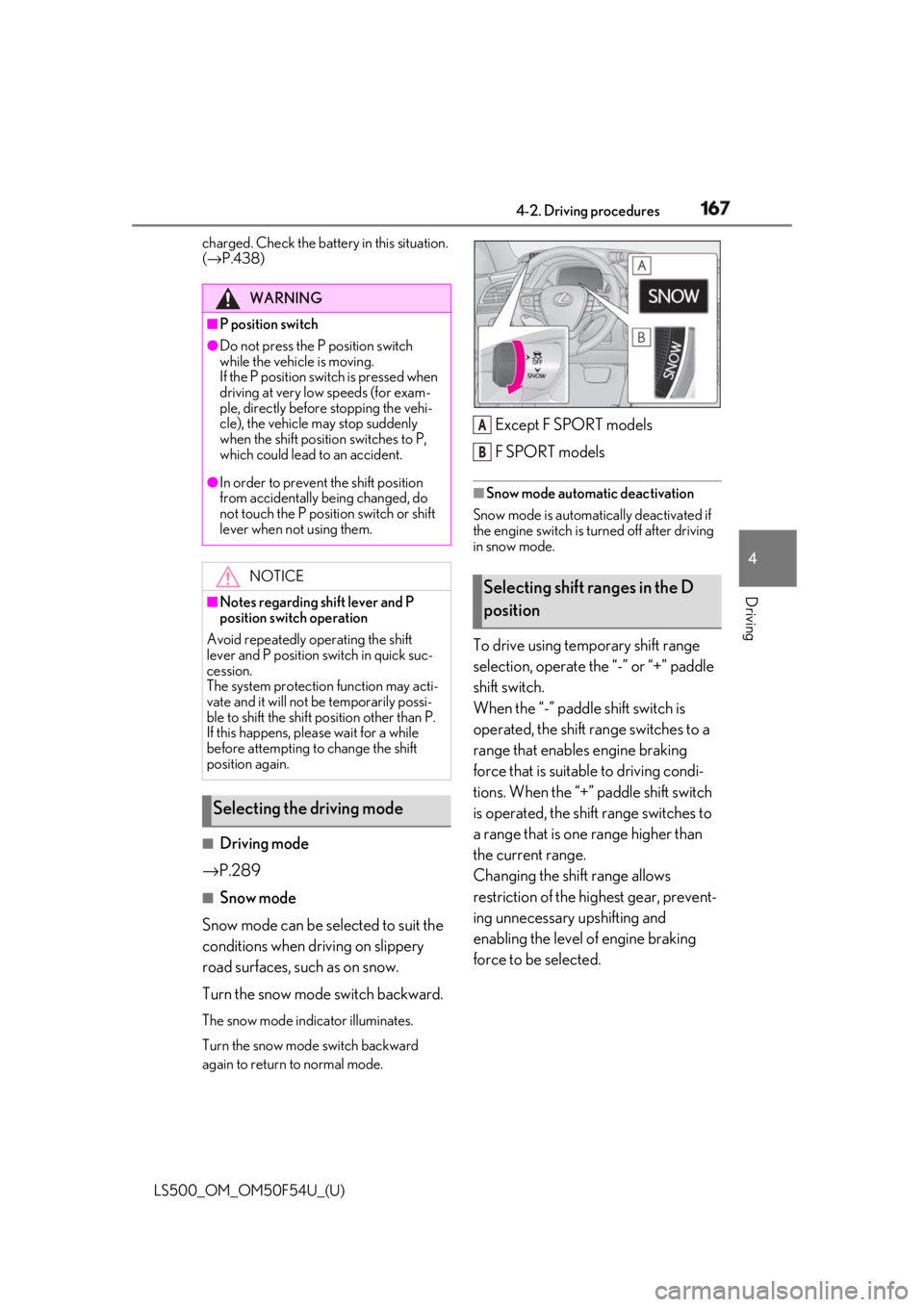
Snow mode
Snow mode can be selected to suit the
conditions when dr iving on slippery
road surfaces, such as on snow.
Turn the snow mode switch backward. The snow mode indicator illuminates.
Turn the snow mode switch backward
again to return to normal mode. Except F SPORT models
F SPORT models ■
Snow mode automatic deactivation
Snow mode is automatically deactivated if
the engine switch is turned off after driving
in snow mode.
To drive using temporary shift range
selection, operate the “-” or “+” paddle
shift switch.
When the “-” paddle shift switch is
operated, the shift range switches to a
range that enables engine braking
force that is suitable to driving condi-
tions. When the “+” paddle shift switch
is operated, the shift range switches to
a range that is one range higher than
the current range.
Changing the shift range allows
restriction of the highest gear, prevent-
ing unnecessary upshifting and
enabling the level of engine braking
force to be selected.WARNING■
P position switch●
Do not press the P position switch
while the vehicle is moving.
If the P position switch is pressed when
driving at very low speeds (for exam-
ple, directly before stopping the vehi-
cle), the vehicle may stop suddenly
when the shift position switches to P,
which could lead to an accident.●
In order to prevent the shift position
from accidentally being changed, do
not touch the P position switch or shift
lever when not using them.
NOTICE■
Notes regarding shift lever and P
position switch operation
Avoid repeatedly operating the shift
lever and P position switch in quick suc-
cession.
The system protection function may acti-
vate and it will not be temporarily possi-
ble to shift the shift position other than P.
If this happens, plea se wait for a while
before attempting to change the shift
position again.
Selecting the driving mode Selecting shift ranges in the D
position A
B
Page 168 of 514
168 4-2. Driving procedures
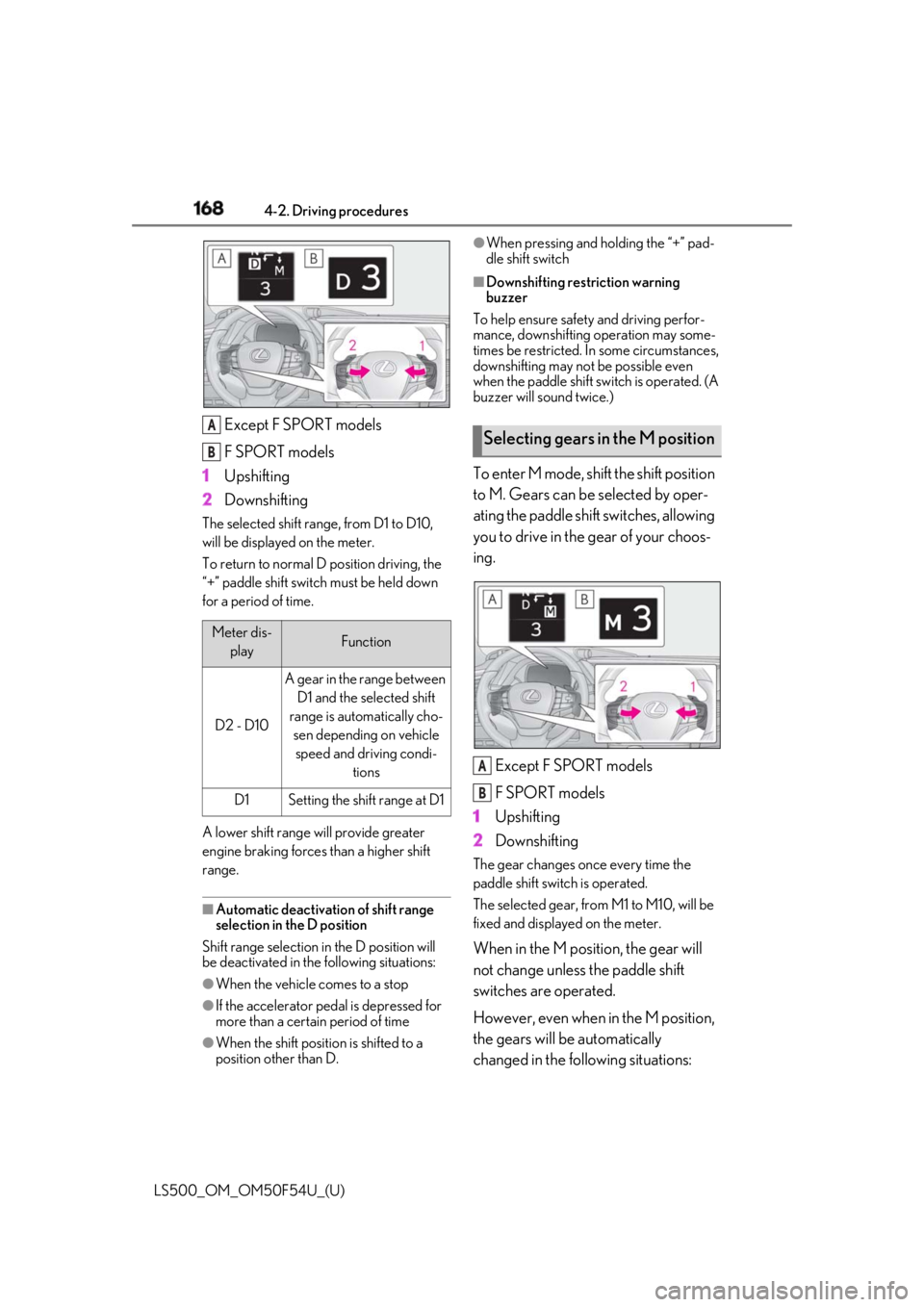
LS500_OM_OM50F54U_(U) Except F SPORT models
F SPORT models
1 Upshifting
2 DownshiftingThe selected shift rang e, from D1 to D10,
will be displayed on the meter.
To return to normal D position driving, the
“+” paddle shift switch must be held down
for a period of time.
A lower shift range will provide greater
engine braking forces than a higher shift
range.
■
Automatic deactivation of shift range
selection in the D position
Shift range selection in the D position will
be deactivated in the following situations:
●
When the vehicle comes to a stop
●
If the accelerator pedal is depressed for
more than a certain period of time
●
When the shift position is shifted to a
position other than D. ●
When pressing and holding the “+” pad-
dle shift switch ■
Downshifting restriction warning
buzzer
To help ensure safety and driving perfor-
mance, downshifting operation may some-
times be restricted. In some circumstances,
downshifting may not be possible even
when the paddle shift sw itch is operated. (A
buzzer will sound twice.)
To enter M mode, shift the shift position
to M. Gears can be selected by oper-
ating the paddle shift switches, allowing
you to drive in the gear of your choos-
ing.
Except F SPORT models
F SPORT models
1 Upshifting
2 Downshifting The gear changes once every time the
paddle shift switch is operated.
The selected gear, from M1 to M10, will be
fixed and displayed on the meter.
When in the M position, the gear will
not change unless the paddle shift
switches are operated.
However, even when in the M position,
the gears will be automatically
changed in the following situations:Meter dis-
play Function
D2 - D10 A gear in the range between
D1 and the selected shift
range is automatically cho-
sen depending on vehicle
speed and driving condi-
tions
D1 Setting the shift range at D1A
B
Selecting gears in the M position
A
B
Page 203 of 514
2034-5. Using the driving support systems
LS500_OM_OM50F54U_(U) 4
Driving ■
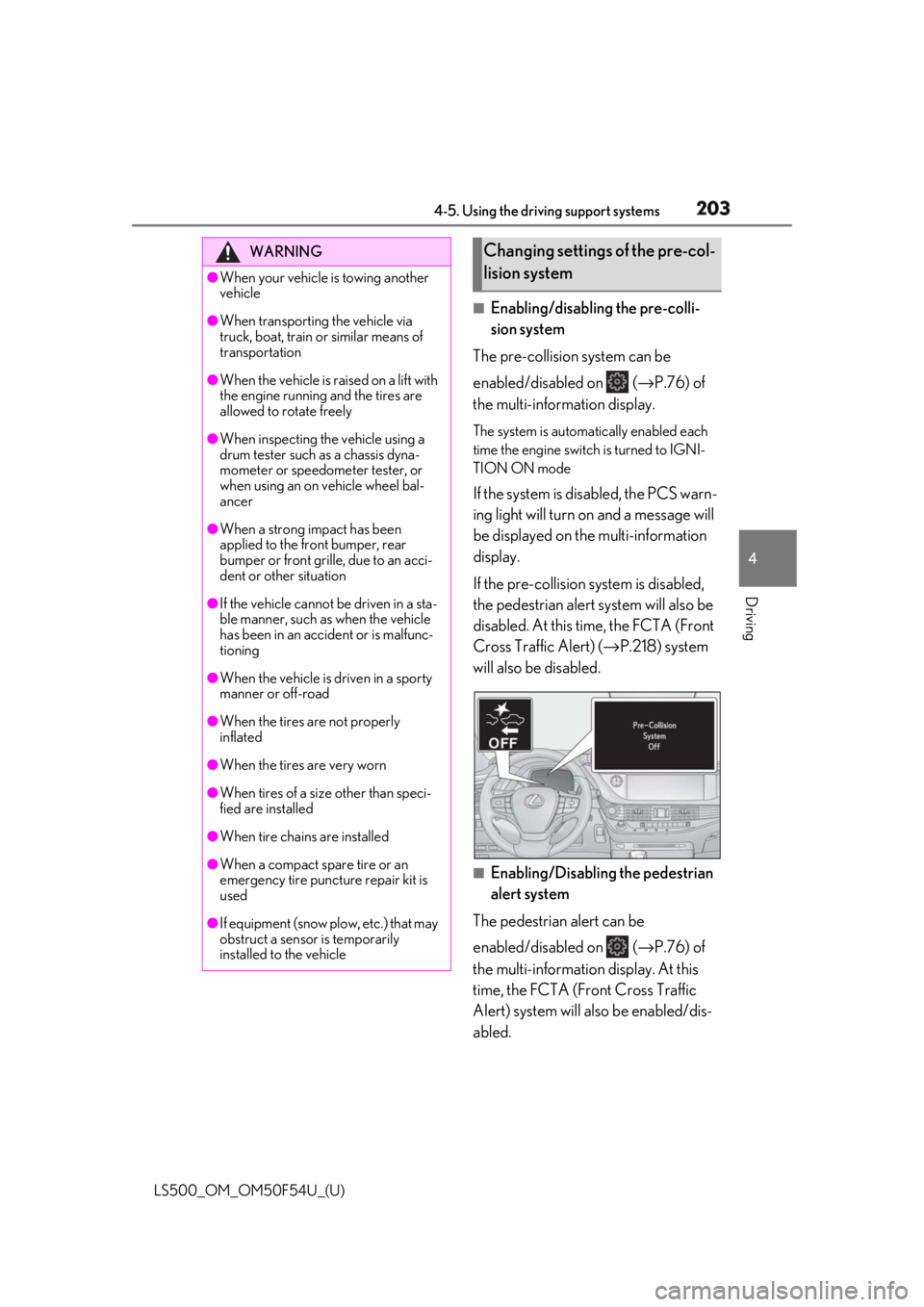
Enabling/disabling the pre-colli-
sion system
The pre-collision system can be
enabled/disabled on ( → P.76) of
the multi-information display. The system is automa tically enabled each
time the engine switch is turned to IGNI-
TION ON mode
If the system is disabled, the PCS warn-
ing light will turn on and a message will
be displayed on the multi-information
display.
If the pre-collision sy stem is disabled,
the pedestrian alert system will also be
disabled. At this time, the FCTA (Front
Cross Traffic Alert) ( → P.218) system
will also be disabled.
■
Enabling/Disabling the pedestrian
alert system
The pedestrian alert can be
enabled/disabled on ( → P.76) of
the multi-information display. At this
time, the FCTA (Front Cross Traffic
Alert) system will also be enabled/dis-
abled.WARNING●
When your vehicle is towing another
vehicle●
When transporting the vehicle via
truck, boat, train or similar means of
transportation●
When the vehicle is raised on a lift with
the engine running and the tires are
allowed to rotate freely●
When inspecting the vehicle using a
drum tester such as a chassis dyna-
mometer or speedometer tester, or
when using an on vehicle wheel bal-
ancer●
When a strong impact has been
applied to the front bumper, rear
bumper or front grille, due to an acci-
dent or other situation●
If the vehicle cannot be driven in a sta-
ble manner, such as when the vehicle
has been in an accident or is malfunc-
tioning●
When the vehicle is driven in a sporty
manner or off-road●
When the tires are not properly
inflated
●
When the tires are very worn
●
When tires of a size other than speci-
fied are installed
●
When tire chains are installed
●
When a compact spare tire or an
emergency tire puncture repair kit is
used
●
If equipment (snow plow, etc.) that may
obstruct a sensor is temporarily
installed to the vehicle Changing settings of the pre-col-
lision system