turn signal LEXUS LS500 2018 User Guide
[x] Cancel search | Manufacturer: LEXUS, Model Year: 2018, Model line: LS500, Model: LEXUS LS500 2018Pages: 514, PDF Size: 10.62 MB
Page 235 of 514

2354-5. Using the driving support systems
LS500_OM_OM50F54U_(U) 4
Driving
Inside of displayed white lines is
black
Indicates that the system is not able to rec-
ognize white (yellow) lines or is temporar-
ily canceled.
■
Operation conditions of each function●
Lane departure alert function
This function operates when all of the fol-
lowing conditions are met.
• LKA is turned on.
• Vehicle speed is approximately 32 mph
(50 km/h) or more.
• System recognizes white (yellow) lines.
• Width of traffic lane is approximately 9.8
ft. (3 m) or more.
• Turn signal lever is not operated.
• Vehicle is driven on a straight road or
around a gentle curve with a radius of
more than approximately 492 ft. (150 m).
• No system malfunctions are detected.
( → P.237)●
Steering assist function
This function operates when all of the fol-
lowing conditions are me t in addition to the
operation conditions for the lane depar-
ture alert function.
•Setting for “Steering Assist” in of the
multi-information display is set to “On”.
( → P.76)
• Vehicle is not accelerated or decelerated
by a fixed amount or more.
• Steering wheel is not operated with a
steering force level su itable for changing
lanes.
• ABS, VSC, TRAC and PCS are not oper-
ating. • TRAC or VSC is not turned off.
• Hands off steering wheel alert is not dis-
played. ( → P.236)●
Vehicle sway warning function
This function operates when all of the fol-
lowing conditions are met.
• Setting for “Sway Warning” in of the
multi-information display is set to “On”.
( → P.76)
• Vehicle speed is ap proximately 32 mph
(50 km/h) or more.
• Width of traffic lane is approximately 9.8
ft. (3 m) or more.
• No system malfunctions are detected.
( → P.237)●
Lane centering function
This function operates when all of the fol-
lowing conditions are met.
• LKA is turned on.
• Setting for “Steering Assist” and “Lane
Center” in of the multi-information
display are set to “On”. ( → P.76)
• System recognizes white (yellow) lines.
• Dynamic radar cruise control with
full-speed range is operating.
• Width of traffic lane is approximately 8.2
to 13.5 ft. (2.5 to 4.1 m).
• Turn signal lever is not operated.
• Vehicle is driven on a straight road or
around a gentle curve with a radius of
more than approximately 656 ft. (200
m).
• No system malfunctions are detected.
( → P.237)
• Vehicle does not ac celerate or deceler-
ate by a fixed amount or more.
• Steering wheel is not operated with a
steering force level su itable for changing
lanes.
• ABS, VSC, TRAC and PCS are not oper-
ating.
• TRAC or VSC is not turned off.
• Hands off steering wheel alert is not dis-
played. ( → P.236)
• Steering assist function is not operating.
■
Temporary cancellation of functions
When operation condit ions are no longer
met, a function may be temporarily can-
celed. However, when the operation condi-
tions are met again, operation of the
Page 244 of 514
244 4-5. Using the driving support systems
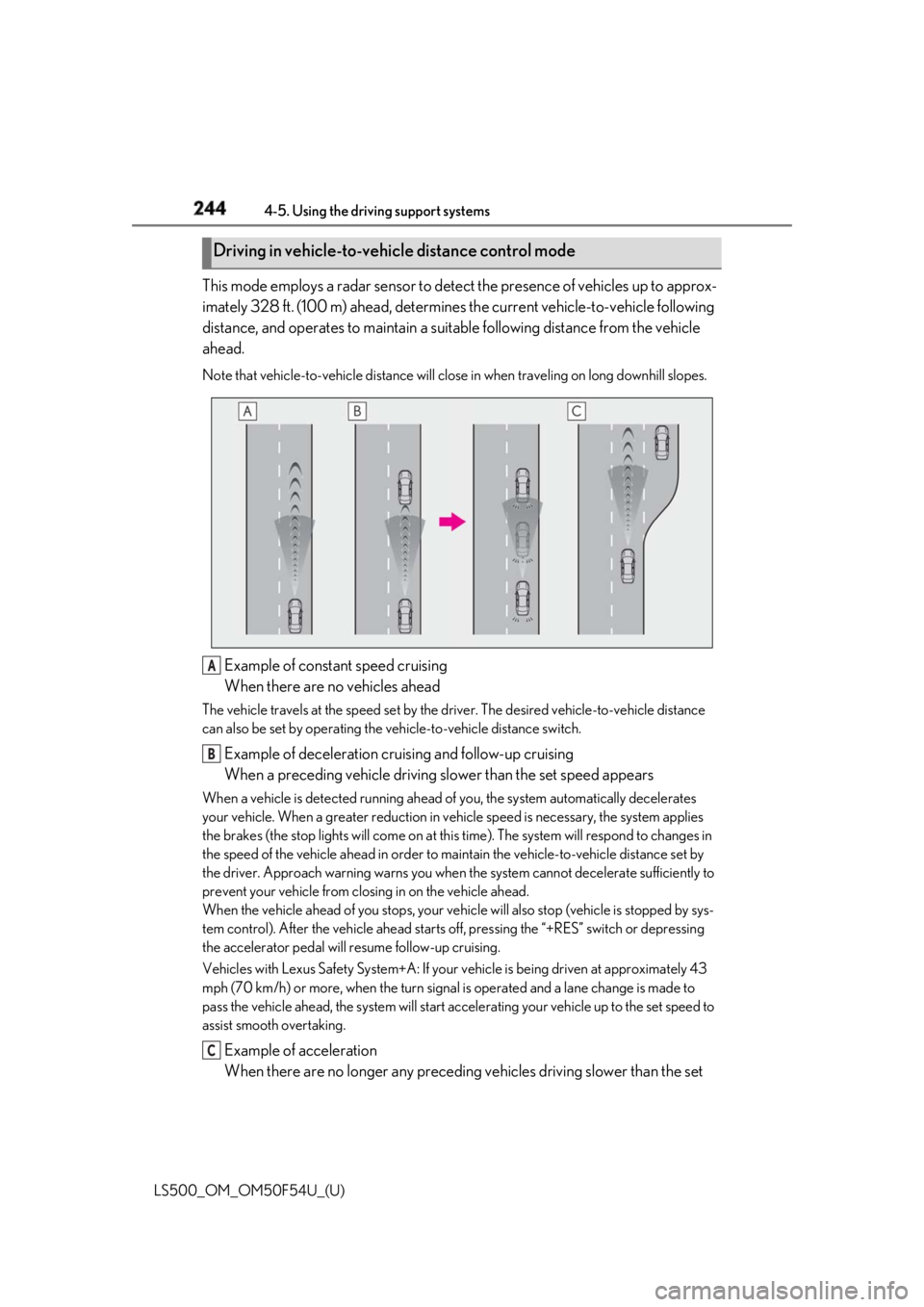
LS500_OM_OM50F54U_(U) This mode employs a radar sensor to detect the presence of vehicles up to approx-
imately 328 ft. (100 m) ahead, determines the current vehicle-to-vehicle following
distance, and operates to maintain a suit able following distance from the vehicle
ahead. Note that vehicle-to-vehicle di stance will close in when trav eling on long downhill slopes.
Example of constant speed cruising
When there are no vehicles aheadThe vehicle travels at the speed set by the driver. The desired vehicle-to-vehicle distance
can also be set by operating the ve hicle-to-vehicle distance switch.
Example of deceleration cruising and follow-up cruising
When a preceding vehicle driving slower than the set speed appearsWhen a vehicle is detected running ahead of you, the system automatically decelerates
your vehicle. When a greater reduction in vehicle speed is necessary, the system applies
the brakes (the stop lights will come on at this time). The sy stem will respond to changes in
the speed of the vehicle ahead in order to maintain the vehicle-to-vehicle distance set by
the driver. Approach warning warns you when th e system cannot decelera te sufficiently to
prevent your vehicle from closing in on the vehicle ahead.
When the vehicle ahead of you stops, your vehi cle will also stop (vehicle is stopped by sys-
tem control). After the vehicle ahead starts off, pressing the “+RES” switch or depressing
the accelerator pedal will resume follow-up cruising.
Vehicles with Lexus Safety System+A: If your vehicle is being driven at approximately 43
mph (70 km/h) or more, when the turn signal is operated and a lane change is made to
pass the vehicle ahead, the system will start acce lerating your vehicle up to the set speed to
assist smooth overtaking.
Example of acceleration
When there are no longer any preceding vehicles driving slower than the set Driving in vehicle-to-vehicle distance control mode
A
B
C
Page 251 of 514
2514-5. Using the driving support systems
LS500_OM_OM50F54U_(U) 4
Driving *
:If equipped
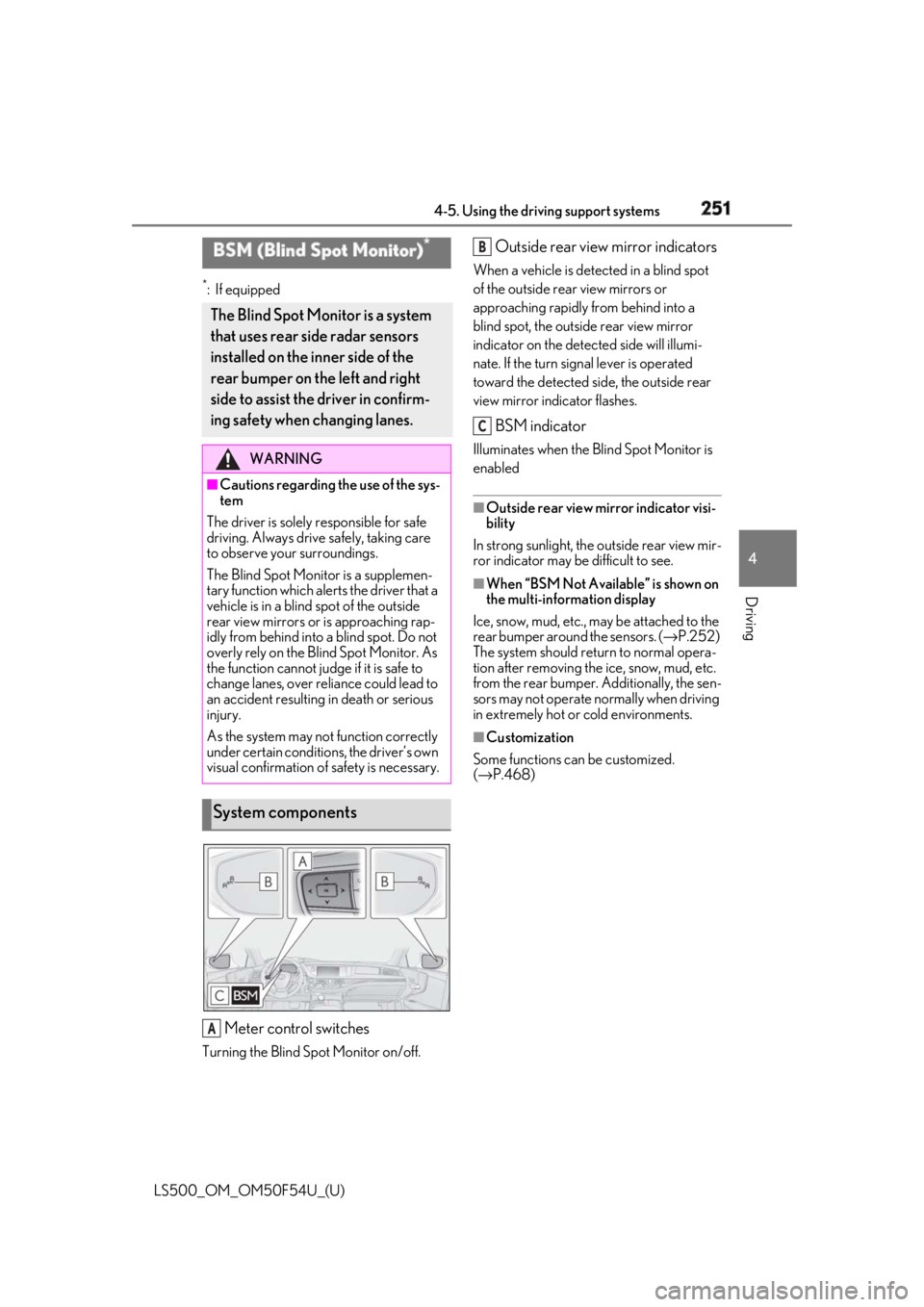
Meter control switchesTurning the Blind Spot Monitor on/off. Outside rear view mirror indicators When a vehicle is dete cted in a blind spot
of the outside rear view mirrors or
approaching rapidly from behind into a
blind spot, the outside rear view mirror
indicator on the detected side will illumi-
nate. If the turn signal lever is operated
toward the detected side, the outside rear
view mirror indicator flashes.
BSM indicator Illuminates when the Blind Spot Monitor is
enabled ■
Outside rear view mirror indicator visi-
bility
In strong sunlight, the outside rear view mir-
ror indicator may be difficult to see. ■
When “BSM Not Available” is shown on
the multi-information display
Ice, snow, mud, etc., may be attached to the
rear bumper around the sensors. ( → P.252)
The system should return to normal opera-
tion after removing the ice, snow, mud, etc.
from the rear bumper. Additionally, the sen-
sors may not operate normally when driving
in extremely hot or cold environments. ■
Customization
Some functions can be customized.
( → P.468)BSM (Blind Spot Monitor) *
The Blind Spot Monitor is a system
that uses rear side radar sensors
installed on the inner side of the
rear bumper on the left and right
side to assist the driver in confirm-
ing safety when changing lanes. WARNING■
Cautions regarding the use of the sys-
tem
The driver is solely responsible for safe
driving. Always driv e safely, taking care
to observe your surroundings.
The Blind Spot Monitor is a supplemen-
tary function which alerts the driver that a
vehicle is in a blind spot of the outside
rear view mirrors or is approaching rap-
idly from behind into a blind spot. Do not
overly rely on the Blind Spot Monitor. As
the function cannot judge if it is safe to
change lanes, over reliance could lead to
an accident resulting in death or serious
injury.
As the system may not function correctly
under certain conditions, the driver’s own
visual confirmation of safety is necessary.
System components
A B
C
Page 354 of 514
354 5-6. Using the other interior features
LS500_OM_OM50F54U_(U) the HomeLink ®
indicator to start
flashing). ■
Before programming●
Install a new battery in the transmitter.●
The battery side of the transmitter must
be pointed away from the HomeLink ®
.
Press the appropriate HomeLink ®
button. The HomeLink ®
indicator light
should turn on.
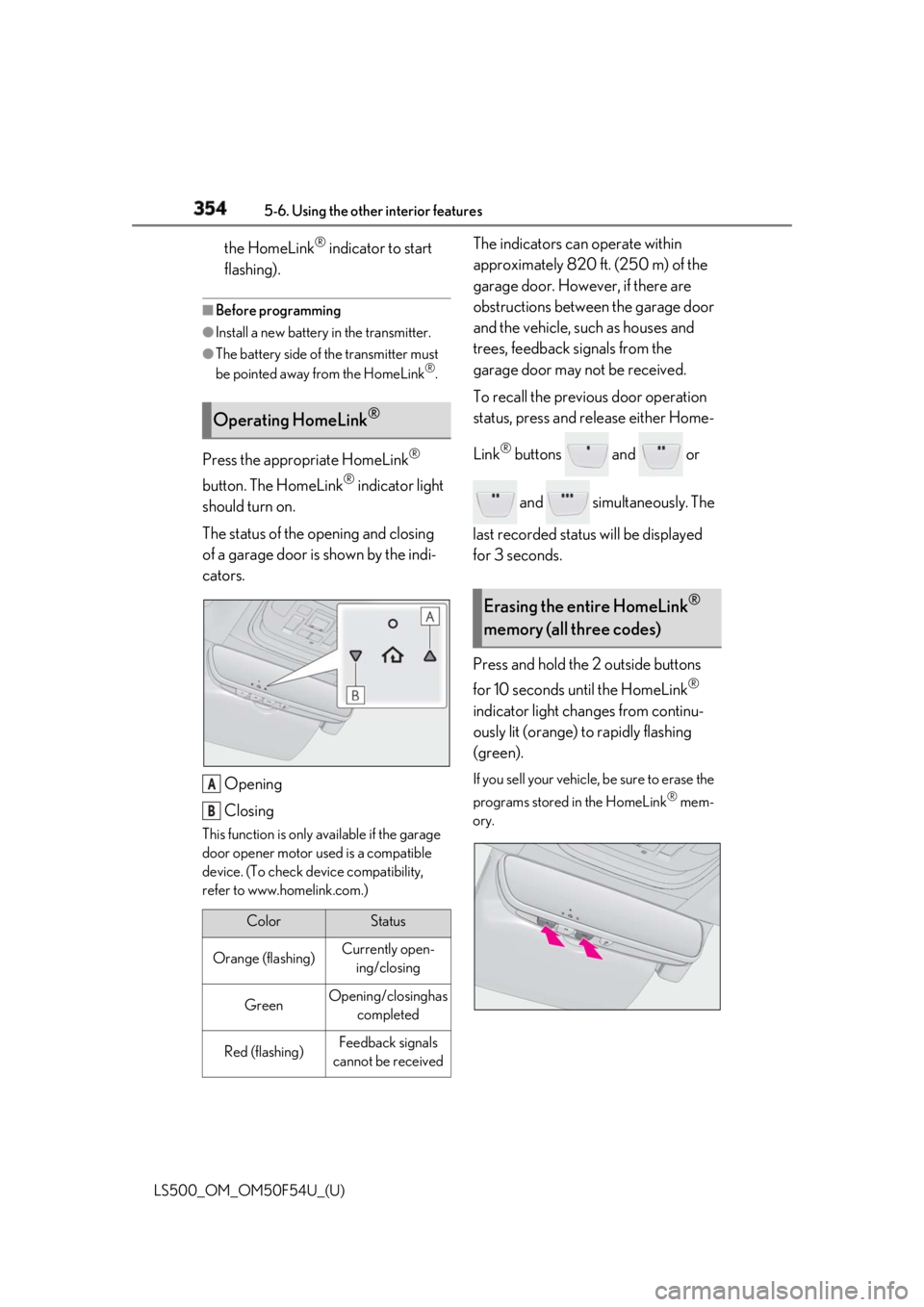
The status of the opening and closing
of a garage door is shown by the indi-
cators.
Opening
ClosingThis function is only available if the garage
door opener motor used is a compatible
device. (To check device compatibility,
refer to www.homelink.com.) The indicators can operate within
approximately 820 ft. (250 m) of the
garage door. However, if there are
obstructions between the garage door
and the vehicle, such as houses and
trees, feedback signals from the
garage door may not be received.
To recall the previous door operation
status, press and release either Home-
Link ®
buttons and or
and simultaneously. The
last recorded status will be displayed
for 3 seconds.
Press and hold the 2 outside buttons
for 10 seconds until the HomeLink ®
indicator light changes from continu-
ously lit (orange) to rapidly flashing
(green). If you sell your vehicle, be sure to erase the
programs stored in the HomeLink ®
mem-
ory.Operating HomeLink ®
Color Status
Orange (flashing) Currently open-
ing/closing
Green Opening/closing has
completed
Red (flashing) Feedback signals
cannot be receivedA
B Erasing the entire HomeLink ®
memory (all three codes)
Page 389 of 514
3896-3. Do-it-yourself maintenance
LS500_OM_OM50F54U_(U) 6
Maintenance and care before serious problems arise.
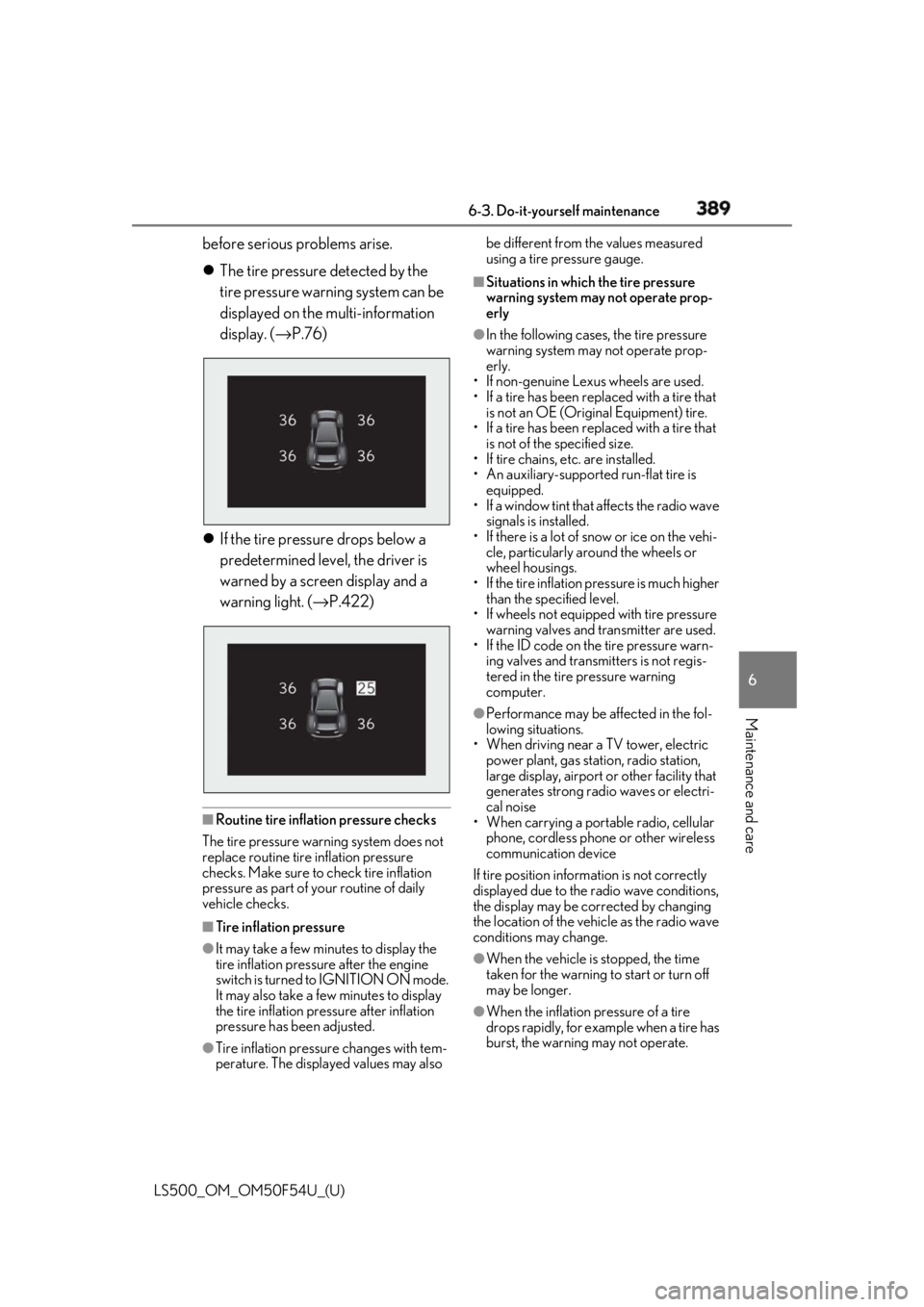
The tire pressure detected by the
tire pressure warning system can be
displayed on the multi-information
display. ( → P.76)
If the tire pressure drops below a
predetermined level, the driver is
warned by a screen display and a
warning light. ( → P.422)
■
Routine tire inflation pressure checks
The tire pressure warning system does not
replace routine tire inflation pressure
checks. Make sure to check tire inflation
pressure as part of your routine of daily
vehicle checks.
■
Tire inflation pressure
●
It may take a few minutes to display the
tire inflation pressure after the engine
switch is turned to IGNITION ON mode.
It may also take a few minutes to display
the tire inflation pres sure after inflation
pressure has been adjusted.
●
Tire inflation pressu re changes with tem-
perature. The displayed values may also be different from the values measured
using a tire pressure gauge. ■
Situations in which the tire pressure
warning system may not operate prop-
erly ●
In the following cases, the tire pressure
warning system may not operate prop-
erly.
• If non-genuine Lexus wheels are used.
• If a tire has been replaced with a tire that
is not an OE (Original Equipment) tire.
• If a tire has been replaced with a tire that
is not of the specified size.
• If tire chains, etc. are installed.
• An auxiliary-supported run-flat tire is
equipped.
• If a window tint that affects the radio wave
signals is installed.
• If there is a lot of snow or ice on the vehi-
cle, particularly around the wheels or
wheel housings.
• If the tire inflation pressure is much higher
than the specified level.
• If wheels not equipped with tire pressure
warning valves and transmitter are used.
• If the ID code on the tire pressure warn-
ing valves and transmitters is not regis-
tered in the tire pressure warning
computer. ●
Performance may be af fected in the fol-
lowing situations.
• When driving near a TV tower, electric
power plant, gas stat ion, radio station,
large display, airport or other facility that
generates strong radi o waves or electri-
cal noise
• When carrying a portable radio, cellular
phone, cordless phone or other wireless
communication device
If tire position information is not correctly
displayed due to the radio wave conditions,
the display may be corrected by changing
the location of the vehicle as the radio wave
conditions may change.
●
When the vehicle is stopped, the time
taken for the warning to start or turn off
may be longer.
●
When the inflation pressure of a tire
drops rapidly, for example when a tire has
burst, the warning may not operate.
Page 410 of 514
410 7-1. Essential information
LS500_OM_OM50F54U_(U) 7-1.Essential information
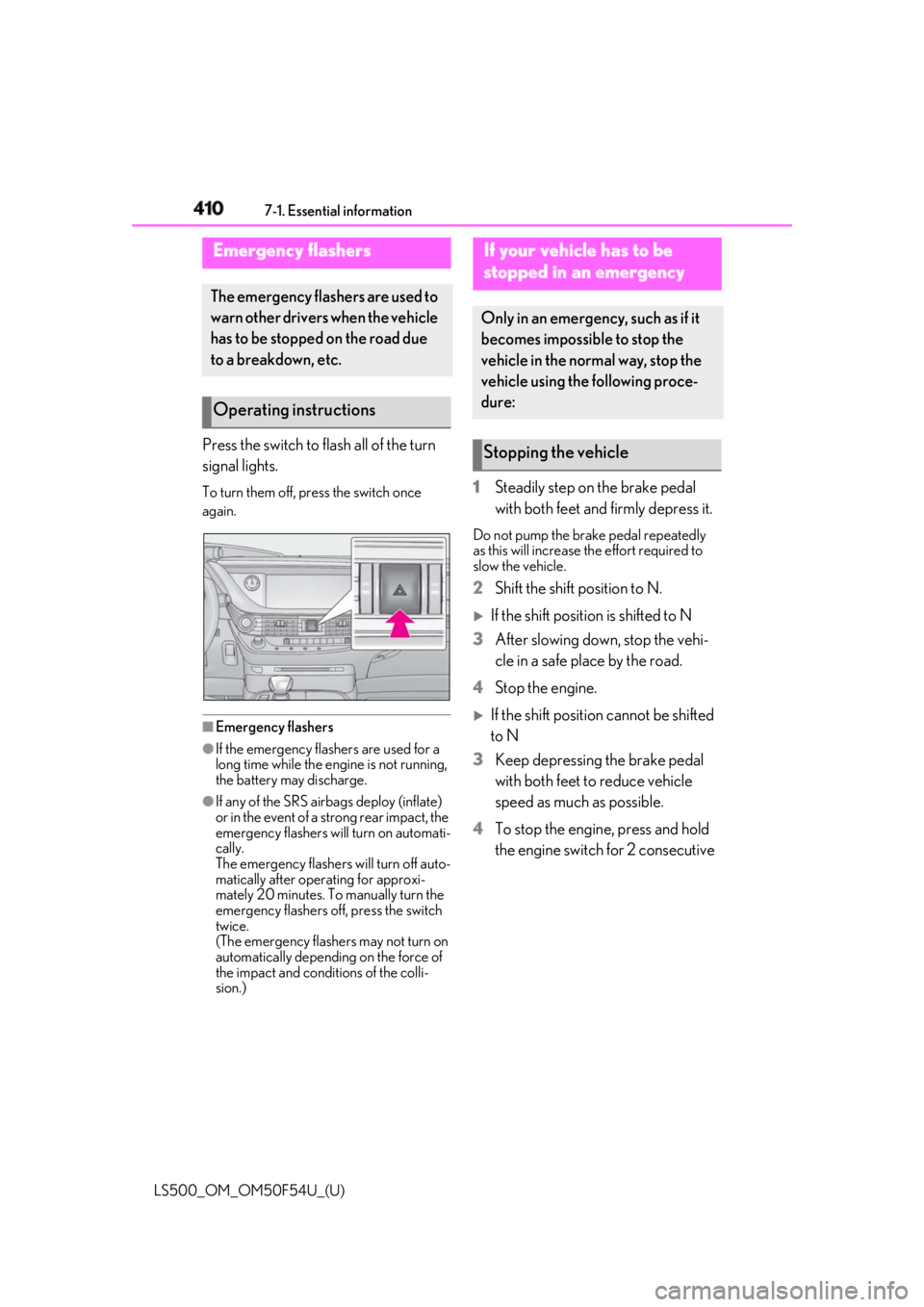
Press the switch to flash all of the turn
signal lights. To turn them off, press the switch once
again.
■
Emergency flashers●
If the emergency flashers are used for a
long time while the engine is not running,
the battery may discharge.●
If any of the SRS airbags deploy (inflate)
or in the event of a strong rear impact, the
emergency flashers will turn on automati-
cally.
The emergency flashers will turn off auto-
matically after operating for approxi-
mately 20 minutes. To manually turn the
emergency flashers off, press the switch
twice.
(The emergency flashers may not turn on
automatically depending on the force of
the impact and conditions of the colli-
sion.) 1 Steadily step on the brake pedal
with both feet and firmly depress it. Do not pump the brake pedal repeatedly
as this will increase the effort required to
slow the vehicle.
2 Shift the shift position to N.
If the shift position is shifted to N
3 After slowing down, stop the vehi-
cle in a safe place by the road.
4 Stop the engine.
If the shift position cannot be shifted
to N
3 Keep depressing the brake pedal
with both feet to reduce vehicle
speed as much as possible.
4 To stop the engine, press and hold
the engine switch for 2 consecutive Emergency flashers The emergency flashers are used to
warn other drivers when the vehicle
has to be stopped on the road due
to a breakdown, etc.
Operating instructions If your vehicle has to be
stopped in an emergency Only in an emergency, such as if it
becomes impossible to stop the
vehicle in the normal way, stop the
vehicle using the following proce-
dure:
Stopping the vehicle
Page 477 of 514
4758-2. Customization
LS500_OM_OM50F54U_(U) 8
Vehicle specifications ■
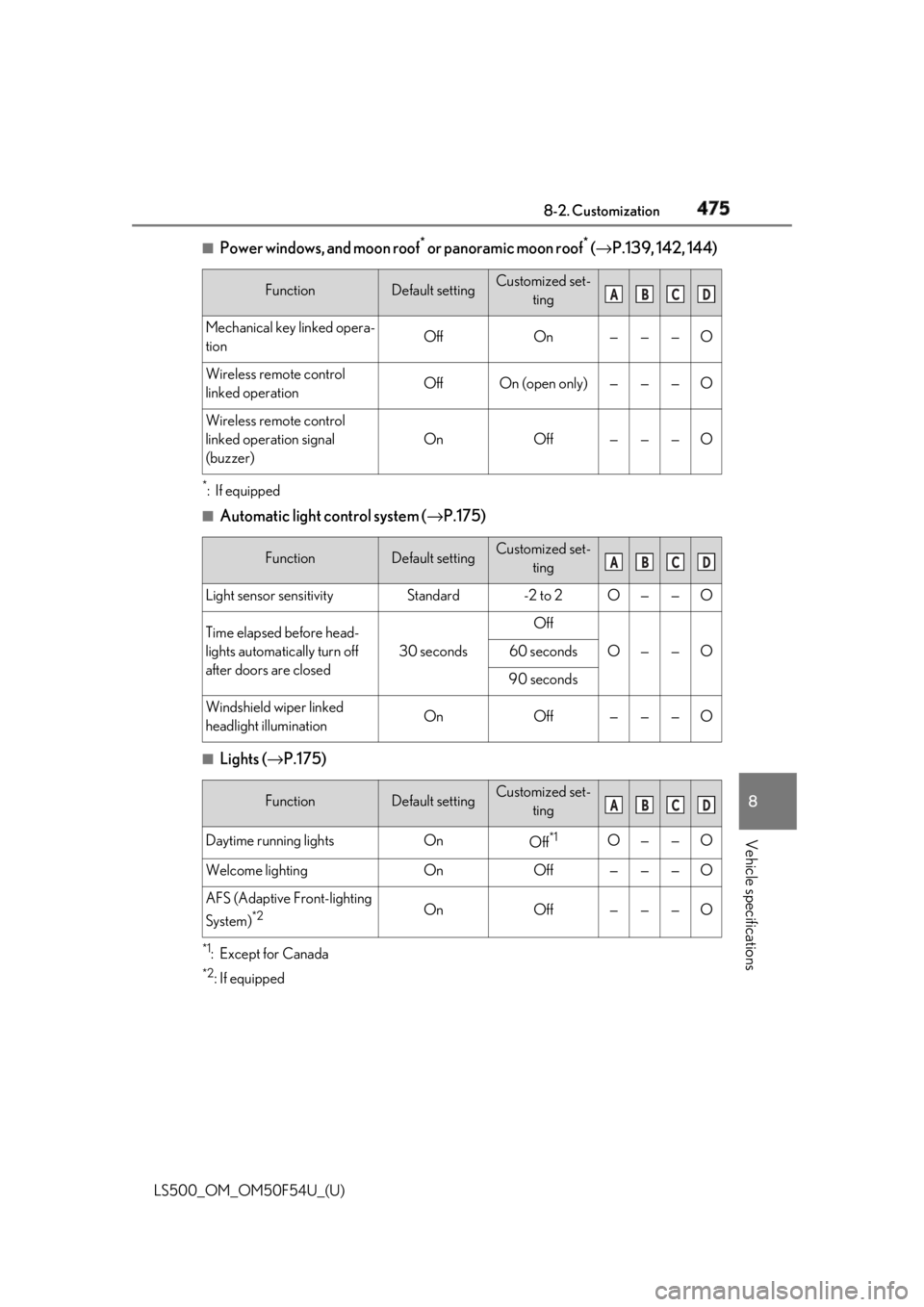
Power windows, and moon roof *
or panoramic moon roof *
( → P.139, 142, 144)*
:If equipped ■
Automatic light control system ( → P.175)
■
Lights ( → P.175)
*1
:Except for Canada *2
: If equipped Function Default setting Customized set-
ting
Mechanical key linked opera-
tion Off On — — — O
Wireless remote control
linked operation Off On (open only) — — — O
Wireless remote control
linked operation signal
(buzzer) On Off — — — O
Function Default setting Customized set-
ting
Light sensor sensitivity Standard -2 to 2 O — — O
Time elapsed before head-
lights automatically turn off
after doors are closed 30 seconds Off
O — — O60 seconds
90 seconds
Windshield wiper linked
headlight illumination On Off — — — O
Function Default setting Customized set-
ting
Daytime running lights On
Off *1
O — — O
Welcome lighting On Off — — — O
AFS (Adaptive Front-lighting
System) *2
On Off — — — O A B C D
A B C D
A B C D
Page 483 of 514
4818-2. Customization
LS500_OM_OM50F54U_(U) 8
Vehicle specifications
■
Vehicle customization●
When the smart access system with
push-button start is off, the entry unlock
function cannot be customized.●
When the doors remain closed after
unlocking the doors and the timer acti-
vated automatic door lock function acti-
vates, signals will be generated in
accordance with the operation buzzer
volume and operational signal (Emer-
gency flashers) function settings.
●
Some settings can be changed using a
switch or the audio system screen. If a
setting is changed using a switch, the
changed setting will not be reflected on
the audio system screen until the engine
switch is turned of f and then to IGNI- TION ON mode. ■
Clock settings screen
If the clock adjustment screen is displayed
continuously when attempting to change
the clock settings, the system may be mal-
functioning. Have the vehicle inspected by
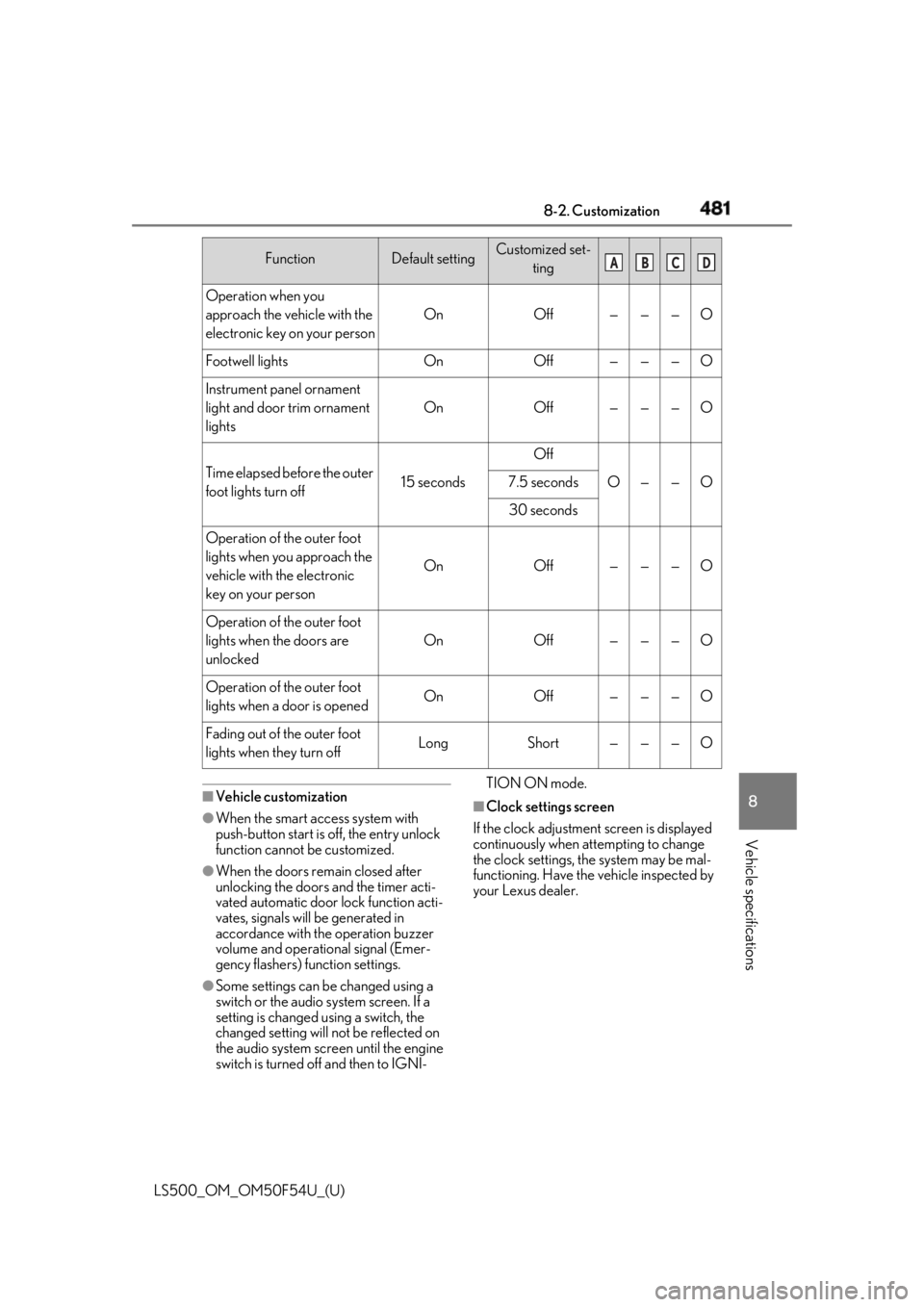
your Lexus dealer.Operation when you
approach the vehicle with the
electronic key on your person On Off — — — O
Footwell lights On Off — — — O
Instrument panel ornament
light and door trim ornament
lights On Off — — — O
Time elapsed before the outer
foot lights turn off 15 seconds Off
O — — O7.5 seconds
30 seconds
Operation of the outer foot
lights when you approach the
vehicle with the electronic
key on your person On Off — — — O
Operation of the outer foot
lights when the doors are
unlocked On Off — — — O
Operation of the outer foot
lights when a door is opened On Off — — — O
Fading out of the outer foot
lights when they turn off Long Short — — — OFunction Default setting Customized set-
ting A B C D
Page 502 of 514

500 Alphabetical Index
LS500_OM_OM50F54U_(U) If the engine will not start ....................... 433
If the fuel filler door cannot be opened
......................................................................... 435
If you have a flat tire .................................. 432
If you lose your keys................................. 435
If you think something is wrong ...........416
If your vehicle becomes stuck............. 446
If your vehicle has to be stopped in an
emergency ................................................. 410
If your vehicle needs to be towed ....... 412
If your vehicle overheats ........................ 443
Engine
ACCESSORY mode ............................... 162
Compartment ..............................................377
Engine compartment cover ................. 378
Engine switch................................................ 160
Fuel pump shut off system ...................... 417
Hood................................................................ 375
How to start the engine........................... 160
Identification number ............................... 449
If the engine will not start ....................... 433
If your vehicle has to be stopped in an
emergency ................................................. 410
Ignition switch (engine switch) ............ 160
Overheating................................................. 443
Tachometer .............................................69, 72
Engine compartment cover .................... 378
Engine coolant
Capacity ...........................................................451
Checking ........................................................ 381
Preparing and checking before winter
......................................................................... 299
Engine coolant temperature gauge 69, 72
Engine immobilizer system ........................ 58
Engine oil
Capacity .........................................................450
Checking ....................................................... 379
Preparing and checking before winter
......................................................................... 299
Warning light .................................................419
Engine oil maintenance data ................... 381 Engine switch ................................................. 160
Auto power off function............................162
Changing the engine switch modes ..162
If your vehicle has to be stopped in an
emergency .................................................. 410
EPS (Electric Power Steering) .............. 294
Warning light .................................................421
Event data recorder (E DR) ............................7 F
FCTA (Front Cross Traffic Alert) ...........218
First-aid kit storage belt ............................ 340
Flat tire
Tire pressure warning system ............ 388
Floor mats ...........................................................22
Fluid
Automatic transmission ..........................452
Brake ................................................................453
Washer .......................................................... 383
Footwell light ................................................. 330
Front air conditioning system ...................313
Front Cross Traffic Alert (FCTA) ...........218
Front passenger occupant classification
system .............................................................. 40
Front seats
Adjustment ....................................................... 116
Cleaning ........................................................ 365
Correct driving posture ............................ 23
Driving position memory ......................... 127
Head restraints..............................................132
Memory recall function............................ 130
Power easy access system ..................... 127
Refresh system ............................................... 121
Seat heaters ..................................................326
Seat position memory ............................... 127
Seat ventilators ............................................326
Front side marker light
Light switch .....................................................175
Replacing light bulbs ............................... 408
Front turn signal lights
Replacing light bulbs ............................... 408
Turn signal lever .......................................... 169
Page 504 of 514

502 Alphabetical Index
LS500_OM_OM50F54U_(U) Intercooler...................................................... 382
Intercooler coolant
Capacity ...........................................................451
Checking ........................................................ 381
Interior lights.................................................. 330
Front interior light ......................................330
Rear interior light .......................................330
Intuitive parking assist..................... 256, 257
Function .......................................................... 257
Warning message.....................................260 J
Jack
Positioning a floor jack............................ 375
Jam protection function
Electronic roof sunshade.........................146
Moon roof ....................................................... 142
Panoramic moon roof...............................146
Power trunk opener and closer .......... 105
Power windows............................................139
Rear door sunshade ................................ 346
K
Keyless entry
Smart access system with push-button
start ..................................................................107
Wireless remote control........................... 94
Keys
Battery-saving function ........................... 108
Electronic key ................................................. 92
Engine switch................................................ 160
If the electronic key does not operate
properly....................................................... 436
If you lose your keys................................. 435
Key number plate ......................................... 92
Keyless entry .........................................96, 107
Mechanical key.............................................. 92
Replacing the battery...............................403
Warning buzzer ...........................................107
Wireless remote control........................... 94 Knee airbags .................................................... 29 L
Lane Tracing Assist (LTA)
Operation ........................................................ 221
Warning messages................................... 229
Lane-Keeping Assist (LKA)
Operation ........................................................231
Warning messages................................... 237
Language (multi-information display) .....81
LATCH anchors ............................................. 53
LDH (Lexus Dynamic Handling system)
.......................................................................... 295
Lever
Auxiliary catch lever .................................375
Hood lock release lever .........................375
Internal trunk release lever..................... 105
Shift lever ......................................................... 163
Turn signal lever .......................................... 169
Wiper lever .................................................... 180
Lexus climate concierge ............................. 311
Lexus Dynamic Handling system (LDH)
.......................................................................... 295
Lexus Enform Safety Connect............... 355
Lexus Safety System+
Automatic High Beam ............................. 178
Dynamic radar cruise control with
full-speed range ........................... 238, 241
LKA (Lane-Keeping Assist) ...................231
PCS (Pre-Collision System) ................. 210
RSA (Road Sign Assist)..........................238
Lexus Safety System+A ..............................187
Dynamic radar cruise control with
full-speed range ........................... 238, 241
FCTA (Front Cross Traffic Alert)....... 218
LTA (Lane Tracing Assist) ...................... 221
PCS (Pre-Collision System) ............... 200
RSA (Road Sign Assist)..........................238
License plate lights
Light switch .....................................................175
Replacing light bulbs ............................... 408