roof LEXUS LS500 2018 Owner's Manual
[x] Cancel search | Manufacturer: LEXUS, Model Year: 2018, Model line: LS500, Model: LEXUS LS500 2018Pages: 514, PDF Size: 10.62 MB
Page 144 of 514
144 3-5. Opening, closing the windows and moon roof
LS500_OM_OM50F54U_(U) *
: If equipped
■
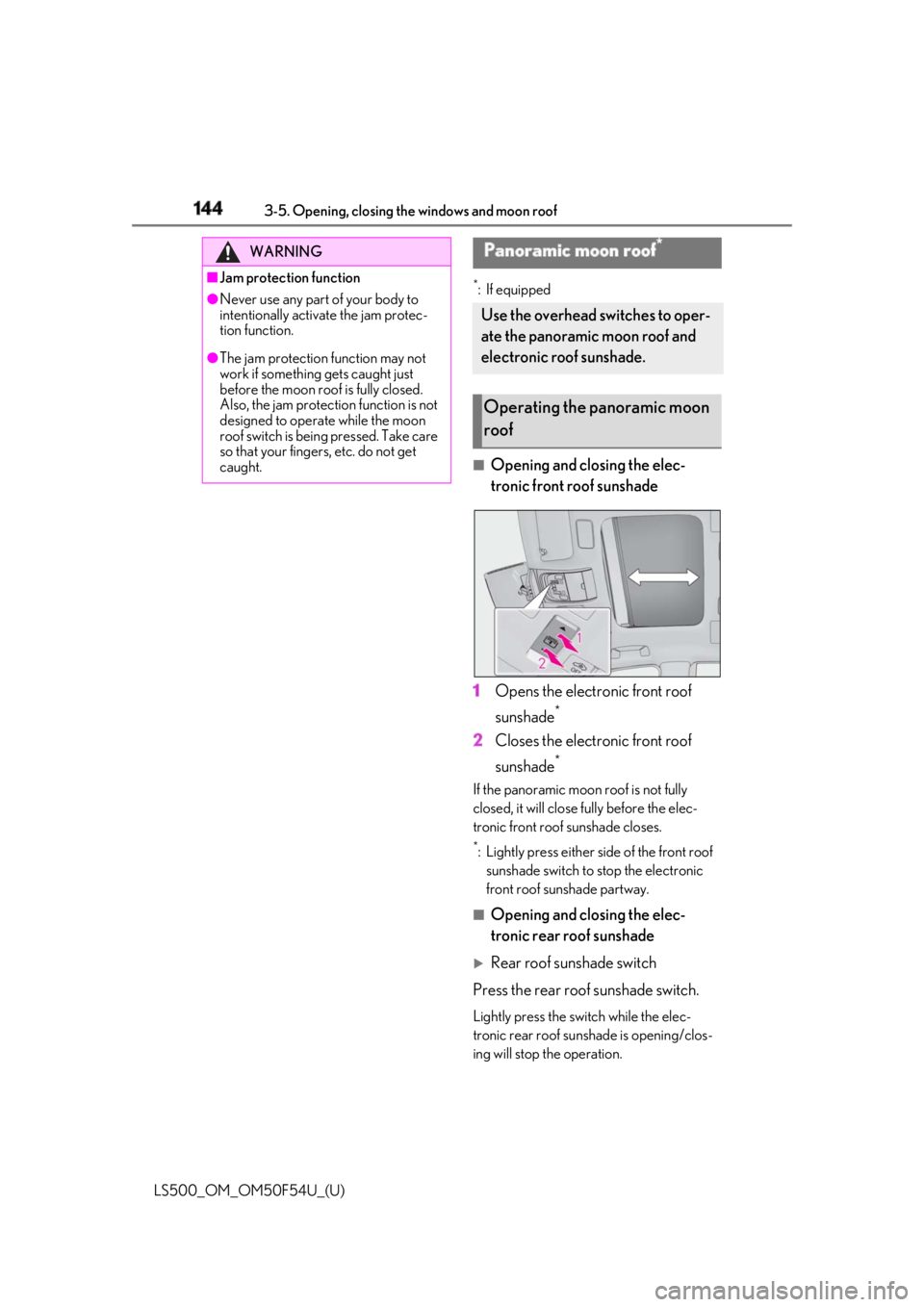
Opening and closing the elec-
tronic front roof sunshade
1 Opens the electronic front roof
sunshade *
2 Closes the electronic front roof
sunshade *
If the panoramic moon roof is not fully
closed, it will close fully before the elec-
tronic front roof sunshade closes. *
: Lightly press either side of the front roof
sunshade switch to stop the electronic
front roof sunshade partway.
■
Opening and closing the elec-
tronic rear roof sunshade
Rear roof sunshade switch
Press the rear roof sunshade switch. Lightly press the switch while the elec-
tronic rear roof sunshade is opening/clos-
ing will stop the operation.WARNING■
Jam protection function●
Never use any part of your body to
intentionally activate the jam protec-
tion function.●
The jam protection function may not
work if something gets caught just
before the moon roof is fully closed.
Also, the jam protection function is not
designed to operat e while the moon
roof switch is being pressed. Take care
so that your fingers, etc. do not get
caught. Panoramic moon roof *
Use the overhead switches to oper-
ate the panoramic moon roof and
electronic roof sunshade.
Operating the panoramic moon
roof
Page 145 of 514
1453-5. Opening, closing the windows and moon roof
LS500_OM_OM50F54U_(U) 3
Before driving Press the switch ag ain will operate the
electronic rear roof sunshade in the oppo-
site direction.
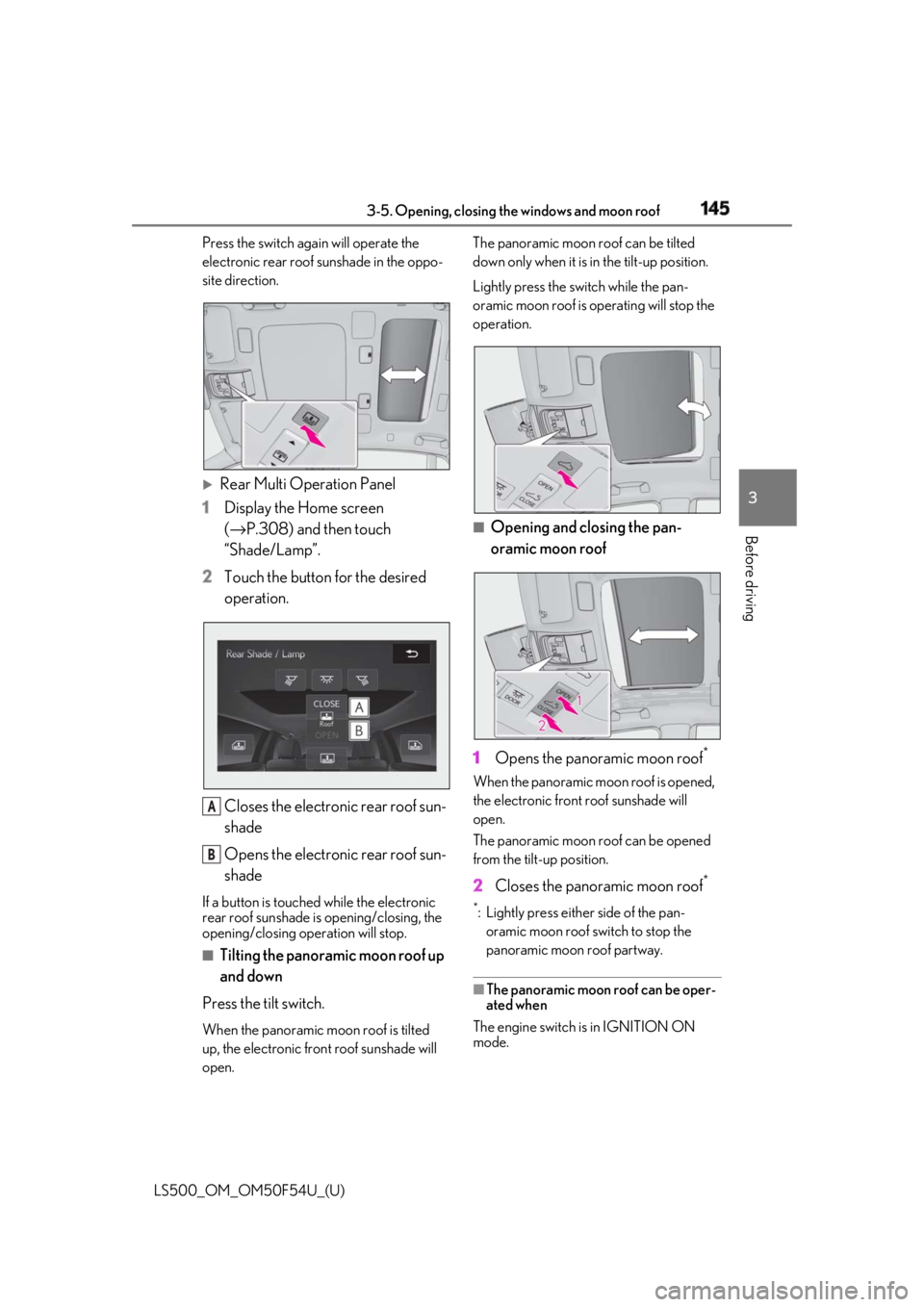
Rear Multi Operation Panel
1 Display the Home screen
( → P.308) and then touch
“Shade/Lamp”.
2 Touch the button for the desired
operation.
Closes the electronic rear roof sun-
shade
Opens the electronic rear roof sun-
shadeIf a button is touched while the electronic
rear roof sunshade is opening/closing, the
opening/closing operation will stop.
■
Tilting the panoramic moon roof up
and down
Press the tilt switch. When the panoramic moon roof is tilted
up, the electronic front roof sunshade will
open. The panoramic moon roof can be tilted
down only when it is in the tilt-up position.
Lightly press the switch while the pan-
oramic moon roof is operating will stop the
operation.
■
Opening and closing the pan-
oramic moon roof
1 Opens the panoramic moon roof *
When the panoramic moon roof is opened,
the electronic front roof sunshade will
open.
The panoramic moon roof can be opened
from the tilt-up position.
2 Closes the panoramic moon roof **
: Lightly press either side of the pan-
oramic moon roof switch to stop the
panoramic moon roof partway.
■
The panoramic moon roof can be oper-
ated when
The engine switch is in IGNITION ON
mode.A
B
Page 146 of 514

146 3-5. Opening, closing the windows and moon roof
LS500_OM_OM50F54U_(U) ■
Operating the panoramic moon roof
after turning the engine off
The panoramic moon roof and electronic
roof sunshade can be operated for approxi-
mately 45 seconds afte r the engine switch
is turned to ACCESSORY mode or turned
off. It cannot, however, be operated once
the driver’s door is opened. ■
Jam protection function
If an object is detected between the pan-
oramic moon roof and the frame in the fol-
lowing situations, travel is stopped and the
panoramic moon roof opens slightly: ●
The panoramic moon roof is closing or
tilting down.●
The electronic roof sunshade is closing.■
Door lock linked panoramic moon roof
operation●
The panoramic moon roof can be
opened and closed using the mechanical
key. *
( → P.437)●
The panoramic moon roof can be
opened using the wireless remote con-
trol. *
( → P.96)*
: These settings must be customized at
your Lexus dealer.■
When the panoramic moon roof or elec-
tronic front roof sunshade does not
close normally
Perform the following procedure:
1 Stop the vehicle.
2 Turn the engine switch to IGNITION
ON mode.
3 Press and hold the “CLOSE” switch or
the front roof sunshade close switch.
Continue pressing the switch for
approximately 10 seconds after the
panoramic moon roof or electronic
front roof sunshade closes and reopens.
The panoramic moon roof and elec-
tronic front roof sunshade will start to
close. *
4 Check that the panoramic moon roof
and electronic front roof sunshade are
fully closed and release the switch. *
: If the switch is released at the incorrect
time, the procedure will have to be per- formed again from the beginning.
If the panoramic moon roof or electronic
front roof sunshade does not fully close
even after performing the above procedure
correctly, have the vehicle inspected by
your Lexus dealer. ■
When the electronic rear roof sunshade
does not close normally
Perform the following procedure:
1 Stop the vehicle.
2 Turn the engine switch to IGNITION
ON mode.
3 Press and hold the rear roof sunshade
switch. Continue pressing the switch for
approximately 10 seconds after the
electronic rear roof sunshade closes
and reopens. The elec tronic rear roof
sunshade will start to close. *
4 Check that the electronic rear roof sun-
shade are fully closed and release the
switch. *
: If the switch is released at the incorrect
time, the procedure will have to be per-
formed again from the beginning.
If the panoramic moon roof or electronic
front roof sunshade does not fully close
even after performing the above procedure
correctly, have the vehicle inspected by
your Lexus dealer. ■
If the panoramic moon roof or elec-
tronic front roof sunshade does not
move normally
If the panoramic moon roof or electronic
front roof sunshade does not open or close
normally or the automatic opening function
does not operate, perform the following ini-
tialization procedure.
1 Stop the vehicle.
2 Turn the engine switch to IGNITION
ON mode.
3 Fully close the panoramic moon roof
and electronic front roof sunshade.
4 Press and hold th e “CLOSE” switch. *
The electronic front roof sunshade will open
after approximately 10 seconds. Then the
panoramic moon roof will open, close, tilt
up and tilt down. After that, the electronic
front roof sunshade will fully close and stop.
Page 147 of 514
1473-5. Opening, closing the windows and moon roof
LS500_OM_OM50F54U_(U) 3
Before driving 5 Check that the panoramic moon roof
and electronic front roof sunshade are
fully closed and release the switch. *
: If the switch is released at the incorrect
time, the procedure will have to be per-
formed again from the beginning.
If, after performing the above procedures
correctly, the panoramic moon roof and
electronic front roof sunshade still does not
open or close normally or the automatic
opening function does not operate, have
the vehicle inspected by your Lexus dealer. ■
If the electronic rear roof sunshade
does not move normally
If the electronic rear roof sunshade does
not open or close normally or the automatic
opening function does not operate, per-
form the following initialization procedure.
1 Stop the vehicle.
2 Turn the engine switch to IGNITION
ON mode.
3 Open the rear roof sunshade.
4 Press and hold the rear roof sunshade
switch. *
Continue pressing th e switch for approxi-
mately 10 seconds after the electronic rear
roof sunshade closes. The electronic rear
roof sunshade will be gin operating again
and stop at the fully closed position.
5 Check that the electronic rear roof sun-
shade are fully closed and release the
switch. *
: If the switch is released at the incorrect
time, the procedure will have to be per-
formed again from the beginning.
If, after performing the above procedures
correctly, the electronic rear roof sunshade
still does not open or close normally or the
automatic opening function does not oper-
ate, have the vehicle inspected by your
Lexus dealer.
■
Panoramic moon roof open warning
buzzer
A buzzer sounds and a message is shown
on the multi-information display in the
instrument cluster when the engine switch
is turned off and the driver’s door is opened
with the panoramic moon roof open. ■
Customization
Some functions can be customized.
( → P.468)
WARNING
Observe the following precautions.
Failing to do so may cause death or seri-
ous injury. ■
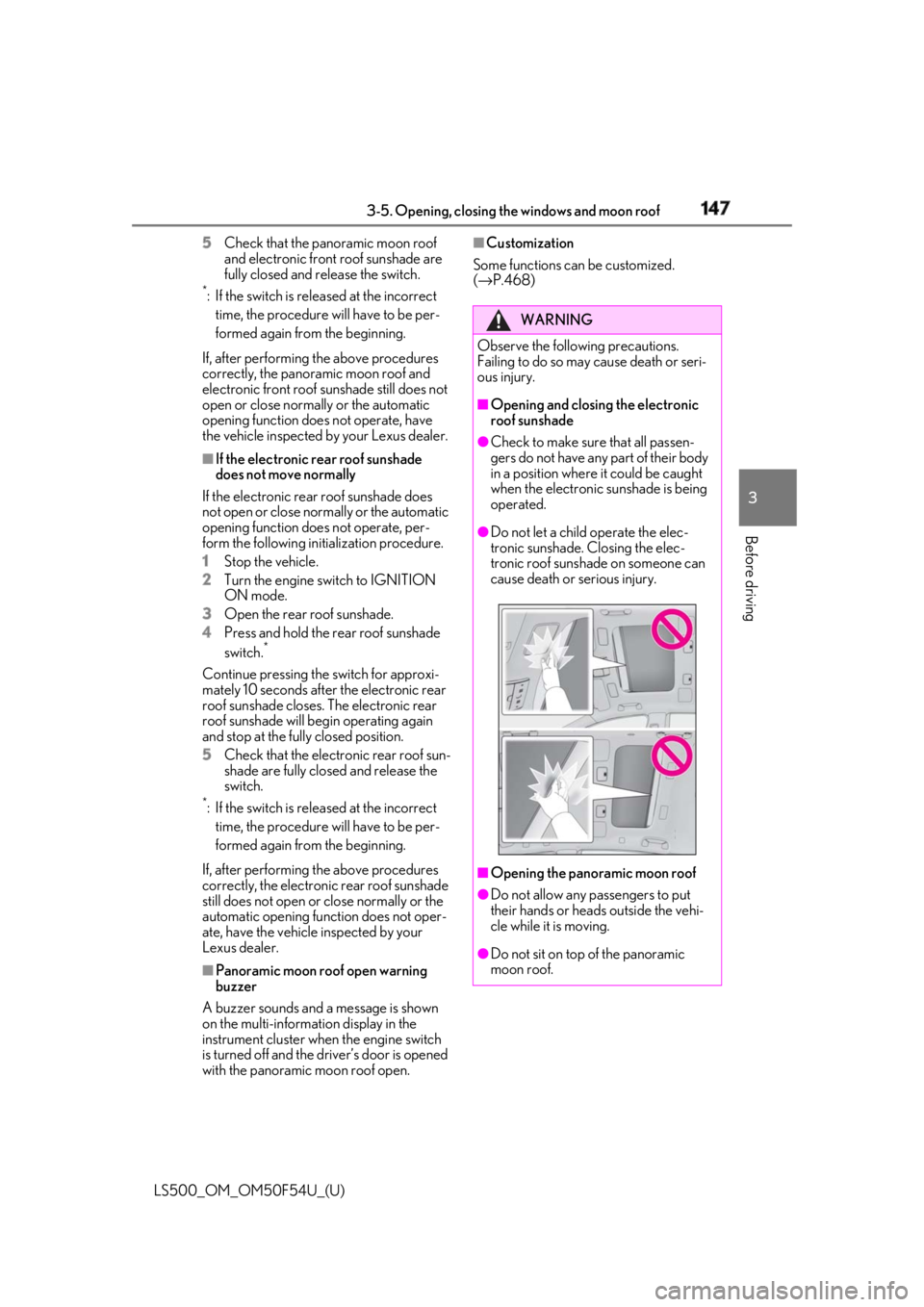
Opening and closing the electronic
roof sunshade ●
Check to make sure that all passen-
gers do not have any part of their body
in a position where it could be caught
when the electronic sunshade is being
operated. ●
Do not let a child operate the elec-
tronic sunshade. Closing the elec-
tronic roof sunshade on someone can
cause death or serious injury.
■
Opening the panoramic moon roof
●
Do not allow any passengers to put
their hands or heads outside the vehi-
cle while it is moving.
●
Do not sit on top of the panoramic
moon roof.
Page 148 of 514
148 3-5. Opening, closing the windows and moon roof
LS500_OM_OM50F54U_(U) WARNING■
Opening and closing the panoramic
moon roof●
The driver is responsible for pan-
oramic moon roof opening and closing
operations. In order to prevent acci-
dental operation, especially by a child,
do not let a child operate the pan-
oramic moon roof. It is possible for
children and other passengers to have
body parts caught in the panoramic
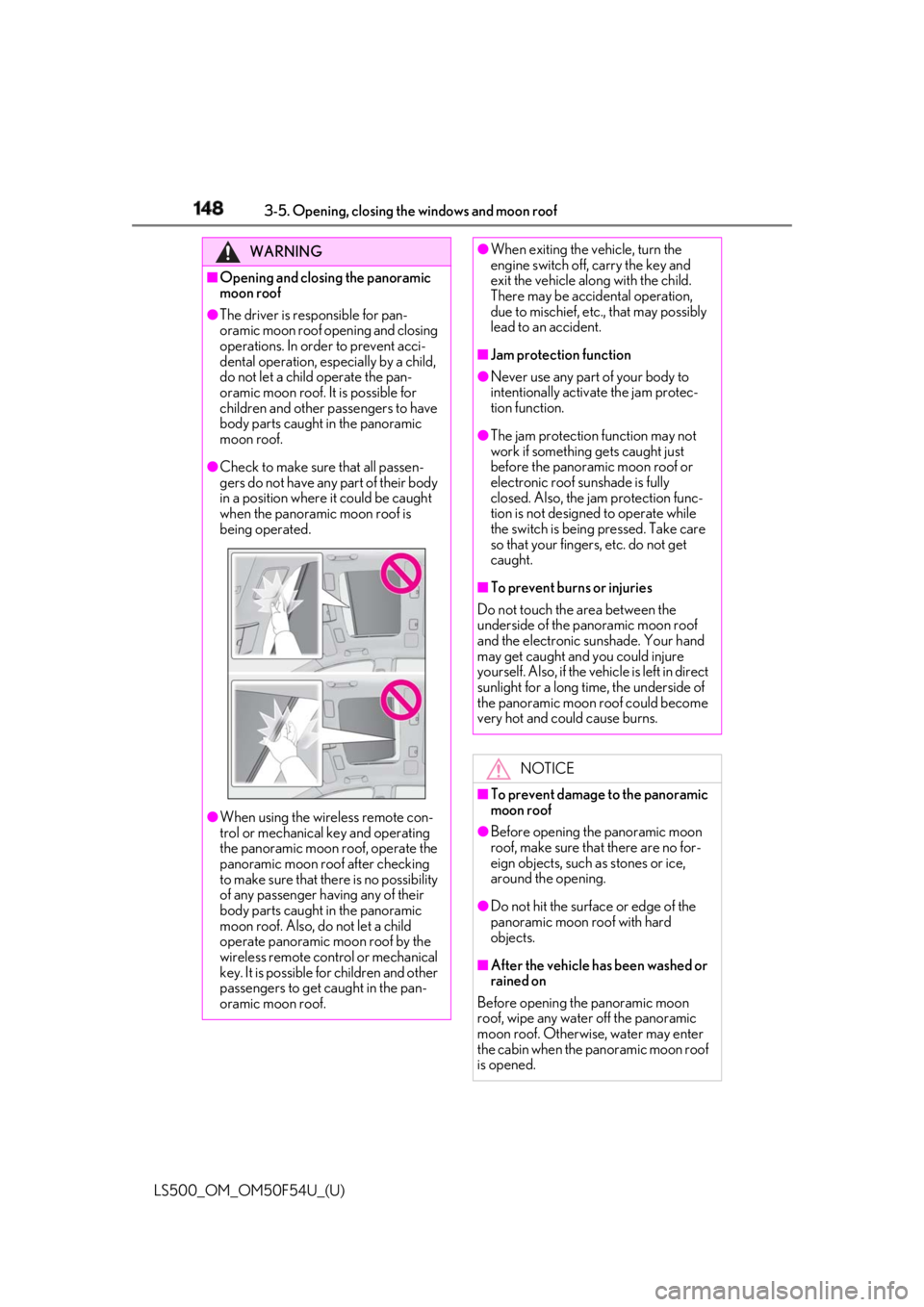
moon roof.●
Check to make sure that all passen-
gers do not have any part of their body
in a position where it could be caught
when the panoramic moon roof is
being operated.
●
When using the wireless remote con-
trol or mechanical key and operating
the panoramic moon roof, operate the
panoramic moon roof after checking
to make sure that there is no possibility
of any passenger having any of their
body parts caught in the panoramic
moon roof. Also, do not let a child
operate panoramic moon roof by the
wireless remote control or mechanical
key. It is possible for children and other
passengers to get caught in the pan-
oramic moon roof. ●
When exiting the vehicle, turn the
engine switch off, carry the key and
exit the vehicle along with the child.
There may be accidental operation,
due to mischief, etc., that may possibly
lead to an accident. ■
Jam protection function ●
Never use any part of your body to
intentionally activa te the jam protec-
tion function. ●
The jam protection function may not
work if something gets caught just
before the panoramic moon roof or
electronic roof sunshade is fully
closed. Also, the jam protection func-
tion is not designed to operate while
the switch is being pressed. Take care
so that your fingers, etc. do not get
caught. ■
To prevent burns or injuries
Do not touch the area between the
underside of the panoramic moon roof
and the electronic sunshade. Your hand
may get caught and you could injure
yourself. Also, if the vehicle is left in direct
sunlight for a long time, the underside of
the panoramic moon roof could become
very hot and could cause burns.
NOTICE
■
To prevent damage to the panoramic
moon roof ●
Before opening the panoramic moon
roof, make sure that there are no for-
eign objects, such as stones or ice,
around the opening.
●
Do not hit the surface or edge of the
panoramic moon roof with hard
objects.
■
After the vehicle has been washed or
rained on
Before opening the panoramic moon
roof, wipe any water off the panoramic
moon roof. Otherwise, water may enter
the cabin when the panoramic moon roof
is opened.
Page 193 of 514
1934-5. Using the driving support systems
LS500_OM_OM50F54U_(U) 4
Driving WARNING●
If water droplets cannot be properly
removed from the area of the wind-
shield in front of the camera sensor by
the windshield wipers, replace the
wiper insert or wiper blade.
If the wiper inserts or wiper blades need
to be replaced, contact your Lexus
dealer. ●
Do not attach window tinting to the
windshield.●
Replace the windshield if it is damaged
or cracked.
If the windshield needs to be replaced,
contact your Lexus dealer.●
Do not get the camera sensor wet.●
Do not allow bright lights to shine into
the camera sensor.●
Do not dirty or damage the camera
sensor.
When cleaning the inside of the wind-
shield, do not allow glass cleaner to
contact the lens. Also, do not touch the
lens.
If the lens is dirty or damaged, contact
your Lexus dealer.
●
Do not subject the camera sensor to a
strong impact.
●
Do not change the installation position
or direction of the camera sensor or
remove it.
●
Do not disassemble the camera sen-
sor.
●
Do not modify any components of the
vehicle around the camera sensor
(inside rear view mirror, etc.) or ceiling.
●
Do not attach any accessories that
may obstruct the camera sensor to the
hood, front grille or front bumper.
Contact your Lexus dealer. ●
If a surfboard or other long object is to
be mounted on the roof, make sure
that it will not obstruct the camera sen-
sor. ●
Do not modify the headlights or other
lights.
Page 199 of 514
1994-5. Using the driving support systems
LS500_OM_OM50F54U_(U) 4
Driving WARNING●
If the part of the windshield in front of
the camera sensor is fogged up or
covered with condensation or ice, use
the windshield defogger to remove the
fog, condensation or ice. ( → P.314)●
If water droplets cannot be properly
removed from the area of the wind-
shield in front of the camera sensor by
the windshield wipers, replace the
wiper insert or wiper blade.
If the wiper inserts or wiper blades need
to be replaced, contact your Lexus
dealer. ●
Do not attach window tinting to the
windshield.●
Replace the windshield if it is damaged
or cracked.
If the windshield needs to be replaced,
contact your Lexus dealer.●
Do not get the camera sensor wet.●
Do not allow bright lights to shine into
the camera sensor.●
Do not dirty or damage the camera
sensor.
When cleaning the inside of the wind-
shield, do not allow glass cleaner to
contact the lens. Also, do not touch the
lens.
If the lens is dirty or damaged, contact
your Lexus dealer.
●
Do not subject the camera sensor to a
strong impact.
●
Do not change the installation position
or direction of the camera sensor or
remove it.
●
Do not disassemble the camera sen-
sor.
●
Do not modify any components of the
vehicle around the camera sensor
(inside rear view mirror, etc.) or ceiling. ●
Do not attach any accessories that
may obstruct the camera sensor to the
hood, front grille or front bumper.
Contact your Lexus dealer. ●
If a surfboard or other long object is to
be mounted on the roof, make sure
that it will not obstruct the camera sen-
sor. ●
Do not modify the headlights or other
lights.
Page 300 of 514
300 4-6. Driving tips
LS500_OM_OM50F54U_(U) Perform the following according to the
driving conditions:
Do not try to forcib ly open a window
or move a wiper that is frozen. Pour
warm water over the frozen area to
melt the ice. Wipe away the water
immediately to prevent it from
freezing.
To ensure proper operation of the
climate control system fan, remove
any snow that has accumulated on
the air inlet vents in front of the
windshield.
Check for and remove any excess
ice or snow that may have accumu-
lated on the exterior lights, vehicle’s
roof, chassis, around the tires or on
the brakes.
Remove any snow or mud from the
bottom of your shoes before getting
in the vehicle.
Accelerate the vehicle slowly, keep a
safe distance between you and the
vehicle ahead, and drive at a reduced
speed suitable to road conditions. Park the vehicle and shift the shift posi-
tion to P without setting the parking
brake. The parking brake may freeze
up, preventing it from being released. If
the vehicle is parked without setting
the parking brake, make sure to block
the wheels.
Failure to do so may be dangerous
because it may cause the vehicle to
move unexpectedly, possibly leading to
an accident.
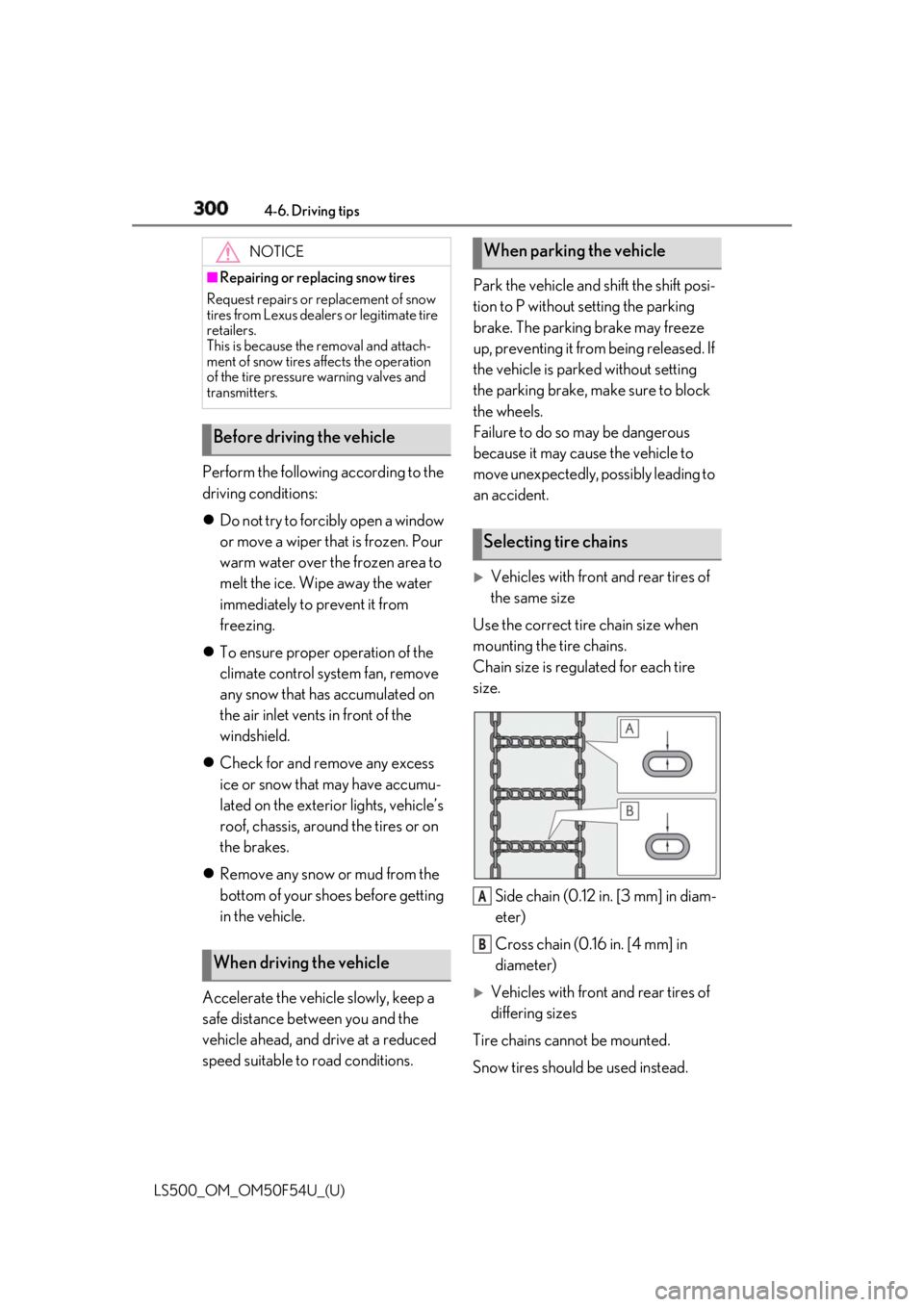
Vehicles with front and rear tires of
the same size
Use the correct tire chain size when
mounting the tire chains.
Chain size is regulated for each tire
size.
Side chain (0.12 in. [3 mm] in diam-
eter)
Cross chain (0.16 in. [4 mm] in
diameter)
Vehicles with front and rear tires of
differing sizes
Tire chains cannot be mounted.
Snow tires should be used instead.NOTICE■
Repairing or replacing snow tires
Request repairs or replacement of snow
tires from Lexus dealers or legitimate tire
retailers.
This is because the removal and attach-
ment of snow tires affects the operation
of the tire pressure warning valves and
transmitters.
Before driving the vehicle
When driving the vehicle When parking the vehicle
Selecting tire chains
A
B
Page 331 of 514
3315-4. Using the interior lights
LS500_OM_OM50F54U_(U) 5
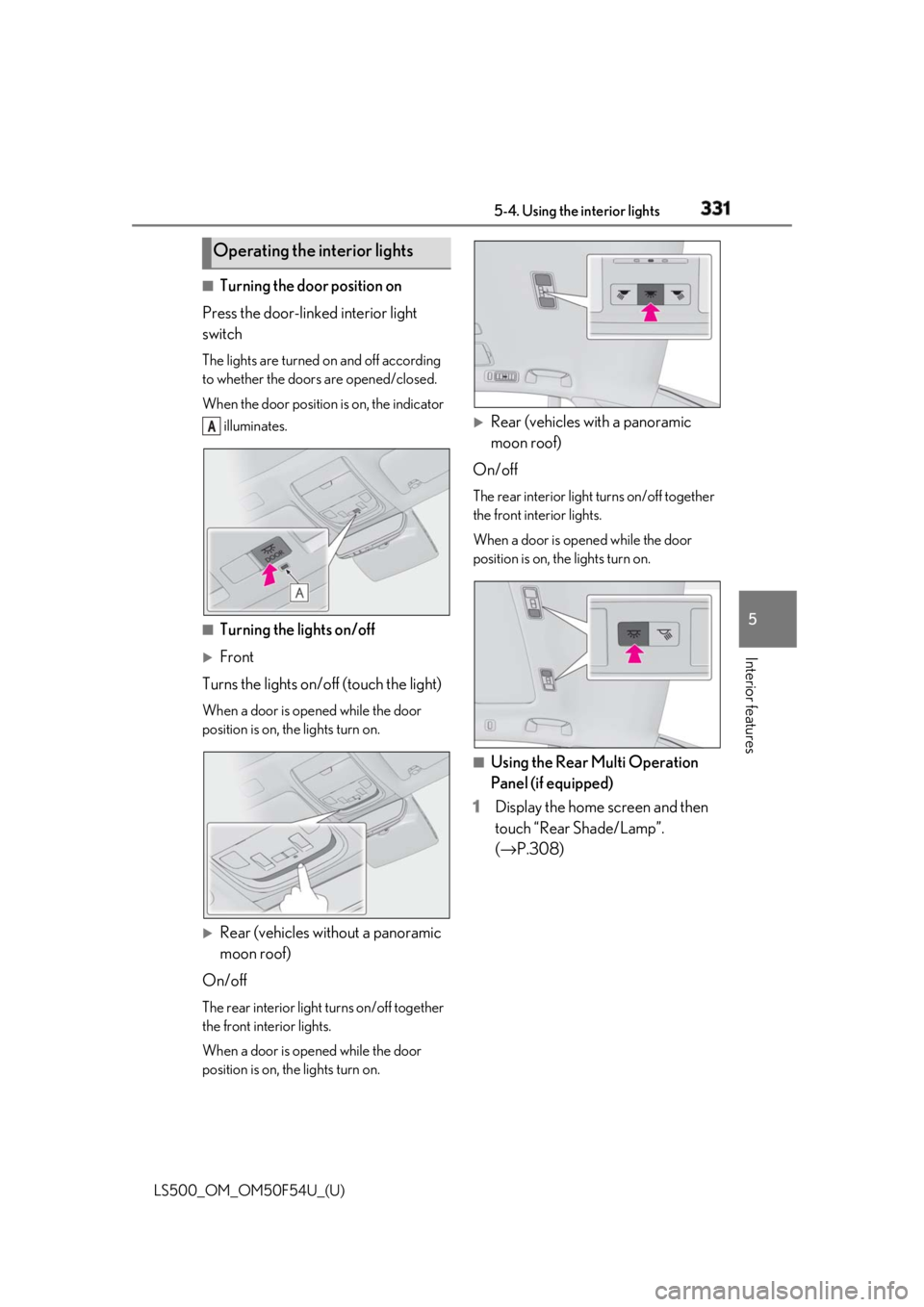
Interior features ■
Turning the door position on
Press the door-linked interior light
switch The lights are turned on and off according
to whether the doors are opened/closed.
When the door position is on, the indicator
illuminates.
■
Turning the lights on/off
Front
Turns the lights on/off (touch the light) When a door is opened while the door
position is on, the lights turn on.
Rear (vehicles without a panoramic
moon roof)
On/off The rear interior light turns on/off together
the front interior lights.
When a door is opened while the door
position is on, the lights turn on.
Rear (vehicles with a panoramic
moon roof)
On/off The rear interior light turns on/off together
the front interior lights.
When a door is opened while the door
position is on, the lights turn on.
■
Using the Rear Multi Operation
Panel (if equipped)
1 Display the home screen and then
touch “Rear Shade/Lamp”.
( → P.308)Operating the interior lights A
Page 332 of 514
332 5-4. Using the interior lights
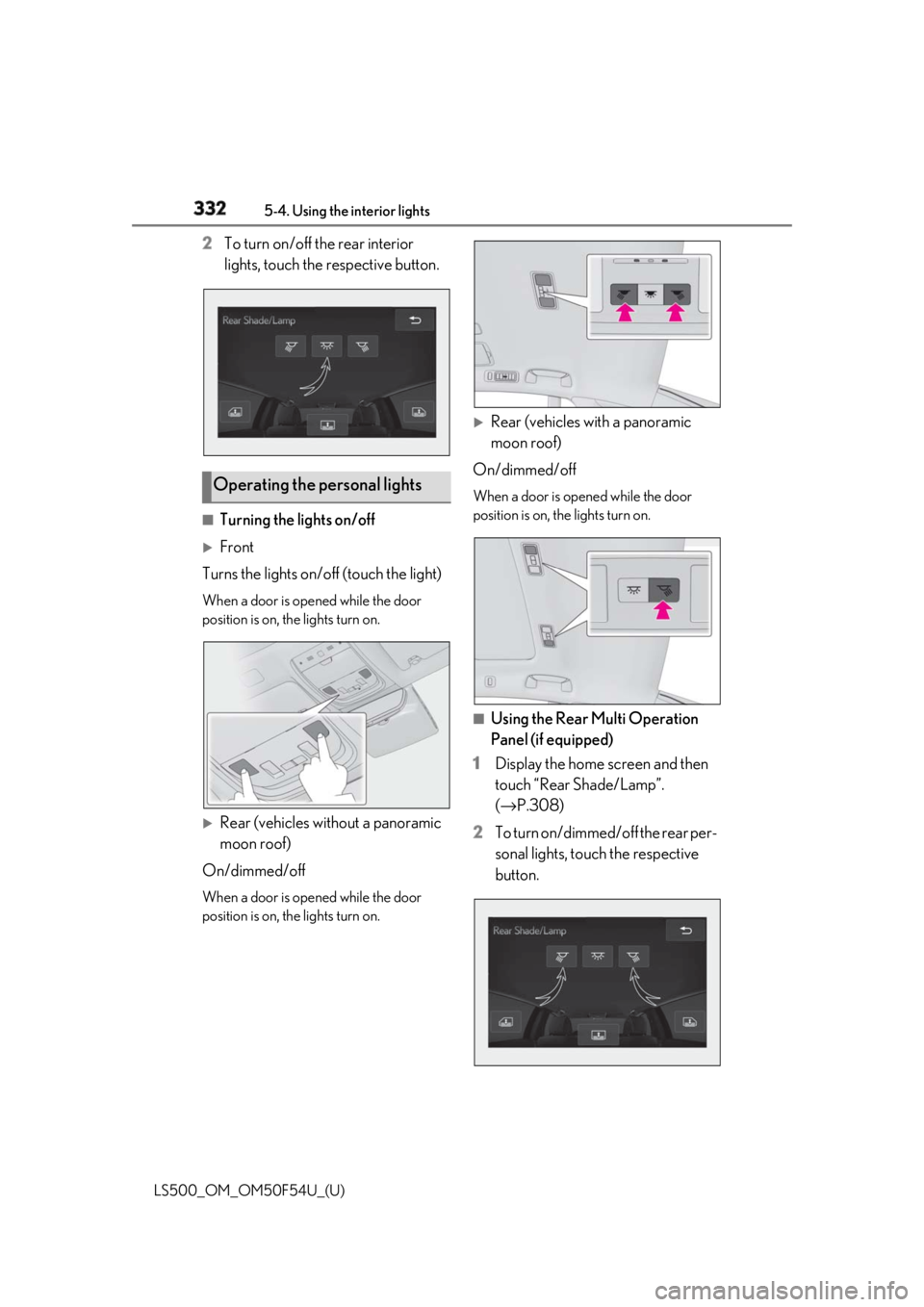
LS500_OM_OM50F54U_(U) 2 To turn on/off the rear interior
lights, touch the respective button.
■
Turning the lights on/off
Front
Turns the lights on/off (touch the light) When a door is opened while the door
position is on, the lights turn on.
Rear (vehicles without a panoramic
moon roof)
On/dimmed/off When a door is opened while the door
position is on, the lights turn on.
Rear (vehicles with a panoramic
moon roof)
On/dimmed/off When a door is opened while the door
position is on, the lights turn on.
■
Using the Rear Multi Operation
Panel (if equipped)
1 Display the home screen and then
touch “Rear Shade/Lamp”.
( → P.308)
2 To turn on/dimmed/off the rear per-
sonal lights, touch the respective
button.Operating the personal lights