seats LEXUS LS500 2018 Owner's Manual
[x] Cancel search | Manufacturer: LEXUS, Model Year: 2018, Model line: LS500, Model: LEXUS LS500 2018Pages: 514, PDF Size: 10.62 MB
Page 91 of 514
91
LS500_OM_OM50F54U_(U) 3 3
Before driving Before driving .
3-1. Key information
Keys ................................................... 92
3-2. Opening, closing and locking the
doors and trunk
Doors................................................. 96
Trunk................................................ 100
Smart access system with
push-button start ..................... 107
3-3. Adjusting the seats
Front seats ...................................... 116
Power rear seat........................... 123
Driving position memory ........ 127
Rear seat position memory ..... 131
Head restraints............................ 132
3-4. Adjusting the steering wheel and
mirrors
Steering wheel............................. 135
Inside rear view mirror............. 136
Outside rear view mirrors ...... 137
3-5. Opening, closing the windows
and moon roof
Power windows........................... 139
Moon roof ..................................... 142
Panoramic moon roof .............. 144
Page 98 of 514
98 3-2. Opening, closing and locking the doors and trunk
LS500_OM_OM50F54U_(U) ■
Customization
Some functions can be customized.
( → P.468) ■
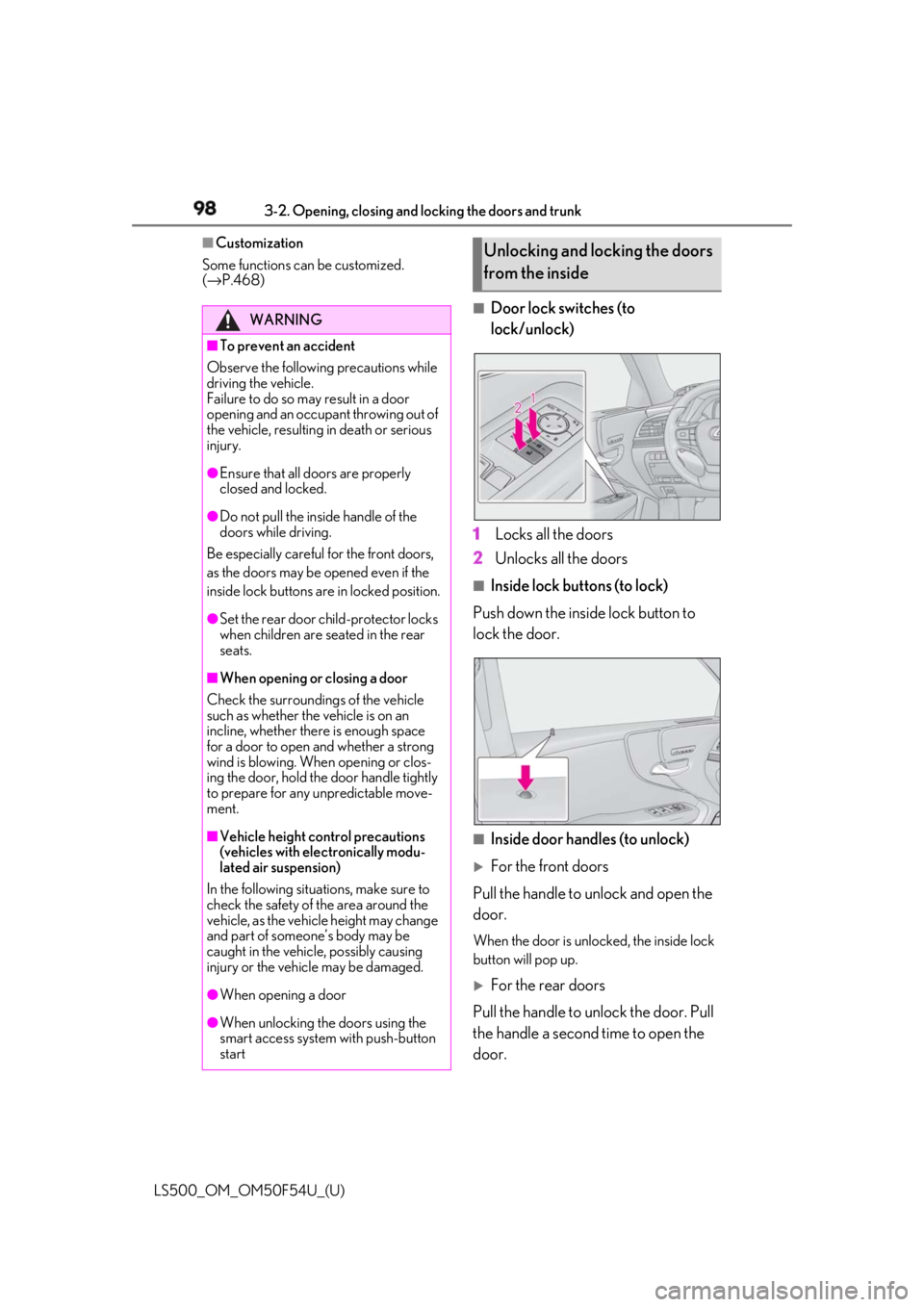
Door lock switches (to
lock/unlock)
1 Locks all the doors
2 Unlocks all the doors ■
Inside lock buttons (to lock)
Push down the inside lock button to
lock the door.
■
Inside door handles (to unlock)
For the front doors
Pull the handle to unlock and open the
door. When the door is unlo cked, the inside lock
button will pop up.
For the rear doors
Pull the handle to unlock the door. Pull
the handle a second time to open the
door.WARNING■
To prevent an accident
Observe the following precautions while
driving the vehicle.
Failure to do so may result in a door
opening and an occupant throwing out of
the vehicle, resulting in death or serious
injury. ●
Ensure that all doors are properly
closed and locked.●
Do not pull the inside handle of the
doors while driving.
Be especially careful for the front doors,
as the doors may be opened even if the
inside lock buttons are in locked position. ●
Set the rear door ch ild-protector locks
when children are seated in the rear
seats.■
When opening or closing a door
Check the surroundings of the vehicle
such as whether the vehicle is on an
incline, whether ther e is enough space
for a door to open and whether a strong
wind is blowing. When opening or clos-
ing the door, hold the door handle tightly
to prepare for any unpredictable move-
ment.
■
Vehicle height co ntrol precautions
(vehicles with electronically modu-
lated air suspension)
In the following situations, make sure to
check the safety of the area around the
vehicle, as the vehicle height may change
and part of someone’s body may be
caught in the vehicle, possibly causing
injury or the vehicle may be damaged.
●
When opening a door
●
When unlocking the doors using the
smart access system with push-button
start Unlocking and locking the doors
from the inside
Page 116 of 514
116 3-3. Adjusting the seats
LS500_OM_OM50F54U_(U) 3-3.Adjusting the seats
■
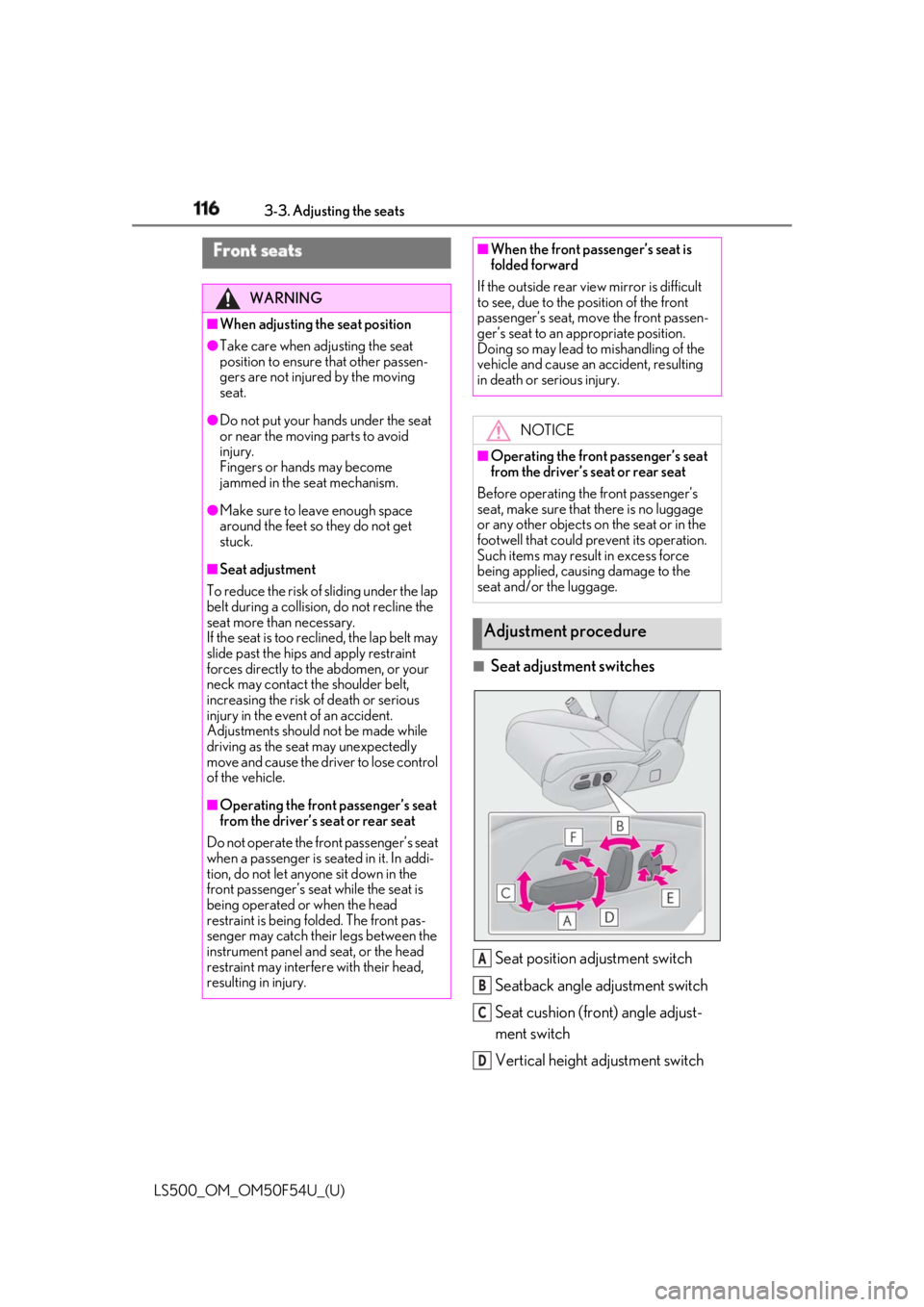
Seat adjustment switches
Seat position adjustment switch
Seatback angle adjustment switch
Seat cushion (front) angle adjust-
ment switch
Vertical height adjustment switchFront seats WARNING■
When adjusting the seat position●
Take care when ad justing the seat
position to ensure that other passen-
gers are not injured by the moving
seat.●
Do not put your hands under the seat
or near the moving parts to avoid
injury.
Fingers or hands may become
jammed in the se at mechanism.●
Make sure to leave enough space
around the feet so they do not get
stuck.■
Seat adjustment
To reduce the risk of sliding under the lap
belt during a collision, do not recline the
seat more than necessary.
If the seat is too reclined, the lap belt may
slide past the hips and apply restraint
forces directly to the abdomen, or your
neck may contact the shoulder belt,
increasing the risk of death or serious
injury in the event of an accident.
Adjustments should not be made while
driving as the seat may unexpectedly
move and cause the driver to lose control
of the vehicle.
■
Operating the front passenger’s seat
from the driver’s seat or rear seat
Do not operate the front passenger’s seat
when a passenger is seated in it. In addi-
tion, do not let anyone sit down in the
front passenger’s seat while the seat is
being operated or when the head
restraint is being folded. The front pas-
senger may catch their legs between the
instrument panel and seat, or the head
restraint may interfer e with their head,
resulting in injury. ■
When the front passenger’s seat is
folded forward
If the outside rear view mirror is difficult
to see, due to the position of the front
passenger’s seat, mo ve the front passen-
ger’s seat to an appropriate position.
Doing so may lead to mishandling of the
vehicle and cause an accident, resulting
in death or serious injury.
NOTICE■
Operating the front passenger’s seat
from the driver’s seat or rear seat
Before operating the front passenger’s
seat, make sure that there is no luggage
or any other objects on the seat or in the
footwell that could prevent its operation.
Such items may result in excess force
being applied, causing damage to the
seat and/or the luggage.
Adjustment procedure
A
B
C
D
Page 117 of 514
1173-3. Adjusting the seats
LS500_OM_OM50F54U_(U) 3
Before driving Lumbar support adjustment switch
Seat cushion length adjustment
switch (if equipped) ■
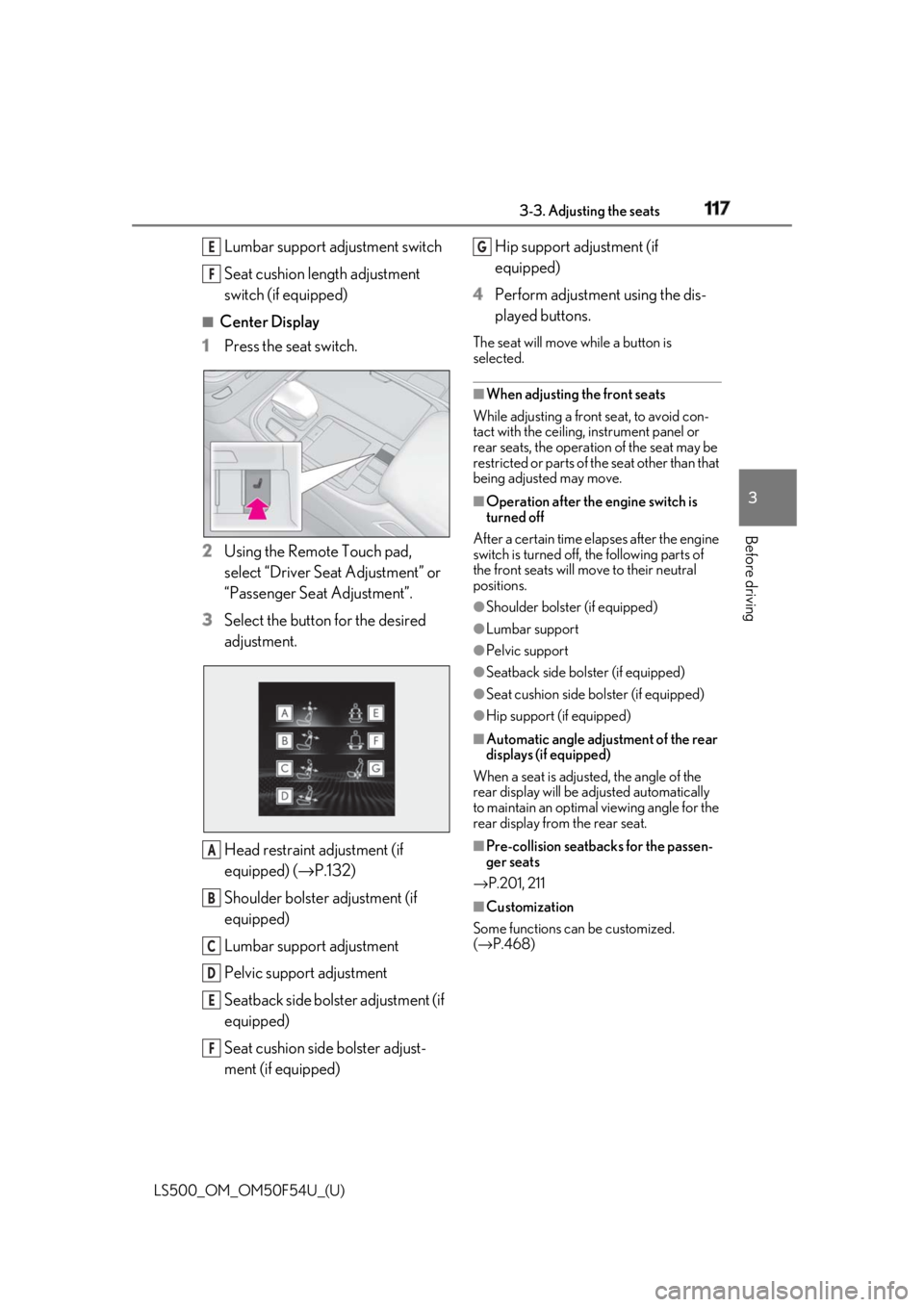
Center Display
1 Press the seat switch.
2 Using the Remote Touch pad,
select “Driver Seat Adjustment” or
“Passenger Seat Adjustment”.
3 Select the button for the desired
adjustment.
Head restraint adjustment (if
equipped) ( → P.132)
Shoulder bolster adjustment (if
equipped)
Lumbar support adjustment
Pelvic support adjustment
Seatback side bolster adjustment (if
equipped)
Seat cushion side bolster adjust-
ment (if equipped) Hip support adjustment (if
equipped)
4 Perform adjustment using the dis-
played buttons. The seat will move while a button is
selected. ■
When adjusting the front seats
While adjusting a front seat, to avoid con-
tact with the ceiling, instrument panel or
rear seats, the operation of the seat may be
restricted or parts of th e seat other than that
being adjusted may move. ■
Operation after the engine switch is
turned off
After a certain time elapses after the engine
switch is turned off, the following parts of
the front seats will move to their neutral
positions. ●
Shoulder bolster (if equipped) ●
Lumbar support ●
Pelvic support ●
Seatback side bolster (if equipped) ●
Seat cushion side bolster (if equipped) ●
Hip support (if equipped) ■
Automatic angle adjustment of the rear
displays (if equipped)
When a seat is adjusted, the angle of the
rear display will be adjusted automatically
to maintain an optimal viewing angle for the
rear display from the rear seat.
■
Pre-collision seatback s for the passen-
ger seats
→ P.201, 211
■
Customization
Some functions can be customized.
( → P.468)E
F
A
B
C
D
E
F G
Page 118 of 514
118 3-3. Adjusting the seats
LS500_OM_OM50F54U_(U) ■
Using the driver’s seat adjustment
switches to adjust the front passen-
ger’s seat (front passenger mode)
The mode of the driver’s seat adjust-
ment switches can be changed to
adjust the front passenger’s seat.
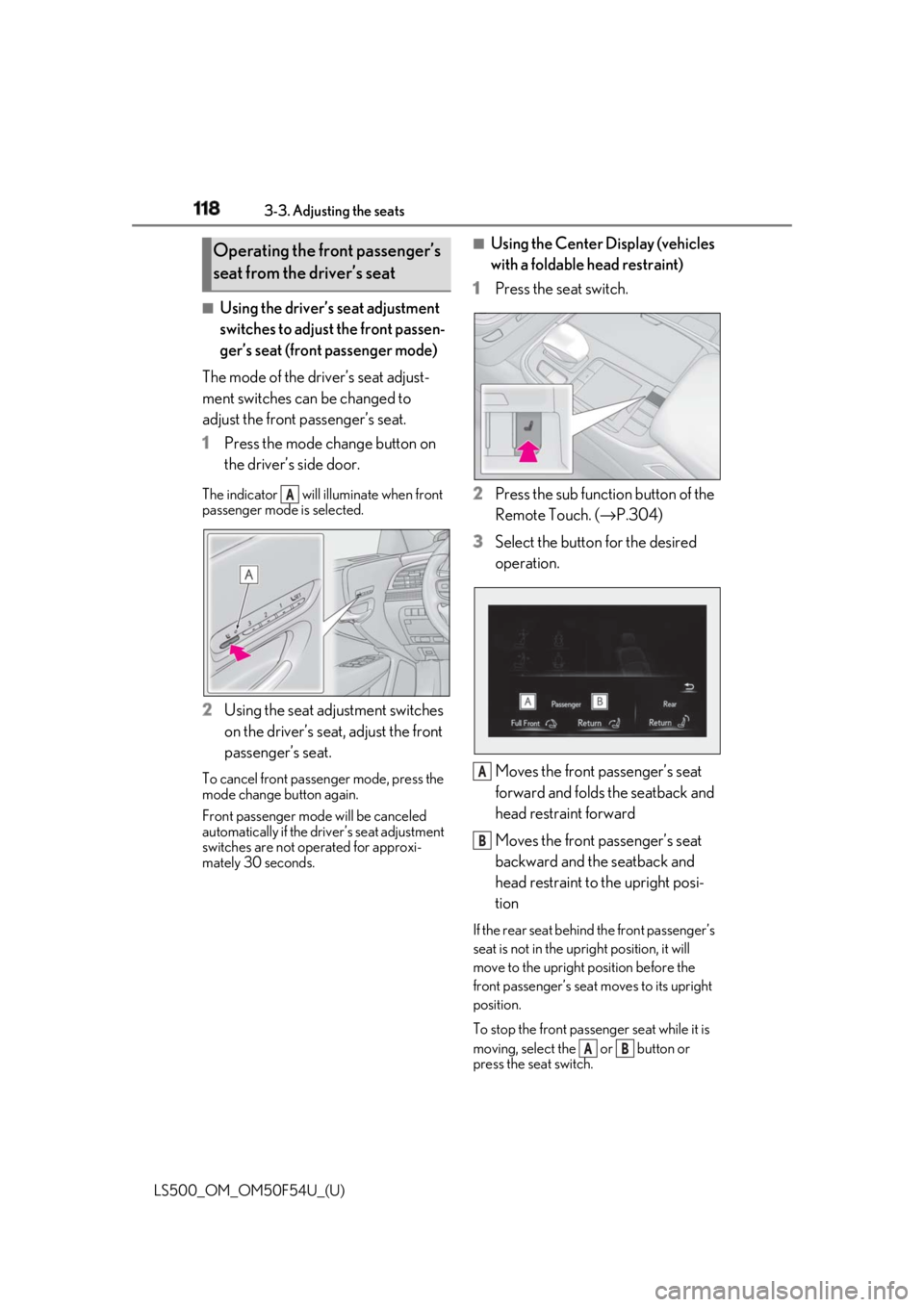
1 Press the mode change button on
the driver’s side door.The indicator will illuminate when front
passenger mode is selected.
2 Using the seat adjustment switches
on the driver’s seat, adjust the front
passenger’s seat.To cancel front passenger mode, press the
mode change button again.
Front passenger mode will be canceled
automatically if the driv er’s seat adjustment
switches are not operated for approxi-
mately 30 seconds. ■
Using the Center Display (vehicles
with a foldable head restraint)
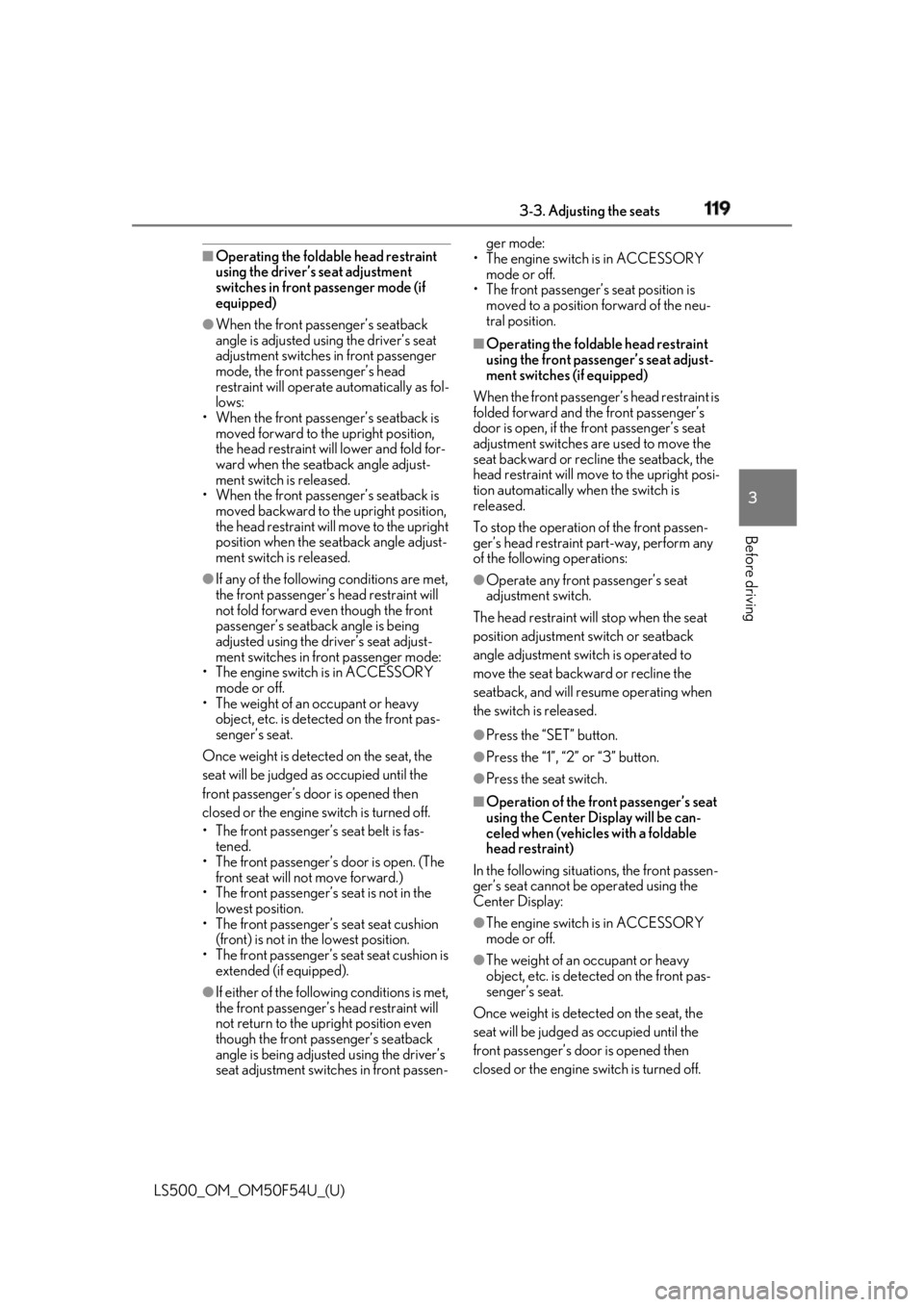
1 Press the seat switch.
2 Press the sub function button of the
Remote Touch. ( → P.304)
3 Select the button for the desired
operation.
Moves the front passenger’s seat
forward and folds the seatback and
head restraint forward
Moves the front passenger’s seat
backward and the seatback and
head restraint to the upright posi-
tion If the rear seat behind the front passenger’s
seat is not in the up right position, it will
move to the upright position before the
front passenger’s seat moves to its upright
position.
To stop the front passen ger seat while it is
moving, select the or button or
press the seat switch.Operating the front passenger’s
seat from the driver’s seat
A
A
B
A B
Page 119 of 514
1193-3. Adjusting the seats
LS500_OM_OM50F54U_(U) 3
Before driving ■
Operating the foldable head restraint
using the driver’s seat adjustment
switches in front passenger mode (if
equipped)●
When the front passenger’s seatback
angle is adjusted using the driver’s seat
adjustment switches in front passenger
mode, the front passenger’s head
restraint will operate automatically as fol-
lows:
• When the front passenger’s seatback is
moved forward to the upright position,
the head restraint will lower and fold for-
ward when the seatback angle adjust-
ment switch is released.
• When the front passenger’s seatback is
moved backward to the upright position,
the head restraint will move to the upright
position when the se atback angle adjust-
ment switch is released.●
If any of the following conditions are met,
the front passenger’s head restraint will
not fold forward even though the front
passenger’s seatback angle is being
adjusted using the driver’s seat adjust-
ment switches in front passenger mode:
• The engine switch is in ACCESSORY
mode or off.
• The weight of an occupant or heavy
object, etc. is detected on the front pas-
senger’s seat.
Once weight is detect ed on the seat, the
seat will be judged as occupied until the
front passenger’s door is opened then
closed or the engine switch is turned off.
• The front passenger’s seat belt is fas-
tened.
• The front passenger’s door is open. (The
front seat will not move forward.)
• The front passenger’s seat is not in the
lowest position.
• The front passenger’s seat seat cushion
(front) is not in the lowest position.
• The front passenger’s seat seat cushion is
extended (if equipped).
●
If either of the following conditions is met,
the front passenger’s head restraint will
not return to the upright position even
though the front passenger’s seatback
angle is being adjusted using the driver’s
seat adjustment switch es in front passen- ger mode:
• The engine switch is in ACCESSORY
mode or off.
• The front passenger’s seat position is
moved to a position forward of the neu-
tral position. ■
Operating the foldable head restraint
using the front passenger’s seat adjust-
ment switches (if equipped)
When the front passenger’s head restraint is
folded forward and the front passenger’s
door is open, if the front passenger’s seat
adjustment switches are used to move the
seat backward or recline the seatback, the
head restraint will move to the upright posi-
tion automatically when the switch is
released.
To stop the operation of the front passen-
ger’s head restraint part-way, perform any
of the following operations: ●
Operate any front passenger’s seat
adjustment switch.
The head restraint will stop when the seat
position adjustment switch or seatback
angle adjustment switch is operated to
move the seat backward or recline the
seatback, and will resume operating when
the switch is released. ●
Press the “SET” button. ●
Press the “1”, “2” or “3” button. ●
Press the seat switch. ■
Operation of the front passenger’s seat
using the Center Display will be can-
celed when (vehicles with a foldable
head restraint)
In the following situations, the front passen-
ger’s seat cannot be operated using the
Center Display:
●
The engine switch is in ACCESSORY
mode or off.
●
The weight of an occupant or heavy
object, etc. is detected on the front pas-
senger’s seat.
Once weight is detected on the seat, the
seat will be judged as occupied until the
front passenger’s door is opened then
closed or the engine switch is turned off.
Page 120 of 514
120 3-3. Adjusting the seats
LS500_OM_OM50F54U_(U) ●
The front passenger’s seat belt is fas-
tened.●
The front passenger’s door is open. (The
front seat will not move forward.)■
When the front passenger’s seat is
folded forward
By reclining the front passenger’s seat seat-
back, the forward view of the rear passen-
ger can be improved.
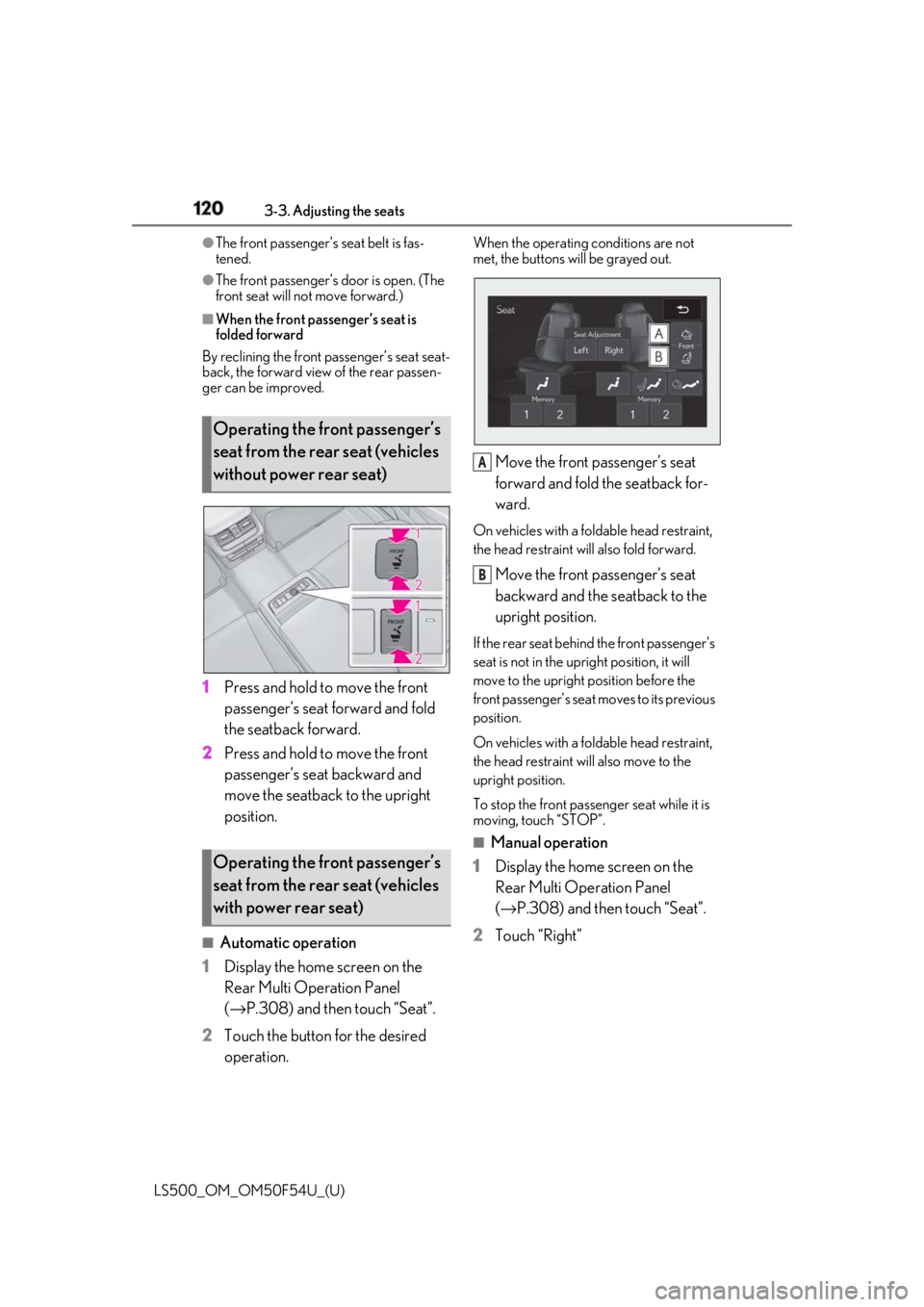
1 Press and hold to move the front
passenger’s seat forward and fold
the seatback forward.
2 Press and hold to move the front
passenger’s seat backward and
move the seatback to the upright
position.
■
Automatic operation
1 Display the home screen on the
Rear Multi Operation Panel
( → P.308) and then touch “Seat”.
2 Touch the button for the desired
operation. When the operating conditions are not
met, the buttons will be grayed out.
Move the front passenger’s seat
forward and fold the seatback for-
ward. On vehicles with a foldable head restraint,
the head restraint will also fold forward.
Move the front passenger’s seat
backward and the seatback to the
upright position. If the rear seat behind the front passenger’s
seat is not in the up right position, it will
move to the upright position before the
front passenger’s seat moves to its previous
position.
On vehicles with a foldable head restraint,
the head restraint will also move to the
upright position.
To stop the front passen ger seat while it is
moving, touch “STOP”. ■
Manual operation
1 Display the home screen on the
Rear Multi Operation Panel
( → P.308) and then touch “Seat”.
2 Touch “Right”Operating the front passenger’s
seat from the rear seat (vehicles
without power rear seat)
Operating the front passenger’s
seat from the rear seat (vehicles
with power rear seat) A
B
Page 121 of 514
1213-3. Adjusting the seats
LS500_OM_OM50F54U_(U) 3
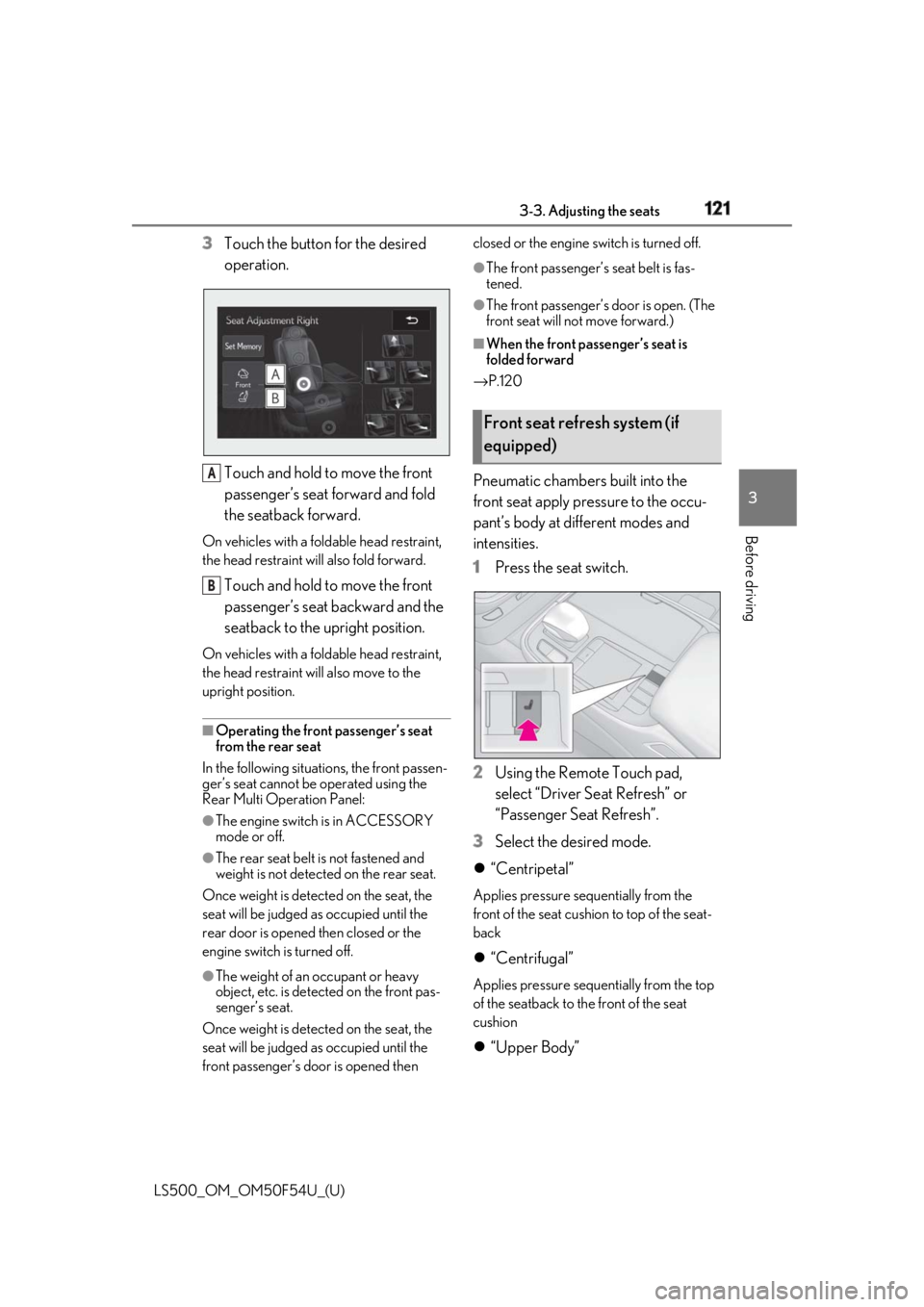
Before driving 3 Touch the button for the desired
operation.
Touch and hold to move the front
passenger’s seat forward and fold
the seatback forward.On vehicles with a fold able head restraint,
the head restraint will also fold forward.
Touch and hold to move the front
passenger’s seat backward and the
seatback to the upright position.On vehicles with a fold able head restraint,
the head restraint will also move to the
upright position.
■
Operating the front passenger’s seat
from the rear seat
In the following situations, the front passen-
ger’s seat cannot be operated using the
Rear Multi Operation Panel: ●
The engine switch is in ACCESSORY
mode or off.●
The rear seat belt is not fastened and
weight is not detected on the rear seat.
Once weight is detect ed on the seat, the
seat will be judged as occupied until the
rear door is opened then closed or the
engine switch is turned off.
●
The weight of an occupant or heavy
object, etc. is detected on the front pas-
senger’s seat.
Once weight is detect ed on the seat, the
seat will be judged as occupied until the
front passenger’s door is opened then closed or the engine switch is turned off. ●
The front passenger’s seat belt is fas-
tened. ●
The front passenger’s door is open. (The
front seat will not move forward.) ■
When the front passenger’s seat is
folded forward
→ P.120
Pneumatic chambers built into the
front seat apply pressure to the occu-
pant’s body at different modes and
intensities.
1 Press the seat switch.
2 Using the Remote Touch pad,
select “Driver Se at Refresh” or
“Passenger Seat Refresh”.
3 Select the desired mode.
“Centripetal” Applies pressure sequentially from the
front of the seat cushion to top of the seat-
back
“Centrifugal” Applies pressure sequentially from the top
of the seatback to the front of the seat
cushion
“Upper Body”A
B Front seat refresh system (if
equipped)
Page 122 of 514
122 3-3. Adjusting the seats
LS500_OM_OM50F54U_(U) Applies pressure sequentially from the bot-
tom to the top of the seatback
“Lower Body” Applies pressure sequentially from the
front to the back of the seat cushion
“Lumbar” Applies pressure sequentially from the bot-
tom to the top of the lumbar area of the
seatback
4 Select the desired intensity and
then confirm the setting.The intensity can be adjusted in 5 steps.
To stop the operation select “Stop”.
If a seat is not occupi ed, do not operate the
front seat refresh system for that seat.
■
Refresh system●
Operating conditions
• The engine switch is in IGNITION ON
mode.
• The temperature in the cabin is not
extremely high.
• For the front passenger’s seat: The weight
of an occupant is detected on the front
passenger’s seat or the front passenger’s
seat belt is fastened.
Once weight is detect ed on the seat, the
seat will be judged as occupied until the
front passenger’s door is opened then
closed or the engine switch is turned off.
●
Automatic stop function
• The operation will be canceled automati-
cally after approximately 15 minutes.
•If the power easy ac cess system begins
operating, the front seat refresh system
will stop.
WARNING
■
Important points while driving
Do not adjust the driver’s seat refresh
system while driving.
Using it may affect your ability to control
the vehicle, possibly leading to an acci-
dent resulting in death or serious injury. ■
Using the refresh system ●
Those who are pregnant, have recently
given birth, or suffer from ailments
requiring rest (heart disease etc.)
should consult a doctor before use. ●
Do not allow children to use the
refresh function. ●
Do not use immediately after consum-
ing a meal or alcohol, or for an
extended period of time. ●
If you feel sick while using the refresh
function, immediately discontinue use.
Page 123 of 514
1233-3. Adjusting the seats
LS500_OM_OM50F54U_(U) 3
Before driving *
:If equipped
■
Manual operation
1 Display the home screen on the
Rear Multi Operation Panel
( → P.308) and then touch “Seat”.
2 Touch “Left” or “Right”.Power rear seat *
WARNING■
When adjusting the seat position●
Take care when ad justing the seat
position to ensure that other passen-
gers are not injured by the moving
seat.●
When adjusting the rear seat with an
ottoman, make sure there is sufficient
space so that a foot does not get
caught between the ottoman and front
passenger seat . (If equipped)●
Vehicle with rear seat entertainment
system: When the rear seat is moving
to the Entertainment Mode position,
do not allow hands near the rear dis-
play. Otherwise, a hand or finger may
be caught, possibly causing injury.■
Seat adjustment
To reduce the risk of sliding under the lap
belt during a collision, do not recline the
seat more than necessary.
If the seat is too reclined, the lap belt may
slide past the hips and apply restraint
forces directly to the abdomen, or your
neck may contact the shoulder belt,
increasing the risk of death or serious
injury in the event of an accident.
Adjustments should not be made while
driving as the seat may unexpectedly
move and cause the driver to lose control
of the vehicle.
■
Using the ottoman (if equipped)
●
Do not sit on the ottoman.
If someone sits on th e ottoman, the seat
belt cannot be fitted properly, and they
may be thrown from the seat, resulting in
death or serious injury in the event of an
accident or sudden braking. ●
When getting in or out of the vehicle,
retract the ottoman. If the ottoman is
not retracted, it may cause a fall, result-
ing in injury. ●
Do not operate the ottoman when the
vehicle is moving. ●
Do not allow anyone to put their hands
or feet under the re ar seat when stow-
ing the ottoman.
NOTICE■
To prevent an ottoman malfunction (if
equipped) ●
Do not place any objects in the rear
seat footwell that could prevent the
operation of the ottoman. ●
Do not place heavy luggage on the
ottoman. ●
Do not place any objects under the
ottoman while it is raised for use. These
objects may interfere with the ottoman
being folded, causing damage to the
ottoman or the objects themselves. ■
To prevent a rear display malfunction
(if equipped)
Do not attempt to move the rear display
by hand, as doing so may damage the
rear display.
Adjustment procedure