stop start LEXUS LS500 2018 Owner's Manual
[x] Cancel search | Manufacturer: LEXUS, Model Year: 2018, Model line: LS500, Model: LEXUS LS500 2018Pages: 514, PDF Size: 10.62 MB
Page 162 of 514
162 4-2. Driving procedures
LS500_OM_OM50F54U_(U) ■
Automatic P position selection function
→ P.166
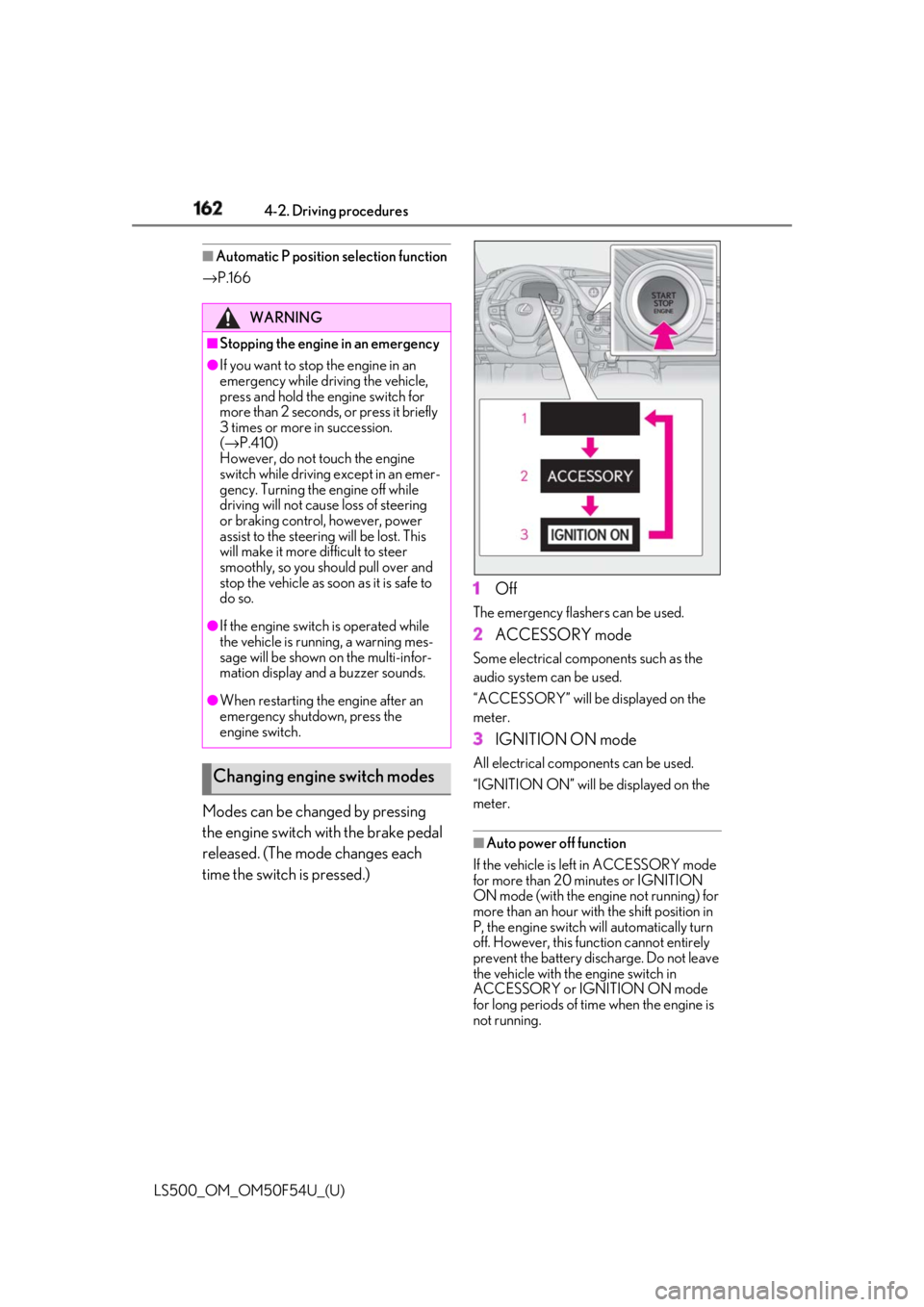
Modes can be changed by pressing
the engine switch with the brake pedal
released. (The mode changes each
time the switch is pressed.) 1 Off The emergency flashers can be used.
2 ACCESSORY mode Some electrical components such as the
audio system can be used.
“ACCESSORY” will be displayed on the
meter.
3 IGNITION ON mode All electrical components can be used.
“IGNITION ON” will be displayed on the
meter.
■
Auto power off function
If the vehicle is left in ACCESSORY mode
for more than 20 minutes or IGNITION
ON mode (with the engine not running) for
more than an hour with the shift position in
P, the engine switch will automatically turn
off. However, this function cannot entirely
prevent the battery discharge. Do not leave
the vehicle with the engine switch in
ACCESSORY or IGNITION ON mode
for long periods of time when the engine is
not running.WARNING■
Stopping the engine in an emergency●
If you want to stop the engine in an
emergency while driving the vehicle,
press and hold the engine switch for
more than 2 seconds, or press it briefly
3 times or more in succession.
( → P.410)
However, do not touch the engine
switch while driving except in an emer-
gency. Turning the engine off while
driving will not cause loss of steering
or braking control, however, power
assist to the steering will be lost. This
will make it more difficult to steer
smoothly, so you should pull over and
stop the vehicle as soon as it is safe to
do so.●
If the engine switch is operated while
the vehicle is running, a warning mes-
sage will be shown on the multi-infor-
mation display and a buzzer sounds.●
When restarting the engine after an
emergency shutdown, press the
engine switch.
Changing engine switch modes
Page 173 of 514
1734-2. Driving procedures
LS500_OM_OM50F54U_(U) 4
Driving
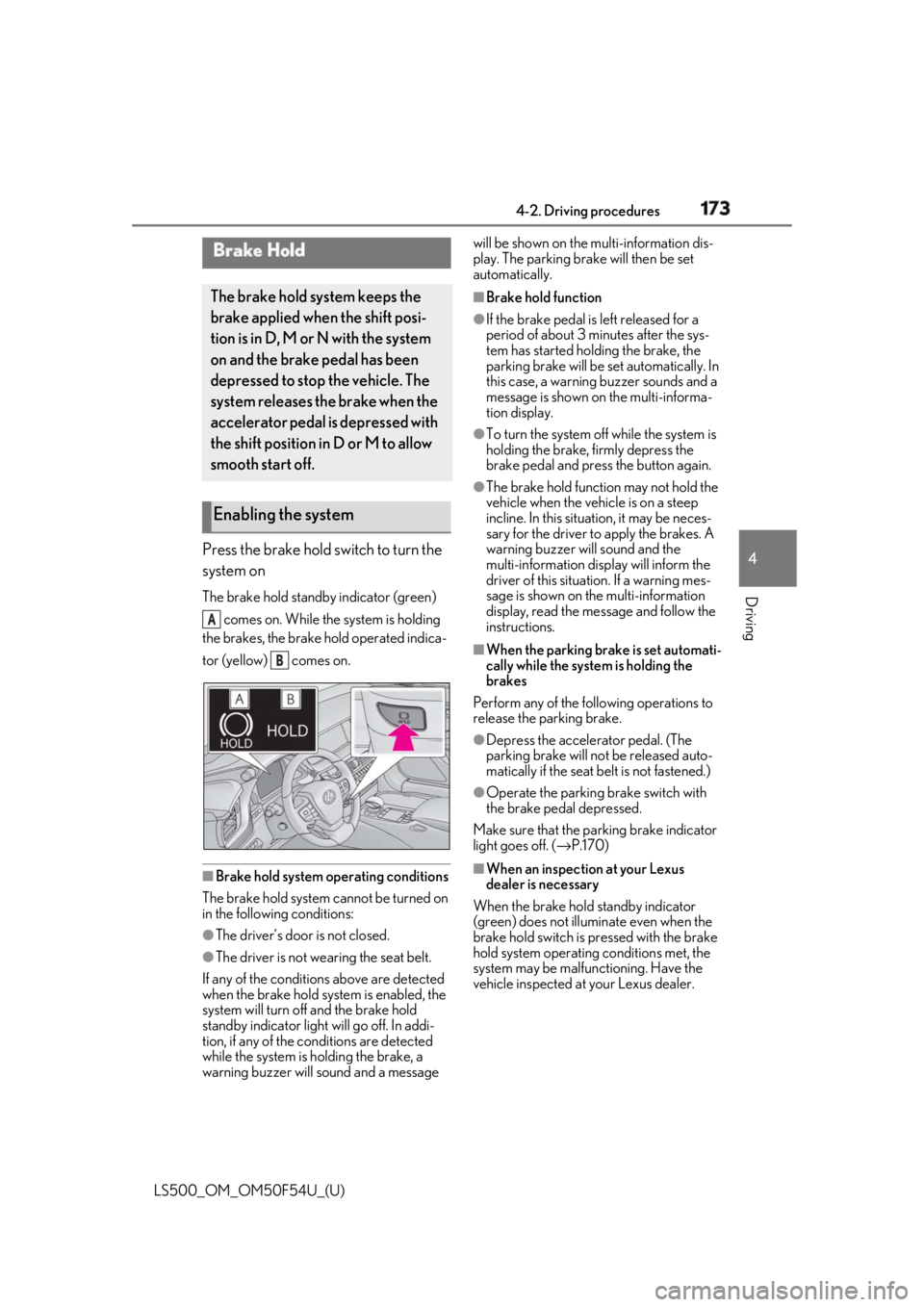
Press the brake hold switch to turn the
system on The brake hold standby indicator (green)
comes on. While the system is holding
the brakes, the brake hold operated indica-
tor (yellow) comes on.
■
Brake hold system operating conditions
The brake hold system cannot be turned on
in the following conditions:
●
The driver’s door is not closed.
●
The driver is not wearing the seat belt.
If any of the conditions above are detected
when the brake hold system is enabled, the
system will turn off and the brake hold
standby indicator light will go off. In addi-
tion, if any of the conditions are detected
while the system is holding the brake, a
warning buzzer will sound and a message will be shown on the multi-information dis-
play. The parking brake will then be set
automatically. ■
Brake hold function ●
If the brake pedal is left released for a
period of about 3 mi nutes after the sys-
tem has started holding the brake, the
parking brake will be set automatically. In
this case, a warning buzzer sounds and a
message is shown on the multi-informa-
tion display. ●
To turn the system off while the system is
holding the brake, firmly depress the
brake pedal and press the button again. ●
The brake hold function may not hold the
vehicle when the vehicle is on a steep
incline. In this situation, it may be neces-
sary for the driver to apply the brakes. A
warning buzzer will sound and the
multi-information display will inform the
driver of this situat ion. If a warning mes-
sage is shown on the multi-information
display, read the message and follow the
instructions. ■
When the parking brake is set automati-
cally while the system is holding the
brakes
Perform any of the following operations to
release the parking brake. ●
Depress the accelerator pedal. (The
parking brake will not be released auto-
matically if the seat belt is not fastened.) ●
Operate the parking brake switch with
the brake pedal depressed.
Make sure that the pa rking brake indicator
light goes off. ( → P.170)
■
When an inspection at your Lexus
dealer is necessary
When the brake hold standby indicator
(green) does not illuminate even when the
brake hold switch is pressed with the brake
hold system operating conditions met, the
system may be malfun ctioning. Have the
vehicle inspected at your Lexus dealer.Brake Hold The brake hold system keeps the
brake applied when the shift posi-
tion is in D, M or N with the system
on and the brake pedal has been
depressed to stop the vehicle. The
system releases the brake when the
accelerator pedal is depressed with
the shift position in D or M to allow
smooth start off.
Enabling the system A
B
Page 244 of 514
244 4-5. Using the driving support systems
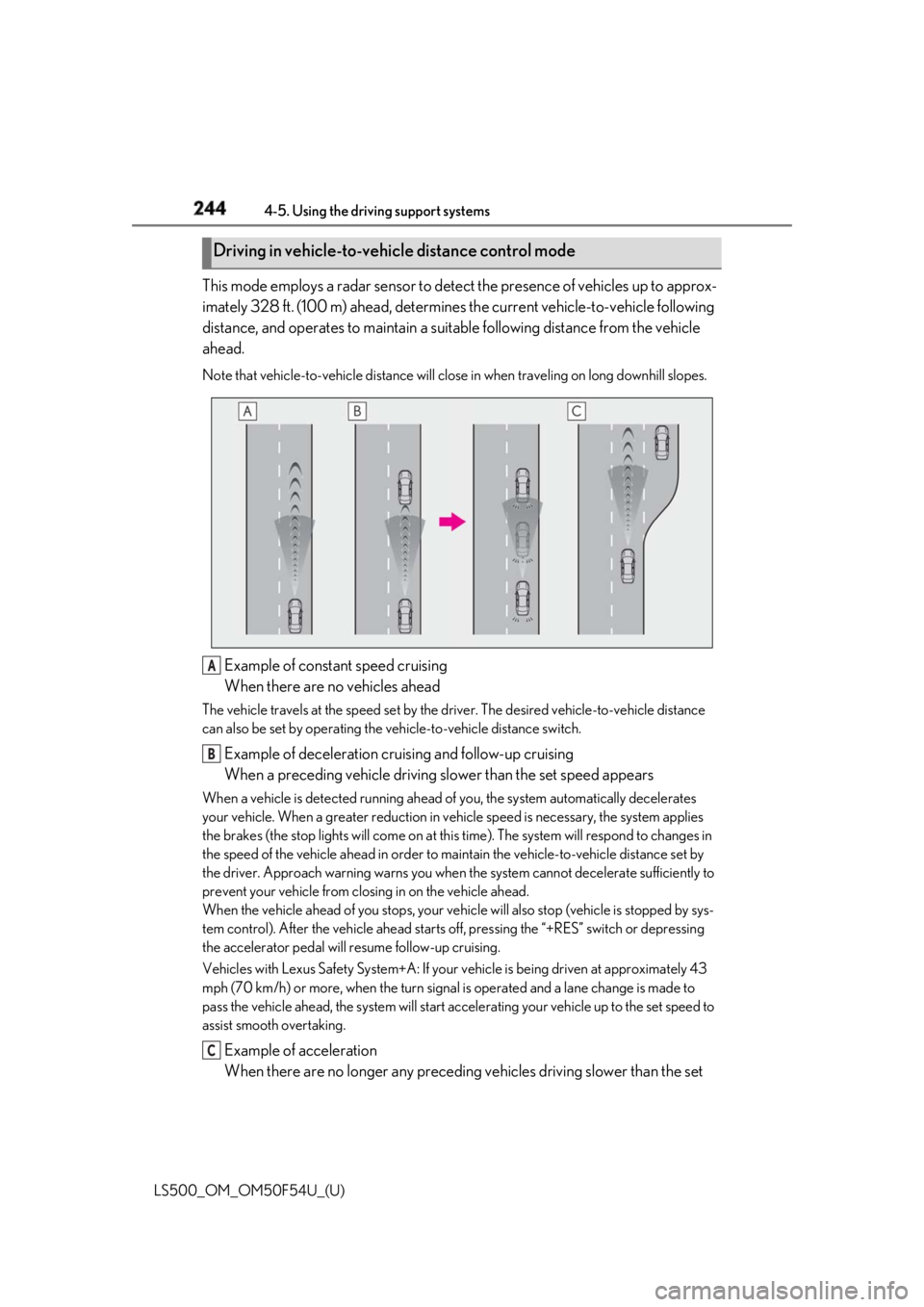
LS500_OM_OM50F54U_(U) This mode employs a radar sensor to detect the presence of vehicles up to approx-
imately 328 ft. (100 m) ahead, determines the current vehicle-to-vehicle following
distance, and operates to maintain a suit able following distance from the vehicle
ahead. Note that vehicle-to-vehicle di stance will close in when trav eling on long downhill slopes.
Example of constant speed cruising
When there are no vehicles aheadThe vehicle travels at the speed set by the driver. The desired vehicle-to-vehicle distance
can also be set by operating the ve hicle-to-vehicle distance switch.
Example of deceleration cruising and follow-up cruising
When a preceding vehicle driving slower than the set speed appearsWhen a vehicle is detected running ahead of you, the system automatically decelerates
your vehicle. When a greater reduction in vehicle speed is necessary, the system applies
the brakes (the stop lights will come on at this time). The sy stem will respond to changes in
the speed of the vehicle ahead in order to maintain the vehicle-to-vehicle distance set by
the driver. Approach warning warns you when th e system cannot decelera te sufficiently to
prevent your vehicle from closing in on the vehicle ahead.
When the vehicle ahead of you stops, your vehi cle will also stop (vehicle is stopped by sys-
tem control). After the vehicle ahead starts off, pressing the “+RES” switch or depressing
the accelerator pedal will resume follow-up cruising.
Vehicles with Lexus Safety System+A: If your vehicle is being driven at approximately 43
mph (70 km/h) or more, when the turn signal is operated and a lane change is made to
pass the vehicle ahead, the system will start acce lerating your vehicle up to the set speed to
assist smooth overtaking.
Example of acceleration
When there are no longer any preceding vehicles driving slower than the set Driving in vehicle-to-vehicle distance control mode
A
B
C
Page 247 of 514
2474-5. Using the driving support systems
LS500_OM_OM50F54U_(U) 4
Driving
After the vehicle ahead of you starts
off, press the “+RES” switch.
Your vehicle will also resume follow-up
cruising if the accelerator pedal is
depressed after the vehicle ahead of
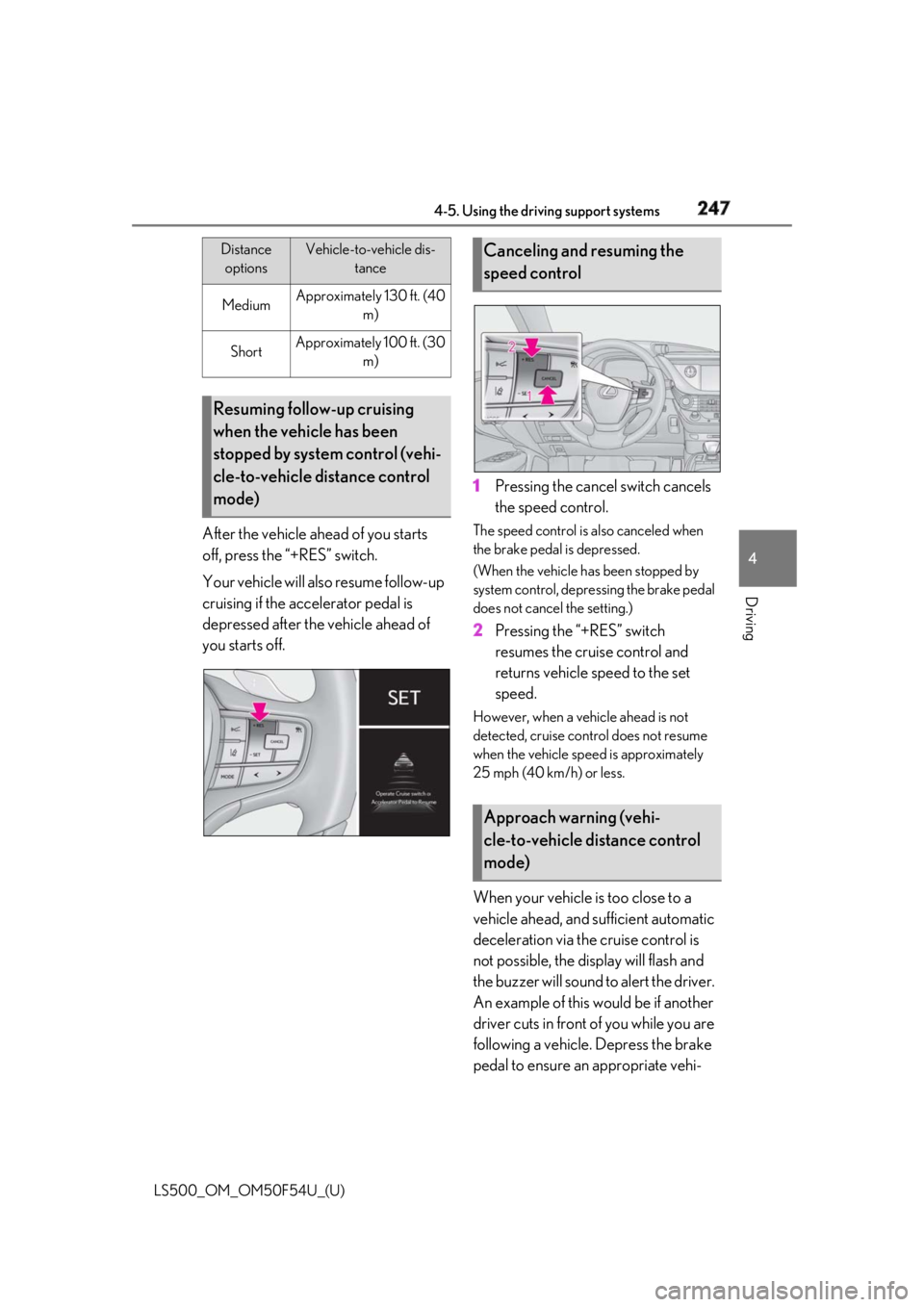
you starts off. 1 Pressing the cancel switch cancels
the speed control. The speed control is also canceled when
the brake pedal is depressed.
(When the vehicle has been stopped by
system control, depressing the brake pedal
does not cancel the setting.)
2 Pressing the “+RES” switch
resumes the cruise control and
returns vehicle speed to the set
speed. However, when a vehicle ahead is not
detected, cruise control does not resume
when the vehicle speed is approximately
25 mph (40 km/h) or less.
When your vehicle is too close to a
vehicle ahead, and sufficient automatic
deceleration via the cruise control is
not possible, the display will flash and
the buzzer will sound to alert the driver.
An example of this would be if another
driver cuts in front of you while you are
following a vehicle. Depress the brake
pedal to ensure an appropriate vehi-Medium Approximately 130 ft. (40
m)
Short Approximately 100 ft. (30
m)
Resuming follow-up cruising
when the vehicle has been
stopped by system control (vehi-
cle-to-vehicle distance control
mode) Distance
options Vehicle-to-vehicle dis-
tance
Canceling and resuming the
speed control
Approach warning (vehi-
cle-to-vehicle distance control
mode)
Page 249 of 514
2494-5. Using the driving support systems
LS500_OM_OM50F54U_(U) 4
Driving by using the paddle shift switch.●
Vehicle speed is at or above approxi-
mately 30 mph (50 km/h).
However, when a preceding vehicle is
detected, the dynamic radar cruise con-
trol with full-speed range can be set even
if the vehicle speed is below approxi-
mately 30 mph (50 km/h).■
Accelerating after setting the vehicle
speed
The vehicle can accelerate by operating the
accelerator pedal. After accelerating, the
set speed resumes. However, during vehi-
cle-to-vehicle distance control mode, the
vehicle speed may decrease below the set
speed in order to maintain the distance to
the preceding vehicle. ■
When the vehicle stops while follow-up
cruising●
Pressing the “+RES” switch while the
vehicle ahead stops w ill resume follow-up
cruising if the vehicle ahead starts off
within approximately 3 seconds after the
switch is pressed.●
If the vehicle ahead starts off within 3 sec-
onds after your vehicle stops, follow-up
cruising will be resumed.■
Automatic cancelation of vehi-
cle-to-vehicle distance control mode
Vehicle-to-vehicle dist ance control mode is
automatically canceled in the following situ-
ations. ●
Actual vehicle speed falls at or below
approximately 25 mph (40 km/h) when
there are no vehicles ahead.●
The preceding vehicle leaves the lane
when your vehicle is following at a vehicle
speed at or below approximately 25 mph
(40 km/h). Otherwise, the sensor cannot
properly detect the vehicle. (“CRUISE
NOT AVAILABLE No Preceding Vehi-
cles” is displayed on the multi-information
display.)
●
VSC is activated.
●
TRAC is activated for a period of time.
●
When the VSC or TRAC system is
turned off.
●
When snow mode is set. ●
The sensor cannot detect correctly
because it is covered in some way. ●
Pre-collision braking is activated. ●
The parking brake is operated. ●
The vehicle is stopped by system control
on a steep incline. ●
The following are detected when the
vehicle has been stopped by system con-
trol:
• The driver is not wearing a seat belt.
• The driver’s door is opened.
• The vehicle has been stopped for about 3
minutes.
If vehicle-to-vehicle distance control mode
is automatically canceled for any other rea-
son, there may be a malfunction in the sys-
tem. Contact your Lexus dealer. ■
Automatic cancelation of constant
speed control mode
Constant speed control mode is automati-
cally canceled in the following situations: ●
Actual vehicle speed is more than
approximately 10 mph (16 km/h) below
the set vehicle speed. ●
Actual vehicle speed falls below approxi-
mately 25 mph (40 km/h). ●
VSC is activated. ●
TRAC is activated for a period of time. ●
When the VSC or TRAC system is
turned off. ●
Pre-collision braking is activated.
If constant speed control mode is automati-
cally canceled for any other reason, there
may be a malfunction in the system. Con-
tact your Lexus dealer.
■
If “Radar Cruise Control Unavailable” is
shown on the multi-information display
The radar cruise control system cannot be
used temporarily. Use the system when it
becomes available again.
■
Brake system operation sound
When the brakes are operated in vehi-
cle-to-vehicle distance mode, a brake oper-
ating sound may be heard. This is not a
malfunction.
Page 255 of 514
2554-5. Using the driving support systems
LS500_OM_OM50F54U_(U) 4
Driving the farther away the vehicle will be detected, caus ing the outside rear view mirror indi-
cator to illuminate or flash.■
The Blind Spot Monitor is operational
when
The Blind Spot Monitor is operational when
all of the following conditions are met: ●
The Blind Spot Monitor is on.●
The shift position is in a position other
than R.●
The vehicle speed is greater than approx-
imately 10 mph (16 km/h).■
The Blind Spot Monitor will detect a
vehicle when
The Blind Spot Monitor will detect a vehicle
present in the detection area in the follow-
ing situations: ●
A vehicle in an adj acent lane overtakes
your vehicle.●
You overtake a vehicle in adjacent lane
slowly.●
Another vehicle enters the detection
area when it changes lanes.■
Conditions under wh ich the Blind Spot
Monitor will not detect a vehicle
The Blind Spot Monitor is not designed to
detect the following types of vehicles and/or
objects: ●
Small motorcycles, bicycles, pedestrians,
etc. *
●
Vehicles traveling in the opposite direc-
tion●
Guardrails, walls, signs, parked vehicles
and similar stationary objects *
●
Following vehicles th at are in the same
lane *
●
Vehicles traveling 2 lanes away from your
vehicle *
*
: Depending on the conditions, detection
of a vehicle and/or object may occur.
■
Conditions under wh ich the Blind Spot
Monitor may not fu nction correctly
●
The Blind Spot Monitor may not detect
vehicles correctly in the following situa- tions:
• When the sensor is misaligned due to a
strong impact to the sensor or its sur-
rounding area
• When mud, snow, ice, a sticker, etc. is
covering the sensor or surrounding area
on the rear bumper
• When driving on a road surface that is
wet with standing water during bad
weather, such as heavy rain, snow, or fog
• When multiple vehicles are approaching
with only a small gap between each vehi-
cle
• When the distance between your vehicle
and a following vehicle is short
• When there is a significant difference in
speed between your vehicle and the vehi-
cle that enters the detection area
• Vehicles which are being overtaken rap-
idly by your vehicle.
• When the difference in speed between
your vehicle and another vehicle is
changing
• When a vehicle enters a detection area
traveling at about the same speed as your
vehicle
• As your vehicle starts from a stop, a vehi-
cle remains in the detection area
• When driving up and down consecutive
steep inclines, such as hills, dips in the
road, etc.
• When driving on roads with sharp bends,
consecutive curves, or uneven surfaces
• When vehicle lanes are wide, or when
driving on the edge of a lane, and the
vehicle in an adjacent lane is far away
from your vehicle
• When an accessory (such as a bicycle
carrier) is installed to the rear of the vehi-
cle
• When there is a significant difference in
height between your vehicle and the
vehicle that enters the detection area
• Immediately after the Blind Spot Monitor
is turned on
●
Instances of the Blind Spot Monitor
unnecessarily detecting a vehicle and/or
object may increase in the following situ-
ations:
• When the sensor is misaligned due to a
strong impact to the sensor or its sur-
Page 280 of 514
280 4-5. Using the driving support systems
LS500_OM_OM50F54U_(U) • The static object is no longer 6 to 13 ft. (2
to 4 m) away from the vehicle or in the
traveling direction of the vehicle.●
Brake control
• The Parking Support Brake is disabled.
• Approximately 2 seconds have elapsed
since the vehicle was stopped by brake
control.
• The brake pedal is depressed after the
vehicle is stopped by brake control.
• The static object is no longer 6 to 13 ft. (2
to 4 m) away from the vehicle or in the
traveling direction of the vehicle.■
Detection range of the Parking Support
Brake function (static objects)
The detection range of the Parking Support
Brake function (static objects) differs from
the detection range of the intuitive parking
assist. ( → P.261) Therefore, even if the intui-
tive parking assist de tects an object and
provides a warning, the Parking Support
Brake function (static objects) may not start
operating. ■
Objects that the Parking Support Brake
function (static obje cts) may not detect
The sensors may not be able to detect cer-
tain objects, such as the following: ●
Pedestrian●
Cotton cloth, snow, and other materials
that are poor reflectors of ultrasonic
waves●
Objects which are not perpendicular to
the ground, are not perpendicular to the
traveling direction of the vehicle, are
uneven or are waving●
Low objects●
Thin objects such as wires, fences, ropes
and signposts
●
Objects that are extremely close to the
bumper
■
Intuitive parking assist buzzer
Regardless of whether the intuitive parking
assist system is enabled or not ( → P.258), if
the Parking Support Brake function (static
objects) is enabled ( → P.272), the front or
rear sensors detect an object and brake
control is performed, the intuitive parking
assist buzzer will sound to notify the driver of the approximate distance to the object. ■
Situations in which the Parking Support
Brake function (static objects) may
operate even if there is no possibility of a
collision
In some situations, such as the following, the
Parking Support Brake function (static
objects) may operate even though there is
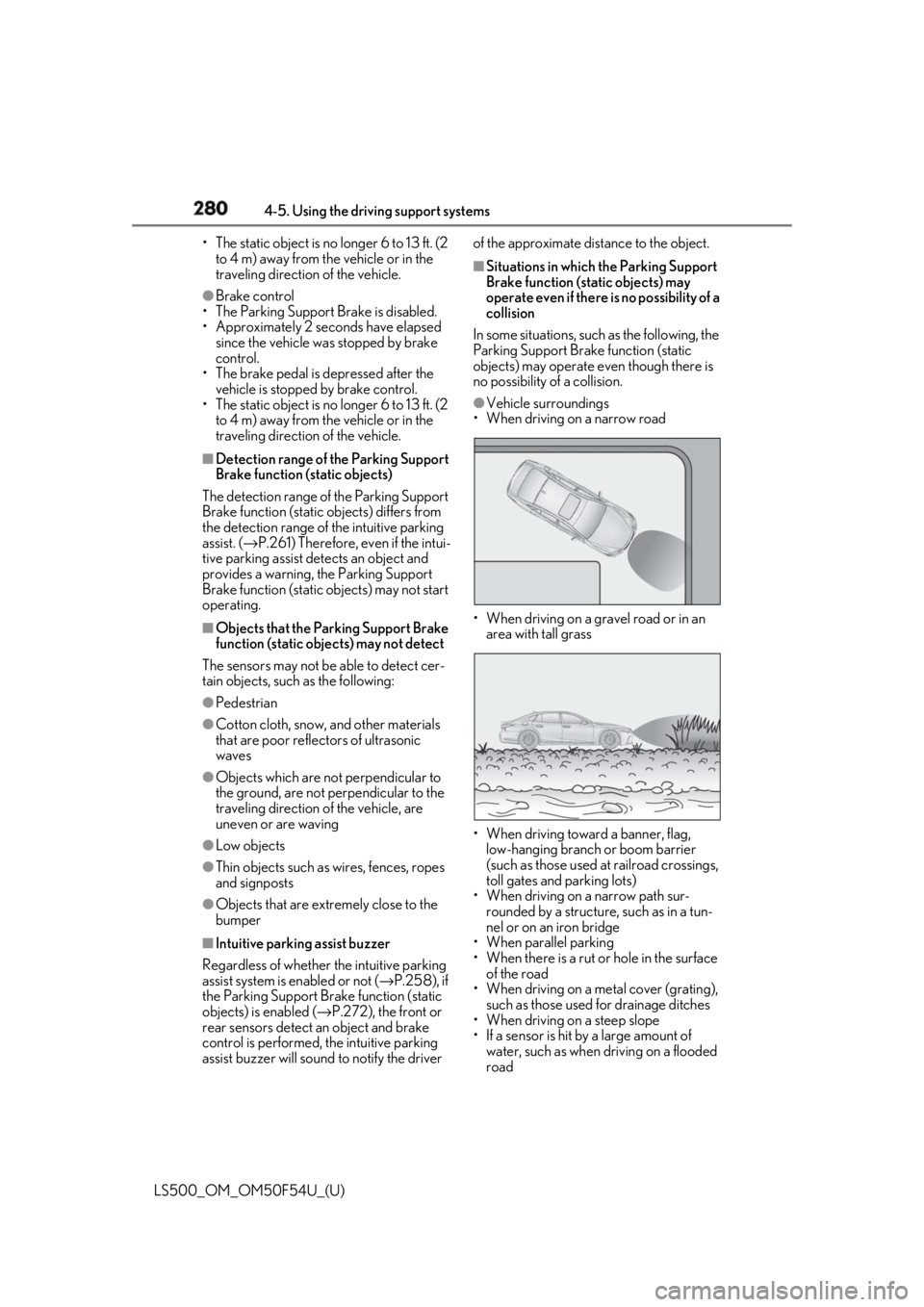
no possibility of a collision. ●
Vehicle surroundings
• When driving on a narrow road
• When driving on a gravel road or in an
area with tall grass
• When driving toward a banner, flag,
low-hanging branch or boom barrier
(such as those used at railroad crossings,
toll gates and parking lots)
• When driving on a narrow path sur-
rounded by a structure, such as in a tun-
nel or on an iron bridge
• When parallel parking
• When there is a rut or hole in the surface
of the road
• When driving on a metal cover (grating),
such as those used for drainage ditches
• When driving on a steep slope
• If a sensor is hit by a large amount of
water, such as when driving on a flooded
road
Page 283 of 514
2834-5. Using the driving support systems
LS500_OM_OM50F54U_(U) 4
Driving ■
The Parking Support Brake function
(rear-crossing vehicles) will operate
when
The function will oper ate when the PKSB
OFF indicator is not illuminated or flashing
( → P.65, 66) and all of the following condi-
tions are met: ●
Engine output restriction control
• The Parking Support Brake is enabled.
• The vehicle speed is 10 mph (15 km/h) or
less.
• Vehicles which are approaching from the
right or left at the re ar of the vehicle at a
traveling speed of less than approxi-
mately 5 mph (8 km/h)
• The shift position is in R.
• The Parking Support Brake determines
that a stronger than normal brake opera-
tion is necessary to avoid a collision with
an approaching vehicle.●
Brake control
• Engine output restriction control is oper-
ating
• The Parking Support Brake determines
that an emergency brake operation is
necessary to avoid a collision with an
approaching vehicle.■
The Parking Support Brake function
(rear-crossing vehicles) will stop operat-
ing when
The function will stop operating if any of the
following conditions are met:
●
Engine output restriction control
• The Parking Support Brake is disabled.
• The collision becomes avoidable with
normal brake operation.
• A vehicle is no longer approaching from
the right or left at the rear of the vehicle.
●
Brake control
• The Parking Support Brake is disabled.
• Approximately 2 seconds have elapsed
since the vehicle was stopped by brake
control.
• The brake pedal is depressed after the
vehicle is stopped by brake control. • A vehicle is no longer approaching from
the right or left at the rear of the vehicle. ■
Detection area of the Parking Support
Brake function (rear-crossing vehicles)
The detection area of the Parking Support
Brake function (rear-crossing vehicles) dif-
fers from the detection area of the RCTA
function ( → P.266). Therefore, even if the
RCTA function detects a vehicle and pro-
vides an alert, the Parking Support Brake
function (rear-crossing vehicles) may not
start operating. ■
Conditions under which the Parking
Support Brake function (rear-crossing
vehicles) will not detect a vehicle
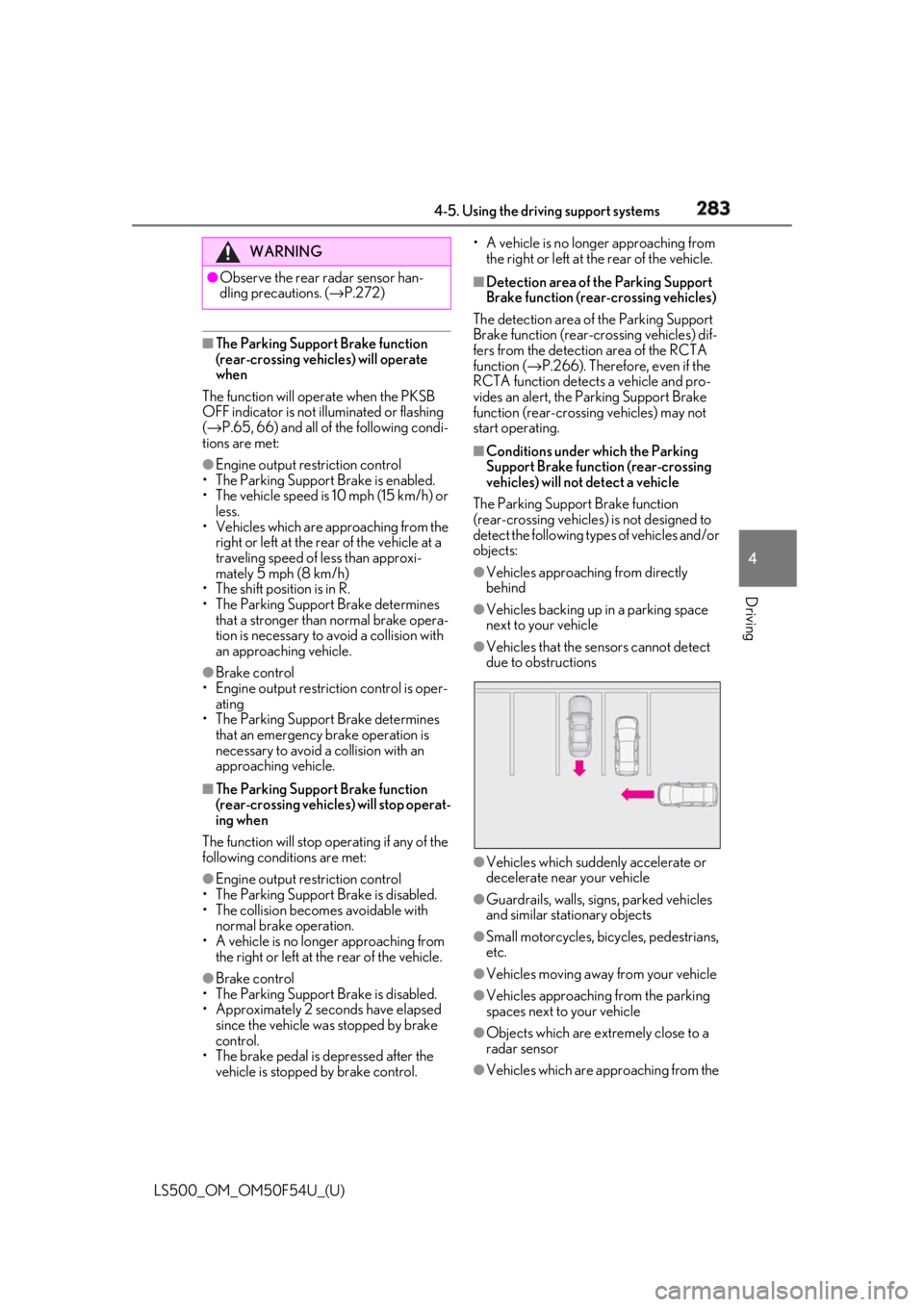
The Parking Support Brake function
(rear-crossing vehicles) is not designed to
detect the following types of vehicles and/or
objects: ●
Vehicles approaching from directly
behind ●
Vehicles backing up in a parking space
next to your vehicle ●
Vehicles that the sensors cannot detect
due to obstructions
●
Vehicles which suddenly accelerate or
decelerate near your vehicle
●
Guardrails, walls, signs, parked vehicles
and similar stationary objects
●
Small motorcycles, bicycles, pedestrians,
etc.
●
Vehicles moving away from your vehicle
●
Vehicles approaching from the parking
spaces next to your vehicle
●
Objects which are extremely close to a
radar sensor
●
Vehicles which are approaching from the WARNING●
Observe the rear radar sensor han-
dling precautions. ( → P.272)
Page 287 of 514
2874-5. Using the driving support systems
LS500_OM_OM50F54U_(U) 4
Driving ■
Parking Support Brake function (rear
pedestrians) will operate when
The function will oper ate when the PKSB
OFF indicator is not illuminated or flashing
( → P.65, 66) and all of the following condi-
tions are met: ●
Engine output restriction control
• The Parking Support Brake is enabled.
• The vehicle speed is 10 mph (15 km/h) or
less.
• The shift position is in R.
• The rear camera sensor detects a pedes-
trian behind the vehicle while backing up
and the system determines that the possi-
bility of colliding with the detected
pedestrian is high.●
Brake control
• Engine output restriction control is oper-
ating
• The Parking Support Brake determines
that an emergency brake operation is
necessary to avoid a collision with a
pedestrians.■
The Parking Support Brake function
(rear pedestrians) will stop operating
when
The function will stop operating if any of the
following conditions are met:
●
Engine output restriction control
• The Parking Support Brake is disabled.
• The collision becomes avoidable with
normal brake operation.
• The pedestrian is no longer detected
behind your vehicle.
●
Brake control
• The Parking Support Brake is disabled.
• Approximately 2 seconds have elapsed
since the vehicle was stopped by brake control.
• The brake pedal is depressed after the
vehicle is stopped by brake control.
• The pedestrian is no longer detected
behind your vehicle. ■
Detection area of the Parking Support
Brake function (rear pedestrians)
The detection area of the Parking Support
Brake function (rear pedestrians) differs
from the detection area of the RCD func-
tion ( → P.269). Therefore, even if the RCD
function detects a vehicle and provides an
alert, the Parking Support Brake function
(rear-crossing vehicles) may not start oper-
ating. ■
Situations in which the system may not
operate properly ●
Some pedestrians, such as the following,
may not be detected by the Parking Sup-
port Brake function (rear pedestrians),
preventing the function from operating
properly:
• Pedestrians who are bending forward or
squatting
• Pedestrians who are lying down
• Pedestrians who are running
• Pedestrians who suddenly enter the
detection area
• Pedestrians riding a bicycle, skateboard,
or other light vehicle
• Pedestrians wearing oversized clothing
such as a rain coat, long skirt, etc., making
their silhouette obscure
• Pedestrians whose body is partially hid-
den by an object, such as a cart or
umbrella
• Pedestrians which are obscured by dark-
ness, such as at night ●
In some situations, such as the following,
pedestrians may not be detected by the
Parking Support Brake function (rear
pedestrians), preventing the function
from operating properly:
• When backing up in inclement weather
(rain, snow, fog, etc.)
• When the rear camera is obscured (dirt,
snow, ice, etc. are at tached) or scratched
• When a very bright light, such as the sun,
or the headlights of another vehicle,
shines directly into the rear camera
• When backing up in a place where the
surrounding brightness changes sud-WARNING■
If the Parking Support Brake function
(rear pedestrians) operates unneces-
sarily
Depress the brake pedal immediately
after the Parking Support Brake function
(rear pedestrians) operates. (Operation
of the function is canceled by depressing
the brake pedal.)
Page 291 of 514
2914-5. Using the driving support systems
LS500_OM_OM50F54U_(U) 4
Driving *
:If equipped
■
Situations in which the vehicle height
control may not operate properly●
In the following situations, the vehicle
height may change slowly or may not
change to the correct height:
• When the vehicle comes into contact
with snow, ice, stone, etc.
• When the ambient temperature is low
• When the accumulator tank pressure is
low●
In the following situations, the vehicle
height may not change:
• If the hood or trunk is not fully closed
• If the brake pedal depressed and the
vehicle is stopped
• When the vehicle is on a significantly
uneven or undulating road
• When the vehicle is on a slanted road or a
slope
■
Operating sound of the air suspension
compressor and valves
When the vehicle height is changed, such
as due to passengers entering the vehicle or
cargo being loaded, or when the vehicle
height is changed using the vehicle height
adjustment switch, the air suspension com-
pressor and valves may operate and a
sound may be heard. This does not indicate a malfunction. ■
When the accumulator tank pressure is
low
When the accumulator tank pressure is low,
the air suspension compressor and valves
may operate repeatedly even though the
vehicle height is not being changed. This
does not indicate a malfunction.
Electronically modulated air
suspension *
The height of the vehicle when driv-
ing can be selected using the vehi-
cle height adjustment switch. The
selected height level will be main-
tained regardless of the number of
passengers or weight of cargo.
Additionally, setti ngs of the follow-
ing functions can be changed:
Access mode control
Parking height control
Vehicle height control WARNING■
Situations in whic h the operation of
the electronically modulated air sus-
pension should be canceled
In the following situations, make sure to
disable all functions of the vehicle height
control of the electronically modulated
air suspension and then stopping the
engine. Otherwise, the vehicle height
may change and part of your body may
be caught under the vehicle, possibly
causing injury. ●
When the vehicle is parked on a curb ●
If any of the wheels is not touching the
ground ●
If the vehicle needs to be jacked up ●
If the vehicle is to be tied down ●
If the vehicle is to be towed
■
Vehicle height control precautions
In the following situations, make sure to
check the safety of the area around the
vehicle, as the vehicle height may change
and part of someone’s body may be
caught in the vehicle, possibly causing
injury or the vehicle may be damaged.
●
When opening a door
●
When unlocking the doors using the
smart access system with push-button
start
●
When changing the vehicle height
using the vehicle height adjustment
switch