lights LEXUS LS500 2018 Workshop Manual
[x] Cancel search | Manufacturer: LEXUS, Model Year: 2018, Model line: LS500, Model: LEXUS LS500 2018Pages: 514, PDF Size: 10.62 MB
Page 330 of 514
330 5-4. Using the interior lights
LS500_OM_OM50F54U_(U) 5-4.Using the interior lights
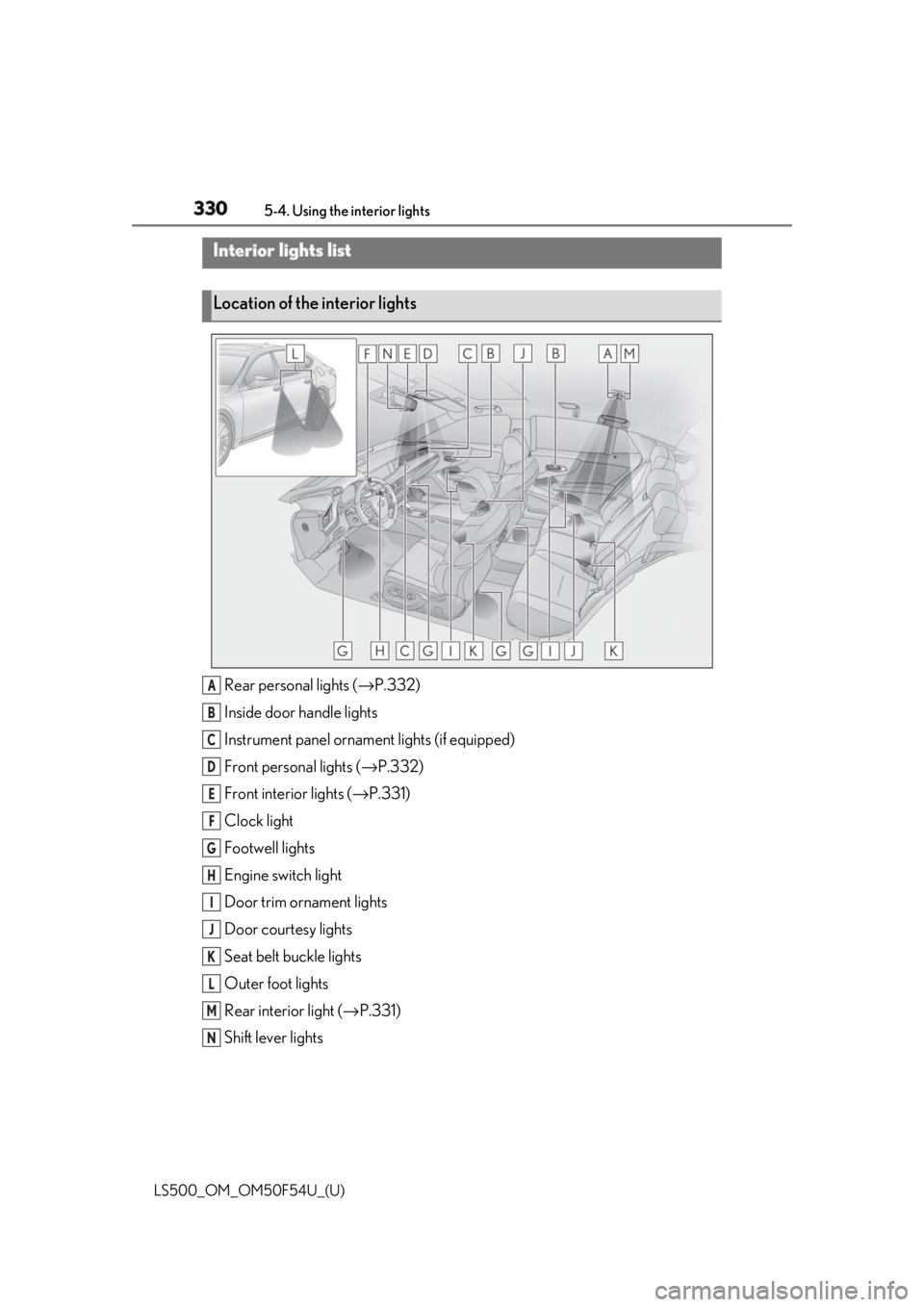
Rear personal lights ( → P.332)
Inside door handle lights
Instrument panel orname nt lights (if equipped)
Front personal lights ( → P.332)
Front interi or lights ( → P.331)
Clock light
Footwell lights
Engine switch light
Door trim ornament lights
Door courtesy lights
Seat belt buckle lights
Outer foot lights
Rear interior light ( → P.331)
Shift lever lightsInterior lights list
Location of the interior lights
A
B
C
D
E
F
G
H
I
J
K
L
M
N
Page 331 of 514
3315-4. Using the interior lights
LS500_OM_OM50F54U_(U) 5
Interior features ■
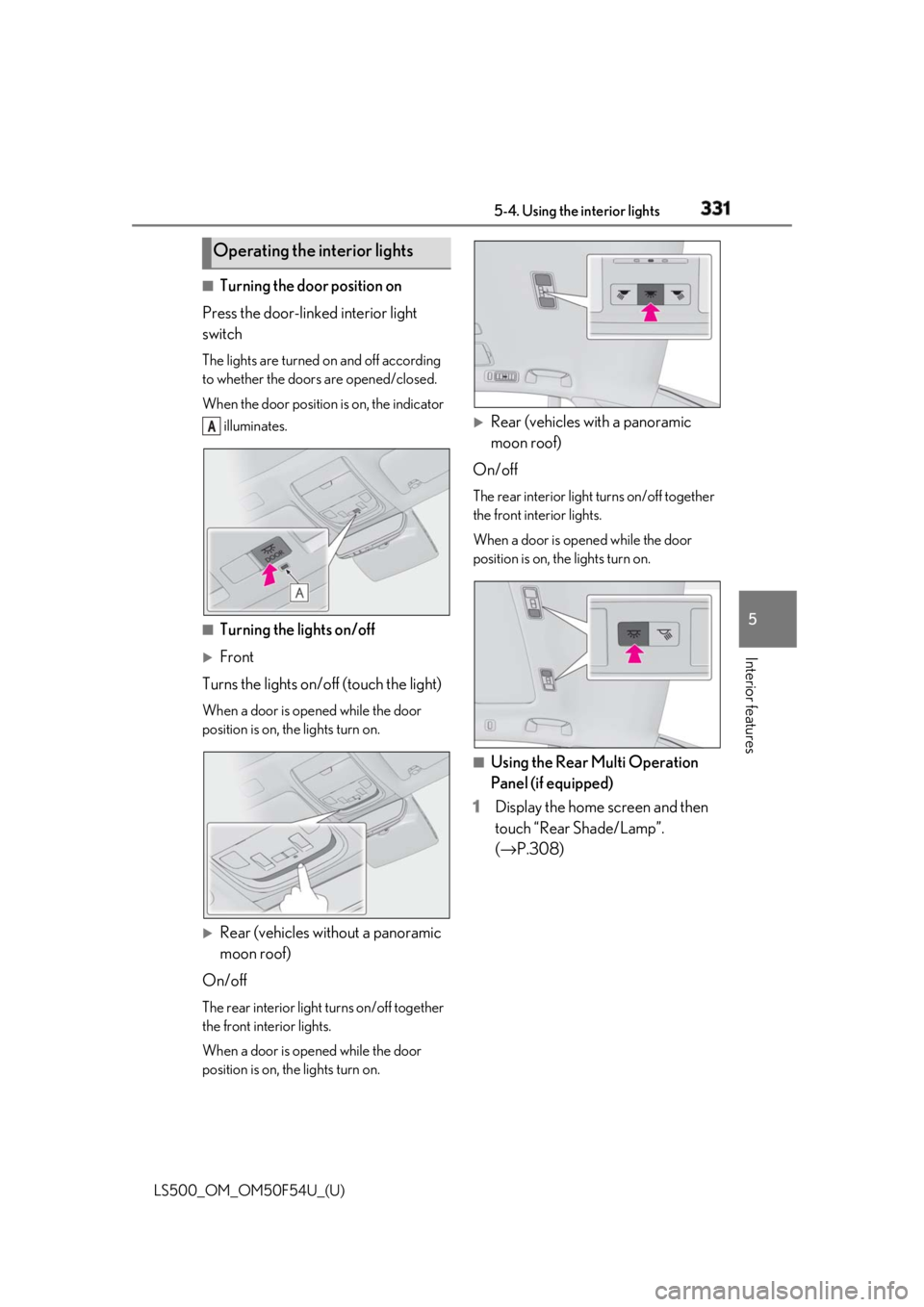
Turning the door position on
Press the door-linked interior light
switch The lights are turned on and off according
to whether the doors are opened/closed.
When the door position is on, the indicator
illuminates.
■
Turning the lights on/off
Front
Turns the lights on/off (touch the light) When a door is opened while the door
position is on, the lights turn on.
Rear (vehicles without a panoramic
moon roof)
On/off The rear interior light turns on/off together
the front interior lights.
When a door is opened while the door
position is on, the lights turn on.
Rear (vehicles with a panoramic
moon roof)
On/off The rear interior light turns on/off together
the front interior lights.
When a door is opened while the door
position is on, the lights turn on.
■
Using the Rear Multi Operation
Panel (if equipped)
1 Display the home screen and then
touch “Rear Shade/Lamp”.
( → P.308)Operating the interior lights A
Page 332 of 514
332 5-4. Using the interior lights
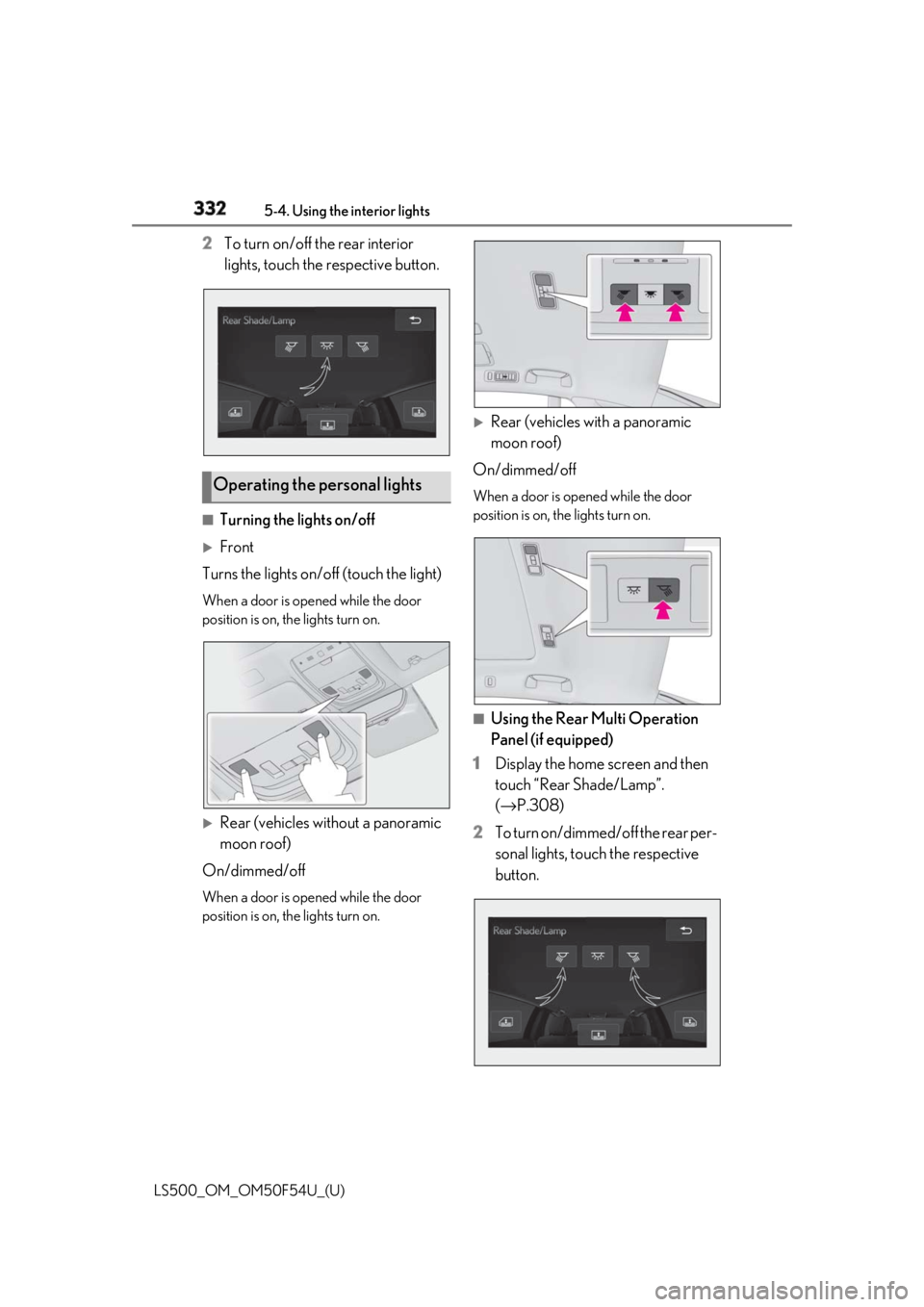
LS500_OM_OM50F54U_(U) 2 To turn on/off the rear interior
lights, touch the respective button.
■
Turning the lights on/off
Front
Turns the lights on/off (touch the light) When a door is opened while the door
position is on, the lights turn on.
Rear (vehicles without a panoramic
moon roof)
On/dimmed/off When a door is opened while the door
position is on, the lights turn on.
Rear (vehicles with a panoramic
moon roof)
On/dimmed/off When a door is opened while the door
position is on, the lights turn on.
■
Using the Rear Multi Operation
Panel (if equipped)
1 Display the home screen and then
touch “Rear Shade/Lamp”.
( → P.308)
2 To turn on/dimmed/off the rear per-
sonal lights, touch the respective
button.Operating the personal lights
Page 333 of 514
3335-4. Using the interior lights
LS500_OM_OM50F54U_(U) 5
Interior features ■
Illuminated entry system
The lights automatically turn on/off accord-
ing to the engine switch mode, the pres-
ence of the electronic key, whether the
doors are locked/unlocked, and whether
the doors are opened/closed. ■
To prevent the battery from being dis-
charged
If the interior lights remain on when the
engine switch is turned off, the lights will go
off automatically after 20 minutes. ■
When front interior light or front per-
sonal lights do not respond as normal●
When water, dirt, et c., have adhered to
the lens surface●
When operated with a wet hand●
When wearing gloves, etc.■
Customization
Some functions can be customized.
( → P.468)
NOTICE■
To prevent battery discharge
Do not leave the lights on longer than
necessary when the engine is not run-
ning.
■
Removing light lenses
Never remove the lens for the front inte-
rior light and front personal lights. Other-
wise, the lights will be damaged. If a lens
needs to be removed, contact your Lexus
dealer.
Page 336 of 514
336 5-5. Using the storage features
LS500_OM_OM50F54U_(U) ■
Glove box light
The glove box light turns on when the tail
lights are on. ■
Trunk opener main switch
The trunk opener main switch is located in
the glove box. ( → P.106)■
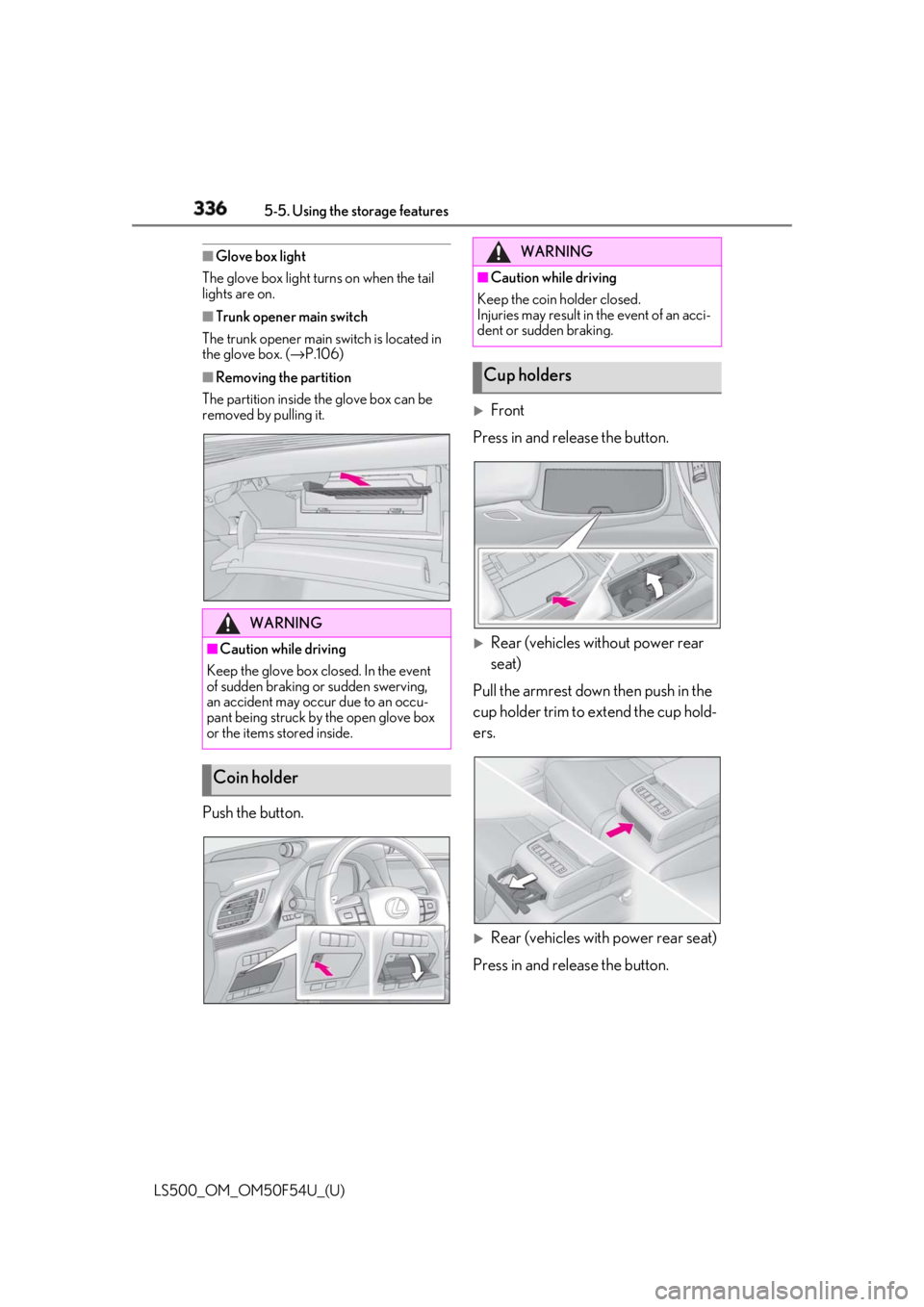
Removing the partition
The partition inside the glove box can be
removed by pulling it.
Push the button.
Front
Press in and release the button.
Rear (vehicles without power rear
seat)
Pull the armrest down then push in the
cup holder trim to extend the cup hold-
ers.
Rear (vehicles with power rear seat)
Press in and release the button.WARNING■
Caution while driving
Keep the glove box closed. In the event
of sudden braking or sudden swerving,
an accident may occur due to an occu-
pant being struck by the open glove box
or the items stored inside.
Coin holder WARNING■
Caution while driving
Keep the coin holder closed.
Injuries may result in the event of an acci-
dent or sudden braking.
Cup holders
Page 337 of 514
3375-5. Using the storage features
LS500_OM_OM50F54U_(U) 5
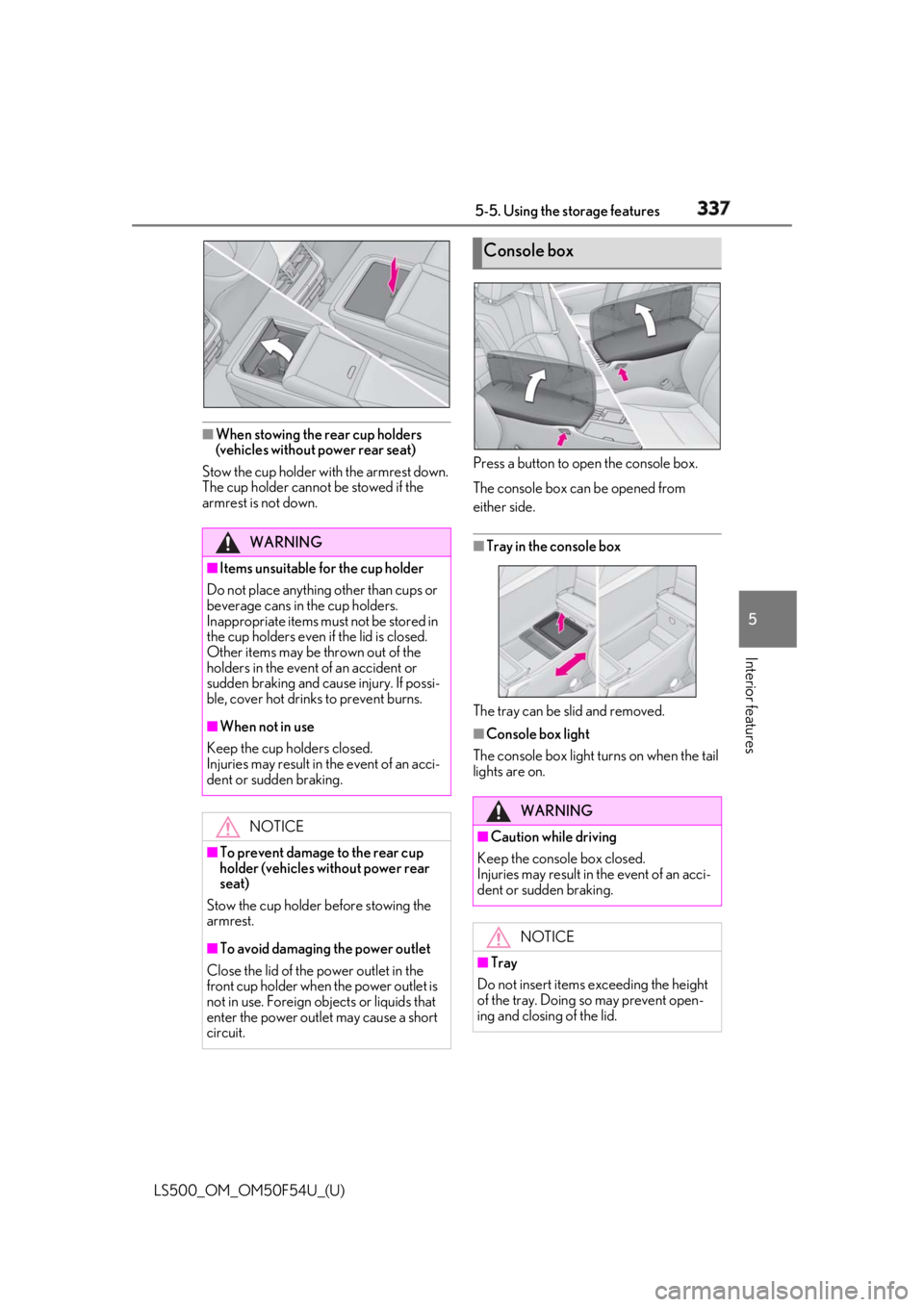
Interior features ■
When stowing the rear cup holders
(vehicles without power rear seat)
Stow the cup holder with the armrest down.
The cup holder cannot be stowed if the
armrest is not down. Press a button to open the console box.
The console box can be opened from
either side.
■
Tray in the console box
The tray can be slid and removed. ■
Console box light
The console box light turns on when the tail
lights are on.WARNING■
Items unsuitable for the cup holder
Do not place anything other than cups or
beverage cans in the cup holders.
Inappropriate items must not be stored in
the cup holders even if the lid is closed.
Other items may be thrown out of the
holders in the event of an accident or
sudden braking and cause injury. If possi-
ble, cover hot drinks to prevent burns. ■
When not in use
Keep the cup holders closed.
Injuries may result in the event of an acci-
dent or sudden braking.
NOTICE
■
To prevent damage to the rear cup
holder (vehicles without power rear
seat)
Stow the cup holder before stowing the
armrest.
■
To avoid damaging the power outlet
Close the lid of the power outlet in the
front cup holder when the power outlet is
not in use. Foreign ob jects or liquids that
enter the power outlet may cause a short
circuit. Console box
WARNING
■
Caution while driving
Keep the console box closed.
Injuries may result in the event of an acci-
dent or sudden braking.
NOTICE
■
Tray
Do not insert items exceeding the height
of the tray. Doing so may prevent open-
ing and closing of the lid.
Page 346 of 514
346 5-6. Using the other interior features
LS500_OM_OM50F54U_(U)
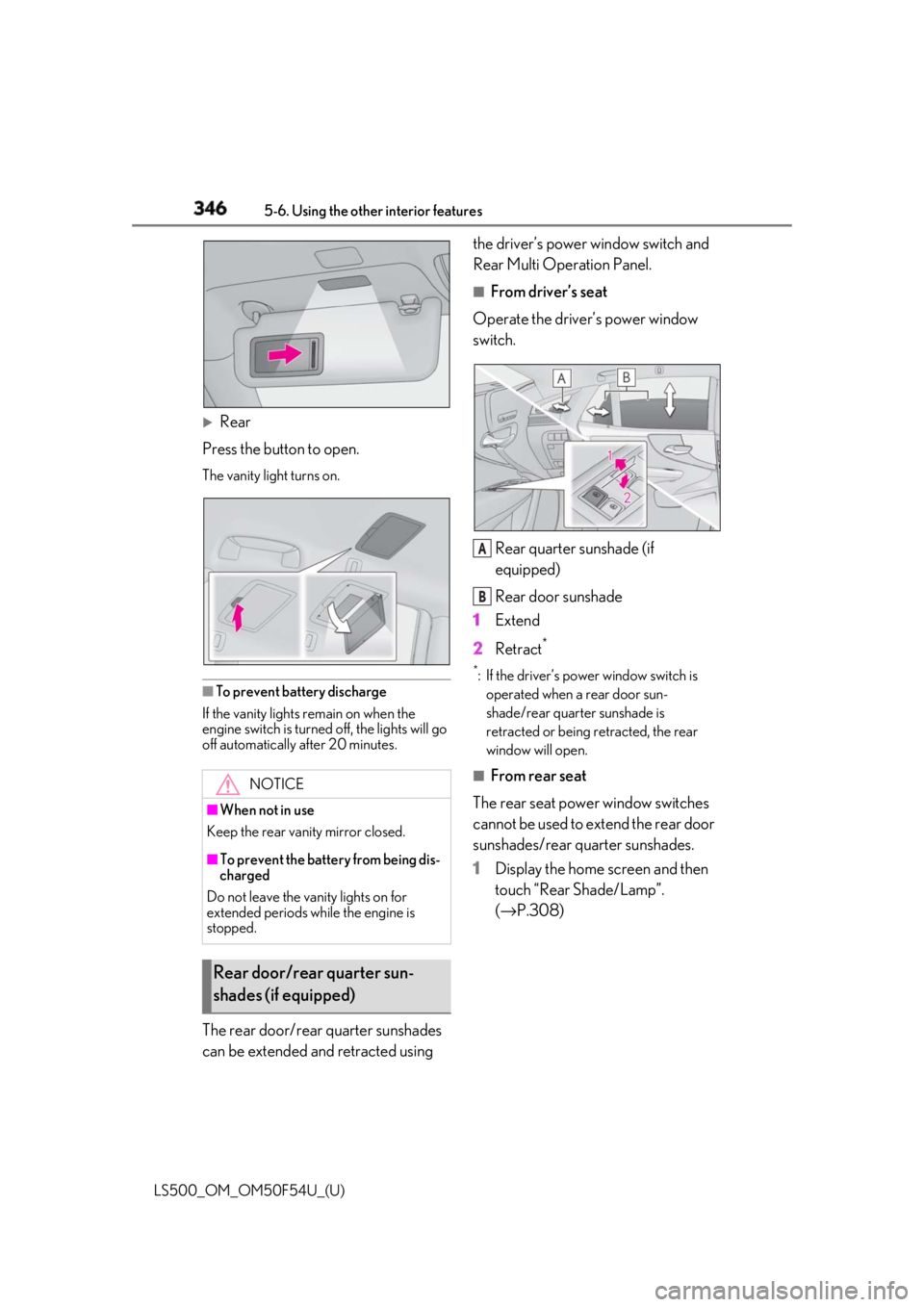
Rear
Press the button to open. The vanity light turns on.
■
To prevent battery discharge
If the vanity lights remain on when the
engine switch is turned off, the lights will go
off automatically after 20 minutes.
The rear door/rear quarter sunshades
can be extended and retracted using the driver’s power window switch and
Rear Multi Operation Panel. ■
From driver’s seat
Operate the driver’s power window
switch.
Rear quarter sunshade (if
equipped)
Rear door sunshade
1 Extend
2 Retract **
: If the driver’s power window switch is
operated when a rear door sun-
shade/rear quarter sunshade is
retracted or being retracted, the rear
window will open. ■
From rear seat
The rear seat power window switches
cannot be used to extend the rear door
sunshades/rear quarter sunshades.
1 Display the home screen and then
touch “Rear Shade/Lamp”.
( → P.308)NOTICE
■
When not in use
Keep the rear vani ty mirror closed.
■
To prevent the battery from being dis-
charged
Do not leave the vanity lights on for
extended periods while the engine is
stopped.
Rear door/rear quarter sun-
shades (if equipped) A
B
Page 364 of 514
364 6-1. Maintenance and care
LS500_OM_OM50F54U_(U) WARNING■
Precaution regarding the front
bumper (vehicles with Lexus Safety
System+A)
If the paint of the fr ont bumper is chipped
or scratched, the Lexus Safety System+A
may not function correctly. If this occurs,
consult your Lexus dealer. ■
Precaution regarding the rear
bumper
If the paint of the rear bumper is chipped
or scratched, the fo llowing systems may
not function correctly. If this occurs, con-
sult your Lexus dealer. ●
Lexus Safety System+A (if equipped)●
BSM (if equipped)●
RCTA (if equipped)●
PKSB (if equipped)
NOTICE■
To prevent paint deterioration and
corrosion on the body and compo-
nents (aluminum wheels, etc.)●
Wash the vehicle immediately in the
following cases:
• After driving near the sea coast
• After driving on salted roads
• If coal tar or tree sap is present on the
paint surface
• If dead insects, in sect droppings or
bird droppings are present on the
paint surface
• After driving in an area contaminated
with soot, oily smoke, mine dust, iron
powder or chemical substances
• If the vehicle becomes heavily soiled
with dust or mud
• If liquids such as benzene and gasoline
are spilled on the paint surface ●
If the paint is chipped or scratched,
have it repaired immediately. ●
To prevent the wheels from corroding,
remove any dirt and store in a place
with low humidity when storing the
wheels. ■
Cleaning the exterior lights ●
Wash carefully. Do not use organic
substances or scrub with a hard brush.
This may damage the surfaces of the
lights. ●
Do not apply wax to the surfaces of the
lights.
Wax may cause damage to the lenses. ■
When using an automatic car wash
Set the wiper switch to the off position.
If the wiper switch is in “AUTO”, the wip-
ers may operate and the wiper blades
may be damaged. ■
When using a high pressure car wash ●
When washing the vehicle, do not
spray the camera or its surrounding
area directly with a high pressure
washer. Shock applied from high pres-
sure water may cause the device to not
operate normally. ●
Do not bring the nozzle tip close to
boots (rubber or re sin manufactured
cover), connectors or the following
parts. The parts may be damaged if
they come into contact with high-pres-
sure water.
• Traction related parts
•Steering parts
• Suspension parts
• Brake parts
Page 370 of 514
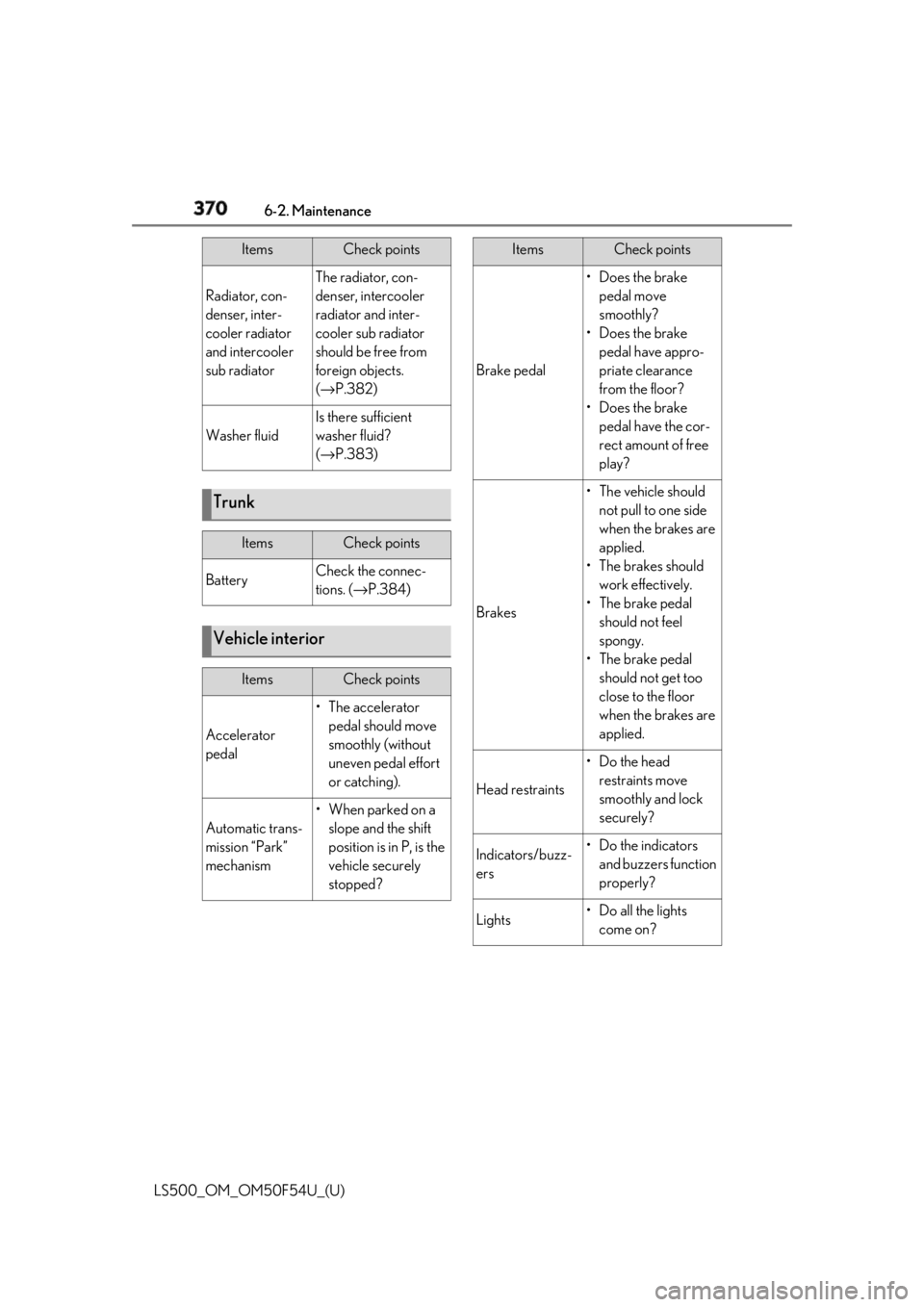
370 6-2. Maintenance
LS500_OM_OM50F54U_(U) Radiator, con-
denser, inter-
cooler radiator
and intercooler
sub radiator The radiator, con-
denser, intercooler
radiator and inter-
cooler sub radiator
should be free from
foreign objects.
( → P.382)
Washer fluid Is there sufficient
washer fluid?
( → P.383)
Trunk Items Check points
Battery Check the connec-
tions. ( → P.384)
Vehicle interior Items Check points
Accelerator
pedal • The accelerator
pedal should move
smoothly (without
uneven pedal effort
or catching).
Automatic trans-
mission “Park”
mechanism •When parked on a
slope and the shift
position is in P, is the
vehicle securely
stopped?Items Check points
Brake pedal •Does the brake
pedal move
smoothly?
•Does the brake
pedal have appro-
priate clearance
from the floor?
•Does the brake
pedal have the cor-
rect amount of free
play?
Brakes • The vehicle should
not pull to one side
when the brakes are
applied.
•The brakes should
work effectively.
• The brake pedal
should not feel
spongy.
• The brake pedal
should not get too
close to the floor
when the brakes are
applied.
Head restraints •Do the head
restraints move
smoothly and lock
securely?
Indicators/buzz-
ers •Do the indicators
and buzzers function
properly?
Lights • Do all the lights
come on?Items Check points
Page 393 of 514
3936-3. Do-it-yourself maintenance
LS500_OM_OM50F54U_(U) 6
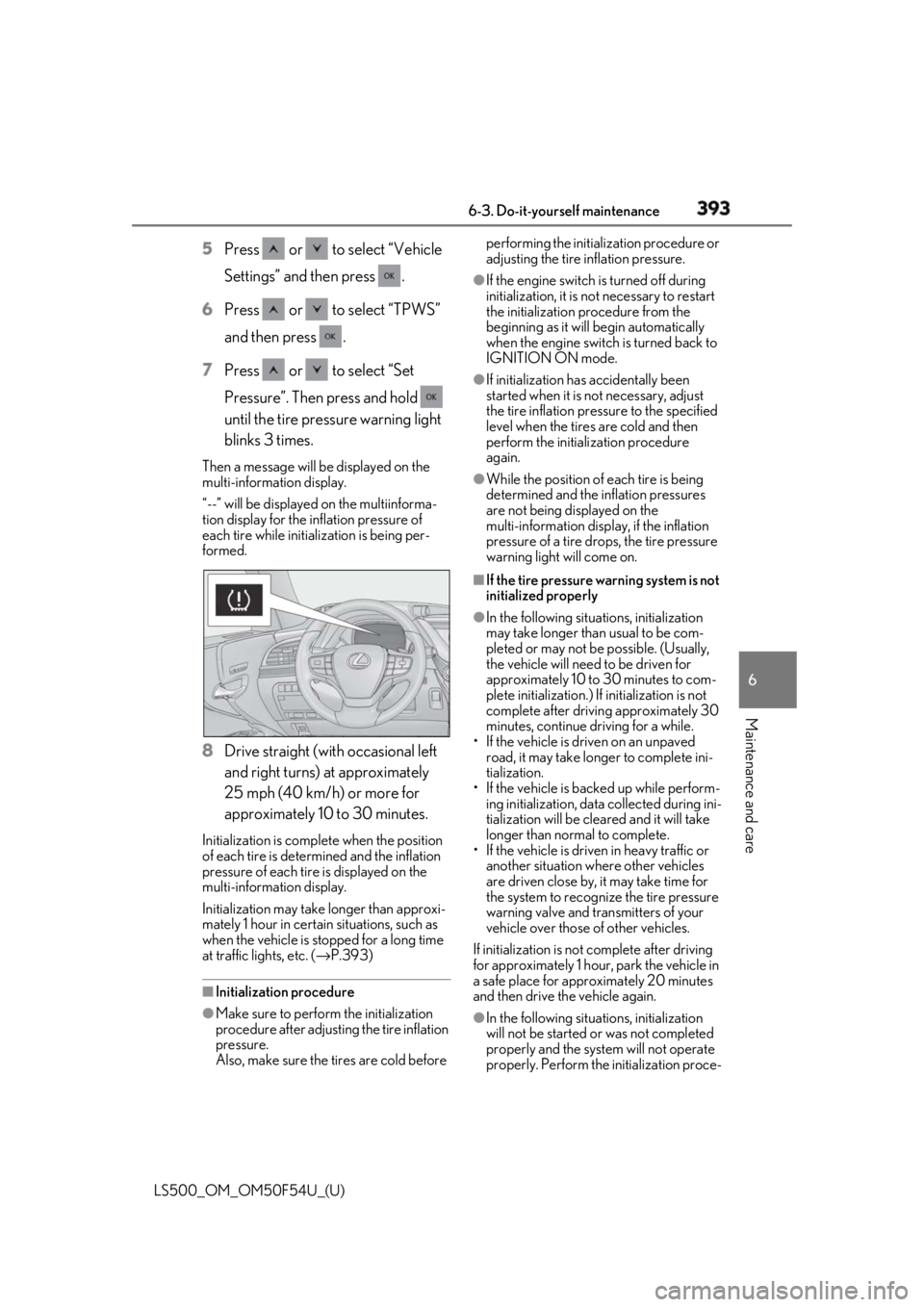
Maintenance and care 5 Press or to select “Vehicle
Settings” and then press .
6 Press or to select “TPWS”
and then press .
7 Press or to select “Set
Pressure”. Then press and hold
until the tire pressure warning light
blinks 3 times.Then a message will be displayed on the
multi-information display.
“--” will be displayed on the multiinforma-
tion display for the inflation pressure of
each tire while initia lization is being per-
formed.
8 Drive straight (with occasional left
and right turns) at approximately
25 mph (40 km/h) or more for
approximately 10 to 30 minutes.Initialization is complete when the position
of each tire is determined and the inflation
pressure of each tire is displayed on the
multi-information display.
Initialization may take longer than approxi-
mately 1 hour in certain situations, such as
when the vehicle is stopped for a long time
at traffic lights, etc. ( → P.393)
■
Initialization procedure
●
Make sure to perform the initialization
procedure after adjusting the tire inflation
pressure.
Also, make sure the tires are cold before performing the initia lization procedure or
adjusting the tire inflation pressure. ●
If the engine switch is turned off during
initialization, it is no t necessary to restart
the initialization procedure from the
beginning as it will begin automatically
when the engine switch is turned back to
IGNITION ON mode. ●
If initialization has accidentally been
started when it is not necessary, adjust
the tire inflation pressure to the specified
level when the tires are cold and then
perform the initiali zation procedure
again. ●
While the position of each tire is being
determined and the inflation pressures
are not being displayed on the
multi-information display, if the inflation
pressure of a tire drops, the tire pressure
warning light will come on. ■
If the tire pressure warning system is not
initialized properly ●
In the following situations, initialization
may take longer than usual to be com-
pleted or may not be possible. (Usually,
the vehicle will need to be driven for
approximately 10 to 30 minutes to com-
plete initialization.) If initialization is not
complete after drivin g approximately 30
minutes, continue driving for a while.
• If the vehicle is driven on an unpaved
road, it may take longer to complete ini-
tialization.
• If the vehicle is backed up while perform-
ing initialization, data collected during ini-
tialization will be cleared and it will take
longer than normal to complete.
• If the vehicle is driven in heavy traffic or
another situation where other vehicles
are driven close by, it may take time for
the system to recognize the tire pressure
warning valve and transmitters of your
vehicle over those of other vehicles.
If initialization is not complete after driving
for approximately 1 hour, park the vehicle in
a safe place for approximately 20 minutes
and then drive the vehicle again.
●
In the following situations, initialization
will not be started or was not completed
properly and the system will not operate
properly. Perform the initialization proce-