Beep LEXUS LS500 2018 Owners Manual
[x] Cancel search | Manufacturer: LEXUS, Model Year: 2018, Model line: LS500, Model: LEXUS LS500 2018Pages: 514, PDF Size: 10.62 MB
Page 97 of 514

973-2. Opening, closing and locking the doors and trunk
LS500_OM_OM50F54U_(U) 3
Before driving
To prevent unintended triggering of the
alarm, unlock the doors using the wireless
remote control and open and close a door
once after the settings have been changed.
(If a door is not opened within 60 seconds
after is pressed, the doors will be
locked again and the alarm will automati-
cally be set.)
In a case that the alarm is triggered, imme-
diately stop the alarm. ( → P.60)■
Impact detection door lock release sys-
tem
In the event that the vehicle is subject to a
strong impact, all the doors are unlocked.
Depending on the force of the impact or the
type of accident, however, the system may
not operate.
■
Operation signals
A buzzer sounds and the emergency flash-
ers flash to indicate that the doors have
been locked/unlocked. (Locked: once;
Unlocked: twice)
A buzzer sounds to indicate that the win-
dows and moon roof or panoramic moon
roof are operating.
■
Security feature
If a door is not opened within approximately 60 seconds after the vehicle is unlocked,
the security feature automatically locks the
vehicle again. ■
When the doors cannot be locked by the
lock sensor on the upper part of the
door handle
When the doors cannot be locked even if
the lock sensor on the surface of the door
handle is touched by a finger, touch the lock
sensor with the palm.
If you are wearing gloves, remove them.
■
Open door warning buzzer
If an attempt to lock the doors is made when
a door is not fully closed, a buzzer sounds
continuously for 5 seconds. Fully close the
door to stop the buzzer, and lock the vehi-
cle once more. ■
Setting the alarm
Locking the doors will set the alarm system.
( → P.60) ■
Conditions affecting the operation of
the smart access system with push-but-
ton start or wireless remote control
→ P.108 ■
If the smart access system with
push-button start or the wireless remote
control does not operate properly
Use the mechanical key to lock and unlock
the doors. ( → P.436)
Replace the key battery with a new one if it
is depleted. ( → P.403)
■
If the battery is discharged
The doors cannot be locked and unlocked
using the smart access system with
push-button start or wireless remote con-
trol. Lock or unlock the doors using the
mechanical key. ( → P.436)Multi-information
display/Beep Unlocking function
Exterior: Beeps 3
times
Interior: Pings once Holding the driver’s
door handle unlocks
only the driver’s
door.
Holding any of the
passenger door
handles unlocks all
the doors.
Exterior: Beeps
twice
Interior: Pings once Holding a door han-
dle unlocks all the
doors.
Page 260 of 514
260 4-5. Using the driving support systems
LS500_OM_OM50F54U_(U) ●
A shift position other than P is selected.■
Setting the buzzer volume
The buzzer volume can be adjusted on the
multi-information display. ( → P.257)■
If “Parking Assist Unavailable Clean
Parking Assist Sensor” is displayed on
the multi-inform ation display
A sensor may be covered with ice, snow,
dirt, etc. Remove the ice, snow, dirt, etc.,
from the sensor to return the system to nor-
mal.
Also, due to ice forming on a sensor at low
temperatures, a warning message may be
displayed or the sensor may not be able to
detect an object. Once the ice melts, the
system will return to normal. ■
Sensor detectio n information●
The following situations may occur
during use.
• Depending on the shape of the object
and other factors, the detection distance
may shorten, or detection may be impos-
sible.
• There will be a short delay between
object detection and display. Even at low
speeds, there is a possibility that the
object will come within the sensor’s
detection areas before the display is
shown and the warning beep sounds.
• It might be difficult to hear the buzzer due
to the volume of the audio system or air
flow noise of the air conditioning system.■
Conditions under which the function
may not function correctly
Certain vehicle conditions and the sur-
rounding environment may affect the ability
of a sensor to correctly detect objects. Par-
ticular instances where this may occur are
listed below.
●
There is dirt, snow or ice on a sensor.
(Cleaning the sensors will resolve this
problem.)
●
A sensor is frozen. (Thawing the area will
resolve this problem.)
In especially cold weather, if a sensor is
frozen the sensor display may be dis-
played abnormally, or objects, such as a
wall, may not be detected.
●
A sensor is covered in any way. ●
When a sensor or the area around a sen-
sor is extremely hot or cold. ●
On an extremely bumpy road, on an
incline, on gravel, or on grass. ●
The vicinity of the vehicle is noisy due to
vehicle horns, motorcycle engines, air
brakes of large vehicles, or other loud
noises producing ultrasonic waves. ●
There is another vehicle equipped with
parking assist sensors in the vicinity. ●
A sensor is coated with a sheet of spray
or heavy rain. ●
If a sensor is hit by a large amount of
water, such as when driving on a flooded
road. ●
If the vehicle is significantly tilted. ●
The vehicle is approaching a tall or
curved curb. ●
If objects draw too close to the sensor. ■
Objects which may not be properly
detected
The shape of the object may prevent the
sensor from detectin g it. Pay particular
attention to the following objects: ●
Wires, fences, ropes, etc. ●
Cotton, snow and other materials that
absorb sound waves ●
Sharply-angled objects ●
Low objects ●
Tall objects with upper sections project-
ing outwards in the direction of your vehi-
cle
People may not be de tected if they are
wearing certain types of clothing.
Page 263 of 514
2634-5. Using the driving support systems
LS500_OM_OM50F54U_(U) 4
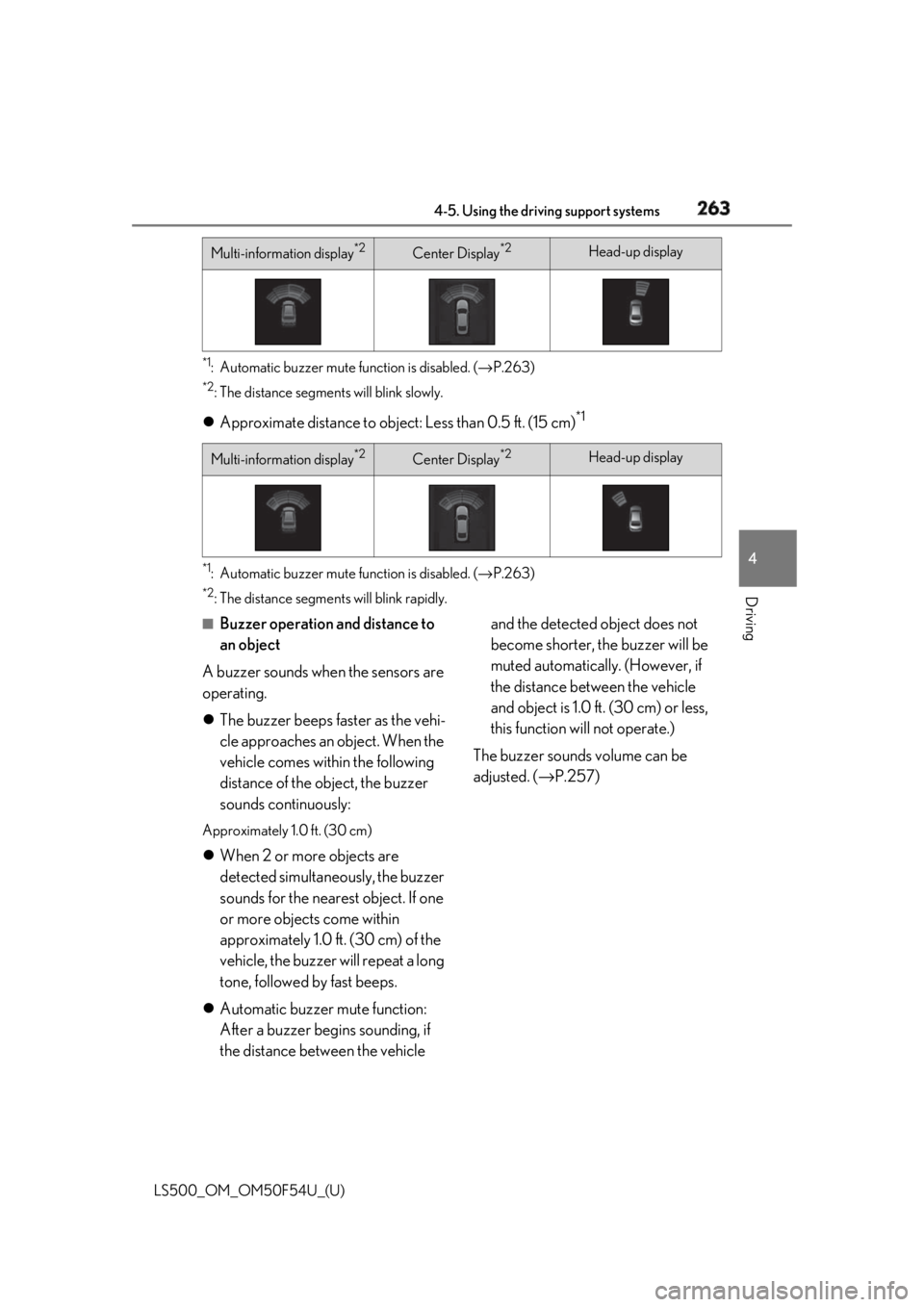
Driving *1
: Automatic buzzer mute function is disabled. ( → P.263)*2
: The distance segments will blink slowly.
Approximate distance to object: Less than 0.5 ft. (15 cm) *1
*1
: Automatic buzzer mute function is disabled. ( → P.263)*2
: The distance segmen ts will blink rapidly.■
Buzzer operation and distance to
an object
A buzzer sounds when the sensors are
operating.
The buzzer beeps faster as the vehi-
cle approaches an object. When the
vehicle comes within the following
distance of the object, the buzzer
sounds continuously: Approximately 1.0 ft. (30 cm)
When 2 or more objects are
detected simultaneously, the buzzer
sounds for the nearest object. If one
or more objects come within
approximately 1.0 ft. (30 cm) of the
vehicle, the buzzer will repeat a long
tone, followed by fast beeps.
Automatic buzzer mute function:
After a buzzer begins sounding, if
the distance between the vehicle and the detected object does not
become shorter, the buzzer will be
muted automatically. (However, if
the distance between the vehicle
and object is 1.0 ft. (30 cm) or less,
this function will not operate.)
The buzzer sounds volume can be
adjusted. ( → P.257)Multi-information display *2
Center Display *2
Head-up display
Multi-information display *2
Center Display *2
Head-up display
Page 272 of 514
272 4-5. Using the driving support systems
LS500_OM_OM50F54U_(U) The Parking Support Brake can be
enabled/disabled on the multi-informa-
tion display. All of the Parking Support
Brake functions (static objects,
rear-crossing vehicles, and rear pedes-
trians) are enabled/disabled simultane-
ously.
Use the meter control switches to
enable/disable the parking support
brake. ( → P.77)
1 Press or to select .
2 Press or to select
and then press .When the Parking Support Brake is dis-
abled, the PKSB OFF indicator ( → P.64)
illuminates on the multi-information dis-
play.
To re-enable the system when it was dis-
abled, select on the multi-information
display, select and then On. If dis-
abled using this method, the system will not
be re-enabled by turning the engine switch
off and then to IGNITION ON mode.
If the engine output restriction control or
brake control operates, a buzzer will sound
and a message will be displayed on the
Center Display and multi-information dis-
play, to alert the driver. On vehicles with a
head-up display, the head-up display will
display the same message as the
multi-information display.
Depending on the situation, engine output restriction control will operate to either
limit acceleration or restrict output as
much as possible.
Engine output restriction control is
operating (acceleration restriction) Acceleration greater than a certain
amount is restricted by the system.
Center Display (Panoramic view monitor):
No warning displayed
Multi-information display: “Object
Detected Acceleration Reduced”
PKSB OFF indicator: Not illuminated
Buzzer: Does not sound
Engine output restriction control is
operating (output restricted as
much as possible) The system has determined that stron-
ger-than-normal brake operation is neces-
sary.
Center Display (Panoramic view monitor):
“BRAKE!”
Multi-information display: “BRAKE!”
PKSB OFF indicator: Not illuminated
Buzzer: Short beep
Brake control is operating The system determined that emergency
braking is necessary.
Center Display (Panoramic view monitor):
“BRAKE!”
Multi-information display: “BRAKE!”
PKSB OFF indicator: Not illuminated
Buzzer: Short beep
Vehicle stopped by system opera-
tion The vehicle has been stopped by brake
control operation.
Center Display (Panoramic view monitor): Enabling/Disabling the Parking
Support Brake
Displays and buzzers for engine
output restriction control and
brake control
Page 273 of 514
2734-5. Using the driving support systems
LS500_OM_OM50F54U_(U) 4
Driving “Press Brake Pedal”
Multi-information display: “Switch to
Brake” (If the accelerator pedal is not
depressed, “Press Brake Pedal” will be dis- played.)
PKSB OFF indicator: Illuminated
Buzzer: Short beep
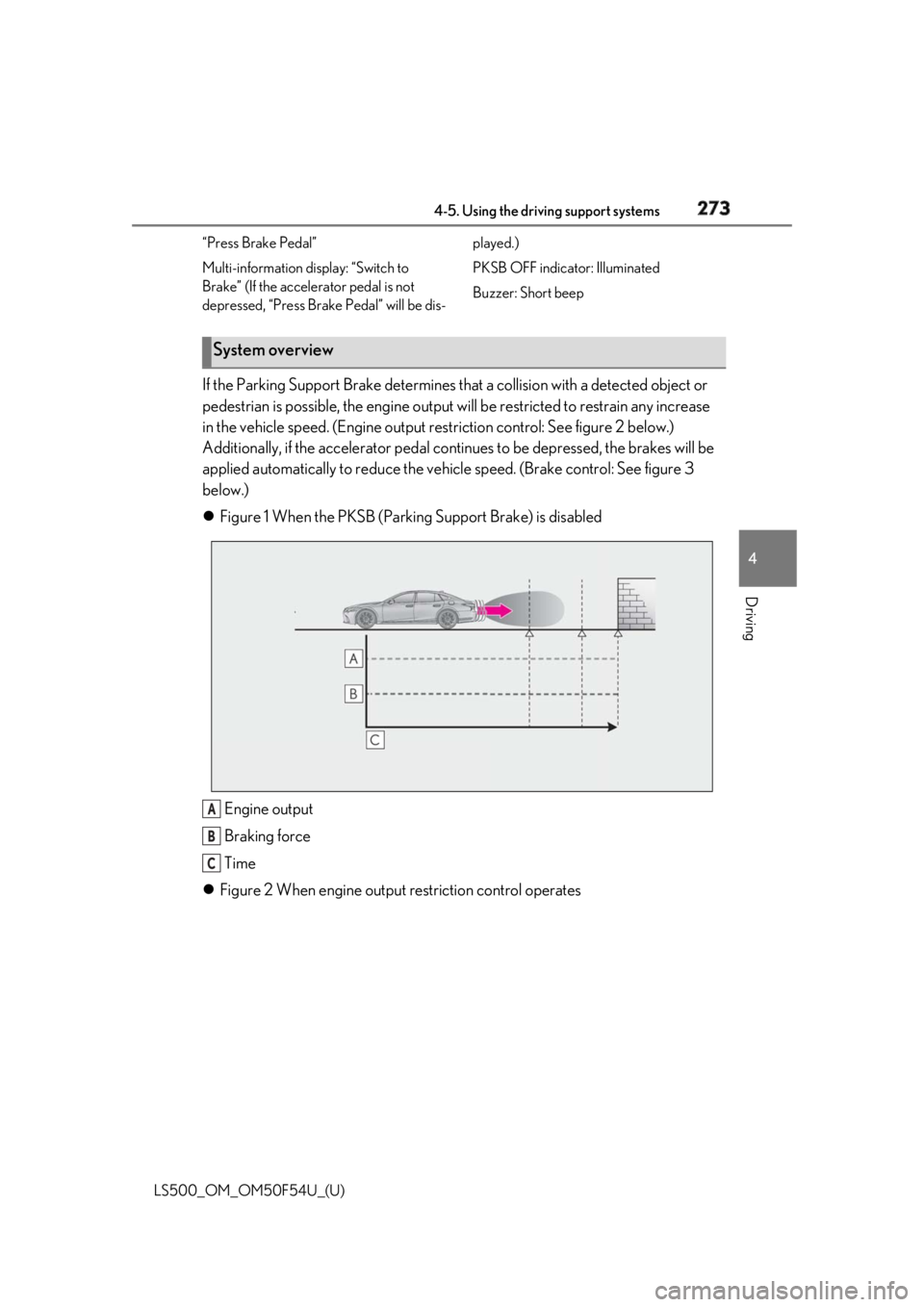
If the Parking Support Brake determines that a collision with a detected object or
pedestrian is possible, the engine output w ill be restricted to restrain any increase
in the vehicle speed. (Engine output restriction control: Se e figure 2 below.)
Additionally, if the accelerator pedal contin ues to be depressed, the brakes will be
applied automatically to re duce the vehicle speed. (Brake control: See figure 3
below.)
Figure 1 When the PKSB (Parki ng Support Brake) is disabled
Engine output
Braking force
Time
Figure 2 When engine output restriction control operatesSystem overview
A
B
C