climate control LEXUS LS500 2018 Owners Manual
[x] Cancel search | Manufacturer: LEXUS, Model Year: 2018, Model line: LS500, Model: LEXUS LS500 2018Pages: 514, PDF Size: 10.62 MB
Page 3 of 514
3TABLE OF CONTENTS
LS500_OM_OM50F54U_(U) 1
2
3
4
5
6
7
8
94-2. Driving procedures
Engine (ignition) switch .............. 160
Automatic transmission.............. 163
Turn signal lever............................. 169
Parking brake ................................. 170
Brake Hold....................................... 173
4-3. Operating the lights and wipers
Headlight switch ............................ 175
AHB (Automatic High Beam)
............................................................ 178
Windshield wipers and washer
............................................................ 180
4-4. Refueling
Opening the fuel tank cap......... 185
4-5. Using the driving support systems
Lexus Safety System+A.............. 187
Lexus Safety System+ ................. 194
PCS (Pre-Collision System) (vehi-
cles with Lexus Safety System+A)
........................................................... 200
PCS (Pre-Collision System) (vehi-
cles with Lexus Safety System+)
............................................................ 210
FCTA (Front Cross Traffic Alert)
............................................................ 218
LTA (Lane Tracing Assist)......... 221
LKA (Lane-Keeping Assist) ..... 231
RSA (Road Sign Assist) ............. 238
Dynamic radar crui se control with
full-speed range.......................... 241
BSM (Blind Spot Monitor) ........ 251
PKSA (Parking Support Alert)
........................................................... 256
Intuitive parking assist ................ 257
RCTA (Rear cross traffic alert)
function .......................................... 264 RCD (Rear Camera Detection)
function.......................................... 268
PKSB (Parking Support Brake)
............................................................ 271
Parking Support Brake function
(static objects) ............................. 277
Parking Support Brake function
(rear-crossing vehicles) ......... 282
Parking Support Brake function
(rear pedestrians) ..................... 286
Driving mode select switch ..... 289
Electronically modulated air sus-
pension ............................................ 291
Driving assist systems ................ 294
4-6. Driving tips
Winter driving tips ....................... 299
5-1. Remote Touch/Display
Remote Touch............................... 304
Center Display.............................. 306
Rear Multi Operation Panel ... 308
5-2. Lexus Climate Concierge
Lexus Climate Concierge........... 311
5-3. Using the air conditioning system
and defogger
Front automatic air conditioning
system ............................................. 313
Rear air conditioning system... 323
Heated steering wheel/seat heat-
ers/seat ventilators
......
............. 326
5-4. Using the interior lights
Interior lights list ........................... 330
5-5. Using the storage features
List of storag e features .............. 334
Trunk features ............................... 3395
Interior features
Page 300 of 514
300 4-6. Driving tips
LS500_OM_OM50F54U_(U) Perform the following according to the
driving conditions:
Do not try to forcib ly open a window
or move a wiper that is frozen. Pour
warm water over the frozen area to
melt the ice. Wipe away the water
immediately to prevent it from
freezing.
To ensure proper operation of the
climate control system fan, remove
any snow that has accumulated on
the air inlet vents in front of the
windshield.
Check for and remove any excess
ice or snow that may have accumu-
lated on the exterior lights, vehicle’s
roof, chassis, around the tires or on
the brakes.
Remove any snow or mud from the
bottom of your shoes before getting
in the vehicle.
Accelerate the vehicle slowly, keep a
safe distance between you and the
vehicle ahead, and drive at a reduced
speed suitable to road conditions. Park the vehicle and shift the shift posi-
tion to P without setting the parking
brake. The parking brake may freeze
up, preventing it from being released. If
the vehicle is parked without setting
the parking brake, make sure to block
the wheels.
Failure to do so may be dangerous
because it may cause the vehicle to
move unexpectedly, possibly leading to
an accident.
Vehicles with front and rear tires of
the same size
Use the correct tire chain size when
mounting the tire chains.
Chain size is regulated for each tire
size.
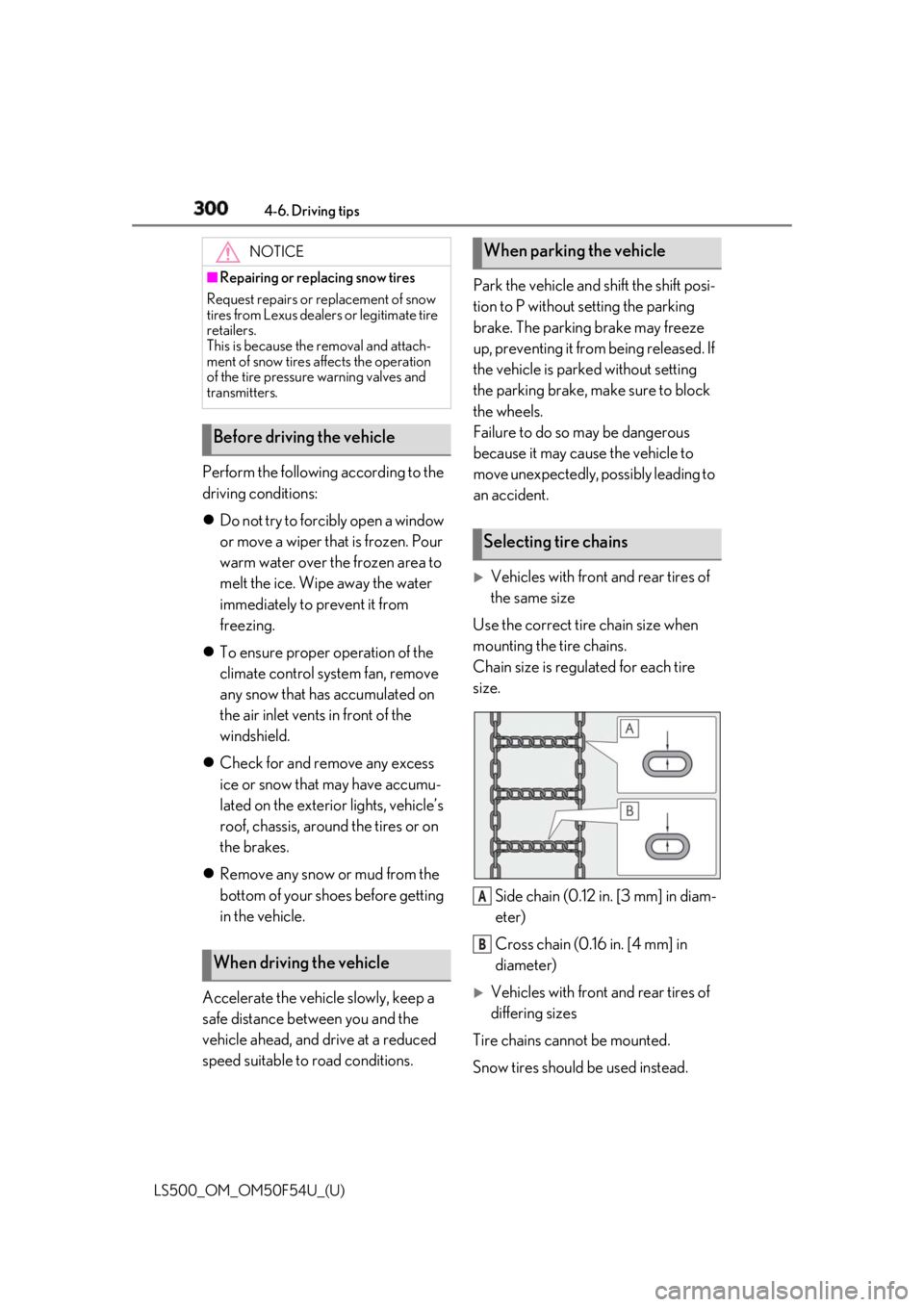
Side chain (0.12 in. [3 mm] in diam-
eter)
Cross chain (0.16 in. [4 mm] in
diameter)
Vehicles with front and rear tires of
differing sizes
Tire chains cannot be mounted.
Snow tires should be used instead.NOTICE■
Repairing or replacing snow tires
Request repairs or replacement of snow
tires from Lexus dealers or legitimate tire
retailers.
This is because the removal and attach-
ment of snow tires affects the operation
of the tire pressure warning valves and
transmitters.
Before driving the vehicle
When driving the vehicle When parking the vehicle
Selecting tire chains
A
B
Page 311 of 514
3115-2. Lexus Climate Concierge
LS500_OM_OM50F54U_(U) 5
Interior features 5-2.Lexus Climate Concierge
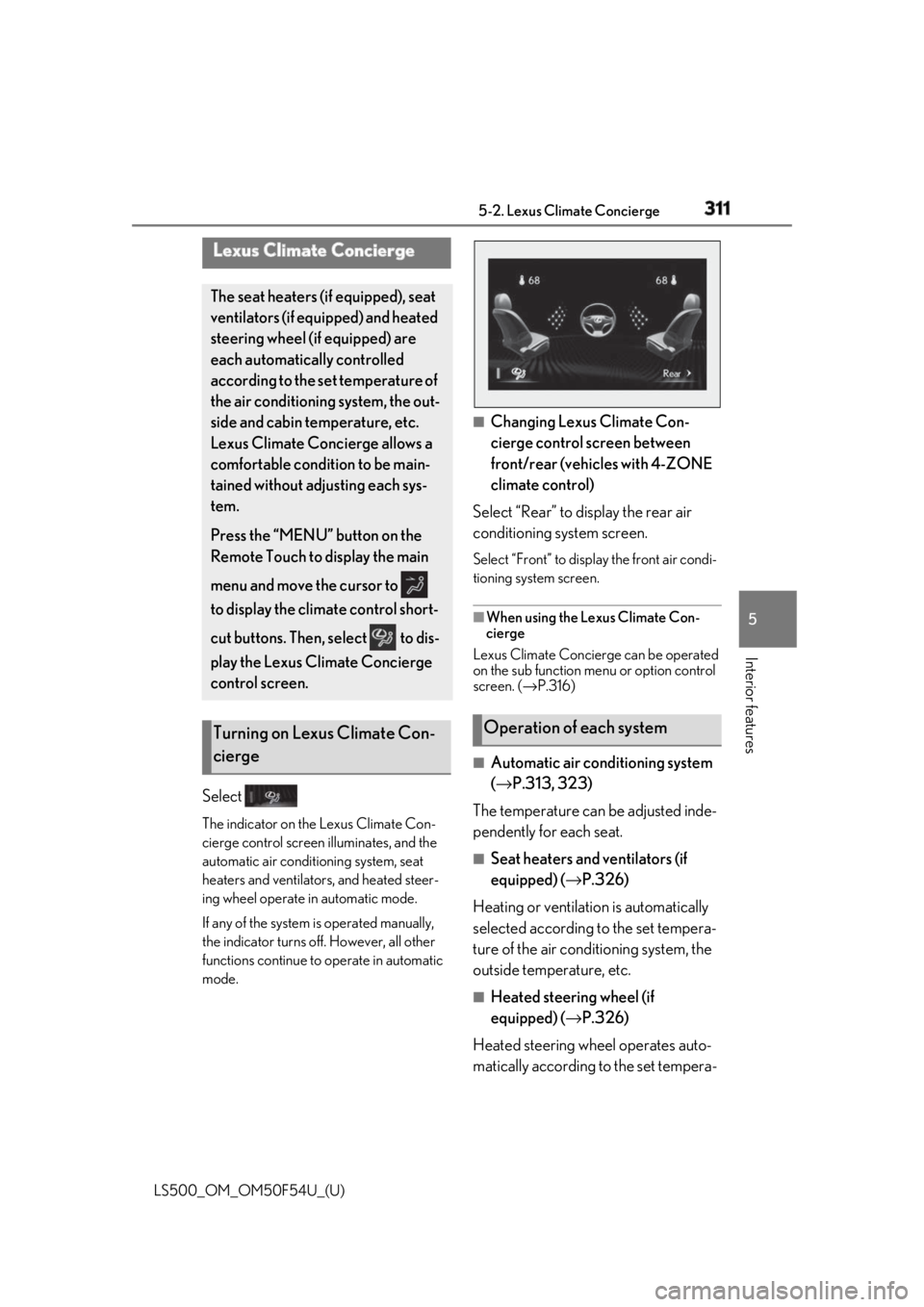
Select The indicator on the Lexus Climate Con-
cierge control screen illuminates, and the
automatic air conditioning system, seat
heaters and ventilators, and heated steer-
ing wheel operate in automatic mode.
If any of the system is operated manually,
the indicator turns off. However, all other
functions continue to operate in automatic
mode. ■
Changing Lexus Climate Con-
cierge control screen between
front/rear (vehicles with 4-ZONE
climate control)
Select “Rear” to display the rear air
conditioning system screen. Select “Front” to display the front air condi-
tioning system screen.
■
When using the Lexus Climate Con-
cierge
Lexus Climate Concierge can be operated
on the sub function menu or option control
screen. ( → P.316)
■
Automatic air conditioning system
( → P.313, 323)
The temperature can be adjusted inde-
pendently for each seat. ■
Seat heaters and ventilators (if
equipped) ( → P.326)
Heating or ventilation is automatically
selected according to the set tempera-
ture of the air conditioning system, the
outside temperature, etc. ■
Heated steering wheel (if
equipped) ( → P.326)
Heated steering wheel operates auto-
matically according to the set tempera-Lexus Climate Concierge The seat heaters (if equipped), seat
ventilators (if equipped) and heated
steering wheel (if equipped) are
each automatically controlled
according to the set temperature of
the air conditioning system, the out-
side and cabin temperature, etc.
Lexus Climate Concierge allows a
comfortable condition to be main-
tained without adjusting each sys-
tem.
Press the “MENU” button on the
Remote Touch to display the main
menu and move the cursor to
to display the climate control short-
cut buttons. Then, select to dis-
play the Lexus Climate Concierge
control screen.
Turning on Lexus Climate Con-
cierge Operation of each system
Page 312 of 514

312 5-2. Lexus Climate Concierge
LS500_OM_OM50F54U_(U) ture of the air conditioning system, the
outside temperature, etc. ■
Passenger detection functions●
When a passenger is detected in the
front passenger seat, the seat heater and
ventilator will operate automatically.●
When a passenger is detected in a rear
seat, the seat heater and ventilator will
operate automatically. (vehicles with
4-ZONE climate control)■
Seat heater/ventilator operation
When automatic mode is selected using the
seat heater/ventilator switch, passenger
detection is not performed. ■
Rear seat heater operation (vehicles
with DUAL-ZONE climate control)
The rear seat heaters are not controlled by
the Lexus Climate Concierge.
Page 313 of 514
3135-3. Using the air conditio ning system and defogger
LS500_OM_OM50F54U_(U) 5
Interior features 5-3.Using the air conditioning system and defogger
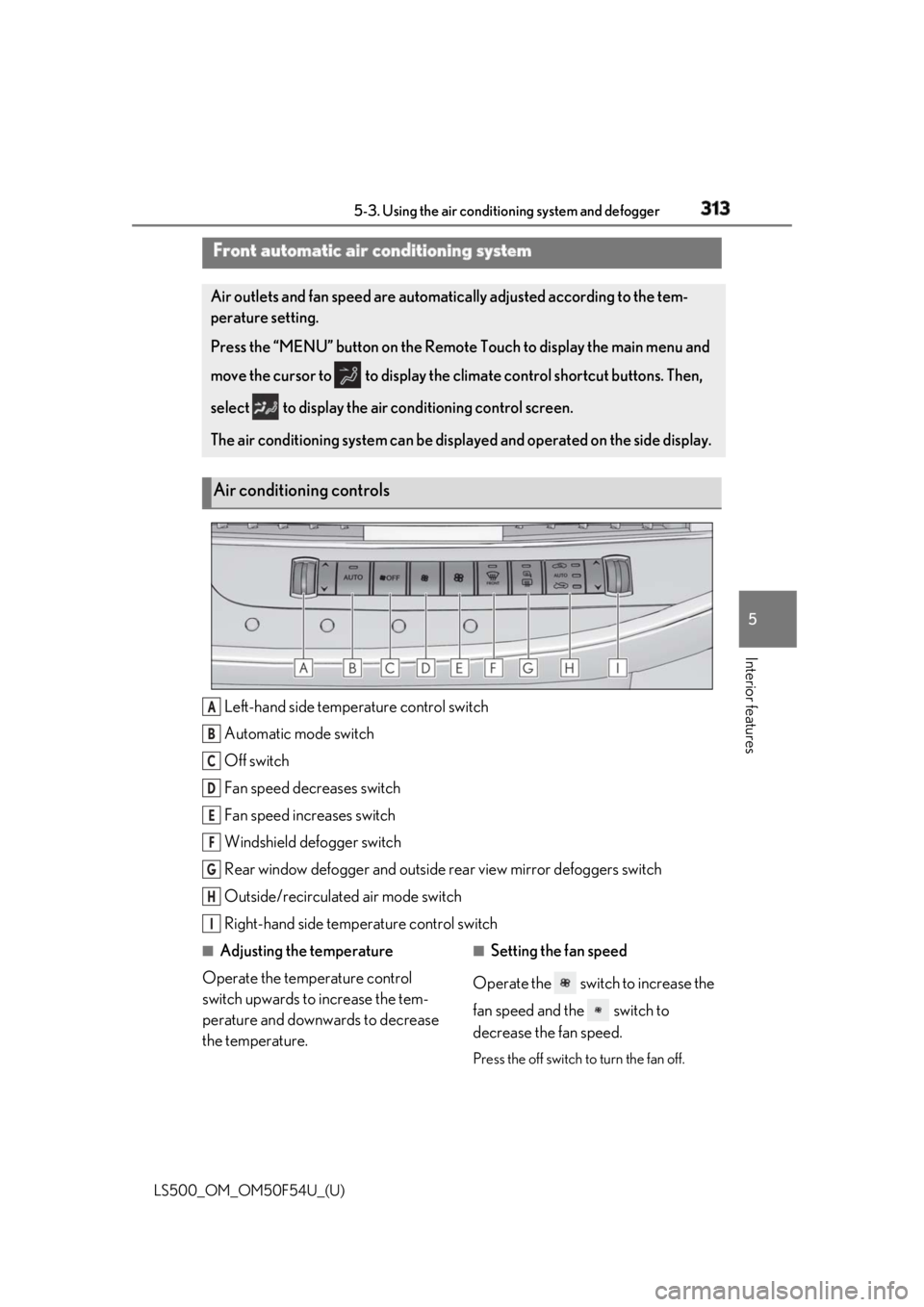
Left-hand side temperature control switch
Automatic mode switch
Off switch
Fan speed decreases switch
Fan speed increases switch
Windshield defogger switch
Rear window defogger and outside rear view mirror defoggers switch
Outside/recirculated air mode switch
Right-hand side temp erature control switch■
Adjusting the temperature
Operate the temperature control
switch upwards to increase the tem-
perature and downwards to decrease
the temperature. ■
Setting the fan speed
Operate the switch to increase the
fan speed and the switch to
decrease the fan speed.
Press the off switch to turn the fan off.Front automatic air conditioning system Air outlets and fan speed are automati cally adjusted according to the tem-
perature setting.
Press the “MENU” button on the Remote Touch to display the main menu and
move the cursor to to display the climate control shortcut buttons. Then,
select to display the air conditioning control screen.
The air conditioning system can be displa yed and operated on the side display.
Air conditioning controls
A
B
C
D
E
F
G
H
I
Page 316 of 514
316 5-3. Using the air conditioning system and defogger
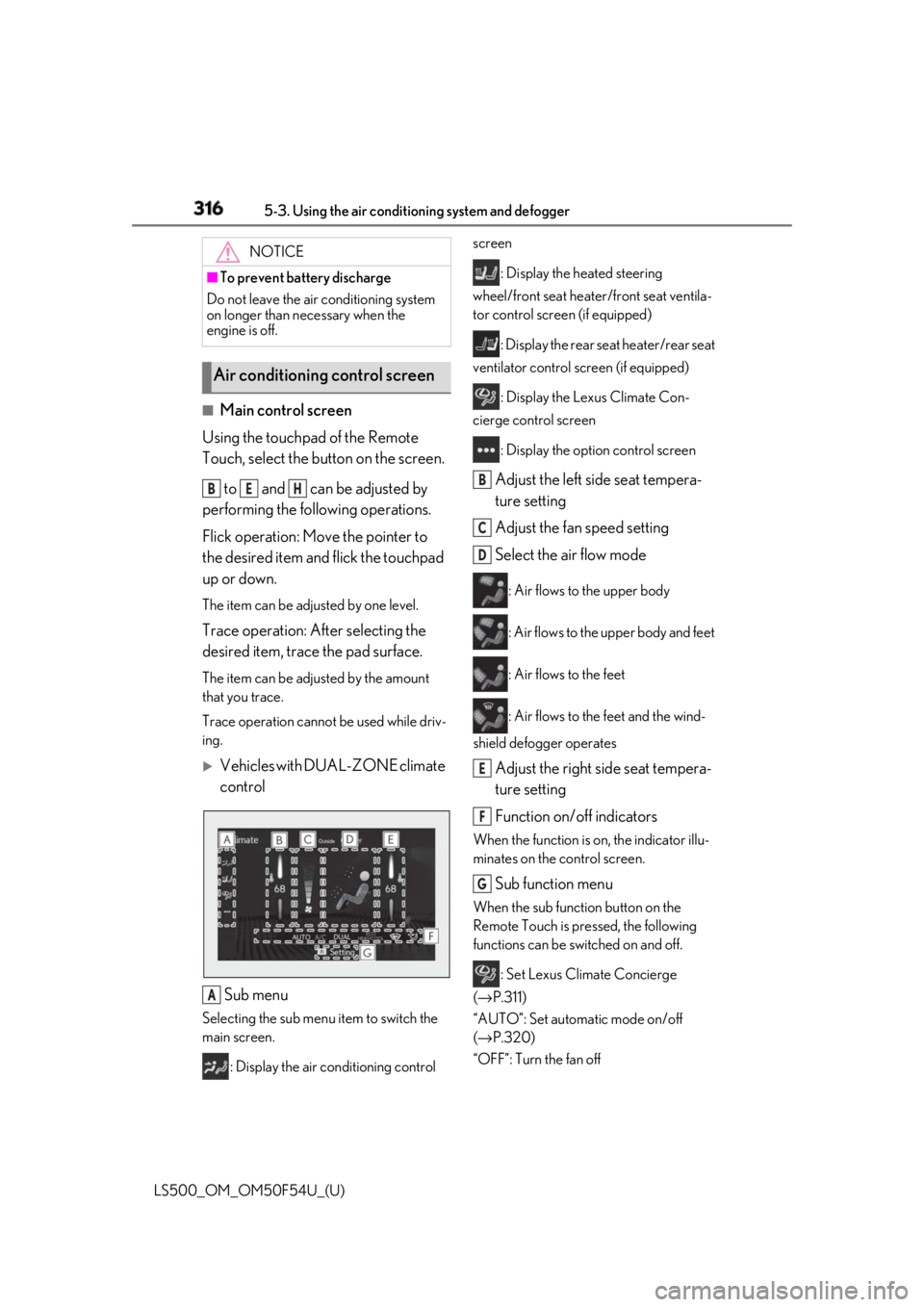
LS500_OM_OM50F54U_(U) ■
Main control screen
Using the touchpad of the Remote
Touch, select the button on the screen.
to and can be adjusted by
performing the following operations.
Flick operation: Move the pointer to
the desired item and flick the touchpad
up or down. The item can be adjusted by one level.
Trace operation: After selecting the
desired item, trace the pad surface. The item can be adjusted by the amount
that you trace.
Trace operation cannot be used while driv-
ing.
Vehicles with DUAL-ZONE climate
control
Sub menu Selecting the sub menu item to switch the
main screen.
: Display the air conditioning control screen
: Display the heated steering
wheel/front seat heater /front seat ventila-
tor control screen (if equipped)
: Display the rear seat heater/rear seat
ventilator control screen (if equipped)
: Display the Lexus Climate Con-
cierge control screen
: Display the option control screen
Adjust the left side seat tempera-
ture setting
Adjust the fan speed setting
Select the air flow mode : Air flows to the upper body
: Air flows to the upper body and feet
: Air flows to the feet
: Air flows to the feet and the wind-
shield defogger operates
Adjust the right side seat tempera-
ture setting
Function on/off indicators When the function is on, the indicator illu-
minates on the control screen.
Sub function menu When the sub function button on the
Remote Touch is pressed, the following
functions can be switched on and off.
: Set Lexus Climate Concierge
( → P.311)
“AUTO”: Set automatic mode on/off
( → P.320)
“OFF”: Turn the fan off NOTICE■
To prevent battery discharge
Do not leave the air conditioning system
on longer than necessary when the
engine is off.
Air conditioning control screen B E H
A B
C
D
E
F
G
Page 317 of 514
3175-3. Using the air conditio ning system and defogger
LS500_OM_OM50F54U_(U) 5
Interior features “A/C”: Set cooling and dehumidification
function
“DUAL”: Adjust the temperature for driver
and passenger seats separately (“DUAL”
mode) ( → P.321)
: Set eco air conditioning mode
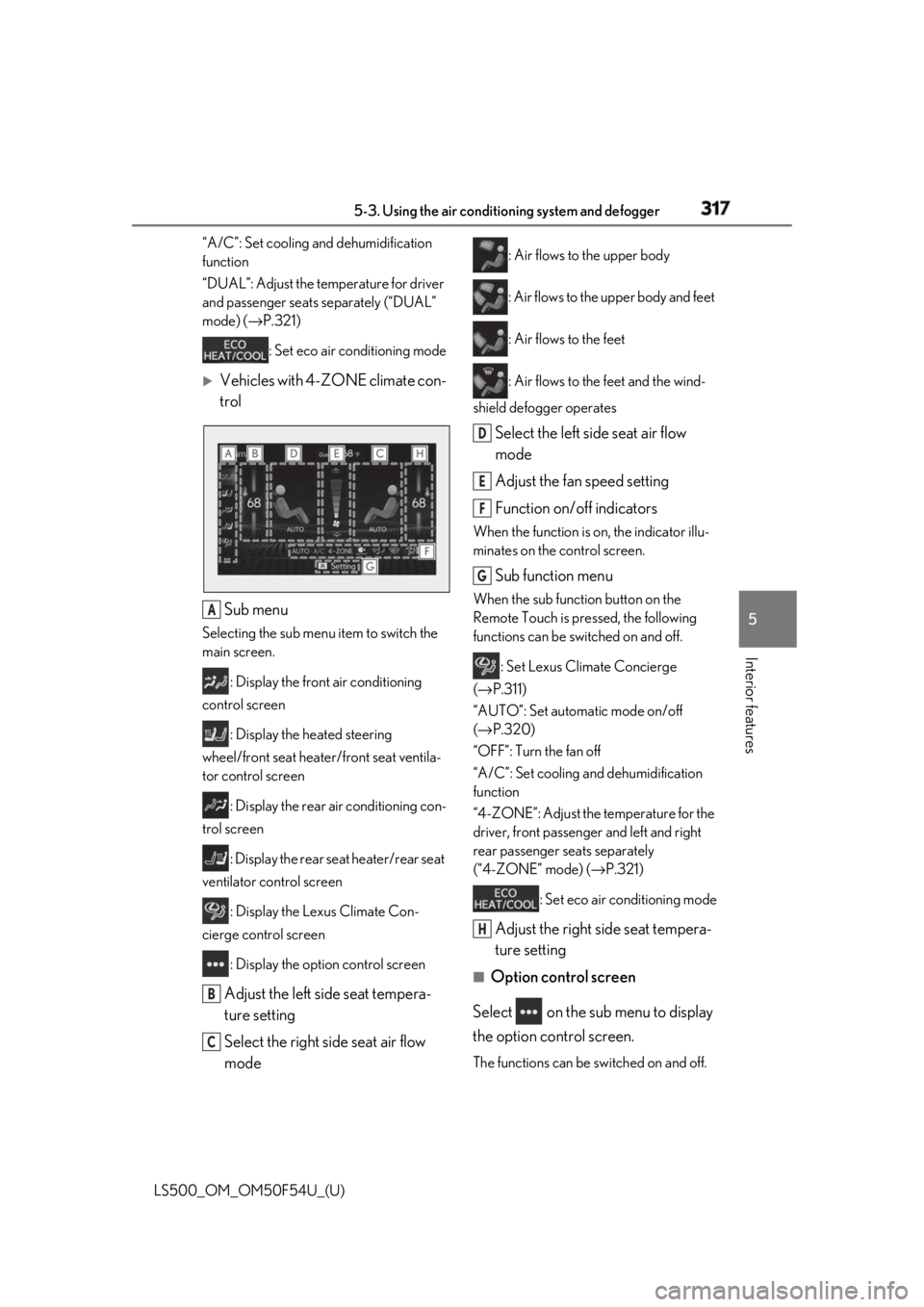
Vehicles with 4-ZONE climate con-
trol
Sub menu Selecting the sub menu item to switch the
main screen.
: Display the front air conditioning
control screen
: Display the heated steering
wheel/front seat heater/front seat ventila-
tor control screen
: Display the rear air conditioning con-
trol screen
: Display the rear seat heater/rear seat
ventilator control screen
: Display the Lexus Climate Con-
cierge control screen
: Display the option control screen
Adjust the left side seat tempera-
ture setting
Select the right side seat air flow
mode : Air flows to the upper body
: Air flows to the upper body and feet
: Air flows to the feet
: Air flows to the feet and the wind-
shield defogger operates
Select the left side seat air flow
mode
Adjust the fan speed setting
Function on/off indicators When the function is on, the indicator illu-
minates on the control screen.
Sub function menu When the sub function button on the
Remote Touch is pressed, the following
functions can be switched on and off.
: Set Lexus Climate Concierge
( → P.311)
“AUTO”: Set automatic mode on/off
( → P.320)
“OFF”: Turn the fan off
“A/C”: Set cooling and dehumidification
function
“4-ZONE”: Adjust the temperature for the
driver, front passenger and left and right
rear passenger se ats separately
(“4-ZONE” mode) ( → P.321)
: Set eco air conditioning mode
Adjust the right side seat tempera-
ture setting ■
Option control screen
Select on the sub menu to display
the option control screen.
The functions can be switched on and off.A
B
C D
E
F
G
H
Page 318 of 514
318 5-3. Using the air conditioning system and defogger
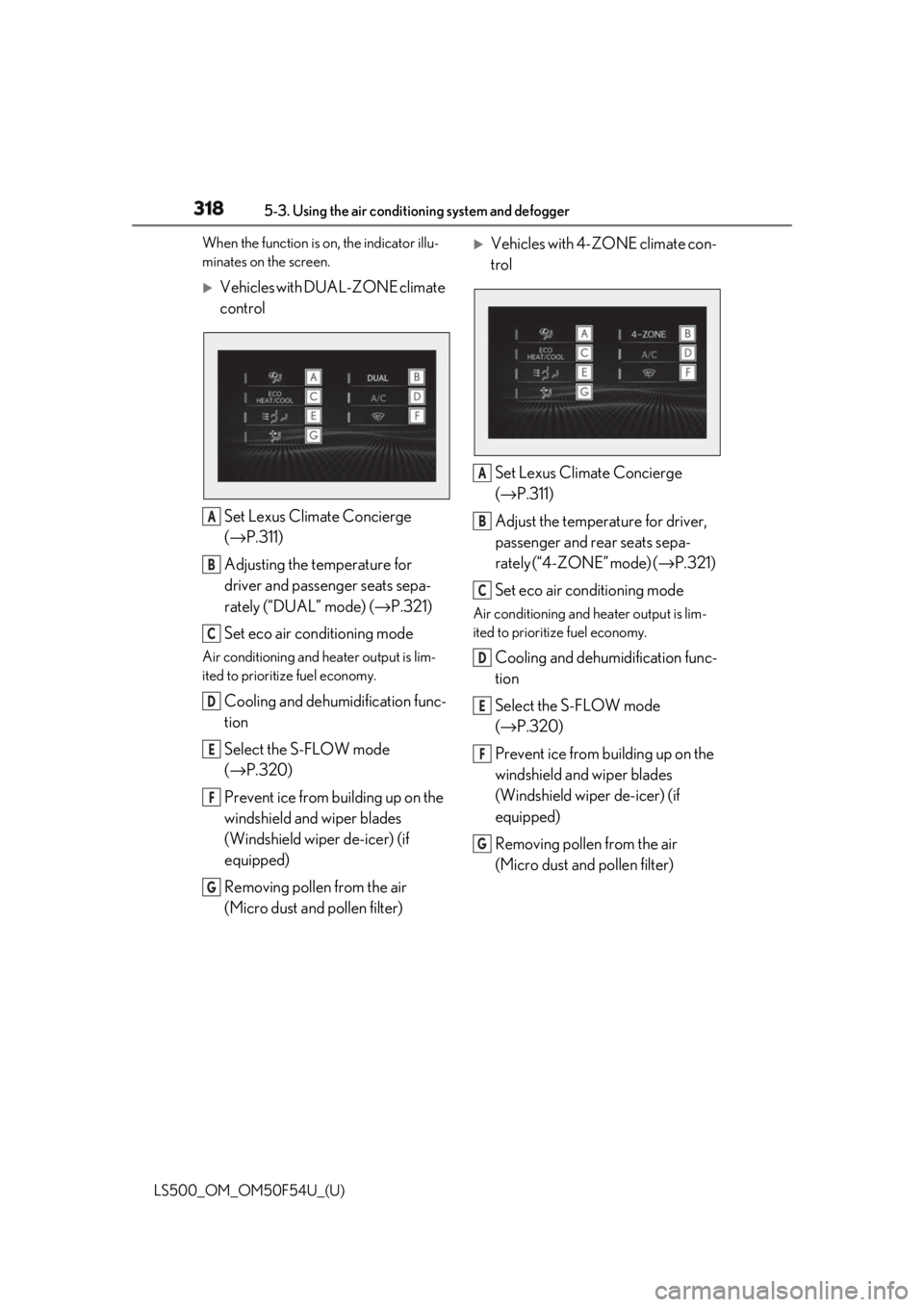
LS500_OM_OM50F54U_(U) When the function is on, the indicator illu-
minates on the screen.
Vehicles with DUAL-ZONE climate
control
Set Lexus Climate Concierge
( → P.311)
Adjusting the temperature for
driver and passenger seats sepa-
rately (“DUAL” mode) ( → P.321)
Set eco air conditioning modeAir conditioning and heater output is lim-
ited to prioritize fuel economy.
Cooling and dehumidification func-
tion
Select the S-FLOW mode
( → P.320)
Prevent ice from building up on the
windshield and wiper blades
(Windshield wiper de-icer) (if
equipped)
Removing pollen from the air
(Micro dust and pollen filter)
Vehicles with 4-ZONE climate con-
trol
Set Lexus Climate Concierge
( → P.311)
Adjust the temperature for driver,
passenger and rear seats sepa-
rately (“4-ZONE” mode) ( → P.321)
Set eco air conditioning mode Air conditioning and heater output is lim-
ited to prioritize fuel economy.
Cooling and dehumidification func-
tion
Select the S-FLOW mode
( → P.320)
Prevent ice from building up on the
windshield and wiper blades
(Windshield wiper de-icer) (if
equipped)
Removing pollen from the air
(Micro dust and pollen filter) A
B
C
D
E
F
G A
B
C
D
E
F
G
Page 319 of 514
3195-3. Using the air conditio ning system and defogger
LS500_OM_OM50F54U_(U) 5
Interior features ■
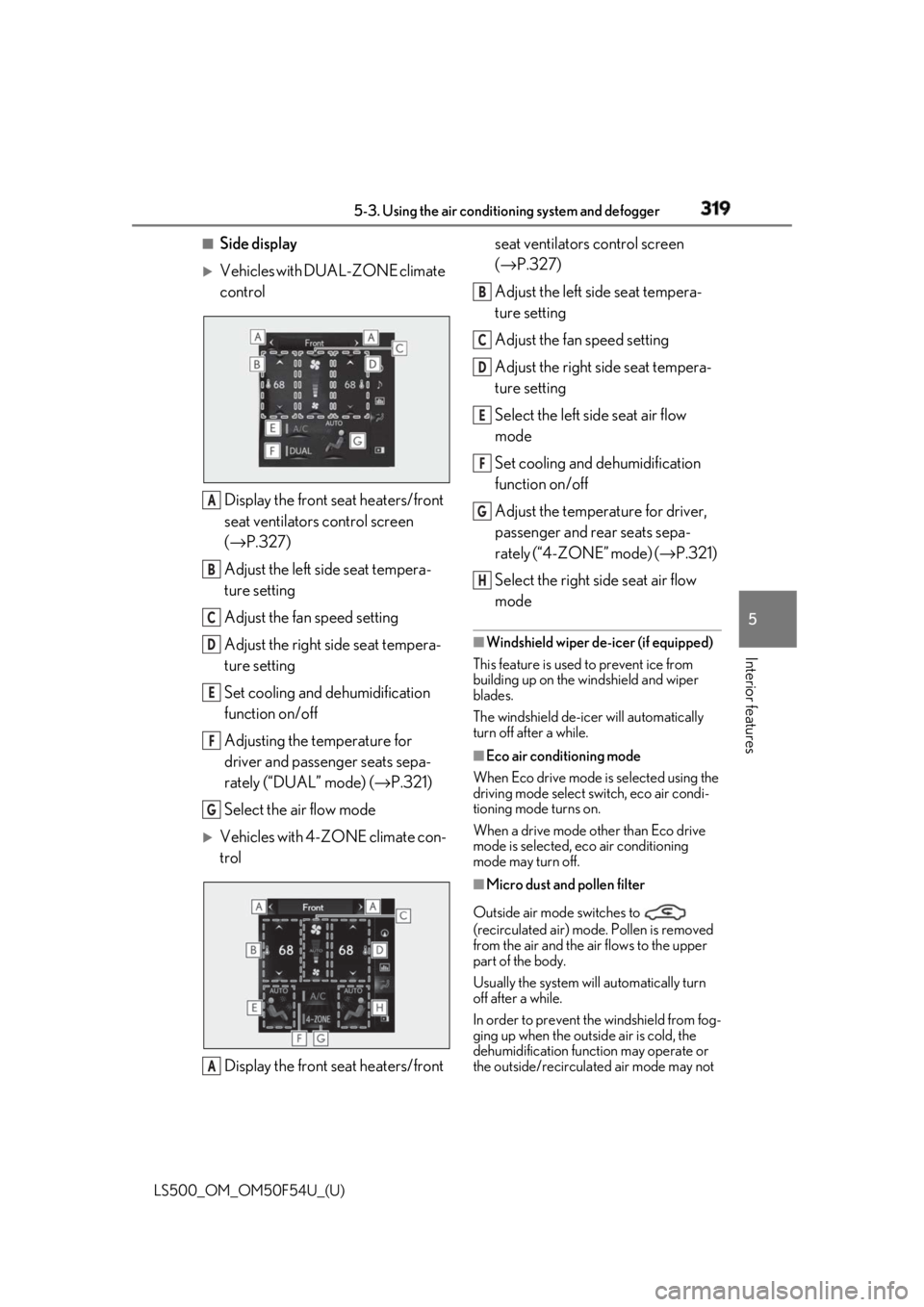
Side display
Vehicles with DUAL-ZONE climate
control
Display the front seat heaters/front
seat ventilators control screen
( → P.327)
Adjust the left side seat tempera-
ture setting
Adjust the fan speed setting
Adjust the right side seat tempera-
ture setting
Set cooling and dehumidification
function on/off
Adjusting the temperature for
driver and passenger seats sepa-
rately (“DUAL” mode) ( → P.321)
Select the air flow mode
Vehicles with 4-ZONE climate con-
trol
Display the front seat heaters/front seat ventilators control screen
( → P.327)
Adjust the left side seat tempera-
ture setting
Adjust the fan speed setting
Adjust the right side seat tempera-
ture setting
Select the left side seat air flow
mode
Set cooling and dehumidification
function on/off
Adjust the temperature for driver,
passenger and rear seats sepa-
rately (“4-ZONE” mode) ( → P.321)
Select the right side seat air flow
mode ■
Windshield wiper de-icer (if equipped)
This feature is used to prevent ice from
building up on the windshield and wiper
blades.
The windshield de-icer will automatically
turn off after a while. ■
Eco air conditioning mode
When Eco drive mode is selected using the
driving mode select switch, eco air condi-
tioning mode turns on.
When a drive mode other than Eco drive
mode is selected, eco air conditioning
mode may turn off.
■
Micro dust and pollen filter
Outside air mode switches to
(recirculated air) mode. Pollen is removed
from the air and the air flows to the upper
part of the body.
Usually the system will automatically turn
off after a while.
In order to prevent the windshield from fog-
ging up when the outside air is cold, the
dehumidification function may operate or
the outside/recirculated air mode may not A
B
C
D
E
F
G
A B
C
D
E
F
G
H
Page 321 of 514
3215-3. Using the air conditio ning system and defogger
LS500_OM_OM50F54U_(U) 5
Interior features To enable/disable S-FLOW mode and
enter manual S-FLOW mode, select the
S-FLOW mode switch.
Manual S-FLOW mode
When the S-FLOW mode switch is
selected, S-FLOW mode will be manu-
ally enabled/ disabled. The indicator will illuminate on the air con-
ditioning control screen when S-FLOW
mode is enabled. ■
Operation of the air conditioning sys-
tem in S-FLOW mode
If the front passenger’s door or a rear door
is opened then closed, the air conditioning
system determines that a passenger is in the
vehicle. In this case, priority for the airflow
will be changed from th e driver’s seat only
to the front seats only or all seats, respec-
tively.
(Depending on the set temperature or
ambient temperature, priority for the air-
flow may not be given to the driver’s seat
only.)
If a passenger is judged to be in the vehicle,
the system will retain the judgement for a
certain amount of time after the engine
switch is turned off. ■
Operation of automatic S-FLOW mode
When the system is operating in automatic
S-FLOW mode, if a rear door is opened
and then closed, S-FLOW mode will be dis-
abled. To enable S-FL OW mode, select the
S-FLOW mode switch.
■
Changing from manual S-FLOW mode
to automatic S-FLOW mode
1 Select the S-FLOW mode switch to dis-
able S-FLOW mode.
2 Turn the engine switch off.
3 After 60 minutes have elapsed, change
the engine switch to ON mode.
Vehicles with DUAL-ZONE climate
control
To turn on the “DUAL” mode, perform
any of the following procedures:
Select “DUAL” on the sub function
menu. ( → P.316)
Select “DUAL” on the option con-
trol screen.
Adjust the passenger’s side tem-
perature setting. The indicator on the main control screen
comes on when the “DUAL” mode is on.
Vehicles with 4-ZONE climate con-
trol
To turn on the “4-ZONE” mode, per-
form any of the following procedures:
Select “4-ZONE” on the sub func-
tion menu. ( → P.316)
Select “4-ZONE” on the option
control screen.
Adjust a passenger seat tempera-
ture setting. The indicator on the main control screen
comes on when the “4-ZONE” mode is on.
■
Location of air outlets
The air outlets and air volume changes
according to the selected air flow
mode.Adjusting the temperature for
the driver and passenger seats
separately
Air outlet layout and operations