instrument panel LEXUS LS500 2019 User Guide
[x] Cancel search | Manufacturer: LEXUS, Model Year: 2019, Model line: LS500, Model: LEXUS LS500 2019Pages: 512, PDF Size: 9.71 MB
Page 75 of 512
752-1. Instrument cluster
LS500_OM_(U)_1810 2
Vehicle status information and indicators ■
Pop-up display
Distance until the next engine oil
change will displayed when a warning
message indicating that oil mainte-
nance should be performed soon or is
required is displayed.
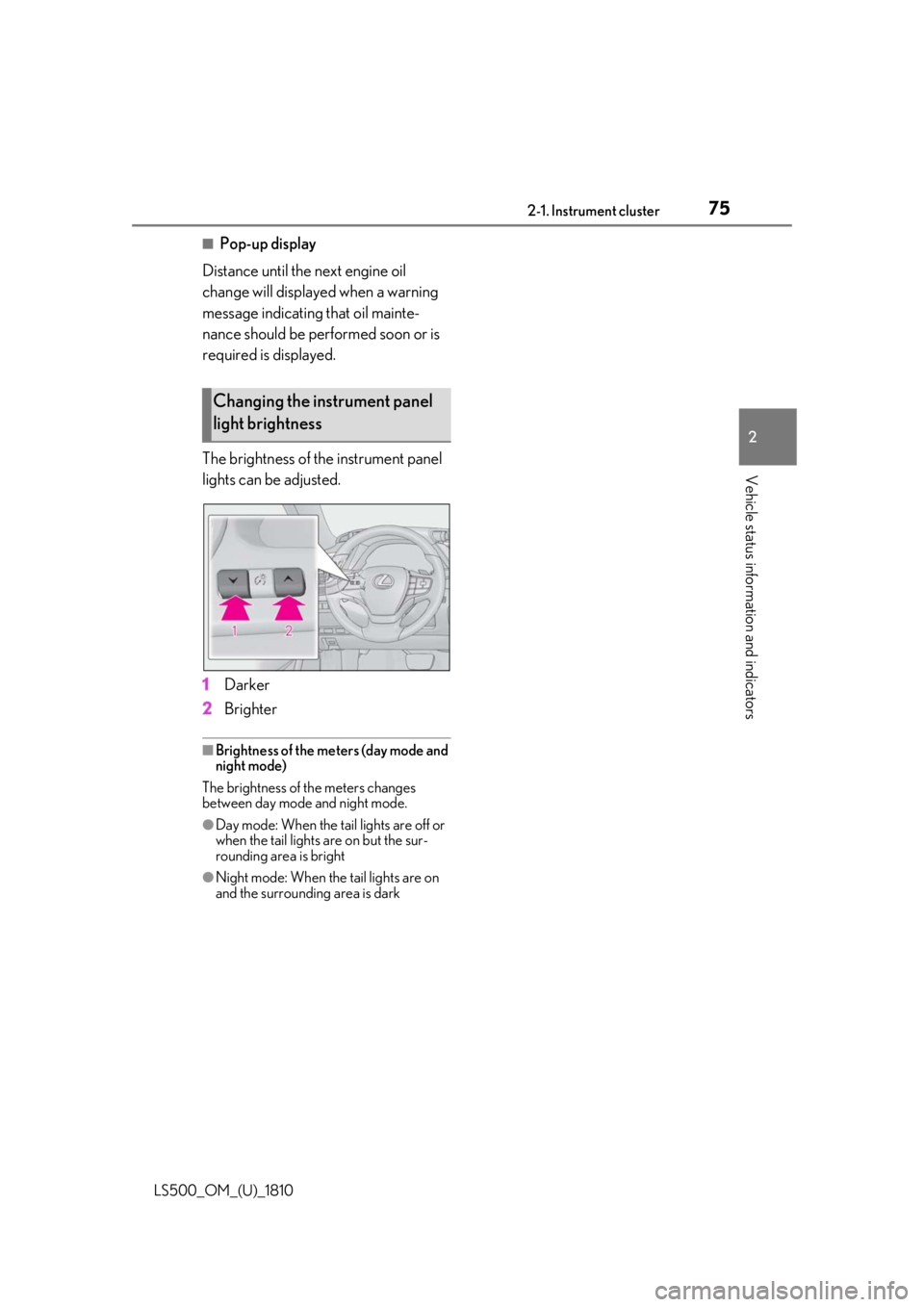
The brightness of the instrument panel
lights can be adjusted.
1 Darker
2 Brighter ■
Brightness of the meters (day mode and
night mode)
The brightness of th e meters changes
between day mode and night mode. ●
Day mode: When the tail lights are off or
when the tail lights are on but the sur-
rounding area is bright
●
Night mode: When the tail lights are on
and the surrounding area is darkChanging the instrument panel
light brightness
Page 76 of 512
76 2-1. Instrument cluster
LS500_OM_(U)_1810 ■
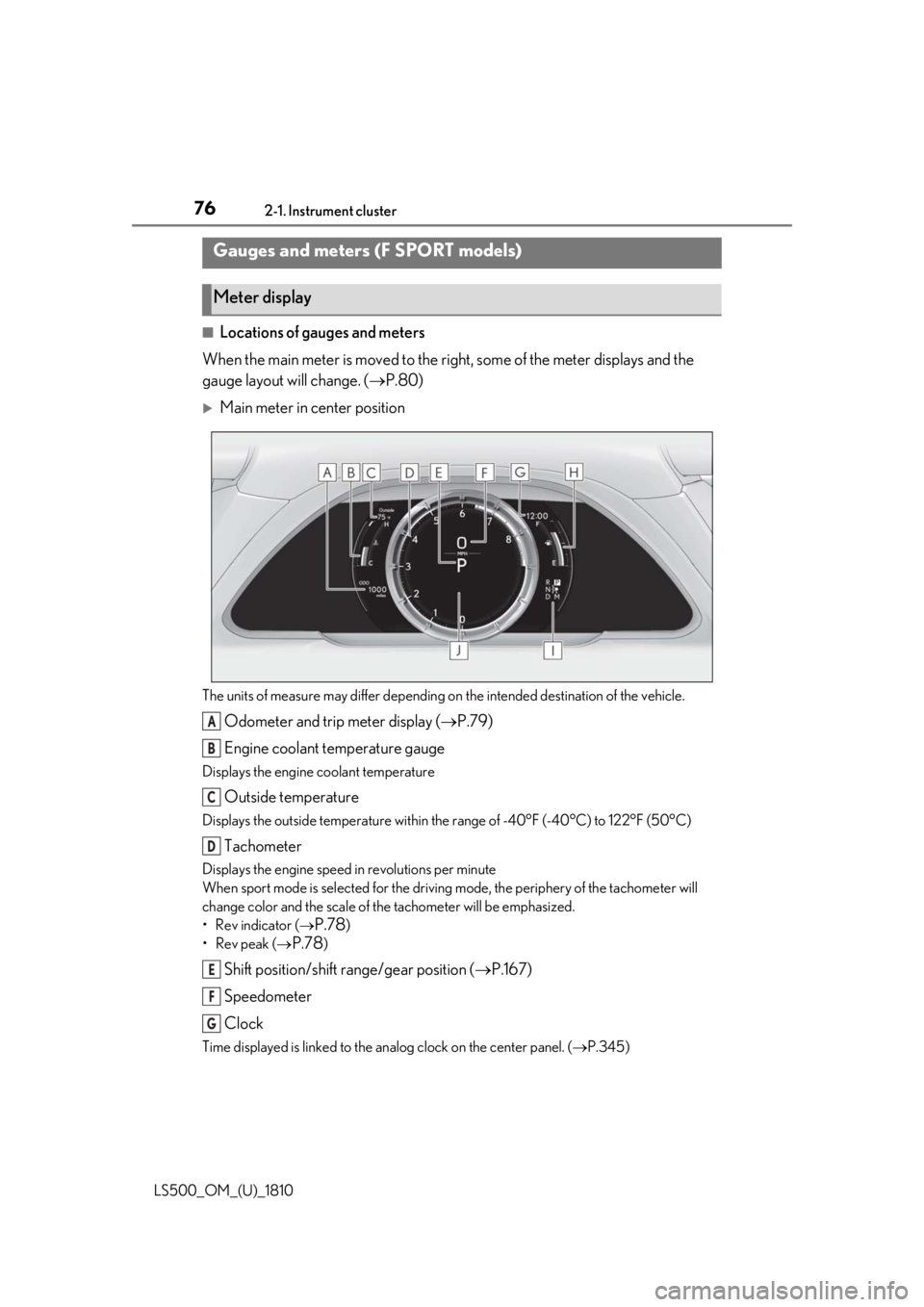
Locations of gauges and meters
When the main meter is moved to the righ t, some of the meter displays and the
gauge layout will change. ( P.80)
Main meter in center position
The units of measure may differ depending on the intended destination of the vehicle.
Odometer and trip meter display ( P.79)
Engine coolant temperature gaugeDisplays the engine coolant temperature
Outside temperatureDisplays the outside temperature within the range of -40°F (-40°C) to 122°F (50°C)
TachometerDisplays the engine speed in revolutions per minute
When sport mode is se lected for the driving mode, the periphery of the tachometer will
change color and the scale of the tachometer will be emphasized.
• Rev indicator (
P.78 )
•Rev peak (
P.78 )
Shift position/shift range/gear position ( P.167)
Speedometer
ClockTime displayed is linked to the analog clock on the center panel. ( P.345)Gauges and meters (F SPORT models)
Meter display
A
B
C
D
E
F
G
Page 77 of 512
772-1. Instrument cluster
LS500_OM_(U)_1810 2
Vehicle status information and indicators Fuel gaugeDisplays the quantity of fuel remaining in the tank
Shift position indicator ( P.169)
Multi-information displayPresents the driver with a variety of vehicle data ( P.80)
Displays warning messages if a malfunction occurs ( P.425)
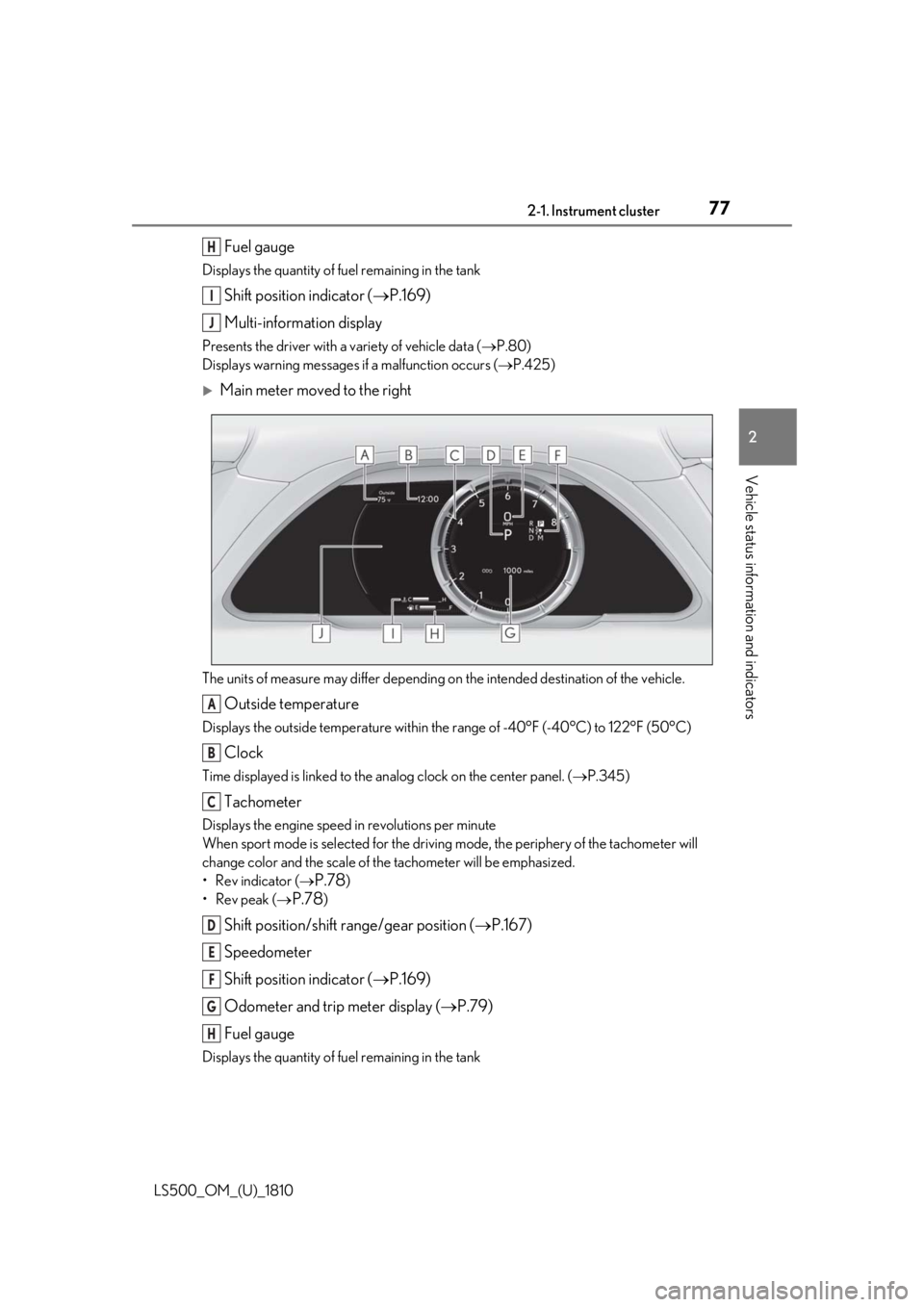
Main meter moved to the right
The units of measure may differ depending on the intended destination of the vehicle.
Outside temperatureDisplays the outside temperature within the range of -40°F (-40°C) to 122°F (50°C)
ClockTime displayed is linked to the analog clock on the center panel. ( P.345)
TachometerDisplays the engine speed in revolutions per minute
When sport mode is se lected for the driving mode, the periphery of the tachometer will
change color and the scale of the tachometer will be emphasized.
• Rev indicator (
P.78 )
•Rev peak (
P.78 )
Shift position/shift range/gear position ( P.167)
Speedometer
Shift position indicator ( P.169)
Odometer and trip meter display ( P.79)
Fuel gaugeDisplays the quantity of fuel remaining in the tank H
I
J
A
B
C
D
E
F
G
H
Page 79 of 512
792-1. Instrument cluster
LS500_OM_(U)_1810 2
Vehicle status information and indicators
■
Display items
Odometer Displays the total distance the vehicle has
been driven.
Trip meter A/trip meter B Displays the distance the vehicle has been
driven since the meter was last reset. Trip
meters A and B can be used to record and
display different distances independently.
Distance until next engine oil
change Displays the distance the vehicle can be
driven until an oil change is necessary.
■
Changing the display
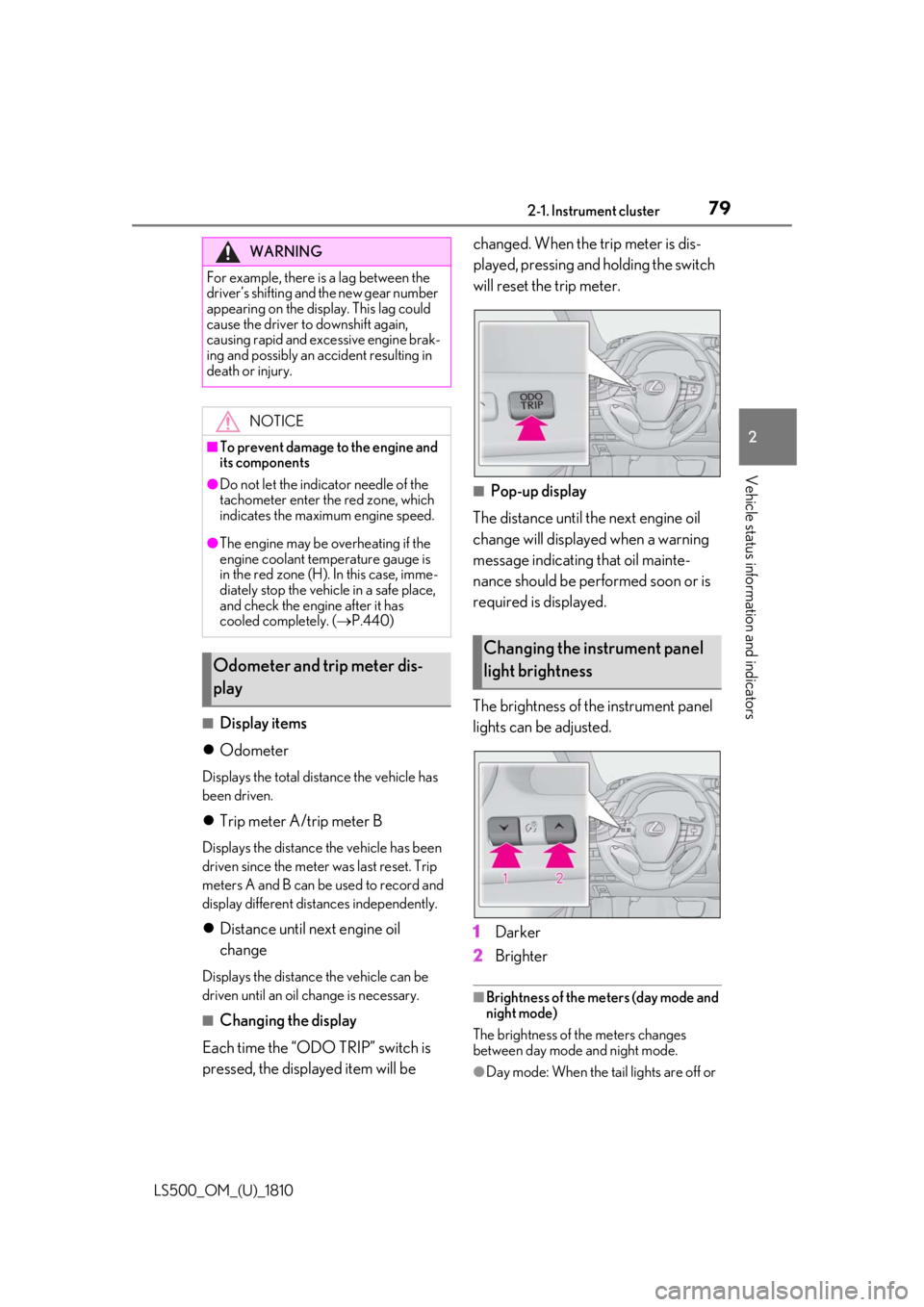
Each time the “ODO TRIP” switch is
pressed, the displayed item will be changed. When the trip meter is dis-
played, pressing and holding the switch
will reset the trip meter.
■
Pop-up display
The distance until the next engine oil
change will displayed when a warning
message indicating that oil mainte-
nance should be performed soon or is
required is displayed.
The brightness of the instrument panel
lights can be adjusted.
1 Darker
2 Brighter ■
Brightness of the meters (day mode and
night mode)
The brightness of the meters changes
between day mode and night mode.
●
Day mode: When the tail lights are off or WARNING
For example, there is a lag between the
driver’s shifting and the new gear number
appearing on the display. This lag could
cause the driver to downshift again,
causing rapid and excessive engine brak-
ing and possibly an accident resulting in
death or injury.
NOTICE■
To prevent damage to the engine and
its components●
Do not let the indicator needle of the
tachometer enter the red zone, which
indicates the maximum engine speed.●
The engine may be overheating if the
engine coolant temperature gauge is
in the red zone (H). In this case, imme-
diately stop the vehicle in a safe place,
and check the engine after it has
cooled completely. ( P.440)
Odometer and trip meter dis-
play Changing the instrument panel
light brightness
Page 113 of 512
1133-2. Opening, closing and locking the doors and trunk
LS500_OM_(U)_1810 3
Before driving take some time to unlock the doors.
• The electronic key has been left in an
area of approximately 6 ft. (2 m) of the
outside of the vehicle for 10 minutes or
longer.
• The smart access system with push-but-
ton start has not been used for 5 days or
longer.●
If the smart access system with push-but-
ton start has not been used for 14 days or
longer, the doors cannot be unlocked at
any doors except the driver’s door. In this
case, take hold of the driver’s door han-
dle, or use the wireless remote control or
the mechanical key, to unlock the doors.■
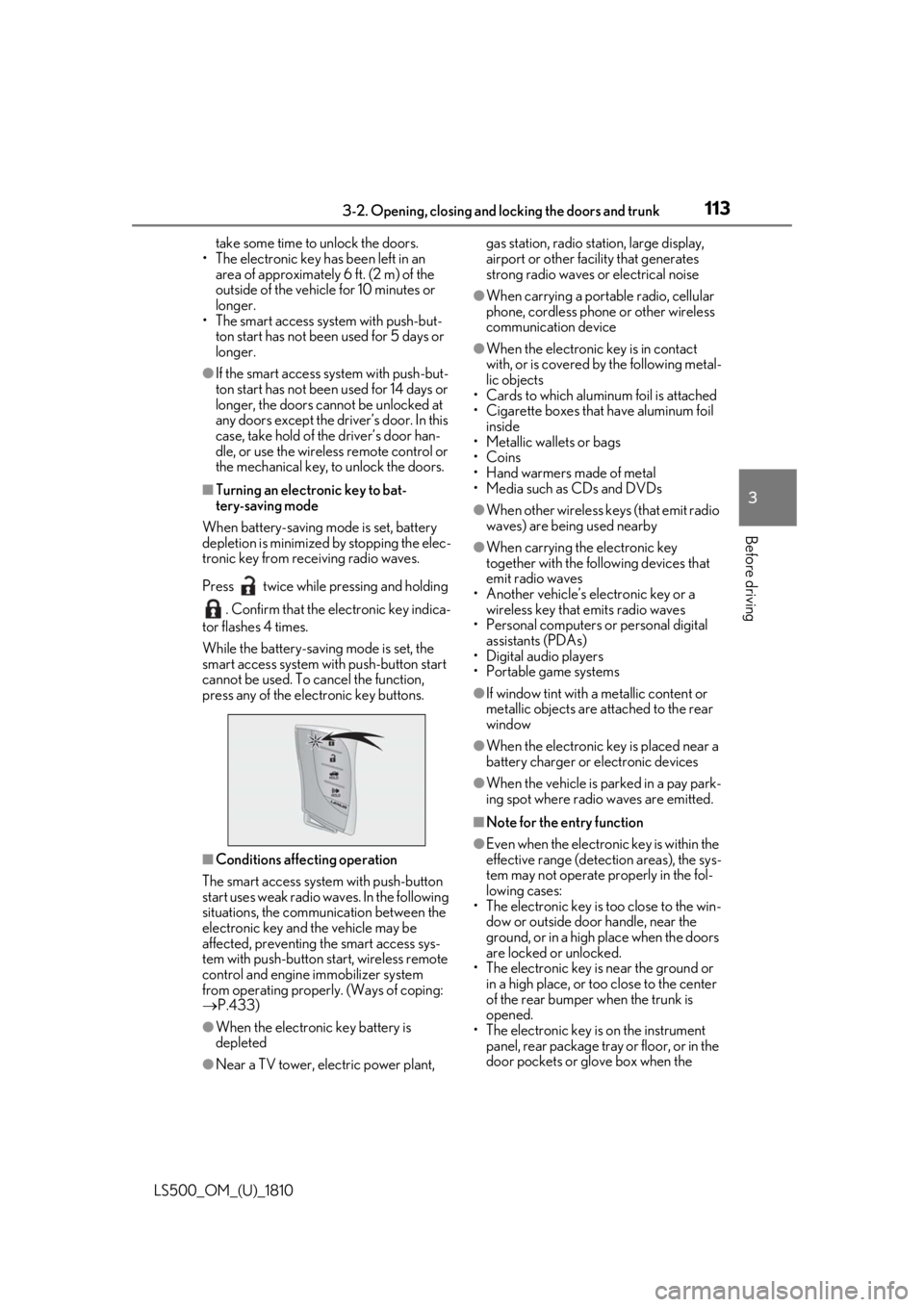
Turning an electronic key to bat-
tery-saving mode
When battery-saving mode is set, battery
depletion is minimized by stopping the elec-
tronic key from re ceiving radio waves.
Press twice while pressing and holding
. Confirm that the electronic key indica-
tor flashes 4 times.
While the battery-saving mode is set, the
smart access system with push-button start
cannot be used. To cancel the function,
press any of the electronic key buttons.
■
Conditions affe cting operation
The smart access system with push-button
start uses weak radio waves. In the following
situations, the communication between the
electronic key and the vehicle may be
affected, preventing the smart access sys-
tem with push-button start, wireless remote
control and engine immobilizer system
from operating properly. (Ways of coping:
P.433)
●
When the electronic key battery is
depleted
●
Near a TV tower, electric power plant, gas station, radio stat ion, large display,
airport or other fac ility that generates
strong radio waves or electrical noise ●
When carrying a portable radio, cellular
phone, cordless phone or other wireless
communication device ●
When the electronic key is in contact
with, or is covered by the following metal-
lic objects
• Cards to which aluminum foil is attached
• Cigarette boxes that have aluminum foil
inside
• Metallic wallets or bags
•Coins
• Hand warmers made of metal
• Media such as CDs and DVDs ●
When other wireless keys (that emit radio
waves) are being used nearby ●
When carrying the electronic key
together with the following devices that
emit radio waves
• Another vehicle’s electronic key or a
wireless key that emits radio waves
• Personal computers or personal digital
assistants (PDAs)
• Digital audio players
• Portable game systems ●
If window tint with a metallic content or
metallic objects are attached to the rear
window ●
When the electronic key is placed near a
battery charger or electronic devices ●
When the vehicle is parked in a pay park-
ing spot where radio waves are emitted. ■
Note for the entry function ●
Even when the electronic key is within the
effective range (detection areas), the sys-
tem may not operate properly in the fol-
lowing cases:
• The electronic key is too close to the win-
dow or outside door handle, near the
ground, or in a high place when the doors
are locked or unlocked.
• The electronic key is near the ground or
in a high place, or too close to the center
of the rear bumper when the trunk is
opened.
• The electronic key is on the instrument
panel, rear package tray or floor, or in the
door pockets or glove box when the
Page 114 of 512

114 3-2. Opening, closing and locking the doors and trunk
LS500_OM_(U)_1810 engine is started or engine switch modes
are changed.●
Do not leave the electronic key on top of
the instrument panel or near the door
pockets when exiting the vehicle.
Depending on the radio wave reception
conditions, it may be detected by the
antenna outside the cabin and the doors
will become lockable from the outside,
possibly trapping the electronic key
inside the vehicle.●
As long as the electron ic key is within the
effective range, the doors may be locked
or unlocked by anyone. However, only
the doors detecting the electronic key
can be used to unlock the vehicle.●
Even if the electronic key is not inside the
vehicle, it may be possible to start the
engine if the electronic key is near the
window.●
The doors may unlock or lock if a large
amount of water spla shes on the door
handle, such as in the rain or in a car
wash, when the electronic key is within
the effective range. (The doors will auto-
matically be locked after approximately
60 seconds if the d oors are not opened
and closed.)●
If the wireless remote control is used to
lock the doors when the electronic key is
near the vehicle, there is a possibility that
the door may not be unlocked by the
entry function. (Use the wireless remote
control to unlock the doors.)●
Touching the door lock sensor while
wearing gloves may delay or prevent lock
operation.●
When the lock operation is performed
using the lock sensor, recognition signals
will be shown up to two consecutive
times. After this, no recognition signals
will be given.
●
If the door handle becomes wet while the
electronic key is within the effective
range, the door may lock and unlock
repeatedly. In this case, follow the follow-
ing correction procedures to wash the
vehicle:
• Place the electronic key in a location 6 ft.
(2 m) or more away from the vehicle.
(Take care to ensure that the key is not stolen.)
• Set the electronic key to battery-saving
mode to disable the smart access system
with push-button start. ( P.113)●
If the electronic key is inside the vehicle
and a door handle becomes wet during a
car wash, a message may be shown on
the multi-information display and a
buzzer will sound outside the vehicle. To
turn off the alarm, lock all the doors. ●
The lock sensor may not work properly if
it comes into contact with ice, snow, mud,
etc. Clean the lock sensor and attempt to
operate it again. ●
A sudden approach to the effective
range or door handle may prevent the
doors from being unlocked. In this case,
return the door handle to the original
position and check that the doors unlock
before pulling the door handle again. ●
If there is another electronic key in the
detection area, it may take slightly longer
to unlock the doors after the door handle
is gripped. ■
When the vehicle is not driven for
extended periods ●
To prevent theft of the vehicle, do not
leave the electronic key within 6 ft. (2 m)
of the vehicle. ●
The smart access system with push-but-
ton start can be deactivated in advance. ●
Setting the electronic key to battery-sav-
ing mode helps to reduce key battery
depletion. ( P.113)■
To operate the system properly ●
Make sure to carry the electronic key
when operating the system. Do not get
the electronic key too close to the vehicle
when operating the system from the out-
side of the vehicle.
Depending on the position and holding
condition of the electr onic key, the key may
not be detected correctly and the system
may not operate properly. (The alarm may
go off accidentally, or the door lock pre-
vention function may not operate.)
●
Do not leave the electr onic key inside the
trunk.
Page 119 of 512

1193-3. Adjusting the seats
LS500_OM_(U)_1810 3
Before driving 3-3.Adjusting the seats
■
Seat adjustment switches
Seat position adjustment switch
Seatback angle adjustment switch
Seat cushion (front) angle adjust-
ment switch
Vertical height adjustment switchFront seats WARNING■
When adjusting the seat position●
Take care when ad justing the seat
position to ensure that other passen-
gers are not injured by the moving
seat.●
Do not put your hands under the seat
or near the moving parts to avoid
injury.
Fingers or hands may become
jammed in the se at mechanism.●
Make sure to leave enough space
around the feet so they do not get
stuck.■
Seat adjustment
To reduce the risk of sliding under the lap
belt during a collision, do not recline the
seat more than necessary.
If the seat is too reclined, the lap belt may
slide past the hips and apply restraint
forces directly to the abdomen, or your
neck may contact the shoulder belt,
increasing the risk of death or serious
injury in the event of an accident.
Adjustments should not be made while
driving as the seat may unexpectedly
move and cause the driver to lose control
of the vehicle.
■
Operating the front passenger’s seat
from the driver’s seat or rear seat
Do not operate the front passenger’s seat
when a passenger is seated in it. In addi-
tion, do not let anyone sit down in the
front passenger’s seat while the seat is
being operated or when the head
restraint is being folded. The front pas-
senger may catch their legs between the
instrument panel and seat, or the head
restraint may interfer e with their head,
resulting in injury. ■
When the front passenger’s seat is
folded forward
If the outside rear view mirror is difficult
to see, due to the position of the front
passenger’s seat, mo ve the front passen-
ger’s seat to an appropriate position.
Doing so may lead to mishandling of the
vehicle and cause an accident, resulting
in death or serious injury.
NOTICE■
Operating the front passenger’s seat
from the driver’s seat or rear seat
Before operating the front passenger’s
seat, make sure that there is no luggage
or any other objects on the seat or in the
footwell that could prevent its operation.
Such items may result in excess force
being applied, causing damage to the
seat and/or the luggage.
Adjustment procedure
A
B
C
D
Page 120 of 512
120 3-3. Adjusting the seats
LS500_OM_(U)_1810 Lumbar support adjustment switch
Seat cushion length adjustment
switch (if equipped) ■
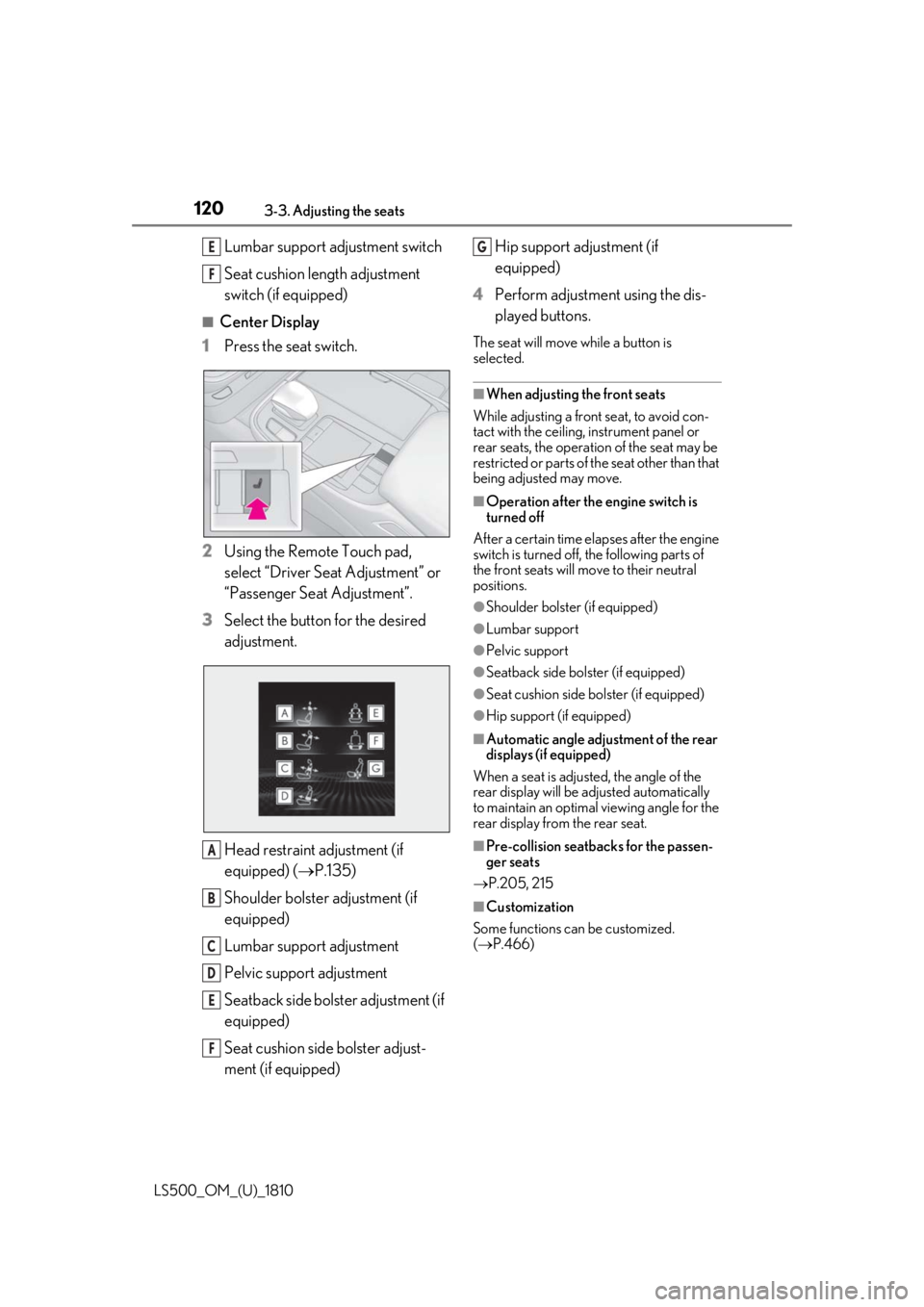
Center Display
1 Press the seat switch.
2 Using the Remote Touch pad,
select “Driver Seat Adjustment” or
“Passenger Seat Adjustment”.
3 Select the button for the desired
adjustment.
Head restraint adjustment (if
equipped) ( P.135)
Shoulder bolster adjustment (if
equipped)
Lumbar support adjustment
Pelvic support adjustment
Seatback side bolster adjustment (if
equipped)
Seat cushion side bolster adjust-
ment (if equipped) Hip support adjustment (if
equipped)
4 Perform adjustment using the dis-
played buttons. The seat will move while a button is
selected. ■
When adjusting the front seats
While adjusting a front seat, to avoid con-
tact with the ceiling, instrument panel or
rear seats, the operation of the seat may be
restricted or parts of th e seat other than that
being adjusted may move. ■
Operation after the engine switch is
turned off
After a certain time elapses after the engine
switch is turned off, the following parts of
the front seats will move to their neutral
positions. ●
Shoulder bolster (if equipped) ●
Lumbar support ●
Pelvic support ●
Seatback side bolster (if equipped) ●
Seat cushion side bolster (if equipped) ●
Hip support (if equipped) ■
Automatic angle adjustment of the rear
displays (if equipped)
When a seat is adjusted, the angle of the
rear display will be adjusted automatically
to maintain an optimal viewing angle for the
rear display from the rear seat.
■
Pre-collision seatback s for the passen-
ger seats
P.205, 215
■
Customization
Some functions can be customized.
( P.466)E
F
A
B
C
D
E
F G
Page 162 of 512
162 4-1. Before driving
LS500_OM_(U)_1810 ■
Total load capacity and seating capacity
These details are also described on the tire
and loading information label. ( P.395)WARNING●
Do not place cargo or luggage in or on
the following locations.
• At the feet of the driver
• On the front passenger or rear seats
(when stacking items)
• On the package tray
• On the instrument panel
•On the dashboard
• In front of the Center Display ●
Secure all items in the occupant com-
partment.■
Capacity and distribution●
Do not exceed the maximum axle
weight rating or the total vehicle
weight rating.●
Even if the total load of occupant’s
weight and the cargo load is less than
the total load capacity, do not apply the
load unevenly. Improper loading may
cause deterioration of steering or
braking control which may cause
death or serious injury. Vehicle load limits Vehicle load limits include total
load capacity, seating capacity,
towing capacity and cargo capac-
ity.
Total load capacity (vehicle
capacity weight): P.446
Total load capacity means the com-
bined weight of occupants, cargo
and luggage.
Seating capacity:5 occupants
(Front 2, Rear 3)
Seating capacity means the maxi-
mum number of occupants whose
estimated average weight is 150 lb.
(68 kg) per person.
Towing capacity
Lexus does not recommend towing
a trailer with your vehicle.
Cargo capacity
Cargo capacity may increase or
decrease depending on the weight
and the number of occupants.
WARNING
■
Overloading the vehicle
Do not overload the vehicle.
It may not only cause damage to the tires,
but also degrade steering and braking
ability, resulting in an accident.
Page 179 of 512
1794-3. Operating the lights and wipers
LS500_OM_(U)_1810 4
Driving 4-3.Operating the lights and wipers
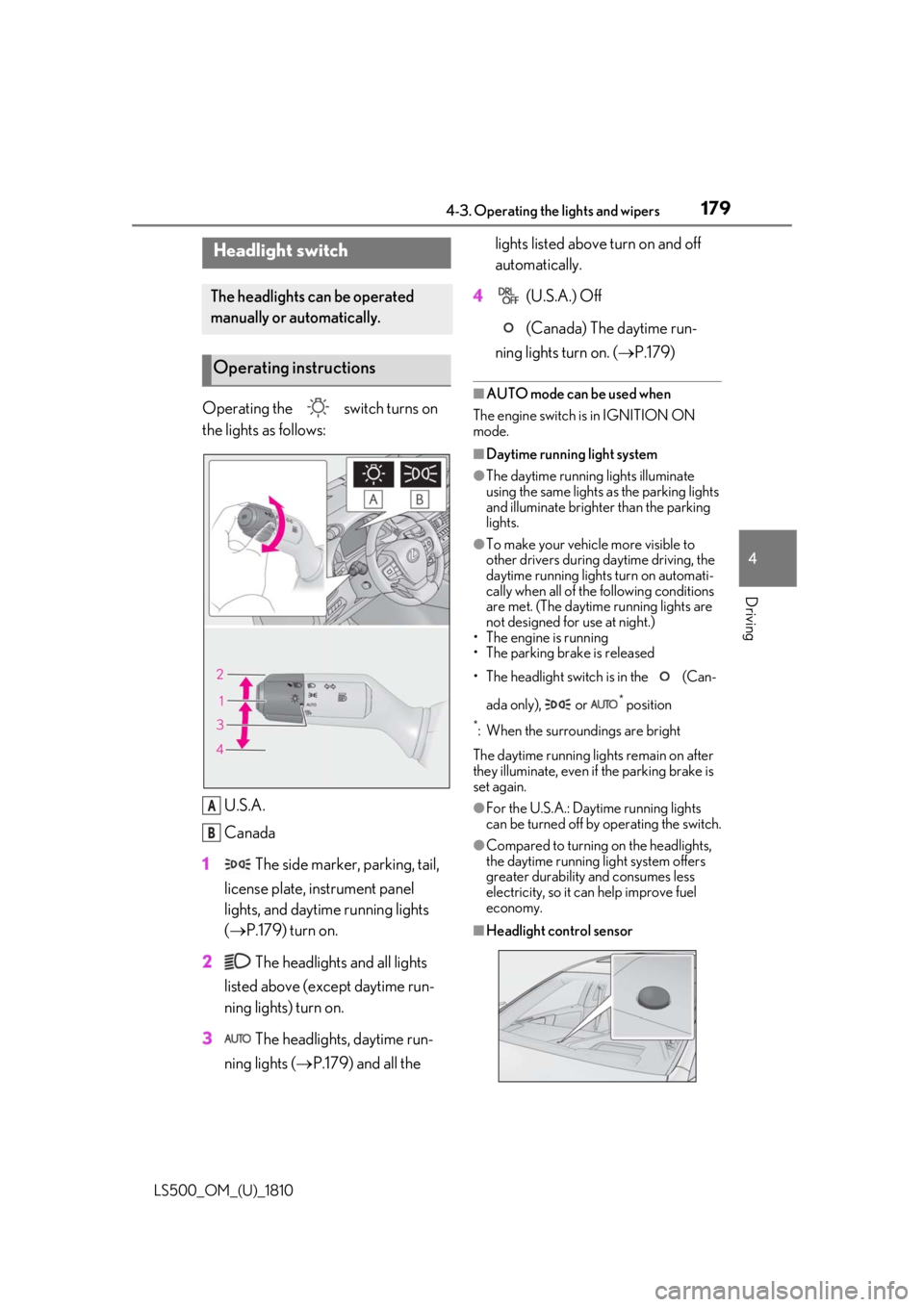
Operating the switch turns on
the lights as follows:
U.S.A.
Canada
1 The side marker, parking, tail,
license plate, instrument panel
lights, and daytime running lights
( P.179) turn on.
2 The headlights and all lights
listed above (except daytime run-
ning lights) turn on.
3 The headlights, daytime run-
ning lights ( P.179) and all the lights listed above turn on and off
automatically.
4 (U.S.A.) Off
(Canada) The daytime run-
ning lights turn on. ( P.179)■
AUTO mode can be used when
The engine switch is in IGNITION ON
mode. ■
Daytime running light system ●
The daytime running lights illuminate
using the same lights as the parking lights
and illuminate brighter than the parking
lights. ●
To make your vehicle more visible to
other drivers during daytime driving, the
daytime running lights turn on automati-
cally when all of the following conditions
are met. (The daytime running lights are
not designed for use at night.)
• The engine is running
• The parking brake is released
• The headlight switch is in the (Can-
ada only), or *
position*
: When the surroundings are bright
The daytime running lights remain on after
they illuminate, even if the parking brake is
set again. ●
For the U.S.A.: Daytime running lights
can be turned off by operating the switch. ●
Compared to turning on the headlights,
the daytime running light system offers
greater durability and consumes less
electricity, so it can help improve fuel
economy.
■
Headlight control sensorHeadlight switch The headlights can be operated
manually or automatically.
Operating instructions
A
B