parking sensors LEXUS LS500 2019 User Guide
[x] Cancel search | Manufacturer: LEXUS, Model Year: 2019, Model line: LS500, Model: LEXUS LS500 2019Pages: 512, PDF Size: 9.71 MB
Page 276 of 512
276 4-5. Using the driving support systems
LS500_OM_(U)_1810 *
:If equipped
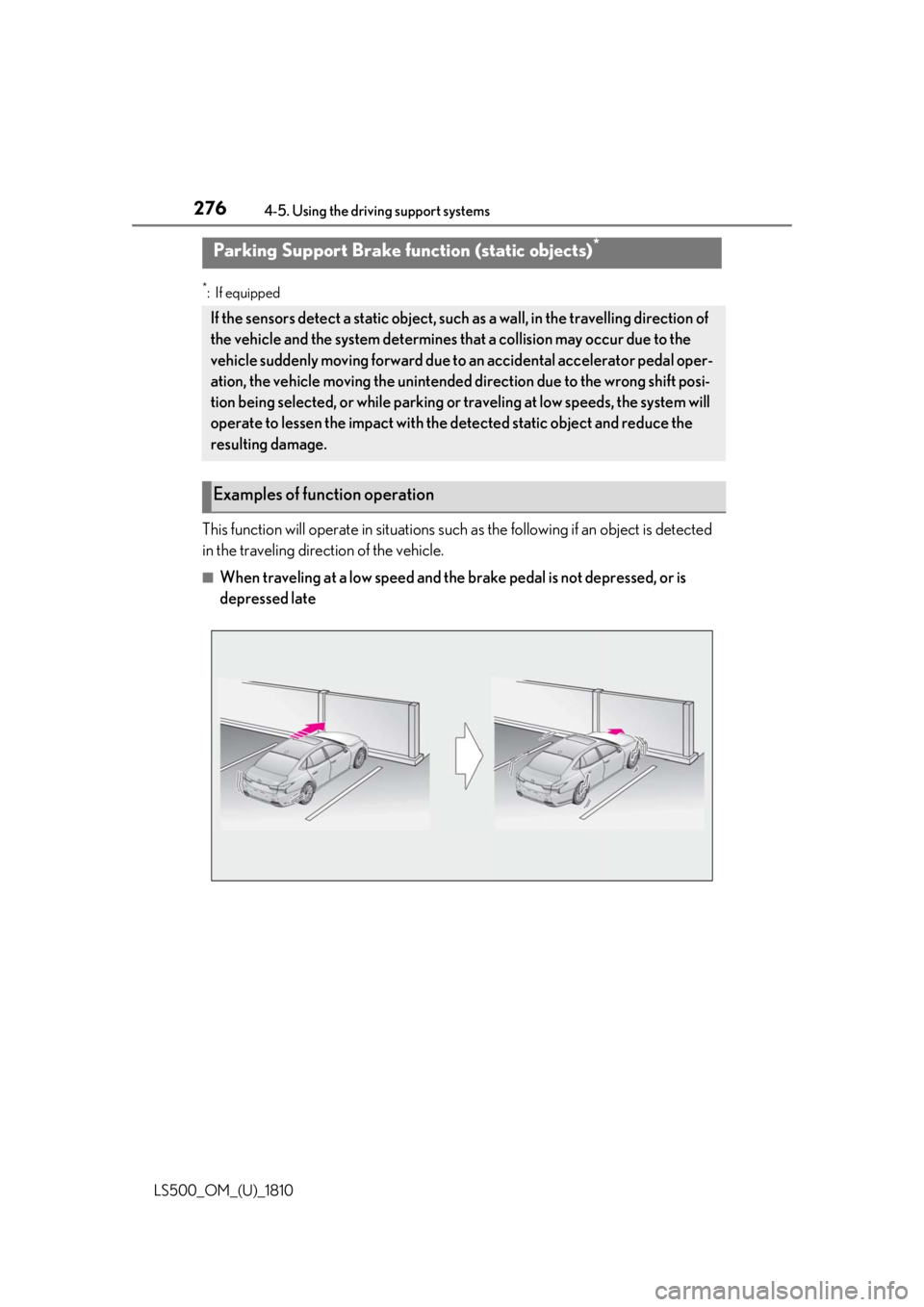
This function will operate in si tuations such as the following if an object is detected
in the traveling direction of the vehicle. ■
When traveling at a low speed and the brake pedal is not depressed, or is
depressed lateParking Support Brake func tion (static objects) *
If the sensors detect a static object, such as a wall, in the travelling direction of
the vehicle and the system determines that a collision may occur due to the
vehicle suddenly moving forward due to an accidental accelerator pedal oper-
ation, the vehicle moving the unintended direction due to the wrong shift posi-
tion being selected, or while parking or traveling at low speeds, the system will
operate to lessen the impact with the detected static object and reduce the
resulting damage.
Examples of function operation
Page 277 of 512
2774-5. Using the driving support systems
LS500_OM_(U)_1810 4
Driving ■
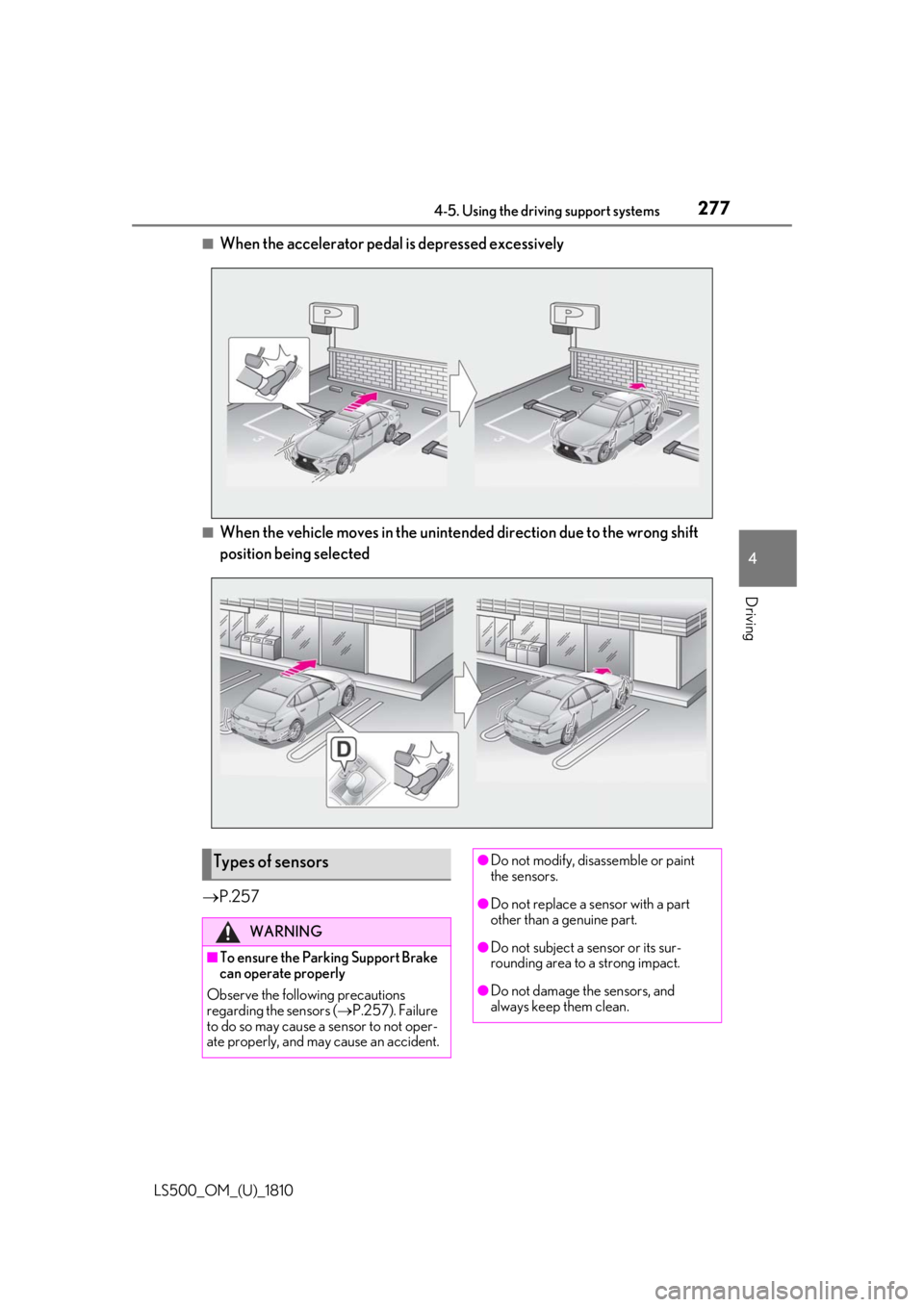
When the accelerator peda l is depressed excessively
■
When the vehicle moves in the unintend ed direction due to the wrong shift
position being selected
P.257
Types of sensors WARNING
■
To ensure the Parking Support Brake
can operate properly
Observe the following precautions
regarding the sensors ( P.257). Failure
to do so may cause a sensor to not oper-
ate properly, and may cause an accident. ●
Do not modify, disassemble or paint
the sensors.
●
Do not replace a sensor with a part
other than a genuine part.
●
Do not subject a sensor or its sur-
rounding area to a strong impact.
●
Do not damage the sensors, and
always keep them clean.
Page 278 of 512
278 4-5. Using the driving support systems
LS500_OM_(U)_1810 ■
The Parking Support Brake function
(static object) will operate when
The function will operate when the PKSB
OFF indicator is not illuminated or flashing
( P.69, 70) and all of the following condi-
tions are met: ●
Engine output restriction control
• The Parking Support Brake is enabled.
• The vehicle speed is 9 mph (15 km/h) or
less.
• There is a static ob ject in the traveling
direction of the vehicle and 6 to 13 ft. (2
to 4 m) away.
• The Parking Support Brake determines
that a stronger-than-normal brake opera-
tion is necessary to avoid a collision. ●
Brake control
• Engine output restriction control is oper-
ating.
• The Parking Support Brake determines
that an immediate brake operation is nec-
essary to avoid a collision.
■
The Parking Support Brake function
(static objects) will stop operating when
The function will stop operating if any of the
following conditions are met:
●
Engine output restriction control
• The Parking Support Brake is disabled.
• The system determines that the collision WARNING●
If the area around a radar sensor is
subjected to an impact, the system
may not operate properly due to a
sensor malfunction. Have the vehicle
inspected by your Lexus dealer.■
Handling the suspension
Do not modify the suspension, as
changes to the height or inclination of the
vehicle may prevent the sensors from
detecting objects correctly or cause the
system to not operate or operate unnec-
essarily. ■
If the Parking Support Brake function
(static objects) operates unnecessar-
ily, such as at a railroad crossing
In the event that the Parking Support
Brake function (static objects) operates
unnecessarily, such as at a railroad cross-
ing, brake control w ill be canceled after
approximately 2 seconds, allowing you
to proceed forward and leave the area,
brake control can also be canceled by
depressing the brake pedal. Depressing
the accelerator pedal after brake control
is canceled will allow you to proceed for-
ward and leave the area. ■
Notes when washing the vehicle
Do not apply intensive bursts of water or
steam to the sensor area.
Doing so may result in the sensor mal-
functioning.
●
When using a high pressure washer to
wash the vehicle, do not spray the sen-
sors directly, as doing so may cause a
sensor to malfunction.
●
When using steam to clean the vehicle,
do not direct steam too close to the
sensors as doing so may cause a sen-
sor to malfunction.
■
When to disable the Parking Support
Brake
In the following situations, disable the
Parking Support Brake as the system
may operate even though there is no
possibility of a collision. ●
When inspecting the vehicle using a
chassis roller, chassis dynamo or free
roller ●
When loading the vehicle onto a boat,
truck or other transport vessel ●
If the suspension has been modified or
tires of a size othe r than specified are
installed ●
If the front of the vehicle is raised or
lowered due to the carried load ●
When equipment that may obstruct a
sensor is installed, such as a towing
eyelet, bumper protector (an addi-
tional trim strip, etc.), bicycle carrier, or
snow plow ●
When using an automatic car wash
Page 279 of 512
2794-5. Using the driving support systems
LS500_OM_(U)_1810 4
Driving has become avoidable with normal brake
operation.
• The static object is no longer 6 to 13 ft. (2
to 4 m) away from the vehicle or in the
traveling direction of the vehicle.●
Brake control
• The Parking Support Brake is disabled.
• Approximately 2 seconds have elapsed
since the vehicle was stopped by brake
control.
• The brake pedal is depressed after the
vehicle is stopped by brake control.
• The static object is no longer 6 to 13 ft. (2
to 4 m) away from the vehicle or in the
traveling direction of the vehicle.■
Re-enabling the Parking Support Brake
function (static objects)
P.275■
Detection range of the Parking Support
Brake function (static objects)
The detection range of the Parking Support
Brake function (static objects) differs from
the detection range of the intuitive parking
assist. ( P.261) Therefore, even if the intui-
tive parking assist de tects an object and
provides a warning, the Parking Support
Brake function (static objects) may not start
operating. ■
Objects that the Parking Support Brake
function (static obje cts) may not detect
The sensors may not be able to detect cer-
tain objects, such as the following: ●
Pedestrian●
Cotton cloth, snow, and other materials
that are poor reflectors of ultrasonic
waves●
Objects which are not perpendicular to
the ground, are not perpendicular to the
traveling direction of the vehicle, are
uneven or are waving
●
Low objects
●
Thin objects such as wires, fences, ropes
and signposts
●
Objects that are extremely close to the
bumper
●
Sharply-angled objects
●
Tall objects with upper sections project-
ing outwards in the direction of your vehi- cle ■
Intuitive parking assist buzzer
Regardless of whether the intuitive parking
assist system is enabled or not ( P.258), if
the Parking Support Brake function (static
objects) is enabled ( P.271), the front or
rear sensors detect an object and brake
control is performed, the intuitive parking
assist buzzer will sound to notify the driver
of the approximate distance to the object. ■
Situations in which the Parking Support
Brake function (static objects) may
operate even if there is no possibility of a
collision
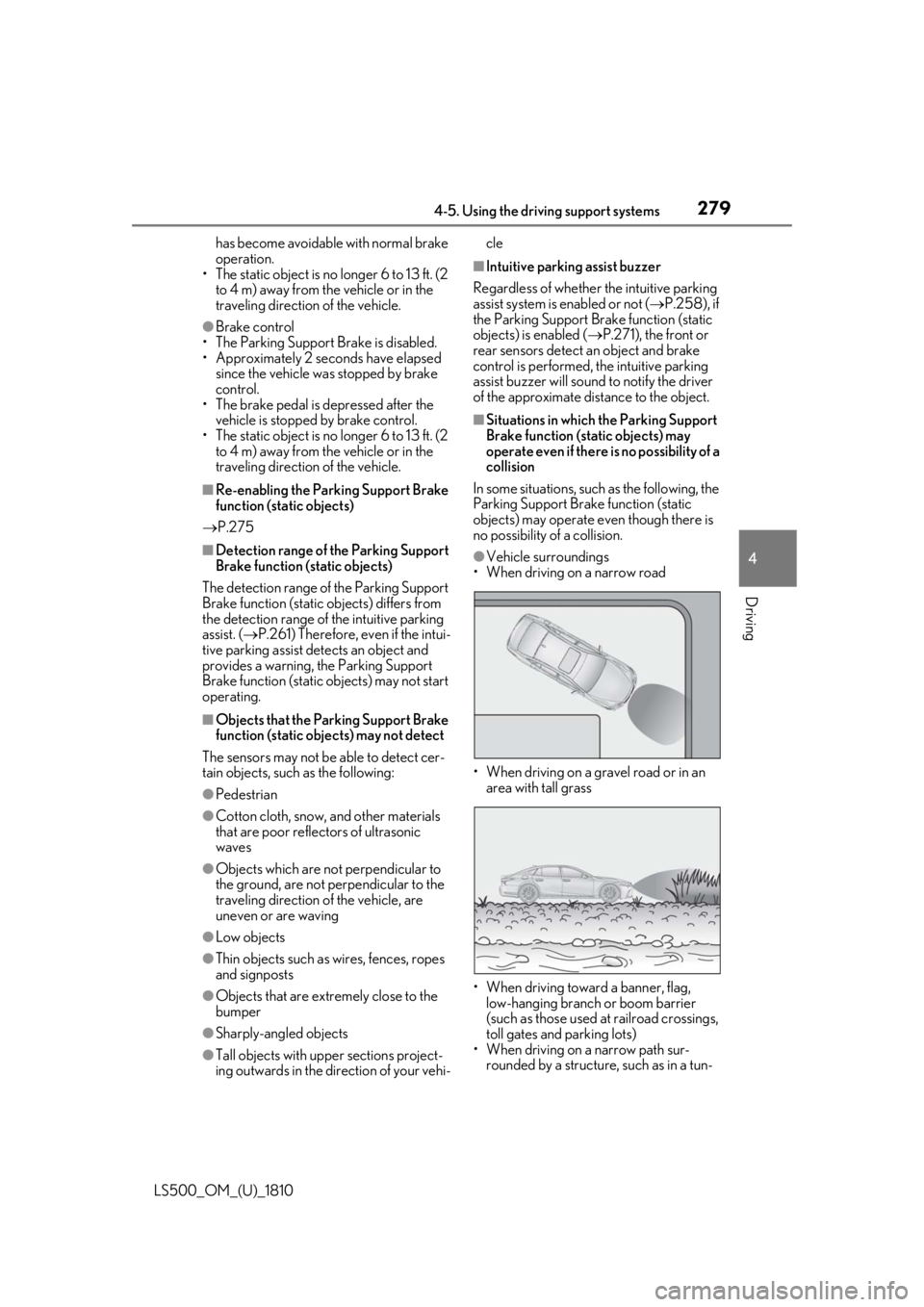
In some situations, such as the following, the
Parking Support Brake function (static
objects) may operate even though there is
no possibility of a collision. ●
Vehicle surroundings
• When driving on a narrow road
• When driving on a gravel road or in an
area with tall grass
• When driving toward a banner, flag,
low-hanging branch or boom barrier
(such as those used at railroad crossings,
toll gates and parking lots)
• When driving on a narrow path sur-
rounded by a structure, such as in a tun-
Page 282 of 512
282 4-5. Using the driving support systems
LS500_OM_(U)_1810 *
:If equipped
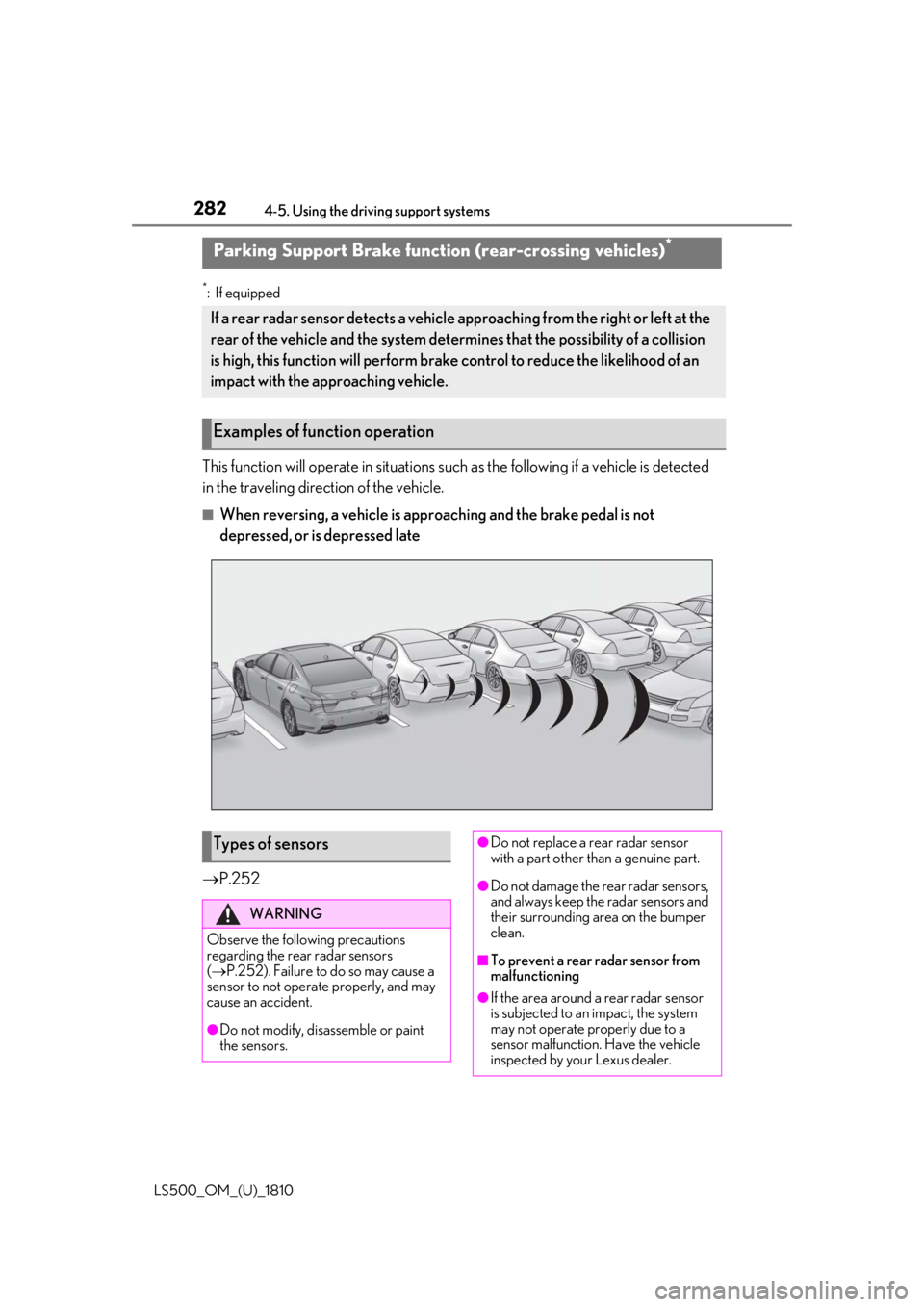
This function will operate in situations such as the following if a vehicle is detected
in the traveling direction of the vehicle. ■
When reversing, a vehicle is appr oaching and the brake pedal is not
depressed, or is depressed late
P.252Parking Support Brake function (rear-crossing vehicles) *
If a rear radar sensor detects a vehicle a pproaching from the right or left at the
rear of the vehicle and the system determ ines that the possibility of a collision
is high, this function will perform brak e control to reduce the likelihood of an
impact with the approaching vehicle.
Examples of function operation
Types of sensors WARNING
Observe the following precautions
regarding the rear radar sensors
( P.252). Failure to do so may cause a
sensor to not operate properly, and may
cause an accident.
●
Do not modify, disassemble or paint
the sensors. ●
Do not replace a rear radar sensor
with a part other than a genuine part.
●
Do not damage the rear radar sensors,
and always keep the radar sensors and
their surrounding area on the bumper
clean.
■
To prevent a rear radar sensor from
malfunctioning
●
If the area around a rear radar sensor
is subjected to an impact, the system
may not operate properly due to a
sensor malfunction. Have the vehicle
inspected by your Lexus dealer.
Page 283 of 512
2834-5. Using the driving support systems
LS500_OM_(U)_1810 4
Driving ■
The Parking Support Brake function
(rear-crossing vehicles) will operate
when
The function will oper ate when the PKSB
OFF indicator is not illuminated or flashing
( P.69, 70) and all of the following condi-
tions are met: ●
Engine output restriction control
• The Parking Support Brake is enabled.
• The vehicle speed is 9 mph (15 km/h) or
less.
• Vehicles which are approaching from the
right or left at the re ar of the vehicle at a
traveling speed of less than approxi-
mately 5 mph (8 km/h)
• The shift position is in R.
• The Parking Support Brake determines
that a stronger than normal brake opera-
tion is necessary to avoid a collision with
an approaching vehicle.●
Brake control
• Engine output restriction control is oper-
ating.
• The Parking Support Brake determines
that an emergency brake operation is
necessary to avoid a collision with an
approaching vehicle.■
The Parking Support Brake function
(rear-crossing vehicles) will stop operat-
ing when
The function will stop operating if any of the
following conditions are met:
●
Engine output restriction control
• The Parking Support Brake is disabled.
• The collision becomes avoidable with
normal brake operation.
• A vehicle is no longer approaching from
the right or left at the rear of the vehicle.
●
Brake control
• The Parking Support Brake is disabled.
• Approximately 2 seconds have elapsed
since the vehicle was stopped by brake
control.
• The brake pedal is depressed after the
vehicle is stopped by brake control. • A vehicle is no longer approaching from
the right or left at the rear of the vehicle. ■
Re-enabling the Parking Support Brake
function (rear-crossing vehicles)
P.275 ■
Detection area of the Parking Support
Brake function (rear-crossing vehicles)
The detection area of the Parking Support
Brake function (rear-crossing vehicles) dif-
fers from the detection area of the RCTA
function ( P.265). Therefore, even if the
RCTA function detects a vehicle and pro-
vides an alert, the Parking Support Brake
function (rear-crossing vehicles) may not
start operating. ■
Conditions under which the Parking
Support Brake function (rear-crossing
vehicles) will not detect a vehicle
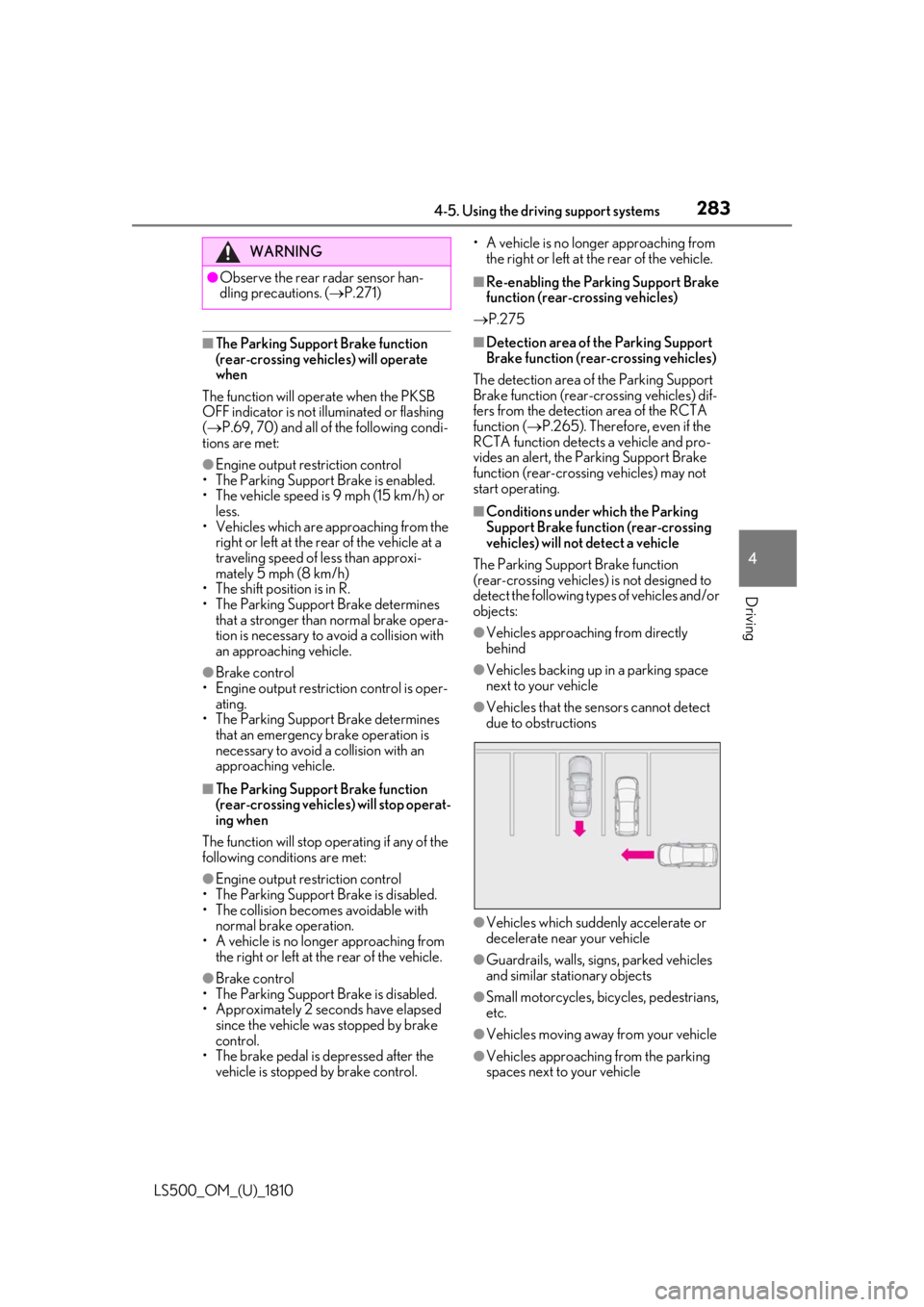
The Parking Support Brake function
(rear-crossing vehicles) is not designed to
detect the following types of vehicles and/or
objects: ●
Vehicles approaching from directly
behind ●
Vehicles backing up in a parking space
next to your vehicle ●
Vehicles that the sensors cannot detect
due to obstructions
●
Vehicles which suddenly accelerate or
decelerate near your vehicle
●
Guardrails, walls, signs, parked vehicles
and similar stationary objects
●
Small motorcycles, bicycles, pedestrians,
etc.
●
Vehicles moving away from your vehicle
●
Vehicles approaching from the parking
spaces next to your vehicleWARNING●
Observe the rear radar sensor han-
dling precautions. ( P.271)
Page 284 of 512
284 4-5. Using the driving support systems
LS500_OM_(U)_1810 ●
Objects which are extremely close to a
radar sensor●
Vehicles which are approaching from the
right or left at the re ar of the vehicle at a
traveling speed of less than approxi-
mately 5 mph (8 km/h)●
Vehicles which are approaching from the
right or left at the re ar of the vehicle at a
traveling speed of more than approxi-
mately 15 mph (24 km/h)■
PKSB buzzer
If the Parking Support Brake is enabled and
brake control is performed, a buzzer will
sound to notify the driver. ■
Situations in which the system may
operate even though there is no possi-
bility of a collision
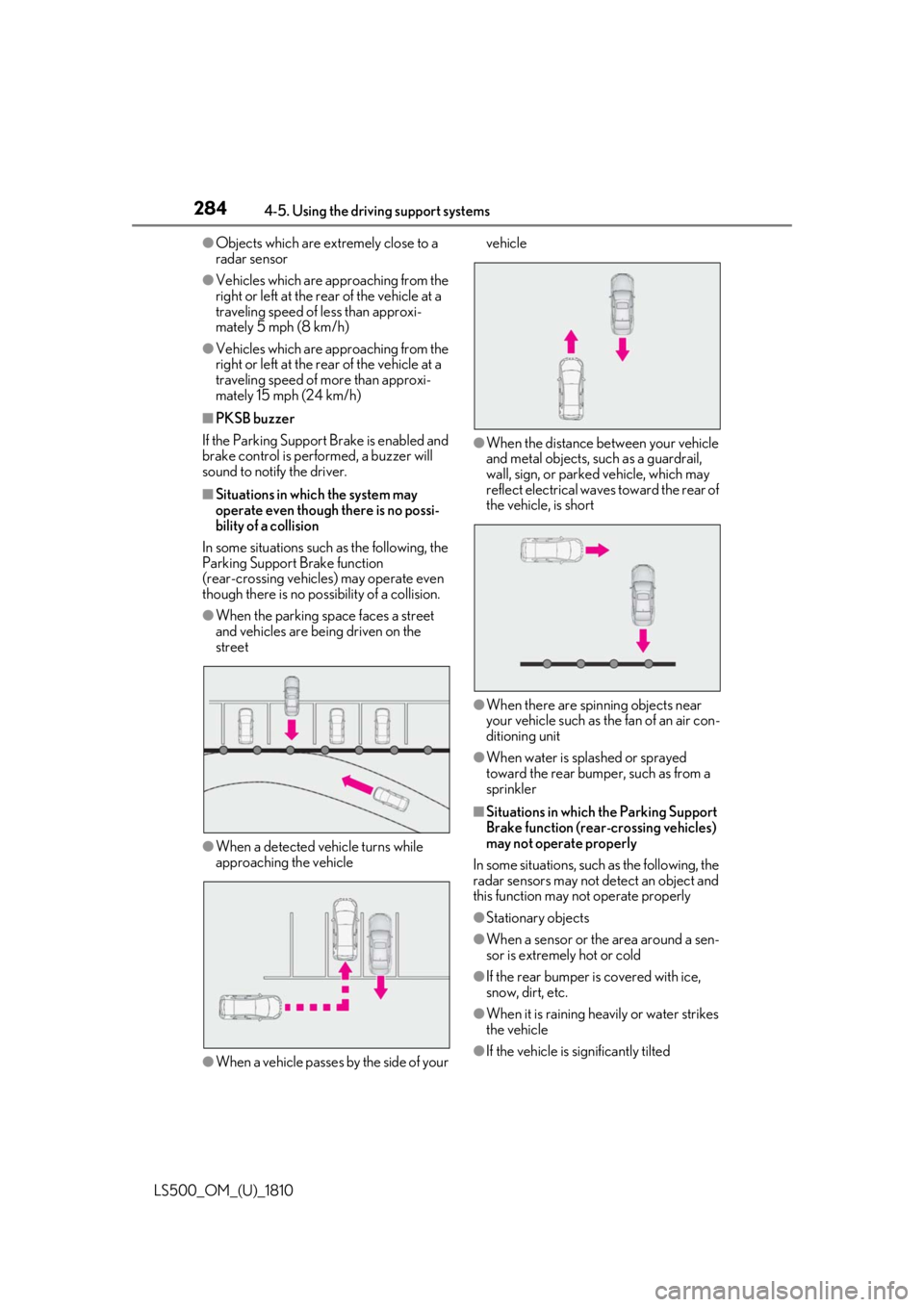
In some situations such as the following, the
Parking Support Brake function
(rear-crossing vehicles) may operate even
though there is no possibility of a collision. ●
When the parking space faces a street
and vehicles are being driven on the
street
●
When a detected vehicle turns while
approaching the vehicle
●
When a vehicle passes by the side of your vehicle
●
When the distance between your vehicle
and metal objects, such as a guardrail,
wall, sign, or parked vehicle, which may
reflect electrical waves toward the rear of
the vehicle, is short
●
When there are spinning objects near
your vehicle such as the fan of an air con-
ditioning unit ●
When water is spla shed or sprayed
toward the rear bumper, such as from a
sprinkler ■
Situations in which the Parking Support
Brake function (rear-crossing vehicles)
may not operate properly
In some situations, such as the following, the
radar sensors may not detect an object and
this function may not operate properly
●
Stationary objects
●
When a sensor or the area around a sen-
sor is extremely hot or cold
●
If the rear bumper is covered with ice,
snow, dirt, etc.
●
When it is raining he avily or water strikes
the vehicle
●
If the vehicle is significantly tilted
Page 422 of 512
422 7-2. Steps to take in an emergency
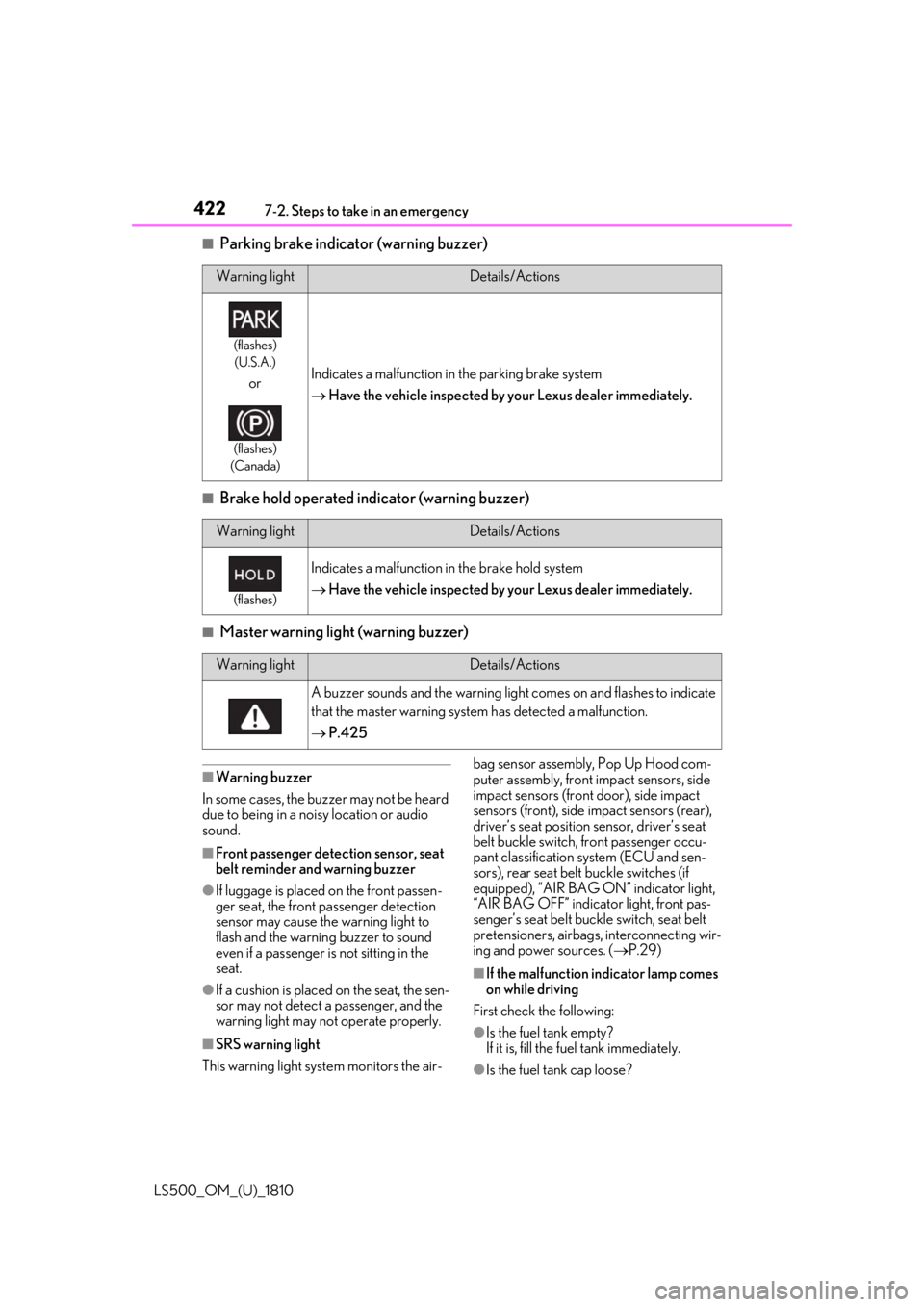
LS500_OM_(U)_1810 ■
Parking brake indicator (warning buzzer)
■
Brake hold operated indicator (warning buzzer)
■
Master warning light (warning buzzer)
■
Warning buzzer
In some cases, the bu zzer may not be heard
due to being in a noisy location or audio
sound.
■
Front passenger detection sensor, seat
belt reminder and warning buzzer
●
If luggage is placed on the front passen-
ger seat, the front passenger detection
sensor may cause th e warning light to
flash and the warning buzzer to sound
even if a passenger is not sitting in the
seat.
●
If a cushion is placed on the seat, the sen-
sor may not detect a passenger, and the
warning light may not operate properly.
■
SRS warning light
This warning light system monitors the air- bag sensor assembly, Pop Up Hood com-
puter assembly, front impact sensors, side
impact sensors (front door), side impact
sensors (front), side impact sensors (rear),
driver’s seat position sensor, driver’s seat
belt buckle switch, front passenger occu-
pant classification system (ECU and sen-
sors), rear seat belt buckle switches (if
equipped), “AIR BAG ON” indicator light,
“AIR BAG OFF” indicator light, front pas-
senger’s seat belt buckle switch, seat belt
pretensioners, airbags, interconnecting wir-
ing and power sources. ( P.29)
■
If the malfunction indicator lamp comes
on while driving
First check the following:
●
Is the fuel tank empty?
If it is, fill the fuel tank immediately.
●
Is the fuel tank cap loose?Warning light Details/Actions(flashes)
(U.S.A.)
or (flashes)
(Canada) Indicates a malfunction in the parking brake system
Have the vehicle inspected by your Lexus dealer immediately.
Warning light Details/Actions(flashes)
Indicates a malfunction in the brake hold system
Have the vehicle inspected by your Lexus dealer immediately.
Warning light Details/Actions
A buzzer sounds and the warning light comes on and flashes to indicate
that the master warning system has detected a malfunction.
P.425
Page 504 of 512

504 Alphabetical Index
LS500_OM_(U)_1810 N
Navigation system-linked display.... 84, 87
Noise from under vehicle ...............................6 O
“ODO TRIP” switch ...............................74, 79
Odometer ..................................................74, 79
Odometer and trip meter display
Display items ........................................... 74, 79
“ODO TRIP” switch ............................ 74, 79
Pop-up display.......................................75, 79
Oil
Engine oil .......................................................448
Front differential oil ...................................450
Rear differential oil ......................................451
Opener
Fuel filler door............................................... 189
Hood.................................................................. 371
Trunk ................................................................. 106
Outer foot lights
Location............................................................331
Outside door handle lights........................331
Outside rear view mirrors
Adjustment..................................................... 140
BSM (Blind Sport Monitor) .................250
Folding ................................................................141
Linked mirror functi on when reversing
.......................................................................... 140
Mirror position memory.......................... 130
Outside rear view mirror defoggers
...........................................................................314
RCTA function ............................................ 263
Outside temperature.............................73, 76
Overheating .................................................. 440
P
Paddle shift switches ............................171, 172
Panic mode ....................................................... 98
Panoramic moon roof
Jam protection function............................149 Operation ........................................................147
Parking assist sensors (intuitive parking
assist) ............................................................. 257
Parking brake
Operation ........................................................174
Parking brake engaged warning buzzer
............................................................................176
Warning light ............................................... 422
Warning message .......................................176
Parking lights
Light switch .....................................................179
Replacing light bulbs ............................... 404
Parking Support Brake function (for
rear-crossing vehicles) .......................... 282
Function ..........................................................282
Parking Support Brake function (rear
pedestrians) .....................................270, 286
Function ......................................................... 286
Parking Support Brake function
(rear-crossing vehicles)......................... 270
Parking Support Brake function (static
objects) .............................................. 270, 276
Function .......................................................... 276
PCS (Pre-Collision System)
Function ............................................... 204, 215
PCS OFF switch .............................. 207, 217
Warning light .................................................421
Personal lights.................................................331
PKSA (Parking Support Alert) .............. 255
PKSB (Parking Support Brake)............. 270
Warning message ..................................... 274
Pop Up Hood................................................... 38
Power easy access system ....................... 130
Power outlets ................................................ 345
Power rear seat ..............................................126
Power steering (Elect ric power steering
system) .......................................................... 295
Warning light ................................................ 418
Power trunk opener and closer ............. 106
Power windows
Door lock linked window operation ..143
Jam protection function ............................142