battery LEXUS LS500 2019 Owner's Manual
[x] Cancel search | Manufacturer: LEXUS, Model Year: 2019, Model line: LS500, Model: LEXUS LS500 2019Pages: 512, PDF Size: 9.71 MB
Page 167 of 512
1674-2. Driving procedures
LS500_OM_(U)_1810 4
Driving ■
When the shift control system malfunc-
tions
When attempting to turn the engine switch
off while there is a malfunction in the shift
control system, the engine switch mode
may change to ACCESSORY mode. In this
case, ACCESSORY mode may be turned
off by applying the parking brake and press-
ing the engine switch again. If there is a mal-
function in the system, have the vehicle
inspected by your Lexus dealer immedi-
ately.
*1
: To improve fuel efficiency and reduce
noise, set the shift position in D for nor-
mal driving. You can choose gear range
suitable for your driving situation by
operating the paddle shift switches. *2
: Any gear range can be fixed when driv-
ing in M mode.
■
For the shift positions ●
When the engine switch is off or in
ACCESSORY mode, the shift position
cannot be changed.
●
When the engine swit ch is in IGNITION
ON mode, the shift position can only be
changed to N.
●
When the engine is running, the shift
position can be changed from P to D, N
or R.
●
The shift position can only be changed to
M directly from D.
In addition, if an attempt is made to change NOTICE■
To prevent battery discharge●
Do not leave the engine switch in
ACCESSORY or IGNITION ON
mode for long period s of time without
the engine running.●
If “ACCESSORY” or “IGNITION
ON” is displayed on the meter, the
engine switch is not off.
Exit the vehicle after turning the
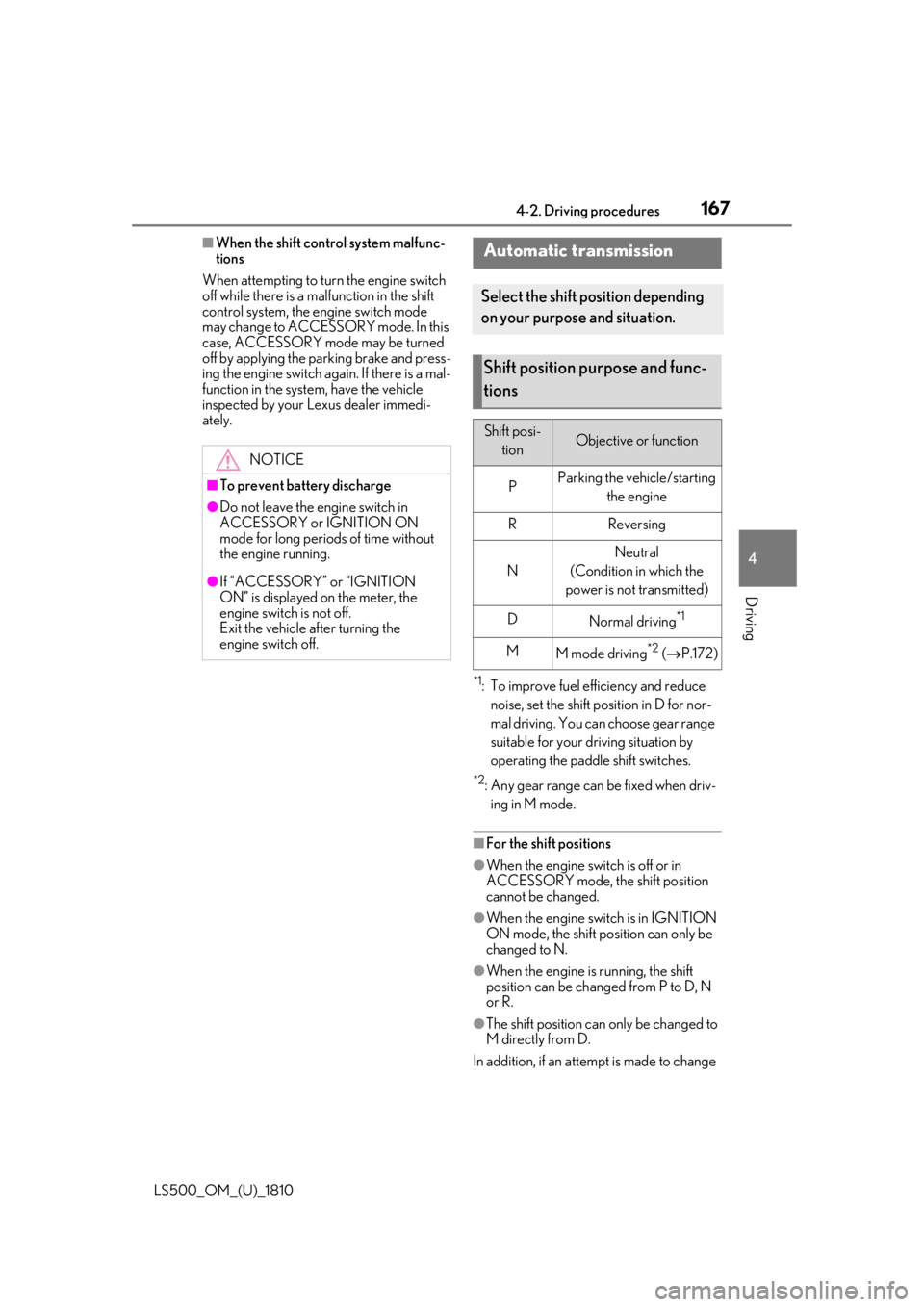
engine switch off. Automatic transmission Select the shift position depending
on your purpose and situation.
Shift position purpose and func-
tions Shift posi-
tion Objective or function
P Parking the vehicle/starting
the engine
R Reversing
N Neutral
(Condition in which the
power is not transmitted)
D
Normal driving *1
M
M mode driving *2
( P.172)
Page 170 of 512
170 4-2. Driving procedures
LS500_OM_(U)_1810 The current shift position is illuminated.
When selecting the shift position, make
sure that the shift position has been
changed to the desired position by check-
ing the shift position indicator provided on
the instrument cluster.
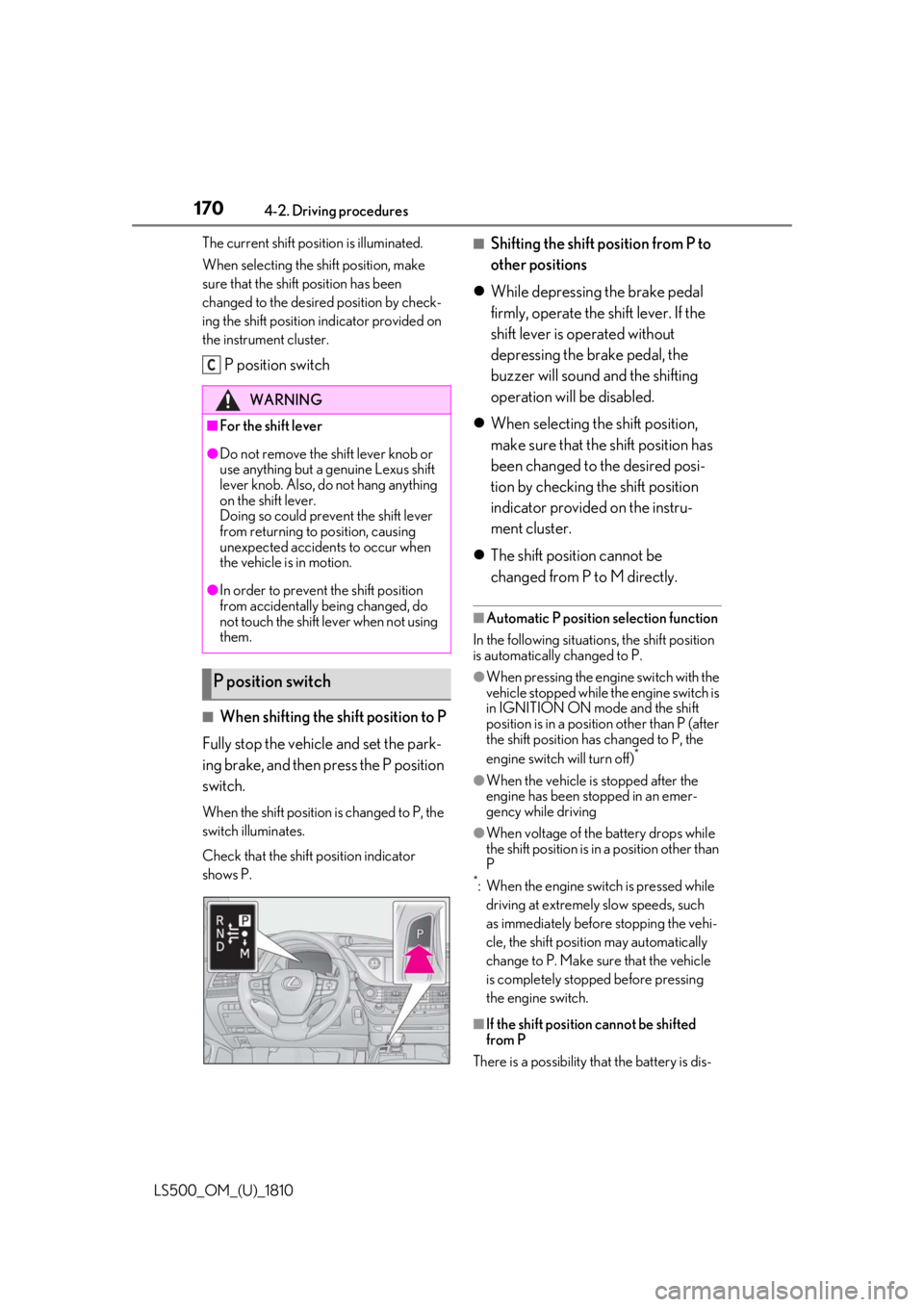
P position switch
■
When shifting the shift position to P
Fully stop the vehicle and set the park-
ing brake, and then press the P position
switch. When the shift position is changed to P, the
switch illuminates.
Check that the shift position indicator
shows P. ■
Shifting the shift position from P to
other positions
While depressing the brake pedal
firmly, operate the shift lever. If the
shift lever is operated without
depressing the brake pedal, the
buzzer will sound and the shifting
operation will be disabled.
When selecting the shift position,
make sure that the shift position has
been changed to the desired posi-
tion by checking the shift position
indicator provided on the instru-
ment cluster.
The shift position cannot be
changed from P to M directly. ■
Automatic P position selection function
In the following situations, the shift position
is automatically changed to P. ●
When pressing the engine switch with the
vehicle stopped while th e engine switch is
in IGNITION ON mode and the shift
position is in a position other than P (after
the shift position has changed to P, the
engine switch will turn off) *
●
When the vehicle is stopped after the
engine has been stopped in an emer-
gency while driving ●
When voltage of the battery drops while
the shift position is in a position other than
P *
: When the engine switch is pressed while
driving at extremely slow speeds, such
as immediately before stopping the vehi-
cle, the shift position may automatically
change to P. Make su re that the vehicle
is completely stopped before pressing
the engine switch.
■
If the shift position cannot be shifted
from P
There is a possibility th at the battery is dis-WARNING■
For the shift lever●
Do not remove the sh ift lever knob or
use anything but a genuine Lexus shift
lever knob. Also, do not hang anything
on the shift lever.
Doing so could prevent the shift lever
from returning to position, causing
unexpected accidents to occur when
the vehicle is in motion.●
In order to prevent the shift position
from accidentally being changed, do
not touch the shift lever when not using
them.
P position switch C
Page 171 of 512
1714-2. Driving procedures
LS500_OM_(U)_1810 4
Driving charged. Check the battery in this situation.
( P.435)
■
Driving mode
P.289 ■
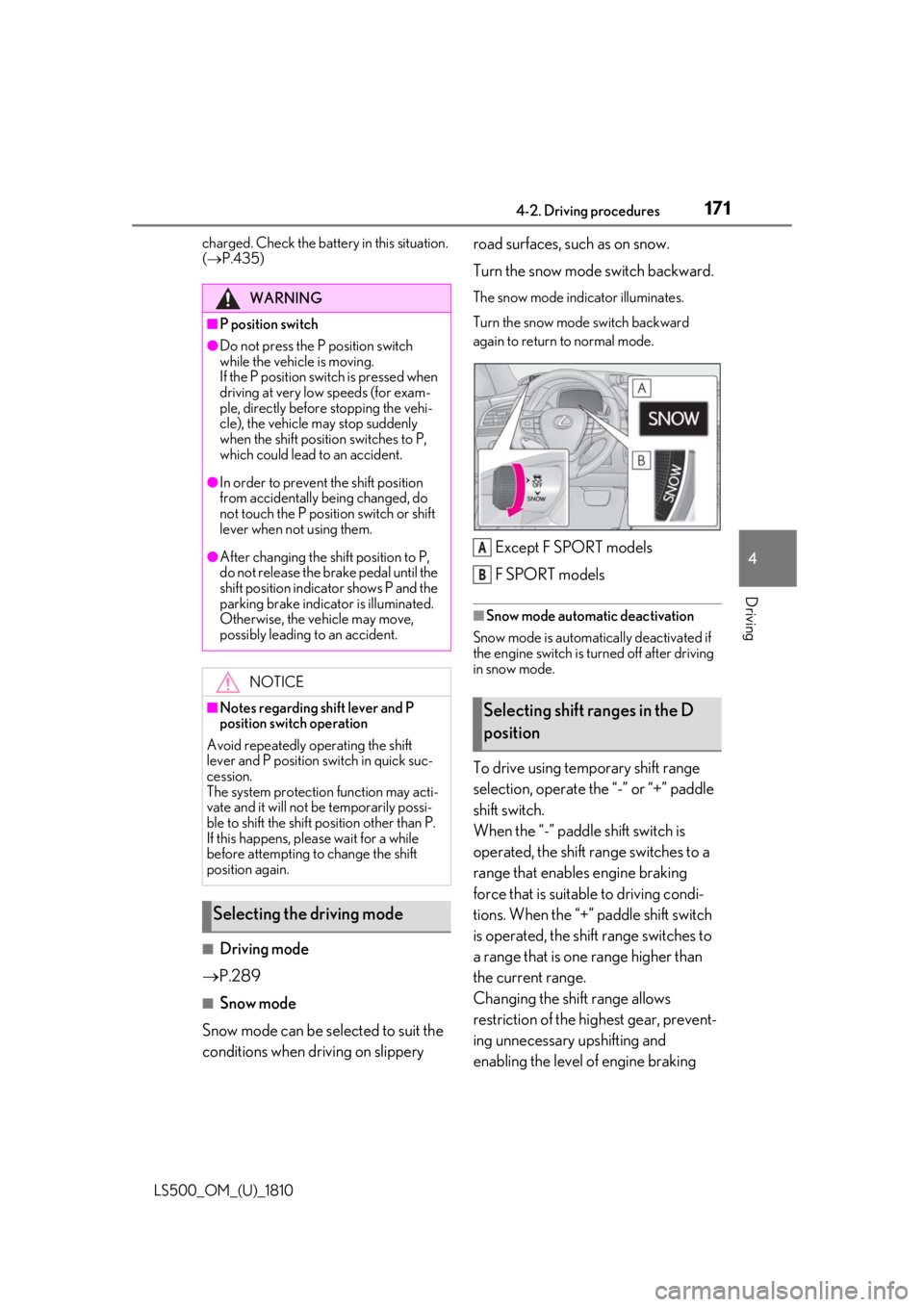
Snow mode
Snow mode can be selected to suit the
conditions when dr iving on slippery road surfaces, such as on snow.
Turn the snow mode switch backward. The snow mode indicator illuminates.
Turn the snow mode switch backward
again to return to normal mode.
Except F SPORT models
F SPORT models ■
Snow mode automatic deactivation
Snow mode is automatically deactivated if
the engine switch is turned off after driving
in snow mode.
To drive using temporary shift range
selection, operate the “-” or “+” paddle
shift switch.
When the “-” paddle shift switch is
operated, the shift range switches to a
range that enables engine braking
force that is suitable to driving condi-
tions. When the “+” paddle shift switch
is operated, the shift range switches to
a range that is one range higher than
the current range.
Changing the shift range allows
restriction of the highest gear, prevent-
ing unnecessary upshifting and
enabling the level of engine braking WARNING■
P position switch●
Do not press the P position switch
while the vehicle is moving.
If the P position switch is pressed when
driving at very low speeds (for exam-
ple, directly before stopping the vehi-
cle), the vehicle may stop suddenly
when the shift position switches to P,
which could lead to an accident.●
In order to prevent the shift position
from accidentally being changed, do
not touch the P position switch or shift
lever when not using them.●
After changing the shift position to P,
do not release the brake pedal until the
shift position indicator shows P and the
parking brake indicator is illuminated.
Otherwise, the vehicle may move,
possibly leading to an accident.
NOTICE■
Notes regarding shift lever and P
position switch operation
Avoid repeatedly operating the shift
lever and P position switch in quick suc-
cession.
The system protection function may acti-
vate and it will not be temporarily possi-
ble to shift the shift position other than P.
If this happens, plea se wait for a while
before attempting to change the shift
position again.
Selecting the driving mode Selecting shift ranges in the D
position A
B
Page 180 of 512
180 4-3. Operating the lights and wipers
LS500_OM_(U)_1810 The sensor may not function properly if an
object is placed on th e sensor, or anything
that blocks the sensor is affixed to the wind-
shield.
Doing so interferes with the sensor detect-
ing the level of ambient light and may cause
the automatic headlight system to malfunc-
tion. ■
Automatic light off system●
When the headlights are on: The head-
lights and tail lights tu rn off 30 seconds
after the driver’s door is opened and
closed if the engine switch is turned to
ACCESSORY mode or turned off. (The
lights turn off immediately if on the
key is pressed after all the doors are
closed.)●
When only the tail lights are on: The tail
lights turn off automatically if the engine
switch is turned to ACCESSORY mode
or turned off and the driver’s door is
opened.
To turn the lights on again, turn the engine
switch to IGNITION ON mode, or turn the
light switch off once and then back to
or . ■
Light reminder buzzer
A buzzer sounds when the engine switch is
turned off or turned to ACCESSORY
mode and the driver’s door is opened while
the lights are turned on. ■
Automatic headlight leveling system
The level of the headlights is automatically
adjusted according to the number of pas-
sengers and the loading condition of the
vehicle to ensure that the headlights do not
interfere with other road users.
■
Windshield wiper linked headlight illu-
mination
When driving during daytime with the
headlight switch turned to , if the wind-
shield wipers are used, the headlights will
turn on automatically after several seconds
to help enhance the visibility of your vehicle.
■
Battery-saving function
In order to prevent the battery of the vehicle from discharging, if the headlights and/or
tail lights are on when the engine switch is
turned off the battery saving function will
operate and automatically turn off all the
lights after approximately 20 minutes.
When the engine switch is turned to IGNI-
TION ON mode, the battery-saving func-
tion will be disabled.
When any of the following are performed,
the battery-saving function is canceled
once and then reactivated. All the lights will
turn off automatically 20 minutes after the
Battery- saving function has been reacti-
vated: ●
When the headlight switch is operated●
When a door is opened or closed ■
Welcome light illumination control
The parking lights and tail lights automati-
cally turn on at night when the doors are
unlocked using the entr y function or wire-
less remote control if the light switch is in
the position. ■
Customization
Some functions can be customized.
( P.466)
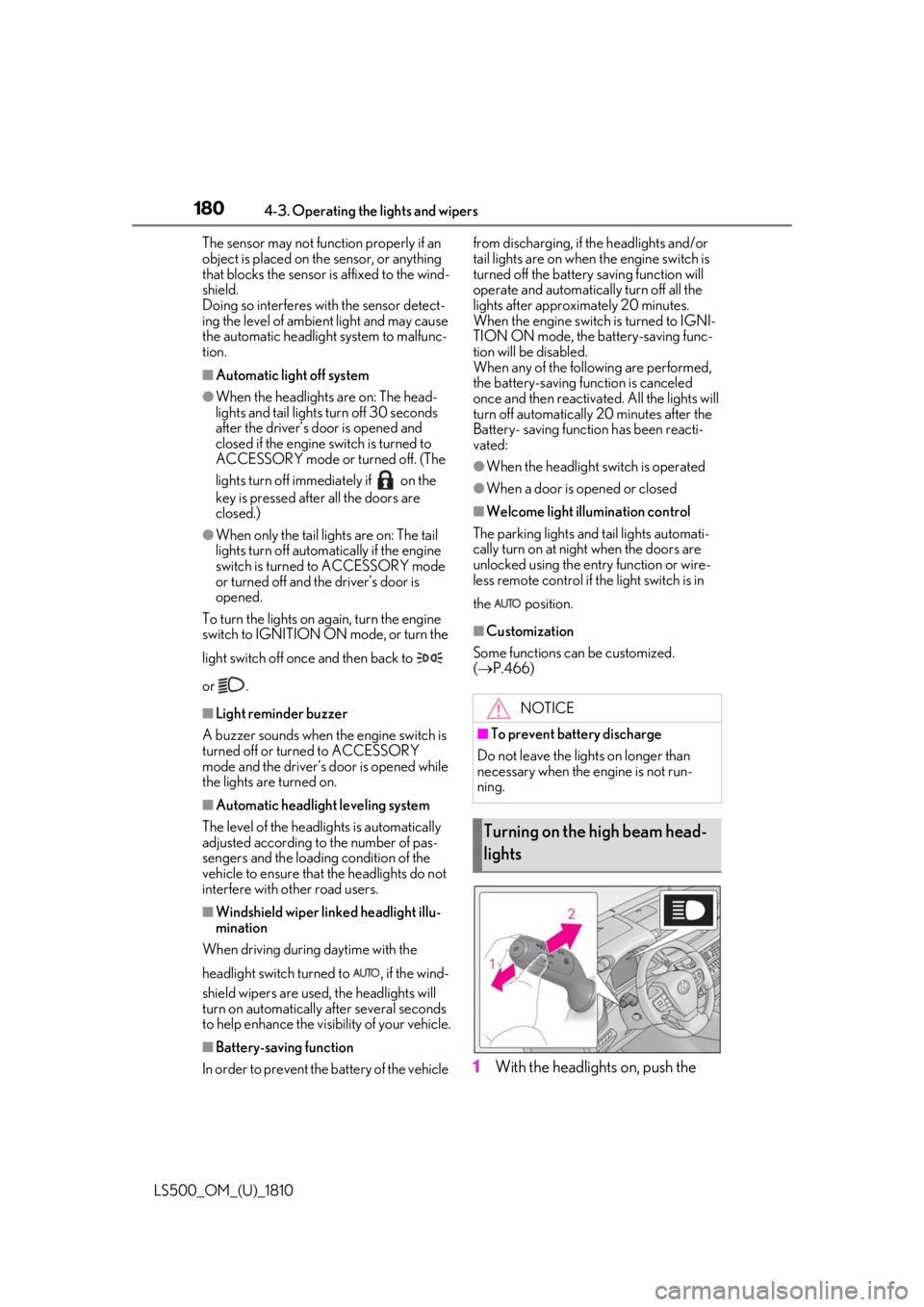
1 With the headlights on, push the NOTICE■
To prevent battery discharge
Do not leave the lights on longer than
necessary when the engine is not run-
ning.
Turning on the high beam head-
lights
Page 209 of 512
2094-5. Using the driving support systems
LS500_OM_(U)_1810 4
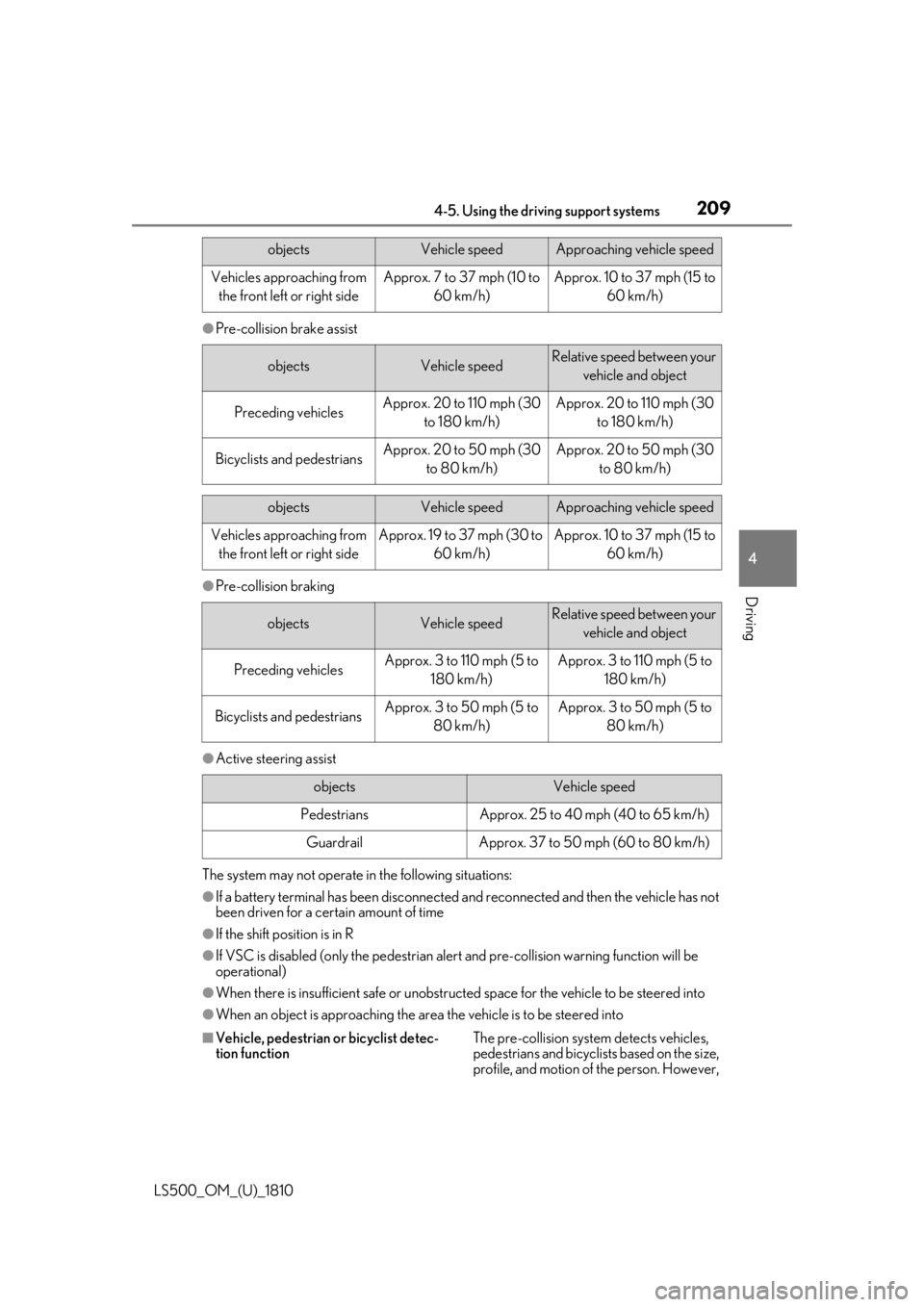
Driving ●
Pre-collision brake assist
●
Pre-collision braking
●
Active steering assist
The system may not operate in the following situations:
●
If a battery terminal has been disconnected and reconnected and then the vehicle has not
been driven for a certain amount of time
●
If the shift position is in R
●
If VSC is disabled (only the pedestrian alert and pre-collision warning function will be
operational)
●
When there is insufficient safe or unobstructed space for the vehicle to be steered into
●
When an object is approaching the area the vehicle is to be steered into
■
Vehicle, pedestrian or bicyclist detec-
tion function The pre-collision system detects vehicles,
pedestrians and bicyclists based on the size,
profile, and motion of the person. However, objects Vehicle speed Approaching vehicle speed
Vehicles approaching from
the front left or right side Approx. 7 to 37 mph (10 to
60 km/h) Approx. 10 to 37 mph (15 to
60 km/h)
objects Vehicle speed Relative speed between your
vehicle and object
Preceding vehicles Approx. 20 to 110 mph (30
to 180 km/h) Approx. 20 to 110 mph (30
to 180 km/h)
Bicyclists and pedestrians Approx. 20 to 50 mph (30
to 80 km/h) Approx. 20 to 50 mph (30
to 80 km/h)
objects Vehicle speed Approaching vehicle speed
Vehicles approaching from
the front left or right side Approx. 19 to 37 mph (30 to
60 km/h) Approx. 10 to 37 mph (15 to
60 km/h)
objects Vehicle speed Relative speed between your
vehicle and object
Preceding vehicles Approx. 3 to 110 mph (5 to
180 km/h) Approx. 3 to 110 mph (5 to
180 km/h)
Bicyclists and pedestrians Approx. 3 to 50 mph (5 to
80 km/h) Approx. 3 to 50 mph (5 to
80 km/h)
objects Vehicle speed
Pedestrians Approx. 25 to 40 mph (40 to 65 km/h)
Guardrail Approx. 37 to 50 mph (60 to 80 km/h)
Page 219 of 512
2194-5. Using the driving support systems
LS500_OM_(U)_1810 4
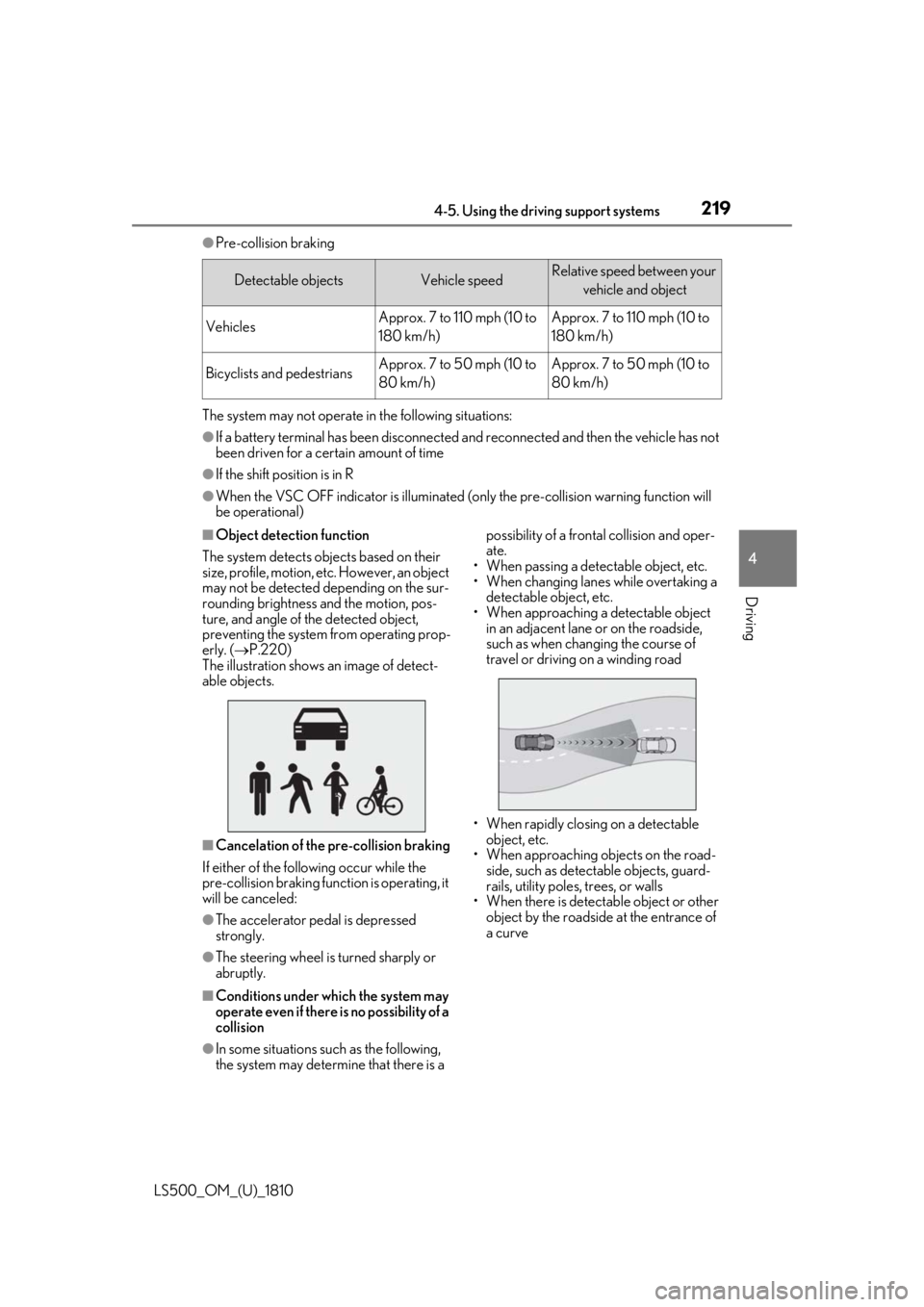
Driving ●
Pre-collision braking
The system may not operate in the following situations: ●
If a battery terminal has been disconnected and reconnected and then the vehicle has not
been driven for a certain amount of time●
If the shift position is in R●
When the VSC OFF indicator is illuminated (only the pre-collision warning function will
be operational)■
Object detection function
The system detects ob jects based on their
size, profile, motion, etc. However, an object
may not be detected depending on the sur-
rounding brightness and the motion, pos-
ture, and angle of the detected object,
preventing the system from operating prop-
erly. ( P.220)
The illustration shows an image of detect-
able objects.
■
Cancelation of the pre-collision braking
If either of the following occur while the
pre-collision braking function is operating, it
will be canceled:
●
The accelerator pedal is depressed
strongly.
●
The steering wheel is turned sharply or
abruptly.
■
Conditions under which the system may
operate even if there is no possibility of a
collision
●
In some situations such as the following,
the system may determine that there is a possibility of a frontal collision and oper-
ate.
• When passing a detectable object, etc.
• When changing lanes while overtaking a
detectable object, etc.
• When approaching a detectable object
in an adjacent lane or on the roadside,
such as when changing the course of
travel or driving on a winding road
• When rapidly closing on a detectable
object, etc.
• When approaching objects on the road-
side, such as detectable objects, guard-
rails, utility poles, trees, or walls
• When there is detectable object or other
object by the roadside at the entrance of
a curveDetectable objects Vehicle speed Relative speed between your
vehicle and object
Vehicles Approx. 7 to 110 mph (10 to
180 km/h) Approx. 7 to 110 mph (10 to
180 km/h)
Bicyclists and pedestrians Approx. 7 to 50 mph (10 to
80 km/h) Approx. 7 to 50 mph (10 to
80 km/h)
Page 274 of 512

274 4-5. Using the driving support systems
LS500_OM_(U)_1810 Engine output restriction control begins operating
System determines that po ssibility of collision with detected object is high
Engine output reduced
System determines that possibility of col lision with detected object is extremely
high
Brake control begins operating
Brake control strength increased
Example: Multi-information display:
“BRAKE!”
Example: Multi-information display: “Switch to Brake” ■
If the Parking Support Brake has oper-
ated
If the vehicle is stopped due to operation of
the Parking Support Brake, the Parking
Support Brake will be disabled and the
PKSB OFF indicator will illuminate. If the
Parking Support Brake operates unneces-
sarily, brake control can be canceled by
depressing the brake pedal or waiting for
approximately 2 seconds for it to automati-
cally be canceled. Then, the vehicle can be
operated by depressing the accelerator
pedal. ■
If “Parking Support Brake Unavailable”
is displayed on th e multi-information
display and the PKSB OFF indicator is
flashing
If the vehicle is stopped due to operation of
the Parking Support Brake, the Parking
Support Brake will be disabled and the
PKSB OFF indicator will illuminate. ●
A sensor may be cove red with ice, snow,
dirt, etc. Remove the ice, snow, dirt, etc.,
from the sensor to return the system to
normal.
Also, due to ice forming on a sensor at
low temperatures, a warning message
may be displayed or the sensor may not
be able to detect an object. Once the ice
melts, the system wi ll return to normal.●
If this message is di splayed only when the
R shift position is selected, the rear cam-
era lens may be dirty. Clean the camera
lens. If this message is displayed in any
forward shift position, a sensor on the
front or rear bumper may be dirty. Clean
the sensors and their surrounding area
on the bumpers. ●
If this message continues to be displayed
even after cleaning the sensor, or is dis-
played even though the sensor is clean,
have the vehicle inspected by your Lexus
dealer. ●
Initialization may not have been per-
formed after a battery terminal was dis-
connected and reconnected. Initialize the
system. ( P.274)
If this message continues to be displayed
even after initializati on, have the vehicle
inspected by your Lexus dealer.
■
If a battery terminal has been discon-
nected and reconnected
The system needs to be initialized. To initial-
ize the system, drive the vehicle straight
ahead for 5 seconds or more at a speed of
approximately 22 mph (35 km/h) or more. D
E
F
G
H
I
J
K
Page 297 of 512

2974-5. Using the driving support systems
LS500_OM_(U)_1810 4
Driving of the following situations: ●
Shift the shift position to P or N●
The accelerator pedal is depressed●
The parking brake is engaged●
2 seconds at maximum elapsed after the
brake pedal is released■
VGRS is disabled when
VGRS may stop operating in the following
situations.
In this event, the steering wheel may move
from its straight forward position, but it will
return when the system restarts. ●
When the steering wheel is operated for
an extended period of time while the
vehicle is stopped or is moving very
slowly (on vehicles with LDH, DRS is dis-
abled together with VGRS)●
When the steering wheel has been held
fully to the left or right
The center position of the steering wheel
may change when VGRS is disabled. How-
ever, the position will return to normal after
VGRS is reactivated. ■
When the battery is disconnected (vehi-
cles with VGRS)
The steering wheel may move from its
straight forward position, but this will be
corrected automatically when driving. ■
Sounds and vibrations caused by the
ABS, brake assist, VS C, TRAC, hill-start
assist control and VGRS systems●
A sound may be heard from the engine
compartment when the brake pedal is
depressed repeatedly, when the engine is
started or just after the vehicle begins to
move. This sound does not indicate that a
malfunction has occurred in any of these
systems.
●
Any of the following conditions may
occur when the above systems are oper-
ating. None of these indicates that a mal-
function has occurred.
• Vibrations may be felt through the vehicle
body and steering.
• A motor sound may be heard also after
the vehicle comes to a stop.
• Vehicles without Lexus Safety System +
A: The brake pedal may pulsate slightly after the ABS is activated.
• Vehicles without Lexus Safety System +
A: The brake pedal may move down
slightly after the ABS is activated.■
ECB operating sound
ECB operating sound may be heard in the
following cases, but it does not indicate that
a malfunction has occurred. ●
Operating sound heard from the engine
compartment when the brake pedal is
operated. ●
Motor sound of the brake system heard
from the front part of the vehicle when
the driver’s door is opened. ●
Operating sound heard from the engine
compartment when one or two minutes
passed after the stop of the engine. ■
EPS, VGRS and DRS operation sound
When the steering wheel is operated, a
motor sound (whirring sound) may be
heard. This does not indicate a malfunction. ■
Automatic reactivation of TRAC and
VSC systems
After turning the TRAC and VSC systems
off, the systems will be automatically
re-enabled in the following situations: ●
When the engine switch is turned off ●
If only the TRAC system is turned off, the
TRAC will turn on when vehicle speed
increases
If both the TRAC and VSC systems are
turned off, automatic re-enabling will not
occur when vehicle speed increases. ■
Reduced effectiveness of the EPS sys-
tem
The effectiveness of the EPS system is
reduced to prevent the system from over-
heating when there is frequent steering
input over an extended period of time. The
steering wheel may feel heavy as a result.
Should this occur, re frain from excessive
steering input or stop the vehicle and turn
the engine off. The EPS system should
return to normal within 10 minutes.
■
Secondary Collision Brake operating
conditions
The vehicle speed is approximately 6 mph
Page 300 of 512
300 4-6. Driving tips
LS500_OM_(U)_1810 4-6.Driving tips
Use fluids that are appropriate to
the prevailing outside temperatures. •Engine oil
• Engine coolant
•Washer fluid
Have a service technician inspect
the condition of the battery.
Have the vehicle fitted with four
snow tires or purchase a set of tire
chains for the rear tires. *
Ensure that all tires are the specified size
and brand, and that chains match the size
of the tires. *
: Tire chains cannot be mounted on vehi-
cles with front and rear tires of differing
sizes.Winter driving tips Carry out the necessary prepara-
tions and inspections before driving
the vehicle in winter. Always drive
the vehicle in a manner appropriate
to the prevailing weather condi-
tions.
Preparation for winter
WARNING
■
Driving with snow tires
Observe the following precautions to
reduce the risk of accidents.
Failure to do so may result in a loss of
vehicle control and cause death or seri-
ous injury.
●
Use tires of the specified size.
●
Maintain the recommended level of air
pressure. ●
Do not drive in excess of 75 mph (120
km/h), regardless of the type of snow
tires being used. ●
Use snow tires on all, not just some
wheels. ■
When installing tire chains
Before installing tire chains, make sure to
disable all functions of the vehicle height
control of the electronically modulated
air suspension. Otherwise, the vehicle
height may change while installing the
tire chains and part or your body may be
caught under the vehicle, possibly caus-
ing injury. ( P.293)■
Driving with tire chains
Observe the following precautions to
reduce the risk of accidents.
Failure to do so may result in the vehicle
being unable to be driven safely, and may
cause death or serious injury. ●
Do not drive in excess of the speed
limit specified for the tire chains being
used, or 30 mph (50 km/h), which-
ever is lower. ●
Avoid driving on bumpy road surfaces
or over potholes. ●
Avoid sudden acceleration, abrupt
steering, sudden br aking and shifting
operations that cause sudden engine
braking.
●
Slow down sufficiently before entering
a curve to ensure that vehicle control is
maintained.
●
Do not use LTA (Lane Tracing Assist)
system.
Page 316 of 512
316 5-3. Using the air conditioning system and defogger
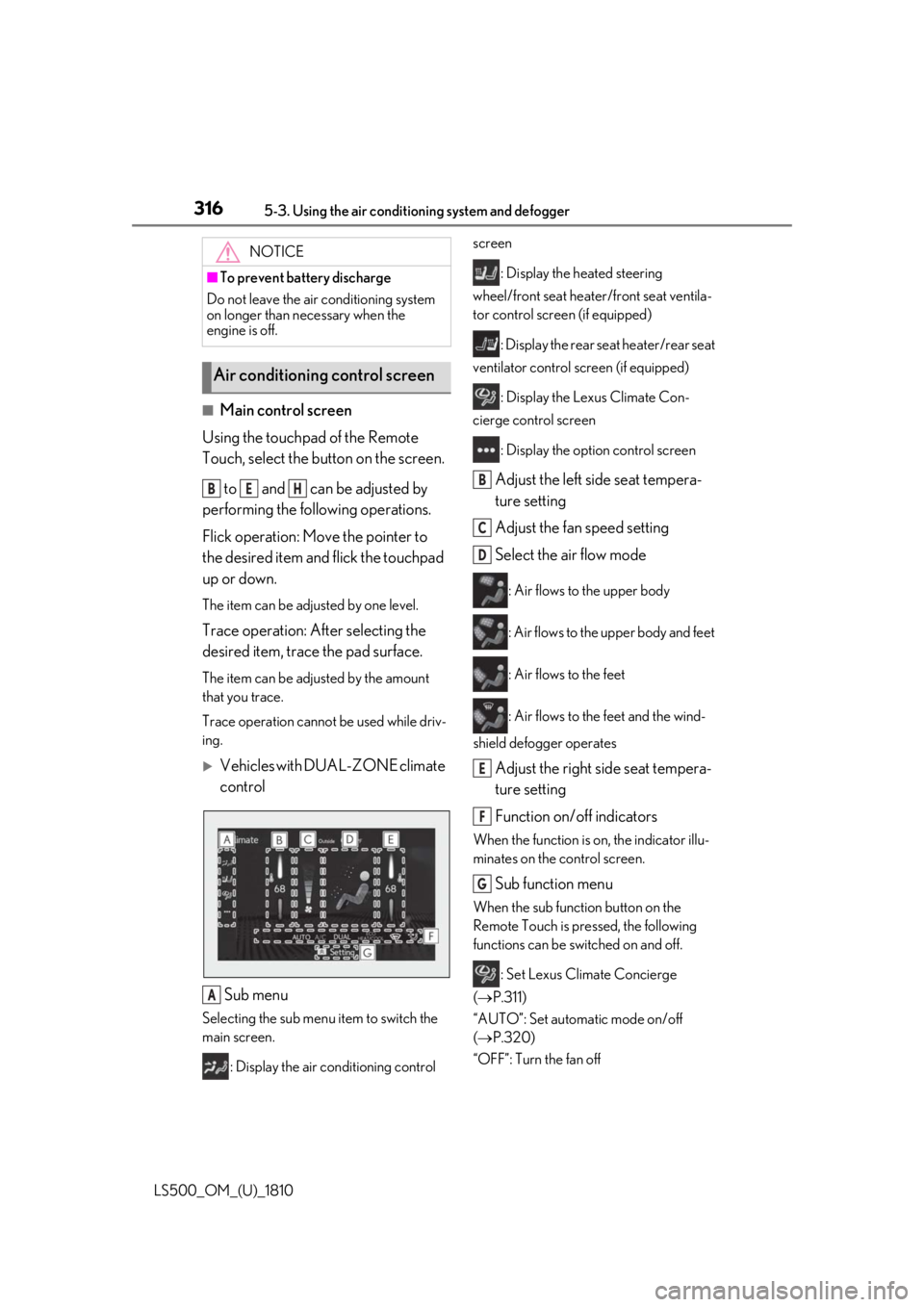
LS500_OM_(U)_1810 ■
Main control screen
Using the touchpad of the Remote
Touch, select the button on the screen.
to and can be adjusted by
performing the following operations.
Flick operation: Move the pointer to
the desired item and flick the touchpad
up or down. The item can be adjusted by one level.
Trace operation: After selecting the
desired item, trace the pad surface. The item can be adjusted by the amount
that you trace.
Trace operation cannot be used while driv-
ing.
Vehicles with DUAL-ZONE climate
control
Sub menu Selecting the sub menu item to switch the
main screen.
: Display the air conditioning control screen
: Display the heated steering
wheel/front seat heater /front seat ventila-
tor control screen (if equipped)
: Display the rear seat heater/rear seat
ventilator control screen (if equipped)
: Display the Lexus Climate Con-
cierge control screen
: Display the option control screen
Adjust the left side seat tempera-
ture setting
Adjust the fan speed setting
Select the air flow mode : Air flows to the upper body
: Air flows to the upper body and feet
: Air flows to the feet
: Air flows to the feet and the wind-
shield defogger operates
Adjust the right side seat tempera-
ture setting
Function on/off indicators When the function is on, the indicator illu-
minates on the control screen.
Sub function menu When the sub function button on the
Remote Touch is pressed, the following
functions can be switched on and off.
: Set Lexus Climate Concierge
( P.311)
“AUTO”: Set automatic mode on/off
( P.320)
“OFF”: Turn the fan off NOTICE■
To prevent battery discharge
Do not leave the air conditioning system
on longer than necessary when the
engine is off.
Air conditioning control screen B E H
A B
C
D
E
F
G