stop start LEXUS LS500 2019 Owner's Manual
[x] Cancel search | Manufacturer: LEXUS, Model Year: 2019, Model line: LS500, Model: LEXUS LS500 2019Pages: 512, PDF Size: 9.71 MB
Page 165 of 512
1654-2. Driving procedures
LS500_OM_(U)_1810 4
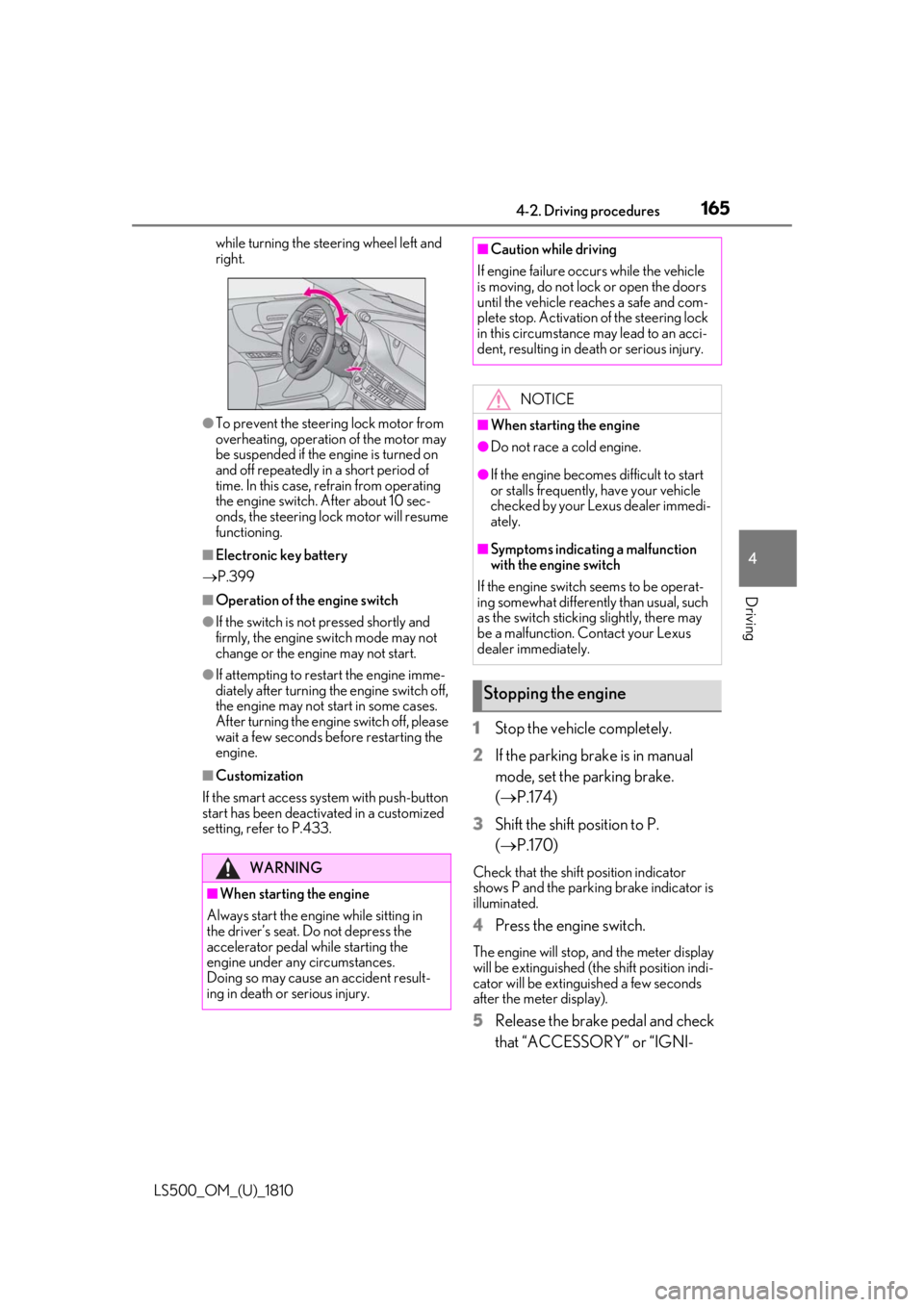
Driving while turning the steering wheel left and
right.
●
To prevent the steering lock motor from
overheating, operation of the motor may
be suspended if the engine is turned on
and off repeatedly in a short period of
time. In this case, refrain from operating
the engine switch. After about 10 sec-
onds, the steering lock motor will resume
functioning.■
Electronic key battery
P.399■
Operation of the engine switch●
If the switch is not pressed shortly and
firmly, the engine switch mode may not
change or the engine may not start.●
If attempting to restart the engine imme-
diately after turning the engine switch off,
the engine may not start in some cases.
After turning the engine switch off, please
wait a few seconds before restarting the
engine.■
Customization
If the smart access sy stem with push-button
start has been deactivated in a customized
setting, refer to P.433. 1 Stop the vehicle completely.
2 If the parking brake is in manual
mode, set the parking brake.
( P.174)
3 Shift the shift position to P.
( P.170) Check that the shift position indicator
shows P and the parking brake indicator is
illuminated.
4 Press the engine switch. The engine will stop, and the meter display
will be extinguished (the shift position indi-
cator will be extinguished a few seconds
after the meter display).
5 Release the brake pedal and check
that “ACCESSORY” or “IGNI-WARNING
■
When starting the engine
Always start the engine while sitting in
the driver’s seat. Do not depress the
accelerator pedal while starting the
engine under any circumstances.
Doing so may cause an accident result-
ing in death or serious injury. ■
Caution while driving
If engine failure occurs while the vehicle
is moving, do not lock or open the doors
until the vehicle reaches a safe and com-
plete stop. Activation of the steering lock
in this circumstance may lead to an acci-
dent, resulting in death or serious injury.
NOTICE■
When starting the engine ●
Do not race a cold engine. ●
If the engine becomes difficult to start
or stalls frequently, have your vehicle
checked by your Lexus dealer immedi-
ately. ■
Symptoms indicating a malfunction
with the engine switch
If the engine switch seems to be operat-
ing somewhat differently than usual, such
as the switch sticking slightly, there may
be a malfunction. Contact your Lexus
dealer immediately.
Stopping the engine
Page 166 of 512
166 4-2. Driving procedures
LS500_OM_(U)_1810 TION ON” is not shown on the
meter. ■
Automatic P position selection function
P.170
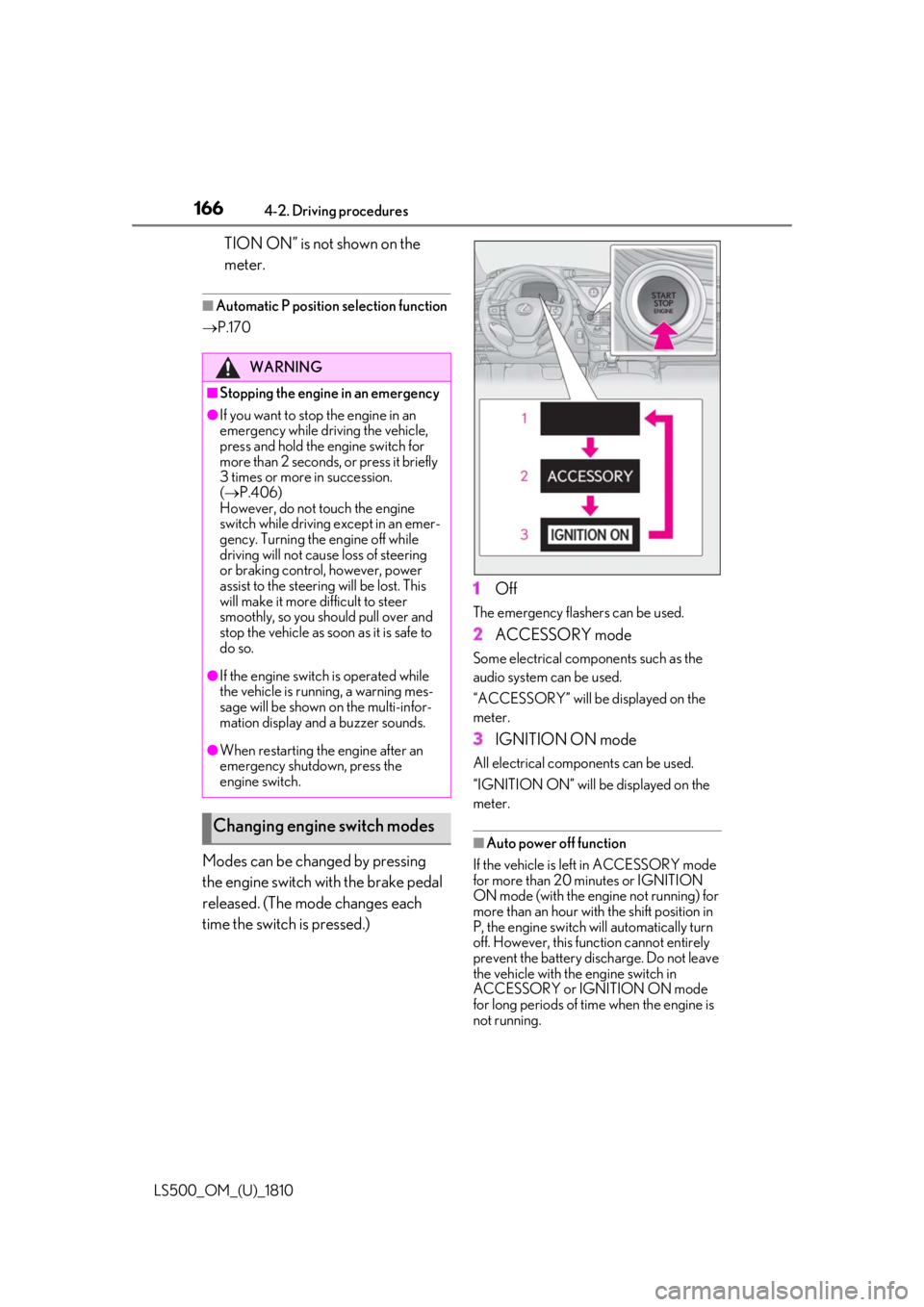
Modes can be changed by pressing
the engine switch with the brake pedal
released. (The mode changes each
time the switch is pressed.) 1 Off The emergency flashers can be used.
2 ACCESSORY mode Some electrical components such as the
audio system can be used.
“ACCESSORY” will be displayed on the
meter.
3 IGNITION ON mode All electrical components can be used.
“IGNITION ON” will be displayed on the
meter.
■
Auto power off function
If the vehicle is left in ACCESSORY mode
for more than 20 minutes or IGNITION
ON mode (with the engine not running) for
more than an hour with the shift position in
P, the engine switch will automatically turn
off. However, this function cannot entirely
prevent the battery discharge. Do not leave
the vehicle with the engine switch in
ACCESSORY or IGNITION ON mode
for long periods of time when the engine is
not running.WARNING■
Stopping the engine in an emergency●
If you want to stop the engine in an
emergency while driving the vehicle,
press and hold the engine switch for
more than 2 seconds, or press it briefly
3 times or more in succession.
( P.406)
However, do not touch the engine
switch while driving except in an emer-
gency. Turning the engine off while
driving will not cause loss of steering
or braking control, however, power
assist to the steering will be lost. This
will make it more difficult to steer
smoothly, so you should pull over and
stop the vehicle as soon as it is safe to
do so.●
If the engine switch is operated while
the vehicle is running, a warning mes-
sage will be shown on the multi-infor-
mation display and a buzzer sounds.●
When restarting the engine after an
emergency shutdown, press the
engine switch.
Changing engine switch modes
Page 177 of 512
1774-2. Driving procedures
LS500_OM_(U)_1810 4
Driving
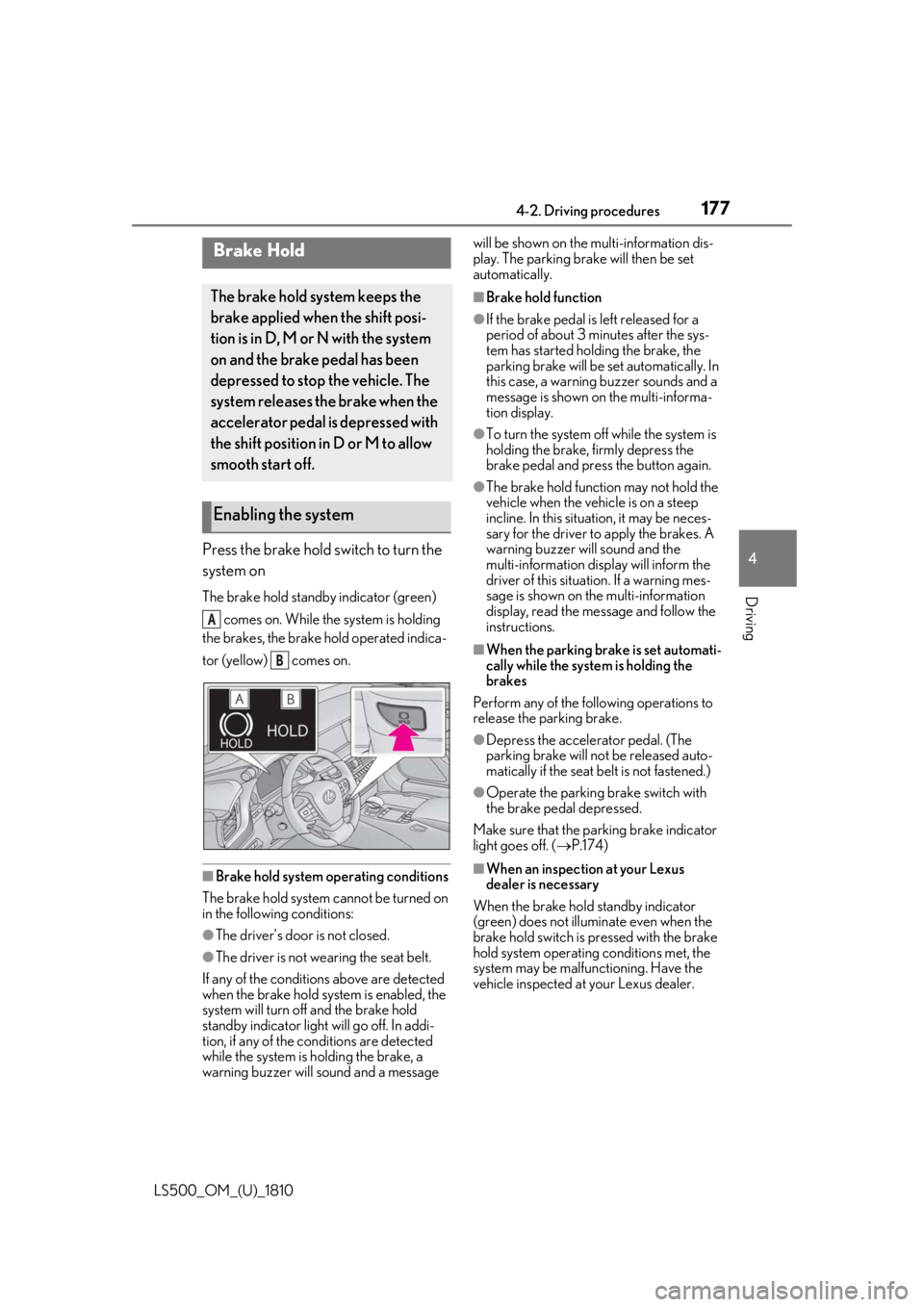
Press the brake hold switch to turn the
system on The brake hold standby indicator (green)
comes on. While the system is holding
the brakes, the brake hold operated indica-
tor (yellow) comes on.
■
Brake hold system operating conditions
The brake hold system cannot be turned on
in the following conditions:
●
The driver’s door is not closed.
●
The driver is not wearing the seat belt.
If any of the conditions above are detected
when the brake hold system is enabled, the
system will turn off and the brake hold
standby indicator light will go off. In addi-
tion, if any of the conditions are detected
while the system is holding the brake, a
warning buzzer will sound and a message will be shown on the multi-information dis-
play. The parking brake will then be set
automatically. ■
Brake hold function ●
If the brake pedal is left released for a
period of about 3 mi nutes after the sys-
tem has started holding the brake, the
parking brake will be set automatically. In
this case, a warning buzzer sounds and a
message is shown on the multi-informa-
tion display. ●
To turn the system off while the system is
holding the brake, firmly depress the
brake pedal and press the button again. ●
The brake hold function may not hold the
vehicle when the vehicle is on a steep
incline. In this situation, it may be neces-
sary for the driver to apply the brakes. A
warning buzzer will sound and the
multi-information display will inform the
driver of this situat ion. If a warning mes-
sage is shown on the multi-information
display, read the message and follow the
instructions. ■
When the parking brake is set automati-
cally while the system is holding the
brakes
Perform any of the following operations to
release the parking brake. ●
Depress the accelerator pedal. (The
parking brake will not be released auto-
matically if the seat belt is not fastened.) ●
Operate the parking brake switch with
the brake pedal depressed.
Make sure that the pa rking brake indicator
light goes off. ( P.174)
■
When an inspection at your Lexus
dealer is necessary
When the brake hold standby indicator
(green) does not illuminate even when the
brake hold switch is pressed with the brake
hold system operating conditions met, the
system may be malfun ctioning. Have the
vehicle inspected at your Lexus dealer.Brake Hold The brake hold system keeps the
brake applied when the shift posi-
tion is in D, M or N with the system
on and the brake pedal has been
depressed to stop the vehicle. The
system releases the brake when the
accelerator pedal is depressed with
the shift position in D or M to allow
smooth start off.
Enabling the system A
B
Page 224 of 512
224 4-5. Using the driving support systems
LS500_OM_(U)_1810 left/right turn immediat ely in front of your
vehicle●
When a pedestrian is approaching your
vehicle●
When an oncoming vehicle makes a
left/right turn●
When your vehicle enters an intersection
before a vehicle approaching from the
left or right in front of your vehicle●
When stopped at traffic light and a vehi-
cle approaches from the left or right in
front of your vehicle●
When driving in a lo cation where there
are objects which reflect radar, such as
vehicles, guardrails, walls, traffic signs,
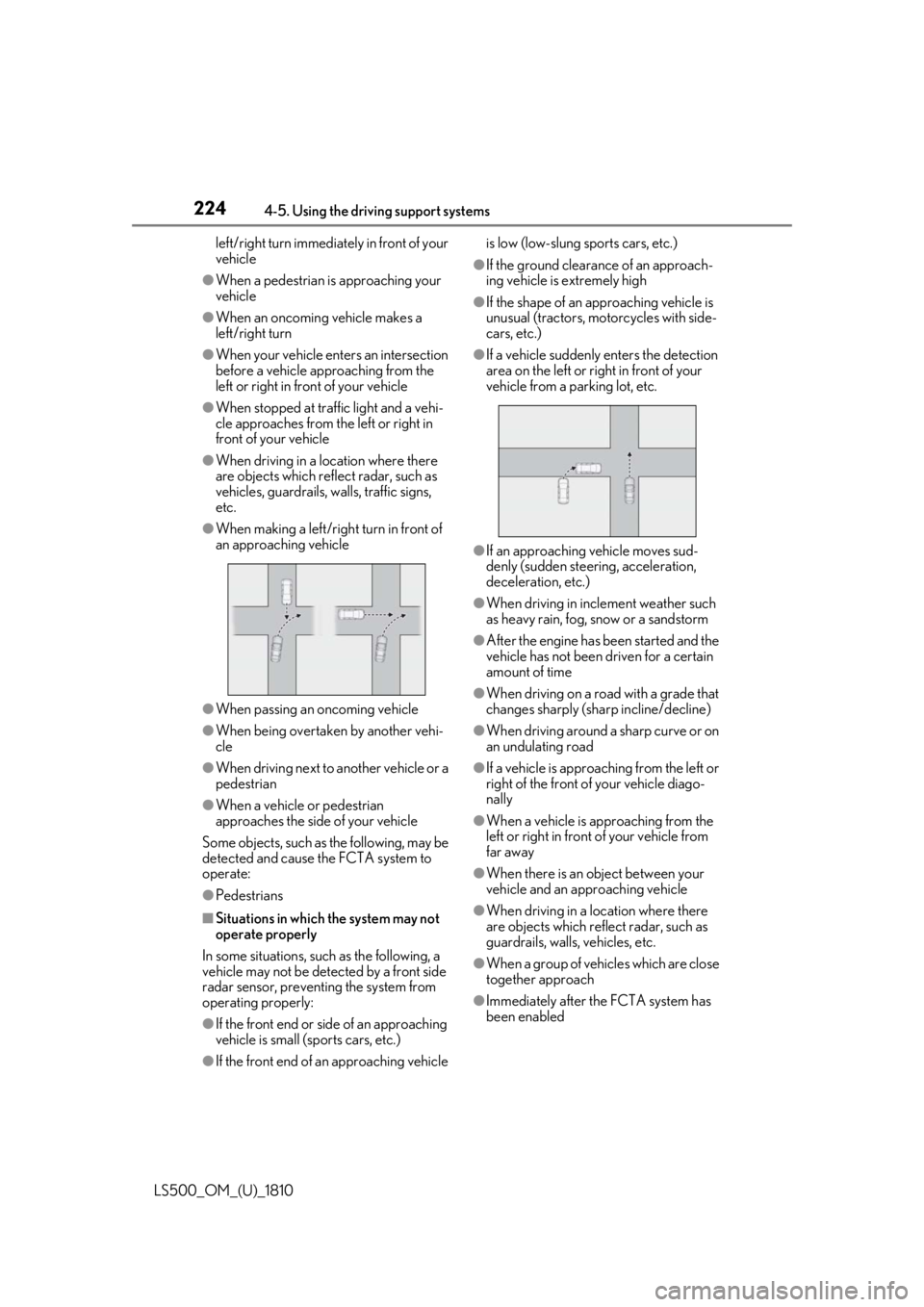
etc.●
When making a left/rig ht turn in front of
an approaching vehicle
●
When passing an oncoming vehicle●
When being overtake n by another vehi-
cle●
When driving next to another vehicle or a
pedestrian●
When a vehicle or pedestrian
approaches the side of your vehicle
Some objects, such as the following, may be
detected and cause the FCTA system to
operate:
●
Pedestrians
■
Situations in which the system may not
operate properly
In some situations, such as the following, a
vehicle may not be detected by a front side
radar sensor, preventing the system from
operating properly:
●
If the front end or si de of an approaching
vehicle is small (sports cars, etc.)
●
If the front end of an approaching vehicle is low (low-slung sports cars, etc.) ●
If the ground clearance of an approach-
ing vehicle is extremely high ●
If the shape of an approaching vehicle is
unusual (tractors, motorcycles with side-
cars, etc.) ●
If a vehicle suddenly enters the detection
area on the left or right in front of your
vehicle from a parking lot, etc.
●
If an approaching vehicle moves sud-
denly (sudden steering, acceleration,
deceleration, etc.) ●
When driving in inclement weather such
as heavy rain, fog, snow or a sandstorm ●
After the engine has been started and the
vehicle has not been driven for a certain
amount of time ●
When driving on a road with a grade that
changes sharply (sha rp incline/decline)●
When driving around a sharp curve or on
an undulating road ●
If a vehicle is approach ing from the left or
right of the front of your vehicle diago-
nally ●
When a vehicle is approaching from the
left or right in front of your vehicle from
far away ●
When there is an object between your
vehicle and an approaching vehicle
●
When driving in a location where there
are objects which reflect radar, such as
guardrails, walls, vehicles, etc.
●
When a group of vehicles which are close
together approach
●
Immediately after the FCTA system has
been enabled
Page 240 of 512
240 4-5. Using the driving support systems
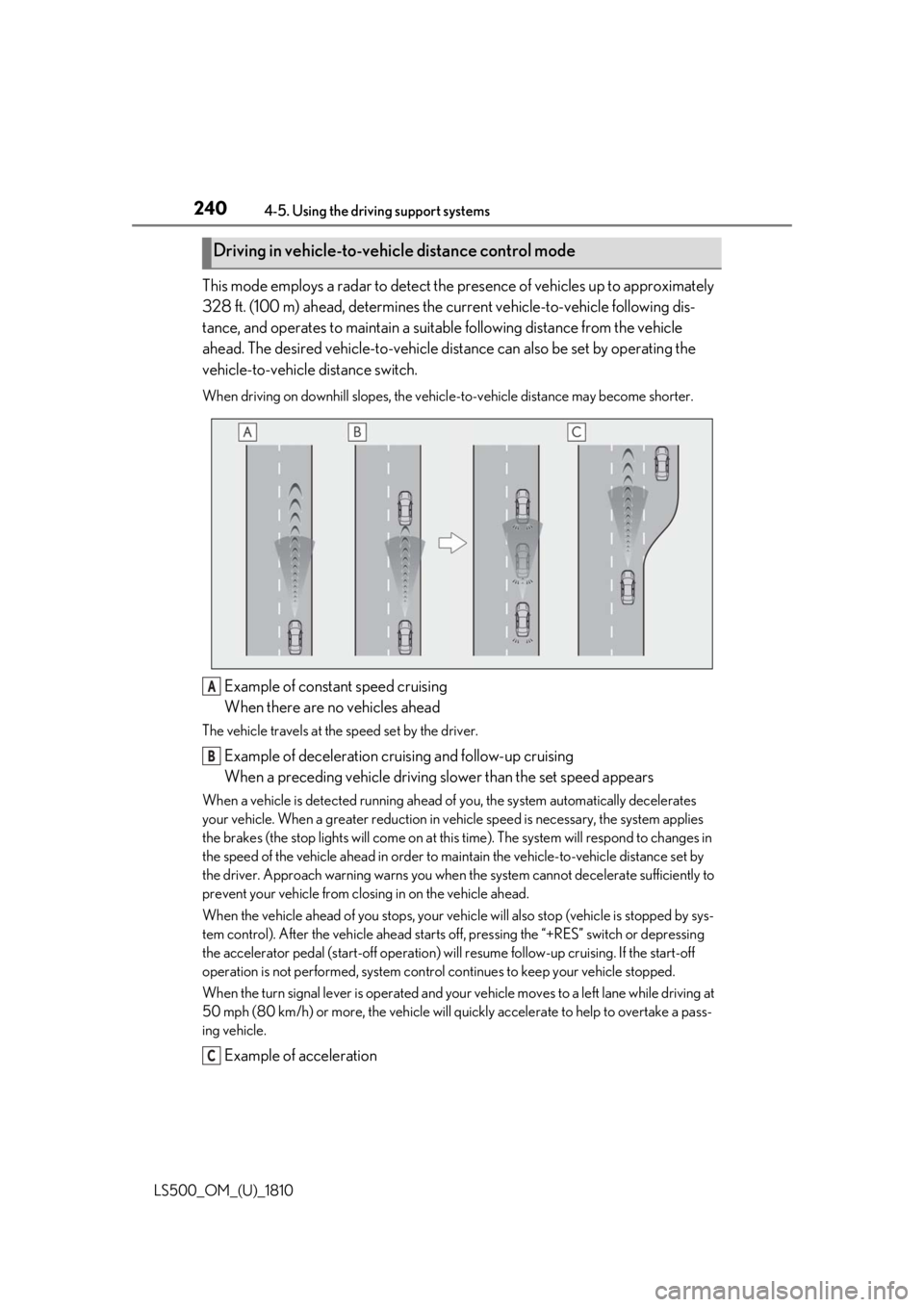
LS500_OM_(U)_1810 This mode employs a radar to detect the pr esence of vehicles up to approximately
328 ft. (100 m) ahead, determines the cu rrent vehicle-to-veh icle following dis-
tance, and operates to maintain a suitab le following distance from the vehicle
ahead. The desired vehicle-to-vehicle distance can also be set by operating the
vehicle-to-vehicle distance switch. When driving on downhill slopes, the vehicl e-to-vehicle distance may become shorter.
Example of constant speed cruising
When there are no vehicles aheadThe vehicle travels at the speed set by the driver.
Example of deceleration cruising and follow-up cruising
When a preceding vehicle driving slower than the set speed appearsWhen a vehicle is detected running ahead of you, the system automatically decelerates
your vehicle. When a greater reduction in vehicle speed is necessary, the system applies
the brakes (the stop lights will come on at this time). The sy stem will respond to changes in
the speed of the vehicle ahead in order to maintain the vehicle-to-vehicle distance set by
the driver. Approach warning warns you when th e system cannot decelera te sufficiently to
prevent your vehicle from closing in on the vehicle ahead.
When the vehicle ahead of you stops, your vehi cle will also stop (vehicle is stopped by sys-
tem control). After the vehicle ahead starts off, pressing the “+RES” switch or depressing
the accelerator pedal (start-off operation) will resume follow -up cruising. If the start-off
operation is not performed, system contro l continues to keep your vehicle stopped.
When the turn signal lever is operated and your vehicle moves to a left lane while driving at
50 mph (80 km/h) or more, the vehicle will quickly accelerate to help to overtake a pass-
ing vehicle.
Example of accelerationDriving in vehicle-to-vehicle distance control mode
A
B
C
Page 243 of 512
2434-5. Using the driving support systems
LS500_OM_(U)_1810 4
Driving
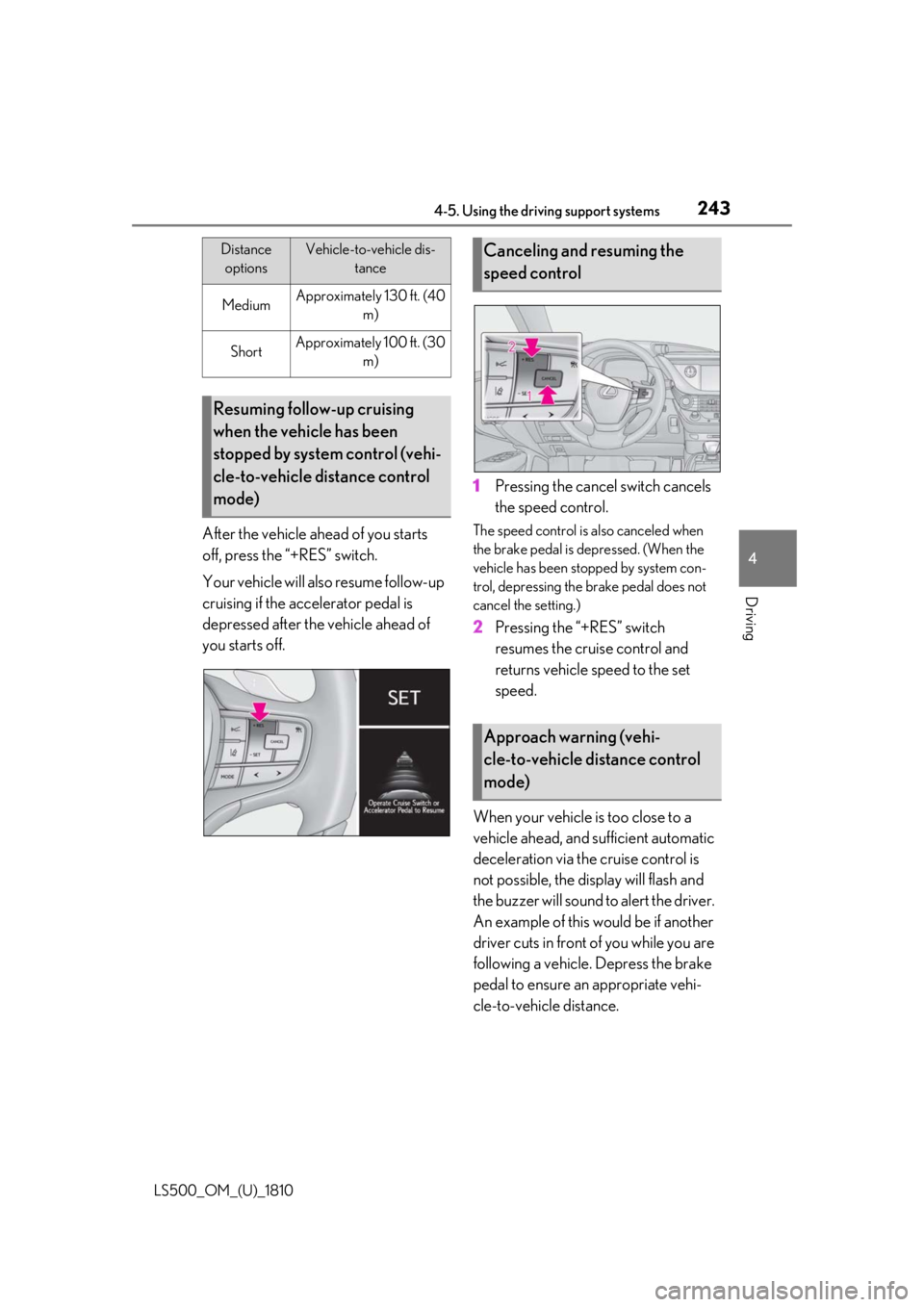
After the vehicle ahead of you starts
off, press the “+RES” switch.
Your vehicle will also resume follow-up
cruising if the accelerator pedal is
depressed after the vehicle ahead of
you starts off. 1 Pressing the cancel switch cancels
the speed control. The speed control is also canceled when
the brake pedal is depressed. (When the
vehicle has been stopped by system con-
trol, depressing the brake pedal does not
cancel the setting.)
2 Pressing the “+RES” switch
resumes the cruise control and
returns vehicle speed to the set
speed.
When your vehicle is too close to a
vehicle ahead, and sufficient automatic
deceleration via the cruise control is
not possible, the display will flash and
the buzzer will sound to alert the driver.
An example of this would be if another
driver cuts in front of you while you are
following a vehicle. Depress the brake
pedal to ensure an appropriate vehi-
cle-to-vehicle distance.Medium Approximately 130 ft. (40
m)
Short Approximately 100 ft. (30
m)
Resuming follow-up cruising
when the vehicle has been
stopped by system control (vehi-
cle-to-vehicle distance control
mode) Distance
options Vehicle-to-vehicle dis-
tance
Canceling and resuming the
speed control
Approach warning (vehi-
cle-to-vehicle distance control
mode)
Page 245 of 512
![LEXUS LS500 2019 Owners Manual 2454-5. Using the driving support systems
LS500_OM_(U)_1810 4
Driving mph (30 km/h) or more.
(However, when the vehicle speed is set
while driving at below approximately 20
mph [30 km/h], the set s](/img/36/58934/w960_58934-244.png "LEXUS LS500 2019 Owners Manual 2454-5. Using the driving support systems
LS500_OM_(U)_1810 4
Driving mph (30 km/h) or more.
(However, when the vehicle speed is set
while driving at below approximately 20
mph [30 km/h], the set s")
2454-5. Using the driving support systems
LS500_OM_(U)_1810 4
Driving mph (30 km/h) or more.
(However, when the vehicle speed is set
while driving at below approximately 20
mph [30 km/h], the set speed will be set
to approximately 20 mph [30 km/h].)■
Accelerating after setting the vehicle
speed
The vehicle can accelerate by operating the
accelerator pedal. After accelerating, the
set speed resumes. However, during vehi-
cle-to-vehicle distance control mode, the
vehicle speed may decrease below the set
speed in order to maintain the distance to
the preceding vehicle. ■
When the vehicle stops while follow-up
cruising●
Pressing the “+RES” switch while the
vehicle ahead stops w ill resume follow-up
cruising if the vehicle ahead starts off
within approximately 3 seconds after the
switch is pressed.●
If the vehicle ahead starts off within 3 sec-
onds after your vehicle stops, follow-up
cruising will be resumed.■
Automatic cancelation of vehi-
cle-to-vehicle distance control mode
Vehicle-to-vehicle dist ance control mode is
automatically canceled in the following situ-
ations. ●
VSC is activated.●
TRAC is activated for a period of time.●
When the VSC or TRAC system is
turned off.●
When snow mode is set.●
The sensor cannot detect correctly
because it is covered in some way.
●
Pre-collision braking is activated.
●
The parking brake is operated.
●
The vehicle is stopped by system control
on a steep incline.
●
The following are detected when the
vehicle has been stopped by system con-
trol:
• The driver is not wearing a seat belt.
• The driver’s door is opened.
• The vehicle has been stopped for about 3
minutes. If vehicle-to-vehicle distance control mode
is automatically canceled for any reasons
other than the above, there may be a mal-
function in the system. Contact your Lexus
dealer. ■
Automatic cancelation of constant
speed control mode
Constant speed control mode is automati-
cally canceled in the following situations: ●
Actual vehicle speed is more than
approximately 10 mph (16 km/h) below
the set vehicle speed. ●
Actual vehicle speed falls below approxi-
mately 20 mph (30 km/h). ●
VSC is activated. ●
TRAC is activated for a period of time. ●
When the VSC or TRAC system is
turned off. ●
Pre-collision braking is activated.
If constant speed control mode is automati-
cally canceled for any reasons other than
the above, there may be a malfunction in the
system. Contact your Lexus dealer. ■
Brake operation
A brake operation sound may be heard and
the brake pedal response may change, but
these are not malfunctions. ■
Warning messages and buzzers for
dynamic radar cruise control with
full-speed range
Warning messages and buzzers are used to
indicate a system malfunction or to inform
the driver of the need for caution while driv-
ing. If a warning messa ge is shown on the
multi-information displa y, read the message
and follow the instruc-
tions.( P.196,202,425)
■
When the sensor may not be correctly
detecting the vehicle ahead
In the case of the fo llowing and depending
on the conditions, operate the brake pedal
when deceleration of the system is insuffi-
cient or operate the accelerator pedal
when acceleration is required.
As the sensor may not be able to correctly
detect these types of vehicles, the approach
warning ( P.243) may not be activated.
Page 254 of 512

254 4-5. Using the driving support systems
LS500_OM_(U)_1810 the farther away the vehicle will be detected, caus ing the outside rear view mirror indi-
cator to illuminate or flash.■
The Blind Spot Monitor is operational
when
The Blind Spot Monitor is operational when
all of the following conditions are met: ●
The Blind Spot Monitor is on.●
The shift position is in a position other
than R.●
The vehicle speed is greater than approx-
imately 10 mph (16 km/h).■
The Blind Spot Monitor will detect a
vehicle when
The Blind Spot Monitor will detect a vehicle
present in the detection area in the follow-
ing situations: ●
A vehicle in an adj acent lane overtakes
your vehicle.●
You overtake a vehicle in an adjacent lane
slowly.●
Another vehicle enters the detection
area when it changes lanes.■
Conditions under wh ich the Blind Spot
Monitor will not detect a vehicle
The Blind Spot Monitor is not designed to
detect the following types of vehicles and/or
objects: ●
Small motorcycles, bicycles, pedestrians,
etc. *
●
Vehicles traveling in the opposite direc-
tion●
Guardrails, walls, signs, parked vehicles
and similar stationary objects *
●
Following vehicles th at are in the same
lane *
●
Vehicles traveling 2 lanes away from your
vehicle *
●
Vehicles which are being overtaken rap-
idly by your vehicle *
*
: Depending on the conditions, detection
of a vehicle and/or object may occur. ■
Conditions under which the Blind Spot
Monitor may not function correctly ●
The Blind Spot Monitor may not detect
vehicles correctly in the following situa-
tions:
• When the sensor is misaligned due to a
strong impact to the sensor or its sur-
rounding area
• When mud, snow, ice, a sticker, etc. is
covering the sensor or surrounding area
on the rear bumper
• When driving on a road surface that is
wet with standing water during bad
weather, such as heavy rain, snow, or fog
• When multiple vehicles are approaching
with only a small gap between each vehi-
cle
• When the distance between your vehicle
and a following vehicle is short
• When there is a significant difference in
speed between your vehicle and the vehi-
cle that enters the detection area
• When the difference in speed between
your vehicle and another vehicle is
changing
• When a vehicle enters a detection area
traveling at about the same speed as your
vehicle
• As your vehicle starts from a stop, a vehi-
cle remains in the detection area
• When driving up and down consecutive
steep inclines, such as hills, dips in the
road, etc.
• When driving on roads with sharp bends,
consecutive curves, or uneven surfaces
• When vehicle lanes are wide, or when
driving on the edge of a lane, and the
vehicle in an adjacent lane is far away
from your vehicle
• When an accessory (such as a bicycle
carrier) is installed to the rear of the vehi-
cle
• When there is a significant difference in
height between your vehicle and the
vehicle that enters the detection area
• Immediately after the Blind Spot Monitor
is turned on
●
Instances of the Blind Spot Monitor
unnecessarily detecting a vehicle and/or
object may increase in the following situ-
Page 279 of 512
2794-5. Using the driving support systems
LS500_OM_(U)_1810 4
Driving has become avoidable with normal brake
operation.
• The static object is no longer 6 to 13 ft. (2
to 4 m) away from the vehicle or in the
traveling direction of the vehicle.●
Brake control
• The Parking Support Brake is disabled.
• Approximately 2 seconds have elapsed
since the vehicle was stopped by brake
control.
• The brake pedal is depressed after the
vehicle is stopped by brake control.
• The static object is no longer 6 to 13 ft. (2
to 4 m) away from the vehicle or in the
traveling direction of the vehicle.■
Re-enabling the Parking Support Brake
function (static objects)
P.275■
Detection range of the Parking Support
Brake function (static objects)
The detection range of the Parking Support
Brake function (static objects) differs from
the detection range of the intuitive parking
assist. ( P.261) Therefore, even if the intui-
tive parking assist de tects an object and
provides a warning, the Parking Support
Brake function (static objects) may not start
operating. ■
Objects that the Parking Support Brake
function (static obje cts) may not detect
The sensors may not be able to detect cer-
tain objects, such as the following: ●
Pedestrian●
Cotton cloth, snow, and other materials
that are poor reflectors of ultrasonic
waves●
Objects which are not perpendicular to
the ground, are not perpendicular to the
traveling direction of the vehicle, are
uneven or are waving
●
Low objects
●
Thin objects such as wires, fences, ropes
and signposts
●
Objects that are extremely close to the
bumper
●
Sharply-angled objects
●
Tall objects with upper sections project-
ing outwards in the direction of your vehi- cle ■
Intuitive parking assist buzzer
Regardless of whether the intuitive parking
assist system is enabled or not ( P.258), if
the Parking Support Brake function (static
objects) is enabled ( P.271), the front or
rear sensors detect an object and brake
control is performed, the intuitive parking
assist buzzer will sound to notify the driver
of the approximate distance to the object. ■
Situations in which the Parking Support
Brake function (static objects) may
operate even if there is no possibility of a
collision
In some situations, such as the following, the
Parking Support Brake function (static
objects) may operate even though there is
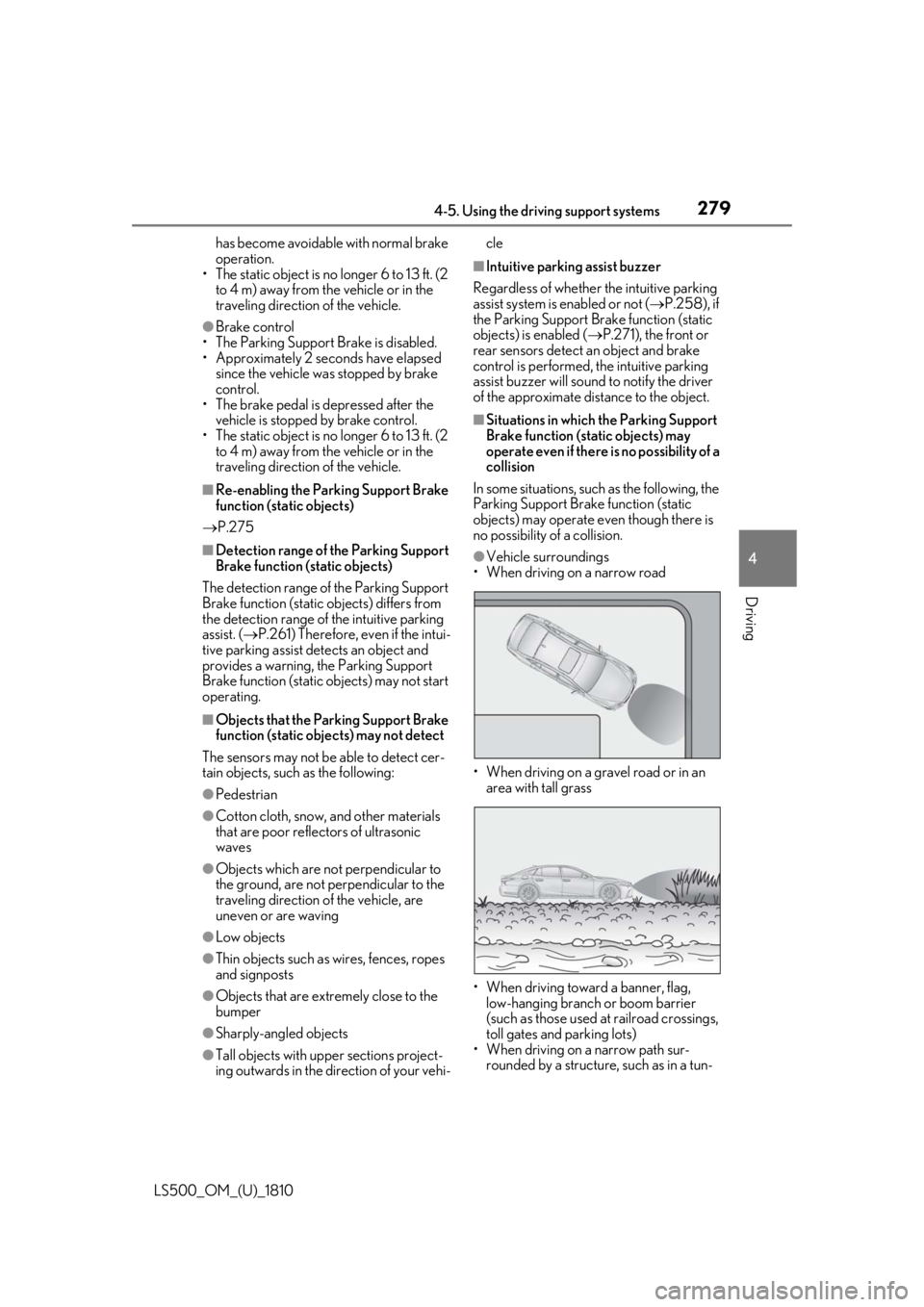
no possibility of a collision. ●
Vehicle surroundings
• When driving on a narrow road
• When driving on a gravel road or in an
area with tall grass
• When driving toward a banner, flag,
low-hanging branch or boom barrier
(such as those used at railroad crossings,
toll gates and parking lots)
• When driving on a narrow path sur-
rounded by a structure, such as in a tun-
Page 283 of 512
2834-5. Using the driving support systems
LS500_OM_(U)_1810 4
Driving ■
The Parking Support Brake function
(rear-crossing vehicles) will operate
when
The function will oper ate when the PKSB
OFF indicator is not illuminated or flashing
( P.69, 70) and all of the following condi-
tions are met: ●
Engine output restriction control
• The Parking Support Brake is enabled.
• The vehicle speed is 9 mph (15 km/h) or
less.
• Vehicles which are approaching from the
right or left at the re ar of the vehicle at a
traveling speed of less than approxi-
mately 5 mph (8 km/h)
• The shift position is in R.
• The Parking Support Brake determines
that a stronger than normal brake opera-
tion is necessary to avoid a collision with
an approaching vehicle.●
Brake control
• Engine output restriction control is oper-
ating.
• The Parking Support Brake determines
that an emergency brake operation is
necessary to avoid a collision with an
approaching vehicle.■
The Parking Support Brake function
(rear-crossing vehicles) will stop operat-
ing when
The function will stop operating if any of the
following conditions are met:
●
Engine output restriction control
• The Parking Support Brake is disabled.
• The collision becomes avoidable with
normal brake operation.
• A vehicle is no longer approaching from
the right or left at the rear of the vehicle.
●
Brake control
• The Parking Support Brake is disabled.
• Approximately 2 seconds have elapsed
since the vehicle was stopped by brake
control.
• The brake pedal is depressed after the
vehicle is stopped by brake control. • A vehicle is no longer approaching from
the right or left at the rear of the vehicle. ■
Re-enabling the Parking Support Brake
function (rear-crossing vehicles)
P.275 ■
Detection area of the Parking Support
Brake function (rear-crossing vehicles)
The detection area of the Parking Support
Brake function (rear-crossing vehicles) dif-
fers from the detection area of the RCTA
function ( P.265). Therefore, even if the
RCTA function detects a vehicle and pro-
vides an alert, the Parking Support Brake
function (rear-crossing vehicles) may not
start operating. ■
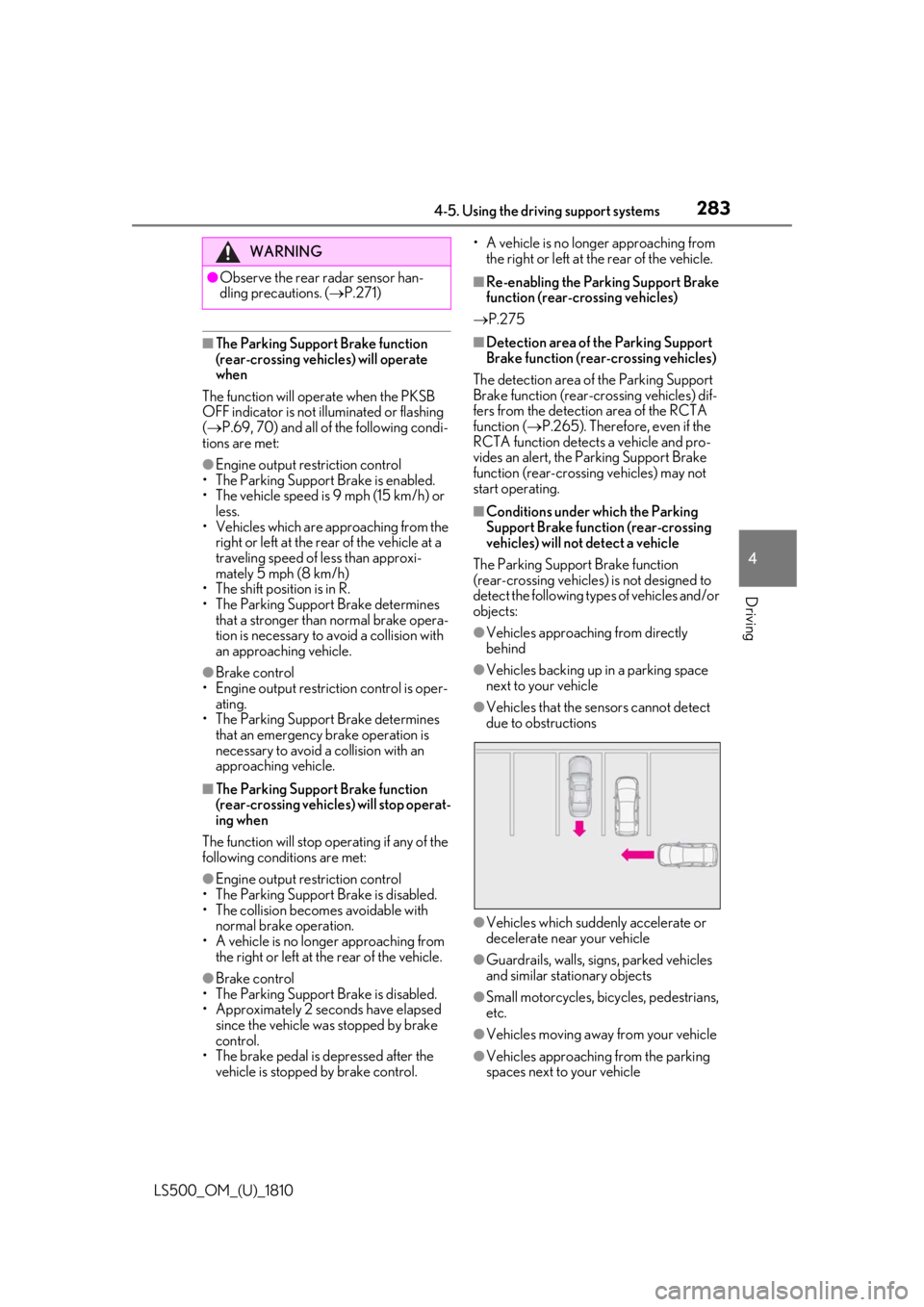
Conditions under which the Parking
Support Brake function (rear-crossing
vehicles) will not detect a vehicle
The Parking Support Brake function
(rear-crossing vehicles) is not designed to
detect the following types of vehicles and/or
objects: ●
Vehicles approaching from directly
behind ●
Vehicles backing up in a parking space
next to your vehicle ●
Vehicles that the sensors cannot detect
due to obstructions
●
Vehicles which suddenly accelerate or
decelerate near your vehicle
●
Guardrails, walls, signs, parked vehicles
and similar stationary objects
●
Small motorcycles, bicycles, pedestrians,
etc.
●
Vehicles moving away from your vehicle
●
Vehicles approaching from the parking
spaces next to your vehicleWARNING●
Observe the rear radar sensor han-
dling precautions. ( P.271)