ECU LEXUS LS500 2019 Owner's Guide
[x] Cancel search | Manufacturer: LEXUS, Model Year: 2019, Model line: LS500, Model: LEXUS LS500 2019Pages: 512, PDF Size: 9.71 MB
Page 65 of 512
651-4. Theft deterrent system
LS500_OM_(U)_1810 1
For safety and security
■
Items to check before locking the
vehicle
To prevent unexpected triggering of
the alarm and vehicle theft, make sure
of the following:
Nobody is in the vehicle.
The windows, moon roof (if
equipped) and panoramic moon
roof (if equipped) are closed before
the alarm is set.
No valuables or other personal
items are left in the vehicle. ■
Setting
Close the doors, trunk and hood, and
lock all the doors. The system will be
set automatically after 30 seconds. The indicator light changes from being on
to flashing when the system is set. ■
Canceling or stopping
Do one of the following to deactivate
or stop the alarms:
Unlock the doors.
Turn the engine switch to ACCES-
SORY or IGNITION ON mode, or
start the engine. (The alarm will be
deactivated or stopped after a few
seconds.) ■
System maintenance
The vehicle has a maintenance-free type
alarm system. ■
Triggering of the alarm
The alarm may be triggered in the following
situations:
(Stopping the alarm deactivates the alarm
system.) ●
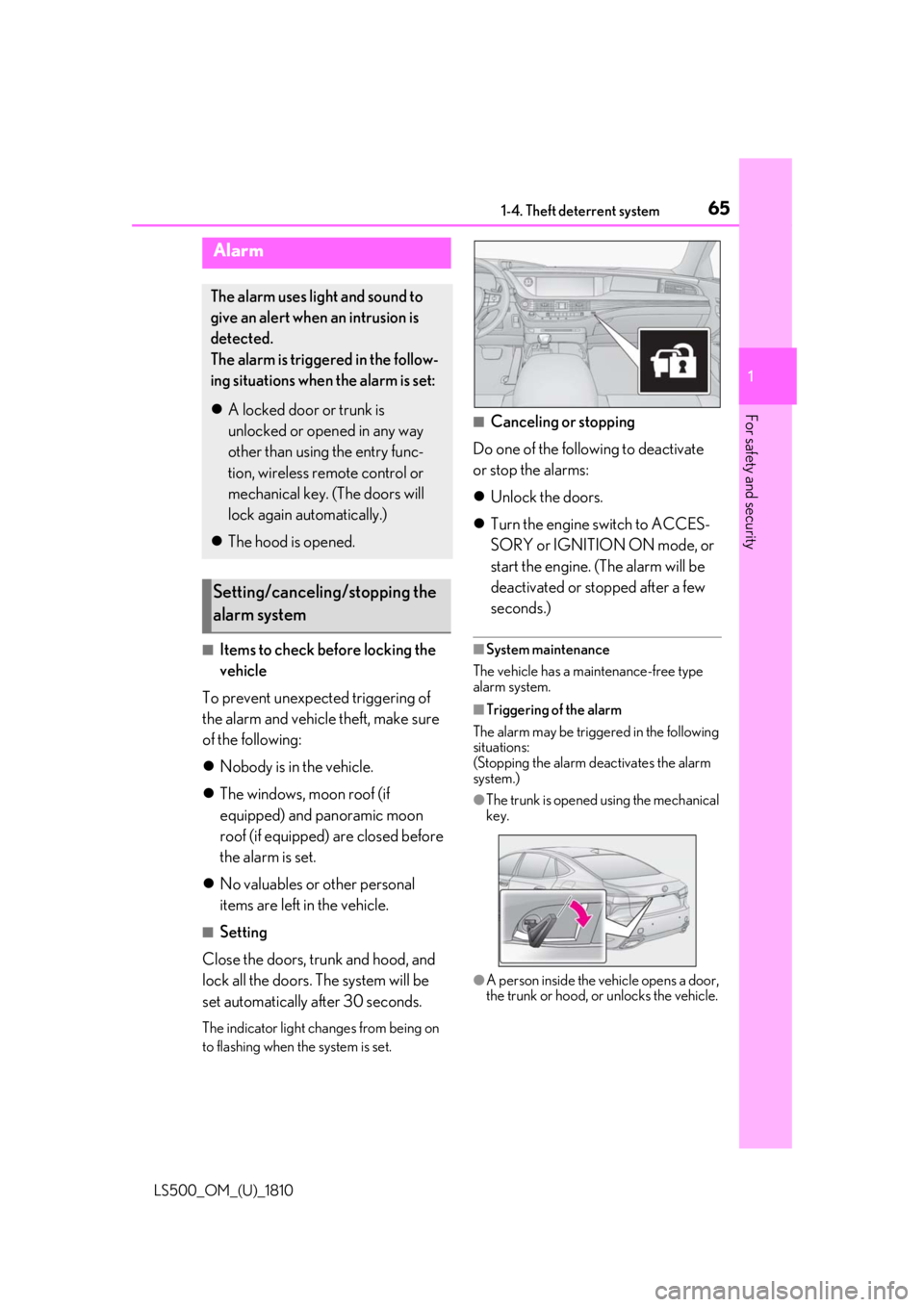
The trunk is opened using the mechanical
key.
●
A person inside the vehicle opens a door,
the trunk or hood, or unlocks the vehicle.Alarm The alarm uses light and sound to
give an alert when an intrusion is
detected.
The alarm is triggered in the follow-
ing situations when the alarm is set:
A locked door or trunk is
unlocked or opened in any way
other than using the entry func-
tion, wireless remote control or
mechanical key. (The doors will
lock again automatically.)
The hood is opened.
Setting/canceling/stopping the
alarm system
Page 71 of 512
712-1. Instrument cluster
LS500_OM_(U)_1810 2
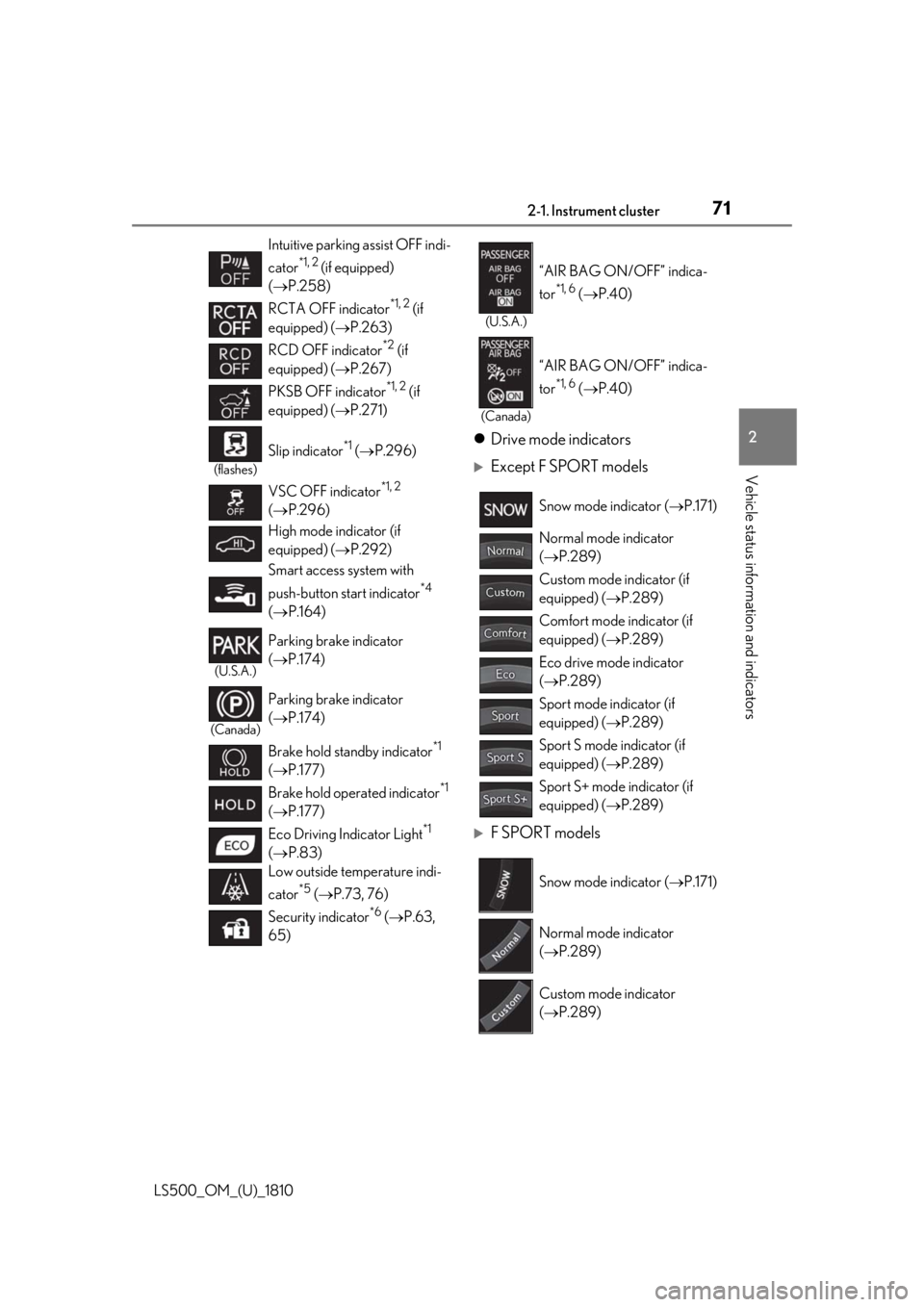
Vehicle status information and indicators Drive mode indicators
Except F SPORT models
F SPORT modelsIntuitive parking assist OFF indi-
cator *1, 2
(if equipped)
( P.258)
RCTA OFF indicator *1, 2
(if
equipped) ( P.263)
RCD OFF indicator *2
(if
equipped) ( P.267)
PKSB OFF indicator *1, 2
(if
equipped) ( P.271)(flashes)
Slip indicator *1
( P.296)
VSC OFF indicator *1, 2
( P.296)
High mode indicator (if
equipped) ( P.292)
Smart access system with
push-button start indicator *4
( P.164)(U.S.A.)
Parking brake indicator
( P.174)
(Canada)
Parking brake indicator
( P.174)
Brake hold standby indicator *1
( P.177)
Brake hold operated indicator *1
( P.177)
Eco Driving Indicator Light *1
( P.83)
Low outside temperature indi-
cator *5
( P.73, 76)
Security indicator *6
( P.63,
65) (U.S.A.)
“AIR BAG ON/OFF” indica-
tor *1, 6
( P.40)
(Canada)
“AIR BAG ON/OFF” indica-
tor *1, 6
( P.40)
Snow mode indicator ( P.171)
Normal mode indicator
( P.289)
Custom mode indicator (if
equipped) ( P.289)
Comfort mode indicator (if
equipped) ( P.289)
Eco drive mode indicator
( P.289)
Sport mode indicator (if
equipped) ( P.289)
Sport S mode indicator (if
equipped) ( P.289)
Sport S+ mode indicator (if
equipped) ( P.289)
Snow mode indicator ( P.171)
Normal mode indicator
( P.289)
Custom mode indicator
( P.289)
Page 100 of 512
100 3-2. Opening, closing and locking the doors and trunk
LS500_OM_(U)_1810 3-2.Opening, closing and locking the doors and trunk
■
Smart access system with
push-button start
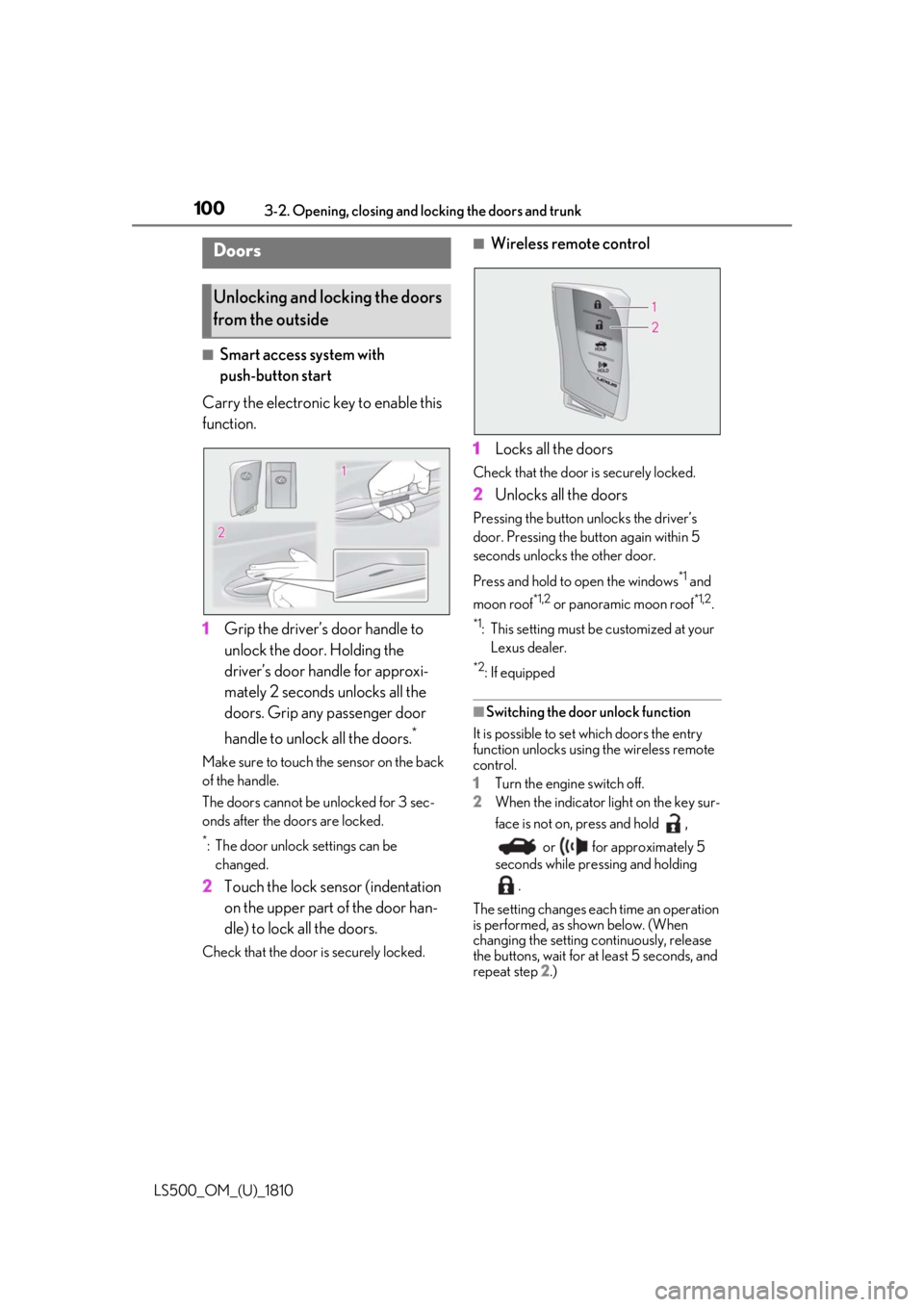
Carry the electronic key to enable this
function.
1 Grip the driver’s door handle to
unlock the door. Holding the
driver’s door ha ndle for approxi-
mately 2 seconds unlocks all the
doors. Grip any passenger door
handle to unlock all the doors. *
Make sure to touch the sensor on the back
of the handle.
The doors cannot be unlocked for 3 sec-
onds after the doors are locked. *
: The door unlock settings can be
changed.
2 Touch the lock sensor (indentation
on the upper part of the door han-
dle) to lock all the doors.Check that the door is securely locked. ■
Wireless remote control
1 Locks all the doors Check that the door is securely locked.
2 Unlocks all the doors Pressing the button unlocks the driver’s
door. Pressing the button again within 5
seconds unlocks the other door.
Press and hold to open the windows *1
and
moon roof *1,2
or panoramic moon roof *1,2
.*1
: This setting must be customized at your
Lexus dealer. *2
: If equipped
■
Switching the door unlock function
It is possible to set which doors the entry
function unlocks using the wireless remote
control.
1 Turn the engine switch off.
2 When the indicator light on the key sur-
face is not on, press and hold ,
or for approximately 5
seconds while pre ssing and holding
.
The setting changes each time an operation
is performed, as shown below. (When
changing the setting continuously, release
the buttons, wait for at least 5 seconds, and
repeat step 2 .)Doors
Unlocking and locking the doors
from the outside
Page 101 of 512
1013-2. Opening, closing and locking the doors and trunk
LS500_OM_(U)_1810 3
Before driving
To prevent unintended triggering of the
alarm, unlock the doors using the wireless
remote control and open and close a door
once after the settings have been changed.
(If a door is not opened within 60 seconds
after is pressed, the doors will be
locked again and the alarm will automati-
cally be set.)
In a case that the alarm is triggered, imme-
diately stop the alarm. ( P.65)■
Impact detection door lock release sys-
tem
In the event that the vehicle is subject to a
strong impact, all the doors are unlocked.
Depending on the force of the impact or the
type of accident, however, the system may
not operate.
■
Operation signals
A buzzer sounds and the emergency flash-
ers flash to indicate that the doors have
been locked/unlocked. (Locked: once;
Unlocked: twice)
A buzzer sounds to indicate that the win-
dows and moon roof or panoramic moon
roof are operating.
■
Security feature
If a door is not opened within approximately 60 seconds after the vehicle is unlocked,
the security feature automatically locks the
vehicle again. ■
When the doors cannot be locked by the
lock sensor on the upper part of the
door handle
When the doors cannot be locked even if
the lock sensor on th e upper part of the
door handle is touched by a finger, touch
the lock sensor with the palm.
If you are wearing gloves, remove them.
■
Open door warning buzzer
If an attempt to lock the doors is made when
a door is not fully closed, a buzzer sounds
continuously for 5 seconds. Fully close the
door to stop the buzzer, and lock the vehi-
cle once more. ■
Setting the alarm
Locking the doors will set the alarm system.
( P.65) ■
Conditions affecting the operation of
the smart access system with push-but-
ton start or wireless remote control
P.113 ■
If the smart access system with
push-button start or the wireless remote
control does not operate properly
Use the mechanical key to lock and unlock
the doors. ( P.433)
Replace the key battery with a new one if it
is depleted. ( P.399)
■
If the battery is discharged
The doors cannot be locked and unlocked
using the smart access system with
push-button start or wireless remote con-
trol. Lock or unlock the doors using the
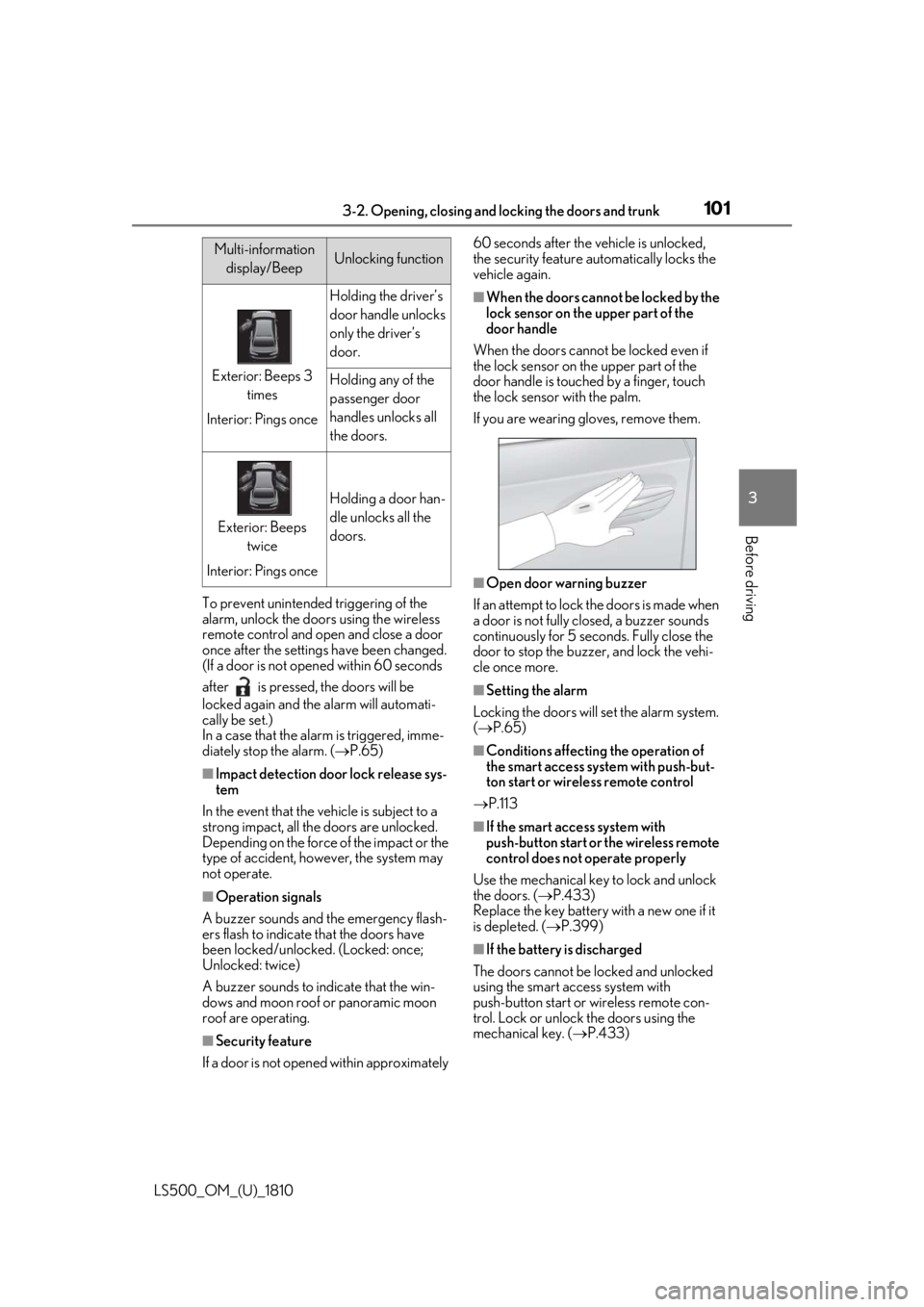
mechanical key. ( P.433)Multi-information
display/Beep Unlocking function
Exterior: Beeps 3
times
Interior: Pings once Holding the driver’s
door handle unlocks
only the driver’s
door.
Holding any of the
passenger door
handles unlocks all
the doors.
Exterior: Beeps
twice
Interior: Pings once Holding a door han-
dle unlocks all the
doors.
Page 105 of 512
1053-2. Opening, closing and locking the doors and trunk
LS500_OM_(U)_1810 3
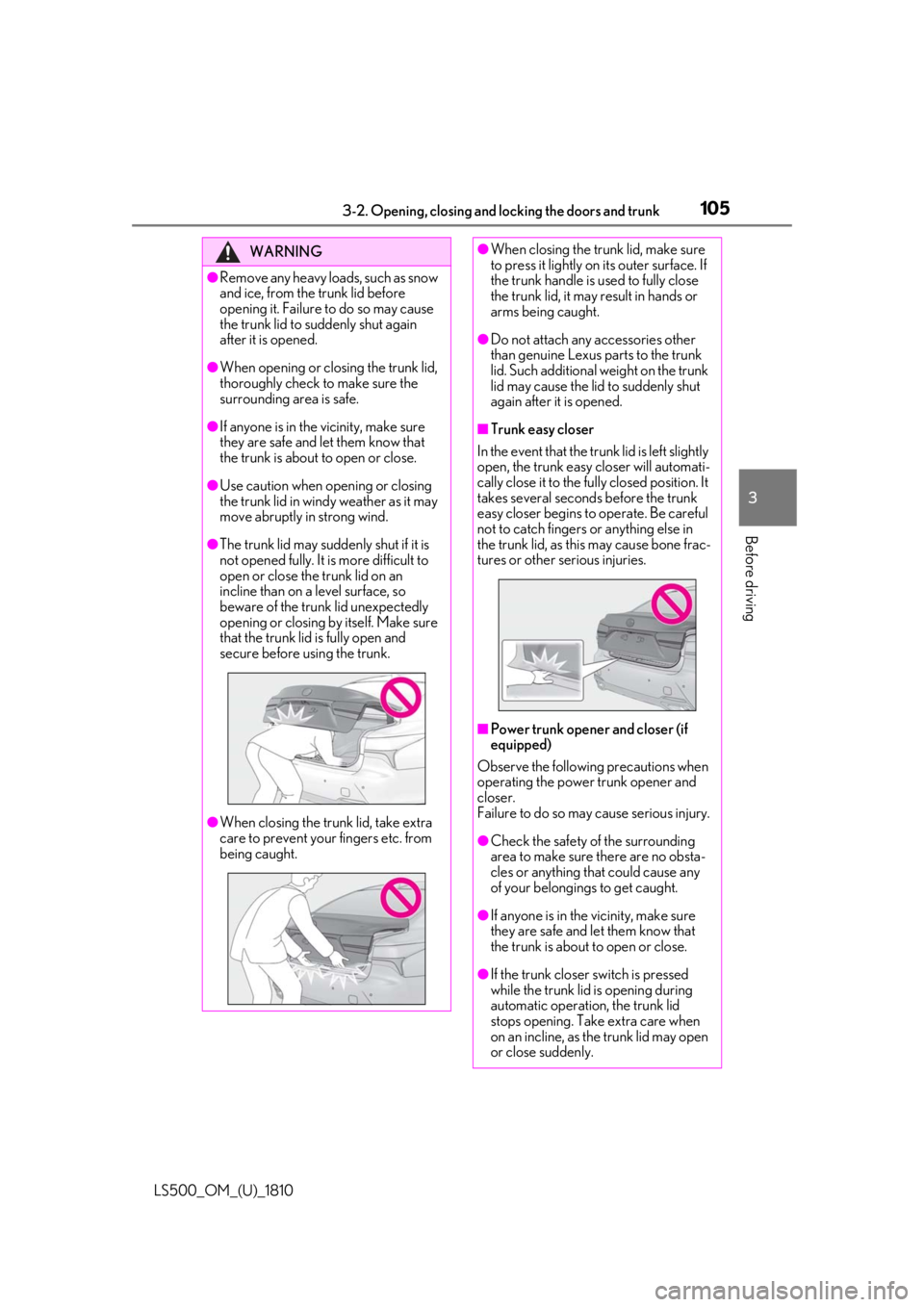
Before driving WARNING●
Remove any heavy loads, such as snow
and ice, from the trunk lid before
opening it. Failure to do so may cause
the trunk lid to suddenly shut again
after it is opened.●
When opening or closing the trunk lid,
thoroughly check to make sure the
surrounding area is safe.●
If anyone is in the vicinity, make sure
they are safe and let them know that
the trunk is about to open or close.●
Use caution when opening or closing
the trunk lid in windy weather as it may
move abruptly in strong wind.●
The trunk lid may sudden ly shut if it is
not opened fully. It is more difficult to
open or close the trunk lid on an
incline than on a level surface, so
beware of the trunk lid unexpectedly
opening or closing by itself. Make sure
that the trunk lid is fully open and
secure before using the trunk.
●
When closing the trunk lid, take extra
care to prevent your fingers etc. from
being caught. ●
When closing the trunk lid, make sure
to press it lightly on its outer surface. If
the trunk handle is used to fully close
the trunk lid, it may result in hands or
arms being caught. ●
Do not attach any accessories other
than genuine Lexus parts to the trunk
lid. Such additional weight on the trunk
lid may cause the lid to suddenly shut
again after it is opened. ■
Trunk easy closer
In the event that the trun k lid is left slightly
open, the trunk easy closer will automati-
cally close it to the fully closed position. It
takes several second s before the trunk
easy closer begins to operate. Be careful
not to catch fingers or anything else in
the trunk lid, as this may cause bone frac-
tures or other serious injuries.
■
Power trunk opener and closer (if
equipped)
Observe the following precautions when
operating the power trunk opener and
closer.
Failure to do so may cause serious injury.
●
Check the safety of the surrounding
area to make sure there are no obsta-
cles or anything that could cause any
of your belongings to get caught.
●
If anyone is in the vicinity, make sure
they are safe and let them know that
the trunk is about to open or close.
●
If the trunk closer switch is pressed
while the trunk lid is opening during
automatic operation, the trunk lid
stops opening. Take extra care when
on an incline, as the trunk lid may open
or close suddenly.
Page 106 of 512
106 3-2. Opening, closing and locking the doors and trunk
LS500_OM_(U)_1810 ■
Trunk opener switch
Press the trunk opener switch. If the vehicle is equipped with a power
trunk opener and closer, the trunk lid will
fully open.WARNING●
On an incline, the trunk lid may sud-
denly shut after it opens automatically.
Make sure the trunk lid is fully open
and secure before using the trunk.●
In the following situations, the power
trunk opener and closer may detect an
abnormality and automatic operation
may be stopped. In this case, the trunk
lid has to be operated manually. Take
extra care in this situation, as the
stopped trunk lid ma y suddenly shut,
causing an accident.
• When the trunk lid contacts an obsta-
cle
• When the battery voltage suddenly
drops, such as when the engine switch
is turned to IGNITION ON mode or
the engine is started during automatic
operation●
Do not attach any accessories other
than genuine Lexus parts to the trunk
lid. The power trunk opener and closer
may not operate, caus ing itself to mal-
function, or the trun k lid may suddenly
shut again after it is opened.■
Hands Free Power Trunk Lid (if
equipped)
Observe the following precautions.
Failure to do so may cause serious injury.
●
Exhaust gasses cause the exhaust
pipes to become quite hot. When
operating the Hands Free Power Trunk
Lid, be careful not to touch the exhaust
pipe.
●
Do not operate the Hands Free Power
Trunk Lid if there is little space under
the rear bumper.
■
Jam protection function
Observe the following precautions.
Failure to do so may cause serious injury.
●
Never use any part of your body to
intentionally activate the jam protec-
tion function. ●
The jam protection function may not
work if something gets caught just
before the trunk lid fully closes. Be
careful not to catch fingers or anything
else in the trunk lid. ●
The jam protection function may not
work depending on the shape of the
object that is caught. Be careful not to
catch fingers or anything else.
NOTICE■
To prevent trunk easy closer malfunc-
tions
Do not apply force to the trunk lid while
the trunk easy closer is operating. ■
To prevent damage to the power
trunk opener and closer (vehicles
with power trunk opener and closer) ●
Make sure that there is no luggage or
snow on the trunk lid before operating
the power trunk opener and closer. In
addition, make sure that there is no ice
between the trunk lid and frame that
prevents movement of the trunk lid.
Operating the power trunk opener
and closer when excessive load is
present on the trunk lid may cause a
malfunction.
●
Do not apply excessive force to the
trunk lid while the power trunk opener
and closer is operating.
Opening/closing the trunk
Page 110 of 512

110 3-2. Opening, closing and locking the doors and trunk
LS500_OM_(U)_1810 If the rear bumper has been touched for a
while, wait for a short time before
attempting to operate the Hands Free
Power Trunk Lid again.●
When standing excessively close to the
rear bumper●
When an external radio wave source
interferes with the communication
between the electronic key and the vehi-
cle ( P.113)●
When the vehicle is parked near an elec-
trical noise source which affects the sen-
sitivity of the Hands Free Power Trunk Lid,
such as a pay parking spot, gas station,
electrically heated road, or fluorescent
light●
When the vehicle is near a TV tower,
electric power plant, radio station, large
display, airport or other facility that gen-
erates strong radio waves or electrical
noise●
When a large amount of water is applied
to the rear bumper, such as when the
vehicle is being washed or in heavy rain●
When mud, snow, ice, etc. is attached to
the rear bumper●
When the vehicle has been parked for a
while near objects that may move and
contact the rear bumper, such as plants●
When an accessory is installed to the rear
bumper
If an accessory has been installed, turn the
Hands Free Power Trunk Lid (kick sensor)
operation setting off.
■
Preventing unintentional operation of
the Hands Free Power Trunk Lid (if
equipped)
When an electronic ke y is in the operation
detection area, the Ha nds Free Power Trunk
Lid may operate unintentionally, so be care-
ful in the following situations:
●
When a large amount of water is applied
to the rear bumper, such as when the
vehicle is being washed or in heavy rain
●
When dirt is wiped off the rear bumper
●
When a small animal or small object, such
as a ball, moves under the rear bumper ●
When an object is moved from under the
rear bumper ●
If someone is swinging their legs while sit-
ting on the rear bumper ●
If the legs or another part of someone’s
body contacts the rear bumper while
passing by the vehicle ●
When the vehicle is parked near an elec-
trical noise source which affects the sen-
sitivity of the Hands Free Power Trunk Lid,
such as a pay parking spot, gas station,
electrically heated road, or fluorescent
light ●
When the vehicle is near a TV tower,
electric power plant, radio station, large
display, airport or ot her facility that gen-
erates strong radio waves or electrical
noise ●
When the vehicle is parked in a place
where objects such as plants are near the
rear bumper ●
If luggage, etc. is set near the rear
bumper ●
If accessories or a vehicle cover is
installed/removed ne ar the rear bumper●
When the vehicle is being towed
To prevent unintentiona l operation, turn the
Hands Free Power Trunk Lid (kick sensor)
operation setting off. ■
Open door warning buzzer
P.103 ■
Customization
Some functions can be customized.
( P.466)
The trunk opener switch can be tem-
porarily disabled to protect luggage
stored in the trunk against theft.
Turn the main switch in the glove box
off to disable the trunk opener.Luggage security system
Page 114 of 512

114 3-2. Opening, closing and locking the doors and trunk
LS500_OM_(U)_1810 engine is started or engine switch modes
are changed.●
Do not leave the electronic key on top of
the instrument panel or near the door
pockets when exiting the vehicle.
Depending on the radio wave reception
conditions, it may be detected by the
antenna outside the cabin and the doors
will become lockable from the outside,
possibly trapping the electronic key
inside the vehicle.●
As long as the electron ic key is within the
effective range, the doors may be locked
or unlocked by anyone. However, only
the doors detecting the electronic key
can be used to unlock the vehicle.●
Even if the electronic key is not inside the
vehicle, it may be possible to start the
engine if the electronic key is near the
window.●
The doors may unlock or lock if a large
amount of water spla shes on the door
handle, such as in the rain or in a car
wash, when the electronic key is within
the effective range. (The doors will auto-
matically be locked after approximately
60 seconds if the d oors are not opened
and closed.)●
If the wireless remote control is used to
lock the doors when the electronic key is
near the vehicle, there is a possibility that
the door may not be unlocked by the
entry function. (Use the wireless remote
control to unlock the doors.)●
Touching the door lock sensor while
wearing gloves may delay or prevent lock
operation.●
When the lock operation is performed
using the lock sensor, recognition signals
will be shown up to two consecutive
times. After this, no recognition signals
will be given.
●
If the door handle becomes wet while the
electronic key is within the effective
range, the door may lock and unlock
repeatedly. In this case, follow the follow-
ing correction procedures to wash the
vehicle:
• Place the electronic key in a location 6 ft.
(2 m) or more away from the vehicle.
(Take care to ensure that the key is not stolen.)
• Set the electronic key to battery-saving
mode to disable the smart access system
with push-button start. ( P.113)●
If the electronic key is inside the vehicle
and a door handle becomes wet during a
car wash, a message may be shown on
the multi-information display and a
buzzer will sound outside the vehicle. To
turn off the alarm, lock all the doors. ●
The lock sensor may not work properly if
it comes into contact with ice, snow, mud,
etc. Clean the lock sensor and attempt to
operate it again. ●
A sudden approach to the effective
range or door handle may prevent the
doors from being unlocked. In this case,
return the door handle to the original
position and check that the doors unlock
before pulling the door handle again. ●
If there is another electronic key in the
detection area, it may take slightly longer
to unlock the doors after the door handle
is gripped. ■
When the vehicle is not driven for
extended periods ●
To prevent theft of the vehicle, do not
leave the electronic key within 6 ft. (2 m)
of the vehicle. ●
The smart access system with push-but-
ton start can be deactivated in advance. ●
Setting the electronic key to battery-sav-
ing mode helps to reduce key battery
depletion. ( P.113)■
To operate the system properly ●
Make sure to carry the electronic key
when operating the system. Do not get
the electronic key too close to the vehicle
when operating the system from the out-
side of the vehicle.
Depending on the position and holding
condition of the electr onic key, the key may
not be detected correctly and the system
may not operate properly. (The alarm may
go off accidentally, or the door lock pre-
vention function may not operate.)
●
Do not leave the electr onic key inside the
trunk.
Page 158 of 512
158 4-1. Before driving
LS500_OM_(U)_1810 WARNING●
In order to prevent accidents due to
the vehicle rolling away, always keep
depressing the brake pedal while the
engine is running, and apply the park-
ing brake as necessary.●
If the vehicle is stopped on an incline,
in order to prevent accidents caused
by the vehicle rolling forward or back-
ward, always depress the brake pedal
and securely apply the parking brake
as needed.●
Avoid revving or racing the engine.
Running the engine at high speed
while the vehicle is stopped may cause
the exhaust system to overheat, which
could result in a fire if combustible
material is nearby.■
When the vehicle is parked●
Do not leave glasses, cigarette lighters,
spray cans, or soft drink cans in the
vehicle when it is in the sun.
Doing so may result in the following:
• Gas may leak from a cigarette lighter
or spray can, and may lead to a fire.
• The temperature inside the vehicle
may cause the plastic lenses and plas-
tic material of glasses to deform or
crack.
• Soft drink cans may fracture, causing
the contents to spray over the interior
of the vehicle, and may also cause a
short circuit in the vehicle’s electrical
components.
●
Do not leave cigarette lighters in the
vehicle. If a cigarette lighter is in a
place such as the glove box or on the
floor, it may be lit accidentally when
luggage is loaded or the seat is
adjusted, causing a fire.
●
Do not attach adhesive discs to the
windshield or windows. Do not place
containers such as air fresheners on
the instrument pane l or dashboard.
Adhesive discs or containers may act
as lenses, causing a fire in the vehicle. ●
Do not leave a door or window open if
the curved glass is coated with a met-
allized film such as a silver-colored
one. Reflected sunlight may cause the
glass to act as a lens, causing a fire. ●
Always apply the parking brake, shift
the shift position to P, stop the engine
and lock the vehicle.
Do not leave the vehicle unattended
while the engine is running.
If the vehicle is parked with the shift
position in P but the parking brake is
not set, the vehicle may start to move,
possibly leading to an accident. ●
Do not touch the exhaust pipes while
the engine is running or immediately
after turning the engine off.
Doing so may cause burns. ■
When taking a nap in the vehicle
Always turn the engine off. Otherwise, if
you accidentally move the shift lever or
depress the accelerator pedal, this could
cause an accident or fire due to engine
overheating. Additionally, if the vehicle is
parked in a poorly ventilated area,
exhaust gases may collect and enter the
vehicle, leading to death or a serious
health hazard. ■
When braking ●
When the brakes are wet, drive more
cautiously.
Braking distance in creases when the
brakes are wet, and this may cause one
side of the vehicle to brake differently
than the other side. Also, the parking
brake may not securely hold the vehi-
cle.
●
Vehicles without Lexus Safety System
+ A: If the brake booster device does
not operate, do not follow other vehi-
cles closely and avoid hills or sharp
turns that require braking.
In this case, braking is still possible, but
the brake pedal should be depressed
more firmly than usual. Also, the brak-
ing distance will in crease. Have your
brakes fixed immediately.
Page 162 of 512
162 4-1. Before driving
LS500_OM_(U)_1810 ■
Total load capacity and seating capacity
These details are also described on the tire
and loading information label. ( P.395)WARNING●
Do not place cargo or luggage in or on
the following locations.
• At the feet of the driver
• On the front passenger or rear seats
(when stacking items)
• On the package tray
• On the instrument panel
•On the dashboard
• In front of the Center Display ●
Secure all items in the occupant com-
partment.■
Capacity and distribution●
Do not exceed the maximum axle
weight rating or the total vehicle
weight rating.●
Even if the total load of occupant’s
weight and the cargo load is less than
the total load capacity, do not apply the
load unevenly. Improper loading may
cause deterioration of steering or
braking control which may cause
death or serious injury. Vehicle load limits Vehicle load limits include total
load capacity, seating capacity,
towing capacity and cargo capac-
ity.
Total load capacity (vehicle
capacity weight): P.446
Total load capacity means the com-
bined weight of occupants, cargo
and luggage.
Seating capacity:5 occupants
(Front 2, Rear 3)
Seating capacity means the maxi-
mum number of occupants whose
estimated average weight is 150 lb.
(68 kg) per person.
Towing capacity
Lexus does not recommend towing
a trailer with your vehicle.
Cargo capacity
Cargo capacity may increase or
decrease depending on the weight
and the number of occupants.
WARNING
■
Overloading the vehicle
Do not overload the vehicle.
It may not only cause damage to the tires,
but also degrade steering and braking
ability, resulting in an accident.