air condition LEXUS LS500 2019 Service Manual
[x] Cancel search | Manufacturer: LEXUS, Model Year: 2019, Model line: LS500, Model: LEXUS LS500 2019Pages: 512, PDF Size: 9.71 MB
Page 326 of 512
326 5-3. Using the air conditioning system and defogger
LS500_OM_(U)_1810 Adjust the temperature setting of each
rear seat using the Center Display or Rear
Multi Operation Panel.
Adjust the temperature setting of
each rear seat using the Center Dis-
play (rear air conditioning control
screen) or Rear Multi Operation
Panel. The temperature setting of each rear seat
can be changed independently.
■
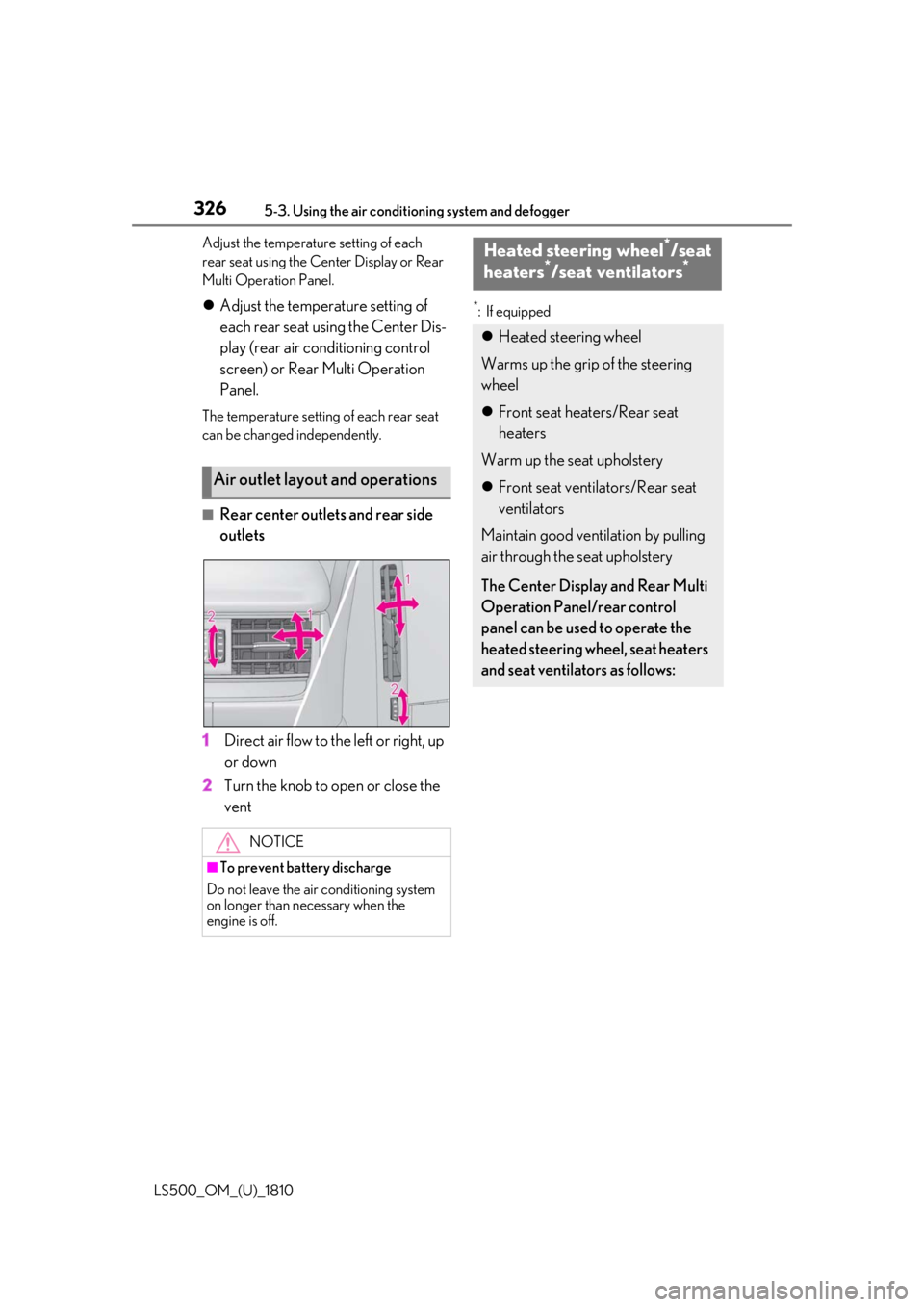
Rear center outlets and rear side
outlets
1 Direct air flow to the left or right, up
or down
2 Turn the knob to open or close the
vent *
: If equipped
Air outlet layout and operations
NOTICE
■
To prevent battery discharge
Do not leave the air conditioning system
on longer than necessary when the
engine is off. Heated steering wheel *
/seat
heaters *
/seat ventilators *
Heated steering wheel
Warms up the grip of the steering
wheel
Front seat heaters/Rear seat
heaters
Warm up the seat upholstery
Front seat ventilators/Rear seat
ventilators
Maintain good ventilation by pulling
air through the seat upholstery
The Center Display and Rear Multi
Operation Panel/rear control
panel can be used to operate the
heated steering wheel, seat heaters
and seat ventilators as follows:
Page 327 of 512
3275-3. Using the air conditio ning system and defogger
LS500_OM_(U)_1810 5
Interior features ■
Center Display
Main screen
Using the touchpad of the Remote
Touch, select the button on the screen.
to can be adjusted by perform-
ing the following operations.
Flick operation: Move the pointer to
the desired item and flick the touchpad
up or down. The item can be adjusted by one level.
Trace operation: After selecting the
desired item, trace the touchpad sur-
face. The item can be adjusted by the amount
that you trace.
Trace operation cannot be used while driv-
ing. Center Display
Press the “MENU” button on the
Remote Touch to display the main
menu and move the cursor to to
display the shortcut buttons. Then,
select to display the heated
steering wheel/front seat
heater/front seat ventilator control
screen.
To display the rear seat heater/rear
seat ventilator control screen, select
. (if equipped)
Rear Multi Operation Panel
Touch “Climate” on the home screen
to display the air conditioning con-
trol screen.( P.308)
Touching the shortcut button on the
home screen will display operation
buttons for the rear seat heaters and
rear seat ventilators.
Rear control panel
The rear seat heaters can be oper-
ated. WARNING
■
To prevent minor burn injuries
Care should be taken if anyone in the fol-
lowing categories comes in contact with
the steering wheel or seats when the
heater is on:
●
Babies, small children, the elderly, the
sick and the phys ically challenged
●
Persons with sensitive skin
●
Persons who are fatigued ●
Persons who have taken alcohol or
drugs that induce sleep (sleeping
drugs, cold remedies, etc.)
NOTICE■
To prevent damage to the seat heat-
ers and seat ventilators
Do not put heavy objects that have an
uneven surface on the seat and do not
stick sharp objects (n eedles, nails, etc.)
into the seat. ■
To prevent battery discharge
Do not use the functions when the
engine is off.
Control screen
A C
Page 328 of 512
328 5-3. Using the air conditioning system and defogger
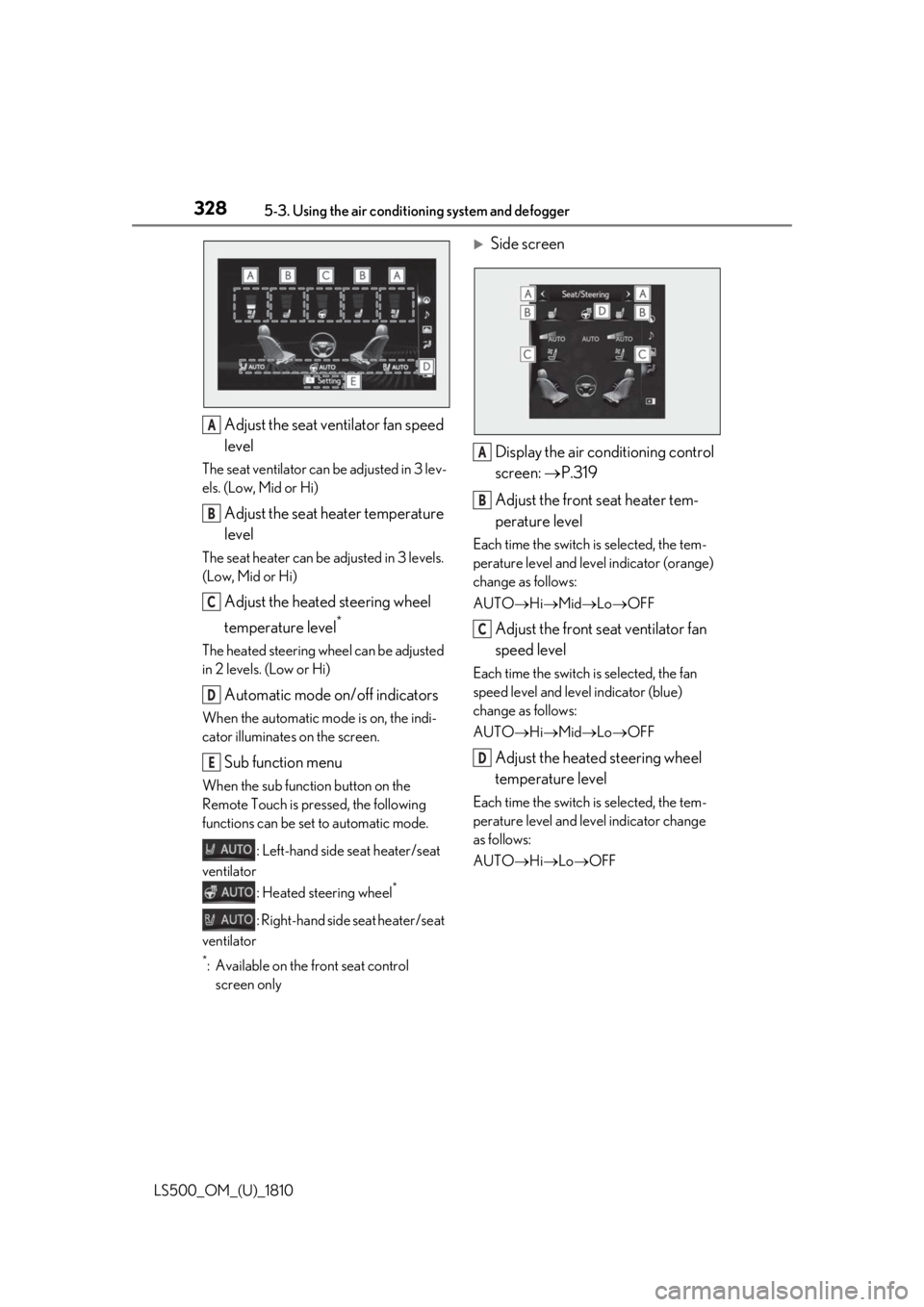
LS500_OM_(U)_1810 Adjust the seat ventilator fan speed
levelThe seat ventilator can be adjusted in 3 lev-
els. (Low, Mid or Hi)
Adjust the seat heater temperature
levelThe seat heater can be adjusted in 3 levels.
(Low, Mid or Hi)
Adjust the heated steering wheel
temperature level *
The heated steering wheel can be adjusted
in 2 levels. (Low or Hi)
Automatic mode on/off indicatorsWhen the automatic mode is on, the indi-
cator illuminates on the screen.
Sub function menu When the sub function button on the
Remote Touch is pressed, the following
functions can be set to automatic mode.
: Left-hand side seat heater/seat
ventilator
: Heated steering wheel *
: Right-hand side seat heater/seat
ventilator *
: Available on the front seat control
screen only
Side screen
Display the air conditioning control
screen: P.319
Adjust the front seat heater tem-
perature level Each time the switch is selected, the tem-
perature level and level indicator (orange)
change as follows:
AUTO Hi Mid Lo OFF
Adjust the front seat ventilator fan
speed level Each time the switch is selected, the fan
speed level and level indicator (blue)
change as follows:
AUTO Hi Mid Lo OFF
Adjust the heated steering wheel
temperature level Each time the switch is selected, the tem-
perature level and le vel indicator change
as follows:
AUTO Hi Lo OFFA
B
C
D
E A
B
C
D
Page 329 of 512
3295-3. Using the air conditio ning system and defogger
LS500_OM_(U)_1810 5
Interior features ■
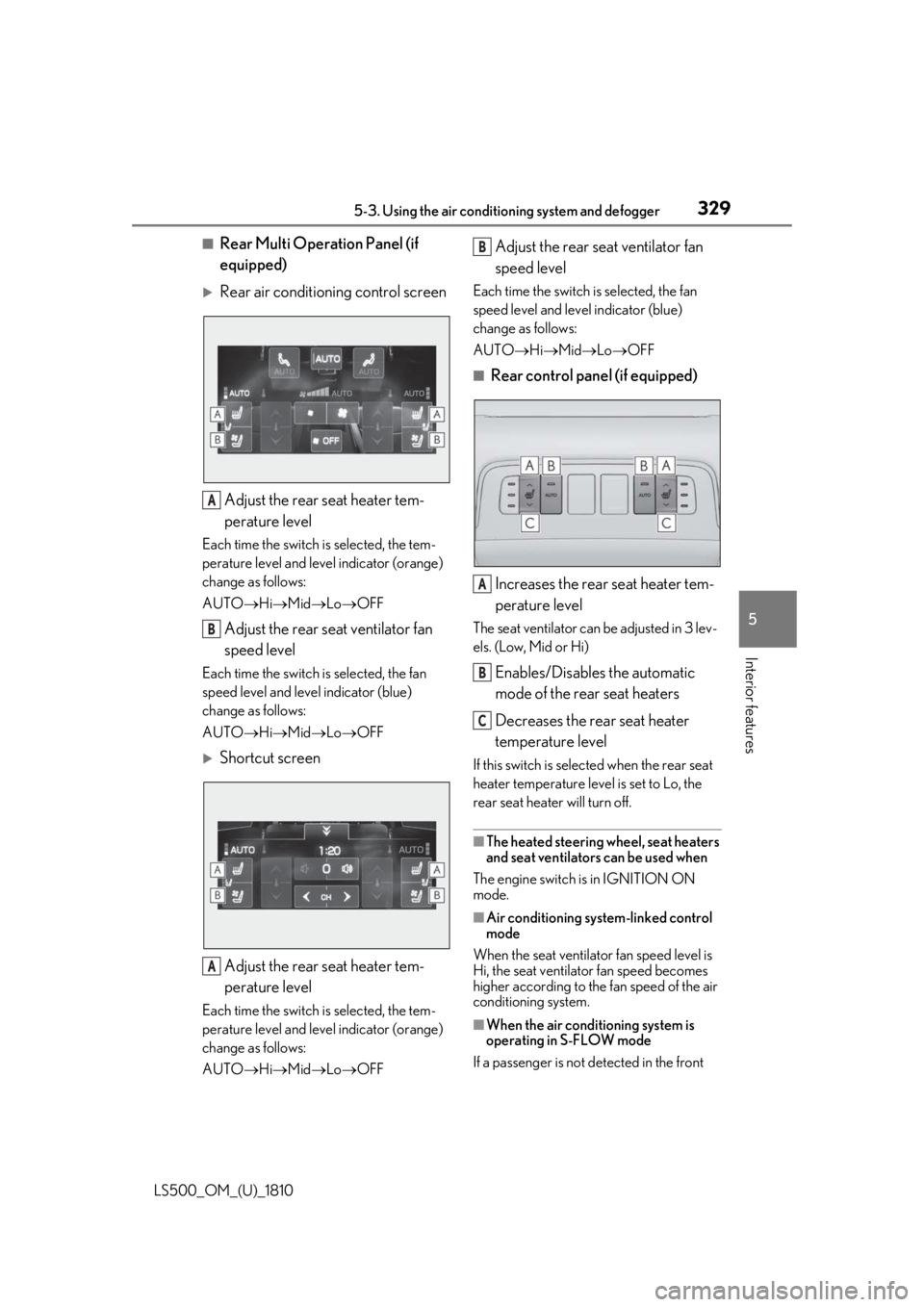
Rear Multi Operation Panel (if
equipped)
Rear air conditioning control screen
Adjust the rear seat heater tem-
perature levelEach time the switch is selected, the tem-
perature level and leve l indicator (orange)
change as follows:
AUTO Hi Mid Lo OFF
Adjust the rear seat ventilator fan
speed levelEach time the switch is selected, the fan
speed level and leve l indicator (blue)
change as follows:
AUTO Hi Mid Lo OFF
Shortcut screen
Adjust the rear seat heater tem-
perature levelEach time the switch is selected, the tem-
perature level and leve l indicator (orange)
change as follows:
AUTO Hi Mid Lo OFF Adjust the rear seat ventilator fan
speed level Each time the switch is selected, the fan
speed level and level indicator (blue)
change as follows:
AUTO Hi Mid Lo OFF■
Rear control panel (if equipped)
Increases the rear seat heater tem-
perature level The seat ventilator can be adjusted in 3 lev-
els. (Low, Mid or Hi)
Enables/Disables the automatic
mode of the rear seat heaters
Decreases the rear seat heater
temperature level If this switch is select ed when the rear seat
heater temperature level is set to Lo, the
rear seat heater will turn off.
■
The heated steering wheel, seat heaters
and seat ventilators can be used when
The engine switch is in IGNITION ON
mode.
■
Air conditioning system-linked control
mode
When the seat ventilator fan speed level is
Hi, the seat ventilato r fan speed becomes
higher according to the fan speed of the air
conditioning system.
■
When the air conditioning system is
operating in S-FLOW mode
If a passenger is not detected in the front A
B
A B
A
B
C
Page 330 of 512

330 5-3. Using the air conditioning system and defogger
LS500_OM_(U)_1810 passenger seat, the seat ventilator and seat
heater of the front pa ssenger’s seat will be
turned off if on. ( P.320)■
Customization
Some functions can be customized.
( P.466)
WARNING■
To prevent overheating and minor
burn injuries
Observe the following precautions when
using the seat heaters. ●
Do not cover the seat with a blanket or
cushion when using the seat heater.●
Do not use seat heater more than nec-
essary.
Page 334 of 512
334 5-4. Using the interior lights
LS500_OM_(U)_1810 ■
Illuminated entry system
The lights automatically turn on/off accord-
ing to the engine switch mode, the pres-
ence of the electronic key, whether the
doors are locked/unlocked, and whether
the doors are opened/closed. ■
To prevent the battery from being dis-
charged
If the interior lights remain on when the
engine switch is turned off, the lights will go
off automatically after 20 minutes. ■
When front interior light or front per-
sonal lights do not respond as normal●
When water, dirt, et c., have adhered to
the lens surface●
When operated with a wet hand●
When wearing gloves, etc.■
The interior lights may turn on automati-
cally when
If any of the SRS airbags deploy (inflate) or
in the event of a strong rear impact, the inte-
rior lights will turn on automatically.
The interior lights will turn off automatically
after approximately 20minutes.
The interior lights can be turned off manu-
ally. However, in order to help prevent fur-
ther collisions, it is recommended that they
be left on until sa fety can be ensured.
(The interior lights may not turn on auto-
matically depending on the force of the
impact and conditions of the collision.) ■
Customization
Some functions can be customized.
( P.466)
NOTICE
■
To prevent battery discharge
Do not leave the lights on longer than
necessary when the engine is not run-
ning. ■
Removing light lenses
Never remove th e lens for the front inte-
rior light and front personal lights. Other-
wise, the lights will be damaged. If a lens
needs to be removed, contact your Lexus
dealer.
Page 357 of 512
357
LS500_OM_(U)_1810 6 6
Maintenance and care Maintenance and care .
6-1. Maintenance and care
Cleaning and protecting the vehi-
cle exterior ................................ 358
Cleaning and protecting the vehi-
cle interior .................................. 361
6-2. Maintenance
Maintenance requirements
........................................................ 364
General maintenance ............. 365
Emission inspection and mainte-
nance (I/M) programs ......... 368
6-3. Do-it-yourself maintenance
Do-it-yourself service precautions
........................................................ 369
Hood................................................ 371
Positioning a floor jack............. 371
Engine compartment............... 373
Battery ........................................... 380
Tires ................................................ 382
Replacing the tire ....................... 391
Tire inflation pressure .............. 395
Wheels........................................... 396
Air conditioning filter............... 398
Electronic key battery ............. 399
Checking and replacing fuses
......................................................... 401
Light bulbs .................................... 404
Page 383 of 512
3836-3. Do-it-yourself maintenance
LS500_OM_(U)_1810 6
Maintenance and care ■
When to replace your vehicle’s tires
Tires should be replaced if: ●
The treadwear indicators are showing on
a tire.●
You have tire damage such as cuts, splits,
cracks deep enough to expose the fabric,
and bulges indicating internal damage●
A tire goes flat repeatedly or cannot be
properly repaired due to the size or loca-
tion of a cut or other damage
If you are not sure, consult with your Lexus
dealer. ■
Tire life
Any tire over 6 years old must be checked
by a qualified technician even if it has sel-
dom or never been used or damage is not
obvious. ■
Maximum load of tire
Check that the maximum load of the
replacement tire is greater than 1/2 of the
Gross Axle Weight Ratings (GAWR) of
either the front axle or the rear axle, which-
ever is greater.
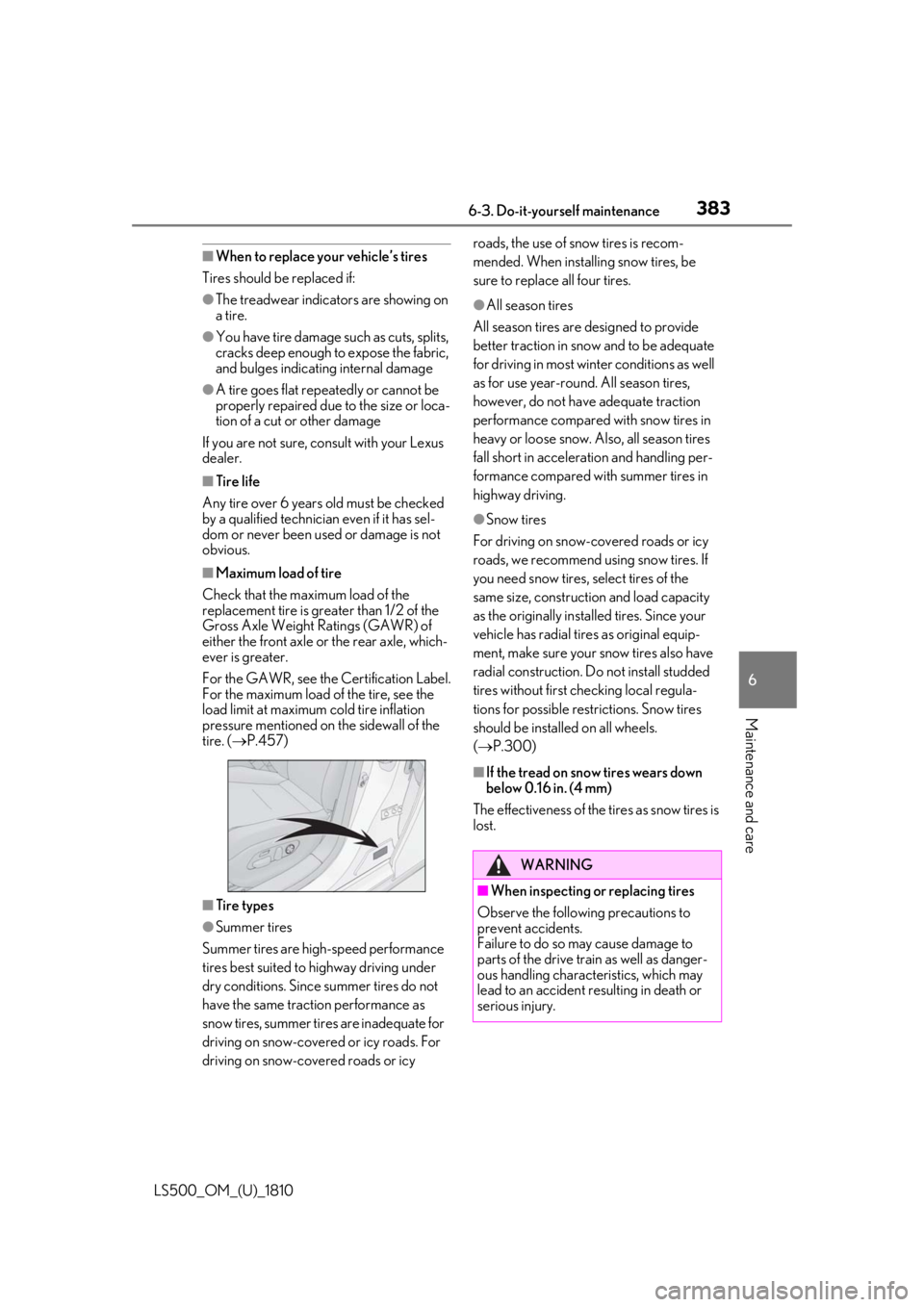
For the GAWR, see the Certification Label.
For the maximum load of the tire, see the
load limit at maximum cold tire inflation
pressure mentioned on the sidewall of the
tire. ( P.457)
■
Tire types
●
Summer tires
Summer tires are high-speed performance
tires best suited to highway driving under
dry conditions. Since summer tires do not
have the same traction performance as
snow tires, summer tires are inadequate for
driving on snow-covered or icy roads. For
driving on snow-covered roads or icy roads, the use of snow tires is recom-
mended. When installing snow tires, be
sure to replace all four tires. ●
All season tires
All season tires are designed to provide
better traction in snow and to be adequate
for driving in most winter conditions as well
as for use year-round. All season tires,
however, do not have adequate traction
performance compared with snow tires in
heavy or loose snow. Also, all season tires
fall short in accelerati on and handling per-
formance compared with summer tires in
highway driving. ●
Snow tires
For driving on snow-covered roads or icy
roads, we recommend using snow tires. If
you need snow tires, select tires of the
same size, construction and load capacity
as the originally instal led tires. Since your
vehicle has radial tires as original equip-
ment, make sure your snow tires also have
radial construction. Do not install studded
tires without first checking local regula-
tions for possible restrictions. Snow tires
should be installed on all wheels.
( P.300) ■
If the tread on snow tires wears down
below 0.16 in. (4 mm)
The effectiveness of the tires as snow tires is
lost.
WARNING
■
When inspecting or replacing tires
Observe the following precautions to
prevent accidents.
Failure to do so may cause damage to
parts of the drive train as well as danger-
ous handling characteristics, which may
lead to an accident resulting in death or
serious injury.
Page 384 of 512
384 6-3. Do-it-yourself maintenance
LS500_OM_(U)_1810
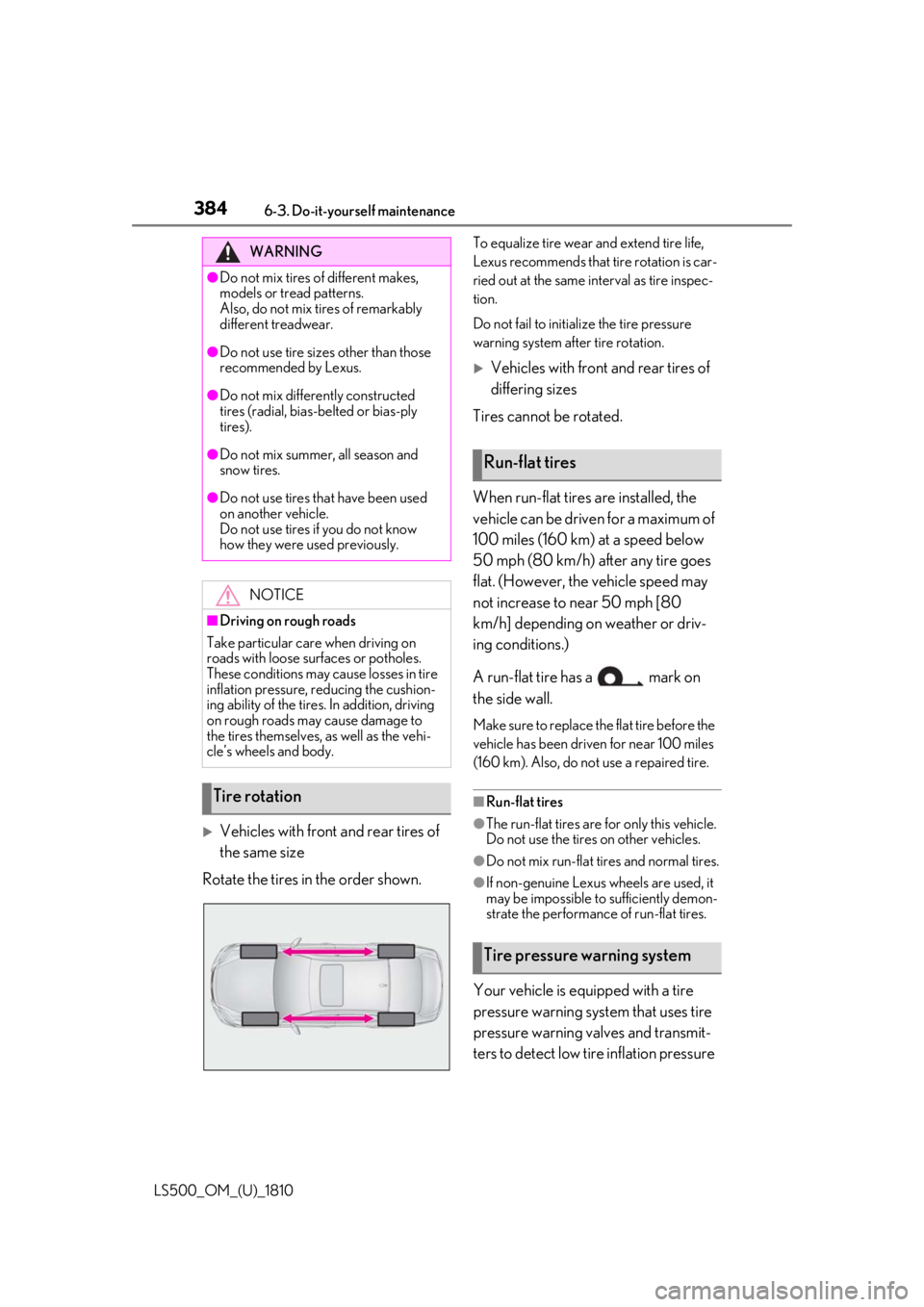
Vehicles with front and rear tires of
the same size
Rotate the tires in the order shown. To equalize tire wear and extend tire life,
Lexus recommends that tire rotation is car-
ried out at the same in terval as tire inspec-
tion.
Do not fail to initialize the tire pressure
warning system after tire rotation.
Vehicles with front and rear tires of
differing sizes
Tires cannot be rotated.
When run-flat tires are installed, the
vehicle can be driven for a maximum of
100 miles (160 km) at a speed below
50 mph (80 km/h) after any tire goes
flat. (However, the vehicle speed may
not increase to near 50 mph [80
km/h] depending on weather or driv-
ing conditions.)
A run-flat tire has a mark on
the side wall. Make sure to replace the flat tire before the
vehicle has been driven for near 100 miles
(160 km). Also, do not use a repaired tire.
■
Run-flat tires ●
The run-flat tires are for only this vehicle.
Do not use the tires on other vehicles. ●
Do not mix run-flat tires and normal tires.
●
If non-genuine Lexus wheels are used, it
may be impossible to sufficiently demon-
strate the performance of run-flat tires.
Your vehicle is equipped with a tire
pressure warning system that uses tire
pressure warning valves and transmit-
ters to detect low ti re inflation pressure WARNING●
Do not mix tires of different makes,
models or tread patterns.
Also, do not mix tires of remarkably
different treadwear.●
Do not use tire sizes other than those
recommended by Lexus.●
Do not mix differently constructed
tires (radial, bias-b elted or bias-ply
tires).●
Do not mix summer, all season and
snow tires.●
Do not use tires that have been used
on another vehicle.
Do not use tires if you do not know
how they were used previously.
NOTICE■
Driving on rough roads
Take particular care when driving on
roads with loose surfaces or potholes.
These conditions may cause losses in tire
inflation pressure, reducing the cushion-
ing ability of the tires. In addition, driving
on rough roads may cause damage to
the tires themselves, as well as the vehi-
cle’s wheels and body.
Tire rotation Run-flat tires
Tire pressure warning system
Page 385 of 512
3856-3. Do-it-yourself maintenance
LS500_OM_(U)_1810 6
Maintenance and care before serious problems arise.
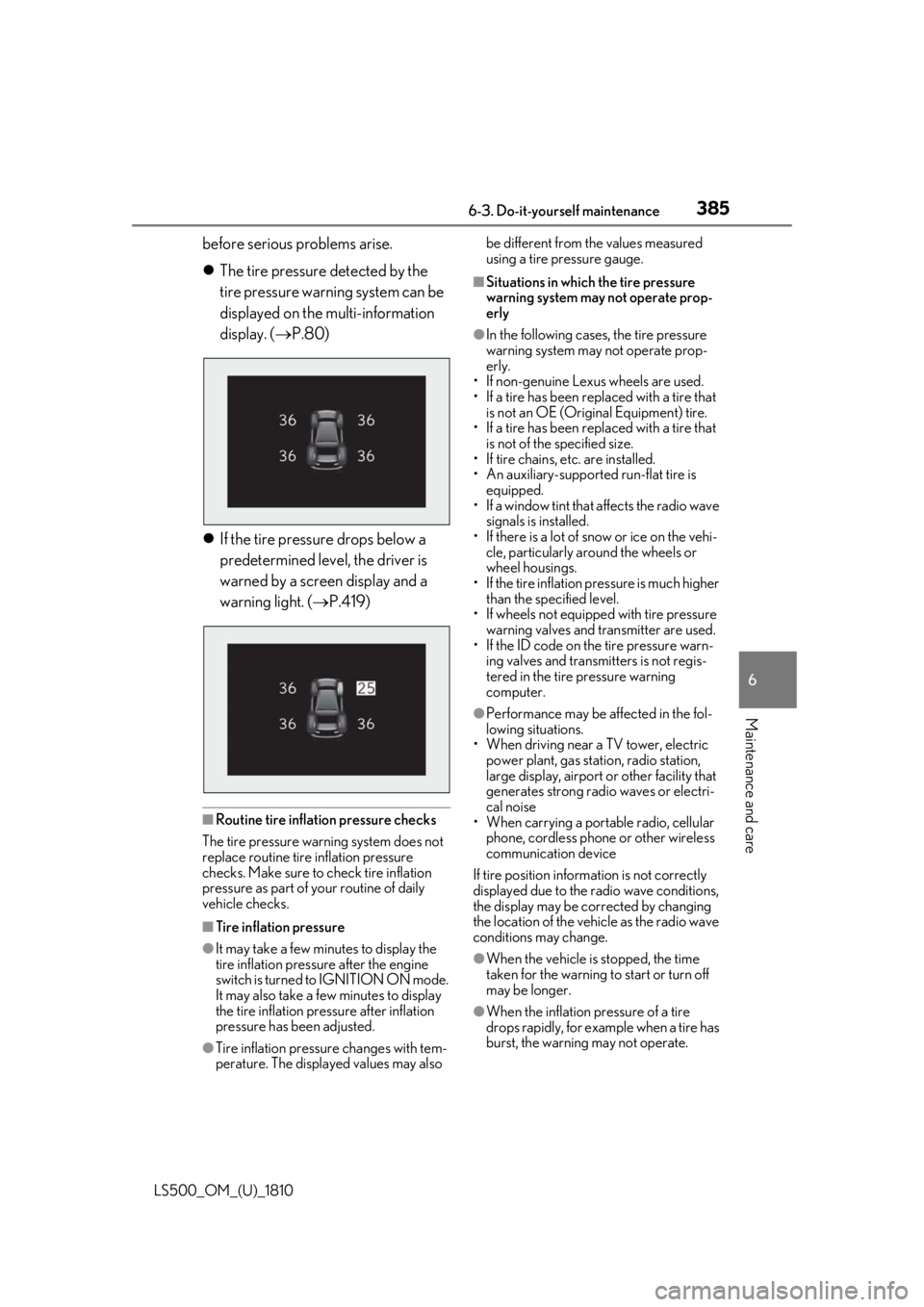
The tire pressure detected by the
tire pressure warning system can be
displayed on the multi-information
display. ( P.80)
If the tire pressure drops below a
predetermined level, the driver is
warned by a screen display and a
warning light. ( P.419)
■
Routine tire inflation pressure checks
The tire pressure warning system does not
replace routine tire inflation pressure
checks. Make sure to check tire inflation
pressure as part of your routine of daily
vehicle checks.
■
Tire inflation pressure
●
It may take a few minutes to display the
tire inflation pressure after the engine
switch is turned to IGNITION ON mode.
It may also take a few minutes to display
the tire inflation pres sure after inflation
pressure has been adjusted.
●
Tire inflation pressu re changes with tem-
perature. The displayed values may also be different from the values measured
using a tire pressure gauge. ■
Situations in which the tire pressure
warning system may not operate prop-
erly ●
In the following cases, the tire pressure
warning system may not operate prop-
erly.
• If non-genuine Lexus wheels are used.
• If a tire has been replaced with a tire that
is not an OE (Original Equipment) tire.
• If a tire has been replaced with a tire that
is not of the specified size.
• If tire chains, etc. are installed.
• An auxiliary-supported run-flat tire is
equipped.
• If a window tint that affects the radio wave
signals is installed.
• If there is a lot of snow or ice on the vehi-
cle, particularly around the wheels or
wheel housings.
• If the tire inflation pressure is much higher
than the specified level.
• If wheels not equipped with tire pressure
warning valves and transmitter are used.
• If the ID code on the tire pressure warn-
ing valves and transmitters is not regis-
tered in the tire pressure warning
computer. ●
Performance may be af fected in the fol-
lowing situations.
• When driving near a TV tower, electric
power plant, gas stat ion, radio station,
large display, airport or other facility that
generates strong radi o waves or electri-
cal noise
• When carrying a portable radio, cellular
phone, cordless phone or other wireless
communication device
If tire position information is not correctly
displayed due to the radio wave conditions,
the display may be corrected by changing
the location of the vehicle as the radio wave
conditions may change.
●
When the vehicle is stopped, the time
taken for the warning to start or turn off
may be longer.
●
When the inflation pressure of a tire
drops rapidly, for example when a tire has
burst, the warning may not operate.