warning LEXUS LS500 2019 Workshop Manual
[x] Cancel search | Manufacturer: LEXUS, Model Year: 2019, Model line: LS500, Model: LEXUS LS500 2019Pages: 512, PDF Size: 9.71 MB
Page 101 of 512
1013-2. Opening, closing and locking the doors and trunk
LS500_OM_(U)_1810 3
Before driving
To prevent unintended triggering of the
alarm, unlock the doors using the wireless
remote control and open and close a door
once after the settings have been changed.
(If a door is not opened within 60 seconds
after is pressed, the doors will be
locked again and the alarm will automati-
cally be set.)
In a case that the alarm is triggered, imme-
diately stop the alarm. ( P.65)■
Impact detection door lock release sys-
tem
In the event that the vehicle is subject to a
strong impact, all the doors are unlocked.
Depending on the force of the impact or the
type of accident, however, the system may
not operate.
■
Operation signals
A buzzer sounds and the emergency flash-
ers flash to indicate that the doors have
been locked/unlocked. (Locked: once;
Unlocked: twice)
A buzzer sounds to indicate that the win-
dows and moon roof or panoramic moon
roof are operating.
■
Security feature
If a door is not opened within approximately 60 seconds after the vehicle is unlocked,
the security feature automatically locks the
vehicle again. ■
When the doors cannot be locked by the
lock sensor on the upper part of the
door handle
When the doors cannot be locked even if
the lock sensor on th e upper part of the
door handle is touched by a finger, touch
the lock sensor with the palm.
If you are wearing gloves, remove them.
■
Open door warning buzzer
If an attempt to lock the doors is made when
a door is not fully closed, a buzzer sounds
continuously for 5 seconds. Fully close the
door to stop the buzzer, and lock the vehi-
cle once more. ■
Setting the alarm
Locking the doors will set the alarm system.
( P.65) ■
Conditions affecting the operation of
the smart access system with push-but-
ton start or wireless remote control
P.113 ■
If the smart access system with
push-button start or the wireless remote
control does not operate properly
Use the mechanical key to lock and unlock
the doors. ( P.433)
Replace the key battery with a new one if it
is depleted. ( P.399)
■
If the battery is discharged
The doors cannot be locked and unlocked
using the smart access system with
push-button start or wireless remote con-
trol. Lock or unlock the doors using the
mechanical key. ( P.433)Multi-information
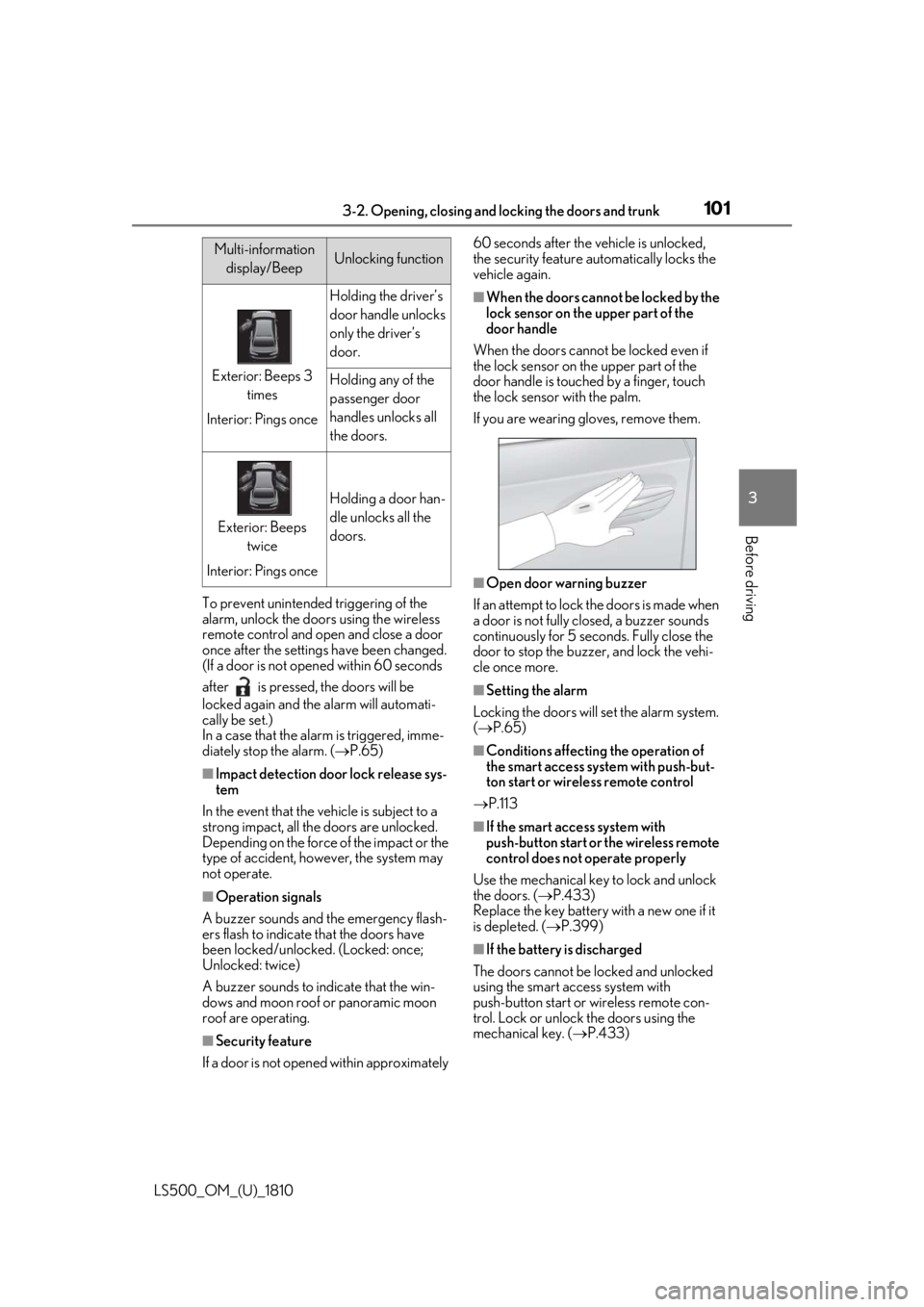
display/Beep Unlocking function
Exterior: Beeps 3
times
Interior: Pings once Holding the driver’s
door handle unlocks
only the driver’s
door.
Holding any of the
passenger door
handles unlocks all
the doors.
Exterior: Beeps
twice
Interior: Pings once Holding a door han-
dle unlocks all the
doors.
Page 102 of 512
102 3-2. Opening, closing and locking the doors and trunk
LS500_OM_(U)_1810 ■
Customization
Some functions can be customized.
( P.466) ■
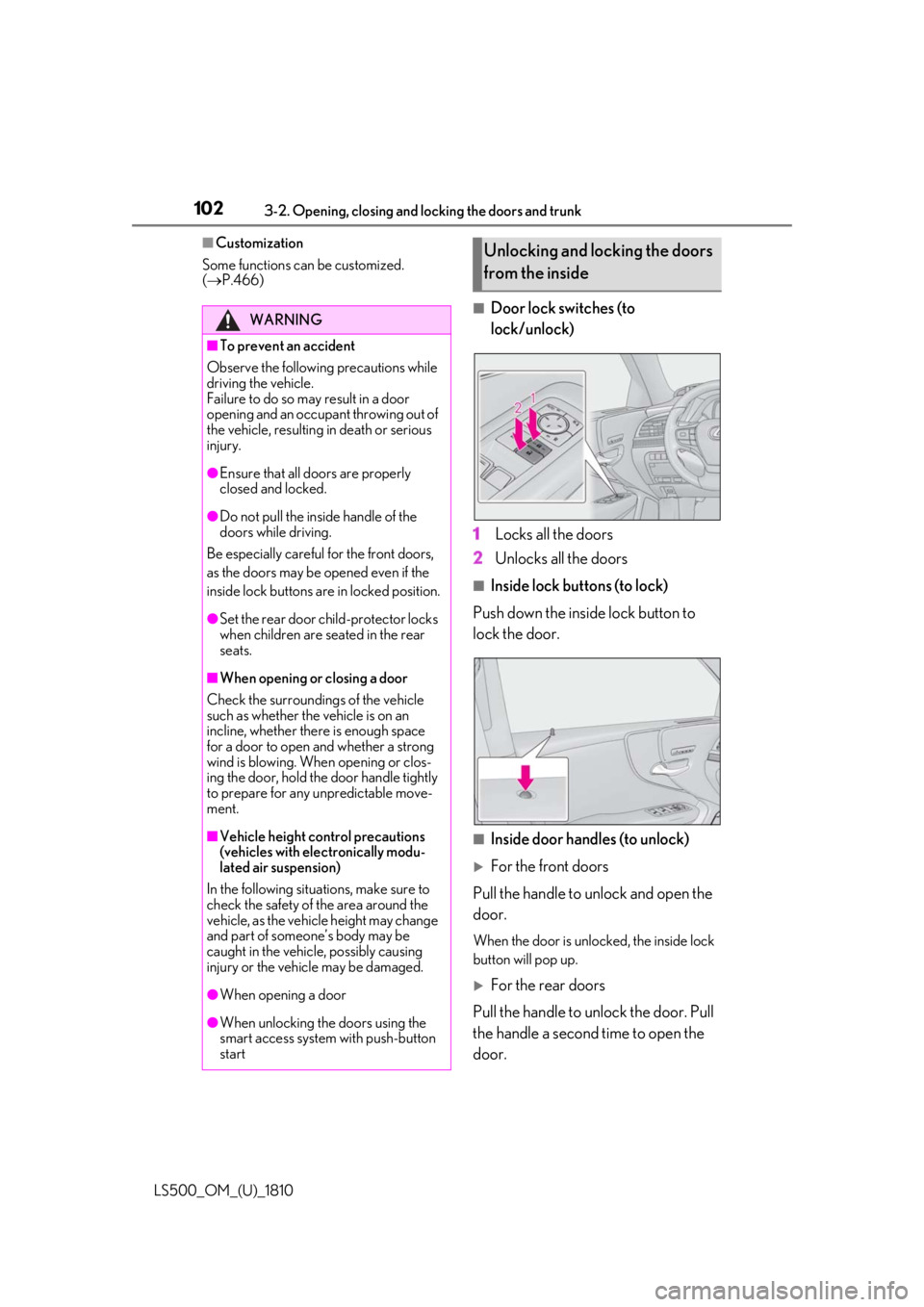
Door lock switches (to
lock/unlock)
1 Locks all the doors
2 Unlocks all the doors ■
Inside lock buttons (to lock)
Push down the inside lock button to
lock the door.
■
Inside door handles (to unlock)
For the front doors
Pull the handle to unlock and open the
door. When the door is unlo cked, the inside lock
button will pop up.
For the rear doors
Pull the handle to unlock the door. Pull
the handle a second time to open the
door.WARNING■
To prevent an accident
Observe the following precautions while
driving the vehicle.
Failure to do so may result in a door
opening and an occupant throwing out of
the vehicle, resulting in death or serious
injury. ●
Ensure that all doors are properly
closed and locked.●
Do not pull the inside handle of the
doors while driving.
Be especially careful for the front doors,
as the doors may be opened even if the
inside lock buttons are in locked position. ●
Set the rear door ch ild-protector locks
when children are seated in the rear
seats.■
When opening or closing a door
Check the surroundings of the vehicle
such as whether the vehicle is on an
incline, whether ther e is enough space
for a door to open and whether a strong
wind is blowing. When opening or clos-
ing the door, hold the door handle tightly
to prepare for any unpredictable move-
ment.
■
Vehicle height co ntrol precautions
(vehicles with electronically modu-
lated air suspension)
In the following situations, make sure to
check the safety of the area around the
vehicle, as the vehicle height may change
and part of someone’s body may be
caught in the vehicle, possibly causing
injury or the vehicle may be damaged.
●
When opening a door
●
When unlocking the doors using the
smart access system with push-button
start Unlocking and locking the doors
from the inside
Page 103 of 512
1033-2. Opening, closing and locking the doors and trunk
LS500_OM_(U)_1810 3
Before driving When the door is unlocked, the inside lock
button will pop up.
■
Locking the front doors from the outside
without a key
1 Push down the inside lock button.
2 Close the door.
The door cannot be locked if the engine
switch is in ACCESSORY or IGNITION
ON mode, or the electronic key is left
inside the vehicle. However, the key may not
be detected correctly and the door may be
locked. ■
Door closer (if equipped)
In the event that a door is left slightly open,
the door closer will automatically close it to
the fully closed position. ●
The door closer will operate regardless
of the engine switch mode.●
The door closer will not function if the
door has been clos ed while pulling the
inside or outside door handle.●
The door can be opened by pulling the
inside or outside door handle, even when
the door closer is operating (except
when the lock button is in the lock posi-
tion or the child-protector lock is set).
●
A motor sound may be heard for several
seconds after the door closer closes the
door. This does not indicate a malfunc-
tion.
■
Open door warning buzzer
If a door or the trunk is not fully closed, a
buzzer will sound when the vehicle speed
reaches 3 mph (5 km/h).
The open door(s) or trunk is indicated on
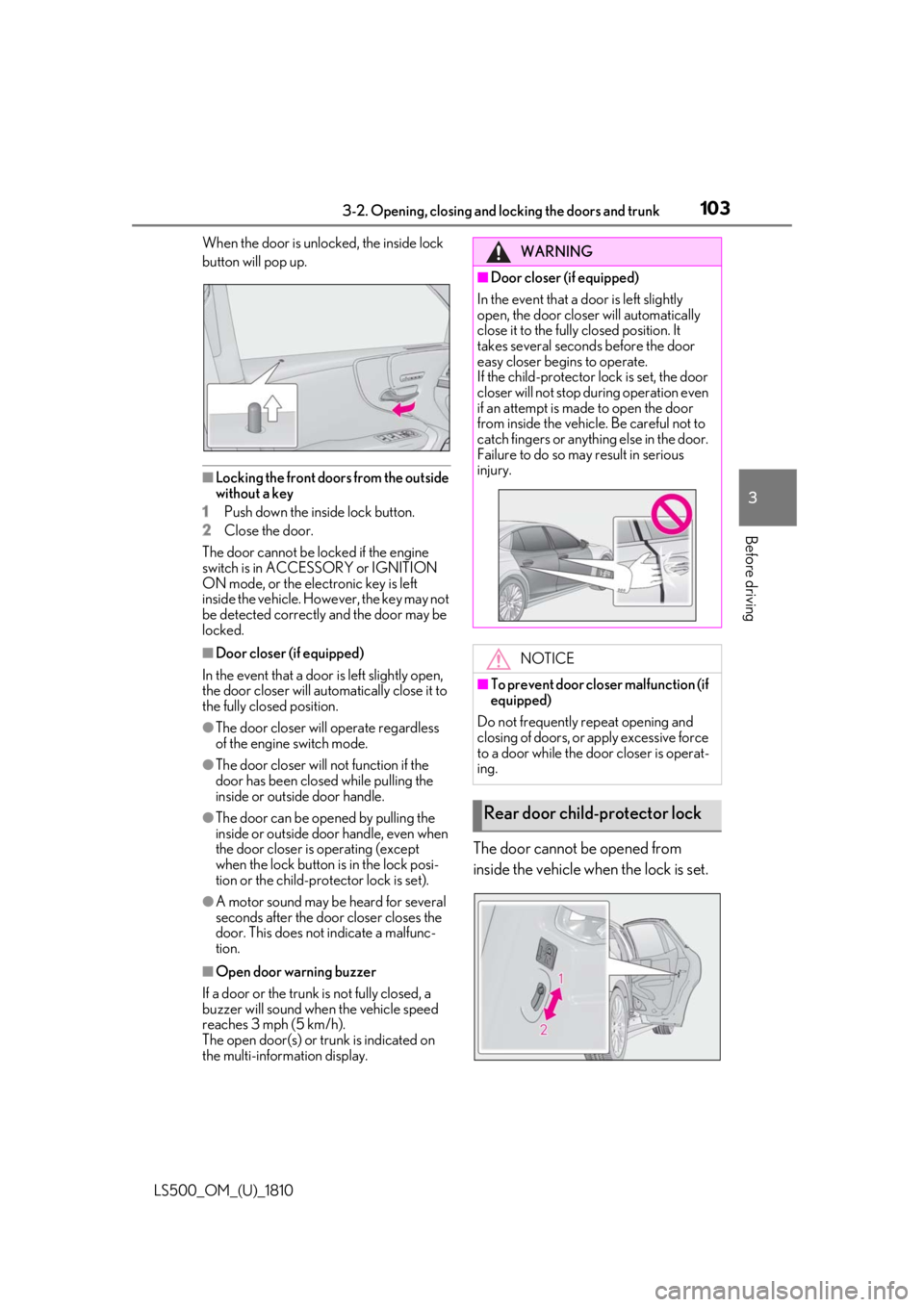
the multi-information display. The door cannot be opened from
inside the vehicle when the lock is set. WARNING■
Door closer (if equipped)
In the event that a d oor is left slightly
open, the door closer will automatically
close it to the fully closed position. It
takes several second s before the door
easy closer begins to operate.
If the child-protector lock is set, the door
closer will not stop during operation even
if an attempt is made to open the door
from inside the vehicle. Be careful not to
catch fingers or anything else in the door.
Failure to do so may result in serious
injury.
NOTICE■
To prevent door closer malfunction (if
equipped)
Do not frequently repeat opening and
closing of doors, or apply excessive force
to a door while the door closer is operat-
ing.
Rear door child-protector lock
Page 104 of 512
104 3-2. Opening, closing and locking the doors and trunk
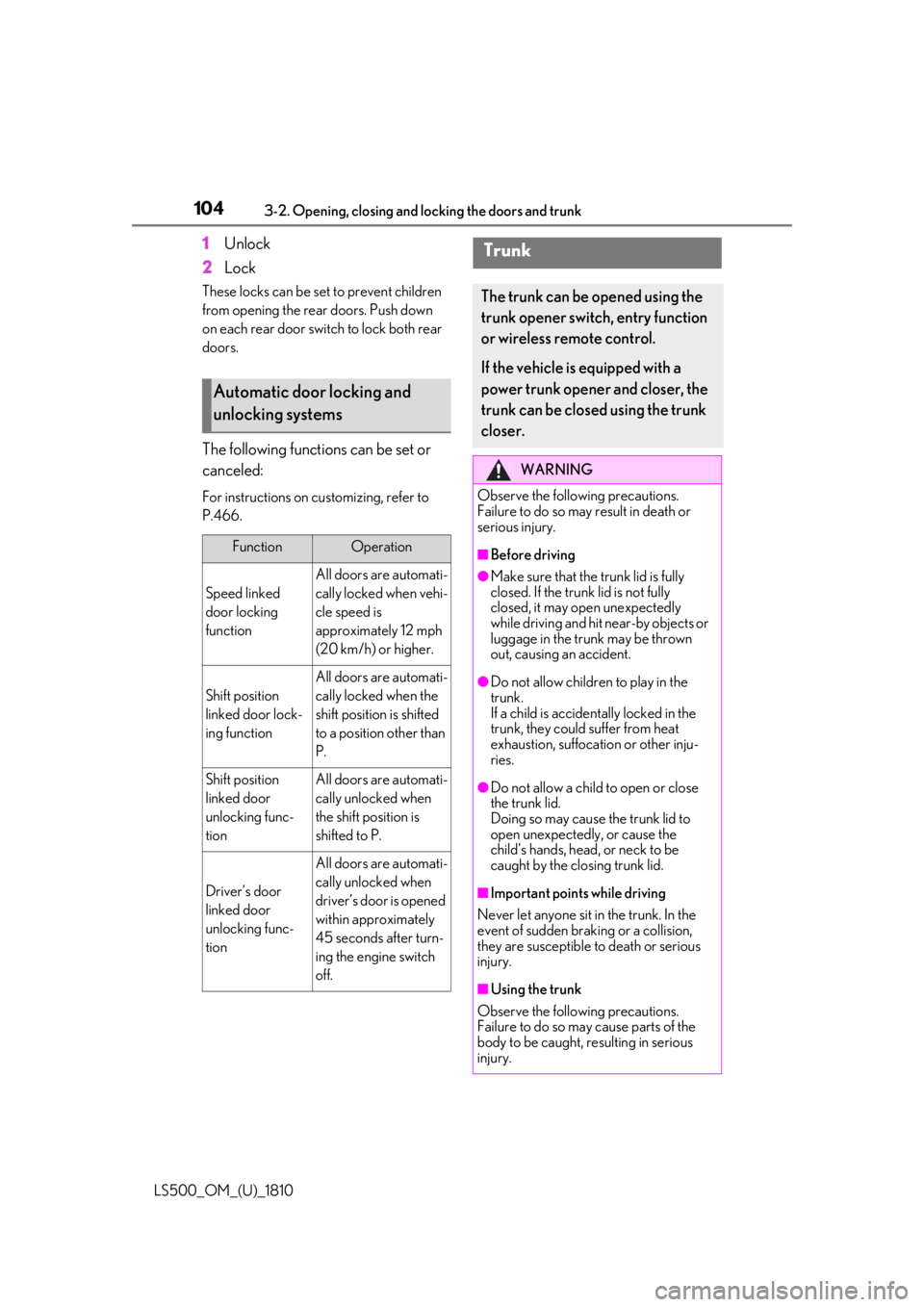
LS500_OM_(U)_1810 1 Unlock
2 LockThese locks can be set to prevent children
from opening the rear doors. Push down
on each rear door switch to lock both rear
doors.
The following functions can be set or
canceled: For instructions on customizing, refer to
P.466.
Automatic door locking and
unlocking systems Function Operation
Speed linked
door locking
function All doors are automati-
cally locked when vehi-
cle speed is
approximately 12 mph
(20 km/h) or higher.
Shift position
linked door lock-
ing function All doors are automati-
cally locked when the
shift position is shifted
to a position other than
P.
Shift position
linked door
unlocking func-
tion All doors are automati-
cally unlocked when
the shift position is
shifted to P.
Driver’s door
linked door
unlocking func-
tion All doors are automati-
cally unlocked when
driver’s door is opened
within approximately
45 seconds after turn-
ing the engine switch
off. Trunk The trunk can be opened using the
trunk opener switch, entry function
or wireless remote control.
If the vehicle is equipped with a
power trunk opener and closer, the
trunk can be closed using the trunk
closer. WARNING
Observe the following precautions.
Failure to do so may result in death or
serious injury. ■
Before driving ●
Make sure that the trunk lid is fully
closed. If the trunk lid is not fully
closed, it may open unexpectedly
while driving and hit near-by objects or
luggage in the trunk may be thrown
out, causing an accident. ●
Do not allow children to play in the
trunk.
If a child is accident ally locked in the
trunk, they could suffer from heat
exhaustion, suffocation or other inju-
ries.
●
Do not allow a child to open or close
the trunk lid.
Doing so may cause the trunk lid to
open unexpectedly, or cause the
child’s hands, head, or neck to be
caught by the closing trunk lid.
■
Important points while driving
Never let anyone sit in the trunk. In the
event of sudden braking or a collision,
they are susceptible to death or serious
injury.
■
Using the trunk
Observe the following precautions.
Failure to do so may cause parts of the
body to be caught, resulting in serious
injury.
Page 105 of 512
1053-2. Opening, closing and locking the doors and trunk
LS500_OM_(U)_1810 3
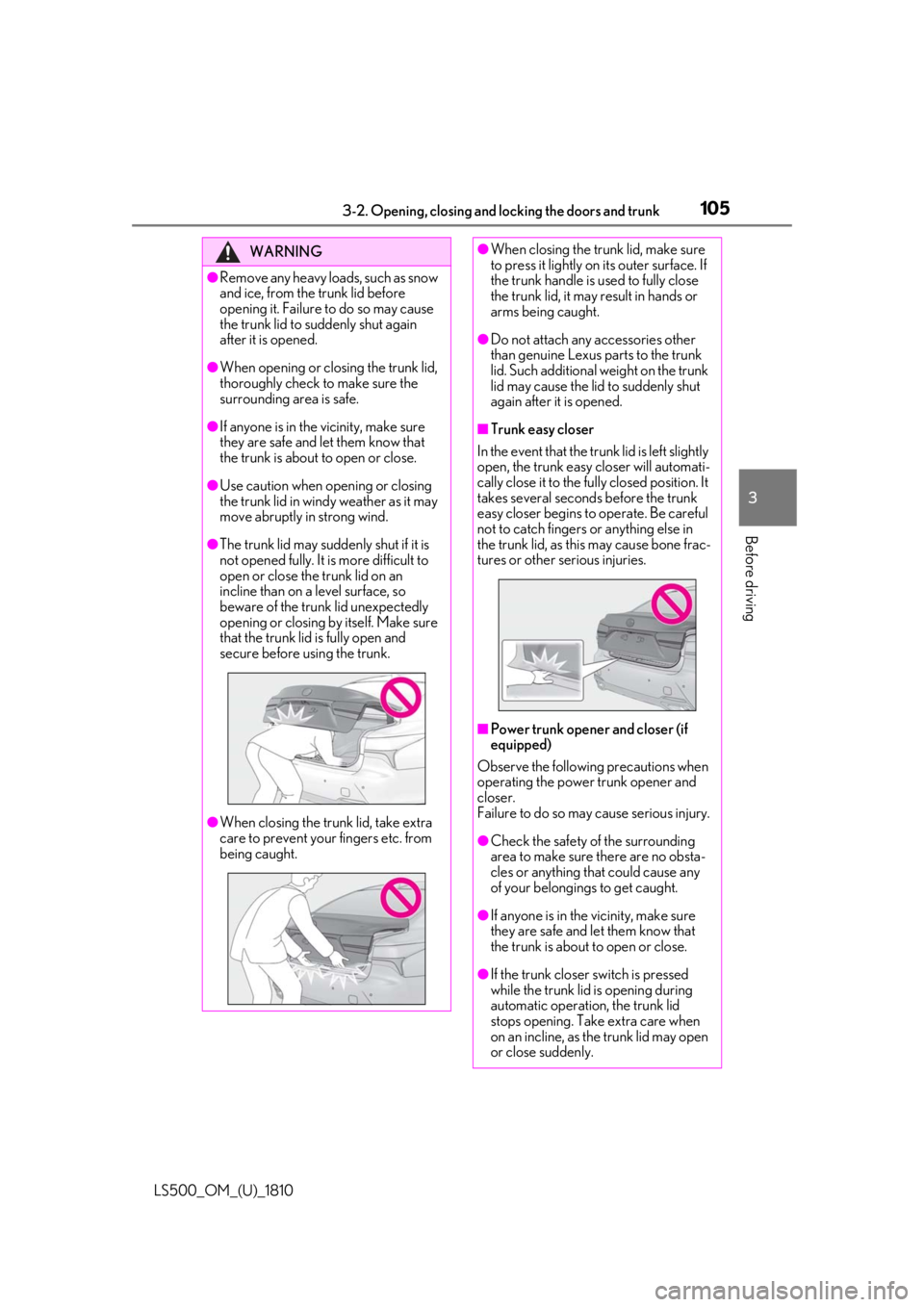
Before driving WARNING●
Remove any heavy loads, such as snow
and ice, from the trunk lid before
opening it. Failure to do so may cause
the trunk lid to suddenly shut again
after it is opened.●
When opening or closing the trunk lid,
thoroughly check to make sure the
surrounding area is safe.●
If anyone is in the vicinity, make sure
they are safe and let them know that
the trunk is about to open or close.●
Use caution when opening or closing
the trunk lid in windy weather as it may
move abruptly in strong wind.●
The trunk lid may sudden ly shut if it is
not opened fully. It is more difficult to
open or close the trunk lid on an
incline than on a level surface, so
beware of the trunk lid unexpectedly
opening or closing by itself. Make sure
that the trunk lid is fully open and
secure before using the trunk.
●
When closing the trunk lid, take extra
care to prevent your fingers etc. from
being caught. ●
When closing the trunk lid, make sure
to press it lightly on its outer surface. If
the trunk handle is used to fully close
the trunk lid, it may result in hands or
arms being caught. ●
Do not attach any accessories other
than genuine Lexus parts to the trunk
lid. Such additional weight on the trunk
lid may cause the lid to suddenly shut
again after it is opened. ■
Trunk easy closer
In the event that the trun k lid is left slightly
open, the trunk easy closer will automati-
cally close it to the fully closed position. It
takes several second s before the trunk
easy closer begins to operate. Be careful
not to catch fingers or anything else in
the trunk lid, as this may cause bone frac-
tures or other serious injuries.
■
Power trunk opener and closer (if
equipped)
Observe the following precautions when
operating the power trunk opener and
closer.
Failure to do so may cause serious injury.
●
Check the safety of the surrounding
area to make sure there are no obsta-
cles or anything that could cause any
of your belongings to get caught.
●
If anyone is in the vicinity, make sure
they are safe and let them know that
the trunk is about to open or close.
●
If the trunk closer switch is pressed
while the trunk lid is opening during
automatic operation, the trunk lid
stops opening. Take extra care when
on an incline, as the trunk lid may open
or close suddenly.
Page 106 of 512
106 3-2. Opening, closing and locking the doors and trunk
LS500_OM_(U)_1810 ■
Trunk opener switch
Press the trunk opener switch. If the vehicle is equipped with a power
trunk opener and closer, the trunk lid will
fully open.WARNING●
On an incline, the trunk lid may sud-
denly shut after it opens automatically.
Make sure the trunk lid is fully open
and secure before using the trunk.●
In the following situations, the power
trunk opener and closer may detect an
abnormality and automatic operation
may be stopped. In this case, the trunk
lid has to be operated manually. Take
extra care in this situation, as the
stopped trunk lid ma y suddenly shut,
causing an accident.
• When the trunk lid contacts an obsta-
cle
• When the battery voltage suddenly
drops, such as when the engine switch
is turned to IGNITION ON mode or
the engine is started during automatic
operation●
Do not attach any accessories other
than genuine Lexus parts to the trunk
lid. The power trunk opener and closer
may not operate, caus ing itself to mal-
function, or the trun k lid may suddenly
shut again after it is opened.■
Hands Free Power Trunk Lid (if
equipped)
Observe the following precautions.
Failure to do so may cause serious injury.
●
Exhaust gasses cause the exhaust
pipes to become quite hot. When
operating the Hands Free Power Trunk
Lid, be careful not to touch the exhaust
pipe.
●
Do not operate the Hands Free Power
Trunk Lid if there is little space under
the rear bumper.
■
Jam protection function
Observe the following precautions.
Failure to do so may cause serious injury.
●
Never use any part of your body to
intentionally activate the jam protec-
tion function. ●
The jam protection function may not
work if something gets caught just
before the trunk lid fully closes. Be
careful not to catch fingers or anything
else in the trunk lid. ●
The jam protection function may not
work depending on the shape of the
object that is caught. Be careful not to
catch fingers or anything else.
NOTICE■
To prevent trunk easy closer malfunc-
tions
Do not apply force to the trunk lid while
the trunk easy closer is operating. ■
To prevent damage to the power
trunk opener and closer (vehicles
with power trunk opener and closer) ●
Make sure that there is no luggage or
snow on the trunk lid before operating
the power trunk opener and closer. In
addition, make sure that there is no ice
between the trunk lid and frame that
prevents movement of the trunk lid.
Operating the power trunk opener
and closer when excessive load is
present on the trunk lid may cause a
malfunction.
●
Do not apply excessive force to the
trunk lid while the power trunk opener
and closer is operating.
Opening/closing the trunk
Page 110 of 512

110 3-2. Opening, closing and locking the doors and trunk
LS500_OM_(U)_1810 If the rear bumper has been touched for a
while, wait for a short time before
attempting to operate the Hands Free
Power Trunk Lid again.●
When standing excessively close to the
rear bumper●
When an external radio wave source
interferes with the communication
between the electronic key and the vehi-
cle ( P.113)●
When the vehicle is parked near an elec-
trical noise source which affects the sen-
sitivity of the Hands Free Power Trunk Lid,
such as a pay parking spot, gas station,
electrically heated road, or fluorescent
light●
When the vehicle is near a TV tower,
electric power plant, radio station, large
display, airport or other facility that gen-
erates strong radio waves or electrical
noise●
When a large amount of water is applied
to the rear bumper, such as when the
vehicle is being washed or in heavy rain●
When mud, snow, ice, etc. is attached to
the rear bumper●
When the vehicle has been parked for a
while near objects that may move and
contact the rear bumper, such as plants●
When an accessory is installed to the rear
bumper
If an accessory has been installed, turn the
Hands Free Power Trunk Lid (kick sensor)
operation setting off.
■
Preventing unintentional operation of
the Hands Free Power Trunk Lid (if
equipped)
When an electronic ke y is in the operation
detection area, the Ha nds Free Power Trunk
Lid may operate unintentionally, so be care-
ful in the following situations:
●
When a large amount of water is applied
to the rear bumper, such as when the
vehicle is being washed or in heavy rain
●
When dirt is wiped off the rear bumper
●
When a small animal or small object, such
as a ball, moves under the rear bumper ●
When an object is moved from under the
rear bumper ●
If someone is swinging their legs while sit-
ting on the rear bumper ●
If the legs or another part of someone’s
body contacts the rear bumper while
passing by the vehicle ●
When the vehicle is parked near an elec-
trical noise source which affects the sen-
sitivity of the Hands Free Power Trunk Lid,
such as a pay parking spot, gas station,
electrically heated road, or fluorescent
light ●
When the vehicle is near a TV tower,
electric power plant, radio station, large
display, airport or ot her facility that gen-
erates strong radio waves or electrical
noise ●
When the vehicle is parked in a place
where objects such as plants are near the
rear bumper ●
If luggage, etc. is set near the rear
bumper ●
If accessories or a vehicle cover is
installed/removed ne ar the rear bumper●
When the vehicle is being towed
To prevent unintentiona l operation, turn the
Hands Free Power Trunk Lid (kick sensor)
operation setting off. ■
Open door warning buzzer
P.103 ■
Customization
Some functions can be customized.
( P.466)
The trunk opener switch can be tem-
porarily disabled to protect luggage
stored in the trunk against theft.
Turn the main switch in the glove box
off to disable the trunk opener.Luggage security system
Page 112 of 512
112 3-2. Opening, closing and locking the doors and trunk
LS500_OM_(U)_1810 ■
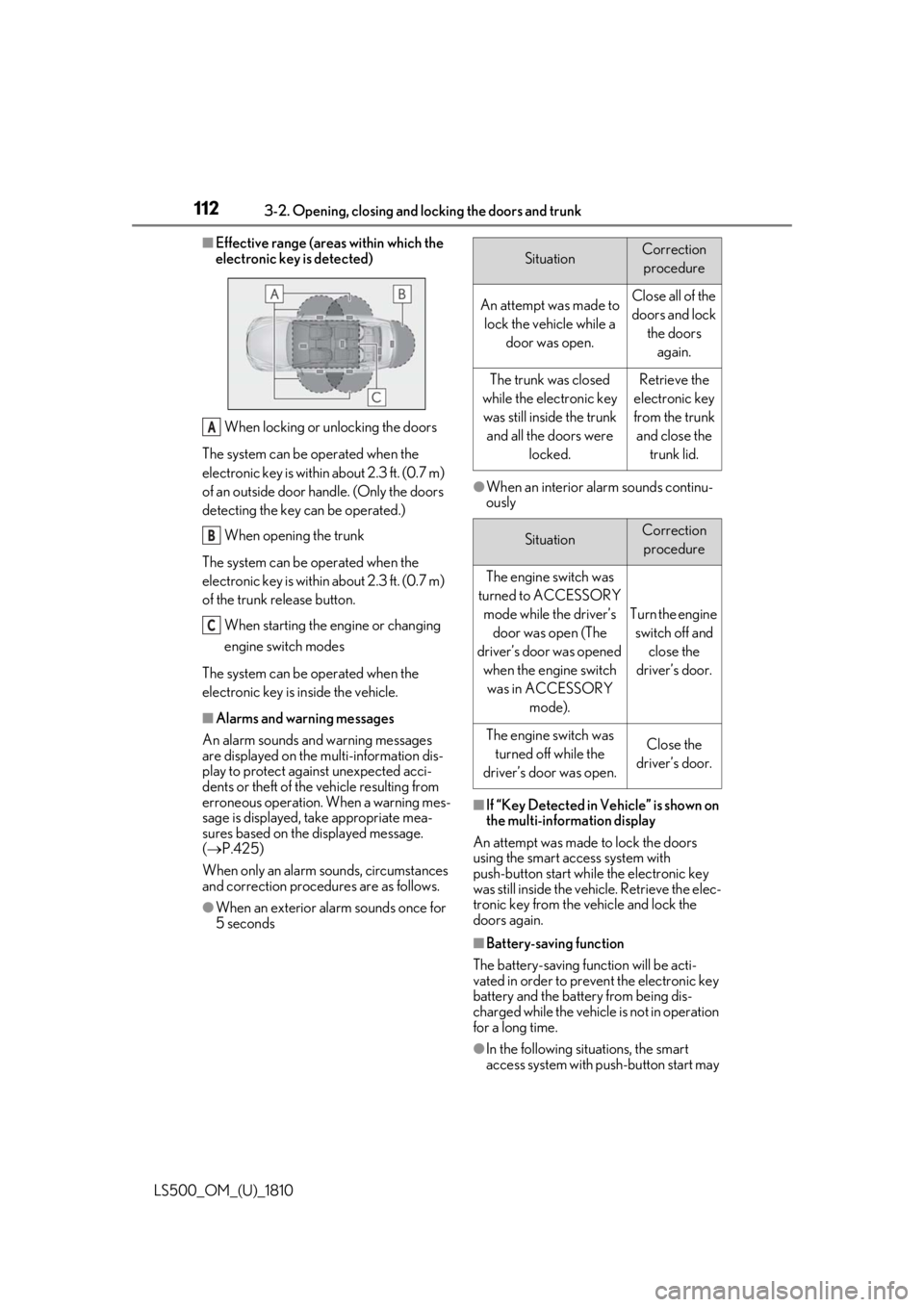
Effective range (areas within which the
electronic key is detected)
When locking or unlocking the doors
The system can be operated when the
electronic key is within about 2.3 ft. (0.7 m)
of an outside door handle. (Only the doors
detecting the key can be operated.)
When opening the trunk
The system can be operated when the
electronic key is within about 2.3 ft. (0.7 m)
of the trunk release button.
When starting the engine or changing
engine switch modes
The system can be operated when the
electronic key is inside the vehicle. ■
Alarms and warning messages
An alarm sounds and warning messages
are displayed on the multi-information dis-
play to protect against unexpected acci-
dents or theft of the vehicle resulting from
erroneous operation. When a warning mes-
sage is displayed, take appropriate mea-
sures based on the displayed message.
( P.425)
When only an alarm sounds, circumstances
and correction procedures are as follows.
●
When an exterior alarm sounds once for
5 seconds ●
When an interior alarm sounds continu-
ously
■
If “Key Detected in Vehicle” is shown on
the multi-information display
An attempt was made to lock the doors
using the smart access system with
push-button start while the electronic key
was still inside the vehicle. Retrieve the elec-
tronic key from the vehicle and lock the
doors again.
■
Battery-saving function
The battery-saving function will be acti-
vated in order to prevent the electronic key
battery and the battery from being dis-
charged while the vehicle is not in operation
for a long time.
●
In the following situations, the smart
access system with pu sh-button start may A
B
C Situation Correction
procedure
An attempt was made to
lock the vehicle while a
door was open. Close all of the
doors and lock
the doors
again.
The trunk was closed
while the electronic key
was still inside the trunk
and all the doors were
locked. Retrieve the
electronic key
from the trunk
and close the
trunk lid.
Situation Correction
procedure
The engine switch was
turned to ACCESSORY
mode while the driver’s
door was open (The
driver’s door was opened
when the engine switch
was in ACCESSORY
mode). Turn the engine
switch off and
close the
driver’s door.
The engine switch was
turned off while the
driver’s door was open. Close the
driver’s door.
Page 118 of 512

118 3-2. Opening, closing and locking the doors and trunk
LS500_OM_(U)_1810 WARNING■
Caution regarding interference with
electronic devices●
People with implantable cardiac pace-
makers, cardiac resynchronization
therapy-pacemakers or implantable
cardioverter defibrillators should keep
away from the smart access system
with push-button start antennas.
( P.111)
The radio waves may affect the opera-
tion of such devices. If necessary, the
entry function can be disabled. Ask
your Lexus dealer for details, such as
the frequency of radio waves and tim-
ing of the emitted radio waves. Then,
consult your doctor to see if you
should disable the entry function.●
Users of any electrical medical device
other than implantable cardiac pace-
makers, cardiac resynchronization
therapy-pacemakers or implantable
cardioverter defibrillators should con-
sult the manufacturer of the device for
information about its operation under
the influence of radio waves.
Radio waves could have unexpected
effects on the operation of such medi-
cal devices.
Ask your Lexus dealer for details on dis-
abling the entry function.
Page 119 of 512

1193-3. Adjusting the seats
LS500_OM_(U)_1810 3
Before driving 3-3.Adjusting the seats
■
Seat adjustment switches
Seat position adjustment switch
Seatback angle adjustment switch
Seat cushion (front) angle adjust-
ment switch
Vertical height adjustment switchFront seats WARNING■
When adjusting the seat position●
Take care when ad justing the seat
position to ensure that other passen-
gers are not injured by the moving
seat.●
Do not put your hands under the seat
or near the moving parts to avoid
injury.
Fingers or hands may become
jammed in the se at mechanism.●
Make sure to leave enough space
around the feet so they do not get
stuck.■
Seat adjustment
To reduce the risk of sliding under the lap
belt during a collision, do not recline the
seat more than necessary.
If the seat is too reclined, the lap belt may
slide past the hips and apply restraint
forces directly to the abdomen, or your
neck may contact the shoulder belt,
increasing the risk of death or serious
injury in the event of an accident.
Adjustments should not be made while
driving as the seat may unexpectedly
move and cause the driver to lose control
of the vehicle.
■
Operating the front passenger’s seat
from the driver’s seat or rear seat
Do not operate the front passenger’s seat
when a passenger is seated in it. In addi-
tion, do not let anyone sit down in the
front passenger’s seat while the seat is
being operated or when the head
restraint is being folded. The front pas-
senger may catch their legs between the
instrument panel and seat, or the head
restraint may interfer e with their head,
resulting in injury. ■
When the front passenger’s seat is
folded forward
If the outside rear view mirror is difficult
to see, due to the position of the front
passenger’s seat, mo ve the front passen-
ger’s seat to an appropriate position.
Doing so may lead to mishandling of the
vehicle and cause an accident, resulting
in death or serious injury.
NOTICE■
Operating the front passenger’s seat
from the driver’s seat or rear seat
Before operating the front passenger’s
seat, make sure that there is no luggage
or any other objects on the seat or in the
footwell that could prevent its operation.
Such items may result in excess force
being applied, causing damage to the
seat and/or the luggage.
Adjustment procedure
A
B
C
D